1
PR18_manual_July_28 9/8/05 10:05 AM Page 4
Getting started
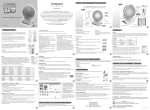
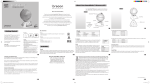
Your SmartGlobe™ base uses four AA alkaline batteries, which are
installed in the back of the base as shown. It is also equipped with an
AC/DC adapter connection*, which allows the base speaker to work
without batteries.
Your SmartPen™ uses two AAA alkaline batteries. Once you have
installed the batteries in the pen as shown, remove the plastic tag
from the back of the pen, next to the reset button. The tag is only for
demo use.
Turn on the SmartPen™ by pressing the
button.
AC Adapter connection (Base unit)
Please remove the batteries before plugging in the AC/DC adapter.
Auto-Off
The SmartPen™ will automatically shut off after fifteen minutes of
not being used, and the base speaker can only be used when plugged
into the SmartPen™.
Low battery indicator
A flashing red LED light indicates that the SmartPen™ is running out
of batteries.
*The AC/DC adapter is available as an accessory. You may order the adapter by completing and
Caution
• Different types of batteries or new and used
batteries are not to be mixed.
• Only use batteries of the same or equivalent type.
• Remove batteries from the unit if the unit is not
going to be used for a long time.
• Remove all batteries when replacing.
• Do not dispose of batteries in fire.
• Non-rechargeable batteries are not to be recharged.
• Rechargeable batteries are to be removed from the
product before being charged.
• Rechargeable batteries are only to be charged under
adult supervision.
• Exhausted batteries are to be removed from the product.
• The supply terminals are not to be short-circuited.
• The base unit must not be connected to a power
supply greater than 9V.
• Due to AC/DC Adapter Connection - Not suitable
for children under 3 years of age. Use only under
adult supervision.
mailing the Accessories Order Form found in your SmartGlobe™ box.
3
PC requirement
In order to register and update your SmartGlobe™, we recommend at least a
Pentium III 800MHz with 128 MB Ram. To install the program, you must
have Windows XP, Windows 2000 (Home or Professional), or Windows ME.
Key functions
Player
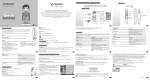
Press this icon to select up to four players in the “Find” activities.
Pause
Press this icon if you would like to pause the game. Press it again to
resume your game.
Repeat
Press this icon to repeat a question or instruction prompt.
Volume
To raise the volume, press [
To lower the volume, press [
]
]
Demo
Press this icon to listen to a demonstration of some of the exciting features and games on your SmartGlobe™.
4