1
AEO TECHNOLOGY
www.AEOrc.com
AEO E-OSD User Manual
Introduction:
Welcome to use AEO Voltage OSD, which is
exclusively designed for displaying FPV voltage of micro
electric planes, pls check the following functions:
● Voltmeter and stopwatch
● Support the double voltage input
● Support manual calibration
● Programming the display content
● Support NTSC and PAL TV signal
● Support anti-glare shade control signal
1.Hardware specification:
Weight: 3.3g
Size:34mm*17mm*4mm
Working Voltage:7.2-12V
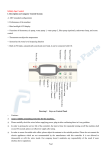
2. Connection & Button Introduction:(See
picture)
2.1 Power Connector:
Connect power supply, support voltage is 7.2V—
12V.Red is + positive, and the black is - negative.
2.2 Voltage Detection Connector:
Connect (parallel) power supply, detect loading
voltage. Red is positive, and the black is negative.
2.3 Video Output Connector:
Output the overlay video signal to video out
equipment. Yellow is signal, black is negative. The
yellow connector needs parallel connection with video
signal output.
2.4. Menu Button
Enter/exit setting menu or adjust the position of display data.
3. User Introuction:
Correctly connect to your system, the screen at video receiving end will display:
3.1 Power supply voltage readout
3.2 Voltage readout after load
3.3 System working time readout
3.4 Setting option for adjusting the screen readout display position.
You can long press the menu button in 2.4 to enter the setting function for adjusting the display position.
We supply many display modes for your choice, each mode will display in different positions. Keeping one
mode for 3 seconds, the display will exit automatically.
Entire Contents © Copyright 2010
1
AEO TECHNOLOGY
www.aeorc.com
4. Manual Voltage Calibration Introduction:
Enter calibration function: When the power is off, press the menu button to connect the power, and enter
the calibration mode, then you will see in the screen:
Calibrate begins:
4.1 You need a high-precision voltage tester to calibrate the voltage of battery, and serving this battery
as power supply battery.
4.2 Enter the setting option
4.3 Adjust the option in red box above picture by long pressing the function button, and adjust the option
content by short pressing the function button.
“- VOLTAGE 1 TUNING” means decrease 1mV voltage by short press once.
“+VOLTAGE 1 TUNING” means increase 1mV voltage by short press once.
“- VOLTAGE 2 TUNING” means decrease 2mV voltage by short press once.
“+VOLTAGE 2 TUNING” means increase 2mV voltage by short press once.
“Save data” means save the adjusted data;
“Load default” means restore the initialized data
5.Attention:
5.1 This OSD module is exclusively designed for micro electric planes; it cannot be rebuilt for any other
purposes.
5.2. Please use this product within secure distance, and keep the model plane in sight..
5.3. Please operate the model plane at the open and no man’s land.
5.4. Please supply the power in strict accordance with safe power system voltage, and use the lownoise, reliable power module or battery system.
5.5. Please do not arbitrarily maintain, rebuild, detect or upgrade this product.
5.6. Please do not let the children play this product, or put the product in mouth.
5.7. Forbid to use this product at gas station and other places where definitely regulate no use for
wireless signal.
Entire Contents © Copyright 2010
2