1
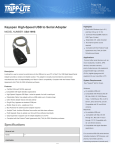
NCE USB Interface Unit
The NCE USB Interface unit is not supplied with any software, but there is a link to the required
driver software from the relevant page of the NCE website at –
http://www.ncedcc.com/component/virtuemart/?page=shop.product_details&flypage=flypage.tpl
&product_id=73&category_id=1
Clicking on the link there takes you to a Silicon Labs webpage where you should download a copy
of the CP210x USB to UART Bridge VCP Driver for Windows XP/Server 2003/Vista/7/8 (v6.6.1) by
clicking this time on the link labelled ‘Download VCP (3.49 MB)’ in the Windows section of the
page (not Windows 2K).
At the download prompt, click Save to transfer the installation file (CP210x_VCP_Windows.zip)
to a suitable location on your computer. Do not try to Run the driver installation file directly from
the Internet.
When download is complete, locate the folder into which you downloaded the installation file. The
file is in a compressed or “zipped” form, so the next step is to right-click on the filename, and
then click on Extract All ... on the pop-up menu (unless you have a third-party utility, such as
WinZip, installed on your computer, in which case follow the appropriate procedure).
In the window which opens, simply follow the prompts to “unzip” the executable installation files
(CP210xVCPInstaller_x86.exe for 32-bit Windows systems, and
CP210xVCPInstaller_x64.exe for 64-bit Windows systems) into a folder
(CP210x_VCP_Windows by default).
This driver is reasonably straightforward to install, and no specific installation instructions are
provided. Installation follows the same steps regardless of the version of Windows running on
your computer, so the following example will show the process under Windows XP.
The first step is to locate the folder into which you “unzipped” the downloaded file, open the
folder, and then double-click on the file appropriate to your version of Windows. If you are
unsure, click on Control Panel from the Start Menu, and open the System topic which will tell you
whether your system is 32-bit or 64-bit. Otherwise, if you double-click on the wrong file, the
installer will tell you to use the other one.
© 2008-2013 JT Chamberlain, A-Train Systems
Page 2 of 17