1
Installation
Menu
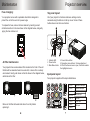
Image size:
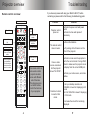
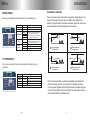
Menu overview:
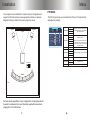
Image sizes are measured diagonally and are approximate.
Press the MENU button on
either the remote or the
projector to bring up the main
menu.
4:3 mode
16:9 mode
Distance
from screen
Projected
image size
Distance
from screen
Projected
image size
103 inches
72 inches
111 inches
72 inches
117 inches
82 inches
126 inches
82 inches
131 inches
92 inches
142 inches
92 inches
143 inches 100 inches
154 inches 100 inches
171 inches 120 inches
185 inches 120 inches
214 inches 150 inches
231 inches 150 inches
286 inches 200 inches
308 inches 200 inches
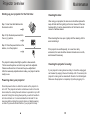
In the main menu, use the up
and down navigation arrow
buttons (▲/▼) to highlight the
menu option that you want to
adjust. Use the left and right
arrow buttons (◄/►) to adjust
the highlighted option.
PIC T U R E
CONTRAST
BRIGHTNESS
HUE
SATURATION
SHARPNESS
N OR M A L
COLOR TONE
3D NR
M OV E
M ID
A DJ
M EN U
To exit from a sub menu, press the
Menu button. Press it again to exit
the main menu screen.
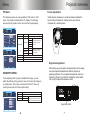
Image adjustment:
Picture Menu:
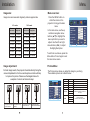
For best image results, the projector should be directly facing the
screen. Adjustments to the focus and keystone controls will help
to improve the picture. Please see the diagram below for
examples of correct and incorrect setup:
The Picture menu allows you adjust the image to your liking.
The available options are outlined below:
Contrast
Brightness
Hue
Saturation
Sharpness
PICTURE
CONTRAST
BRIGHTNESS
HUE
Color tone
SATURATION
SHARPNESS
NORM A L
COLOR TONE
3D NR
M OV E
The projector is angled
too far to the left
The projector is set up
correctly.
The projector is angled
too far to the right.
The projector’s keystone
control needs to be adjusted.
E X IT
M ID
ADJ
M EN U
EX IT
3D NR
0-100
0-100
0-100
0-100
0-100
Standard
Cool
Warm
High
Mid
Low
Off
Adjusts the black level in the image.
Adjusts the white level in the image.
Adjusts the tint of the image.
Adjusts the amount of color saturation.
Adjusts the image sharpness.
Color tone presets.
Adds more warmth or coolness to
the image
3D noise reduction.
Reduces ‘noise’ in the picture.