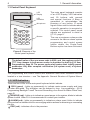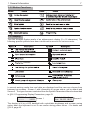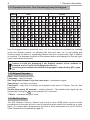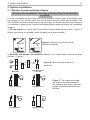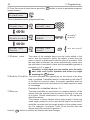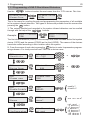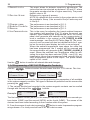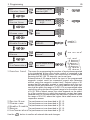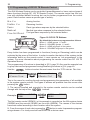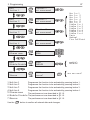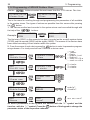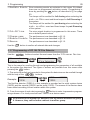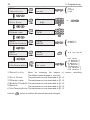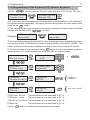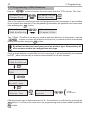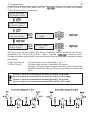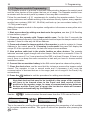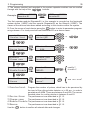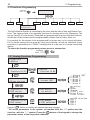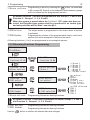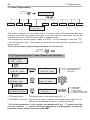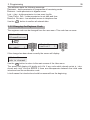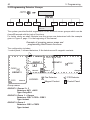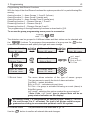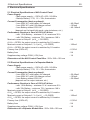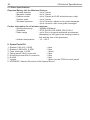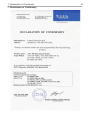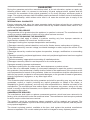
1
AVA Wireless Security System INSTALLATION AND PROGRAMMING MANUAL 1304 2 TABLE OF CONTENTS Table of Contents 1. General Information.........................................................................................4 1.1 Main Specifications..........................................................................................4 1.2 Supported Wireless Devices............................................................................5 1.3 Control Panel Keyboard...................................................................................6 1.3.1 LED Indications.......................................................................................6 1.3.2 Buttons Functions...................................................................................7 1.3.3 Display....................................................................................................7 1.3.4 Symbols Used for Text Entering from the Keypad..................................8 1.3.5 Keypad Sounder ....................................................................................8 1.3.6 Built-in Siren............................................................................................8 2. System Installation...........................................................................................9 2.1 Wireless System Installation Basics ................................................................9 2.2 Control Panel Installation............................................................................... 11 2.2.1 Choosing the Installation Location........................................................ 11 2.2.2 Box mounting........................................................................................12 2.2.3 Connecting Wire Zones and Programmable Outputs...........................14 2.2.4 Connecting a Digital Communicator (Dialer).........................................14 2.3 Initial Start-up of the Control Panel................................................................15 2.4 System Programming Sequence . .................................................................16 2.5 Language Selection........................................................................................16 2.6 Installing Wireless Devices.............................................................................17 2.6.1 Enrolling New Devices..........................................................................17 2.6.2 Deleting the House Address of a Device . ............................................19 3. Programming..................................................................................................20 3.1 Device Programming .....................................................................................20 3.1.1 Common Parameters............................................................................21 3.1.2 Common Detector Parameters.............................................................21 3.1.3 Programming of AVA P-Rex 100 TE Infrared Detectors........................23 3.1.4 Programming of МС 100 ТЕ Magnetic Contacts...................................24 3.1.5 Programming of RC102 TE Remote Control.........................................26 3.1.6 Programming of SR200R Outdoor Siren...............................................28 3.1.7 Programming of FD 100 TE Fire Detector.............................................29 3.1.8 Programming of Wireless AVA Keyboard (VG)......................................31 3.1.9 Programming of Wire Detectors............................................................32 3.1.10 Programming of Repeater...................................................................34 3.2 Functions Programming.................................................................................36 3.2.1 Arming Functions Programming............................................................36 3.2.2 Disarming Functions Programming.......................................................37 3.3 User Programming.........................................................................................38 3.3.1 Programming of User Codes, Names and Attributes............................38 3.3.2 Changing the Engineer Code................................................................39 3.4 Detector Groups Programming .....................................................................40 3.5 Outputs Programming....................................................................................42 3.6 System Parameters Programming.................................................................43 3.6.1 Display parameters Programming.........................................................43 3.6.2 Built-in Parameters Programming.........................................................44 3.6.3 Entry Time Programming......................................................................44 3.6.4 Exit Time Programming.........................................................................44 Table of Contents 3 3.6.5 Programming Backlight Turnoff Time and Generating of an Event for Mains Power Lost.....................................................................................45 3.6.6 System Option Programming................................................................45 3.6.7 Software Version...................................................................................45 3.6.8 Changing the Menu Language..............................................................45 3.7 Service Menu.................................................................................................46 3.8 Digital Communicator (Dialer) Programming..................................................46 3.8.1 Telefphone Numbers Programming.......................................................47 3.8.2 Event Messages Programming.............................................................48 3.8.3 Dialer Options Programming.................................................................49 3.8.4 PC Connection Programming...............................................................52 3.8.5 Control Parameters Programming........................................................53 3.8.6 Alarm System Control by Telephone.....................................................54 3.9 Maintenance Menu.........................................................................................56 4. Event LOG.......................................................................................................58 5. Electrical Specifications................................................................................59 6.Additional Spare Parts Kit .............................................................................60 7. Declaration of Comformity............................................................................61 Notes....................................................................................................................62 GUARANTEE.......................................................................................................63 NOTICE: Carefully read this manual before attempting to install and program the system. 4 1. General Information 1. General Information 1.1 Main Specifications AVA is a wireless security system designed to protect domestic and commercial premises by providing protection against: • intruder break-in; • fire; • various technical and medical events. The system consists of a control panel, with a built-in LCD display and a keyboard, and has a two-way communication with a set of various wireless devices: an infrared detector, a magnetic contact, a fire detector, a remote control, a repeater-module, a wireless keyboard and a wireless outdoor siren - Fig. 1. In addition to the main panel, a telephone communicator (dialer) can be installed to notify about various events and offering remote control over some of the system functions as well. In addition the panel and the repeater have two wire zones and four programmable outputs (PGM) each. Figure 1. AVA control panel and the different wireless devices which could be enrolled into the system configuration. 1. General Information 5 The system supports up to 22 wireless devices, allocated to six different security groups. Arming any group depends on its type which can be programmed independently. The different types of groups are: entry-exit, follow and instant. The system can support up to six Arming and six Disarming functions. The detector groups to be Armed and/or Disarmed for any individual function are additionally programmed to which of the programmable outputs (PGM1 – PGM4) they shall generate a signal. The Arm and Disarm functions can be activated via the 16 user codes from the control panel keypad, the wireless keyboard or from the remote control. The AVA Wireless System supports three types of panic functions, which can be activated from the control panel keypad, the remote control or from the wireless keyboard. The system operates in real time and stores information about the latest 256 events by date/hour/minute, which can be reviewed from the control panel keypad. The system also accommodates programming a monitoring PC software (UDL) to be used for alarm system control by telephone line, §3.8.4, page 52. 1.2 Supported Wireless Devices AVA Keyboard (VG) is used to monitor the status of the system, for arming and disarming the alarm panel. The keyboard has one wire input zone used to connect a magnetic contact in case the keyboard is installed on a wall close to a door. The keyboard may have an option for play-back of 7 voice messages. FD100TE Optical-Smoke Fire Detector for reporting fire events with sensitivity level adjustment options. AVA P-Rex Infrared Detector for reporting movement, with an option for wall or stand mounting. MC100TE Magnetic Detector for door or window frame installation with an option for rolling shutter control. RC102TE Remote Control with panel visual and sound indication for sending and receiving messages about the system status - whether armed or disarmed, as well as whether the system is in alarm mode. Outdoor siren SR200R Repeater-module Detailed information on installation, enrolment and adjustment of the various wireless devices is provided in their individual manuals. 6 1. General Information 1.3 Control Panel Keyboard LCD Display LED Indication MIC Microphone AR M DIS PRG AR M BP S TR BL ME M 1 2 3 4 5 6 7 8 9 0 ENT CLR Buttons The main panel keyboard consists of an LCD Display, LED Indication and 20 buttons with general and special functions. A beep is generated to acknowledge the pressing of any button. A sound signal is also used to indicate where a specific operation is accepted or rejected. The control panel sound signals are explained in detail in §1.3.5, page 8. The user or engineer codes provide access to the various alarm system programming and control menus unless where the Single-Touch Buttons option has been activated. Figure 2. Elements of the control panel keyboard The default value of the user menu code is 0000, and the engineer code is 7777. Any changes in both access codes is described in detail in §3.3 User Programming, page 38. The access codes shall restore their initially preset parameters only after complete nullification (full system reset) of system parameters. The programming and control menus and submenus have been numbered and are located in a tree structure – see The Appendix: General Structure of System Menus. 1.3.1 LED Indication There are four LEDs on the main panel keyboard which indicate: 220V (green) - lights up permanently to indicate mains power supply and turns off when disrupted. The indication can be delayed in time via programing - §3.6.5 Programming Backlight Turnoff Time and Generating of an Event for Mains Power Lost, page 45. TROUBLE (red) - lights up to indicate an open tamper in the system; blinks to indicate system trouble. When lit it is recommended to contact your installer. ALARM (red) - lights up permanently to indicate an alarm event; blinks to indicate entry and exit countdown time for encouraging relative actions for disarming or evacuating the site. FIRE (red) - indicates a fire in the premises. 1. General Information 7 1.3.2 Button Functions 1.3.3 Display The AVA Wireless System avails of an alphanumeric display (2 x 16 characters). The following specific symbols have been introduced to account for various events: premises In normal working mode time and date are displayed and the user can choose from between two screens - Screen 1 with information of groups status, set by default and Screen 2. The type of screen is selected from the System Parameters Menu as described in §3.6.1 Programming Display Parameters, page 43. Teletek Wireless 123456 Mon.04/09 Screen 1 Screen 2 Mon. 04/09 10:51 -----10:51 The display is lit by a LED backlight with controllable brightness and a power saving option when the keyboard is not in use and/or during power failure – for details see §3.6.5, page 45. 8 1. General Information 1.3.4 Symbols Used for Text Introducing from the Keypad Buttons Latin Cyrillic Use the keypad buttons numbered from 1 to 9 to introduce the symbols for entering group and detector names, for adjusting the time and date, etc. In text editing and entering mode the button is repeatedly pressed until the required letter, digit or symbol is obtained. The available symbols of the pressed button are displayed in the top righthand corner when introduced. Letters in Latin are displayed if the English version of the software is selected, and in Cyrillic in the Bulgarian version. Switching over between the different languages is described in §2.5, page 16. 1.3.5 Keypad Sounder Beep - when pressing a button; Long beep - reject an action; One long beep followed by a few short ones - confirmation signal; Short beeps - exit time is running; Fast beeps - entry time is running, an important event such as Tamper, Fire, etc. has occurred; Double beep every 20 seconds - trouble indication. The double beep signal can be stopped by holding the CLR button pressed for 2 seconds; “Chime” - activated entry-exit zone. 1.3.6 Built-in Siren The AVA Wireless Security System has a built-in siren 90dB which could be freely programmed to become active in case of specific system events and continuity of siren alarm. For details when programming the built-in siren parameters see §3.6.2 Built-in Siren Parameters Programming, page 44. 2. System Installation 9 2. System Installation 2.1 Wireless System Installation Basics Planning the Installation. Situating and Selecting the Installation Location. In order to achieve the best efficiency of the wireless system, prior to installation plan the location of the control panel and the wireless devices within the premises. The AVA Wireless System communicates two-way with all enrolled devices and therefore it is advised to observe the following recommendations when selecting the installation location. 1. Do not install the control panel in premises located below ground level - Figure 3. Where this cannot be avoided, install the panel as high as possible. Figure 3. Selecting the control panel installation location. 2. Minimize the number of obstacles between the control panel and the wireless devices – Figure 4. Figure 4. Minimizing the number of obstacles. Brick wall Low Reduction Low Reduction Steel Reinforced Concrete High Reduction High Reduction Figure 5. The construction and the width of the walls between the premises also affect the radio signals transmitted between the devices. 10 2. System Installation 3. No objects or obstructions, which may reflect or absorb radio waves, as well as devices causing interferences, must be situated in close proximity of the control panel installation location – Figure. 6. Figure 6. Do not install the panel close to sources of strong radio fields as these can cause interference and thus diminish the serviceability of the system and its radio band. 4. The control panel should be installed approximately within the centre of the premises that are to be guarded and the span to the various wireless devices should be relatively uniform. 5. Where the control panel is installed in a corner at least 5 cm of space should be left around the box for proper ventilation – Figure. 7. The control panel installation location should be dry and should not be subjected to harsh temperature changes. The control panel should be installed close to grounding and telephone cables. Figure 7. 2. System Installation 11 2.2 Control Panel Installation 2.2.1 Selecting the Installation Location The installation location of the control panel and the various devices shall strongly influence the efficiency of the wireless alarm system. In order to achieve best performance for the radio signal and respectively for the good serviceability of your wireless alarm system, please follow the recommendations given below. Outdoor siren SR200R PIR detector AVA P-Rex Magnet Contact МС 100 ТЕ PIR detector AVA P-Rex Control Panel AVA Remote Control RC 102 TE Figure 8. A model situation of locating the AVA Control Panel and the wireless devices enrolled in it. LEGEND: Fire Detector PIR Detector Magnet Contact Control Panel Figure 9. Location of the AVA Control Panel and the wireless devices enrolled in it within the premises. The Control Panel is located approximately within the centre of the alarm system. 12 2. System Installation 2.2.2 Box Installation 1. Use the provided profile board (see the back of the packaging) to drill mounting openings (6 - 8 mm) at the installation location - Figure 10. Template For mounting onto a brick wall it is recommended to use 4,2x35 DIN 7981 screws and 6x30 UN 9802 plugs. 2. Install the back of the box on the wall and adjust the tamper-switch as shown in Figure 11. Figure 10. Adjust the temper-switch with the help of the screw below it so as viewed from aside to be horizontal. Figure 11. Location of the modules in the box and the electrical connections among them. 2. System Installation 13 3. Run the mains cable (for 230V AC, 50/60Hz) through opening 7, shown in Figure 11 and connect it to the mains terminal – Figure 12. Use one of the three plastic caps to fix the mains power cable in Clamp 10 (Figure 11). With the additional provided spare parts kit use the two screws (tapping screw 2.9x13 cross slot DIN 798) to secure the cap to the clamp. F-TYPE FUSE 0,315A Figure 12. Connecting to the mains terminal. 4. Connect the ribbon cable to the display and the one of the built-in siren to the main module see Figure 13. ATTENTION: DO NOT TOUCH THE ANTENNA! ANTENNA 2 1 3 6 7 4 Cable shoes for connecting the accumulator + - PGM1 PGM2 PGM3 PGM4 Zn1 GND Zn2 AC - Accumulator battery 12V, 1,2 7Ah AUX + black red BATT ±AUX 5 1 - RESET Jumper 2 - Flat terminal for connecting the keypad 3 - Flat terminal for connecting the dialler 4 - Connector for connecting the built-in siren 5 - Connector for connecting the tamper-switch 6 - Battery Fuse 2А, type self-recoverable 7 - ±AUX Output Fuse 1A, type self-recoverable AC - Mains Power Supply, ~230V AC ±10%, 50 60Hz ±AUX - Power Supply 12V, for detectors with consumption up to 1A PGM1 - Programmable output, with power transistor PGM2-PGM4 - Programmable outputs, with small-power transistor Zn1, Zn2 - Terminals for wire zones GND - Common ground Figure 13. Overall view of the main module and description of the inputs and outputs. 5. Install the charge battery (12V DC, 1.2 ÷ 7 Ah; it is recommended to use a YUASA #NP-12 model) designed to provide backup power supply in case of mains failure (230V AC). NOTE that the battery has to be connected to the AVA control module AFTER the initial system start-up - see §2.3, page 15. Observe the polarity of the battery terminals. Otherwise the self-recoverable fuse BATT will turn out. OBSERVE SAFETY MEASURES WHEN USING 220V! 14 2. System Installation 2.2.3 Connecting Wire Zones and Programmable Outputs The system programmable outputs (PGMs) are transistor type (NPN) with a 1K resistor in the collector. By default all PGMs are in NC state (normally closed contact) – i.e. the programmable output is ON and the polarity of the output is grounded. PGM1 is a power output, whereas PGM-s 2, 3 and 4 are low current outputs. The outputs are designed to be used as open collectors: i.e. for switching over from load to ground. The additional 1K resistor in the collector serves as an additional output level in case the output is potential. Then serviceability shall be restricted by the resistor. +12V 1k PGM PGM Hardware Figure 14. How to connect the wire zones and scheme of a programmable output GND 2.2.4 Connecting a Digital Communicator (Dialer) Figure 15 shows how to connect the CPC 100 TE Digital Communicator board to the control panel. If the connection is correct and power is supplied to the control panel a green LED will begin to blink in the top left-hand corner of the communicator. Figure 15. Dialer connecting Connect the Dialer to the AVA control panel only when the main power supply is switched off. The Dialer has to be the first device connected to the telephone line, in order to provide it with highest priority in operation. 2. System Installation 15 2.3. Initial Start-up of the Control Panel After the system is installed, it should be started-up: i.e. the power supply is turned on (initial power supply) with a mounted jumper for full reset (located next to the processor – see Figure 13, page 13). Before performing a full system reset (to remove the jumper from the control module, next to the processor), prepare the box to be closed by placing the nuts from the spare parts kit in the holders on the internal side of the cover – Figure 16. Turn the two M3x16 screws into the cover openings so that they join the nuts but do not go all the way. Turn on the main power supply with the mounted jumper for full reset of the control module. The system will begin to operate and the display will indicate: please remove Reset Jumper! Remove the jumper and wait for several seconds for the system to restart. The display will indicate: reseting please wait Connect the battery terminals, observing the polarity. Place the top cover and wind the screws to the end, as shown in Figure 17. After performing a full system reset AVA system will automatically go on normal working mode and a sound signalization for open tamper in the system (the tamper of the control module) will turn on, and on the LCD will . start blinking symbol The sound signal can be stopped by single-pressing the CLR button of the keypad, and symbol will disappear after the top cover is finally installed and the tamper-switch is closed. Figure 16. Figure 17. 16 2. System Installation 2.4. System Programming Sequence After installing the AVA Wireless Alarm System control panel and performing a full reset, there shall be no enrolled system devices, and its system parameters shall be set at default values (for more information see also the Appendix: General Structure of System Menus). In order to programme and prepare the system to operate after restart, it is recommended to perform the following sequence of actions: 1. Install and enrol the wireless devices according to the algorithm (example) set in §2.6.1 Enrolling of new devices, of this manual. It is obligatory to perform the described radio test at the place of installation. 2. Programme the devices according to the needs (in case there is a difference from the default parameters) by following the instruction in §3. It is recommended that each device be given an individual name thus providing perspicuity to the system and easing the user in understanding the status and performance of the devices – see Example of Grouping sensor areas in §3.4, page 40. 3. Programme the Detector Groups according to the desired organization and functioning of the system. For ease set the Groups names according to their functions. 4. Programme or modify the Arm and Disarm functions because they are operated by the user and can also be activated from the buttons on the remote control. 5. Programme the necessary user codes and functions which have been assigned to system activation rights and attributes. 6. If necessary programme the outputs. 7. If necessary change system parameters. 8. Do not forget to instruct the user how to operate the system and where necessary to seek installation assistance. 2.5 Language Selection During initial start-up the menus by default are in English. In order to change the menus over to other language select in succession: Engineer code - 7777 7 8 This enables prior access to the system parameters and the opportunity to select the desired language. After selecting the indicated buttons the screen has the following view: 8)Language english 8)Language áúëãàðñêè You can choose the selected language by pressing the ENT After the language is changed and confirmed, press the the initial menu screen – see also §1.3.3 Display. button for confirmation. CLR button twice to return to 2. System Installation 17 2.6 Installing Wireless Devices The Control Panel communicates with the wireless devices via a two-way radio connection. In order for an AVA System to communicate with the wireless devices, they must first be enrolled in the system so that it can identify them. Every wireless device has a unique house address (HA) with which it is memorized in the configuration of the system. All wireless devices are enrolled according to a uniform algorithm. 2.6.1 Enrolling of New Devices 1. Start a procedure for adding new devices to the system. Select in succession: Engineer 2 1 code - 7777 1)Add Devices Start ? ENT dNxxxx---#xxxxxx Stop ? ENT Exit of the procedure for adding devices to the system. 2. Open the cover of the device, as shown in its installation instructions. Note: The enrolment of RC 102 TE remote control do not require opening of its cover. Follow the given enrolling procedure in the individual operation instruction of RC 102TE. 3. Place its battery, paying attention to the polarity. The green and the red LEDs will light up for half a second. 4. Single-press the device tamper, in order to transmit radio ID signal to the panel. If enrolment has been successful, the display of the control panel will show information about the type of device and the specific house address. If the device has not been registered in the control panel at the first attempt, press its tamper again. After the device has been enrolled, it will automatically pass into radio communication mode. 5. Go over to the device installation location and perform a radio test. This will ascertain whether the selected location has good radio signal conditions and communication with the control panel. Single-press the device tamper-switch. If the LED blinks two or three times in green, then the radio signal and communication are good and the device can be installed at the selected place. If the LED blinks green once or does not blink at all, then the radio communication is poor and the installation place must be changed (i.e. move the device to a different place in the same room). Note that the LED blinks in red when the device is sending radio signal to the base. 6. Install the base of the device following the instructions provided in its individual manual. 7. Close the device box, paying attention for its tamper-switch to be also well closed. In about 5 sec. after closing its inclosure, the device will exit the radio test mode and will begin normal operation. 8. Press the ENT button to exit the procedure for adding new devices. If after closing the box of the device, the symbol R blinks on the display of the control panel, that means the device is still in radio test mode. The device will leave this mode only after its tamper-switch is closed and remains closed for more than 5 sec. 18 2. System Installation Example for enrolling a wireless device - infrared detector: 2. System Installation 19 2.6.2 Deleting the House Address of a Device Every wireless device communicates with the control panel within the authority of its unique house address (HA). In order for a specific device to be enrolled in an AVA control panel, it must not have an HA, which has been attributed from another system, i.e. used to be enrolled in one control panel, but has had to be moved and enrolled in a new AVA Wireless System. In such case the device house address needs to be deleted prior to its enrolment in the new system. The deletion is performed analogically for the different wireless devices: 1. Power up the device (remove and place back its battery) while the tamper is open: i.e. open the device, if it has been powered prior to this moment, leave it without any power supply for about 10 sec. and then power it while the tamper is open. A red LED starts blinking. 2. While the red LED is blinking press quickly the device tamper-switch at least 3 times. The red LED lights up continuously for 1 sec. to indicate a deleted HA of a device. After such restart, the device will have a deleted HA and the pressing of the tamperswitch again will attempt to enrol the device in the control panel. The first enrolled device in the system will be added to Group 1, the second to Group 2, and any following one – to group 3. Keep in mind that all fire detectors following enrolment are by default added to Group 6. All enrolled devices can be further re-programmed according to your choice and needs It is recommended to double check your programing table after completion in respect to devices place, group and name. It is also advisable every device to be assigned a specific name so that it can be easily identifiable within the system – see §3.1.2 Common Detector Parameters and the Example for Programming Detector Groups and Programming Functions in §3.4. As a rule all wireless devices are programmed to send test messages to the control panel over a specific time interval. This is brought about by the need for the control system to monitor at all times their reliability and performance. The test message time (XX minutes) is the same as for all other devices and can be programmed – see §3.1.1 Common Parameters. All devices have to be enrolled in the system again only where a full reset of the control panel has been performed (see §2.3) or the device house address has been deleted. All device HAs are stored in a separate power independent memory and cannot be deleted in case of simultaneous failure of main or back-up power supply. If a wireless system with enrolled devices is turned off, the devices’ batteries MUST be removed in order not to be drained out of power in their continuous attempts to communicate with the panel. 20 3. Programming 3. Programming System parameters programming is not required. Every added device adopt’s a default parameters which ensures the normal function of the system - see The Appendix: General Structure of System Menus. The installer avails of the opportunity to programme them further depending on the specific installation. In order to have clarity in the system, we recommend to change (rename) the devices and user names. Programming system parameters is done after entering a valid engineer code – see buttons. §1.3. Scroll through the main system menus with the help of the Access to a specific programme menu and confirmation of the introduced data is done by pressing the ENT button. The CLR button goes one step back or rejects the introduced data. All active parameters in the system are marked with the “*” symbol and the inactive – with the “-” symbol. Press the PRG button of the keypad to change the parameter status of the respective submenu. Confirm the changes with the ENT button. Example for changing the status of a system parameter (programming): 1)LED config * open PRG 1)LED config - open ENT Confirmation of the changed parameter. As the example indicates, after the PRG button is pressed, the active parameter, marked with the “*” symbol, becomes inactive and is marked with the “-” symbol. Activating the parameter a second time is analogically done by pressing the PRG button a second time. This type of programming applies to all menus in the system! 3.1 Device Programming Engineer code - 7777 Engineer Menu 3 1 4 5 6 7 8 9 Engineer Menu 2)Devices The device programming parameters are common or special. 3.1.1 Common Parameters Parameters, which are common to all devices, are programmed from this menu. To enter the common parameter programming menu select in succession: Engineer code - 7777 2 2 2)Program Device 1)Common Prog. ENT 3. Programming 21 Two submenus can be programmed here. 1)Common Prog. 1)LED config ENT 1)Common Prog. 2)Communication 1)LED config ENT 1)LED config * open * * * open ÒÕ / RX programming 2)Communication 5min/1s/10times 5min/1s/10times 10min/2s/5times 20min/5s/5times 60min/2s/5times Programme three parameters to specify what the wireless device LEDs should indicate. By default all three parameters are active. 2)CommunicationProgramme the time for sending test messages to the main control panel from each wireless device and how many repetitions should be performed during the set period of time. 3.1.2 Common Detector Parameters Use the buttons to select the next menu from the 2)Program Device: 2)Program Device 1)Common Prog. After the ENT 2)Program Device 2)All Devices ENT button is pressed LCD displays: dN - Device serial number dNXXX ---#000000 DevicedN name XXX - Device name, given from the system --- - Current status of the device #000000 - House address of the device DevicedN name - Device name, which could be edited by the installer This is the submenu for programming the parameters of the first enrolled and recorded in the system device. The screen displays information about the number, the type and unique house address of the device. Each device in the system has a submenu for programming its parameters. Two types of actions are possible from this screen: 1. All enrolled and recorded in the system devices can be scrolled through with the buttons. Example: 01PIR ---#012345 Device01 name 02SIR ---#054321 Device02 name The first enrolled device in the example is an infrared detector (01PIR) and the second is a siren (02SIR). The devices have service names which can be edited. 22 2. From the screen of each device press the ming submenu. dNXXX ---#000000 DevicedN name ENT 3. Programming button to enter its parameter program- ENT Three submenus can be programmed here. Device01 name 1)Change name ENT 1)Change name Device01 name - Device01 name 2)Enable/Disable ENT Device01 name ENABLED Device01 name 3)Remove ENT Device01 name remove? 1)Change name 1 2 3 4 5 6 7 8 9 0 disable? enable? ENT are you sure? The name of the wireless device can be freely edited in this menu. Use the keypad to select the letters to write the new name. A cursor is positioned under the letter to be edited. After the new letter is selected, the cursor automatically moves on to the next letter to be edited. A table with the available symbols is provided in §1.3.4, page 8. Attention: In this mode you can switch over the avaliable Latin and Cyrillic symbols and letters by single pressing the PRG button. 2)Enable/Disable The menu provides the opportunity for the device to be disabled or enabled. A disabled device is indicated by the letter D in the field of its current status; the system operation shall not be interfered with by its performance, but shall respond in case of a message. Example for a disabled device: -D-. 3)Remove Use the ENT The menu provides an opportunity for complete deletion of the device from the system memory and for enrolling a new one in its place. Double confirmation is required for the request to delete the device. The position of every deleted device stays empty. If there are some empty positions, and a new device had to be enrolled it would be recorded into first empty position in the system memory. For example, if positions 7 and 15 are free the first new device would be recorded in position 7. button to confirm all entered data and changes. 3. Programming 23 3.1.3 Programming of AVA P-Rex Infrared Detectors Use the buttons to select the next menu from the 2)Program Device: 2)Program Device 1)Common Prog. 2)Program Device 3)PIRs ENT This is the menu for scrolling through and programming the parameters of all available in the system infrared detectors. Two types of actions are possible from this screen after pressing the ENT button. 1. The various enrolled and recorded in the system infrared detectors can be scrolled through with the help of the buttons. Example: 01PIR ---#012345 PIR01 03PIR ---#123456 PIR02 The first infrared detector (PIR01) in this example has been recorded as the first system device (01PIR) and the second (PIR02) as the third (03PIR). The names of the devices have been edited according to their location within the system. 2. From the screen of each device press the ENT button to enter its parameter programming submenu. For clarity we shall use PIR01 as a device name. PIR01 1)Sensitivity PIR01 2)Device Group PIR01 3)Change name ENT ENT ENT 1)Sensitivity 0...7:03 - 2)Device Group N:01 - 3)Change name PIR01 - PIR01 4)Enable/Disable ENT PIR01 ENABLED PIR01 5)Remove ENT PIR01 remove? PIR01 6)LowTemperature ENT 6)LowTemperature not used 1 2 3 4 5 6 7 8 9 or 0 1 2 3 4 5 6 7 8 9 or 0 1 2 3 4 5 6 7 8 9 0 enable? disable? ENT are you sure? not used -4 degree Ñ -2 degree Ñ 0 degree Ñ +2 degree Ñ +5 degree Ñ +15 degree Ñ +25 degree Ñ 24 3. Programming The menu allows for detector sensitivity adjustments. The values that can be selected are between 00 and 07, where the greater number shall be of higher sensitivity. The preset default value is 03. 2)Device Group Reference to a group of sensors. NOTE: By default the first enrolled in the system device shall be assigned to Group 1, the second to Group 2 and every next to Group 3. The performance is as described in §3.1.2. 3)Change name 4)Enable/Disable The performance is as described in §3.1.2. 5)Remove The performance is as described in §3.1.2. 6)LowTemperature This is the menu for adjusting the lowest ambient temperature reading (with precision of ±1°С) where the sensor can operate. Upon reaching the programmed value, the control panel shall generate and transmit via the communicator (if such is available in the system) an EV_FREEZE_ALARM event message – see Event-LOG Table, page 58. The occurrence of such an event will also be indicated with the t symbol on the control panel display, but with no sound signal. Where the ambient temperature rises above the value that has been programmed, the t symbol will be removed and the communicator will generate an EV_FREEZE_ALARM_R event. Where the selected Low Temperature event for activating the output has been selected (PGM – see §3.3), any temperature above that programmed shall restored the initially programmed status of the output. The preset default option is not used. Use the ENT button to confirm all entered data and changes. 1)Sensitivity 3.1.4 Programming of МС 100 ТЕ Magnetic Contacts Use the buttons to select the next menu from the 2)Program Device: 2)Program Device 1)Common Prog. 2)Program Device 4)Magnet Contact ENT This is the menu for scrolling through and programming the parameters of all available in the system magnetic contacts. Two types of actions are possible from this screen after pressing the ENT button. 1. The various enrolled and recorded in the system magnetic contacts can be scrolled through with the help of the buttons. Example: 02MC ---#234567 MC01 04MC ---#765432 MC02 The first magnetic contact (MC01) in this example has been recorded as a second system device (02MC) and the second (MC02) as the fourth (04MC). The names of the devices have been edited according to their location within the system. 2. From the screen of each device press the ENT button to enter its parameter programming submenu. For clarity we shall use MC01 as a device name. 3. Programming MC01 1)Impulse Input MC01 2)Device Group MC01 3)Change name ENT ENT ENT 1)Impulse Input counter:009 - 2)Device Group N:02 - 3)Change name MC01 - MC01 4)Enable/Disable ENT MC01 ENABLED MC01 5)Remove ENT MC01 remove? MC01 6)LowTemperature ENT 1 2 3 4 5 6 7 8 9 25 or 0 1 2 3 4 5 6 7 8 9 or 0 1 2 3 4 5 6 7 8 9 0 enable? disable? ENT 6)LowTemperature not used are you sure? not used -4 degree Ñ -2 degree Ñ 0 degree Ñ +2 degree Ñ +5 degree Ñ +15 degree Ñ +25 degree Ñ 1)Impulse Input The menu for programming the number of input pulses expected to be introduced at the roller shutter control or expected to be generated by the shock sensor (see instruction on installing and servicing the MC 100 TE detector) can be set here. Entered value of 00 means that to the input of the programmed magnetic contact could be connected normal wire detectors without using the magnetic contact itself. Entered value of 01 means that the magnetic contact is used together with the connected normal wire detectors. The rolling shutter set pulse values shall be within the range of 2÷250. It is recommended when controlling rolling shutters the preset range to be the within value of 2÷25. With a shock sensor the value depends on the stability of the construction in which the magnetic contact has been installed and it is recommended that the preset values be within the range of 20÷100, where the higher value shall mean a less responsive sensor. 2)Device Group The performance is as described in §3.1.3. 3)Change name The performance is as described in §3.1.2. 4)Enable/DisableThe performance is as described in §3.1.2. The performance is as described in §3.1.2. 5)Remove 6)LowTemperatureThe performance is as described in §3.1.3. Use the ENT button to confirm all entered data and changes. 26 3. Programming 3.1.5 Programming of RC102 TE Remote Control The AVA Wireless System can be controlled (armed/disarmed or have various types of alarm functions) through RC 102 TE Remote Control. The remote control has four buttons with attributed default functions but can be further programmed from the control panel. Each function means a specific type of activity: Arm f-n Arming function. DisArm f-n Disarming function Panic Medical Panic type alarm response by the selected button. Fire CallPoint Fire type alarm response by the selected button. Medical type alarm response by the selected button. Figure 18. RC102 TE Buttons. By default the buttons are programmed as follows: Button 1 - ARMS groups 1, 2 and 3. Button 2 - DISARMS groups 1, 2 and 3. Button 3 - ARMS all groups in the system. Button 4 - DISARMS all groups in the system. Every button has been programmed to functions (Arming or Disarming) which can be activated by the press of the button. In order to monitor the status of the system via the information button on the remote control, it must remain as “not programmed” in the system. For more information about programming the remote control see RC 102 TE Operation Manual. The programming of functions is described in §3.2, page 32. Also see the example how to group devices and programme Arming/Disarming functions in §3.4, page 40. Use the buttons to select the next menu from the 2)Program Device: 2)Program Device 1)Common Prog. 2)Program Device 5)Remote Ctrl ENT This is the menu for scrolling through and programming the parameters of all available in the system remote controls. Two types of actions are possible from this screen after pressing the ENT button. 1. The various enrolled and recorded in the system remote controls can be scrolled through with the help of the buttons. Example: 05REM ---#345678 REM01 06REM ---#876543 REM02 The first remote control (REM01) in this example is recorded as the fifth system device (05REM) and the second (REM02) as the sixth (06REM). The names of the devices have been edited according to their location within the system. 2. From the screen of each device press the ENT button to enter its parameter programming submenu. For clarity we shall use REM01 as a device name. 3. Programming REM01 1)button 1 ENT 27 1)button 1 not programmed REM01 2)button 2 ENT 2)button 2 not programmed REM01 3)button 3 ENT 3)button 3 not programmed REM01 4)button 4 ENT 4)button 4 not programmed REM01 5)Change name ENT 5)Change name REM01 - REM01 6)Enable/Disable ENT REM01 ENABLED REM01 7)Remove ENT REM01 remove? Arm f-n 1 Arm f-n 2 Arm f-n 3 Arm f-n 4 Arm f-n 5 Arm f-n 6 DisArm f-n 1 DisArm f-n 2 DisArm f-n 3 DisArm f-n 4 DisArm f-n 5 DisArm f-n 6 Panic Medical Fire CallPoint 1 2 3 4 5 6 7 8 9 0 enable? disable? ENT are you sure? 1)button 1 2)button 2 Programme the function to be activated by pressing button 1. 3)button 3 Programme the function to be activated by pressing button 3. 4)button 4 5)Change name Programme the function to be activated by pressing button 4. Programme the function to be activated by pressing button 2. The performance is as described in §3.1.2. 6)Enable/Disable The performance is as described in §3.1.2. 7)Remove The performance is as described in §3.1.2. Use the ENT button to confirm all entered data and changes. 28 3. Programming 3.1.6 Programming of SR200R Outdoor Siren Use the buttons to select the next menu from the 2)Program Device: 2)Program Device 6)Siren 2)Program Device 1)Common Prog. ENT This is the menu for scrolling through and programming the parameters of all available in the system sirens. Two types of actions are possible from this screen after pressing the ENT button. 1. The various enrolled and recorded in the system sirens can be scrolled through with the help of the buttons. Example: 07SIR ---#456789 SIR01 08SIR ---#987654 SIR02 The first siren (SIR01) in this example has been recorded as the seventh system device (07SIR) and the second (SIR02) as the eighth (08SIR). The names of the devices have been edited according to their location within the system. 2. From the screen of each device press the ENT button to enter its parameter programming submenu. For clarity we shall use SIR01 as a device name. - FIRE * SIR01 1)Audible Events ENT - 1)Audible Events - Alarm SIR01 2)Cut-Off time ENT 2)Cut-Off time 1 minute SIR01 3)Change name ENT 3)Change name SIR01 - SIR01 4)Enable/Disable ENT SIR01 ENABLED SIR01 5)Remove ENT SIR01 remove? Tamper Panic Module Lost Medical sqwk.on fArm sqwk.on pArm 2 minute 3 minute 4 minute 1 2 3 4 5 6 7 8 9 0 enable? disable? ENT are you sure? All active parameters in the system are marked with the “*” symbol and the inactive - with the “-” symbol. Press the PRG button of the keypad to change the parameter status of the respective submenu. 3. Programming 29 1)Audible Events Siren activating events are selected in this menu. By default there are no programmed activating events. Programming is done by pressing the PRG button, as described in §3 on page 20. Two beeps will be emitted for full Arming when selecting the sqwk. onfArm event and three beeps for full Disarming of the system. Two beeps will be emitted for part Arming when selecting the sqwk. on pArm event and three beeps for part Disarming of the system. The siren signal duration is programmed in this menu. There are no default preset values. 2)Cut-Off time The performance is as described in §3.1.2. 3)Change name 4)Enable/Disable The performance is as described in §3.1.2. The performance is as described in §3.1.2. 5)Remove Use the ENT button to confirm all entered data and changes. 3.1.7 Programming of FD 100 TE Fire Detector Use the buttons to select the next menu from the 2)Program Device: 2)Program Device 1)Common Prog. 2)Program Device 7)Fire Detector ENT This is the menu for scrolling through and programming the parameters of all available in the system fire detectors. Two types of actions are possible from this screen after pressing the ENT button. 1. The various enrolled and recorded in the system fire detectors can be scrolled through with the help of the buttons. Example: 09FIR ---#567890 FIRE01 10FIR ---#098765 FIRE02 The first fire detector (FIRE01) in this example is recorded as the ninth system device (09FIR) and the second (FIRE02) as the tenth (10FIR). The names of the devices have been edited according to their location within the system. 2. From the screen of each device press the ENT button to enter its parameter programming submenu. For clarity we shall use FIRE01 as a device name. All enrolled in the system fire detectors are by default attributed to group 6. However, they can be further redirect to another group. 30 FIRE01 1)Sensitivity FIRE01 2)Fire Group FIRE01 3)Change name ENT ENT ENT 2)Fire Group N:06 - 3)Change name FIRE01 - ENT FIRE01 ENABLED FIRE01 5)Remove ENT FIRE01 remove? ENT low normal high 1)Sensitivity normal FIRE01 4)Enable/Disable FIRE01 6)LowTemperature 3. Programming 1 2 3 4 5 6 7 8 9 0 1 2 3 4 5 6 7 8 9 0 enable? disable? ENT 6)LowTemperature not used 1)Sensitivity Menu for selecting the degree of The default preset degree is normal. 2)Fire Group 3)Change name The performance is as described in §3.1.3. The performance is as described in §3.1.2. 4)Enable/Disable The performance is as described in §3.1.2. 5)Remove The performance is as described in §3.1.2. 6)LowTemperature The performance is as described in §3.1.3. Use the ENT or button to confirm all entered data and changes. are you sure? not used -4 degree Ñ -2 degree Ñ 0 degree Ñ +2 degree Ñ +5 degree Ñ +15 degree Ñ +25 degree Ñ sensor sensitivity. 3. Programming 31 3.1.8 Programming of AVA Keyboard (VG) Wireless Keyboard Use the buttons to select the next menu from the 2)Program Device: 2)Program Device 8)Remote KBD 2)Program Device 1)Common Prog. ENT This is the menu for scrolling through and programming the parameters of all available in the system wireless keyboards. Two types of actions are possible from this screen after pressing the ENT button. 1. The various enrolled and recorded in the system wireless keyboards can be scrolled through with the help of the buttons. Example: 11KBD ---#678901 Keyboard01 12KBD ---#109876 Keyboard02 The first wireless keyboard (Keyboard01) in this example has been recorded as the eleventh system device (11KBD) and the second (Keyboard02) as the twelfth (12KBD). The names of the devices have been edited according to their location within the system. 2. From the screen of each device press the ENT button to enter its parameter programming submenu. For clarity we shall use Keyboard01 as a device name. Keyboard01 2)Device Group Keyboard01 3)Change name ENT ENT 2)Device Group N:03 - 3)Change name Keyboard01 - Keyboard01 4)Enable/Disable ENT Keyboard01 ENABLED Keyboard01 5)Remove ENT Keyboard01 remove? 1 2 3 4 5 6 7 8 9 0 1 2 3 4 5 6 7 8 9 0 enable? disable? ENT 2)Device Group The performance is as described in §3.1.3. 3)Change name The performance is as described in §3.1.2. 4)Enable/Disable The performance is as described in §3.1.2. 5)Remove The performance is as described in §3.1.2. Use the ENT or button to confirm all entered data and changes. are you sure? 32 3. Programming 3.1.9 Programming of Wire Detectors Use the buttons to select the next menu from the 2)Program Device: 2)Program Device 9)Wire Devices 2)Program Device 1)Common Prog. ENT This is the menu for scrolling through and programming the parameters of all available in the system wire detectors. Two programming submenus are possible from this screen after pressing the ENT button. 9)Wire Devices 1)Add WireDevice 9)Wire Devices 2)Program W.Dev. The 1)Add WireDevice menu is used to add wire detectors to the system. Use the buttons to select a free device from the list (a number without an attributed device) and confirm using the ENT button. By default all devices have been preset as wireless type. Respectively, all wire sensors need to be configured as wire type. Once a given detector is specified to be of a wire type, it will automatically be renamed as WIR which will become a common denomination for all wire sensors. 9)Wire Devices 1)Add WireDevice ENT 01PIR ---#012345 PIR01 13xxxx---#000000 Device13 name ENT Device13 name 1)Device Type ENT 1)Device Type wireless wire wireless After the sensor type is determined as wire, the selection is confirmed by pressing the ENT button. To return to the main menu for programming wire sensors double press the CLR button. 3. Programming In the 9)Wire Devices menu use the 2)Programm W.Dev. sub menu. 33 buttons to select the second 9)Wire Devices 2)Program W.Dev. ENT 13WIR ---#000000 Device13 name ENT Device13 name 1)Device Group Device13 name 2)Wire Input ENT ENT 1)Device Group N:00 - 2)Wire Input N:01 - 1 2 3 4 5 6 7 8 9 or 0 1 2 3 4 5 6 7 8 9 or 0 The group and the wire input, from which information will be provided, can be programmed in the 2)Program W.Dev. menu. Use the buttons to scroll through all system wire devices. A group and a wire input is individually assigned to each wire device. 1)Device Group 2)Wire Input The performance is as described in §3.1.3. The wire input number is selected in this menu. As each of the wire inputs supports double zoning, it should be specified which wire detector will pass information to which wire input. Sensor 1 input is connected to terminal Z1 and R 1K is used. Sensor 2 input is connected to terminal Z1 and R 2, 2K is used. Sensor 3 input is connected to terminal Z2 and R 1K is used. Sensor 4 input is connected to terminal Z2 and R 2, 2K is used. 34 3. Programming 3.1.10 Repeater-module Programming The Repeater-module is a device to facilitate communication between the control panel and the other devices of the system that are out of range. The Repeater-module communicates with the control panel by means of two-way radio connection. Follow the mentioned in § 2.1 requirements for installing the repeater-module. For ensuring continuous and reliable working of the wireless security system, every repeatermodule has a primary (230V AC, 50-60Hz) and back-up (an accumulator battery 12V, 1.2-7Ah) power supply. Adding the repeater-module to the system configuration is the same as every other wireless device: 1. Start a procedure for adding new devices to the system, see also § 2.6 Enrolling of new devices, page 17. 2. Power-up the repeater with Tamper-switch open. For the first 5 seconds the repeater will beep frequently. During that period close and open the tamper switch of the repeater 3 times to clear any old House Address. 3. Press and release the tamper-switch of the repeater in order to register its House Address to the control panel. 4. If learning is successful the panel will display the unique ID of the repeater-module, its state and unique house address. 5. Now perform radio test in the similar fashion as other devices. The repeater indicates received signal strength with short beeps. Radio test is successful if from 10 attempts no more of 2 or 3 are missed and the RSS is at least 2 beeps. If there is only one or there is no beep the radio connection is bad and you have to choose another installation location. 6. Connect the accumulator battery to the AVA control panel as observe the polarity. 7. Close the device box, and be sure that the inclosure presses the tamper switch closed. The repeater is now in normal mode and if necessary it will route the communication of devises that are in his range (and out of range of the Panel) fully automatically. 8. Press the ENT button to exit the procedure for adding new devices. Note that devices that need to be installed in the range of the repeater will have to be learned close to the Panel and then carried in their position in the repeater range. In cases of communication lose between devices and the Panel (out of range) the lost device state will become monitored automatically by the Repeater. Use the buttons to select the next menu from the 2)Program Device: 2)Program Device 1)Common Prog. 2)Program Device 10)Repeater ENT This is the menu for scrolling through and programming the parameters of all available in the system repeater-modules. Two types of actions are possible after pressing the ENT button. 3. Programming 35 1. The various enrolled and recorded in the system repeater-modules can be scrolled through with the help of the buttons. Example: 14REP ---#002345 Repeater01 15REP ---#003456 Repeater02 The first repeater-module (Repeater01) in this example is recorded as the fourteenth system device (14REP) and the second (Repeater02) as the fifteenth (15REP). The names of the devices have been edited according to their location within the system. 2. From the screen of each device press the ENT button to enter its parameter programming submenu. For clarity we shall use Repeater01 as a device name. Repeater01 1)Impulse Input Repeater01 2)Device Group Repeater01 3)Change name ENT ENT ENT 1)Impulse Input counter:005 - 2)Device Group N:04 - 3)Change name Repeater01 - Repeater01 4)Enable/Disable ENT Repeater01 ENABLED Repeater01 5)Remove ENT Repeater01 remove? 1 2 3 4 5 6 7 8 9 or 0 1 2 3 4 5 6 7 8 9 or 0 1 2 3 4 5 6 7 8 9 0 enable? disable? ENT are you sure? Program the number of pulses, which has to be perceived by the input of the rolling shutter detector or in 20 sec., in order to generate an ALARM. These are between 5 and 250. The recommended value for a rolling shutter is between 5 and 25. 2)Device Group The performance is as described in §3.1.3. 3)Change name The performance is as described in §3.1.2. 4)Enable/Disable The performance is as described in §3.1.2. 5)Remove The performance is as described in §3.1.2. 1)Impulse Input Use the ENT button to confirm all entered data and changes. 36 3. Programming 3.2 Functions Programming Engineer code - 7777 Engineer Menu 2 1 5 4 6 7 8 9 Engineer Menu 3)Functions The AVA Wireless System is controlled by the User with the help of Arm and Disarm functions. The system avails of six possible functions for Arming and six for Disarming. The groups (see §3.4) to be Armed / Disarmed are programmed for every individual function, as well as for the actions and the programmable outputs that will carry them out. It is possible for the system to be programmed for groups only or for output activation. Full or partial arming can be done by using the functions, as well as individual output activation or generating of a “PANIC” message that is to be sent to a central monitoring station. To select the function programming menu press in succession: Engineer code - 7777 3 3.2.1 Arming Functions Programming 3)Functions 1)ARMing ENT 1)ARMing function N: 01 1)ARMing function N: 06 ENT function N: 01 1)Group options ENT 1)Group options - Instant ARM * * * - Instant ARM * Group 1 Group 2 Group 3 Group 4 Group 5 Group 6 function N: 01 2)PGM action ENT 2)PGM action no action no action Set Reset Change Pulse 2 sec. Pulse 5 sec. Pulse 10 sec. function N: 01 3)PGM Number ENT 3)PGM Number no PGM selected no PGM selected PGM 1 PGM 2 PGM 3 PGM 4 Use the ENT button to confirm all entered data and changes. * All active parameters in the system are marked with the “*” symbol and the inactive - with the “-” symbol. Press the PRG button of the keypad to change the parameter status of the respective submenu. 3. Programming 37 1)Group options Programming is done by selecting the PRG button, as described in §3 on page 20. Specify in the submenu which detector groups are to be armed by the programmed function. By default Function 1 has been programmed to arm Groups 1, 2 and 3 and Function 2 – Groups 1, 2, 3, 4, 5 and 6. When the system is armed where the Instant ARM option has been selected, the Entry/Exit type groups shall be considered of an Instant type and entry-exit time will not start - see also §3.4. 2)PGM action The output action is programmed in this menu when a function is activated. 3)PGM Number Programme the number of the programmable output, which is to perform the action assigned in the previous menu. All Arming functions (1 to 6) are programmed in an analogical manner. 3.2.2 Disarming Functions Programming 3)Functions 2)DisARMing ENT 2)DisARMing function N: 01 2)DisARMing function N: 06 1)Group options * Group 1 * * * - ENT funtion N: 01 1)Group options ENT Group 1 Group 2 Group 3 Group 4 Group 5 Group 6 Duress event function N: 01 2)PGM action ENT 2)PGM action no action no action Set Reset Change Pulse 2 sec. Pulse 5 sec. Pulse 10 sec. function N: 01 3)PGM Number ENT 3)PGM Number no PGM selected no PGM selected PGM 1 PGM 2 PGM 3 PGM 4 1)Group options Programming follows the Arming functions. By default Function 1 has been programmed to disarm Groups 1, 2 and 3 and Function 2 – Groups 1, 2, 3, 4, 5 and 6. 2)PGN action 3)PGM Number Use the ENT Programming follows the Arming functions. Programming follows the Arming functions. button to confirm all entered data and changes. 38 3. Programming 3.3 User Programming Engineer Menu Engineer code - 7777 2 1 5 3 6 7 8 9 Engineer Menu 4)Codes Menu The system supports 16 user codes with a 16 symbol name and parameters and one engineer code with all programming rights. From the engineer code menu can not be changed the User’s codes and their rights to bypass zones. The manufacturer preset system codes are 0000 – for the Manager Code and 7777 – for the Engineer Code. Their values are automatically restored after completing a full system reset. To access the user programming menu press in succession: Engineer code - 7777 4 3.3.1 Programming User Codes, Names and Attributes 4)Codes Menu 1)User Codes ENT Code 01 **** Code 01 name **** programmed code õõõõ free position for new code Code 02 xxxx Code 02 name ENT Code 01 name 1)Change name Code 01 name 2)CodeAttributes ENT ENT 1)Change name Code 01 name - 2)CodeAttributes * Manager 1 2 3 4 5 6 7 8 9 0 * * * * * Manager* Bypass Log view Time/Date Set Remote Access The performance is as described in §3.1.2. 1)Change name 2)CodeAttributes The menu is used to assign code owner rights where all attributes of the Manager Code are enabled by default. * All active parameters in the system are marked with the “*” symbol and the inactive - with the “-” symbol. Press the PRG button of the keypad to change the parameter status of the respective submenu. 3. Programming 39 The attributes have the following meanings: Manager - holds permission to programme all remaining codes Bypass - holds permission to bypass zones Log view - holds permission to view event log-file Time/Date Set - holds permission to set date and time Remote Access - has enabled access to telephone line Use the ENT button to confirm all entered data. 3.3.2 Changing the Engineer Code The engineer code can be changed from the user menu. This code has no name. 4)Codes Menu 2)ChangeEngineer ENT 4)Codes Menu new code:[ ] 1 2 3 4 5 6 7 8 9 4)Codes Menu confirm:[ ] 0 1 2 3 4 5 6 7 8 9 0 If the change has been done correctly the screen will display: 4)Codes Menu code is changed Use the CLR button to return to the main screen of the User menu. The screen will display already exists if any code which already exists is introduced and confirming ERROR if there are discrepancies between the initial code introduced and the confirmation code. In both cases the introduction should be resumed from the beginning. 40 3. Programming 3.4 Programming Detector Groups Engineer Menu Engineer code- 7777 2 1 3 6 4 7 8 9 Engineer Menu 5)Group The system provides flexible organization of the different sensor groups which can be Armed/Disarmed with the help of functions. For better clarity we shall illustrate how the groups are determined with the example given in Figure 9, page 11 in the beginning of this manual. Example of grouping sensor areas and programming Arm/Disarm functions: The configuration includes: 1 control panel, 3 infrared detectors, 2 fire detectors and 2 magnetic contacts. MC2 PIR2 Room 3 PIR1 GROUP 2 GROUP 1 FIRE1 FIRE2 Room 2 GROUP 3 PIR3 Room 4 Room 1 Garage MC1 LEGEND: Fire Detector PIR Detector Magnet Contact Control Panel Group areas: GROUP 1: Rooms 2 + 3 Detectors: МС1 + МС2 Type: Entry/Exit GROUP 2: Room 1 + Garage Detectors: PIR1 + PIR2 + FIRE1 Type: Instant GROUP 3: Room 4 Detectors: PIR3 + FIRE2 Type: Instant 3. Programming 41 Programming Arm/Disarm Functions With the help of the Arm/Disarm functions the system provides full or partial Arming/Disarming. Arming function 1 – Arms Groups 1, 2 and 3 (full arm) Arming function 2 – Arms Group 2 (partial arm) Arming function 3 – Arms Groups 2 and 3 (partial arm) Disarming function 1 – Disarms Groups 1, 2 and 3 Disarming function 2 – Disarms Group 2 Disarming function 3 – Disarms Groups 2 and 3 The programming of Arming/Disarming functions is described in §3.2. To access the group programming menu press in succession: Engineer code - 7777 5 The detectors can be grouped in 6 different areas and their status can be checked with buttons. To programme the parameters of a group use the ENT button the to access the submenus and specify the type and name change. G:01 --- Ent/Ext Group 01 name G:02 --- Follow Group 02 name G:06 --- Instant Group 06 name ENT Group 01 name 1)Group Type ENT 1)Group Type Entry/Exit Group 01 name 2)Change name ENT 2)Change name Group 01 name - 1)Group type not used Instant Entry/Exit Follow 1 2 3 4 5 6 7 8 9 0 The menu allows selection of the type of sensor groups. The type serves to specify the kind of alarm activation: Instant - instant activation; Entry/Exit - activates entry-exit time; Follow - the group is activated following an event (alarm) in Entry/Exit group; not used - selecting this option renders the group inactive*. * Note: If the not used type is chosen there will be no group status indication on the display! By default Group 1 is programmed as Entry/Exit type, Group 2 - as Follow, and Groups 3 to 6 - as Instant. The type of all groups could be reprogrammed according to accommodate personal use of the system. 2)Change name Use the ENT The performance is as described in §3.1.2. button to confirm all entered data and changes. 42 3. Programming 3.5 Outputs Programming Engineer Menu Engineer code - 7777 2 1 3 5 4 7 8 9 Engineer Menu 6)Outputs In order to indicate (usually to external devices) certain system events (see Table of events) or trouble, all programmable outputs (PGM1-PGM4) can be programmed separately from the functions. Several events can be programmed simultaneously as a “logical OR” from the programmed events will be formed. To access the output programming menu press in succession: Engineer code - 7777 6 buttons to select the output that has to be programmed. Use the 6)Outputs PGM N: 01 6)Outputs PGM N: 04 1)System Events - Siren - Siren* FIRE Tamper Panic Module Lost Medical full ARM part ARM ÀÑ loss * Main ÂÀÒÒ fuse module ÂÀÒÒ low temp. comm. ERR line fault RFinterference ENT PGM N: 01 1)System Events ENT PGM N: 01 2)SystemTroubles ENT 2)SystemTroubles - ÀÑ loss - PGM N: 01 3)Normal state ENT 3)Normal state * PGM1 NC to GND * * * * PGM1 PGM2 PGM3 PGM4 NC NC Nc NC to to to to 1)System Events Programme the events for which the output is to be activated. 2)SystemTroubles Programme the trouble, for which the output is to be activated. 3)Normal state Programme the normal status of the output when inactive (if acUse the ENT tivated it alternates it’s status NC/NO). By default all outputs are programmed as NC. button to confirm all entered data and changes. * All active parameters in the system are marked with the “*” symbol and the inactive - with the “-” symbol. Press the PRG button of the keypad to change the parameter status of the respective submenu. GND * GND GND GND 3. Programming 43 3.6 System Parameters programming Engineer Menu Engineer code - 7777 2 1 3 4 5 6 8 9 Engineer Menu 7)System The menu allows programming of a variety of different system parameters which are common to the system. To access the System Parameters menu select: Engineer code - 7777 7 buttons to scroll through the different sub menus of the System Pa- Use the rameters. 3.6.1 Display Parameters Programming 7)System 1)LCD settings ENT 1)LCD settings 1)Display ENT 1)Display * Chime on entry 1)LCD settings 2)Backlight ENT 2)Backlight < >:03 - * Chime on entry * display Groups 1 2 3 4 5 6 7 8 9 or 0 1)Display Programme what is to be displayed on the main system screen, see also §1.1.3. Programming is done as described in §3. The “Chime on entry” is an option that activates several short “beep” signals from the keyboard when an entry-exit zone device is activated. The “display Groups” option shows all groups on the main system screen and the system trouble in them (see Screen 1 on page 7). Both options are preprogrammed in the system by default. 2)Backlight The menu allows to adjust the back light on the display. The values are between 00 - 15, where the greater value means more brightness. The recommended values of 03 has been set by default. Use the ENT button to confirm all entered data and changes. 44 3. Programming 3.6.2 Built-in Siren Parameters Programming 7)System 2)Main Siren 2)Main Siren 1)System Events ENT 1)System Events * Alarm * * * * 2)Main Siren 2)Cut-Off time ENT 2)Cut-Off time 2 minute 1 2 3 4 ENT Alarm * FIRE Tamper Panic Module Lost Medical sqwk.on fARM sqwk.on pARM minute minune minute minute 1)System Events Menu for the events where the built-in siren of the control panel is activated. By default the events “Alarm”, “Fire”, “squawk on full” (beeps in full arming) and “squawk on p a r t ” (beeps in part arming) are programmed. 2)Cut-Off time Use the ENT The duration of the siren signal is programmed. By default the time is set at 2 min. button to confirm all entered data and changes. * All active parameters in the system are marked with the “*” symbol and the inactive - with the “-” symbol. Press the PRG button of the keypad to change the parameter status of the respective submenu. 3.6.3 Entry Time Programming The programmed Entry Time applies to all entry-exit groups and can be within the interval of 0 - 255 seconds. By default the programmed Entry Time is 10 sec. 7)System 3)Entry Time Use the ENT ENT 3)Entry time in seconds:10 - 1 2 3 4 5 6 7 8 9 0 button to confirm the entered time. 3.6.4 Exit Time Programming The programmed Exit Time applies to all entry-exit groups and can be within the interval of 0 - 255 seconds. By default the programmed Exit Time is 20 sec. 7)System 4)Exit Time Use the ENT ENT 4)Exit Time in seconds:20 - button to confirm the entered time. 1 2 3 4 5 6 7 8 9 0 3. Programming 45 3.6.5 Programming Backlight Turnoff Time and Generating of an Event for Mains Power Lost During a main electrical power failure for a longer time than programmed, the display back light completely turns off to save the battery. The problem is visualized by the blinking symbol on the control panel. In case of failure of the main power supply, the system generates an “EV_AC_lost” system event. It is sent to a monitoring system or by telephone line, which can be postponed in time in the interval of 0 - 255 minutes, in order to avoid indicating the problem during short-term power failures. The default programmed time for postponing the generation of an “EV_AC_lost” system event is 30 minutes. 7)System 5)AC fault delay Use the ENT ENT 5)ÀÑ fault delay in minutes :30 - button to confirm the entered time. 1 2 3 4 5 6 7 8 9 0 3.6.6 System Options Programming The menu allows for “single-touch button operation”, i.e. quick arming without the requirement of an user code. The messages to the communicator and the event memory log during operation with single-touch functions are generated for user code 16 (therefore user code 16 has to be respectively programmed by assigning Arming Rights, see AVA User Manual, User Programming). The options “onetouch menu” and “one touch ARM” have been activated by default. The activated option “Tamperon Lost” gives the possibility for generating a message for open tamper-switch at lost device event. With the activated option “Tamper disable” the system would not send messages for open tamper-switch of a device. 7)System 6)System options Use the ENT ENT 6)System options * one touch menu * * - one touch menu * one touch ARM Tamper on Lost Tamper disable button to confirm the entered data and changes. * All active parameters in the system are marked with the “*” symbol and the inactive - with the “-” symbol. Press the PRG button of the keypad to change the parameter status of the respective submenu. 3.6.7 Software Version The system software version can be seen in the menu. 7)System 7)Soft. Version ENT 7)Soft. Version ver.:ÕÕ 3.6.8 Language Menu The AVA Control Panel supports different languages for the system menu. By default the menus are in English. 7)System 8)Language Use the ENT ENT 8)Language english button to confirm the entered language. 46 3. Programming 3.7 Service Menu The service menu is programmed and used ONLY by authorized personnel of the producer! 3.8 Communicator (Dialer) Programming Engineer Menu Engineer code - 7777 1 2 3 4 6 5 7 8 Engineer Menu 9)Dialer The communicator is designed to be installed in the wireless system box and has the following basic functions: 1. Transmits messages by telephone to the central monitoring station or to a preset telephone number. 2. Provides remote control and system programming by computer. 3. Provides the ability to listen, talk and control the system over the telephone. To access the menu to programme the digital communicator select: Engineer code - 7777 9 The communicator menus are active only when the Dialer has been properly installed and connected in the main panel box. The system allows up to six telephone numbers to be recorded, by which the system can report a specific event. Use the buttons on the keyboard to enter the digits and letters in all menus of the communicator and press ENT to confirm the introduced data. 3. Programming 47 3.8.1 Telephone Numbers Programming 9)Dialer 1)Phones ENT 1)Phones Phone 01 1)Phones Phone 06 ENT Phone 01 1)Enter Phone Phone 01 2)Choose Dest. ENT 1)Enter Phone - ENT 2)Choose Dest. Dest.(1-4) 01 - Phone 01 3)Choose Prot. ENT 3)Choose Prot. SIA Phone 01 4)Enter ID ENT 4)Enter ID 9999 - 1 2 3 4 5 6 7 8 9 Button 0 0 P T D 0 1 2 3 4 5 6 7 8 9 or 0 No SIA ContactID User 1 2 3 4 5 6 7 8 9 Button 0 0 A B C D E F 0 Use the 1)Phones menu to view the different sub menus for programming the parameters of the different telephone numbers. Each telephone number is programmed individually. The respective menus are programmed: 1)EnterPhone For telephones 1 to 6 a telephone number is assigned to dial the user or a monitoring station. Enter digits 0÷9 and/or the letters “P”, “T”, “D” and “0” for an interval, where the letters have the following meanings: “D” is a 2 second pause; “P” means passing over to pulse dialling mode; “T” means passing over to tone dialling mode. Each dialling starts in tone mode. The interval (double pressing the button “0”) deletes the unnecessary digits from the telephone number. After the communicator is reset there is no entered telephone number by default. It is recommended that the telephone numbers be introduced to the system last because after they are confirmed with the ENT button the communicator will start dialling them as is assigned in the parameters by default. 48 3. Programming 2)Choose Dest. For telephones 1 to 6 is assigned a number for a Destination from 1 to 4 where 1 means top dialling priority and 4 is the lowest priority. Any message (about an event) is transmitted individually to one of the four Destinations; after it has been successfully transmitted the telephone transmission attempts to the same Destination are terminated. By default and after reset the communicator is assigned to Destination 1. 3)Choose Prot. A protocol for data exchange is programmed for every telephone from 1 to 6 - “SIA” or “Contact ID” for data exchange with central monitoring station; and a “User” protocol for personal calls to the user. The default protocol after the communicator is restarted is “SIA”. 4)EnterID A 4-digit identification number of a site is programmed for every telephone from 1 to 6 for transmitting events to the monitoring station. By quick-pressing the 0 button enter Figures 0 – 9 or the letters A - F. After the communicator is reset the number is 9999. Where a “User” protocol for sending messages has been programmed, the identification number of the site does not need to be introduced. Its default programmed value shall not interfere with the performance of the communicator. 3.8.2 Event Messages Programming 9)Dialer 2)Mess.Filters ENT 2)Mess.Filters Message 01 2)Mess.Filters Message 64 ENT Message 01 1)Destinations ENT 1)Destinations * Dest. 1 * * * * Dest. Dest. Dest. Dest. 1* 2 3 4 From the menu 2)Mess.Filters use the buttons to select a message from 01 to 64. These messages are transmitted to the user in case of a system event, also see §4 Events LOG. 1)Destinations Select the transmission Destination (1 to 4) for every message. After resetting the communicator, Destinations 1 and 2 are set to transmit all events (suitable to be transmitted to the central station) and Destinations 3 and 4 are set for the events suitable to be transmitted by user protocol (alarm events only). This means that the telephones connecting to the Central Station are programmed as Destinations 1 and/or 2 and the protocol “SIA” or “Contact ID” shall be selected for them whereas the telephones for calling the User are programmed for Destinations 3 and/or 4 via the “User” protocol. * All active parameters in the system are marked with the “*” symbol and the inactive - with the “-” symbol. Press the PRG button of the keypad to change the parameter status of the respective submenu. 3. Programming 49 3.8.3 Dialer Properties Programming 9)Dialer 3)Dialer Prop ENT 3)Dialer Prop 1)Dest Attempt 3)Dialer Prop 2)Max Attempt 3)Dialer Prop 3)Line break ENT ENT ENT 1)Dest Attempt Count(1-9) 02 - 2)Max Attempt Count(1-9) 04 - 3)Line break min(0-99) 15 - 1 2 3 4 5 6 7 8 9 or 0 1 2 3 4 5 6 7 8 9 or 0 1 2 3 4 5 6 7 8 9 or 0 3)Dialer Prop 4)Common flags ENT 4)Common flags - Call Back - Call Back* Ans Mashine Wait Dialtone Code 6 Dig 3)Dialer Prop 5)Expand SIA ENT 5)Expand SIA -Sia Hi Speed - Sia Sia Sia Sia 3)Dialer Prop 6)Hour test ENT 6)Hour test Hour(0-23)12 - 3)Dialer Prop 7)Minute test 1)DestAttempt ENT 7)Minute test Min(0-59)01 - 1 2 3 4 5 6 7 8 9 Hi Speed* Ext Area Ext Time Ext Date or 0 1 2 3 4 5 6 7 8 9 or 0 Set the number of attempts for transmitting a message with priority to all destinations. Each message is transmitted independently to one of the four destinations, and following successful transmission the attempts to reach the user are terminated. In case of failure an attempt shall be made to redirect the message to another telephone number availing of the same priority, and so on until the number of attempts, set in the menu, is reached. After the communicator is reset, the default preset value is 2. 50 3. Programming 2)Max Attempt Set the maximum number of attempts to transmit an event to a central station or to an individual user in this menu. After the communicator is reset, the default value is 4. After listing in order of priority the 4 Destinations, the dialling attempts are renewed after listing the 4 destinations in a priority order, set in the “Max Attempt” parameter is reached, by enumerating according to the transmission priority. Example 1: Three telephone numbers for sending event messages are introduced in the communicator (i.e. the messages shall be sent to three separate Destinations), which are selected by different priority (preset in the 2)Destinations submenu). The parameters “DestAttempt” - 02 and “Max Attempt” – 04 are set. This means that each of the telephone numbers shall be initially dialled twice and if unanswered by the respective telephone number up to four more times. Priority/ Destination Phone 1 Phone 2 Phone 3 1 1 3 Under such scheme of organization the communicator shall begin to dial the preset telephone numbers according to their priority: 1 , 2 , 1 , 2 , 3 , 3 1 , 2 , 3 ,1 , 2 , 3 The first row of attempts is dependant on the “Dest Attempt” parameter and the second on the “Max Attempt” parameter. NOTE: The telephone numbers 1 and 2 are with Destination 1, which means that the messages are transmitter via SIA or ContactID protocol to a monitoring station. The telephone number 3 is with Destination 3 which means transmitting directly to a User by a User protocol. Example 2: Let us use the same example but with preset parameters of “DestAttempt” - 04 and “Max Attempt” - 04. This means that each of the telephone numbers shall be selected initially four times depending on its priority and if unanswered by the respective telephone number up to four more 4 times. Under such scheme of organization the communicator shall begin to dial the preset telephone numbers according to their priority: 1 , 2 , 1 , 2 , 1 , 2 , 1 , 2 , 3 , 3 , 3 , 3 1 , 2 , 3 ,1 , 2 , 3 ,1 , 2 , 3 ,1 , 2 , 3 Example 3: Given the preset parameters of “DestAttempt” - 01 and “Max Attempt” - 04, the following shall be selected in sequence: 1 , 2 , 3 ,1 , 2 , 3 ,1 , 2 , 3 ,1 , 2 , 3 The telephone number is dialled only where a number and protocol have been set. 3. Programming 51 3)Line break Introduce a telephone line fault warning indication delay. The time is set in minutes. The availability of a telephone line is not tested if the preset value is 0. After resetting the communicator the preset default value is 15 minutes. 4)Common flags Set the options for the performance of the dialer in this menu. * All active parameters in the system are marked with the “*” symbol and the inactive - with the “-” symbol. Press the PRG button of the keypad to change the parameter status of the respective submenu. The “Wait Dialtone” option is used to wait for the dial tone signal before dialling a telephone. Data can be exchanged by dialling the UDL number (up-download) from the system where a “Call Back” option has been set. The “Ans Mash” option has to be activated if there is a device for recording of voice messages (answering machine) connected to the telephone line after the digital communicator of the control panel . The device (answering machine) has to be set to answer the incoming calls at a lower number of rings than the digital communicator of the control panel. Then the recording device (answering machine) will switch on before the communicator of the control panel . If within a 3-minute period there is a second incoming call the communicator will switch on immediately. The “Code 6 Dig” option is not in use for this software version. There are no set options following reset. 5)Expand SIA Additional alarm system transmission options using protocol SIA have been preset in the menu. Programming is done by pressing the PRG button, as described in §3. - SIA Hi Speed - modem transmission speed to the central station (parameter value is 110b/s if unset); - SIA Ext Area - transmission from modifier about event group; - SIA Ext Time - transmission from modifier about hour of event; - SIA Ext Date - transmission from modifier about date. There are no set options following reset. 6)Hourtest Set the hour for transmitting an automatic test to a central station. Set a number between 0 and 23. Following a system reset the test hour will be 12. 7)Minute test Set the minute for transmitting an automatic test to the monitoring station. Set a number between 0 and 59. Following a system reset the introduced minute shall be 01. 52 3. Programming 3.8.4 PC Connection Programming 9)Dialer 4)Udl ENT 4)Udl 1)Id Panel 4)Udl 2)Id PC 4)Udl 3)Callback Ph ENT ENT ENT 1)Id Panel 1234 - 2)Id PC 1234 - 3)Callback Ph - 4)Udl 4)Answer mode ENT 4)Answer mode No Answer 4)Udl 5)Rings ENT 5)Rings Count (09)07 - 1 2 3 4 5 6 7 8 9 0 1 2 3 4 5 6 7 8 9 0 1 2 3 4 5 6 7 8 9 0 Button 0 0 P T D No Answer modem DTMF cntrl 1 2 3 4 5 6 7 8 9 or 0 1)Id Panel Introduce the panel ID No. for data exchange (UDL). After reset, the preset value is 1234. 2)Id PC Introduce the computer ID number for communicating with the UDL. After reset, the preset value is 1234. 3)Callback Ph Introduce a UDL call-back telephone number. Introduce the numbers 0÷9 and/or the letters “P”, “T”, “D” and “0” for an interval, where the letters have the following meanings: “D” is a 2-second pause; “P” means passing over to pulse dialling mode; “T” means passing over to tone dialling mode. Each dialling begins in tone mode. The interval (double pressing the button “0”) deletes the unnecessary figures from the telephone number. After the communicator is reset, there will be no default introduced number. 3. Programming 53 4)Answer mode When answering the telephone select the type of signal from the menu. The possible options are: “Modem” - after the telephone is answered the system will expect to be connected to a UDL computer. “DTMF cntrl” - the system will expect human control over DTMF-tones with listening, talking and control options over the communicator. After the system is reset there shall be no response options. 5)Rings Introduce the number of telephone rings before an answer by the system. The telephone will not be answered at the preset value of 0. After reset the introduced value is 7. In order to control the system via DTMF - tones, the answer function must have been enabled, the value of the “Rings” number must be other than “0” and the preset “DTMF cntrl” parameter must have been set in the “Answer mode” menu. 3.8.5 Programming of Control Parameters 9)Dialer 5)Manual control ENT 5)Manual control 1)Clear buffer ENT 1)Clear buffer - to Dest 1 - to to to to Dest Dest Dest Dest 1 2 3 4 to to to to Dest Dest Dest Dest 1 2 3 4 5)Manual control 2)Send Test Msg ENT 2)Send Test Msg * to Dest 1 * * * * 5)Manual control 3)Pick Up ENT 3)Pick Up DTMF cntrl modem DTMF cntrl 5)Manual control 4)Set default ENT 4)Set default Continue? 1)Clear buffer * * ENT This menu provides an option for stopping any communication over the telephone line and deleting the memorized events sent to their respective destinations. By default all destinations are off and only those shall be enabled which are expected to receive an event message. * All active parameters in the system are marked with the “*” symbol and the inactive - with the “-” symbol. Press the PRG button of the keypad to change the parameter status of the respective submenu. 54 3. Programming 2)Send Test Msg The destinations to which a test message is to be sent is set in the menu. Programming is done as described in §3. There is no default preset Destination. The menu sets the type of signal which is to be activated when 3)PickUP answering the telephone. The possible options are: “Modem”- for computer control or for using “SIA” or “ContactID” protocol; “DTMF cntrl” – for human control (individually) and when using “User” protocol for data exchange. The menu provides for a reset of all adjusted communicator pa4)Set default rameters and for resetting default producer settings. Use the ENT button to confirm the entered data and changes. 3.8.6 Alarm System Control by Telephone Listening to and controlling the alarm system by telephone is done after the alarm system is dialled from a tone telephone. Following a system signal, the user must dial “*” to interrupt it and then dial a 6 digit code. The first four digits represent a valid user code and the remaining two are random numbers. The code must have permitted “Remote Access” rights – see §3.3.1 Programming User Codes, Names and Attributes. After confirmation signal from the system, the answering machine mode is turned on. Switching over among the various modes is done with the figures (0, 1, 2, 3). To change over to control mode select “*”and “9”. Whilst in this state, dial the function number: - between “001” and “006” for arming - between “101” and “106” for disarming To return to listening to answering machine dial “0”. To stop the connection press “99” in listening mode. 3. Programming 55 Algorithm for working with the communicator over the telephone Dial the telephone number Wait for continuous signal from AVA system Press once button “*” Enter 6-digit access code 4-digit valid user code + 2 random digits Received acknowledge signal? No Yes Button 0 - Listening to the AVA’s premises Button 1 - Talking to the AVA’s premises Button 2 - Listening and talking to the AVA’s premises Button 3 - Amplified listening to the AVA’s premises *9 - Remote Arming / Disarming mode 99 - Termination of the connection No Pressed buttons 0, 1, 2 or 3? Pressed buttons * and 9? No Yes Yes Switches on respective acoustic function ARM functions 001 to 006 DISARM functions 101 to 106 Yes Pressing 99 terminates the connection. Pressed buttons * and 0? No 56 3. Programming 3.9 Maintenance Menu Engineer Menu Engineer code - 7777 2 3 4 5 6 7 8 9 Engineer Menu 1)Maintenance This is the first menu in the tree structure of the system software. It is in supplementary to the engineer-installer, where the various system parameters can be verified. Engineer Menu 1)Maintenance 1)SystemTroubles * ÀÑ loss * * * * * * * * ÀÑ loss * main ÂÀÒÒ fuse module ÂÀÒÒ low temp. comm. ERR line fault RFinterference * * * * * * * * Alarm * FIRE Tamper Panic Module lost Medical full ARM part ARM ENT 1)Maintenance 1)SystemTroubles ENT 1)Maintenance 2)System Events ENT 2)System Events * Alarm 1)Maintenance 3)Group state ENT G01 --- Ent/Ext Group 01 name G06 --- Instant Group 06 name 1)Maintenance 4)Devices state ENT 01PIR ---#012345 PIR01 02MC ---#123456 MC01 1)Maintenance 5)LOG ENT 5)LOG 1)Display LOG 5)LOG 2)Clear LOG 1)Maintenance 6)Main BATT ENT 6)Main ÂÀÒÒ 12,5V batt OK not measured yet 12,5V batt OK 10,0V batt LOST 11,0V batt LOW * All active parameters in the system are marked with the “*” symbol and the inactive - with the “-” symbol. Press the PRG button of the keypad to change the parameter status of the respective submenu. 3. Programming 57 1)SystemTroubles The screen lists in 1 - 2 sec. all currently available system trouble. The possible trouble can be: AC lost - the panel does not register any power supply; mainBATT - trouble with main battery; fuse - faulty fuse in auxiliary power supply; moduleBATT - low battery level in some of the modules; lowtemp. - temperature reported lower than that set; comm.ERR - communication trouble over the phone line; line fault - telephone line trouble; “RFinterference” - detected radio jamming.. 2)System Events The screen lists the current events. 3)Group state The screen displays the status of the groups in succession buttons to stop the autoevery 1 sec. Use the matic listing and to review the groups manually. This menu is intended only for viewing the status and therefore no adjustments or changes can be made here. 4)Device state The screen displays the status of the devices successively buttons to stop the automatic every 1 sec. Use the listing and to view the devices manually. This menu is intended only for viewing the status and therefore no adjustments or changes can be made here. Use the ENT button to access the menu where the events can be indicated or deleted. 1)Display L O GUse the buttons in the submenu to list the latest 256 events by ordinal number, hour, minute and date. Pressing the PRG button on the screen will display further information on a second screen indicating the group number and the device name where the event has occurred. 5)LOG Example for LOG displaying: 5)Log 1)Display Log ENT 000 07/29 19:18 EV_PROG_ENG 001 07/29 19:18 EV_BURG_ALARM 2)ClearLOG 6)Main BATT Use the ENT PRG G:02 Group name D:01 Device name The submenu provides for the event Log-file to be deleted which is confirmed by pressing the ENT button. To return use the CLR button. The screen visualizes information about the battery status. The main panel battery is measured once per minute and information is provided on the current status. button to confirm the entered data and changes. 58 5. Events LOG 4.Events LOG Event Number DESCRIPTION OF THE EVENT IN THE LOG-FILE 1 2 3 4 5 6 7 8 9 10 11 12 13 14 15 16 17 18 19 20 - 21 22 23 24 25 26 27 28 29 - 30 31 32 33 34 35 36 37 38 39 40 41 42 43 44 45 46 47 48 49 50 51 52 53-58 59 60 61 62 63 64 EV_ERROR EV_BURG_ALARM EV_BURG_ALARM_REST EV_FIRE EV_FIRE_REST EV_PANIC EV_PANIC_REST EV_TAMPER EV_TAMPER_REST EV_MEDICAL EV_MEDICAL_REST EV_SENSOR_BPS EV_SENSOR_BPS_R EV_WATER_ALARM EV_WATER_ALARM_R EV_FIRE_BPS EV_FIRE_BPS_REST EV_HEAT_ALARM EV_HEAT_ALARM_R NOT USED EV_FREEZE_ALARM EV_FREEZE_ALARM_R EV_DISARM_USER EV_DISARM_REMOTE NOT USED EV_ARM_USER EV_ARM_REMOTE NOT USED EV_PROG_ENG EV_PROG_ENG_END EV_DURESS EV_COMM_LINE EV_COMM_LINE_REST EV_COMM_FAIL EV_TEST_AUTO EV_TEST_MANUAL EV_FUSE EV_FUSE_REST EV_SYSTEM_RESET EV_АС _LOSS EV_АС _REST EV_BAT_LOW EV_BAT_REST NOT USED EV_ExpM_TAMPER EV_ExpM_TAMPER_R EV_RF_BATT EV_RF_BATT_R EV_RF_INTERF EV_RF_INTER_R NOT USED EV_ExpM_LOST EV_ExpM_LOST_R EV_CLEAN_SENSOR NOT USED NOT USED NOT USED SIA Protocol ContactID Protocol Default programming by destinations 1 2 3 4 * * * * * * * * * * * * * * ВА ВН FA FH PA PH TA TR MA MH UB UU WA WH FB FU KA KH 130 130г 110 110г 120 120г 137 137г 100 100г 570 570г 154 154г 571 571г 158 158г * * * * * * * * * * * * * * * * * * * * * * * * * * * * * * * * * * * * ZA ZH OP OQ 159 159г 401 407 * * * * * * * * CL CQ 401 401 * * * * LB LX HA YS YK YC RP RX YP YQ YW AT AR YT YR 627 628 121 351 351г 354 602 601 300 300г 305 301 301г 311 * * * * * * * * * * * * * * * * * * * * * * * * * * * * * * ES EJ XT XR XQ XH 341 341г 384 384г 344 344г * * * * * * * * * * * * EM EN AS 333 333г 616 * * * * * * 5.Electrical Spesifications 59 5. Electrical Specifications 5.1 Electrical Specifications of AVA Control Panel Power Supply: - Main power supply - ~230V AC ±10%, 50-60Hz - Backup Battery - 12V, 1.2 ÷ 7Ah, Accumulator Current Consumption (device optional): - from 230V AC, with battery full charged - from 230V AC, with 0,8А charge current - from Battery without 230V AC (depends on the back light mode, output statuses, etc.) ~ 40-50mA ~ 100mA ~ 40-140mA Performance Duration in Case of 230V AC failure: - with 1,2Ah Battery - minimum 12 h / maximum 30 h - with 7Ah Battery - minimum 72 h / maximum 148 h Maximal current at Output 1 (at Uout = CLOSED) At Uout = OPEN, the output current is restricted by 1K resistor. - 2А Primary fuse (230V AC) - 0,315A Battery fuse - 2А Supplementary voltage PGM (+12V) fuse - 1A Maximal current at Outputs 2, 3, 4 (at Uout = CLOSED) At Uout = OPEN, the output current is restricted by 1K resistor. - 100mА Dimensions of the AVA Control Panel Box - 293 х 340 x 102 mm 5.2 Electrical Specifications of a Repeater Module Power Supply: - Main power supply - ~230V AC ±10%, 50-60Hz - Backup Battery - 12V, 1.2 ÷ 7Ah, Accumulator Current Consumption (device optional): - from 230V AC, with battery full charged - from 230V AC, with 0,8А charge current - from Battery without 230V AC (depends on the output statuses, etc.) ~ 30-40mA ~ 100mA ~ 30-90mA Performance Duration in Case of 230V AC failure: - with 1,2Ah Battery - minimum 12 h / maximum 40 h - with 7Ah Battery - minimum 72 h / maximum 148 h Maximal current at Output 1 (at Uout = CLOSED) At Uout = OPEN, the output current is restricted by 1K resistor. - 2А Primary fuse (230V AC) - 0,315A Battery fuse - 2А Supplementary voltage PGM (+12V) fuse - 1A Maximal current at Outputs 2, 3, 4 (at Uout = CLOSED) At Uout = OPEN, the output current is restricted by 1K resistor. Dimensions of a Repeater Module Box - 293 х 340 x 102 mm - 100mА 60 5.Electrical Specifications 5.3 Other Specifications Expected Battery Life for Wireless Devices: - Infrared detector - up to 2 years - Magnetic contact - up to 3 years - Remote control - up to 3 years (at 40-50 activations per a day) - Outdoor siren - up to 4 years - Wireless keyboard - up to 6 months without voice guide messages - up to 4 months with voice guide messages Further Information for all wireless devices: - Working frequency - 868Mhz ISM band - Standards - ETSI 300 220; EN 60950; EN 50130-4 - Radio range - up to 35m in a typical residential environment (depending on the type of the building construc tion and the size of the premises) - Ambient temperature - +5 - +50°С 6. Spare Parts Kit 1. Resistor 1КΩ ±5%, 0,25W - 4 pcs 2. Resistor 2,2КΩ ±5%, 0,25W - 2 pcs 3. Fuse, slow type, 0,315А - 1 piece 4. Taping screw 2,9х13 cross slot - 2 pcs 5. Round-top screw М3х16 cross slot - 2 pcs 6. Nut М3 - 2 pcs 7. Jumper - 1 piece (on the PCB of control panel) 8. APPENDIX: General Structure of the System Menus 7. Declaration of Conformity 7. Declaration of Conformity 61 62 NOTES GUARANTEE 63 During the guarantee period the manufacturer shall, at its sole discretion, replace or repair any defective product when it is returned to the factory. All parts replaced and/or repaired shall be covered for the remainder of the original guarantee, or for ninety (90) days, whichever period is longer. The original purchaser shall immediately send manufacturer a written notice of the defective parts or workmanship, which written notice must in all cases be received prior to expiry of the guarantee. INTERNATIONAL GUARANTEE Foreign customers shall enjoy the same guarantee rights as those enjoyed by any customer in Bulgaria, except that manufacturer shall not be liable for any related customs duties, taxes or VAT, which may be payable. GUARANTEE PROCEDURE This guarantee will be granted when the appliance in question is returned. The manufacturer shall accept no product whatsoever, of which no prior notice has been received. CONDITIONS FOR WAIVING THE GUARANTEE This guarantee shall apply to defects in products resulting only from improper materials or workmanship, related to its normal use. It shall not cover: § Damages resulting from improper transportation and handling; § Damages caused by natural calamities, such as fire, floods, storms, earthquakes or lightning; § Damages caused by incorrect voltage, accidental breakage or water; beyond the control of the manufacturer; § Damages caused by unauthorized system incorporation, changes, modifications or surrounding objects; § Damages caused by peripheral appliances unless such peripheral appliances have been supplied by the manufacturer; § Defects caused by inappropriate surrounding of installed products; § Damages caused by failure to use the product for its normal purpose; Damages caused by improper maintenance; § Damages resulting from any other cause, bad maintenance or product misuse. In the case of a reasonable number of unsuccessful attempts to repair the product, covered by this guarantee, the manufacturer’s liability shall be limited to the replacement of the product as the sole compensation for breach of the guarantee. Under no circumstances shall the manufacturer be liable for any special, accidental or consequential damages, on the grounds of breach of guarantee, breach of agreement, negligence, or any other legal notion. WAIVER This Guarantee shall contain the entire guarantee and shall be prevailing over any and all other guarantees, explicit or implicit (including any implicit guarantees on behalf of the dealer, or adaptability to specific purposes), and over any other responsibilities or liabilities on behalf of the manufacturer. The manufacturer does neither agree, nor empower, any person, acting on his own behalf, to modify or alter this Guarantee, nor to replace it with another guarantee, or another liability with regard to this product. UNWARRANTED SERVICES The manufacturer shall repair or replace unwarranted products, which have been returned to its factory, at its sole discretion under the conditions below. The manufacturer shall accept no products for which no prior notice has been received. The products, which the manufacturer deems repairable, will be repaired and returned. The manufacturer has prepared a price list and those products, which can be repaired, shall be paid for every repaired appliance. The closest equivalent product, available at the time, shall replace the products manufacturer deems un-repairable. The current market price shall be charged for every replaced product. Address: 14А Srebarna Str., 1407 Sofia, Bulgaria Tel.: (+359 2) 9694 700, Fax: (+359 2) 962 52 13 e-mail: [email protected] 18020508, Rev F www.teletek-electronics.com