1
IMPORTANT
SAFETY INSTRUCTIONS
Read before operating equipment
L
Read these instructions.
2.
Keep
these instructions.
16.
3.
Heed
all warnings.
4.
Follow
5.
Do not use this apparatus
6.
Clean only with a dry cloth.
7.
Do not Mock any of the ventilation
with the manufacturers
instructions.
8.
Do not install near any heat sources such as radiators, heat registers, stoves, or other apparatus (including amplifiers)
that produce
heat_
Damage Requiring
by qualified service
A.
B.
all instructions.
near water.
C.
D.
openings.
Install
in accordance
E.
17.
Service - The appliance
personnel when:
should
be serviced
The power supply cord or the plug has been damaged;
or
Objects have fallen, or liquid has been spilled into the appliance; or
The appliance has been exposed to rain; or
The appliance does not appear m operate normally or
exhibits a marked change in performance;
or
The appliance has been dropped, or the enclosure damaged.
Tilt/Stability
- All televisions
must comply
with recommended
international
global safety standards
for tilt and stability properties
of its cabinet design.
• Do not compromise
these design standards by applying excessive pull force to the front, or top, of the cabinet which could ultimately overturn lhe product.
• Also, do not endanger yourself, or children, by placing electronic equipmenffloys
on the top of the cabinet. Such items could
unsuspectingly
fall from the top of the set and cause product damage and/or personal injury.
9.
Do not defeat the safety purpose of the polarized or groundingtype plug. A polarized plug has two blades wifh one wider than
the other. A grounding
type plug has two blades and 1bird grounding prong, The wide blade or third prong are wovided
for your
safety. When the provided plug does not fit into your outlet, consult an electrician
for replacement
of the obsolete outlet.
10.
Protect the power cord from being walked on or pinched particularly at plugs, convenience
receptacles,
and 1he point where they
exit from the apparatus.
18.
Wall or Ceiling
a wall or ceiling
11.
Only
19.
12.
_
Power
power
20.
Outdoor
Antenna
Grounding
- If an outside antenna is connected to the receiver, be sure the antenna system is grounded so as to
provide some protection
against voltage surges and built up static
charges.
13.
14.
use attachments/accessories
specified
by the manufacturer.
Use only with a cart, stand, tripod, bracket, or table
specified by the manufacturer,
or sold with the apparatus. When a cart is used, use caution when moving
the cari]apparatus
combination
to avoid injury from tip-over.
Unplug this apparatus during lightning storms or when unused for
long periods of time.
Refer all servicing
to qualified
service
personnel.
Servicing
15.
Section
This product may contain lead and mercury. Disposal of these
materials may be regulated due to environmental
considerations.
For disposal or recycling information,
please contact your local
authorities or the Electronic Industries Alliance: www.eiae.org
- An outdoor
810 of the National
antenna
Electric
should
be located
Code, ANSI/NFPA
away
to
from
No. 70-
1984, provides information
with respect to proper grounding of
the mast and supporting structure,
grounding of the lead-in wire to
is
required when the apparatus has been damaged in any way, such
as power-supply
cord or plug is damaged,
liquid has been spilled
or objects have fallen into apparatus, the apparatus
has been
exposed to rain or moisture, does not operate normally, or has
been dropped.
Lines
lines.
Meunting
- The appliance
should be mounted
only as recommended
by the manufacturer.
an antenna discharge unit, size of grounding
connectors,
location
of antenna-discharge
unit, connection
to grounding electrodes,
and
requirements
for the grounding electrode.
See Figure below.
21.
Object
and Liquid
do not fall and liquids
openings.
Entry
- Care should
are not spilled
be taken so that objects
into the enclosure
through
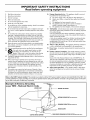
Note to the CATV system installer: This reminder isprovided to call the CATV system installer'sattention to Article 820-40 of the NEC that i
provides guidelines for proper grounding and, in particular, specifies that the cable ground shall be connected to the grounding system of the building,as c ose to the point of cab e entry as practica.
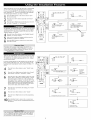
Example
of Antenna
Grounding
as per NEC - National
Electric
Code
GROUND
CLAMP
ELECTRICSERVICE EQUIPMENT
ANTENNA LEAD IN WIRE
POWERSERVICE GROUNDING ELECTRODESYSTEM INECART
258,PA_T
H)