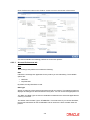
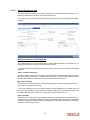
1
Leasing User Guide Oracle FLEXCUBE Universal Banking Release 12.0.3.0.0 Part No. E53393-01 April 2014 Leasing User Guide April 2014 Oracle Financial Services Software Limited Oracle Park Off Western Express Highway Goregaon (East) Mumbai, Maharashtra 400 063 India Worldwide Inquiries: Phone: +91 22 6718 3000 Fax:+91 22 6718 3001 www.oracle.com/financialservices/ Copyright © 2007, 2014, Oracle and/or its affiliates. All rights reserved. Oracle and Java are registered trademarks of Oracle and/or its affiliates. Other names may be trademarks of their respective owners. U.S. GOVERNMENT END USERS: Oracle programs, including any operating system, integrated software, any programs installed on the hardware, and/or documentation, delivered to U.S. Government end users are "commercial computer software" pursuant to the applicable Federal Acquisition Regulation and agency-specific supplemental regulations. As such, use, duplication, disclosure, modification, and adaptation of the programs, including any operating system, integrated software, any programs installed on the hardware, and/or documentation, shall be subject to license terms and license restrictions applicable to the programs. No other rights are granted to the U.S. Government. This software or hardware is developed for general use in a variety of information management applications. It is not developed or intended for use in any inherently dangerous applications, including applications that may create a risk of personal injury. If you use this software or hardware in dangerous applications, then you shall be responsible to take all appropriate failsafe, backup, redundancy, and other measures to ensure its safe use. Oracle Corporation and its affiliates disclaim any liability for any damages caused by use of this software or hardware in dangerous applications. This software and related documentation are provided under a license agreement containing restrictions on use and disclosure and are protected by intellectual property laws. Except as expressly permitted in your license agreement or allowed by law, you may not use, copy, reproduce, translate, broadcast, modify, license, transmit, distribute, exhibit, perform, publish or display any part, in any form, or by any means. Reverse engineering, disassembly, or decompilation of this software, unless required by law for interoperability, is prohibited. The information contained herein is subject to change without notice and is not warranted to be error-free. If you find any errors, please report them to us in writing. This software or hardware and documentation may provide access to or information on content, products and services from third parties. Oracle Corporation and its affiliates are not responsible for and expressly disclaim all warranties of any kind with respect to third-party content, products, and services. Oracle Corporation and its affiliates will not be responsible for any loss, costs, or damages incurred due to your access to or use of third-party content, products, or services. Contents 1. Preface ...................................................................................................... 1-1 1.1 1.2 1.3 1.4 1.5 1.6 2. Introduction.............................................................................................................. Audience.................................................................................................................. Documentation Accessibility.................................................................................... Organization ............................................................................................................ Related Documents ................................................................................................. Glossary of Icons..................................................................................................... Leasing - An Overview ............................................................................ 2-1 2.1 2.2 Introduction.............................................................................................................. Elements in a Lease Structure ................................................................................ 2.2.1 Parties to a Lease....................................................................................... 2.2.2 Leased Asset.............................................................................................. 2.2.3 Lease Period .............................................................................................. 2.2.4 Types of Lease ........................................................................................... 2.2.5 Lease Rental .............................................................................................. 2.2.6 Down Payment ........................................................................................... 2.2.7 Residual Amount ........................................................................................ 2.3 Product Definition Facility ........................................................................................ 2.3.1 Advantages of Defining a Product .............................................................. 2.4 Methods of Interest Application ............................................................................... 2.5 Methods of Interest Calculation and Payment......................................................... 2.6 Flexible Repayment Schedule Set Up..................................................................... 2.7 Defining Grace Periods ........................................................................................... 2.8 Tracking the Status of a Lease................................................................................ 2.9 Supported Tax Types .............................................................................................. 2.10 Automatic Processing of Different ‘Events’............................................................. 2.11 Compensation on Pre-payment............................................................................... 2.12 Value Dated Amendments....................................................................................... 3. 2-1 2-1 2-1 2-1 2-1 2-2 2-2 2-2 2-3 2-3 2-3 2-3 2-4 2-4 2-4 2-4 2-5 2-5 2-5 2-5 Maintenances and Operations ................................................................ 3-1 3.1 3.2 3.3 3.4 3.5 3.6 4. 1-1 1-1 1-1 1-1 1-2 1-2 Introduction.............................................................................................................. Maintaining Bank Parameters ................................................................................. Maintaining Branch Parameters .............................................................................. Maintaining Check Lists........................................................................................... Maintaining Written Down Value (Current Asset Value).......................................... Viewing Written Down Value (Current Asset Value)................................................ 3-1 3-2 3-3 3-5 3-7 3-8 Defining a Leasing Product .................................................................... 4-1 4.1 4.2 Introduction.............................................................................................................. 4-1 Setting up a Product ................................................................................................ 4-2 4.2.1 Defining Other Attributes of the Product..................................................... 4-3 4.2.2 Specifying User Data Elements.................................................................. 4-4 4.2.3 Specifying Product Preferences ................................................................. 4-5 4.2.4 Specifying Components............................................................................ 4-13 4.2.5 Specifying Notices and Statements ......................................................... 4-23 4.2.6 Mapping Accounting Role to Product ....................................................... 4-26 4.3 4.4 5. 5.3 5.4 5.5 5.6 Introduction.............................................................................................................. 5-1 Maintaining Lease Account Details ......................................................................... 5-2 5.2.1 Main Tab..................................................................................................... 5-4 5.2.2 Account Details Tab ................................................................................. 5-12 5.2.3 Default Tab ............................................................................................... 5-15 5.2.4 Checklist Tab............................................................................................ 5-17 5.2.5 Fields Tab................................................................................................. 5-19 5.2.6 Components Tab ...................................................................................... 5-20 5.2.7 Charges Tab............................................................................................. 5-27 5.2.8 Linkages Tab ............................................................................................ 5-30 5.2.9 Advices Tab.............................................................................................. 5-31 5.2.10 Credit Score Tab ...................................................................................... 5-32 5.2.11 Capturing Additional Details for Leasing .................................................. 5-33 Saving and Authorising Mortgage/Commitment Account ...................................... 5-33 Multilevel Authorization of a Contract .................................................................... 5-33 Viewing Lease Account Summary Details............................................................. 5-34 Maintaining Events Dairy....................................................................................... 5-35 5.6.1 Processed Events..................................................................................... 5-36 5.6.2 Unprocessed Events ................................................................................ 5-37 Capturing Additional Details for a Lease ............................................. 6-1 6.1 7. 4-29 4-36 4-44 4-47 4-48 4-50 4-51 4-51 4-52 Account Creation ..................................................................................... 5-1 5.1 5.2 6. 4.2.7 Specifying Account Status ....................................................................... 4.2.8 Specifying Events ..................................................................................... 4.2.9 Maintaining Branch /Currency Restriction ............................................... 4.2.10 Restricting Customer Category ............................................................... 4.2.11 Defining Product Fields ............................................................................ 4.2.12 Associating an MIS Group with the Product ............................................. 4.2.13 Defining User Defined Fields.................................................................... Viewing Product Summary Details ........................................................................ Processing EMI on Lease...................................................................................... Introduction.............................................................................................................. 6.1.1 Viewing MIS Details of the lease ................................................................ 6.1.2 Viewing Account GL Balance ..................................................................... 6.1.3 Viewing Internal Rate of Return (IRR) Details ............................................ 6.1.4 Capturing Swift Message Details................................................................ 6.1.5 Viewing Installment Details......................................................................... 6.1.6 Viewing Events Diary Details...................................................................... 6.1.7 Viewing Asset Values ................................................................................. 6-1 6-2 6-3 6-4 6-5 6-5 6-7 6-8 Making Manual Disbursements .............................................................. 7-1 7.1 7.2 7.3 7.4 Introduction.............................................................................................................. 7-1 Disbursing a Lease through the ‘Manual’ Mode ...................................................... 7-1 7.2.1 Verifying the Check List Items .................................................................... 7-5 7.2.2 Capturing Values for the Event Level UDFs............................................... 7-6 7.2.3 Viewing the Default Details......................................................................... 7-6 7.2.4 Viewing the Charge Details Associated with the Event .............................. 7-7 7.2.5 Capturing the Advice Related Details......................................................... 7-7 7.2.6 Viewing the Swift Message Details............................................................. 7-9 Authorizing a Manual Disbursement........................................................................ 7-9 Disbursing a Lease through ‘Auto’ Mode............................................................... 7-10 7.4.1 8. Operations ................................................................................................ 8-1 8.1 8.2 8.3 8.4 8.5 8.6 8.7 9. Processing for Down Payment ................................................................. 7-10 Introduction.............................................................................................................. 8-1 Maintaining Leasing Payments................................................................................ 8-1 8.2.1 Partial Payment .......................................................................................... 8-8 8.2.2 Payments Simulation.................................................................................. 8-8 Saving and Authorising Leasing Payments ............................................................. 8-9 Viewing Leasing Payments ................................................................................... 8-10 Leasing Amendments............................................................................................ 8-11 8.5.1 Amendments Tab ..................................................................................... 8-12 8.5.2 Account Details Tab ................................................................................. 8-12 8.5.3 Default Tab ............................................................................................... 8-14 8.5.4 Components Tab ...................................................................................... 8-15 8.5.5 Charges Tab............................................................................................. 8-16 8.5.6 Saving and Authorizing Leasing Amendments......................................... 8-16 8.5.7 VAMI Simulation ....................................................................................... 8-17 Maintaining Manual Status Change....................................................................... 8-18 Viewing Manual Status Change ............................................................................ 8-20 Batch Processes ...................................................................................... 9-1 9.1 9.2 9.3 Introduction.............................................................................................................. 9-1 Configuring Batch Processes .................................................................................. 9-1 9.2.1 Defining Batch Processes .......................................................................... 9-2 9.2.2 Initiating the Batch Process ........................................................................ 9-4 9.2.3 Multi-threading of Batch Processes............................................................ 9-4 9.2.4 Excess Amount Allocation Batch................................................................ 9-5 9.2.5 Interest Posting (INTP Event)..................................................................... 9-5 9.2.6 Processing the CL Batch ............................................................................ 9-6 9.2.7 Processing Minimum Amount Due Batch ................................................... 9-7 9.2.8 Processing the EMI Change Batch (EMIC) ................................................ 9-7 Triggering User Defined Events .............................................................................. 9-8 9.3.1 Viewing MIS Details.................................................................................. 9-10 9.3.2 Viewing Rate Details ............................................................................... 9-12 9.3.3 Viewing Charge Details ............................................................................ 9-16 9.3.4 Viewing Event Details.............................................................................. 9-16 9.3.5 Viewing Event Fields ................................................................................ 9-17 10. Annexure A ............................................................................................. 10-1 10.1 10.2 10.3 10.4 10.5 Accounting Entries for Leasing.............................................................................. Events.................................................................................................................... Accounting Roles................................................................................................... Amount Tags ......................................................................................................... Event-wise Accounting Entries .............................................................................. 10.5.1 Financial Lease ........................................................................................ 10.5.2 Operational Lease .................................................................................... 10.6 Event-wise Advices ............................................................................................... 10.7 LE SDEs ............................................................................................................... 10-1 10-1 10-2 10-3 10-3 10-3 10-6 10-8 10-9 11. Function ID Glossary ............................................................................. 11-1 1. Preface 1.1 Introduction This manual is designed to acquaint you with the Leasing module of Oracle FLEXCUBE. The manual provides an overview of the module and guides you through the various steps involved in providing leasing facility to the customers of your bank or leasing company. You can further obtain information about to a particular field by placing the cursor on the relevant field and striking the <F1> key on the keyboard. 1.2 Audience This manual is intended for the following User/ User Roles: 1.3 Role Function Back office data entry clerk Input functions for contracts Back office managers/officers Authorization functions Product Managers Product definition and authorization End of Day operators Processing during End of Day/ Beginning of Day Financial Controller/Product Managers Generation of reports Documentation Accessibility For information about Oracle's commitment to accessibility, visit the Oracle Accessibility Program website at http://www.oracle.com/pls/topic/lookup?ctx=acc&id=docacc. 1.4 Organization This manual is organized into the following chapters. Chapter 1 About this Manual gives information on the intended audience. It also lists the various chapters covered in this User Manual. Chapter 2 Leasing — An overview is a snapshot of the features that the module provides. Chapter 3 Maintenances and Operations talks about maintaining various parameters at bank and branch level. Chapter 4 Defining a Leasing Product talks about defining the attributes specific to setting up a leasing product. Chapter 5 Account Creation details the process of setting up and maintaining lease accounts. 1-1 1.5 Chapter 6 Capturing Additional Details for a Lease explains the various additional functions required to maintain and process a lease account. Chapter 7 Making Manual Disbursements deals with the additional details and changes that you can effect on a lease. Chapter 8 Operations deals with the maintenance of payments and amendments, funding, status change, simulation of payments, rollover and so on which are related to a lease account. Chapter 9 Batch Processes explains the processes configuring a batch for auto processing. Chapter 10 Annexure A lists the event-wise accounting entries required for leasing. Chapter 11 Function ID Glossary has alphabetical listing of Function/Screen ID's used in the module with page references for quick navigation. Related Documents You may need to refer to any or all of the following User Manuals while working on the Leasing module: 1.6 Finances Core Services Core Entities Deposits Procedures Settlements Profit Charges and Fees Tax User Defined Fields Glossary of Icons This User Manual may refer to all or some of the following icons: Icons Function Exit Add row Delete row Option List 1-2 2. Leasing - An Overview 2.1 Introduction The important features of the Leasing module of Oracle FLEXCUBE are discussed in depth in this chapter. A Lease can be defined as a contract where a party being the owner (lessor) of an asset (leased asset) provides the asset for use by the lessee at a consideration (rental), either fixed or dependent on any variables, for a certain period (lease period), either fixed or flexible, with an understanding that at the end of such period, the asset, subject to the embedded options of the lease, will either be returned to the lessor or disposed off as per the lessor’s instructions. Leasing is nothing more than a method of paying for the use of an asset over a specified period of time. Though it seems very similar to the concept of renting, they are very different. 2.2 Elements in a Lease Structure 2.2.1 Parties to a Lease There are two parties to a lease: the owner called the lessor and the user called the lessee. The lessor is the person who owns the asset and gives it on lease. The lessee takes the asset on lease and uses it for the period of the lease. Ownership is no pre-condition for leasing. Technically, in order to be a lessor, one does not have to own the asset; one has to have the right to use the asset. Thus, a lessee can be a lessor for a sub-lessee, unless the parent lessor has restricted the right to sub-lease. 2.2.2 Leased Asset The subject of the lease is the asset, article or property to be leased. The asset may be anything – an automobile, land, factory, or consumer durable. Only tangible assets can be leased, you cannot lease intangible assets, since one of the prime elements of a lease is handing over possession, along with the right to use. Hence, intangible assets are assigned, whereas tangible assets may be leased. The concept of leasing will have the following limitations: 2.2.3 What cannot be owned cannot be leased. Thus human resources cannot be ‘leased’. While lease of movable properties can be affected by mere delivery, immovable property is incapable of deliveries in the physical sense. Most countries have specific laws relating to transactions in immovable properties: if the law of the land requires a procedure for a lease of immovable or real estate, such procedure should be complied. A lease is structurally a rental for the lease period: with the understanding that the asset will be returned to the lesser after the period. Thus, the asset must be capable of re delivery. It must be durable (at least during the lease period), identifiable and severable. The existence of the leased asset is an essential element of a lease transaction – the asset must exist at the beginning of the lease and at the end on the lease term. Nonexistence of the asset, for whatever reason, will be fatal to the lease. Lease Period The term of lease, or lease period, is the period for which the agreement of the lease shall be in operation. As an essential element in a lease is redelivery of the asset by the lessee at the end of the lease period, it is necessary to have a period of lease. During this certain period, the lessee may be given a right of cancellation, and beyond this period, the lessee may be 2-1 given a right of renewal, but essentially, a lease should not amount to a sale, i.e. the asset should not be given permanently to the lessee. 2.2.4 Types of Lease Leases can be broadly classified into two: 2.2.4.1 Financial Lease Operational Lease Financial Lease In a Financial Lease, though the device used is leasing, the purpose and effect is virtually financing – leasing for the purpose of financing. However the generic differences between a lease and a lease mentioned earlier still remain. The lessor will provide the money needed by the lessee to buy an asset; in return the payments by the lessee will be in the form of lease rentals. The lease amount is the amount that has been financed. A Financial Lease is a ‘lease look-alike’. This lease should be treated like a lease with the lease amount as the principal and a interest charged. 2.2.4.2 Operational Lease It is a non-financial lease. Any other lease other than a financial lease is an operating lease. In a financial lease, the lessor does not operate the asset he leases; he merely finances it. The word ‘operating lease’ is not applied to indicate that the lessor ‘operating’ the asset, but only as a contra-distinction to Financial Leases. Therefore, any lease where the lessor takes a risk other than a plain financial risk is an operating lease. This lease should be treated like a lease with no principal and the entire lease amount as a special interest that is paid in installments. 2.2.5 Lease Rental The lease rental represents the consideration for the lease transaction. This is the amount that the lessee pays the lessor. If it is a Financial Lease Transaction, the rentals will simply be the recovery of the lessor’s principal, and a certain rate of return on outstanding principal, i.e. the rentals can be seen as bundled principal repayment and interest. If it is an Operating Lease Transaction, the rental might include several elements depending upon the costs and risks borne by the lessor, such as: 2.2.6 Interest on the lessor’s investment If the lessor bears any repairs, insurance, maintenance or operation costs, the charges for such cost. Depreciation of the asset Servicing charges or packing charges for providing a package of the above service. Down Payment Down Payment is the upfront payment made by the lessee at the beginning of the lease. This is a surrogate for the margin or borrower contribution in case of lease transaction. In the case of financial lease, the down payment will be entirely towards the principal and in the case of operational lease; the entire payment will be an income. 2-2 2.2.7 Residual Amount Simply put, ‘Residual Value’ means the value of the leased equipment at the end of the lease term. If the lease contains a buy out option to buy the asset at the residual amount at the end of the lease, this is the price at which the lessee can buy the asset from the lessor at the end of the lease. It is common practice to have residual amount for Financial Leases, but it is also possible for Operational Leases to have residual amount. 2.3 Product Definition Facility A Product is a specific service, or scheme, that you offer your customers. A Leasing product is a specific Leasing scheme that is offered to customers. While setting up the module, the bank or the Leasing Company can define the various leasing schemes that it offers as products. For each product, it can also define ‘attributes’, or in other words, the terms and conditions. When a user at the bank or leasing company actually processes a lease, it can be associated with a product. The lease acquires the terms defined for the product that it involves. However, you can allow a user to change the inherited attributes of a lease, while processing, to suit a special customer. 2.3.1 Advantages of Defining a Product When defining a scheme as a product, the bank can specify the following details: Tenor and interest preferences Type of interest that is applicable Minimum, maximum and standard rates applicable Compensation interest and grace days (for lease) Standards schedules applicable Ledgers to which the accounting entries should be posted (at different events such as booking, amendment, rollover, etc) The product is defined only once. Therefore, you need not specify the basic details, every time a lease is entered into Oracle FLEXCUBE. This feature drastically reduces processing time, thus allowing a bank to focus on and take advantage of, the opportunities in the market. 2.4 Methods of Interest Application In Oracle FLEXCUBE, it is possible to define multiple interest and charges. That is, you can specify the interest and charge that you would like to levy at the different events in the lifecycle of a lease. Interest can be calculated based on a rate, or a flat amount. Interest rates may be: Fixed Floating – Periodic Rate revision is possible Special You can define tier and slab structures to compute charges. You can also define a minimum and a maximum charge, as well as a compensation for defaulted schedules. 2-3 2.5 Methods of Interest Calculation and Payment The default interest calculation basis is 30 (Euro)/ 360. The repayment schedules for interest can be defined, for each transaction. Depending on the mode of payment, the interest will be liquidated either automatically or manually, according to the schedule defined. Accrual of Interest The frequency of interest accrual, whether daily, monthly, quarterly, half-yearly, or annual, can be specified for a product during set up. This specification will apply, to the accruable components of all leases involving the product. The system accrues interest whenever you make a backdated rate change. An accrual, to the extent of a repayment, is automatically carried out at the time of repayment. The module supports amendments and payments for previous accrual periods. Subsequent accruals will correct any adjustments that are to be made due to these actions. The Lease module allows you to accrue interest at the product level. Rather than accrue interest for each lease involving a product, and then update the ledgers of the accrued interest individually, the bank can accrue interest for each contract involving the product, and pass a consolidated entry to the ledgers. 2.6 Flexible Repayment Schedule Set Up Using the Lease module, you can define flexible schedules for the payment of principle, interest, commission and fees. Schedules for the payment of the various components can be defined individually, or otherwise. The schedules would be amortized based on reducing balances. 2.7 Defining Grace Periods A bank using this module can define a grace period for the products it offers. This specification would apply to all contracts involving the product. A compensation profit will be applied in case of default in payment, on expiry of the grace period. Compensation will not be applied if the payment is made during the grace period. In case the payment is not made, the compensation will be calculated from the day the payment is outstanding. 2.8 Tracking the Status of a Lease The Lease module of Oracle FLEXCUBE, allows you to define the various status, into which overdue lease should move. The module allows a bank to define: The number of overdue days from which a lease should be classified under a status Whether accruals should be stopped on reaching a status Whether accruals should be reversed for a status The asset account to which defaulted lease should be transferred (if they are to be reported separately) The notices to be generated for the benefit of the customer Movement of a lease from one status to another can be either automatic, or manual. Lease, both regular and past due, can be tracked, automatically, across several user-defined status. 2-4 2.9 Supported Tax Types Oracle FLEXCUBE supports the processing of a Withholding and an Expense type of tax. Tax can be computed based on either the liquidation amount or the schedule amount. The bank can define tax rates as slabs or tiers and define a minimum and maximum tax amount that could apply. The bank could bear the tax (Expense) or charge the customer for it (withholding). 2.10 Automatic Processing of Different ‘Events’ A lease contract goes through different stages in its lifecycle. These stages are referred to as events in Oracle FLEXCUBE. Events can be defined as Booking, Amendment, Liquidation, etc. Once a lease contract is initiated, Oracle FLEXCUBE automatically processes all the events defined for it starting from initiation until liquidation. It processes the following automatically: Passes the appropriate accounting entries Generates the advices and messages specified for the event (including billing notices and delinquency notices to defaulters) Liquidates due schedules Accrues interest Applies compensation interest on default In addition, you can automatically track overdue contracts and classify them into various statuses. For each status, you can specify preferences like whether accruals should be stopped, reversed, or, if the lease should be transferred to a different asset account. 2.11 Compensation on Pre-payment You can levy compensation on premature payments. This compensation can be specified both in terms of a percentage and as a flat amount. 2.12 Value Dated Amendments Amendments (changes to the Maturity Date, the Principal amount, the Interest Rate, Interest spreads, Residual Amount etc.) are possible on any lease contract, product, or group of contracts. These amendments can take effect as of back-value or future dates. The zero-based interest accrual methodology ensures that interest accruals are recalculated and adjusted for back-valued amendments. Subsidized residual amount can be changed during VAMI if subsidized residual amount is checked at the product level. Down payment of a lease can be changed during VAMI if there is an increase in amount financed. 2-5 3. Maintenances and Operations 3.1 Introduction Before you begin using the Leasing module, you must maintain the following information in the system: Bank Parameters These are parameters that you need to specify at the bank level. These will include the following: Interest calculation parameters Amount blocks on inactive accounts Splitting of accounting entries for the offset leg Site specific maintenances Branch Parameters These are parameters that you need to specify at the branch level. These will include the following: Branch Code Branch description Netting Parameters Process till Next working Day. Intraday job preferences Account Auto generation Account Mask User ref number generation Other Preferences In addition, you also have to maintain the following: Check Lists For different events, you can maintain check lists. You can maintain the checklists based on the combination of event code and product code. Written down Value (Current Asset value) You can capture the written down value of an asset linked to a lease account. These will include the following: Account reference number Currency Written down date Written down value Remarks Re-computation of insurance amount on changed/ new written down value will be processed during EOD for all accounts. Also, only the latest written down value can be amended The above maintenances are discussed in detail in this chapter. 3-1 3.2 Maintaining Bank Parameters You can maintain the bank parameters in the ‘Lending – Bank Parameters’ screen. You can invoke this screen by typing ‘CLDBKPMT’ in the field at the top right corner of the Application toolbar and clicking on the adjoining arrow button. Here you can capture the following details: Bank Code Specify the code that represents your bank Include To date for Interest Calc If you check this option, then accrual entries will be passed from the value date + 1 till the maturity date. However, if this box is not checked, then accrual entries will be passed from the value date till the maturity date - 1. Amount Blocking for inactive account Indicate whether an amount block needs to be imposed on an inactive account or not Split Offset Leg Check this box if you wish to have split accounting entries for the offset leg of a transaction. For example, if a certain transaction debits a particular GL and credits two different GLs (as in off balance sheet entries), the system will pass two debit entries for the first GL to be in sync with the credit entries to the other GLs. If this option is not checked the accounting entries will be as under: 3-2 Dr/ Cr Account Amoun t Dr 0000000 1 50 Cr 0000001 1 20 Cr 0000002 2 30 If this option is checked the accounting entries will be as under: Dr/ Cr Account Amoun t Dr 0000000 1 20 Cr 0000001 1 20 Dr 0000000 1 30 Cr 0000002 2 30 Achieve Processed Records from events diary The parameter Reference Date, Frequency, Unit will be used to archive the processed records in Event Diary The archival will be done in EOD by batch function. If this parameter is not set then no archive will be done. Purge Inactive Loans Specify the tenor in units of days, months and year, for which you want to keep the inactive loans for purging. Cut off Transactions Select the Cutoff GL from the option list. Transactions after 2:00 pm on a day will be considered on the next working day. The accounting entries for such transactions will be passed into the Cutoff GL and not the Settlement GL. 3.3 Maintaining Branch Parameters You can maintain the branch parameters in the ‘Leasing – Branch Parameters’ screen. You can invoke this screen by typing ‘LEDBRPMT’ in the field at the top right corner of the Application tool bar and clicking on the adjoining arrow button. 3-3 Branch parameters include the following: Branch Code You have to indicate the code of the branch for which the parameters have to be maintained. The codes of the various branches of your bank are available in the option list provided. Branch Name Based on the branch code selected, the branch name is defaulted here. Process Till Next Working Day – 1 This specification will determine the day on which automatic events such accrual, liquidation etc. falling due on a holiday, should be processed. If you select this option, events scheduled for a holiday will be processed on the last working day before the holiday. Netting GL Netting Accrual Here, you need to indicate the netting preference for posting entries during accrual, liquidation and status change. GL Netting Liquidation If you opt to net, the system will post a single consolidated entry for a GL and Currency combination. If you do not select this option, entries are posted individually for each account. 3-4 GL Netting Status Change Check this option to indicate that installment level status change should be done. Netting of Notices across Accounts The Netting of Notices across Accounts can be used to indicate that for or all accounts for which the payments falls due on a particular date, the requests for invoice generation should be consolidated. Auto Allocate Part Payment Check this option if you want to do a partial payment through auto allocation. Settlement The settlement accounts for processing lending transactions have to be specified here. You have to specify the Bridge GL/Account to be used for the settlement of the debit and credit legs of transactions that would be processed at your branch. You can select the accounts from the option lists provided for the same. Account Auto Generated You can select this option for automatic generation of account numbers. The system generates the account numbers automatically when you create customer accounts through the ‘Account Details’ screen. If this option is not checked, you have to capture the account number yourself. Account Mask Check this box to specify a format/mask for account numbers in order to maintain uniformity in the account numbers generated/captured across a branch. If you specify that account numbers should conform to a specific format, you have to specify the mask in the ‘Account Mask’ field. User Ref no in Msgs Check this box to indicate that the User Reference Number provided in the account screen has to be used in Tag 20 of MT103 and Tag 21 of MT202. If the box is unchecked, the loan account number will be used instead of the User Ref no. Auto Gen User ref Check this box to indicate that system should auto generate user ref no during account creation. IRR Processing Check this option to trigger the YACR (Yield Accrual) event for the branch batch. Accrual Entries on Holidays Check this option to determine whether the accrual entries due on the holidays should be passed as of the holiday itself or as on the working day before the holiday(s)/after the holiday(s) depending on the Process Till Next Working Day -1 option. 3.4 Maintaining Check Lists You can maintain check list for different events using the ‘Check List Maintenance’ screen. The check lists that you maintain here will be validated during the execution of that event for a lease account. 3-5 You can invoke this screen by typing ‘CLDCHKMT’ in the field at the top right corner of the Application tool bar and clicking on the adjoining arrow button. The following details have to be captured here: Product Code Specify the product code for which you need to maintain a check list. Alternatively, you can also select the product code from the adjoining option-list. All valid loans and leasing products that you have maintained in the system will be available for selection. You can also select the option ‘All’ select all the product codes. Event Code Select the event code for which check list items have to be maintained, from the drop down list. Product Description The product description is defaulted based on the product selected. Check List Item Specify the check list item name that you want to maintain for the selected event. The check list items that you maintain here will be validated by the system during that event, while processing the lease account. 3-6 3.5 Maintaining Written Down Value (Current Asset Value) You can capture the written down value for an asset linked to a lease account using the ‘Leasing Written Down Value’ screen. To invoke this screen, click ‘LEDWDVAL’ in the field at the top right corner of the Application tool bar and click on the adjoining arrow button. The following details need to be maintained here: Account Specify the account for which written down value needs to be captured. Alternatively, you can also select the account number from the adjoining option list. All active financial lease accounts will be available in the list of options. Written Down Date Specify the date from which the written down value should become effective. Alternatively, you can also select the date by clicking the adjoining calendar button. Written down Value Specify the value for the asset. The value has to be in the same currency as that of the lease account. Currency The currency of the lease account number is defaulted here. Remarks Here you can capture additional information, if any. During insurance processing, system computes the insurance premium using the SDE ‘WRITTEN_DOWN_VALUE’. The value for this SDE for a lease account is derived from the maintenance done in the ‘Asset Details’ screen. System picks up the value for the latest effective date and the insurance rate is applied on this value to arrive at insurance premium amount. 3-7 3.6 Viewing Written Down Value (Current Asset Value) You can view the written down value for an asset linked to a lease account using the ‘Leasing Written Down Value Summary’ screen. You can invoke this screen by typing ‘LESWDVAL’ in the field at the top right corner of the Application tool bar and clicking the adjoining arrow button. You can query on records based on any or all of the following criteria: Authorization Status Record Status Account Reference Number Written Down Date Click ‘Search’ button. The system identifies all records satisfying the specified criteria and displays the following details for each one of them: Authorization Status Record Status Account Reference Number Written Down Date 3-8 4. Defining a Leasing Product 4.1 Introduction A product is a specific service that you offer your customers. For example, amongst other financial services, you may offer Financial Lease. Financial Lease can be of different types: Financial Lease provided for purchase of Agricultural Land Financial Lease provided for purchase of Non Agricultural Land Financial Lease for purchase of Agricultural Land and Financial Lease provided for purchase of Non Agricultural Land are examples of specific services that you offer. All Financial Lease for purchase of Agricultural Land that you issue would involve the product, Financial Lease provided for purchase of Agricultural Land. A product, helps classify the lease that you issue, according to broad groups (such as, for growing cash crops, non-cash crops etc.,) having some common features. The other advantage of defining a product is that you can define certain general attributes for a product. These attributes will default to all contracts involving it. In this chapter, we shall discuss the manner in which you can define attributes specific to a Leasing product. You can create a leasing product in the ‘Product’ screen, invoked from the Application Browser. In this screen, you can enter basic information relating to a lease product such as the Product Code, the Description, etc. 4-1 4.2 Setting up a Product You can capture product details in the ‘Product’ screen. You can invoke the ‘Product’ screen by typing ‘LEDPRMNT’ in the field at the top right corner of the Application tool bar and clicking the adjoining arrow button. In this screen, you can enter basic information about a product such as the Product Code, the Description, etc. Information related to specific attributes of a product such as end date, preferences, components, events etc. have to be defined in the respective sub-screens. Product Code Specify the unique identifier for the leasing product in Oracle FLEXCUBE. Product Description Enter a brief description to identify the product code. Slogan You can enter marketing punch line for any product you create. This slogan will be printed on all advices that are sent to the customers who avail of the product. For example, if you set up a borrowing product called Money Multiplier, you could enter the slogan ‘Watch your money grow with Money Multiplier.’ Product Category The system displays the category of the product as ‘Leasing’. Start Date and End Date A product can be defined to be active over a specific period. When you create a product, you can specify a ‘Start Date’ and ‘End Date’ for it. The product can only be used within the specified period (i.e. within the Start Date and End Date). If you do not specify the Start Date, the branch date will be displayed as the Start Date. 4-2 If you do not specify an End Date for a product, it can be used for an indefinite period. The start and end dates of a product come in handy when you are defining a product that you would like to offer over a specific period. Remarks When creating a product, you can enter information about the product intended for your bank’s internal reference. This information will not be printed on any correspondence with the customer. Leasing Specify the following under leasing in the screen: Lease Type Select the type of lease from the adjoining drop-down list. This list displays the following values: Financial Operational Insurance Required Check this box to indicate that insurance is applicable for this product. This option is enabled only for financial leasing. 4.2.1 Defining Other Attributes of the Product After specifying the basic details of a product, you can define finer attributes for the product in the appropriate buttons provided. Click on the button provided for this purpose. Each button is explained briefly in the table below: Button Description User Data Elements To define the UDEs and Components relating to the product Preferences To indicate your preferences specific to the product Components To specify the component details, schedule definition and formulae for the product Notices and Statements To specify details of notices and account statements to be issued to customers. These have to be generated for different events in the life cycle of a lease. Role to Head To specify accounting roles and account heads for the product. (The concept of accounting roles and heads is explained later) Account Status To indicate the status preferences for the product Events To specify events Branch/Currency Rest To define the branch and currency restrictions for the product Customer Category Restriction To Define the Customer Category Restrictions and Customer Access Restrictions for the Product 4-3 Fields To associate User Define Fields(UDFs) i.e. Character Fields, Number Fields and Date Fields, with the product MIS To associate MIS details with a product. Product Fields To define additional fields that are available for use depending on the bank’s requirement Note There are some fields in the product screens, to which input is mandatory. If you try to save a product without entering details in these fields, the product will not be saved. When you save a product that you have created, your user ID will be displayed in the ‘Input By’ field and the date and time at which you saved the product in the ‘Date/Time’ field. The Status of the product will be updated as ‘Unauthorized’. A product is available for use only after it has been authorized by another user. 4.2.2 Specifying User Data Elements You can define the User Data Elements in the ‘User Data Elements’ screen. Invoke this screen by clicking ‘User Data Elements’ button. The following screen displays: To define a User Data Element (UDE), you have to specify the following details in the screen: User Data Elements ID Data elements like the rate at which interest has to be applied, the tier structure based on which interest needs to be computed etc. are called User Data Elements (UDEs). These are, in effect, elements for which you can capture the values. You have to specify a unique ID to identify the UDE in the system. 4-4 User Data Elements Description You can also provide a brief description of the UDE being defined. User Data Elements Type UDE Type will describe the nature of the UDE. Select the type of UDE from the adjoining dropdown list. This list displays the following values: Amount Number Rate Rate Code User Data Elements Currency If the UDE type is ‘Amount’, you should specify the currency of the UDE. Specify a valid currency in which the UDE amount is counted. This adjoining option list displays all valid currencies maintained in the system. You can choose the appropriate one. Minimum Value Specify the floor limit for the UDE value. This means that the actual UDE value cannot be less than the rate specified here. Note that this amount has to be less than the maximum UDE value. The system will throw an error message if the minimum UDE value is greater than the maximum UDE value. Maximum Value Specify the ceiling limit for the UDE value. This means that the actual UDE value cannot be greater than the rate specified here. Note that this amount has to be greater than the minimum UDE value. The system will throw an error message if this value is less than the minimum UDE value. 4.2.3 Specifying Product Preferences Preferences are the options that are available to you for defining the attributes of a lease product. These could be: The manner in which the system should handle schedules falling due on holidays The tenor details for the lease Whether receivables should be tracked for the lease etc. The options you choose, ultimately, shape the product. These details are used for lease processing. 4-5 Click ‘Preferences’ button in the ‘Product’ screen to move to this section of the screen. You should maintain the following preferences for the loan product: 4.2.3.1 Account Preferences tab Rate The exchange rate preferences include the following: Rate Indicate the exchange rate applicable for the product you are maintaining. The available options are: Mid Rate Buy/Sell Rate By default, the Buy/Sell Rate is used. Rate Type Specify a valid type of the rate that should be used for the product. This adjoining option list displays all valid types of rate maintained in the system. You can choose the appropriate one. The ‘Rate’ and ‘Rate Type’ are used in combination to determine the actual rate applicable for currency conversion. The default value for Rate Type is ‘STANDARD’. This means that, if you choose ‘Mid Rate’, the mid rate maintained for the STANDARD code is used for the loans created under the product. 4-6 Maximum Variance Specify the maximum limit for rate variance. This is expressed in percentage. The variance between the exchange rate (specified for the product) and the rate captured for a loan (at the account level) should not be greater than the value specified here. If the exchange rate exceeds the maximum variance that you have defined for the product, the system will not allow you to save the loan. The transaction is rejected. This value should be greater the value for ‘Normal Variance’. Normal Variance Specify the minimum/normal variance allowed for the rate. If the exchange rate variance between the exchange rate (specified for the product) and the rate captured for a loan exceeds the value specified here, the system will display an override message before proceeding to apply the exchange rate. The normal variance should be less than the maximum variance. For back valued transactions, the system applies the rate on the basis of the exchange rate history. The variance will be based on the rate prevailing at that time. Account Preferences As part of specifying the account preferences, you can indicate the following: Track receivable Auto Liquation Check this box to indicate that the receivables should be tracked during auto liquidation. Liquidate Back Valued Schedules Check this box to indicate that the schedules with a due date less than the system date should be liquidated on the initiation of back valued lease account. Special Interest Accrual Check this box to indicate that the accrual computation should be based on formula specified for a component. Otherwise, interest accrual will be done based on the number of days in the schedule. Back Period Entry Allowed Check this box to indicate that the lease account should be allowed to process transactions with a value date less than the current system date. Interest Statement Check this box to indicate that the interest statement should be generated for the account. Product for Limits Check this box to indicate that the product is for limits. If you check this option, the product will be available for limits linkage during line creation. Partial Block Release Check this box to indicate whether the partial release of term deposit should be done as part of loan repayment. Schedule Basis You should also specify the schedule basis for the rolled over lease. The new lease can inherit the schedules from the lease product or you can apply the schedules maintained for the original loan itself. Liquidation Liquidation preferences include the following: 4-7 Liquidation Mode Indicate the mode of liquidation that you are maintaining. You can select one of the following options: Manual Auto Component The default value for liquidation mode is ‘Manual’. At the end of the day, liquidation will be done according to the specified mode. Allow Partial Liquidation In case of insufficient funds, check this box to indicate that the partial liquidation should be done automatically to the extent of funds available in the account you are maintaining. However, if this check box is not selected, the schedule amount due will not be liquidated if sufficient funds are not available in the account. Reset Retry Count for Reversed Auto Liquidation If you have maintained a limit on the number of retries for auto liquidation, this option will reset the retries count to zero during reversal of auto liquidation. This will be applicable from the date of reversal of payment. Hence, the system will once again attempt auto liquidation till the number of retries allowed. The system will update the status of the reversed payment to ‘Unprocessed’ after which it again attempts auto liquidation. Retries Auto Liquidation Days Capture the number of working days for which the system should attempt auto liquidation. The number of retries per day will depend on the configuration maintained for the ‘Liquidation Batch Process’ - during BOD, EOD or both. For instance, if the batch is configured for both EOD and BOD, and the number of retry days is ‘1’, then, auto liquidation is attempted twice on the same day i.e. once during BOD and another retry at EOD. Retries for Advice Specify number of times you want to retry generation of advice. The number of retries should be less than ‘Retries Auto Liquidation Days’. When auto liquidation fails and advice retry count is reached, the system generates a failure advice and sends it to the customer to initiate an appropriate action for the successful execution of the advice. Tenor Specify the following under Tenor in the screen: Minimum Tenor Specify the minimum amount of time that the customer can take to decide on the ‘rate plan’ and intimate the bank about the decision. Default Maximum Tenor Specify the maximum amount of time that the customer can take to decide on the ‘rate plan’ and intimate the bank about the decision. Unit Select the unit for the rate plan tenor from the drop-down list. The following options are available for selection: Monthly Yearly 4-8 4.2.3.2 Holiday Preferences Tab The value date/maturity date of a contract might fall on a holiday defined for branch or on a holiday specified for the currency involved in the contract. You need to specify the following holiday parameters, which has to be considered for holiday handling: Holiday Treatment for All Schedules The schedule date of a contract might fall on a local holiday defined for your branch or on a holiday specified for the currency involved in the contract. You need to specify the following holiday parameters, which has to be considered for holiday handling: Adhoc Treatment Required Check this option to allow the movement of due dates of the schedules that fall on the newly declared holidays. This option is enabled only if the options, Ignore Holidays parameter and the Cascade Schedules parameter are not checked at the product level. Move Across Month Check this box to indicate that the schedule date falling on a holiday should be allowed to cross over into next/previous month. If you have specified to move the schedule date of a lease falling due on a holiday, either to the next or previous working day and the movement crosses over into a different month, then this option will determine whether the movement should be allowed or not. Ignore Holidays Check this box to indicate that the holidays should be ignored while fixing schedule date. In such a case, if a schedule date falls on a holiday, the automatic processing of such a schedule is determined by your holiday handling specifications for automatic processes, as defined in the ‘Branch Parameters’ screen. 4-9 Cascade Schedules Check this box to indicate that the schedule should be cascaded to all the other schedules fall on holidays. Hence, when you move a cascaded schedule which falls due on a holiday to the next or previous working day (based on the ‘Branch Parameters’), the movement happens to other schedules too. If not selected, only the affected schedule will be moved to the previous or next working day, as the case may be, and other schedules will remain unaffected. However, when you cascade schedules, the last schedule (at maturity) will be liquidated on the original date itself and will not be changed like the interim schedules. Hence, for this particular schedule, the interest days may vary from that of the previous schedules. Include Branch Holiday Check this box to indicate that the branch holiday should be considered for schedule date. Indicate the type of movement of the schedule that you are maintaining. You can select one of the following options: Move Forward: Indicates that the schedule date falling due on a holiday will be moved forward to the next working day. Move Backward: Indicates that the schedule date falling due on a holiday will be moved backward to the previous working day. However, if you opt to ignore the holidays and do not select the ‘Move Across Months’ option, the system Ignores the holidays and the due will be scheduled on the holiday itself. Holiday Check Select the type of holiday to be considered for schedule date from the adjoining drop-down list. This list displays the following values: Currency Local Both Holiday Currency Specify the currency based on which holiday check needs to be done for leases under this product. Input to this field will be mandatory if you have indicated ‘Currency’ in the ‘Holiday Check’ field. The adjoining option list displays all valid currency codes maintained in the system. You can select the appropriate one. Auth Re-key Fields As a cross-checking mechanism to ensure that you are invoking the right lease for authorization, you can specify that the values of certain fields should be entered, before the other details are displayed. The complete details of the lease will be displayed only after the values to these fields are entered. This is called the re-key option. The fields for which the values have to be given are called the re-key fields. You can specify the values of a lease that the authorizer is supposed to key-in before authorizing the same. You can select the fields from the option list provided. If no re-key fields have been defined, the details of the loan will be displayed immediately once the authorizer calls the loan for authorization. The re-key option also serves as a means of ensuring the accuracy of the data captured. 4-10 4.2.3.3 Leasing Preferences Tab The leasing preferences include the following: Lease Payment Mode Select the mode of payment of the lease from the adjoining drop-down list. This list displays the following values: Advance: The payment is made in the beginning of the schedule. Arrears: The payment is made in the end of the schedule. Residual Value Basis Residual amount is the price at which a lessee can buy the asset at the end of the lease. Select the basis of residual amount from the adjoining drop-down list. This list displays the following values: Percentage of asset amount Flat amount Percentage of lease amount Using the aforementioned basis the system calculates the residual amount during the processing of contract. The value computed by the system can be altered while account booking. Residual Auto Liquidate Check this box to indicate that the residual amount is liquidated automatically. Interest Subsidy Allowed Check this box to indicate that the subsidy is allowed for interest rate. The system will process the EMI computation based on the subsidized rate. Note If this option is selected at the product level, then there must be at least one more interest component with ‘Include in EMI’ checked at the Product - Component level. Interest rate subsidy, is not applicable for operational lease 4-11 Residual Subsidy Allowed Check this box to indicate that the subsidized residual amount will be used while liquidating the residual value. You can specify the subsidized residual amount at the account level. Lease Asset Required Indicate the preference of customer while booking a lease. You can select one of the following options: Lease with Asset: In this lease the asset will be associated with the lease account. Lease without Asset: In this lease the asset will not be associated with the lease account. But for financial leasing, you can buy the asset with the residual value as asset value at the end of the lease. Note At the time of closure of lease account through ‘Close’ operation, you can choose a different FA product other than the one already linked at product level. Fixed Asset Product Code Specify a valid FA product code that should be created when a lease account which has no asset associated with it, is closed. This adjoining option list displays all valid FA products maintained in the system. You can choose the appropriate one. Prepayment of Lease The following are the preferences based on which prepayment of amortized loan should be processed: Recomputation Basis Select the basis of re-computation of lease for the prepayment of the lease from the adjoining drop-down list. This list displays the following values: Recalculate Instalment Amount: In this case the tenor remains constant. Change Tenor: Here, the tenor is recomputed while the instalment remains constant. Prepayment Effective From Select the start of lease prepayment from the adjoining drop-down list. This list displays the following values: Next Instalment The default value of lease prepayment is ‘Next Instalment’. Prepayment Equated Monthly Installment Type Select the type of Equated Monthly Installment (EMI) prepayment from the adjoining dropdown list. This list displays the following values: Single Instalment: A single instalment is computed using the future rates. Multiple Instalment: Multiple EMIs are defined if a future rate change is known upfront. Minimum Equated Monthly Installment Amount Specify the minimum amount that has to be paid after recomputing the Equated Monthly Installment (EMI). The recalculated EMI after prepayment should be equal to or greater than this amount. Equated Monthly Installment Currency Specify the currency in which the minimum Equated Monthly Installment (EMI) amount should be paid. 4-12 Disbursement Mode Indicate the mode of principal disbursement that you are maintaining. You can select one of the following options: Manual: You can manually disburse the lease using ‘Disbursement’ screen. Here, disbursement happens on demand. Auto: The system automatically disburses the lease during a batch process according to the schedules maintained. In this case, disbursement happens based on the disbursement schedule maintained for the product. This is defined in the ‘Components’ tab. By default, the system does an auto disbursal. Note This disbursement mode is only applicable for Financial Leasing. For details, refer the ‘Making Manual Disbursements’ chapter of this User Manual. 4.2.4 Specifying Components You have already maintained the components of the product in the ‘Main’ tab of the ‘Product’ screen. The features of the components are defined in the ‘Components’ tab of the screen. Note that the components defined in the ‘Main’ tab are displayed in the form of a list in the screen above. From the component list, highlight a component and then go on to define the features for the selected component. Component Details The basic information for a component is specified here. This includes the following: 4-13 Component The Components which are defined in Main Tab are available in Component list. The Component which is selected in the list appears in Component field. For e.g. ‘INSURANCE’, ‘MAIN_INT’, ‘PRINCIPAL’ etc. Subsequently, you have to define the parameters for these components in the ’Component’ tab of the screen. Description The system displays the description of the selected component, which is specified in the ‘Main’ tab. Currency Specify a valid currency that should be associated to the component. This adjoining option list displays all valid currencies maintained in the system. You can choose the appropriate one. Calculation Type This value is displayed based on the preference maintained in the ‘Main’ tab. However, you can change it. Select the method of the calculation which is to be associated with the component from the adjoining drop-down list. The list displays the following values: Formula with schedule (Component Type - Interest) Formula without schedule (Charge) Penal Interest Prepayment Penalty Discount Schedule without formula (Principal) No schedule No formula (Ad Hoc Charges) Penalty Charges Note ‘Penalty Charges’ are calculated only once for a ‘Penal Basis’ schedule. Include in EMI Check this box to indicate that the selected component should be included in EMI calculation. Main Component Check this box to designate a component as the ‘Main’ Interest component. If you enable the ‘Main Component’ option for a particular component, the system treats this component as the main component and also uses this component for calculating EMI. The default value of main component is ‘MAIN_INT’. Component Type Specify a valid type of the component. This adjoining option list displays all valid types maintained in the system. You can choose the appropriate one. A component can be of one of the following types: Charge Tax Insurance Interest 4-14 Note You can not associate ‘PRINCIPAL’ component with a particular type. Liquidation Mode You can specify the mode of liquidation of the component from the drop-down list. The following options are available for selection: Auto Manual Note This is applicable only if ‘Liquidation mode’ is selected as ‘Component’ at the product preference level. Component Attributes The component attributes include the following: Special Component Check this box to indicate the component as a ‘Special Component’. You can specify the special amount for the special component at the lease account level. In Operational leasing, for the main interest component, the default value of ‘Special Component’ field is ‘checked’. Penal Basis Specify the basis component on which the penalty is computed. Periodicity Select the periodicity of the component from the adjoining drop-down list. The list displays the following values: Daily Periodic If you choose the periodicity as ‘Daily’, any changes to UDE and SDE values will result in recalculation of the component. The recalculation happens as and when a change in value occurs. If maintained as ‘Periodic’, the values and calculations of the elements will be refreshed on the last day of the period. Formula Type Select the type of the formula to be used for calculating the component from the adjoining drop-down list. The list displays the following values: User Defined: This can also include a combination of standard formulae for different schedules of the component or can have a completely user defined formula. Standard – Simple – Amort-Payment in Advance – Amort –Payment in Arrears – Amortized Operational 4-15 Note For a financial lease, the default value of the formula type is ‘Amort-Payment in Arrears’. If the payment mode is changed to advance, then you have to select the formula type ‘Amort-Payment in Advance’. Rate to Use Specify a valid UDE rate that should be used in computing the standard formula. This adjoining option list displays all valid UDE rates maintained in the system. You can choose the appropriate one. Basis Element Specify a valid component that should be used in computing the standard formula. This adjoining option list displays all valid components maintained in the system. You can choose the appropriate one. For interest and charges, this is applicable if ‘Formula Type’ is ‘Standard’ and this is not applicable if ‘Formula Type’ is ‘User Defined’. For ‘Principal’ component, this is not applicable. Balance Type Indicate the type of balance that you are maintaining. You can select one of the following options: Debit Credit Component Defaults The following are the component defaults: Days in Month Select the number of days in a month for interest computation from the adjoining drop-down list. This list displays the following values: 30 (Euro): In this case, 30 days is considered for all months including February, irrespective of leap or non-leap year 30 (US): This means that only 30 days is to be considered for interest calculation for all months except February where the actual number of days is considered i.e. 28 or 29 depending on leap or non-leap year. Actual: This implies that the actual number of days is considered for calculation. For instance, 31 days in January, 28 days in February (for a non-leap year), 29 days in February (for a leap year) and so on Days in Year Select the number of days in a year for interest computation from the adjoining drop-down list. This list displays the following values: 360: This means that only 360 days will be considered irrespective of the actual number of calendar days. 365: In this case, leap and non leap year will be 365 . Actual: In this case, leap year will be 366 and non leap year will be 365. Note For EMI computation, the number of days in month/year is always 30/360. 4-16 Grace Days Specify the number of days available without penalty after the due date. You have to repay the lease within the grace days to avoid the penalty. Verify Funds Check this box to indicate that the availability of funds in the customer account should be verified during liquidation. Interest Method Check this box to indicate that the interest method should be used for the selected component. IRR Applicable Check this box to indicate that the selected component should be considered for Internal Rate of Return (IRR) calculation. This option is applicable to interest, charge and insurance components. If a charge component is to be considered for IRR, the charge will be accrued using the FACR (Upfront Fee Accrual) batch. The following components cannot be considered for IRR calculation: Off-balance sheet component Provision component If you check this option, then you have to check the ‘Accrual Required’ option. For bearing type of component formula, you can check this option only if the ‘Accrual Required’ option is checked. For discounted or true discounted types of component formula, this option will be enabled irrespective of the whether the ‘Accrual Required’ option is checked or not. If this option is checked and ‘Accrual Required’ is not, the discounted component will be considered as a part of the total discount to be accrued for Net Present Value (NPV) computation. If both ‘Accrual Required’ and ‘IRR Applicable’ are checked, then discounted interest will be considered for IRR computation. Accruals/Provisioning/Interest Payback To perform accrual of the components, you have to capture the following details: Required Check this box to indicate that the component should be accrued. Required check box should be checked for interest payback component. Frequency Select the frequency of accrual from the adjoining drop-down list. This list displays the following values: Daily Monthly Quarterly Half Yearly Yearly The frequency for interest payback component should not be selected as daily. 4-17 Start Month Select the starting month of accrual from the adjoining drop-down list. This list displays the following values: January February March April May June July August September October November December If you set the accrual frequency as quarterly, half yearly or yearly, you have to specify the month in which the first accrual has to begin, besides the date. Start Date Specify the starting date of accrual. Start month and start date are not applicable for interest payback component if the component type is Interest Payback. Prepayment Threshold This includes the threshold amount and currency, explained below: Amount Specify the minimum limit for allowing prepayment of schedules. If the residual amount after prepayment against a schedule is less than the threshold amount you specify here, the system will disallow the prepayment. Currency Specify a valid currency in which the threshold amount should be expressed. This adjoining option list displays all valid currencies maintained in the system. You can choose the appropriate one. 4.2.4.1 Defining Formula To compute component value for a particular schedule, you have to define a formula. You can define any one of the two types of formulae: Book Intermediate 4-18 Book Booked Formula refers to the formula used to compute a component value for a particular schedule. You can use intermediate formulae to create a ‘Booked’ formula. To create the formula, click ‘Book’ in the ‘Component’ tab of the screen. The following screen is displayed: The SDEs available will be shown in the Condition Builder. The Booked formula so created will be linked to a schedule. These are some of the examples of the formulae generated by the system on its own by choosing the formula type and the basis elements. Simple @SIMPLE(PRINCIPAL_EXPECTED,(INTEREST_RATE),DAYS,YEAR,COMPOUND_ VALUE) Amortized Reducing @AMORT_RED(PRINCIPAL_EXPECTED,(INTEREST_RATE),DAYS,YEAR) Discounting @DISCOUNTED(PRINCIPAL_EXPECTED,(INTEREST_RATE),DAYS,YEAR) Amortised Rule 78 @AMORT_78(PRINCIPAL_EXPECTED,(INTEREST_RATE),DAYS,YEAR) True Discounted @TRUE_DISC(PRINCIPAL_EXPECTED,(INTEREST_RATE),DAYS,YEAR) Amort-Payment in Adavance @AMORT_ADV(CAPITAL_AMOUNT,(INTEREST_RATE),DAYS,YEAR,RESIDUAL_ AMOUNT) Amort payment in Arrears @AMORT_ARR(CAPITAL_AMOUNT,(INTEREST_RATE),DAYS,YEAR,RESIDUAL_ AMOUNT) Amoritzed Operational @AMORT_OPR(CAPITAL_AMOUNT,RESIDUAL_AMOUNT,NO_OF_PERIODS) The parameters required to create a ‘Booked’ formula is similar to the ones explained for an Intermediate formula. 4-19 Amortized Check this box to indicate that the schedules of the component should be amortized. Amort Basis Element If you opt to Amortize the schedules of the component, you have to identify the element based on which the component is amortized. For example, if it is deposit interest, the amortization basis would be ‘Principal’. The components are available in the option list provided. Intermediate Intermediate Formulae are used as building blocks for more complex formulae. An intermediate formula is used to create a Book formula as an intermediate step. It will not be associated directly to any schedule. To define an intermediate formula, click ‘Intermediate’ in the ’Components’ tab of the screen. The ‘Intermediate Formula - Expression Builder’ screen is displayed. Formula Name Specify a suitable name to identify the formula that you are defining. After you specify the name you can define the characteristics of the formula in the subsequent fields. You have to use the name captured here to associate a formula with a schedule. The name can comprise of a maximum of 27 alphanumeric characters. Round Up/Down (Decimal) If you want to round off the results of an intermediate formula, you can indicate whether the result should be rounded up or rounded down by choosing one of the following values from the drop-down list: Up Down Compound Days/Months/Years If you want to compound the result obtained for the intermediate formula, you have to specify the frequency for compounding the calculated interest. The frequency can be in terms of: Days Months 4-20 Years If you do not specify the compound days, months or years, it means that compounding is not applicable Rounding Factor Specify the precision value if the number is to be rounded It is mandatory for you to specify the precision value if you have maintained the rounding parameter. Compound Days If you want to compound the result obtained for the intermediate formula, you have to specify the frequency for compounding the calculated interest. The frequency can be in terms of days. Compound Months If you want to compound the result obtained for an intermediate formula, you have to specify the frequency for compounding the calculated interest. The frequency can be in terms of months. Compound Years If you want to compound the result obtained for an intermediate formula, you have to specify the frequency for compounding the calculated interest. The frequency can be in terms of years. Condition and Result A formula or calculation logic is built in the form of expressions where each expression consists of a ‘Condition’ (optional) and a ‘Result’. There is no limit to the number of expressions in a formula. For each condition, assign a unique sequence number/formula number. The conditions are evaluated based on this number. To define a condition, click on ‘Condition’ in the screen above. The following screen is displayed: In this screen, you can use the elements, operators, and logical operators to build a condition. Although you can define multiple expressions for a component, if a given condition is satisfied, subsequent conditions are not evaluated. Thus, depending on the condition of the expression that is satisfied, the corresponding formula result is picked up for component value computation. Therefore, you have the flexibility to define computation logic for each component of the product. 4-21 The result of the formula may be used as an intermediate step in other formulae. Schedule In the ‘Component’ section of the screen, you need to maintain the applicable schedule details for each component: Sequence Number Specify the sequence number to determine the order in which the individual schedule should be applied on a component. You can define more than one schedule to a component. Type Select the type of schedule from the adjoining drop-down list. This list displays the following values: Payment: This type of schedule is used for the components Principal, Interest, Charge and Insurance. Disbursement: This type of schedule is only used for Principal component under financial leasing. Rate Revision schedules: This will capture the schedule at which the rates applicable to the component should be revised. This type of schedule is used for the interest, charge and insurance components. Start Reference Select the reference to arrive at the due date of the schedule from the adjoining drop-down list. This list displays the following values: Calendar: If you select this option, you should also specify the ‘Start Date’ for the schedule. For example, if an account is created on 15th Sept with a ‘Monthly’ schedule frequency and the Start Date is 1st, then the schedule due dates would be 1st Oct, 1st Nov and so on. Value Date: If you select value date, the schedule due dates will be based on the Value Date of the account. Here, the value date and start date is the same. For instance, if an account is created on 15th Sept and the schedule frequency is ‘Monthly’, then the schedule due date would be 15th October, 15th Nov and so on. For a component, you can define schedules based on both value date and calendar date. Frequency Unit Select the unit of the schedule from the adjoining drop-down list. This list displays the following values: Daily Weekly Monthly Quarterly Half Yearly Yearly If the schedule unit is ‘Weekly’, you should also capture the ‘Start Day’. Similarly, for units ‘Quarterly’, ‘Half Yearly’ and ‘Yearly’, you should also specify the ‘Start Month’. Frequency Specify the multiplier that should be multiplied with the frequency unit to derive the nonstandard frequency unit. This is used in combination with ‘Unit’ explained above, to define non-standard frequencies. For instance, a ‘Monthly’ unit and frequency 2 implies that the schedule is bi-monthly (occurring every two months). 4-22 Start Day Select the starting day of the schedule from the adjoining drop-down list, if the schedule unit is ‘Weekly’. This list displays the following values: Sunday Monday Tuesday Wednesday Thursday Friday Saturday Start Month Select the starting month of the schedule from the adjoining drop-down list, if the schedule unit is one of the following: Quarterly Half Yearly Yearly The drop-down box lists the months in a year. Start Date Specify a value between 1 and 31. This is applicable if the schedule unit is ‘Monthly’ Formula Specify a valid formula that should be used for calculating the component value. This adjoining option list displays all valid formulae maintained in the system. You can choose the appropriate one. Number of schedules Specify the number of times a schedule frequency should recur. For example, a 12 monthly schedule would have a ‘Monthly’ unit and number of schedules as 12. 4.2.5 Specifying Notices and Statements Just as you define components that should become a part of the product, so also you can associate Notices and account statement with a product. 4-23 The actual communication/correspondence, however, is handled by the Messaging Module of Oracle FLEXCUBE. Click ‘Notices and Statements’ button in the ‘Product’ screen. In this screen, you need to maintain the preferences for Billing Notices, Delinquency Notices, Rate Revision Notice, Direct Debit Notice and Statements. Also, you can associate multiple formats for the generation of notices and statements. The selection of a particular format is based on the condition. Rule Number You can assign a unique number for each rule/condition that is being maintained for notice and statement generation. Condition Define the conditions/rules for notice and statement generation. The system will evaluate the conditions and based on the one that is satisfied, the corresponding advice format is selected for notice/statement generation. To maintain a condition, click ‘Condition’ button in the screen above. The ‘Condition Builder’ is displayed. For details on building a condition using the options available in the screen, refer the section titled ‘Defining UDE Rules’ in the ‘Maintenances and Operations’ chapter of this User Manual. Number of Days The Number of days indicates the period before the due date, when the system starts sending the Billing/Delinquency notices to customers. This period is defined as a specific number of days and will begin before the date the repayment becomes due. Format For the condition defined, select the format in which the advice should be generated. The system will select the specific format of the message type when the condition maintained evaluates favorably. Frequency Days Specify the frequency (in days) for generation of Delinquency Notices. The first notice is sent on the basis of the ‘Num Days’ maintained. For instance, if the ‘Num Days’ is four and the 4-24 payment due date is 4th April 2004, the first notice will be sent on 31st March ’04 (4 days before due date). Subsequent generation of the same notice is based on the frequency days maintained. If the ‘Frequency Days’ is ‘2’, the second notice will be sent on 2nd April ’04 i.e. the notice is sent once in two days only. Message Type For the condition defined, select the format in which the advice should be generated. The system will select the specific format of the message type when the condition maintained evaluates favorably. Liquidation Frequency Days Specify the frequency (in days) for generation of Delinquency Notices. The first notice is sent on the basis of the ‘Num Days’ maintained. For instance, if the ‘Num Days’ is four and the payment due date is 4th April 2004, the first notice will be sent on 31st March ’04 (4 days before due date). Subsequent generation of the same notice is based on the frequency days maintained. If the ‘Frequency Days’ is ‘2’, the second notice will be sent on 2nd April ’04 i.e. the notice is sent once in two days only. The following information is applicable to Statement generation: Frequency Indicate the frequency in which the Statements have to be generated. The available options: Daily Monthly Quarterly Half Yearly Yearly Frequency Days The frequency captured here is used to get the next date for statement generation subsequent to the first statement. This will be used in combination with the ‘Frequency’ explained above. Start Date The date entered here is used as a reference to start generation of the statement Message Type Specify the type of Statement that should be generated. Statements are of the following types: Interest Statements Loan Statements Generic Notice You can maintain the following details to generate a notice. Notice ID Select the notice type of the rate plan from the list of options. Rule Number Specify the unique number for the rule maintained for notice. Condition Specify the condition for notice generation. The system will evaluate the conditions and based on the one that is satisfied, the corresponding advice format is selected for notice. 4-25 Click ‘Condition’ button to maintain a condition in ‘Product’ screen. The ‘Condition Builder’ is displayed. Format Specify the format of the advice to be generated. Tenor Specify the tenor at which the notice has to be generated. Number of Days Specify the number of days required to intimate the customer in advance about the UDE rate change period. Frequency Specify the frequency in which the notice has to be generated. Transaction Code Specify the identifier code of the transaction. Interest Rate Revision within the Rate Revision Period The Rate Revision Notice section allows you to maintain the number of days for the generation of the advice, prior to the scheduled date of rate revision. During End of Day if the notification date is less than or equal to schedule date, a Rate Revision Advice is generated. The four different conditions for the rate revision will be handled in Oracle FLEXCUBE as follows: Condition 1: Once the interest revision date is reached, the system continues to use the same interest rate code, till the next revision date. Condition2: If the request for change in interest rate is received a few days before the scheduled revision date, the interest rate code of the lease account is changed by value dated amendment, with the effective date as the scheduled interest revision date. On the effective date, the system changes the rate code and picks up the new interest rate Condition 3: If the request is for a future dated prepayment of the lease account there is no change in the interest rate, the principal is changed depending on the prepaid amount and once the payment is available in the settlement account, you can liquidate the lease manually with the requested effective date. An outstanding component breakup of prepayment penalty charges if applicable is sent to the customer. Condition4: If the request for interest rate revision is made much before the scheduled revision date, you can change the interest rate code of the lease account by value dated amendment with effective date as requested. The rate revision will be applicable on the total principal outstanding amount. 4.2.6 Mapping Accounting Role to Product You can define the accounting roles for a product in the ‘Role to Head’ button of the ‘Consumer Lending Product’ screen. A list of accounting roles that are applicable to the 4-26 product being maintained is provided. This list also includes the accounting roles that you have maintained for the module using the ‘Accounting Role and Head Maintenance’ screen. The following details are captured in this screen: Class Code Select a class code from the adjoining option list. The option list displays all the valid classes maintained in the system. Click ‘Default from Class’ button to default the role to head mapping details for the selected class. You can select and modify the required role to head mapping details to suit the product you are defining. You can also define new role to head mapping by clicking add icon. Map Type The mapping between an accounting role and account head can be of the following types: Static: If the map type is static, you can link an accounting role to only one accounting/ GL head (one to one mapping). User Defined: For a user defined map type, you can maintain multiple linkages under different conditions using a case-result rule structure (one to many accounting). Accounting Role and Description Accounting role is used to denote the accounting function of a GL or Account. To map an accounting role to an account head, select a valid accounting role from the option list provided. This list will display the roles available for the module. Once you choose the accounting role, the description maintained for the role is also displayed in the adjacent field. If you do not want to select a role from the option list, you can also create an accounting role for a product and specify a brief description for the same. 4-27 Note The GLs (Account Heads) for the Dr/Cr Settlement Bridge Role will default as per your selection in the ‘Branch Parameters’ screen. Account Head and Description The account head identifies the GL or Account to which the accounting entries would be posted. Based on the type of accounting role you select (Asset, Liability etc.), the list of Account Heads (General Ledger heads) that are of the same type as that of the accounting role, becomes available in the option list provided. You can select an accounting head from this list and thus, create a role to head mapping. On selection of the Account Head, the description is also displayed in the adjacent field. Click Add icon to create subsequent mappings for the product. If you would like to delete a role to head mapping, click Delete icon. Rule If the ‘Map Type’ is ‘User Defined’, you can create a case-result rule structure based on which the entries are posted to the appropriate account head. To create a rule, click ‘Rule’ in the ‘Role to Head’ tab of the product screen. You can define multiple conditions and for each condition you can specify the resultant ‘Account Head’. This way you can maintain one to many mappings between an accounting role and an account head. Depending on the condition that is evaluated favorably, the corresponding account head is used for posting the entries. 4-28 To build a condition, click on ‘Condition’ in the screen above. The ‘Condition Builder’ is displayed. You can build the conditions using the elements (SDEs), operators and logical operators available in the screen above. For details on building a condition using the options available in the screen, refer the section titled ‘Defining UDE Rules’ in the ‘Maintenances and Operations’ chapter of this User Manual. Note The system ensures that all accounting roles that are applicable for the Product and which have been used in the definition of the accounting entries are necessarily linked to an account head. If the mapping is not complete, an error message is displayed when you attempt to save the product. 4.2.6.1 Dynamic creation of accounting roles for a component For each component you define for a product in the ‘Main’ tab, six accounting roles are dynamically created by the system. For example, if you have defined a component ‘MAIN_INT’, the following accounting roles are created: MAIN_INTINC -Component Income MAIN_INTEXP -Component Expense MAIN_INTRIA -Component Received in Advance MAIN_INTPAY -Component Payable MAIN_INTREC -Component Receivable MAIN_INTPIA -Component Paid in Advance For a detailed list of Events, Advices, Accounting Roles and Amount Tags, refer ‘Annexure 1’ of this User Manual. 4.2.7 Specifying Account Status Ideally, when setting up a product, you should identify all possible status that lease involving the product would move into. 4-29 A status can apply either to a lease installment or the entire lease account. Installment level status change preferences are maintained in the ‘Component’ tab of the screen. For more details, refer the section titled ‘Component Details’ in this chapter You can maintain account level status movement preferences the ‘Account Status’ button of the screen. In this screen, you can specify the following: Class Code Select a class code from the adjoining option list. The option list displays all the valid classes maintained in the system. Click ‘Default from Class’ button to default the account status details for the selected class. You can select and modify the required details to suit the product you are defining. You can also define new account status by clicking the ‘+’ button. Define a status derivation rule to resolve a status Define accounting entries, advices etc. which need to be fired for a status Specify the liquidation order for a status Associate charges, if applicable, for a status Policies to be triggered for a status change Status When setting up a product, you should identify all possible statuses that lease involving the product would move into. By default, the ‘NORM’ (Normal) status is defined for the product. You can select the relevant status codes from the option list provided. The status codes defined through the ‘Status Codes Maintenance’ screen with ‘Status Type’ as ‘Account’ is available in this list. When you select a status, the associated description is also displayed in the adjacent field. Adversity Level This signifies the adversity level of the status. The Status ‘NORM’ has an adversity level of ‘1’ and is the most favorable. This is the default status for a lease. 4-30 Accrual Preference For a status, you have to indicate the manner in which accounting entries should be posted when the lease moves to the status. The options are: Stop Accrual – accruals are frozen Reverse Accrual – accruals till date are reversed by transferring them to an expense GL Continue Accrual – accruals continue as in the previous status as per the Role to Head maintained for the status and as per the accounting entries defined After you specify the status codes applicable for the product, you need to specify the manner in which the status movement should occur. From Status and To Status When you highlight a status from the list of status codes maintained for the product, the selected status becomes the ‘From Status’ In the option list provided for the ‘To Status’, the status codes applicable for the product is displayed. Select the relevant status into which a loan should move from the ‘From Status’. Movement Type You have to indicate the type of movement of a lease from the current status (From Status) to the next status (To Status). The movement can be: Automatic Manual Both Movement Rule You have to define the status derivation rule which will determine the movement of a lease from one status to the other. This is the condition based on which the status movement occurs. If a lease satisfies all the rules defined due to which it can move to several statuses at a time, it will identify the most adverse status and move to that status. To define a derivation rule, click ‘Condition’ button in the screen above. The ‘Condition Builder’ is displayed. You can build the conditions using the elements (SDEs), operators and logical operators provided in the screen above. 4-31 For details on building a condition using the options available in the screen, refer the section titled ‘Defining UDE Rules’ in the ‘Maintenances and Operations’ chapter of this User Manual. Complete Pending Accruals Check this box to indicate if the pending interest accruals need to be completed before the Account status changes. This is applicable only if Accrual Frequency is any one of the following: Monthly Quarterly Half yearly Yearly This check box will not be enabled if Accrual Frequency in the ‘Consumer Lending Product’ screen is ‘Daily’. 4.2.7.1 Specifying Liquidation Order You can prioritize the liquidation of the various lease components at a status level. To maintain liquidation order of components, click ‘Liquidation Order’ button in the ‘Account Status’ screen – the following screen is displayed. When a loan attains an adverse status, you may want to allot priority to the recovery of certain components. For example, you may want to recover the Principal first and then the Interest type of components. The components maintained for the product are available in the option list provided. Select a component and then specify the order of liquidation for the component. Click on Add icon to maintain the liquidation order for the next component 4.2.7.2 Specifying Accounting Preferences You can specify accounting preferences at a status level. You may have a GL structure under which loans in ‘Normal’ status should report. You can maintain a different structure for lease 4-32 in other status. To do this, click ‘Accounting Entries’ in the ’Account Status’ tab – the following screen is displayed: Also, for a status, you may not want to change accounting roles but change only the accounts/ GLs. The accounting roles will be the same. To achieve this, you can create a rule based ‘Role to Head’ mapping. The SDEs like ’Account Status’ can be used to create the rule and if a lease satisfies the rule i.e. moves to the status maintained in the rule, the Account Head selected for the rule is used for posting the entries. Refer the section titled ‘Role to Head Tab for details on creating a ‘Role to Head’ mapping. 4.2.7.3 Specifying Advices You can also specify the advices that should be generated when a status change occurs. For instance, when a lease moves from an ‘ACTIVE’ status to an ‘OVERDUE’ status, you can choose to send an advice to inform the customer of the status change and request for payment. The advices can be maintained in the ‘Product Event Advices Maintenance’ screen - click ‘Advices’ in the ‘Account Status’ tab to invoke it. 4-33 You can associate advices at an event level also. For more details on maintaining advice preferences, refer the ‘Maintaining Event details’ section of this User Manual. 4.2.7.4 Specifying Policy Preferences Just as you associate policies at an installment level, you can also associate policies for a lease account status. To do this, click ‘Policies’ in the ‘Account Status’ tab of the product screen – the following screen is displayed: Specify the following in this screen: Policy Code The policies defined in the ‘User Policy’ screen are available in the option list provided. Policies are used to handle special validations and operations on a loan. Execution Type You can associate a policy at one of the following points in time in a lease-event lifecycle: Before Event After Event Both The policy gets executed appropriately 4-34 4.2.7.5 Associating Charges Whenever a lease undergoes a status change, you can apply charge on the lease. You need to associate charge components at a status level. To do this, click ‘Charges’ in the ‘Account Status’ tab of the screen – the following screen is displayed: The charge type of components defined for the product (in the ‘Components’ tab of the screen) are displayed in the option list. Select the component you wish to associate with the lease. The charge is applied when the lease moves to the status and is debited to the customer account. 4.2.7.6 Processing at Account Level At the account level, when there is a change in the status, Oracle FLEXCUBE will first check if accrual is required for the components. When the accrual frequency for a component is not ‘Daily’, Oracle FLEXCUBE will validate if the installment status or the account status changes before accrual execution date. If it changes, Oracle FLEXCUBE will trigger catchup accrual for the component till the installment status and the account status change date. Subsequent to this, Oracle FLEXCUBE will process the installment status change and account status change. – An installment status change will not change the next execution date of unprocessed ACCR events – A status change is applicable for both manual and automatic account status – If you delete an account level status change, it will delete the catch up accrual accounting entries also – If you reverse an account level status change, it will reverse the catch up accrual accounting entries as well 4-35 4.2.7.7 Maintaining Ad Hoc Charge Components A component of the type Ad hoc can be set up using ‘Components’ tab in the ‘Consumer Lending Product’ screen since ad hoc charges cannot be computed upfront or scheduled. Select the option in ‘Calculation Type’ as ‘No Schedule No Formula’. 4.2.8 Specifying Events A contract goes through different stages in its life cycle. In Oracle FLEXCUBE, the different stages a contract passes through in its life cycle are referred to as ’Events‘. At an event, typically, you would want to post the accounting entries to the appropriate account heads and generate the required advices. When setting up a product, you can define the accounting entries that have to be posted and the advices that have to be generated at the various events in the life cycle of accounts involving the product. 4-36 Therefore, for the required events you have to specify the Accounting entries, Charges, Policies and Advices. To do this, click ’Events’ button in the ‘Product’ screen – the following screen is displayed. You can specify the following details: Class Code Select the class code from the adjoining option list. The list displays all the class codes maintained in the system. Click ‘Default’ button to default the events maintained for the selected class. You can select the required events for the product you are defining. You can also define new events apart from the defaulted events. Event Code and Description These are the events for which the accounting entries, advices, policies and charges will be maintained, individually. The event codes applicable for the module are available in the option list provided. This list also includes user defined events set up for the module. Select the relevant events for the product from this list. The description for the event chosen is also displayed 4-37 4.2.8.1 Defining Accounting Entries To define accounting entries for an event, click ‘Accounting Entries’ in the ‘Events’ screen – the ’Accounting Entries’ screen is displayed. With the Rule definition builder, you can maintain different set of accounting entries for different conditions. Rule Number Every rule/condition you define for a product should be assigned a unique number. The rule number can consist of a maximum of 5 digits Case You can use the ‘Condition Builder’ to define a rule. Click on ‘Condition’ in the above screen to invoke it. 4-38 You can define a rule using the SDEs like Tenor, Customer Risk Category and other UDEs. If you do no specify a rule/condition, the accounting entries become applicable to all conditions. Accounting Role Select the accounting role that should be used at the event. The option list displays all the accounting roles specified for the product in the ‘Role To Head’ tab of the ‘Consumer Lending Product’ screen. Select the role appropriate for the event. Amount Tag Specify the amount tag applicable for the Accounting Role. An amount tag identifies the amount/value that is actually due for a component. Depending on the components defined for the product, the system dynamically creates a set of amount tags. For instance, if the component is ‘MAIN_INT’, the following amount tags are automatically created: MAIN_INT _RESD - Component Amount Residual MAIN_INT_ADJ MAIN_INT_LIQD - Component Amount Liquidated MAIN_INT_CAP - Component Amount Capitalized MAIN_INT_ACCR - Component Amount Accrued MAIN_INT_DLIQ-Component Amount Paid against Due Schedules/future not-due schedules MAIN_INT_OLIQ-Component Amount Paid against Overdue Schedules - Component Amount Adjustment The ‘_DLIQ’ and ‘_OLIQ’ tags will be generated only for the events LIQD and ROLL. Select the appropriate amount tag from this list Debit or Credit Here, you have to specify the type of accounting entry to be posted – the entry can be a debit entry or a credit entry. Transaction Code Every accounting entry in Oracle FLEXCUBE is associated with a Transaction Code that describes the nature of the entry. Specify the transaction code that should be used to post the accounting entry to the account head. You can group all similar transactions under a common transaction code. The transaction codes maintained in the ‘Transaction Code Maintenance’ screen are available in the option list provided. Netting Specify whether accounting entries should be netted at an event. You can net the accounting entries that are generated at an event by selecting ‘Yes’ from the drop down list. The system will then net the entries and show the resultant value in account statements. If you do not net, the entries will be shown separately in the statements. MIS Head An MIS Head indicates the manner in which the type of entry should be considered for profitability reporting purposes. This classification indicates the method in which the accounting entry will be reported in the profitability report. It could be one of the following: Balance Contingent Balance Income Expense 4-39 You can also link a product to an MIS Group if you do not want to define individual entities for the product. Refer the section titled ‘Associating an MIS Group with the product’ in this chapter for more details. Revaluation Required Online Revaluation refers to revaluation done on transaction amounts during transaction posting, and not as part of an end-of-day process. The Revaluation profit /loss are booked to the Online ‘Profit GL’ or Online ‘Loss GL’ that you maintain for the GL being revalued. You can opt for online revaluation by selecting the ‘Reval Reqd’ option. Profit GL and Loss GL If you have opted for online revaluation and the result of revaluation is a profit, the profit amount is credited to the Profit GL you select here. Similarly, if the result of revaluation is a loss, the loss amount is credited to the Loss GL you specify here. Reval Txn Code If you opt for online revaluation, you need to associate the transaction code to be used for booking revaluation entries. The system will use this transaction code to track the revaluation entries. Holiday Treatment Specify whether holiday treatment is applicable for processing accounting entries falling due on holidays. Select one of the following: Yes No GAAP Indicate the GAAP indicators for which the accounting entry is required for reporting under multi GAAP accounting. The adjoining option list shows all the GAAP indicators maintained in the system. Choose the appropriate one. The system will then post entries into the specified books (GAAP indicators) during the different events that occur in the lifecycle of the lease. You can retrieve the balance for a certain component in an account in a specific status, for a given GAAP indicator, in a certain branch, reporting to a certain GL. The system will show the real and contingent balances accordingly. Split Balance Specify whether you need the balances to be split or not. If you check this option, the system will store the balance break-up for the specified GAAP indicators. You can then retrieve the balances separately for the different GAAP indicators to which accounting entries are posted for the lease. If you need to move the balances from multiple/Single GLs, where the balances are currently lying, check this box. In such case the credit leg will be governed by the GLs from where component balances need to move, and not the GL maintained at the product level for the event. Balance Check in Batch Indicate whether the balance check is required for the batch operations/online processing. The options available are: Reject – The transaction is rejected if there is insufficient fund to process the transaction. 4-40 Delinquency Tracking – The transaction is processed. If you have specified delinquency tracking for the accounting entries, the tracking is done according to the parameters you have defined for the Delinquency Product. Force Debit – The transaction is processed. However, no delinquency tracking is done even if the account goes into overdraft. Partial Liquidation – The transaction is processed. If you have specified partial delinquency, the system liquidates upto the available amount and the delinquency tracking is done on the remaining amount only. Delinquency Product In case you have specified delinquency tracking for balance check type, you need to specify the delinquency product under which the entry is tracked. The option list displays all the delinquency product codes maintained in the Oracle FLEXCUBE. Select the appropriate from the option list. Settlement This field used to settle the amount. If it set as yes, while doing settlement system uses the Account used during amount settlement. If it is no it will use default account, which is mapped in role to head. If you have selected the ‘Accounting Role’ as DR_SETTL_BRIDGE or CR_SETTL_BRIDGE in and if ‘Settlement’ box is checked then system looks at the default settlement accounts maintained in the Debit settlement Mode and Credit settlement mode. If ‘Settlement’ box is not checked then the system tries to arrive at the GL through Role to Head Mapping. 4.2.8.2 Specifying Advices for an Event You can select the advices that should be triggered for various events. The selected advices are generated, once the product is authorized. These advices can be simple Debit /Credit advices when any payment or disbursement is made, Deal Slip advices, Rate Revision advices, Loan advices etc. To specify the advices for an event, click ‘Advices’ button in the ‘Events’ screen of the ‘Product Maintenance’ screen – the following screen is displayed. 4-41 The following advice details have to be maintained in the screen: Event Code Code of the specified event is defaulted from the Event level. Description Description of the specified event is defaulted from the Event level. Advices Details The following advice details can be maintained here: Advice Name Specify a valid advice you want to trigger, from the adjoining option list. This option list displays advices applicable for the module. Description Description of the specified advice is defaulted here. Generation Time Authorization is defaulted as the generation time for all advices which need to be generated for a specified Event. Suppress Select ‘Y’ or ‘N’ from the adjoining drop-down list to either suppress or allow the generation of some advices. Priority Select the importance of the advice generation from the adjoining drop-down list. This list displays the following values: High Medium Low Charges Check this box if you want to collect charges for advice generation. For a detailed list of Events, Advices, Accounting Roles and Amount Tags, refer ‘Annexure A’ of this User Manual. 4.2.8.3 Defining User Defined Policies Policies are user defined validations that will be fired when any event is triggered. These can even be policies which govern the firing of an event under certain conditions. For example, if an operation called payment is being done and the customer is paying an amount greater than his current overdue and one additional installment, you can associate a policy to disallow the payment. Therefore, you have to associate policies to an event. 4-42 Click on ‘Policies’ button in the ‘Events’ screen to define the policies that should be executed for an event. You can select the appropriate policy from the option list provided. The policies defined in the ‘User Policy’ screen are available in this list. You should also specify the instance when the policy should be triggered for the event. The options are: 4.2.8.4 Before Event After Event Both Associating Charges You can associate charges to an event. Linking a charge to an event implies calculating the value of the charge. To associate charges, click ‘Charges’ button in the ‘Event’ screen. The charge type of components defined for the product (in the ‘Components’ tab of the screen) are displayed in the option list. Select the component you wish to associate with the event. 4-43 4.2.8.5 Defining Event Fields You can invoke the ‘Event Fields’ screen by clicking on the ‘Event Fields’ button on the ‘Events’ screen. 4.2.9 Maintaining Branch /Currency Restriction The lease products created in the Head Office Bank (HOB) are available across all the branches subject to the branch restrictions maintained for the product. Likewise, you also restrict the products to select currencies. To achieve this, you can maintain a list of allowed/ disallowed branches and currencies 4-44 Click on the ‘Branch /Currency Restriction’ button in the product screen. The following details are captured here: 4.2.9.1 Branch /Currency Restriction tab Under Branch and Currency Restrictions respectively, two columns are displayed. Allowed List Disallowed List The allowed or disallowed column that is displayed would depend on the list type that you choose to maintain. For instance, if you choose to maintain an allowed list of branches, the column would display the branches that you can opt to allow. In the Branch Restriction and Currency Restriction Section, click on the adjoining option list to invoke a list of bank codes and currencies codes respectively that you have maintained in your bank. Select an appropriate code. Using the Add or Delete icons, you can add/delete a branch or currency from the corresponding allowed/disallowed column that you have maintained. Note When you create a product, it is, by default, available to all the branches of your bank, in all currencies, and for all customers unless restrictions are explicitly specified for the product. Minimum Loan Amount Specify the minimum amount for all the allowed currency maintained at the product level. Maximum Loan Amount Specify the maximum amount for all the allowed currency maintained at the product level. 4-45 Note System checks the following: 4.2.9.2 – At the product level, if the minimum amount is less than the maximum amount – At the Lease Contract screen, if the amount financed falls in the range of minimum and maximum amount derived from product for the currency same as the lease currency Currency Balance Restriction Tab You can maintain the following currency balance details: Currency Code You can specify the transaction limit for a currency while defining currency restrictions for a product. Choose the currency code from the option list. Residue Amount Here, you have to capture the minimum amount by which, if a component of a schedule becomes overdue, the system will consider it as paid. Negative Residue Amount If the difference between the amount paid (COMPONENT_EXPECTED) and the amount due is less than the residue amount specified here, then the difference is treated as an income otherwise the transaction is rejected. In the case of an income, the installment schedule is marked as completely settled/paid and the income is posted to the residual suspense GL. This triggers the event called ‘RESD’ (Residual) and the following entries are passed: Accounting Role Amount Tag Dr/Cr Lease Account RESIDUAL_AMOUNT Cr Residual Suspense RESIDUAL_AMOUNT Dr ATM Cash limit Here, you can enter the maximum non- Cash transaction amount for the currency that you have defined. The ATM transaction amount cannot exceed the value given here. 4-46 Rounding Factor (EMI) Specify the rounding factor if the EMI is to be rounded. It is mandatory for you to specify the rounding factor if you have maintained the rounding parameter. Round Up/Down Indicate whether the EMI should be rounded up or down. Choose ‘UP’ in case you want to round the number to the next decimal value. Choose ‘DOWN’ if you want to truncate the number to the previous decimal value The principal component of the EMI is adjusted based on the rounded EMI amount. Numerator Method Specify the day count method for the numerator for each currency applicable to the product. The following options are available in the drop-down list: Actual 30 Euro 30 US Choose the appropriate one. This value will be used for calculation of the Net Present Value (NPV). Denominator Method Specify the day count method for the denominator for each currency applicable to the product. The following options are available in the drop-down list: 360 365 Choose the appropriate one. This value will be used for calculation of the Net Present Value (NPV). 4.2.10 Restricting Customer Category Just as you can maintain a list of allowed/disallowed branches and currencies for a product, you can maintain a list of allowed/disallowed customer categories. 4-47 You can maintain several restrictions for each customer category. You can restrict customers from availing a product by maintaining an ‘allowed’ list or a ‘disallowed’ list of customer categories. Only customer categories that are a part of an allowed list maintained for a product can avail the product. Likewise, customer categories that are part of a disallowed list cannot avail the product or service. The allowed or disallowed column that you view depends on the list type that you choose to maintain. For instance, if you choose to maintain an allowed list, the column would display those customer categories that you choose to allow. You can move a category to the allowed/disallowed column, using the Add or Delete icons. 4.2.10.1 Allowing Access to Special Customers Depending on the customer restriction you specify – allowed or disallowed, you can further maintain a list of customers who are allowed (for a ‘Disallowed’ list) or specific customers who are not allowed to use the product (in the case of an ‘Allowed’ list). For example, you may disallow the customer category ‘CORPORATES’ from availing a certain lease product. However, you may want to allow ‘Cavillieri and Barrett’ (belonging to the category ‘CORPORATES’) to avail the product. Select the name of the customer from the option list provided. The ‘Customer Name’ is displayed after you select the customer id. If the selected customer belongs to a category which is ‘Disallowed’ for the product but you want to allow the customer, check the ‘Allowed’ option. Similarly, if the customer belongs to a category that is ‘Allowed’ but you want to disallow the customer, do not check the ‘Allowed’ option. 4.2.11 Defining Product Fields Product Fields are additional fields that are available for use depending on the bank’s requirement. You can define the Product Fields in the ‘Product Fields’ screen. 4-48 In the Product Field button of the screen, you can associate these custom fields with the product. The Product Fields are segregated based on the ‘Field Type’, into the following: Character Fields Number Fields Date Fields When you select an UDF from the option list, the value is also displayed in the adjacent field. 4-49 4.2.12 Associating an MIS Group with the Product You can associate MIS details with a product in the ‘MIS’ screen. Click ‘MIS’ button in the ‘Product’ screen to invoke it. In this screen, you can associate an ‘MIS Group’ to which the product should be linked (if it is applicable; if not, you can define the individual entities under which the product should be reviewed). To associate a group, check the ‘Link Group’ option. If a group is linked, the entities defined for the group will be displayed. Only the Transaction MIS Code will be applicable to a product. The specific MIS entity (in the form of an MIS Code) will be picked up by default only if you have defined them for the group. If not, you have to indicate the appropriate MIS code for each applicable MIS class. 4-50 4.2.13 Defining User Defined Fields You can associate user defined fields to a product by using the ‘User Defined Fields’ screen. Click ‘Fields’ button in the Product screen to invoke it. Here you can capture the following details: Field Number The system displays the field name. 4.3 Viewing Product Summary Details You can view the summary of the products maintained in the system in the ‘Product Summary’ screen. You can invoke the ‘Product Summary’ screen by typing ‘LESPRMNT’ in the field at the top right corner of the Application tool bar and clicking the adjoining arrow button. The following details have to be captured in this screen: Authorization Status Select the status of authorization from the adjoining drop-down list. This list displays the following values: 4-51 Authorized Unauthorized Product Category Specify a valid category that should be displayed. This adjoining option list displays all valid categories maintained in the system. You can choose the appropriate one. Hence, this module deals with leasing, you have to specify the category ‘Leasing’ in this field. Lease Type Select the type of lease from the adjoining drop-down list. This list displays the following values: Financial Operational Record Status Select the status of record from the adjoining drop-down list. This list displays the following values: Open Closed Product Code Specify a valid code that should be displayed. This adjoining option list displays all valid codes maintained in the system. You can choose the appropriate one. Lease Payment Mode Select the mode of paying the lease from the adjoining drop-down list. This list displays the following values: Advance Arrear After specifying any or all of the aforementioned details, click ‘Search’ button to view the details of lease maintained in the system. The system displays all the available records based on the details specified in this screen. You can double click on anyone of the displayed records to view the product detailed screen. 4.4 Processing EMI on Lease The Equated Monthly Installment (EMI) is a fixed payment amount which is used to pay off both interest and principal each month. For the computation of EMI, the following formula should be defined in ‘Book Formula’. EMI Formula for Financial Lease According to the payment type the formula for financial lease varies. For Payment in Advance, EMI = C RV C – -----------------n1 + I EMI = -------------------------------------------1 1 – -----------------------n–1 1 + I 1 + ---------------------------------I 4-52 Where: C = Capital = Amount Financed – Down Payment RV = Residual Value I = Periodic Rate of Interest n = Number of Periods For Payment in Arrears, RV C – -----------------n1 + I EMI = I ---------------------------------1 1 – -----------------n1 + I Where: C = Capital = Amount Financed – Down Payment RV = Residual Value I = Periodic Rate of Interest n = Number of Periods EMI Formula for Operational Lease EMI = Lease Amount/Tenor (no. of instalments) Where: Lease amount = Amount Financed – down payment 4-53 5. Account Creation 5.1 Introduction A contract is customer-specific. When you grant a lease to a customer, you enter into a contract. Every time a lease is issued to a customer, it is not necessary to specify its general attributes, since a lease acquires the attributes defined, for the product it involves. You can change the general attributes for a lease at the time of processing a lease. In addition to the general attributes, which a lease inherits from a product, there are the specific attributes, which have to be defined for it. They are: Customer details Lease Amount Lease Currency Repayment account for the lease 5-1 5.2 Maintaining Lease Account Details You can maintain the leasing account details using the ‘Leasing Account Details’ screen. You can invoke this screen by typing ‘LEDACCDT’ in the field at the top right corner of the Application tool bar and clicking the adjoining arrow button. You can specify the following generic details in the Account Details screen: Branch The system displays the Branch Code of the branch into which the user has logged in, for which the UDE values are maintained. Account Number Based on the leasing parameters that setup at the branch level, the account number would be either auto generated or would have to be captured in this field. 5-2 Product Code Specify the product code for the lease account from the option list. Double click on a Product Code to select a particular code. The product codes are maintained in the Product Definition screen. Click ‘P’ button to populate the Product Category, Value Date, Maturity Date based on the Product Code selected, the main screen will display all these values. Alt Acc No Specify the alternate account number in this field. It can be an account number in the existing system from which the account has migrated to Oracle FLEXCUBE. User Defined Status After you enter the account number, the system displays the status of the account in this field. This is based on the products status maintenance rules. User Reference Number A 16-digit User Reference Number is autogenerated and displayed here if the ‘Auto Generate User Ref No’ option is checked in the Branch Parameters. The format of the user reference number is BranchCode + ProductCode + Sequence number. You are allowed to modify the auto-generated User Ref No. If the ‘Auto Generate User Ref No’ in Branch Parameters is not checked then the User Ref No will be blank by default and you have to specify it manually. Validations are done by the system not to save the account if an unsuppressed payment message is present which has the User Ref No as blank. 5-3 5.2.1 Main Tab You can capture the main details of the leasing account in this tab. The following details regarding the leasing account are captured here: Account Details Amount Financed Specify the total lease amount. On saving the transaction after entering all the required details in the system, the system validates the value of the transaction amount against the following: Product transaction limit User Input limit If the transaction currency and the limit currency are different, then the system converts the amount financed to limit currency and checks if the same is in excess of the product transaction limit and user input limit. If this holds true, the system indicates the same with below override/error messages: Number of levels required for authorizing the transaction 5-4 Transaction amount is in excess of the input limit of the user Currency Specify the currency of the lease. Customer No Specify the customer number. Customer Name The system displays the customer name. Down Payment Specify the total down payment for a lease account. Note The down payment should always be less then the amount financed. Residual Value Basis The system displays the residual value basis from the product code. The value computed by the system can be altered while account booking. Residual Value Specify the percentage of asset, percentage of lease or flat amount based on the residual value basis defined at the product. Residual Amount The system displays the residual amount after computing the percentage of asset or lease amount. In case of flat amount, residual value is copied to residual amount. Note Residual Amount should be less than the lease amount minus the down Payment. Subsidy Customer Name Specify the ID of the party who provides the subsidy for leasing. Subsidy Customer Name Specify the name of party who provides the subsidy for leasing. Based on this the system displays the settlement details for the subsidy components. Value Date Specify the value date for the lease account. Maturity Date Specify the maturity date for the lease account. Securitization status The system displays the securitization status. The status can be anyone of the following: Blank – Indicates account is not involved in securitization, that is it not part of the securitization pool Marked for securitized – Indicates loan account is part of securitization contract (on batch); however, the securitization batch is not executed yet. Securitized – Indicates the successful completion of batch process. 5-5 Lease Type The system displays the type of lease. Payment Mode The system displays the mode of payment. Account Statistics The system displays the various balances for every component. Supplier ID Select the supplier or vendor ID from the option list. Supplier Name The system displays the name of the supplier. This name is based on the supplier ID selected. Insurance Company Select the insurance company details from the option list. Asset Reference Number Specify the asset reference number. This field is enabled only if the ‘With Asset’ field is selected at the product level. Asset Details Insurance schedules are based on Asset value while contract booking, and subsequently change is based on written down value. You can capture the asset details by clicking ‘Asset Values’ button in ‘Account Details’ tab of the ‘Account Details’ screen. 5.2.1.1 Valuations Tab You can capture valuation details of the asset in this tab. Here, you can specify the following details related to your assets like vehicle, home, etc. Assets Select the type of asset from the drop-down list. The following values are provided for selection: Vehicle Home 5-6 Others Valuation Dt Specify the valuation date for the selected asset, or select the date by clicking the ‘Calendar’ button. Source Specify the source associated with the asset selected. Supplement Specify the supplement of the valuation source used for the valuation. Edition Specify edition of the valuation source used for the valuation. Wholesale Specify the wholesale rate associated with the asset selected. Retail Specify the retail rate associated with the asset selected. Usage Specify usage level at the time of the valuation. Usage Value + Specify the initial usage value. Total Specify the total usage of the asset. 5.2.1.2 Vehicle Tab You can capture details regarding the asset of type ‘Vehicle’ in this tab. You can specify the following common details associated with asset of type vehicle: Class Select the class associated with the asset selected, from the option list. The following options are provided: New Used 5-7 Status Select the status of the asset selected, from the option list. The following options are provided: Active Inactive Inventory Undefined Type Specify the type of the selected asset. Sub Type Specify the subtype associated with the asset, if any. Year Specify the year of association with the selected asset. Make Specify the make of the selected asset. For vehicle, you can specify the manufacturing company name and for home you can specify the name of the builder or developer. Model Specify the model of the selected asset. Address Specify the address associated with the asset. You need to specify the following details additional related to vehicle type of asset: Body Specify the body number associated with the vehicle. ID Number Specify the unique identification number associated with the vehicle. Reg. Number Specify the registration number of the vehicle. 5.2.1.3 Home Tab You can capture details regarding the asset of type Home in this tab. You can specify the following additional details for home type of asset: 5-8 Occupancy Specify the number of people occupying the house. Width Specify the width associated with the selected asset. Length Specify the length associated with the selected asset. PO # Specify the post office number of the location of the property. GEO Specify the property GEO code (Geospatial Entity Object Code) for the asset. BNA Specify the census tract/BNA code (Block Numbering Area) for the asset. MSA Specify the metropolitan statistical area (MSA) code for the asset. Click ‘OK’ button to save the details. Financial Details You can capture the income or liability details of the customer in the ‘Financials’ screen. To invoke this screen, click on ‘Financials’ button in ‘Account Details’ tab of the Account Details screen. 5.2.1.4 Financials Tab You can specify the following details related to the customer’s income here: The following details are captured here: Type Select the type of the income from the option list provided. 5-9 Source Specify the source of the income. Currency Select the currency associated with the income, from the option list provided. Amount Specify the amount associated with the income. Comment Specify any remarks or comments for the income. 5.2.1.5 Liability Tab Here you can specify the following details related to the customer’s liability: The following details are captured here: Type Select the type of the liability from the option list provided. Account Type Specify the account type associated with the liability. Currency Select the currency associated with the liability, from the option list provided. Amount Specify the amount associated with the liability. Frequency Select the frequency at which payments are made towards the liability from the drop-down list. Following are the options available in the drop-down list: Daily Weekly Monthly Quarterly 5-10 Half Yearly Yearly Balance Specify the current amount outstanding. Comment Specify any remarks or comments to be associated with the liability. 5.2.1.6 Other Income Tab You can also capture the details related to other sources of income, if exists. The following details are captured here: Seq No Specify the sequence number here. Type Specify the type of income here. You can also select the income type from the adjoining option list. Currency Specify the currency of the income here. You can also select the currency from the adjoining option list. Amount Specify the amount of income here. Frequency Select the frequency of the income here from the drop-down list. Following are the options available in the drop-down list: Daily Weekly Monthly Quarterly Half Yearly 5-11 Yearly Click ‘OK’ button to save the details. 5.2.2 Account Details Tab You can capture the account details of the leasing account in this tab. The following details regarding the leasing account are captured here: Amount The system displays the amount details. Maturity Date The system displays the date of maturity. Value Date The system displays the value date. Book Date The system displays the booking date. 5-12 Down Payment The system displays the down payment details. Currency The system displays the currency details. Asset Reference No The system displays the asset reference number. Subsidized Residual Amount Specify the subsidized residual amount. However, this can be changed during VAMI. Note If the Subsidy Residual Amount check box is checked in the product level and if the subsidized residual amount is not specified, then the system displays an override message. Primary Applicant You can maintain the following details of the Primary applicants: Customer ID Specify the customer ID. Customer Name Specify the customer name. Other Applicants The details of the liability parties to the account are maintained in this field. You can specify the following details of the Co-applicants: Customer ID Select the customer ID from the option list. Customer Name The system displays the name of the customer. Responsibility Select the details of the co-applicants and their responsibility as a Co-signer or as a guarantor from the option list. Liabilities% Specify the liability of the co-applicant. You can also specify the percentage of interest split among different co-applicants. Liability Amount The system calculates and displays the upper limit of the liability in terms of the amount in this field. You may override the computed value. Effective Date Specify the effective date. Holiday Periods You can specify the following detail here: 5-13 Period Select the period for which repayment holiday is to be given to the customer. The holiday periods maintained in the system are displayed in the adjoining option list Effective Date You can specify the following detail here: Effective Date The effective date is used to pick the UDE value. The system displays this date from the General UDE maintenance screen. UDE Values The system displays the UDE values from that of the UDE values maintenance screen. These values can be overridden by providing account level UDE values. However, the value can be maintained only for those UDEs defined at the product level. No New UDEs can be introduced at the account level. You can specify the following details for the UDE values: UDE ID Specify the UDE ID from the option list. UDE Values Specify the Actual Value for the UDE based on the effective date in this field. The value specified here should fall within the minimum and maximum limits maintained for the UDE linked to the underlying product. Rate Code Select the code for the Floating Rates if any and the spread on it applicable in this field by clicking the option list. Code Usage Select the Code usage which can be periodic or automatic. Resolved Value This denotes the final value of a UDE. Resolved value = Rate code value taken from Floating Rate Maintenance + the spread [UDE Value] 5-14 5.2.3 Default Tab The defaults are maintained by the bank. Depending upon the combination of various preferences, the bank can have various account preferences. The defaults primarily are based on product definition and can be overridden. Liquidation You can maintain the following liquidation preferences: Liquidation Mode The system defaults the mode of liquidation from the product level. However you can modify the same to indicate the mode of liquidation that you are maintaining. You can select one of the following options: Manual Auto Component Auto Liquidate Reversed Payment If auto liquidation has been reversed in an account, it will be retried depending upon the status of this field. If this option is selected, then the auto liquidation is retried. Partial Liquidation If you select this option, system will perform partial auto liquidation. Retries for Auto liquidation When auto liquidation option is chosen and funds are not available, the number of times the system can retry auto liquidation is determined by this field. If blank, the number of retries is infinite. 5-15 Retries Advice Days Number of retries for an advice is defaulted here from the product maintenance level; however, you can modify if needed. The value should be less than the value maintained for ‘Retries Auto Liquidation Days’. Track Receivable If Track receivable option is checked for an account, it tracks the amount to be liquidated as a receivable if funds are not available. So upon any subsequent credit, the receivables are blocked and allocated to the pending liquidation. Auto Liquidation Select this option to indicate that the Track receivable option is for Auto Liquidations. Note This is defaulted from the product level. On schedule liquidation if there are insufficient funds in the settlement account to satisfy the liquidation and if both the product and the account are marked for receivable tracking then system initiates tracking of receivable. If the account is marked for Partial liquidation, then liquidation happens to the extent of available funds, and the remaining amount is tracked. If the account is not marked for partial liquidation, and the amount available in the settlement account is less than the due amount, then system won’t do any liquidation and starts tracking the full due amount. Whenever there is a credit to an account, the tracking process checks if the account has any receivable against it and if it does then the relevant amount is blocked as a receivable and the corresponding amount is marked to be used for settlement during subsequent ALIQ for the account. This process happens till the amount needed for liquidation is fully available. The decision of allocating this credit will be based on the preference order of products that has been specified at an account class level. On the following EOD/BOD, batch liquidation tries to liquidate the schedule. The amount receivable is made available for the liquidation, and liquidation happens to the extent of receivable amount. Manual Liquidation Select this option to indicate that the Track receivable option is for Manual Liquidations. Note By default, the system selects this option. Liquidate Back Value Schedules On checking this field, the system liquidates the back value schedule in case of back value account. Intermediary Details You can capture the Intermediary Details at the account level to keep track of the accounts created through Intermediaries. 5-16 Intermediary Initiated Check this box to indicate that the lease has been initiated by an intermediary. Intermediary Code If you have checked the box 'Intermediary Initiated', you need to specify the code of the intermediary who has initiated the lease. The adjoining option list displays all valid intermediary codes maintained in the system. You can select the appropriate one. Note Both the fields are disabled after the first authorization of the lease. They field cannot be modified during value-dated amendment and rollover operation. Note that adjustment of commission and charge computed for the intermediary (in the past cycle) should be done manually in case of a reversal of any transaction done by the intermediary post the computation. Loan Settlement Notice The system displays the following loan settlement details based on the values specified at ‘Value Dated Amendments’ level: 5.2.4 Loan Settlement Request Notice Date Expected Closure Date Checklist Tab The Check lists are maintained in the ‘Check List Maintenance’ screen and are linked to different events of the contract. The checklist maintained for the BOOK event is available in the Checklist tab at the time of account creation. 5-17 Check List The following details are captured here: Description The system displays the description of the check list maintained for the BOOK event. Verified Check this box to indicate that the check list item has been verified Remarks Specify any additional remarks about the check list or the account in this free format text field 5-18 5.2.5 Fields Tab The User Defined Fields are defined at the Product level. These fields are available in the Fields tab at the time of account creation. The following details are displayed/ captured here: UDF Description The system displays all the UDF descriptions defined at the Product level. 5-19 UDF Value Specify the UDF value in this field. This is applicable only if the user input or list of values is defined at the time of creation of the UDF. 5.2.6 Components Tab Clicking against the ‘Components’ tab in the ‘Account Details’ screen invokes the following screen: You can specify the following details for the components: Description After you specify the component Name, the system displays the description of the component. Component Currency The system displays the currency associated with the component. The value is defined at Product level. 5-20 Special Interest Amount Specify the amount for the special interest. Settlement Ccy Select the settlement currency for the option list. The settlement currency is maintained as a default for both Credits and Debits. Dr. Payment Mode Select the debit payment mode from the drop-down list. Following are the options available in the drop-down list: CASA Credit Card Debit Card Clearing External Account Electronic Pay Order Internal Check Instrument GIRO Cash/Teller Liquidation Mode The system defaults the mode of liquidation from the product level. However you can modify the same to indicate the mode of liquidation of the component from the drop-down list. The following options are available for selection: Auto Manual Note This is applicable only if ‘Liquidation mode’ is selected as ‘Component’ at the account preference level. Main component The system selects the component of the lease designated as main component in the product level in this field. Verify Fund Select this option to indicate whether the system should verify the availability of sufficient funds in the customer account before doing auto liquidation of the component. Capitalized Select this option if the scheduled amounts are to be capitalized. Waive Select this option to waive the component for the account. Penal basis Comp options The system displays the penal basis for calculating penalty component. Service Branch Specify the branch that services the customer account. 5-21 Service Account Specify the account in the service branch. Note All modes except CASA needs service account. Adjustments etc. are settled through this account. Component Type Specify the nature of the component. This is also known as the ‘Reporting Type’. It defines the manner in which the component should be classified for reporting/ accounting purposes. A component can be of one of the following types: Reimbursement: these are components which have both Dr and Cr mapped to settlement accounts Off-Balance Sheet (OBS): An OBS Component will have balances but these need not be zero when an account is closed Adhoc Charges Charge Tax Insurance Interest Provisioning Deposit Cr. Payment Mode Select the credit payment mode from the drop-down list. Following are the options available in the drop-down list: CASA Clearing External Account Instrument Cash/Teller Special Interest Select this option to denote if the component is a special interest type. This implies that the computed value of the component can be overridden with the entered value. IRR Applicable Check this option to indicate that the component is to be considered for IRR calculation for the account. This field will not be available for input if ‘Accrual Required’ and ‘IRR Applicable’ are left unchecked at the product level. Schedule The schedules can be for two types, namely, Schedules for financial lease Schedules for operational lease 5-22 5.2.6.1 Schedules for Financial Lease For Advance payment type and for complete disbursement during initiation, the payment schedules for principal and interest are populated with start date as value date, due date as schedule start date .The first EMI schedule will be liquidated during the initiation. Accounting entries are passed with DSBR event. For Arrears payment type and for complete disbursement during initiation, the payment schedules for principal and interest are populated with start date as value date and due date as schedule end date. Schedules will be liquidated on due date. For multiple disbursements (Lease advances), the EMI schedules will not be populated in this case. Pre- EMI interest is collected by defining interest schedules. This is applicable for both modes of payment. Note EMI schedules are populated once the total amount is disbursed (On SCHR event) If a residual amount exists for the lease account, then the system will consider the residual amount as the last schedule of the contract with the due date as the maximum date supported (global maximum date) with the components as PRINCIPAL and INTEREST. The residual amount in case of payment in advance includes the interest. Payment schedules are populated based on the frequency and frequency units maintained at product level; however this can be changed at account level. 5.2.6.2 Schedules for Operational Lease For an operational lease, disbursement schedules are restricted. On value date of the lease account, along with INIT, DSBR will fire for down payment and first EMI will be liquidated if the payment mode is Advance. If the payment mode is Arrears, the schedule due date will be the schedule end date. If a residual amount exists for the lease contract, then that would be the last schedule of the contract with the due date as the maximum date supported (global maximum date) and the component INTEREST. The residual amount in case of payment in advance includes the interest. Note The frequency and frequency units of multiple schedules should be the same. Click ‘Edit’ button to make any change to the scheduling. The following details are captured here: Type Select the type of schedule from the option list. Schedule can be a payment, a disbursement or a rate revision schedule. Schedule Flag Select the Schedule flag from the option list. Formula Specify the formula used to compute the component for that schedule. 5-23 First Due Date Specify the first due date for the schedule for the component. The first due date can be defined based on the value date for the lease or a calendar date. Number Specify the number of times the schedule is repeated for a chosen frequency for the schedule. If the Frequency is Monthly and Number is 1, it implies once a month. Frequency Specify the number of times the schedule will repeat for a Unit. If it is 2 and the Unit is Monthly, it implies twice a month. Unit Specify the installment unit for the component for the schedule. Due Dates On Specify to schedule an installment on a particular date of the month. End Date Specify the end date for the component for the schedule. This is computed from the start date, frequency, unit and number for the schedule. Amount The system displays the amount of payment done. EMI Amount The system displays the EMI that should be repaid in this schedule. Note EMI is computed based on the formula maintained. User defined EMI is supported, however the EMI and the frequency of schedules must be consistent (same) for the lease account. Schedule Details You can view the schedule details by clicking ‘Explode’ button. The system displays the following details: 5.2.6.3 The sequential schedule number for installments The due date of the payments and disbursements The settlement amount for the schedule The amount due for the schedule The EMI that should be repaid in this schedule The principal that has to be amortized The amount accrued for the component for the schedule Schedule- wise Split Settlement for Auto Disbursement Oracle FLEXCUBE allows you to maintain split details for schedule-wise auto disbursement in a lease account, only if you have set the disbursement mode to ‘Auto’ in the Account Preferences tab of the Leasing Product screen (LEDPRMNT). In the Leasing Account Details (LEDACCDT) screen, click ‘Product Default’ button after entering product code, customer ID, currency and the amount, to default the product level 5-24 component and schedule details of the selected product in the component tab of the Account Details screen. The schedule definition section in the component tab is disabled both on product defaulting and enriching. However you can modify the disbursal amount and the number of schedules for the disbursal by clicking ‘Edit Schedules’ button. You can view the disbursement schedule and maintain the schedule- wise lease split details for auto disbursement in the Disbursal screen. To do this, first select the principal component in the component tab and then click on ‘Disbursals’ button. The screen is as shown below: The system displays the list of Schedules for the disbursements and their corresponding Disbursement amounts. Schedule Due Date The system displays the due date of the schedule. Total Disbursement Amt The system displays the total disbursement amount for the specified lease account. Amount to Disburse The system displays the amount to be disbursed. Already Disbursed Amt The system displays the amount which has been disbursed. Note Oracle FLEXCUBE allows auto disbursal only for the principal component. 5-25 Split Details You can maintain the following split details: Percentage Specify the split percentage of the disbursement amount. Amount Specify the split amount for the schedule. Split amount is calculated based on the percentage and the disbursal amount. If you specify only the amount and not the percentage, the system calculates the percentage of the amount to be disbursed and displays it in the percentage field during save. Note – The system validates if the amount and percentage are not entered and if split for the same disbursement schedule is available – If one disbursement schedule maintains one split with percentage and other split with amount, system maintains either amount or percentage for the disbursement schedule. – If the total amount is less than the amount to disburse for the schedule, system adjusts the rest of the amount in last split of the particular schedule and percentage gets calculated based on the amount. – The system displays an error, if you specify an amount greater than that of the disbursement schedule – The system displays an error, if the total amount or total percentage maintained exceeds the amount to disburse or 100 percent. Settlement Account Branch Specify the branch of the customer account. The adjoining option list displays the list of valid open branches maintained in the system. You can choose the appropriate one. Settlement Account Number Specify the settlement account number. The adjoining option list displays the valid accounts maintained for the given branch. You can choose the appropriate one. The system displays the following split details: Split sequence number The sequence number for each split is auto generated by the system on save. Payment Mode The system displays ‘ACC’ as the payment mode for disbursal. Settlement Account Currency Once you choose the account number, the currency of the settlement account gets defaulted. Customer Once you choose the account number, the customer id gets defaulted. It is mandatory to re-enter the split settlement details during VAMI, if there is a change in the disbursement schedule. For the disbursed schedules, the split settlement amendment would be ignored during VAMI. 5-26 During BOD, the system checks the lease split settlement details before taking the Credit Settlement details of the principal component. The credit settlement details of the principal component /Service account would be considered only in the absence of split settlement details for that particular schedule. Revisions To view the details of the Rate revision schedule, click ‘Revisions’ button. This lists the details of the revisions done on the Components. Schedule Due Date The system displays the due date of the schedule. Applied Flag The system displays if the revision was applied or not. 5.2.7 Charges Tab You can calculate and apply charges on an account by specifying the basis on which we would like to apply charges. For example, we may want to apply charges on the basis of the debit turnover in an account. When we define a Charge product, we have to specify the Charge basis. 5-27 When we apply the charge product on an account or an account class, charges for the account will be calculated on this basis. The following details are captured: Description Specify the description for the component. Component Type Select the type of component from the drop-down list. Following are the options available in the drop-down list: Formula with schedule (Component Type - Interest) Formula without schedule (Charge) Penal Interest Prepayment Penalty Discount Schedule without formula (Principal) No schedule No formula (Ad Hoc Charges) Penalty Charges Component Currency The system displays the currency associated with the component. The component currency is defaulted from the Product level. 5-28 Settlement Currency Select the settlement currency form the option list. Dr Payment Mode Select the debit payment mode from the drop-down list. Following are the options available in the drop-down list: CASA Credit Card Debit Card Clearing External Account Electronic Pay Order Internal Check Instrument Cash/Teller Dr Prod Ac Specify the Product/ Account to be used for Debit payments. Dr Acc Brn Select the details of the branch where the Dr account resides from the option list. Cr Payment Mode Select the credit payment mode from the drop-down list. Following are the options available in the drop-down list: CASA Clearing External Account Instrument Cash/Teller Cr Prod Ac Specify the details of the Product/ Account to be used for Credit payments. Cr Acc Brn Select the details of the branch where the Cr account resides from the option list. Charge Appl Date Specify the details of the date from which the charge is applicable. Service Branch Specify the branch that services the account. Service Account Specify the account in the service branch. Due Date Specify the date on which the charge was applied. Amount Due Specify the details of the amount due for repayment. For each component, the following details are displayed: 5-29 Event Code Component Name: A component will be of type ‘Charge’ Amount Due: The amount due for repayment in this field Amount Settled: The settled amount in this field Schedule Due Date: The scheduled date for repayment in this field Waive: If this option is checked, the charge defined for event is waived off Waiver Flag Select this option to waive off the charges. 5.2.8 Linkages Tab Clicking against the ‘Linkages’ tab in the ‘Account Details’ screen invokes the following screen: Linkage Sequence Number Specify the sequence number for the linkage. Linkage Type Select the type of linkage from the option list. Linkage Branch Select the branch of the linkage type Customer ID Specify the ID of the customer to be used for corresponding linkage type by clicking ‘C’ button. Linkage Ref No Specify the linkage reference number be used by clicking ‘L’ button. Linkage Amount Click on ‘L’ button Specify the linkage amount. Linked Currency Specify the linked currency. 5-30 Link% Specify the linkage percentage. Block Reference No On save the system displays the block reference number. Secured Portion Specify the part of the principal that is backed by some asset. On save: 5.2.9 the system validates the linked amount with term deposit available balance. If the term deposit available balance is less than the linkage amount, then the system displays an error message. the system marks a lien on the term deposit by the linkage amount with 'Amount Block Type' as 'Loan' and 'Reference No' as Loan account number. Advices Tab Clicking against the ‘Advices’ tab in the ‘Account Details’ screen invokes the following screen: You can specify the following Advice details: Message Type The system displays all the advices for all the events for the account. The list will include all the advices that are defined at the product level Suppress This field allows the user to suppress the generation of the advice for a particular event. The options are Yes or No. 5-31 Priority Click the option list to select the priority of generation. A list of values is displayed. Double click on a value to select it. The options are High, Medium or Low 5.2.9.1 Suppress Advices across the Account The generation of an advice across the life of the account can be suppressed. Message Type Select the type of advice, the generation of which can be suppressed across the account from the option list. You can suppress the Payment Message defaulted in case you do not need a credit through swift message. The message is automatically suppressed if the Principal Credit Settlement account is changed to a GL or if the receiver in ‘Swift Msg Details’ screen is not valid to receive the message i.e, if the Customer Type of the Receiver party is not a Bank. Also, if the settlement mode for PRINCIPAL component is anything other than CASA, the swift message is automatically suppressed. If the Transfer Type is chosen as blank i.e, neither Customer Transfer nor Bank Transfer, then PAYMENT_MESSAGE will become CREDIT_ADVICE by Swift (MT910) if the Receiver is a bank and the credit settlement account is a current account. 5.2.10 Credit Score Tab Click ‘Credit Score’ tab to specify the details for calculating the credit score. You need to specify the following details here: Rule Name The system displays the rule associated with the leasing product. However you can amend this field. User Input Score Specify the credit score associated with the customer. 5-32 Automated Score The system displays the credit score calculated based on the rules maintained at the product level. Agency Code Specify the code of the external agency, to be approached for calculating the score. External Credit Score The system displays the score as calculated by the external agency. Click ‘Score’ button to auto-generate the credit score for the customer. Click ‘External Score’ button to auto-generate the credit score for the Bureau. 5.2.11 Capturing Additional Details for Leasing The buttons on the ‘Account Details’ screen enable you to invoke a number of functions vital to the processing of a leasing account. For more details on the field explanation of each links refer section ‘Creating a Commitment Account’ in the ‘Account Creation’ chapter of Retail Lending user manual. 5.3 Saving and Authorising Mortgage/Commitment Account You have to save a contract after entering all the required details in the system. Click Save icon on the Toolbar to save an account. The system updates this as an unauthorised contract. To authorize an account, click ‘Authorize’ icon on the Application toolbar. Note You cannot authorise a contract from the ‘Leasing Account Details’ screen in the following cases: 5.4 – the contract has multilevel of authorization pending, the same will be done using the ‘Multilevel Authorization Detailed’ screen – the level of authorization is greater than or equal to ‘N’ – the ‘Nth’ or the final level of the users authorisation limit is less than the difference between amount financed and sum of the limits of all the users involved in authorizing a transaction, this case holds good when the ‘Cumulative’ field is checked in the ‘Product Transaction Limits Maintenance’ screen – the transaction amount is greater than the authoriser’s authorisation limit if the ‘Cumulative’ field is unchecked in the ‘Product Transaction Limits Maintenance’ screen Multilevel Authorization of a Contract High value contracts may require multilevel of authorization. The levels of authorizations are defined in the ‘Product Transaction Limits’ screen. You can use the ‘Multilevel Authorization Detailed’ screen for authoring a contract n-1 times. However, final authorization can take place only in the contract screen. 5-33 For more details, refer the ‘Multilevel Authorization of Contract/Loan Account’ section in the ‘Procedures’ User Manual. 5.5 Viewing Lease Account Summary Details You can view details of lease account in the ‘Account Summary’ screen. You can invoke this screen by typing ‘LESACCDT’ in the field at the top right corner of the Application tool bar and clicking the adjoining arrow button. You can query on records based on any or all of the following criteria: Account Number Branch Customer ID Product Code Value Date Maturity Date Amount financed Currency User Defined Status Alternate Account Number Account Status Auth Status Click ‘Search’ button. The system identifies all records satisfying the specified criteria and displays the following details for each one of them: Account Number Branch 5-34 5.6 Customer ID Product Code Value Date Maturity Date Amount financed Currency User Defined Status Alternate Account Number Account Status Auth Status Maintaining Events Dairy An ‘event’ may be defined as any action starting from application entry to collections. This module captures the details of events applicable to the account. You can maintain events dairy using ‘Events Dairy’ screen. You can invoke this screen by typing ‘LEDEVDRY’ in the field at the top right corner of the Application tool bar and clicking on the adjoining arrow button. The screen has a separate processed and unprocessed events under two different headings. 5-35 5.6.1 Processed Events The processed events are all the events which have already taken place. This displays the details like the sequence number of the event. The date on which the event was processed, the value date, the event code, the cutoff status, and a brief description of the event. The screen also displays the details of the events according to the events selected. The following details are displayed: Events The processed events are all the events which have already taken place. The following event details are displayed: Sequence Number Processed Date Execution Due Date Code Description Cutoff Status Advices The following advice details are displayed: DCN Message Type View Message 5-36 Entries The following entry details are displayed: 5.6.2 Debit/Credit Branch Account Number Account Currency Event Foreign Currency Amount Exchange Rate Event Local Currency Amount Value Date Transaction Date Amount Tag Log Foreign Currency Amount Log Local Currency Amount Transaction Code Event Sequence Number Event Unprocessed Events The Unprocessed event screen has all the details of the overdue and the Due events for the account. The following details are displayed: 5-37 Overdue Events An event which has crossed the due date becomes an overdue event. The number of days after the due date is used by the bank to calculate penalty for the event. The following Overdue event details are displayed: Code: Unique event code Date: Date on which event occurred Description: Brief event description Components Component name: Name of the component affected by the event. Events due The date on which the event is supposed to take place is the due date of the event. In case of repayments, the customer is informed by the bank regarding the due date. The following details are displayed: Code: Unique event code Date: Date on which event occurred Description: Brief event description Components Component name: Name of the component affected by the event. 5-38 6. Capturing Additional Details for a Lease 6.1 Introduction The buttons on the ‘Account Details’ screen enable you to invoke a number of functions vital to the processing of a leasing account. These buttons have been briefly described below. Buttons Description MIS Click this button to define MIS details for the lease. GL Balance Click this button to view the GL balances for the various components that are defined for an account. IRR Details Click this button to view the IRR value for the chosen component for different effective dates. 6-1 6.1.1 Events Click this button to view the details of the events and accounting entries that a contract involves. Installment Click this button to view the installment details for the lease. Swift Msg Details Click this button to view the swift message details pertaining to any transaction on the account Viewing MIS Details of the lease Click ‘MIS’ button to view the MIS details screen. This is a view only screen, which provides a MIS details for an account. The system displays the following information: Contract Reference Number MIS Group Input Related Reference Number Related Account MIS Head 6-2 Floating Rate Rate Code Spread Rate At 6.1.2 Rate Type Pool Code Contract Level Interest Method Viewing Account GL Balance Click ‘GL Balance’ button to view the GL details screen. This is a view only screen, which provides a single snapshot of the latest GL balances for the various components that are defined for an account. The system displays the following information: Account Details Branch Code Account No 6-3 Alternate account number. Customer ID Product Code Product Category Amount Financed Currency Value Date Maturity Date Components Component Name Description GL Details 6.1.3 GL Code Type Status Balance Lcy Balance Viewing Internal Rate of Return (IRR) Details Click the ‘IRR Details’ button and invoke the ‘IRR Details’ screen. This screen displays the IRR value for the chosen component for different effective dates. The values are displayed in the descending order of the dates. The following details are displayed here: Effective Date Interest Rate 6-4 6.1.4 Capturing Swift Message Details You can view the swift message details pertaining to any transaction on the account in the ‘Swift Msg Details’ button. The following swift message related details can be viewed in the above screen: 6.1.5 Branch Code Account Number Beneficiary Institution Sender to Receiver Info Message Details Payment Details Charge Details Ordering Institution Ordering customer Intermediary Reim Institution Ultimate Beneficiary Beneficiary Institution for Cover Receiver Correspondence Ace with Institution Intermediary Viewing Installment Details Click ‘Installment’ button to access the Installment query screen. The installment query screen displays the details of the installments for the account. The information displayed includes the account details, installment details and the installment summary. 6-5 You can invoke the ‘Installment Query’ screen by typing ‘CLDINSQY’ in the field at the top right corner of the Application tool bar and clicking the adjoining arrow button. The following installment details are displayed: Account Details The following account details are displayed: Branch Code Customer ID Account No Alternate Account Number Application number Amount Financed Currency Product Code Maturity Date Value Date User Defined Status Installment Summary The following installment summary details are displayed: Schedule No Due Date Currency Total Amount Due 6-6 Installment Detail The following installment details are displayed: 6.1.6 Component Name Amount Due Status Viewing Events Diary Details An ‘event’ may be defined as any action starting from application entry to collections. This module captures the details of events applicable to the account. The screen displays both processed and unprocessed events. The following details are displayed here: Branch Code Account No Alternate Account Number Application Number Customer ID Product Code Product Category Amount Financed Currency Page 6-7 6.1.7 Total Pages Down Payment Amount Maturity Date Value Date. User Defined Status Viewing Asset Values This screen retrieves the latest value of the asset maintained under written down value screen. The following details are displayed here: Value Date Asset Value 6-8 7. Making Manual Disbursements 7.1 Introduction The Leasing module of Oracle FLEXCUBE supports the following modes for Lease disbursements: Auto Manual If you select the mode ‘Auto’, the system will automatically disburse the lease based on the disbursement schedule defined for the product. In the manual mode, disbursement happens on demand. In this case, disbursement schedules need not be maintained for the ‘PRINCIPAL’ component. Also, you can collect any applicable charges related to the disbursement at the time of making the disbursement. These charges are defined at the product level. 7.2 Disbursing a Lease through the ‘Manual’ Mode You can initiate a manual disbursement through the ‘Manual disbursement’ screen. This screen supports the principle disbursement for a financial lease. You can invoke this screen by typing ‘LEDMDSBR’ in the field at the top right corner of the Application tool bar and clicking on the adjoining arrow button. To begin the disbursement, click on the New icon in the application toolbar. The following information gets defaulted to the screen: Branch Code The code of the login/sign-on branch is displayed here. However, you can select a different branch from the option list provided. It is the branch where the Lease account of the customer resides. Account Number Select the Lease Account of the customer to which the disbursement is made. All valid accounts are available in the option list. Select the appropriate one from this list. 7-1 Event Sequence Number This is the sequence number generated by the system on trigger of an Event. The system generates the Event Sequence Number while populate due. During the process of DSBR, if three events fired BOOK and INIT, then the system populates it as four as the Event Sequence Number. Value Date This is the date when the credit entry (for the disbursement amount) is posted to the Cr Settlement Bridge. The current system date is displayed here. Execution Date This is the date on which the disbursement is booked in the system. The current system date is displayed here. You may change the date to a date in the future before the maturity date of the Lease. Component Name All disbursements are made towards the PRINCIPAL component. You cannot change the component. Reference Number This is auto generated and used as a reference to identify the transaction in the system. Capture the following details in the screen: Remarks Capture any additional information about the disbursements, if required. Total Amount This displays the sum total of the amount disbursed across the various settlement modes. It gets incremented by the amount settled. On saving the transaction after entering all the required details in the system, the system validates the value of the transaction amount against the following: Product transaction limit User Input limit If the transaction currency and the limit currency are different, then the system converts the amount financed to limit currency and checks if the same is in excess of the product transaction limit and user input limit. If this holds true, the system indicates the same with below override/error messages: Number of levels required for authorizing the transaction Transaction amount is in excess of the input limit of the user Disbursement Details The following disbursement details have to be captured in the ‘Disbursement Details’ section of the screen: Reversed When you reverse a manual disbursement, the system automatically checks this option to denote that the particular settlement mode has been reversed. For reversing a disbursal, a different event, REVD (Reverse Disbursement) is triggered. 7-2 Settle Mode You can make disbursements either through a single mode or by using multiple modes of settlement, depending on the customer’s requirement. The settlement details that need to be captured depend on the mode you select. The list of modes and the applicable settlement details are given below: CASA – Settlement Branch – Settlement Account Clearing – Upload Source – Instrument Number – Clearing Product – End Point – Routing Number – Clearing Bank – Clearing Branch – Sector Code External Account – Upload Source – Product Category – Clearing Bank Code – Clearing Branch Code – External Account Name – External Account Number Instrument – Instrument Number – Settlement Branch – Settlement Account Cash/Teller – Upload Source – Settlement Product Note Atleast one mode is mandatory to make a disbursement. Loans with auto disbursement facility cannot be disbursed under manual disbursement screen. Settle Ccy After specifying the settlement mode for the disbursement, select the currency in which the disbursement is to be made. The currencies allowed for the branch are available in the option list provided. Amount Settled Here, you have to capture the disbursement amount that is to be settled through the selected mode in the selected currency. 7-3 The ‘Total Amount’ gets incremented by the amount settled and displays the sum total of the amount disbursed across the various settlement modes. Exch Rate This information is applicable if the Mode Currency is different from the Lease Currency. The exchange rate that is defaulted from the Standard Exchange Rate Maintenance is used to convert the disbursement amount to the Lease Currency equivalent. You can change the defaulted rate provided the change is within the variance level maintained for the underlying product. Settle Ccy Equiv As mentioned above, if the Mode Currency and Lease Currency are different, the system calculates the Lease Currency equivalent using the exchange rate applicable for the currency pair. Negotiated Cost Rate Specify the negotiated cost rate that should be used for foreign currency transactions between the treasury and the branch. You need to specify the rate only when the currencies involved in the transaction are different. Otherwise, it will be a normal transaction. The system will display an override message if the negotiated rate is not within the exchange rate variance maintained at the product. Negotiation Reference Number Specify the unique reference number that should be used for negotiation of cost rate, in foreign currency transaction. If the negotiated cost rate is specified then you should be needed to specify the negotiated reference number. Note Oracle FLEXCUBE books then online revaluation entries based on the difference in exchange rate between the negotiated cost rate and transaction rate. 7-4 7.2.1 Verifying the Check List Items To every online event, you can associate check list items through the ‘Event Checklist’ screen. To view the check list items associated with the ‘Disbursement’ event (DSBR), click on the ‘Check List & Remarks’ button. This screen displays the check list items for DSBR. All check list items have to be verified for successful disbursal of the Lease. To do this, check the ‘Verified’ box against each check list item. You may also capture any additional information/remarks, if required. Click ‘OK’ button to Save and return to the ‘Manual disbursement’ screen. 7-5 7.2.2 Capturing Values for the Event Level UDFs You can enter values for the UDFs that you have associated with the DSBR event in the ‘Account Event UDF’ screen. To invoke this screen, click ‘Event Fields’ button in the ‘Manual Disbursement’ screen. The system allows you to enter different values for the same UDF for events that gets repeated for the same Lease account. For instance, if you have multiple disbursements for a Lease Account, you can capture different values for UDFs for different disbursements. Click Exit button to exit and return to the ‘Manual disbursement’ screen. 7.2.3 Viewing the Default Details The defaults are maintained by the bank for the account can be viewed by clicking the ‘Default’ button. The defaults primarily are based on product definition and the account but it can be overridden. 7-6 If the Payment By is ‘Message’ then the settlement mode is defaulted to CASA and the settlement account, branch and currency are defaulted from the Settlement Instructions maintenance. 7.2.4 Viewing the Charge Details Associated with the Event When making a manual disbursement, you can apply the charges applicable for the event. To do this, click ’Charges’ button and invoke the ‘Manual disbursement – Charges’ screen. Specify the following details in this screen: Component Name Select the charge component from the option list provided. This list displays the components of type ‘Charge’ that were associated with the event at the time of defining the product. Settle Mode You can use multiple modes of settlement for charge settlement also. The list of modes applicable is same as the one allowed for Lease disbursal. Settle Ccy After specifying the settlement mode, select the currency in which the charge is to be collected. The currencies allowed for the branch are available in the option list provided. Amount Settled If a formula is maintained for charge calculation at the product level, the system calculates the charge on the amount being disbursed using the formula. The same is then displayed in the here. Exch Rate and Settle Ccy Equiv This information is applicable if the Mode Currency is different from the Lease Currency. The exchange rate that is defaulted from the Standard Exchange Rate Maintenance is used to convert the charge amount to the Lease Currency equivalent. 7.2.5 Capturing the Advice Related Details You can view the advices defaulted which also includes the Payment Message in the ‘Advices’ screen. To invoke this screen, click ‘Advices’ button on the ‘Manual Disbursement’ screen. You can also choose to suppress the messages as required . 7-7 You can opt to suppress the Payment Message defaulted in case you do not need a credit through swift message. The deafulted details can be overriden at this stage and if the settlement mode is changed to anything other than CASA, the swift message is automatically suppressed. System automatically supresses the payment message under the following conditions: If the Principal Credit Settlement account is changed to a GL or if the receiver in Swift Msg Details tab is not valid to receive the message i.e, if the Customer Type of the Receiver party is not a Bank If the settlement mode for PRINCIPAL component is changed to anything other than CASA If the Transfer Type is chosen as blank i.e, neither Customer Transfer nor Bank Transfer and if the Receiver is a bank and the credit settlement account is a current account then the PAYMENT_MESSAGE becomes CREDIT_ADVICE by Swift (MT910). 7-8 7.2.6 Viewing the Swift Message Details The swift message details are picked up from the Settlement Instructions maintenance and are displayed in the ‘Swift’ screen. To invoke this screen, click ‘Swift’ button on the ‘Manual Disbursement’ screen. 7.3 Authorizing a Manual Disbursement After entering the details for manual disbursement in the ‘Manual Disbursement Input’ screen click Save icon to save the details. To authorize the manual disbursement, click Authorize icon on the Application toolbar. The account authorization screen is displayed. The Branch and Account number is defaulted and the Xref number is generated by the system. The following detail needs to be selected as required: 7-9 Message Generation Check this box if you want swift messages to be generated either for the customer transfer or the bank transfer along with a cover. The generated message can be biewed in the messages browser. Even if the box is left unchecked you can go to messages browser at a later point of time and generate the message. If the message generation fails for some reason, the account is authorized and you have to go to the browser to manually generate the swift message. All other advices related to DSBR event are not generated at this point and you need to go to the message browser to do the same. After the swift message has been generated, if the Lease account or the manual disbursement is reversed, no message is sent from CL. Note You cannot authorise a manual disbursement in the following cases: 7.4 – the contract has multilevel of authorization pending, the same will be done using the ‘Multilevel Authorization Detailed’ screen – the level of authorization is greater than or equal to ‘N’ – the ‘Nth’ or the final level of the users authorisation limit is less than the difference between amount financed and sum of the limits of all the users involved in authorizing a transaction, this case holds good when the ‘Cumulative’ field is checked in the ‘Product Transaction Limits Maintenance’ screen – the transaction amount is greater than the authoriser’s authorisation limit if the ‘Cumulative’ field is unchecked in the ‘Product Transaction Limits Maintenance’ screen Disbursing a Lease through ‘Auto’ Mode If you select the disbursement mode as Auto, then the principle disbursement happens automatically. During default, the system populates one schedule for the value date which gets executed if you save a lease account. If you define multiple schedules, then schedules get executed during the batch disbursement. Note Reversal of Disbursement is not allowed after a complete disbursement. 7.4.1 Processing for Down Payment Processing for down payments is as follows: For Financial Lease For Operational Lease For Financial Lease Every Disbursement collects Down Payment amount and the proportion and for every schedule down payment is computed based on the amount financed and total down payment. If it is a single disbursement, then total down payment is collected along with disbursement. If it is multiple disbursements, then down payments are collected for every disbursement in proportion with amount disbursed. 7-10 Note – System populates the schedules for Down payment with disbursement date as the schedule due date and percentage of down payment amount as schedule amount. – The down payment is entirely towards the principal. – For the EMI calculation and schedule population, the formula is as follows: Lease amount minus the Down payment. – The proportion of down payment amount should be less than the disbursed amount. For Operational Lease Here, the down payment is collected as one time payment for lease. The entire down payment is towards income and is collected on account creation and not on disbursement as operational lease do not have any disbursement. System populates one schedule for down payment with schedule date as value date and the amount as down payment amount. 7-11 8. Operations 8.1 Introduction This chapter explains the various operations that can be performed on a lease account; the most prominent being payments and amendments, funding, status change, simulation of payments, rollover etc. 8.2 Maintaining Leasing Payments The ‘Lease Payment’ screen allows you to make payments towards a lease. Payment can be against any or all or a combination of the components due. Prepayments will attract a prepayment penalty to be charged. The payment computed by the system can be overridden by the amount negotiated by the customer and a subsidy is captured as amount waived. The amount accepted is either waived or capitalized. Depending on the mode selected, additional payment details such as clearing house details, settlement products to be used if the settlement is through another product of Oracle FLEXCUBE, etc are captured. If the outstanding balance of all the components is zero except the Residual amount then the status of the lease is marked as ‘Residue’ On liquidation of residual amount, status is set to Liquidated. There is no penalty on Residual amount if it is not liquidated. 8-1 You can invoke the ‘Leasing Payment’ screen by typing ‘LEDPMNT’ in the field at the top right corner of the Application tool bar and clicking on the adjoining arrow button. You can specify the following details in the Lease Payment screen: Account Details The following details are captured here: Branch Select the branch code of the account towards which the payment is made from the option list. Account Number Select the customer’s account number from the option list. Event Sequence Number The system displays the event sequence number of the payment in the account’s life history. Value date Specify the date on which the payment affects the account balance in this field. Note The value date can be a Back Valued, Current or Future Date. 8-2 Execution Date This is the application date on which the payment is entered into the system. If the Execution date is in the future, the payment is tanked and released on the Future Value date of the payment; else, it is applied immediately as of the value date of the payment. Note By default it is the current system date, but can be modified. Collection Agent The collection agent assigned to the lease gets defaulted here during liquidation. Note The collection agent assigned through the Assignment screen is still valid and the collection agent assigned here is effective only for this particular liquidation. After Authorization the details of the liquidation is passed into Collections module routines for the calculation of Collection Agent Fee. Customer No The system displays the Customer No of the account in this field. Main Int. Rate The rate value for the rate code maintained against the main interest UDE chosen is displayed here. Limit Date Select the limit date from the available schedules that can be included as amount from the option list. Note This option is allowed only if the installment option is selected. Installment(s) If you select this option then the amount due includes schedules till limit date. If not then the amount due is the same as on the value date. Interest Payback Applicable Check this box if interest payback is applicable for a prepayment. Amount Financed Specify the total lease amount. On saving the transaction after entering all the required details in the system, the system validates the value of the transaction amount against the following: Product transaction limit User Input limit If the transaction currency and the limit currency are different, then the system converts the amount financed to limit currency and checks if the same is in excess of the product transaction limit and user input limit. If this holds true, the system indicates the same with below override/error messages: Number of levels required for authorizing the transaction 8-3 Transaction amount is in excess of the input limit of the user Prepayment of Amortized Lease The following details are captured here: Recomputation Basis Select the recomputation basis from the drop-down list. Following are the options available in the drop-down list: Change EMI Reduce Tenor Recomputation Effective From You can start the prepayment on the next installment. Payment Details The following details are captured here: Reversed This option indicates that the settlement is reversed. Note This option is disabled in the new payment mode. Payment Mode Specify the mode of leasing payment by clicking the adjoining option list. A list of payment modes is displayed. Click on a value to select it. The payment modes are CASA, Cash/Teller, Instrument, External Account, Electronic Pay Order, Internal Cheque, Clearing, Debit Card, and Credit Card. Settlement Currency Select the currency used for the specific payment mode by clicking the adjoining option list. A list of currencies is displayed. Click on a value to select it. Amount Settled Specify the amount paid through the specified mode of payment in terms of the settlement currency in this field. Note The amount should be a valid amount and should not exceed the total amounts due; else it is treated as a prepayment. Lease Currency Equivalent The system displays the amount settled in terms of the local currency in this field. Exchange Rate Specify the exchange rate to be used between the lease currency and settlement currency in this field. 8-4 Note The exchange rate is defaulted but can be overridden. The final value should be within the exchange rate variances maintained in the account preference. Set Component Each settlement is apportioned against a component due based on the Liquidation order. The order in which the settlements are picked is ordinal as entered in the screen. Click ‘Set Component’ button to view/change the component settlement details in the ‘Component Details’ screen. Settlement Branch Select the settlement branch from the option list. Settlement Account Select the settlement account from the option list. Settlement Product Specify the settlement product Instrument number Specify the instrument number. Card No Specify the card number. External Account Number Specify the external account number External Account Name Specify the external account name. Clearing Bank Select the clearing bank details from the option list. Clearing Branch Specify the clearing branch details. Upload Source Select the upload source details from the option list. Sector Code Select the sector code details from the option list. Routing Number Specify the routing number. Settlement Reference Number Specify the settlement reference number. Component Details The following details are captured here: Component Name The system displays the component name in this field. 8-5 Currency The system displays the currency of the component based on lease currency and the account in this field. If the component is based on a flat amount UDE then the UDE currency is displayed. Amount due The system displays the amount due for the component in this field. It is generated based on the account and component. Adjustment Due Adjustment due happens when there is a revaluation or when there is rate revision, according to increase or decrease of rates. Amount overdue Here, the system displays the amount overdue for the component. It is generated based on the account and component. Amount not due For the principal amount, Amount not due is the rest of principal that is due after the value date. Hence any payment towards this constitutes a prepayment. This value is system generated based on account and component. Amount Paid The system displays the actual amount paid against the component dues in this field. Note When payments are allocated across dues, payment details are defaulted from the liquidation order. But these details can be modified as per your preferences. Amount Waived Enter the amount waived by the bank after negotiations with the customer in this field. Amount Capitalized Enter the amount capitalized in this field. Settlement Details Depending upon the mode of payment the following settlement details are captured: For ‘CASA’: Settlement Branch Settlement Account For ‘Credit Card’ and ‘Debit Card’ Card No. For ‘Clearing’ Upload Source Instrument Number Clearing Product End Point 8-6 Routing Number Clearing Bank Clearing Branch Sector Code For ‘External Account’ Upload Source PC Category Clearing Bank Clearing Branch External Account Name External Account Number For ‘Electronic Pay Order’ Upload Source PC Category Clearing Bank Clearing Branch External Account Name External Account Number For ‘Internal Check’ Instrument Number Settlement Branch Settlement Account For ‘Instrument’ Instrument Number Settlement Branch Settlement Account For ‘Cash/Teller’ Upload Source Settlement Product On saving a manual payment towards a lease component (s), the online liquidation against each such component follows the order of liquidation as specified through the ‘Component Liquidation Order’ screen. 8-7 8.2.1 Partial Payment Partial payment is required to parameterize partial liquidation during auto liquidation process. In the ‘Product’ screen you can indicate whether partial liquidation is allowed during auto liquidation of the lease or not. This preference set at the product level gets defaulted at the account creation level also. But this option is allowed only if ‘Verify Funds’ option is selected. Auto Liquidation will check this option before carrying out partial liquidation viz. before liquidating to the extent of availability during Verify Funds check. If selected, the function proceeds with liquidation, else it is marked as unpaid. Refer the section titled ‘Specifying Product Preferences’ in the ‘Defining Product Categories and Products’ chapter of this User Manual for more details. 8.2.2 Payments Simulation Lease payment simulation calculation function is used to arrive at an agreement with the client. The ‘Leasing Payment Simulation’ screen displays the effect of making payments across components across schedules. You can invoke this screen by typing ‘LEDSIMPT’ in the field at the top right corner of the Application tool bar and clicking on the adjoining arrow 8-8 button. The results are used to arrive at a negotiated amount that can be used to settle outstanding loss. For more details on the field explanation refer section ‘Leasing Payment’ in this chapter. You can change specific UDE values to simulate the effect of changing prepayment penalty rates. Payments can be saved from the simulator. Once the payment simulation is saved, if you enter simulation account number in the payments screen and click on the ‘Populate Due’ button then the system displays all the details entered in the payment simulation screen. Note Only users with rights to input payments are allowed to save payments from the simulator. Click ‘Simulate’ button to view the account details after the current payment. An account screen is launched to view the updated account after the payment. You can also print an advice from the simulation screen. 8.3 Saving and Authorising Leasing Payments You have to save a leasing payment after entering all the required details in the system. Click Save icon on the application Toolbar to save an account. The system updates this as an 8-9 unauthorised contract. To authorize an account, click ‘Authorize’ icon on the Application toolbar. Note You cannot authorise a payment from the ‘Leasing Payments’ screen in the following cases: 8.4 – the contract has multilevel of authorization pending, the same will be done using the ‘Multilevel Authorization Detailed’ screen – the level of authorization is greater than or equal to ‘N’ – •the ‘Nth’ or the final level of the users authorisation limit is less than the difference between amount financed and sum of the limits of all the users involved in authorizing a transaction, this case holds good when the ‘Cumulative’ field is checked in the ‘Product Transaction Limits Maintenance’ screen – the transaction amount is greater than the authoriser’s authorisation limit if the ‘Cumulative’ field is unchecked in the ‘Product Transaction Limits Maintenance’ screen Viewing Leasing Payments You can view details of leasing payments in the ‘Leasing Lease Payments Summary’ screen. You can invoke this screen by typing ‘LESPMNT’ in the field at the top right corner of the Application tool bar and clicking the adjoining arrow button. You can query on records based on any or all of the following criteria: Account Number Authorize Status Branch Click ‘Search’ button. The system identifies all records satisfying the specified criteria and displays the following details for each one of them: 8-10 8.5 Account Number Authorize Status Branch Leasing Amendments Oracle FLEXCUBE supports value dated amendments for leasing module. You can invoke this screen by typing ‘LEDVDAMD’ in the field at the top right corner of the Application tool bar and clicking on the adjoining arrow button. Booking an amendment is called VAMB and Initiating is called VAMI. These are considered as events in the life cycle of the Lease. Value Dated Amendments supports the following functions: Modification of currency between UF and CLP. The UF conversion on any date uses the effective date UF rate. When the above change in interest rate is completed, the accrual is recomputed. The difference in accruals is accounted for in the current period on the booking date of the change. The amendment date of value dated amendments should be one of the schedule dates. Recomputation of EMI will be effective from the next schedule after the amendment date. If these changes are required to be effective on a particular date, not maintained previously, a fresh set of rates for that day is required to be maintained. You can pick any active account from the Value Dated Amendments screen and apply the amendments for that account. You can also view or modify the amendments that are not yet applied for that account. If the amendments result in a status change for the account, the system will update the current status for the account in the ‘Derived Status’ field. During end-of-day batch processing, it will 8-11 update the ‘User Defined Status’ for the account with the worst status available for all accounts and leases for this CIF and post the required accounting entries for the change. For more details on the field explanation refer section ‘Specifying Account Details’ in ‘Account Creation’ chapter. 8.5.1 Amendments Tab The following detail is displayed here: Effective Date The effective date of the various amendments done to the leasing account is displayed here. 8.5.1.1 Viewing and Modifying Existing Amendments In order to view or modify existing amendments, query for the required account number. Select the corresponding effective dates of the amendment and click the ‘View/Modify’ button. The Account Details tab is displayed where you can view/modify the existing amendments. 8.5.2 Account Details Tab Specify the account number for which the amendment needs to be done and then ‘Unlock’ the record. In the New Amendment frame specify the Effective Date. Click the ‘Create New Amendment’ button in order to make new amendments to lease. The Account Details tab is displayed where you can create the new amendment. 8-12 The following information is captured: Effective Date This is the date as of which the changed values should be applicable. You can add a new effective date, when you make some amendment to the account. Click add button to enter the effective date. Once you have entered the new effective date, click ‘P’ button. The system will default the latest UDE values maintained for the account. However, you may delete or modify the default UDE values. Note If you click the ‘P’ button after making some changes to the UDE values, the system will ignore your changes and default the UDE values from the product again. Maturity Extend By Specify a number in the field. On clicking ‘Edit’ followed by ‘Explode Schedules’ button in the Components tab, the system multiplies the number with the ‘Tenor Unit’ maintained in LE Product (Days, Months or Years) and extends the maturity and payment schedules by the resulting unit. Main Int Rate The rate value for the rate code maintained against the main interest UDE chosen is displayed here. Amount Waived Specify the amount which can be provided as the discount to the customer. This will be waived from the charge computed. This amount can not be greater than the charge amount. Click view icon to view a list of lending rate codes and their values in the ascending order of rate value. For more details on the field explanation refer section ‘Specifying Account Details’ in ‘Account Creation’ chapter. 8-13 8.5.3 Default Tab Defaults maintained for the account are displayed here: You can modify the following details: Liquidation Mode Specify the mode of liquidation from the drop-down list. The following options are available for selection: Auto Manual Component Retries Advice Days Number of retries for an advice is defaulted here from the product maintenance level; however, you can modify if needed. The value should be less than the value maintained for ‘Retries Auto Liquidation Days’. Loan Settlement Notice You can maintain the following loan settlement notice details here: Loan Settlement Request Check this option to indicate the request for loan settlement has been received. If you check this box, it is mandatory to specify the notice date and the expected loan closure date. 8-14 Notice Date Specify the date on which the notice of loan settlement was received. By default, the system displays the current application date. However, you can modify this. You can use the date button to choose an appropriate date from the calendar. Expected Closure Date Specify the expected date of loan closure. This date must be later than the notice date specified above. This must also be earlier than the original loan closure date. You can specify the expected closure date only if the option ‘Loan Settlement Request’ is checked. In other cases, this date cannot be captured. 8.5.4 Components Tab Components maintained for the account are displayed here. You can modify the following details: Liquidation Mode The system defaults the mode of liquidation from the product level. However you can modify the same to indicate the mode of liquidation of the component from the drop-down list. The following options are available for selection: Auto Manual 8-15 Note This is applicable only if ‘Liquidation mode’ is selected as ‘Component’ at the account preference level. 8.5.5 Charges Tab In order to calculate the charges that we would like to levy on an account, we have to specify the basis on which we would like to apply charges. The Charges tab is displayed where you can view/modify the charges to be levied on the account. You can capture the following details in this screen: Amt. Waived: The amount displayed here is the amount that needs to be waived as the discount offered to the customer. For more details on the field explanation refer section ‘Specifying Account Details’ in ‘Account Creation’ chapter. 8.5.6 Saving and Authorizing Leasing Amendments After entering the amended details, click ‘Save’ icon to save the leasing details. On saving the transaction after entering all the required details in the system, the system validates the value of the transaction amount against the following: Product transaction limit 8-16 User Input limit If the transaction currency and the limit currency are different, then the system converts the amount financed to limit currency and checks if the same is in excess of the product transaction limit and user input limit. If this holds true, the system indicates the same with below override/error messages: Number of levels required for authorizing the transaction Transaction amount is in excess of the input limit of the user To authorize an account, click ‘Authorize’ icon on the Application toolbar. Note You cannot authorise a contract from the ‘Leasing Amendments’ screen in the following cases: 8.5.7 – the contract has multilevel of authorization pending, the same will be done using the ‘Multilevel Authorization Detailed’ screen – the level of authorization is greater than or equal to ‘N’ – the ‘Nth’ or the final level of the users authorisation limit is less than the difference between amount financed and sum of the limits of all the users involved in authorizing a transaction, this case holds good when the ‘Cumulative’ field is checked in the ‘Product Transaction Limits Maintenance’ screen – the transaction amount is greater than the authoriser’s authorisation limit if the ‘Cumulative’ field is unchecked in the ‘Product Transaction Limits Maintenance’ screen VAMI Simulation Value Dated Amendment simulation calculation function is used to get the details of the VAMI charge before applying the same. You can invoke this screen by typing ‘LEDSIMVD’ in the field at the top right corner of the Application tool bar and clicking on the adjoining arrow button. The Value Dated Amendment Simulation screen is similar to ‘Amendments’ screen. 8-17 For more details on the field explanation refer section ‘Specifying Account Details’ in ‘Account Creation’ chapter. Also refer ‘‘Leasing Amendments’ section in this chapter. 8.5.7.1 Maturity Date Change The Amendment of the lease account maturity date, effective on a certain date can be performed through this function. Future schedules are affected based on the effective date. This assists in providing schedules as per the customer’s choice. Hence, even if an extension is sought, the interest increase in the installment can be postponed till a certain period to facilitate customer’s liquidity situation. 8.5.7.2 Version Creation Version numbers are created for a lease account during any one of the following three instances: 8.6 When amendments made to the Account parameters – Principal, Rate and Tenor Rollover of the lease product Maintaining Manual Status Change The status change can also be triggered manually. The status change can also be done with a value date which can even be in the past. You can invoke the ‘Manual Installment Status Change’ screen by typing ‘LEDMSTCH’ in the field at the top right corner of the Application tool bar and clicking on the adjoining arrow button. The following details are captured here: Branch Enter the branch code of the account for which the status will be manually changed in this field. 8-18 Account Number Select the account number of the account which needs a status change in this field by clicking the adjoining option list. A list of values is displayed. Double click on a value to select it. Current Status The system displays the current status of the Account in this field. New Status Select the new status of the account by clicking the adjoining option list. A list of values appears. Double click on a value to select it. The valid values are active, dormant, closed and so on. Note This is a mandatory input. Effective Date Enter the date of the new status for the account comes into effect in this field. This is a mandatory input. Note When a change in status is done manually for an account, the system will post the required accounting entries for the change immediately. 8-19 8.7 Viewing Manual Status Change You can view the details of manual status change details in the ‘Leasing Manual Status Change Summary’ screen. You can invoke this screen by typing ‘LESMSTCH’ in the field at the top right corner of the Application tool bar and clicking the adjoining arrow button. You can query on records based on any or all of the following criteria: Account Number Branch Authorization Status Click ‘Search’ button. The system identifies all records satisfying the specified criteria and displays the following details for each one of them: Account Number Branch Authorization Status 8-20 9. Batch Processes 9.1 Introduction The events that are to take place automatically are triggered off during what is called the Batch Process. The batch process is an automatic function that is run as a mandatory Beginning of Day (BOD) and/or End of Day (EOD) process. During EOD, the batch process should be run after end-of-transaction-input (EOTI) has been marked for the day, and before end-of-financial-input (EOFI) has been marked for the day. 9.2 Configuring Batch Processes You have the facility to configure the batch processes to be executed either at EOD or BOD or both, as per the bank’s requirement. This is achieved through the ‘Automatic Process Definition’ screen. You can invoke this screen by typing ‘CLDTPROC’ in the field at the top right corner of the Application tool bar and clicking on the adjoining arrow button. In this screen, you can amend the order of the various operations in the CL batch and choose to trigger them at EOD or BOD or both. The default configuration is given below: Batch Operation BOD/EOD Forward Init of Lease Accounts BOD Calculation EOD/BOD Accruals EOD/BOD Minimum Amount Due BOD Auto Liquidations EOD/BOD 9-1 Auto Disbursements BOD Rate Revisions BOD UDE Cascade EOD Maturity processing – Rollovers , Auto Closures BOD/EOD Automatic Status Change Processing BOD FEES BOD INTP (Interest Posting) BOD Billing & Payment Notices BOD Statements generation EOD Penalty Computation BOD Forward VAMIs BOD Revaluation EOD Readjustment EOD These batch processes are factory shipped for your bank. Note that you need to set the ‘UDBATEVT’ batch as a predecessor to the CL batch ‘LEDBATCH’. 9.2.1 Defining Batch Processes The CL batch processes are explained briefly: Forward Init of Lease Accounts Lease accounts maintained in the system are classified into two types: Active Inactive When lease accounts become Active, the BOOK event is triggered for the Lease and you can specify a Value Date for the lease during this event. This batch identifies all the accounts that are due for initiation on that day, at BOD and the INIT event is triggered for these accounts. The current system date will be taken as the value date for these accounts. Re-Calculation Lease parameter alterations directly affect the computation of accruals. This batch identifies such changes made to lease accounts, both at BOD and EOD. Further, it recalculates the accruals based on the altered lease components. Accruals This batch passes all the recalculated accrual changes required for the components. It is triggered, both at BOD and EOD. Auto Liquidations This batch processes the payments that are configured as auto payments and is triggered both at BOD and EOD. 9-2 Auto Disbursements Disbursement schedules are maintained for products. As part of BOD process, the DSBR events for the accounts will be triggered. This batch processes these schedules at BOD, which enables the DSBR events of the accounts to be initiated. Rate Revision As part of BOD program, this batch processes the Floating Rate revision schedules for products. UDE Cascade This batch is triggered at EOD in case of UDE value changes. The changes in UDE values are applied to all the affected accounts. In case, a single account requires a UDE Change/Cascade, it can be performed online for that account alone. Such accounts are then excluded from this batch. Maturity Processing Maturity processing of leases is performed if the maturity date falls at BOD of a particular day. This results in either Auto Closure or Rollover of leases. Auto Closure: Leases that are liquidated on maturity are subject to Auto Closure, during maturity processing. Rollover: Leases that have auto rollover maintained are rolled over during maturity processing. Status Change Processing Certain accounts have automatic status changes, wherein the SDEs required for status change are evaluated. In such cases, this batch detects status changes at BOD. Once this is done, appropriate status change activities are triggered. If you have selected the CIF/Group level status processing option (as part of the preferences for your branch), the status change batch picks up the worst status among all the leases and accounts (savings and current accounts) for a customer within the branch and updates this in all the customer’s leases (in the ‘User Defined Status’ field). Notice Generation – Billing, Payments For each lease, the number of days prior to which a Notice is to be generated is evaluated. In case of leases that carry dues, the Notice is generated as specified in the notice days maintained for the product. This batch is processed at BOD. Statement Generation At EOD, the statement is generated depending on the statement frequency and other statement based maintenance actions specified. Forward VAMI At BOD, this batch processes all value dated amendments that are booked with the date as Value Date. Penalty Penalty computations are evaluated at BOD by this batch. Any grace period maintained will have to be considered during this calculation. On completion of the grace period, the penalty components are computed from the due date till the current date. Revaluation At EOD, revaluation of assets and liabilities to the LCY are carried out. 9-3 Readjustment This batch is processed at EOD. It is triggered in the presence of Index currencies that are not treated as a part of revaluation. It handles readjustments based on new index rates. Minimum Amount Due At BOD, this batch will identify the Open Line Leases accounts whose MAIN_INT component due date is equal to the application date and then calculate the minimum amount due details. 9.2.2 Initiating the Batch Process If you have opted to trigger the CL batch programs at EOD, the same will be executed as part of the ‘End of Cycle Operations’ after marking the ‘EOTI’ for the day. If the trigger is maintained as ‘BOD’, the programs will be executed before the start of ‘Transaction Input’. However, the programs will be triggered both at EOD and BOD if you opt to trigger it at both the instances. You also have the option to execute the batch programs through the ‘CL Batch’ screen. You can also invoke this screen by typing ‘CLDBATCH’ in the field at the top right corner of the Application tool bar and clicking on the adjoining arrow button. Run Sequentially Check this box to opt to execute the processes as per the sequence maintained in the ‘Automatic Process Definition’ screen. Click ‘Run’ button to run the batch process. Click ‘Cancel’ button to cancel the batch execution. 9.2.3 Multi-threading of Batch Processes The CL Batch process handles multi threading. The number of parallel processes and the interval between processes is maintained as part of ‘CL Branch Parameters’. Refer the section titled ‘Maintaining Branch Parameters’ in the ‘Maintenances and Operations’ chapter of this User Manual for details. The accounts are split into multiple groups which can be processed in parallel for a particular sub process. Hence, all non conflicting parallel groups will complete the sub process after 9-4 which the next sub process is taken up and so on. There is also an option to run it purely sequentially as shown above. 9.2.4 Excess Amount Allocation Batch The Excess Amount Allocation batch is run to allocate the transfer amount available for each member against the outstanding balance in the corresponding lease accounts. A member account is owned by a single member, but a lease account can be co-owned by several members in a certain ratio. Each member could be a borrower in multiple leases. For these reasons the amount allocations are necessitated. The allocation process considers the following important parameters: % liability of each member in each lease where he is the borrower Transfer amount available per member Amount due (based on % liability) per member To enable this fund allocation the rebate batch is run at the bank level. Common Settlement Account maintained in ‘Rebate Account Preferences’ screen is used as the ‘Common Bridge Account’. This will have the combined balance of all the member accounts, which can be utilized for lease re-payment. The Rebate account processing batch will provide the details like the member account number (CASA account), the member (CIF number) and the excess amount for the member. This data will act as the input for this batch program. The batch does the following operations: 9.2.5 It will get the due details for the next schedule of each lease, along with the Liability Split %. This will include the overdue amount, if any. Allocate the excess amount of each member to his leases, with the earliest unpaid schedule first. The due date of the schedule will be considered by the allocation batch for allocating the payments. The batch will ensure that the available amount is used to make advance payment for the immediate next component due before considering the next. While allocating the amount for the next schedule, the available amount will be available amount minus the amount already allocated against the previous schedule. With this info, CL payment will be triggered for each lease account. This will be an advance payment (not Pre payment) for an aggregate amount and will be initiated according to the liquidation order maintained for the components. On successful payment, process status will be changed to ‘P’ for all the records with this Lease account number. Status will be changed to ‘E’, in case of any error during the payment. As per the current functionality, the error details will be available in the exception table. After correcting the errors, you can re-initiate the process which will exclude the already processed lease accounts. Further generation of Payment advice will derive the amount after considering the amount paid through this batch process. Interest Posting (INTP Event) You need to make a provision to post an income into a separate GL. This income is the interest which you pay to the customer who has a lease account. On the interest posting date, a transaction occurs to move the receivable and the income from one GL to another. This transaction distinguishes between receivables from the income which is due and not due. Also, this interest posting is applicable for the main interest component only. 9-5 The INTP event runs at the BOD for a lease product against which it has been defined. The following points are noteworthy: 9.2.6 You can pick the INTP event during the lease product definition and maintain the accounting entries against this event. To recall, you need to click on the ‘Events’ tab in the ‘Consumer Lending Product’ screen where you specify the various events which need to be run. At the time of lease account creation, Oracle FLEXCUBE populates the events diary with one record of the INTP event for each schedule due date. This has the status as ‘Unprocessed’. This is done for the main interest component schedule only. The system also creates a record for the end of each calendar quarter during the moratorium period in the case of amortized lease products. Any rebuilding of repayment schedules results in the rebuilding of records in the events diary. The batch process picks up all the unprocessed INTP records from the events diary having the execution date on or before the current application date. The process is limited to the active accounts belonging to the current branch. The amount and date of due for the main interest component is fetched from the component schedule due details. The accounting entries get passed on the schedule due date or the calendar quarter end, as defined for the event INTP through the ‘Consumer Lending Product’ screen under the ‘Events’ tab pertaining to a lease product maintenance. For term leases, the transaction posting date is the same as schedule due date of the main interest component. The same is followed for amortized leases also. For an amortized lease with a moratorium period, the transaction posting date is the end of the calendar quarter and the end of the moratorium period. If the moratorium period is different from the end of the calendar quarter, the entries passed will not tally with the actual amount due. This difference gets passed on the schedule due date of the moratorium period. There are no changes in the INTP event execution behaviour in case of a partial prepayment. If a lease is getting pre-closed with a complete settlement, the system does not wait till the schedule due date or calendar quarter end for passing the INTP entries. It posts the interest accrued till the current date on the date of the pre-closure. In case of any failures during the INTP batch process, the system logs the error details for the account and processes the subsequent accounts. Processing the CL Batch When prioritization rule is maintained for a L/C linked to the lease account, then bulk liquidation takes a different route during CL batch processing. Liquidation is triggered based on the preference rule defined for L/C. Preference with respect to ‘ALL’ is considered if a specific preference is not maintained for the corresponding L/C. This is treated as a normal payment once the respective component, schedule of the lease is identified for the payment. During the batch process prioritization for account liquidation takes place. The batch process for liquidation takes place as follows Sub-process named as ‘BLIQ’ is used for Bulk Payment which runs before the ‘ALIQ’ Process. Event code used for this Prioritized liquidation is ALIQ. Accounts linked with L/C are grouped and liquidation process is done on the group. For the L/C linked to the lease account, if a prioritization rule is set, the same is considered for Bulk Payment. If prioritization rule is not maintained, the liquidation happens as part of ‘ALIQ’. 9-6 When the bulk payment happens as part of batch, the prioritization rule determines which account is to be liquidated first. The account is attempted like any other ALIQ except for the component prioritization. Liquidation order is as per the prioritization rules defined for L/C. Verify funds facility is used as applied as part of lease processing. Missed or skipped schedules/accounts during Bulk liquidation due to specified preferences are picked up during ALIQ process and are allowed to succeed individually. Accounting entry netting is not available as part of Bulk Payment. There are multiple debits to the customer account for different CL account involved in the Bulk Payment. 9.2.7 Processing Minimum Amount Due Batch The minimum amount due batch calculates the minimum amount due for open line leases. This batch will identify the OLL accounts whose MAIN_INT component due date is equal to the application date and compute minimum amount due details. The following details are available in the installment query details of a lease account: Billing date Min Amount due Pay by date Component details – Component name – Amount due – Settled sum of payments made in the billing period. This batch will calculate the minimum amount due to be paid by the customer on pay by date as per the chosen formula. The system will generate the billing advice with the calculated values. The system will generate the billing advice based on the billing notice product setup. This advice is generated before the pay by date and not schedule due date for open line leases. The system will also create the new advice format for billing advice for open line leases with the following details: 9.2.8 Lease account number Next Billing Date Available Credit Limit Amount Utilized Amount Financed (Lease Limit) Billing Period From Billing Period To Billed Date Payment Date Amount Due Minimum Amount Due Excess Payment (Will show the excess amount paid within the billing cycle) List of billed transactions Processing the EMI Change Batch (EMIC) The event EMI Change (EMIC) processes the changes on the Effective Date from which the EMI amount is applicable for the customer. Based on the parameters specified for EMI 9-7 change, the EMIC event derives the new EMI amount for the customer. The new EMI amount is then compared with Minimum EMI and Maximum EMI amount maintained in the ‘Account Details’ screen. If the new EMI amount is beyond the minimum and maximum limits, it is set to the minimum or maximum limit amount, as applicable. The new EMI comes into effect only from the next schedule. The current schedule remains unaffected by the change in EMI. For a schedule, if the interest is greater than the EMI, the EMI is set to the interest amount and the principal amount is set to zero. With effective from the next schedule, the system sets the new EMI amount and calculates the future schedules. 9.3 Triggering User Defined Events You can use the ‘CL User Defined Events Triggering’ screen to manually trigger the user defined events for lease accounts. You can this screen by typing ‘UDDCLEVT’ in the field at the top right corner of the Application tool bar and clicking on the adjoining arrow button. Here you need to specify the following details: Account Number Specify the account for which you want to trigger the user defined event. The adjoining option list displays all valid account numbers available in the system. You can select the appropriate one. Branch Code The system displays the code of the branch where the account resides. Click ‘Default’ button. The system fetches values for the following fields based on the selected contract and displays them: Counter Party 9-8 Currency Status Event Sequence Number The system displays the event sequence number. Event Code Specify the event that needs to be triggered for the selected account. The adjoining option list displays all events linked to the account. You can select the appropriate one. Value Date If the value date derivation rule has been maintained for the event code, the system will calculate the value date and display it here. However, you can change it. Payment Remarks Specify remarks pertaining to the payment on the account. Amount Details Specify the following details. Amount Tag The amount tag is displayed based on the product-level maintenance of the specified account. Description The system displays a brief description of the amount tag. Currency If a derivation rule has been maintained for the event code, the system will derive the currency as per the rule and display it here. However, you can change it. Amount Paid If a derivation rule has been maintained for the event code, the system will derive the amount as per the rule and display it here. Settlement Branch Specify the branch where the settlement account resides. The adjoining option list displays all valid branch codes maintained in the system. You can select the appropriate one. Alternatively, if you have specified the settlement account, the system will display the corresponding branch code here. Settlement Account Specify the account that should be debited or credited. The adjoining option list displays all valid accounts maintained in the system. If you have specified the settlement branch, the option list will display all accounts available in that branch. You can select the appropriate one. 9-9 9.3.1 Viewing MIS Details Click ‘MIS’ button the screen and invoke the ‘MIS’ screen. You can view the following details: Contract Reference MIS Group Link to Group Input preference - Related reference/Related Account Related Account Number Related Reference Number MIS Head Floating Rate Code Floating Rate Spread Rate Type Rate at Pool Code/Contract Level Interest method Pool Code Reference Rate Cost Codes The ‘Transaction MIS’ tab opens by default. Here you can view the transaction MIS codes. 9-10 9.3.1.1 Composite MIS Code Tab Click this tab to view composite MIS codes. 9-11 9.3.1.2 Fund MIS Tab Click this tab to view fund MIS codes. 9.3.2 Viewing Rate Details Click ‘Rate’ button on the ‘MIS’ screen and invoke the ‘Rate Details’ screen. Here you can view the following details: 9-12 9.3.2.1 Contract Reference Number Booking Rate Effective Date Refinance Rate Viewing Amendment Rate Details Click ‘Amendment Rate’ button and invoke the ‘Rate Details’ screen. Here you can view the following details: Rate Type Rate Code Spread Contract Reference 9-13 9.3.2.2 Viewing Rate Details Click ‘Rate’ button on the ‘Rate Details’ screen and invoke the ‘Rate Details’ screen. Here you can view the following details: 9.3.2.3 Contract Reference Number Booking Rate Effective Date Refinance Rate Viewing Change Log Click ‘Change Log’ button on the ‘MIS’ screen and invoke the ‘Change Log’ screen. If MIS reclassification occurs, through changing the MIS codes for transaction or composite classes, the System stores the changes made, in a Contract MIS Change Log. The following details are stored in the Contract MIS Change Log for the contract in respect of which the MIS reclassification occurred: Contract Reference Number 9-14 9.3.2.4 MIS Class that was changed Date on which the change was made. The old code for the changed MIS Class (this information is stored only for the first amendment during a day) The new MIS code for the changed MIS class. Viewing Balance Transfer Log Click ‘Balance Transfer Log’ button on the ‘MIS’ screen and invoke the ‘Balance Transfer Log’ screen. When an MIS reclassification occurs in respect of a the account, the balances in a GL associated with the old MIS code in each case are transferred to the GL for the new MIS code, if the option of transferring MIS balances upon reclassification has been set in the ‘Chart of Accounts’ screen for the GL. You can view the following details: Contract Reference Branch Period Financial year Transfer Indicator MIS Class Transaction Date Old MIS New MIS Currency Amount Exchange Rate 9-15 9.3.3 Viewing Charge Details Click ‘Charge’ button on the ‘CL User Defined Events Triggering’ screen and invoke the ‘Charges’ screen. You can view the following details: 9.3.4 Component Name Settlement Currency Settlement Branch Settlement Account Settlement Amount Viewing Event Details Click ‘Events’ button on the ‘CL User Defined Events Triggering’ screen and invoke the ‘Events Diary’ screen. 9-16 9.3.4.1 Unprocessed Tab Click this tab to view the unprocessed event details. Refer the section ‘Events Diary’ in the chapter titled ‘Account Creation’ in this User Manual for details about the ‘Events Diary’ screen. 9.3.5 Viewing Event Fields Click ‘Event Fields’ button on the ‘CL User Defined Events Triggering’ screen and invoke ‘Fields’ screen 9-17 . Here you can view the UDFs and their values linked to the account. Click save icon after specifying the details in order to trigger the event for the specified account. This record needs to be authorized for the event to be triggered. 9-18 10. Annexure A 10.1 Accounting Entries for Leasing This section contains details of the suggested accounting entries that can be set up, for the Leasing module of Oracle FLEXCUBE. The details of the suggested accounting entries are given event-wise. 10.2 Events The following is an exhaustive list of events that can take place during the lifecycle of a leasing contract. In the subsequent paragraphs we shall examine the accounting entries and advices for each of the events listed below. Event Code Event Description BOO K Booking This event will be triggered on capturing the lease contract. The contingents will be booked if the lease contract is forward dated. INIT Contract Initiation This event will be triggered on the value date of the Contract. DSB R Disbursement For a Financial lease, On first DSBR the principal would be disbursed and down payment will also be collected. Additional Remarks In case of a forward dated lease contract, the contingent entries will be reversed Also, in case of payment by advance, the first schedule payment would be liquidated. For an Operational lease, there would not be any principal disbursement Only down payment would be collected. On Value date of the lease account, DSBR would fire for Down payment. Also, in case of payment by advance, the first schedule payment would be liquidated. In case of operational lease there won’t be any Disbursement schedules. MLIQ Manual Liquidation This event is triggered on manual payment of a schedule. This can be triggered from Manual Payment Screen ALIQ Auto Liquidation This event is triggered on Automatic payment of a schedule. This can be triggered from Batch ACC R Accrual This event will be triggered based on the frequency maintained at the product level. 10-1 Event Code Event Description VAMB Value date Amendment Booking Additional Remarks This event is fired when financial details of a contract is changed Principal Increment Interest rate change Residual Amount change Maturity Date Change VAMI Value date Amendment Initiation This event is fired on initiation of a value dated amendment. REV N Rate Revision For Financial lease with floating rate type, revision should happen periodically STCH Status Change This event is triggered when a status change occurs. REV C Contract Reversal This event is triggered when a loan is withdrawn. REVP Reversal of Payment The latest payment made, both auto and manual, will be reversed during this event. SCH R Schedule Regeneration This event would fire during the Last DSBR for populating the EMI schedules. PRO V Provisioning This event would fire during provisioning. This is applicable only for financial lease. CLOL Account Closure This event would fire during the lease account closure (Financial lease account with residue status). 10.3 Accounting Roles This section provides the list of accounting roles and its description. Account Role Description CONTGL Contingent General Ledger CONTOFF Contingent LOAN_AC Loan Account CR_SETTL_BRIDGE(Dealer Ac) Credit Settlement Bridge CR_SETTL_BRIDGE (Customer ac) Credit Settlement Bridge CR_SETTL_BRIDGE Credit Settlement Bridge <component>_REC Component Receivable <component>_INC Component Income 10-2 DR_SETTL_BRIDGE Debit Settlement Bridge CR_SETTLEMENT_BRG Credit Settlement Bridge FAWIPACC Work-In-Progress Account 10.4 Amount Tags This section provides the list of amount tags and its description. Amount Tag Description PRINCIPAL_FWD Principal Forward PRINCIPAL_FWD (Reversing of contingents) Principal Forward PRINCIPAL Principal PRINCIPAL_DOWNPMNT Principal Down Payment MAIN_INT_DOWNPMNT Main Interest Down Payment PRINCIPAL_LIQD (First EMI) Principal Liquidation <component>_ACCR Accrual PRINCIPAL_LIQD Principal Liquidated <component>_LIQD Liquidation PRINCIPAL_INCR Principal Increased RESIDUAL_AMT Residual Amount 10.5 Event-wise Accounting Entries This section lists suggested accounting entries across events for financial and operational lease products. 10.5.1 Financial Lease The following accounting entries and advices can be set up for financial lease products. BOOK (Booking of Contract/Account) Payment Type: Payment by Advance Account Role Amount Tag Dr/Cr CONTGL PRINCIPAL_FWD Debit CONTOFF PRINCIPAL_FWD Credit Payment Type: Payment by Arrears CONTGL PRINCIPAL_FWD 10-3 Debit CONTOFF PRINCIPAL_FWD Credit DSBR (Disbursement) Payment Type: Payment by Advance Account Role Amount Tag Dr/Cr CONTGL PRINCIPAL_FWD (Reversing of contingents) Credit CONTOFF PRINCIPAL_FWD Debit LOAN_AC PRINCIPAL Debit CR_SETTL_BRIDGE(Dealer Ac) PRINCIPAL Credit LOAN_AC PRINCIPAL_DOWNPMNT Credit CR_SETTL_BRIDGE (Customer ac) PRINCIPAL_DOWNPMNT Debit LOAN_AC PRINCIPAL_LIQD (First EMI) Credit CR_SETTL_BRIDGE PRINCIPAL_LIQD (First EMI) Debit Payment Type: Payment by Arrears Account Role Amount Tag Dr/Cr CONTGL PRINCIPAL_FWD (Reversing of contingents) Credit CONTOFF PRINCIPAL_FWD Debit LOAN_AC PRINCIPAL Debit CR_SETTL_BRIDGE(Dealer Ac) PRINCIPAL Credit LOAN_AC PRINCIPAL_DOWNPMNT Credit CR_SETTL_BRIDGE (Customer ac) PRINCIPAL_DOWNPMNT Debit ACCR (Accrual) Payment Type: Payment by Advance Account Role Amount Tag Dr/Cr <component>_REC <component>_ACCR Debit <component>_INC <component>_ACCR Credit 10-4 Payment Type: Payment by Arrears Account Role Amount Tag Dr/Cr <component>_REC <component>_ACCR Debit <component>_INC <component>_ACCR Credit ALIQ & MLIQ (Auto/Manual Liquidation) Payment Type: Payment by Advance Account Role Amount Tag Dr/Cr LOAN_AC PRINCIPAL_LIQD Credit DR_SETTL_BRIDGE PRINCIPAL_LIQD Debit <component>_REC <component>_LIQD Credit DR_SETTL_BRIDGE <component>_LIQD Debit Payment Type: Payment by Arrears Account Role Amount Tag Dr/Cr LOAN_AC PRINCIPAL_LIQD Credit DR_SETTL_BRIDGE PRINCIPAL_LIQD Debit <component>_REC <component>_LIQD Credit DR_SETTL_BRIDGE <component>_LIQD Debit Advices VAMB (Value Dated Amendment Booking) No accounting entries for this event. VAMI (Value Dated Amendment Initiation) Payment Type: Payment by Advance Account Role Amount Tag Dr/Cr LOAN_AC PRINCIPAL_INCR Debit CR_SETTLEMENT_BRG PRINCIPAL_INCR Credit LOAN_AC PRINCIPAL_DOWNPMNT Credit DR_SETTL_BRIDGE(Customer ac) PRINCIPAL_DOWNPMNT Debit Amount Tag Dr/Cr Payment Type: Payment by Arrears Account Role 10-5 LOAN_AC PRINCIPAL_INCR Debit CR_SETTLEMENT_BRG PRINCIPAL_INCR Credit LOAN_AC PRINCIPAL_DOWNPMNT Credit DR_SETTL_BRIDGE(Customer ac) PRINCIPAL_DOWNPMNT Debit CLOL Payment Type: Payment by Advance Account Role Amount Tag Dr/Cr FAWIPACC RESIDUAL_AMT Debit LOAN_AC RESIDUAL_AMT Credit INT_INC INTEREST_RV Debit INT_REC INTEREST_RV Credit REVC The Accounting Entries for this event will be in negative amounts. REVP The Accounting Entries for this event will be the same as that of ALIQ & MLIQ. 10.5.2 Operational Lease The following accounting entries and advices can be set up for operational lease products. DSBR (Disbursement) Payment Type: Payment by Advance Account Role Amount Tag Dr/Cr LOAN_AC MAIN_INT_DOWNPMNT Credit DR_SETTL_BRIDGE MAIN_INT_DOWNPMNT Debit LOAN_AC <component>__LIQD (First EMI) Credit DR_SETTL_BRIDGE <component>__LIQD (First EMI) Debit Payment Type: Payment by Arrears Account Role Amount Tag Dr/Cr LOAN_AC MAIN_INT_DOWNPMNT Credit DR_SETTL_BRIDGE MAIN_INT_DOWNPMNT Debit 10-6 ACCR (Accrual) Payment Type: Payment by Advance Account Role Amount Tag Dr/Cr <component>_REC <component>_ACCR Debit <component>_INC <component>_ACCR Credit Payment Type: Payment by Arrears Account Role Amount Tag Dr/Cr <component>_REC <component>_ACCR Debit <component>_INC <component>_ACCR Credit ALIQ & MLIQ (Auto/Manual Liquidation) Payment Type: Payment by Advance <component>_REC <component>_LIQD Credit DR_SETTL_BRIDGE <component>_LIQD Debit Payment Type: Payment by Arrears <component>_REC <component>_LIQD Credit DR_SETTL_BRIDGE <component>_LIQD Debit VAMI (Value Dated Amendment Initiation) Payment Type: Payment by Advance LOAN_AC MAIN_INT_DOWNPMNT Credit DR_SETTL_BRIDGE MAIN_INT_DOWNPMNT Debit Payment Type: Payment by Arrears LOAN_AC MAIN_INT_DOWNPMNT Credit DR_SETTL_BRIDGE MAIN_INT_DOWNPMNT Debit REVC The Accounting Entries for this event will be in negative amounts. REVP The Accounting Entries for this event will be the same as that of ALIQ & MLIQ. 10-7 10.6 Event-wise Advices In this section we will discuss the suggested events and advices that should be generated for that particular event in the life cycle of Consumer Lending. BOOK The system uses this event to enter details of a lease account. However, at this stage the account is not initialized thus there will not be a change in the balance but you can perform other activities (processing fee etc) for the loan account. The accounting entries passed will be either Contingent Entries for disbursement or component liquidations entries. Advice Name Description Format Name CL_CONT_ADV Contract Advice CL_CONTR_STMT DSBR This event is marked by the disbursement of the lease amount. The disbursement may be done manually or can be triggered by a disbursement schedule. The loan account will have debit balances after total disbursement. Advice Name Description Format Name CR_ADV Credit Advice CL_CR_ADV CLST_DETAILS Loan Detailed Statement Advice CL_LOAN_DETAIL CLST_SUMMARY Loan Summary Statement Advice CL_LOAN_SUMMARY TAX_ADVICE Tax Advice CL_TAX_ADVICE ACCR The accrual of the various components will be triggered based on the accrual parameters you maintain at the product level. ALIQ & MLIQ Depending on the mode of liquidation opted for, whether automatic or manual, the appropriate event is triggered. A batch process will be triggered at EOD for payments that are marked for auto liquidation. ALIQ Advice Name Description Format Name DR_ADV Debit Advice CL_DR_ADV DELINQYADV Delinquency Advice CL_DELQ_ADV MLIQ Advice Name Description 10-8 Format Name BILNOTC Billing Advice CL_BILL_ADVC DELINQYADV Delinquency Advice CL_DELQ_ADV PAYMENT_ADVICE Payment Advice CL_PMT_ADV VAMB This event is triggered when you book a value dated amendment. You can book for an amendment of the following: Maturity date Principal Increase Rate change The batch program will identify the changes booked and the same is triggered appropriately on the value date by the VAMI event. Advice Name Description Format Name CLAMDADV Amendment Advice CL_AMD_ADV VAMI This event will pick up the future dated VAMBs and on the value date, initiate the same. The accounting entries for an increase in principal will be as follows: Accounting Role Amount Tag Dr /Cr LOAN_AC PRINCIPAL_INCREASED Dr CR_SETTLEMENT_BRG PRINCIPAL_INCREASED Cr Any change to Rate and Tenor (Maturity Date) will alter the original loan schedules. 10.7 LE SDEs The following is an exhaustive list of SDEs that are supported for LE Module: Name Description CUSTOMER_CREDIT_RATING Holds the Credit Rating information of Customer The ‘Customer Credit Rating’ field at the Customer level will be used as a SDE CUSTOMER_CREDIT_RATING for defining status change rules. This will also be available for provision rule definition at the LE product level. 10-9 11. Function ID Glossary LEDPMNT ............................ 8-2 LEDPRMNT .......................... 4-2 LEDSIMPT ............................ 8-8 LEDSIMVD ......................... 8-17 LEDVDAMD ....................... 8-11 LEDWDVAL .......................... 3-7 LESACCDT ........................ 5-34 LESMSTCH ........................ 8-20 LESPMNT ........................... 8-10 LESPRMNT ........................ 4-51 LESWDVAL .......................... 3-8 C CLDBATCH .......................... 9-4 CLDBKPMT .......................... 3-2 CLDCHKMT ......................... 3-6 CLDINSQY ........................... 6-6 CLDTPROC .......................... 9-1 L LEDACCDT .......................... 5-2 LEDBRPMT .......................... 3-3 LEDEVDRY ........................ 5-35 LEDMDSBR ......................... 7-1 LEDMSTCH ........................ 8-18 U UDDCLEVT .......................... 9-8 11-1