1
4. Function Settings
(3) How to preserve the humidification-unit part /
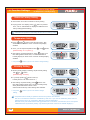
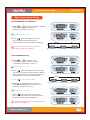
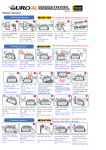
How to Set Abnormal High & Low Temp. Alarm
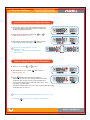
(4) How to change Centigrade & Fahrenheit
How to Set Abnormal Low Temperature Alarm
▶ This function gives notice when incubator temperature
is lower than setting temperature because of abnormal
ambient temperature decrease.
▶ Adjust abnormal low temp. setting with
button. [Default setting : -3°C]
or
▶ After setting required value, press
button to save.
Then, it will go to the next stage,°C & °F change.
Abnormal Low Temperature: " LO" will
indicated on LCD.
(The others, same with abnormal high temp.
alarm function.)
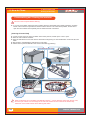
How to change Centigrade & Fahrenheit
▶ Select °C or °F with
or
▶ After selecting °C or °F , press
[Default setting : °C]
button.
button to save.
▶ Press
button after choosing Centigrade or
Fahrenheit to save what you change, and then set value
is blinking after "Trn"(set turning cycle) is displayed for
0.5 second on temp FND for MAX 190 / MAX 380 to go to
next stage. For MAX 1000,
set value is blinking after "Trn1" (set turning cycle for left-side cradle)
is displayed for 0.5 second.
How to change Centigrade value to Fahrenheit °C = 5/9 (°F - 32)
※ Just press
49
button if you do not need to change setting.
%*(*5"-*/$6#"503