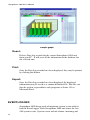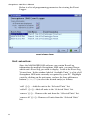
1
Sensaphone 2000
User’s Manual
○ ○ ○ ○ ○ ○ ○ ○ ○ ○ ○ ○ ○ ○ ○ ○ ○
Version 3.3
Phonetics, Inc.
1
Sensaphone® 2000 User’s Manual
Every effort has been made to ensure that the information in this
document is complete, accurate and up-to-date. Phonetics, Inc.
assumes no responsibility for the results of errors beyond its
control. Phonetics, Inc. also cannot guarantee that changes in
equipment made by other manufacturers, and referred to in this
manual, will not affect the applicability of the information in this
manual.
Third Edition, version 3.3, September, 2000.
Written and produced by Phonetics, Inc.
Sensaphone is a registered trademark of Phonetics, Inc.
Touch Tone is a registered trademark of AT&T.
2
Important Safety Instructions
Your Sensaphone 2000 has been carefully designed to give you
years of safe, reliable performance. As with all electrical equipment,
however, there are a few basic precautions you should take to avoid
hurting yourself or damaging the unit:
Read the installation and operating instructions in this manual
carefully. Be sure to save it for future reference.
Read and follow all warning and instruction labels on the product
itself.
To protect the Sensaphone 2000 from overheating, make sure all
openings on the unit are not blocked. Do not place on or near a heat
source, such as a radiator or heat register.
Do not use your Sensaphone 2000 near water, or spill liquid of any
kind into it.
Be certain that your power source matches the rating listed on the
AC power transformer. If you’re not sure of the type of power
supply to your facility, consult your dealer or local power company.
Do not allow anything to rest on the power cord. Do not locate this
product where the cord will be abused by persons walking on it.
Do not overload wall outlets and extension cords, as this can result
in the risk of fire or electric shock.
Never push objects of any kind into this product through ventilation
holes as they may touch dangerous voltage points or short out parts
that could result in a risk of fire or electric shock.
To reduce the risk of electric shock, do not disassemble this
product, but return it to Phonetics’ Customer Service, or another
approved repair facility, when any service or repair work is required. Opening or removing covers may expose you to dangerous
voltages or other risks. Incorrect reassembly can cause electric
shock when the unit is subsequently used.
If anything happens that indicates that your Sensaphone 2000 is not
working properly or has been damaged, unplug it immediately and
follow the procedures in the manual for having it serviced. Return
the unit for servicing under the following conditions:
1. The power cord or plug is frayed or damaged.
2. Liquid has been spilled into the product or it has been exposed
to water.
3
Sensaphone® 2000 User’s Manual
3. The unit has been dropped, or the enclosure is damaged.
4. The unit doesn’t function normally when you’re following the
operating instructions.
Avoid using a telephone (other than a cordless type) during an
electrical storm. There may be a remote risk of electric shock from
lightning.
Do not use the telephone to report a gas leak in the vicinity of the
leak.
CAUTION
To reduce the risk of fire or injury to persons, read and follow these
instructions:
1. Use only the following type and size batteries: Ni-Cad, size C
2. Do not dispose of the batteries in a fire. The cell may explode.
Check with local codes for possible special disposal instructions.
3. Do not open or mutilate the batteries. Released electrolyte is
corrosive and may cause damage to the eyes or skin. It may be toxic
if swallowed.
4. Exercise care in handling batteries in order not to short the
battery with conducting materials such as rings, bracelets, and keys.
The battery or conductor may overheat and cause burns.
5. Do not mix old and new batteries in this product.
FCC Requirements
Part 68: The Sensaphone 2000 complies with Part 68 of the FCC
rules. On the back of the unit there is a label that contains, among
other information, the FCC Registration Number and the Ringer
Equivalence Number (REN) for this equipment. You must, upon
request, provide this information to your local telephone company.
The REN is useful to determine the quantity of devices that you
4
may connect to your telephone line and still have all of those
devices ring when your telephone number is called. In most, but not
all areas, the sum of the REN’s of all devices connected to one line
should not exceed five (5.0). To be certain of the number of devices
that you may connect to your line, you may want to contact your
local telephone company to determine the maximum REN for your
calling area.
This equipment may not be used on coin service units provided by
the telephone company. Connection to party lines is subject to state
tariffs.
Should the Sensaphone 2000 cause harm to the telephone network,
the telephone company may discontinue your service temporarily.
If possible, they will notify you in advance. But if advance notice
isn’t practical, the telephone company may temporarily discontinue
service without notice and you will be notified as soon as possible.
You will be informed of your right to file a complaint with the FCC.
The telephone company may make changes in its facilities, equipment, operations, or procedures where such action is reasonably
required in the operation of its business and is not inconsistent with
the rules and regulations of the FCC that could affect the proper
functioning of your equipment. If they do, you will be notified in
advance to give you an opportunity to maintain uninterrupted
telephone service.
The telephone company may ask that you disconnect this equipment
from the network until the problem has been corrected or until you
are sure that the equipment is not malfunctioning.
Part 15: This equipment has been tested and found to comply with
the limits for a Class A digital device, pursuant to Part 15 of the
FCC Rules. These limits are designed to provide reasonable
protection against harmful interference when the equipment is
operated in a commercial environment. This equipment generates,
5
Sensaphone® 2000 User’s Manual
uses and can radiate radio frequency energy and, if not installed and
used in accordance with the instructions, may cause harmful
interference to radio communications. Operation of this equipment
in a residential area is likely to cause harmful interference in which
case the user will be required to correct the interference at his own
expense.
Telephone Consumer Protection Act
The FCC Telephone Consumer Protection Act of 1991 makes it
unlawful for any person to use a computer or other electronic
device, including FAX machines, to send a message unless such
message contains, in a margin at the top or bottom of each transmitted page or on the first page of the transmission, the date and time
it is sent and an identification of the business or other entity, or
other individual sending the message, and the telephone number of
the sending machine or such business, other entity, or individual.
(The telephone number provided may not be a 900 number or any
other number for which charges exceed local or long-distance
transmission charges.)
To comply with this law, you must enter the following information
into your Sensaphone 2000:
Date & Time as shown in the System Programming section of this
manual.
Name and telephone number to identify the source of the FAX
transmission as shown in the System Programming section of this
manual.
Canadian Department of Communications Statement
Notice: The Canadian Department of Communications label
identifies certified equipment. This certification means that the
equipment meets certain telecommunications network protective
operational and safety requirements. The Department does not
guarantee the equipment will operate to the user’s satisfaction.
Before installing this equipment, users should ensure that it is
permissible to be connected to the facilities of the local telecommunications company. The equipment must also be installed using an
6
acceptable method of connection. In some cases, the company’s
inside wiring associated with a single line individual service may be
extended by means of a certified connector assembly (telephone
extension cord). The customer should be aware that compliance
with the above conditions may not prevent degradation of service in
some situations.
Repairs to certified equipment should be made by an authorized
Canadian maintenance facility designated by the supplier. Any
repairs or alterations made by the user to this equipment, or
equipment malfunctions, may give the telecommunications company cause to request the user to disconnect the equipment.
Users should ensure for their own protection that the electrical
ground connections of the power utility, telephone lines and internal
metallic water pipe system, if present, are connected together. This
precaution may be particularly important in rural areas.
CAUTION: Users should not attempt to make such connections
themselves, but should contact the appropriate electric inspection
authority, or electrician, as appropriate.
The Ringer Equivalence Number (REN) assigned to each terminal
device denotes the percentage of the total load to be connected to a
telephone loop which is used by the device to prevent overloading.
The termination on a loop may consist of any combination of
devices subject only to the requirement that the total of the Ringer
Equivalence Numbers of all the devices does not exceed 5.0. For
Sensaphone 2000, the Ringer Equivalence Number is 0.3.
7
Sensaphone® 2000 User’s Manual
8
Contents
Important Safety Instructions ............................ 3
CAUTION...................................................................................... 4
FCC Requirements ....................................................................... 4
Telephone Consumer Protection Act ........................................... 6
Canadian Department of Communications Statement ............. 6
Chapter 1: Introduction ................................... 15
Programming Interface .............................................................. 16
Technical Support ....................................................................... 16
About This Manual ..................................................................... 16
Chapter 2: Installation ..................................... 19
OPERATING ENVIRONMENT............................................... 19
MOUNTING THE UNIT ........................................................... 19
POWER SURGE PROTECTION ............................................. 20
BATTERY BACKUP .................................................................. 20
Turning the Sensaphone 2000 on......................................................... 20
TELEPHONE LINE .................................................................. 21
Line Seizure ........................................................................................... 22
INPUT CONFIGURATION ...................................................... 22
WIRING SENSORS AND TRANSDUCERS ........................... 23
LED INDICATORS .................................................................... 24
Inputs 1-8 and Power:........................................................................... 24
Battery: .................................................................................................. 24
System-On: ............................................................................................ 24
Phone: .................................................................................................... 24
Chapter 3: Communications ............................ 25
Installing and Starting the Software ......................................... 25
Minimum requirements ....................................................................... 25
Installation ................................................................................... 25
WINDOWS ‘95 INSTALLATION ....................................................... 25
WINDOWS 3.1 INSTALLATION ....................................................... 26
Running the Software ................................................................. 26
ix
Sensaphone® 2000 User’s Manual
Sensaphone 2000 Menu Bar ................................................................. 27
Communications Setup .............................................................. 28
Local Port Configuration ..................................................................... 28
Modem Setup .............................................................................. 28
Communication Status ......................................................................... 29
Advanced Comm Setup ........................................................................ 30
Options ................................................................................................... 31
Chapter 4: Programming .................................. 33
SETTING UP NEW UNITS ................................................... 33
Procedure .................................................................................... 34
COMMUNICATING WITH SENSAPHONE 2000 ................. 35
Local Communication .................................................................. 35
Modem Communication .............................................................. 35
Off-line Communication .............................................................. 36
MANAGING UNIT PROGRAMMING FILES ........................ 36
To create a Data File: ................................................................... 36
To view a Data File Off-line: ........................................................ 37
To delete a Data File: ................................................................... 37
To load an existing Data File into a Sensaphone 2000 Unit: ........ 37
SYSTEM PROGRAMMING .................................................. 37
System Identification ................................................................... 38
Unit Phone Number: ................................................................... 38
Unit Description: ......................................................................... 38
Clock: .......................................................................................... 39
Unit Date & Time ......................................................................... 39
Auto Daylight Savings .................................................................. 39
Dialout Settings: .......................................................................... 39
Dialing Method ............................................................................ 39
Dialing Prefix ............................................................................... 39
Alpha Pager Speed ....................................................................... 40
Maximum Calling Rounds ............................................................ 40
Voice Repetitions ......................................................................... 40
ACCESS: .............................................................................. 40
Acknowledgment Code ................................................................ 40
Voice Password ............................................................................ 40
Slave ID ....................................................................................... 41
Passwords .................................................................................... 41
Incoming Calls: ............................................................................ 41
Rings Until Answer ...................................................................... 41
x
Carrier Wait Time......................................................................... 41
INPUTS ............................................................................... 41
STATUS TAB: ....................................................................... 42
Input Name: ................................................................................ 42
Value (with units): ....................................................................... 42
Status: .......................................................................................... 43
State: ........................................................................................... 43
Min & Max: .................................................................................. 43
Clear Alarms: ............................................................................... 44
CONFIGURATION TAB: ..................................................... 44
Input Type: ................................................................................... 44
Table Low & Table High: .............................................................. 44
Calibration: .................................................................................. 45
Label/Units: ................................................................................. 45
ALARM PROGRAMMING TAB:........................................... 46
Inputs Name: ............................................................................... 46
Alarm Low Limit: ......................................................................... 46
Alarm High Limit: ........................................................................ 47
Recognition Time: ........................................................................ 47
Call List: ....................................................................................... 47
Alarm Enable/Disable: ................................................................. 48
Alarm Reset Time: ........................................................................ 48
MONITORS ........................................................................ 48
Displaying Input Monitors ........................................................... 48
Delete Input Monitors ................................................................. 49
Bar Reading: ................................................................................ 49
Low Limit: .................................................................................... 49
High Limit: ................................................................................... 49
Low Alarm Limit: ......................................................................... 49
High Alarm Limit: ........................................................................ 50
Minimum Input Reading: ............................................................. 50
Maximum Input Reading: ............................................................ 50
Gauge Reading: ........................................................................... 50
Low Limit: .................................................................................... 50
High Limit: ................................................................................... 51
Low Alarm Limit: ......................................................................... 51
High Alarm Limit: ........................................................................ 51
Minimum Input Reading: ............................................................. 51
Maximum Input Reading: ............................................................ 51
DESTINATIONS .................................................................. 52
xi
Sensaphone® 2000 User’s Manual
Name: .......................................................................................... 52
Destination: ................................................................................. 53
Special Dialing Codes: ................................................................. 54
Special Alphanumeric Pager Dialing Codes ................................. 55
Call Zones: ................................................................................... 55
Alarm Call Mode: ........................................................................ 56
Disabled: ..................................................................................... 56
Until Acknowledged: ................................................................... 56
Inform: ........................................................................................ 57
DIAL TYPE: ......................................................................... 58
Intercall Delay: ............................................................................ 59
Send Report: ................................................................................ 59
DATALOGGING ................................................................. 59
Interval: ....................................................................................... 60
Use Start Time:............................................................................. 61
Start Time:.................................................................................... 61
Inputs Being Logged: ................................................................... 61
Start/Stop datalogging: ................................................................ 61
RESET NOW Button ..................................................................... 62
DOWNLOADING THE DATA LOGGER: ............................. 62
VIEWING THE DATA LOGGER (ON-LINE): ......................... 62
VIEWING THE DATA LOGGER (OFF-LINE): ........................ 63
Input selection: ............................................................................ 63
From Date and To Date: ............................................................... 63
Query: ......................................................................................... 63
Graph: ......................................................................................... 63
Export: ......................................................................................... 64
EVENT LOGGER ................................................................. 64
Downloading the Event Logger: ................................................... 65
Viewing the Event Logger: ........................................................... 65
Unit selection: ............................................................................. 66
Event types: ................................................................................. 67
Query Times: ................................................................................ 67
View: ........................................................................................... 67
Reset Event Logger: ...................................................................... 67
REPORTS ............................................................................ 67
Current Status: ............................................................................. 68
Data Logger: ................................................................................ 68
Use Start Time:............................................................................. 68
Report Interval: ............................................................................ 68
xii
POLLING ............................................................................ 69
GLOBAL VIEW: ................................................................... 72
SETTINGS: .......................................................................... 72
Enable Polling: ............................................................................. 72
Reset Data Log after download: ................................................... 72
Print Data Log after download .................................................... 73
Print Event Log after download ................................................... 73
Chapter 5: Status Report and Voice Messages .. 75
Playing/Recording Messages using the Voice Record Jack ............... 75
Local Status Report .............................................................................. 76
Status Report ........................................................................................ 76
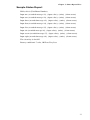
Sample Status Report ........................................................................... 77
Chapter 6: Operation....................................... 79
PART ONE: ALARM DIALOUT AND ACKNOWLEDGMENT .................................................................................... 79
Alarm Recognition: .............................................................................. 79
Alarm Notification: .............................................................................. 79
Dialout Note: Call Progress .................................................................. 79
Alarm Call Mode: Until Acknowledged vs. Inform ........................... 80
Alarm Dialout - Voice ........................................................................... 80
Alarm Dialout - Beeper ........................................................................ 81
Alarm Dialout - Alphanumeric Pager ................................................. 81
Alarm Dialout - Modem ....................................................................... 81
Alarm Dialout - Fax .............................................................................. 82
Alarm Dialout - E-mail ........................................................................ 82
ALARM ACKNOWLEDGMENT:............................................ 82
Alarm Acknowledgment - Voice Dialout ............................................. 82
Alarm Acknowledgment - Beeper Dialout .......................................... 83
Alarm Acknowledgment - Alphanumeric Pager Dialout ................... 84
Alarm Acknowledgment - Automatic (Max Calls) ............................. 85
Acknowledgement ID ........................................................................... 86
PART TWO: REPORT DIALOUT ........................................... 87
PART THREE: CALL-IN STATUS .......................................... 87
Voice Mode: ........................................................................................... 87
Chapter 7: Polling Mode & Auto Answer Mode 89
Enabling Auto Answer Mode ..................................................... 89
Enabling Polling Mode ............................................................... 89
xiii
Sensaphone® 2000 User’s Manual
APPENDIX A : Checking Your Sensaphone 2000
for Proper Operation ................................... 91
APPENDIX B: System Events List...................... 93
APPENDIX C: Engineering Specifications......... 95
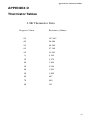
APPENDIX D: Thermistor Tables ...................... 99
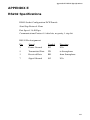
APPENDIX E: RS232 Specifications................ 101
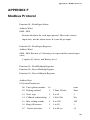
APPENDIX F: Modbus Protocol ..................... 103
APPENDIX G: Troubleshooting ...................... 111
APPENDIX H: Accessories ............................. 117
APPENDIX I: Returning the Unit for Repair ... 119
INDEX ........................................................... 121
WARRANTY
xiv
Chapter 1: Introduction
Chapter 1: Introduction
Welcome to the Sensaphone 2000 by Phonetics, Inc. The 2000 is a
powerful monitoring, alarm, and data logging system. It can monitor
equipment and environmental conditions using 8 universal inputs,
plus built-in power failure detection. The Sensaphone 2000 also
features a wide variety of communication options: user recordable
voice, fax, modem, numeric pager, alphanumeric pager, and internet
e-mail.
The Sensaphone 2000 is a fully programmable environmental
monitoring system for unattended or remote applications. The unit
will monitor and alarm on (8) universal inputs including: N.O./N.C.
contact, 2.8K & 10K thermistor, 4-20mA, 0-5V, run time accumulator, and pulse count. The unit will also monitor AC power and
battery condition. On the front of the unit are LED indicators to
show the operating status. Each input (including power) has a red
status LED indicating the alarm status of the input. There is also a
green LED for Battery status, a green LED for System-On status
and an amber LED for Phone status.
The unit can be programmed via a local serial port or remotely by
modem using an IBM compatible computer with the Windows
operating system and the included Manager 2000 software package.
All programming is stored in nonvolatile memory. The unit is
capable of performing data logging of the (8) universal inputs,
power and battery voltage. The data logging is stored in nonvolatile
memory. A real-time clock is also included to time stamp logged
data and to schedule reports. The unit is capable of sending automatic reports on a programmable time basis, (i.e. Send a report
every x hours starting at time xx:xx). Reports may be sent via fax or
e-mail only, and will be sent to all destinations programmed to
receive reports. The report comprises a cover page and the unit data,
which includes the current conditions of each input, power status
and battery condition. If the data logger is enabled and programmed
to be sent with reports, a data log report will also be sent at this
time. You also have the option to retrieve the data logger information locally or remotely on demand.
The unit comes in an aluminum enclosure with tabs for wall or
panel mounting. Terminal connections for inputs are easily accessible from the front of the unit. The unit is powered via a plug-in
adapter and has a backup battery holder located in a separate
chamber in the enclosure. The backup battery system requires (6)
C-size nicad batteries. Circuitry in the unit will maintain proper
charging of the battery system. The unit is capable of alarming via
15
Sensaphone® 2000 User’s Manual
voice, alphanumeric pager, numeric pager, fax or e-mail. You also
have the capability to program a call list for each input as well as
four time zones to assign telephone numbers to. You can even
monitor the input values in real-time through the local port or online via modem.
Note: E-mail requires a subscription fee.
Programming Interface
Manager 2000 Windows programming software is included to allow
quick and easy access all of the unit's programmable parameters.
Sophisticated features such as realtime input monitoring, graphical
bar and gauge displays, polling of multiple units and a database to
store and query data logger information, all combine to provide a
complete monitoring system. The Programming and Operation
chapters provide step-by-step instructions on how to use all of the
unit's features.
If any questions arise upon installation or operation of the
Sensaphone 2000, please contact Phonetics Technical Service
Department at the number shown below and have the following
information:
•
Date of purchase __________________
•
Serial number
__________________
Technical support is available from 8:00 AM to 5:00 PM, EST.
Phonetics, Inc.
901 Tryens Road
Aston, PA 19014
Phone: (610)558-2700
FAX: (610)558-0222
http://www.sensaphone.com
About This Manual
This manual comprises the instructions and commands necessary to
install and program the Sensaphone 2000. Additional summary and
16
Chapter 1: Introduction
application chapters are included to help you speed programming
and to understand Sensaphone 2000's features. You should thoroughly read this manual to establish a basic understanding of the
system and keep it as a reference.
17
Sensaphone® 2000 User’s Manual
18
Chapter 2: Installation
Chapter 2: Installation
This chapter provides information to install the Sensaphone 2000.
Please read the entire chapter before starting.
OPERATING ENVIRONMENT
The Sensaphone 2000 should be mounted and operated in a clean,
dry environment. The unit is microprocessor controlled and as a
result it should not be installed near devices that generate strong
electromagnetic fields. Such interference is typically generated by
power switching equipment such as relays or contactors. A poor
operating environment may result in unwanted system resets and/or
system lockup. The temperature range the unit can operate in is
32°F to 122°F (0°C to 50°C). If the unit needs to operate below
freezing, a strip heater should be installed nearby.
MOUNTING THE UNIT
When you receive the unit, carefully remove it from the box.
Mounting tabs with holes are provided on the left and right sides of
the enclosure (see figure below). Mount the unit in a position that
allows easy access to the input terminal block, battery compartment, on/off switch and the programming port. Also, there must be
a power outlet and telephone jack close to the unit.
CAUTION:The Sensaphone 2000 is a sensitive electronic device. Personnel and
work area should be grounded before coming into contact with this device. Do
not install the Sensaphone 2000 near strong electrostatic, electromagnetic,
magnetic or radioactive fields.
mounting dimensions
19
Sensaphone® 2000 User’s Manual
POWER SURGE PROTECTION
The Sensaphone 2000 can be damaged by power surges and
lightning through the telephone line and the power supply. Although
the unit has built-in surge protection, we strongly recommend that
additional protection be obtained for the unit and for any electronic
equipment that is attached to your power supply and telephone lines.
Power surge protection is especially important if you live in a
lightning-prone area.
BATTERY BACKUP
The Sensaphone 2000 has a compartment for 6 “C” cell NickelCadmium rechargeable batteries (not included). Be sure to use
quality batteries that are rated for at least 2200mAhr. These will
provide approximately 10-15 hours of unit operation in the event of
a power failure.
NOTE: Use ONLY Nickel-Cadmium rechargeable
batteries.
The unit will constantly recharge the batteries whenever the power
switch is turned on and the unit is plugged into a power supply.
Also, a 3V lithium battery is included for memory storage, to retain
user programming. This battery should provide at least 2 years of
service without power, and up to 10 years of intermittent use.
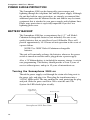
Turning the Sensaphone 2000 on
Thread the power supply cord through the strain relief ring next to
the power jack, and plug it in. Then plug the transformer into a
115VAC 60Hz outlet. The ring anchors the cord, protecting the plug
and jack. Slide the power switch to ON to start the unit. The
System-On LED should glow steadily.
Strain Relief
Support Ring
Electrical Jack
Sensaphone 2000 Rear View
20
Chapter 2: Installation
It is important to note that when the unit is turned off, all programming is retained in non-volatile memory via the internal 3V lithium
battery. The “C” cell Ni-Cad batteries are not in use when the power
switch is off.
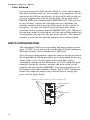
TELEPHONE LINE
Connect the Sensaphone 2000’s PHONE LINE jack to a standard 2
wire analog phone line. The unit dials using pulse or tone, with loop
start only. The Sensaphone 2000 will recognize ringer frequencies
from 16 to 60 Hz and will operate with all standard analog telephone systems that accept pulse or tone dialing.
Phone Line:
Attach standard
phone line here.
Phone Ext. is the
“Line Seize” jack
for use with other
phone devices.
To record messages, plug a
telephone directly into this jack.
DO NOT connect a Phone Line
to this jack.
RS232 for data communication
Power Off/On
Phone Phone
Line
Ext.
Voice
Record
RS232 Port
Sensaphone 2000—Front View
CAUTION: Do NOT connect the unit’s VOICE
RECORD jack to a live telephone line as this will
cause permanent damage to the unit.
Certain private telephone systems and public switching equipment
may not accept the unit’s dialing or may generate an unacceptable
ring signal. In those cases, a dedicated line may be required for the
unit. Consult the supplier of your telephone system if you encounter
problems.
CAUTION: Never install telephone wiring during a
lightning storm. Never install telephone jacks in wet
locations unless the jack is specifically designed for
wet locations. Never touch uninsulated telephone
wires or terminals unless the telephone line has been
disconnected at the network interface. Use caution
when installing or modifying telephone lines.
21
Sensaphone® 2000 User’s Manual
Line Seizure
Line seizure gives the 2000 unit the ability to “seize” the telephone
line when it needs to dial out. For example, if an emergency occurs
which puts the 2000 in alarm mode, the unit will be able to dial out
even if a telephone has been left off the hook. To the right of the
PHONE LINE jack is another labeled PHONE EXT. This jack can
be used to share a phone line with other devices (telephone, fax
machine, modem) and to give the 2000 priority in the event of an
emergency. To make use of this feature you must have all the
extension devices originate from the PHONE EXT. jack. Whenever
the unit must make an alarm phone call, the unit will disconnect any
current phone calls and seize the line for its own use. The unit will
continue to seize the line until the alarm has been acknowledged.
INPUT CONFIGURATION
The Sensaphone 2000 can accept analog and digital inputs over the
range 0-5VDC. It can also accept current from 4-20mA transducers.
The input load for current transducers is 220 Ohms.
To set the input configuration, adjust the jumpers located just below
the terminal block. Needlenose pliers are recommended for moving
shunts. There is one for each input so that each input can be
individually configured. For thermistors, N.O./N.C.(normally open/
normally closed) dry contacts, run time and pulse count, set the
jumper to the left (marked TMP/DRY). For current transducers set
the jumper to the right (marked 4-20mA). For 0-5VDC transducers,
remove the jumper or simply hang it off one pin for storage purposes. See the figure below.
NO/NC dry contact, thermistor, run time, and pulse count
4-20mA transducer
0-5VDC transducer
TMP/DRY 4-20MA
22
Chapter 2: Installation
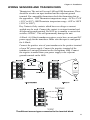
WIRING SENSORS AND TRANSDUCERS
Thermistors: The unit will accept 2.8K and 10K thermistors. These
should be wired to an input terminal and the adjacent ground
terminal. For compatible thermistors check the thermistor data in
the appendices. 2.8K Thermistor temperature range: -58ºF to 176ºF
(-50ºC to 80ºC); 10K Thermistor temperature range: -60ºF to 300ºF
(-50ºC to 150ºC).
Dry Contacts: Only contacts which have no voltage or current
applied may be used. Connect the contact to an input terminal and
an adjacent ground terminal. Do NOT try to monitor a contact that
switches 120VAC. This will permanently damage the unit.
4-20mA: A 4-20mA transducer requires you to have an external DC
power supply for the transducer. Make sure the input is configured
for 4-20mA.
Connect the positive wire of your transducer to the positive terminal
of your DC power supply. Connect the negative terminal of the
transducer to an input terminal on the Sensaphone 2000. Connect
the negative terminal from your power supply to the adjacent
ground terminal on the 2000.
The different sensor types connected to the terminal block.
23
Sensaphone® 2000 User’s Manual
LED INDICATORS
The LEDs provide on-site alarm and status information. Listed
below are descriptions of how the LEDs work.
Inputs 1-8 and Power:
LED Off: Input OK
LED Blinking: Unacknowledged alarm exists
LED On: Acknowledged alarm exists
Battery:
LED On: Battery condition OK
LED Blinking: Battery condition low
LED Off: Battery very low
System-On:
LED On: System power on
LED Off : System power off
Phone:
LED On: Unit is communicating on the phone line
LED Off: Unit is not using the phone line
24
Chapter 3: Communications
Chapter 3: Communications
This section describes how to install and configure the Sensaphone
2000 Windows Software for your computer and modem.
Installing and Starting the Software
Minimum requirements
486 or better computer (Pentium recommended)
4 MB of free disk space
4 MB RAM (8 MB RAM recommended)
Graphics card compatible with Microsoft Windows 3.1, 95
or NT (such as VGA)
Microsoft Windows 3.1, 95 or NT
VGA or Super VGA monitor
Mouse
Modem
INSTALLATION
The Manager 2000 Windows software setup program makes
installation quick and easy. You’ll be prompted to insert the installation disks in the order they are numbered. Make sure that all
Windows applications are closed before attempting to run Setup. If
you encounter problems during installation, please call Phonetics
Technical Support at (610)558-2700.
The Sensaphone 2000 Software for Windows will install to a
directory named C:\S2000, unless you choose to change the
directory name.
WINDOWS ‘95 INSTALLATION
1. Start Windows.
2. Insert disk labelled Sensaphone 2000.
3. Select Start>Run and type in a:\Setup.exe. Click OK.
4. Follow the prompts until the installation is finished.
25
Sensaphone® 2000 User’s Manual
5. Insert disk 1 of the Sensaphone 2000 Database.
6. Select Start>Run and type a:\Setup.exe and click OK. This will
install the Borland Database Engine.
7. Follow the prompts and install disk 2 when instructed.
8. Follow the prompts until installation is complete.
WINDOWS 3.1 INSTALLATION
1. Start Windows.
2. Insert disk 1 labelled Sensaphone 2000.
3. Select File>Run and type in a:\Setup.exe. Click OK.
4. Follow the prompts until the installation is finished.
5. Insert disk 1 of the Sensaphone 2000 Database.
6. Select File>Run and type a:\Setup.exe and click OK. This will
install the Borland Database Engine.
7. Follow the prompts and install disk 2 when instructed.
8. Follow the prompts until the installation is complete.
Running the Software
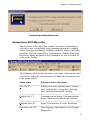
To run the software, double click the 2000 icon. When the software
runs for the first time a configuration screen will appear. This will
automatically configure your modem settings and local serial port if
selected. If you have an external modem, make sure it is ON before
you proceed. If you would prefer to configure the software manually, you may do so after installation. When you start the software
you’ll see the main menu and toolbar. These menus and tools will
allow you to open new 2000 units, communicate with existing 2000
units, observe real-time input values and numerous other features.
Pictured below is the Automatic Port Detection form.
26
Chapter 3: Communications
automatic port detection screen
Sensaphone 2000 Menu Bar
The menu bar at the top of the window lists menu commands for
selecting a unit, configuring your communication ports, sending
and receiving programming, enabling automatic features and other
functions. You can choose these commands by clicking them with
the mouse. Many frequently used commands are also available as
tools on the Toolbar.
The following table briefly describes each menu. Shortcut keys that
you can use to display each menu are included in parentheses next
to the menu names.
Menu name
Functions under this menu...
________________________________________________________________________
File (Alt, F)
Adding new units, opening units, closing
units, loading data, saving data, deleting
data, printing information, exiting.
________________________________________________________________________
Config (Alt, C)
Communications Setup, Communications
Status, Advanced Comm Setup, Options
________________________________________________________________________
Program (Alt, P)
Inputs, Destinations, System, Reporting
________________________________________________________________________
Functions (Alt, U)
Data Logging, Auto Answer, View Events,
Diagnostics
27
Sensaphone® 2000 User’s Manual
________________________________________________________________________
Polling (Alt, O)
Unit Schedule, Enable
________________________________________________________________________
Window (Alt, W)
Cascade, Tile, Arrange Icons, Minimize all
________________________________________________________________________
Help (Alt, H)
About, Help
________________________________________________________________________
Communications Setup
The software will communicate to your 2000 through your
computer’s local serial port or through your modem. These communication paths must be properly configured for a connection to be
established. (If you ran the auto-configure option at start-up, you
may skip over this section.) To configure the communications
settings manually, click on Configuration>Communications Setup.
Local Port Configuration
Select the appropriate serial port to communicate with the 2000.
This must be a serial port on your computer that is unused and can
be connected to the Sensaphone 2000’s RS232 port.
Modem Setup
Select the serial port that communicates with your modem and
select the maximum baud rate of your modem. This will typically be
all that is required to configure your modem; however, additional
options have been included and are described below.
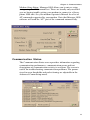
Retries: This is the number of times Manager 2000 will attempt to
call a Sensaphone 2000 if it encounters a busy signal or is unsuccessful at making a connection during any manual attempt to call
out.
Use All Dial Time: Checking this box will make the Manager 2000
software wait until this time period has expired before attempting to
communicate with the unit, even though a connection may have
been established earlier.
Dial Time Out: If a modem connection is not established with a
Sensaphone 2000 before this time expires, Manager 2000 software
terminates the call.
28
Chapter 3: Communications
Modem Setup String: Manager 2000 allows you to enter a setup
string using the AT command set. These are usually only needed if
you are having trouble getting your modem to connect to a Sensaphone 2000 unit. See your modem Operator’s Manual for a list of
AT commands supported by your modem. Note that Manager 2000
software will send the “AT” part of the command automatically.
Communication Status
The Communication Status screen provides information regarding
communication performance, communication errors and text
descriptions of communication activity in real time. The screen is
useful for troubleshooting communication problems. The parameters for error thresholds and packet timing are adjustable in the
Advanced Comm Setup menu.
29
Sensaphone® 2000 User’s Manual
Advanced Comm Setup
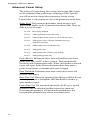
The Advanced Comm Setup form can be used to tune and customize the communication performance of Manager 2000. Typically
you will not need to change these parameters for any reason.
Listed below is a description of each of the parameters on the form:
Status Level: This parameter determines which messages will
appear in the display on the Communication Status form. There are
eight levels of messages:
Level 0: Messaging disabled
Level 1: Adds significant events and errors
Level 2: Adds modem events, writes to unit & file messages
Level 3: Adds packet errors, advanced modem messages,
download messages
Level 4: Adds notification of read from unit
Level 5: Adds packet data
Level 6: Adds notification of input status polling
Level 7: Adds polling packet data
Packet Retries: Information flows back and forth between Sensaphone 2000 and your PC in data “packets.” Both automatically
check for packet transmission errors. When a bad packet is detected,
it gets sent again. Packet Retries determines how many times a
packet is sent before a communication error is logged.
Error Threshold: Determines how many consecutive errors will
result in a disconnect.
Retry Time Out: This is the amount of time Manager 2000 will wait
for a response from a Sensaphone 2000 unit before it decides to
make another request.
Packet Time Out: The amount of time before the PC gives up and
determines that an individual modbus request has timed out.
Decreasing this parameter will not increase performance, but
increasing the parameter may remove occasional errors.
30
Chapter 3: Communications
advanced comm setup
Options
The Options form (under the Configuration menu) allows you to
customize the display to your taste. You can have the Toolbar and/or
the Statusbar be displayed or hidden. You can elect to see the
commands as icons with text or as icons only. The Statusbar can be
placed at the far right end of the Toolbar only if you choose “Buttons have Icons Only” in the Tool Bar box. Otherwise it appears on
the bottom right of your screen. (See figure on the following page.)
statusbar (at far right of Toolbar)
The On-Line Timeout, if selected, will automatically disconnect you
from the Sensaphone 2000 when there is no mouse movement for
the duration of time you specify. The range is 1 minute to 24 hours
and the default, when you turn on this feature, is 1 hour.
Incoming Alarm Notification allows you to switch off and on the
audible notification of an incoming alarm. The default setting is off.
The Sensaphone 2000 comes with a pre-programmed WAV file as
31
Sensaphone® 2000 User’s Manual
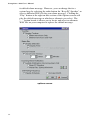
its default alarm message. However, you can change that to a
system beep by selecting the radio button for “Beep PC Speaker,” or
select a different WAV file for your alarm message. Clicking the
“Play” button at the right on this section of the Options screen will
play the default message or whichever alternate you select. The
“…” button beside it allows you to locate and select an alternate
WAV file on your computer to replace the default message.
options screen
32
Chapter 4: Programming
Chapter 4: Programming
The Sensaphone 2000 software provides access to all of the unit’s
programming through point-and-click menus. The unit can be
programmed either locally through the serial port or remotely via
modem. When you are finished programming, the Sensaphone
2000 Windows software provides the option to save the unit’s
programming on your computer for backup purposes. You must
save this programming information in order to view the programming off-line for any unit. Once you save the programming for a
particular unit, you may copy the same information into another
unit if desired. A default programming file (defaults.s2k) is
included in case you want to restore the unit to factory default
settings.
SETTING UP NEW UNITS
When a new unit is added you will be prompted to fill in a Unit
Data form. This form holds the unit’s description and phone
number as well as password information. Sensaphone 2000 features
two-level password access: one for programming and one for
status. Status-only access allows you to view input values and
programming but does not allow you to change any parameters.
This is useful if you want to allow multiple users to view the
information for this unit but do not want them to be able to change
anything. If this is the first time the unit is being accessed you
should set up both passwords. When other users add this unit to
their computer you can give them the status password and/or the
programming password depending on your requirements. When
logging in using the status password the software will automatically
send the password during the initial connect sequence. When
logging in using the program password you will be prompted to
enter the password after connecting. You may also allow the
software to automatically log in with the programming password by
clicking the “Save program password to disk” box.
Note that if you do not enter a programming password, a default password of “S2000” will be entered
for you.
33
Sensaphone® 2000 User’s Manual
New Unit Data Form
Procedure
1.
Click the Open button on the Toolbar,
then click the
“New” button on the “Open Connection” form. Or, from
the menu bar choose File, then New Unit.
2.
Fill in the Unit Description and Phone Number. This sets
up a record that the software will reference whenever you
want to communicate with or check information about
this unit.
3.
Enter a status password. If this the first time the unit is
being set up, you must also enter a programming password or you will not be able to program the unit.
4.
Select the type of password access you wish to log in
with: status or programming.
5.
34
*
The status password allows viewing access only. No programming changes will be possible. The status password is
automatically saved to your hard disk and will be entered for
you when you attempt to communicate with the unit.
*
The programming password allows full access to all parameters. By clicking the “Save program password to disk” box,
the software will automatically enter the programming
password for you when you attempt to communicate with the
unit.
Click “OK” to add the new unit to your computer’s
database.
Chapter 4: Programming
COMMUNICATING WITH SENSAPHONE 2000
This section describes the procedure for communicating with a
Sensaphone 2000 unit.
Note: the 2000 can only communicate with one person at a time.
This means that if someone is logged on through the RS232 port,
the unit will NOT answer a call, nor will it make any calls until the
connection is closed. Conversely, if someone is on-line using the
modem, you cannot log on through the RS232 port.
Choose Local or Modem communication.
Local Communication
For Local communication you must connect one of your computer’s
serial COM ports to the 2000’s RS232 port.
1.
Click the “Open” button on the Toolbar. The “Open Connection”
form will appear.
2.
Choose the unit you want to connect with from the text box.
3.
Select “Local” Connection Mode.
4.
Click “Connect.”
Your PC will connect locally to the Sensaphone 2000 unit. If a
local connection is not established, see the Troubleshooting section
of this manual.
Modem Communication
For Remote communication you must have a modem and a telephone line connected to your computer.
1.
Click the “Open” button on the Toolbar. The “Open Connection”
form will appear.
2.
Choose the unit you want to connect with from the text box.
3.
Select “Modem” Connection Mode.
4.
Click “Connect.”
35
Sensaphone® 2000 User’s Manual
Your PC will instruct the modem to dial the Sensaphone 2000 unit
using the phone number from the Unit Data form. The Sensaphone
2000 will answer the call and establish a connection with your
modem. If a remote connection is not established, see the Troubleshooting section of this manual.
Off-line Communication
Off-line communication provides a method of viewing the programming in a unit without being connected. You can also query, view or
print information from the Data Logger or Event Logger while offline. For Off-line communication you must have a data file saved
for the unit selected. This can only be created after you have
finished programming a unit while on-line and saved the programming. The Manager 2000 software will prompt you to save when
you exit, or you can save by clicking File>Save Data from the menu
bar. A “File Save” box will appear so that you can enter a file name
for that unit. Do not change the .s2k extension because the software
uses this to identify Sensaphone 2000 data files.
MANAGING UNIT PROGRAMMING FILES
The programming parameters of a Sensaphone 2000 unit should be
saved to a Data File in your computer. There are several reasons for
this:
1.
In order to view a unit’s programming off-line, you need to save the
unit’s programming in a Data File.
2.
Once you save the programming for a particular unit, you may copy
the same information into another unit.
3.
It’s a good idea to have a backup copy of a unit’s programming in
case the unit gets damaged.
The Manager 2000 Windows software allows you to view saved
Sensaphone 2000 unit information without being connected to a
unit. You may view a unit’s programming, or view a unit’s downloaded Data Logger or Event Logger. In order to view a unit’s
programming, you need to save the unit’s programming in a Data
File while still on-line.
To create a Data File:
While you are on-line, choose “File” from the main menu, then
select “Save Data.” Enter a file name, then click “OK.”
This will create an Offline Data File.
36
Chapter 4: Programming
To view a Data File Off-line:
1.
Click the “Open” button on the Toolbar. The “Open Connection”
form will appear.
2.
Choose a unit from the text box.
3.
Click Edit on the “Open Connection” form. The name of the last
Off-Line Data File that was created or saved appears in the lower left
corner of the Unit Data form. Click “OK” to accept the file or click
the Browse button next to the filename to select another file.
4.
Under Connection Mode, select “Off-line.”
5.
Click “Connect.”
The Manager 2000 software will display the programming parameters as if you were connected with a unit. You can view these
parameters, but you can’t change them.
To delete a Data File:
Choose “File” from the main menu, then select “Delete Data File.”
Select the file you wish to delete and click “OK.”
To load an existing Data File into a Sensaphone 2000 Unit:
1.
Establish an on-line connection with a Sensaphone 2000 (either
Local or via Modem).
2.
Choose “File” from the main menu, then select “Load Data.”
3.
Select the Data File you wish to load, then click “OK.”
The selected Data File will be loaded into the Sensaphone 2000.
All existing programming in the unit will be overwritten.
SYSTEM PROGRAMMING
The System form includes the global system parameters that apply
to the unit in general. You must be on-line with the unit to program
the System parameters. Once you are on-line, choose Program from
the main menu, then select System. You can also access the System
programming from the Toolbar button labeled System.
Below is a list of the parameters, their default settings and the range
of programming for each parameter.
37
Sensaphone® 2000 User’s Manual
System Settings form
System Identification
Unit Phone Number:
The Unit’s Phone Number is the identification number of the
Sensaphone 2000 and can be up to 16 digits long. This is automatically filled in from the information you provided when setting up
the unit on your computer. This number must be programmed to be
the same as the telephone number where the unit is installed. The
Unit’s Phone Number serves several purposes:
1.
When using your PC and Manager 2000 software to remotely
program a Sensaphone 2000, this is the number your modem will
dial to contact the unit.
2.
It’s the first thing spoken by Sensaphone 2000 during any voice call:
“Hello, this is (Unit Phone Number).”
3.
When Sensaphone 2000 sends a cover page with a Fax transmission
or alerts an alphanumeric pager, the Unit’s Phone Number is sent as
part of the information.
Unit Description:
The Unit Description is the text description of the Sensaphone
2000. It can be up to 32 characters long. This is automatically
38
Chapter 4: Programming
filled in from the information you provided when setting up the unit
on your computer. When Sensaphone 2000 sends a cover page with
a Fax transmission or alerts an alphanumeric pager, the Unit
Description is sent as part of the basic information.
Clock:
Unit Date & Time
The date and time are automatically programmed into a new unit,
based on your computer’s date and time. This will occur the very
first time you go on-line. If you are in a different time zone you
will need to correct the time accordingly.
Auto Daylight Savings
This instructs Sensaphone 2000 to automatically correct the time
twice a year for daylight savings.
Programmable settings: On, Off
Default setting: On
Dialout Settings:
Dialing Method
The Dialing Method parameter lets you program whether Sensaphone 2000 will dial out in Pulse or Tone. The default setting is
Tone.
Dialing Prefix
The “Dialing prefix” box on the System Settings screen is for email
prefixes only. If for instance the 2000 is on an office phone system
where it had to dial a “9” to get an outside line, entering a “9” here
will force the 2000 to dial “9” before dialing the email server phone
number.
To enter a specific prefix for dialout types other than email, go
instead to the Dialout Destination screen (see “Destinations” section
later in this chapter) and enter the prefix with the phone number in
the Destination column, following the instructions under “Special
Dialing Codes.” You must enter each prefix manually for each
individual phone number that requires one.
39
Sensaphone® 2000 User’s Manual
Alpha Pager Speed
This is the baud rate of the data connection between Sensaphone
2000 and your alphanumeric pager service.
Programmable settings: 300, 1200, 2400
Default setting: 1200
Maximum Calling Rounds
The maximum number of times Sensaphone 2000 will dial through
a list of destinations to attempt to deliver either an alarm or a report.
Programmable range: 0 - 100 calling rounds
Default setting: 100 calling rounds
Voice Repetitions
The number of times Sensaphone 2000 repeats the alarm message
during a dial out alarm call.
Programmable range: 0-10
Default setting: 3
Access:
Acknowledgment Code
This is the code used to acknowledge an alarm via Touch-Tone
telephone.
Programmable range: 0 - 999999 from 1 to 6 digits long. Note: When
using an acknowledgment code with leading zeros, all digits must be
included. If the acknowledgment code is 000888, simply entering
“888” will NOT acknowledge the alarm.
Default setting: 555
Voice Password
Sensaphone 2000 allows you to record input and ID voice messages. These messages are protected by the voice password. The
voice password must be entered on a Touch-Tone phone keypad in
order to record voice messages.
Programmable range: 0 - 999999 from 1 to 6 digits long.
Default setting: 555
40
Chapter 4: Programming
Slave ID
This is the modbus address of the Sensaphone 2000 unit. It is set by
default and should not be changed unless you are using multiple
units that might have the same, and therefore conflicting, ID
numbers. The Slave ID can be set to any number between 1 and
247. It should never be set to “0,” as this will keep you from
communicating with the unit.
Passwords
This command allows you to change Sensaphone 2000’s programming and status passwords. You can only change these if you are online and have logged on using the programming password.
Incoming Calls:
Rings Until Answer
This is the number of times Sensaphone 2000 will let the phone ring
before it answers an incoming call.
Programmable range: 1 - 15 rings
Default setting: 1 ring
Carrier Wait Time
The Carrier Wait Time is the amount of time Sensaphone 2000 will
wait for a modem connection when it receives an incoming call.
NOTE: Do not set this parameter too short, otherwise
a modem connection may never be established.
Programmable range: 10 to 60 seconds
Default setting: 35 seconds
INPUTS
The Sensaphone 2000 monitors 8 universal inputs, power, and
battery condition. You must be on-line with the unit to program the
Input parameters. Once you are on-line, choose “Program” from
the main menu, then select “Inputs.” You can also access Input
programming from the Toolbar button labeled Inputs.
41
Sensaphone® 2000 User’s Manual
There are 3 tabs on the Inputs form: Status, Alarm Programming,
and Configuration.
Status tab:
The Status tab shows the name, value, units of measure, status,
alarm state, and Min/Max values for all of the inputs.
Listed below is a description of the information found on the Status
tab of the Inputs form:
Input Name:
This field will allow you to type in a 16 character description for
each input.
Value (with units):
This is the real time state or value of each input. If a unit of measure
has been selected for the input, it will also be displayed here. If you
choose Pulse Count or Run Time as your Input Types and double
click on their respective Values, you will pop up a small screen on
which to preset the values for each.
Display range for 0-5V, 4-20mA, and Temperature input types:
-99,999.9 to 99,999.9
Display range for Pulse Count and Run Time: 0 to 999,999. You can
42
Chapter 4: Programming
choose hours, minutes, or seconds for time measurement, under the
Configuration tab. When the limit of 999,999 is reached, the value
will return to zero.
Status:
This is the current status of each input with respect to that input’s
alarm programming. For any input that displays a numeric value,
(temperature, 4-20mA, 0-5VDC, pulse count, or time accumulator)
the Status column will display either Okay, High, or Low. For N.O./
N.C. inputs, the Status Column will display either Open, Closed, or
the label selected for that input from the Configuration tab.
State:
The actual alarm state of the input. There are 5 possible alarm
states: No Alarm, Waiting, Alarm, Outstanding, and Cleared.
Definitions:
No Alarm (green) - A digital input is in its normal position or an
analog input is within the programmed alarm limits.
Waiting (yellow) - A digital input is in the alarm position or an
analog input has gone outside of the programmed alarm limits but
the input’s alarm recognition time has not expired.
Alarm, Alarm High, Alarm Low (red) - A digital input has remained
in the alarm position or an analog input has remained outside of the
programmed alarm limits for the length of the alarm recognition
time. An unacknowledged alarm exists.
Cleared (purple) - An alarm has been acknowledged, but the input is
still in the alarm position or is still outside of the programmed alarm
limits.
Outstanding (pink) - An unacknowledged alarm exists but the input
has returned to its normal position or back to within the programmed alarm limits.
Min & Max:
The highest and lowest values an input has reached. Digital inputs
have no Min or Max values, while other inputs may have only a
Max.
43
Sensaphone® 2000 User’s Manual
Clear Alarms:
The button marked “Clear Alarms” will, when pressed, clear all set
alarms.
Note: To clear an individual alarm, double click on it
in the “State” column.
Configuration tab:
The Configuration tab shows the name, type, high and low table
values, calibration setting, and label/units for all of the inputs.
Listed below is a description of the information found on the
Configuration tab of the Inputs form:
Input Type:
This can be one of eight types - Normally Open (N.O.), Normally
Closed (N.C.), 0-5V, 4-20mA, 2.8K thermistor, 10K thermistor,
Pulse count or Time Accumulator.
Table Low & Table High:
An important feature that Sensaphone 2000 offers is the ability to
create a unique linear table for each 4-20mA or 0-5V analog input.
The Table Low & Table High fields are used to define the upper and
lower analog display limits for 4-20mA and 0-5V input types. For
example, suppose you’re using a 4-20mA transducer to measure the
depth of water in a 75 foot well. Simply enter a Table Low of 0, and
44
Chapter 4: Programming
a Table High of 75 and the Sensaphone 2000 will scale the input to
read between 0 and 75.0. The Table Low & Table High fields are
also used to set the upper and lower limits for the bar and gauge
monitors found on the Monitor form.
Programmable ranges:
Table Low: -99,999.9 to 99,999.9
Table High: -99,999.9 to 99,999.9
Default settings:
Table Low value: 0
Table High value: 100
Calibration:
To compensate for minor variances in sensor accuracy, an offset
may be programmed for each input. For example, if input #3 is
sensing temperature and is reading 2.5 degrees too high, then the
calibration for input #3 should be set at -2.5 to obtain an accurate
reading. Digital inputs (N.O. and N.C.) cannot be calibrated.
Programmable range: +/-999.9 units
Default setting: 0.0
Label/Units:
This field lets you identify the input value using specific units of
measure and/or a description of the input condition. Several
selections for dry contacts are listed with an O: or C: next to them
to differentiate the “Open” contact label from the “Closed” contact
label. The label/unit that is selected will also be spoken during a
voice telephone call (except for “Custom”). You may choose from
any of the selections provided or pick “Custom” to create your own
label (except for RunTime and N.O/N.C.). Select “Custom” and a
“Customize Units” box like the one below will pop up.
45
Sensaphone® 2000 User’s Manual
Note that for N.O. and N.C. input types, units of NONE will result
in the unit speaking “open” or “closed” during a status report.
Selectable units of measure: none, degrees F, degrees C, inches,
feet, gallons, liters, psi, gpm, volts, amps, hours, minutes, seconds
Default setting: none
Alarm Programming tab
The Alarm Programming tab shows the name, high and low alarm
limits, alarm recognition time, call list, dialout enable status, and
alarm reset time for all of the inputs.
Listed below is a description of each of the programming options
found on the Alarm Programming tab of the Inputs form:
Inputs Name:
This field will allow you to type in a 16 character description for
each input.
Alarm Low Limit:
This is the value which will cause the unit to make alarm dialouts
on an input low condition.
0-5V, 4-20mA, and Temperature:
Programmable range: -99,999.9 to 99,999.9
Default setting: 0
Pulse Count and Run Time Accumulator:
N/A
46
Chapter 4: Programming
Alarm High Limit:
This is the value which will cause the unit to make alarm dialouts
on an input high condition.
0-5V, 4-20mA, and Temperature:
Programmable range: -99,999.9 to 99,999.9
Default setting: 100
Pulse Count and Run Time Accumulator:
Programmable range: 0 to 999,999
Default setting: 1,000
NOTE: Regarding thermistors, the actual programmable range
will depend upon the type of thermistor, as follows: 2.8K
thermistor temperature range, from -58ºF to 176ºF (-50ºC to
80ºC); 10K thermistor temperature range, from -60ºF to 300ºF
(-50ºC to 150ºC).
Recognition Time:
This is the time required for an out of tolerance condition to become
an alarm. The input must remain above or below the alarm limit
continuously for the entire time in order to become an alarm.
0-5V, 4-20mA, and Temperature:
Programmable range: 0 seconds - 270 minutes, Default setting: Inputs 18: 3 seconds
AC Power:
Programmable range: 0 seconds - 270 minutes, Default setting: 5 minutes
Pulse Count and Run Time Accumulator:
N/A
Call List:
Click this button to display the list of destinations the unit will call
to deliver an alarm message for each input. Sensaphone 2000 will
call the destinations in numerical order. Place a check next to each
destination you want Sensaphone 2000 to call for an alarm on the
currently selected input.
Default setting: All
47
Sensaphone® 2000 User’s Manual
Alarm Enable/Disable
This will enable or disable the dialout for this input.
Default setting: Enabled
Alarm Reset Time:
The is the time allowed for an acknowledged alarm’s fault condition
to be corrected before the unit resets (reactivates) the alarm and
begins the dialout process all over again. The default setting for this
parameter is 0 minutes and 0 seconds, meaning that the alarm reset
feature is disabled.
Programmable range: 0 min, 0 sec to 270 min, 0 sec
Default setting: 0 min, 0 sec (disabled)
MONITORS
The Manager 2000 software provides the user with the ability to
monitor all of a Sensaphone 2000’s inputs in real-time graphical
form. You must be on-line with a unit to monitor its inputs. Once
on-line, you can access real-time input monitoring from the Toolbar
button labeled Monitors.
Displaying Input Monitors
To display a monitor, from the Monitor menu choose File>New,
then select the desired input and monitor type. More than one
monitor may be displayed for each input.
48
Chapter 4: Programming
Delete Input Monitors
To delete a monitor, select it by clicking on it. Next, choose
File>Delete from the Monitor menu.
There are 3 types of input monitors: Bar, Gauge, and Contact
Status. Below is a view of each and an explanation of its features.
bar monitor
Bar Reading:
This is the real-time value of the input. This number is white if the
input status is OK, but will change to red if the input goes above or
below the programmed alarm limits.
Low Limit:
The lowest possible reading of the monitor. This is taken from the
Table Low field on the Configuration tab of the Inputs form.
High Limit:
The highest possible reading of the monitor. This is taken from the
Table High field on the Configuration tab of the Inputs form.
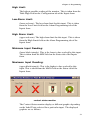
Low Alarm Limit:
(lower red zone) The low alarm limit for this input. This is taken
from the Low Limit field on the Alarm Programming tab of the
Inputs form.
49
Sensaphone® 2000 User’s Manual
High Alarm Limit:
(upper red zone) The high alarm limit for this input. This is taken
from the High Limit field on the Alarm Programming tab of the
Inputs form.
Minimum Input Reading:
(lower black triangle) This is the lowest value reached by this input.
This is taken from the MIN field on the Status tab of the Inputs
form.
Maximum Input Reading:
(upper black triangle) This is the highest value reached by this
input. This is taken from the MAX field on the Status tab of the
Inputs form.
gauge monitor
Gauge Reading:
This is the real-time value of the input. This number is white if the
input status is OK, but will change to red if the input goes above or
below the programmed alarm limits.
Low Limit:
The lowest possible reading of the monitor. This is taken from the
Table Low field on the Configuration tab of the Inputs form.
50
Chapter 4: Programming
High Limit:
The highest possible reading of the monitor. This is taken from the
Table High field on the Configuration tab of the Inputs form.
Low Alarm Limit:
(lower red zone) The low alarm limit for this input. This is taken
from the Low Limit field on the Alarm Programming tab of the
Inputs form.
High Alarm Limit:
(upper red zone) The high alarm limit for this input. This is taken
from the High Limit field on the Alarm Programming tab of the
Inputs form.
Minimum Input Reading:
(lower black triangle) This is the lowest value reached by this input.
This is taken from the MIN field on the Status tab of the Inputs
form.
Maximum Input Reading:
(upper black triangle) This is the highest value reached by this
input. This is taken from the MAX field on the Status tab of the
Inputs form.
contact status monitor
The Contact Status monitor displays a different graphic depending
on the Label/Units selected for a particular input. The displayed
graphics are as follows:
51
Sensaphone® 2000 User’s Manual
Input Label/Units Input OK graphic
none
[check mark]
OK/Fault
[check mark]
On/Off
[Light Bulb - ON]
Running/Stopped [Traffic Light - GREEN]
AC Power
[Light Bulb - ON]
Input ALARM graphic
[red X]
[red X]
[Light Bulb - OFF]
[Traffic Light - RED]
[Light Bulb - OFF]
DESTINATIONS
Sensaphone 2000 will call up to 32 telephone numbers or E-mail
addresses (both referred to as destinations) to report alarm conditions or send reports. Destinations can be voice calls, fax machines,
computers with modems running Sensaphone 2000 software, Email addresses, numeric pagers, or alphanumeric pagers. You must
be on-line with the unit to program the Destination parameters.
Once you are on-line, choose Program from the main menu, then
select Destinations. You can also access the Destination programming from the Toolbar button labeled Destinations.
Dialout Destinations form
The Dialout Destinations form allows you to program information
for up to 32 destinations. The parameters and their options are listed
below:
Name:
This field allows you to program a description (16 characters max)
for each destination. The name will appear on faxes and E-mail
transmissions whenever an alarm or report is sent to the destination.
If you are entering a fax destination be sure to use the name of
person who you intend to receive the fax.
52
Chapter 4: Programming
Destination:
The actual telephone number or E-mail address Sensaphone 2000
dials to deliver its report or alarm message. The Destination field
can be up to 64 characters long for E-mail addresses and 32 digits
for all other Dial Types and may consist of numbers, letters, and
special dialing codes.
Numeric Pagers
The Sensaphone 2000 can send alarm messages to numeric pagers.
It will automatically send its telephone number and the alarm input
number when dialing to a numeric pager. All you have to do is
enter the telephone number of your pager.
Example: (301)565-2300
Note: If your pager service is answered by a voiceprompted message you will need to enter additional
programming. See the Special Dialing codes section
below.
Alphanumeric Pagers
The Sensaphone 2000 can dial alphanumeric pagers to send alarm
messages. The Sensaphone 2000 will send the unit description,
telephone number, input name and input value. To program an
alphanumeric pager destination, enter the phone number followed
by the letter A and then the pager ID.
Example: 1-610-555-4593 A 0504099
E-mail
The Sensaphone 2000 can send alarm messages and reports via Email. For this to work you must have an internet E-mail account
and register the unit with Phonetics. The unit will automatically
dial a toll-free number to the E-mail server at Phonetics and then
forward the information to you. A monthly fee is required to
receive E-mail from your Sensaphone. Simply fill out the E-mail
registration card that came with your unit, or contact Phonetics for
more details. In the “Destination” field, enter the E-mail address.
Example: [email protected]
53
Sensaphone® 2000 User’s Manual
Special Dialing Codes:
Sometimes, when dialing out on certain phone systems, Sensaphone
2000 may need special instructions to access an outside phone line,
to contact numeric pagers, or to use alphanumeric pager services.
The following dialing codes give Sensaphone 2000 instructions on
how to send the phone digits when dialing the phone number. Each
code is counted as one digit toward the total of 32 digits. The
dialing codes are:
P = two-second pause. A two-second pause can be placed anywhere
within the phone number by typing the letter P (upper or lower
case). The pause takes up one digit and may be used more than
once. This is typically required when a pager service is answered by
a voice prompted message. You must add enough pauses to get past
the voice message. In this case you must enter the number you wish
to be displayed on your pager.
Example: 555-2233 PP 444-8877#
POUND (#) or ASTERISK (*): When dialing to a numeric pager, a
pound sign (#) or an asterisk (*) may be used within the phone
number. An asterisk (*) typically is displayed as a dash (-) on most
pagers.
Example: 1 # 6105554591 PP 986033 #
W = wait for answer. This code instructs Sensaphone 2000 to wait
until the call is answered before continuing. The “W” code takes up
one digit and may be used only once. The “W” code is typically
used in the middle of a dialout number when calling a numeric
pager. The Sensaphone 2000 will wait for the pager company to
answer the call before sending the number to be displayed on the
pager. Note that the 2000 automatically waits for the call to be
answered after the last digit in the telephone number is dialed.
Example: 1-610-555-4593 W 610-558-2000
(pager company phone #) W (number to display on numeric pager)
Note that digits following “W” to numeric pagers will
automatically be dialed as touch-tones.
I= send alarm input #. This code instructs Sensaphone 2000 to send
the input numbers that have an alarm to a numeric pager. The “I”
code takes up one digit and may be used only once in the phone
number. Note that this is only required if you must insert additional
dialing codes (such as pauses) to make your pager work.
Example: 555-2233 PP 444-8877 I
54
Chapter 4: Programming
Special Alphanumeric Pager Dialing Codes
A = alphanumeric pager ID (required)
C = alphanumeric character password (optional)
A = alphanumeric pager ID: The “A” dialing code is used ONLY
for alphanumeric pager destinations. It is placed between the pager
company’s telephone number and a particular pager’s ID number by
typing the letter A (upper or lower case). It instructs Sensaphone
2000 to wait until a connection is made to the alphanumeric pager
service’s computer system before transmitting the ID number for a
particular pager.
Example: 1-610-555-4593 A 0504099
C = alphanumeric character password: The “C” dialing code is
used ONLY for alphanumeric pager destinations and only if your
particular pager system requires a character password. This
password may be required for Sensaphone 2000 to access the pager
service’s computer system. If required, it is placed between the
pager company’s telephone number and the required character
password in the dialout sequence by typing the letter C (upper or
lower case). The character password must precede the pager ID
number.
Example if character password required:
1-610-555-4593 C 000000 A 0504099
(pager company phone #) C (character password) A (pager ID #)
The alphanumeric character password is optional and is, in general,
reserved for future services. Length of the password, when used,
may be different in some systems. Consult your pager service for
more information.
Call Zones:
Sensaphone 2000 is capable of assigning different destinations to
specific calling groups (zones) to accommodate work shift schedules. There are 4 Call Zones to choose from. To include a destination in a Call Zone, check the appropriate box. To set up Call
Zones, click on the “Edit Zones” button and the following form will
appear:
55
Sensaphone® 2000 User’s Manual
edit zones form
The Edit Calling Zones form divides up the 7 day week into 21
blocks of time. To change the start and end time for each block,
drag the horizontal divider bars up or down as needed. To reassign
a block of time to a different Call Zone, click inside the block until
it matches the color of the desired zone. To change the color of a
zone, double click on the zone’s color square at the bottom of the
form. Select a new color from the palette, then click the OK button.
Alarm Call Mode:
The three selections for destination Alarm Call Mode are Disabled,
Until Acknowledged, and Inform.
Disabled
Destinations programmed with Alarm Call Mode Disabled will
never be called. This is simply a way to disable dialing to this
destination if necessary.
Until Acknowledged
Destinations programmed with Alarm Call Mode “Until Acknowledged” will continue to be called until one of them acknowledges
56
Chapter 4: Programming
the alarm. Once acknowledged, the remaining destinations will not
be called.
Example: An alarm occurs and the Sensaphone 2000
is programmed to call destinations #1,#2, and #3 and
all 3 destinations are Alarm Call Mode “Until
Acknowledged.” The unit will call destination #1, if
the alarm isn’t acknowledged, it will call #2. If
destination #2 doesn’t acknowledge, then the unit will
call destination #3. If the alarm still hasn’t been
acknowledged, Sensaphone 2000 will call destination
#1 again. This process will continue until one of the
destinations acknowledges the alarm.
Note: Fax, E-mail and Modem destinations cannot be
programmed as “Until Acknowledged” call modes.
Inform:
Destinations programmed with Alarm Call Mode “Inform” will be
called until the alarm message has been successfully delivered one
time, regardless of acknowledgment. If a transmission to an
“Inform” destination was successful, that destination will not be
contacted again. Sensaphone 2000 will only make additional
attempts to contact an Alarm Call Mode “Inform” destination if that
destination hasn’t successfully received its transmission (for
example, due to a “no answer,” “busy signal,” “no carrier” response). If a transmission fails to reach a destination after the last
calling round is completed, the failure is recorded in the Event Log.
Calls to priority “Inform” destinations are useful for providing
records of alarm events.
Example: The Sensaphone 2000 used in the above
example is monitoring the heating system in a school.
The first three destinations are set as Alarm Call
Mode “Until Acknowledged” and programmed to call
maintenance personnel. In addition, destination #4 is
programmed to call the school’s fax machine and is
set as Alarm Call Mode “Inform.” Sensaphone 2000
will call the maintenance personnel as described
above so that they can fix the boiler, and will also
send a fax to the school office informing them of the
problem.
Important: Destinations programmed as Alarm Call
Mode “Inform” cannot acknowledge alarms.
57
Sensaphone® 2000 User’s Manual
Dial Type:
This is used to specify the type of call Sensaphone 2000 will make
to a particular destination. The available dialout types are: Fax,
Voice, E-mail, Pager, Alpha Pager, and Modem.
Fax - This instructs Sensaphone 2000 to send a fax transmission to
either a fax machine or a PC with the ability to receive a fax
directly.
E-mail - This instructs Sensaphone 2000 to deliver a message to
the E-mail address programmed in the destination field.
NOTE: For “E-Mail” Dial Types, only E-mail
addresses may be programmed in the destination
field, NOT telephone numbers. Sensaphone 2000 is
pre-programmed with a toll-free 800 number that will
automatically connect to Phonetics’ E-mail server
system. Note: E-mail service requires a subscription
fee.
Numeric Pager - This instructs Sensaphone 2000 to dial a
numeric pager and leave the unit’s ID number and alarm input
numbers on the display. This will happen automatically just by
entering the pager’s telephone number in the destination field. If
you want to change the information that is sent to your pager or you
are having trouble receiving the page, you may use the special
dialing codes to customize the dialout to your pager.
NOTE: When dialing to a numeric pager it is sometimes necessary to combine codes. Certain pager
systems vary and you must adjust accordingly. To test
your pager system, use an extension telephone on the
same line as the SENSAPHONE 2000 unit and listen
in during the Sensaphone 2000’s dial-out to confirm
that your pager service is reached without a problem.
If you must add a pause, use the letter P to insert a
two second pause wherever necessary.
Alpha Pager - This instructs Sensaphone 2000 to deliver a text
message to an alphanumeric pager.
Modem - This instructs Sensaphone 2000 to call a modem
attached to a computer running Manager 2000 software.
58
Chapter 4: Programming
Intercall Delay
The intercall delay is the amount of time Sensaphone 2000 will wait
after completing a call before calling the next destination. The delay
is in seconds, with a default of 30.
Note: A 30-second delay is too short to allow a call
back if a pager is being called. Increase the delay
time enough to accommodate your pager.
Send R
Report
Sensaphone 2000 can be programmed to automatically send reports
to selected destinations. Check this box to include this destination
when sending reports.
Note: Reports may only be sent to Fax or E-mail
destinations.
DATALOGGING
Sensaphone 2000’s built-in Data Logger can log and store information on all 8 universal inputs, AC power and backup battery voltage.
You must be on-line with the unit to program the Datalogging
parameters. Once you are on-line, choose “Functions” from the
main menu, then select Data Logging. You can also access the Data
Log programming from the Toolbar button labeled Data Log.
Note that whenever you change any parameters on the Data Log
form the datalogger in the Sensaphone 2000 will be reset. If you
need to make changes to your programming, be sure to “Retrieve
Data” first.
59
Sensaphone® 2000 User’s Manual
data log form
Below is a list of Data Log programming parameters, their default
settings and the range of programming for each parameter.
Interval:
Time between data logs.
Programmable range:
Minimum: 0 hours, 0 minutes, 1 second
Maximum: 199 hours, 59 minutes, 59 seconds
Default Setting:
0 hours, 0 minutes, 10 seconds
Warning
Setting the Data Logger interval to just a few seconds will produce
large amounts of data. If you download this data regularly you will
quickly begin to fill your hard disk. Care must be taken to evaluate
your system and needs to avoid this situation.
60
Chapter 4: Programming
Use Start Time
Checking this box will make the Sensaphone 2000 start its Data
Logger at the time indicated in the Start Time box. If this box is not
checked, Datalogging will begin immediately.
Start Time:
Sensaphone 2000 can be programmed to begin Datalogging at a
particular time of day. When Sensaphone 2000’s internal clock
reaches the programmed Start Time, the unit will begin Datalogging
the selected input values at the programmed interval. The Start
Time function is used to delay the start of Datalogging. Once
Datalogging has begun, the Start Time programming is ignored.
Default Setting: 12:00:00AM
Inputs being Logged
This selects which inputs Sensaphone 2000 will log. The unit’s data
logger can store 32,768 samples. Every time the unit logs input
data, it uses one sample for each checked box. For example, if
inputs 1-5 are selected, 5 samples are used up every time Sensaphone 2000 logs data. The more inputs you select, the fewer
samples are left available. Below is a table showing the number of
Data Samples available vs. the number of Inputs Being Logged.
Once the Sensaphone 2000 has filled its Data Logger, it will begin
overwriting the oldest Data Log samples with new ones.
# of Inputs Being Logged
1
2
3
4
5
6
7
8
9
10
Data Samples Available
32,768
16,384
10,922
8,192
6,553
5,461
4,681
4,096
3,640
3,276
Start/Stop Datalogging
To start Datalogging, click on this button.
Default setting: Stopped
NOTE: Any changes to the Data Log Programming
form will RESET the datalogger.
61
Sensaphone® 2000 User’s Manual
RESET NOW button
This button will reset the Data Logger (i.e., delete the records) in
the 2000. If the Data Logger was just received, a RESET within 5
minutes of downloading will only delete the records just downloaded. The 2000 will retain any data that was logged during the
download period. After 5 minutes have passed since the download,
clicking the RESET button will delete ALL records in the 2000.
Downloading the Data Logger
To view a Sensaphone 2000’s Data Log samples, the unit’s Data
Logger must first be downloaded to your PC. You must be on-line
with a unit to download its Data Logger. Once you are on-line,
choose “Functions” from the main menu, then select Datalogging.
You can also access the Data Logger from the Data Log Toolbar
button.
To download the Data Logger, click “Retrieve Data.”
Every time a unit’s Data Logger is downloaded, the Manager 2000
software adds the new information to that unit’s database in your
PC. It also checks for and filters out duplicate Data Log records.
Viewing the Data Logger (on-line)
Once the Data Logger has been downloaded, it can be viewed. To
view the Data Logger, click the “View Database” button on the Data
Log Programming form. The following form will appear.
62
Chapter 4: Programming
Viewing the Data Logger (off-line):
To view a unit’s downloaded Data Logger off-line, follow the
instructions for “Offline Communication” and “To View A Data File
Offline” earlier in this chapter.
Below is a list of programming parameters for viewing the Data
Logger:
Input selection:
You must choose which inputs to display. To display a Data Log
record for an input, click on the input’s button to highlight it.
From Date and To Date
Selects a range of Data Log records by time.
Query:
Searches the Data Log database and displays the information that
corresponds to the selected time period and selected inputs.
Graph:
Once the Data Log records have been displayed, they may be viewed
in graph form by clicking the “Graph” button. The graph will show
all inputs selected in the query. If too many samples are selected for
graphing, the software gives you the option to average values.
Otherwise, you will have to perform a smaller query to avoid
averaging. The graph has many features that allow you to display
the data graphically, including line graphs, bar charts and threedimensional views. Experimentation is the best way to learn about
all of the available options. A sample graph follows.
63
Sensaphone® 2000 User’s Manual
sample graph
Reset:
Deletes Data Log records for the current Sensaphone 2000 unit
from your PC. It will reset all the information in the database for
the selected unit.
Print:
Once the Data Log records have been displayed, they may be printed
by clicking this button.
Export:
Once the Data Log records have been displayed, the displayed
information may be saved as a comma-delimited file. This file can
then be used in a spreadsheet such programs as Lotus 123 or
Microsoft Excel.
EVENT LOGGER
Sensaphone 2000 keeps track of important system events with its
built-in Event Logger. Each Sensaphone 2000 unit stores the last
500 system events. System events include alarms, incoming and
64
Chapter 4: Programming
outgoing phone calls, and alarm acknowledgments. See Appendix A
for a complete list of events stored by the Event Logger. Once the
Event Log is full, the oldest record is overwritten by the newest.
Downloading the Event Logger
To view Sensaphone 2000’s Event Log, the unit’s Event Logger
must first be downloaded to your PC. You must be on-line with the
unit to download the Event Log. Once you are on-line, choose
“Functions” from the main menu, then select “View Events.” You
can also access the Event Logger from the Toolbar button labeled
Events.
The following event log form will appear:
To download the Event Logger, click “Download Events.”
Every time a unit’s Event Logger is downloaded, the Manager 2000
software adds the new information to that unit’s database in your
PC. It also checks for and filters out duplicate Event Log records.
The downloaded Event Logger can then be viewed off-line.
Viewing the Event Logger
Once the Event Logger has been downloaded, it can be viewed on
the form called “Event Viewer.”
65
Sensaphone® 2000 User’s Manual
Below is a list of programming parameters for viewing the Event
Logger:
event viewer form
Unit selection:
Since the MANAGER 2000 software can contain Event Log
information for multiple Sensaphone 2000 units, you must choose
which unit’s Event Log you wish to display. Look at the Event Log
Viewer form. In the window labeled “Available Units” is a list of all
Sensaphone 2000 units currently recognized by your PC. Highlight
a unit by clicking on the unit name, and use the four add/remove
buttons (>,>>,<,<<) to select the desired unit(s) as follows:
‘add’ ([>]) - Adds the unit to the “Selected Units” list.
‘add all’ ([>>]) - Adds all units to the “Selected Units” list.
‘remove’ ([<]) - Removes the unit from the “Selected Units” list.
‘remove all’ ([<<]) - Removes all units from the “Selected Units”
list.
66
Chapter 4: Programming
Event types:
Select here the types of events to display: All Events or Alarms
Only.
Query Times:
Selects a range of event times to display. “Inc.All” will include all
event times in the Sensaphone 2000, with a “To” date stretching
into the future. “To Now” resets the “To” time to the exact moment
you click on the button.
View:
Displays the selected Event Log records.
Reset Event Logger
Deletes all Event Log records from your PC’s database.
REPORTS
Sensaphone 2000 can send periodic reports to selected Fax or Email destinations. Reports may include either the current status of
all inputs, stored Data Logger information, or both. You must be online with the unit to program Report parameters. Once you are online, choose “Programming” from the main menu, then select
“Reports.” You can also access the Reports programming from the
Toolbar button labeled Reports.
reports form
67
Sensaphone® 2000 User’s Manual
Below is a list of Report programming parameters, their default
settings and the range of programming for each parameter.
Current Status:
To send the current status of all inputs with the report, check this
box.
Data Logger
To send information stored in Sensaphone 2000’s Data Logger,
check this box. If this box is checked, you must select the number
of Data Log records to send with the report. Sensaphone 2000 will
send the number of records requested beginning with the most
recent record and follow in order of newest to oldest. (Note: A data
Log record is a time slice of whatever inputs were being logged.)
When Sensaphone 2000 sends Data Logger information with a
report, it DOES NOT erase the information from the unit.
Use Start Time
Sensaphone 2000 can be programmed to begin sending reports at a
particular time of day. When Sensaphone 2000’s internal clock
reaches the programmed Start Time, the unit will begin sending
reports to the selected destinations. The Start Time function is used
to delay the start of reporting. Once reporting has begun, the Start
Time programming is ignored.
Note: To disable the Start Time function, leave the
Start Time at the default setting of 12:00:00AM.
Sensaphone 2000 will begin sending reports after the
first Report Interval has expired.
Default Setting: 12:00:00AM
Report Interval
Time between reports.
Programmable range: Minimum - 0 hours, 1 minutes
Maximum - 24 hours, 0 minutes
Default Setting: 24 hours, 0 minutes
68
Chapter 4: Programming
POLLING
Polling occurs when a PC automatically calls a remote Sensaphone
2000 with a modem at a predetermined time and retrieves information. The concept is similar to setting an alarm clock to download a
unit’s Data Logger or Event Log.
Polling is a useful feature for users who need to save more data than
the Sensaphone 2000 is capable of holding. The unit’s Data Logger
can hold 32,768 input readings. This means that if one input is
being logged, Sensaphone 2000 can store up to 32,768 data
samples, but if 10 inputs are being logged, the unit can only store up
to 3,276 data samples. Once the Sensaphone 2000 has filled its
Data Logger, it will begin overwriting the oldest Data Log samples
with new samples. If it is important that you save all of your data
samples, and you intend to log more data than the Sensaphone 2000
can hold, YOU MUST DOWNLOAD YOUR DATA.
To manually download Sensaphone 2000 Data Log information to
your PC, simply press “Retrieve Data” on the “Datalogging”
programming form while on-line with the unit. The contents of the
Data Logger will be transferred to a database in your PC.
The process is the same for downloading the Event Log. While online with the unit, press “Download Events” on the “Event Log
Viewer” form and the unit’s Event Log is saved to your PC. Polling
is nothing more than choosing a time for these features to automatically execute. Two frequency options are available for automatic
Polling: Weekly Schedule or Monthly. From the Configuration
menu, select “Options.” Polling Options are the last two at the
bottom of the Options form.
polling options
69
Sensaphone® 2000 User’s Manual
If you select Once per Month, your unit will poll selected data
automatically at 12:00 A.M. on the first day of the month every
month.
Note: Choosing Once per Month will wipe out any
Weekly Schedule you have set up.
For Monthly, choose Once per Month and click OK. Then to open
the Monthly Polling Setup form, click on the Toolbar button labeled
Unit Schedule.
monthly polling setup form
First, select the units in the lefthand column that you want to poll,
and click the top arrow to move each to the “Selected Units”
column. Clicking the >> button will move all available units into
Selected Units. Only the Units listed as Selected Units will be
polled. The reverse arrows remove selected units, returning them to
the “Available” column. Next choose your settings: Which items—
Data Log, Event Log—are to be retrieved, whether you want the
reports on each printed, and whether you want the unit’s database
reset after the download. Then Click OK.
To initiate the polling sequence on demand, click the Poll Now
button.
If you choose Weekly Schedule Polling, then you set up polling
features as follows. Open the unit On-line or Off-line. Program by
choosing “Polling,” then “Unit Schedule” from the main menu, or
click on the Toolbar button labeled Unit Schedule.
70
Chapter 4: Programming
weekly polling setup form
The screen displayed is the Polling Setup screen for the currently
selected unit. This screen allows you to choose what type of poll
you would like to schedule and when the poll will take place.
Each time your PC polls a Sensaphone 2000, you may download
the contents of the selected unit’s Data Logger, Event Logger, or
both.
In the top left corner of the “Polling Setup” form there are 3 buttons
labeled Data Log, Event Log, and Both.
To schedule a poll, click on one of the buttons, drag it to the desired
day of the week column, and drop it at the desired hour. The
Polling Setup form is a WYSIWYG (What You See Is What You
Get) calendar interface. Once you have released the button, you
have scheduled a poll. If you wish to change the time of a poll,
drag it to its new time and drop it. If you want to remove a poll,
drag the poll over the trash can icon and drop it. The poll will
disappear and is no longer scheduled.
71
Sensaphone® 2000 User’s Manual
Global View:
This button brings up a form that looks very similar to the Polling
Setup form, except it contains all of the scheduled polls for every
unit. If you wish to see the scheduled polls for a given unit you can
select that unit in the combo box on the Polling Summary form.
Settings:
Click this button to set the following Polling options:
weekly polling settings form
Enable Polling:
If this box is checked, the current unit will be among the units
polled at each scheduled interval. In order for your PC to make the
scheduled Polling phone calls to units, you must enable Polling for
each unit and turn on the master polling control. The master polling
control is enabled by selecting Enable from the Polling menu or by
clicking Polling Mode from the Toolbar.
Note: If you are logged into a unit with the PC,
polling for that hour will not occur until you exit the
unit. Also, it is important to note that if for some
reason you are logged into a unit for an entire hour,
your PC will not make the phone calls for that hour.
If you are going to utilize the polling feature heavily,
try to schedule polling at times when it is unlikely
that your PC is being used.
Reset Data Log after download
If this box is checked, the Sensaphone 2000’s Data Logger will be
reset (cleared) once the poll is complete.
72
Chapter 4: Programming
Note: The Sensaphone 2000 unit will not automatically delete its Data Log records when they are
downloaded, unless you select this button. Resetting
the Data Logger after polling is useful if you also
intend to print the Data Log records after polling. If
you do not clear the Data Log after a poll, the next
time you poll the unit you will download and print the
same records again.
Print Data Log after download
If this box is checked, the PC will print the downloaded Data
Logger information after each poll.
Print Event Log after download
If this box is checked, the PC will print the downloaded Event
Logger information after each poll.
Note: The data downloaded from the Sensaphone
2000 may be quite large, and printing all of it may
take some time. Remember to keep an adequate
supply of paper in your printer and also make sure
that your printer has enough memory to handle large
jobs. Automatic printing at the time of the poll
allows you to schedule the print job at a time when
it’s less likely to interfere with other activities.
73
Sensaphone® 2000 User’s Manual
74
Chapter 5: Status Report/Voice
Chapter 5: Status Report and Voice Messages
The Sensaphone 2000 provides a voice status report via telephone
using its own internal voice in combination with your recorded
input messages. This allows you to set up a custom system that
fully describes the unit’s location, the input having a problem, its
current value and units of measure. The messages may be recorded
either at the unit by plugging a telephone into the Voice Record
jack, or remotely by calling the unit. This section will describe how
to program identification and input messages along with some
examples. In addition, obtaining a status report both locally and
remotely will be discussed.
Playing/Recording Messages using Voice Record Jack
To play and record messages using the Voice Record jack you will
need a simple single-line Touch-Tone telephone. Plug this telephone directly into the 2000’s Voice Record jack. (DO NOT connect
the Voice Record jack to a telephone line or to a digital telephone
system. This will permanently damage the unit). When you plug the
telephone into the jack and lift the handset, the unit will recite a
status report. At the end of the status report, the unit will say “Enter
Password.” This is the voice password. Enter the voice password
using the telephone keypad buttons. If the voice password is
entered correctly, Sensaphone 2000 will say “OK.” If not, the unit
will beep then say “ERROR,” and you will have to hang up the
phone and try again.
Once the voice password is accepted, Touch-Tone commands are
used to record and play back messages as well as listen to a status
report. The commands are listed below:
Play Command
Record Command
Erase Command
Message Description
* 1
# 1
##1
Input Message #1
* 2
# 2
##2
Input Message #2
* 3
# 3
##3
Input Message #3
* 4
# 4
##4
Input Message #4
* 5
# 5
##5
Input Message #5
* 6
# 6
##6
Input Message #6
* 7
# 7
##7
Input Message #7
* 8
# 8
##8
Input Message #8
* 9
# 9
##9
**
Identification (ID) Message
Status Report
75
Sensaphone® 2000 User’s Manual
To record a message, press the [#] key followed by the message
number you want. For example, to record the ID message, press [#]
then 9. After you hear the start beep, begin speaking into the phone.
You have until the second beep to complete your message. You have
6 seconds of recording time for the ID message and 4 seconds for
each of the 8 input messages.
To play back a message, press the [*] key followed by the message
number you want. For example, to play the ID message, press [*]
then 9.
To request a complete status report, press the [*] key twice.
Note: Since the unit can only communicate with one
device at a time, it will not answer any calls nor make
any calls while you are on-line in local voice mode.
Local Status Report
To receive a voice status report at the unit, plug a telephone into the
Voice Record jack. After a few seconds the unit will begin reciting
a status report. At the end of the report it will ask for a password.
The password is the Voice Password required to change voice
messages and acknowledge alarms. If entered correctly, the unit
will allow you to use the Touch-Tone commands to record/listen to
messages and acknowledge alarms. When finished simply hang up.
Status Report
To receive a voice status report remotely, call the unit and after you
hear the unit beep, press any Touch Tone within 3 seconds. The unit
will then recite a status report. If the unit starts its modem tone
sequence, simply wait until it finishes. A status report will begin as
soon the tones finish. At the end of the report it will ask for a
password. The password is the Voice Password required to change
voice messages and acknowledge alarms. If entered correctly, the
unit will allow you to use the Touch-Tone commands to record/
listen to messages and acknowledge alarms. When finished simply
hang up. The unit will disconnect itself automatically if no TouchTone commands are received within 10 seconds.
76
Chapter 5: Status Report/Voice
Sample Status Report
Hello, this is (Unit Phone Number)
Input one (recorded message #1), (input value), (units), (alarm status)
Input two (recorded message #2), (input value), (units), (alarm status)
Input three (recorded message #3), (input value), (units), (alarm status)
Input four (recorded message #4), (input value), (units), (alarm status)
Input five (recorded message #5), (input value), (units), (alarm status)
Input six (recorded message #6), (input value), (units), (alarm status)
Input seven (recorded message #7), (input value), (units), (alarm status)
Input eight (recorded message #8), (input value), (units), (alarm status)
The electricity is On/Off
Battery condition 8.7 volts, OK/Low/Very Low
77
Sensaphone® 2000 User’s Manual
78
Chapter 6: Operation
Chapter 6: Operation
After installation and programming have been completed,
Sensaphone 2000 is fully operational. This chapter explains how
Sensaphone 2000 operates.
PART ONE: ALARM DIALOUT AND ACKNOWLEDGMENT
There are 3 stages to a complete alarm event: 1) Alarm Recognition,
2) Alarm Notification, 3) Acknowledgment. Note that not all alert
conditions will go through each stage. For example, some may not
meet the recognition time.
Alarm Recognition:
1) Sensaphone 2000 monitors 8 inputs plus power failure. When the
status of an input changes or exceeds user-programmed limits, it
causes an alert condition.
2) If the alert condition lasts long enough to meet its programmed
recognition time, the alert condition becomes an alarm and
Sensaphone 2000 begins the alarm notification sequence.
Alarm Notification:
Sensaphone 2000 can make 6 types of phone calls: Voice, Fax, Email, Modem, Beeper, and Alphanumeric pager.
Dialout Note:Call Progress
Sensaphone 2000 monitors call progress when dialing out. If
Sensaphone 2000 dials out and encounters a busy signal or no
answer within 30 seconds, the unit hangs up, waits the programmed
intercall delay time, and then dials the next phone number.
79
Sensaphone® 2000 User’s Manual
Alarm Call Mode: Until Acknowledged vs. Inform
Until Acknowledged:
Destinations programmed with Alarm Call Mode “Until Acknowledged” will continue to be contacted until one of them acknowledges the alarm.
Note: Fax and E-mail destinations cannot be programmed as “Until
Acknowledged.”
Inform:
Destinations programmed with Alarm Call Mode “Inform” will be
contacted until the alarm message has been successfully delivered
one time. If a transmission to Alarm Call Mode “Inform” destination was successful, that destination will not be contacted again.
Important: Destinations programmed as Alarm Call
Mode “Inform” CANNOT ACKNOWLEDGE
ALARMS.
Alarm Dialout -Voice
When dialing out to a destination programmed as “voice,” Sensaphone 2000 waits for the phone to be answered, then recites its userrecorded identification message, then the message identifying the
input that has gone into alarm.
Below is an example of what Sensaphone 2000 might say during a
typical ‘voice’ dialout:
“Hello, this is (user recorded ID message)”
“The electricity is off ”
“Hello, this is (user recorded ID message)”
“The electricity is off ”
“Hello, this is (user recorded ID message)”
80
Chapter 6: Operation
“The electricity is off ”
“Enter acknowledgment code.”
In this example, the number of Voice Message Repetitions was set
to three.
Note: If the call reaches an answering machine, the
message will be recorded, but Sensaphone 2000 will
be talking over your outgoing message, so you will
probably lose part of the first alarm message repetition.
Alarm Dialout - Beeper
When dialing out to a destination programmed as “Beeper,”
Sensaphone 2000 leaves a number (usually the unit’s own phone
number) on the display of a numeric beeper.
IMPORTANT: When dialing out to a phone number
programmed as “Beeper,” Sensaphone 2000 DOES
NOT speak a voice message. It calls the beeper
company or service, enters the number to be displayed on the beeper, then hangs up.
Alarm Dialout -Alphanumeric Pager
When dialing out to a destination programmed as “Alpha,” Sensaphone 2000 leaves a text message up to 80 characters long on the
display of an alphanumeric pager.
IMPORTANT: When dialing out to a phone number
programmed as “Alpha,” Sensaphone 2000 DOES
NOT speak a voice message. It calls the pager
company or service, transmits the information to be
displayed on the pager, then hangs up.
Alarm Dialout - Modem
When dialing out to a destination programmed as “Modem,”
Sensaphone 2000 waits for the phone to be answered by a modem,
establishes a data connection, then transmits its alarm message.
IMPORTANT: When dialing out to a phone number
programmed as “Modem,” Sensaphone 2000 DOES
81
Sensaphone® 2000 User’s Manual
NOT speak a voice message. It is expecting the call
to be answered by a PC running Phonetics Manager
2000 Windows software. Once a connection is
established, the Sensaphone 2000 transmits the alarm
information, then hangs up.
Alarm Dialout - Fax
When dialing out to a destination programmed as “Fax” Sensaphone
2000 waits for the phone to be answered by a fax machine, establishes a connection, then faxes its alarm message.
IMPORTANT: When dialing out to a phone number
programmed as “Fax,” Sensaphone 2000 DOES NOT
speak a voice message. It is expecting the call to be
answered by a fax machine. Once a connection is
established, the Sensaphone 2000 faxes the alarm
information, then hangs up.
Alarm Dialout - E-mail
When dialing out to a destination programmed as “E-mail,”
Sensaphone 2000 is pre-programmed to call the toll-free 800
number of the Phonetics’ E-mail server system. Once connected, the
unit delivers its alarm message to the E-mail address programmed
in the destination field.
IMPORTANT: When dialing out to a phone number
programmed as E-mail, Sensaphone 2000 DOES
NOT speak a voice message. It is expecting the call
to be answered by the Phonetics’ E-mail server
system. Once a connection is established, the Sensaphone 2000 E-mails the alarm message, then hangs
up.
ALARM ACKNOWLEDGMENT :
Alarm Acknowledgment -Voice Dialout
Repeated below is the same example of what Sensaphone 2000
might say during a typical “voice” dialout:
“Hello, this is (user recorded ID message)”
“The electricity is off ”
“Hello, this is (user recorded ID message)”
82
Chapter 6: Operation
“The electricity is off ”
“Hello, this is (user recorded ID message)”
“The electricity is off ”
“Enter acknowledgment code.”
Sensaphone 2000 will now wait 5 seconds for the Touch-Tone
acknowledgment code (and acknowledgment ID if chosen) to be
entered. After the last digit of the acknowledgment code has been
received, Sensaphone 2000 will respond by saying: “Alarm Acknowledged.” The alarm has been acknowledged and the unit will
hang up. Once the alarm has been acknowledged, the dialout
process stops.
If the Touch-Tone acknowledgment code is not received, the
Sensaphone 2000 will offer you a second chance to enter it,
responding with: “beep,” “error,” “Enter acknowledgment code.” If
the acknowledgement code is still not received, then the Sensaphone
2000 will respond by saying: “beep,” “error,” “goodbye.” The alarm
has not been acknowledged. Sensaphone 2000 will hang up and
wait for a callback acknowledgment. This waiting period is called
the “intercall delay time.” During this time you may call the unit
back from a Touch-Tone phone. Wait for the unit to beep. Then hit
any key on the phone, and the unit will give a voice report. Once
you receive the complete report, enter the code to acknowledge the
alarm (and acknowledgment ID if chosen). NOTE: An alarm cannot
be acknowledged using a pulse (rotary) telephone.
Alarm Acknowledgment - Beeper Dialout
Sensaphone 2000 will dial out to your beeper service and leave a
number on the display of your beeper. (See Programming Section)
The unit will then hang up without speaking a voice message and
wait for callback acknowledgment. This waiting period is called the
“intercall delay time.” During this time you may call the unit back
from a Touch-Tone phone to receive a report of the alarm condition
and acknowledge the alarm by entering the acknowledgment code
(and acknowledgment ID if chosen).
NOTE: An alarm cannot be acknowledged using a
pulse (rotary) telephone.
Below is an example of what Sensaphone 2000 will say when you
call it back to acknowledge a typical alarm:
“Hello, this is (user recorded ID message)”
“The electricity is off ”
83
Sensaphone® 2000 User’s Manual
“Hello, this is (user recorded ID message)”
“The electricity is off ”
“Hello, this is (user recorded ID message)”
“The electricity is off ”
“Enter acknowledgment code.”
Sensaphone 2000 will now wait 5 seconds for the Touch-Tone
acknowledgment code to be entered. After the last digit of the
acknowledgment code has been received, Sensaphone 2000 will
respond by saying: “Alarm Acknowledged.” The alarm has been
acknowledged and the unit will hang up. Once the alarm has been
acknowledged, the dialout process stops.
If the Touch-Tone acknowledgment code is not received, Sensaphone 2000 will offer you a second chance to enter it, responding
with: “beep,” “error,” “Enter acknowledgment code.” If the
acknowledgement code is still not received, then the Sensaphone
2000 will respond by saying: “beep,” “error,” “goodbye.” The alarm
has not been acknowledged. Sensaphone 2000 will hang up and
wait for a callback acknowledgment. This waiting period is called
the “intercall delay time.” During this time you may call the unit
back from a Touch-Tone phone. Wait for the unit to beep. Then hit
any key on the phone, and the unit will give a voice report. Once
you receive the complete report, enter the code to acknowledge the
alarm (and acknowledgment ID if chosen). NOTE: An alarm cannot
be acknowledged using a pulse (rotary) telephone.
TIP: When Sensaphone 2000 is programmed to make
calls to beepers, make sure the intercall delay time is
long enough to give the person carrying the beeper
some time to get to a phone to call the unit back.
Alarm Acknowledgement-Alphanumeric Pager
Sensaphone 2000 will dial out to your alphanumeric pager service
and leave a message on the display of your pager. (See Programming Section, Chapter Four, for dialing to beepers/pagers). The unit
will then hang up without speaking a voice message and wait for
callback acknowledgment. This waiting period is called the
“intercall delay time.” During this time you may call the unit back
from a Touch-Tone phone to receive a report of the alarm condition
and acknowledge the alarm by entering the acknowledgment code
(and acknowledgment ID if chosen).
NOTE: An alarm cannot be acknowledged using a
pulse (rotary) telephone.
84
Chapter 6: Operation
Below is an example of what Sensaphone 2000 will say when you
call it back to acknowledge a typical alarm:
“Hello, this is (ID message)”
Input 1, closed, alarm exists
“Hello, this is (ID message)”
Input 1, closed, alarm exists
“Hello, this is (ID message)”
Input 1, closed, alarm exists
“Enter acknowledgment code.”
Sensaphone 2000 will now wait 5 seconds for the Touch-Tone
acknowledgment code to be entered. After the last digit of the
acknowledgment code has been received, Sensaphone 2000 will
respond by saying, “Alarm Acknowledged.” The alarm has been
acknowledged and the unit will hang up. Once the alarm has been
acknowledged, the dialout process stops.
If the Touch-Tone acknowledgment code is not received, Sensaphone 2000 will respond by saying: “beep,” “error,” “goodbye.” The
alarm has not been acknowledged. Sensaphone 2000 will hang up
and wait for a callback acknowledgment. This waiting period is
called the “intercall delay time.” During this time you may call the
unit back from a Touch-Tone phone. Wait for the unit to beep.
Then hit any key on the phone, and the unit will give a voice report.
Once you receive the complete report, enter the code to acknowledge the alarm (and acknowledgment ID if chosen). NOTE: An
alarm cannot be acknowledged using a pulse (rotary) telephone.
TIP: When Sensaphone 2000 is programmed to make
calls to alphanumeric pagers, make sure the intercall
delay time is long enough to give the person carrying
the pager some time to get to a phone to call the unit
back.
Alarm Acknowledgment -Automatic (Max Calls)
Sensaphone 2000 has the ability to acknowledge itself by using the
Max Calls function. The unit keeps a count of the number of phone
calls it makes for a particular alarm. Once the number of calls made
reaches Max Calls, Sensaphone 2000 will acknowledge the alarm
and stop the dialout process.
85
Sensaphone® 2000 User’s Manual
Acknowledgment ID
The ID feature is useful to identify who has acknowledged an alarm
when that acknowledgment was performed on a return call to the
unit. The feature allows the user to key in a two-digit Touch-Tone
ID code right after entering the alarm acknowledgment code. The
ID code is then stored in the Event Log so that users would be able
to identify who acknowledged the alarm. For example: A 2000 unit
calls John’s pager and leaves an alarm message, then continues
calling the programmed destination numbers. John finally gets to a
telephone and is the first to call in to the unit. When he acknowledges the alarm, he enters 555-21. The number 21 is John’s Acknowledgment ID. The Event Log would show that ID #21 had
acknowledged the alarm. (See figure below)
Figure 1: Event Log showing Acknowledgment ID
86
Chapter 6: Operation
PART TWO: REPORT DIALOUT
The unit is capable of sending automatic reports on a programmable
time basis, (i.e. Send a report every x hours starting at time xx:xx).
Reports may be sent via fax or e-mail only, and will be sent to all
destinations programmed to receive reports. Reports cover the unit
data, which includes the current conditions of each input, power
status, and battery condition. If the Data Logger is enabled and
programmed to send with reports, a Data Log report will also be
sent at this time.
PART THREE: CALL-IN STATUS
Using PC with Manager 2000 Windows Software: At any time the
unit is idle (not dialing out or communicating locally), you can call
into it using a modem. Sensaphone 2000 will answer after its
programmed “Rings To Answer,” connect, and go on-line. At this
point you have entered an on-line session identical to the local
programming session, and may program the unit as necessary.
Voice Mode:
You can also call into the Sensaphone 2000 using a Touch-Tone
telephone. After answering, Sensaphone 2000 will beep once.
Immediately press any key on your Touch-Tone keypad to get a
voice status report. If the Sensaphone 2000 doesn’t receive a
Touch-Tone signal within a few seconds, it will attempt to make a
data (modem) connection. If a data connection isn’t made after the
programmed “Carrier Wait Time,” Sensaphone 2000 will again
switch to voice mode and recite a status report. Immediately
following the status report, Sensaphone 2000 prompts you for a
voice-mode password. This password allows you to use Touch-Tone
commands to both listen to and record the unit’s voice messages.
To listen to a recorded alarm message:
1. Press the [*] key on your phone.
2. Press the corresponding input number key: 1-8, or press 9 to
listen to the ID message.
Sensaphone 2000 will recite the corresponding message.
87
Sensaphone® 2000 User’s Manual
To record a message remotely:
1. Press the # key on your phone.
2. For an input alarm message, press the corresponding input
number key: 1-8, or press 9 to record the ID message.
After the beep, say your message clearly. The input alarm messages
may be up to 4 seconds long. The ID message can be up to 6
seconds long. Sensaphone 2000 will beep at the end of the allotted
time.
Below is an example of a voice status report:
“Hello, this is 610-555-2000” (ID number)
“This is the Sensaphone 2000 in lift station 21.” (user-recorded ID
message)
“Input 1, jockey pump #1 overload, closed, OK”
“Input 2, jockey pump #2 overload, closed, OK”
“Input 3, main pump overload, closed, OK”
“Input 4, wet well level, 8.9 feet, OK”
“Input 5, dry well sump pump, Off, OK”
“Input 6, exit flow, 746.9 gpm, OK”
“Input 7, wet well air temperature, 54.4 degrees fahrenheit, OK”
“Input 8, waste grinder motor overload, closed, OK”
“The electricity is On”
“Battery voltage 8.6 volts, OK.”
“Goodbye”
88
Chapter 7: Auto-Answer and Polling
Chapter 7: Polling Mode & Auto Answer Mode
Polling mode and Auto Answer mode allo w your PC to comm unicate automaticall y with m ultiple Sensaphone 2000s. Polling is the
pr ocess of calling units to r etrie ve the Data Lo g or Ev ent Lo g (see
“Datalo gging,” “Event Lo gger,” and “Polling” sections in Chapter
Four). Auto Answer mode let’ s your PC r eceive alarm calls w hen
the destination type is set to modem. In or der to r eceive alarm calls
or ha ve the softw ar e perf orm polling y ou must have the pr ogram
running and ha ve one or both modes ena bled. When the softw ar e
receives an alarm messag e it will displa y it on your scr een immediately as well as update the Ev ent Lo g for that par ticular unit. When
using these featur es, your computer and modem m ust r emain ON
contin uously.
Enabling Auto Answer Mode
You can ena ble Auto Answer mode b y selecting Functions>A uto
Answer fr om the men u bar or b y clicking on the Answer Mode icon
in the Toolbar .
Note that Auto Answer mode can onl y be ena bled if you ar e not
connected with a unit. Once you’re connected, it becomes gr ayed
out.
Enabling Polling Mode
To ena ble Polling mode , click on the Polling Mode icon on the
Toolbar or select P olling>Ena ble from the men u bar . This is the
global polling-ena ble contr ol. In ad dition, each unit m ust ha ve
Polling ena bled (see Chapter F our f or specif ic Polling Settings).
89
Sensaphone® 2000 User’s Manual
90
Appendix A: Checking for Proper Operation
APPENDIX A
Checking Your Sensaphone 2000
for Proper Operation
We recommend that y ou test y our Sensaphone w eekly to be sur e it
is functioning pr oper ly. This will ensur e that w hen a pr oblem arises
the Sensaphone will be r eady to aler t the appr opriate per sonnel.
Ther e ar e several tests that can be perf ormed:
1. Call the unit and listen to the Status Repor t. This will test the
unit's a bility to ans wer the phone and speak a messag e. It will
also verify that the inputs ar e reading pr oper ly, the alarm
conditions are OK, the electricity is on, and that the batteries
are OK.
2. Cr eate a test alarm on an input and allo w the unit to contact all
pr ogrammed telephone n umber s. This will mak e sur e that the
Sensaphone is pr ogrammed pr oper ly. It will also pr epar e
per sonnel to r espond appr opriatel y when the y receive a call
from the Sensaphone.
3. Test the batteries (if installed) b y unplugging the AC Adapter
and making sure that the Sensaphone continues to function.
Check the battery v oltage by logging on to the unit and
viewing the Inputs scr een. The battery v oltage should be a bout
8.5V. The scr een should also indicate that the AC Power is
OFF. Reconnect the AC Adapter w hen f inished.
4. Test the inter nal modem b y calling the Sensaphone fr om a
computer and lo gging on.
91
Sensaphone® 2000 User’s Manual
92
Appendix B: System Events
APPENDIX B
System Events List
EVENT LOGGER - List of System Events
Startup completed
Unit reset by user
Data Logger reset
Data Logger started
Data Logger stopped
Data Logger downloaded
Data Logger full
Diagnostic - hardware reset
Diagnostic - reset program RAM
Diagnostic - reset all RAM
Password attempt successful for status only
Password attempt successful for programming access
Password attempt failed
Alarm detected
Alarm reset time expired - alarm detected
Alarm detected but not configured
Alarm acknowledged by max calls
Alarm acknowledged by 15 calls to phone 1
Alarm acknowledged by inbound phone call
Acknowledgment request received
No acknowledgment received on outbound call
Dialing “Until Acknowledged” phone number
Dialing “Inform” phone number
Phone busy
93
Sensaphone® 2000 User’s Manual
No answer
Voice call answered
Modem connect
Fax connect
E-mail connect
Numeric pager connect
Alpha pager connect
Message delivered
Hanging up
Inbound phone call received
Giving voice report (for inbound calls)
Inbound phone call terminated
94
Appendix C:Engineering Specfifications
APPENDIX C
Engineering Specifications
Electrical
Power Requirements:
120VAC 60Hz 10W (UL listed power supply)
Power Surge Protection:
17V Metal Oxide Varistor and solid state transient protection
Battery System:
(6) C-cell Rechargeable Nicad batteries (not included)
Battery Charging:
Precision voltage controlled charging system
Battery Backup time:
10 - 15 hrs
Inputs
Input Channels:
8 universal, AC Power and battery
Input Types:
Normally Open/Normally Closed contact, 2.8K thermistor [temperature
range: -58ºF to 176ºF (-50ºC to 80ºC)], 10K thermistor [temperature
range: -60ºF to 300ºF (-50ºC to 150ºC)], 4-20mA current loop, 0-5V
analog voltage
Input Conditioning:
Open Contacts see 5VDC, closed contacts see 0.5mA, Thermistors, see
5VDC through 10K Ohms, 4-20mA inputs, see 220 Ohms to
ground, 0-5V analog inputs see 5M Ohms
Input Fault Protection:
35V over/under voltage protection
Input Resolution:
10 bits
95
Sensaphone® 2000 User’s Manual
Datalogging
Number of Channels:
Inputs 1-8, AC Power & Nicad Battery backup (selectable)
Total Number of Samples: 32,768
Sampling Rate:
Programmable from 1 second to 200 hours
All samples include date and time.
Communication
Phone Line Connection:
RJ11 jack for connection to the public switched telephone network; pulse
& tone dialing
Communication Types:
Voice, Fax, E-mail, modem, alphanumeric pager, numeric pager
Dialing Parameters:
Calls up to 32 destinations (telephone numbers or E-mail addresses)
32 digit telephone numbers & 64 character E-mail addresses
Time between calls programmable from 10 seconds to 60 minutes
Maximum number of calling rounds programmable from 1 to 100
Programmable call list per input
Alarm acknowledgment via touch tones or callback
Call progress monitoring to detect dial tone, busy signals & ringback
Modem:
Data throughput 14,400 bps, 14,400 bps Fax
Protocols: V.32bis, V.32, V.22bis, V.22A/B, V.23, V.21, Bell 212A &103
Speech Technology:
(8) User-recorded voice alarm messages (4 seconds each) and (1)
Identification message (5 seconds); 53 seconds of pre-recorded
speech; 2.7KHz bandwidth, selectable speech for units of measure
Phone Line Surge Protection:
275V Metal Oxide Varistor
96
Appendix C:Engineering Specfifications
Programming
Programming Connection:
RS232 DB25 Female DCE; 38,400 baud
Programming Method:
local or remote PC with Sensaphone 2000 Software for Microsoft
Windows (included)
Data Retention:
2 years typical (lithium battery backed static RAM)
Visual Indicator
s
Input Alarm Status:
1 red LED for each channel
AC Power Alarm:
1 red LED
System On:
1 green LED
Battery Condition:
1 green LED
Phone Line Off-hook:
1 amber LED
Environmental
Operating Temperature Range:
32°-122° F (0°-50° C)
Humidity:
0-90% RH, non-condensing
Physical
Enclosure:
Durable aluminum enclosure with integral mounting brackets for wallmounting or panel mounting
97
Sensaphone® 2000 User’s Manual
Dimensions:
12.1"W x 7.2"H x 1.6"D
Weight:
3 lbs. (4 lbs. with batteries)
Approvals
FCC Part 68
FCC Part 15 Class A
Warranty
One year parts and labor warranty.
Specifications subject to change without notice.
E-mail delivery requires additional service fees.
Copyright 1996 Phonetics, Inc. Sensaphone is a
registered trademark of Phonetics, Inc.
Phonetics, Inc.
98
Appendix D: Thermistor Tables
APPENDIX D
Thermistor Tables
2.8K Thermistor Data
Degrees Celsius
Resistance (Ohms)
-50
187,625
-40
94,206
-30
49,549
-20
27,180
-10
15,491
0
9,142
10
5,572
20
3,498
30
2,256
40
1,491
50
1,009
60
697
70
490
80
351
99
Sensaphone® 2000 User’s Manual
10K Thermistor Data
Degrees Celsius
100
Resistance (Ohms)
-50
441.3K
-40
239.8K
-30
135.2K
-20
78.91K
-10
47.54
0
29.49K
10
18.79K
20
12.25K
30
8,194
40
5,592
50
3,893
60
2,760
70
1,990
80
1,458
90
1,084
100
816.8
110
623.5
120
481.8
130
376.4
140
297.2
150
237.0
Appendix E: RS232 Specifications
APPENDIX E
RS232 Specifications
DB25 Socket Configuration:DCE Female
Start/Stop Protocol: None
Port Speed: 38,400 bps
Communications Protocol: 8 data bits, no parity, 1 stop bit
RS232 Pin Assignment:
Pin
Signal
Symbol
Direction
1
Frame Ground
FG
N/A
2
Transmitted Data
TD
to Sensaphone
3
Received Data
RD
from Sensaphone
7
Signal Ground
SG
N/A
101
Sensaphone® 2000 User’s Manual
102
Appendix F: Modbus Protocol
APPENDIX F
Modbus Protocol
Function 02 - Read Input Status
Address Word
0000 - 0001
Returns ok/alarm for each input queried. This is the current
input state, not the alarm status. It is one bit per input.
Function 04 - Read Input Registers
Address Word
0000 - 0028 Returns a 32 bit integer to represent the current input
value.
8 inputs, AC detect, and Battery level.
Function 03 - Read Holding Registers
Function 06 - Preset Holding Register
Function 10 - Preset Multiple Registers
Address Byte
01 System Parameters
00 Unit’s phone number
16
none
10 Dialing method
1
1:Tone 2:Pulse
Tone
12 Voice reps
1
0 to 10
3
14 Callback acknowledge 1
1:Yes 0:No
Yes
16 Max calling rounds
1
0 to 100
100
18 Rings till answer
1
1 to 20
1
1C Carrier wait time
1
0 to 60 sec
35
103
Sensaphone® 2000 User’s Manual
1E Alpha page speed
1
2:1200 1:300
1200
20 Dialout prefix
8
string[0-9 * # P W D] none
28 Online timeout
2
0 to 255 min
4
2A Auto daylight savings 1
1:Yes 0:No
Yes
2C Acknowledgement code 6
string[0-9]
555
02 Datalogger Information
00 Datalog time interval
4
0 to 199:59:59
04 Enable datalogger
1
0:No 1:Yes
06 Reset datalogger
1
0:No 1:Yes (writing 1 clears)
08 Unused
1
0A Use Start Time
1
0C Unused
1
0E Hour start
1
10 Minute start
1
12 Second start
1
14 Records Used
2
0 to xxxxx (read only)
16 Records available
2
0 to xxxxx (read only)
18 Which inputs to log
2
(1 bit for each 8 points)
0:No 1:Yes
0
03 Cover Page Information
00 To: #3
32
20 From: #1
32
40 From: #2
32
60 Send cover page
1
0:Yes 1:No
04 Clock Variables - Writes to 40 thru 45 cause RTC update
104
00
Hour
1
0 to 23
02
Minute
1
0 to 59
Appendix F: Modbus Protocol
04
Second
1
0 to 59
06
Day
1
1 to 31
08
Month
1
1 to 12
1
0 to 99
00 Report time interval
4
0 to 199:59:59
04 Reports to send
1
0:None, 1:Status,
0A Year
05 Reporting
2:Datalog, 3:Both
06 Report start time
2
0 to 23h, 0 to 59m
08 Datalog Records
2
0 to 36810
06 Calling Periods
00 Day Start
1
02 Day End
1
04 Morning Periods
2
06 Afternoon Periods
2
08 Night Periods
2
07 Passwords
00
Programming
16
CR
Password
10
Status Password
16
CR
20
Current Password
16
CR
08 thru 0F Unused
10 thru 2F Inputs (up to 128)
105
Sensaphone® 2000 User’s Manual
00 Name
16 Input #
10 Type
1
0 to 8 (see list) 1
12 Low setpoint
4
-99,999.9 to 99,9999.9
0
16 High setpoint
4
-99,999.9 to 99,9999.9
100
1A Alarm low limit
4
-99,999.9 to 99,999.9
0
1E Alarm high limit
4
-99,999.9 to 99,9999.9
22 Recognition time
2
0 to 270:00
24 Call list
4
28 Units
1
0 to 19 (see list)
0
2A Calibration
2
-999.9 to 999.9
0
2C Alarm en/disable
1
0:Dis 1:En
2E Alarm reset time
2
seconds
30 Custom Units
8
38 Unused
40 Another input record
80 Another input record
C0 Another input record
50 thru 5F Destinations (up to 32)
106
00 Name
16
10
64
Destination
50 Dialout type
1
0 to 5 (see list)
2
52 Send datalog report
1
0:No 1:Yes
No
54
1
0, 1, 2 (see list)
0
56 Call Period 1
1
0:No 1:Yes
Yes
58 Call Period 2
1
0:No 1:Yes
Yes
5A
Call Period 3
1
0:No 1:Yes
Yes
5C
Call Period 4
1
0:No 1:Yes
Yes
5E
Delay time
2
30 to 3600 sec
60
Call Mode
Appendix F: Modbus Protocol
60
Unused
80 Another destination record
60 Sensaphone 2000 Identification
00 Slave Address
1
1 to 247
12 Run Diagnostics
1
(writing a nonzero runs diags)
14 ROM Version Number 4
(Read Only)
18 Diagnostic Results
2
(Read Only)
1A ROM Checksum
2
(Read Only)
1C RAM Checksum
2
(Read Only)
1E Voice Password6 string[0-9]
24 End Online Session
1
255
555
write 42 to End session
61 thru FE Unused
FF Clear Alarms
To clear an alarm, write a non-zero value to its address. It is
a write only address.
00 Clear alarm number 1
01 Clear alarm number 2
02 Clear alarm number 3
03 Clear alarm number 4
04 Clear alarm number 5
05 Clear alarm number 6
06 Clear alarm number 7
07 Clear alarm number 8
08 Clear alarm number 9
09 Clear alarm number 10
0A Clear Max Min for 1
0B Clear Max Min for 2
107
Sensaphone® 2000 User’s Manual
0C Clear Max Min for 3
0D Clear Max Min for 4
0E Clear Max Min for 5
0F Clear Max Min for 6
10 Clear Max Min for 7
11 Clear Max Min for 8
12 Clear Max Min for 9
13 Clear Max Min for 10
Function 11 - Report Slave Identification
Byte/Description
00 Echo of slave address
01 Function - 11
02 Byte count
03 Slave ID - 0x6F for Phonetics product
04 Run indicator status - 0x00=OFF, 0xFF=ON
05 Unit type ID - 0x01 for Sensaphone 2000
06 Access Level 0=None 1=Read Only (Status) 2=Read/Write
(Programming)
Input Types:
The following is the list of available input types that can be selected
at offset 10h of the input programming.
* 0: Normally Open
* 1: Normally Closed
* 2: 2.8k Thermistor reading Fahrenheit
* 3: 2.8k Thermistor reading Celsius
* 4: 10k Thermistor reading Fahrenheit
* 5: 10k Thermistor reading Celsius
108
Appendix F: Modbus Protocol
* 6: 4-20 mA
* 7: 0-5 Volt
* 8: Pulse Counter
* 9: Run-time Accumulator
Input Units:
The following list comprises the available units that can be selected
at offset
28h of the input programming. This affects both voice and data
references.
* 0: no units
* 1: Okay/Fault
* 2: On/Off
* 3: Off/On
* 4: Running/Stopped
* 5: Stopped/Running
* 6: deg F
* 7: deg C
* 8: inches
* 9: feet
* 10: gallons
* 11: liters
* 12: psi
* 13: gpm
* 14: volts
* 15: amps
* 16: hours
* 17: minutes
* 18: seconds
* 19: custom (allows a user programmable unit entry, not represented in the voice or data list)
109
Sensaphone® 2000 User’s Manual
Dialout Types:
The following is the list of available dialout types that can be
selected at offset 50h of the destination programming.
* 0: Fax
* 1: Voice
* 2: E-mail
* 3: Pager
* 4: Alpha Pager
* 5: Modem (running Sensaphone 2000 Manager software)
Dialout Modes:
The following is the list of available dialout call modes that can be
selected at offset 54h of the destination programming.
* 0: Disabled
* 1: Until Acknowledgment
* 2: Inform Only
110
1. The Sensaphone 2000 won’t
communicate with my computer
through the RS232 port.
I. DATA COMMUNICATIONS
Problem
Change the Comm Port in the Communications Setup screen.
Connect the cable to one of your PC’s
serial ports.
The cable is connected to your
computer’s parallel port.
Solution
The wrong Comm Port may be selected in Manager 2000
Cause
If you have tried the solutions outlined in this section and are not satisfied with the results, call Phonetics Customer
Service at (610)558-2700, or follow the guidelines for shipping the Sensaphone 2000 to Phonetics for service (see
Appendix H).
• General Problems
• Temperature Monitoring
• Dial-Out
• Data Communications
Most problems with the Sensaphone 2000® are easy to identify and can be quickly corrected, and are found under the
following general headings:
In the event that a problem is encountered, this section will assist you in determining the cause, so that you can return the
unit to its usual monitoring routine with minimal interruption.
APPENDIX G: Troubleshooting
Appendix G: Troubleshooting
111
112
2. The Sensaphone 2000 won’t
communicate with my computer using
the modem.
Problem
Solution
On the “Open Connection” screen,
click on the EDIT button. On the left
corner click on the box labeled “Recover from Unit Reset.” Click OK and
then try to connect again.
Wait until the phone LED goes off or
turn the Power switch OFF and then
ON.
Change the Comm Port setting on the
Communications Setup screen. On the
“Open Connection” form, click on
MODEM and then SETUP.
The Sensaphone® must be connected
to a standard (2-wire Analog) telephone line, and not to a digital extension to a phone system.
Close the on-line session through the
RS232 port.
Cause
The slave ID in the unit does not
match the Slave ID in Manager 2000.
The Sensaphone 2000 is on the phone
communicating with someone else.
The wrong Comm Port is selected for
your modem.
The Sensaphone 2000 is connected to
an incompatible telephone line.
The unit is on-line with a computer
through the RS232 port and therefore
Sensaphone® 2000 User’s Manual
II.DIAL-OUT
1. The Sensaphone 2000 fails to dial
out.
Increase the Dial Time Out on the
Communications Setup form or reduce
the number of Rings Until Answer in
the 2000.
Close the on-line session through the
RS232 port.
Verify destination telephone numbers:
Is a “1+area code” required? Does
your telephone line require a “9” to
reach an outside line?
Check call zone programming for your
destinations.
Enable the Alarm Call Mode.
Shorten the recognition time for the
alarm or extend the amount of time the
The Rings Until Answer is set too
high. As a result, the Manager 2000
software is timing out before the 2000
answers the call.
The unit will not dial out if you are
logged on through the RS232 port.
The telephone number may be incorrectly programmed.
A call zone may not be selected or the
alarm may have occurred outside the
selected call zone.
The Alarm Call Mode may be disabled
for this destination.
Recognition time is too long. An
alarm condition does not remain in
won’t answer a call.
Appendix G: Troubleshooting
113
114
1. The temperature reading is -58º F
or -50º C.
III: TEMPERATURE MONITORING
2. The Sensaphone 2000 continues to
dial out and I can’t get on-line because
it’s always busy.
Problem
The temperature sensor has become
disconnected or has broken wires.
Examine the wires to the temperature
sensor and connect or replace the
wiring.
Extend the length of the intercall time
for each destination.
Increase calling rounds to a number
greater than zero.
“Max Calling Rounds” is set to “zero.”
The destination intercall times are
programmed too short. The unit will
wait the intercall time between calls
and then dial the next number. If this
value is too short, the opportunity to
call in will be very short.
alarm exists. An unacknowledged
alarm exists only when the red LED
blinks on the front panel.
Solution
effect long enough to become a valid
alarm.
Cause
Sensaphone® 2000 User’s Manual
1. The alarm status of an input is
incorrect.
IV. GENERAL PROBLEMS
3. The temperature reading is incorrect when using a 10K thermistor.
2. The temperature is reading 176º F
or 80º C.
Incorrect input normality.
Change the input normality on the
input configuration form.
Verify the temperature vs. resistance
curve of your sensor and/or replace the
sensor as necessary.
Move the shunt to the correct position.
The shunt for setting the input type is
not installed in the TMP/DRY position.
The Sensaphone 2000 is compatible
with a specific type of 10K thermistor.
Since there are several types available,
you must make sure that you are using
the correct type. Otherwise incorrect
readings will occur. The table in
Appendix C shows the temperature vs.
resistance curve for acceptable models.
Verify and correct wiring.
The temperature sensor wires are
touching or have shorted.
Appendix G: Troubleshooting
115
Solution
Confirm that the input shunt is in the
correct position for your sensor.
Acknowledge the alarm by: a) Going
on-line with a PC and clearing the
alarm; b) Calling the unit back with a
telephone and giving the Touch Tone
acknowledgement code; or c) Plugging
a telephone into the Local Voice jack
and giving the Touch Tone
acknowledgement code.
Cause
The shunt for setting the input type is
in the wrong position.
The unit has an unacknowledged
alarm and is still trying to deliver its
message. Even if the alarm condition
no longer exists, the unit will continue
to dial and deliver its message until it
is finally acknowledged.
Problem
2. The Sensaphone 2000 starts dialing
as soon as I turn it on.
Sensaphone® 2000 User’s Manual
116
Appendix H: Accessories
APPENDIX H
Accessories
The sensors listed below are available from Phonetics and represent
the most commonly used input devices. Other dry contact sensors,
designed for more specialized applications, may also be used.
Commercial or industrial electrical supply houses can provide
devices to monitor virtually any condition. For further information,
contact Phonetics Customer Service at (610)558-2700.
MODEL NUMBER SENSOR / SWITCH
FGD-0006
Magnetic Reed Switch
FGD-0007
Passive Infra-Red Detector
FGD-0010
Accessory Hook-up Wire
FGD-0013
Water Detection Sensor
FGD-0022
Temp° Alert
FGD-0023
ISOTEL Surge Protector
FGD-0027
Humidistat
FGD-0049
Smoke Detector with Built-in Relay
FGD-0052
Humidity Transmitter
FGD-0053
24V Power Supply for Humidity Transmitter
FGD-0100
Remote Temperature Sensor
FGD-0101
2.8K Weatherproof Temperature Probe
FGD-0102
10K Weatherproof Temperature Probe
FGD-0103
10K Indoor Decorator Zone Temperature Sensor
FGD-0104
10K Outdoor Air Weatherproof Temperature Sensor
FGD-0105
10K Immersion Temperature Sensor
FGD-0200
Phonecell SX3e Cellular Phone
FGD-0201
3dB Spike Antenna for SX3e
FGD-0202
9dB Yagi Antenna for SX3e
117
Sensaphone® 2000 User’s Manual
118
FGD-0203
External Switching Power Supply for SX3e
FGD-0204
Battery Backup unit for SX3e
Appendix I: Returning the 2000 for Repair
APPENDIX I
Returning the Unit for Repair
In the event that the Sensaphone 2000 does not function properly,
we suggest that you do the following:
1) Record your observations regarding the 2000’s malfunction.
2) Call the Technical Service Department
to sending the unit to Phonetics for repair.
If the unit must be sent to Phonetics for Servicing, please do the
following:
1) Turn the power switch Off, disconnect all wiring and unplug the
unit.
NOTE: You can retain your wiring configuration by
removing the terminal block before packing and
shipping the unit. Insert the tip of a small screwdriver
into the space between the block and the base into
which it plugs, being careful not to damage the silver
pins (see Illustration). Gently pry up the block — it’s
a single unit so you will have to pry at each end and
near the center to free it incrementally. Remove the
block with your wiring still attached to the screws.
(When the unit is returned to you, simply align the
pins and carefully refit the block to the unit.)
Carefully insert a screwdriver into the spaces
between the terminal block and the base
and gently pry up the block.
Terminal Block
2) Carefully pack the unit to avoid damage in transit. Use the
original container (if available) or a sturdy shipping box.
119
4) Ship your package to the address below:
SERVICE DEPARTMENT
Phonetics Inc.
901 Tryens Road
Aston, PA 19014
5) Ship prepaid and insured via UPS or US Mail to ensure a
traceable shipment with recourse for damage or replacement.
120
Sensaphone 2000 Index
INDEX
4-20mA transducers. See Inputs: type
A
Access Passwords 35
Accessories for the 2000 111
Advanced Comm Setup 24
Alarm Acknowledgment
Acknowledgment ID 80
alphanumeric pager dialout 78–79
and intercall delay 79
beeper dialout & message 77–78
intercall delay setting 78
code programming 34
Max Calls function 79
voice dialout message 76–77
Alarm Call Mode 74
“inform” mode 74
“until acknowledged” mode 74
with fax and e-mail 74
Alarm Dialout 74
destination programming
alphanumeric pager 75
beeper 75
e-mail 76
fax 76
modem 75–76
voice 74
Alarm Notification 73
Alarm Programming Tab 40–42
alarm low/high limits 40–41
“Call list” button 41
dialout enable/disable 42
Inputs name field 40
recognition time 41
“Reset time” programming 42
Alarm Recognition 73
Alphanumeric Pagers. See Destinations: Dial Type
Auto Answer
enabling. See Polling: and Auto-Answer mode
121
Sensaphone® 2000 User’s Manual
C
Calling the 2000
on a Touch-Tone phone 81–82
Canadian Dept. of Communications
certification 6–7
Carrier Wait Time 35
Clearing Alarms. See Inputs Form: status tab: clear alarms button
Clock. See Unit Date & Time
Communications
Data
troubleshooting 105
local 29
local port configuration 22
modem 29–30
modem setup 22–23
offline 30
status screen 23
Configuration Options 25
Configuration Tab 38–40
input label/units 39
selecting custom values 39–40
input type 38
low/high table programming 38–39
offset value calibration 39
D
Data File
creating 30
deleting 31
loading existing programming 31
viewing 31
Datalogging 53. See also Polling
deleting the data log 58
downloading the data 56
programming Start Time 55
resetting 56
selecting inputs to log 55
viewing the data 56–58
graphs 57–58
Destinations 46–51
alarm call mode
disabled 50
inform 51
122
Sensaphone 2000 Index
until acknowledged 50–51
calling zones 49–50
dial type 52–53
dialout destinations form 46–47
intercall delay 53
“send report” feature 53
special dialing codes 48
Dialout Settings
alpha pager speed 34
dialing prefix 33
dialout method 33
maximum calling rounds 34
troubleshooting 107
voice repetitions 34
Dry Contact sensors. See Inputs: type
E
E-mail. See Destinations: Dial Type
Engineering Specifications 89
Event Logger 58–61. See also Polling
list of system events 87–88
F
Fax. See Destinations: Dial Type
FCC Requirements 4–5
I
Incoming Alarm Notification 25–26
Incoming Calls 35
Inputs
configuring 16–17
detaching terminal block 113
monitors 42–46
bar type 43–44
contact status type 45–46
deleting 43
displaying 42
gauge type 44–45
programming 35–37
type 16–17
Inputs Form
status bar
minimum/maximum values 37
123
Sensaphone® 2000 User’s Manual
status tab 36–38
clear alarms button 38
current input status 37
input alarm state 37
input name 36
input values 36–37
intercall delay 73
and busy signal 73
L
LED Indicators 18
Line Seizure 16
M
Manager 2000 Software
and “Event Log” data 60–61
calling in via modem 81
configuring 20–21
features 10
installation 19–20
menu choices 21
minimum system requirements 19
modbus address. See Slave ID
Modbus Protocol 97
Modem. See also Destinations: dial type
setup 22–23
N
Numeric Pagers. See Destinations: dial type
O
On-Line Timeout 25
P
Password access 27
Phone Ext. Jack. See Line Seizure
Phone Line Jack 15
Polling 63–66
and Auto-Answer mode 83
Enable Polling 66
enabling 83
Print Data Log after download 67
124
Sensaphone 2000 Index
Print Event Log after download 67
Printing options 67
“Setting Options” form 66–67
Programming Parameters
saving 30
R
Reports 61–62
automatic dialout of 81
Data log records in 62
programming start time 62
Rings Until Answer feature 35
RS232 Specifications 95
S
Safety Instructions 3–4
Sensaphone 2000
battery backup system 14
electrical surge protection 14
mounting 13
operating environment 13
strain relief ring 14
Slave ID 35
Special Dialing Codes. See Destinations: special dialing codes
System 31–67
programming parameters 31
T
Tables (Low & High). See Configuration Tab: low/high table programming
Technical Support 10
Temperature Monitoring
troubleshooting 108. See also Inputs
Thermistor Tables 93–94
Thermistors. See Inputs: type
Toolbar 21
U
Unit Data Form 27–28
Unit Date & Time 33
Unit Description 32–33
125
Sensaphone® 2000 User’s Manual
Unit Phone Number 32. See also System
V
Voice Password
recording 34
Voice Record Jack 15
and Touch-Tone commands 69
and voice password 69
connecting a phone to 69
for local status report 70
Voice Status Report
remote retrieval 70–71
126
1 YEAR LIMITED WARRANTY
1. WARRANTOR: Dealer, Distributor, Manufacturer
2. ELEMENTS OF WARRANTY: This Product is warranted to be free from
defects in materials and craftsmanship with only the limitations and exclusions
set out below.
3. WARRANTY AND REMEDY: One-Year Warranty — In the event that the
Product does not conform to this warranty at any time during the time of one
year from original purchase, warrantor will repair the defect and return it to
you at no charge
This warranty shall terminate and be of no further effect at the time the
Product is (1) damaged by extraneous cause such as fire, water, lightning,
etc. or not maintained as reasonable and necessary; (2) modified; (3) improperly installed; (4) repaired by someone other than warrantor; (5) used in a
manner or purpose for which the Product was not intended; or (6) sold by
original purchaser.
WARRANTORS’ OBLIGATION UNDER THIS WARRANTY IS LIMITED TO
REPAIR OR REPLACEMENT OF THE PRODUCT. THIS WARRANTY DOES
NOT COVER PAYMENT OR PROVIDE FOR THE REIMBURSEMENT OF
PAYMENT OF INCIDENTAL OR CONSEQUENTIAL DAMAGES.
It must be clear that the warrantors are not insuring your premises or guaranteeing that there will not be damage to your person or property if you use this
Product. The warrantors shall not be liable under any circumstances for
damage to your person or property or some other person or that person’s
property by reason of the sale of this product or its failure to operate in the
manner in which it is designed. The warrantors’ liability, if any, shall be limited
to the original cost of the Product. The warrantors assume no liability for
installation of the Product and/or interruptions of the service due to strikes,
riots, floods, fire, and/or any cause beyond Seller’s control.
4. PROCEDURE FOR OBTAINING PERFORMANCE OF WARRANTY: In
the event that the Product does not conform to this warranty, the Product
should be shipped or delivered freight prepaid to a warrantor with evidence of
original purchase.
5. LEGAL REMEDIES: This warranty gives you specific legal rights, and you
may also have other rights which vary from state to state to the extent allowed
by law expressly in lieu of any other express or implied warranty, condition, or
guarantee.
Effective date 4/14/97
Phonetics, Inc.
127