1
PHOTOMOD 5.3
GeoMosaic
By default the Sheets layer contains the following names of attributes:
• create – for storing information about sheet status;
• sheet_name – for storing sheet name.
Choose the Sheets › Parameters or click the
button in the Sheets toolbar for
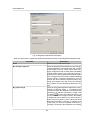
changing default attributes names of the Sheets layer, before the splitting into sheets.
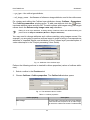
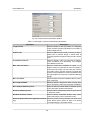
The Parameters window opens. Choose the From attribute option and define the new
name of attribute for storing sheets name: select the name from list or specify it using
the
button. The same way change the name of attribute for storing information
about sheet status in the Attribute name input field of the Sheets activity panel. Click
OK. Thus, after the completion of splitting process, the data about the sheet name and
sheet status will be stored in the defined attributes irrespective of splitting mode.
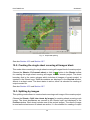
Fig. 18. Setting attributes names
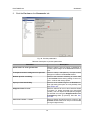
Perform the following actions for obtaining and editing information about a sheet:
• Select the sheet boundaries by double click in the Preview window;
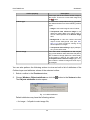
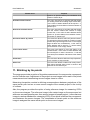
• Choose the Sheets › Sheet info. The Sheet info window opens.
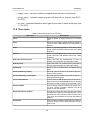
Fig. 19. Values of cutline attribute
Window contains the following information:
42