1
BW/BWS-E serial Indicator user’s manual
0RAGE
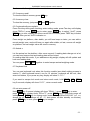
This option is used to select the manual zero range when
press the ZERO key.
Options: 0%, 2%, 4%, 10%, 20%, 50%, 100%
This option is used to set whether Bench Scales will do
auto zero tracking in net mode (after do tare operate, net
weight is zero) Options: ON/OFF
Set the ADC speed
7.5/15/30/60 times/second
Set new zero point, after set this value, when in zero point,
the reading will be –xxx.xxx
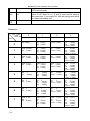
This option is used to set RS-232 communication mode
Options:
CONT(continuously send)
ST1: send one frame data after stable
STC: send data continuously when stable
PR1: when press print key, send one frame data (printer
mode)
PR2: when press M+ key, do print data and M+ at the
same time
AUTO: auto accumulate (auto print) mode, when weight
stable and then return to zero, indicator will do accumulate
and print operate automatically
ASK: ask mode, bi-direction,
Command R: read data
Command T: tare
Command Z: zero
Wireless: wireless mode
Note: if you have selected the wireless model, the
communication mode has to be set to wireless.
This option is used to set baud rate
Options: 600/1200/2400/4800/9600
This option is used to set parity verify
Optional: 7E1/7O1/8N1
0-TARE
SPEED
ZERO
P2
COM
MODE
BAUD
pr
ptype
P3
Lin
lab
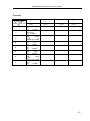
tpup: set the printer as tpup model.
lp-50: set the printer as LP-50 model.
“Lab x”, set gross/acc print format
prt
“prt, set the date/time print format
DECI
This option is used to select the decimal
Options : 0, 0.0, 0.00, 0.000
This option is used to select the division
Options : 1, 2, 5, 10, 20, 50, 100, 200
This display will show xxxxxx for setting the capacity.
Nonlin
Non- linearity Calibrate
Liner
Linearity Calibrate
This display will show xxxxxx for indicating the internal
counts.
Enable /disable key lock
Dual
ON/ OFF
INC
CAP
CAL
COUNT
P4
LOCK
- 13 -