1
Link demonstration
•
•
This section describes the steps required to set up a quick demonstration that
will enable you to send text from one PC to another PC using a wireless link at
32 kbps.
Hardware required:
–
–
–
–
•
Setup Hardware:
–
–
–
•
Setup the 2 PCs wherever you want to demonstrate the RF link.
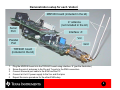
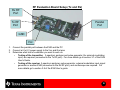
Assemble each ‘station’ according to the figure on page 5
Review proper hardware and jumper setups in the EVM User’s Guide section 6.2.2.
Setup Software:
–
–
•
2 MSP-US-TRF6901 (or MSP-EU-TRF6901) EVM kits
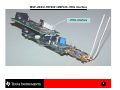
4 antennas (See pg. 13 for how to choose an antenna)
2 PCs each equipped with 1 serial port
2 Power Supplies
Download the file TRF6900 Demo_1_16.exe from the CD provided with the EVM kit
located under the following directory:
\MS-RF Chipset\Tools_Software\Setup_TRF6900 demo 1_16_Master
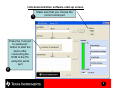
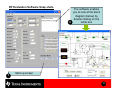
Install the software on each PC. See a snap-shot on page 6
Establish a bi-directional link:
–
–
See page 6 to start-up the software
See section 7.7.5 of the EVM User’s guide for more information on how to run the
software
4