1
•
•
•
•
The
The
The
The
current street name and estimated address
nearest POI (if any)
nearest intersection located in front of you
next instruction if you are on a route (see section on Routes)
Step 1
Travel in a familiar area with intersections to experience the orientation information that
Trekker provides.
Press the F2 key to find out about satellites and reception.
Use the Where Am I function (Home key) to get orientation information about your
immediate environment
Activity 3: Points of Interest (POI’s) in Pedestrian Mode
.
Step 1
What is a POI?
A POI is a landmark. There are 2 types of POI’s. They are ones that are contained on the
map when you purchase the Trekker system, and the personal ones that you create. POI’s
can be used as the origin or destination of a route. They can also be used as a starting
point to browse an area prior to your visit. POI’s can be edited with personal information
(e.g. add phone number) if desired.
Step 2
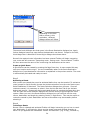
Searching for POI’s
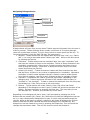
Use the Trekker POI Search dialogue to find both mapped and personal POI’s. You have
two choices when searching for POI’s. They are Search by Distance and Search by
Address:
21