1
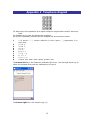
Active Bluetooth/Wireless LAN Indicator: On the Dell Axim X51, it is located on the right
side of the top front panel. On the HP iPAQ 4150, it is located immediately to the left of
the Power button.
Microphone: On the Dell Axim X51, it is located on the left side of the top front panel. On
the HP iPAQ 4150, it is located just to the left of the SDIO Expansion Slot. Use the
microphone to record your voice or other sounds.
Step 2
Turn on the Key describer mode by pressing and holding the F1 key. Use this mode to
explore the Tactile keyboard, noting that it is divided into 3 zones (Data Entry, Navigation,
and Function)
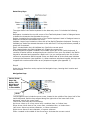
Up, Down, Left
and Right
Arrow keys,
with the Enter
key in the
Step 3
Using the Key Describer mode, explore the Data Entry keys, learning their location and
their function.
7