1
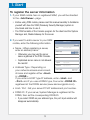
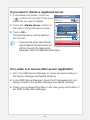
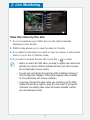
1. Start To register the server information 1. If your SSM mobile has no registered SSM, you will be directed to the <Add Server> page. Before using SSM mobile, please read this manual carefully to familiarize yourself with how the SSM (Samsung Security Manager) system is structured and how to use it. The SSM consists of the Console program for the client and the System Manager and, Media Gateway for the server. 2. If you want to add a server to your SSM mobile, enter the following information. • Name : When registering a server, enter an arbitrary name. Otherwise, you may use the server name registered in the SSM Console. Duplicated server name is not allowed. Be careful! Add Server Tip Name Enter server name. Host Address Type Host DDNS Enter host name. Port Login ID Input User ID. Password Inpur password. • Address Type : Depending on your network access environment, choose and register either <Host> or <DDNS>. If you enter a HOST type IP address, enter <Host> and <Port> and if you use a DDNS type, then enter <DDNS ID> registered at the DDNS service (www.samsungipolis.com). Save Login ID • Host / Port : Set your server PC’s IP address and port number. • DDNS ID : If your server, System Manager is registered at the DDNS, then set the corresponding DDNS ID. If you select DDNS as your address type, the port input window will disappear automatically. 3