1
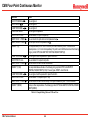
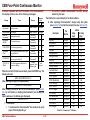
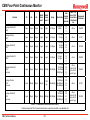
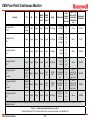
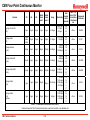
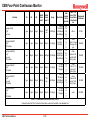
CM4 Four-Point Continuous Monitor
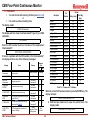
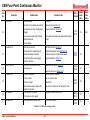
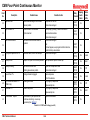
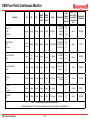
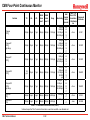
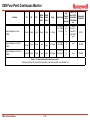
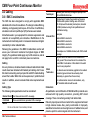
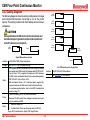
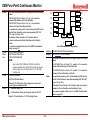
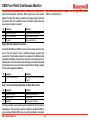
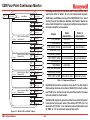
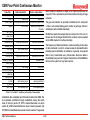
Fault
No.
Description
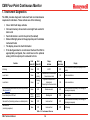
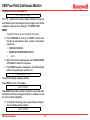
EE CSUM Error
Possible Cause
Out of Monitor
Idle Time Expired
Note:
If this fault appears vital, factory calibration information has
been lost. Recalibration must be performed by a Local
Service Agent.
Return to Monitor Mode or Disable Timer (Section 7.6.5)
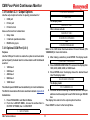
HI BACKGND 4 PTS
High background on all points
Find source of gas near optics block
12
13
14
15
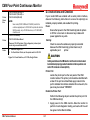
Broken Tape in Carrier
Clock Error
N/A
N/A
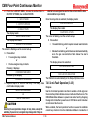
Optics Fail PTx
16
Voltage Fail PTx
17
CM4 Technical Manual
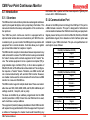
Relay
Activated
Beeping
Audio
Alarm
Yellow
Status
LEDs
FAULT
(RY10)
On
Solid
FAULT
(RY10)
On
Solid
FAULT
(RY10)
On
Solid
FAULT
(RY10)
On
Solid
FAULT
(RY10)
On
Solid
FAULT
(RY10)
On
Solid
Reset System (Section 8.5)
Call Local Service Agent
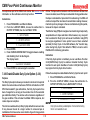
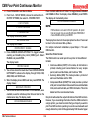
EEPROM Error
10
11
Corrective Action
Dirty Optics
Data Corrupted
Set Date and Time (Section 7.6.1)
Clock Failure
Call Local Service Agent
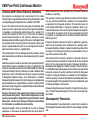
Communication problem between circuit
boards
Check Controller cables
Ribbon cable unplugged
Call Local Service Agent
Check cable from CM4 to customer I/O module
Power Supply problem
Call Local Service Agent
External short-circuit on 24 VDC
Correct short and replace fuse (F15) on customer I/O
board
Table B-1: CM4 Fault Listings (cont’d)
B-3