1
Integrated Notification System
(INS)
Version 6.2.4
Note: A searchable file of this manual can be found under www.mawnet.com/ins/manual.pdf
Table of contents
Table of contents................................................................................................. 2
Main features....................................................................................................... 5
Receiving voice calls........................................................................................ 7
Receiving SMS/E-mail ..................................................................................... 7
Sending Messages .......................................................................................... 7
Getting Started .................................................................................................... 8
How to.............................................................................................................. 8
…set up the application initially........................................................................ 8
…run a voice script to answer calls or respond to SMS/E-Mail events with a
script ................................................................................................................ 8
…send a message to a contact ....................................................................... 9
…send a message from a web site................................................................ 10
…configure Check-it to scan Excel for values................................................ 10
…install MsgServer.exe as a service under Windows ................................... 10
…get more information .................................................................................. 10
Order and registration........................................................................................ 11
About ................................................................................................................. 12
Message Server ....................................................................................................... 13
General.............................................................................................................. 13
System Log.................................................................................................... 14
Error Log........................................................................................................ 14
Outbox Log .................................................................................................... 14
Sent Log ........................................................................................................ 14
Script Log....................................................................................................... 14
Run MsgCenter.............................................................................................. 14
Quit ................................................................................................................ 14
Message handling ............................................................................................. 15
Message adaptation....................................................................................... 15
Voice Engine.................................................................................................. 16
TTS Engine (Text-to-Speech) ........................................................................ 17
Sending of Files vs. sending of text ............................................................... 17
Fax printer driver............................................................................................ 18
Creating off-online faxes ................................................................................ 19
FAX reception ................................................................................................ 19
Message confirmation.................................................................................... 19
Command line parameters ................................................................................ 20
Running MsgServer.exe as service under Windows ......................................... 20
Message Center ....................................................................................................... 21
General.............................................................................................................. 21
Main panel......................................................................................................... 21
New Message (File->New->Message)........................................................... 22
Message Scenarios ....................................................................................... 22
Import/Export (File->Import/Export->Contacts) .............................................. 23
Contacts......................................................................................................... 24
Contact List.................................................................................................... 25
SMS Service Detail ........................................................................................ 26
Fax Viewer (Fax->Viewer) ................................................................................. 28
Fax converter (Fax->Fax converter) .................................................................. 28
INS manual, page 2 of 120
Voice Recorder (Voice->Voice Recorder) ......................................................... 29
Voice file formats ........................................................................................... 29
Tools->Quick Setup........................................................................................... 31
Tools->Preferences ........................................................................................... 31
General .......................................................................................................... 32
Fax (Sending) ................................................................................................ 34
Communication.............................................................................................. 35
SMS ............................................................................................................... 37
Voice.............................................................................................................. 38
E-mail............................................................................................................. 39
Tools->Call Simulator ........................................................................................ 40
Designer ................................................................................................................... 41
General.............................................................................................................. 41
Cells .................................................................................................................. 42
Functional Cells ............................................................................................. 43
Play Message ................................................................................................ 44
Hang-up ......................................................................................................... 45
Get Number ................................................................................................... 46
Speak String .................................................................................................. 47
Run Program ................................................................................................. 48
Run Script ...................................................................................................... 49
Run VBS code ............................................................................................... 50
HTTP Call ...................................................................................................... 51
Send DDE command ..................................................................................... 52
Record Message............................................................................................ 53
Result Variable Switch ................................................................................... 54
Transfer Call .................................................................................................. 55
Send Message............................................................................................... 56
Voice Mail ...................................................................................................... 57
Voice Mail Admin ........................................................................................... 58
Fax-On-Demand ............................................................................................ 59
Send DTMF String ......................................................................................... 60
String contains substring................................................................................ 61
String left chars .............................................................................................. 62
String right chars............................................................................................ 63
String left until ................................................................................................ 64
String right from ............................................................................................. 65
String between two strings............................................................................. 66
Replace string................................................................................................ 67
Load From File............................................................................................... 68
Save To File................................................................................................... 69
Calculator....................................................................................................... 70
Set System Variable ...................................................................................... 71
Exit................................................................................................................. 72
Result Variables ................................................................................................ 73
Send Message.......................................................................................................... 75
General.............................................................................................................. 75
Command Line Parameter............................................................................. 75
Text in files..................................................................................................... 76
SMS Ringtones.............................................................................................. 76
SMS Logos .................................................................................................... 76
INS manual, page 3 of 120
Types ............................................................................................................. 77
Direct sending................................................................................................ 77
Check-It .................................................................................................................... 78
General.............................................................................................................. 78
Command line parameters for CheckIt .......................................................... 79
Dynamic Data Exchange (DDE) .................................................................... 79
INSClient .................................................................................................................. 80
(INSClient only ships with the Enterprise Edition of INS. Please contact MAW
Consulting for more information).................................................................... 80
General.............................................................................................................. 80
Outbox ........................................................................................................... 81
Settings.......................................................................................................... 81
Exit................................................................................................................. 82
Communication devices ........................................................................................... 83
Voice Devices.................................................................................................... 83
Voice boards.................................................................................................. 84
Installing on Dialogic Systems ....................................................................... 89
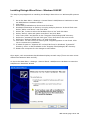
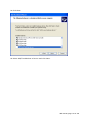
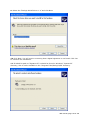
Installing Dialogic Wave Driver - Windows 2000/XP .................................... 100
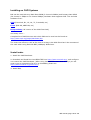
Installing on CAPI Systems.......................................................................... 106
SMS (Overview) ..................................................................................................... 109
How can SMS be sent? ............................................................................... 109
What protocols are supported?.................................................................... 109
How does it work? ........................................................................................... 110
Supported mobile phones ............................................................................ 111
What do I need to know about......................................................................... 112
…Flash Messages? ..................................................................................... 112
…Ring tones? .............................................................................................. 112
…Pictures? .................................................................................................. 112
…Operator Logos? ...................................................................................... 113
…How can I get my original Logo back?...................................................... 113
…Caller Group Logos? ................................................................................ 113
…download WAP content from the web ...................................................... 114
Direct link to GSM device............................................................................. 115
Trouble Shooting .................................................................................................... 116
No device(s) found....................................................................................... 116
Fax driver Installation requests RASDD files ............................................... 116
TAPI modem not accepted .......................................................................... 116
How to Configure MODEM Wave Drivers for use with Message Server...... 117
Caller ID....................................................................................................... 118
How to Configure an ISDN "modem" with MsgServer.................................. 120
DDE error..................................................................................................... 120
INS manual, page 4 of 120
Main features
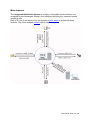
The Integrated Notification System is a highly configurable communication tool
designed to send messages through your computer and lets your computer handle
incoming calls.
Best of all you do not have to buy an expensive voice board to access all those
features. Any voice-enabled modem can be used.
INS manual, page 5 of 120
Using the Integrated Notification System you can
•
•
•
•
•
•
•
Send messages to
o pagers
o mobile phones (Through the SMS standard)
o fax machines
o voice recipients
o e-mail recipients
Send faxes from any print enabled application using the Windows printer
driver
Send faxes to distribution groups
Design interactive voice response (IVR) scripts to answer incoming calls. The
caller can navigate through the script by pressing digits on the phone keypad.
Scripts like multi-user voice mail boxes, credit card verification or fax-ondemand are set up within minutes. Message Server supports an unlimited
number of incoming lines.
Design interactive scripts to dynamically react on SMS or e-mail messages.
Scripts like SMS-to-Email or Email-to-SMS are only some of the possibilities
Receive faxes
Scanning external application for values and in the event the criteria is met,
send a message to a user. Ideal for SCADA alarming or Network monitoring.
The Integrated Notification System consists of the following applications:
Message Server
Message Center
Designer
Send Message
Check-It
Client
INS manual, page 6 of 120
Receiving voice calls
By using the intuitive but powerful graphical script Designer you can create
interactive phone applications (Also called Interactive Voice Response IVR Systems),
where the caller uses the phone keypad to enter values and navigates through a
script. Applications like Credit Card verifications, Fax-On-Demand, SMS-On-Demand
or Voice-Mail may be designed within minutes.
All values entered by the caller are available for further processing in the script or can
be exchanged with any other application like Excel or Visual Basic.
Receiving SMS/E-mail
By using the intuitive but powerful graphical script Designer you can create scripts
that react on incoming messages. The message (SMS or E-mail) is queried for the
specified values and format and then you can react on its contents. SMS/Email
forwarding, SMS/Email auto reply, SMS on demand, etc, may be designed within
minutes. All values received are available for further processing in the script or can
be exchanged with any other application like Excel or Visual Basic.
Sending Messages
Using the Message Center utility, you can define a database of contacts to which you
may send your messages. Messages can be sent by
•
•
•
•
•
•
Pager
Mobile phones (Through the SMS standard)
Fax
E-mail
Voice file
or as script
When sending a message you can decide to send it using a pre-specified
communication link or to let Message Server choose the most appropriate link. If you
let Message Server choose the link, it will automatically adapt the message to suite
the selected communication link.
The messages can be sent through the Message Center interface or using the
command line interface of Send Message.
Check-It allows you even to query other applications for values and send alarm
messages if those values exceed the defined limits. This feature makes the suite
invaluable for SCADA applications, where you need to monitor factory floor data.
Network administrator may set up events to monitor the loss of communication and
sent alarm messages to the support group.
INS manual, page 7 of 120
Getting Started
How to...
…set up the application initially
To set up the application initially please use the Tools->Quick Setup option in the
MsgCenter utility, found in the main directory. This will lead you through a set of
screens which sets up you modem, script and other settings.
To change other parameters of the suite you can use the Tools->Preferences option.
This however is not necessary in most cases.
…run a voice script to answer calls or respond to SMS/E-Mail events with a
script
Scripts can either be voice scripts (started when a call comes in) or text scripts
(started when a new e-mail or SMS is received, or at predefined timer intervals).
Once you have set up the suite you may use Designer.exe to edit the selected script
file. Designer is a graphical script interface, which allows you to create and modify
answering scripts. All voice script files have the extension VSC and all text script files
the extension TSC.
The flow of the script is usually from top to bottom, starting at the cell with the red
caption until it reaches an end point. The end point should be a HANGUP or EXIT
cell.
By double clicking on a cell you may open a pop up screen which allows you
configure the behaviour of the cell.
Once you have designed the script you need to select it in the appropriate place.
For voice scripts:
1. Define a new line under MsgCenter->Tools->Preferences->Communication as
type "VOICE: Incoming Voice/Fax calls"
2. Select the script under "Script"
3. Make sure that a communication device under "Connected to" is correct.
For Timer activated scripts:
1. Define a new line under MsgCenter->Tools->Preferences->Communication as
type "Timer"
2. Select the script under "Script"
3. Set the scan interval to a non zero value
For SMS scripts:
1. Define a new line under MsgCenter->Tools->Preferences->Communication as
type "SMS: Incoming SMS through Handset"
2. Make sure that a communication device under "Connected to" is correct.
INS manual, page 8 of 120
3. Set the inbox scan interval to a non zero value
(The system will download the messages every scan and then execute the
script)
For E-mail scripts:
1. Define a new line under MsgCenter->Tools->Preferences->Communication as
type "E-MAIL: Incoming E-Mail"
2. Make sure that a valid e-mail profile is selected under "Connected to".
3. Enter the correct POP settings if necessary
4. Set the inbox scan interval to a non zero value
(The system will download the messages every scan and then execute the
script)
Then start the MsgServer application. This application handles all calls from and to
your system.
Message Server will go through a start-up routine where all settings are checked. If
during the start-up errors are encountered, an error message is displayed for 5
second and the icon on the right side of the taskbar blinks. Clicking on the icon opens
a menu, which allows you to open the different logs or to close the application. The
SYSTEM LOG reports all events during the current session, so it is a good idea to
leave it open at beginning. If there were no errors during start-up and there is a valid
script configured, the SYSTEM LOG will display "Running script [scriptname]".
Now you are ready to call the line to which your modem is attached to and watch the
script running. The SYSTEM LOG will always display the current cell name, the keys
entered by the caller and any other event occurring during the call.
When a text script (SMS or E-mail) is selected the system will periodically (Scan
time) download the new messages and the run the script on the new messages.
…send a message to a contact
After the initial set up through MsgCenter select the Contacts icon in the explorer
window. Select the default MAW entry and right click on the icon. Then select
Duplicate. Enter your name and change the appropriate settings. If applicable select
your SMS services. In the CONTACT TIMES part you may configure during what
time which device can be used. If you only wish to receive SMS messages just select
SMS as first link and as first preference.
Then choose File->New->Message and select the created contact as Recipient.
Under Send Via you can select if the message will be send by the user defaults
(entered in contacts) or through a pre-selected communication link.
The advantage of specifying multiple communication links for a contact is that a
message may be send using the most appropriate communication for the time.
Then enter a message and press SEND. This will add the message to the outgoing
message queue and MsgServer will send it using the appropriate communication
device.
Start MsgServer as described above.
Depending on the selected device the message will be adapted. Please search the
help file for "Message adaptation" for more information on how MsgServer can adapt
your message to suite a particular communication device.
INS manual, page 9 of 120
…send a message from a web site
There is a sample on C:\INS\SampleScripts\Text Scripts\SMSFromWeb that shows
on how to set up a web site that gets user input and then sends it via e-mail to a
predefined e-mail address. With Message Server you can then read this e-mail and
from a text script do the required functions to return a desired logo, or other
information.
…configure Check-it to scan Excel for values
Start CheckIt.exe. The application will run minimized and only appear as icon on the
right side of the task bar. Click on the icon to open the configuration screen.
The example event will scan Excel every minute for the value of cell A1 (R1C1). If the
value in this cell exceeds 10, an alarm message will be sent to the contact MAW.
In order for this example to work Excel needs to be running in the background.
Also Check-It needs to be minimized to start scanning the values.
…install MsgServer.exe as a service under Windows
(See on p.20, “Running MsgServer.exe as service under Windows”)
…get more information
All applications have on-line help. So please use F1 anywhere in the applications to
get context sensitive help.
INS manual, page 10 of 120
Order and registration
To order a copy of INS or to check its current price, please go to
www.mawnet.com/order.html
After your order has been approved, you will receive from us within 24 hours an email with your serial key that unlocks your evaluation copy into a fully licensed
version. This key also entitles you to future upgrades, so please store it in a safe
place.
To register the application, please open MsgCenter.exe and enter the provided
unlock key on the about form. For this the user needs to have the administrator
access rights to be able to write to the registry. Also for the software validation,
administrator access is required.
Once registered, any other user may log on and use any other INS application
however.
The MsgServer.exe application should always be run under the administrator
account.
INS manual, page 11 of 120
About
Support
For all support questions please refer to our support forum on
www.mawnet.com/support.html
Please note:
- We can not provide phone support for our evaluation copies, please use the forum above
- Always indicate your name and e-mail address whenever you contact us
MAW Consulting International
E-Mail
[email protected]
Web
http://www.mawnet.com
(general inquiries)
European Headquarters Switzerland
MAW Consulting
Hofacker 19
8808 Pfäffikon
Switzerland
Phone: +41-(0)55-4201386
Fax:
+41-(0)55-4201386
UK Support line
MAW Consulting UK Ltd.
Phone: +44-(0)7092288534
Fax
+44-(0)7092288539
INS manual, page 12 of 120
Message Server
General
The Message Server application is the main application of INS. It runs continuously
in the background of a voice board or voice modem equipped PC and handles all
communication requests to and from the outside world.
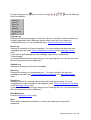
After startup the application displays an icon in the System Tray (Right part of task
bar).
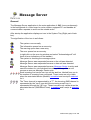
The signification of the icon is as follows:
The system runs normally
The information queue has a new entry
The warning queue has a new entry
The error queue has a new entry
(a right-click on the error log window and select "Acknowledge all" will
reset all error indications on the taskbar)
The system is checking the message queue
Message Server was suspended because a fax call was detected.
Message Server was suspended because a data call was detected.
Message Server was suspended because Message Center is active and
uses the modem for voice playback/recording. Message Server will
resume as soon as Message Center quits.
Each incoming line has its own icon on the task bar, labeled from one to
the number of incoming lines configured. Those icons are only visible
when the associated device (Modem) is enabled and a script is selected
for it.
The Timer channel is represented by a "T", the incoming SMS channel is
represented by the "sms" icon while the incoming e-mail icon is
represented through the "@" icon. Those icons are only visible when the
associated device (SMS/Email/Timer) is enabled and a script is selected
for it.
INS manual, page 13 of 120
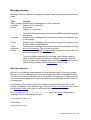
By right clicking on the
menu is available:
icon or on any of the
icons the following
System Log
Displays the system messages in text form. Here you are able to see all events and
modem responses. When Message Server closes down the log is saved as
c:\INS\session.log. You can disable the log in Tools->Preferences->General.
Error Log
Displays a summary of all error messages. You may configure the days the error
messages are kept under Tools->Preferences->General in the Message Center
utility.
If you wish to acknowledge an error message, right click on it and select
"Acknowledge".
If you entered this menu through clicking on an incoming line icon, only the errors for
this incoming device will be displayed.
Outbox Log
Displays a summary of all unsent messages.
Sent Log
Displays a summary of all messages sent. . You may configure the days the
messages are kept under Tools->Preferences->General in the Message Center
utility.
Script Log
Displays a log of all incoming calls and the path taken by the script. You may
configure the number of scripts to be displayed under Tools->Preferences->General
in the Message Center utility.
If you entered this menu through clicking on an incoming line icon, only the scripts for
this incoming device will be displayed.
Run MsgCenter
Runs the Message Center utility.
Quit
Shuts down all channels (modems or voice board channels) and quits the
application.
INS manual, page 14 of 120
Message handling
Message Server is capable of sending messages using the following communication
types:
Type
SMS (to pager
or mobile
phone)
Facsimile
E-mail
Voice
recipients
Scripts
Capacity
Alphanumeric messages up to 160 characters
Pictures (72 x 28 pixels)*
Ring tones*
Logos (72 x 14 pixels)*
*Only with supported mobile phones and a SMS central that supports
this feature
Alphanumeric messages with no limits on number of characters, use
of cover page
Alphanumeric messages with no limits on number of characters, use
of cover page and attachments
Alphanumeric messages, read either character by character or using
pre-recorded words , use of cover voice files.
Scripts as designed with Designer which will start to execute as soon
as the called person answers the phone.
The only difference between an incoming script and an outgoing
script is that the outgoing script can not have a hangup cell at the
end. It is a part of an outgoing call so the hangup will be done by the
calling voice message. (After confirmation of the script).
Message adaptation
Most of us use different communication tools at different times. It is not uncommon
that we receive our messages by e-mail during working hours, but by SMS at home.
To make sure that the message finds a way to get to its recipient, you can configure
all communication types your contacts are likely to use and define at which times to
use what type.
As different communication types have different capacities Message Server can
"adapt" a message to the individual type. Using the Tools->Preferences menu item in
the Message Center utility you can influence how messages are adapted.
IE if you check the Speak only CAP characters flag in the voice configuration a
message sent to a fax with the reading
PV has reached a value > 30
will become
{P}{V} {higher than} {30}
INS manual, page 15 of 120
Voice Engine
The Message Server Voice Engine allows you to pre-record characters, words or
expressions and accesses them through text messages.
IE if you pre-record the voice files
TEMPERATURE.WAV
ALARM.WAV
VALUE.WAV
a message string with the contents
TEMPERATURE ALARM TT42 VALUE >23.45
will be read as
{TEMPERATURE} {ALARM} {T}{T}{4}{2} {VALUE} {is higher than} {2}{3}{point}{4}{5}
The file ASSORTED.CFG contains the mapping for each voice file. This allows attributing
a voice file to a particular string. All voice files need to be located in the voice file
directory.
IE the entry
"ALARM"=ALARM
plays the voice file ALARM.WAV whenever the string ALARM is found in a message
and the entry
"*"=STAR
plays the voice file STAR.WAV whenever the character * is found.
If the message string contains words that are not defined, they are read back on a
character-per-character base.
INS manual, page 16 of 120
TTS Engine (Text-to-Speech)
If a text to speech engine is installed you may use it to play back written text in the
Speak String cell. Currently Message Server can only work with SAPI 4.
For SAPI 4, you will want to download speech synthesis and recognition engines
from Microsoft's website at:
http://www.microsoft.com/downloads/release.asp?ReleaseID=26299
The file that you will want to get is SAPI4SDKSuite.exe (the large file).
This contains the SAPI COM interfaces as well as speech synthesis and recognition
engines.
After installing this package, the Message Server will automatically pick it up and let
you use the speech capabilities.
Please note that WindowsXP ships with SAPI5 which will not work with INS. You
may however additionally install SAPI4 as SAPI4 and SAPI5 can coexist on the same
computer.
Sending of Files vs. sending of text
If a message launched to a voice recipient represents a valid voice file path, the
voice file is played and not read character by character. So if the message
C:\INS\ALERT.WAV
is send to a voice recipient the file ALERT.WAV is played when the other party
responds, not a list of characters.
The same applies for faxes, e-mails and scripts. If the message represents a valid
file, the content of the file is sent rather than the file path.
Valid voice file extensions are
WAV - Windows Audio File
Valid mail file extensions are
*.* - (all files)
Valid fax file extensions are
APF - Fax files
BMP - Windows Bitmap
DCX - Multi page PCX
PCX - PC Paintbrush
TIF - Tagged Image File
TXT - ASCII text file
Valid SMS picture/logo file extensions are
GIF - Graphic Interchange Format
Valid SMS text/ringtone file extensions are
TXT - ASCII text file
INS manual, page 17 of 120
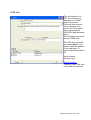
Fax printer driver
Message Server is able to send faxes from any print enabled Windows application.
To do so the Quick Setup option will add an additional printer to your system.
The new printer is called [INS Fax Printer].
So whenever you wish to fax a document, just print it to this printer and your fax will
be sent by Message Server. (Message Server needs to be running when printing the
fax).
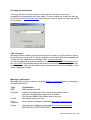
When printing from the Windows application the following dialog will appear.
Just select the recipient from the selection box or enter a new name. The Explorer
button next to the recipient will open the detail page for this recipient (As entered
under Contacts). You can also send faxes to an entire ContactList by selecting the
list either from the selection box or by entering a new list name. (Must start with the
">" character). Pressing on a list will open the detail page for the entered list. When
sending faxes to a list the Fax Cover and Fax Number will be taken from each
individual user.
If you wish to send a fax just once directly to a FAX number, without the need to
create a new user, then just enter the fax number in the top field under Direct to FAX.
A temporary user will be created automatically and deleted again when the message
is sent.
As long as there is anything written in this field, some of the other fields are hidden.
To display them again, just delete the entry in the Direct to FAX field.
INS manual, page 18 of 120
Creating off-online faxes
You may use the fax printer driver to create off-line files that are not send
immediately, but separately at a later stage. To do so enable the Create fax file only
check box in the Fax Printer Driver and chose the location where you wish the fax file
to be created.
FAX reception
Message Server is able to receive faxes either at the start of a voice script or during
the recording of a voice file. To set the number of seconds to wait at the beginning of
a script for a fax signal see the settings under Incoming Script(s).
If a fax is detected during the recording of a voice file (in the Record Message cell or
the Voice Mail cell) Message Server will stop the current script and switch to the fax
reception mode. Once the fax transmission has succeeded the fax is available in the
inbox of Message Center.
Message confirmation
Message Server retries to send a message Number of attempts times. A message is
considered as sent if
Type
SMS
Facsimile
E-mail
Voice
recipients
Scripts
Confirmation
SMS central sent ACK
Internal Fax application: Fax confirmed by remote station
External Fax application: Application is started
Fax through MsMail: Mail engine reports no error
Mail engine reports no error
User confirms message by pressing the confirm message key
User confirms message by pressing the confirm message key
BEFORE OR AFTER THE SCRIPT.
INS manual, page 19 of 120
Command line parameters
You can start MsgServer.exe with the following command line parameters:
/DEBUG
Writes additional messages to the session.log that allows the MAW
Support crew to better understand potential problems with your system
/NOFORM Does not display the taskbar icons nor any other form
/SERVICE Indicates that MsgServer rungs as a service under Windows
Please only use those parameters when directed by MAW support to do so.
Running MsgServer.exe as service under Windows
MsgServer.exe can run as a service under WindowsNT (WindowsNT, Windows2000
or WindowsXP). This has the advantage that MsgServer.exe is loaded every time the
system starts and you do not need to log on to start MsgServer.
To install the MsgServer service please run the batch file found under
c:\INS\utilities\service\InstallAsService.bat.
This utility will install a service called MsgServer which you can edit through the
service tab in the Windows control panel.
Once you have installed the service you need to re-boot the computer for the service
to load.
To uninstall the service please run c:\INS\utilities\service\UninstallAsService.bat.
If the MsgServer service is started and a user logs onto the computer, the tray icons
are visible as if the application was started normally. You may completely hide the
icons by setting the services settings for the MsgServer to "Do not allow service to
interact with desktop". If the icons are visible and the user logs off, the MsgServer
service is stopped. This behaviour is by design.
To use the fax printer driver to send faxes the icons need to be visible.
INS manual, page 20 of 120
Message Center
General
The Message Center tool is the main user interface to the Integrated Notification
System. Here you can
•
•
•
•
•
•
•
listen to your voice messages
view your faxes
send messages
record voice files
configure your communication device and other parameters
define contacts
etc.
All settings, messages and logs are kept in a set of databases found in the
installation directory.
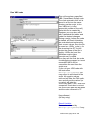
Main panel
The main pane displays all Message Server log entries. Those logs are updated
whenever you receive voice mail or faxes through the voice mail cell, or if a caller
executes a script. To delete an entry, simply press <DEL> or use the pop-up menu.
To get more information about a list item just double click on it.
Dbl click to view
details or use the right
mouse button for the
popup menu
<=Play voice mail
<=Stop playing
<=View fax
INS manual, page 21 of 120
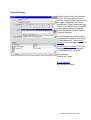
New Message (File->New->Message)
This screen allows you to create messages and send them.
Under Send via you can select if the message will be send according to the user
defaults (Entered in contacts) or through a pre-selected communication link.
The advantage of specifying multiple communication links in contacts is that a
message may be send using the most appropriate communication link for the time.
It also acts as backup, so that if one link is not available the message will be send
through another.
Pressing SEND will add the message to the outgoing message queue and Message
Server will send it using the appropriate communication device.
Depending on the selected device the message will be adapted.
You can also modify the sending time so that the message is only send at a later
moment. If you change any of the parameters associated with a contact those
parameters will become the new parameters of this contact.
<=Time to send
<=Message type
<=Recipient details
<=Text
<=Send/Clear
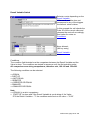
Message Scenarios
The option "Add to scenario" will add this message to a scenario. Message Scenarios
are messages that you can predefine, store in a folder (scenario) and activate as a
group at a later stage. To activate a scenario from MsgCenter just right-click on the
scenario and select "Launch scenario".
You can also activate a scenario through Send Message or inside a Designer script.
INS manual, page 22 of 120
Import/Export (File->Import/Export->Contacts)
This option allows you to import and export the internal contacts database to an
external CSV (Comma Separated Value File) file.
The format to be followed for importing from a file is the following:
String<30>
String<30>
String<30>
String<20>
String<150>
String<150>
String<150>
String<20>
String<30>
String<1>
String<20>
String<150>
String<50>
String<150>
String<100>
ContactName
FirstName
LastName
VoiceNumber
VoiceFileBefore
VoiceFileAfter
ScriptFile
SMSNumber
SMSService
SMSType
FaxNumber
FaxCover
EMail
EMailCover
Comment
All fields must be enclosed by ".
A sample of an import file would be
"MAW","Marc ","Wanderer","123456789","C:\voice\voice1.wav","C:\voice\voice2.wav","","+41799999999","(Internet)
Clickatell","0","+411234567","C:\cover\faxcover.apf","[email protected]","",""
"TLEE","Tom","Lee","","","","","+41799999999","(use default from preferences)","0","","","","",""
It is highly recommended to first export the database, to add the new entries and
then to re/import the file. This will ensure that you place the right information into the
right column.
INS manual, page 23 of 120
Contacts
Specify here all users who need to receive your messages.
You can define whether the person receives a message by SMS, Fax, E-mail or
Voice file. Simply define under the Contact Times when the contact can receive
which communication type.
If the contact does not use a particular communication type, the associated fields
may be empty.
If at the same time two communication types are available, the message is send
depending on the contact's Contact Preference.
If the message can not be send through the device at 1st preference the 2nd will be
used etc.
The advantage of specifying multiple communication links for a contact is that a
message may be send using the most appropriate communication link for the time.
It also acts as backup, so that if one link is not available the message will be send
through another.
INS manual, page 24 of 120
Contact List
Allows creating distribution lists of messages by configuring contacts into contact
lists. You can add/delete users from a list by dragging the user name to the desired
column.
To change the name of the list, type the new name in the text box at the top.
By using the and button you can change the priority in which the message is
send to the members of the contact list. If you select the Message behavior Send to
all members the message is send to all members of the list. If you select Send to
members until first acknowledgment the message is send to the members following
the priority list until a member confirms the reception of the message.
INS manual, page 25 of 120
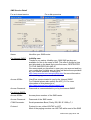
SMS Service Detail
For an Internet service
For a dial-up service
Name:
Identifies your SMS center
For Internet SMSC:
Infobiiip.com
Thanks to our partner Infobiiip.com 1'000 SMS per day are
available for free to the users of INS. This offer is limited in time
and allocated on the basis first-come-first-serve, RESTRICTED
TO FIVE SMS PER DAY AND IP.
We recommend you therefore to open your own account and buy
your credits from Infobiiip.com at rates well below those provided
by your mobile operators. Please go to
http://www.mawnet.com/setupinfobiiip.html for more information
about setting up your account with Infobiiip.
Access ID/Nbr:
UserID as communicated to you by the Internet SMSC
For Clickatell please also specify the APP_ID. For more
information on this please go to
http://www.mawnet.com/setupclickatell.html
Access Password:
Password as communicated to you by the Internet SMSC
For dial-up SMSC:
Access ID/Nbr:
Access phone number of the SMS center
Access Password:
Password of the SMS center
COM Parameter:
Serial parameters Baud, Parity, DB, SB. IE 1200,e,7,1
Protocol:
Protocol to use, either XIO/TAP or UCP
Most of the paging services use XIO/TAP while most of the SMS
INS manual, page 26 of 120
services use UCP. Please contact your local paging company for
more information.
#Msg
Maximum number of messages to be transmitted during one
session (As imposed by the SMSC).
(0 for no limitation)
Connect via modem
Use a modem to connect to SMS service. (Versus using a local
server).
Note: Please contact your local SMS service for more information about the settings
for their service.
The Integrated Notification System is designed to function with any dial-up service
provider supporting either the XIO/TAP or the UCP protocol.
Due to the large number of service providers we do not have the capability to test
them all regularly. We can therefore not guarantee that all providers implement their
services 100% according to the protocol's specification.
If you find one of the providers that is outdated or yours which is not on the list
please let us know!
INS manual, page 27 of 120
Fax Viewer (Fax->Viewer)
Utility to display faxes.
Fax converter (Fax->Fax converter)
Fax conversion utility. To create off-line faxes you may also use the fax printer driver
and create them off-line.
INS manual, page 28 of 120
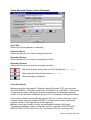
Voice Recorder (Voice->Voice Recorder)
Voice File:
Selects the file for playback or recording.
Playback Device:
Selects the device to be used for playing voice files.
Recording Device:
Selects the device to be used for recording voice files.
Recording Format:
Selects the format to be used for recording voice files.
Starts the recorder and records to the file selected as Voice File
Starts playback of the file selected as Voice File
Stops recording or playback
Voice file formats
Modems using the Unimodem/V Telephony Service Provider (TSP) can only work
with PCM 8000 Hz, 16 bit Mono wave files. (PCM 8000 Hz, 16 bit Mono). This format
is supported by most of the sound recorders available for the Windows operating
system. For the Windows SndRec32 just go to File->Properties to change the format.
If you select a different format Message Server will try to convert it internally to the
required format, using the installed CODEC. For better sound quality you should
however record it in the right format at the beginning.
INS can convert any format for which an associated Windows ACM (Audio
Compression Manager) codec is installed on the PC, including PCM, RIFF-MP3,
ADPCM, GSM, CCIT A Law and µ Law, True Speech(TM), etc. as long as the
INS manual, page 29 of 120
appropriate codec is installed.
If you use a voice board and a third party TSP you may use other formats as well.
INS manual, page 30 of 120
Tools->Quick Setup
The Quick Setup Wizard leads you through a set of screens, which help you to set up
Message Server for the first time. Once set up you can change the settings under the
menu item Tools->Preferences.
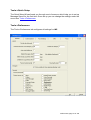
Tools->Preferences
The Tools->Preferences tab configures all settings for INS.
INS manual, page 31 of 120
The following tabs are available for configuration:
General
Fax(Sending)
Communication
Voice
E-Mail
SMS
General
Idle time between send attempts (s)
Sets the time interval Message Server waits before trying to re-send failed
messages. When a new message is submitted to the queue, it is send immediately.
NOTE: Do not set below 60s to allow the destination to become free (IE if busy).
Number of attempts
Number of attempts to send a message. Message Server will reschedule the
message Number of attempts times if it is unable to confirm that the message has
been sent.
Outside line dial prefix
Prefix to be added in front of every phone number to get an outside line.
Auto start Message Server
If selected, this option will start Message Server automatically every time Message
Center starts.
Record system log file
If selected Message Server will keep a log file of all its activities. This option is very
helpful for trouble shooting or for confirmation of actions taken by the system. The log
is saved to a file called SYSTEM.LOG in the main program directory.
Max log file size xxx kB
Restricts the size of the SYSTEM.LOG. After exceeding this size the current system
log is backed up and a new log is created.
Delete Error Log entries after xxx days
Number of days to wait until deleting the old error log entries
If you set this value to 0 no error logs are kept.
Delete Script Log entries after xxx days
Number of days to wait until deleting the old script log entries
If you set this value to 0 no script logs are kept.
Delete Messages after xxx days
Number of days to wait until deleting the old messages (incoming and sent/failed)
If you set this value to 0 no incoming messages and no failed messages are kept.
Messages that are not yet sent will still be visible. If a message is used to send a file
and the message is deleted, then the file is also deleted unless you unselect the Also
delete attachments checkbox.
INS manual, page 32 of 120
Show readme.txt when opening designer script
This option makes Designer to display the file readme.txt when opening a script.
Security
Here you can protect the access to the critical system functions. If you enter a
password under Access password, this password must be entered the next time the
functions(s) checked are called. This password is case sensitive. If you use this
function then make sure to always also set the password for Preferences, as
otherwise a user can change the password.
As the password is stored on the server, this setting will apply for all clients.
INS manual, page 33 of 120
Fax (Sending)
Use internal fax engine for faxing (Preferred method)
Station ID: You station identification to be transmitted to the remote station
Header Line: Header line to be used when sending a fax. The following replacement
characters may be used:
Tag Description
$D today's date in MM/DD/YY format, always 8 characters
$I station ID, variable length
$N total number of pages, variable length
$P current page number, variable length
$T current time in HH:MMpm format, always 7 characters
Save outgoing faxes in
Directory to copy the faxes to once they are sent.
Use E-mail for faxing
Uses MsMail for sending faxes (The MsMail Fax service needs to be installed on the
post office).
Use Fax application
Defines an external fax application to be started when sending a fax. This application
will be called with a command string in the form
AppName FaxNbr CoverSheet Message
is the fax number for the desired contact as specified in Contacts. CoverSheet
is the filename of the specified coversheet and Message is a string containing the
actual message.
FaxNbr
INS manual, page 34 of 120
Communication
(See also communication devices)
Here you can allocate the communication devices (modems, voice boards)
connected to your computer to the different line.
Each device can only be used once as they may be needed anytime.
Test
Starts a test sequence to confirm the selected device type and its fitness for the
selected application.
Detect Lines
Searches for a suitable device, which can be used by Message Server.
Init String
Initialization string to send to the modem every time the modem needs to be reset.
This string will be send after the internal init string ATZ. (Ignored if empty)
SMS communication through handset
Select here the port your mobile phone is attached to, either through a cable or an IR
INS manual, page 35 of 120
connection. This setting is used when synchronizing the handset SMS inbox with the
INS inbox and when sending SMS through a direct link. Choose here the virtual
modem driver installed for your mobile phone. This driver should be installed by
Windows as soon as you connect the mobile to the computer. Otherwise
choose the option "detect new hardware" in the Windows control panel. If you
do not install a modem driver you may alternatively select a COM port directly. If you
set this value to (None) you will be unable to import anything from the mobile or to
send a SMS through the mobile phone.
The default speed for most mobile phones is 9600 Bds, but there are some that
require 19200 Bds. If your mobile phone does not seem to work with 9600 Bds you
may need to change this value.
Scan interval:
Time interval to scan the inbox (SMS or E-mail) for new messages or to trigger the
Timer.
E-Mail
Select here the profile to use for sending/receiving e-mails. If you use MS Exchange
(IE Outlook) select your profile name from the list. If you use another MAPI compliant
application (IE Netscape, Outlook express, etc) select (MAPI enabled). (To use
Netscape you need to enable its MAPI setting under Edit->Preferences>Mail&Newgroups).
To retrieve the messages of your POP3 mailbox select (POP / SMTP Mail) and enter
the appropriate settings.
This setting is used when synchronizing your E-mail box inbox with the INS inbox
and for sending E-mails.
Script
Pressing the
button will open Designer and allows you to modify the script.
Answer phone after xxx rings
Selects the number of rings before answering the phone. For Caller ID display you
should leave this value at least at two as the caller information is transmitted between
the first and second ring.
Wait xxx (s) for FAX signal
Sets the number seconds to wait for the detection of a fax signal. The fax signal is
defined by 700ms of a high pitch and 3000ms of silence. For INS to be able to detect
at least one full period before starting the script you need to set this value to around
4-8s.
INS manual, page 36 of 120
SMS
Sender ID
Your own mobile phone number that will be sent as Sender ID (if supported by the
SMSC, not used for XIO SMSC)
Mobile phone character set
Character set to use when communication with the mobile phone
INS manual, page 37 of 120
Voice
Allow Key Ahead
Enable/Disable keying ahead of DTMF signals (Keys pressed on the phone pad)
Confirm Message Key
When sending a message as voice file the user presses this key to confirm the
message.
Silence detection level
Level underneath which the audio level is considered as silence.
Voice File Directory
Directory where all assorted voice files are kept
If you do not specify a drive, the path is taken starting from the application directory.
IE Assorted\WAV becomes C:\INS\Assorted\WAV
Play Beep after messages
Play a beep after sending a message as voice file
Speak only CAP characters
If the voice file message consist of a chain of characters speak only the uppercase
characters
Voice recording format
Allows you to change the recording format of the voice files. Do not change this
value unless advised my MAW Consulting.
(See also Voice file formats)
INS manual, page 38 of 120
E-mail
Export Voice Mail/ Fax
When this option is selected Message Server will copy all incoming messages (Voice
mails and faxes) to your MAPI enabled e-mail application (Exchange, Outlook
express, Netscape, etc). This allows you to listen to your voice mail from within your
e-mail application. The voice mails are stored as attachment in the Inbox (for
MSMail) or Draft folder (for Netscape).
External Mail Reader
External mail reader to use to display e-mail messages. (IE Exchange32, Outlook,
Netscape, etc)
Mail sending subject
The subject to use when sending e-mails
INS manual, page 39 of 120
Tools->Call Simulator
The Call Simulator gives you the option to simulate an incoming call. This is very
useful if you want to test your voice scripts. When Message Server is running you
can click on Dial which will simulate a ring sequence. Once the communication
device has answered the call you can listen to the voice prompts and simulate the
keys pressed by a caller. When you select Hangup the connection is interrupted,
similar as if a caller hangs up.
You can select the line to test by changing the "Testing Line" combo box; here you
find all enabled incoming lines listed.
The simulator can only be used to test voice scripts. Text scripts should be tested
“on-line”
INS manual, page 40 of 120
Designer
General
Designer is an easy to use graphical interface, which allows you to create powerful
scripts. Those scripts are then executed by the Message Server application.
Fax-on-demand, Voice Mail and Automated Information Services are only a few of
the possibilities that can be designed.
Designer will create two types of scripts, voice and text.
Voice scripts are used to create interactive phone applications (Also called
Interactive Voice Response IVR Systems), where the caller uses the phone keypad
to enter values and navigates through a script. Fax-on-demand, Voice Mail and
Automated Information Services are only a few of the possibilities that can be
designed with voice scripts.
Text scripts are used to create scripts that react on incoming messages or are timer
dependent. The message (SMS or E-mail) is queried for the specified values and
format and then you can react on its contents. SMS/Email forwarding, SMS/Email
autoreply, SMS on demand, etc, may be designed within minutes.
Instruction Flow
When executing a script the first cell is always the Start Cell. This is the only cell with
a red caption. From then on the flow of instructions depends on the script. By double
clicking on a cell the detail screen opens and the behavior of the cell can be
configured. In the Targets section of the cell the Trigger defines the caller action (IE
when the caller presses a key on the phone pad) that leads to a next Target, which is
the next cell to be executed.
INS manual, page 41 of 120
Cells
Double clicking on the cell icon opens a window that highlights the settings for this
particular cell. The settings and values depend on the function of the cell.
<=Cell title, used to identify cell
<=Cell type, defines behaviour of cell
<=Description, free comment
<=Voice file(s)
Dbl click to select or enter Result Variable
<=Options
<=Parameters
<=Targets, next steps
Some of the cells have only SUCCESS/FAIL as
trigger option, some only NEXT.
Double click on trigger or target to change
INS manual, page 42 of 120
Functional Cells
The following functional cells are available:
(1) Used in voice scripts (*.vsc)
(2) Used in SMS, E-mail or Timer scripts (*.tsc)
(1)
(1)
(1)
(1)
(1)(2)
(1)
(1)(2)
(1)(2)
(1)(2)
(1)
(1)(2)
(1)
(1)(2)
(1)
(1)
(1)
(1)
(1)(2)
(1)(2)
(1)(2)
(1)(2)
(1)(2)
(1)(2)
(1)(2)
(1)(2)
(1)(2)
(1)(2)
(1)(2)
(2)
Play Message
Hang-up
Get Number
Speak String
Run Program
Run Script
Run VBS code
HTTP call
Send DDE Command
Record Message
Result Variable Switch
Transfer Call
Send Message
Voice Mail
Voice Mail Admin
Fax-On-Demand
Send DTMF String
String contains substring
String left chars
String right chars
String left until
String right from
String between two strings
Replace string
Load from File
Save to File
Calculator
Set System Variables
Exit
INS manual, page 43 of 120
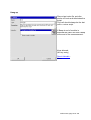
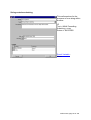
Play Message
The Play Message cell plays a
single voice file and waits for the
caller to press a phone key. This
trigger is then used to select the
next target in the script.
The timeout value defines the
number of seconds to wait until
the TimeOut path is taken.
This cell always requires a
TimeOut trigger to be defined.
In this example the caller may
press the "1" key which leads to
the GetID cell or wait 10s and go
to the End cell.
If Beep at end of module is
selected the caller will hear a beep
at the end of the announcement.
Keys allowed :
Defined by Trigger
Result Variable :
Key pressed by caller
INS manual, page 44 of 120
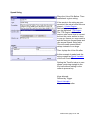
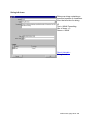
Hang-up
Plays a last voice file, puts the
phone off-hook and terminates the
script.
This cell should always be the last
cell in a voice script.
If Beep at end of module is
selected the caller will hear a beep
at the end of the announcement.
Keys allowed :
(No key entry)
Result Variable :
None
INS manual, page 45 of 120
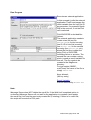
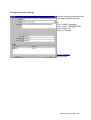
Get Number
Plays the first voice file. Then the
caller has Timeout[s] seconds to
enter Input limit numbers. S/he
can enter less than the required
digits by pressing "#" to end.
If Confirm number is not selected
the SUCCESS path is taken
immediately after the numbers are
entered. If not all numbers are
entered within the Timeout[s]
seconds the FAIL path is taken.
If Confirm number is selected the
second voice file is played and the
entered number is read back,
followed by the third voice file. The
caller can confirm the number by
pressing 1 to select the
SUCCESS path. If the caller
presses 2 the FAIL path is taken.
(May be used to re-enter number)
Keys allowed :
"1234567890*#"
"12" (in confirm number)
Result Variable :
Number entered by caller
INS manual, page 46 of 120
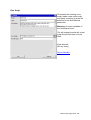
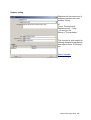
Speak String
Plays the Voice File Before. Then
reads back a given string.
If the words in the string are prerecorded, the actual voice files are
played. =>Voice Engine
Alternatively you may select to
use the Microsoft TTS Engine.
The TTS Engine will however
require quite some time to convert
the text into voice as this is done
in one go. Hence you may need to
split the text into several parts and
use several Speak String cells.
This will create several small
delays instead of one large.
Then it plays the Voice file after.
In this example it reads back the
string created as Result Variable
of the cell Check ID.
Setting the TimeOut value to zero
allows continuing straight to the
End cell without waiting for the
caller to press a key.
Keys allowed :
Defined by Trigger
Result Variable :
Key pressed by caller
INS manual, page 47 of 120
Run Program
Executes an external application.
In this example it calls the external
application TestID and passes the
result variable from the cell Get ID
as parameter. If successful Speak
PW is the next cell, if not the End
cell is selected.
FAIL/SUCCESS is decided like
follows:
The external application needs to
create a two line text file
RESULTx.TXT (x for the incoming
line ID. IE for the first incoming
line RESULT1.TXT, for the second
incoming line RESULT2.TXT, etc),
where the first line is either the
string FAIL or SUCCESS,
indicating failure or success. The
second line can contain a string,
which is used as result variable for
this cell. The file needs to be
created in the MsgServer
directory.
For text scripts (SMS/Email/Timer) the name of the file is
simply RESULT.TXT.
Keys allowed :
(No key entry)
Result Variable :
2nd line returned by RESULTx.TXT
Note:
Message Server does NOT delete the result file. If the Wait Until completed option is
unchecked Message Server will not wait for the application to complete (and update
the result file), but read the previously created file (if existing). If there is no result file,
the script will execute the FAIL path.
INS manual, page 48 of 120
Run Script
Terminates the existing voice
script, loads a new voice script
and starts executing it at the cell
specified in the Next Module
parameter.
Warning: All result variables of
the old script are lost.
The left example would call a new
script Script2 and start it at cell
Start.
Keys allowed :
(No key entry)
Result Variable :
None
INS manual, page 49 of 120
Run VBS code
This cell launches a specified
VBS (Visual Basic Script) code.
The code entered in this cell is
saved in a file into the same
directory as the script, in the
form VBSx.txt (x is the
sequential number of the cell).
Once this file is created by
Designer you may also edit it
with a standard text editor and
make the desired changes.
During a script, before the code
is started, all Result Variables
are evaluated and replaced by
their current values, then the file
is saved as ~VBSx_y.vbs (y for
the incoming line ID, for text
scripts the name of the file is
simply ~VBSx.vbs) and the
Windows script engine
(wscript.exe) is called.
You may use the final vbs code
for debugging purpose, but must
remember that it will be
overwritten the next time the
script runs.
If you exit your VBS code with
the instruction
WScript.Quit(param) you
may return a value back to the
script. All negative values
returned will take the FAIL path,
zero and all positive values (or
no value) will take the
SUCCESS path. If the "Wait until
competed" check box is not set
the SUCCESS path will be taken
and the value returned is "0".
Keys allowed :
(No key entry)
Result Variable :
Parameter returned by
WScript.Quit(param) if any.
INS manual, page 50 of 120
HTTP Call
This cell allows you to
GET the contents of a
web page or to POST
data to a web site.
If the web site does not
exist or another error
occurs, the FAIL path is
taken, otherwise the
SUCCESS path becomes
active.
The web page returned is
the raw HTML data.
The URL does not need
the leading http://. Just
directly enter the address
of the web page, IE
www.mawnet.com/order.h
tml
Keys allowed :
(No key entry)
Result Variable :
Contents (raw HTML text)
of the web site returned
INS manual, page 51 of 120
Send DDE command
Establishes a DDE connection
with an external application.
In the left example the script starts
a DDE session with Excel and
reads R1C1 (=A1). This value
becomes the result variable of this
cell. If the DDE transaction is
successful the next cell becomes
Speak Value, otherwise Error
DDE.
Note: The external application
(IE Excel or MsAccess) needs to
be running during the execution
of the script.
Keys allowed :
(No key entry)
Result Variable :
If action is Get Data the value
received by the DDE server,
otherwise none.
INS manual, page 52 of 120
Record Message
Plays a voice file and then records
to a file. The recording continues
until the caller presses a key defined
as trigger. Depending on the key
pressed the Trigger selects the next
Target. If a Timeout value is defined
the recording will also stop at the
end of this period and the Timeout
Target is selected.
In this example the filename of the
recorded file is made up of a string
"C:\INS\Recorded_" and a result
variable , followed again by a string
".WAV"
So if the result variable is "123" the
resulting filename would become
"C:\INS\Recorded_123.WAV"
Keys allowed :
Defined by Trigger
Result Variable :
Key pressed by caller
INS manual, page 53 of 120
Result Variable Switch
Selects a route depending on the
Result Variable .
If the result variable does not
correspond to any of the triggers
the timeout value is taken.
In this example the cell checks the
Caler ID of the current caller and
chooses the next cell accordingly.
See below for notes on
Conditions.
Keys allowed :
(No key entry)
Result Variable :
None
Conditions
The condition field decides how the comparison between the Result Variable and the
Value is done. The conditions are tested in sequence until the first matching value.
All comparisons are string comparisons, therefore a<b, 100 <20 and 100>020.
The following condition can be selected:
== EQUAL
= PART OF
<> NOT EQUAL
> GREATER
>= GREATER OR EQUAL
< SMALLER
<= SMALLER OR EQUAL
Note
== (EQUAL) is a strict comparison
= (PART OF) is also valid if the Result Variable is a sub string of the Value.
IE if the Result Variable = "1" the condition would be true for value = "1234"
INS manual, page 54 of 120
Transfer Call
This cell allows a call to be
transferred to another number.
For this option you need a TAPI
compliant phone system, standard
modems do not support this
feature.
(For transferring calls on modems
please refer to Send DTMF String)
Keys allowed :
(No key entry)
Result Variable :
Phone Number
INS manual, page 55 of 120
Send Message
Sends a message to a user.
The recipient needs to be
defined in the Message Center
database as contact, or the
number needs to be preceded
with a valid keyword. See
under direct sending.
If you select (User default) as
Send Type, depending on the
capacity of the communication
device specified for the contact
the message will be adapted,
IE a valid voice file path may
be send as voice file to a
phone rather than character by
character. (See Voice and
Fax/E-mail messages)
Keys allowed :
(No key entry)
Result Variable :
None
INS manual, page 56 of 120
Voice Mail
Allows setting up a voice mailbox.
Plays the first voice file, then waits
for the caller to leave a message.
The recording continues until the
caller presses a key or the
message length exceeds the Max
Record Time[s] value. Then the
second voice file is played.
In the left example the ID of the
owner of the VMB is made up of a
string "User" and a result variable .
So if the result variable is "123"
the resulting Admin ID is
"User123".
The Admin ID is used to identify
the owner of the mailbox in the cell
Voice Mail Admin.
Keys allowed :
(No key entry)
Result Variable :
Filename of recorded voice
message
INS manual, page 57 of 120
Voice Mail Admin
Accesses voicemail left by a caller
in a Voice Mail cell.
If the owner of the VMB (Admin
ID) has mail, the second voice file
with the instructions is played,
followed by the recorded voice
messages. If all files were
accessed the third file is played. If
there is no mail the first file is
played.
In this example the ID of the
owner of the VMB is made up of a
string "User" and a result variable.
So if the result variable is "123"
the resulting Admin ID is
"User123".
The instructions are as follows:
1
4
6
9
Listen to next message
Delete current message
Re-listen current message
Exit
Keys allowed :
"1469"
Result Variable :
None
You can also use Message Center
to access your voice mail
INS manual, page 58 of 120
Fax-On-Demand
This cell asks the caller to enter a
fax number, followed by the # key.
The caller then has 60s to enter
his/her fax number.
If Confirm number is selected the
second voice file is played and the
entered number is read back,
followed by the third voice file. The
caller can confirm the number by
pressing 1 or press 2 to re-enter
the number.
Then the facsimile message
specified in Fax file to send is
queued to be sent to the entered
fax number as soon as the script
ends.
Valid fax files are:
APF - Fax files
BMP - Windows Bitmap
DCX - Multi page PCX
PCX - PC Paintbrush
TIF - Tagged Image File
TXT - ASCII text file
Keys allowed :
"1234567890#*"
Result Variable :
Number entered
INS manual, page 59 of 120
Send DTMF String
This cell plays a DTMF string
back to the caller.
Keys allowed :
(No key entry)
Result Variable :
DTMF String
The Generate Digits method is intended for end-to-end
signaling over an established call, it may be used to
navigate through automated call center menus etc., but
may also be used to transfer an existing call (of course the
telephone switch must support call transfer by this
method). e.g. Call Send DTMF String with the DTMF
parameter set to "!101" to flash the hookswitch and dial
extension 101, then call the HangUp cell to effect the
transfer.
Valid characters for the Digits parameter are '0' through '9',
'A', 'B', 'C', 'D', '*', '#', ';' and ',' (comma). A comma injects
an extra delay between the signaling of the previous and
next digits it separates. The duration of this pause is
configuration defined, the telephony device settings dictate
what this duration is. Multiple commas may be used to
inject longer pauses. The exclamation character '!' is a
valid character in the string causing a "hookflash"
operation, that is, one-half second on hook, followed by
one-half second off-hook before continuing. Other dial
modifiers may also be accepted (W @ etc), consult the
telephony device documentation for details.
INS manual, page 60 of 120
String contains substring
This cell searches for the
presence of one string within
another.
IE
Text = MAW Consulting
Substring = maw
Return = SUCCESS
Result Variable :
None
INS manual, page 61 of 120
String left chars
Returns a string containing a
specified number of characters
from the left side of a string.
IE
Text = MAW Consulting
Nbr of chars = 3
Return = MAW
Result Variable :
String found
INS manual, page 62 of 120
String right chars
Returns a string containing a
specified number of characters
from the left side of a string.
IE
Text = MAW Consulting
Nbr of chars = 3
Return = ing
Result Variable :
String found
INS manual, page 63 of 120
String left until
Returns a string from the left side of
a string until the first occurrence of
another string/character.
IE
Text = MAW Consulting
Until string = $RV[@SPACE]
Return = MAW
Result Variable :
String found
INS manual, page 64 of 120
String right from
Returns a string from the right side
of a string from the first
occurrence of another
string/character on.
IE
Text = MAW Consulting
From string = $RV[@SPACE]
Return = Consulting
Result Variable :
String found
INS manual, page 65 of 120
String between two strings
Returns a string located between
two other strings/characters.
IE
Text = MAW Consulting
From string = $RV[@SPACE]
Until string = ing
Return = Consult
Result Variable :
String found
INS manual, page 66 of 120
Replace string
Replaces all occurrences of a
substring inside a text, with
another string.
IE
Text = The dog barks
Replace string... = dog
...by string = cat
Return = The cat barks
This function is quite useful for
filtering characters that disturb
and replace them. IE filtering ",
etc
Result Variable :
Filtered string
INS manual, page 67 of 120
Load From File
Reads a text file and stores its
contents into the Result
Variable..
Result Variable :
Contents of the file
INS manual, page 68 of 120
Save To File
Creates a text file and writes to it. If
the file is successfully written the
SUCCESS path is taken and the
Result Variable holds the filename. If
the file cannot be written the FAIL
path is taken and the Result Variable
holds an empty string.
Result Variable :
Filename or empty string
INS manual, page 69 of 120
Calculator
Calculates the value of an
expression and returns the result
as Result Variable.
Valid functions are
+-*/^
ABS, ACOS, ASIN, ATAN, COSH,
COS, EXP, LOG10, LOG,
POW10, ROUND, SINH, SIN,
SQRT, SQR, TANH, TAN,
TRUNC
You can also use () to combine
multiple operations. IE
cos(sin(1))
Result Variable :
Result of the calculation
INS manual, page 70 of 120
Set System Variable
FOR INTERNAL USE ONLY.
This allows the MAW engineers to
change some of the system
variables through the script.
Please do not use directly.
INS manual, page 71 of 120
Exit
Terminates a text script.
Result Variable :
None
INS manual, page 72 of 120
Result Variables
Result variables are a powerful tool of Designer. Each cell stores a result variable
that then can be accessed by other cells. To access a result variable use the format
$RV[CellName].
IE if a caller presses "1" in the Play Message cell "Welcome" this value can be
referenced through $RV[Welcome]. You can even append result variables to strings.
A reference to User$RV[Welcome]VMB would be treated as User1VMB.
Similar for the text script cells.
If you evaluate a text string with the String left chars cell “TestPW”, you can reference
the result of the evaluation through $RV[TestPW].
Predefined result variables are
(1) Available in voice scripts (*.vsc)
(2) Available in SMS scripts (*.tsc)
(3) Available in E-mail scripts (*.tsc)
(4) Available in Timer activated scripts (*.tsc)
(1)
(1)
(1)
(1)(2)(3)(4)
(1)(2)(3)(4)
(1)(2)(3)(4)
(1)(2)(3)(4)
$RV[@CID]
$RV[@CIDNAME]
$RV[@LID]
$RV[@DATE]
$RV[@TIME]
$RV[@DAYOFWEEK]
$RV[@SCRIPTTIME]
(1)(2)(3)(4)
(1)(2)(3)(4)
(1)(2)(3)(4)
(1)(2)(3)(4)
(2)(3)
(2)(3)
(3)
(1)(2)(3)(4)
(3)
$RV[@AppDir]
$RV[@ScriptDir]
$RV[@CR]
$RV[@LF]
$RV[@MESSAGE]
$RV[@ORIGINATOR]
$RV[@RECIPIENT]
$RV[@SPACE]
(3) $RV[@SUBJECT]
Caller ID number string (if supported)
Caller ID name string (if supported)
Incoming line ID
Current Date in format "yyyy-mm-dd" IE
2003-12-24
Current Time in format "hhhmmmsss" IE
23h55m21s
Day of the week, IE "MONDAY"
Time in seconds elapsed since start of script
(Three zero-padded characters, IE 023
means 23 seconds elapsed)
Application Directory, IE C:\INS
Current Script Directory , IE
C:\INS\SampleScripts
Carriage Return (end of line sign ASCII 13)
Line feed (new line sign ASCII 10)
Message body (Email or SMS text)
SMS ID (+41798888) or E-Mail originator
([email protected])
Email recipient of message
SPACE “ ”sign (ASCII 32)
Email subject
INS manual, page 73 of 120
The use of $RV[@ScriptDir] is recommended as path statement for all voice file
names as it allows to copy the script to any other directory without the need for
redefining the voice file location.
IE $RV[@ScriptDir]\welcome.wav
If you select a voice file in the same directory than the script file, it's path is
automatically replaced with $RV[@ScriptDir].
INS manual, page 74 of 120
Send Message
General
The Send Message utility is a simple command line application that allows submitting
messages to Message Server without using Message Center.
Command Line Parameter
The format is
SendMsg
TimeToSend[yyyymmddhhnnss]
Type[EMAIL¦FAX¦VOICE¦PALPHA¦PNUM¦PTO¦SMST¦SMSF¦SMSR¦SMSP¦SMSOL¦SMSGL¦SMSW¦SCENAR
IO¦DEFAULT] Recipient
{SMSOL:Operator}
Message¦File
IE
SendMsg.exe 20000101000000 VOICE MAW "Happy New Year"
will send a message on January 1st, 2000 at 0:00:00 h by Voice to the contact MAW
with the contents "Happy New Year".
(See also file sending )
Messages to Contact lists can be sent by adding a ">" in front of the list name.
IE
SendMsg.exe 19991609231000 DEFAULT >EMLIST "Fire in CR"
will send a message on September 16th, 1999 at 23:10:00 to all contacts on list
EMLIST with the contents "Fire in CR2".
To send a message immediately without indicating the date/time, use NOW as
TimeToSend value:
IE
SendMsg.exe NOW DEFAULT MAW "Hello world"
Depending on the available communication channels configured for each contact, the
messages will be adapted.
INS manual, page 75 of 120
Text in files
You can send texts that are located in a file by specifying the filename as message.
IE
SendMsg.exe NOW SMST [SMS:0123456789] "ForJohn.txt"
In this example ForJohn.txt would be a text file containing the message to be send.
It is your responsibility to make sure, that the message is not longer than 160
characters, otherwise it will not be accepted by the SMS central.
SMS Ringtones
Ringtones can be sent directly as text
IE
SendMsg.exe NOW SMSR [SMS:0123456789] "
StarTrek:d=4,o=5,b=80:8g,16c6,f6,16e6,16c6,16a,16d6,8g6"
or in a file
IE
SendMsg.exe NOW SMSR [SMS:0123456789] "StarTrek.txt"
In this example StarTrek.txt would be a file containing the ringtone codes.
SMS Logos
The Operator parameter is only used when sending a message as SMS Operator
Logo (SMSOL), here you need to specify the name of the operator of which you want
to change the logo.
Valid operator names (IE "Switzerland - Swisscom NATEL") can be found in
MsgCenter, when sending a message using the SMS link.
IE
SendMsg.exe 20010101000000 SMSOL [SMS:0123456789] "Switzerland - Swisscom
NATEL" "c:\logo.gif"
INS manual, page 76 of 120
Types
The different link types are defined as follows:
E-MAIL
FAX
VOICE
SMST
SMSF
SMSR
SMSP
SMSOL
SMSGL
SMSW
SCENARIO
DEFAULT
E-Mail
Fax
Voice
Text SMS
Flash SMS
Ringtone SMS
Picture SMS
Operator Logo SMS
Group Logo SMS
WAP push
Message Scenario
User default
Direct sending
Instead of specifying a contact you can send a message directly to a number. To do
so, use the following syntax instead of the contact name:
[E-MAIL:[email protected]]
[FAX:0123456789]
[VOICE:0123456789]
[SMS:0123456789]
When sending directly to a number the cover pages are omitted. For SMS messages
the central used is the one specified as default central in the preferences.
INS manual, page 77 of 120
Check-It
General
Check-It is a utility that scans through DDE values in other applications. If you use
INS as alarm server you may not always be able to define alarms in the application
that actually measures the values. (IE SCADA applications). In this case you may
define alarm conditions in Check-It and let it read the values from your data server.
Similar to the Message Server application Check-It displays an icon in the System
Tray (Right part of task bar) after startup. This means that Check-It is ready to read
values from the other applications. If you click on the icon and double click on an
entry the following configuration screen opens:
DDE Topic
Item
Condition
Limit
Hysteresis
Scan time
Parameter for the DDE call, usually APPLICATION|TOPICNAME
Subject of DDE conversation
Condition to compare value
Limit to compare value with
Absolute value to exceed until event is re-enabled after sending an
alarm message. IE if the Hysteresis is 1.5, the Limit is >11.5 and the
actual value exceeds this limit an alarm will be send. Then this event
is disabled until the value falls below 11.5-1.5=10, then the event will
be re-enabled.
Scan time to read values. Format hh:mm:ss.
INS manual, page 78 of 120
User to call
Message
Contacts(s) which will receive the alarm message
Actual alarm message to send
(See also file sending)
Enable/Disable Enables or disables scanning of value
Note(s):
•
•
•
•
•
While the configuration screen is open the actual scanning of the values is
paused. It resumes when you press the minimize (X) button.
Check-It needs Message Server running in order to send the alarm messages.
To be able to read values from an application through DDE the application
needs to be running.
To scan a remote computer on a network use the NetDDE format as topic.
IE \\ComputerName\Application|Topic
When using Excel please note that the Topic and Item is language dependent.
This means that for instance in German a call to cell A1 in Excel becomes
Excel|Tabelle1 and Z1S1
Command line parameters for CheckIt
You can start CheckIt.exe with the following command line parameters:
/NOFORM Does not display the taskbar icon nor any other form
Please only use this parameter when directed by MAW support to do so.
Dynamic Data Exchange (DDE)
DDE has three parts: the name of the application; the file name or topic; and the cell
range, value, field, or data that's referred to. The following illustration shows the parts
of a remote reference formula and the required separator characters.
Topic: Excel|Sheet1
Item: R1C1
You can either get data form a DDE server, send data to the DDE server or execute
a macro on the DDE server.
The program that contains the data you want to link must support Dynamic Data
Exchange (DDE). To determine whether your program supports DDE or to learn the
DDE name and topic information for the program, contact the software vendor of the
program.
INS manual, page 79 of 120
INSClient
(INSClient only ships with the Enterprise Edition of INS. Please contact MAW
Consulting for more information).
General
The client application allows to use INS as Client-Server Fax Server, to which several
clients can submit their faxes.
Faxes are created through the INS Fax Printer. By simply printing to this driver from
any Windows application, a Fax file is created. You can then submit this Fax to be
send by Message Server. As both applications MsgServer.exe and INSClient.exe try
to connect to the MAW Fax printer, they can not run both on the same machine.
The INSClient installation does not install the INSClient.exe on the local computer,
but creates a link to the Server application.
When you start the INSClient.exe application you will see a small icon on the taskbar
.
Through a right-click the following menu is available:
INS manual, page 80 of 120
Outbox
The Outbox displays the currently submitted messages. Once a message has been
sent by Message Server it disappears from this list.
Settings
Through the Install Fax Driver on this Server button you can add a new virtual printer,
to which you can print your faxes from any windows application.
IMPORTANT
The faxes are created on the Server under the FAXQueue directory .
As the fax files are submitted with the full path
(IE M:\INS\FAXQueue\FAX0001.apf)
you must on the server also map the same drive (IE M:) to the INS directory. Like this
Client and the server refer to the file with the same path.
If during the installation of the fax printer driver the system requests the file
RASDD.dl_ then those required system files are not yet installed on your PC. Just
INS manual, page 81 of 120
cancel the current installation and copy the files under C:\INS\Utilities\RASDD into
the directory C:\INS. Then retry the installation.
Exit
Leaves the application INSClient. Faxes printed to the MAW Fax printer will not be
sent anymore.
INS manual, page 82 of 120
Communication devices
Message Server supports any TAPI compliant voice modem or voice boards to be
used for its voice features.
Voice Devices
What is a Windows voice modem?
A voice modem is a modem that is capable of playing and recording audio over a
telephone line. While almost all modems are capable of doing data and fax, a
growing number have voice capabilities. Modern voice modems are powerful
telephony devices capable of advanced features like voice interaction, call transfers,
and outbound dialing. For most users, a high quality voice modem and advanced
telephony software like Message Server will allow them to create a professional
communications solution. Common brands include US Robotics, 3Com, ZOOM,
ModemBlaster, EigerMedia, and others.
In order for a voice modem to work with Windows TAPI, the modem must have voice
drivers and sound devices. The voice drivers are interfaced with Windows
95/98/2000 through UniModem/V (95/98) or UniModem/5 (2000), Windows' universal
modem voice drivers. Sound devices (or Wave Devices) for the voice modem are
usually provided by the manufacturer. Unfortunately, Windows NT4 does not support
UniModem/V or UniModem/5, so voice modems cannot be used with Message
Server under NT4.
If you wish to use your modem under TAPI you need to make sure that you have
•
•
•
a voice capable modem (IE a modem which is able to play voice files through
the phone line or speaker)
the most updated driver for your modem/board
(http://ww.mawnet.com/links.html#ModemDrivers)
make sure that you configure your modem with the latest modem driver.
Unfortunately modem suppliers still seem to sell their modems with outdated
drivers, which often do not support Voice & CallerID. The only way to be sure
that you have the right driver is to download the newest driver from the
Internet. You may even need to experiment with different drivers.
IE the 3COM U.S.Robotics 56K Message Modem does not support Caller ID
with its own driver (U.S.Robotics 56K Message) but detects CallerID with the
U.S.Robotics 56K Voice EXT driver.
INS manual, page 83 of 120
What is a TAPI voice board?
A voice borad is a device designed specifically for doing voice processing over
telephone lines. Telephony cards provide much better quality audio output than
voice modems and may support multiple phone lines on a single card. A TAPI
telephony card is one that works with Windows Telephony API. Common brands
include Dialogic, Brooktrout and MediaPhonics PhoneRider.
In order for a telephony card to work with Message Server, it must provide support
for playback and recording of wave format audio. Technically, that means the device
must provide TAPI "wave/in" and "wave/out" devices.
Voice boards
For best results, we recommend Dialogic telephony cards be used with INS.
Dialogic cards
Can be used with normal analog phone lines and T1 and E1 lines
Telephony cards are a much better solution then voice modems, offering
better quality sound playback/recording and better detection of DTMF and
busy tones.
Dialogic cards listed below can be used with INS.
D/4PCIU
D/4PCIUF
D/4PCIU4S
D/4PCI
D/41JCT
ProLine/2V
D/41E
D/41ESC
D/160SC-LS
D/120JCT
D/21H
D/41H
D/41EPCI
D/42NE2
D/82JCT
D/240, D/480 D/300, D/600 DMV cards
D/21D
D/41D
Dialog/4
VFX/40 series
Good entry-level cards are the 4 port D/4PCIUF and D/4PCIU4S, they costs around US$600.
Dialogic cards can be purchased from:
US:
www.pcnation.com
www.pagecomputers.com
www.epinions.com
Used cards: Ebay (www.ebay.com) and www.thetelecomlink.com
A driver CD should be shipped with the cards. Complimentary SR5.1.1 drivers can also be
downloaded from:
http://resource.intel.com/telecom/support/releases/winnt/Sr511/index.htm (300MB)
D/4PCIU & D/4PCIUF cards require either the SR5.1.1 Feature Pack 1 drivers, or the SR5.1.1 +
SR5.1.1 SP1 + D4PCIU support patch.
Newest DMV cards require SR6.0 drivers.
The freely available SR5.1.1 + SR5.1.1 SP1 drivers are sufficient for all other cards (even on WinXP
systems).
Other System Release updates can be downloaded from here.
INS manual, page 84 of 120
Please also see: Installing on Dialogic Systems.
CAPI Cards
Can be used with BRI ISDN lines and T1/E1 ISDN lines
INS can be used with any ISDN BRI (2 channel 128Kbs) and ISDN PRI (24
channel T1 or 30 channel E1) cards that supports CAPI. This includes cards
from:
Eicon (BRI-2M, 4BRI-8M, etc)
AVM (Fritz!Card, B1, C2, C4, T1, Fritz!GSM, etc)
BT Speedway (UK version of the AVM Fritz!Card)
PrimuX cards from Gerdes AG
and many more, see here.
The most cost effective card at the time of writing is the AVM Fritz!Card. We recommend this card
when using INS with BRI (128Kbps) ISDN lines.
Please also see: Installing on CAPI / ISDN Systems.
Other Telephony Cards
Can be used with normal analog phone lines
CallUrl Voice 2/4 LV+ 2- and 4-Port Analog Interface Voice Board
The Voice 2/4LV+ provides two/four telephone line interface circuits
for direct connection to analog loop start lines. Up to 4 Voice boards
can be installed in a single PC chassis enabling port expansion up to
16 ports per system.
Data Sheet
CallUrl Voice 8LV 8-Port Analog Interface Voice Board
The Voice 4/8LV provides four/eight telephone line interface circuits
for direct connection to analog loop start lines. Multiple Voice
boards can be installed in a single PC chassis enabling port
expansion up to 80 ports per system.
Data Sheet
INS manual, page 85 of 120
Brooktrout/Rhetorex still provides TAPI drivers for their cards
(unsupported).
The following cards are supported: Brooktrout Vantage 4 line & 8
line PCI, DSP9432i, RDSP432 (ISA) and some of the older models:
TR114+I2L, TR114+P2L, TR114+I2C/D, TR114+I4L, TR114+P4L,
TR114+I4C/D, TR114+I2P/V, TR114+I4P/V, TR114+I8P/V,
TR114+I8S, TR114+I12V, TR114+I16V, TR114+I8V-T1,
TR114+I24T, TR114+ P24T
Please Click Here to obtain TAPI drivers for Brooktrout cards.
Other manufactures : Ai-Logix (formerly Music Telecom) and Natural Micro Systems no longer
provide TAPI drivers for their products, hence cards from those manufacturers cannot be used with
INS.
Telephony Devices
Can be used with normal analog phone lines only
Mediaphonics Phonerider USB
This one line device has high quality playback and recording, together
with good DTMF tone detection. The Mediaphonics company has now
closed down but there are still a number of distributors holding stock of
this device. One place to get them from is www.televox.com (priced at
around US$200).
Way2Call's Hi-Phone DeskTop
This one line device has high quality playback and recording, together
with good DTMF tone detection (priced at around US$200).
Note: Some users have reported some problems with setting up this
device's drivers under Win2000. (please see here)
Modems (Voice capable)
Can be used with normal analog phone lines only
In general external modems work a lot better then the internal
modems, and internal 'Soft' modems have a number of issues. We do
not recommend using internal modems in general.
As the modem models on the market change frequently we cannot provide a definitive list of
current 'best' modems. We have found that the quality of sound playback and recording can vary
between different releases of the same modem. When selecting your voice modem we recommend
trying a few modems if possible and choosing the best one. For help on choosing the current best
INS manual, page 86 of 120
modem its probably best to ask for some help at a large computer shop in your local area. They
will be able to advise which modems can correctly recognize your local telephone company's
CallerID signaling, and which have a good reputation for sound quality. A discussion thread on
which modems other users have found satisfactory is running on the INS Support Forum.
Many voice modems have one or more of the following problems:
Poor sound quality/volume.
Unreliable DTMF tone detection.
Cannot do call transfers as hookflash length is too long or too short.
Mistakenly detect a disconnect tone while playing or recording messages and hangup a call
halfway through playing/recording of sound file.
Unable to interrupt the playing of a sound file halfway through.
For reasons above many people find voice modems unsuitable and choose to use a telephony card
instead (Dialogic).
For a feedback from users about the different modems click here.
For a detailed list of modems we tested with INS please click here.
For a detailed list of modem drivers under Windows 2000/XP please click here.
Installing Voice Modems
When using a voice modem the first thing that should be checked is whether it's Wave drivers have
been correctly installed. Without it's wave drivers the modem will not be able to play and record
sound files. To check that the wave drivers are installed you will need to view the Windows Device
Driver Manager.
Windows 9x/Me
1.
2.
3.
4.
Open the Windows Control Panel
Double click on the System Icon
Click the Device Manager TAB
Click the + next to Sound, video and
game controllers.
Check if the "Wave Device for Voice
Modem" driver appears.
Windows 2000/XP
1. Open the Windows Control Panel
2. Double click on the System Icon
3. Click the Hardware TAB and Device
Manager button
4. Click the + next to Sound, video and
game controllers.
Check if the "UniModem Half-Duplex Audio
Device" driver appears.
If the wave drivers have not been installed for your voice modem then you should update or
reinstall your modem drivers. You should also double check if the modem does in fact support voice
(note: many 'speakerphone' modems do not support 'voice').
If its hard to find a Voice modem in your local area you can try buying them online from these
INS manual, page 87 of 120
places:
US:
www.pcmall.com
www.accessmicro.com
Note: WinNT does not support Voice modems - if using NT you will need to use a telephony cards
(eg: Dialogic) or upgrade to Win2000/XP.
Note: Modems using the UnimodemV TelephonyService Provider (TSP) can only work with PCM 8000 Hz, 16 bit
Mono wavefiles. Other more sophisticated telephony devices can play other formats that allow for greater
compression. In essence TAPI has nothing to do with the Wave files, the Windows Media Control Interface is
used to play and record to/from the media device which just so happens to be part of the modem.
If you are looking for an inexpensive program to work and convert wave files look at Cool Edit,
http://www.syntrillium.com.
Other Miscellaneous Add-Ons
Instead of plugging analog telephone lines into the Dialogic card (or voice modem) you can just
attach the IPS Fixed Cellular Terminal device and receive & make calls over the GSM mobile
network. Very useful solution in situations where:
May take some time for the lines to be installed,
Need to move the IVR system frequently,
Need to change the phone numbers used by the IVR frequently (just purchase different prepaid SIM cards),
Need to place many calls to mobile phone numbers (mobile-to-mobile calls are usually cheaper
then landline-to-mobile calls),
INS manual, page 88 of 120
Installing on Dialogic Systems
Dialogic cards supported
The following Dialogic cards have been tested to work with INS:
D/4PCI, D/4PCIU, D/4PCIUF, D/41E, D/41EPCI, D/41JCT, D/41ESC, D/41H, D/42 series,
D/120JCT, D/160S, D/21H, ProLine/2V, D/21D, D/41D, Dialog/2, Dialog/4, all digital
T1/E1 cards: D/240, D/480, D/300, D/600, and all DMV-series cards.
The D4PCI card is about US$500 brand new from a number of large online retailers
(please see the Communication Devices page), and many cards can be purchased
second-hand on Ebay for as little as $200 – just search for “Dialogic” on www.ebay.com
Installing Dialogic Software
Dialogic's System Release 5.1.1 SP1 (or later) software should be used with INS.
Dialogic System Release software can be downloaded for free from:
http://resource.intel.com/telecom/support/releases/complimentary/index.htm
When installing SR5.1.1 the "Custom Installation" option should be chosen and then the
"Global API" option must be selected.
SR5.1.1 Service Pack 1 should be installed after SR5.1.1 is installed.
D/4PCIU & D/4PCIUF cards require either the SR5.1.1 Feature Pack 1 drivers, or the
SR5.1.1 + SR5.1.1 SP1 + D4PCIU support patch.
Newest DMV cards require SR6.0 drivers.
The freely available SR5.1.1 + SR5.1.1 SP1 drivers are sufficient for all other cards (even
on WinXP systems).
Please always refer to the Dialogic’s Release Notes and/or Installation Notes to determine
what Operating System may be used.
If using Windows NT then Internet Explorer 5 or greater should also be installed. Please
read the Dialogic cards release notes and help files to ensure correct installation and
configuration of your Dialogic card - these will cover how to set up your card to correctly
detect busy and engaged tones, and perform call transfers correctly.
Sometimes you will need to specify a particular “Parameter File” in the Dialogic’s
Configuration Manager to ensure the card is set up to work correctly with phone lines in
your country. Please consult your local Dialogic representative regarding any questions
relating to configuration of your Dialogic card.
INS manual, page 89 of 120
Installing PCI Dialogic Card
Dialogic PCI voice cards have a small rotary switch (on the circuit card), which sets the
board number. If this is the first Dialogic voice card in the PC, set the board number to 1.
Plug the Dialogic voice card into any available PCI slot on the PC mother board.
1. After fitting the Dialogic PCI voice card, re-start the PC. The "Found New
Hardware Wizard" will be displayed. Press Next.
Select the "Search for a suitable driver" option.
Select only the "Specify a location" option.
Browse to the Dialogic installation directory's \DRVR\ subdirectory.
Press Next.
The correct Dialogic card name should be displayed. Press Finish.
Start the Dialogic Configuration Manager: From the Start menu, select Programs,
then Dialogic System Software, then Dialogic Configuration Manager.
8. Connect to the local computer, auto card detection will begin.
9. Check if the voice card has been auto-detected.
10. Double click on the voice card icon and set the country parameter to the correct
value.
11. Select Start-Service from the Service menu. The service will take up to 30
seconds to start.
12. From the Service menu, select Startup-Mode, then Automatic.
2.
3.
4.
5.
6.
7.
If the card is not detected, or the model is displayed as ????, do the following:
1.
2.
3.
4.
Reboot the PC
Enter the system BIOS
Disable "Plug & Play" and/or disable ACPI
Repeat steps 7 to 9 above
Installing ISA Dialogic Card
Dialogic ISA voice cards have jumper switches for setting the hardware interrupt level
(IRQ) and base memory address segment. When fitting these Dialogic voice cards, it is
essential to choose a hardware interrupt level and base memory address segment that
do not conflict with existing equipment installed in your PC.
How to check for un-allocated IRQ and memory on Windows NT:
From the Start menu, select Programs, then Administrative Tools, then Windows NT
Diagnostics.
Press the Resources tab.
Press the IRQ button to view currently allocated IRQs.
Press the Memory button to view currently allocated segments.
How to check for un-allocated IRQ and memory on Windows 2000/XP:
From the Start menu, select Programs, then Accessories, then System Tools, then
System Information.
Expand the Hardware Resources folder.
Press the IRQs folder to view currently allocated IRQs.
Press the Memory folder to view currently allocated segments.
INS manual, page 90 of 120
Having identified suitable free IRQ and memory address, configure the card by setting
the jumpers and switches located on the card. IRQ 5 is usually a good choice, the base
memory address can usually be left at the default D000.
1. After fitting the Dialogic ISA voice card, re-start the PC.
2. Start the Dialogic Configuration Manager: From the Start menu, select Programs,
then Dialogic System Software, then Dialogic Configuration Manager.
Connect to the local computer.
Auto card detection will begin.
The ISA card will not be auto detected. Select Add-Device from the Action Menu.
Select the voice card model.
Give the voice card a name or number.
Setup the correct IRQ and memory values. (May need to double-click on the
displayed voice card icon first)
9. Set the country parameter to the correct value.
10. Select Start-Service from the Service menu. The service will take up to 30
seconds to start.
11. From the Service menu, select Startup-Mode, then Automatic.
3.
4.
5.
6.
7.
8.
Installing the TAPI driver
Please carry out the installation of Dialogic’s TAPI and Wave drivers as per the
instructions below and then test your system using Dialogic’s TALKER32 application as
outlined in the last part of this chapter.
When installing the Dialogic software select 'Custom Installation' option and ensure that
the TAPI Drivers and the Global Call option is selected. Global Call needs to be installed
in order for the TAPI Driver to be loaded.
Full instructions on installing the TAPI and Wave drivers can be found in the Dialogic help
file “d41mt.hlp” located in Windows’ System32 directory.
After installing the Dialogic software you will need to configure the TAPI Driver and the
Wave Driver.
After installing the Dialogic TAPI and Wave drivers you can test the system using the
Dialogic demonstration application TALKER32. TALKER32 uses the TAPI/Wave interface to
control the Dialogic card, which is the same control interface used by INS.
Boards D/21D, D/41D, Dialog/2, Dialog/4 and VFX/40 can only support Mu-Law WAV
files under TAPI/Wave. You will need to download this set of INS system sound files if
you intend to use INS with those boards.
INS manual, page 91 of 120
Installing Dialogic TAPI driver
Run Setup from the 'Dialogic System Software and SDK' CD. You will need to ensure that
the TAPI drivers are installed as well.
1. Run the Telephony applet in the Control Panel:
i.
ii.
iii.
iv.
Click Start.
Point to Settings.
Click Control Panel.
Double-click Phone and Modem icon (or Telephony icon).
2. Click the Advanced tab (or Telephony Drivers tab).
3. If the Dialogic Service Provider for NT does not appear in the Telephony Drivers tab,
do the following to add it:
i.
ii.
iii.
Click Add to display the Add Driver dialog.
Click the Dialogic Generation 2 Service Provider for NT to select it (if it is not
shown, restart your PC and try again).
Click Add. The Dialogic TAPI driver (TSP) Configuration dialog is displayed.
4. Click Detect Boards to update the list of Dialogic board channels (dxxxB1C1 is board 1
channel 1). The list is updated to match the configuration that was most recently started.
You can click Help to access on-line help for the TSP configuration.
5. Click OK to close the Dialogic TSP Configuration dialog. The Dialogic TSP should now
appear in the Telephony Drivers tab. Note that the Configure button can be used to
redisplay the Dialogic TSP Configuration dialog.
6. Click OK (or Close) button to exit the Telephony applet.
After installation use the Dialogic Configuration Manager to configure and start the board.
INS manual, page 92 of 120
Installing Dialogic Wave driver - Windows XP/2000/2003 :
1. Go to the Start Menu->Settings->Control Panel->Add/Remove Hardware to start
2.
3.
4.
5.
6.
7.
8.
9.
10.
11.
12.
the Add/Remove Hardware Wizard
Click Next.
Select Add/Troubleshoot a Device and click Next.
Windows will attempt to find any new plug and play devices. It should find none.
Select "Add a new device" and click Next.
Select “No, I want to select the hardware from a list” and click Next
Select “Sound, video and game controllers” and click Next
Click “Have Disk” and browse to the "Program Files\Dialogic\LIB" directory.
Select the “oemsetup” file and click open. Then click OK on the next screen.
Select the “Dialogic WAVE driver 1.X” and click Next.
Click Next. You will receive a warning that a digital signature is not found. Click
Yes to continue the installation.
If asked for path to "dlgwave.dll" it should be found in Windows' "System32"
directory, else it is also available in the "Program Files\Dialogic\LIB" directory.
Restart the computer for the changes to take affect
The “Dialogic WAVE driver 1.X” should now be seen in the Device Manager (Control Panel
-> System -> Hardware Tab -> Device Manager).
The “No drivers are installed for this device” message in the “Device Status” box is
normal. Once “Dialogic WAVE Driver” is listed in Device Managers “Sound, video and
game controllers” section then this indicates that the Wave drivers are working.
If the “Dialogic WAVE Driver” entry has an exclamation mark next to it then this indicates
that the Wave drivers are not correctly installed and that they should be uninstalled and
re-installed again.
INS manual, page 93 of 120
The remainder of the recommended configuration for the Wave drivers is shown below:
INS manual, page 94 of 120
Installing Dialogic Wave driver - Windows NT :
To check if the Dialogic driver has been installed open the Control Panel and run the
Multimedia applet. Click on the Devices tab. You should see something like this:
In the example above the Dialogic wave driver has already been installed. If the driver is
missing, click on 'Add...'. You should now see the Add window.
Select the 'Unlisted or Updated Driver' option and click OK. you should now see the
'Install Driver' window.
INS manual, page 95 of 120
The wave driver is located in the 'Lib' directory of your Dialogic installation. Specify the
path to the 'Lib' directory and click OK. You will need to restart the computer before the
changes take effect.
Wave driver problem solving (reinstallation)
Sometimes installing 3rd party Sound Recording software or other changes to wave
driver configuration results in the Dialogic (or voice modem) wave drivers being remapped incorrectly, resulting in the sound files from the running script being played
through the computer's speakers, or "WAVERR_BADFORMAT" errors returned when
trying to play sound files (even when the preferred format sound files are used: for
Dialogic: PCM 11025Hz, 8bit, Mono fand for Voice modem: PCM 8000Hz, 16bit,
Mono).
In these situations the Dialogic (or voice modem) wave drivers should be uninstalled and
the re-installed again in order to have them play the sound files correctly. The computer
must be rebooted after the driver uninstall and then again rebooted after driver reinstall. It is a good idea to uninstall all wave drivers and install just the Dialogic/Modem
wave driver first. If that works then other Wave drivers (sound card etc) may be added.
To uninstall the wave driver:
1. Run the Control Panel Sounds and Multimedia applet.
2. Click the Hardware tab.
3. Select Audio for Dialogic WAVE Driver (or the "Unimodem Half-Duplex Audio Device" if
using voice modem).
4. Click Properties.
5. Select "Driver" tab.
6. Click Uninstall.
7. Reboot computer before re-installing driver.
INS manual, page 96 of 120
Test using Dialogic’s TALKER32
Once the TAPI and Wave drivers have been installed and the Dialogic service is running
you can test the Dialogic card using Dialogic’s own TALKER32 Demo/Testing Application.
TALKER32 can be found by following:
Start -> Programs -> Dialogic System Software -> Dialogic Sample Programs -> TAPI
When you start TALKER32 it will find all TAPI devices on the system – amongst them the
Dialogic lines should be listed. You can find out which are the Dialogic lines by pressing
the “Info” button and looking at the description on the Line Information dialog – for
Dialogic lines it will say “Line type: Dialogic Gen 2”
Find all the Dialogic lines and select the “Auto Answer” and “Auto Play” check boxes, and
also for each Dialogic line click the “Select file to play” and indicate the sound file
“play.wav” from the TALKER32’s directory (\Program
Files\Dialogic\Samples\Talker32\play.wav) should be used.
When you now call into the system TALKER32 will answer the call and play “Welcome to
Dialogic…”
If the caller has heard that sound file being played then the system is now ready to be
used with INS.
INS manual, page 97 of 120
Configure Dialogic TSP
Dialogic TSP (Telephony Service Provider) can be accessed using:
Win98/NT: Open Control Panel’s Telephony applet, select the Telephony Drivers tab,
select the Dialogic Service Provider and the press Configure.
Win2000/XP: Open Control Panel’s “Phone and Modem Options” applet, select the
Advanced tab, select the Dialogic Service Provider and then click Configure:
Dialogic TSP Configuration allows setting of the the number of rings after which the call
should be reported, definition of disconnect/busy tones which are used by your telephone
network, and the commands used by the PBX to transfer calls correctly.
INS manual, page 98 of 120
Found New Hardware Wizard on Win2000
If the Found New Hardware Wizard keeps popping up every time you start Windows, and
you are unable to stop it by pressing Cancel please read:
http://resource.intel.com/telecom/support/tnotes/tnbyos/winnt/tn383.htm
INS manual, page 99 of 120
Installing Dialogic Wave Driver - Windows 2000/XP
The step-by-step approach to installing the Dialogic Wave driver on Win2000/XP systems
is:
1. Go to the Start Menu->Settings->Control Panel->Add/Remove Hardware to start
the Add/Remove Hardware Wizard
2. Click Next.
3. Select Add/Troubleshoot a Device and click Next.
4. Windows will attempt to find any new plug and play devices. It should find none.
5.
6.
7.
8.
9.
10.
11.
12.
Select "Add a new device" and click Next.
Select “No, I want to select the hardware from a list” and click Next
Select “Sound, video and game controllers” and click Next
Click “Have Disk” and browse to the "Program Files\Dialogic\LIB" directory.
Select the “oemsetup” file and click open. Then click OK on the next screen.
Select the “Dialogic WAVE driver 1.X” and click Next.
Click Next. You will receive a warning that a digital signature is not found. Click
Yes to continue the installation.
If asked for path to "dlgwave.dll" it should be found in Windows' "System32"
directory, else it is also available in the "Program Files\Dialogic\LIB" directory.
Restart the computer for the changes to take affect
Once again, with screenshots that Windows displays at each step (There are some minor
differences between 2000 and XP).
1. Go to the Start Menu->Settings->Control Panel->Add/Remove Hardware to start the
Add/Remove Hardware Wizard
INS manual, page 100 of 120
2. Click Next.
3. Select Add/Troubleshoot a Device and click Next.
INS manual, page 101 of 120
4. Windows will attempt to find any new plug and play devices. It should find none.
Select "Add a new device" and click Next.
5. Select “No, I want to select the hardware from a list” and click Next
INS manual, page 102 of 120
6. Select “Sound, video and game controllers” and click Next
7. Click “Have Disk” and browse to the "Program Files\Dialogic\LIB" directory.
8. Select the “oemsetup” file and click open. Then click OK on the next screen.
INS manual, page 103 of 120
9. Select the “Dialogic WAVE driver 1.X” and click Next.
10. Click Next. You will receive a warning that a digital signature is not found. Click Yes
to continue the installation.
11. If asked for path to "dlgwave.dll" it should be found in Windows' "System32"
directory, else it is also available in the "Program Files\Dialogic\LIB" directory.
INS manual, page 104 of 120
12. Restart the computer for the changes to take affect
INS manual, page 105 of 120
Installing on CAPI Systems
INS can be used with any Basic Rate ISDN (2 channel 128Kbs) and Primary Rate ISDN
(24 channel 1.5Mbps or 30 channel 2Mbps) hardware that supports CAPI. This includes
hardware from:
AVM (Fritz!Card, B1, C2, C4, T1, Fritz!GSM, etc)
Eicon (BRI-2M, 4BRI-8M, etc)
BT Speedway (UK version of the AVM Fritz!Card)
and many more....
Complete list of CAPI devices with which INS can be used can be found at:
http://www.capi.org/pages/hardware.php
The most cost effective card at the time of writing is the AVM Fritz!Card. We recommend
this card when using INS with BRI (128Kbps) ISDN lines.
Install order
1. Install the CAPI hardware.
2. Download and Install the ComISDN TSP from http://www.comisdn.org/, and configure
it to control the CAPI hardware. (After using ComISDN for more then 30 days you will
need to pay a registration fee for it to ComISDN, please see
http://www.comisdn.org/order.htm).
3. Install INS,
INS manual, page 106 of 120
Configuring ComISDN
The ComISDN TSP can be configuration window is accessed using:
Open Start -> Settings -> Control Panel then click Phone and Modem Options or
Telephony, and then under Advanced or Telephony Drivers, select ComISDN
Service Provider and click Configure.
The ISDN Interface Properties window will appear:
The main setting that needs to be confirmed as having been correctly set is the Network
audio protocol. If not set correctly the sound played and recorded will sound very
distorted.
INS manual, page 107 of 120
To set the Network Audio Protocol select the Computer (root) and then click Properties.
By default, ComISDN will use "u-Law" if it detected that the version of Windows installed
is a US, Canadian or Japan one. For all other countries, it will use "A-Law".
If Windows has not been configured with the correct country setting then it is possible
that this setting is incorrect and will need to be set manually. please ensure that it is set
to "u-Law" if you are located in US, Canada or Japan, and set it to "A-Law" if you are
located in other countries. It may also want to confirm with the telephone company or
PBX supplier which protocol should be used - or just try them both and see which one
sounds better.
Wav file format
All sound files should be in format: PCM 8kHZ, 16 bit, Mono. Other file formats will not
play.
INS manual, page 108 of 120
SMS (Overview)
The Integrated Notification System (INS) allows you to send a short message
(SMS = Short Message Service) to a mobile phone using your computer. It supports
Picture messages, Caller Group Graphic, Operator Logo, Ringtones and Flash SMS.
The messages can be sent through an attached modem, through an Internet
connection or directly through an attached mobile phone. If a mobile phone is
attached to the computer (IE through the IR port), the contents of the inbox can be
downloaded and stored in folders. The phonebook can also be downloaded and
synchronized with INS.
Sending Picture messages, Caller Group Graphics, Operator Logos and Ringtones
only work for Nokia phones. Most new phones can however now receive FlashSMS.
Downloading and synchronizing the address book is possible on most mobile phones
that can connect to a computer (either through the IR port or a cable link).
How can SMS be sent?
SMS can be sent either
•
•
•
Through a modem, using a dial-up SMS center
Through the Internet, using an Internet SMS center
Through a mobile phone attached to the computer (IE attached to the IR port)
What protocols are supported?
INS supports a wide range of protocols (XIO/TAP, UCP, INET, PDU) hence can be
used for most of the SMS services.
INS manual, page 109 of 120
How does it work?
INS accesses through your modem, the Internet or the mobile phone a SMSC (Short
Message Service Center) and submits the message you wish to send. Then the
SMSC transmits this message to the desired mobile phone.
Sending through the mobile phone
When you send the message through your mobile phone (attached to the computer),
INS will use the parameters (Sender ID, SMS center, etc) of your phone to send the
message.
Sending will work the same as when sending messages from your phone, except that
you type the message on your computer. Not all phone manufactures implement
however a link to the computer (IR port or serial cable link).
You can send text, pictures and ringtones.
Having the mobile phone connected to the computer has the additional advantage
that you can transfer data from your phone to the computer and back. IE you can
synchronize your phone book and archive received SMS on your computer.
Sending through the modem
Sending the message through a modem will connect to a SMSC (SMS center) that
relays your message to its destination. There are several mobile phone providers that
offer this modem dial-up. The connection is to a local server (not to the Internet),
hence you need to choose a SMSC that is within your region. Alternatively you may
select to dial a server abroad, but the communication cost will be expensive. When
dialing abroad you need also to change the access number of the SMSC, to include
the international dial codes
There are two different protocols supported by the SMSC, either XIO/TAP or UCP.
XIO/TAP is an older protocol initially designed for pager messages. SMSCs that
support this protocol will not be able to process pictures or ringtones. They can only
process text messages and can not send the SenderID.
SMSCs that support the UCP protocol can send text, pictures and ringtones and
support sending of the SenderID.
Sending through the Internet
There are several web sites that allow you to send SMS through their web interface.
Those free sites only offer you to send text messages and require you to send the
SMS through their web site, so that you are exposed to their ads. Often they add also
a little commercial statement at the end of your message.
INS can not send SMS through those web sites. INS can however send messages
through a number of commercial gateways (IE www.clickatell.com). Those sites allow
you to set up an account and buy blocks of SMS. You can then send the messages
INS manual, page 110 of 120
either through their web site or through our INS. For more details on how to open an
account please go to http://www.mawnet.com/inetsmsc.html.
Once you have received your userID and password go to SMS services and enter
those details in the corresponding fields.
You can send text, pictures and ringtones.
Cost
The cost per SMS for all three options is more or less the same. With the mobile
phone link and the modem link you pay on a per usage, while with the Internet
gateway you prepay blocks of messages.
Supported mobile phones
INS will work with all mobile phones that come with a modem driver.
INS manual, page 111 of 120
What do I need to know about
…Flash Messages?
Flash SMS is just like normal SMS. The difference lies in the way it appears on the
receiver handset. The receiver of Flash SMS would see the message without the
need to press any button on the handset. It would appear on screen upon arrival. The
downside is that this message will be overwritten by the next flash SMS, if it is not
saved.
Almost all of the newer phones support Flash SMS.
Note: The message size is limited to 160 characters
…Ring tones?
Ringtones are supported in the RTTTL format.
RTTTL (Ringing Tones text transfer language) is a language used for publishing
ringing tones on web pages. You will find hundreds of web pages with ringtones in
RTTTL format. If you do a +ringtone +nokia search in for example Alta Vista, you will
find hundreds of links to pages with ringtones in RTTTL format.
You may also download a selection from our website on
http://www.mawnet.com/download/tones.zip
Note: The limitation to 160 characters does not apply to ringtones. Depending on the
SMSC it may however reject large messages, IE over 300 characters.
…Pictures?
•
•
•
File format supported is: gif
The pictures must be in 2 colors only (black and white) and in the format:
72x28 pixels.
You will find a lot of ready-made pictures on the net if you do a search. But
you can also make them yourself with a paint program like Paint Shop Pro or
Windows Paint.
You may also download a selection from our website on
http://www.mawnet.com/download/pictures.zip
Note: Because of the size of pictures INS will need to dial three times to get the
picture across to the SMSC.
INS manual, page 112 of 120
…Operator Logos?
•
•
•
File format supported is: gif
The pictures must be in 2 colors only (black and white) and in the format:
72x14 pixels.
You will find a lot of ready-made pictures on the net if you do a search. But
you can also make them yourself with a paint program like Paint Shop Pro or
Windows Paint.
You may also download a selection from our website on
http://www.mawnet.com/download/logos.zip
•
Choose YOUR Operator/Network from the Operator list.
…How can I get my original Logo back?
Send a logo, it doesn't matter which, and choose "Clear logo" from the Operator list.
When you save that logo, it will not show up, instead you get your original logo back.
…Caller Group Logos?
•
•
•
File format supported is: gif
The pictures must be in 2 colors only (black and white) and in the format:
72x14 pixels.
You will find a lot of ready-made pictures on the net if you do a search. But
you can also make them yourself with a paint program like Paint Shop Pro or
Windows Paint.
You may also download a selection from our website on
http://www.mawnet.com/download/logos.zip
INS manual, page 113 of 120
…download WAP content from the web
•
Check the WAP Download option and enter the local path of the desired content.
The file will then be uploaded to our web site and you will receive a SMS
indicating you from where you can download the file to your handset. Your
handset must support the WML (WAP Markup Language) standard to read the
cover file.
You must also make sure, that your handset is able to play/display the file
format you send to it. Normally handsets can only display correclty JPG or GIF
files and play RM or MID sound files.
Please note that the file will be automatically deleted again from our web site
after 24 hours, hence you must download it before that.
INS manual, page 114 of 120
Direct link to GSM device
Your modem needs to support a connection to a PC (IE through IR).
If you have troubles with the IR port or need to know which virtual COM port is
assigned to the IR port please check in the windows control panel the IR settings for
your computer. Make sure that the IR-Transmission is activated.
NOTE: Windows 2000 (until SP2) does not support mapping virtual COM ports to
Infrared Ports (Q252795)
See the microsoft support forum under
http://support.microsoft.com/default.aspx?scid=kb;EN-US;q252795 or search for
Q252795
To download the patch and to enable the virtual COM port, please go to
http://www.microsoft.com/windows2000/downloads/security/q252795/default.asp
To install the MS patch just restart your computer with the mobile phone in front of
the IR port. Win2000 will detect the new device and install a new modem driver for it.
Alternatively you can download a smaller (73kB) third party patch from
http://www.mawnet.com/download/IrCOMM2k-eng.zip
INS manual, page 115 of 120
Trouble Shooting
No device(s) found
Make sure that your modem/voice board is connected, switched on and no other
application (IE Internet dialup connection) is using it.
Fax driver Installation requests RASDD files
If during the installation of the fax printer driver the system requests the file
RASDD.dl_ then those required system files are not yet installed on your PC. Just
cancel the current installation and copy the files under C:\INS\Utilities\RASDD into
the directory C:\INS. Then retry the installation.
TAPI modem not accepted
If the AutoDetect function returns FAIL for your TAPI modem check the following:
-If you are running Windows95/98/ME or Windows2000/XP
WindowsNT 4.0 can not be used for TAPI as it does not support voice.
-If your modem is correctly installed under Settings->Control Panel->Modem
The modem has to be installed using the configuration files (INF) provided by
your modem manufacturer.
-If the WAV driver is correctly installed
Check under Settings->Control Panel->Multimedia->Devices->Audio Devices
and make sure that there is an entry similar to
"Manufacturer Voice Modem Serial Wave Device"
If not re-install your modem so that Windows can detect the Wave device.
INS manual, page 116 of 120
How to Configure MODEM Wave Drivers for use with Message Server
One key component, for any voice MODEM, is the different system settings that
effect the ability to play and record sound files over the telephone line.
For most modems this requires that windows have a driver installed that can play and
record WAV files over the telephone line. If the wrong driver is installed, then the
voice quality will sound very scratchy or just sound like static.
In most cases, when the MODEM was initially installed, this driver will be
automatically installed.
To check if your system has a MODEM WAVE driver installed, follow these steps:
1. Open the Windows Control Panel
2. Double click on the Multimedia Icon
3. Select the Advanced TAB
4. Click on the + next to Audio Devices
If no MODEM Wave drivers are listed, then use the following procedure to add this
driver:
(NOTE: You should visit your MODEM vendors web site and download the latest set
of installation files and drivers available for the device before proceeding.)
To install the WAV driver for your MODEM, do the following:
1. Go to Control Panel
2. Select the Add New Hardware icon
3. Press the Next button
4. Select the No option (do not want windows to search) and press Next
5. Select Sound, video and game controllers option and press Next
6. If using a USR MODEM, select the USR Manufacturer
7. If using a different MODEM, select Microsoft and then select your MODEM driver
type (multiple types will be listed). When in doubt, select the Rockwell Voice Modem
Serial WAVE Device, Diamond 56k modems may use the Rockwell ACF Voice Serial
Wave Device. Find the best choice available for your modem.
8. If you have downloaded a new set of drivers from your modem vender, you may
chose the "Have Disk Option to browse to the location you have the files stored.
9. Press the Next button, then Finish
10. Reboot your system
This operation will install a serial WAV driver for your MODEM. This driver will take
standard Windows WAV files and play and record them over the telephone line.
INS manual, page 117 of 120
Caller ID
To use MsgServer with Caller ID you need two things:
•
•
Caller ID Service from your local telephone company
A MODEM or hardware device that supports Caller ID
The first is required as only your local telephone company can supply this data. The
second is required so that the data sent by the Telephone Company can be passed
to software programs for processing.
Many current MODEMs offer support for Caller ID. The key question is always what
setup string to use to enable Caller ID (virtually every MODEM disables Caller ID as
the default).
For most MODEMs, the string AT#CID=1 will enable Caller ID. On some voice based
MODEMs the string is AT#CLS=8#CID=1. Look in the user's manual for your
MODEM to see if any setup string is referenced or mentioned.
Other common setup strings are:
* AT#CID=2
* AT%CCID=1
* AT%CCID=2
* AT+VCID=1
* AT#CC1
* AT*ID1
The best way to test is to use a terminal data program. In Windows 95 the
HyperTerminal program can be used.
To use HyperTerminal do the following:
1) Select "HyperTerminal" by navigating through the Start button to "Programs," then
"Accessories," then "HyperTerminal"
2) Double click on "hyperterm" or "hyperterm.exe"
3) Name the new connection "test," and select OK
4) Change the "connect using" to Direct to COM X, were X is the COM port used by
the Caller ID device
5) Click on OK on the screen for port settings
To test your MODEM, do the following:
1. Type the string ATZ, (OK should appear on the screen)
2. Enter the Caller ID string to be tested, (AT#CID=1 for most modems)
3. If OK results, continue; If ERROR results the modem may not support Caller ID; try
a different setup string
4. Have someone call you and watch the terminal screen
5. If Caller ID is working, you will see the word RING, followed by one or more
additional data lines. The word RING will then continue to appear for each incoming
ring.
INS manual, page 118 of 120
6. If Caller ID is not working, you will only see the word RING for each incoming ring.
If this is the case try another setup string and go back to step two.
The most common result, when Caller ID data works, is the following:
RING
DATE = xxxxx
TIME = xxxx
NMBR = xxxxxxxxx
NAME = xxxxxxxx
RING
RING ...
There are other formats as well. The key point is that other data generally appears
between the first and second rings.
Some telephone companies, especially in Canada, ship Caller ID data in different
formats. If you see a format different from the above, send us the data and
information via E-Mail at [email protected]. We see a new format about once a
month, and can usually make a minor software adjustment to handle the new case.
INS manual, page 119 of 120
How to Configure an ISDN "modem" with MsgServer
MsgServer can also work with ISDN modems as long as they have a TAPI interface.
Some of the ISDN modems are not TAPI compliant, but CAPI (Common ISDN API)
compliant. This is not the same and they will not function under MsgServer.
If your ISDN modem driver has setup options, be sure the following choices are
enabled:
•
•
Incoming calls are tracked using Dial-Up-Networking
Voice over data is enabled
Using this setup, most ISDN modems will work correctly. Calls on both channels will
be reported on line 1 (as if they came in on channel A).
Outbound DialOut calls will generally go out on channel B.
For example, the US Robotics 128K internal ISDN device will work with these
settings and provide Caller ID number information (no name) for each incoming call
on either channel.
DDE error
When you receive a DDE error during the execution of a script that uses DDE to
access an external application( IE Excel or MsAccess), you may have forgotten to
start the external application and leave it open.
MAPI32 error
If you receive an error similar to "MAPI32.DLL not found or corrupt", then there is a
version incompatibility between the currently installed MAPI mail engine. Please go
to the command prompt and run the file Fixmapi.exe.
The Fixmapi.exe tool is included with Internet Explorer 5 to detect and aid in
resolving conflicts with Messaging Application Programming Interface (MAPI) files
that may affect your ability to send and receive mail and faxes from other programs.
For more information about Fixmapi.exe please refer to the Microsoft knowledge
base at article http://support.microsoft.com/default.aspx?scid=KB;en-us;q228457
INS manual, page 120 of 120