1
Sun Virtual Desktop Infrastructure
Version 3.0
April 2011
Copyright © 2011, Oracle and/or its affiliates. All rights reserved.
This software and related documentation are provided under a license agreement
containing restrictions on use and disclosure and are protected by intellectual property
laws. Except as expressly permitted in your license agreement or allowed by law, you
may not use, copy, reproduce, translate, broadcast, modify, license, transmit,
distribute, exhibit, perform, publish, or display any part, in any form, or by any means.
Reverse engineering, disassembly, or decompilation of this software, unless required
by law for interoperability, is prohibited.
The information contained herein is subject to change without notice and is not
warranted to be error-free. If you find any errors, please report them to us in writing.
If this software or related documentation is delivered to the U.S. Government or
anyone licensing it on behalf of the U.S. Government, the following notice is
applicable:
U.S. GOVERNMENT RIGHTS Programs, software, databases, and related
documentation and technical data delivered to U.S. Government customers are
"commercial computer software" or "commercial technical data" pursuant to the
applicable Federal Acquisition Regulation and agency-specific supplemental
regulations. As such, the use, duplication, disclosure, modification, and adaptation
shall be subject to the restrictions and license terms set forth in the applicable
Government contract, and, to the extent applicable by the terms of the Government
contract, the additional rights set forth in FAR 52.227-19, Commercial Computer
Software License (December 2007). Oracle USA, Inc., 500 Oracle Parkway, Redwood
City, CA 94065.
This software is developed for general use in a variety of information management
applications. It is not developed or intended for use in any inherently dangerous
applications, including applications which may create a risk of personal injury. If you
use this software in dangerous applications, then you shall be responsible to take all
appropriate fail-safe, backup, redundancy, and other measures to ensure the safe use
of this software. Oracle Corporation and its affiliates disclaim any liability for any
damages caused by use of this software in dangerous applications.
Oracle and Java are registered trademarks of Oracle and/or its affiliates. Other names
may be trademarks of their respective owners. Intel and Intel Xeon are trademarks or
registered trademarks of Intel Corporation. All SPARC trademarks are used under
license and are trademarks or registered trademarks of SPARC International, Inc.
AMD, Opteron, the AMD logo, and the AMD Opteron logo are trademarks or
registered trademarks of Advanced Micro Devices. UNIX is a registered trademark
licensed through X/Open Company, Ltd.
This software and documentation may provide access to or information on content,
products, and services from third parties. Oracle Corporation and its affiliates are not
responsible for and expressly disclaim all warranties of any kind with respect to
third-party content, products, and services. Oracle Corporation and its affiliates will not
be responsible for any loss, costs, or damages incurred due to your access to or use
of third-party content, products, or services.
1. About VDI . . . . . . . . . . . . . . . . . . . . . . . . . . . . . . . . . . . . . . . . . . . . . . . . . . . . . . . . . . . . . . . . . . . . . . . . . . . . . . . . . . . . . . . . .
2. Getting Started - VDI Demo . . . . . . . . . . . . . . . . . . . . . . . . . . . . . . . . . . . . . . . . . . . . . . . . . . . . . . . . . . . . . . . . . . . . . . . . . .
3. Planning the Installation . . . . . . . . . . . . . . . . . . . . . . . . . . . . . . . . . . . . . . . . . . . . . . . . . . . . . . . . . . . . . . . . . . . . . . . . . . . . .
3.1 Release Notes . . . . . . . . . . . . . . . . . . . . . . . . . . . . . . . . . . . . . . . . . . . . . . . . . . . . . . . . . . . . . . . . . . . . . . . . . . . . . . . . .
3.1.1 VDI Patches . . . . . . . . . . . . . . . . . . . . . . . . . . . . . . . . . . . . . . . . . . . . . . . . . . . . . . . . . . . . . . . . . . . . . . . . . . . . . .
3.2 Supported Configurations . . . . . . . . . . . . . . . . . . . . . . . . . . . . . . . . . . . . . . . . . . . . . . . . . . . . . . . . . . . . . . . . . . . . . . .
3.3 Deployment Guide . . . . . . . . . . . . . . . . . . . . . . . . . . . . . . . . . . . . . . . . . . . . . . . . . . . . . . . . . . . . . . . . . . . . . . . . . . . . .
4. Installing . . . . . . . . . . . . . . . . . . . . . . . . . . . . . . . . . . . . . . . . . . . . . . . . . . . . . . . . . . . . . . . . . . . . . . . . . . . . . . . . . . . . . . . . . .
4.1 Testing the VMware Infrastructure Setup . . . . . . . . . . . . . . . . . . . . . . . . . . . . . . . . . . . . . . . . . . . . . . . . . . . . . . . . . . .
4.2 Installing the VDI Core . . . . . . . . . . . . . . . . . . . . . . . . . . . . . . . . . . . . . . . . . . . . . . . . . . . . . . . . . . . . . . . . . . . . . . . . . .
4.3 Configuring the VDI Core . . . . . . . . . . . . . . . . . . . . . . . . . . . . . . . . . . . . . . . . . . . . . . . . . . . . . . . . . . . . . . . . . . . . . . . .
4.3.1 How to Configure Sun VDI for an Evaluation Environment . . . . . . . . . . . . . . . . . . . . . . . . . . . . . . . . . . . . . . . .
4.3.2 How to Configure Sun VDI for a Production Environment . . . . . . . . . . . . . . . . . . . . . . . . . . . . . . . . . . . . . . . .
4.3.3 How to Configure a Remote MySQL Database . . . . . . . . . . . . . . . . . . . . . . . . . . . . . . . . . . . . . . . . . . . . . . . . . .
4.3.4 Reconfiguring the VDI MySQL Cluster . . . . . . . . . . . . . . . . . . . . . . . . . . . . . . . . . . . . . . . . . . . . . . . . . . . . . . . . .
4.3.4.1 How to do a Rolling Restart of Your MySQL Cluster . . . . . . . . . . . . . . . . . . . . . . . . . . . . . . . . . . . . . . . .
4.3.4.2 How to Prevent Unrestricted SQL Node Joins . . . . . . . . . . . . . . . . . . . . . . . . . . . . . . . . . . . . . . . . . . . . . .
4.3.4.3 MySQL Cluster Reconfiguration Scenarios . . . . . . . . . . . . . . . . . . . . . . . . . . . . . . . . . . . . . . . . . . . . . . . .
4.3.5 Backing Up the VDI Configuration . . . . . . . . . . . . . . . . . . . . . . . . . . . . . . . . . . . . . . . . . . . . . . . . . . . . . . . . . . .
4.4 Checking VDA Services . . . . . . . . . . . . . . . . . . . . . . . . . . . . . . . . . . . . . . . . . . . . . . . . . . . . . . . . . . . . . . . . . . . . . . . . . .
4.4.1 How to Check the Core Service . . . . . . . . . . . . . . . . . . . . . . . . . . . . . . . . . . . . . . . . . . . . . . . . . . . . . . . . . . . . . .
4.4.2 How to Check the Database Service . . . . . . . . . . . . . . . . . . . . . . . . . . . . . . . . . . . . . . . . . . . . . . . . . . . . . . . . . .
4.4.3 How to Check the Admin GUI Service . . . . . . . . . . . . . . . . . . . . . . . . . . . . . . . . . . . . . . . . . . . . . . . . . . . . . . . . .
4.4.4 How to Check the RDP Broker Service . . . . . . . . . . . . . . . . . . . . . . . . . . . . . . . . . . . . . . . . . . . . . . . . . . . . . . . .
4.5 Using the CLI . . . . . . . . . . . . . . . . . . . . . . . . . . . . . . . . . . . . . . . . . . . . . . . . . . . . . . . . . . . . . . . . . . . . . . . . . . . . . . . . . .
4.5.1 The Man Page for the vda Command . . . . . . . . . . . . . . . . . . . . . . . . . . . . . . . . . . . . . . . . . . . . . . . . . . . . . . . . .
4.5.2 The vda Command . . . . . . . . . . . . . . . . . . . . . . . . . . . . . . . . . . . . . . . . . . . . . . . . . . . . . . . . . . . . . . . . . . . . . . . .
4.5.2.1 vda Command Usage . . . . . . . . . . . . . . . . . . . . . . . . . . . . . . . . . . . . . . . . . . . . . . . . . . . . . . . . . . . . . . . . .
4.5.2.2 vda Command Usage Examples . . . . . . . . . . . . . . . . . . . . . . . . . . . . . . . . . . . . . . . . . . . . . . . . . . . . . . . . .
4.5.3 The vda-config Command . . . . . . . . . . . . . . . . . . . . . . . . . . . . . . . . . . . . . . . . . . . . . . . . . . . . . . . . . . . . . . . . . .
4.5.4 The vda-db-status Command . . . . . . . . . . . . . . . . . . . . . . . . . . . . . . . . . . . . . . . . . . . . . . . . . . . . . . . . . . . . . . . .
4.5.5 The vda-install Command . . . . . . . . . . . . . . . . . . . . . . . . . . . . . . . . . . . . . . . . . . . . . . . . . . . . . . . . . . . . . . . . . . .
4.5.6 The vda-migrate Command . . . . . . . . . . . . . . . . . . . . . . . . . . . . . . . . . . . . . . . . . . . . . . . . . . . . . . . . . . . . . . . . .
4.5.7 The vda-service Command . . . . . . . . . . . . . . . . . . . . . . . . . . . . . . . . . . . . . . . . . . . . . . . . . . . . . . . . . . . . . . . . . .
4.5.8 The vda Subcommands . . . . . . . . . . . . . . . . . . . . . . . . . . . . . . . . . . . . . . . . . . . . . . . . . . . . . . . . . . . . . . . . . . . . .
4.5.9 The vda-webadmin Command . . . . . . . . . . . . . . . . . . . . . . . . . . . . . . . . . . . . . . . . . . . . . . . . . . . . . . . . . . . . . . .
4.6 Setting Up a Storage Server . . . . . . . . . . . . . . . . . . . . . . . . . . . . . . . . . . . . . . . . . . . . . . . . . . . . . . . . . . . . . . . . . . . . . .
4.6.1 How to Set Up an OpenSolaris Storage Server . . . . . . . . . . . . . . . . . . . . . . . . . . . . . . . . . . . . . . . . . . . . . . . . . .
4.6.2 How to Set Up a Sun Storage 7000 Unified Storage System . . . . . . . . . . . . . . . . . . . . . . . . . . . . . . . . . . . . . . .
4.6.3 How to Set Up a Solaris Storage Server . . . . . . . . . . . . . . . . . . . . . . . . . . . . . . . . . . . . . . . . . . . . . . . . . . . . . . .
4.7 Setting Up a Sun xVM VirtualBox Server . . . . . . . . . . . . . . . . . . . . . . . . . . . . . . . . . . . . . . . . . . . . . . . . . . . . . . . . . . . .
4.8 Defining Virtual Machine Templates in Sun xVM VirtualBox . . . . . . . . . . . . . . . . . . . . . . . . . . . . . . . . . . . . . . . . . . . .
4.9 Setting Up a VMware ESX Server . . . . . . . . . . . . . . . . . . . . . . . . . . . . . . . . . . . . . . . . . . . . . . . . . . . . . . . . . . . . . . . . . .
4.10 Setting Up a VMware vCenter Server . . . . . . . . . . . . . . . . . . . . . . . . . . . . . . . . . . . . . . . . . . . . . . . . . . . . . . . . . . . . .
4.11 Defining Virtual Machine Templates in VMware vCenter . . . . . . . . . . . . . . . . . . . . . . . . . . . . . . . . . . . . . . . . . . . . . .
4.12 Upgrading . . . . . . . . . . . . . . . . . . . . . . . . . . . . . . . . . . . . . . . . . . . . . . . . . . . . . . . . . . . . . . . . . . . . . . . . . . . . . . . . . . .
4.13 Removing the VDI Core . . . . . . . . . . . . . . . . . . . . . . . . . . . . . . . . . . . . . . . . . . . . . . . . . . . . . . . . . . . . . . . . . . . . . . . .
4.14 How to Configure Sun VDI for a Single Host Setup . . . . . . . . . . . . . . . . . . . . . . . . . . . . . . . . . . . . . . . . . . . . . . . . . .
5. Administering . . . . . . . . . . . . . . . . . . . . . . . . . . . . . . . . . . . . . . . . . . . . . . . . . . . . . . . . . . . . . . . . . . . . . . . . . . . . . . . . . . . . . .
5.1 How to Access the Admin GUI . . . . . . . . . . . . . . . . . . . . . . . . . . . . . . . . . . . . . . . . . . . . . . . . . . . . . . . . . . . . . . . . . . . .
5.2 How to Create Desktop Providers . . . . . . . . . . . . . . . . . . . . . . . . . . . . . . . . . . . . . . . . . . . . . . . . . . . . . . . . . . . . . . . . .
5.2.1 How to Create Desktop Providers for an xVM VirtualBox Platform . . . . . . . . . . . . . . . . . . . . . . . . . . . . . . . . . .
5.2.2 How to Create Desktop Providers for a VMware Infrastructure Platform . . . . . . . . . . . . . . . . . . . . . . . . . . . . .
5.3 How to Create Desktop Pools . . . . . . . . . . . . . . . . . . . . . . . . . . . . . . . . . . . . . . . . . . . . . . . . . . . . . . . . . . . . . . . . . . . .
5.4 Importing Virtual Machines . . . . . . . . . . . . . . . . . . . . . . . . . . . . . . . . . . . . . . . . . . . . . . . . . . . . . . . . . . . . . . . . . . . . . .
5.4.1 How to Import Virtual Machines for an xVM VirtualBox Platform . . . . . . . . . . . . . . . . . . . . . . . . . . . . . . . . . .
5.4.2 How to Import Virtual Machines for a VMware Infrastructure Platform . . . . . . . . . . . . . . . . . . . . . . . . . . . . . .
5.5 How to Enable Cloning in Pools . . . . . . . . . . . . . . . . . . . . . . . . . . . . . . . . . . . . . . . . . . . . . . . . . . . . . . . . . . . . . . . . . . .
5.5.1 How to Enable Cloning for an xVM VirtualBox Platform . . . . . . . . . . . . . . . . . . . . . . . . . . . . . . . . . . . . . . . . . .
5.5.2 How to Enable Cloning for a VMware Infrastructure Platform . . . . . . . . . . . . . . . . . . . . . . . . . . . . . . . . . . . . .
5.6 How to Set Up a User Directory . . . . . . . . . . . . . . . . . . . . . . . . . . . . . . . . . . . . . . . . . . . . . . . . . . . . . . . . . . . . . . . . . . .
5.6.1 Active Directory Integration . . . . . . . . . . . . . . . . . . . . . . . . . . . . . . . . . . . . . . . . . . . . . . . . . . . . . . . . . . . . . . . . .
5.6.1.1 How to Set up Kerberos Authentication . . . . . . . . . . . . . . . . . . . . . . . . . . . . . . . . . . . . . . . . . . . . . . . . . .
5.6.1.2 How to Set Up Public Key Authentication . . . . . . . . . . . . . . . . . . . . . . . . . . . . . . . . . . . . . . . . . . . . . . . . .
5.6.2 LDAP Integration . . . . . . . . . . . . . . . . . . . . . . . . . . . . . . . . . . . . . . . . . . . . . . . . . . . . . . . . . . . . . . . . . . . . . . . . . .
6
7
11
16
22
23
26
29
30
31
32
33
33
35
36
37
38
39
43
44
44
45
46
46
47
47
54
54
57
58
60
62
63
66
68
104
107
107
108
109
110
111
112
113
114
116
117
118
119
120
120
121
121
122
123
123
124
125
125
126
127
128
128
130
131
5.6.2.1 How to Set Up Anonymous Authentication . . . . . . . . . . . . . . . . . . . . . . . . . . . . . . . . . . . . . . . . . . . . . . . 132
5.6.2.2 How to Set Up Simple Authentication . . . . . . . . . . . . . . . . . . . . . . . . . . . . . . . . . . . . . . . . . . . . . . . . . . . . 133
5.6.2.3 How to Set Up Secure Authentication . . . . . . . . . . . . . . . . . . . . . . . . . . . . . . . . . . . . . . . . . . . . . . . . . . . . 133
5.6.3 Customizing the LDAP Filters and Attributes . . . . . . . . . . . . . . . . . . . . . . . . . . . . . . . . . . . . . . . . . . . . . . . . . . . 134
5.6.4 User Directory Settings . . . . . . . . . . . . . . . . . . . . . . . . . . . . . . . . . . . . . . . . . . . . . . . . . . . . . . . . . . . . . . . . . . . . . 147
5.7 How to Add Users to Pools . . . . . . . . . . . . . . . . . . . . . . . . . . . . . . . . . . . . . . . . . . . . . . . . . . . . . . . . . . . . . . . . . . . . . . 148
5.8 How to Associate Tokens to Users . . . . . . . . . . . . . . . . . . . . . . . . . . . . . . . . . . . . . . . . . . . . . . . . . . . . . . . . . . . . . . . . . 149
5.9 How to Create Automated Administration Scripts . . . . . . . . . . . . . . . . . . . . . . . . . . . . . . . . . . . . . . . . . . . . . . . . . . . . 150
5.10 VDI Default Configuration . . . . . . . . . . . . . . . . . . . . . . . . . . . . . . . . . . . . . . . . . . . . . . . . . . . . . . . . . . . . . . . . . . . . . . 156
5.11 Adapting Sun Ray Software . . . . . . . . . . . . . . . . . . . . . . . . . . . . . . . . . . . . . . . . . . . . . . . . . . . . . . . . . . . . . . . . . . . . . 158
5.11.1 Sun Ray Administration GUI . . . . . . . . . . . . . . . . . . . . . . . . . . . . . . . . . . . . . . . . . . . . . . . . . . . . . . . . . . . . . . . . 159
5.11.2 Sun Ray Computing Model . . . . . . . . . . . . . . . . . . . . . . . . . . . . . . . . . . . . . . . . . . . . . . . . . . . . . . . . . . . . . . . . . 159
5.11.3 Sun Ray Kiosk Session . . . . . . . . . . . . . . . . . . . . . . . . . . . . . . . . . . . . . . . . . . . . . . . . . . . . . . . . . . . . . . . . . . . . . 160
5.12 Setting Up Sun Secure Global Desktop Software . . . . . . . . . . . . . . . . . . . . . . . . . . . . . . . . . . . . . . . . . . . . . . . . . . . . 162
5.13 Understanding the RDP Broker . . . . . . . . . . . . . . . . . . . . . . . . . . . . . . . . . . . . . . . . . . . . . . . . . . . . . . . . . . . . . . . . . . 163
5.14 Accessing Desktops with a Sun Ray DTU . . . . . . . . . . . . . . . . . . . . . . . . . . . . . . . . . . . . . . . . . . . . . . . . . . . . . . . . . . . 164
5.15 Accessing Desktops with SGD Web Access . . . . . . . . . . . . . . . . . . . . . . . . . . . . . . . . . . . . . . . . . . . . . . . . . . . . . . . . . 170
5.16 Accessing Desktops with Microsoft RDC . . . . . . . . . . . . . . . . . . . . . . . . . . . . . . . . . . . . . . . . . . . . . . . . . . . . . . . . . . . 170
5.17 Disabling Client Authentication . . . . . . . . . . . . . . . . . . . . . . . . . . . . . . . . . . . . . . . . . . . . . . . . . . . . . . . . . . . . . . . . . . 171
6. Troubleshooting and FAQs . . . . . . . . . . . . . . . . . . . . . . . . . . . . . . . . . . . . . . . . . . . . . . . . . . . . . . . . . . . . . . . . . . . . . . . . . . . 172
6.1 Are all VirtualBox versions compatible with VDI 3? . . . . . . . . . . . . . . . . . . . . . . . . . . . . . . . . . . . . . . . . . . . . . . . . . . . 177
6.2 Can I convert a VDI Demo into a clustered VDI Production environment? . . . . . . . . . . . . . . . . . . . . . . . . . . . . . . . . 177
6.3 Can I install a full Demo without user directory integration? . . . . . . . . . . . . . . . . . . . . . . . . . . . . . . . . . . . . . . . . . . . 177
6.4 Can I install the VDI Demo in a virtual machine? . . . . . . . . . . . . . . . . . . . . . . . . . . . . . . . . . . . . . . . . . . . . . . . . . . . . . 178
6.5 Can I set up a Demo of VDI 3 on one machine? . . . . . . . . . . . . . . . . . . . . . . . . . . . . . . . . . . . . . . . . . . . . . . . . . . . . . . 178
6.6 Can I try out MySQL or set up an evaluation VDI remote database? . . . . . . . . . . . . . . . . . . . . . . . . . . . . . . . . . . . . . . 178
6.7 Can I use OpenSolaris instead of Solaris 10 Update 7 for my single host Demo? . . . . . . . . . . . . . . . . . . . . . . . . . . . 178
6.8 Can I use PKI instead of Kerberos for authentication to an Active Directory? . . . . . . . . . . . . . . . . . . . . . . . . . . . . . . 179
6.9 Can I use wild cards in token names to represent a group of DTUs in order to assign these DTUs to a pool? . . . . 179
6.10 Does the MySQL database store all SRS-related configuration? . . . . . . . . . . . . . . . . . . . . . . . . . . . . . . . . . . . . . . . . 179
6.11 Does the VirtualBox swap space really have to be the same as the memory? . . . . . . . . . . . . . . . . . . . . . . . . . . . . . 179
6.12 Do I need to configure SRS separately in VDI 3? . . . . . . . . . . . . . . . . . . . . . . . . . . . . . . . . . . . . . . . . . . . . . . . . . . . . 179
6.13 Do Sun Secure Global Desktop Software perpetual licenses include support with my purchase? . . . . . . . . . . . . . . 180
6.14 End-users are not able to log into their Windows desktop. . . . . . . . . . . . . . . . . . . . . . . . . . . . . . . . . . . . . . . . . . . . . 180
6.15 End-users cannot access their virtual machines. . . . . . . . . . . . . . . . . . . . . . . . . . . . . . . . . . . . . . . . . . . . . . . . . . . . . . 180
6.16 How do I configure DHCP in VDI 3? . . . . . . . . . . . . . . . . . . . . . . . . . . . . . . . . . . . . . . . . . . . . . . . . . . . . . . . . . . . . . . 180
6.17 How do I configure the audio for VirtualBox hosted virtual machines? . . . . . . . . . . . . . . . . . . . . . . . . . . . . . . . . . . 181
6.18 How do I make a desktop available to a user at all times in VDI 3? . . . . . . . . . . . . . . . . . . . . . . . . . . . . . . . . . . . . . 181
6.19 How do I migrate a VDI Demo configuration to a VDI Single Host configuration? . . . . . . . . . . . . . . . . . . . . . . . . . 181
6.20 How do I specify USB redirection for Sun Ray? . . . . . . . . . . . . . . . . . . . . . . . . . . . . . . . . . . . . . . . . . . . . . . . . . . . . . . 181
6.21 How do I use VMware virtual machines with multiple network adapters? . . . . . . . . . . . . . . . . . . . . . . . . . . . . . . . . 181
6.22 How is desktop assignment in VDI 3 different than in VDI 2? . . . . . . . . . . . . . . . . . . . . . . . . . . . . . . . . . . . . . . . . . . 182
6.23 I am getting the error - Currently there is no desktop available or assigned to you. . . . . . . . . . . . . . . . . . . . . . . . . 182
6.24 I am unable to get a MS RDC connection on my VMware virtual machine. . . . . . . . . . . . . . . . . . . . . . . . . . . . . . . . 183
6.25 I cannot log into the Admin GUI. . . . . . . . . . . . . . . . . . . . . . . . . . . . . . . . . . . . . . . . . . . . . . . . . . . . . . . . . . . . . . . . . . 183
6.26 I can see my VirtualBox hosted desktop, but it will not start. . . . . . . . . . . . . . . . . . . . . . . . . . . . . . . . . . . . . . . . . . . 184
6.27 I can start a virtual machine from the VirtualBox GUI, but it will not start from the VDI Admin GUI. . . . . . . . . . . 184
6.28 If I purchase Sun Secure Global Desktop Software licenses and support, am I entitled to support for Sun Virtual
Desktop Infrastructure Software (VDI) support? . . . . . . . . . . . . . . . . . . . . . . . . . . . . . . . . . . . . . . . . . . . . . . . . . . . . . . . . . 184
6.29 If I purchase support with my Sun Virtual Desktop Infrastructure Software licenses, do I also get support for Sun
Secure Global Desktop Software? . . . . . . . . . . . . . . . . . . . . . . . . . . . . . . . . . . . . . . . . . . . . . . . . . . . . . . . . . . . . . . . . . . . . 185
6.30 I get a blank screen after successfully logging into the Admin GUI. . . . . . . . . . . . . . . . . . . . . . . . . . . . . . . . . . . . . . 185
6.31 I have created a new pool in my VMware desktop provider and virtual machines are not created automatically. 186
6.32 I have free memory on my ZFS storage host, but my VirtualBox virtual machines will not start due to a lack of
memory. . . . . . . . . . . . . . . . . . . . . . . . . . . . . . . . . . . . . . . . . . . . . . . . . . . . . . . . . . . . . . . . . . . . . . . . . . . . . . . . . . . . . . . . . 186
6.33 In my VMware desktop pool, new virtual machines are created automatically, but they are not made available. . 186
6.34 Is it possible to assign MS Terminal Server to users? . . . . . . . . . . . . . . . . . . . . . . . . . . . . . . . . . . . . . . . . . . . . . . . . . 186
6.35 Is it possible to customize the desktop login screen? . . . . . . . . . . . . . . . . . . . . . . . . . . . . . . . . . . . . . . . . . . . . . . . . . 187
6.36 Is Sun Secure Global Desktop Software included with my purchase of Sun Virtual Desktop Infrastructure Software?
187
6.37 Is the Demo configuration a supported configuration? . . . . . . . . . . . . . . . . . . . . . . . . . . . . . . . . . . . . . . . . . . . . . . . 187
6.38 Is there a way to modify the cacao logging behavior so that a long history can be maintained? . . . . . . . . . . . . . . 188
6.39 Is VMware ESXi a supported virtualization platform? . . . . . . . . . . . . . . . . . . . . . . . . . . . . . . . . . . . . . . . . . . . . . . . . . 188
6.40 Jobs don't finish even after canceling them using the Admin GUI. . . . . . . . . . . . . . . . . . . . . . . . . . . . . . . . . . . . . . . 188
6.41 Kerberos authentication to Active Directory works for a while and then stops. . . . . . . . . . . . . . . . . . . . . . . . . . . . . 188
6.42 There is an error when I add a VirtualBox host to a desktop provider. . . . . . . . . . . . . . . . . . . . . . . . . . . . . . . . . . . .
6.43 The Sun Ray DTU is cycling and cannot connect to a virtual machine. . . . . . . . . . . . . . . . . . . . . . . . . . . . . . . . . . . .
6.44 The system is not reacting as expected. . . . . . . . . . . . . . . . . . . . . . . . . . . . . . . . . . . . . . . . . . . . . . . . . . . . . . . . . . . .
6.45 The VDI logs are not showing me any useful information. Can I adjust the logging level? . . . . . . . . . . . . . . . . . . .
6.46 The VirtualBox host is crashing unexpectedly. . . . . . . . . . . . . . . . . . . . . . . . . . . . . . . . . . . . . . . . . . . . . . . . . . . . . . .
6.47 The VirtualBox software never finishes installing due to an error. . . . . . . . . . . . . . . . . . . . . . . . . . . . . . . . . . . . . . .
6.48 The VirtualBox Web Service cannot be contacted. . . . . . . . . . . . . . . . . . . . . . . . . . . . . . . . . . . . . . . . . . . . . . . . . . . .
6.49 The VMware virtual machine cloning process is not operating as expected. . . . . . . . . . . . . . . . . . . . . . . . . . . . . . .
6.50 The window displaying the VMware-hosted virtual desktop is freezing. . . . . . . . . . . . . . . . . . . . . . . . . . . . . . . . . . .
6.51 Unused VMware virtual machines are not being recycled. . . . . . . . . . . . . . . . . . . . . . . . . . . . . . . . . . . . . . . . . . . . .
6.52 Users cannot log into their desktops using their User Principal Name (UPN), or email address. . . . . . . . . . . . . . .
6.53 Users do not show up in the Admin GUI in the Users and Groups section. . . . . . . . . . . . . . . . . . . . . . . . . . . . . . . .
6.54 vda command reports that VDI is not running although cacaoadm and vda-db-status say it is. . . . . . . . . . . . . . . .
6.55 VDI database doesn't start during an Evaluation configuration. . . . . . . . . . . . . . . . . . . . . . . . . . . . . . . . . . . . . . . . .
6.56 What are the conditions of the RTU license for SGD? . . . . . . . . . . . . . . . . . . . . . . . . . . . . . . . . . . . . . . . . . . . . . . . .
6.57 What are the conditions of the VDI 3.0 concurrent users license for Sun Ray and SGD? . . . . . . . . . . . . . . . . . . . .
6.58 What are the differences between SRS in VDI 2 and VDI 3? . . . . . . . . . . . . . . . . . . . . . . . . . . . . . . . . . . . . . . . . . . .
6.59 What are the requirements for High Availability in a VirtualBox backend? . . . . . . . . . . . . . . . . . . . . . . . . . . . . . . .
6.60 What happens when the Primary VDI Core host fails? . . . . . . . . . . . . . . . . . . . . . . . . . . . . . . . . . . . . . . . . . . . . . . . .
6.61 What is the difference between Personal and Flexible desktop assignments? . . . . . . . . . . . . . . . . . . . . . . . . . . . . .
6.62 What is the support target for VirtualBox 3.0.0? . . . . . . . . . . . . . . . . . . . . . . . . . . . . . . . . . . . . . . . . . . . . . . . . . . . .
6.63 What type of privileged access to the user directory is required? . . . . . . . . . . . . . . . . . . . . . . . . . . . . . . . . . . . . . . .
6.64 When I start a desktop I get this error - No suitable hosts to start a desktop for Desktop Provider XYZ. . . . . . . .
6.65 Which versions of JRE are supported? . . . . . . . . . . . . . . . . . . . . . . . . . . . . . . . . . . . . . . . . . . . . . . . . . . . . . . . . . . . . .
6.66 Why does my VMware virtual machine have an invalid IP address or cannot be pinged? . . . . . . . . . . . . . . . . . . . .
7. JavaOne and VDI Success Story . . . . . . . . . . . . . . . . . . . . . . . . . . . . . . . . . . . . . . . . . . . . . . . . . . . . . . . . . . . . . . . . . . . . . . . .
8. Desktop and Virtual Machine States . . . . . . . . . . . . . . . . . . . . . . . . . . . . . . . . . . . . . . . . . . . . . . . . . . . . . . . . . . . . . . . . . . . .
9. UserDirdemo . . . . . . . . . . . . . . . . . . . . . . . . . . . . . . . . . . . . . . . . . . . . . . . . . . . . . . . . . . . . . . . . . . . . . . . . . . . . . . . . . . . . . .
189
190
190
190
191
191
192
192
193
193
194
194
194
194
195
195
195
196
196
196
197
197
197
198
198
198
200
202
Sun Virtual Desktop Infrastructure 3.0
About VDI
About VDI
Features of VDI 3
Sun VDI 3.0 now includes the following features:
Support for a wide variety of virtual desktop operating systems (XP, Vista, 2000, OpenSolaris, Ubuntu).
Built-in virtualization (Sun xVM VirtualBox for VDI) or VMware Infrastructure.
Integration with OpenSolaris and Sun Unified Storage Systems.
Better support for VMware, allowing for larger deployments.
Support for Active Directory.
Users can have multiple virtual desktops and choose which one they want to access.
Built-in support for RDP clients, meaning nearly any client device can connect directly to a Sun VDI Software server
without installing any software on the client.
Streamlined and simplified installation.
Architecture
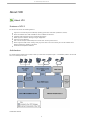
Sun Virtual Desktop Infrastructure 3.0 (VDI) is made up of three main components layers - a virtualization platform, the Sun VDI
Core, and a desktop access client.
Virtualization Platform
6
Sun Virtual Desktop Infrastructure 3.0
The basis for the architecture is the virtualization platform. In addition to creating and storing virtual machines the hypervisor
provides the core functionality needed for virtual desktop management like starting, stopping, and snapshotting virtual machines.
Sun VDI 3.0 supports the Sun xVM VirtualBox and VMware Virtual Infrastructure 3 virtualization platforms.
Sun VDI Core
The central component of the Sun VDI is the Sun VDI Core. The VDI Core provides all the functionality needed to build and
manage large scale virtual machine deployments. In addition to its management capabilities, the VDI Core is also responsible for
the brokering of virtual desktops on behalf of desktop access clients.
By integrating with Active Directory, the VDI Core is able to provide support for assignment of virtual desktops to existing users
and groups within an organization. The VDI Core configuration data and runtime information is stored in a MySQL database
which may be shared across multiple VDI Core instances on the network. This ensures access to the VDI Core even in failover
scenarios.
Desktop Access
There are three distinct mechanisms supported for access to virtual desktops.
Sun Ray Thin Client Access - In this case, a custom Sun Ray Software Kiosk Session is initiated when a user inserts a token card
into a Sun Ray thin client. This session uses the Sun VDI Core to request access to a virtual desktop on behalf of the user. Once a
virtual desktop has been assigned to the user, a Remote Desktop Protocol (RDP) connection to the desktop is established for the
session using the Sun Ray Windows Connector.
Secure Web Access with SGD - In this case, the browser is used to initiate a Sun Secure Global Desktop Software (SGD) session.
SGD, in turn, uses the VDI Core's RDP redirection capability to establish a connection to an assigned virtual desktop.
RDP Client Access - (RDP redirection must be supported on the client side to use this mechanism). As with the previous case, the
VDI Core's redirection capability is used to establish a connection to an assigned virtual desktop.
Getting Started - VDI Demo
Contents
Installing the Software
System Requirements
1. Install the operating system.
2. Configure the ZFS storage.
3. Install the virtualization platform.
4. Install the VDI Connection Broker (aka VDI Core).
5. Apply the VDI 3 Patch 3.
6. Configure VDI for Evaluation.
Creating Virtual Machine Templates
1. Create a new virtual machine using the VirtualBox GUI.
2. Install an operating system in the virtual machine.
3. Install the VirtualBox Guest Additions.
Manage Desktops with the VDI Web Administration
Access a Desktop (as an End-User)
Congratulations!
Getting Started - VDI Demo
The following information describes how to install and configure the VDI components (connection broker, virtualization platform,
and storage) on one host. A Demo VDI Setup is great for evaluation, but cannot support a large deployment.
7
Sun Virtual Desktop Infrastructure 3.0
The VDI Demo configuration is not a supported production environment configuration. For more information
about supported production environment VDI configurations, please see the Supported Configurations page.
You can also make a multi-host demo version of VDI, but you will have to refer mainly to the Installing document. In this case, the
system requirements will be less strict than what this page describes, see the Supported Software tables in the Release Notes. Also
refer to Supported Configurations to learn more about which hardware configurations will and will not work. When configuring
the VDI Core software, make sure to choose the Evaluation configuration, see Step 6 below for more details.
Installing the Software
System Requirements
You must perform the installation on a physical machine ("bare metal"). Installing the VDI software in a virtual machine will not
work.
The machine must meet the following requirements:
x86 CPU
At least 4 GB memory RAM
At least 32 GB disk space - it is recommended to use a system with two disks so that the Solaris OS uses on one disk and
the ZFS storage uses the other (see below).
Refer to the VDI 3 Release Notes for more details.
1. Install the operating system.
You must use Solaris 10 Update 7 (64-bit) as the operating system.
Install the operating system on the first disk.
You should perform a default installation using either UFS or ZFS as the file system.
We recommend adapting the default partition layout:
All of the VDI components will be installed under /opt - ensure that sufficient disk space is available here.
Swap space must be equal to or greater than the physical memory - if you have 4 GB memory, your swap space
must also be 4 GB or more.
Templates for virtual machines will be stored under /var/tmp - you should reserve enough disk space for
storing at least one or two virtual machine images.
Refer to the Solaris documentation for more details.
2. Configure the ZFS storage.
Sun VDI 3 (in combination with VirtualBox) uses the ZFS filesystem to create snapshots of virtual machine disk images or to
clone/replicate virtual machine disks. The interaction with ZFS is handled automatically and is completely encapsulated within VDI.
8
Sun Virtual Desktop Infrastructure 3.0
However, initially you must setup the ZFS storage (more precisely a ZFS storage pool aka zpool).
As previously mentioned, the second disk should be configured as ZFS storage. Simply trigger the following command as
root user:
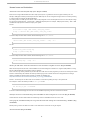
# zpool create VDI <name of second disk>
(In this case, the name of the zpool is 'VDI', but you can also use any other name in your setup. If you do not know the name of
your second disk, you can look it up using the format or fdisk command.)
ZFS uses any memory available (up to the limit) for a so-called ARC cache. This can cause issues in a demo setup, because
VDI may falsely report that there is not enough memory for starting up any virtual machine. To resolve this issue, adapt
the max value used for the ARC cache.
For example, to restrict the memory to 2GB, add the following line in /etc/system:
set zfs:zfs_arc_max = 2147483648
Enable the SMF service for iSCSI access (iSCSI target daemon) with the command:
svcadm enable svc:/system/iscsitgt:default
3. Install the virtualization platform.
For the demo installation we will use Sun VirtualBox as the virtualization platform.
You must use the VirtualBox archive (vbox_2.0.zip) that is bundled with Sun VDI 3. This archive includes Sun
VirtualBox 2.0.12 together with an installation script (vb-install) that automates the necessary configuration steps.
As root user, unzip the VirtualBox archive and execute the installation:
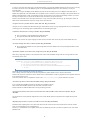
# unzip vbox_2.0.zip
# cd vbox_2.0
# ./vb-install
The installation script installs the VirtualBox packages and starts up the VirtualBox web service. In addition, the Apache web server
(bundled with Solaris 10) will be configured to act as SSL proxy for the VirtualBox web service.
4. Install the VDI Connection Broker (aka VDI Core).
As root user, unzip the VDI archive and execute the installation:
# unzip vda_3.0_amd64.zip
# cd image
# ./vda-install
After accepting the license agreement, the installation process begins, and all VDI components are installed. These components
include:
Sun Ray Server Software
Sun Ray Connector for Windows Operating Systems
Sun VDI Core
MySQL Database
Web Administration
Apache Tomcat
RDP Broker
Sun Ray Kiosk session scripts
After successful installation reboot your machine.
9
Sun Virtual Desktop Infrastructure 3.0
# reboot
5. Apply the VDI 3 Patch 3.
Download VDI 3 patch 3 (141482-03) from sunsolve.
Install the patch on your system. As root user, trigger the following command:
# patchadd /var/spool/patch/141482-03
6. Configure VDI for Evaluation.
As root user execute the vda-config script and choose the "0 Evaluation Sun VDI Host" configuration type:
# /opt/SUNWvda/sbin/vda-config
Now you've successfully installed and configured your VDI demo! For the remaining steps, use the VDI and VirtualBox
administration tools.
Creating Virtual Machine Templates
After installing the software, you should prepare a couple of virtual machines that will later be assigned to users. This is a two
step process: first, create virtual machines using tools from the VirtualBox virtualization platform. Then, import the prepared
virtual machines into Sun VDI. The imported virtual machines can either be assigned to users or can act as templates for cloning
additional machines.
VirtualBox provides some management tools for creating new virtual machines, which were installed on your demo machine
when vb-install was executed. If you prefer to prepare and test virtual machines on a separate machine, for example using
your laptop, then you can also download a compatible VirtualBox 2.0.8 version for your preferred operating system from here.
The following steps assume that you are running the VirtualBox tool directly from your demo machine.
1. Create a new virtual machine using the VirtualBox GUI.
As root startup the Sun VirtualBox GUI
# /opt/VirtualBox/VirtualBox
1. You can safely ignore the notification that a newer VirtualBox version is available.
2. Click New to launch the New Virtual Machine wizard.
3. The wizard will guide you through virtual machine creation.
Be sure to choose the appropriate hard-disk and RAM space for the desired configuration (4 GB hard-disk and
384 MB RAM are recommended).
For more information about virtual machine system requirements, refer to Chapter 3: Starting out with xVM
VirtualBox in the Sun xVM VirtualBox User Manual.
2. Install an operating system in the virtual machine.
At this point you have an empty virtual machine, equivalent to a PC without an OS installed. The next step is to choose the boot
medium for the OS and install it.
1.
2.
3.
4.
5.
Select the newly created virtual machine and click Settings.
Open the Advanced tab in the Settings GUI.
Ensure that CD/DVD-ROM is set as the first boot device.
Select the CD/DVD-ROM option in the left panel of the Settings dialog.
Check the Mount CD/DVD Drive checkbox.
a.
10
Sun Virtual Desktop Infrastructure 3.0
5.
a. Select the Host CD/DVD Drive radio button to install the OS from the CD-ROM drive.
b. Select the ISO Image File radio button, with the appropriate path, to install the OS from a previously
downloaded ISO file.
6. Click OK to save the changes and close the Settings GUI.
At this point the new virtual machine must be started to trigger the OS installation.
7. Select the new virtual machine and click Start.
8. Follow the installation prompts, or seek further installation details from the OS manufacturer.
3. Install the VirtualBox Guest Additions.
After the OS is installed, the Sun VirtualBox Guest Additions must be installed.
1. With the virtual machine running and fully booted, click the Devices menu, then select Install Guest Additions.
This will launch the xVM VirtualBox Guest Additions installer inside the virtual machine.
2. Install the Guest Additions according to the instructions in the wizard and reboot when asked.
3. Install all additional software for the desired virtual machine template.
If you plan to take advantage of the Windows Sysprep functionality, then you also need to install the Sysprep tool into your
virtual machine. However, for a first demo setup we recommend to NOT execute the Sysprep tool, because it is hard to later
detect any errors in this area. Instead, you should first become familiar with Sun VDI and then create a Sysprep-ed virtual machine
in a later stage. For example, you must take advantage of sysprep if the virtual machine must join an ActiveDirectory domain.
Please refer to Defining Virtual Machine Templates in Sun xVM VirtualBox for further details.
Manage Desktops with the VDI Web Administration
To manage desktops and users in VDI, refer to the following pages (these are also listed under Step 1 of Administering):
1.
2.
3.
4.
5.
6.
7.
8.
Access the Web Administration GUI.
Create desktop providers.
Create desktop pools.
Import virtual machine templates into the VDI Core.
Clone the virtual machine templates.
Set up a user directory.
Add test users to desktop pools.
Associate tokens to the test users.
Access a Desktop (as an End-User)
There are three VDI-compatible options for desktop access software: Sun Ray Software, Sun Secure Global Desktop Software, and
Microsoft RDC Software.
Sun Ray software is automatically installed with the VDI Core installation, and is covered under the VDI demo licensing. To read
more about how to adapt Sun Ray software, and access a desktop as and end-user with a Sun Ray DTU, use the following links:
Adapting Sun Ray Software
Accessing Desktops with a Sun Ray DTU
For desktop SGD, and MS RDC information, refer to Steps 2-3 of Administering.
Congratulations!
You should have a fully functional VDI Demo. If you have run into problems setting up VDI, please look for answers in some of
the following places:
Troubleshooting and FAQs
The VDI Forum
Planning the Installation
11
Sun Virtual Desktop Infrastructure 3.0
Standard System Requirements
This section outlines the minimum requirements for a standard VDI 3 configuration. We recommend that you read the following
pages for more information about supported software and VDI deployment options:
Release Notes
Supported Configurations
Deployment Guide
12
Sun Virtual Desktop Infrastructure 3.0
Sun VirtualBox Virtualization Platform
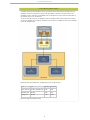
A standard (minimum) VDI/VirtualBox setup for a production environment requires three VDI hosts, one
VirtualBox host, and one storage host. The Sun VDI 3.0 Software is installed on the VDI hosts, and Sun
VirtualBox for VDI is installed on the VirtualBox host. The storage host is used to store the virtual disks of
the desktops which run on the VDI host.
You can use any x86 host (even your laptop) to create a VirtualBox virtual machine which will be used by
Sun VDI as a template for the desktops. Templates must be created in VirtualBox for VDI, which is available
on the VDI download page.
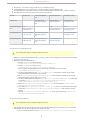
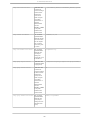
Requirements for two desktops with 512 MB memory and a 10 GB disk each:
Host
CPU
Memory
Disk space
Three VDI hosts
all x86 or all SPARC CPU
2 GB
1 GB
VirtualBox host
x86 CPU
2 GB
1 GB
Storage host
x86 CPU
1 GB
32 GB
Review the Supported Software below!
13
Sun Virtual Desktop Infrastructure 3.0
VMware Infrastructure Virtualization Platform
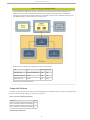
A standard (minimum) VDI/vCenter setup for a production environment requires at least three VDI hosts, one
VMware vCenter host, and one VMware ESX host. Most VDI deployments will probably require and additional
storage host. All required VDI components (VDI Core) are installed on the VDI hosts. The VMware vCenter host and
the VMware ESX host are used to maintain the virtual machines.
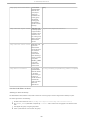
Requirements for 2 desktops with 512 MB memory and a 10 GB disk each:
Host
CPU
Memory
Disk space
Three VDI hosts
all x86 or all SPARC CPU
2 GB
1 GB
VMware vCenter host
x86 CPU
2 GB
1 GB
VMware ESX host
x86 CPU
2 GB
32 GB
Review the Supported Software below!
Supported Software
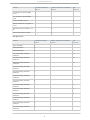
This section includes support tables for VDI Core host operating systems, virtualization platforms, storage servers, desktop guest
systems. For more about VDI Support, see Supported Configurations.
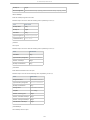
VDI Core Host Operating Systems
Software
VDI 3
Solaris 10 Update 6 SPARC and x86 (64-bit)
X
Solaris 10 Update 7 SPARC and x86 (64-bit)
X
Virtualization Platforms
14
Sun Virtual Desktop Infrastructure 3.0
Software
VirtualBox Virtualization
Platform
VMware Infrastructure Virtualization
Platform
Not
Supported
Sun VirtualBox for VDI (VirtualBox
2.0.10)
X
Sun VirtualBox for VDI (VirtualBox
2.0.8)
X
All other VirtualBox Versions
X
VMware VirtualCenter 2.5 (Update 1, 2,
3, 4, 5)
X
VMware ESX server 3.5 (Update 1, 2, 3,
4)
X
VMware vSphere (ESX server 4.0)
X
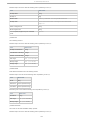
Storage Servers
Software
VirtualBox Virtualization
Platform
VMware Infrastructure Virtualization
Platform
Not
Supported
Solaris 10 Update 7
X
OpenSolaris 2008.11
X
OpenSolaris 2009.06
X
Sun Unified Storage 7000 Series
2009.Q3.2.0
X*
Sun Unified Storage 7000 Series
2009.Q3.1.0
X*
Sun Unified Storage 7000 Series
2009.Q3.0.0
X*
Sun Unified Storage 7000 Series
2009.Q2.5.1
X
Sun Unified Storage 7000 Series
2009.Q2.5.0
X
Sun Unified Storage 7000 Series
2009.Q2.4.0
X
Sun Unified Storage 7000 Series
2009.Q2.3.1
X
Sun Unified Storage 7000 Series
2009.Q2.3.0
X
Sun Unified Storage 7000 Series
2009.Q2.2.1
X
Sun Unified Storage 7000 Series
2009.Q2.2.0
X
Sun Unified Storage 7000 Series
2009.Q2.1.1
X
Sun Unified Storage 7000 Series
2009.Q2.1.0
X
Sun Unified Storage 7000 Series
2009.Q2.0.0
X
15
Sun Virtual Desktop Infrastructure 3.0
Sun Unified Storage 7000 Series
2008.Q4.2.3
X
Sun Unified Storage 7000 Series
2008.Q4.2.2
X
Sun Unified Storage 7000 Series
2008.Q4.2.1
X
Sun Unified Storage 7000 Series
2008.Q4.2.0
X
Sun Unified Storage 7000 Series
2008.Q4.1.1
X
Sun Unified Storage 7000 Series
2008.Q4.1.0
X
Sun Unified Storage 7000 Series
2008.Q4.0.1
X
Sun Unified Storage 7000 Series
2008.Q4.0.0
X
Qualified by VMware
X
* With the 2009.Q3.0.0 release a new iSCSI stack (COMSTAR) has been introduced to the Unified Storage 7000 Series which is
incompatible with VDI 3.0 and the upcoming VDI 3.1 releases. COMSTAR will be supported by VDI 3.1.1 which will be released
ASAP after the 3.1 release.
Tip
For more information about the Sun Unified Storage 7000 Series, see the Fishworks Documentation.
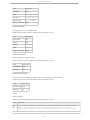
Desktop Guest Systems
Software
VirtualBox Virtualization
Platform
VMware Infrastructure Virtualization
Platform
Not
Supported
Windows XP SP2 and
higher
X
X
Windows Vista Enterprise
X
X
Windows 2000
X
Ubuntu 8.10
X
OpenSolaris 2008.11
X
SLED 11
X
Release Notes
Contents
Package Software
Patches
Third-Party Software
Supported Software
VDI Core Host Operating Systems
Virtualization Platforms
Storage Servers
16
Sun Virtual Desktop Infrastructure 3.0
Desktop Guest Systems
Known Issues and Limitations
Solaris hosts must have adequate swap space. (Bug ID 1225025)
Memory for ARC cache should be restricted to a lower limit when using ZFS on S10u7. (Bug ID 6844780)
Desktops cannot use 'Host Networking' unless VirtualBox has been configured to run as root. (Bug ID 6839450)
During log-off, VirtualBox desktops do not go into idle state when settings are 'Host Networking - WinRDP'.
(Bug ID 6837283)
VDI Host Overload (Bug ID 6810444)
Using the VDI CLI in parallel with the Admin Web GUI. (Bug ID 6770476)
Limitations with VDI hosts running on SPARC. (Bug ID 6812848)
Sun Open Storage fails after a software update. (Bug ID 6826006)
OpenSolaris Update causes SSH to the storage box to fail. (Bug ID 6812829)
vb-install script fails to install xVM VirtualBox package. (Bug ID 6814023)
Cloned virtual machines have lower resolution than the xVM VirtualBox virtual machine templates. (Bug ID
6815380)
Migrating large numbers of pools from VDI 2.0 to 3.0 fails. (Bug ID 6819562)
Importing VDI 2.0 data into VDI 3.0 fails if pool's recycle policy is 'Destroy'. (Bug ID 6818383)
Reporting Problems and Providing Feedback
Further Information
Release Notes
These notes contain important information about the Sun VDI Core at the time of revenue release, including requirements and
supported platforms as well as issues and workarounds. Be sure to read this document before you begin using Sun VDI 3.
Package Software
Sun Virtual Desktop Infrastructure Software 3.0 bundled software includes:
Sun VDI Core
Sun Ray Server Software 4.1 (SRSS)
Sun Ray Connector for Windows OS, Version 2.1 (SRWC)
Sun VirtualBox for VDI 3.0, otherwise known as Sun VirtualBox 2.0.10 (Solaris 10 x86 only)
Separate software covered by the VDI license:*
Sun Secure Global Desktop 4.41 (SGD)
Sun Secure Global Desktop 4.5 (SGD)
Sun VirtualBox for VDI 3.0, otherwise known as Sun VirtualBox 2.0.10 (additional platforms for creating desktop
templates)
* For more details about the concurrent license, see the Troubleshooting and FAQs.
Patches
The first VDI 3 patch was released on May 30. A revision of the patch was released on August 13. For more details see: VDI
Patches.
Third-Party Software
Sun VDI 3 includes software originating from third parties that is subject to GPL/LGPL, or CDDL licenses. The corresponding
source code is available via the links below:
TopLink Essentials (licensed under CDDL) is a persistence API used by Sun VDI core.
The library source code is available at:
http://download.java.net/javaee5/v2ur2/promoted/source/glassfish-v2ur2-b04-src.zip
Sun VirtualBox for VDI contains modified GPL code.
The source code is available at: http://download.virtualbox.org/virtualbox/2.0.10/VirtualBox-2.0.10-OSE.tar.bz2
Supported Software
17
Sun Virtual Desktop Infrastructure 3.0
This section includes support tables for VDI Core host operating systems, virtualization platforms, storage servers, desktop guest
systems. For more about VDI Support, see Supported Configurations.
VDI Core Host Operating Systems
Software
VDI 3
Solaris 10 Update 6 SPARC and x86 (64-bit)
X
Solaris 10 Update 7 SPARC and x86 (64-bit)
X
Virtualization Platforms
Software
VirtualBox Virtualization
Platform
VMware Infrastructure Virtualization
Platform
Not
Supported
Sun VirtualBox for VDI (VirtualBox
2.0.10)
X
Sun VirtualBox for VDI (VirtualBox
2.0.8)
X
All other VirtualBox Versions
X
VMware VirtualCenter 2.5 (Update 1, 2,
3, 4, 5)
X
VMware ESX server 3.5 (Update 1, 2, 3,
4)
X
VMware vSphere (ESX server 4.0)
X
Storage Servers
Software
VirtualBox Virtualization
Platform
VMware Infrastructure Virtualization
Platform
Not
Supported
Solaris 10 Update 7
X
OpenSolaris 2008.11
X
OpenSolaris 2009.06
X
Sun Unified Storage 7000 Series
2009.Q3.2.0
X*
Sun Unified Storage 7000 Series
2009.Q3.1.0
X*
Sun Unified Storage 7000 Series
2009.Q3.0.0
X*
Sun Unified Storage 7000 Series
2009.Q2.5.1
X
Sun Unified Storage 7000 Series
2009.Q2.5.0
X
Sun Unified Storage 7000 Series
2009.Q2.4.0
X
Sun Unified Storage 7000 Series
2009.Q2.3.1
X
Sun Unified Storage 7000 Series
2009.Q2.3.0
X
18
Sun Virtual Desktop Infrastructure 3.0
Sun Unified Storage 7000 Series
2009.Q2.2.1
X
Sun Unified Storage 7000 Series
2009.Q2.2.0
X
Sun Unified Storage 7000 Series
2009.Q2.1.1
X
Sun Unified Storage 7000 Series
2009.Q2.1.0
X
Sun Unified Storage 7000 Series
2009.Q2.0.0
X
Sun Unified Storage 7000 Series
2008.Q4.2.3
X
Sun Unified Storage 7000 Series
2008.Q4.2.2
X
Sun Unified Storage 7000 Series
2008.Q4.2.1
X
Sun Unified Storage 7000 Series
2008.Q4.2.0
X
Sun Unified Storage 7000 Series
2008.Q4.1.1
X
Sun Unified Storage 7000 Series
2008.Q4.1.0
X
Sun Unified Storage 7000 Series
2008.Q4.0.1
X
Sun Unified Storage 7000 Series
2008.Q4.0.0
X
Qualified by VMware
X
* With the 2009.Q3.0.0 release a new iSCSI stack (COMSTAR) has been introduced to the Unified Storage 7000 Series which is
incompatible with VDI 3.0 and the upcoming VDI 3.1 releases. COMSTAR will be supported by VDI 3.1.1 which will be released
ASAP after the 3.1 release.
Tip
For more information about the Sun Unified Storage 7000 Series, see the Fishworks Documentation.
Desktop Guest Systems
Software
VirtualBox Virtualization
Platform
VMware Infrastructure Virtualization
Platform
Not
Supported
Windows XP SP2 and
higher
X
X
Windows Vista Enterprise
X
X
Windows 2000
X
Ubuntu 8.10
X
OpenSolaris 2008.11
X
SLED 11
X
19
Sun Virtual Desktop Infrastructure 3.0
Known Issues and Limitations
Solaris hosts must have adequate swap space. (Bug ID 1225025)
Solaris hosts running xVM VirtualBox must have swap space equal to, or greater than the host's physical memory size. For
example, 16GB physical memory would require at least 16GB swap. This can be configured during a Solaris 10 install by choosing
a 'custom install' and changing the default partitions.
For existing Solaris 10 installs you will need to create a swap image file on the local filesystem and mount it. The swap file image
size should be: Physical Memory - Current Swap = Additional Swap Required. For example, 16GB physical memory - 1GB = 15GB
of additional swap required. To add the swap to your system:
For ZFS:
# zfs create -V 16gb _<ZFS volume>_/<new_swap_volume>
# swap -a /dev/zvol/dsk/_<ZFS volume>_/<new_swap_volume>
To have the swap mounted after a reboot, add the following line to /etc/vfstab:
/dev/zvol/dsk/_<ZFS volume>_/<new_swap_volume> - - swap - no -
For UFS:
# mkfile 15g /path/to/swap.img
# swap -a /path/to/swap.img
To have the swap mounted after a reboot, add the following line to /etc/vfstab:
/path/to/swap.img - - swap - no -
Memory for ARC cache should be restricted to a lower limit when using ZFS on S10u7. (Bug ID 6844780)
When all VDI components (VDI host, xVM VirtualBox host, and ZFS storage) are installed on a single box (x86 platform, running
S10u7), xVM VirtualBox will not be able to start any desktops.
Cause - ZFS uses any memory available (up to the limit) for an ARC cache. If other programs try to access the memory, ZFS should
release it. Unfortunately, VDI evaluates the memory before trying to start a virtual machine and recognizes that not enough
memory is available to start the virtual machine. Full details are available here
http://www.solarisinternals.com/wiki/index.php/ZFS_Evil_Tuning_Guide#ARCSIZE.
Solution - The memory for the ARC cache can be limited to a max value by adding an entry in /etc/systems file.
For example, to restrict the memory to 2GB, in /etc/system add:
set zfs:zfs_arc_max = 2147483648
It has been verified that keeping this value to as low as 512MB and importing a file of 2.7G will work as desired.
Desktops cannot use 'Host Networking' unless VirtualBox has been configured to run as root. (Bug ID 6839450)
Virtual machines cannot be started with host networking unless the VirtualBox web service runs as root.
During log-off, VirtualBox desktops do not go into idle state when settings are 'Host Networking - WinRDP'. (Bug
ID 6837283)
Desktop never go to the idle state and remain in used state forever and hence do not get recycled.
VDI Host Overload (Bug ID 6810444)
20
Sun Virtual Desktop Infrastructure 3.0
In case you see a blank page when login in to the administration ui it's likely that database problems are the root cause. You may
for instance see "Error 157" in the database log files in '/var/opt/SUNWvda/mysql-cluster' of the primary or one of your
secondary hosts.
Cause- When using the VDI MySQL Cluster database, the first two VDI secondary hosts run the MySQL Cluster data nodes in
addition to a MySQL SQL node, SRSS, SRWC, VDI, etc. MySQL Cluster is sensitive to resource shortages. The expected load to the
MySQL Cluster data nodes is small, so the MySQL processes should be able to cope under typical loading. However, if you have
too many Sun Ray sessions on each of the first two Sun Ray secondaries, you may see this error.
Solution- Check the load on the concerned hosts and if it is high, reduce the load on this host e.g. by reducing the number of
SRSS sessions hosted. Restart the SQL node running on the concerned host
Using the VDI CLI in parallel with the Admin Web GUI. (Bug ID 6770476)
Using the vda CLI to modify some data, while having an Admin Web UI session running, might generate errors in the Web Admin
UI and log you out. At following login, the Web Admin UI will be working fine again.
Limitations with VDI hosts running on SPARC. (Bug ID 6812848)
Only one storage is supported with Solaris SPARC VDI hosts.
The 'duplicate' action fails with Solaris SPARC VDI hosts.
Cause- Sun VDI 3.0 does not support copying one iSCSI volume to another iSCSI volume via Java in Solaris SPARC VDI hosts.
Sun Open Storage fails after a software update. (Bug ID 6826006)
Do not update the software of a Sun Open Storage after it has been added to VDI 3.0. Any management action of VDI
3.0 fails afterwards.
OpenSolaris Update causes SSH to the storage box to fail. (Bug ID 6812829)
After doing a 'pkg image-update' on an OpenSolaris host used for xVM VirtualBox storage, VDI can no longer SSH to the box.
The following error is seen:
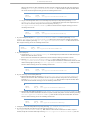
Caused by: com.jcraft.jsch.JSchException: Algorithm negotiation fail
at com.jcraft.jsch.Session.receive_kexinit(Session.java:510)
at com.jcraft.jsch.Session.connect(Session.java:285)
at com.sun.vda.service.vbox.SshServer.executeCommand(SshServer.java:331)
... 40 more
Normal SSH via the command line continues to work fine.
Cause- Changes have been made to how the sshd negotiates the ciphers between version 101b and 108 of OSOL.
Solution- We require the customer to use the release version of OSOL 2008.11 (101b). Any upgrades are not supported and need
to get clearance from us first.
A fix in this particular case is to activate the 'Ciphers' line in /etc/ssh/sshd_config and to restart the ssh service.
vb-install script fails to install xVM VirtualBox package. (Bug ID 6814023)
If you uninstall xVM VirtualBox and want to reinstall it, the installation may fail.
Cause- Some xVM VirtualBox processes may still remain even after removal.
Solution- Reboot the xVM VirtualBox host to kill any remaining processes.
Cloned virtual machines have lower resolution than the xVM VirtualBox virtual machine templates. (Bug ID
6815380)
The cloned VM has a blurry desktop image because it has a lower (8-bit) resolution compared to the original (32-bit) virtual
machine.
Migrating large numbers of pools from VDI 2.0 to 3.0 fails. (Bug ID 6819562)
Sometimes when migrating two or more pools from VDI 2.0 to VDI 3.0 the first pool will succeed and the next ones will fail.
Cause- A misconfiguration in the vda-migrate tool.
Solution- It is recommended not to migrate several pools simultaneously from VDI 2.0 to VDI 3.0 (a patch for this issue will be
available soon).
21
Sun Virtual Desktop Infrastructure 3.0
Importing VDI 2.0 data into VDI 3.0 fails if pool's recycle policy is 'Destroy'. (Bug ID 6818383)
Cause- The "Recycling Policy" value 'destroy' in VDI 2.0 became 'delete' for VDI 3.0.
Solution- Edit the exported text properties file ('migrate_svdc_1.?'). It should be located in the directory which was used to
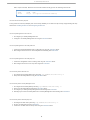
export previous Sun VDI data. Find all the lines which end with "pool.recyclepolicy=Destroy" and modify them to
"pool.recyclepolicy=Delete".
Reporting Problems and Providing Feedback
To report a bug in the software, please send an email to the VDI Team
If you are reporting a bug, please provide the following information where applicable:
Description of the problem, including the situation, where the problem occurs, and its impact on your operation.
Machine type, operating system version, browser type and version, locale and product version, including any patches you
have applied, and other software that might be affecting the problem.
Detailed steps on the method you have used, to reproduce the problem.
Any error logs or core dumps.
Further Information
You may also be interested in these related release notes:
Sun Ray Server Software 4.1 Release Notes - http://docs.sun.com/app/docs/doc/820-3774
Sun Ray Windows Connector 2.1 Release Notes - http://docs.sun.com/app/docs/doc/820-3777
Sun Secure Global Desktop 4.41 Release Notes - http://docs.sun.com/app/docs/doc/820-4905
Sun xVM VirtualBox 2.0.8 for VDI - http://download.virtualbox.org/virtualbox/vboxvdi3download.html
VDI Patches
VDI Patches
The information below provides an overview of the patching available for all VDI versions. Use the links from the patch ID
numbers to access the official patch documentation on SunSolve.
VDI Patch Strategy
Patches for the VDI Core will be released as patches for the VDI 3 product.
Patches for included Sun Ray technology will be released as the part of the Sun Ray product.
In general it is recommended to run on the latest patch level, even though it might not be important to VDI 3. The most
recent patch was announced here.
Changes to VirtualBox will NOT be delivered as patches.
If bug fixes are required, a new minor version of VirtualBox qualified for VDI 3 will be released. As a result, VirtualBox
must be reinstalled on the virtualization host.
Changes to the storage platform are not driven or controlled by the VDI team.
Therefore the VDI team needs to qualify a new firmware for the Unified Storage systems as well as updates to
OpenSolaris. The VDI team will announce which future versions are supported or by when. So, be a bit careful in this
area.
VDI 3 Patch (Revision 3)
The third patch for VDI 3 was released on October 30. The patch is available for both x86 and SPARC platforms:
x86 - 141482-03
SPARC - 141481-03
VirtualBox 2.0.12 - VirtualBox for VDI
The patch includes the following features:
Security - Resolves the issue described in Sun Alert (268328).
VirtualBox 2.0.12 - Includes a minor update release of VirtualBox (VBox 2.0.12), which includes a couple of fixes to
further increase robustness (for example, addresses a memory leak in the VirtualBox webservice).
22
Sun Virtual Desktop Infrastructure 3.0
If you would like to make virtual machine templates on a local installation of VirtualBox (instead of the
installation on your VirtualBox host), make sure you install the correct version from the VirtualBox website.
VDI 3 Patch (Revision 2)
The second patch for VDI 3 was released on August 13. The patch is available for both x86 and SPARC platforms:
x86 - 141482-02
SPARC - 141481-02
VirtualBox 2.0.10 - VirtualBox for VDI
The patch includes the following features:
Single Host Configuration - Allows you to install all VDI components on one host. This is a configuration suitable for
production environments that do not require fail-over. For more information, see the Supported Configurations page.
VirtualBox 2.0.10 - Includes a minor update release of VirtualBox (VBox 2.0.10), which supports desktop recycling for
non-Windows guest operating systems.
VDI 3 Patch (Revision 1)
The first patch for VDI 3 was released on May 30.
The patch included the following features:
S10 U7 support - Allows you to build a demo/POC on a single box including VirtualBox and storage.
VMware vSphere 4 support - VDI 3 runs against VMware vCenter 4
Support of the latest Unified Storage firmware
Performance improvements in the Admin GUI
The patch corrects the following bugs listed in the Release Notes:
1.
2.
3.
4.
5.
Limitations with VDI hosts running on SPARC. (Bug ID 6812848)
Sun Open Storage fails after a software update. (Bug ID 6826006)
OpenSolaris Update causes SSH to the storage box to fail. (Bug ID 6812829)
Migrating large numbers of pools from VDI 2.0 to 3.0 fails. (Bug ID 6819562)
Importing VDI 2.0 data into VDI 3.0 fails if pool's recycle policy is 'Destroy'. (Bug ID 6818383)
VDI 2 Patch (Revision 5)
The fifth revision of VDI 2 Patch 1 was released on April 29. The patch is available for the following packages:
Linux packages - 127561-05
Solaris 10 packages on x86 - 127560-05
Solaris 10 packages on SPARC - 127559-05
Windows packages - 138482-05
Supported Configurations
Contents
Supported Configurations for Sun Virtualbox Virtualization Platforms
Supported Configurations for VMware Infrastructure Virtualization Platforms
Single Host Configuration
VirtualBox on Primary Host Configuration
Primary Host Virtualized Configuration
Explicitly Unsupported Configurations
Supported Configurations
23
Sun Virtual Desktop Infrastructure 3.0
The following information outlines the supported and unsupported configurations for a Sun VDI 3 deployment in a production
environment. For more information about supported software versions, please refer to the Release Notes.
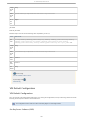
Supported Configurations for Sun Virtualbox Virtualization Platforms
Configuration Type
Minimum No. of Machines
Standard VirtualBox Configuration
5
Single Host Configuration
1
VirtualBox on Primary Host Configuration
4
Supported Configurations for VMware Infrastructure Virtualization Platforms
Configuration Type
Minimum No. of Machines
Standard VMware Configuration
6
Primary Host Virtualized Configuration
5
Sun VDI Support Information
Some VDI configurations are Explicitly Unsupported Configurations.
In order to download the VDI 3 Patches, you must have (at minimum) a Sun Basic Service support plan.
For more information about Sun Service support plans, see the Sun Services site.
VMware software is not included as part of the Sun VDI Software 3 package, therefore a Sun Support
contract will not cover VMware-related issues. For VMware coverage, you will need an additional
support plan. For more information about Sun Service plans for VMware, see the Sun Services for
VMware site.
Single Host Configuration
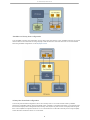
In the Single Host Configuration, everything (VDI connection broker, VirtualBox virtualization platform, and storage) run on one
physical host. Please note that the requirement for this deployment option is to run Solaris 10 Update 7 on this host (with the
latest patch installed). Concerning the database, you would have a locally installed MySQL Server (with an InnoDB engine) and
connect to it selecting the remote database option during VDI 3 configuration. This kind of deployment offers zero redundancy,
meaning it is one big Single Point of Failure.
The VDI support contracts only cover a VDI configuration with an embedded MySQL database. The Single Host
Configuration uses a locally installed MySQL database with a InnoDB engine, which must be configured as a
remote database. Therefore, if you want support service for the database component of the Single Host
Configuration, you must purchase an additional MySQL service contract. For more information, see the MySQL
Support page.
24
Sun Virtual Desktop Infrastructure 3.0
VirtualBox on Primary Host Configuration
In the VirtualBox on Primary Host Configuration, the Sun VDI 3 Primary node and one of your VirtualBox hosts share one physical
machine. Make sure the shared host has enough capacity to deal with these two roles at the same time. For more information
about sizing VirtualBox configurations, see the Deployment Guide.
Primary Host Virtualized Configuration
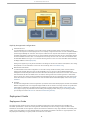
In the Primary Host Virtualized Configuration, the Sun VDI 3 Primary node runs in a virtual machine hosted by a VMware
Infrastructure virtualization platform. Running the MySQL Cluster completely in a virtualized environment is not supported. Given
the fact that the MySQL Cluster management node (or Primary node) requires only little resources, the MySQL team has agreed
that it is an acceptable and supported scenario to run it in a virtual machine. The two VDI 3 Secondary hosts running the MySQL
Cluster data nodes nevertheless need to run on bare metal.
25
Sun Virtual Desktop Infrastructure 3.0
Explicitly Unsupported Configurations
Virtualized VDI Core
In a Virtualized VDI Core configuration, the Sun VDI 3 Primary and two Secondary nodes could be hosted in virtual
machines--this may work for some deployments, but it is explicitly unsupported! Sun VDI 3 core with embedded database
provides High-Availability out of the box, which requires network and I/O response times that cannot be guaranteed in
virtualized environments. Customers who rely on a fully virtualized environment will need to use a configuration utilizing
an external database. However, there is one exception for the Primary VDI Core node. This node can be virtualized with
the embedded database, as long as it is not used for delivering sessions to users. For more information about virtualizing
the MySQL database, see the MySQL FAQs.
Although not supported, you may still be interested in virtualizing the VDI Core for whatever reason(demos, POC, testing,
development). For more information on how to do this successfully, refer to Tino Rachui's blog.
Mixed Endian Cluster Nodes
In a Mixed Endian Cluster Nodes configuration, the Sun VDI 3 Primary and two Secondary nodes could be hosted on
machines with dissimilar CPU types (a mix or x86 and SPARC). For a Sun VDI 3 Core with embedded database, the
management node (Primary VDI node) and first two data nodes (Secondary VDI nodes) used in the cluster must have the
same architecture (all x86 or all SPARC). That is, all machines hosting nodes must be either big-endian or little-endian,
and you cannot use a mixture of both. Any additional nodes added (since they are just MySQL client nodes and not part
of the data cluster) can be either architecture. For more information about mixed Endian MySQL nodes, see the MySQL
Limitations.
VDI Demo
The VDI Demo configuration cannot be supported as a production environment VDI deployment, because the embedded
database configuration does not comply with MySQL standards. We do, however, encourage customers to try VDI Demo
configuration to evaluate the new features before committing to a larger deployment. See the Getting Started - VDI
Demo page for step-by-step information about installing and configuring a Demo setup. If you run into any problems,
you can always consult the VDI Forum or check the Troubleshooting and FAQs.
Deployment Guide
Deployment Guide
This chapter provides guidelines for the design of the hardware architecture for VDI 3 deployments with VirtualBox. The
information provided here is derived from a sizing test with 1000 desktops which were running a script to simulate an office
workload (for closer details see the 'Appendix' chapter). The workload is different for every single installation and relatively small
changes in the usage patterns can have noticeable effects on the hardware requirements. Therefore it is a good practice to size
every deployment individually. This guide provides cornerstones for such efforts.
26
Sun Virtual Desktop Infrastructure 3.0
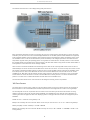
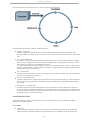
The hardware environment for a VDI 3 deployment typically looks like this:
Every (production) deployment consists of one primary VDI core server and at least two secondary VDI core servers to provide
redundancy. The VDI core servers host a clustered MySQL database for the VDI data (optional remote databases are supported),
route information between clients and desktops, and provide the broker functionality which delivers the desktops to the clients.
The VirtualBox servers run the virtual machines which provide the desktops. The storage(s) provide the virtual disks which are
interpreted as physical disks by the operating systems running within the virtual machines. The iSCSI protocol is used to transfer
the disk data between the VirtualBox servers and the storages. That iSCSI data creates a major part of the total network traffic of
a VDI system (for a closer discussion see the 'Storage' chapter).
Other consumers of network bandwidth worth mentioning are the clients of VDI 3 (Sun Rays, RDP clients and the Sun Secure
Global Desktop). The clients connect to the VirtualBox servers via the VDI core servers. In case of a Sun Ray client, which uses the
ALP protocol to transfer the desktop graphics, the VDI core servers convert the RDP protocol received by the VirtualBox servers
to the ALP protocol. So there is one data stream for each client connection between the client, the VDI core server and the
VirtualBox server. RDP clients, like the windows connector (uttsc), connect to the VDI core server which in turn uses the 'RDP
redirect' feature to instruct the clients to connect to the VirtualBox servers directly as there is no need to translate the RDP
protocol. In this case there is a data stream between the soft client and the VirtualBox server.
The texts behind the bold terms are rules of thumb for calculating the according resource requirements.
VDI Core Servers
The primary VDI core server requires a dual-core CPU and 2 GB of memory. As long as the VDI services are not configured on
that server (which is not recommended) these hardware requirements do not change with the number of running desktops.
The secondary VDI core server requirements for the number of cores and memory size varies with the number of running
desktops supported, as well as the required network bandwidth. The bandwidth also varies with the content displayed. The
numbers given below are typical for office work. Displaying videos or web pages with flash content can multiply the required
bandwidth.
Number of cores = number of running desktops / 20
Example: Two secondary VDI core servers with 8 CPUs and 4 cores per CPU can serve 2 * 8 * 4 * 20 = 1280 running desktops
Memory size [MB] = number of desktops * 110 MB + 2048 MB
Example: Two secondary VDI core servers with 64 GB of memory can serve (2 * 64 * 1024 MB - 2 * 2048 MB) / 110 MB = 1154
running desktops
27
Sun Virtual Desktop Infrastructure 3.0
Network bandwidth [Mb/s] = number of running desktops * 0.15 [Mb/s]
Example: One secondary VDI core server with one 1 Gb Ethernet interface can serve 1024 / 0.15 Mb/s = 6827 running desktops
Please refer also to the Complete Sun Ray Server Sizing Guide
VirtualBox Servers
VDI 3 supports any server running Solaris 10u6 to host VirtualBox.
Number of cores = number of running desktops / 4
Example: A server with 8 CPUs and 4 cores per CPU can support up to 8 * 4 * 4 = 128 running desktops
Memory size [MB] = number of running desktops * memory size of a desktop * 1.2 + 1024 MB
Example: A server with 64 GB of memory can support (64 * 1024 MB - 1024 MB) / (512 MB * 1.2) = 105 running desktops of 512
MB in size
A rule of thumb for VirtualBox servers is: "A server with 32 cores and 64 GB of memory supports 100 desktops." While the CPU
power of the server chosen for the examples above allows to support 128 desktops it is not advisable to increase the memory size
to do so. At least 20% of the available CPU power should be available as security margin.
Network bandwidth [Mb/s] = storage network bandwidth / number of VirtualBox servers
For a closer discussion of the network bandwidth see the chapter 'Storage'.
100+ VMs: If you want to run more than 100 VMs on a single VirtualBox server you need to increase the SYSV semaphores on the
VirtualBox server. You need to set the number of available semaphores to the number of VMs you intend to run including a
security margin for other processes. To set the SYSV semaphores for 1000 VMs type as root:
prctl -r -n project.max-sem-ids -v 1024
projmod -s -K "project.max-sem-ids=(priv,1024,deny)" user.root
The first line changes the available semaphores for the current process, the second line makes this a permanent system setting for
the 'root' user. If the VBoxSVC process is run by another user add a user.myuser line to the /etc/project file and change the
second line accordingly.
The maximum number of virtual machines on a single VirtualBox server is 1023.
Storage
VDI 3 supports any Sun Storage 7000 Unified Storage System and any server running the OpenSolaris 2008.11 operating system.
The recommended disk layout is RAID 10 (mirrored sets in a striped set; ZFS stripes the data automatically between multiple sets).
It is called 'Mirrored' by the 7000 series. While this disk layout uses 50% of the available disk capacity for redundancy it is faster
than RAID 5 for intense small random read/writes which is the typical access characteristic for iSCSI.
The storages provide the virtual disks which are accessed by VirtualBox via iSCSI. iSCSI is a CPU-intensive protocol therefore the
number of cores of the storage are a decisive factor for its performance which makes the x7410 the best-suited solution for
heavy-duty installations as it can be equipped with up to 16 cores. Other important factors are the memory size (cache), the
number of disks and the available network bandwidth.
The network bandwidth is very volatile and determined by the relation of desktops starting up (peak network bandwidth) and
desktops that have cached the application(s) in use (avarage network bandwidth). Starting a VM creates a network load of 150
MB which needs to be satisfied in ~30 seconds. If many desktops are started at the same point in time the requested network
bandwidth may exceed 1 Gb/s (if the CPUs of the storage can handle the load created by the iSCSI traffic). This senario is typical
for shift-work companies. In such a case it is recommended to set the "Pool / Cloning / Machine State" option to "Running"
which keeps the desktops always running and therefore decouples the OS boot from the login of a user. Another option is to
trunk several interfaces as a cheap way to provide more than 1 Gb/s bandwidth via one IP. It is also possible to use Jumbo Frames
to speedup iSCSI connections. Jumbo Frames need to be configured for all participants of the network (storages, VirtualBox
servers and switches) and it is important to note that Jumbo Frames are not standardized so there is a risk of incompatibilities.
28
Sun Virtual Desktop Infrastructure 3.0
Typically there is no shortage of disk space. VDI 3 in combination with VirtualBox uses the 'sparse' volume feature of ZFS which
allows to allocate more space for volumes than physically available as long as the actual data written does not exceed the capacity
of the storage. This feature in combination with the fact that cloned desktops reuse unchanged data of their templates results in
a very effective usage of the available disk space. In this light the calculation for disk space below is a worst-case scenario
assuming that all volumes are completely used by data which differs from the template.
Number of cores = number of virtual disks in use / 200
Example: A x7210 storage with 2 CPUs and 4 cores per CPU can serve up to 2 * 4 * 200 = 1600 virtual disks
Memory size. The more the better as the free memory can be used as disk cache which reduces the access time
Average Network bandwidth [Mb/s] = number of virtual disks in use * 0.032 Mb/s
Example: A x7210 storage with one Gigabit Ethernet interface can serve up to 1000 / 0.032 = 31250 virtual disks
Peak Network bandwidth [Mb/s] = number of virtual disks in use * 40 Mb/s
Example: A x7210 storage with one Gigabit Ethernet interface can serve up to 1000 / 40 = 25 virtual disks
Disk space [GB] = number of desktops * size of the virtual disk [GB]
Example: A x7210 storage with a capacity of 46 TB can support 46 * 1024 GB / 2 / 8 GB = 2944 8 GB disks in a RAID 10
configuration
Helpful Hints
The graphic performance of desktops is better without background images.
Avoid processes which generate constant or, even worse, burst disk I/O, as for example the indexing service of MS
Windows or virus scanners with a scheduled scan every Friday at 9 pm.
Appendix
The script used during the sizing tests starts a sequence of applications generating a workload which is aligned with the 'heavy
worker' workload as defined in VMware's 'VDI server sizing and scaling':
1.
2.
3.
4.
5.
6.
7.
Start PowerPoint. Load a massive presentation and browse the slides. Close PowerPoint.
Start Internet Explorer. Browse three different Web pages. Close Internet Explorer.
Start Command Prompt. Do a directory listing.
Start PowerPoint. Load a massive presentation and browse the slides. Close PowerPoint.
Start Excel. Open an Excel sheet. Close Excel.
Start PowerPoint. Load a massive presentation and browse the slides. Close PowerPoint.
Start Word. Type a small document. Close Word.
Installing
Installing
1. Review the System Requirements
Check the VDI System Requirements to determine what equipment you will need.
2. Obtain the Sun VDI Software
To download a copy of the Sun VDI software, go to sun.com.
To download VDI 3 Patch 3, go to SunSolve.
3. Set Up a Virtualization Platform
29
Sun Virtual Desktop Infrastructure 3.0
VDI 3 enables you to set up one or more virtualization platforms. You can set up VirtualBox or VMware Infrastructure platforms
(or both).
Sun VirtualBox
1. Set Up a Storage Server
How to Set Up a Solaris Storage Server
How to Set Up an OpenSolaris Storage Server
How to Set Up a Sun Storage 7000 Unified Storage System
2. Set Up a Sun xVM VirtualBox Server
3. Define Virtual Machine Templates
VMware Infrastructure
1.
2.
3.
4.
Set Up a VMware ESX Server
Set Up a VMware vCenter Server
Define Virtual Machine Templates
Test the VMware Infrastructure Setup
4. Install and Configure the VDI Core
The VDI Core is the central management layer between the virtualization platform and the desktop access clients.
1. Install the VDI Core
2. Configure the VDI Core
How to Configure Sun VDI for a Single Host Setup
How to Configure Sun VDI for a Production Environment
How to Configure a Remote MySQL Database
Reconfiguring the VDI MySQL Cluster
How to do a Rolling Restart of Your MySQL Cluster
How to Prevent Unrestricted SQL Node Joins
MySQL Cluster Reconfiguration Scenarios
Backing Up the VDI Configuration
VDI Default Configuration
Optional Tasks
Patch VDI 3
Check VDA Services
How to Check the Core Service
How to Check the Database Service
How to Check the Admin GUI Service
How to Check the RDP Broker Service
Upgrade from VDI 2 to VDI 3
Remove the VDI Core
Testing the VMware Infrastructure Setup
Testing the VMware Infrastructure Setup
It is highly recommended to test the configuration made so far, before setting up the remaining Sun VDI components. A quick
manual test consists of cloning a virtual machine using the desired template and customization specification followed by a remote
access to the cloned virtual machine via RDP:
Steps
1. Open the Virtual Infrastructure Client.
2. Right-click on the desired template and select Deploy Virtual Machine from this Template.
a.
30
Sun Virtual Desktop Infrastructure 3.0
2.
a. The wizard will ask you to specify a name for the new VM - select the desired host/cluster and datastore with
sufficient free space.
b. On the Guest Customization step, select the Customize Using an Existing Customization Specification option,
then choose the customization specification you just created from the list.
c. Review your selections, and click Finish to begin cloning.
3. After the cloning has finished, select the new virtual machine and power it on.
After some time you should see its IP address and hostname appear in the Virtual Infrastructure Client. Make sure that it
has a unique IP address and that the hostname corresponds to the virtual machine name.
4. On the VMware vCenter server, open a Remote Desktop Connection by clicking Start > All Programs > Accessories >
Communications > Remote Desktop Connection.
a. In the Remote Desktop Connection window, enter the IP address of the newly cloned virtual machine, and click
Connect.
b. If everything is configured correctly, a full-screen remote desktop session to your virtual machine should be
displayed.
Previous Page
Defining Virtual Machine Templates in VMware vCenter
Up One Page Level
Installing
Installing the VDI Core
Installing the VDI Core
The VDI Core can be installed on an x86 or SPARC platform running Solaris 10 Update 6 (64-bit). It is important to note that when
you are choosing to use the embedded MySQL Cluster database all of your hosts need to be of the same architecture either x86
or SPARC. If you have an xVM VirtualBox virtualization platform, the VDI Core and xVM VirtualBox may share the same host.
Steps
1. Become root user:
$ su
2. Unzip the VDI archive on the VDI server:
# unzip vda_3.0_amd64.zip
or
# unzip vda_3.0_sparc.zip
3. Go to the image directory:
# cd image
4. Execute the installation.
31
Sun Virtual Desktop Infrastructure 3.0
4.
The files will be installed to /opt/SUNWvda/.
# ./vda-install
The installation script displays the text of the Sun Software License Agreement and prompts you to accept its terms and
conditions. After the license confirmation, the installation process begins, and all VDI components are installed. These
components include:
Sun Ray Server Software
Sun Ray Connector for Windows Operating Systems
Sun VDI Core
MySQL Database
Web Administration
Apache Tomcat
RDP Broker
Sun Ray Client
On completion, the installation script will indicate the path of the installation log file. All installation log files are
stored in the directory /var/sadm/install/logs.
5. Reboot the VDI server:
# reboot
Up One Page Level
Installing
Next Page
Configuring the VDI Core
Configuring the VDI Core
Configuring the VDI Core
Configuring the VDI Core for a Production Environment provides high availability and the required level of performance for
medium to bigger deployments. For the Production Setup a minimum of three VDI hosts is required in order to guarantee
high-availability: a Primary host, and two Secondary hosts.
How to Configure Sun VDI for a Production Environment
How to Configure a Remote MySQL Database
Additional VDI Configuration Options
If you have an expert understanding of MySQL and would like to reconfigure or back up the VDI MySQL Cluster, please refer to
the following sections:
Reconfiguring the VDI MySQL Cluster (Optional)
Backing Up the VDI Configuration (Optional)
32
Sun Virtual Desktop Infrastructure 3.0
Previous Page
Installing the VDI Core
Up One Page Level
Installing
Next Page
Checking VDA Services
How to Configure Sun VDI for an Evaluation Environment
How to Configure Sun VDI for an Evaluation Environment
It is only recommended to use the Evaluation Setup for demo and showcase setups.
Steps
1. Go to the installation directory:
cd /opt/SUNWvda/sbin
2. Execute the configuration script:
./vda-config
3. Choose the 0 Evaluation Sun VDI Host configuration type.
At the end of the configuration script you will be given a path of the configuration log file. Or, on Solaris platforms, you can find
it at /var/adm/log/vda-config.<date and time>.log
For the evaluation setup no password will be set for the MySQL database.
To set a password use the following script: /opt/SUNWvda/mysql/bin/mysqladmin
--defaults-file=/etc/opt/SUNWvda/my.cnf password <new password>.
Up One Page Level
Configuring the VDI Core
Next Page
How to Configure Sun VDI for a Production Environment
How to Configure Sun VDI for a Production Environment
How to Configure Sun VDI for a Production Environment
33
Sun Virtual Desktop Infrastructure 3.0
To configure VDI 3 for a production environment, you need to set up a minimum of one physical Primary Host and two physical
Secondary Hosts.
Before you Begin
If your VDI installation will consist of more than 20 secondary hosts, add more [ MYSQLD ] sections to the end
of the file '/etc/opt/SUNWvda/config.clustered.ini'.
Steps
1. Configure the Primary Sun VDI Host.
a. Go to the installation directory:
cd /opt/SUNWvda/sbin
b. Execute the configuration script:
./vda-config
Read VDI Default Configuration for more information about the configuration script.
c. Choose the 1 Primary Sun VDI Host configuration type.
d. Specify an administrator password.
This is the password that will be used to secure the MySQL database.
e. Specify a cluster signature.
This password will be used to encrypt messages that will be exchanged among the Sun Ray hosts forming a
Fail-Over-Group (FOG). This password must be the same on all hosts that will be added to the multi-host group.
It needs to be at least 8 characters long.
f. Choose whether to use the MySQL Cluster database bundled with VDI 3.0 or connect to a remote MySQL
database.
If you choose to use the MySQL Cluster, you must specify the DNS names of your first two secondary
hosts, which will also run the MySQL Cluster data nodes.
If you choose to connect to a remote MySQL database, the remote database must be MySQL 5.0 or
higher with InnoDB or MySQL Cluster 6.2.15 or higher.
On completion, the configuration script will indicate the path to the configuration log file. This will be
/var/adm/log/vda-config.<date and time>.log.
The configured primary host cannot host Sun Ray sessions nor run the VDI Service. It
just serves as a primary in the Sun Ray FOG and as the management node of the
MySQL Cluster database if the VDI MySQL Cluster database option has been chosen
during configuration. In order to turn it into a fully-fledged VDI host (which is not
recommended) you would have to run vda-config a second time after the first two
secondaries have been configured.
2. Configure the Secondary Sun VDI Hosts.
Always wait until the configuration of one Secondary host has completed before configuring the next
one.
You may spoil the MySQL Cluster otherwise.
3. Go to the installation directory:
cd /opt/SUNWvda/sbin
4. Execute the configuration script:
34
Sun Virtual Desktop Infrastructure 3.0
4.
./vda-config
a. Select the 2 Secondary Sun VDI Host configuration type and specify an administrator password.
b. Specify a cluster signature.
Must be the same as for the primary host.
c. Specify the maximum number of users to be hosted.
d. Specify the user ID range start.
This information is useful to avoid user ID conflicts and to comply with company regulations regarding user IDs.
e. Enter the DNS names of the primary host and the secondary host you are configuring.
f. Choose whether to use the MySQL database of the Sun VDI cluster or connect to a remote MySQL database.
This selection must be the same as for the primary host.
If you choose a remote MySQL database, you will need to provide some additional information about
the database host and users.
Previous Page
How to Configure Sun VDI for a Single Host Setup
Up One Page Level
Configuring the VDI Core
Next Page
How to Configure a Remote MySQL Database
How to Configure a Remote MySQL Database
How to Configure a Remote MySQL Database
As an alternative to the VDI MySQL Cluster database, it is possible to use a remote MySQL database. This needs to be a MySQL
version 5.0 (or higher) or a MySQL Cluster version 6.2.15 (or higher). You can use either the 32-bit or the 64-bit version. It is
important that a transactional storage engine is available, which will usually be InnoDB or NDB.
VDI MySQL Cluster database vs. Remote MySQL Database
Sun VDI allows you to either make use of the MySQL Cluster database that is bundle with the software or is
able to integrate into an existing MySQL database. The first option requires almost no knowledge of SQL
databases in general and MySQL in particular. It is well suited for small to medium deployments. For larger
deployments, if a MySQL database exist already or if specific security related requirements exist choosing the
remote MySQL database option more likely the right choice. Find details on the remote database configuration
below.
Steps
1. Configure the Primary Sun VDI Host.
a. Follow Steps 1-3 under Configure the Primary Sun VDI Host on the Configuring a Production Environment page.
b. Choose 2 Remote Database.
i. Specify the DNS name of your MySQL server.
ii. Specify the port on which your MySQL server is listening.
iii. Specify a privileged database administrator. This user needs to have the privileges to create databases
and add users. If you do not have such a user yet follow the instructions below How to Create a
Privileged Database User in order to add one.
iv. Specify the password for the database administrator that you have specified.
v. Specify whether you want to connect to your MySQL server via SSL or not.
vi. Specify the name of the VDI database that will be created or just accept the default 'vda'.
vii. Specify the name of a user that will be associated with and used to access the VDI database.
Alternatively you can simply accept the default 'vdadb'.
viii. Specify a password for the VDI database user.
2.
35
Sun Virtual Desktop Infrastructure 3.0
viii.
2. Configure the Secondary Sun VDI Hosts.
a. Follow Steps 1-5 under Configure the Secondary Sun VDI Hosts on the Configuring a Production Environment
page.
b. Choose 2 Remote Database.
i. Specify the DNS name of your MySQL server.
ii. Specify the port on which your MySQL server is listening.
iii. Specify whether you want to connect to your MySQL server via SSL or not.
iv. Specify the name of your VDI database which has been specified when configuring your Primary Sun
VDI host.
v. Specify the name of the user that has access to the VDI database. This is the user you have specified
when configuring your Primary Sun VDI host (the default is 'vdadb').
vi. Specify the password for your VDI database user.
How to Create a Privileged Database User
You may want to set up a privileged database user who has, among other things, the privileges to create databases and
other users.
Use the 'mysql' command line tool to enter the mysql interactive mode as root. Then execute the following statements
(replace '<user>' and '<password>' accordingly):
GRANT ALL PRIVILEGES ON *.* TO '<user>'@'localhost' IDENTIFIED BY '<password>'
WITH GRANT OPTION;
GRANT ALL PRIVILEGES ON *.* TO '<user>'@'%' IDENTIFIED BY '<password>' WITH GRANT
OPTION;
For more information, follow the instructions outlined by MySQL in Adding New User Accounts to MySQL.
Previous Page
How to Configure Sun VDI for a Production Environment
Up One Page Level
Configuring the VDI Core
Next Page
Reconfiguring the VDI MySQL Cluster
Reconfiguring the VDI MySQL Cluster
Reconfiguring the VDI MySQL Cluster
The following tips and procedures require a profound knowledge of the VDI configuration in general and the
MySQL Cluster database configuration in particular.
Be sure have have this level of knowledge before continuing. Familiarize yourself with MySQL Cluster. Detailed
information can be found in the official MySQL documentation MySQL Cluster Overview. Failures made when
executing the following procedures may seriously spoil your VDI installation or make it completely unusable.
When the MySQL Cluster database option has been chosen during the VDI configuration a MySQL Cluster database will be
installed under the hood. It has been mentioned already that for this option at least three physical hosts are required each of
which will assume a different role from the perspective of the MySQL Cluster database. A detailed overview about MySQL Cluster
node types and core concepts can be found here: MySQL Cluster Core Concepts. In particular there will exist:
1.
2.
3.
4.
A Primary hosts which runs the MySQL Cluster Management node
The 1st Secondary which runs the first MySQL Cluster data node as well as a SQL node
The 2nd Secondary which runs the second MySQL Cluster data node as well as a SQL node
Further Secondaries which will run a SQL node each
This is a rather static MySQL Cluster configuration consisting always only of one Management node, two Data nodes and up to 99
SQL nodes. Besides that several compromises have been made favoring ease of installation and configuration over absolute
36
Sun Virtual Desktop Infrastructure 3.0
security. Find detailed information about security related aspects in conjunction with MySQL Cluster here: MySQL Cluster Security
Issues. Several reasons may exist forcing you to adapt the MySQL Cluster database setup for instance:
Security, you want to make the MySQL Cluster installation more secure
Scalability/Fail-safety, you want to increase the level of fail-safety of the MySQL Cluster database by adding more Data
nodes
Error recovery, one of your hosts suffers from an outage and a new or another hosts need to take over his role e.g. one
of your Data node hosts is broken which is a dangerous situation as in that moment you lack fail-safety (one Data node
alone doesn't provide fail-safety). In a situation like this you are maybe forced to promote one of your other secondary
hosts to be a Data node.
What follows are some procedures that can be followed in order to do some reconfigurations to the MySQL Cluster configuration
none of which is support out-of-the-box by the 'vda-config' script. Most of these reconfiguration procedures imply a complete
outage of the system. Be aware also that you have to comply with the MySQL Cluster rules regarding reconfiguration as published
here Performing Rolling Restart of MySQL Cluster.
How to do a Rolling Restart of Your MySQL Cluster
MySQL Cluster Reconfiguration Scenarios
How to Prevent Unrestricted SQL Node Joins
Previous Page
How to Configure a Remote MySQL Database
Up One Page Level
Configuring the VDI Core
Next Page
Backing Up the VDI Configuration
How to do a Rolling Restart of Your MySQL Cluster
How to do a Rolling Restart of Your MySQL Cluster
Be sure to comply with the MySQL Cluster rules regarding reconfiguration as published here: Performing Rolling Restart of
MySQL Cluster.
Steps
1. Stop the vdadb:core service on the Primary host.
Execute svcadm disable vda:/application/database/vdadb:core. Verify that it has been stopped by
executing svcs svc:/application/database/vdadb:core (this can take a couple of minutes). You should see
an output similar to this one:
STATE
disabled
STIME
Dez_09
FMRI
svc:/application/database/vdadb:core
2. Start the vdadb:core service again on the Primary host.
Execute svcadm enable svc:/application/database/vdadb:core. This makes the new MySQL Cluster
configuration effective. Verify that the service has been started by executing svcs
svc:/application/database/vdadb:core (again, this may take a couple of minutes). You should see an output
similar to this one:
37
Sun Virtual Desktop Infrastructure 3.0
STATE
online
STIME
Dez_09
FMRI
svc:/application/database/vdadb:core
3. Stop your first data node.
Execute svcadm disable svc:/application/database/vdadb:core on your first Secondary host. Verify that
is has been stopped by executing svcs svc:/application/database/vdadb:core (this can take a couple of
minutes).
STATE
disabled
STIME
Dez_09
FMRI
svc:/application/database/vdadb:core
4. Once the data node has been stopped, start it again.
Execute svcadm enable svc:/application/database/vdadb:core and wait until it has been started (again,
this might take a couple of minutes). Verify that the service has been started by executing svcs
svc:/application/database/vdadb:core. You should see output similar to this one:
STATE
online
STIME
Dez_09
FMRI
svc:/application/database/vdadb:core
5. Repeat the last two steps on your second Secondary host.
6. Stop the SQL node on every secondary host.
Execute svcadm disable svc:/application/database/vdadb:sql. Verify that is has been stopped by
executing svcs svc:/application/database/vdadb:sql (this can take a couple of minutes).
STATE
disabled
STIME
Dez_09
FMRI
svc:/application/database/vdadb:sql
7. Start the SQL node on every secondary host.
Execute svcadm enable svc:/application/database/vdadb:sql. Verify that is has been started by executing
svcs svc:/application/database/vdadb:sql (this can take a couple of minutes).
STATE
online
STIME
Dez_09
FMRI
svc:/application/database/vdadb:sql
Up One Page Level
Reconfiguring the VDI MySQL Cluster
Next Page
MySQL Cluster Reconfiguration Scenarios
How to Prevent Unrestricted SQL Node Joins
38
Sun Virtual Desktop Infrastructure 3.0
How to Prevent Unrestricted SQL Node Joins
The default MySQL Cluster configuration allows up to 20 SQL nodes joining the MySQl Cluster. In security sensitive environment
however one might want to prevent unrestricted SQL node joins. This is just one step toward a more secure MySQl Cluster
configuration other steps can be taken by following the suggestions from the official MySQL site MySQL Cluster Security Issues.
Restricting SQL nodes from joining the MySQL Cluster will be accomplished by changing the file
/etc/opt/SUNWvda/config.ini on the Primary VDI host. At the end of this file there are a couple of [ MYSQLD ] sections.
For every SQL node that wants to join the MySQL Cluster there has to exist a free [ MYSQLD ] slot. For VDI every Secondary host
(and the Primary if configured to serve sessions as well) runs its own SQL node hence one [ MYSQLD ] slot has to exist for every
Secondary and the Primary in case. Restricted access of SQL nodes will be accomplished by exactly specifying the hosts that are
allowed to join. Augment the [ MYSQLD ] slots in your /etc/opt/SUNWvda/config.ini file like this:
...
[MYSQLD]
HostName=<ip_or_dns_of_the_host_running_an_sql_node>
...
Please follow the existing convention in this file regarding the use of IPs vs. host names. Mixing of IPs and host names in
/etc/opt/SUNWvda/config.ini is not allowed. Remove all unnecessary [ MYSQLD ] slots. Example: Imagine you have 3
secondary hosts with the the following host names: my-1st-secondary, my-2nd-secondary, my-3rd-secondary.
Initially your /etc/opt/SUNWvda/config.ini will look like this:
...
[MYSQLD]
[MYSQLD]
[MYSQLD]
[MYSQLD]
[MYSQLD]
[MYSQLD]
[MYSQLD]
...
[MYSQLD]
Change it to look like this:
...
[MYSQLD]
HostName=my-1st-secondary
[MYSQLD]
HostName=my-2nd-secondary
[MYSQLD]
HostName=my-3rd-secondary
Previous Page
MySQL Cluster Reconfiguration Scenarios
Up One Page Level
Reconfiguring the VDI MySQL Cluster
MySQL Cluster Reconfiguration Scenarios
MySQL Cluster Reconfiguration Scenarios
The following table show the different host types from the perspective of the MySQL Cluster database and the possible
transformation from one type to another. The following terms will be used:
39
Sun Virtual Desktop Infrastructure 3.0
Non-VDI host - a host which is not yet a VDI host e.g. a completely new host
Primary-Management host - the host which is running the MySQL Cluster Management node
Secondary-Data host - a secondary host which is running one of the MySQL Cluster data nodes as well as a SQL node
Secondary-SQL host - a secondary host which is running a SQL node only
From/To
Non-VDI host
Primary-Management
host
Secondary-Data host
Secondary-SQL host
Non-VDI host
-
From Non-VDI to
Primary-Management
host
From Non-VDI to
Secondary-Data host
From Non-VDI to
Secondary-SQL host
Primary-Management
host
From
Primary-Management
to Non-VDI host
-
From
Primary-Management to
Secondary-Data host
From
Primary-Management to
Secondary-SQL host
Secondary-Data host
From Secondary-Data
to Non-VDI host
From Secondary-Data to
Primary-Management
host
-
From Secondary-Data to
Secondary-SQL host
Secondary-SQL host
From Secondary-SQL
to Non-VDI host
From Secondary-SQL to
Primary-Management
host
From Secondary-SQL to
Secondary-Data host
-
From Non-VDI to Primary-Management host
This reconfiguration implies a complete outage of the system.
1. Prepare your new Primary-Management host by Installing the VDI Core and configuring it as Primary VDI host according
to Configuring the VDI Core.
2. Prepare your two Secondary-Data hosts.
a. Stop the vdadb:core service by executing
svcadm disable svc:/application/database/vdadb:core
b. Stop the vdadb:sql service by executing
svcadm disable svc:/application/database/vdadb:sql
c. If your original Primary-Management host is still running, un-configure it now by executing
/opt/SUNWvda/sbin/vda-config -u.
d. On both Secondary-Data hosts edit /etc/opt/SUNWvda/my.cnf exchange the ip address of the original
Primary-Management host with that of your new one.
e. Edit /etc/opt/SUNWvda/vdadbconnection.properties and exchange the ip address of the original
Primary-Management host with that of your new one.
f. On both Secondary-Data hosts change the svc:/application/database/vdadb:core SMF configuration
by executing svccfg -s svc:/application/database/vdadb:core setprop
config/ndbd_connectstring = astring: <management-host>
g. Refresh the svc:/application/database/vdadb:core SMF service description: svcadm refresh
svc:/application/database/vdadb:core
h. Check that your svc:/application/database/vdadb:sql SMF service is in 'disabled' state. Start it again
by executing svcadm enable svc:/application/database/vdadb:core (this can take a couple of
minutes).
i. Start the svc:/application/database/vdadb:sql SMF service again by executing svcadm enable
svc:/application/database/vdadb:sql.
From Non-VDI to Secondary-Data host
This reconfiguration implies a complete outage of the system.
1. Stop the Data node as well as the SQL node on your two Secondary-Data hosts (or the remaining one in case one data
node is broken etc.). On all Secondary-SQL hosts stop the SQL node.
a. On your Secondary-Data hosts execute svcadm disable svc:/application/database/vdadb:core.
40
1.
Sun Virtual Desktop Infrastructure 3.0
a.
Wait until the service has been stopped (this can take a couple of minutes). Verify that it has been stopped by
executing svcs svc:/application/database/vdadb:core (this can take a couple of minutes). When
the service has been stopped correctly you will see something similar to this:
STATE
disabled
STIME
Dez_09
FMRI
svc:/application/database/vdadb:core
b. On your Secondary-Data as well as on all Secondary-SQL hosts stop the SQL node by executing svcadm
disable svc:/application/database/vdadb:sql. Wait until the service has been stopped (this can
take a couple of minutes). Verify that it has been stopped by executing svcs
svc:/application/database/vdadb:sql. When the service has been stopped correctly you will see
something similar to this:
STATE
disabled
STIME
Dez_09
FMRI
svc:/application/database/vdadb:sql
2. On your Primary host stop the svc:/application/database/vdadb:core service by executing svcadm
disable svc:/application/database/vdadb:core. Wait until the service has been stopped. Verify that the
service has been stopped by executing svcs svc:/application/database/vdadb:core. When the service has
been stopped correctly you will see something similar to this:
STATE
disabled
STIME
Dez_09
FMRI
svc:/application/database/vdadb:core
3. On your Primary host:
a. Change the file /etc/opt/SUNWvda/config.ini and exchange the ip/hostname of the data node that you
want to retire with that of the new one.
Be sure not to mix hostnames and ip addresses in this file! Follow the existing convention in this file.
b. Start the svc:/application/database/vdadb:core service again by executing svcadm enable
svc:/application/database/vdadb:core. Wait a couple of minutes and check that the service has been
started correctly again by executing svcs svc:/application/database/vdadb:core. When the service
has been started correctly you will see something similar to this:
STATE
online
STIME
Dez_09
FMRI
svc:/application/database/vdadb:core
4. On your remaining "old" Secondary-Data host:
a. Start the data node again by executing svcadm enable svc:/application/database/vdadb:core.
Wait until the service has been started (this can take a couple of minutes). Verify that it has been started by
executing svcs svc:/application/database/vdadb:core (this can take a couple of minutes). When
the service has been started correctly you will see something similar to this:
STATE
online
STIME
Dez_09
FMRI
svc:/application/database/vdadb:core
b. Start the SQL node again by executing svcadm enable svc:/application/database/vdadb:sql. Wait
until the service has been started (this can take a couple of minutes). Verify that it has been started by executing
svcs svc:/application/database/vdadb:sql (this can take a couple of minutes). When the service
has been started correctly you will see something similar to this:
STATE
online
STIME
Dez_09
FMRI
svc:/application/database/vdadb:sql
5. Configure your new Secondary-Data host by simply executing /opt/SUNWvda/sbin/vda-config
6. On your Secondary-SQL hosts start the SQL node again by executing svcadm enable
svc:/application/database/vdadb:sql. Wait until the service has been started (this can take a couple of
minutes). Verify that it has been started by executing svcs svc:/application/database/vdadb:sql (this can
41
Sun Virtual Desktop Infrastructure 3.0
6.
take a couple of minutes). When the service has been started correctly you will see something similar to this:
STATE
online
STIME
Dez_09
FMRI
svc:/application/database/vdadb:sql
From Non-VDI to Secondary-SQL host
As long as there are still free [ MYSQLD ] slots on the Primary available you can add a new SQL node by simply following the steps
outlined here: Installing the VDI Core and Configuring the VDI Core.
From Primary-Management to Non-VDI host
1. Un-configure your Primary-Management host.
2. Configure a new Primary-Management host using the instructions above.
From Primary-Management to Secondary-Data host
1. Convert the Primary-Management host to a Non-VDI host using the instructions above.
2. Now configure the host to run as a Secondary-Data host following these instructions.
From Primary-Management to Secondary-SQL host
1. Convert the management node to a nothing node using the instructions above.
2. Now configure the host to run an SQL node using these instructions.
From Secondary-Data to Non-VDI host
1. Un-configure the Secondary-Data host by executing /opt/SUNWvda/sbin/vda-config -u.
2. Setup a new Secondary-Data host using the instructions above.
From Secondary-Data to Primary-Management host
1.
2.
3.
4.
Un-configure the Secondary-Data by executing /opt/SUNWvda/sbin/vda-config -u.
Setup a new Secondary-Data host follow the instructions above.
Un-configure your existing Primary-Management host following these instructions
Reconfigure your former Secondary-Data host as a Primary-Management hosts following these instructions.
From Secondary-Data to Secondary-SQL host
1. Unconfigure the data node by executing /opt/SUNWvda/sbin/vda-config -u.
2. Set up a new data node using these instructions.
3. Convert the new data node into an SQL node using the instructions above.
42
Sun Virtual Desktop Infrastructure 3.0
From Secondary-SQL to Non-VDI host
1. Unconfigure the SQL node by executing /opt/SUNWvda/sbin/vda-config -u.
From Secondary-SQL to Primary-Management host
1. Unconfigure the SQL node by executing /opt/SUNWvda/sbin/vda-config -u.
2. Replace your existing management node by the unconfigured SQL node using these instructions.
From Secondary-SQL to Secondary-Data host
1. Unconfigure your data node by executing /opt/SUNWvda/sbin/vda-config -u.
2. To setup a new data node, use the instructions above.
Previous Page
How to do a Rolling Restart of Your MySQL Cluster
Up One Page Level
Reconfiguring the VDI MySQL Cluster
Next Page
How to Prevent Unrestricted SQL Node Joins
Backing Up the VDI Configuration
Backing Up the VDI Configuration
The use of MySQL Cluster for the VDI configuration implies a high level of fail-safety already which reduces the need for backups
as a means for disaster recovery. Find further details about this topic in the official MySQL documentation. Nevertheless there
may exist reasons for creating backups of the VDI configuration. Creating a backup of the VDI MySQL Cluster database is
relatively easy accomplished. Detailed steps on how to do this can be found in the official MySQL documentation under the
section Online Backup of MySQL Cluster. When following the steps outlined there the backup files of your VDI configuration
database will reside in '/var/opt/SUNWvda/mysql-cluster/BACKUP' on each of your first two secondary hosts which are running
the MySQL Cluster data nodes. You can save these directories aside and restore the VDI database from this backup later in time.
Please keep in mind that flexible desktop assignments existing at the time when the backup will be created
might not be valid anymore when the VDI configuration has to be restored from this backup. This may lead to
some unexpected side effects. For this reason you should consider replication as an alternative to regularly
taken backups. Master-Slave replication is supported with the MySQL Cluster version coming along with VDI.
Find details on the topic here: MySQL Cluster Replication
Previous Page
Reconfiguring the VDI MySQL Cluster
Up One Page Level
Configuring the VDI Core
43
Sun Virtual Desktop Infrastructure 3.0
Checking VDA Services
Checking VDA Services
It is important to know how to check the status of the different services provided by Sun VDI. Most services run under the control
of the Solaris Service Management Facility (SMF).
How to Check the Core Service
How to Check the Database Service
How to Check the Admin GUI Service
How to Check the RDP Broker Service
Previous Page
Configuring the VDI Core
Up One Page Level
Installing
Next Page
Removing the VDI Core
How to Check the Core Service
How to Check the Core Service
Starting with Sun VDI 3, the main VDI Core service now runs as a module within the Common Agent Container (cacao). This
Java-based agent is an integrated part of Solaris 10 and is already used in a wide range of Sun products. If you encounter any
issues, you should first check the status of the agent as well as the status of the VDI Core service module.
To check the status of the Common Agent Container execute as root:
# cacaoadm status
or alternatively use the Solaris Service Management Facility:
# svcs svc:/application/management/common-agent-container-1:default
To check the status of the VDI Core service module (deployed within the agent):
# cacaoadm status com.sun.vda.service_module
Log messages will appear in the Common Agent Container log file at:
# /var/cacao/instances/default/logs/cacao.0
44
Sun Virtual Desktop Infrastructure 3.0
Log messages at error or warning level will also be forwarded to the syslog daemon.
Up One Page Level
Checking VDA Services
Next Page
How to Check the Database Service
How to Check the Database Service
How to Check the Database Service
Sun VDI Core uses a MySQL database which is configured within the Sun VDI services or remotely. To ensure that the database
service is up and running:
# /opt/SUNWvda/sbin/vda-db-status status
If not configured remotely, the database service runs under the Solaris Service Management Facility. Depending on the selected
configuration, the status of the database service can also be checked as explained below.
In an Evaluation Environment
# svcs svc:/application/database/vdadb:sql
In a Production Environment
On a Primary host or on the specified Secondary hosts A and B (i.e. first and second data nodes), the status of the database
service engine can be checked using:
# svcs svc:/application/database/vdadb:core
Also, on any Secondary host:
# svcs svc:/application/database/vdadb:sql
The corresponding log files can be located at:
# /var/svc/log/application-database-vdadb:core.log
# /var/svc/log/application-database-vdadb:sql.log
45
Sun Virtual Desktop Infrastructure 3.0
Previous Page
How to Check the Core Service
Up One Page Level
Checking VDA Services
Next Page
How to Check the Admin GUI Service
How to Check the Admin GUI Service
How to Check the Admin GUI Service
To check the status of the Admin GUI:
# /opt/SUNWvda/sbin/vda-webadmin status
The corresponding log file can be located at:
# /var/opt/SUNWvda/log/webadmin0.log
Previous Page
How to Check the Database Service
Up One Page Level
Checking VDA Services
Next Page
How to Check the RDP Broker Service
How to Check the RDP Broker Service
How to Check the RDP Broker Service
The RDP broker service supplied by Sun VDI 3.0 also runs under the Solaris Service Management Facility. To ensure that the RDP
broker service is running:
# svcs svc:/application/rdpbroker:default
The log file for the RDP broker service can be located at:
# /var/svc/log/application-rdpbroker:default.log
46
Sun Virtual Desktop Infrastructure 3.0
Previous Page
How to Check the Admin GUI Service
Up One Page Level
Checking VDA Services
Using the CLI
Using the CLI
The following sections provide detailed information about the usage, subcommands, and examples of VDI CLI commands. You
can also see examples of the man page associated with each command.
Command
Description
vda-install
Installation / Uninstallation of Sun VDI
vda-config
Configuration / Unconfiguration of Sun VDI
vda-migrate
Migration of settings and data from a previous version of Sun VDI
vda-webadmin
Management of the Web server hosting the Sun VDI Web Administration
vda
Administration of Sun VDI
vda-db-status
Status of the Sun VDI database service
vda-service
Management of the Sun VDI service
The Man Page for the vda Command
The Man Page for the vda Command
Sun VDI 3.0
vda(1M)
NAME
vda - administer Sun Virtual Desktop Infrastructure
SYNOPSIS
/opt/SUNWvda/sbin/vda [-? | --help]
/opt/SUNWvda/sbin/vda [-V | --version]
/opt/SUNWvda/sbin/vda <subcommand> [-? | --help]
/opt/SUNWvda/sbin/vda <subcommand> [options] [operands]
DESCRIPTION
The vda command may be used to administer Sun Virtual Desktop Infrastructure. Support is included for common administration tasks such as the creation and management of desktop
47
Sun Virtual Desktop Infrastructure 3.0
providers and pools of desktops, the assignment of desktops
to users and groups, and monitoring the state of the virtualization platform.
In all cases, vda executes an action on a Sun Virtual Desktop Infrastructure system object. Examples of such objects
are user, group, pool, desktop etc. The action to be executed is identified by a subcommand where the subcommand
name is composed of the relevant object type and the name of
the action to be performed, separated by a hyphen (-).
/opt/SUNWvda/sbin/vda [-? | --help]
This command lists all the subcommands.
/opt/SUNWvda/sbin/vda [-V | --version]
This command displays the version information.
/opt/SUNWvda/sbin/vda <object>
This command lists the subcommands
specified object type.
that
apply
to
the
/opt/SUNWvda/sbin/vda <subcommand> [-? | --help]
This command displays the detailed usage of the
mand.
subcom-
Sun Virtual Desktop InLasttchange: 03/11/09ration
1
Sun VDI 3.0
vda(1M)
/opt/SUNWvda/sbin/vda <subcommand> [options] [operands]
This command executes the action specified by the subcommand, options and operands. Options and operands
depend on each subcommand, the detailed description of
options and operands for a subcommand can be obtained by
/opt/SUNWvda/sbin/vda <subcommand> [-? | --help].
Objects
user
Users and groups from the user directory
group
Local groups of users that are not
in the user directory
pre-defined
directory
Active Directory or LDAP
information is stored
where
token
Smart cards identifiers for users in a Sun
environment
pool
Collection of desktops
desktop
Desktops managed by Sun VDI
48
server
user
Ray
Sun Virtual Desktop Infrastructure 3.0
provider
Desktop providers that encapsulate the details
of the underlying virtualization technology
job
Action executed in the background
settings
Global settings that apply to the Sun VDI
tem
sys-
Generic Actions
list
Lists all the objects
show
Shows the
object
detailed
properties/status
setprops
Sets the properties of an object
of
an
Sun Virtual Desktop InLasttchange: 03/11/09ration
Sun VDI 3.0
2
vda(1M)
getprops
Gets the properties of an object
add
Adds an object
create
Creates an object
remove
Removes an object
delete
Deletes an object
Example of Subcommands
user-show
Shows the desktops available for
user
a
group-create
Creates a new local group with
specified properties
token-setprops
Edits the properties of the token
pool-list
Lists all pools
desktop-delete
Deletes the desktops
provider-vc-create
Creates a new VMware
desktop provider
provider-disable-host
Disables the hosts for the xVM Vir-
49
the
VirtualCenter
Sun Virtual Desktop Infrastructure 3.0
tualBox desktop provider. Disabled
hosts are not used for automated
cloning.
Refer to http://wikis.sun.com/display/VDI3/Home for a
plete list of available subcommands and their usage.
com-
OPTIONS
The following options are supported:
-x, --parseable
the -x option displays information in a parseable format, as
Sun Virtual Desktop InLasttchange: 03/11/09ration
Sun VDI 3.0
3
vda(1M)
a list of lines of colon ':' separated fields. The -x option
is available for the list, show, search, desktops subcommands.
EXIT STATUS
Exit Code
Status
0
Successful completion
1
An error occurred
2
Invalid command line options or arguments
specified
were
EXAMPLES
Example 1 Creating a Desktop Provider
The following example creates a VMware VirtualCenter desktop
provider:
example%
/opt/SUNWvda/sbin/vda
provider-vc-create
name="VC provider",host=my.vc.com,username=Administrator
The following example creates a xVM VirtualBox desktop
vider with two hosts and one storage:
example%
/opt/SUNWvda/sbin/vda
name="VB provider
provider-vb-create
-p
pro-
-p
example%
/opt/SUNWvda/sbin/vda
provider-add-host
-p
host=my.first.vb.com,port=443,username=root "VB provider"
50
Sun Virtual Desktop Infrastructure 3.0
example%
/opt/SUNWvda/sbin/vda
provider-add-host
-p
host=my.second.vb.com,port=443,username=root "VB provider"
Sun Virtual Desktop InLasttchange: 03/11/09ration
Sun VDI 3.0
4
vda(1M)
example%
/opt/SUNWvda/sbin/vda
provider-add-storage
-p
host=my.zfs.com,username=root,zfspool=vda_zfspool "VB provider"
Example 2 Creating a Pool
The following example creates a pool for storing xVM
alBox templates:
example%
/opt/SUNWvda/sbin/vda
name="Templates",provider="VB
type=personal
Virtu-
pool-create
-p
provider",assignment-
example% /opt/SUNWvda/sbin/vda
pool-vb-import
-p
image=template.vdi,xml-configuration=golden-master.xml
plates
vdiTem-
The following example creates a pool for cloning 30 desktops
from VMware VirtualCenter. First list the templates from the
VirtualCenter, and select one of them:
example% /opt/SUNWvda/sbin/vda
provider"
NAME
XP-Template
XPClone
ID
vm-134
vm-629
provider-list-templates
"VC
PATH
[Datacenters, ADatacenter, vm]
[Datacenters, ADatacenter, vm]
example% /opt/SUNWvda/sbin/vda pool-create
-p
name="VC
pool",provider="VC
provider",template=vm-134,preferredsize=30,free-size=5,max-size=35,power-state=on,assignmenttype=flexible,recycle-policy=reuse,idle-timeout=2
example% /opt/SUNWvda/sbin/vda pool-start "VC pool"
Sun Virtual Desktop InLasttchange: 03/11/09ration
51
5
Sun Virtual Desktop Infrastructure 3.0
Sun VDI 3.0
vda(1M)
Example 3 Configuring the User Directory
The following example configures a LDAP directory using simple authentication, the default 389 port, a fallback LDAP
server, and no restriction on the base DN:
example%
/opt/SUNWvda/sbin/vda
directory-add
-p
auth-
type=simple,hosts=my.ldap.com;secondary.ldap.com,username='"cn=Administrator,ou=people,dc=my,dc=company,dc=com"'
The following example configures an Active Directory using
Kerberos authentication:
example% /opt/SUNWvda/sbin/vda
directory-add
-p
authtype=kerberos,addomain=my.company.com,username=Administrator
Example 4 Assigning Pools and Desktops to Users
The following example assigns the user "John Smith" to the
pool "VC pool". Once complete, John Smith will be dynamically assigned a desktop from the VC pool each time he logs
in.
example% /opt/SUNWvda/sbin/vda
"cn=John Smith,ou=people"
user-assign
-p
"VC
pool"
The following example lists the desktops in the pool "Static
pool" and permanently assigns one of them to the user "Mary
O'Leary". Each time Mary O'Leary logs in, she will get the
same desktop.
example% /opt/SUNWvda/sbin/vda pool-desktops "Static pool"
NAME
WindowsXP0001
Smith,ou=people
WindowsXP0002
ID
80
MACHINE STATE
Running
STATUS
Used
DN
cn=John
81
Powered Off
Available
-
Sun Virtual Desktop InLasttchange: 03/11/09ration
Sun VDI 3.0
6
vda(1M)
52
Sun Virtual Desktop Infrastructure 3.0
example% /opt/SUNWvda/sbin/vda user-assign -d
moleary
WindowsXP0002
Example 5 Listing the Desktops and Pools Assigned to a User
The following example lists all the desktop and pools
assigned to "Mary O'Leary" in the order they apply to her.
example% /opt/SUNWvda/sbin/vda user-show moleary
SEE ALSO
vda-db-status (1M), vda-service (1M)
NOTES
Find
more
information
http://wikis.sun.com/display/VDI3/Home.
53
at
Sun Virtual Desktop Infrastructure 3.0
Sun Virtual Desktop InLasttchange: 03/11/09ration
7
The vda Command
The vda Command
The vda command, /opt/SUNWvda/sbin/vda, is used for administration tasks at the CLI level. Nearly all administration tasks
that are performed via the Web Administration GUI can also be performed using the vda command. The vda command also
provides advanced usage of VDI administration that is not available from the Admin GUI.
The vda command information has been broken up into the following sections.
Content
Description
Command Usage
General information about the vda command
Subcommand Usage
Detailed information about using the vda subcommands
Examples
Examples of vda command usage
Man Page
The man page for the vda command
Information about creating bulks of tokens with and creating automated administration scripts is available in Administering VDI
3.0.
vda Command Usage
vda Command Usage
Command
/opt/SUNWvda/sbin/vda
Usage
Sun Virtual Desktop Infrastructure Administration
Usage: vda <subcommand>
-?, --help:
-V, --version:
User Subcommands:
user-search:
user-show:
user-desktops:
user-assign:
user-unassign:
user-defaultdesktop:
user-personaldesktop:
Custom Groups Subcommands:
group-list:
group-create:
group-delete:
group-getprops:
group-setprops:
group-show:
Print this help list
Display the version
Search for users/groups in the user directory that
match the specified search criteria
Show the desktops available for the user
Show the desktops assigned to the user
Assign users to pools or desktops
Unassign users from pools or desktops. If no pool or
desktop is specified, all assignments are removed
from the users
Make the desktop the default desktop for the user
Make the desktop a personal desktop for the user
List all custom groups
Create a new local group with the specified
properties
Delete the custom group
List the properties of the custom group
Edit the properties of the custom group
Show the pools assigned to the custom group
54
Sun Virtual Desktop Infrastructure 3.0
group-assign:
group-unassign:
Token Subcommands:
token-search:
token-create:
token-remove:
token-getprops:
token-setprops:
token-unsetprops:
token-show:
token-desktops:
token-assign:
token-unassign:
Pool Subcommands:
pool-list:
pool-create:
pool-delete:
pool-getprops:
pool-setprops:
pool-resetprops:
pool-unsetprops:
pool-show:
pool-desktops:
pool-vb-import:
pool-vc-import:
pool-start:
pool-stop:
pool-enable:
pool-disable:
pool-create-sysprep:
Desktop Subcommands:
desktop-delete:
desktop-show:
desktop-template:
desktop-start:
desktop-stop:
Assign custom groups to pools
Unassign custom groups from pools. If no pool is
specified, all assignments are removed from the
custom groups
Search for tokens that match the search criteria
Create a new token (smart card id)
Remove the specified tokens from the system
List the properties of the token
Edit the properties of the token
Remove the properties of the token
Show the desktops available for the token
Show the desktops assigned to the token
Assign tokens to pools or desktops
Unassign tokens from pools or desktops. If no pool
or desktop is specified, all assignments are removed
from the tokens
List all pools
Create a new pool with the specified properties
Delete the pools and their desktops
List the properties of the pool
Edit the properties of the pool
Reset the properties of the pool to their default
value
Unset the properties of the pool
Show detailed information about the pool
List all desktops from the pool
Import xVM VirtualBox desktops into the pool
Import VMware VirtualCenter desktops into the pool
Start automatic cloning of desktops for the pools
Stop automatic cloning of desktops for the pools
Enable users to connect to flexible desktops from
the pools
Disable users from connecting to flexible desktops
from the pools
Create a Sysprep file for the pool. Valid only for
xVM VirtualBox pools
Delete the desktops
Show detailed properties for the desktops
Convert the desktops to templates. Valid for xVM
VirtualBox desktops only
Start the desktops
Stop the desktops
Desktop Provider Subcommands:
provider-list:
List all desktop providers
provider-vb-create:
Create a new xVM VirtualBox desktop provider
provider-vc-create:
Create a new VMware VirtualCenter desktop provider
provider-delete:
Delete the desktop providers
provider-vb-getprops:
List the properties of the xVM VirtualBox desktop
provider
provider-vb-setprops:
Edit the properties of the xVM VirtualBox desktop
provider
provider-vc-getprops:
List the properties of the VMware VirtualCenter
desktop provider
provider-vc-setprops:
Edit the properties of the VMware VirtualCenter
desktop provider
provider-show:
Show detailed information about the desktop provider
provider-list-hosts:
List all hosts for the xVM VirtualBox desktop
provider
provider-add-host:
Add a host to the xVM VirtualBox desktop provider
provider-remove-host:
Remove the hosts from the xVM VirtualBox desktop
provider
provider-enable-host:
Enable the hosts for the xVM VirtualBox desktop
provider. Enabled hosts are used for automated
cloning
provider-disable-host:
Disable the hosts for the xVM VirtualBox desktop
provider. Disabled hosts are not used for automated
cloning
provider-list-storage:
List all storages for the desktop provider
55
Sun Virtual Desktop Infrastructure 3.0
provider-add-storage:
Add a storage to the xVM VirtualBox desktop provider
provider-remove-storage: Remove the storage from the xVM VirtualBox desktop
provider
provider-list-templates: List the templates for the desktop provider
provider-list-unmanaged: List the desktops from the VMware VirtualCenter that
are not managed by any desktop provider
User Directory Subcommands:
directory-add:
Add the user directory configuration to the system
directory-remove:
Remove the user directory configuration from the
system
directory-getprops:
List the properties of the user directory
directory-setprops:
Edit the properties of the user directory
directory-show:
Show the configuration details for the user
directory
Global Settings Subcommands:
settings-getprops:
List global settings
settings-setprops:
Edit global settings
settings-resetprops:
Reset global settings to their default value
Job Subcommands:
job-list:
job-show:
job-wait:
List the existing jobs
Show the job details
Wait until the job ends
Each subcommand has its specific options and arguments. Specify --help after the
56
Sun Virtual Desktop Infrastructure 3.0
subcommand name to display its usage.
vda Command Usage Examples
vda Command Usage Examples
Topic Jump List
Creating a Desktop Provider
Creating a Pool
Configuring the User Directory
Assigning Pools and Desktops to Users
Listing the Desktops and Pools Assigned to a User
Creating a Desktop Provider
The following example creates a VMware VirtualCenter desktop provider:
example% /opt/SUNWvda/sbin/vda provider-vc-create -p name="VC
provider",host=my.vc.com,username=Administrator
The following example creates a xVM VirtualBox desktop provider with two hosts and one storage:
example% /opt/SUNWvda/sbin/vda provider-vb-create -p name="VB provider
example% /opt/SUNWvda/sbin/vda provider-add-host -p
host=my.first.vb.com,port=443,username=root "VB provider"
example% /opt/SUNWvda/sbin/vda provider-add-host -p
host=my.second.vb.com,port=443,username=root "VB provider"
example% /opt/SUNWvda/sbin/vda provider-add-storage -p
host=my.zfs.com,username=root,zfspool=vda_zfspool "VB provider"
Creating a Pool
The following example creates a pool for storing xVM VirtualBox templates:
example% /opt/SUNWvda/sbin/vda pool-create -p name="Templates",provider="VB
provider",assignment-type=personal
example% /opt/SUNWvda/sbin/vda pool-vb-import -p
vdi-image=template.vdi,xml-configuration=golden-master.xml Templates
The following example creates a pool for cloning 30 desktops from VMware VirtualCenter. First list the templates from the
VirtualCenter, and select one of them:
example% /opt/SUNWvda/sbin/vda provider-list-templates "VC provider"
NAME ID PATH
XP-Template vm-134 [Datacenters, ADatacenter, vm]
XPClone vm-629 [Datacenters, ADatacenter, vm]
example% /opt/SUNWvda/sbin/vda pool-create -p name="VC pool",provider="VC
provider",template=vm-134,preferred-size=30,\
free-size=5,max-size=35,power-state=on,assignment-type=flexible,recycle-policy=reuse,idle-timeout=2example%
/opt/SUNWvda/sbin/vda pool-start "VC pool"
Configuring the User Directory
57
Sun Virtual Desktop Infrastructure 3.0
The following example configures a LDAP directory using simple authentication, the default 389 port, a fallback LDAP server, and
no restriction on the base DN:
example% /opt/SUNWvda/sbin/vda directory-add -p
auth-type=simple,hosts=my.ldap.com;secondary.ldap.com,\
username='"cn=Administrator,ou=people,dc=my,dc=company,dc=com"'
The following example configures an Active Directory using Kerberos authentication:
example% /opt/SUNWvda/sbin/vda directory-add -p
auth-type=kerberos,addomain=my.company.com,username=Administrator
Assigning Pools and Desktops to Users
The following example assigns the user "John Smith" to the pool "VC pool". Once complete, John Smith will be dynamically
assigned a desktop from the VC pool each time he logs in.
example% /opt/SUNWvda/sbin/vda user-assign -p "VC pool" "cn=John Smith,ou=people"
The following example lists the desktops in the pool "Static pool" and permanently assigns one of them to the user "Mary
O'Leary". Each time Mary O'Leary logs in, she will get the same desktop.
example% /opt/SUNWvda/sbin/vda pool-desktops "Static pool"
NAME ID MACHINE STATE STATUS DN
WindowsXP0001 80 Running Used cn=John Smith,ou=people
WindowsXP0002 81 Powered Off Available example% /opt/SUNWvda/sbin/vda user-assign -d WindowsXP0002 moleary
Listing the Desktops and Pools Assigned to a User
The following example lists all the desktop and pools assigned to "Mary O'Leary" in the order they apply to her.
example% /opt/SUNWvda/sbin/vda user-show moleary
The vda-config Command
Command
/opt/SUNWvda/sbin/vda-config
Usage
58
Sun Virtual Desktop Infrastructure 3.0
Usage: vda-config OPTIONS
Configures the Sun Virtual Desktop Infrastructure product.
If no OPTIONS are specified, the command will perform
a full interactive configuration of this product.
The accepted values for OPTIONS are:
-h
Display this help list.
-u
Unconfigures all components of this product.
-w
Configures only the web administration user interface
of the Sun Virtual Desktop Infrastructure.
Man Page
59
Sun Virtual Desktop Infrastructure 3.0
Sun Virtual Desktop Infrastructure Commands
vda-config(1)
NAME
vda-config - Sun Virtual Desktop
tion tool
Infrastructure
configura-
SYNOPSIS
/opt/SUNWvda/sbin/vda-config [-u] [-w] [-h]
DESCRIPTION
The vda-config command line tool will be used to configure
or unconfigure the Sun Virtual Desktop Infrastructure. If
no OPTIONS are specified, the command will configure the Sun
Virtual Desktop Infrastructure.
OPTIONS
-u
Unconfigure Sun Virtual Desktop Infrastructure.
-w
Configures only the web administration user
of the Sun Virtual Desktop Infrastructure.
-h
Prints a usage message for this command.
interface
EXIT STATUS
The following exit values are returned:
0
Success
1
Failure
ATTRIBUTES
See attributes(5) for descriptions of the
butes:
following
attri-
____________________________________________________________
|
Attribute Type
|
Attribute Value
|
| Availability
| SUNWvda-service
|
| Interface Stability
| Uncommitted
|
|_____________________________|_____________________________|
SEE ALSO
Sun VDI 3.0
Last change: 03/11/09
The vda-db-status Command
Command
/opt/SUNWvda/sbin/vda-db-status
Usage
60
1
Sun Virtual Desktop Infrastructure 3.0
Usage: vda-db-status OPTIONS
Shows a detailed status of the Sun Virtual Desktop Infrastructure Database service.
The accepted values for OPTIONS are:
-h
Display this help list.
-s
Displays a short version of the status.
-x
Displays the status without headers.
-i
Displays information about the current configuration.
Man Page
61
Sun Virtual Desktop Infrastructure 3.0
Sun Virtual Desktop Infrastructure Administration
vda-db-status(1M)
NAME
vda-db-status - Sun Virtual Desktop
database status tool
Infrastructure
Service
SYNOPSIS
/opt/SUNWvda/sbin/vda-db-status [-i] [-x] [-s] [-h]
DESCRIPTION
The Sun Virtual Desktop Infrastructure Service database
status tool displays information about the current database
configuration and the status of the Sun Virtual Desktop
Infrastructure Service database.
OPTIONS
-i
Displays information about the current database configuration.
-x
Display the status without a header.
-s
Display a short version of the database status.
-h
Print a usage message
EXIT STATUS
The following exit values are returned.
0
Success
non zero
Failure
ATTRIBUTES
See attributes(5) for descriptions of the
butes:
following
attri-
____________________________________________________________
|
Attribute Type
|
Attribute Value
|
| Availability
| SUNWvda-db-status
|
| Interface Stability
| Uncommitted
|
|_____________________________|_____________________________|
SEE ALSO
vda-config(1M), vda-service(1M)
Sun VDI 3.0
Last change: 03/11/09
The vda-install Command
Command
/opt/SUNWvda/sbin/vda-install
Usage
62
1
Sun Virtual Desktop Infrastructure 3.0
Usage: vda-install OPTIONS
Installs the Sun VDI product.
If no OPTIONS are specified, the command will perform
a full installation of this product.
The accepted values for OPTIONS are:
-h
Display this help list.
-u
Uninstalls all components of this product.
Man Page
Sun Virtual Desktop Infrastructure Commands
vda-install(1)
NAME
vda-install - Sun Virtual Desktop
tion tool
Infrastructure
installa-
SYNOPSIS
/opt/SUNWvda/sbin/vda-install [-u] [-h]
DESCRIPTION
The vda-install command line tool will be used to install or
uninstall Sun Virtual Desktop Infrastructure. If no OPTIONS
are specified, the command will perform a full installation
of the Sun Virtual Desktop Infrastructure.
OPTIONS
-u
-h
Uninstalls Sun Virtual Desktop Infrastructure.
Prints a usage message for this command.
EXIT STATUS
The following exit values are returned:
0
Success
1
Failure
ATTRIBUTES
See attributes(5) for descriptions of the
butes:
following
attri-
____________________________________________________________
|
Attribute Type
|
Attribute Value
|
| Availability
| vda-install
|
| Interface Stability
| Uncommitted
|
|_____________________________|_____________________________|
SEE ALSO
vda-config(1M)
Sun VDI 3.0
Last change: 03/11/09
The vda-migrate Command
63
1
Sun Virtual Desktop Infrastructure 3.0
Command
/opt/SUNWvda/sbin/vda-migrate
Usage
Usage: vda-migrate OPTIONS
Migrates settings and data from a previous version of Sun Virtual Desktop
Infrastructure
The accepted values for OPTIONS are:
-e [/path/to/directory]
Exports data from an older version of Sun Virtual Desktop Infrastructure
3.0.
Execute only while the old version is still installed and configured.
This is the default option.
-i /path/to/directory
Imports data to Sun Virtual Desktop Infrastructure 3.0 from an older
version.
Execute only after the new version is installed and configured.
-h
Display this help list.
Man Page
64
Sun Virtual Desktop Infrastructure 3.0
Sun Virtual Desktop Infrastructure Administration
vda-migrate(1M)
NAME
vda-migrate - Sun Virtual Desktop
and data migration utility
Infrastructure
Settings
SYNOPSIS
/opt/SUNWvda/sbin/vda-migrate
/opt/SUNWvda/sbin/vda-migrate -e [</path/to/directory>]
/opt/SUNWvda/sbin/vda-migrate -i </path/to/directory>
/opt/SUNWvda/sbin/vda-migrate -h
DESCRIPTION
The Sun Virtual Desktop Infrastructure migration utility
provides a way to export and import data and settings from a
previous version to a current version of Sun Virtual Desktop
Infrastructure.
OPTIONS
-e [</path/to/directory>]
Exports data from an older version of Sun Virtual
Desktop Infrastructure.
This option should only be
executed while the old version is still installed and
configured.
The exported data is stored in the given
directory;
if
no
directory
is
supplied,
/var/opt/SUNWvda/backup is used. This is the default
option.
-i </path/to/directory>
Imports data to Sun Virtual Desktop Infrastructure
from an older version.
This option should onle be
executed after the new version is installed and configured.
The imported data is read from a the supplied directory.
-h
Print a usage message
ATTRIBUTES
See attributes(5) for descriptions of the
butes:
following
attri-
____________________________________________________________
|
Attribute Type
|
Attribute Value
|
| Availability
| SUNWvda-db-status
|
| Interface Stability
| Uncommitted
|
|_____________________________|_____________________________|
Sun VDI 3.0
Last change: 03/11/09
1
Sun Virtual Desktop Infrastructure Administration
vda-migrate(1M)
SEE ALSO
vda-config(1M), vda-service(1M)
Sun VDI 3.0
Last change: 03/11/09
65
2
Sun Virtual Desktop Infrastructure 3.0
The vda-service Command
Command
/opt/SUNWvda/sbin/vda-service
Usage
Usage: vda-service SUBCOMMAND
or: vda-service OPTIONS
Manages the Sun Virtual Desktop Infrastructure service.
The accepted values for SUBCOMMAND are:
start
stop
restart
status
Starts the service
Stops the service
Stop followed by start
Display status of service
The accepted values for OPTIONS are:
-h
Display this help list.
Man Page
Sun Virtual Desktop Infrastructure Administration
vda-service(1M)
NAME
vda-service - Sun Virtual
administration tool
Desktop
Infrastructure
Service
SYNOPSIS
/opt/SUNWvda/sbin/vda-service start
/opt/SUNWvda/sbin/vda-service stop
/opt/SUNWvda/sbin/vda-service restart
/opt/SUNWvda/sbin/vda-service status
/opt/SUNWvda/sbin/vda-service -h
DESCRIPTION
The Sun Virtual Desktop Infrastructure Service is responsible for brokering desktop sessions on behalf of client
applications. vda-service may be used to control the service.
SUBCOMMANDS
The following subcommands are supported.
start Start the service
stop
Stop the service
restart
Restart the service
66
Sun Virtual Desktop Infrastructure 3.0
status
Query and print the service status
OPTIONS
-h
Print a usage message
EXIT STATUS
The following exit values are returned.
0
Success
non zero
Failure
ATTRIBUTES
See attributes(5) for descriptions of the
butes:
Sun VDI 3.0
following
Last change: 03/11/09
attri-
1
Sun Virtual Desktop Infrastructure Administration
vda-service(1M)
______________________________________________________________________
|
Attribute Type
|
Attribute Value
|
| Availability
| SUNWvda-service
|
| Interface Stability
| Uncommitted
|
|_____________________________|_____________________________|
SEE ALSO
vda-config(1M), vda-webadmin(1M)
67
Sun Virtual Desktop Infrastructure 3.0
Sun VDI 3.0
Last change: 03/11/09
2
The vda Subcommands
Detailed Usage of the Subcommands
user
user-search
Search for users/groups in the user directory that match the specified search
criteria
Usage:
vda user-search [-x | --parseable] [<searchfilter>]
-?, --help
Print this help list
Options:
-x, --parseable
Display output suitable for programmatic parsing.
Operand:
<searchfilter>
The search filter criteria
'*' denotes mandatory parameters.
user-show
Show the desktops available for the user
Usage:
vda user-show [-x | --parseable] <userId>
-?, --help
Print this help list
Options:
-x, --parseable
Display output suitable for programmatic parsing.
Operand:
*<userId>
The DN or userid of the user
'*' denotes mandatory parameters.
user-desktops
68
Sun Virtual Desktop Infrastructure 3.0
Show the desktops assigned to the user
Usage:
vda user-desktops [-x | --parseable] <userId>
-?, --help
Print this help list
Options:
-x, --parseable
Display output suitable for programmatic parsing.
Operand:
*<userId>
The DN or userid of the user
'*' denotes mandatory parameters.
user-assign
Assign users to pools or desktops
Usage:
vda user-assign [-p <pool1>,<pool2> | --pool=<pool1>,<pool2>] [-d
<desktop1>,<desktop2> | --desktop=<desktop1>,<desktop2>]
<userId1> <userId2>
-?, --help
Print this help list
Options:
-p <pool1>,<pool2>, --pool=<pool1>,<pool2>
The name of the pools
-d <desktop1>,<desktop2>, --desktop=<desktop1>,<desktop2>
The id of the desktops
Operand:
*<userId1> <userId2>
The DN or userid of the users to assign
'*' denotes mandatory parameters.
user-unassign
69
Sun Virtual Desktop Infrastructure 3.0
Unassign users from pools or desktops. If no pool or desktop is specified, all
assignments are removed from the users
Usage:
vda user-unassign [-p <pool1>,<pool2> | --pool=<pool1>,<pool2>] [-d
<desktop1>,<desktop2> | --desktop=<desktop1>,<desktop2>]
<userId1> <userId2>
-?, --help
Print this help list
Options:
-p <pool1>,<pool2>, --pool=<pool1>,<pool2>
The name of the pools the users should be unassigned
from
-d <desktop1>,<desktop2>, --desktop=<desktop1>,<desktop2>
The id of the desktops the user should be unassigned
from
Operand:
*<userId1> <userId2>
The DN or userid of the users to unassign
'*' denotes mandatory parameters.
user-defaultdesktop
Make the desktop the default desktop for the user
Usage:
vda user-defaultdesktop <desktopId>
-?, --help
Operand:
*<desktopId>
Print this help list
The id of the desktop which should be made default.
This should be a desktop assigned to a user
'*' denotes mandatory parameters.
user-personaldesktop
Make the desktop a personal desktop for the user
Usage:
vda user-personaldesktop <desktopId>
-?, --help
Operand:
*<desktopId>
Print this help list
The id of the desktop which should be made personal.
This should be a desktop assigned to a user with a
flexible assignment
'*' denotes mandatory parameters.
group
group-list
70
Sun Virtual Desktop Infrastructure 3.0
List all custom groups
Usage:
vda group-list [-x | --parseable]
-?, --help
Options:
-x, --parseable
Print this help list
Display output suitable for programmatic parsing.
'*' denotes mandatory parameters.
group-create
Create a new local group with the specified properties
Usage:
vda group-create [-p <prop1>=<value1>,<prop2>=<value2> |
--property=<prop1>=<value1>,<prop2>=<value2>]
-?, --help
Print this help list
Options:
*-p <prop1>=<value1>,<prop2>=<value2>, --property=<prop1>=<value1>,<prop2>=<value2>
The list of properties that define the group
Properties:
*name=<name>
The name of the custom group
comment=<comment>
The comment for the custom group
search-filter=<search-filter>
The LDAP search filter which defines the users in this
group
If a property value contains a comma (','), use the double-quoting syntax for
the value, such as <prop>='"<value>"' (single-quote ' followed by double-quote "
to open, double-quote " followed by single quote ' to close).
'*' denotes mandatory parameters.
group-delete
Delete the custom group
Usage:
vda group-delete <group-name1> <group-name2>
-?, --help
Print this help list
Operand:
*<group-name1> <group-name2>
The name of the custom group to delete
'*' denotes mandatory parameters.
group-getprops
71
Sun Virtual Desktop Infrastructure 3.0
List the properties of the custom group
Usage:
vda group-getprops [-p <prop1>,<prop2> | --properties=<prop1>,<prop2>]
<group-name>
-?, --help
Print this help list
Options:
*-p <prop1>,<prop2>, --properties=<prop1>,<prop2>
The list of properties to get
Properties:
comment
search-filter
Operand:
*<group-name>
The comment for the custom group
The LDAP search filter which defines the users in this
group
The name of the custom group
'*' denotes mandatory parameters.
group-setprops
Edit the properties of the custom group
Usage:
vda group-setprops [-p <prop1>,<prop2> | --properties=<prop1>,<prop2>]
<group-name>
-?, --help
Print this help list
Options:
*-p <prop1>,<prop2>, --properties=<prop1>,<prop2>
The list of properties to set
Properties:
name=<name>
The new name for the custom group
comment=<comment>
The comment for the custom group
search-filter=<search-filter>
The LDAP search filter which defines the users in this
group
Operand:
*<group-name>
The name of the custom group
'*' denotes mandatory parameters.
group-show
72
Sun Virtual Desktop Infrastructure 3.0
Show the pools assigned to the custom group
Usage:
vda group-show [-x | --parseable] <group-name>
-?, --help
Print this help list
Options:
-x, --parseable
Display output suitable for programmatic parsing.
Operand:
*<group-name>
The name of the custom group
'*' denotes mandatory parameters.
group-assign
Assign custom groups to pools
Usage:
vda group-assign [-p <pool1>,<pool2> | --pool=<pool1>,<pool2>] <group-name1>
<group-name2>
-?, --help
Print this help list
Options:
*-p <pool1>,<pool2>, --pool=<pool1>,<pool2>
The name of the pools
Operand:
*<group-name1> <group-name2>
The name of the custom group to assign
'*' denotes mandatory parameters.
group-unassign
Unassign custom groups from pools. If no pool is specified, all assignments are
removed from the custom groups
Usage:
vda group-unassign [-p <pool1>,<pool2> | --pool=<pool1>,<pool2>] <group-name1>
<group-name2>
-?, --help
Print this help list
Options:
-p <pool1>,<pool2>, --pool=<pool1>,<pool2>
The name of the pools the custom groups should be
unassigned from
Operand:
*<group-name1> <group-name2>
The name of the custom group to unassign
'*' denotes mandatory parameters.
token
73
Sun Virtual Desktop Infrastructure 3.0
token-search
Search for tokens that match the search criteria
Usage:
vda token-search [-x | --parseable] [<search-criteria>]
-?, --help
Options:
-x, --parseable
Operand:
<search-criteria>
Print this help list
Display output suitable for programmatic parsing.
The search criteria to be matched to the token id or
the user associated to the token
'*' denotes mandatory parameters.
token-create
Create a new token (smart card id)
Usage:
vda token-create [-p <prop1>=<value1>,<prop2>=<value2> |
--prop=<prop1>=<value1>,<prop2>=<value2>] [-f <token-file> |
--file=<token-file>] [-w | --write]
-?, --help
Print this help list
Options:
-p <prop1>=<value1>,<prop2>=<value2>, --prop=<prop1>=<value1>,<prop2>=<value2>
The list of properties that define the token
-f <token-file>, --file=<token-file>
A CSV file containing the properties of the tokens to
be created. Format of the file is: <token-id> <comment>
<userid>
-w, --write
Overwrite existing tokens, option to be used with the
token-file option
Properties:
*token-id=<token-id>
user=<user>
comment=<comment>
The token id
The DN or userid of the user associated to the token
The comment for the token
If a property value contains a comma (','), use the double-quoting syntax for
the value, such as <prop>='"<value>"' (single-quote ' followed by double-quote "
to open, double-quote " followed by single quote ' to close).
'*' denotes mandatory parameters.
token-remove
74
Sun Virtual Desktop Infrastructure 3.0
Remove the specified tokens from the system
Usage:
vda token-remove <tokenId1> <tokenId2>
-?, --help
Operand:
*<tokenId1> <tokenId2>
Print this help list
The id of the tokens to remove
'*' denotes mandatory parameters.
token-getprops
List the properties of the token
Usage:
vda token-getprops [-p <prop1>,<prop2> | --properties=<prop1>,<prop2>]
<tokenId>
-?, --help
Print this help list
Options:
*-p <prop1>,<prop2>, --properties=<prop1>,<prop2>
The list of properties to get
Properties:
user
comment
The user associated to the token
The comment for the token
Operand:
*<tokenId>
The id of the token
'*' denotes mandatory parameters.
token-setprops
75
Sun Virtual Desktop Infrastructure 3.0
Edit the properties of the token
Usage:
vda token-setprops [-p <prop1>=<value1>,<prop2>=<value2> |
--properties=<prop1>=<value1>,<prop2>=<value2>] <tokenId>
-?, --help
Print this help list
Options:
*-p <prop1>=<value1>,<prop2>=<value2>, --properties=<prop1>=<value1>,<prop2>=<value2>
The list of properties to set
Properties:
user=<user>
comment=<comment>
token-id=<token-id>
The DN or userid of the user associated to the token
The comment for the token
A new token id for the token
If a property value contains a comma (','), use the double-quoting syntax for
the value, such as <prop>='"<value>"' (single-quote ' followed by double-quote "
to open, double-quote " followed by single quote ' to close).
Operand:
*<tokenId>
The id of the token
'*' denotes mandatory parameters.
token-unsetprops
Remove the properties of the token
Usage:
vda token-unsetprops [-p <prop1>,<prop2> | --properties=<prop1>,<prop2>]
<tokenId>
-?, --help
Print this help list
Options:
*-p <prop1>,<prop2>, --properties=<prop1>,<prop2>
The list of properties to unset
Properties:
user
comment
The user associated to the token
The comment for the token
Operand:
*<tokenId>
The id of the token
'*' denotes mandatory parameters.
token-show
76
Sun Virtual Desktop Infrastructure 3.0
Show the desktops available for the token
Usage:
vda token-show [-x | --parseable] <tokenId>
-?, --help
Print this help list
Options:
-x, --parseable
Display output suitable for programmatic parsing.
Operand:
*<tokenId>
The id of the token
'*' denotes mandatory parameters.
token-desktops
Show the desktops assigned to the token
Usage:
vda token-desktops [-x | --parseable] <tokenId1> <tokenId2>
-?, --help
Print this help list
Options:
-x, --parseable
Display output suitable for programmatic parsing.
Operand:
*<tokenId1> <tokenId2>
The id of the token
'*' denotes mandatory parameters.
token-assign
Assign tokens to pools or desktops
Usage:
vda token-assign [-p <pool1>,<pool2> | --pool=<pool1>,<pool2>] [-d
<desktop1>,<desktop2> | --desktop=<desktop1>,<desktop2>]
<tokenId1> <tokenId2>
-?, --help
Print this help list
Options:
-p <pool1>,<pool2>, --pool=<pool1>,<pool2>
The name of the pools
-d <desktop1>,<desktop2>, --desktop=<desktop1>,<desktop2>
The id of the desktops
Operand:
*<tokenId1> <tokenId2>
The id of the tokens to assign
'*' denotes mandatory parameters.
token-unassign
77
Sun Virtual Desktop Infrastructure 3.0
Unassign tokens from pools or desktops. If no pool or desktop is specified, all
assignments are removed from the tokens
Usage:
vda token-unassign [-p <pool1>,<pool2> | --pool=<pool1>,<pool2>] [-d
<desktop1>,<desktop2> | --desktop=<desktop1>,<desktop2>]
<tokenId1> <tokenId2>
-?, --help
Print this help list
Options:
-p <pool1>,<pool2>, --pool=<pool1>,<pool2>
The name of the pools the tokens should be unassigned
from
-d <desktop1>,<desktop2>, --desktop=<desktop1>,<desktop2>
The id of the desktops the token should be unassigned
from
Operand:
*<tokenId1> <tokenId2>
The id of the tokens to unassign
'*' denotes mandatory parameters.
pool
pool-list
List all pools
Usage:
vda pool-list [-x | --parseable]
-?, --help
Options:
-x, --parseable
Print this help list
Display output suitable for programmatic parsing.
'*' denotes mandatory parameters.
pool-create
78
Sun Virtual Desktop Infrastructure 3.0
Create a new pool with the specified properties
Usage:
vda pool-create [-p <prop1>=<value1>,<prop2>=<value2> |
--properties=<prop1>=<value1>,<prop2>=<value2>]
-?, --help
Print this help list
Options:
*-p <prop1>=<value1>,<prop2>=<value2>, --properties=<prop1>=<value1>,<prop2>=<value2>
The list of properties that define the pool
Properties:
*name=<name>
*provider=<provider>
comment=<comment>
template=<template>
The name to identify the pool
The name of the desktop provider for this pool
The comment for the pool
The id of the template to use to automatically populate
this pool
name-pattern=<name-pattern>
The naming pattern to use for new cloned desktops. The
pattern is composed of a prefix and a '0' for each
digit of the sequential number
system-preparation=<system-preparation>
The system prepartion to use for cloned desktops. For
VMware VirtualCenter pools, specify a custom spec name.
For xVM VirtualBox pools, specify a filepath to a
Sysprep file.
preferred-size=<preferred-size>
The desired number of desktops in the pool
free-size=<free-size>
The minimum number of available desktops in the pool
max-size=<max-size>
The maximum number of desktops the pool can contain
power-state=<power-state>
The power state of a desktop after cloning or
recycling. Default is 'off'. Possible values are 'on',
'off', 'suspended'
assignment-type=<assignment-type>
The assignment policy for this pool. Default is
'flexible'. Possible values are 'personal' and
'flexible'
idle-timeout=<idle-timeout>
The time a machine remains suspended before being made
available (in minutes). Default is 120 minutes
synchronous-cloning=<synchronous-cloning>
The maximum number of parallel desktop cloning jobs.
Default is 5
recycle-policy=<recycle-policy>
The action to take when recycling desktops. Default is
'snapshot'. Possible values are 'snapshot', 'reuse',
'delete'
network-interface=<network-interface>
The type of network interface for xVM VirtualBox pool,
NAT or Host Interface. Possible values are 'nat' or
'host'. Valid only for xVM VirtualBox pools
desktop-protocol=<desktop-protocol>
The type of desktop protocol for xVM VirtualBox pools,
only valid if the network interface is Host Interface.
Possible values are 'virtualbox' or 'windows' rdp
connector. Valid only for xVM VirtualBox pools
If a property value contains a comma (','), use the double-quoting syntax for
the value, such as <prop>='"<value>"' (single-quote ' followed by double-quote "
to open, double-quote " followed by single quote ' to close).
'*' denotes mandatory parameters.
pool-delete
79
Sun Virtual Desktop Infrastructure 3.0
Delete the pools and their desktops
Usage:
vda pool-delete [-f | --force] [-d | --delete-desktops] <pool1> <pool2>
-?, --help
Options:
-f, --force
-d, --delete-desktops
Operand:
*<pool1> <pool2>
Print this help list
Delete the pool even if one of the desktops/templates
are in use
Delete the desktops also from backend
The name of the pools to be deleted
'*' denotes mandatory parameters.
pool-getprops
80
Sun Virtual Desktop Infrastructure 3.0
List the properties of the pool
Usage:
vda pool-getprops [-p <prop1>,<prop2> | --properties=<prop1>,<prop2>] <name>
-?, --help
Print this help list
Options:
*-p <prop1>,<prop2>, --properties=<prop1>,<prop2>
The list of properties to get
Properties:
comment
assignment-status
The comment about the pool
Whether desktop assignments from the pool are enabled
or disabled. Possible values are 'enabled' and
'disabled'
assignment-type
The assignment policy for this pool. Possible values
are 'personal' and 'flexible'
cloning-status
Whether desktop cloning is for this pool is enabled or
disabled. Possible values are 'enabled' and 'disabled'
template
The name of the template used to automatically populate
this pool
system-preparation-status
Whether system preparation is applied to cloned
desktops for this pool
system-preparation
The system prepartion used for cloned desktops. For
VMware VirtualCenter pools, a custom spec name. For xVM
VirtualBox pools, a Sysprep file
power-state
The power state of a desktop after cloning or
recycling. Possible values are 'on', 'off', 'suspended'
name-pattern
The naming pattern to use for new cloned desktops. The
pattern is composed of a prefix and a '0' for each
digit of the sequential number
preferred-size
The desired number of desktops in the pool
free-size
The minimum number of available desktops in the pool
max-size
The maximum number of desktops the pool can contain
recycle-policy
The action to take when recycling desktops. Possible
values are 'snapshot', 'reuse', 'delete'
idle-timeout
The time a machine remains suspended before being made
available (in minutes)
synchronous-cloning
The maximum number of parallel desktop cloning jobs
preferred-storage
The list of storages used when the pool creates new
desktops. Valid only for VMware VirtualCenter pools
network-interface
The type of network interface for xVM VirtualBox pool,
NAT or Host Interface. Possible values are 'nat' or
'host'. Valid only for xVM VirtualBox pools
desktop-protocol
The type of desktop protocol for xVM VirtualBox pools,
only valid if the network interface is Host Interface.
Possible values are 'virtualbox' or 'windows' rdp
connector. Valid only for xVM VirtualBox pools
Operand:
*<name>
The name of the pool
'*' denotes mandatory parameters.
pool-setprops
81
Sun Virtual Desktop Infrastructure 3.0
Edit the properties of the pool
Usage:
vda pool-setprops [-p <prop1>=<value1>,<prop2>=<value2> |
--properties=<prop1>=<value1>,<prop2>=<value2>] <name>
-?, --help
Print this help list
Options:
*-p <prop1>=<value1>,<prop2>=<value2>, --properties=<prop1>=<value1>,<prop2>=<value2>
The list of properties to set
Properties:
name=<name>
The name to identify the pool
comment=<comment>
The comment about the pool
assignment-type=<assignment-type>
The assignment policy for this pool. Possible values
are 'personal' and 'flexible'
template=<template>
The id of the template used to automatically populate
this pool
system-preparation-status=<system-preparation-status>
Whether system preparation is applied to cloned
desktops for this pool. Possibles values are 'enabled'
or 'disabled'
system-preparation=<system-preparation>
The system prepartion used for cloned desktops. For
VMware VirtualCenter pools, a custom spec name. For xVM
VirtualBox pools, a Sysprep file.
power-state=<power-state>
The power state of a desktop after cloning or
recycling. Possible values are 'on', 'off', 'suspended'
name-pattern=<name-pattern>
The naming pattern to use for new cloned desktops. The
pattern is composed of a prefix and a '0' for each
digit of the sequential number
preferred-size=<preferred-size>
The desired number of desktops in the pool
free-size=<free-size>
The minimum number of available desktops in the pool
max-size=<max-size>
The maximum number of desktops the pool can contain
recycle-policy=<recycle-policy>
The action to take when recycling desktops. Possible
values are 'snapshot', 'reuse', 'delete'
idle-timeout=<idle-timeout>
The time a machine remains suspended before being made
available (in minutes).
synchronous-cloning=<synchronous-cloning>
The maximum number of parallel desktop cloning jobs
preferred-storage=<preferred-storage1>;<preferred-storage2>
The list of storages used when the pool creates new
desktops. Semi-colon ';' separated list of storage IDs,
the IDs can be found using the provider-list-storage
command. Valid only for VMware VirtualCenter pools
network-interface=<network-interface>
The type of network interface for xVM VirtualBox pool,
NAT or Host Interface. Possible values are 'nat' or
'host'. Valid only for xVM VirtualBox pools
desktop-protocol=<desktop-protocol>
The type desktop protocol for xVM VirtualBox pools,
only valid if the network interface is Host Interface.
Possible values are 'virtualbox' or 'windows' rdp
connector. Valid only for xVM VirtualBox pools
If a property value contains a comma (','), use the double-quoting syntax for
the value, such as <prop>='"<value>"' (single-quote ' followed by double-quote "
to open, double-quote " followed by single quote ' to close).
Operand:
*<name>
The name of the pool
'*' denotes mandatory parameters.
82
Sun Virtual Desktop Infrastructure 3.0
pool-resetprops
Reset the properties of the pool to their default value
Usage:
vda pool-resetprops [-p <prop1>,<prop2> | --properties=<prop1>,<prop2>] <name>
-?, --help
Print this help list
Options:
*-p <prop1>,<prop2>, --properties=<prop1>,<prop2>
The list of properties to reset
Properties:
assignment-type
power-state
name-pattern
recycle-policy
idle-timeout
synchronous-cloning
network-interface
desktop-protocol
Operand:
*<name>
The assignment policy for this pool
The power state of a desktop after cloning or recycling
The naming pattern to use for new cloned desktops
The action to take when recycling desktops
The time a machine remains suspended before being made
available
The maximum number of parallel desktop cloning jobs
The type of network interface for xVM VirtualBox pool,
NAT or Host Interface. Valid only for xVM VirtualBox
pools
The type desktop protocol for xVM VirtualBox pools,
only valid if the network interface is Host Interface.
Valid only for xVM VirtualBox pools
The name of the pool
'*' denotes mandatory parameters.
pool-unsetprops
Unset the properties of the pool
Usage:
vda pool-unsetprops [-p <prop1>,<prop2> | --properties=<prop1>,<prop2>] <name>
-?, --help
Print this help list
Options:
*-p <prop1>,<prop2>, --properties=<prop1>,<prop2>
The list of properties to unset
Properties:
template
Operand:
*<name>
The id of the template used to automatically populate
this pool
The name of the pool
'*' denotes mandatory parameters.
pool-show
83
Sun Virtual Desktop Infrastructure 3.0
Show
detailed information about the pool
Usage:
vda pool-show [-x | --parseable] <pool>
-?, --help
Print this help list
Options:
-x, --parseable
Display output suitable for programmatic parsing.
Operand:
*<pool>
The name of the pool
'*' denotes mandatory parameters.
pool-desktops
List all desktops from the pool
Usage:
vda pool-desktops [-x | --parseable] <pool>
-?, --help
Print this help list
Options:
-x, --parseable
Display output suitable for programmatic parsing.
Operand:
*<pool>
The name of the pool
'*' denotes mandatory parameters.
pool-vb-import
84
Sun Virtual Desktop Infrastructure 3.0
Import xVM VirtualBox desktops into the pool
Usage:
vda pool-vb-import [-p <prop1>=<value1>,<prop2>=<value2> |
--properties=<prop1>=<value1>,<prop2>=<value2>] <pool>
-?, --help
Print this help list
Options:
*-p <prop1>=<value1>,<prop2>=<value2>, --properties=<prop1>=<value1>,<prop2>=<value2>
The list of properties that define the desktop
Properties:
*vdi-image=<vdi-image>
The name of the disk image file for this desktop. The
file must be in '/var/tmp'.
*xml-configuration=<xml-configuration>
The name of the XML configuration file for this
desktop. The file must be in '/var/tmp'.
If a property value contains a comma (','), use the double-quoting syntax for
the value, such as <prop>='"<value>"' (single-quote ' followed by double-quote "
to open, double-quote " followed by single quote ' to close).
Operand:
*<pool>
The name of the pool where desktops are imported
'*' denotes mandatory parameters.
pool-vc-import
Import VMware VirtualCenter desktops into the pool
Usage:
vda pool-vc-import [-d <desktop1>,<desktop2> | --desktop=<desktop1>,<desktop2>]
<pool>
-?, --help
Print this help list
Options:
*-d <desktop1>,<desktop2>, --desktop=<desktop1>,<desktop2>
The UUID if the desktops to import
Operand:
*<pool>
The name of the pool where desktops are imported
'*' denotes mandatory parameters.
pool-start
85
Sun Virtual Desktop Infrastructure 3.0
Start automatic cloning of desktops for the pools
Usage:
vda pool-start <name1> <name2>
-?, --help
Operand:
*<name1> <name2>
Print this help list
The name of the pools
'*' denotes mandatory parameters.
pool-stop
Stop automatic cloning of desktops for the pools
Usage:
vda pool-stop <name1> <name2>
-?, --help
Operand:
*<name1> <name2>
Print this help list
The name of the pools
'*' denotes mandatory parameters.
pool-enable
Enable users to connect to flexible desktops from the pools
Usage:
vda pool-enable <name1> <name2>
-?, --help
Operand:
*<name1> <name2>
Print this help list
The name of the pools
'*' denotes mandatory parameters.
pool-disable
Disable users from connecting to flexible desktops from the pools
Usage:
vda pool-disable <name1> <name2>
-?, --help
Operand:
*<name1> <name2>
Print this help list
The name of the pools
'*' denotes mandatory parameters.
86
Sun Virtual Desktop Infrastructure 3.0
pool-create-sysprep
Create a Sysprep file for the pool. Valid only for xVM VirtualBox pools
Usage:
vda pool-create-sysprep [-p <prop1>=<value1>,<prop2>=<value2> |
--properties=<prop1>=<value1>,<prop2>=<value2>] <name>
-?, --help
Print this help list
Options:
*-p <prop1>=<value1>,<prop2>=<value2>, --properties=<prop1>=<value1>,<prop2>=<value2>
The list of properties to use to create the Sysprep
file
Properties:
admin-password=<admin-password>
The Windows
*key=<key>
The Windows
workgroup=<workgroup>
The Windows
domain=<domain>
The Windows
domain-admin=<domain-admin>
The Windows
domain-password=<domain-password>
The Windows
Administrator password
license key
workgroup name
domain name
domain Administrator name
domain Administrator password
If a property value contains a comma (','), use the double-quoting syntax for
the value, such as <prop>='"<value>"' (single-quote ' followed by double-quote "
to open, double-quote " followed by single quote ' to close).
Operand:
*<name>
The name of the pool
'*' denotes mandatory parameters.
desktop
desktop-delete
Delete the desktops
Usage:
vda desktop-delete [-f | --force] [-r | --remove-vc] <desktop1> <desktop2>
-?, --help
Options:
-f, --force
-r, --remove-vc
Operand:
*<desktop1> <desktop2>
Print this help list
Delete the pool even if one of the desktops/templates
are in use.
Delete the desktops also from VMware VirtualCenter
The id of the desktops to delete
'*' denotes mandatory parameters.
desktop-show
87
Sun Virtual Desktop Infrastructure 3.0
Show detailed properties for the desktops
Usage:
vda desktop-show <desktop1> <desktop2>
-?, --help
Operand:
*<desktop1> <desktop2>
Print this help list
The id of the desktops
'*' denotes mandatory parameters.
desktop-template
Convert the desktops to templates. Valid for xVM VirtualBox desktops only
Usage:
vda desktop-template [-u | --undo] <desktop1> <desktop2>
-?, --help
Print this help list
Options:
-u, --undo
Convert the templates back to desktops
Operand:
*<desktop1> <desktop2>
The id of the desktops to convert
'*' denotes mandatory parameters.
desktop-start
Start the desktops
Usage:
vda desktop-start <desktop1> <desktop2>
-?, --help
Operand:
*<desktop1> <desktop2>
Print this help list
The id of the desktops to start
'*' denotes mandatory parameters.
desktop-stop
88
Sun Virtual Desktop Infrastructure 3.0
Stop the desktops
Usage:
vda desktop-stop <desktop1> <desktop2>
-?, --help
Operand:
*<desktop1> <desktop2>
Print this help list
The id of the desktops to stop
'*' denotes mandatory parameters.
provider
provider-list
List all desktop providers
Usage:
vda provider-list [-x | --parseable]
-?, --help
Options:
-x, --parseable
Print this help list
Display output suitable for programmatic parsing.
'*' denotes mandatory parameters.
provider-vb-create
Create a new xVM VirtualBox desktop provider
Usage:
vda provider-vb-create [-p <prop1>=<value1>,<prop2>=<value2> |
--properties=<prop1>=<value1>,<prop2>=<value2>]
-?, --help
Print this help list
Options:
*-p <prop1>=<value1>,<prop2>=<value2>, --properties=<prop1>=<value1>,<prop2>=<value2>
The list of properties that define the desktop provider
Properties:
*name=<name>
comment=<comment>
The name for the desktop provider
The comment for the desktop provider
If a property value contains a comma (','), use the double-quoting syntax for
the value, such as <prop>='"<value>"' (single-quote ' followed by double-quote "
to open, double-quote " followed by single quote ' to close).
'*' denotes mandatory parameters.
provider-vc-create
89
Sun Virtual Desktop Infrastructure 3.0
Create a new VMware VirtualCenter desktop provider
Usage:
vda provider-vc-create [-p <prop1>=<value1>,<prop2>=<value2> |
--properties=<prop1>=<value1>,<prop2>=<value2>]
-?, --help
Print this help list
Options:
*-p <prop1>=<value1>,<prop2>=<value2>, --properties=<prop1>=<value1>,<prop2>=<value2>
The list of properties that define the desktop provider
Properties:
*name=<name>
*host=<host>
port=<port>
*username=<username>
password=<password>
comment=<comment>
The name for the desktop provider
The hostname of the VMware VirtualCenter host
The port to connect to the VMware VirtualCenter host.
The default is 443
The username to authenticate to the VMware
VirtualCenter host
the password to authenticate to the VMware
VirtualCenter host
The comment for the desktop provider
If a property value contains a comma (','), use the double-quoting syntax for
the value, such as <prop>='"<value>"' (single-quote ' followed by double-quote "
to open, double-quote " followed by single quote ' to close).
'*' denotes mandatory parameters.
provider-delete
Delete the desktop providers
Usage:
vda provider-delete <provider1> <provider2>
-?, --help
Print this help list
Operand:
*<provider1> <provider2> The name of the desktop providers to delete
'*' denotes mandatory parameters.
provider-vb-getprops
90
Sun Virtual Desktop Infrastructure 3.0
List the properties of the xVM VirtualBox desktop provider
Usage:
vda provider-vb-getprops [-p <prop1>,<prop2> | --properties=<prop1>,<prop2>]
<provider>
-?, --help
Print this help list
Options:
*-p <prop1>,<prop2>, --properties=<prop1>,<prop2>
The list of properties to get
Properties:
comment
The comment for the desktop provider
Operand:
*<provider>
The name of the desktop provider
'*' denotes mandatory parameters.
provider-vb-setprops
Edit the properties of the xVM VirtualBox desktop provider
Usage:
vda provider-vb-setprops [-p <prop1>=<value1>,<prop2>=<value2> |
--properties=<prop1>=<value1>,<prop2>=<value2>]
<provider>
-?, --help
Print this help list
Options:
*-p <prop1>=<value1>,<prop2>=<value2>, --properties=<prop1>=<value1>,<prop2>=<value2>
The list of properties to edit
Properties:
name=<name>
comment=<comment>
The new name for the desktop provider
The comment for the desktop provider
If a property value contains a comma (','), use the double-quoting syntax for
the value, such as <prop>='"<value>"' (single-quote ' followed by double-quote "
to open, double-quote " followed by single quote ' to close).
Operand:
*<provider>
The name of the desktop provider
'*' denotes mandatory parameters.
provider-vc-getprops
91
Sun Virtual Desktop Infrastructure 3.0
List the properties of the VMware VirtualCenter desktop provider
Usage:
vda provider-vc-getprops [-p <prop1>,<prop2> | --properties=<prop1>,<prop2>]
<provider>
-?, --help
Print this help list
Options:
*-p <prop1>,<prop2>, --properties=<prop1>,<prop2>
The list of properties to read from the desktop
provider
Properties:
host
port
username
certificate
comment
Operand:
*<provider>
The hostname of the VMware VirtualCenter host
The port to connect to the VMware VirtualCenter host.
The username to authenticate to the VMware
VirtualCenter host
The certificate for the VMware VirtualCenter server
The comment for the desktop provider
The name of the provider
'*' denotes mandatory parameters.
provider-vc-setprops
Edit the properties of the VMware VirtualCenter desktop provider
Usage:
vda provider-vc-setprops [-p <prop1>=<value1>,<prop2>=<value2> |
--properties=<prop1>=<value1>,<prop2>=<value2>]
<provider>
-?, --help
Print this help list
Options:
*-p <prop1>=<value1>,<prop2>=<value2>, --properties=<prop1>=<value1>,<prop2>=<value2>
The list of properties to edit for the desktop provider
Properties:
name=<name>
host=<host>
port=<port>
The name for the desktop provider
The hostname of the VMware VirtualCenter host
The port to connect to the VMware VirtualCenter host.
The default is 443
username=<username>
The username to authenticate to the VMware
VirtualCenter host
password=<password>
The password to authenticate to the VMware
VirtualCenter host
password-prompt
Prompt for the password to authenticate to the VMware
VirtualCenter host
certificate=<certificate>
Indicate to update the certificate for the VMware
VirtualCenter host. Possible value is 'update'
comment=<comment>
The comment for the desktop provider
If a property value contains a comma (','), use the double-quoting syntax for
the value, such as <prop>='"<value>"' (single-quote ' followed by double-quote "
to open, double-quote " followed by single quote ' to close).
Operand:
*<provider>
The name of the desktop provider
'*' denotes mandatory parameters.
92
Sun Virtual Desktop Infrastructure 3.0
provider-show
Show detailed information about the desktop provider
Usage:
vda provider-show <provider>
-?, --help
Operand:
*<provider>
Print this help list
The name of the desktop provider
'*' denotes mandatory parameters.
provider-list-hosts
List all hosts for the xVM VirtualBox desktop provider
Usage:
vda provider-list-hosts [-x | --parseable] <provider>
-?, --help
Print this help list
Options:
-x, --parseable
Display output suitable for programmatic parsing.
Operand:
*<provider>
The name of the desktop provider
'*' denotes mandatory parameters.
provider-add-host
93
Sun Virtual Desktop Infrastructure 3.0
Add a host to the xVM VirtualBox desktop provider
Usage:
vda provider-add-host [-p <prop1>=<value1>,<prop2>=<value2> |
--properties=<prop1>=<value1>,<prop2>=<value2>]
<provider>
-?, --help
Print this help list
Options:
*-p <prop1>=<value1>,<prop2>=<value2>, --properties=<prop1>=<value1>,<prop2>=<value2>
The list of properties that define the host
Properties:
*host=<host>
port=<port>
sshport=<sshport>
*username=<username>
password=<password>
The
The
443
The
22
The
The
hostname
port for the SSL connection to the host. Default is
port for the SSH connection to the host. Default is
username to authenticate to the host
password to authenticate to the host
If a property value contains a comma (','), use the double-quoting syntax for
the value, such as <prop>='"<value>"' (single-quote ' followed by double-quote "
to open, double-quote " followed by single quote ' to close).
Operand:
*<provider>
The name of the desktop provider
'*' denotes mandatory parameters.
provider-remove-host
Remove the hosts from the xVM VirtualBox desktop provider
Usage:
vda provider-remove-host [-h <host1>,<host2> | --host=<host1>,<host2>]
<provider>
-?, --help
Print this help list
Options:
*-h <host1>,<host2>, --host=<host1>,<host2>
The list of hosts to remove from the desktop provider
Operand:
*<provider>
The name of the desktop provider
'*' denotes mandatory parameters.
provider-enable-host
94
Sun Virtual Desktop Infrastructure 3.0
Enable the hosts for the xVM VirtualBox desktop provider. Enabled hosts are used
for automated cloning
Usage:
vda provider-enable-host [-h <host1>,<host2> | --host=<host1>,<host2>]
<provider>
-?, --help
Print this help list
Options:
*-h <host1>,<host2>, --host=<host1>,<host2>
The list of hosts to enable
Operand:
*<provider>
The name of the desktop provider
'*' denotes mandatory parameters.
provider-disable-host
Disable the hosts for the xVM VirtualBox desktop provider. Disabled hosts are
not used for automated cloning
Usage:
vda provider-disable-host [-h <host1>,<host2> | --host=<host1>,<host2>]
<provider>
-?, --help
Print this help list
Options:
*-h <host1>,<host2>, --host=<host1>,<host2>
The list of hosts to disable
Operand:
*<provider>
The name of the desktop provider
'*' denotes mandatory parameters.
provider-list-storage
List all storages for the desktop provider
Usage:
vda provider-list-storage [-x | --parseable] <provider>
-?, --help
Print this help list
Options:
-x, --parseable
Display output suitable for programmatic parsing.
Operand:
*<provider>
The name of the desktop provider
'*' denotes mandatory parameters.
provider-add-storage
95
Sun Virtual Desktop Infrastructure 3.0
Add a storage to the xVM VirtualBox desktop provider
Usage:
vda provider-add-storage [-p <prop1>=<value1>,<prop2>=<value2> |
--properties=<prop1>=<value1>,<prop2>=<value2>]
<provider>
-?, --help
Print this help list
Options:
*-p <prop1>=<value1>,<prop2>=<value2>, --properties=<prop1>=<value1>,<prop2>=<value2>
The list of properties that define the storage
Properties:
*host=<host>
port=<port>
*username=<username>
password=<password>
*zfspool=<zfspool>
The
The
The
The
The
hostname of the storage server
port to connect to the storage. Default is 22.
username to authenticate to the storage
password to authenticate to the storage
name of the ZFS pool to use on the storage
If a property value contains a comma (','), use the double-quoting syntax for
the value, such as <prop>='"<value>"' (single-quote ' followed by double-quote "
to open, double-quote " followed by single quote ' to close).
Operand:
*<provider>
The name of the desktop provider
'*' denotes mandatory parameters.
provider-remove-storage
Remove the storage from the xVM VirtualBox desktop provider
Usage:
vda provider-remove-storage [-h <host> | --host=<host>] [-z <zfspool> |
--zfspool=<zfspool>] <provider>
-?, --help
Print this help list
Options:
*-h <host>, --host=<host>
The hostname of the storage server
*-z <zfspool>, --zfspool=<zfspool>
The name of the ZFS pool of the storage
Operand:
*<provider>
The name of the desktop provider
'*' denotes mandatory parameters.
provider-list-templates
96
Sun Virtual Desktop Infrastructure 3.0
List the templates for the desktop provider
Usage:
vda provider-list-templates [-x | --parseable] <provider>
-?, --help
Print this help list
Options:
-x, --parseable
Display output suitable for programmatic parsing.
Operand:
*<provider>
The name of the desktop provider
'*' denotes mandatory parameters.
provider-list-unmanaged
List the desktops from the VMware VirtualCenter that are not managed by any
desktop provider
Usage:
vda provider-list-unmanaged [-x | --parseable] <provider>
-?, --help
Print this help list
Options:
-x, --parseable
Display output suitable for programmatic parsing.
Operand:
*<provider>
The name of the desktop provider
'*' denotes mandatory parameters.
directory
directory-add
97
Sun Virtual Desktop Infrastructure 3.0
Add the user directory configuration to the system
Usage:
vda directory-add [-p <prop1>=<value1>,<prop2>=<value2> |
--property=<prop1>=<value1>,<prop2>=<value2>]
-?, --help
Print this help list
Options:
*-p <prop1>=<value1>,<prop2>=<value2>, --property=<prop1>=<value1>,<prop2>=<value2>
The list of properties that define the user directory
Properties:
*auth-type=<auth-type>
The type of authentication to be used. Possible values
are 'anonymous', 'simple', 'secure', 'kerberos', and
'publickey'
hosts=<hosts1>;<hosts2> The host name or IP address and port number of the LDAP
server, separated by a colon ':'. The port number may
be omitted, if so, 389 is the default for anonymous and
simple authentication, 636 is the default for secure
authentication. May be a semi-colon ';' separated list
of hosts. Property required with anonymous, simple and
secure authentication
basedn=<basedn>
The base DN to restrict the part of the directory used
to search for users. Valid only with anonymous, simple
and secure authentication
addomain=<addomain>
The Active Directory domain name. Valid only for
kerberos and publickey authentication
username=<username>
The username to authenticate to the user directory
with. Required with simple, secure and kerberos
authentication
password=<password>
The password to authenticate to the user directory
with. Required with simple, secure and kerberos
authentication
If a property value contains a comma (','), use the double-quoting syntax for
the value, such as <prop>='"<value>"' (single-quote ' followed by double-quote "
to open, double-quote " followed by single quote ' to close).
'*' denotes mandatory parameters.
directory-remove
Remove the user directory configuration from the system
Usage:
vda directory-remove [-f | --force]
-?, --help
Options:
-f, --force
Print this help list
Force removal of the user directory configuration when
the user directory is in use, because some users are
assigned to desktops or associated to tokens
'*' denotes mandatory parameters.
directory-getprops
98
Sun Virtual Desktop Infrastructure 3.0
List the properties of the user directory
Usage:
vda directory-getprops [-p <prop1>,<prop2> | --properties=<prop1>,<prop2>]
-?, --help
Print this help list
Options:
*-p <prop1>,<prop2>, --properties=<prop1>,<prop2>
The list of properties to get
Properties:
auth-type
hosts
basedn
addomain
username
The type of authentication to be used. Possible values
are 'anonymous', 'simple', 'secure', 'kerberos', and
'publickey'
The host name or IP address and port number of the LDAP
server, separated by a colon ':'. May be a semi-colon
';' separated list of hosts
The base DN to restrict the part of the directory used
to search for users. Valid only with anonymous, simple
and secure authentication
The Active Directory domain name. Valid only for
kerberos and publickey authentication
The username to authenticate to the user directory
with. Required with simple, secure and kerberos
authentication
'*' denotes mandatory parameters.
directory-setprops
99
Sun Virtual Desktop Infrastructure 3.0
Edit the properties of the user directory
Usage:
vda directory-setprops [-p <prop1>,<prop2> | --properties=<prop1>,<prop2>]
-?, --help
Print this help list
Options:
*-p <prop1>,<prop2>, --properties=<prop1>,<prop2>
The list of properties to set
Properties:
*auth-type=<auth-type>
The type of authentication to be used. Possible values
are 'anonymous', 'simple', 'secure', 'kerberos', and
'publickey'
hosts=<hosts1>;<hosts2> The host name or IP address and port number of the LDAP
server, separated by a colon ':'. The port number may
be omitted, if so, 389 is the default for anonymous and
simple authentication, 636 is the default for secure
authentication. May be a semi-colon ';' separated list
of hosts. Property required with anonymous, simple and
secure authentication
basedn=<basedn>
The base DN to restrict the part of the directory used
to search for users. Valid only with anonymous, simple
and secure authentication
addomain=<addomain>
The Active Directory domain name. Valid only for
kerberos and publickey authentication
username=<username>
The username to authenticate to the user directory
with. Required with simple, secure and kerberos
authentication
password=<password>
The password to authenticate to the user directory
with. Required with simple, secure and kerberos
authentication
'*' denotes mandatory parameters.
directory-show
Show the configuration details for the user directory
Usage:
vda directory-show
-?, --help
Print this help list
settings
settings-getprops
100
Sun Virtual Desktop Infrastructure 3.0
List global settings
Usage:
vda settings-getprops [-p <prop1>,<prop2> | --property=<prop1>,<prop2>]
-?, --help
Print this help list
Options:
*-p <prop1>,<prop2>, --property=<prop1>,<prop2>
The list of global settings to read
Properties:
clientauthentication
vbox.connect.timeout
Determines whether clients are authenticated
Connection timeout to the xVM VirtualBox web service,
in milliseconds
vbox.request.timeout
Request timeout to the xVM VirtualBox web service, in
milliseconds
ldap.user.object.filter LDAP filter used to identify objects of type user
ldap.user.search.filter LDAP filter used to search for users according a search
criteria. Searches for users can be done using the
user-search command or in the web administration
console. $SEARCH_STRING is the placeholder for the
search criteria
ldap.user.member.attributes
List of comma separated LDAP attributes on a user
object storing the groups the user is a member of
ldap.userid.attributes List of comma separated LDAP attributes storing the
userid value for user objects. This is used to find a
user given its userid
ldap.group.object.filter
LDAP filter used to identify objects of type group
ldap.group.search.filter
LDAP filter used to search for groups according a
search criteria. Searches for groups can be done using
the user-search command or in the web administration
console. $SEARCH_STRING is the placeholder for the
search criteria
ldap.group.member.attributes
List of comma separated LDAP attributes on a group
object storing the users member of the group
ldap.group.short.attributes
List of comma separated LDAP attributes on a group
object storing the information for short membership
ldap.container.object.filter
LDAP filter used to identify objects of type container.
Containers can be selected as root for custom group
filters in the web administration console
ldap.container.search.filter
LDAP filter used by the web administration console to
search for containers according a search criteria, when
selecting a root for a custom group filter.
$SEARCH_STRING is the placeholder for the search
criteria
ldap.default.attributes List of LDAP separated attributes loaded in the cache
when looking up an object
'*' denotes mandatory parameters.
settings-setprops
101
Sun Virtual Desktop Infrastructure 3.0
Edit global settings
Usage:
vda settings-setprops [-p <prop1>=<value1>,<prop2>=<value2> |
--property=<prop1>=<value1>,<prop2>=<value2>]
-?, --help
Print this help list
Options:
*-p <prop1>=<value1>,<prop2>=<value2>, --property=<prop1>=<value1>,<prop2>=<value2>
The list of global settings to edit
Properties:
clientauthentication=<clientauthentication>
Determines whether clients are authenticated. Possible
values are 'enabled' and 'disabled'
vbox.connect.timeout=<vbox.connect.timeout>
Connection timeout to the xVM VirtualBox web service,
in milliseconds
vbox.request.timeout=<vbox.request.timeout>
Request timeout to the xVM VirtualBox web service, in
milliseconds
ldap.user.object.filter=<ldap.user.object.filter>
LDAP filter used to identify objects of type user
ldap.user.search.filter=<ldap.user.search.filter>
LDAP filter used to search for users according a search
criteria. Searches for users can be done using the
user-search command or in the web administration
console. $SEARCH_STRING is the placeholder for the
search criteria
ldap.user.member.attributes=<ldap.user.member.attributes>
List of comma separated LDAP attributes on a user
object storing the groups the user is a member of
ldap.userid.attributes=<ldap.userid.attributes>
List of comma separated LDAP attributes storing the
userid value for user objects. This is used to find a
user given its userid
ldap.group.object.filter=<ldap.group.object.filter>
LDAP filter used to identify objects of type group
ldap.group.search.filter=<ldap.group.search.filter>
LDAP filter used to search for groups according a
search criteria. Searches for groups can be done using
the user-search command or in the web administration
console. $SEARCH_STRING is the placeholder for the
search criteria
ldap.group.member.attributes=<ldap.group.member.attributes>
List of comma separated LDAP attributes on a group
object storing the users member of the group
ldap.group.short.attributes=<ldap.group.short.attributes>
List of comma separated LDAP attributes on a group
object storing the information for short membership
ldap.container.object.filter=<ldap.container.object.filter>
LDAP filter used to identify objects of type container.
Containers can be selected as root for custom group
filters in the web administration console
ldap.container.search.filter=<ldap.container.search.filter>
LDAP filter used by the web administration console to
search for containers according a search criteria, when
selecting a root for a custom group filter.
$SEARCH_STRING is the placeholder for the search
criteria
ldap.default.attributes=<ldap.default.attributes>
List of LDAP separated attributes loaded in the cache
when looking up an object
If a property value contains a comma (','), use the double-quoting syntax for
the value, such as <prop>='"<value>"' (single-quote ' followed by double-quote "
to open, double-quote " followed by single quote ' to close).
'*' denotes mandatory parameters.
102
Sun Virtual Desktop Infrastructure 3.0
settings-resetprops
Reset global settings to their default value
Usage:
vda settings-resetprops [-p <prop1>,<prop2> | --property=<prop1>,<prop2>]
-?, --help
Print this help list
Options:
*-p <prop1>,<prop2>, --property=<prop1>,<prop2>
The list of global settings to reset
Properties:
clientauthentication
vbox.connect.timeout
Determines whether clients are authenticated
Connection timeout to the xVM VirtualBox web service,
in milliseconds
vbox.request.timeout
Request timeout to the xVM VirtualBox web service, in
milliseconds
ldap.user.object.filter LDAP filter used to identify objects of type user
ldap.user.search.filter LDAP filter used to search for users according a search
criteria. Searches for users can be done using the
user-search command or in the web administration
console. $SEARCH_STRING is the placeholder for the
search criteria
ldap.user.member.attributes
List of comma separated LDAP attributes on a user
object storing the groups the user is a member of
ldap.userid.attributes List of comma separated LDAP attributes storing the
userid value for user objects. This is used to find a
user given its userid
ldap.group.object.filter
LDAP filter used to identify objects of type group
ldap.group.search.filter
LDAP filter used to search for groups according a
search criteria. Searches for groups can be done using
the user-search command or in the web administration
console. $SEARCH_STRING isthe placeholder for the
search criteria
ldap.group.member.attributes
List of comma separated LDAP attributes on a group
object storing the users member of the group
ldap.group.short.attributes
List of comma separated LDAP attributes on a group
object storing the information for short membership
ldap.container.object.filter
LDAP filter used to identify objects of type container.
Containers can be selected as root for custom group
filters in the web administration console
ldap.container.search.filter
LDAP filter used by the web administration console to
search for containers according a search criteria, when
selecting a root for a custom group filter.
$SEARCH_STRING is the placeholder for the search
criteria
ldap.default.attributes List of LDAP separated attributes loaded in the cache
when looking up an object
'*' denotes mandatory parameters.
job
job-list
103
Sun Virtual Desktop Infrastructure 3.0
List the existing jobs
Usage:
vda job-list [-x | --parseable]
-?, --help
Options:
-x, --parseable
Print this help list
Display output suitable for programmatic parsing.
'*' denotes mandatory parameters.
job-show
Show the job details
Usage:
vda job-show [-x | --parseable] <job>
-?, --help
Print this help list
Options:
-x, --parseable
Display output suitable for programmatic parsing.
Operand:
*<job>
The id of the jobs
'*' denotes mandatory parameters.
job-wait
Wait until the job ends
Usage:
vda job-wait [-t <timeout> | --timeout=<timeout>] <job>
-?, --help
Print this help list
Options:
-t <timeout>, --timeout=<timeout>
Timeout in seconds to wait
Operand:
*<job>
The id of the job
'*' denotes mandatory parameters.
The vda-webadmin Command
Command
/opt/SUNWvda/sbin/vda-webadmin
Usage
104
Sun Virtual Desktop Infrastructure 3.0
Usage: vda-webadmin SUBCOMMAND
or: vda-webadmin OPTIONS
Manages the Web server hosting the Sun Virtual Desktop Infrastructure Web
Administration.
The accepted values for SUBCOMMAND are:
start
stop
restart
status
enable
disable
Starts the server
Stops the server
Stop followed by start
Display status of server
Enable the server to start at system boot
Disable the server from starting at system boot
The accepted values for OPTIONS are:
-h
Display this help list.
Man Page
Sun Virtual Desktop Infrastructure Administration
vda-webadmin(1M)
NAME
vda-webadmin - Sun
Administration tool
Virtual
Desktop
Infrastructure
Web
SYNOPSIS
/opt/SUNWvda/sbin/vda-webadmin start
/opt/SUNWvda/sbin/vda-webadmin stop
/opt/SUNWvda/sbin/vda-webadmin restart
/opt/SUNWvda/sbin/vda-webadmin status
/opt/SUNWvda/sbin/vda-webadmin enable
/opt/SUNWvda/sbin/vda-webadmin disable
/opt/SUNWvda/sbin/vda-webadmin -h
DESCRIPTION
The Sun Virtual Desktop Infrastructure Web Administration
tool allows administrators control and configure the brokering of desktop sessions. vda-webadmin may be used to control
the web administration service used by the tool.
SUBCOMMANDS
The following subcommands are supported.
start Start the service
stop
Stop the service
restart
Restart the service
status
Query and print the service status
enable
Enable the service to start at system boot
105
Sun Virtual Desktop Infrastructure 3.0
enable
Disable the service from starting at system boot
OPTIONS
-h
Print a usage message
EXIT STATUS
The following exit values are returned.
0
Success
Sun VDI 3.0
Last change: 03/11/09
1
Sun Virtual Desktop Infrastructure Administration
vda-webadmin(1M)
non zero
Failure
ATTRIBUTES
See attributes(5) for descriptions of the
butes:
following
attri-
____________________________________________________________
|
Attribute Type
|
Attribute Value
|
| Availability
| SUNWvda-admin
|
| Interface Stability
| Uncommitted
|
|_____________________________|_____________________________|
SEE ALSO
vda-config(1M), vda-service(1M)
106
Sun Virtual Desktop Infrastructure 3.0
Sun VDI 3.0
Last change: 03/11/09
2
Setting Up a Storage Server
Setting Up a Storage Server
A Sun xVM VirtualBox virtualization platform requires a storage server to house the virtual machines.
The following servers can be used as storage by VDI 3.0:
Any Sun Storage 7000 Unified Storage System (the 7210 or 7410 are best suited for production)
Any server running the OpenSolaris 2008.11 operating system (best suited for demo purposes)
There are storage limitations with SPARC VDI hosts.
Please see the Release Notes for more information.
How to Set Up a Sun Storage 7000 Unified Storage System
How to Set Up an OpenSolaris Storage Server
How to Set Up a Solaris Storage Server
Up One Page Level
Installing
Next Page
Setting Up a Sun xVM VirtualBox Server
How to Set Up an OpenSolaris Storage Server
How to Set Up an OpenSolaris Storage Server
Each virtual disk is represented by a ZFS volume. The ZFS volumes are stored in a ZFS pool and accessed by xVM VirtualBox via
iSCSI. The management of the ZFS volumes is done by Sun VDI 3.0 and requires ssh root access to the ZFS storage server and a
ZFS pool on that ZFS storage server.
The ZFS storage host must be an x86 platform running OpenSolaris 2008.11 (64-bit). The ZFS server requires the following
preparation.
Steps
1. Install the operating system.
Install OpenSolaris 2008.11. We highly recommend to install the release version (101b). The OpenSolaris installer offers
you the option to create a user. It is important to create such a user during the installation process otherwise several
steps of the configuration will fail.
2. Enable root access.
To enable root access:
a. Log into the ZFS storage host. If you are working remotely, use the newly-created user account:
$ ssh <username>@<ZFS_Storage_Host>
b.
107
Sun Virtual Desktop Infrastructure 3.0
b. Become superuser:
$ su
c. Transform the root role to the root user:
# rolemod -K type=normal root
d. Edit the file /etc/ssh/sshd_config and change the line PermitRootLogin no to PermitRootLogin
yes
e. Restart the SSHD service to implement the changes you made to the sshd_config file:
# svcadm restart ssh
3. Create a ZFS pool.
Creating a pool is an optional action. The OpenSolaris/Solaris installer has already created a pool named 'rpool'. This
pool contains the OpenSolaris/Solaris file systems and can also be used by Sun VDI 3.0. Creating a dedicated pool is
recommended to separate the Sun VDI 3.0 data from the OpenSolaris/Solaris file systems.
To create a ZFS pool, use the following command:
# zpool create <pool name> <disk1> <disk2> <disk3> ...
4. Install the iSCSI packages.
Install the iSCSI packages on the storage server. You can add the packages from the command line of the storage server
(Internet connectivity is required):
pkg install SUNWiscsi
pkg install SUNWiscsitgt
5. Enable iSCSI access.
Execute the following CLI command as root on the Solaris storage server:
# svcadm enable svc:/system/iscsitgt:default
Previous Page
How to Set Up a Sun Storage 7000 Unified Storage System
Up One Page Level
Setting Up a Storage Server
How to Set Up a Sun Storage 7000 Unified Storage System
How to Set Up a Sun Storage 7000 Unified Storage System
Sun VDI 3 supports the Sun Storage 7110, 7210 and 7410 Unified Storage Systems. A Sun Unified Storage System requires the
following preparation:
Steps
108
Sun Virtual Desktop Infrastructure 3.0
1. Set up the system.
Follow the instructions provided by the "Quick Setup" manual of the Sun Unified Storage System.
2. Update the Sun Unified Storage System Software.
Updating the Sun Unified Storage System Software is an optional action. We recommend to update the system to version
ak-2008.11.20.1.0,1-1.5 or higher. This version contains important performance features.
3. Create a project.
Creating a project is an optional action. There is always a project called 'default' which can be used by Sun VDI 3.
Do not update the software of a Sun Storage 7000 Unified Storage System after it has been added to VDI 3.
Please see the Release Notes for more information.
Up One Page Level
Setting Up a Storage Server
Next Page
How to Set Up an OpenSolaris Storage Server
How to Set Up a Solaris Storage Server
How to Set Up a Solaris Storage Server
Each virtual disk is represented by a ZFS volume. The ZFS volumes are stored in a ZFS pool and accessed by xVM VirtualBox via
iSCSI. The management of the ZFS volumes is done by Sun VDI 3.0 and requires ssh root access to the ZFS storage server and a
ZFS pool on that ZFS storage server.
A Solaris storage server requires the following preparation:
Steps
1. Install the operating system.
Install Solaris 10 update 7. The Solaris installer offers you the option to use UFS or ZFS for the root file system. It is
recommended that the storage server contains multiple disks and the other disks are exclusively used for the VDI ZFS
pools. In that case either of the two choices is fine. If there is only one disk available choose ZFS.
2. Enable root access.
To enable root access:
a. Edit the file /etc/ssh/sshd_config and change the line PermitRootLogin no to PermitRootLogin
yes
b. Restart the SSHD service to implement the changes you made to the sshd_config file:
# svcadm restart ssh
3. Create a ZFS pool.
Creating a pool is an optional action. The Solaris installer has already created a pool named 'rpool' if 'ZFS' has been
selected during installation. This pool contains the root file systems and can also be used by Sun VDI 3.0. Creating a
dedicated pool is recommended to separate the Sun VDI 3.0 data from the OpenSolaris/Solaris file systems.
To create a ZFS pool, use the following command:
# zpool create <pool name> <disk1> <disk2> <disk3> ...
4.
109
Sun Virtual Desktop Infrastructure 3.0
4. Enable iSCSI access.
Execute the following CLI command as root on the Solaris storage server:
# svcadm enable svc:/system/iscsitgt:default
Previous Page
How to Set Up an OpenSolaris Storage Server
Up One Page Level
Setting Up a Storage Server
Setting Up a Sun xVM VirtualBox Server
Setting Up a Sun xVM VirtualBox Server
The VirtualBox server should be an x86 platform (only) running Solaris 10 Update 6 (64-bit) or Solaris 10 Update 7 (64-bit).
Before You Begin
Make sure that the Solaris swap space is adequate, otherwise your installation will fail.
Solaris hosts running VirtualBox must have swap space equal to, or greater than the host's physical memory
size. See the Release Notes for detailed information.
Steps
1. Obtain the root user:
$ su
2. Unzip the VirtualBox archive:
# unzip vbox_2.0.zip
3. Change to the expanded directory:
# cd vbox_2.0
4. Execute the installation:
# ./vb-install
110
Sun Virtual Desktop Infrastructure 3.0
Previous Page
Setting Up a Storage Server
Up One Page Level
Installing
Next Page
Defining Virtual Machine Templates in Sun xVM VirtualBox
Defining Virtual Machine Templates in Sun xVM VirtualBox
Defining Virtual Machine Templates in Sun xVM VirtualBox
Sun VDI presents users with easy access to their virtual desktops, instances of any desktop operating system, executed in a virtual
machine. You can manually create virtual machines, or you can configure Sun VDI to create, or clone additional virtual machines
automatically from a template.
Before You Begin
After executing the Sun VirtualBox for VDI 3 installer, you can create your first virtual machine. To simplify the installation, it is
recommended that you use the installation of Sun VirtualBox for VDI 3 (described in the previous section) to create the first
virtual machine template. However, you can also install a version of Sun VirtualBox for VDI locally (on your laptop), and create
virtual machines there. Make sure to download VirtualBox version 2.0.10.
Sun VDI 3.0 doesn't support hardware virtualization. When creating your template ensure that hardware
virtualization (VT-x/AMD-V) is disabled.
Steps
1. Launch the Sun VirtualBox Web Console.
# /opt/VirtualBox/VirtualBox
a. Click New to launch the New Virtual Machine wizard.
b. The wizard will guide you through virtual machine creation.
Be sure to choose the appropriate hard-disk and RAM space for the desired configuration (4 GB hard-disk and
384 MB RAM are recommended).
For more information about virtual machine system requirements, refer to Chapter 3: Starting out with
VirtualBox in the Sun VirtualBox User Manual.
2. Install the operating system.
At this point you have an empty virtual machine, equivalent to a PC without an OS installed. The next step is to choose
the boot medium for the OS and install it.
a. Select the newly created virtual machine and click Settings.
b. Open the Advanced tab in the Settings GUI.
c. Ensure that CD/DVD-ROM is set as the first boot device.
d. Select the CD/DVD-ROM option in the left panel of the Settings dialog.
e. Check the Mount CD/DVD Drive checkbox.
i. Select the Host CD/DVD Drive radio button to install the OS from the CD-ROM drive.
ii. Select the ISO Image File radio button, with the appropriate path, to install the OS from a previously
downloaded ISO file.
f. Click OK to save the changes and close the Settings GUI.
At this point the new virtual machine must be started to trigger the OS installation.
g. Select the new virtual machine and click Start.
h. Follow the installation prompts, or seek further installation details from the OS manufacturer.
111
Sun Virtual Desktop Infrastructure 3.0
h.
3. Install the VirtualBox Guest Additions.
After the OS is installed, the VirtualBox Guest Additions must be installed.
a. With the virtual machine running and fully booted, click the Devices menu, then select Install Guest Additions.
This will launch the VirtualBox Guest Additions installer inside the virtual machine.
b. Install the Guest Additions according to the instructions in the wizard and reboot when asked.
c. Install all additional software for the desired virtual machine template.
4. Install System Preparation (recommended).
If you later want to take advantage of desktop cloning, then it is often necessary to customize the identity and domain
settings of Windows XP after a clone has been created from a template. This can be automated using Sysprep. However,
the virtual machine that should be used as template must be prepared following the steps below:
a. Download the appropriate Sysprep CAB from Microsoft and unpack the contents into the directory
C:\Sysprep
- Windows XP Service Pack 2 Deployment Tools.
- Windows XP Service Pack 3 Deployment Tools.
b. Execute Sysprep. This will shutdown the virtual machine.
# C:\Sysprep\sysprep.exe -mini -quiet -reseal -activated
If you plan on using Sysprep for cloned virtual machines, always test your configuration first. For example, if
your virtual machines will be joining a Windows domain ensure that the template can be manually added to the
domain. In doing so any DNS or other potential problems can be rectified early on. Detecting the root cause of
failures during Sysprep can be tedious so ensure things work correctly with the template first!
Previous Page
Setting Up a Sun xVM VirtualBox Server
Up One Page Level
Installing
Setting Up a VMware ESX Server
Setting Up a VMware ESX Server
VMware ESX server is a Linux-based appliance that provides a virtualization layer abstracting CPU resources, storage, and memory
of a physical host into multiple virtual machines.
To install the software, just power on the host machine with the VMware ESX Server CD in the CD drive. If available, you can also
use remote management applications such as the Integrated Lights Out Manager (ILOM) (available with the Sun Fire x4100 server)
to drive the installation.
During installation, you can safely rely on the suggested default settings.
After installation, make sure that you can access the VMware ESX server through the VMware Virtual Infrastructure Client and
that the license is set properly.
For full details see Installing ESX Server in the VMware ESX Server 3 and VirtualCenter Installation Guide.
112
Sun Virtual Desktop Infrastructure 3.0
Up One Page Level
Installing
Next Page
Setting Up a VMware vCenter Server
Setting Up a VMware vCenter Server
Setting Up a VMware vCenter Server
VMware vCenter provides central management of several ESX servers. It installs on a physical or virtual Windows machine. For
quick evaluation you can simply install it on a virtual machine inside your ESX server. The guest OS can be Microsoft Windows XP
or Microsoft Windows Server 2003 with 1 GB of RAM and an 8 GB hard-disk.
For full details, see Installing VMware Infrastructure Management in the VMware ESX Server 3 and VirtualCenter Installation Guide
.
Steps
Once VMware vCenter is installed, complete the following configuration steps:
1. Add the VMware ESX server as a managed host.
In VMware vCenter select the datacenter where the host will be added. In the menu bar go to Inventory > Datacenter >
Add Host, and follow the instructions.
2. Install the Windows System Preparation Tools for Windows XP.
They can be downloaded from Microsoft here:
Windows XP Service Pack 2 Deployment Tools.
Windows XP Service Pack 3 Deployment Tools.
Extract the Sysprep tools from the CAB into the directory:
C:\Documents and Settings\All Users\Application Data\VMWare\VMWare
VirtualCenter\sysprep\xp
For further instructions see Appendix B Installing the Microsoft Sysprep Tools in the VMware Basic System
Administration Guide.
Sun VDI takes advantage of the web services API provided by the VMware Infrastructure SDK to communicate
(via HTTPS) with VMware vCenter. Thus, make sure that:
VMware vCenter's Webaccess component is installed and configured.
Port 443 (HTTPS) is enabled in any firewall that may be active on the system.
As a simple test, point your Web browser to https://<localhost>/mob. If everything works correctly, you will
have access to the VMware Infrastructure SDK browser (after providing the VMware Admin user name and
password).
The previous version of Sun VDI required the installation of a Virtual Desktop Connector agent on the VMware
vCenter host. Starting with Sun VDI 3, this step is no longer necessary.
113
Sun Virtual Desktop Infrastructure 3.0
Previous Page
Setting Up a VMware ESX Server
Up One Page Level
Installing
Next Page
Defining Virtual Machine Templates in VMware vCenter
Defining Virtual Machine Templates in VMware vCenter
Defining Virtual Machine Templates in VMware vCenter
Sun VDI presents users with easy access to their virtual desktops, typically instances of Microsoft Windows XP executed in a virtual
machine. You can manually create virtual machines, or you can configure Sun VDI to create, or clone additional virtual machines
automatically from a template.
Steps
1. Create a virtual machine with Microsoft Windows XP.
It is assumed that the process of creating virtual machines is already largely known. So, only a few important settings are
highlighted. For full details see Creating Virtual Machines in VMware Basic System Administration.
Follow these recommendations:
Use Microsoft Windows XP SP3 as the baseline. The license must be a volume license.
Define one disk. It should be as small as possible, for example, 4 GB is a good size. The size impacts system
performance and overall storage consumption.
RAM also should be as small as possible (384 MB is recommended).
A single CPU should be enough.
One network interface is needed. It should be configured for DHCP. Ensure that the virtual machine gets a valid
IP after powering on.
2. Install the VMware Tools.
Once you have created a virtual machine with Microsoft Windows XP installed on it, install VMware Tools. VMware Tools
is a suite of utilities that enhances the performance of the virtual machine's guest operating system and improves
management of the virtual machine. Installing VMware Tools in the guest operating system is vital.
The installation can be easily triggered from within the VMware Virtual Infrastructure Client (VIC): Right‐click the virtual
machine and choose Install VMware Tools. For additional details see Installing and Upgrading VMware Tools in VMware
Basic System Administration.
3. Enable Remote Desktop Access.
RDP is the main access method to the Microsoft Windows XP desktop. By default, this access method is disabled and
rejected through the firewall. To enable remote desktop access, launch VMware's Virtual Infrastructure Client, with your
virtual machine still powered on and logged in, then follow these steps:
a. Open a console for the VM.
b. In the console, click the virtual machine's Start button.
c. Right-click on My Computer in the start menu, and select Properties.
d. In the System Properties window, select the Remote tab.
e. Under Remote Desktop, check the box marked Enable Remote Desktop on this computer so that this item is
selected.
f. Make sure that the desired users have been granted remote access rights.
g. Click OK to save the settings and close the dialog.
Before you try to connect to a virtual desktop remotely, ensure that no firewall blocks the remote access:
Make sure that port 3389 is enabled in any firewall that may be active on the system.
4. Install the Sun VDI Tools.
Sun VDI 3.0 has a tools component notifies the VDI service when a desktop is in use and handles RDP connections when
the guest OS initiates Standby. The VDI Tools must be installed on the guest operating system for recycling to work
114
4.
Sun Virtual Desktop Infrastructure 3.0
correctly and so that the RDP connection is correctly closed when the virtual machine goes into Standby or Suspend
mode.
a. Locate the vda-tools.msi installer file in the directory where you unzipped the VDI archive.
The vda-tools.msi is located in the ./image/vda_3.0/Windows/Packages/ subdirectory. Copy the
installer to the desired VM.
b. Within the VM's console double-click the installer and follow the prompts to complete installation.
The default target location for the VDI Tools on Windows is C:\Program Files\Sun\Virtual Desktop
Access\Tools.
c. The VM services list should now contain a new service named Sun VDI Tools, running and set to start
automatically.
5. Configure power management.
An unused virtual desktop is treated like a laptop that is unplugged to save power; it is suspended automatically to
release all its CPU and memory consumption. Suspending virtual machines also affects how they are recycled. A virtual
machine will be recycled if it is has been suspended for longer than the recycling idle timeout period, even if the user
has not logged out of the machine.
The Power Options for Microsoft Windows XP play an important role in the suspend behavior of the VM. The timeout
before a virtual machine goes into standby should be set to an appropriate value.
a. Open the Virtual Infrastructure Client.
b. Select the desired virtual machine and open the console.
c. Log into the virtual machine.
d. Go to Start > Control Panel. Open Power Options.
e. Set the System Standby time to the desired value.
f. Verify that the guest OS actually enters standby as configured.
Virtual machines should be configured to be suspended when the OS goes into standby. This is enabled in
VMware vCenter.
g. Open the Virtual Infrastructure Client.
h. Right-click on the desired virtual machine and go to Edit Settings
i. Go to Options > Power Management, select Suspend the Virtual Machine.
6. Create a virtual machine template.
You can clone additional virtual machines manually, or let Sun VDI clone them automatically from a template. Any
existing virtual machine can be converted into a template:
a. Open the Virtual Infrastructure Client.
b. Right‐click the desired virtual machine and power down the machine.
c. From the commands area or the pop-up menu, click Convert to Template
For additional details see Chapter 13: Working with Templates and Clones in VMware Basic System
Administration.
There is typically the need to customize the identity and network settings of the Windows XP after a clone has
been create from a template. This can be achieved using a Customization Specification:
d. Open the Virtual Infrastructure Client.
e. Click Edit from the menu above the tool bar and select Customization Specifications...
f. Click the New icon in the Customization Specification Manager to start the wizard.
g. On the first wizard step, choose Windows as the target virtual machine OS, and give the specification a name
and description.
h. The following steps ask the standard Windows installation questions and should be completed to correspond
with your requirements, with the exception of the following:
Computer Name: Make sure that the Use the Virtual Machine Name item is selected. If not, you may
end up with duplicate hostnames.
Windows License: Enter your Windows XP serial number. The Include Server License Information item
should be left unchecked.
Networking: Make sure the interface is configured for DHCP. If not, your cloned virtual machines will
not have unique IP addresses and will not work with Sun VDI 3.0.
i. After completing the wizard and saving your customization specification, close the Customization Specification
Manager.
For additional details see Chapter 14: Customizing Guest Operating System in VMware Basic System
Administration.
115
Sun Virtual Desktop Infrastructure 3.0
Previous Page
Setting Up a VMware vCenter Server
Up One Page Level
Installing
Next Page
Testing the VMware Infrastructure Setup
Upgrading
Upgrading
Configured settings from Sun VDI 2.0, including a VMware vCenter and its corresponding virtual machines and pools, can be
stored and used once again after Sun VDI 3.0 has been installed and configured.
Sun VDI 3.0 provides a command line tool to preserve the data and settings from Sun VDI 2.0.
Sun VDI 2.0 = Sun VDC 1.0
Sun VDI 2.0 is also known as Sun VDC 1.0 - this can cause confusion. VDI refers to the complete layered
software solution, while VDC refers to only the management software component.
If you are currently running the Sun VDI 2.0 software, release in March 2008, you can upgrade to VDI 3.0 using
the following procedure.
Steps
1. Extract data and settings from Sun VDI 2.0.
If Sun VDI 2.0 is still installed and configured, and the Sun VDI 3.0 bits are already available, use vda-migrate to export
the data:
<MEDIA-DIR>/Supplemental/vda-migrate -e </path/to/directory>
The data will be exported to the specified directory.
Sun VDI 2.0 was found on the server.
+ Storing data...
Data exported to directory '/var/opt/SUNWvda/backup'
A log file is created with detailed information. When vda-migrate finishes it indicates the location of the log file. In
Solaris platforms it can be located at '/var/adm/log/vda-migrate.<date and time>.log'.
For more information about the vda-migrate command see its usage page.
2. Remove Sun VDI 2.0.
Refer to the Sun Virtual Desktop Connector 1.0 Installation and Administration Guide.
3. Install Sun VDI 3.0.
Refer to Step 4: Install and Configure the VDI Core in the Installing information.
4. Import the data and settings into Sun VDI 3.0.
Later on, the exported data should be imported with the vda-migrate command, this time called in the Sun VDI 3.0
installation directory.
116
4.
Sun Virtual Desktop Infrastructure 3.0
VDI must be configured before the data can be imported.
In order to import data, Sun VDI 3.0 must have been previously installed and configured.
It's also recommended to import the data before any other action takes place on a Sun VDI host, (i.e.
before adding a desktop provider, or performing another administrative task).
/opt/SUNWvda/sbin/vda-migrate -i </path/to/directory>
Import data from Sun Virtual Desktop Infrastructure 2.0 ([y]/n)?
Creating Desktop Providers
+ virtual.center...
Enter port for VC host virtual.center [443]:
Creating Pools
+ pool.A...
Restoring Pool Assignments
+ Importing desktop /datacenter/vm/vda-dyn-pool.A/vmA01...
+ Importing desktop /datacenter/vm/vda-dyn-pool.A/vmA02...
+ pool.B...
Restoring Pool Assignments
+ Importing desktop /neid.Datacenter/vm/vmB11...
Restoring non-assigned Desktops
+ Creating Personal pool for 'virtual.center'...
+ Importing desktop /datacenter/vm/vmC31...
+ Importing desktop /datacenter/vm/vmD41...
The data from Sun Virtual Desktop Infrastructure 2.0 has been imported into Sun
VDI 3.0.
A log file is created with detailed information and can be used to track eventual errors. The log file can be located at '
/var/adm/log/vda-migrate.<date and time>.log'.
For more information about the vda-migrate command see its usage page.
5. Upgrade the VDI Tools.
The VDI tools are installed on the desktop guest OS and are necessary for recycling to work properly and to handle RDP
connections when the guest OS enters standby. VDI 3.0 introduces some improvements which are incompatible with
previous versions of the tools. If you are importing desktops from a previous version of VDI, the tools need to be
upgraded.
a. Go Control Panel > Add or Remove Programs. Remove 'Sun Virtual Desktop Connector Tools'.
b. Install the new version of the VDI tools. Instructions can be found here.
Removing the VDI Core
Removing the VDI Core
Uninstall and un-configure the VDI Core:
# /opt/SUNWvda/sbin/vda-install -u
117
Sun Virtual Desktop Infrastructure 3.0
Previous Page
Checking VDA Services
Up One Page Level
Installing
How to Configure Sun VDI for a Single Host Setup
How to Configure Sun VDI for a Single Host Setup
The Single Host VDI Configuration should only be used in production environments where fail-over is not required.
To use this configuration type, you will need to specify an existing database that can either be installed remotely or on this server.
Steps
1. Prepare your MySQL database (refer to MySQL documentation).
See How to Create a Privileged User at the bottom of the How to Configure a Remote MySQL Database page.
2. Go to the installation directory:
cd /opt/SUNWvda/sbin
3. Execute the configuration script:
./vda-config
4. Choose the 3 Single Sun VDI Host configuration type.
a. Accept the default local host DNS, or specify the DNS name of your MySQL server if it's on a non-local host.
b. Accept the default port (3306) or specify the port on which your MySQL server is listening.
c. Specify a privileged database administrator, see above.
d. Specify the password for the database administrator that you have specified.
e. Specify whether you want to connect to your MySQL server via SSL or not.
f. Specify the name of the VDI database that will be created or just accept the default 'vda'.
g. Specify the name of a user that will be associated with and used to access the VDI database. Alternatively you
can simply accept the default 'vdadb'.
h. Specify a password for the VDI database user.
i. Specify the maximum number of users to be hosted.
j. Specify the user ID range start.
This information is useful to avoid user ID conflicts and to comply with company regulations regarding user IDs.
At the end of the configuration script you will be given a path of the configuration log file. Or, on Solaris platforms, you can find
it at /var/adm/log/vda-config.<date and time>.log
118
Sun Virtual Desktop Infrastructure 3.0
Up One Page Level
Configuring the VDI Core
Next Page
How to Configure Sun VDI for a Production Environment
Administering
Administering
1. Manage Virtual Desktops Using the VDI Web Administration or Using the CLI
The Sun VDI Web Administration (Admin GUI) provides an interface for managing virtual machine assignments in the VDI Core
and monitoring the state of the hypervisor in the virtualization layer. The Sun VDI Core can also be controlled via a command line
interface (CLI) - see Using the CLI for more information.
1. Access the Admin GUI
2. Create Desktop Providers
How to Create Desktop Providers for an xVM VirtualBox Platform
How to Create Desktop Providers for a VMware Infrastructure Platform
3. Create Desktop Pools
4. Import Virtual Machines
How to Import Virtual Machines for an xVM VirtualBox Platform
How to Import Virtual Machines for a VMware Infrastructure Platform
5. Enable Cloning in Pools
How to Enable Cloning for an xVM VirtualBox Platform
How to Enable Cloning for a VMware Infrastructure Platform
6. Set Up a User Directory
Active Directory Integration
How to Set up Kerberos Authentication
How to Set Up Public Key Authentication
LDAP Integration
How to Set Up Anonymous Authentication
How to Set Up Simple Authentication
How to Set Up Secure Authentication
Customizing the LDAP Filters and Attributes
User Directory Settings
7. Add Users to Pools
8. Associate Tokens to Users
How to Create Automated Administration Scripts
Desktop and Virtual Machine States
2. Set Up Virtual Desktop Access Software
VDI 3.0 enables you to set up one or more client access method. Choose Sun Ray Software, Sun Secure Global Desktop Software,
or Microsoft Remote Desktop Connection (or a combination).
Sun Ray Software
Adapting Sun Ray Software
Sun Ray Administration GUI
Sun Ray Computing Model
Sun Ray Kiosk Session
119
Sun Virtual Desktop Infrastructure 3.0
VDI Default Configuration
Sun Secure Global Desktop Software
Setting Up Sun Secure Global Desktop Software
Microsoft Remote Desktop Connection
Understanding the RDP Broker
3. Access a Desktop as an End-User
See what an end-user sees when they log into their desktop using each one of the supported client access devices.
Sun Ray Software
Accessing Desktops with a Sun Ray DTU
Sun Secure Global Desktop Software
Accessing Desktops with SGD Web Access
Microsoft Remote Desktop Connection
Accessing Desktops with Microsoft RDC
How to Access the Admin GUI
How to Access the Admin GUI
Use the VDI Web Administration to manage virtual desktops.
Steps
1. Go to http://<server name>:1800 (or http://localhost:1800 if remote administration has been disabled).
2. You must use root user credentials.
You will be re-directed to https and the browser will ask you to accept the security certificate. After confirmation, you should get
the login screen.
Up One Level
Administering
Next Page
How to Create Desktop Providers
How to Create Desktop Providers
How to Create Desktop Providers
Desktop providers encapsulate the details of the underlying virtualization platform. Since VDI 3 is compatible with both VMware
Virtual Infrastructure and Sun xVM VirtualBox virtualization platforms, there are two types of desktop providers. At a minimum,
you must configure one desktop provider before you can continue with the creation of pools. There is no limitation to the
number of providers the system can manage. At any time you can configure additional providers.
How to Create Desktop Providers for an xVM VirtualBox Platform
120
Sun Virtual Desktop Infrastructure 3.0
How to Create Desktop Providers for a VMware Infrastructure Platform
Previous Page
How to Access the Admin GUI
Up One Page Level
Administering
Next Page
How to Create Desktop Pools
How to Create Desktop Providers for an xVM VirtualBox Platform
How to Create Desktop Providers for an xVM VirtualBox Platform
Follow the steps below to set up an xVM VirtualBox desktop provider.
Steps
1. Select the Desktop Providers category in the left sidebar.
2. Select New in the Sun xVM VirtualBox Desktop Providers overview.
This will activate the New Desktop Provider for Sun xVM VirtualBox wizard that allows you to add multiple xVM
VirtualBox hosts as well as multiple xVM VirtualBox storage servers.
3. Enter the host name (or IP address) and administrator credentials for the xVM VirtualBox host server.
4. Select the Select Existing Hosts option, in Step 2, when you are finished.
5. In Step 3, enter the host name (or IP address) and administrator credentials for the xVM VirtualBox storage server (a host
running the recommended OpenSolaris version).
Again, it is possible to configure multiple xVM VirtualBox storage servers.
6. Select the Select Existing Storage option, in Step 3, when you are finished.
7. Verify or change the desktop provider name and add comments, in Step 4.
8. Once you click Finish the new desktop provider will appear in the VDI Admin GUI. You can now view the provider details,
including CPU and memory utilization, and it is possible to add or remove additional xVM VirtualBox hosts or storage
servers as needed.
Up One Page Level
How to Create Desktop Providers
Next Page
How to Create Desktop Providers for a VMware Infrastructure Platform
How to Create Desktop Providers for a VMware Infrastructure Platform
How to Create Desktop Providers for a VMware Infrastructure Platform
Follow the steps below to set up a VMware Infrastrucure desktop provider.
Steps
1. Select the Desktop Providers category in the left sidebar.
2. Select New in the VMware VirtualCenter Desktop Providers overview.
This will activate the New Desktop Provider for VMware VirtualCenter wizard.
3. Enter the name (or IP address) and administrator credentials for the VMware vCenter.
4.
121
Sun Virtual Desktop Infrastructure 3.0
4. Verify or change the Desktop Provider name and add comments, in Step 4.
5. Once you click Finish the new desktop provider will appear in the Admin GUI. You can now view the VMware vCenter
resource details, including datacenters, VMware clusters, and datastores.
In Sun VDI 2.0 it was possible to limit the used VMware vCenter resources to specific VMware datacenters. This
kind of resource restriction will now happen as part of the pool configuration.
Previous Page
How to Create Desktop Providers for an xVM VirtualBox Platform
Up One Page Level
How to Create Desktop Providers
How to Create Desktop Pools
How to Create Desktop Pools
Sun VDI 3 organizes desktops in pools. A pool is just a collection (or container) of desktops. Typically you will create different
pools for different types of users. For example, the engineering team, in your company, might have different desktop
requirements than the marketing department.
When changing pool settings from NAT networking to Host Networking + Windows RDP, existing desktops that
are running must be stopped and restarted or else subsequent user requests for these desktops will fail.
This issue occurs because existing, running desktops will be using NAT and will not have a public IP address.
After the pools settings have been changed, subsequent requests for that desktop will attempt to access the
desktop via the private (and unaccessible) NAT IP.
Steps
1. Select the Pools category in the left sidebar.
2. Click New in the All Pools overview.
This will activate a New Pool wizard.
3. In Step 2, select a desktop provider from the drop-down menu, and choose a pool type.
Dynamic pools are filled with cloned flexible desktops. If you choose the Dynamic Pool type, the desktops in the
pool will be temporarily assigned to users; they will be recycled each time the user logs out. This pool type is
considered dynamic because the user-desktop assignments are often changing.
Growing pools are filled with cloned personal desktops. If you choose the Growing Pool type, the desktops in
the pool will be permanently assigned to users; the user can log in and out without losing their desktop settings.
The desktops are not recycled.
Manual pools are initially empty. They are filled manually by importing personal desktops. The Manual Pool type
should be used if cloned desktop assignment is not an option.
4. In Step 3, select None as template.
5. In Step 4, specify a name for the pool.
6. Once you click the Finish a new empty pool will appear in the Pools overview.
122
Sun Virtual Desktop Infrastructure 3.0
Previous Page
How to Create Desktop Providers
Up One Page Level
Administering
Next Page
Importing Virtual Machines
Importing Virtual Machines
Importing Virtual Machines
A pool will be empty (has no desktops) after initial creation. You can now manually add existing desktops (virtual machines) to
your pool using the VDI Admin GUI. The procedure will differ depending on the virtualization platform.
How to Import Virtual Machines for an xVM VirtualBox Platform
How to Import Virtual Machines for a VMware Infrastructure Platform
Previous Page
How to Create Desktop Pools
Up One Page Level
Administering
Next Page
How to Enable Cloning in Pools
How to Import Virtual Machines for an xVM VirtualBox Platform
How to Import Virtual Machines for an xVM VirtualBox Platform
Sun VDI takes advantage of the ZFS file system which vastly improves the performance of desktop deployment. As a first step you
must import the desktop to the storage:
If you plan to use desktop cloning (described in the next section), then the virtual machine should have been prepared with
Sysprep before importing. Strictly spoken the Sysprep step can be omitted depending on how you finally deploy your guest
Operating Systems running inside your virtual machines but you will almost certainly require Sysprep if you have a Microsoft
Active Directory based network and want your Windows machines to join successfully.
Copy the XML config file and VDI disk image file of an existing xVM VirtualBox machine to the /var/tmp directory on the host
where Sun VDI has been executed (VDI host).
Importing snapshots of virtual machines is not supported.
Steps
123
Sun Virtual Desktop Infrastructure 3.0
The following examples use the xVM VirtualBox default paths.
1. Shut down your virtual machine.
2. Copy the XML file:
# scp ~/.VirtualBox/Machines/<VM name>/<VM name>.xml root@<VDC host>:/var/tmp
3. Copy the VDI image:
# scp ~/.VirtualBox/VDI/<VM name>.vdi root@<VDC host>:/var/tmp
If you have insufficient space in /var/tmp you can copy both files to another location on the host
and create a symbolic link.
# ln -s /<path to files>/<VM name>.xml /var/tmp/
# ln -s /<path to files>/<VM name>.vdi /var/tmp/
4.
5.
6.
7.
In the Admin GUI open the Pools tab, then select the previously created empty pool.
Select the Desktops tab, and click Import. An import dialog will be displayed.
Select the correct XML and VDI files, and click OK.
The virtual machine will be imported as a background job. Imports can take long periods of time (> 10minutes), so
please be patient.
After the virtual machine has been imported successfully, it will show up in the Desktops tab of the Pools page (a page refresh
might be necessary).
Up One Page Level
Importing Virtual Machines
Next Page
How to Import Virtual Machines for a VMware Infrastructure Platform
How to Import Virtual Machines for a VMware Infrastructure Platform
How to Import Virtual Machines for a VMware Infrastructure Platform
VMware vCenter manages the virtual machines (VM) that have been executed on the configured VMware ESX server. You can use
any existing VM and import it into the previously created pool. The VDI Core will just create a corresponding entry for the VM in
its database - no physical copying is done here. The VM will not be altered in any way.
Steps
1. In the Admin GUI open the Pools tab, then select the previously created empty pool.
2. Select the Desktops tab, and click Import. An import dialog will be displayed.
3. The dialog will display the available VMs in the VirtualCenter hierarchy - you can select individual VMs, or folders. In the
latter case, all the VMs under this folder will be selected for the import.
4. Click on OK to import the VMs into the VDI Core database.
VMs which are already imported into the VDI Core cannot be selected for import. Templates can also not be
imported as they will be handled specially - see the next section dealing with desktop cloning.
124
Sun Virtual Desktop Infrastructure 3.0
After the virtual machine(s) has been imported successfully, it will show up in the Desktops tab of the Pool page (a page refresh
might be necessary).
Previous Page
How to Import Virtual Machines for an xVM VirtualBox Platform
Up One Page Level
Importing Virtual Machines
How to Enable Cloning in Pools
How to Enable Cloning in Pools
Filling a desktop pool manually is cumbersome and inefficient for large desktop numbers. Thus Sun VDI 3.0 can also clone
desktops as needed from a template (or golden master).
For each pool, you can specify:
Preferred Size: The initial number of desktops that should be cloned
Free desktops: How many desktops must be available (unassigned) for other users the system will clone new desktops, if necessary, to keep enough desktops available
for new users.
Maximum Size: The maximum number of desktops
Power State: The desired state of the desktop after cloning has completed or after a
desktop has been recycled given the recycle policy is not Delete Desktop.
Recycle Policy: What should happen if the desktop is no longer in use by the assigned user?
Reset to Snapshot: The desktop will be reverted to its initial state before becoming available to another user.
Reuse Desktop: The desktop will be handed over, as is, to the next user.
Delete Desktop: The desktop will be destroyed - it is used one-time only.
How to Enable Cloning for an xVM VirtualBox Platform
How to Enable Cloning for a VMware Infrastructure Platform
Previous Page
Importing Virtual Machines
Up One Page Level
Administering
Next Page
How to Set Up a User Directory
How to Enable Cloning for an xVM VirtualBox Platform
How to Enable Cloning for an xVM VirtualBox Platform
125
Sun Virtual Desktop Infrastructure 3.0
Cloning is the fastest and most efficient way to populate a pool. Use the steps below to enable cloning in a pool.
Steps
1. In the Admin GUI open the Pools tab, then select the previously created pool.
2. Select the Desktop tab.
3. Select the imported virtual machine that you want to use as the template. From the actions drop-down menu select
Convert to Template.
4. Select the Desktop Cloning tab.
This tab allows you to control most of the pool configuration options. For additional options see the User Assignment
tab.
5. Select the template from the Template drop-down menu.
6. Check Apply System Preparation if Sysprep has been executed on your template.
If System Preparation is checked you must also create a System Preparation File using the link below. In the System
Preparation pop-up, specify whether cloned desktops should join a Windows Workgroup or Domain.
7. Specify Preferred Size, Free Desktops, and Maximum Size (start with lower numbers at the beginning - you can increase
them at any time).
8. Check Enable Automatic Cloning.
9. Click Save.
Cloning can take up to a minute to start, after which you will see 'clone jobs' beginning to appear in the Jobs window. To access
the Jobs window, click the Jobs Running link in the top-left of the Admin GUI. After a clone job has been finished successfully, the
new desktop will show up in the Desktops tab of the Pool page (a page refresh might be necessary).
Where do my VirtualBox Desktops Live?
Powered Off Desktops
Powered off desktops reside in two places in the VDI environment, the database and the storage. The VDI database contains all
desktop configuration information to register the desktop on a host and the storage host contains the desktops hard disk data.
Powered off desktop are typically* not associated or registered on any VirtualBox host. This allows VDI to select the best suited
host on every start of a desktop. This helps ensure a spread of desktops across available VirtualBox hosts minimizing resource
usage on each.
*In some rare circumstances a desktop maybe left registered and powered off on a VirtualBox host. Desktops in this state for
more than a couple of minutes can safely be deleted from the VirtualBox host if necessary as the configuration is stored in the
VDI database and all data on a storage host. When manually unregistering a desktop from VirtualBox ensure that you also
unregister the desktops disk image.
Running Desktops
Running desktops are registered and started on a single VirtualBox host. The VirtualBox host that a desktop is running on can be
determined using the 'Desktop Summary' page in the VDI UI. A running desktop is connected directly to the storage host.
Up One Page Level
How to Enable Cloning in Pools
Next Page
How to Enable Cloning for a VMware Infrastructure Platform
How to Enable Cloning for a VMware Infrastructure Platform
How to Enable Cloning for a VMware Infrastructure Platform
Cloning is the fastest and most efficient way to populate a pool. Use the steps below to enable cloning in a pool.
Steps
1. In the Admin GUI open the Pools tab, then select the previously created pool (or any other empty pool).
2. Select the Resources tab.
3.
126
Sun Virtual Desktop Infrastructure 3.0
3. Select your preferred storage for newly cloned virtual machines. Per default, all available storage may be used (for each
clone the VDI Core will select the storage with the most available disk space).
4. Select the Desktop Cloning tab.
5. Select the preferred template from the Template drop-down menu (the drop-down menu will list all templates that are
available in the VMware vCenter).
6. Check Apply System Preparation, and specify which customization spec should be used if needed.
7. Specify Preferred Size, Free Desktops and Maximum Size (start with lower numbers at the beginning, you can always
increase them at any time).
8. Check Enable Automatic Cloning.
9. Click Save.
Cloning can take up to a minute to start, after which you will see 'clone jobs' beginning to appear in the Jobs window. To access
the Jobs window, click the Jobs Running link in the top-left of the Admin GUI. After a clone job has been finished successfully, the
new desktop will show up in the Desktops tab of the Pool page (a page refresh might be necessary).
Previous Page
How to Enable Cloning for an xVM VirtualBox Platform
Up One Page Level
How to Enable Cloning in Pools
How to Set Up a User Directory
How to Set Up a User Directory
Typically the user information is already stored in an Active Directory or LDAP server. Before you can assign users to desktops,
you must configure the desired Active Directory/LDAP server and the VDI Core.
Active Directory Integration
To be used when integrating with Microsoft Active Directory.
LDAP Integration
To be used when integrating with other types of LDAP directories or to quickly set up a demo with Active Directory.
If you need to install your own directory, you may choose OpenDS. Some directions to set it up for VDI can be
found here.
If you have an expert understanding of user directory integration and would like to optimize VDI for your user directory, please
refer to the sections below:
Customizing the LDAP Filters and Attributes
User Directory Settings
127
Sun Virtual Desktop Infrastructure 3.0
Previous Page
How to Enable Cloning in Pools
Up One Page Level
Administering
Next Page
How to Add Users to Pools
Active Directory Integration
Active Directory Integration
Active Directory integration is the recommended choice for production platforms integrating with Microsoft Active Directory.
The users from the Active Directory can be used for desktop and pool assignments and will be able to access desktops from VDI.
On top of this basic feature, Active Directory integration offers the following functionalities:
1. Active Directory integration allows to access all the users from a forest and use those users for desktop and pool
assignments.
This means that the users from the different sub-domains of the forest will be able to access desktops from VDI.
2. Active Directory integration allows computer entries to be removed from the Active Directory when cloned desktops are
deleted by the VDI Core.
When a Windows desktop (cloned by VDI) joins a domain (through Sysprep), this will typically create a new computer
entry in the Active Directory. Configuring VDI with Kerberos Authentication will allow VDI to remove the computer
entries from the Active Directory, when deleting unused desktops. This avoids having computer entries piling up in the
Active Directory while the matching desktops have long been destroyed.
Active Directory integration requires additional configuration (Kerberos configuration and time synchronization) on the VDI host.
If you just want to quickly set up a demo with an Active Directory, it should be more straight-forward to use LDAP Integration.
Kerberos Authentication
Kerberos Authentication is the typical choice when integrating with Microsoft Active Directory.
How to Set up Kerberos Authentication
Public Key Authentication
Public Key authentication should be used to integrate with Microsoft Active Directory when the domain controller requires LDAP
signing. (http://support.microsoft.com/kb/935834).
How to Set up Public Key Authentication
Up One Page Level
How to Set Up a User Directory
Next Page
LDAP Integration
How to Set up Kerberos Authentication
128
Sun Virtual Desktop Infrastructure 3.0
How to Set up Kerberos Authentication
Follow the steps below to configure Kerberos Authentication for your Active Directory.
To get the full functionality offered by Kerberos Authentication, it is necessary to provide the credentials of a
user that has 'write' access to the Active Directory. This user will be used to read users and delete computer
entries from the directory.
Steps
Kerberos Authentication requires some specific configuration on the Active Directory server and VDI host prior to setting up the
user directory in the Admin UI:
1. Kerberos authentication must be enabled in Active Directory.
It should already be enabled as the default.
2. Ensure that each Active Directory domain has a global catalog server.
Configure a domain controller in each domain as a global catalog server.
3. Synchronize the time between the VDI server and Active Directory server.
For example, use ntpdate <my.windows.host>
4. Edit the system default Kerberos configuration file (/etc/krb5/krb5.conf on Solaris OS platforms) on the VDI
server.
At a minimum, the Kerberos configuration file must contain the following sections:
[libdefaults] - this sets defaults for Kerberos authentication. You must set the default_realm and
default_checksum.
[realms] - this sets the KDCs for each Kerberos realm. A realm can have more than one KDC. The entry for
each KDC has the form hostname:port. The port can omitted if the default, port 88, is used.
[domain_realm] - this maps Active Directory domains to Kerberos realms.
The following is an example Kerberos configuration file for a domain containing just one server:
[libdefaults]
default_realm = MY.COMPANY.COM
default_checksum = rsa-md5
[realms]
MY.COMPANY.COM = {
kdc = my.windows.host
}
[domain_realm]
.my.company.com = MY.COMPANY.COM
my.company.com = MY.COMPANY.COM
5. You can check that Kerberos works fine by using nslookup and kinit. For example:
# nslookup -query=any _gc._tcp.my.company.com must resolve the domain
# kinit -V [email protected] must succeed
6. Restart the Common Agent Container:
cacaoadm stop --force
cacaoadm start
7. In the Admin GUI, go to the Settings category and User Directory subcategory, and click Add User Directory to launch
the User Directory wizard:
a. Select Active Directory Type, and click Next.
b. Select Kerberos Authentication.
c. Enter the domain for the Active Directory
For example: my.company.com
d. Enter the user principal name of a user that has sufficient privileges to write into the Active Directory.
For example: super-user or [email protected]
e. Enter the password for that user.
f. Click Next to review your choices before completing the configuration.
129
Sun Virtual Desktop Infrastructure 3.0
Up One Page Level
Active Directory Integration
Next Page
How to Set Up Public Key Authentication
How to Set Up Public Key Authentication
How to Set Up Public Key Authentication
Public Key Authentication requires some specific configuration on the Active Directory server and VDI host prior to setting up the
user directory in the Admin GUI.
Steps
1. Follow the configuration steps 1 to 5 described for Kerberos Authentication
2. Creating a client certificate for each of the VDI host.
The VDI keystore for the client certificate is located at /etc/opt/SUNWvda/sslkeystore and the password is
changeit.
a. Generating a key pair (private/public key) for the client certificate.
on the VDI host, log in as superuser (root) and use keytool to generate the key pair in the VDI
keystore.
/usr/java/jre/bin/keytool -genkey -keyalg rsa \
-keystore /etc/opt/SUNWvda/sslkeystore \
-storepass changeit -keypass changeit \
-alias <your_alias>
b. Generating a Certificate Signing Request (CSR) for client certificate.
on the VDI host, use keytool to generate the certificate request.
/usr/java/jre/bin/keytool -certreq \
-keystore /etc/opt/SUNWvda/sslkeystore \
-storepass changeit -keypass changeit \
-alias <your_alias> \
-file <certreq_file>
The alias must be the same as the alias used when generating the key pair. Aliases are case-insensitive.
c. Creating the certificate.
Copy the CSR file to the server hosting the Active Directory.
Using Internet Explorer, go to "http://localhost/certsrv".
Log in.
On the Microsoft Certificate Services page, click Request a certificate.
On the Request a Certificate page, click advanced certificate request.
On the Advanced Certificate Request page, click Submit a certificate request by using a
base-64-encoded CMC or PKCS #10 file, or submit a renewal request by using a base-64-encoded PKCS
#7 file.
On the Submit a Certificate Request or Renewal Request page, paste the contents of the CSR into the
Saved Request text box or browse to the CSR file.
Select an appropriate template from the Certificate Templates list. (Administrator is recommended).
Click Submit.
On the Certificate Issued page, ensure Base 64 encoded is selected and click Download certificate chain.
Save the certificate file.
d. Importing the certificate on the VDI host.
Copy the certificate file to the VDI host.
Import the certificate into the VDI keystore
130
Sun Virtual Desktop Infrastructure 3.0
/usr/java/jre/bin/keytool -import \
-keystore /etc/opt/SUNWvda/sslkeystore \
-storepass changeit -keypass changeit \
-trustcacerts -file <certificate_file> \
-alias <your_alias>
3. Restart the Common Agent Container:
cacaoadm stop --force
cacaoadm start
4. Configuring the user directory in VDI Admin GUI.
In the Admin GUI, go to the Settings category and User Directory subcategory, and click Add User Directory to launch
the User Directory wizard:
a. Select Active Directory Type, and click Next.
b. Select Public Key Authentication.
c. Enter the domain for the Active Directory.
For example: my.company.com
d. The following step shows the SSL certificates of the Active Directory servers. Click Next to permanently accept
the certificates.
e. Click Next to review your choices before completing the configuration.
Previous Page
How to Set up Kerberos Authentication
Up One Page Level
Active Directory Integration
LDAP Integration
LDAP Integration
LDAP Integration allows to integrate with one Active Directory server or one LDAP server in a straight-forward way, without the
need for extra configuration.
The users from the Active Directory or LDAP server can be used for desktop and pool assignments and will be able to access
desktops from VDI.
LDAP Integration offers three security levels for authentication: anonymous, simple, and secure.
Anonymous Authentication
Anonymous Authentication is useful for demo when the directory supports it.
It is offered to enable you to set up a quick integration with an LDAP server for demo purposes. Anonymous Authentication may
only be chosen if your LDAP server supports anonymous authentication.
It is not recommended to select Anonymous Authentication on production platforms.
Active Directory does not support Anonymous Authentication.
How to Set Up Anonymous Authentication
131
Sun Virtual Desktop Infrastructure 3.0
Simple Authentication
Simple Authentication is the demo solution for Active Directory and the typical choice for other LDAP directories.
Simple Authentication is the recommended choice for production platforms integrating with LDAP directories other than Active
Directory.
Simple Authentication also allows you to set up a quick integration with an Active Directory server for demo purposes.
If integrating with Active Directory, it is not recommended to select Simple Authentication on production platforms as a better
integration can be achieved using Kerberos Authentication.
How to Set Up Simple Authentication
Secure Authentication
Use Secure Authentication to secure connections over SSL, when the directory supports it.
Choose Secure Authentication to integrate with an LDAP directory secured by SSL.
It is not possible to integrate with an Active Directory using Secure Authentication.
How to Set Up Secure Authentication
Previous Page
Active Directory Integration
Up One Page Level
How to Set Up a User Directory
Next Page
Customizing the LDAP Filters and Attributes
How to Set Up Anonymous Authentication
How to Set Up Anonymous Authentication
Use the steps below to set up anonymous authentication.
Steps
In the Admin GUI, go to the Settings category and User Directory subcategory, and click Add User Directory to launch the User
Directory wizard:
1. Select LDAP Type, and click Next.
2. Select Anonymous Authentication.
3. Enter the hostname or IP address, and port number, of the LDAP server. 389 is the default port number used by most
LDAP servers.
4. Enter the base DN of the LDAP server. Specifying a base DN is optional. It allows you to restrict the part of the LDAP
directory used to search for users.
For example: cn=Users,dc=my,dc=company,dc=com
5. Click Next to review your choices before completing the configuration.
132
Sun Virtual Desktop Infrastructure 3.0
Up One Page Level
LDAP Integration
Next Page
How to Set Up Simple Authentication
How to Set Up Simple Authentication
How to Set Up Simple Authentication
Use the steps below to set up simple authentication.
It is necessary to provide the credentials of a user that has 'read' access to the user directory. This user will be
used to read user information from the directory.
Steps
In the Admin GUI, go to the Settings category and User Directory subcategory, and click Add User Directory to launch the User
Directory wizard:
1. Select LDAP Type, and click Next.
2. Select Simple Authentication.
3. Enter the hostname or IP address, and port number, of the LDAP server. 389 is the default port number used by most
LDAP servers.
4. Enter the base DN of the LDAP server. Specifying a base DN is optional. It allows you to restrict the part of the LDAP
directory used to search for users.
For example: cn=Users,dc=my,dc=company,dc=com
5. Enter the user name. It must be the fully distinguished name (DN) of a user that has sufficient privileges to search the
LDAP directory.
For example: cn=super-user,cn=Users,dc=my,dc=company,dc=com.
If integrating with an Active Directory, you may use the user principal name for the user. For example: super-user or
[email protected].
6. Enter the password for the user.
7. Click Next to review your choices before completing the configuration.
Previous Page
How to Set Up Anonymous Authentication
Up One Page Level
LDAP Integration
Next Page
How to Set Up Secure Authentication
How to Set Up Secure Authentication
How to Set Up Secure Authentication
Use the steps below to set up secure authentication.
133
Sun Virtual Desktop Infrastructure 3.0
It is necessary to provide the credentials of a user that has 'read' access to the user directory. This user will be
used to read user information from the directory.
Steps
In the Admin GUI, go to the Settings category and User Directory subcategory, and click Add User Directory to launch the User
Directory wizard:
1. Select LDAP Type, and click Next.
2. Select Secure Authentication.
3. Enter the hostname or IP address, and port number, of the LDAP server. 636 is the default port number used by most SSL
secured LDAP servers.
4. Enter the base DN of the LDAP server. Specifying a base DN is optional. It allows you to restrict the part of the LDAP
directory used to search for users.
For example: cn=Users,dc=my,dc=company,dc=com
5. Enter the user name. It must be the fully distinguished name (DN) of a user that has sufficient privileges to search the
LDAP directory.
For example: cn=super-user,cn=Users,dc=my,dc=company,dc=com.
6. Enter the password for the user.
7. The following step shows the SSL certificate of the LDAP server. Click Next to permanently accept the certificate.
8. Review your choices before completing the configuration.
Previous Page
How to Set Up Simple Authentication
Up One Page Level
LDAP Integration
Customizing the LDAP Filters and Attributes
Customizing the LDAP Filters and Attributes
VDI uses various LDAP filters and attribute lists to look up and interpret the data stored in the user directory.
VDI comes with some LDAP filters that are suitable for demos with Active Directory or Sun Directory Server. But these filters
might be incompatible with other types of directories such as OpenLDAP or eDirectory and would then need to be modified.
For production, it is always recommended to customize those filters to match most closely the schema definition of the directory.
How to Edit the Filters
This section explains how to edit those filters, and the values recommended per type of directory.
The LDAP filters are specified as global settings using the vda CLI command:
/opt/SUNWvda/sbin/vda settings-getprops
/opt/SUNWvda/sbin/vda settings-setprops
After editing the ldap.xxx global settings, you need to restart cacao for the new values to be taken into
account.
cacaoadm stop --force
cacaoadm start
Example
134
Sun Virtual Desktop Infrastructure 3.0
Listing the LDAP filter used to identify objects of type user and the LDAP filter used to search for users according a search criteria:
example% /opt/SUNWvda/sbin/vda settings-getprops -p
ldap.user.object.filter,ldap.user.search.filter
ldap.user.object.filter:
(&(|(objectclass=user)(objectclass=person)(objectclass=inetOrgPerson)(objectclass=organizationalPerson))(!(o
ldap.user.search.filter:
(|(cn=$SEARCH_STRING)(uid=$SEARCH_STRING)(mail=$SEARCH_STRING))
Customizing the LDAP filter used to search for users according a search criteria, for Active Directory:
example% /opt/SUNWvda/sbin/vda settings-setprops -p
ldap.user.search.filter='"(|(cn=\$SEARCH_STRING)(uid=\$SEARCH_STRING)(mail=\$SEARCH_STRING))"'Settings
updated.
example% /opt/SUNWvda/sbin/vda settings-getprops -p ldap.user.search.filter
ldap.user.search.filter:
(|(cn=$SEARCH_STRING)(uid=$SEARCH_STRING)(mail=$SEARCH_STRING))
Default LDAP Filters and Attributes
Global Setting Name
Description
Default Value
ldap.user.object.filter
LDAP filter used
to identify objects
of type user
(&(|(objectclass=user)(objectclass=person)(objectclass=inetOrg
(objectclass=organizationalPerson))(!(objectclass=computer)))
ldap.user.search.filter
LDAP filter used
to search for
users according a
search criteria.
Searches for
users can be
done using the
user-search
command or in
the web
administration
console.
$SEARCH_STRING
is the place
holder for the
search criteria
(|(cn=$SEARCH_STRING)(uid=$SEARCH_STRING)(mail=$SEARCH_STRING)
ldap.userid.attributes
List of comma
separated LDAP
attributes storing
the userid value
for user objects.
This is used to
find a user given
its userid
uid,sAMAccountName
135
Sun Virtual Desktop Infrastructure 3.0
ldap.user.member.attributes
List of comma
separated LDAP
attributes on a
user object
storing the
groups the user is
a member of
memberof,primaryGroupID
ldap.group.object.filter
LDAP filter used
to identify objects
of type group
(|(objectclass=group)(objectclass=groupofnames)(objectclass=groupo
ldap.group.search.filter
LDAP filter used
to search for
groups according
a search criteria.
Searches for
groups can be
done using the
user-search
command or in
the web
administration
console.
$SEARCH_STRING
is the place
holder for the
search criteria
(|(dc=$SEARCH_STRING)(o=$SEARCH_STRING)(ou=$SEARCH_STRING)
(cn=$SEARCH_STRING)(uid=$SEARCH_STRING)(mail=$SEARCH_STRING))
ldap.group.member.attributes
List of comma
separated LDAP
attributes on a
group object
storing the users
member of the
group
member,uniquemember
ldap.group.short.attributes
List of comma
separated LDAP
attributes on a
group object
storing the
information for
primary group
membership.
Primary group
membership is
specific to Active
Directory.
primaryGroupToken
ldap.container.object.filter
LDAP filter used
to identify objects
of type container.
Containers can be
selected as root
for custom group
filters in the web
administration
console
(|(objectclass=domain)(objectclass=organization)
(objectclass=organizationalUnit)(objectclass=container))
136
Sun Virtual Desktop Infrastructure 3.0
ldap.container.search.filter
LDAP filter used
by the web
administration
console to search
for containers
according a
search criteria,
when selecting a
root for a custom
group filter.
$SEARCH_STRING
is the place
holder for the
search criteria
(|(cn=$SEARCH_STRING)(dc=$SEARCH_STRING)(ou=$SEARCH_STRING))
ldap.default.attributes
List of comma
separated LDAP
attributes loaded
in the cache
when looking up
an object. It
should contain all
the attributes
used in the other
filters and
attribute lists.
dc,o,ou,cn,uid,mail,member,uniquemember,memberof,
sAMAccountName,primaryGroupToken,primaryGroupID
Recommended Values with Active Directory
Global Setting Name
Description
Recommended Value with Active Directory
ldap.user.object.filter
LDAP filter used
to identify objects
of type user
(&(objectclass=user)(!(objectclass=computer)))
ldap.user.search.filter
LDAP filter used
to search for
users according a
search criteria.
Searches for
users can be
done using the
user-search
command or in
the web
administration
console.
$SEARCH_STRING
is the place
holder for the
search criteria
(|(cn=$SEARCH_STRING)(sAMAccountName=$SEARCH_STRING))
ldap.userid.attributes
List of comma
separated LDAP
attributes storing
the userid value
for user objects.
This is used to
find a user given
its userid
sAMAccountName,userPrincipalName
137
Sun Virtual Desktop Infrastructure 3.0
ldap.user.member.attributes
List of comma
separated LDAP
attributes on a
user object
storing the
groups the user is
a member of
memberof,primaryGroupID
ldap.group.object.filter
LDAP filter used
to identify objects
of type group
(objectclass=group)
ldap.group.search.filter
LDAP filter used
to search for
groups according
a search criteria.
Searches for
groups can be
done using the
user-search
command or in
the web
administration
console.
$SEARCH_STRING
is the place
holder for the
search criteria
(cn=$SEARCH_STRING)
ldap.group.member.attributes
List of comma
separated LDAP
attributes on a
group object
storing the users
member of the
group
member
ldap.group.short.attributes
List of comma
separated LDAP
attributes on a
group object
storing the
information for
primary group
membership.
Primary group
membership is
specific to Active
Directory.
primaryGroupToken
ldap.container.object.filter
LDAP filter used
to identify objects
of type container.
Containers can be
selected as root
for custom group
filters in the web
administration
console
(objectclass=container)
138
Sun Virtual Desktop Infrastructure 3.0
ldap.container.search.filter
LDAP filter used
by the web
administration
console to search
for containers
according a
search criteria,
when selecting a
root for a custom
group filter.
$SEARCH_STRING
is the place
holder for the
search criteria
(cn=$SEARCH_STRING)
ldap.default.attributes
List of comma
separated LDAP
attributes loaded
in the cache
when looking up
an object. It
should contain all
the attributes
used in the other
filters and
attribute lists.
cn,member,memberof,sAMAccountName,primaryGroupToken,primaryGro
Recommended Values with Sun Directory Server
Global Setting Name
Description
Recommended Value with Sun Directory Server
ldap.user.object.filter
LDAP filter used
to identify objects
of type user
(objectclass=person)
ldap.user.search.filter
LDAP filter used
to search for
users according a
search criteria.
Searches for
users can be
done using the
user-search
command or in
the web
administration
console.
$SEARCH_STRING
is the place
holder for the
search criteria
(|(cn=$SEARCH_STRING)(uid=$SEARCH_STRING))
ldap.userid.attributes
List of comma
separated LDAP
attributes storing
the userid value
for user objects.
This is used to
find a user given
its userid
uid
139
Sun Virtual Desktop Infrastructure 3.0
ldap.user.member.attributes
List of comma
separated LDAP
attributes on a
user object
storing the
groups the user is
a member of
memberof
ldap.group.object.filter
LDAP filter used
to identify objects
of type group
(objectclass=groupofuniquenames)
ldap.group.search.filter
LDAP filter used
to search for
groups according
a search criteria.
Searches for
groups can be
done using the
user-search
command or in
the web
administration
console.
$SEARCH_STRING
is the place
holder for the
search criteria
(cn=$SEARCH_STRING)
ldap.group.member.attributes
List of comma
separated LDAP
attributes on a
group object
storing the users
member of the
group
uniquemember
ldap.group.short.attributes
List of comma
separated LDAP
attributes on a
group object
storing the
information for
primary group
membership.
Primary group
membership is
specific to Active
Directory.
empty
ldap.container.object.filter
LDAP filter used
to identify objects
of type container.
Containers can be
selected as root
for custom group
filters in the web
administration
console
(|(objectclass=domain)(objectclass=organizationalUnit))
140
Sun Virtual Desktop Infrastructure 3.0
ldap.container.search.filter
LDAP filter used
by the web
administration
console to search
for containers
according a
search criteria,
when selecting a
root for a custom
group filter.
$SEARCH_STRING
is the place
holder for the
search criteria
(|(dc=$SEARCH_STRING)(ou=$SEARCH_STRING))
ldap.default.attributes
List of comma
separated LDAP
attributes loaded
in the cache
when looking up
an object. It
should contain all
the attributes
used in the other
filters and
attribute lists.
dc,ou,cn,uid,uniquemember,memberof
Global Setting Name
Description
Recommended Value with OpenDS
ldap.user.object.filter
LDAP filter used
to identify objects
of type user
(objectclass=person)
ldap.user.search.filter
LDAP filter used
to search for
users according a
search criteria.
Searches for
users can be
done using the
user-search
command or in
the web
administration
console.
$SEARCH_STRING
is the place
holder for the
search criteria
(|(cn=$SEARCH_STRING)(uid=$SEARCH_STRING))
ldap.userid.attributes
List of comma
separated LDAP
attributes storing
the userid value
for user objects.
This is used to
find a user given
its userid
uid
Recommended Values with OpenDS
141
Sun Virtual Desktop Infrastructure 3.0
ldap.user.member.attributes
List of comma
separated LDAP
attributes on a
user object
storing the
groups the user is
a member of
memberof
ldap.group.object.filter
LDAP filter used
to identify objects
of type group
(objectclass=groupofuniquenames)
ldap.group.search.filter
LDAP filter used
to search for
groups according
a search criteria.
Searches for
groups can be
done using the
user-search
command or in
the web
administration
console.
$SEARCH_STRING
is the place
holder for the
search criteria
(cn=$SEARCH_STRING)
ldap.group.member.attributes
List of comma
separated LDAP
attributes on a
group object
storing the users
member of the
group
uniquemember
ldap.group.short.attributes
List of comma
separated LDAP
attributes on a
group object
storing the
information for
primary group
membership.
Primary group
membership is
specific to Active
Directory.
empty
ldap.container.object.filter
LDAP filter used
to identify objects
of type container.
Containers can be
selected as root
for custom group
filters in the web
administration
console
(|(objectclass=domain)(objectclass=organizationalUnit))
142
Sun Virtual Desktop Infrastructure 3.0
ldap.container.search.filter
LDAP filter used
by the web
administration
console to search
for containers
according a
search criteria,
when selecting a
root for a custom
group filter.
$SEARCH_STRING
is the place
holder for the
search criteria
(|(dc=$SEARCH_STRING)(ou=$SEARCH_STRING))
ldap.default.attributes
List of comma
separated LDAP
attributes loaded
in the cache
when looking up
an object. It
should contain all
the attributes
used in the other
filters and
attribute lists.
dc,ou,cn,uid,uniquemember,memberof
Recommended Values with Open LDAP
Global Setting Name
Description
Recommended Value with Open LDAP
ldap.user.object.filter
LDAP filter used to
identify objects of type
user
It is mandatory to remove
(!(objectclass=computer)) from the default filter.
Recommended is (objectclass=person)
ldap.user.search.filter
LDAP filter used to
search for users
according a search
criteria. Searches for
users can be done using
the user-search
command or in the web
administration console.
$SEARCH_STRING is the
place holder for the
search criteria
(|(cn=$SEARCH_STRING)(uid=$SEARCH_STRING))
ldap.userid.attributes
List of comma separated
LDAP attributes storing
the userid value for user
objects. This is used to
find a user given its
userid
uid
ldap.user.member.attributes
List of comma separated
LDAP attributes on a user
object storing the groups
the user is a member of
memberof
ldap.group.object.filter
LDAP filter used to
identify objects of type
group
(objectclass=groupofnames)
143
Sun Virtual Desktop Infrastructure 3.0
ldap.group.search.filter
LDAP filter used to
search for groups
according a search
criteria. Searches for
groups can be done
using the user-search
command or in the web
administration console.
$SEARCH_STRING is the
place holder for the
search criteria
(cn=$SEARCH_STRING)
ldap.group.member.attributes
List of comma separated
LDAP attributes on a
group object storing the
users member of the
group
member
ldap.group.short.attributes
List of comma separated
LDAP attributes on a
group object storing the
information for primary
group membership.
Primary group
membership is specific to
Active Directory.
empty
ldap.container.object.filter
LDAP filter used to
identify objects of type
container. Containers can
be selected as root for
custom group filters in
the web administration
console
???
ldap.container.search.filter
LDAP filter used by the
web administration
console to search for
containers according a
search criteria, when
selecting a root for a
custom group filter.
$SEARCH_STRING is the
place holder for the
search criteria
???
ldap.default.attributes
List of comma separated
LDAP attributes loaded in
the cache when looking
up an object. It should
contain all the attributes
used in the other filters
and attribute lists.
cn,uid,member,memberof
Recommended Values with Novell eDirectory
Global Setting Name
Description
Recommended Value with Novell eDirectory
ldap.user.object.filter
LDAP filter used
to identify objects
of type user
It is mandatory to remove (!(objectclass=computer)) from the default filter. Recom
(objectclass=Person)
144
Sun Virtual Desktop Infrastructure 3.0
ldap.user.search.filter
LDAP filter used
to search for
users according a
search criteria.
Searches for
users can be
done using the
user-search
command or in
the web
administration
console.
$SEARCH_STRING
is the place
holder for the
search criteria
(|(cn=$SEARCH_STRING)(uid=$SEARCH_STRING)(givenName=$SEARCH_ST
ldap.userid.attributes
List of comma
separated LDAP
attributes storing
the userid value
for user objects.
This is used to
find a user given
its userid
givenName,cn,uid
ldap.user.member.attributes
List of comma
separated LDAP
attributes on a
user object
storing the
groups the user is
a member of
groupMembership
ldap.group.object.filter
LDAP filter used
to identify objects
of type group
(|(objectclass=group)(objectclass=groupofnames)(objectclass=gr
ldap.group.search.filter
LDAP filter used
to search for
groups according
a search criteria.
Searches for
groups can be
done using the
user-search
command or in
the web
administration
console.
$SEARCH_STRING
is the place
holder for the
search criteria
???
ldap.group.member.attributes
List of comma
separated LDAP
attributes on a
group object
storing the users
member of the
group
member,uniquemember
145
Sun Virtual Desktop Infrastructure 3.0
ldap.group.short.attributes
List of comma
separated LDAP
attributes on a
group object
storing the
information for
primary group
membership.
Primary group
membership is
specific to Active
Directory.
empty
ldap.container.object.filter
LDAP filter used
to identify objects
of type container.
Containers can be
selected as root
for custom group
filters in the web
administration
console
(objectclass=organizationalUnit)
ldap.container.search.filter
LDAP filter used
by the web
administration
console to search
for containers
according a
search criteria,
when selecting a
root for a custom
group filter.
$SEARCH_STRING
is the place
holder for the
search criteria
???
ldap.default.attributes
List of comma
separated LDAP
attributes loaded
in the cache
when looking up
an object. It
should contain all
the attributes
used in the other
filters and
attribute lists.
cn,uid,givenName,groupmembership,member,uniquemember
How the LDAP Filters are Used
Searching for Users and Groups
The administration tools (web-GUI or CLI) allow to search for users and groups in order to assign them to desktops or pools.
The search logic works as the following:
the filter used to search for users is: (&<ldap.user.object.filter><ldap.user.search.filter>))
the $SEARCH_STRING placeholder is replaced by *criteria* where criteria is the string typed in the web-GUI search
field.
same applies for groups, using the group filters.
search is performed for users first, then for groups
146
Sun Virtual Desktop Infrastructure 3.0
Requesting a Desktop for a User
When requesting a desktop for a user, VDI first needs to find the user DN that matches the user id before resolving the
pool/desktop assignments for the user DN. If client authentication is enabled, then the user id attribute is also used for
authentication.
The attributes used to match the user id are defined in ldap.userid.attributes.
Resolving Group Membership
Group membership is resolved using the attributes defined in ldap.user.member.attributes and
ldap.group.member.attributes.
Nested group depth is limited to 3.
VDI also resolves Primary Group membership which is Active Directory specific. The attributes used for resolving primary group
membership are defined in ldap.group.short.attributes and ldap.user.member.attributes.
LDAP Cache
In order to improve the performance and reduce the load on the user directory, the user and group entries retrieved by VDI are
cached. Entries in the LDAP cache time out after 10 minutes.
It is not possible at the moment to change the LDAP cache timeout neither to flush the cache.
Previous Page
LDAP Integration
Up One Page Level
How to Set Up a User Directory
Next Page
User Directory Settings
User Directory Settings
User Directory Settings
User directory settings are configured in the Admin Web UI in the Settings category and User Directory subcategory.
Defining the User Directory
The instructions to define the user directory are described in Active Directory Integration and LDAP Integration.
Only one user directory can be defined.
Changing the Security Level
It is possible to change the security level for the connections to the user directory:
1. go to the LDAP or Active Directory tab (depending on the user directory type)
2. click the Edit button for the Security Level, to launch the wizard
3. switch to another security level and modify the other settings if necessary, such as the port, the username and the
password
4. click Next to review your choices before completing the configuration update.
It is only possible to switch to a security level within the same type of user directory, LDAP or Active Directory. If you want to
switch between LDAP and Active Directory, you have to remove the user directory and add it again.
In the case of LDAP connection type, it is not possible change the security level if additional hosts have been defined (see Adding
147
Sun Virtual Desktop Infrastructure 3.0
Fallback Hosts).
Changing the Credentials
When using Kerberos, Simple or Secure authentication, it is possible to update the credentials used for opening the connection to
the user directory:
1.
2.
3.
4.
go to the LDAP or Active Directory tab (depending on the user directory type)
click the Edit button for the Security Level, to launch the wizard
edit the username and the password as necessary
click Next to review your choices before completing the configuration update.
Updating the Server SSL Certificates
When using Public Key or Secure authentication, if the SSL certificate for the server has been changed, you need VDI to use the
new certificate:
1.
2.
3.
4.
5.
go to the LDAP or Active Directory tab (depending on the user directory type)
click the Edit button for the Security Level, to launch the wizard
do not change any of the existing settings if you only want to update the server certificates
the following step shows the SSL certificates of the servers. Click Next to permanently accept the certificates.
click Next to review your choices before completing the configuration update.
Adding Fallback Hosts
When using the LDAP type of connection, it is possible to have additional LDAP hosts that would be used as a fallback in the case
the connection to the main host is failing.
The additional LDAP hosts must be the replica of the main host. The connection to the fallback hosts will be open using the same
security level, same port, same base DN and same credentials as for the main host.
The list of LDAP hosts can be found in the LDAP tab. Hosts can be added, removed and their order can be changed.
Removing the User Directory
The button to remove the user directory can be found on the LDAP or Active Directory tab.
If some assignments have been registered using some data (users or groups) from the user directory, a warning will be poped up
and a confirmation is asked. If you confirm, the user directory will be removed, but it will leave VDI in a broken state where the
users will not be able to access to their desktop. If you add the settings to the same directory again, even using a different
security level, the assignments will still be valid and the user will be able to access their desktop again.
Previous Page
Customizing the LDAP Filters and Attributes
Up One Page Level
How to Set Up a User Directory
How to Add Users to Pools
How to Add Users to Pools
It is now time to assign your users to desktops. You can either assign a user to a specific desktop, or you can assign a user (or
user group) to a desktop pool. In the latter case, the Sun VDI Core will automatically assign any available desktop from the pool
to the user, once the user requests a desktop.
Steps
1.
148
Sun Virtual Desktop Infrastructure 3.0
1.
2.
3.
4.
5.
Select the Users tab and Users and Groups entry in the left sidebar.
Search for a known user in the User Directory (you can specify user name or user ID).
Click on the user's name, and then select the Assignment tab in their profile.
In the Pool Assignments space, click the Add button.
Highlight the desired pool(s) and click OK to assign the user.
Previous Page
How to Set Up a User Directory
Up One Page Level
Administering
Next Page
How to Associate Tokens to Users
How to Associate Tokens to Users
How to Associate Tokens to Users
In a Sun Ray environment, users will take advantage of smart cards (tokens) to initiate a session on a Sun Ray thin client (DTU).
With VDI 3, you can associate a token to a user (it is also possible to assign desktops directly to specific tokens). Once tokens have
been created, they can be assigned to Pools and Desktops.
How to Associate Tokens Using the Admin GUI
1.
2.
3.
4.
Select the Users tab and Users and Groups entry in the left sidebar.
Search for a known user in the User Directory.
Click on the user's name, and then select the Token tab in their profile.
In the Tokens table, click the New button.
It is possible to manage (create, search, delete) tokens by using the Tokens entry in the Users tab.
5. Enter the ID of the new token (e.g. Payflex.500d9b8900130200) and if desired an additional comment in the pop-up
window, and click OK.
Token IDs can be copied directly from the SRSS Admin GUI (see the Tokens tab and display Currently
Used Tokens).
Users can also be associated to existing tokens. To do this, select Add in the user's Tokens table and search for the desired token.
How to Create Bulks of Tokens Using the vda CLI Command
It is possible to create a number of tokens at once using the token-create subcommand.
The token-create subcommand can take an input file containing the tokens to create and the user associated with the token if
needed.
Usage
149
Sun Virtual Desktop Infrastructure 3.0
Options:
-f <token-file>, --file=<token-file>
A CSV file containing the properties of the tokens to
be created. Format of the file is: <token-id> <comment>
<userid>
-w, --write Overwrite existing tokens, option to be used with the
token-file option
The format of the token file is CSV with the following values:
token-id: the id of the smart card, this value is mandatory.
comment: a comment about the token that can be used as a user friendly description of the token. This value maybe
empty.
userid: the user id of a user from the user directory, to be associated with the token. This value maybe empty.
Example
The following example shows a valid csv file for token creation and uses the file to create the tokens and their association to
users.
example% cat /tokens.csv
mo12.345,"token for Mary O'Leary",moleary
js46.23,"token for user John Smith",jsmith
x34.45,"token without any associated user",
example% /opt/SUNWvda/sbin/vda token-create -f /tokens.csv
example% /opt/SUNWvda/sbin/vda token-search
NAME USER DN
mo12.345 Mary O'Leary cn=Mary O'Leary,ou=people
js46.23 John Smith cn=John Smith,ou=people
x34.45 - -
Previous Page
How to Add Users to Pools
Up One Page Level
Administering
Next Page
How to Create Automated Administration Scripts
How to Create Automated Administration Scripts
How to Create Automated Administration Scripts
The /opt/SUNWvda/sbin/vda CLI can be used in scripts for automated administration.
Reading the Return Code
The /opt/SUNWvda/sbin/vda returns the following exit codes:
0: Successful completion
1: An error occurred
2: Invalid command line options or arguments were specified
Parsing the Output of the CLI
150
Sun Virtual Desktop Infrastructure 3.0
A number of subcommands support a parseable option so that the output is formatted for easy parsing: as a list of lines of
colon-separated (':') fields.
The syntax of the option is:
-x, --parseable
Display output suitable for programmatic parsing.
Jump List of Subcommands
user-search
user-show
user-desktops
group-list
group-show
token-search
token-show
token-desktops
pool-list
pool-show
pool-desktops
provider-list
provider-show
provider-list-hosts
provider-list-storage
provider-list-templates
provider-list-unmanaged
job-list
job-show
user-search
Search for users/groups in the user directory that match the specified search criteria.
Parseable Output: list of lines with the following values separated by a colon (':').
Value
Data Format
Name of the user/group
string
Kind of object
User / Group
DN of the user/group
string
user-show
Show the desktops available for the user.
Parseable Output in the case of a user: list of lines with the following values separated by a colon (':').
Value
Data Format
Pool Name
string
Desktop Name
string
Desktop Id
integer
Kind of Assignment
User / Token <token> / Group <group_name> / Custom Group <group_name>
Parseable Output in the case of a group: list of lines with the following values separated by a colon (':').
Value
Data Format
151
Sun Virtual Desktop Infrastructure 3.0
Pool Name
string
user-desktops
Show the desktops assigned to the user.
Parseable Output: list of lines with the following values separated by a colon (':').
Value
Data Format
Desktop Name
string
Desktop Id
integer
Pool Name
string
Type of Assignment
flexible / personal
Is Default Desktop
true / false
group-list
Lists all custom groups.
Parseable Output: list of lines with the following values separated by a colon (':').
Value
Data Format
Custom Group Name
string
group-show
Show the pools assigned to the custom group.
Parseable Output: list of lines with the following values separated by a colon (':').
Value
Data Format
Pool Name
string
token-search
Search for tokens that match the search criteria.
Parseable Output: list of lines with the following values separated by a colon (':').
Value
Data Format
Token
string
Name of the Associated User
string
DN of the Associated User
string
token-show
Show the desktops available for the token.
Parseable Output: list of lines with the following values separated by a colon (':').
Value
Data Format
Pool Name
string
Desktop Name
string
152
Sun Virtual Desktop Infrastructure 3.0
Desktop Id
integer
Kind of Assignment
User / Token / Group <group_name> / Custom Group <group_name>
token-desktops
Show the desktops assigned to the token.
Parseable Output: list of lines with the following values separated by a colon (':').
Value
Data Format
Desktop Name
string
Desktop Id
integer
Pool Name
string
Type of Assignment
flexible / personal
Is Default Desktop
true / false
pool-list
List all pools.
Parseable Output: list of lines with the following values separated by a colon (':').
Value
Data Format
Pool Name
string
Type of Desktop Assignment
Personal / Flexible
Number of Desktops
integer
Desktop Provider Name
string
pool-show
Show detailed information about the pool.
Parseable Output: one line with the following values separated by a colon (':').
Value
Data Format
Assignment Status
Enabled / Disabled
Type of Desktop Assignment
Personal / Flexible
Desktop Provider Name
string
Cloning Status
Enabled / Disabled
Template
None / string
Number of Cloning Jobs
integer
Number of Available Desktops
integer
Number of Assigned Desktops
integer
Total Number of Desktops
integer
pool-desktops
List all desktops from the pool.
153
Sun Virtual Desktop Infrastructure 3.0
Parseable Output: list of lines with the following values separated by a colon (':').
Value
Data Format
Desktop Name
string
Desktop Id
long
Machine State
Running / Powered Off / Suspended / Unknown
Desktop State
Available / Used / Idle / Unresponsive / Reserved /
Template
Name of Assigned User
string
DN of Assigned User
string
Is It a Template (displayed only for Virtual Box
pools)
yes / no
provider-list
List all desktop providers.
Parseable Output: list of lines with the following values separated by a colon (':').
Value
Data Format
Desktop Provider Name
string
Total Number of Desktops
integer
Number of Used Desktops
integer
CPU Usage
xx% (x.x GHz/MHz)
Memory Usage
xx% (x.x GB/MB)
Storage Usage
xx% (x.x GB/MB)
provider-show
Show detailed information about the desktop provider.
Parseable Output: one line with the following values separated by a colon (':').
Value
Data Format
Server
string
Datacenters
comma separated strings
Pool Names
comma separated strings
followed by a list of lines with the following values separated by a colon (':').
Value
Data Format
Host Name
string
CPU Usage
xx% (x.x GHz/MHz)
Memory Usage
xx% (x.x GB/MB)
provider-list-hosts
List all hosts for the xVM VirtualBox desktop provider.
Parseable Output: list of lines with the following values separated by a colon (':').
154
Sun Virtual Desktop Infrastructure 3.0
Value
Data Format
Host Name
string
Status
Enabled / Disabled
CPU Usage
xx% (x.x GHz/MHz)
Memory Usage
xx% (x.x GB/MB)
Number of Desktops
integer
provider-list-storage
List all storage servers for the desktop provider.
Parseable Output: list of lines with the following values separated by a colon (':').
Value
Data Format
Storage Name
string
ZFS Pool
string
Capacity
xxx.x GB
Usage
xx.x GB
Number of Desktops
integer
provider-list-templates
List the templates for the desktop provider.
Parseable Output: list of lines with the following values separated by a colon (':').
Value
Data Format
Template Name
string
Template Id
long
provider-list-unmanaged
List the desktops from the VMware VirtualCenter that are not managed by any desktop provider.
Parseable Output: list of lines with the following values separated by a colon (':').
Value
Data Format
Desktop Name
string
Desktop Id
long
job-list
List the existing jobs.
Parseable Output: list of lines with the following values separated by a colon (':').
Value
Data Format
Job
Title
Cloning Desktop <desktop_name> / Recycling Desktop <desktop_name> / Starting Desktop
<desktop_name> / Powering Off Desktop <desktop_name> / Shutting Down Desktop
<desktop_name> / Restarting Desktop <desktop_name> / Deleting Pool <pool_name> / etc.
155
Sun Virtual Desktop Infrastructure 3.0
Target
of the
Job
string
Status
of the
Job
Queued / Running / Completed / Failed / Cancelling / Cancelled
Id of
the
Job
integer
job-show
Show the job details.
Parseable Output: one line with the following values separated by a colon (':').
Value
Data Format
Job
Title
Cloning Desktop <desktop_name> / Recycling Desktop <desktop_name> / Starting Desktop
<desktop_name> / Powering Off Desktop <desktop_name> / Shutting Down Desktop
<desktop_name> / Restarting Desktop <desktop_name> / Deleting Pool <pool_name> / etc.
Target
of the
Job
string
Status
of the
Job
Queued / Running / Completed / Failed / Cancelling / Cancelled
Start
Time
hh:mm:ss
End
Time
hh:mm:ss
Job
Details
string
Previous Page
How to Associate Tokens to Users
Up One Page Level
Administering
VDI Default Configuration
VDI Default Configuration
This is an overview of the configuration actions which occur during VDI configuration (via script 'vda-config'). Actions are shown
according to VDI component and the used command lines.
The configuration actions shown here don't necessarily happen in chronological order.
Sun Ray Server Software (SRSS)
156
Sun Virtual Desktop Infrastructure 3.0
Configures basic SRSS settings:
/opt/SUNWut/sbin/utconfig
Administrator password
Server for a FOG
FOG's signature
Configures SRSS Web Administration:
/opt/SUNWut/lib/support_lib/srwa_config update
Tomcat's home directory
http ports (1660, 1661)
Webservice's user name(utwww)
Remote access (enabled)
Configures Kiosk user accounts:
/opt/SUNWkio/bin/kioskuseradm create -l utku -g utkiosk -i auto -u-c
Replicates from Primary to Secondary hosts:
/opt/SUNWut/lib/utrcmd -n/opt/SUNWut/sbin/utreplica -p -a
/opt/SUNWut/sbin/utreplica -s
Enables LAN access:
/opt/SUNWut/sbin/utadm -L on
Allows root user access:
/opt/SUNWut/sbin/utadminuser -a root
/opt/SUNWut/sbin/utadminuser -d admin
Additionally, the following line is commented out in the file /etc/pam.conf :
# utadmingui auth sufficient \/opt\/SUNWut\/lib\/pam_sunray_admingui.so.1
Sets Kiosk Session value to vda:
/opt/SUNWut/sbin/utkiosk -i session -f
Sets Kiosk Policy for both card users and non-card users:
/opt/SUNWut/sbin/utpolicy -a
[-g] -z both -k both -m
Sun Ray Windows Connector (SRWC)
Enables SRWC if the Kiosk and LAN settings succeed:
/opt/SUNWuttsc/sbin/uttscadm -c
VDI Core
157
Sun Virtual Desktop Infrastructure 3.0
Creates RDP Broker SMF service:
svc://application/rdpbroker
Configures VDA webservice:
Ports are configured (1800 / 1801)
webuser is set to noaccess
Remote access is enabled
Stops CACAO:
cacaoadm stop -f
Sets java and file-encoding flags:
cacaoadm set-param java-flags=-Xms4M -Xmx256M -Dcom.sun.management.jmxremote
-Dfile.encoding=utf-8
Starts CACAO:
cacaoadm start
Sets CACAO to start at boot:
cacaoadm enable -i default
Adapting Sun Ray Software
Adapting Sun Ray Software
Sun VDI 3 supports different desktop access mechanisms. End-users have the choice to use existing Windows PC client devices or
they can step up to the energy efficient thin clients from Sun (also known as Sun Ray DTUs). Sun Ray Software (including Sun Ray
Server Software and Sun Ray Connector for Windows Operating Systems) is automatically installed and configured as part of the
Sun VDI core installation.
Sun Ray Computing Model
Sun Ray Administration GUI
Sun Ray Kiosk Session
VDI 3 now authenticates users each time they sign in. If you would prefer to disable client authentication, refer to the following
link:
How to Disable Client Authentication
158
Sun Virtual Desktop Infrastructure 3.0
Up One Page Level
Administering
Next Page
Setting Up Sun Secure Global Desktop Software
Sun Ray Administration GUI
Sun Ray Administration GUI
The Sun Ray administration GUI is configured and accessible on each Sun VDI host. This allows easy modification of Sun Ray
configuration settings such as Kiosk session parameters (see following section).
Steps
1. Go to http://<server name>:1660.
2. You will be re-directed to https and the web browser will ask you to accept the security certificate. After confirmation,
you should get the login screen.
3. You must login as super user ("root") with corresponding password.
Sun VDI 3 does not use the default "admin" user account that is normally configured as part of the Sun Ray
Software installation.
Previous Page
Sun Ray Computing Model
Up One Page Level
Adapting Sun Ray Software
Next Page
Sun Ray Kiosk Session
Sun Ray Computing Model
Sun Ray Computing Model
Sun Ray DTUs have no local disks or locally installed applications or operating systems and are therefore considered stateless. This
makes them easy to exchange, inexpensive to maintain, and extremely secure. Sun Ray DTUs connect to the next available Sun
VDI host using the Appliance Link Protocol (ALP). To ensure uninterrupted service, several Sun VDI hosts are automatically
configured as a Sun Ray failover group, so that whenever a server goes down, the affected DTUs automatically re-connect to the
next available Sun VDI server in the failover group.
The Sun Ray architecture uses tokens (authentication keys) to associate a desktop session with a user. Typically, the token is
presented on a smart card that the user inserts into the DTU's card reader. If a session associated with that token is already
running on any Sun VDI server, the DTU is automatically redirected to that server, and the user's most recent session is displayed.
While the session continues to reside on the server, it appears to follow the user from one DTU to another. This functionality,
called hotdesking or session mobility, enables users to access their desktops from different locations, using any DTU on their
network.
More information around Sun Ray can be found in the Sun Ray Software documentation.
159
Sun Virtual Desktop Infrastructure 3.0
Up One Page Level
Adapting Sun Ray Software
Next Page
Sun Ray Administration GUI
Sun Ray Kiosk Session
Sun Ray Kiosk Session
Sun Ray Software is typically used to serve standard UNIX desktop sessions. However, other session types can be easily supported
taking advantage of the Sun Ray Kiosk mode. Sun VDI 3 comes with a predefined Kiosk session (called Sun Virtual Desktop Access
- VDA) that uses the Sun Ray Windows Connector to establish a remote desktop protocol (RDP) connection to a virtual machine.
A Sun Ray Kiosk session is initiated when a user inserts a smart card into a Sun Ray DTU. The new session will first bring up a login
dialog asking for user name and password (and optionally a Windows domain). This type of authentication can be disabled if
required (see Disabling Client Authentication).
Sun VDI 3 does not require the usage of smart cards. Per default the Kiosk session is enabled for smart card
and non-smart card access.
After successful authentication, the system will contact the Sun VDI service to determine the desktops assigned to the logged in
user. If multiple desktops are available, the user will get a desktop selection dialog. Once the user has selected a desktop, the Sun
Ray Windows Connector will startup and connect to the virtual machine running the desktop (see DTU Access).
Supported Kiosk Session Parameters
The appearance and behavior of the Kiosk session can be configured via a number of session parameters. These parameters can
be split up into two groups: Settings specific for the VDA session (affecting the desktop selector dialog), and settings specific for
the Sun Ray Windows Connector (aka uttsc) (affecting the quality of the RDP connection). The general syntax is:
<specific settings for desktop selector> -- <uttsc specific settings>
Desktop Selector Settings
Per default the login/desktop selector dialog will take advantage of the Java Runtime Environment located under /usr/java.
However, an alternative path can be specified using the "-j" option. We recommend to use Java 6 for the dialog to get better
locale support and to take advantage of the latest improvements in the Java Swing area.
Other Kiosk parameters set default values for the input fields or hide/display certain UI elements in the dialog.
-n (--no-desktop-selector)
-d (--default-domain)
-l (--list-of-domains)
vdatest.germany,qa.ireland
-t (--timeout)
-j (--java-home)
dialog.
-o (--no-domain-field)
-w (--show-password-field)
- Disables the desktop selector completely.
- Allows to preset domain input field.
- Preset the domain selector pulldown, e.g. -l
- Specifies the timeout applied after login (seconds)
- Path to JRE (defaults to /usr/java) used by the selector
- Always hide domain input field.
- Always show password field
160
Sun Virtual Desktop Infrastructure 3.0
Disabling the desktop selector
If you disable the desktop login/selector dialog with the "-n" option, then users have no possibility to enter
their password prior to accessing a desktop. Thus if you disable this dialog, you must also disable the client
authentication at the same time - see Disabling Client Authentication.
Windows Connector (uttsc) Settings
See the uttsc man page for a complete listing of the supported parameters. The list below is just an extract of the settings to
illustrate the configuration options.
-r sound:[low|high|off]
change the quality of
- Disable sound redirection from the server to the client or
transmitted sound. The sound quality in terms of bits per
second can be specified.
A "low" quality transmits 8khz and a "high" quality does
22.2 khz.
By default, High
quality sound is enabled.
-A color depth
24).
- Sets the colour depth for the connection (8, 15, 16
The
colour
depth
or
may be limited by the server
configuration in which case
the server configuration is honored.
-E window-attribute
- Enable window attributes from the defined set. The
available set of options which
can be enabled are:
wallpaper, fullwindowdrag, menuanimations,
theming,
cursorshadow, cursorsettings.
Keeping these attributes disabled improves display
performance especially over lower
bandwidth networks. Multiple -E options can be specified
for more than one attribute
if required.
Adapting Kiosk Session
Kiosk session settings can be easily adapted via the Sun Ray Admin GUI:
Steps
1.
2.
3.
4.
5.
Login to the Sun Ray Admin GUI.
Switch to the Advanced tab.
Afterwards select the Kiosk Mode sub-tab.
Click on Edit to modify the configuration settings.
Enter the desired settings in the Arguments field.
For example:
-d vdatest -j /usr/java6 -- -E wallpaper -E theming
6. Click on OK to save the new settings.
If you want to adapt the default locale of login/desktop selection dialog, put in the desired locale in the Locale
input field of the Kiosk settings.
Perform a Cold Restart
The new settings will become active for every newly created Kiosk session. If you want to enforce the settings for existing sessions
also, then you can perform a cold Sun Ray services restart. This will terminate all existing sessions and will create new Kiosk
sessions as necessary.
161
Sun Virtual Desktop Infrastructure 3.0
Users will notice an outage and will also be forced to re-login into their desktop sessions again, if you perform
a cold Sun Ray services restart.
Steps
1.
2.
3.
4.
Switch to the Servers tab.
Select all servers in your Sun VDI environment.
Click on Cold Restart to initiate the Sun Ray services restart.
This operation can take up to several minutes.
Previous Page
Sun Ray Administration GUI
Up One Page Level
Adapting Sun Ray Software
Next Page
Disabling Client Authentication
Setting Up Sun Secure Global Desktop Software
Setting Up Sun Secure Global Desktop Software
Sun VDI can be also used with Sun Secure Global Desktop software (SGD) 4.41.
Steps
1. Install SGD 4.41 or SGD 4.5.
For detailed instructions, see the Sun Secure Global Desktop Software 4.41 Collection.
The mechanism for accessing desktops via Sun Secure Global Desktop has changed since Sun VDI 2.
The 'My Desktop' Application Object and corresponding expect script is no longer required for Sun
VDI 3.
2. Replace the SGD Terminal Service Client. (SGD 4.41 Only)
The default SGD Terminal Service Client (ttatsc) does not support RDP redirection as required by the Sun VDI Core. Thus,
you need to replace this binary with an updated version included in the Sun VDI Core installation.
Replace the default SGD Terminal Services Client provided by SGD (found at /opt/tarantella/bin/bin/ttatsc)
with the version provided by the Sun VDI RDP Broker (found at
/opt/SUNWrdpb/supplemental/ttatsc/<Installation_Platform>/ttatsc).
3. Create a Windows Application Object.
You need to create a Windows application object to offer users an easy way to access the desktops managed by Sun VDI.
This can be done using the tarantella CLI or using the SGD Administration console.
For example, to create a full screen kiosk Windows application using the SGD command line enter the following
command:
# /opt/tarantella/bin/tarantella object new_windowsapp --name
".../_ens/o=applications/cn=Sun VDI Desktop" \
--width 1200 --height 1000 --maxinstances 1 --login windows.exp --displayusing
kiosk --maximize true
162
Sun Virtual Desktop Infrastructure 3.0
4. Configure an application server for the new Application Object.
If the SGD server and the VDI server are the same machine, no further commands are necessary. An application object
will use the SGD server as the application host by default if an explicit application host isn't specified.
a. However, if you need to create a host object, use the following command:
/opt/tarantella/bin/tarantella object new_host --name
".../_ens/o=appservers/cn=hostname" --address "hostname.domain.com"
For more information, refer to the SGD documentation.
b. To assign the host object to an application object:
/opt/tarantella/bin/tarantella object add_host --name
".../_ens/o=applications/cn=Sun VDI Desktop" --host
".../_ens/o=appservers/cn=hostname"
For more information, refer to the SGD documentation.
5. Assign the new Application Object to the users that need to access a Sun VDI Desktop.
By default, all the users are assigned to the Applications group so an easy way to do so is to add the newly created
application object to the Applications group:
# /opt/tarantella/bin/tarantella object add_member --name
".../_ens/o=applications/cn=Applications" \
--member ".../_ens/o=applications/cn=Sun VDI Desktop"
Creating the Application Object and adding the object to the Applications group can also be done via
the SGD Administration Console. Please see the SGD documentation for more details on adding
Application Objects to SGD.
Security Considerations
Sun VDI 3 now authenticates users each time they sign into their desktop. If you would prefer to disable this feature, please see
Disabling Client Authentication.
Previous Page
Adapting Sun Ray Software
Up One Page Level
Administering
Next Page
Understanding the RDP Broker
Understanding the RDP Broker
Understanding RDP Broker
Sun VDI 3 includes a built-in RDP broker that allows easy desktop access leveraging the Remote Desktop Protocol (RDP). This way
users can take advantage of existing RDP clients (for example, the remote desktop connection in Windows XP) for accessing
163
Sun Virtual Desktop Infrastructure 3.0
desktops.
How Does it Work?
1. The RDP client first contacts the Sun VDI RDP broker (passing over any information like username, password, etc).
2. The RDP broker will then contact the VDI service on behalf of the client and will ask to startup the desired desktop.
3. The VDI service will first verify the username/password combination (if client authentication is enabled on the VDI service
side - that is the default, see Disabling Client Authentication).
4. If authentication succeeds, the corresponding desktop will be started up and the VDI service returns the IP and optionally
RDP port of the virtual machine (VM) running the desktop.
5. This information is used by the RDP broker to construct an RDP Server Redirection Packet containing either:
the VM host/IP address as the server to redirect to (if using Windows RDP, as done for VMware Infrastructure 3)
or a routing token containing encoded IP address and RDP port information (if using the VirtualBox RDP (aka VRDP))
The latter is necessary, because VRDP does not use the standard Windows RDP port. Thus the RDP broker needs to hand back
both the IP and the RDP port information. For details of the routing token encoding, see the 'Routing Token Format' section of
'Session Directory and Load Balancing Using Terminal Server'.
Finally this RDP redirection packet is sent back to the RDP client and the client will redirect accordingly.
Supported RDP Clients
RDP clients that support all the above mentioned mechanism and that have been tested with Sun VDI are:
the Microsoft terminal services client (aka remote desktop connection) as included in Windows XP and Windows Vista
the Sun Ray Connector for Windows OS (aka uttsc)
the SGD terminal services client (aka ttatsc, using the updated version delivered as part of Sun VDI)
Other clients may work, but have not been tested by QA.
Security Considerations
Sun VDI 3 now authenticates users each time they sign into their desktop. If you would prefer to disable this feature, please see
Disabling Client Authentication.
Previous Page
Setting Up Sun Secure Global Desktop Software
Up One Page Level
Administering
Accessing Desktops with a Sun Ray DTU
Accessing Desktops with a Sun Ray DTU
The following screenshots illustrate how to access a desktop from an end-user perspective using Sun Ray thin clients (DTUs).
Using the Desktop Login/Selector Dialog
Starting with Sun VDI 3 all users must authenticate themselves before getting access to any desktops. Also new is the possibility to
select between multiple desktops. This behavior can be configured (see Using Sun Ray Software).
Steps
164
Sun Virtual Desktop Infrastructure 3.0
1. Log into Sun VDI.
Insert a smart card (token) that has been assigned to a pool, or a desktop directly (as described before) into a Sun Ray
DTU that is connected to a Sun VDI host. It should display a login screen, after a short while. You must provide your user
name and password (and optionally a Windows domain).
Sun VDI 3 does not require the usage of smart cards. Per default desktop access is enabled for smart
card and non-smart card usage.
2. Select a desktop or pool.
165
Sun Virtual Desktop Infrastructure 3.0
After successful authentication, the system will determine the desktops (and pools) assigned to you. If multiple desktops
are available, you will get a desktop selection dialog. The selection screen will be skipped, if there is only one desktop
available to you.
You will be automatically logged out, if you do not select a desktop within three minutes (the default
timeout).
3. Work with the desktop.
166
Sun Virtual Desktop Infrastructure 3.0
Once you have selected a desktop, the Sun Ray Connector for Windows OS will startup and will display your desktop.
At any time you can disconnect from your desktop by moving your mouse up to the top of the screen. A remote desktop
pulldown menu will appear. Hitting the "X" from the menu will disconnect you from the current desktop session and the
desktop selection menu (or the login screen) will appear again.
There is also a Disconnect button available in the Windows start menu, for desktops connected via
Windows RDP. Desktops connected via VirtualBox RDP (VRDP) will not offer this button.
Using the Default Desktop
The desktop login/selector dialog can be completely disabled with the "-n" Kiosk session option (see Using Sun Ray Software). In
this setup users are always connected to their default desktop without the need to pass any other Sun VDI dialogs. This behavior
is similar to previous Sun VDI versions.
If you disable the desktop login/selector dialog, users have no possibility to enter their password prior to
accessing a desktop. Thus to make this setup work, you must also disable the Sun VDI client authentication see Disabling Client Authentication.
Steps
1. Start the desktop.
167
Sun Virtual Desktop Infrastructure 3.0
Insert a smart card (token) that has been assigned to a pool, or a desktop directly (as described before) into a Sun Ray
DTU that is connected to a Sun VDI host. Sun VDI will determine the assigned default desktop and will start it up if
necessary. During that time a wait screen is displayed.
Sun VDI 3 does not require the usage of smart cards. Per default desktop access is enabled for smart
card and non-smart card usage.
2. Log into the desktop.
168
Sun Virtual Desktop Infrastructure 3.0
It is good practice, if desktops are configured to always present their own login screen before displaying the actual
desktop content. This way authentication is still required, but it is now performed on the guest OS level.
In this example you will get the standard Windows login screen. Depending on your guest OS configuration you must
enter user name/password (and potentially the Windows domain).
3. Work with the desktop.
169
Sun Virtual Desktop Infrastructure 3.0
Once you have successfully logged in you will get your desktop content displayed. The behavior is the same as for a
standard Windows PC.
Up One Page Level
Administering
Next Page
Accessing Desktops with SGD Web Access
Accessing Desktops with SGD Web Access
Accessing Desktops with SGD Web Access
Log into the SGD webtop (with URL http://<ssgd_server>/) as the user who has been assigned the pool/desktop.
The Windows Application Object that you created (see Setting Up Sun Secure Global Desktop Software) should appear in
the list of applications on the left-hand side. Clicking the Application Object should ask for user credentials and then
launch a Windows session for the user on the assigned desktop.
Previous Page
Accessing Desktops with a Sun Ray DTU
Up One Page Level
Administering
Next Page
Accessing Desktops with Microsoft RDC
Accessing Desktops with Microsoft RDC
Accessing Desktops with Microsoft RDC
Sun VDI 3 includes a built-in RDP broker that allows easy desktop access leveraging the Remote Desktop Protocol (RDP). This way
users can take advantage of existing Windows PCs for accessing desktops. There is typically no need to install any additional
software on your PC. Both Windows XP and Windows Vista provide out of the box the necessary functionality. The following
screenshots illustrate how to access a desktop from an end-user perspective using Windows XP.
Steps
1. Open a remote desktop connection.
a. Click on Start > All Programs > Accessories > Remote Desktop Connection.
b. In the dialog, specify as Computer the name, or IP address of the host running Sun VDI 3.
c. Specify the user name, and optionally Windows domain. Click Connect.
d. A popup dialog will come up asking for the user password. Enter the password and click OK.
e. After a while, the desktop should be displayed, and be ready to use.
170
Sun Virtual Desktop Infrastructure 3.0
The remote desktop connection on your computer might be configured for performance
optimization. Thus certain elements like desktop background, theming, menu and window
animations might not be displayed in your setup. You can easily adapt these settings (see
Experience tab of the remote desktop connection) to meet your personal requirements.
2. Access a specific desktop or pool.
If multiple desktops are assigned to a user, then Sun VDI will connect to the default desktop (which can be defined using
the Sun VDI Admin GUI).
Alternatively, it is possible to specify the desired desktop or pool when opening the remote desktop connection. Just
enter the user name, followed by the pool name, and the optional desktop ID using the following syntax:
<username>::pool=<poolname>[,desktop=<desktopId>]
It is usually sufficient to just specify the pool name. However, if you have multiple desktops assigned from the same pool,
you must specify both the pool name and the desktop ID.
Desktop identifiers can be listed via the Sun VDI administration CLI executing /opt/SUNWvda/sbin/vda
user-desktops <username>
If you frequently switch between various desktops, then it is convenient to store the remote desktop connection settings for each
desktop in an RDP file (see Connection Settings > Save As). You can then create shortcuts to these files allowing you to initiate a
connection via a simple mouse double-click.
Previous Page
Accessing Desktops with SGD Web Access
Up One Page Level
Administering
171
Sun Virtual Desktop Infrastructure 3.0
Disabling Client Authentication
Security Considerations
Starting with Sun VDI 3, all users must authenticate themselves before getting access to any desktop. Typically users will be asked
for a user name/password combination (and optionally a Windows domain). The VDI service will then contact the user directory
for the verification of the provided user credentials. If authentication succeeds the connection to the desired desktop will be
established - otherwise it will be denied. The user name/password will also be forwarded to the guest OS running the desktop this way users get automatically logged into their desktop without the need to potentially pass another login screen.
For Sun VDI 3 automatic login will work for Windows RDP only - forwarding of user credentials does not work
yet for VRDP and non-Windows OS.
Authentication on the VDI service level can be disabled if desired. However, special care needs then to be taken on the users'
desktops setup to not open unwanted security holes. For example, it is good practice, if desktops are configured to always
present their own login screen before displaying the actual desktop content. This way authentication is still required, but it is now
performed on the guest OS level only. This setup also allows to take advantage of more advanced authentication techniques that
are not supported out of the box by the VDI service.
For security reasons it is recommended to leave authentication always enabled, unless the simple user
name/password authentication does not satisfy your requirements.
Enabling/Disabling Authentication
You can use the VDA administration CLI to configure, if authentication should be performed by the VDI service.
To check the currently configured authentication policy:
# /opt/SUNWvda/sbin/vda settings-getprops -p clientauthentication
To enable authentication (the default):
# /opt/SUNWvda/sbin/vda settings-setprops -p clientauthentication=Enabled
To disable authentication:
# /opt/SUNWvda/sbin/vda settings-setprops -p clientauthentication=Disabled
Up One Page Level
Adapting Sun Ray Software
Setting Up Sun Secure Global Desktop Software
Accessing Desktops with Microsoft RDC
Troubleshooting and FAQs
Troubleshooting and FAQs
172
Sun Virtual Desktop Infrastructure 3.0
This page displays a categorical view of VDI Troubleshooting and FAQs. Some questions will be shown in more than one category.
We are constantly updating this page based on VDI Forum questions!
Database
Does the MySQL database store all SRS-related configuration?
What happens when the Primary VDI Core host fails?
Can I convert a VDI Demo into a clustered VDI Production environment?
Can I try out MySQL or set up an evaluation VDI remote database?
VDI database doesn't start during an Evaluation configuration.
I get a blank screen after successfully logging into the Admin GUI.
Desktops and Desktop Pools
I have created a new pool in my VMware desktop provider and virtual machines are not created automatically.
In my VMware desktop pool, new virtual machines are created automatically, but they are not made available.
I am getting the error - Currently there is no desktop available or assigned to you.
What is the difference between Personal and Flexible desktop assignments?
How is desktop assignment in VDI 3 different than in VDI 2?
How do I make a desktop available to a user at all times in VDI 3?
Networking
How do I configure DHCP in VDI 3?
How do I use VMware virtual machines with multiple network adapters?
Why does my VMware virtual machine have an invalid IP address or cannot be pinged?
I am unable to get a MS RDC connection on my VMware virtual machine.
The window displaying the VMware-hosted virtual desktop is freezing.
vda command reports that VDI is not running although cacaoadm and vda-db-status say it is.
RDP and SGD
Do Sun Secure Global Desktop Software perpetual licenses include support with my purchase?
If I purchase support with my Sun Virtual Desktop Infrastructure Software licenses, do I also get support for Sun Secure
Global Desktop Software?
If I purchase Sun Secure Global Desktop Software licenses and support, am I entitled to support for Sun Virtual Desktop
Infrastructure Software (VDI) support?
Is Sun Secure Global Desktop Software included with my purchase of Sun Virtual Desktop Infrastructure Software?
Can I install a full Demo without user directory integration?
What are the conditions of the VDI 3.0 concurrent users license for Sun Ray and SGD?
What are the conditions of the RTU license for SGD?
173
Sun Virtual Desktop Infrastructure 3.0
Sun Ray Software and DTU
How do I configure DHCP in VDI 3?
Does the MySQL database store all SRS-related configuration?
How do I specify USB redirection for Sun Ray?
Can I use wild cards in token names to represent a group of DTUs in order to assign these DTUs to a pool?
The Sun Ray DTU is cycling and cannot connect to a virtual machine.
I am getting the error - Currently there is no desktop available or assigned to you.
What are the differences between SRS in VDI 2 and VDI 3?
What are the conditions of the VDI 3.0 concurrent users license for Sun Ray and SGD?
Do I need to configure SRS separately in VDI 3?
Is it possible to customize the desktop login screen?
Supported Software and Configurations
Do Sun Secure Global Desktop Software perpetual licenses include support with my purchase?
If I purchase support with my Sun Virtual Desktop Infrastructure Software licenses, do I also get support for Sun Secure
Global Desktop Software?
If I purchase Sun Secure Global Desktop Software licenses and support, am I entitled to support for Sun Virtual Desktop
Infrastructure Software (VDI) support?
Is Sun Secure Global Desktop Software included with my purchase of Sun Virtual Desktop Infrastructure Software?
Is it possible to assign MS Terminal Server to users?
Is VMware ESXi a supported virtualization platform?
Which versions of JRE are supported?
What are the conditions of the VDI 3.0 concurrent users license for Sun Ray and SGD?
What is the support target for VirtualBox 3.0.0?
Is the Demo configuration a supported configuration?
Storage
When I start a desktop I get this error - No suitable hosts to start a desktop for Desktop Provider XYZ.
I have free memory on my ZFS storage host, but my VirtualBox virtual machines will not start due to a lack of memory.
Does the VirtualBox swap space really have to be the same as the memory?
User Directory
Users do not show up in the Admin GUI in the Users and Groups section.
Users cannot log into their desktops using their User Principal Name (UPN), or email address.
Can I use PKI instead of Kerberos for authentication to an Active Directory?
174
Sun Virtual Desktop Infrastructure 3.0
What type of privileged access to the user directory is required?
I am getting the error - Currently there is no desktop available or assigned to you.
Kerberos authentication to Active Directory works for a while and then stops.
Users
Users do not show up in the Admin GUI in the Users and Groups section.
End-users cannot access their virtual machines.
Is it possible to customize the desktop login screen?
End-users are not able to log into their Windows desktop.
VDI Admin GUI
Jobs don't finish even after canceling them using the Admin GUI.
I can start a virtual machine from the VirtualBox GUI, but it will not start from the VDI Admin GUI.
Users do not show up in the Admin GUI in the Users and Groups section.
I cannot log into the Admin GUI.
There is an error when I add a VirtualBox host to a desktop provider.
I get a blank screen after successfully logging into the Admin GUI.
VDI Demo
Can I install a full Demo without user directory integration?
Can I set up a Demo of VDI 3 on one machine?
Can I use OpenSolaris instead of Solaris 10 Update 7 for my single host Demo?
Can I convert a VDI Demo into a clustered VDI Production environment?
How do I migrate a VDI Demo configuration to a VDI Single Host configuration?
Can I install the VDI Demo in a virtual machine?
Can I try out MySQL or set up an evaluation VDI remote database?
VDI database doesn't start during an Evaluation configuration.
Is the Demo configuration a supported configuration?
VDI Services
Jobs don't finish even after canceling them using the Admin GUI.
The system is not reacting as expected.
Is there a way to modify the cacao logging behavior so that a long history can be maintained?
The VDI logs are not showing me any useful information. Can I adjust the logging level?
vda command reports that VDI is not running although cacaoadm and vda-db-status say it is.
175
Sun Virtual Desktop Infrastructure 3.0
VirtualBox Virtualization Platform
What are the requirements for High Availability in a VirtualBox backend?
I can start a virtual machine from the VirtualBox GUI, but it will not start from the VDI Admin GUI.
How do I configure the audio for VirtualBox hosted virtual machines?
The VirtualBox Web Service cannot be contacted.
The VirtualBox software never finishes installing due to an error.
Are all VirtualBox versions compatible with VDI 3?
When I start a desktop I get this error - No suitable hosts to start a desktop for Desktop Provider XYZ.
There is an error when I add a VirtualBox host to a desktop provider.
The VirtualBox host is crashing unexpectedly.
I have free memory on my ZFS storage host, but my VirtualBox virtual machines will not start due to a lack of memory.
Does the VirtualBox swap space really have to be the same as the memory?
What is the support target for VirtualBox 3.0.0?
I can see my VirtualBox hosted desktop, but it will not start.
Virtual Machines
The VMware virtual machine cloning process is not operating as expected.
How do I configure the audio for VirtualBox hosted virtual machines?
How do I use VMware virtual machines with multiple network adapters?
Why does my VMware virtual machine have an invalid IP address or cannot be pinged?
Unused VMware virtual machines are not being recycled.
I am unable to get a MS RDC connection on my VMware virtual machine.
End-users cannot access their virtual machines.
I can see my VirtualBox hosted desktop, but it will not start.
VMware Virtualization Platform
The VMware virtual machine cloning process is not operating as expected.
How do I use VMware virtual machines with multiple network adapters?
Why does my VMware virtual machine have an invalid IP address or cannot be pinged?
I have created a new pool in my VMware desktop provider and virtual machines are not created automatically.
Unused VMware virtual machines are not being recycled.
In my VMware desktop pool, new virtual machines are created automatically, but they are not made available.
I am unable to get a MS RDC connection on my VMware virtual machine.
Is VMware ESXi a supported virtualization platform?
The window displaying the VMware-hosted virtual desktop is freezing.
176
Sun Virtual Desktop Infrastructure 3.0
Are all VirtualBox versions compatible with VDI 3?
Are all VirtualBox versions compatible with VDI 3?
No. You must use VirtualBox 2.0.10 (also known as VirtualBox for VDI) that comes with VDI as your virtualization platform.
If you would like to create virtual machine templates locally on your laptop, make sure to use the version 2.0.10 as well. Builds for
most operating systems are available here: http://download.virtualbox.org/virtualbox/vboxvdi3download.html
This will also allow you to install the correct VirtualBox tools. Virtual machines created with newer versions of VirtualBox contain
incompatible changes in the configuration XML and cannot be imported.
VirtualBox 2.0.8 was the original supported version for VDI 3. The second revision of the VDI Patch supports
VirtualBox 2.0.10.
Can I convert a VDI Demo into a clustered VDI Production
environment?
Can I convert a VDI Demo into a clustered VDI Production environment?
Yes. While configuring the multi-host Production setup, run vda-config on all hosts (one Primary and two Secondaries). On
one of the Secondary hosts you may restore the data.
Back up the database:
On the Demo (or Evaluation) host, execute:
/opt/SUNWvda/mysql/bin/ndb_mgm
at the ndb_mgm prompt, execute:
START BACKUP
Check if a directory 'BACKUP' was created at the location /var/opt/SUNWvda/mysql-cluster.
Do a restore into the cluster:
Perform vda-config -u, it should ask for restoring this backup. Run vda-config on all hosts (one Primary and two
Secondaries). Save the backup as /var/opt/SUNWvda/mysql-cluster/BACKUP on the Secondary server. Execute the
following command on the same host:
/opt/SUNWvda/mysql/bin/ndb_restore -b <backup #> -n <nodeid #> -r - backup_path=<path>
For further reference, see the Backing Up the VDI Configuration page.
Can I install a full Demo without user directory integration?
Can I install a full Demo without user directory integration?
Sun VDI 3 allows to assign desktops to users and/or tokens (smart cards). The user information must always come from an LDAP
(or Active Directory) server. There is currently no possibility to take advantage of local system accounts (Unix accounts). As a
consequence a demo setup normally requires a user directory. This allows to test the full VDI 3 functionality for accessing
desktops, for example using an RDP client or using Sun Ray DTUs.
The Sun Ray functionality also supports the usage of smart cards. You can assign desktops to specific smart cards (tokens) and
you can configure the system to display a desktop by just inserting a smart card into a Sun Ray DTU (without asking for any user
name). In such a setup a user directory is no longer mandatory. However, keep in mind that this limits you to test the Sun Ray
177
Sun Virtual Desktop Infrastructure 3.0
functionality only. You will not be able to access desktops from an RDP client.
If you want to test the RDP broker functionality included in Sun VDI 3, then you must assign desktops to users and therefore must
take advantage of LDAP (or Active Directory). This means that you have to configure an LDAP server, afterwards search for the
user in the Sun VDI Admin tools and then assign either a pool or a desktop to this user. Desktops/pools are internally assigned to
LDAP user DNs. If you are using an RDP client, you must specify a user name (and potentially a corresponding password). Sun VDI
translates this user name into a user DN and will then bring up the corresponding desktop.
Full Background:
1. The RDP client contacts the VDI RDP broker and passes over any user name, credentials and domain information (if
specified).
2. The RDP broker triggers an internal VDA client CLI called 'vda-client'. This CLI encapsulates the communication of any
client with the VDA service. The vda client will request the start of a desktop for the provided user name (if
authentication is enabled, the provided credential information will be verified first).
3. The VDA service will look up the LDAP DN for the provided user name.
4. It will then figure out the desktop assignments for this user DN.
5. Based on determined information one desktop will be picked up and started.
6. The IP and RDP port of the virtual machine is handed back to the vda-client CLI.
7. The RDP broker uses this information to redirect the RDP client to the IP/RDP port of the virtual machine.
8. The RDP client connects to the virtual machine.
Can I install the VDI Demo in a virtual machine?
Can I install the VDI Demo in a virtual machine?
No, the Demo setup (described on the Getting Started - VDI Demo page) must be installed on a physical machine.
Can I set up a Demo of VDI 3 on one machine?
Can I set up a Demo of VDI 3 on one machine?
Yes! We encourage new users to set up a VDI demo to get comfortable with the software before installing a production
environment setup. See Getting Started - VDI Demo for VDI demo system requirements and step-by-step installation and
configuration instructions.
Can I try out MySQL or set up an evaluation VDI remote database?
Can I try out MySQL or set up an evaluation VDI remote database?
Yes! The MySQL Sandbox is a quick and easy way to setup MySQL or try out VDI remote database setup.
You can find it here: https://launchpad.net/mysql-sandbox
Just download and extract it to a arbitrary folder.
Download the MySQL version (tar packages!) of your choice from http://dev.mysql.com/downloads.
To install a simple MySQL server just execute:
<mysql-sandbox-path>/make_sandbox <absolute-path-to-your-mysql.tar.gz>
That's it.
On Solaris 10 you might have to add /usr/sfw/bin to your path in order to make mysql_sandbox work.
More documentation about MySQL Sandbox can be found at: https://launchpad.net/mysql-sandbox
178
Sun Virtual Desktop Infrastructure 3.0
Can I use OpenSolaris instead of Solaris 10 Update 7 for my single
host Demo?
Can I use OpenSolaris instead of Solaris 10 Update 7 for my single host Demo?
OpenSolaris may be used as storage platform hosting the ZFS pool used by VDI 3. However, the core parts of VDI 3 CANNOT be
installed on OpenSolaris.
The information on the Getting Started - VDI Demo page focuses on simplicity - everything (connection broker, storage,
virtualization backend) is installed on a single machine. The VDI 3 install and configuration scripts (e.g. vda-install,
vda-config, vb-install, vb-config), will work for the Solaris 10 platform only. The scripts require some libraries and tools
under certain paths that do not exist (or exist under different paths) in OpenSolaris. This could be made to work on OpenSolaris,
but it would require a lot of manual adaptations. That's why , for the moment, we require Solaris 10 for the VDI 3 installation and
do not support OpenSolaris for installing the core VDI parts.
Solaris 10 Update 7 is required because several fixes in the ISCSI area went into this update. The limitation to 64-bit is caused by
the MySQL cluster database version shipped with VDI 3 (we only include the 64-bit version of the MySQL cluster in VDI 3).
Can I use PKI instead of Kerberos for authentication to an Active
Directory?
Can I use PKI instead of Kerberos for authentication to an Active Directory?
You can certainly use PKI authentication and it should offer the same features (including removing computers from the Active
Directory) as Kerberos authentication.
Can I use wild cards in token names to represent a group of DTUs in
order to assign these DTUs to a pool?
Can I use wild cards in token names to represent a group of DTUs in order to assign these DTUs to a pool?
No, tokens in VDI don't allow wild cards. Instead, you can create tokens in bulk and have them associated to users by using the
vda CLI as described on the How to Associate Tokens to Users page. Then you can make pool assignments based on existing
groups of users in your user directory, or groups you would define especially for VDI using Custom Groups.
Does the MySQL database store all SRS-related configuration?
Does the MySQL database store all SRS-related configuration?
No, all SRS-related configuration is stored in the LDAP-based SRS datastore.
Does the VirtualBox swap space really have to be the same as the
memory?
Does the VirtualBox swap space really have to be the same as the memory?
Yes, because of a long standing Solaris bug, all the memory that the VirtualBox virtual machines use is double accounted (but not
actually used). This means that if you stay with 64GB of swap on your system, as soon as you start enough virtual machines to
consume 64.1GB of memory, Solaris will think it has no memory left and stop forking processes, causing it to hang or crash.
See the Release Notes for more information.
Do I need to configure SRS separately in VDI 3?
179
Sun Virtual Desktop Infrastructure 3.0
Do I need to configure SRS separately in VDI 3?
A separate installation of SRS is not necessary in VDI 3. In fact, we require that SRSS and SRWC are NOT installed/configured
when starting the VDI 3 installation. The SRSS/SRWC parts are automatically setup as part of the VDI 3 install/configuration script.
Do Sun Secure Global Desktop Software perpetual licenses include
support with my purchase?
Do Sun Secure Global Desktop Software perpetual licenses include support with my purchase?
Yes. Sun Secure Global Desktop Software perpetual licenses include 1year of Basic support, which only provides access to Sun
Knowledge Base, alerts, notifications, and software updates. Basic does NOT include email or telephone support. An upgrade to
Standard or higher support level is required for email or telephone support.
End-users are not able to log into their Windows desktop.
End-users are not able to log into their VMware provided Windows desktop.
Verify that the users are configured for remote access and are allowed to perform a remote access.
End-users cannot access their virtual machines.
End-users cannot access their virtual machines.
1. On a terminal trigger the following command:
/opt/SUNWvda/lib/vda-client -p `cat /tmp/vdaservice.port` -m <test user>
2. If things work as expected, then the vda-client will trigger the startup of the corresponding Virtual Machine and should
return an IP (e.g. 10.16.46.208) or DNS name (e.g. argus-load5-ham) for accessing the user's desktop. If the RDP port
differs from the default, then it will be appended to the IP/DNS name (e.g. 10.16.46.208:49259 or
argus-load5-ham:49259)
3. With that information it should now be possible to establish an RDP connection to the desktop.
4. If no IP or DNS name is returned by vda-client, VDI might have some trouble resolving the user ID in the user directory.
To check that, change the log level of cacao to ALL as described in the cacao troubleshooting.
5. in the cacao log file /var/cacao/instances/default/logs/cacao.0, look for entries of the type
FINEST: userId=<test user> -> DN=<dn>
6. if <dn> is null, that means that no user matching the user id <test user> was found in the user directory. It would
then be necessary to customize the list of attributes ldap.userid.attributes to match the directory schema as
explained in Customizing the LDAP Filters and Attributes.
7. if <dn> is not null, that means that the user matching the user id <test user> was correctly found in the user
directory.
How do I configure DHCP in VDI 3?
How do I configure DHCP in VDI 3?
First, install and configure VDI using vda-install and vda-config as described on the Installingpages. This will also install
SRS and configure the SRS fail-over group and Kiosk settings. You can then adapt things as needed using the typical SRSS
commands. For example, use utadm -a <interface name> to configure a dedicated interconnect for the Sun Ray DTUs. This
180
Sun Virtual Desktop Infrastructure 3.0
will also ask you for the desired DHCP settings.
How do I configure the audio for VirtualBox hosted virtual
machines?
Audio doesn't play after changing audio configuration for VirtualBox hosted virtual machines in VDI GUI
If you change a virtual machine's configuration (i.e. audio) via the VDI GUI, the changes will not take effect until the virtual
machine has been unregistered/re-registered on a VirtualBox host. Simply restarting the virtual machine from within will not
result in this behavior. To force the unregister/register choose either 'Power Off' or 'Shutdown' from the VDI GUI and then a
'Start'.
How do I make a desktop available to a user at all times in VDI 3?
How do I make a desktop available to a user at all times in VDI 3?
Make sure the user's desktop has a personal assignment instead of a flexible assignment. For more about desktop assignment
types, see: What is the difference between Personal and Flexible desktop assignments?
How do I migrate a VDI Demo configuration to a VDI Single Host
configuration?
How do I migrate a VDI Demo configuration to a VDI Single Host configuration?
1. On the Demo host, execute the following:
/opt/SUNWvda/mysql/bin/mysqldump --defaults-file=/etc/opt/SUNWvda/my.cnf
--port=3306 -u root --opt vda > /demosetup.sql
2. Save demosetup.sql on the Single Host setup.
3. Execute vda-config using option 3 (with InnoDB as the database).
4. On the Single Host setup host, execute the following:
# /usr/local/mysql/bin/mysql
vda < demosetup.sql
You must use the database name 'vda' (as seen in the commands above), otherwise the migration will fail. This
is because the default name of the database during the Demo configuration is 'vda'.
How do I specify USB redirection for Sun Ray?
How do I specify USB redirection for Sun Ray?
You can adapt the Kiosk session parameters using the Sun Ray Admin GUI as described on the Sun Ray Kiosk Session page. Add
the desired drive mapping after any other uttsc specific settings: <specific settings for desktop selector> <any other uttsc specific settings> -r disk:<drive name>=<path>
How do I use VMware virtual machines with multiple network
181
Sun Virtual Desktop Infrastructure 3.0
adapters?
How do I use VMware virtual machines with multiple network adapters?
See Sun VDI: How to use virtual machines with multiple network adapters.
How is desktop assignment in VDI 3 different than in VDI 2?
How is desktop assignment in VDI 3 different than in VDI 2?
The previous release of VDI (Sun VDI 2/VDC 1) uses a slightly different terminology. A desktop with static assignment is owned by
a user (similar to personal in Sun VDI 3). A dynamic or temporary desktop is only temporarily owned by the user (similar to
flexible in Sun VDI 3).
In VDI 2, all desktops that are part of a pool must be dynamic, and static desktops are not part of a pool. In VDI 3 you can choose
if the pool is filled with personal or flexible desktops.
For more about desktop assignment and pool types in VDI 3, see: What is the difference between Personal and Flexible desktop
assignments?
I am getting the error - Currently there is no desktop available or
assigned to you.
I am getting the error - Currently there is no desktop available or assigned to you.
Sun VDI 3 typically returns the above message for the following reasons:
a) There are no desktops directly assigned to you.
b) There is a pool assigned to you, but no desktops in the pool are available/free to use for you.
c) A desktop has been picked up for you, but it is in an unusable state - typically the startup of the desktop has failed for
whatever reasons.
To further nail down the root cause, I recommend the following steps:
1. Increase the logging level in your setup, so that you can follow on what the system is doing.
Execute as root:
# cacaoadm set-filter -p com.sun.vda.service=ALL
# cacaoadm stop -f
# cacaoadm start
Log messages will appear in the log file at: /var/cacao/instances/default/logs/cacao.0
Messages at SEVERE and WARNING level will also be forwarded to syslog.
2. As a next step, you should check that your desktop/pool assignments are correctly recognized by your system. The Sun
VDI Kiosk login takes advantage of an internal CLI (vda-client) to retrieve that information. You can manually trigger this
CLI from a terminal (root privileges are not necessary):
$ /opt/SUNWvda/lib/vda-client -a query -u <username>
Password: xxxxx
Windows 7,Windows7000003,8,User
The CLI will ask for the user's password. So you have to enter the same credential information as on the Kiosk session
login screen (if authentication is disabled on your system, the vda-client CLI will still prompt for a password, but you can
leave this blank then - your input is not validated in this case).
If everything works, then you should get a CSV list of desktop/pool assignments. The format is something like
<pool name>,<desktop name>,<desktop ID>,<origin>
If you already get an error here, or the system reports no assignments, then you should take a look at the cacao logs
mentioned above. Look for entries of the ClientRequestWorker that handles vda-client requests:
182
Sun Virtual Desktop Infrastructure 3.0
...
Jun 26,
FINEST:
...
Jun 26,
FINEST:
...
2009 12:10:47 PM com.sun.vda.service.client.ClientRequestWorker run
Received request from vda-client (127.0.0.1): query(user=username)
2009 12:10:49 PM com.sun.vda.service.client.ClientRequestWorker run
Sent response to vda-client: Windows 7,Windows70000003,8,User
There might be a couple of issues that could cause problems:
a) authentication failed
b) the username could not be found in LDAP - thus no user DN could be determined
c) no assignments found for the determined user DN.
The log entries between the request received and sent response should give you some insights here.
3. If step 2 went fine, then you should actually request a desktop for your user. Again this can be done via the vda-client
CLI:
$ /opt/SUNWvda/lib/vda-client -a start -u <username> [-P <poolname> [-D
<desktopId>]]
Password: xxxxx
servername:49281
The poolname and desktopId parameters are only necessary if multiple desktops are assigned and you want to startup a
specific desktop. If there is only one desktop or pool assigned (or you just want to startup the default desktop), then you
do not need to provide these parameters. If everything works, then the CLI will return the name (or IP) of the user's
desktop/virtual machine optionally followed by a colon and the number of the RDP port.
If that does not work (the CLI reports an error), then you should again take a look into the logs:
...
Jun 26,
FINEST:
....
Jun 26,
FINEST:
....
2009 12:25:14 PM com.sun.vda.service.client.ClientRequestWorker run
Received request from vda-client (127.0.0.1): start(user=username)
2009 12:25:18 PM com.sun.vda.service.client.ClientRequestWorker run
Sent response to vda-client: servername:49281
Again the log entries between the request received and sent response should give you some insights about any issues here.
One typical issue is that no suitable host to startup the desktop has been found. In that case you should first check the memory
available for running the desktop/virtual machine.
I am unable to get a MS RDC connection on my VMware virtual
machine.
I am unable to get a MS RDC connection on my VMware virtual machine.
1. Verify that it has been enabled in the Remote tab of the System Properties dialog.
If this is enabled, the issue probably has to do with your network settings.
2. Verify that the virtual machine's subnet can be reached from the Windows machine from which you run the Remote
Desktop Connection client.
If you have set up a private network for your virtual machines, it might not be accessible from a machine not on that
network.
I cannot log into the Admin GUI.
183
Sun Virtual Desktop Infrastructure 3.0
I cannot log into the Admin GUI.
This is most likely an issue with cacao or the vda service
1. If the VDI host runs into a virtual machine, check that the machine has enough RAM
2. Check the status of cacao and the vda service as described in The system is not reacting as expected.
3. Try restarting the service:
/opt/SUNWvda/sbin/vda-service restart
I can see my VirtualBox hosted desktop, but it will not start.
I can see my VirtualBox hosted desktop, but it will not start.
In some rare circumstances a desktop maybe left registered and powered off on a VirtualBox host. Desktops in this state for more
than a couple of minutes can safely be deleted from the VirtualBox host if necessary as the configuration is stored in the VDI
database and all data on a storage host. When manually unregistering a desktop from VirtualBox ensure that you also unregister
the desktop's disk image.
Concrete steps:
1. Login as the user you specified during the installation of VirtualBox (typically 'root').
2. Determine the UUID of the virtual machine:
Execute VBoxManage list virtual machines.
Or, use the VDI Admin GUI to obtain the ZFS volume name listed in the Desktop Summary tab. The UUID is the
string after the forward slash (example: f3ced2bb-d072-4efc-83c9-5a487872919d).
3. To unregister the virtual machine on the VirtualBox host (this action does not delete the VDI desktop), execute:
VBoxManage unregistervm <uuid> -delete
4. To unregister the virtual disk on the VirtualBox host (this action does not delete the VDI desktop), execute:
VBoxManage unregisterimage disk <uuid>
I can start a virtual machine from the VirtualBox GUI, but it will not
start from the VDI Admin GUI.
I can start a virtual machine from the VirtualBox GUI, but it will not start from the VDI Admin GUI.
VirtualBox doesn't check for available memory before starting a virtual machine. When a virtual machine is started, ZFS releases
cache to free up memory for it.
In contrast, VDI always checks for available memory before starting a virtual machine to ensure the host does not become
over-committed. Unfortunately if ZFS cache has consumed most of the memory VDI will not attempt to start the virtual machine.
The workaround for this is to limit the ZFS ARC cache, see the Release Notes for more information.
If I purchase Sun Secure Global Desktop Software licenses and
support, am I entitled to support for Sun Virtual Desktop
Infrastructure Software (VDI) support?
If I purchase Sun Secure Global Desktop Software licenses and support, am I entitled to support for Sun Virtual
Desktop Infrastructure Software (VDI) support?
No. You would have to purchase Sun VDI Software and support separately.
184
Sun Virtual Desktop Infrastructure 3.0
If I purchase support with my Sun Virtual Desktop Infrastructure
Software licenses, do I also get support for Sun Secure Global
Desktop Software?
If I purchase support with my Sun Virtual Desktop Infrastructure Software licenses, do I also get support for Sun
Secure Global Desktop Software?
Yes. However support services are limited to the boundaries of the restricted Right To Use (RTU) license included with your Sun
VDI Software license. For Standard support levels or higher, this means support services will provide support for all features and
functionality of Sun Secure Global Desktop Software within context and usage solely for the purpose of using with Sun VDI
Software and accessing one (1) fullscreen desktop per user. Additional features and/or functionality Sun Secure Global Desktop
Software provides that are not related to this purpose are not supported by Sun support services.
I get a blank screen after successfully logging into the Admin GUI.
I get a blank screen after successfully logging into the Admin GUI.
This is most likely an issue with the MySQL database
1. Try restarting the service
/opt/SUNWvda/sbin/vda-service restart
2. If problem persists, you need to troubleshoot the MySQL database:
If you are using the VDI MySQL Cluster database, it is important to know that MySQL Cluster is quite demanding
regarding physical resources, this specifically concerns CPU power, RAM and network bandwidth. The MySQL Cluster data
nodes need to be connected via at least 100Mbps networks, preferable Gbps. The first thing to check is always if the
network connectivity is provided and the load on the secondary hosts especially the first two secondary hosts which are
hosting the MySQL data node process is ok.
Execute:
/opt/SUNWvda/sbin/vda-db-status
to see if the MySQL Cluster management node and the two data nodes are running. Furthermore check on the
concerned host the SQL node is running by executing:
svcs svc:/application/database/vdadb:sql
If everything is fine you should see somthing similar to this:
STATE STIME FMRI
online Mrz_18 svc:/application/database/vdadb:core
In case the SQL node is not running start it by either executing:
svcadm enable svc:/application/database/vdadb:core
or
185
Sun Virtual Desktop Infrastructure 3.0
svcadm clear svc:/application/database/vdadb:core.
If none of this helps have a look at the MySQL log files for possible root causes for your database problems. You'll find the log
files on the Primary hosts in /var/opt/SUNWvda/mysql-cluster. On the Secondary hosts you'll find the database log files in
/var/opt/SUNWvda/mysql-cluster and /var/opt/SUNWvda/mysql.
Information about the MySQL Cluster log file format can be found in the official MySQL documentation MySQL Cluster Log
Messages.
I have created a new pool in my VMware desktop provider and
virtual machines are not created automatically.
I have created a new pool in my VMware desktop provider and virtual machines are not created automatically.
You have not defined a template for the pool. Make sure that your pool configuration points to a virtual machine or
template.
There is not enough disk space available to create copies of the template.
I have free memory on my ZFS storage host, but my VirtualBox
virtual machines will not start due to a lack of memory.
I have free memory on my ZFS storage host, but my VirtualBox virtual machines will not start due to a lack of
memory.
The ZFS ARC cache is eating up the memory. See the Release Notes for information about limiting the ARC cache usage.
In my VMware desktop pool, new virtual machines are created
automatically, but they are not made available.
In my VMware desktop pool, new virtual machines are created automatically, but they are not made available.
1. Verify that you still have enough disk space for your virtual machines.
Depending on the recycle policy settings for your pool before a newly created virtual machine is made available for
users, a snapshot is taken. This operation requires sufficient disk space.
2. Verify that the RDP port (typically 3389) of the Windows guest OS instance is open.
Before a newly created virtual machine is made available, the Virtual Desktop Connector verifies whether RDP
communication can be established to the virtual machine. The following issues might prevent a successful test:
The virtual machine is on a private network and cannot be accessed by the Virtual Desktop Connector. Verify
your network configuration.
Remote access is disabled on the Windows guest OS.
Firewall settings of the Windows guest OS do not allow RDP connections.
Is it possible to assign MS Terminal Server to users?
Is it possible to assign Microsoft Remote Desktop Services (formerly called Terminal Services) sessions to users?
While VDI 3 provides connectivity to RDS sessions running on Microsoft Windows Remote Desktop Services via the SRWC
(included as a component of SRS), it does NOT provide any ‘brokering’ of those sessions. Brokering of Microsoft RDS sessions is a
new feature in VDI 3.1, please refer to the VDI 3.1 documentation for more details.
In the meantime, you can work within the VDA session script (including SRWC). For example, you can forward unknown tokens to
your RDS environment.
186
Sun Virtual Desktop Infrastructure 3.0
Is it possible to customize the desktop login screen?
Is it possible to customize the desktop login screen?
Adapting the VDI login screen, which is displayed on the Sun Ray DTUs, is supported, with some limitations.
It is possible to replace the product logo (upper left corner) and the background of the desktop login/selection dialog (middle of
the screen) with custom images. However, there is no way to change the text position and colors of buttons and input elements.
Due to this limitation we also require a fixed size background image - otherwise the dialog input elements would appear
misplaced on the screen.
Place your custom image(s) in the Kiosk session directory under /etc/opt/SUNWkio/sessions/vda - ensure that file
permissions (readable for everyone) are correct. The file names must be dialog_background.png and company_logo.png
respectively. For the start you might want to download the sample background image below and make the desired modifications
there.
Either quit the existing Sun Ray Kiosk session (click on quit button) or perform a cold restart of Sun Ray services to enforce the
creation of new Kiosk sessions. The images should now appear in the VDI login/desktop selection screen.
The other more complex alternative for customers using VDI 3 is to replace the default VDI kiosk session with an adapted version.
The vda-client CLI offers all the functionality needed to communicate with the VDI service for retrieving a list of assigned
desktops, starting desktops, etc. Customers can create their own GUI (login screen/desktop selector) around this CLI. However,
this obviously requires a bit more programming effort. Please also keep in mind that the vda-client CLI is not a public, stable API
and is still evolving. Future product versions might introduce incompatible changes here that require adaptations again on your
custom implementation.
Is Sun Secure Global Desktop Software included with my purchase of
Sun Virtual Desktop Infrastructure Software?
Is Sun Secure Global Desktop Software included with my purchase of Sun Virtual Desktop Infrastructure Software?
A restricted Right To Use (RTU) license is included with Sun VDI Software licenses. The RTU for Sun Secure Global Desktop
Software restricts usage to providing access to one (1) fullscreen desktop per user. There are no limitations as to what type of
operating system (e.g. Windows, Linux, etc).
Is the Demo configuration a supported configuration?
Is the Demo configuration a supported configuration?
The VDI Demo configuration cannot be supported as a production environment VDI deployment, because the embedded
database configuration does not comply with MySQL standards. We do, however, encourage customers to try VDI Demo
configuration to evaluate the new features before committing to a larger deployment. See the Getting Started - VDI Demo page
for step-by-step information about installing and configuring a Demo setup. If you run into any problems, you can always consult
the VDI Forum or check the Troubleshooting and FAQs.
For information about supported VDI configurations for a production environment, see the Supported Configurations page.
187
Sun Virtual Desktop Infrastructure 3.0
Is there a way to modify the cacao logging behavior so that a long
history can be maintained?
Is there a way to modify the cacao logging behavior so that a longer history can be maintained?
The default cacao logging properties may be insufficient for heavily active VDI implementations or when increasing the logging
level to debug an issue with VDI services. If needed, the default fie size before a file is rotated can be increased, as well as the
number of rotated backup files kept before the logging history is deleted from the server.
Edit the following properties in the /etc/cacao/instances/default/private/cacao.properties file to obtain the
desired logging behavior:
# Cacao log file
log.file.limit=1000000
log.file.count=3
The log.file.limit property is measured in bytes with a maximum configuration limit of 2147483647 bytes.
The cacao service needs to be restarted for changes to become effective:
# /usr/lib/cacao/bin/cacaoadm stop --force
# /usr/lib/cacao/bin/cacaoadm start
Is VMware ESXi a supported virtualization platform?
Is VMware ESXi a supported virtualization platform?
Yes, VMware ESXi is a supported virtualization platform, but if problems occur they need to be verified first on bare ESX.
Jobs don't finish even after canceling them using the Admin GUI.
Jobs don't finish even after canceling them using the Admin GUI.
You can force to abort all active jobs:
1. Verify that the vda service is running.
2. Enter the following command in the shell:
/opt/SUNWvda/mysql/bin/mysql --defaults-file=/etc/opt/SUNWvda/my.cnf -D vda -u
root -p -e "UPDATE t_job SET status = 'CANCELED', endtime = NOW() WHERE status IN
('RUNNING','QUEUED','CANCELLING') AND type <> 'DESTROY_POOL'"
3. If asked for a password, either enter the Admin password that you have chosen during the installation (for a multi-host
setup) or just hit enter (for an evaluation setup).
Kerberos authentication to Active Directory works for a while and
then stops.
Kerberos authentication to Active Directory works for a while and then stops.
A temporary solution for this issue is to run the following on each VDI server:
188
Sun Virtual Desktop Infrastructure 3.0
kinit -V [email protected]
Troubleshooting
This might be:
1. A time synchronization issue.
Make sure the domain controllers and the VDI servers are connecting to the same NTP server.
2. A Kerberos configuration issue.
Make sure the Kerberos configuration file (/etc/krb5/krb5.conf) contains the libdefaults section and sets the
default_realm and default_checksum as in the following example:
[libdefaults]
default_realm = MY.COMPANY.COM
default_checksum = rsa-md5
[realms]
MY.COMPANY.COM = {
kdc = my.windows.host
}
[domain_realm]
.my.company.com = MY.COMPANY.COM
my.company.com = MY.COMPANY.COM
There is an error when I add a VirtualBox host to a desktop provider.
There is an error when I add a VirtualBox host to a desktop provider.
Several errors can occur when adding a VirtualBox host and will result in possible error alerts on either the 'Specify Host' or
'Verify Certificate' wizard steps.
Specify Host Step
After entering the host details and clicking, the next two actions happen:
Resolve hostname (if used)
Fetch the SSL and SSH certificates
An error on this page can be related to DNS problems resolving the hostname or issues contacting the host.
1. Verify that all information entered is correct including SSH and SSL ports. The SSL port refers to the port Apache 2 is
listening on.
2. Verify that the VDI host can resolve the host by using 'nslookup <hostname>' from a shell on the VDI host.
3. If the name can be resolved, verify that the host is running, and SSH and Apache 2 have started successfully. This can be
checked as follows:
# svcs svc:/network/http:apache2
# svcs svc:/network/ssh:default
Both commands should indicate that the service is 'Online'. If a service is marked as 'maintenance', try resetting it using:
# svcadm clear <service_frmi>
Verify Certificate Step
After reviewing the certificates and clicking Finish/Next, an error here indicates that the VirtualBox web service cannot be
contacted or may not be running.
Verify that the service is online:
189
Sun Virtual Desktop Infrastructure 3.0
# svcs svc:/application/virtualbox/webservice:default
If the service is in maintenance mode, clear the service and check the status again:
# svcadm clear svc:/application/virtualbox/webservice:default
If the service is offline, enable it using:
# svcadm enable svc:/application/virtualbox/webservice:default
The Sun Ray DTU is cycling and cannot connect to a virtual machine.
The Sun Ray DTU is cycling and cannot connect to a virtual machine.
1. Verify that you have a virtual machine available to connect to.
2. Verify that remote access is correctly configured on your guest operating system.
3. Verify that the VDI Core host can communicate with either your vCenter or your VirtualBox host.
The firewall on the vCenter server might be blocking the communication.
The user name or password might be incorrect.
4. Verify that the VMware tools are installed on the Windows guest OS.
The system is not reacting as expected.
The system is not reacting as expected.
A restart of the vda service is recommended:
Restart the Common Agent Container:
cacaoadm stop --force
cacaoadm start
You may want to inspect the Common Agent Container (cacao) log file located at:
/var/cacao/instances/default/logs/cacao.0
In order to change the level of debugging information in the cacao log file for the vda service, before restarting cacao, execute:
cacaoadm set-filter -p com.sun.vda.service=ALL
To check the status of cacao execute:
cacaoadm status
To check the status of the vda service:
cacaoadm status com.sun.vda.service_module
190
Sun Virtual Desktop Infrastructure 3.0
The VDI logs are not showing me any useful information. Can I
adjust the logging level?
The VDI logs are not showing me any useful information. Can I adjust the logging level?
Yes, you can increase the detail that is shown in the logs. To increase the logging level, perform the following as root:
# cacaoadm set-filter -p com.sun.vda.service=ALL
Then restart the VDI service:
# cacaoadm stop -f
# cacaoadm start
Then try to recreate the problem, and check the logs again.
To decrease the logging level:
# cacaoadm set-filter -p com.sun.vda.service=NULL
Then restart the VDI service:
# cacaoadm stop -f
# cacaoadm start
The VirtualBox host is crashing unexpectedly.
The VirtualBox host is crashing unexpectedly.
The host may have run out of memory - the threshold for the crash is determined by the amount of swap space configured.
Solaris hosts running VirtualBox must have swap space equal to, or greater than the host's physical memory size. For example,
16GB physical memory would require at least 16GB swap. This can be configured during a Solaris 10 install by choosing a 'custom
install' and changing the default partitions.
For existing Solaris 10 installs you will need to create a swap image file on the local filesystem and mount it. The swap file image
size should be: Physical Memory - Current Swap = Additional Swap Required. For example, 16GB physical memory - 1GB = 15GB
of additional swap required. To add the swap to your system:
# mkfile 15g /path/to/swap.img
# swap -a /path/to/swap.img
To have the swap mounted after a reboot, add the following line to /etc/vfstab:
/path/to/swap.img - - swap - no -
The VirtualBox software never finishes installing due to an error.
The VirtualBox software never finishes installing due to an error.
191
Sun Virtual Desktop Infrastructure 3.0
If you are installing VirtualBox, you may get the following error in the console:
## Executing postinstall script.
Configuring VirtualBox kernel modules...
VirtualBox Host kernel module unloaded.
devfsadm: driver failed to attach: vboxdrv
Warning: Driver (vboxdrv) successfully added to system but failed to attach
can't load module: No such device or address
## Aborting due to attach failure.
## Configuration failed. Aborting installation.
pkgadd: ERROR: postinstall script did not complete successfully
Installation of <SUNWvbox> partially failed.
This error is typically seen when previous versions of VirtualBox are still installed. Try removing VirtualBox (./vb-install -u).
Then verify that the following packages have been removed:
SUNWvbox
SUNWvboxkern
Reboot, then try the installation again.
The VirtualBox Web Service cannot be contacted.
The VirtualBox Web Service cannot be contacted.
The VDI 3 installer runs a check to be sure that the Apache 2 packages are installed on the Solaris platform. If the Apache 2
packages are not installed, and the check does not notify you, the VirtualBox web service cannot be contacted, and you will not
be able to continue with installation. In this case, you should install the Apache 2 packages and try the VirtualBox installation
again.
The VMware virtual machine cloning process is not operating as
expected.
The VMware virtual machine cloning process is not operating as expected.
To determine whether a new virtual machine is ready for use, the VDI Core tries to open an RDP connection to it. In certain cases,
especially if you use a customized VM template for Vista, RDP can become available before the build process has completed;
however, a virtual machine made available before the build process has completed cannot be used.
The following procedure describes how to set up a customized virtual machine template VMware customization specs to correct
this problem. It requires that RDP is disabled in the virtual machine template and that RDP is not blocked by a firewall when
cloning is completed.
Preparations for manual Sysprep for Windows XP (Step 3) and Vista VMs (Step 4) are also included.
1. Disable RDP by making sure the Remote Desktop checkbox on the Remote section of the System Preference dialog on
the Windows Control Panel is unchecked.
If you are using the Windows Firewall, make sure that the Remote Desktop item is checked under
Firewall Exceptions.
2. Create a registry file called enableRdp.reg at C:\ with the following content:
REGEDIT4
[HKEY_LOCAL_MACHINE\SYSTEM\CurrentControlSet\Control\TerminalServer]
"fDenyTSConnections"=dword:00000000
192
Sun Virtual Desktop Infrastructure 3.0
The enableRdp.reg file is used at the end of the Sysprep process to enable RDP in the Windows registry.
3. For Windows XP manual Sysprep, include the following under Additional Commands in the Setup Manager tool:
regedit /s C:\enableRdp.reg
The Setup Manager tool is used to create answer files for Sysprep.
4. For Windows Vista manual Sysprep and customization specs, create a batch file called SetupComplete.cmd in the
%WINDIR%\Setup\Scripts directory with the following content:
regedit /s C:\enableRdp.reg
Windows Vista looks for %WINDIR%\Setup\Scripts\SetupComplete.cmd and executes it at the end of every
setup process, including Sysprep. The default setting for %WINDIR% is C:\Windows.
The window displaying the VMware-hosted virtual desktop is
freezing.
The window displaying the VMware-hosted virtual desktop is freezing.
If you suspend or power down your virtual machine without first closing the RDP connection, the guest OS dies, but the RDP
connection remains active. The result is a non-responsive window displaying the last known state of your Windows session. The
following steps show how to set the Run VMware Tools Scripts panel on both the Virtual Infrastructure Client and the guest OS to
avoid this problem.
1. Configure the Run VMware Tools Scripts panel on the Virtual Infrastructure Client.
a. Select Edit Settings of a particular VM to bring up the Virtual Machine Properties page.
b. Click the Options tab.
c. Select VMware Tools.
This is where you can modify the behavior of the Power Controls (Start, Stop, Suspend, and Reset).
d. Next to the Power Off switch (red rectangle), select Shut Down Guest.
This allows the guest OS to shut down gracefully when the Power Control button is pressed.
e. In the Run VMware Tools Scripts panel, check the Before Powering Off checkbox.
2. Repeat steps a. through e. above to configure the Run VMware Tools Scripts panel on the guest OS.
3. Modify the poweroff-vm-default.bat script on the guest OS.
The install location on the guest OS, typically C:\Program Files\VMware\VMware Tools, contains the following
default scripts:
poweroff-vm-default.bat
poweron-vm-default.bat
resume-vm-default.bat
suspend-vm-default.bat
4. Add tsdiscon.exe to the poweroff-vm-default.bat script.
The poweroff-vm-default.bat script is the first to execute when the VM is powered off from the VMware
Infrastructure Client. It now calls tsdiscon.exe, which closes all open RDP connections.
Unused VMware virtual machines are not being recycled.
Unused VMware virtual machines are not being recycled.
1. Verify that the Power Options on the Windows guest OS have been configured to go into standby when it is idle.
2. Verify that the VMware Tools and the Virtual Desktop Connector Tools are installed and running on the Windows guest
OS.
Check the Windows Event Log for any problems with the tools.
193
2.
Sun Virtual Desktop Infrastructure 3.0
If you imported desktops from a previous version of VDI, verify that the desktop is using the latest version of the VDI
tools. Open the desktop console, go to Control Panel > Add or Remove Programs. Open the support information for Sun
VDI Tools. The version number should be 3.0.0.
3. Verify that the virtual machine is configured to suspend when it is in standby.
Check the virtual machine settings (Options/Power management), and make sure that the Suspend the Virtual Machine
item is selected.
4. Verify that the Windows guest OS actually enters standby and the virtual machine suspends when the machine is not in
use.
If you experience problems with the standby feature in Windows XP, see
http://www.terranovum.com/projects/energystar/ez_gpo.html. EZ GPO includes a group policy for power
options.
Users cannot log into their desktops using their User Principal Name
(UPN), or email address.
Users cannot log into their desktops using their User Principal Name (UPN), or email address.
Users should be able log into Active Directory with the user name [email protected], where example.com is different than
the Active Directory domain. The default LDAP settings only allow the user to log in with their Windows username (the
sAMAccountName). You need to change the LDAP user ID attributes to include the UPN. You can do this with the following
command:
vda settings-setprops -p
ldap.userid.attributes='"uid,sAMAccountName,userPrincipalName"'
You need to include both sAMAccountName and userPrincipleName in this order. This is because the user ID attributes are
both used for looking up the DN and for authentication. So userPrincipalName is used to look up the DN, and
sAMAccountName is used internally for authentication.
This also requires VDI 3 Patch 1 to be installed.
Users do not show up in the Admin GUI in the Users and Groups
section.
Users do not show up in the Admin GUI in the Users and Groups section.
It might be necessary to customize the LDAP filters ldap.user.object.filter and ldap.user.search.filter as
described in Customizing the LDAP Filters and Attributes, especially if the user directory is OpenLDAP or Novell eDirectory.
vda command reports that VDI is not running although cacaoadm
and vda-db-status say it is.
vda command reports that VDI is not running although cacaoadm and vda-db-status say it is.
If you run the /opt/SUNWvda/sbin/vda command, and:
1. You are getting the error message, "This command cannot be used because Sun Virtual Desktop Infrastructure is not
running on this server",
2. cacaoadm and vda-db-status show that VDI is running fine,
look in your /etc/hosts file to see if you have an IPv6 localhost (::1 localhost) there. Comment that out and try to run the vda
command again.
194
Sun Virtual Desktop Infrastructure 3.0
VDI database doesn't start during an Evaluation configuration.
VDI database doesn't start during an Evaluation configuration.
Installing VDI 3 Patch 1 will solve this problem.
If you do not intend to install VDI 3 Patch 1, change the value 'NoOfFragmentLogFiles' from 300 to 16 in
/etc/opt/SUNWvda/config.local.ini. Then configure again.
What are the conditions of the RTU license for SGD?
What are the conditions of the RTU license for SGD?
The Right To Use (RTU) license for SGD that is included with the purchase of Sun VDI Software is designed to provide you a
secure alternative method when connecting to your Sun VDI virtual machine - an alternative to the Sun Ray thin client. The RTU
for SGD that ships with Sun VDI Software is limited. The license limits the SGD usage to access one fullscreen desktop per user.
Sun VDI Software 3 supports the usage of both VMware ESX server and Sun VirtualBox as back-end virtualization platforms. One
of the supported Sun VDI Software operating systems is indeed OpenSolaris 2008.11, but must be run on a Sun VirtualBox virtual
machine. The VMware ESX server only supports the use of Windows XP or Vista with Sun VDI Software.
Sun VDI Software 3 now also includes an integrated Microsoft RDP (Remote Desktop Protocol) server as a secondary means of
accessing any virtual machine remotely (alternatively you can use a Sun Ray thin client). Thus, regardless of the operating system
that is running inside a virtual machine, either a Sun Ray thin client or the RDP server is utilized to remotely access it.
As a result, using SGD to access a virtual desktop is done by connecting to the integrated Microsoft RDP server within Sun VDI
Software. Thus, the SGD license key that is shipped with the purchase of a Sun VDI Software license, is a Windows (RDP) license.
What are the conditions of the VDI 3.0 concurrent users license for
Sun Ray and SGD?
What are the conditions of the VDI 3.0 concurrent users license for Sun Ray and SGD?
The VDI license is per concurrent user. For a VDI configuration using both Sun Ray and SGD, use the following guidelines:
Will the Sun Rays (DTUs) be used simultaneously?
If yes, you need at least as many VDI licenses as DTUs. No extra Sun Ray licenses are necessary.
Will your users access their desktops through SGD and Sun Ray?
If yes, you will need VDI licenses for maximum users concurrently accessing their desktop independent of the device.
Will SGD be used to access multiple desktops and or applications?
If yes, you need additional SGD licenses for each of the SGD users.
What are the differences between SRS in VDI 2 and VDI 3?
What are the differences between SRS in VDI 2 and VDI 3?
The main change between SRS in VDI 2 and VDI 3 is the installation/configuration experience. In VDI 2 you had to manually install
and configure the various pieces of software (SRSS, SRWC, and VDC) and the whole process was complex and error-prone (at
least for customers new to SRS and VDI). Thus we tried to simplify things for VDI 3 and offer a single out-of-the-box experience
for installation and configuration.
In VDI 3, there is no need anymore to install SRSS and SRWC manually before installing the VDI Core. Instead, everything is
installed automatically using a single installation script (vda-install). We also offer a configuration script (vda-config) that
configures the various pieces for common usage scenarios. It is still possible to adapt or fine tune things later using the usual
SRSS commands.
There have been no changes to the SRS product itself. SRS still uses its own LDAP-based datastore for storing configuration
settings specific to SRS. However, the VDI Core (formerly called VDC) now takes advantage of a full-blown MySQL database for
storing settings specific to VDI (including desktop pool settings, desktop assignments, etc.). In VDI 2, these settings were stored in
195
Sun Virtual Desktop Infrastructure 3.0
the SRS datastore, but this created several issues. In VDI 3, the read/write cycles/frequency are higher compared to VDI 2 and
thus an LDAP based datastore was no longer the best suitable choice.
What are the requirements for High Availability in a VirtualBox
backend?
What are the requirements for High Availability in a VirtualBox backend?
High Availability for a VirtualBox virtualization platform would require at least 2 VirtualBox hosts. In the event that one VirtualBox
server goes down, all existing desktop sessions would be terminated. Then the terminated sessions would be restarted on the
remaining VirtualBox server(s) as they are requested by users, as long as there is sufficient memory available.
High Availability for The VDI Core, Sun Ray, and MySQL requires a Primary node, and 2 Secondary nodes. See Supported
Configurations for detailed information about the hardware configurations that support this type of redundancy.
What happens when the Primary VDI Core host fails?
What happens when the Primary VDI Core host fails?
Assuming you have three VDI Core hosts and one of them is the primary, if the primary goes down the following happens:
The underlying database is still running on the remaining hosts.
All desktop sessions are still running on the remaining hosts.
New session requests will be handled by the remaining hosts.
All desktops are still running on the virtualization hosts.
So in essence, your VDI cluster is still healthy. The operation is just impacted in this way:
You can't add new VDI core hosts.
You can't change the configuration of the Sun Ray server failover group.
A failure of another VDI core host (data node) will result into a complete outage of the underlying database.
You should bring up the primary again as soon as possible in order to gain failover capabilities again.
What is the difference between Personal and Flexible desktop
assignments?
What is the difference between Personal and Flexible desktop assignments?
Personal Assignment: Desktops which have been personally assigned to users are owned by these users (similar to the
personal computers under their desks). Thus they will never be recycled and will never become available for other users.
(However, an administrator can explicitly remove the assignment and re-assign a desktop to a different user.)
Flexible Assignment: Desktops which have been flexibly assigned are temporarily owned by users. Once users log out of
their desktops or their desktops are no longer in use, they will be recycled and become available for other users. As part
of the recycle process the desktop assignment will be removed.
Personal assignments are created when you select a specific desktop in the VDI Admin GUI and assign it explicitly to a user.
If you assign a user (or a group of users) to a pool, the desktop assignments are created on demand the first time the user
requests a desktop (or connects to a desktop). The type of assignment (personal or flexible) depends on the pool settings. You
can configure this individually for each pool on the Pool - Settings subcategory (see the Desktop Assignment section).
In addition to the assignment type, you can also specify how each pool is filled with desktops. Here you have the choice to
manually import desktops, or to clone desktops automatically from a specified template (see the Cloning subcategory).
When you create a new pool we provide default settings for the assignment and cloning configurations. For convenience, the
pool wizard offer "Manual", "Dynamic", and "Growing" pool types which only differ in their default settings. You can change the
pool settings at any point. The pool type is not stored anywhere - it just defines the initial pool settings and is offered as a
196
Sun Virtual Desktop Infrastructure 3.0
shortcut. The main differences in the pool types are as follows:
Dynamic pool: Desktops are cloned from a template. Flexible desktop assignment is the default.
Growing pool: Desktops are cloned from a template. Personal desktop assignment is the default.
Manual pool: Cloning disabled (you have to manually fill this pool via importing desktops). Personal desktop assignment
is the default.
Recycling of desktops will only happen for flexibly assigned desktops. This is independent from the desktop provider.
For the moment recycling only works when Windows is used as the guest operating system for the desktop.
Non-Windows guests (such as Ubuntu or OpenSolaris) are supported by VirtualBox but not recycled. The
VirtualBox Guest Additions for these platforms do not provide the functionality needed for recycling (the
information about logged in/out users). This will be addressed in the next release of VDI.
What is the support target for VirtualBox 3.0.0?
What is the support target for VirtualBox 3.0.0?
The next release of VDI will is the support target for VirtualBox 3.0.0. Version 3 of VDI only supports VirtualBox version 2.0.8.
What type of privileged access to the user directory is required?
What type of privileged access to the user directory is required?
For LDAP type of authentication:
Read access to the entire users and groups base, so that Sun VDI is able to look up for users and resolve the desktops
assigned to the users that log in. (if using Active Directory with a single domain, this is typically under
CN=Users,DC=my,DC=domain,DC=com).
If using Active Directory, read access to the CN=Configuration,DC=my,DC=domain,DC=com location. This is used by Sun
VDI to pre-populate the domain field of the login dialog for end-users, with the domain or the list of subdomains. This is
not mandatory, if no such access is given to Sun VDI, the domain field of the login dialog will be left empty.
For Active Directory type of authentication:
Read access to the entire users and groups base, so that Sun VDI is able to look up for users and resolve the desktops
assigned to the users that log in. (If using Active Directory with a single domain, this is typically under
CN=Users,DC=my,DC=domain,DC=com).
Read access to the CN=Configuration,DC=my,DC=domain,DC=com location. This is used by Sun VDI to pre-populate the
domain field of the login dialog for end-users, with the domain or the list of subdomains. This is not mandatory, if no
such access is given to Sun VDI, the domain field of the login dialog will be left empty.
Write access to the computers location. This is typically under CN=Computers,DC=my,DC=domain,DC=com when a
Windows host joins to the my.domain.com domain. Write access to the computers location is used by Sun VDI to delete
the corresponding computer entry from the AD when a cloned desktop (VM) gets destroyed. The computer entry is
automatically created by AD when the cloned Windows desktop joins the domain, which is generally instructed in the
Sysprep. Write access is not mandatory, if you provide a user which has no such access, Sun VDI won't be able to delete
computers entries from the AD and you'll be left with a growing number of computer entries in your AD, this will only
happen in the case you are using the cloning of Windows desktops.
When I start a desktop I get this error - No suitable hosts to start a
desktop for Desktop Provider XYZ.
When I start a desktop I get this error - No suitable hosts to start a desktop for Desktop Provider
<ProviderName>.
197
Sun Virtual Desktop Infrastructure 3.0
The error 'No suitable hosts to start a desktop for Desktop Provider <ProviderName>.' indicates that there were no hosts with
sufficient memory in your desktop provider.
1. Check the available memory on your hosts using the VDI Admin GUI under the Desktop Provider > Hosts tab.
2. If host memory usage is higher than expected it's possible that ZFS is consuming the memory for cache. See the Release
Notes for information about limiting the ARC cache usage.
Which versions of JRE are supported?
Which versions of JRE are supported?
Java Runtime Environments 1.5 and 1.6 are supported with the most recent version of VDI.
Why does my VMware virtual machine have an invalid IP address or
cannot be pinged?
Why does my VMware virtual machine have an invalid IP address or cannot be pinged?
1. Verify that your networking interface is properly configured for your ESX server in the Virtual Infrastructure Client.
2. If the network interface is properly configured for your ESX server:
Verify that the network adapter is enabled in the template and is connected to the correct network.
Verify that there is a properly configured DHCP server with enough leases running on the subnet your virtual machine
will run on.
See the VMware documentation, available online at http://www.vmware.com/support/pubs/vi_pubs.html
JavaOne and VDI Success Story
New URL!
Please go to* http://wikis.sun.com/display/DesktopVirtualization/Sun+VDI+for+JavaOne *instead.
Abstract
The JavaOne Conferenceis one of the most popular developer conferences around the globe. Over the last couple of years
conference participants got access to email and browser through Sun's Ultra Thin Clients, Sun Ray and the Solaris desktop. This
year participants are offered a choice of different desktops ranging from OpenSolaris 2009.06 over Windows 7 RC to Ubuntu 8.10.
All desktops are accessed through Sun Ray's hosted by Sun's recently released desktop virtualization product Sun VDI 3(VDI Virtual Desktop Infrastructure) and Sun's Unified Storage platform.
Introduction
The JavaOne conference expects each year about 7000 participants. Each participant has the opportunity to access the internet
through the public conference WiFi or through terminals at various spots around the conference. These terminals are actually
Sun's Ultra Thin Clients, called Sun Rays. Each participant simply needs to use his conference badge and inserts it into one of the
198
Sun Virtual Desktop Infrastructure 3.0
terminals in order to obtain a session with internet access. This has been the common practice since years. This year the
underlying technology is different as the participants get access to a variety of different desktops such as OpenSolaris 2009.06,
Windows 7 RC and Ubuntu 8.10.
During the whole conference week participants will own this selection of desktops. Each desktop is completely isolated and acts
as a Virtual PC. Every time the user inserts his card, he gets access to the same selection of desktops that has been assigned at
first use. Based on the card information participants will get also access to personalized information, such as their conference
schedule. So a level of customization is applied to each desktop. Participants are also able to switch between desktops.
In total the trade show group has to manage about 21000 desktops. This is a new dimension in virtual desktop management. It is
a challenge in terms or management of the sheer amount of desktops as well as handling the storage capacity needed to host
21000 virtual desktop images with an average amount of 10GB per individual image. This sums up to a total of 210 TB.
Sun VDI 3 actually uses a number of intelligent techniques to simplify the management. First of all Sun VDI 3 doesn't actually run
all the desktops in parallel. It only runs those desktops that are currently used by participants. As there are about 150 Sun Ray
terminals around the conference, there are only about 150-200 desktops in use at a time. The way this is organized is quite
simple. When a user inserts his conference badge and selects a certain desktop, the desktop is started or resumed from a previous
usage. When a user finally removes his card, the desktop(s) being in use are suspended, meaning they are stopped and their
current state is stored to disk. This behavior reduces the total requirement for CPU and memory quite dramatically.
A similar efficient approach is used on the storage side. Instead of creating 21000 full disk images in advance, Sun VDI 3 just
populates 3 desktops images fully on the storage side. One image per desktop type: OpenSolaris, Windows or Ubuntu. The images
are used as templates. Based on these templates there are a couple of thousand sparse desktop clones created for each template.
These clones reference their template and grow only when participants start using their desktops. This cloning technique is based
on capabilities of the Solaris filesystem ZFS and are exposed by the recently announced Unified Storage Systems. If you want to
find out more about the architecture of Sun VDI 3, you should start reading here.
Architecture
For the conference we have been using a relatively small setup compared to the number of desktops to be hosted, that focuses
on responsiveness of the desktops, sized for an upper limit of 400 to 500 hundred desktops running at the same time. As stated
above, we expect a load of 150-200 hundred desktops due to the limitation of having just 150 Sun Ray terminals.
The illustration above shows the general architecture. It misses just the terminals that are connected through a private
interconnect with the 3 VDI core servers, responsible for the session handling. Here we are using 3 x4600, each with 4 CPUs and
16GB memory. This is well enough for the session handling and virtual desktop management.
The virtualization layer is equipped with 5 x4450 servers, each 4 CPUs, 6 cores per CPU and 64MB of memory. These servers will
run VirtualBox hosting the virtual desktops. Each of these virtualization hosts will be able to handle about 100 desktops.
199
Sun Virtual Desktop Infrastructure 3.0
And finally we are using 3 7210 Unified Storage servers. From the capacity point of view, each server can handle more than
thousand desktops. However, for the conference we need a maximum of throughput, as desktops will be started and suspended
very frequently, which is not a common usage pattern for an enterprise customer. Therefore we have added more headroom on
the storage side.
The solution has been built to provide a good level of availability. Both the session and the virtualization layer can tolerate host
failures. A failure of a storage host will lead into a loss of the virtual desktop image. The user would get a new image on a
different storage host. This is acceptable for a conference. But for an enterprise deployment you would need to cluster the
storage backend. A solution with a clustered 7410 Unified Storage system is more appropriate in this case.
If you want to find out more about how to deploy and size Sun VDI 3, please have a look into our deployment guide.
Summary
The Sun VDI deployment for JavaOne demonstrates the capabilities of a highly integrated and flexible virtual desktop
management system. It leverages at it's best the power of the underlying hardware and focuses on the administration and
configuration of the backend. The clients are completely stateless and are not managed as such. All administration happens in the
backend. Sun VDI 3 provides users with a choice of desktops on the one hand, while reducing the complexity on the backend
quite dramatically with it's 3-tier self-contained approach (session, virtualization, storage).
Find out more:
Sun VDI 3 Product Page: http://www.sun.com/solutions/vdi/index.jsp
Sun VDI 3 Product Documenation: http://wikis.sun.com/display/VDI3/Home
Sun VDI User Forum: http://forums.sun.com/forum.jspa?forumID=992
VirtualBox: http://www.virtualbox.org/
Unified Storage: http://www.sun.com/storage/disk_systems/unified_storage/
OpenSolaris: http://opensolaris.org/
Get it
Sun VDI 3: http://www.sun.com/software/vdi/get.jsp
VirtualBox: http://www.virtualbox.org/wiki/Downloads
Unified Storage Simulator: http://www.sun.com/storage/disk_systems/unified_storage/resources.jsp
OpenSolaris: http://opensolaris.org/os/TryOpenSolaris/
Desktop and Virtual Machine States
Desktop and Virtual Machine States
In Sun VDI a user is assigned to one or several virtual desktops and can use these desktops from everywhere as if they were on a
traditional desktop computer. Sun VDI provides advanced management and lifecycle features which allow the effective
management of 1000s of virtual desktops. Virtual desktops go through states dictated by settings in the VDI Core.
Virtual machines are used to run the operating systems which render the desktops, are controlled by a hypervisor (up to now VDI
3 supports Sun VirtualBox and VMware Infrastructure) and go through traditional machine states (from powered on to powered
off).
Desktop States
The desktop states are used to:
Implement the desktop lifecycle.
Synchronize VDI servers and VirtualBox servers which compete for the desktops.
Serve as a tool for monitoring and analyzing the system state.
200
Sun Virtual Desktop Infrastructure 3.0
The image below depicts a simplified version of the lifecycle of a flexibly assigned desktop.
The desktop states are stored in the database. The desktop states are:
Available - The first state
A desktop is added to the database and then set to the Available state after being cloned from a template. After
becoming Available, the desktop is ready to be assigned to users. If the desktop is set to be recycled, it will return to this
state.
Idle - The intermediate state
The desktop is in this state whenever the desktop is assigned and the user is not using it: When the desktop is assigned
and the user has not logged in yet or when the desktop is assigned and the user just logged out. A desktop is recycled
after it remains in that state for a configurable amount of time.
For a VirtualCenter desktop provider two additional cases are worth mentioning: A desktop is in the Idle state when the
desktop is assigned and either the virtual machine is suspended or the guest OS went into 'standby' (VirtualCenter option
"keep VM running on guest OS standby").
Used - The active state
A desktop enters the Used state as soon as as user has logged in to the desktop. The desktop stays in this state while the
user logins in, uses the desktop, and logs out.
Reserved - The maintenance state
A desktop is Reserved when it is being worked on by the VDI Core. This desktop state usually occurs when the desktop is
the source of a manual copy operation or the desktop is recycled. The desktop will become Available after leaving the
Reserved state.
Unresponsive - The quarantine state
The desktop enters the Unresponsive state whenever the VDI core determines a severe problem with the desktop. An
unresponsive desktop is outside of the desktop life cycle and needs attention of the administrator. The administrator may
either fix the problem and apply the 'Activate' action to the desktop which puts the desktop back in the life cycle or the
administrator may choose to delete the desktop.
Virtual Machine States
Virtual machine states are defined by the hypervisor. For VDI 3 you have the choice of using a Sun VirtualBox or VMware
Infrastructure virtualization platform.
Sun VirtualBox
Powered Off
Powered off desktops reside in two places in the VDI environment, the database and the storage. The VDI database
contains all desktop configuration information to register the desktop on a VirtualBox server and the storage server
201
Sun Virtual Desktop Infrastructure 3.0
contains the desktops hard disk data.
Powered off desktops are typically not associated or registered on any VirtualBox host. This allows the VDI Core to select
the best suited host on every start of a desktop. This helps ensure a spread of desktops across available VirtualBox hosts
minimizing resource usage on each.
Running
Running desktops are registered and started on a single VirtualBox host. The VirtualBox host that a desktop is running on
can be determined using the 'Desktop Summary' page in the VDI UI. A running desktop is connected directly to the
storage host.
Stuck, Aborted, Paused
These are machines states specific to VirtualBox.
VMware Infrastructure
Powered Off
The desktop is switched off.
Running
The desktop is running.
Suspended
Suspended desktops have been suspended by the VMware infrastructure.
Unknown
This state typically indicates that the VirtualCenter server cannot be contacted to retrieve the state information.
UserDirdemo
Setting up the User Directory
Now the desktops must be made available to users. Typically the user information is already stored in an Active Directory or LDAP
server. Before you can assign users to desktops, you must configure the desired Active Directory/LDAP server and the VDI Core.
Note- If you do not have a directory already installed, you may use OpenDS as explained in this blog entry.
1. Select the Settings category in the left sidebar.
2. Then select the User Directory subcategory.
3. Click Add User Directory... to launch the User Directory wizard. Continue depending on your directory type.
LDAP directory that supports Anonymous Authentication
Note- Active Directory does not support Anonymous Authentication.
1. Select LDAP Type, and click Next.
2. Select Anonymous Authentication.
3. Enter the hostname or IP address, and port number, of the LDAP server. 389 is the default port number used by most
LDAP servers.
4. Enter the base DN of the LDAP server. Specifying a base DN is optional. It allows you to restrict the part of the LDAP
directory used to search for the users. In most cases it is not necessary to provide the base DN.
For example: cn=Users,dc=my,dc=company,dc=com
5. Click Next to review your choices before completing the configuration.
Active Directory or other type of LDAP directory that does not support Anonymous
Authentication
1. Select LDAP Type, and click Next.
2.
202
Sun Virtual Desktop Infrastructure 3.0
2. Select Simple Authentication.
3. Enter the hostname or IP address, and port number, of the LDAP server. 389 is the default port number used by most
LDAP servers.
4. Enter the base DN of the LDAP server. Specifying a base DN is optional. It allows you to restrict the part of the LDAP
directory used to search for the users. In most cases it is not necessary to provide the base DN.
For example: cn=Users,dc=my,dc=company,dc=com
5. Enter the user name. It must be the fully distinguished name (DN) of a user that has sufficient privileges to search the
LDAP directory.
For example: cn=super-user,cn=Users,dc=my,dc=company,dc=com.
If integrating with an Active Directory, you may use the user principal name for the user. For example: super-user or
[email protected].
6. Enter the password for the user.
7. Click Next to review your choices before completing the configuration.
203