1
4. Basic Gatekeeper Conguration
21
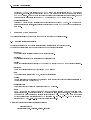
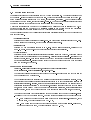
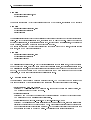
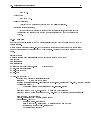
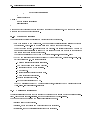
explicit - reads the parameter ip=value where ip is the IP address of the peering client, value
is 1,0 or allow,forbid or yes,no. If ip is not listed the parameter default is used.
regex - the IP of the client is matched against the given regular expression.
Example:
To allow client from 195.71.129.0/24 and 195.71.131.0/24:
regex=195\.71\.(129|131)\.[0-9]+$
password - the user has to input appropriate username and password to login. The format of
username/password is the same as 7.3 ([SimplePasswordAuth]) section.
Moreover, these rules can be combined by "|" or "&". For example,
rule=explicit | regex
The IP of client must match explicit or regex rule.
rule=regex & password
The IP of client must match regex rule, and the user has to login by username and password.
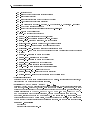
• default=allow
Default: forbid Only used when rule=explicit.
• Shutdown=forbid
Default: allow Whether to allow shutdown the gatekeeper via status port.
• DelayReject=5
Default: 0 How long (in seconds) to wait before rejecting invalid username/password for the status
line access.
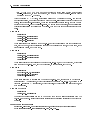
4.2.3 Section [LogFile]
This section denes log le related parameters. Currently it allows users to specify log le rotation options.
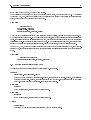
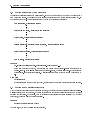
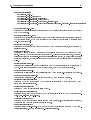
• Rotate=Hourly | Daily | Weekly | Monthly
Default: N/A If set, the log le will be rotated based on this setting. Hourly rotation enables rotation once per hour, daily - once per day, weekly - once per week and monthly - once per month. An
exact rotation moment is determined by a combination of RotateDay and RotateTime variables. During rotation, an existing le is renamed to CURRENT_FILENAME.YYYYMMDD-HHMMSS, where
YYYYMMDD-HHMMSS is replaced with the current timestamp, and new lines are logged to an empty
le. To disable the rotation, do not set Rotate parameter or set it to 0.
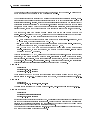
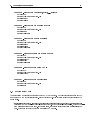
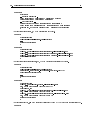
Example 1 - rotate every hour (00:45, 01:45, ..., 23:45):
[LogFile]
Rotate=Hourly
RotateTime=45
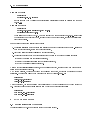
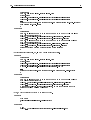
Example 2 - rotate every day at 23:00 (11PM):
[LogFile]
Rotate=Daily
RotateTime=23:00