1
Copyright
All mobile products by GIGA-BYTE Communications Inc. mentioned in this document, including the device,
accessories, software, text, music, and pictures, are owned by, or authorized by original manufacturers to
GIGA-BYTE Communications Inc. Reproduction, transfer, distribution, or storage of part or all of the contents
in this document in any form without the prior written permission of GIGA-BYTE Communications Inc. is
prohibited.
GIGA-BYTE Group, GIGA-BYTE Communications Inc.
MS820│0-1
Safety Information
This chapter contains important information on safe and efficient operation. Please read this information
before using the device.
Advice for limiting exposure to Radio Frequency (RF) Signals
For individuals concerned about limiting their exposure to RF fields, the World Health Organization (WHO)
provides the following advice: Precautionary measures: Present scientific information does not indicate the
need for any special precautions for the use of mobile phones. If individuals are concerned, they might
choose to limit their own or their children’s’ RF exposure by limiting the length of calls, or using "hands-free"
devices to keep mobile phones away from the head and body.
Further information on this subject can be obtained from the WHO home page http://www.who.int/peh-emf
WHO Fact sheet 193: June 2000.
Specific Absorption Rate (SAR)
Your mobile device is a radio transmitter and receiver. It is designed not to exceed the limits for exposure to
radio waves recommended by international guidelines. These guidelines were developed by the
independent scientific organization ICNIRP and include safety margins designed to assure the protection of
all persons, regardless of age and health.
The guidelines use a unit of measurement known as the Specific Absorption Rate, or SAR. The SAR limit for
mobile devices is 2 W/kg. As mobile devices offer a range of functions, they can be used in other positions,
such as on the body as described in this user guide.
As SAR is measured utilizing the devices highest transmitting power the actual SAR of this device while
operating is typically below that indicated above. This is due to automatic changes to the power level of the
device to ensure it only uses the minimum level required to reach the network.
The World Health Organization has stated that present scientific information does not indicate the need for
any special precautions for the use of mobile devices. They note that if you want to reduce your exposure
then you can do so by limiting the length of calls or using a 'hands-free' device to keep the mobile phone
away from the head and body. Additional Information can be found on the websites of the World Health
Organization (http://www.who.int/emf).
SAR Information
GSM900: 0.302 W/kg
DCS1800: 0.084 W/kg
WCDMA: 0.462 W/kg
MS820│ 0-2
Road Safety
Check the laws and regulations on the use of phones in the area where you drive. Do NOT use this device
unless you use hands-free operation while driving or riding.
Potentially Explosive Atmospheres
Turn off your phone prior to entering any area with a potentially explosive atmosphere such as gas stations,
explosive chemicals, or flammable objects.
Aircraft Safety
While in flight, switch the device to flight mode (turn off phone or wireless functions). When instructed to do
so, turn off your phone when on board an aircraft.
Facilities
Turn off the device in any facility where posted notices instruct you to do so. These facilities may include
hospitals or health care facilities that may be using equipment that is sensitive to external RF energy.
Approved Accessories and Batteries
Use only original or manufacturer approved accessories, batteries and chargers.
MS820│ 0-3
Regulatory Agency Identifications
For regulatory identification purposes, your product is assigned a model number of MS820.
To ensure continued reliable and safe operation of your device, use only the accessories listed below with
your MS820.
The Battery Pack has been assigned a model number of GPS-H01.
Note:
This product is intended for use with a certified Class 2 or Class 3 Limited Power Source, rated 5 Volts
DC, maximum 1 Amp power supply unit.
European Union Notice
Products with CE marking comply with the R&TTE Directive (99/5/EC), the EMC Directive (89/336/EEC), and
the Low Voltage Directive (73/23/EEC) & (2006/95/EC) issued by the Commission of the European
Community.
Compliance with these directives implies conformity to the following European Norms (in parentheses are
the equivalent international standards)
• EN 60950-1 (IEC 60950-1)
Safety of Information Technology Equipment.
• ETSI EN 301 511
Global system for mobile communications (GSM); Harmonized EN for mobile stations in the GSM 900 and
GSM 1800 bands, covering essential requirements of article 3.2 of the R&TTE directive (1995/5/EC).
• ETSI EN 301 489-1
Electromagnetic compatibility and Radio spectrum Matters (ERM); ElectroMagnetic Compatibility (EMC)
standard for radio equipment and services; Part 1: Common technical requirements.
• ETSI EN 301 489-7
Electromagnetic compatibility and Radio spectrum Matters (ERM); ElectroMagnetic Compatibility (EMC)
standard for radio equipment and services; Part 7: Specific conditions for mobile and portable radio and
ancillary equipment of digital cellular radio telecommunications systems (GSM and DCS).
• ETSI EN 301 489-17
Electromagnetic compatibility and Radio spectrum Matters (ERM); ElectroMagnetic Compatibility (EMC)
standard for radio equipment and services; Part 17: Specific conditions for 2.4 GHz wideband transmission
MS820│ 0-4
systems and 5 GHz high performance RLAN equipment.
• ETSI EN 300 328
Electromagnetic compatibility and Radio spectrum Matters (ERM); Wideband Transmission systems; data
transmission equipment operating in the 2.4 GHz ISM band and using spread spectrum modulation
techniques.
Safety precautions for RF exposure
• Use only original manufacturer-approved accessories, or accessories that do not contain any metal.
• Use of non-original manufacturer-approved accessories may violate your local RF exposure guidelines and
should be avoided.
Exposure to Radio Frequency (RF) Signals
Your device contains a radio transmitter and receiver. The radiated output power is far below the
international radio frequency exposure limits. These limits are part of comprehensive guidelines and
establish permitted levels of RF energy for the general population. The guidelines are based on the safety
standards previously set by international standards bodies:
• American National Standards Institute (ANSI) IEEE. C95.1-1992
• National Council on Radiation Protection and Measurement (NCRP). Report 86. 1986
• International Commission on Non-Ionizing Radiation Protection (ICNIRP) 1996
• Ministry of Health (Canada), Safety Code 6. The standards include a substantial safety margin designed to
assure the safety of all persons, regardless of age and health.
The exposure standard for wireless mobile phones employs a unit of measurement known as the Specific
Absorption Rate, or SAR. The standard incorporates a substantial margin of safety to give additional
protection for the public and to account for any variations in usage.
As with other mobile radio transmitting equipment, users are advised that for satisfactory operation of the
equipment and for the safety of personnel, it is recommended that no part of the human body be allowed to
come too close to the antenna during operation of the equipment.
Your device has an internal antenna. Use only the supplied integral antenna. Use of unauthorized or
modified antennas may impair call quality and damage the phone, causing loss of performance and SAR
levels exceeding the recommended limits as well as result in non-compliance with local regulatory
requirements in your country.
To assure optimal phone performance and ensure human exposure to RF energy is within the guidelines set
forth in the relevant standards; always use your device only in its normal-use position. Do not touch or hold
MS820│ 0-5
the antenna area unnecessarily when placing or receiving a phone call. Contact with the antenna area may
impair call quality and cause your device to operate at a higher power level than needed. Avoiding contact
with the antenna area when the phone is IN USE optimizes the antenna performance and the battery life.
Telecommunications & Internet Association (TIA) safety information
Pacemakers
The Health Industry Manufacturers Association recommends that a minimum separation of six inches be
maintained between a handheld wireless phone and a pacemaker to avoid potential interference with the
pacemaker. These recommendations are consistent with the independent research by and
recommendations of Wireless Technology Research. Persons with pacemakers:
• Should ALWAYS keep the phone more than six inches from their pacemaker when the phone is turned ON.
• Should not carry the phone in a breast pocket.
• Should use the ear opposite the pacemaker to minimize the potential for interference. If you have any
reason to suspect that interference is taking place, turn the phone OFF immediately
Hearing Aids
Some digital wireless phones may interfere with some hearing aids. In the event of such interference, you
may want to consult your service provider, or call the customer service line to discuss alternatives.
Other Medical Devices
If you use any other personal medical device, consult the manufacturer of your device to determine if they
are adequately shielded from external RF energy. Your physician may be able to assist you in obtaining this
information.
Turn the phone OFF in health care facilities when any regulations posted in these areas instruct you to do so.
Hospitals or health care facilities may be using equipment that could be sensitive to external RF energy.
WEEE Notice
The Directive on Waste Electrical and Electronic Equipment (WEEE), which entered into force as European
law on 13th February 2003, resulted in a major change in the treatment of electrical equipment at end-of-life.
The purpose of this Directive is, as a first priority, the prevention of WEEE, and in addition, to promote the
reuse, recycling and other forms of recovery of such wastes so as to reduce disposal.
The WEEE logo (shown at the left) on the product or on its box indicates that this product must not be
disposed of or dumped with your other household waste. You are liable to dispose of all your electronic or
electrical waste equipment by relocating over to the specified collection point for recycling of such hazardous
waste. Isolated collection and proper recovery of your electronic and electrical waste equipment at the time
of disposal will allow us to help conserving natural resources. Moreover, proper recycling of the electronic
MS820│ 0-6
and electrical waste equipment will ensure safety of human health and environment. For more information
about electronic and electrical waste equipment disposal, recovery, and collection points, please contact
your local city center, household waste disposal service, shop from where you purchased the equipment, or
manufacturer of the equipment.
RoHS Compliance
This product is in compliance with Directive 2002/95/EC of the European Parliament and of the Council of 27
January 2003, on the restriction of the use of certain hazardous substances in electrical and electronic
equipment (RoHS) and its amendments.
MS820│ 0-7
General Information
This chapter contains important information on safe and efficient operation. Please read this information
before using the device. Ignorance of the following notices may lead to violations of the law.
•
•
•
•
•
•
Before using the device, please make sure you have fully charged the battery.
Do NOT remove the battery from the device during charging.
Before inserting SIM card into the device, make sure that the device is switched off.
Do NOT attempt to dissemble the device on your own. This should be done by an authorized person.
Use the device in accordance to instructions when in public facilities.
In some countries, it is a violation against the law to record phone conversations. Always ask permission
of the other party when you are going to record a conversation.
MS820│ 0-8
Table of Contents
Copyright ...................................................................................................................................................... 0-1
Safety Information ........................................................................................................................................ 0-2
Regulatory Agency Identifications ................................................................................................................ 0-4
General Information...................................................................................................................................... 0-8
Chapter 1 Before Using Your Device ........................................................................................................ 1-1
1.1 Getting to Know Your Device.................................................................................................................. 1-1
1.2 Insert the Battery & SIM card ................................................................................................................. 1-2
1.3 SIM ......................................................................................................................................................... 1-4
1.4 Battery............................................................................................................................................................................. 1-4
1.5 Lock/Unlock............................................................................................................................................ 1-5
1.6 Power .............................................................................................................................................................................. 1-6
Chapter 2 Getting Started .......................................................................................................................... 2-1
2.1 Display Information................................................................................................................................. 2-1
2.2 Screen Orientation.................................................................................................................................. 2-6
2.3 Setting the Time& Date .......................................................................................................................... 2-6
2.4 Using the Stylus...................................................................................................................................... 2-7
2.5 Screen Alignmen .................................................................................................................................... 2-7
2.6 Input Method .......................................................................................................................................... 2-7
2.7 Drawing on the Screen ........................................................................................................................... 2-8
2.8 Recording a Message............................................................................................................................ .2-9
2.9 Editing My Info........................................................................................................................................ 2-9
2.10 Password Setup ................................................................................................................................... 2-9
2.11 Multi-Language................................................................................................................................... 2-10
2.12 Smart Touch....................................................................................................................................... 2-10
Chapter 3 Phone Functions....................................................................................................................... 3-1
3.1 Phone Dialer Screen and Key Introduction............................................................................................. 3-1
3.2 Making a Call.......................................................................................................................................... 3-1
3.3 Receiving/Ignoring a Call........................................................................................................................ 3-2
3.4 International Calls................................................................................................................................... 3-2
3.5 Emergency Calls .................................................................................................................................... 3-2
3.6 Volume Adjustment ................................................................................................................................ 3-2
3.7 Making a Call from Contacts .................................................................................................................. 3-3
3.8 Creating a New Contact ......................................................................................................................... 3-3
3.9 Call History ............................................................................................................................................. 3-3
3.10 Setting Ringtone and Password ........................................................................................................... 3-4
MS820│ 0-9
3.11 Black List .............................................................................................................................................. 3-4
3.12 Video Telephony................................................................................................................................... 3-4
Chapter 4 Settings...................................................................................................................................... 4-1
4.1 Personal Settings ................................................................................................................................... 4-1
4.2 System Settings...................................................................................................................................... 4-3
Chapter 5 Synchronization ........................................................................................................................ 5-1
5.1 Install and Use ActiveSync ..................................................................................................................... 5-1
5.2 Synchronize via Bluetooth ...................................................................................................................... 5-2
Chapter 6 Getting Connected.................................................................................................................... 6-1
6.1 Internet Access....................................................................................................................................... 6-1
6.2 GPRS Connection Settings .................................................................................................................... 6-1
6.3 Activating GPRS Connection.................................................................................................................. 6-1
6.4 GPRS Wizard ......................................................................................................................................... 6-2
6.5 Bluetooth Wireless Transmissions.......................................................................................................... 6-2
6.6 Internet Sharing...................................................................................................................................... 6-3
6.7 Wi-Fi ................................................................................................................................................................................ 6-4
6.8 USB ........................................................................................................................................................ 6-4
Chapter 7 Messaging ................................................................................................................................. 7-1
7.1 SMS\MMS & E-mail ..................................................................................................................................................... 7-1
7.2 Using SMS\MMS .................................................................................................................................... 7-1
7.3 Set up your device to Synchronize Outlook E-mail with your computer.................................................. 7-3
7.4 Establishing E-mail Account ...................................................................................................................................... 7-4
7.5 Using E-mail .................................................................................................................................................................. 7-5
7.6 Windows Live ......................................................................................................................................... 7-6
Chapter 8 Multimedia ................................................................................................................................. 8-1
8.1 Camera................................................................................................................................................... 8-1
8.2 Video Mode ............................................................................................................................................ 8-2
8.3 Recorder................................................................................................................................................. 8-3
8.4 Pictures & Videos ................................................................................................................................... 8-3
8.5 JAVA ...................................................................................................................................................... 8-4
8.6 Audio Mixer ............................................................................................................................................ 8-4
8.7 FM Radio................................................................................................................................................ 8-4
8.8 Streaming Player .................................................................................................................................... 8-5
Chapter 9 Applications .............................................................................................................................. 9-1
9.1 Calendar................................................................................................................................................. 9-1
9.2 Contacts.......................................................................................................................................................................... 9-2
9.3 Tasks...................................................................................................................................................... 9-3
MS820│ 0-10
9.4 Notes ...................................................................................................................................................... 9-3
9.5 Word Mobile................................................................................................................................................................... 9-4
9.6 Excel Mobile ........................................................................................................................................... 9-4
9.7 PowerPoint Mobile ....................................................................................................................................................... 9-5
9.8 OneNote Mobile...................................................................................................................................... 9-5
9.9 Windows Media Player ........................................................................................................................... 9-5
9.10 Internet Explore .................................................................................................................................... 9-6
9.11 Calculator ............................................................................................................................................. 9-6
9.12 Games.................................................................................................................................................. 9-7
9.13 Motion Games ...................................................................................................................................... 9-7
9.14 STK (SIM Tool Kit)................................................................................................................................ 9-8
9.15 Zip.................................................................................................................................................................................. 9-8
9.16 GPS Tracking ....................................................................................................................................... 9-8
9.17 Location Message...................................................................................................................................................... 9-9
9.18 SIM Manager............................................................................................................................................................... 9-9
9.19 Spb Backup ........................................................................................................................................ 9-10
9.20 QuickMark .......................................................................................................................................... 9-12
Chapter 10 Managing Your Mobile.......................................................................................................... 10-1
10.1 Memory Management......................................................................................................................... 10-1
10.2 Memory .............................................................................................................................................. 10-1
10.3 Add or Remove Programs .................................................................................................................. 10-1
Chapter 11 Specifications........................................................................................................................ 11-1
Chapter 12 FAQ ........................................................................................................................................ 12-1
MS820│ 0-11
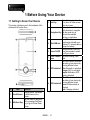
1 Before Using Your Device
1.1 Getting to Know Your Device
This section introduces you to the hardware of the
device and its function keys.
3
4
5
6
7
8
9
No.
1
2
Item
Function
Display screen. Use stylus
Touch Screen to select items on the
screen.
You can make or answer a
call by pressing Talk/Send
Talk/Send Key
key, or go to Phone Dialer
screen.
Press this key to end a call
or to return to Today screen
from any screen.
Press up, down, left and
right directions to navigate.
Navigation Key Tap the center key to
execute the selected
function or application.
Use USB connector to
synchronize data with your
Mini USB slot
desktop PC, transmit data or
charge the battery.
Press and hold Power key
Power On/Off for a few seconds to power
on/off your device.
Front Camera Use when making Video
Lens
calls.
The LED indicator indicates
the status of your device by
showing different colors.
LED Indicator1 Blue: Bluetooth is activated.
Orange: Wi-Fi is activated.
Purple: Notification, GPS
signal is detected.
The LED indicator indicates
the status of your device by
showing different colors.
LED Indicator2
Green: Mobile network is
detected.
Red: Charging activated.
End Key
MS820│ 1-1
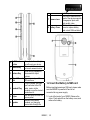
17 Camera Lens
18 Battery Cover
10
Soft Reset
Button
11 Camera Key
12 Volume Key
13
Micro SD card
slot
14 Headset Plug
15 Stylus
16 Speaker
Press the button with stylus
to soft reset your device.
Press and hold camera key
to launch camera function.
Slide this key upwards or
downwards to adjust
volume.
You can insert your Micro
SD card here.
Plug in headset, and then
you can listen to the FM
radio, music via the
headset or use the device's
hands-free kit.
Use the stylus to touch the
screen panel.
Besides using stereo
headset, you may play
music/voice through the
built-in speaker.
The CMOS camera on the
back of the device supports
5-mega-pixel photo and
high quality video.
Push and slide out the
cover to replace battery
and unlock SIM card hatch.
1.2 Insert the Battery & SIM card
Before inserting/removing a SIM card, please make
sure that MS820 is powered off and is not
connected to any power supply.
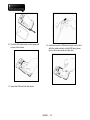
1. Look at the back of your MS820. Remove the
stylus. Push and slide on the battery cover, and
remove the battery.
MS820│ 1-2
2. Find the SIM card carrier on the upper-left
corner of the device.
4. And then insert the SIM carrier back into the slot
with the metal contacts on the SIM facing down.
(do not force the carrier into the slot)
3. Insert the SIM card into the carrier.
MS820│ 1-3
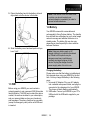
5. Return the battery back to the battery slot and
stylus back onto the device in that order.
Note: If the device or the SIM card is lost
or stolen, you should contact your
network operator immediately in order to
prevent unauthorized use.
1.4 Battery
Your MS820 comes with a removable and
rechargeable Lithium Polymer battery. The standby
time and talk time will depend on your actual usage
network coverage and whether the device is in
standby mode. The battery life may also vary
depending on how frequently the user switches
between functions.
6. Slide the battery cover back and push until you
hear “click”.
1.3 SIM
Before using your MS820, you must contact a
network operator to get a personal SIM (Subscriber
Identity Module). The SIM card contains the device
number, the services included in your subscription,
and your personal data such as your phonebook
and messages. The phone functions are unusable
(except for emergency calls) until a valid SIM card
is inserted.
Note: Using any battery pack or AC
adapter (charger) not specified/endorsed
by GSmart on this phone may be
dangerous and may invalidate any
warranty and approval given to the
device. Unplug the charger from the
power supply when it is not in use.
Charging the battery
Please make sure that the battery is installed and
fully charged when using your MS820 for the first
time. You may charge the battery in the following
ways:
1. Universal AC Adapter: Plug your AC adapter
into a suitable main power socket, and plug the
connector to the charging slot of your MS820.
The phone will start charging automatically.
2. USB cable: Connect your MS820 to your PC’s
USB port with the USB cable supplied in your
package.
MS820│ 1-4
1.5 Lock/Unlock
1. Lock the device:
On Today screen, tap Device unlocked to lock
the device. The device will not respond to
touches on screen nor react to any input on the
keypad, when it is locked.
2. Unlock the device:
Tap “Unlock” on the lower-left corner of the screen.
Then tap “Unlock” button on the newly appeared
screen, and the device is unlocked.
You may also enable the device to lock
automatically after the screen backlight is turned
off.
MS820│ 1-5
1.6 Power
Power on
While the device is powered off, press Power key
on the top of the device to power it on.
Power off
While the power is on, press, and hold Power key
on the top of the device for about 5 seconds to turn
it off. To reduce the power consumption of your
device, you may change the backlight duration and
brightness level. Also, you can save more power by
setting the device to turn off automatically if it is not
in use for a specific period of time.
Battery power level
Tap Start > Settings > System tab > Power > Battery
tab. The bar indicates the remaining battery power
level.
Turn off the device automatically
Tap Start > Settings > System tab > Power >
Advanced tab, and select the duration before the
device turns off by itself. This feature controls the
screen standby time.
Sleep Mode
1. Sleep Mode is a power saving mode designed to
reserve battery power. After idling for a period of
time, the device automatically enters Sleep
Mode. You may also manually enter Sleep
mode by pressing power On/Off key shortly. The
backlight of the screen will turn off and the
device will go into Sleep mode. When in Sleep
mode, your device will show no response to any
operation or touches on the screen and keypad.
2. Press the power On/Off key again to exit Sleep
mode.
3. You may set the time to activate Sleep mode.
The device will automatically enter Sleep mode
when no operation is done within that time.
․Tap Start > Settings > System Tab > Power >
Advanced Tab.
․Check “Turn off device if not used for” Please
select “On battery power” or “On
external power”.
․Select your desired time period.
․Tap “OK” to complete this setting.
MS820│ 1-6
2 Getting Started
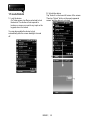
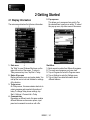
2.1 Display Information
The main screen displays the following information:
1. Start menu
Tap “Start” to open Windows Start menu on the
upper-left corner of the screen. To return to
Today screen at any time, Tap Start > Today.
2. Status & Icon area
Display notification icons and system status. You
can tap the icon to look into the detail or settings
of the function.
3. Today screen
On Today screen, this area contains shortcuts to
certain programs and important information of
today. To change Today screen settings, tap
Start > Settings > Personal tab > Today
4. Command area
Depending on different mode, this area contains
different features such as menu options, input
panel and commands to create or edit a file.
5. Pop-up menu
This allows you to access an item quickly. Tap
the selected item to perform an action. To cancel
this pop-up menu, tap other areas of this screen.
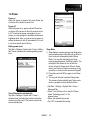
Start Menu
1. Quick access to certain fixed Microsoft programs.
2. The most recent programs you have used.
3. Tap on Programs to enter the Programs menu.
4. Tap on Settings to enter the Settings menu.
5. Tap on Help to see detail information about
different features.
MS820│ 2-1
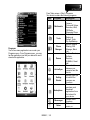
Programs
You will see many application icons under your
Programs menu. From Programs menu, you may
tap the application icon that you desired to use to
execute the application.
From Today screen > Start > Programs
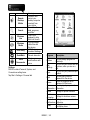
Your device contains the following programs:
Icon
Programs
Description
Audio Mixer,
Camera,
Pictures & Videos,
Multimedia
Recorder, JAVA,
FM Radio,
Streaming Player
Calculator,
Restore to
Tools
Default, Torch,
Zip, Spb Backup
Dial Kit, Internet
Sharing, SIM
Phone
Manager, Black
Manager
List
Bubbles Breaker,
Solitaire,
Revolver,
Games
SHIBALA, Smart
ball
Transmit data
between your
ActiveSync
computer and the
device.
Quickly guide you
to instruct the
Getting
common use
Started
functions.
You can
purchase, and
download
Marketplace
applications from
the Internet for
your device.
Perform MSN
Messenger
functions.
Write notes,
Notes
memo, or
MS820│ 2-2
Remote
Desktop
Mobile
Search
Windows
Live
Windows
Media
GPS Utility
drawings.
Connect, and
control your
desktop computer
remotely from
your device
Search for all
data, programs,
and files.
This is your
gateway to help
with Live Search.
Play sound and
video files with
this device.
GPS Tracking,
Location Message
QuickMark
Decode barcodes.
Program
Voice
Commander
Start programs
and functions with
voice.
You may assign programs to
Buttons
hard keys.
You can set your device with the
Call
functions, when you are on a
Settings
call.
You can set your preferred input
Input
method.
You may set a personal
Lock
password for the device.
Select the programs to be
Menus
displayed in Start menu.
Owner
You may input your personal
Information information.
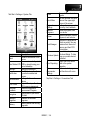
Settings
MS820 contains Personal, System, and
Connections setting items.
Tap Start > Settings > Personal tab
Phone
Description
Settings for phone functions.
Shutdown
Settings for shutdown screen.
Animation
Sounds&
Settings for alarm sound and
Notifications notification.
Settings for screen appearance
Today
and display items.
MS820│ 2-3
Tab Start > Settings > System Tab
Program
Description
Contains information of the
device.
You can automatically rotate
Auto Rotate LCD LCD by simply turning your
device sideways.
Backlight
Settings for backlight.
Identify the device to others
Certificates
to prevent unauthorized
access.
Settings for time and
Clock& Alarms
alarms.
Adjust different profiles for
CPU Profile
CPU power management.
Customer
Customer Experience
Feedback
Improvement Program.
Encrypt data in your micro
Encryption
SD card.
Managed
Examine the installed
Programs
programs
Memory status and running
Memory
programs.
About
Power status and wireless
signals.
You can activate the Quick
Quick Menu
Menu at the upper-right
corner of the screen.
Regional
Settings for region, number,
Settings
currency, time, and date.
Remove
Remove programs from
Programs
your device.
Screen orientation, screen
Screen
alignment, and text size.
Examine the applications
which are using. You can
examine their amount of
Task Manager
memory and their CPU
consumption.
Download and update
Windows Mobile. To help
Windows Update
keep your mobile device
protected.
Report the errors which
Error Reporting exist in the system
operation.
Set how to start programs
Voice
and functions with voice.
Commander
Settings
Power
Tap Start > Settings > Connections Tab
MS820│ 2-4
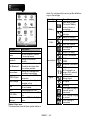
alerts. You can tap on the icons to get the definitions
or go to the settings.
Status Type
Battery
Calls
Program
Band Switch
Beam
Bluetooth
Cell Broadcast
Connections
GPRS Wizard
SMS Settings
USB
Wi-Fi
Wi-Fi Utility
Wireless
Manager
Description
Select band system.
You can choose to receive
all incoming beams.
Settings for Bluetooth
function.
Receive broadcast channel
information and news from
your service provider.
Settings and management
for modem connections.
Basic settings for GPRS
connection.
Receiving and sending text
message set up.
Use the device as a micro
SD card reader.
Configurations for Wi-Fi.
Display Wi-Fi status and IP
info.
Turn on/off Bluetooth, flight
mode.
Connections
Icon
Description
Main battery power.
The level of battery
power is shown in
percentage.
Low battery. Please
recharge.
Battery is charging.
You have missed calls.
Voice call in active.
3G network is
connected.
GPRS is in range.
GPRS is connected.
Building connection to
GPRS.
Bluetooth is activated.
Wi-Fi is activated; a
Wi-Fi network is in
range; Wi-Fi network
is connected.
Signal
Strong signal.
No signal.
Roaming.
GPS signal is trying to
connect, and is
connected.
GPS Tracking is trying
to connect.
GPS Tracking is
connected.
Status & Icon area
This area shows icons of basic system status or
MS820│ 2-5
Message
Location Message
GPS signal is trying to
detect.
Location Message
GPS signal is
detected.
You have one or more
new message(s).
You have one or more
new voice mail(s).
You have one or more
instant message(s).
System volume.
Volume
Quick Menu
Phone volume.
Portrait
Ringer is on.
Ringer is off.
Memory Management,
Adjust Brightness,
Quick Menu Setting.
2.2 Screen Orientation
You can choose your screen display in Portrait or
Landscape mode. The Portrait mode allows you to
get a better view or a better operation of certain
programs on your device, while Landscape may be
optimal for viewing longer text files. You can also
change the default screen display by following the
steps below:
1. Tap Start > Settings > System tab > Screen >
General tab.
2. On General tab screen, select your desired
orientation, Portrait, Landscape (right-handed),
or Landscape (left-handed).
3. Tap OK, and the screen will be changed
accordingly.
Landscape
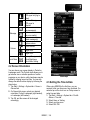
2.3 Setting the Time & Date
When using MS820 for the first time, you are
required to set your time zone, time, and date. You
can also tap on the clock icon on Today screen to
setup time and date.
1. Tap Start > Settings > System tab > Clock&
Alarms > Time tab.
2. Select Home or Visiting.
3. Select your time zone.
4. Select AM / PM.
MS820│ 2-6
5. Use the up and down arrow aside hour, minute,
and second to adjust the highlighted time unit.
6. Tap the down arrow aside the date to open a
calendar, and select a desired month, date, and
year.
7. Tap OK, a pop-up window will appear on your
screen to confirm to Save Changes to the clock
settings.
8. Tap Yes to save the changes and exit.
2.6 Input Method
1. Start a program such as Word Mobile.
2. Tap the Input Panel icon
at the lower
center of the screen, and tap the Input Selector
arrow icon
to select the input method.
Note: Change the time on Home zone may
change your Calendar schedule.
2.4 Using the Stylus
Use the stylus to touch or write on your screen.
Using stylus can avoid damaging your screen.
There are 2 ways to use your stylus:
․Tap: softly tap on a desired item by your stylus,
and lift the pen from the screen.
․Press: under some certain condition, touch and
hold your stylus on a desired item for a few
seconds until a blue dotted circle appears. This
indicates that a pop-up menu is going to be
activated.
2.5 Screen Alignment
When using MS820 for the first time, screen
alignment is required. If you find that the device
does not accurately respond to your stylus taps, or
you have performed a system reset, you need to
align your screen again.
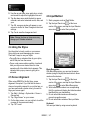
1. Tap Start > Settings > System tab > Screen >
General tab.
2. Tap “Align Screen” on your screen.
3. On the align screen, use your stylus to touch the
crosses on the screen accurately.
4. Tap “OK” to exit.
Block Recognizer
With Block Recognizer, you can input character
strokes (using the stylus) that are similar to those
used on other devices.
1. Tap the Input Panel icon
at the lower
center of the screen, and tap the Input Selector
arrow icon
to select Block Recognizer.
2. Write letters and numbers in a corresponding
field, the system will display the letters/numbers
identified from your handwriting.
3. Do not write letters/numbers continually to
prevent recognition errors.
4. Do not write letters outside of the input fields.
Keyboard
You can input data by using screen keyboard.
MS820│ 2-7
1. Tap the Input Panel icon
at the lower
center of the screen, and tap the Input Selector
arrow icon
to select Keyboard.
2. On your screen keyboard, tap Shift or CAP key
to input a capital letter or to input multiple
symbols.
3. Tap the delete key
on your screen
keyboard to delete.
4. To close the screen keyboard, tap the Input
Panel icon
again on your screen to hide
the screen keyboard.
1. Tap the Input Panel icon
at the lower
center of the screen, and tap the Input Selector
arrow icon
to select Transcriber.
2. Position the cursor where you want text to
appear.
3. Use the stylus to write anywhere on the screen.
The handwriting will be converted to text after
you lift the stylus from the screen.
2.7 Drawing on the Screen
You can draw on the screen in the same way that
you write on the screen. The difference between
writing and drawing on the screen is how you select
items and how they can be edited. For example,
selected drawings can be resized, while writing
cannot.
Note: To change the displayed keyboard
size on the screen, tap the Input Selector
arrow icon
movement anywhere on the screen as handwriting
input.
beside the Input Panel icon
and tap Options. Under Input screen,
you may select either Large keys or Small
keys by tapping on its radio button.
Letter Recognizer
at the lower
1. Tap the Input Panel icon
center of the screen, and tap the Input Selector
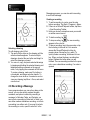
Creating a drawing
Cross three ruled lines on your first stroke. A
drawing box appears. Subsequent strokes in or
touching the drawing box become part of the
drawing. Drawings that do not cross three ruled
lines will be treated as writing.
arrow icon
to select Letter Recognizer.
2. Write letters and numbers in a corresponding
field on your Letter Recognizer screen. This
device will display the letters/numbers that you
had just input in Letter Recognizer fields.
3. Tap the delete key
to delete an input.
Transcriber
Transcriber is a handwriting recognition program
that allows you to write in cursive, print\, or a
combination of both. Transcriber works
transparently in the background of programs,
recognizing words with its integrated dictionary.
When Transcriber is turned on, it interprets stylus
MS820│ 2-8
Messaging program, you can also add a recording
to an E-mail message.
Creating a recording
1. To add a recording to a note, open the note
before recording. Tap Start > Programs > Notes.
2. If there is no Record/Playback toolbar, tap Menu
> View Recording Toolbar.
3. Hold your device’s microphone near your mouth
or another sound source.
4. To start recording, tap
Selecting a drawing
To edit drawing, select it first.
1. Tap and hold the stylus on the drawing until the
selection handle appears. To select multiple
drawings, deselect the pen button and drag it to
select the drawings you want.
2. You can cut, copy, and paste selected drawings
by tapping and holding the selected drawing and
tapping an editing command on the pop-up
menu, or by tapping the command on Edit menu.
To resize a drawing, make sure Pen button is
not selected, and drag a selection handle. To
change the zoom level so it is easier to work or
view your drawing, tap Menu > Zoom, and select
a zoom level.
.
. The new recording
5. To stop recording, tap
appears in the note list.
6. To play a recording, tap in the open note or tap
the recording in the note list. You can also
access the Record/Playback tool bar by
pressing down Volume key for a while. To
quickly create a recording, hold down Volume
key. When you hear the beep, recording has
begun. Release the button when you are
finished. The new recording is stored in the open
note, or as a standalone recording, if no note is
opened.
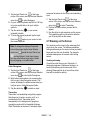
2.8 Recording a Message
In any program where you can write or draw on the
screen, you can also quickly capture thoughts,
reminders, and phone numbers by recording a
message. In Calendar, Tasks, and Contacts, you
can include a recording in Notes tab. In Notes, you
can either create a standalone recording, or include
a recording in a written note. If you want to include
the recording in a note, open the note first. In the
MS820│ 2-9
2.9 Editing My Info
2.11 Multi-Language
You can input your personal information to your
device in Owner Information.
1. Tap Start > Settings > Personal tab > Owner
Information > Identification tab.
2. Tap Name field, and input your name.
3. Tap a desired input field and input your
information.
4. Tap Notes tab to input other information you
would like to display on Today screen.
5. If you want your information to be displayed on
the starting screen, tap Options tab.
The device supports multi-language automatically. If
the documents don’t show correctly, tap “Start” >
Settings > System > Region and select the region
and the language you want. Supported languages
in alphabetic order are: Afrikaans, Albanian, Arabic
(Saudi Arabia), Azeri (Cyrillic), Azeri (Latin), Basque,
Belarusian, Bulgarian, Catalan, Chinese (Hong
Kong S.A.R.), Chinese (Macau S.A.R.), Chinese
(People’s Republic Of China), Chinese (Singapore),
Chinese (Taiwan), Croatian, Czech, Danish, Dutch
(Belgium), Dutch (Netherlands), English (Australia),
English (Belize), English (Canada), English
(Caribbean), English (Ireland), English (Jamaica),
English (New Zealand), English (Philippines),
English (South Africa), English (Trindad), English
(United Kingdom), English (United States), English
(Zimbabwe), Estonian, Faroese (Faroe Islands),
Finnish, French (Belgium), French (Canada),
French (France), French (Luxembourg), French
(Monaco), French (Switzerland), FYRO
Macedonian, German (Austria), German (Germany),
German (Liechtenstein), German (Luxembourg),
German (Switzerland), Greek, Hebrew, Hungarian,
Icelandic, Italian (Italy), Italian (Switzerland),
Japanese (Japan), Korean (Korea), Latvian,
Lithuanian, Norwegian (Bokmal), Norwegian
(Nynorsk), Polish, Portuguese (Brazil), Portuguese
(Portugal), Romanian, Russian, Serbian (Cyrillic),
Serbian (Latin), Slovak, Slovenian, Spanish
(Argentina), Spanish (Bolivia), Spanish (Chile),
Spanish (Colombia), Spanish (Costa Rica), Spanish
(Dominican Republic), Spanish (Ecuador), Spanish
(El Salvador), Spanish (Guatemala), Spanish
(Honduras), Spanish (International Sort), Spanish
(Mexico), Spanish (Nicaragua), Spanish (Panama),
Spanish (Paraguay), Spanish (Peru), Spanish
(Puerto Rico), Spanish (Traditional Sort), Spanish
(Uruguay), Spanish (Venezuele), Swahili, Swedish,
Swedish (Finland), Tatar, Thai, Turkish, Ukrinian,
2.10 Password Setup
You can set your own password to prevent
unauthorized use of your device.
1. Tap Start > Settings > Personal tab > Lock>
Password tab.
2. On Password tab screen, check Prompt if
device unused for.
3. Select an appropriate time.
4. Select a password type in Password type field.
5. Input your password in Password field and
reconfirm the password in Confirm field.
6. Tap OK, a pop-up window will appear to confirm,
“Do you want to save password settings
changes?”
7. Tap Yes to finish settings and save the changes;
Tap No to cancel.
8. You may also input password hint message
under Hint tab screen.
9. Tap OK to save your inputs.
Note: If you forget your password, you need
to perform system default, which will lose all
your data and settings.
MS820│ 2-10
Urdu (Islamic Republic of Pakistan), Uzbek (Cyrillic),
Uzbek (Latin).
2.12 Smart Touch
Today and Smart Touch are different main screens.
to change the screen from
Easy touch icon
Today to Smart Touch. You could set one of them as
default main screen.
Shortcut Bar
Smart Touch Home
After you get into Smart Touch, you can tap Today
icon
MS820│ 2-11
to change to the Today screen.
No.
Items
screen to show Today,
Contacts, Message, Call
History, Programs, Files,
Calendar, Setting, and
Add.
Description
1
Operator/
Signal
Display your own
operator system name
and communication
signal.
2
Battery
Display battery status.
3
You can check the phone
Call History call records or missing
phone calls.
4
Messaging
You can send, and check
messages.
5
E-mail
You can send, and check
Outlook E-mail.
6
Indicator
Bar
Display notification icons
and system status.
7
Lock/
Unlock
Tap it to lock or unlock
your device.
8
Time/ Date
Display time and date.
9
Wallpaper
You can touch, and slide
the screen (right to left/
left to right) to switch the
screen to show the
wallpaper, analogue
clock, calendar, Smart
Album, Smart player.
10
Shortcut
Bar
You can touch, and slide
the shortcut bar (right to
left/ left to right) on the
Wallpaper
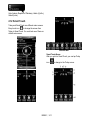
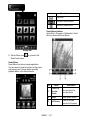
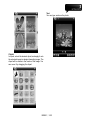
It contains the pure wallpaper, Analogue clocks,
calendar, Smart Album, Smart Player. Tap and slide
the screen (from right to left/ left to right) on the
screen to switch these four different contents, which
can move in circles.
Analogue Clock
Calendar
Smart Album
Smart Player
MS820│ 2-12
Pure wallpaper
Indicator Bar
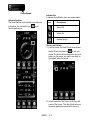
It displays the notification icons and system status.
Advance Features
The Smart features could be able to provide more
information. You can tap the icon
favorite preferences.
Icon
to set
Descriptions
Sound Off
Vibrate On
Headset plug in.
Device Lock/ Unlock
1. Lock the device: On Smart Touch Home screen,
tap the Device unlocked icon
to lock your
device. The device will not respond to any touch
actions on the screen, nor react to any input on
the keypad, when it is locked.
2. Unlock the device: Tap Unlock on the lower-left
corner of the screen. Then tap Unlock button on
the newly appeared screen and the device is
MS820│ 2-13
Shortcut Manager”.
unlocked.
Tap the Add icon
to review all the items in
Shortcut Manager, and then tap the icon
return to Smart Touch Home.
to
Return
Shortcut Bar
The shortcut bar shows the items which are used
frequently. You can add or delete items on the
shortcut bar. See “Add the items to Shortcut Bar”
and “Delete the items which are in Shortcut Bar in
MS820│ 2-14
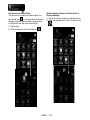
Shortcut Manager
Add the items to Shortcut Bar
The shortcut bar contains four items at least. You
tap the Add icon
to review all items in Shortcut
Manager, and then you can add the desired items
on the shortcut bar; the steps are as below:
1. Tap the item.
2. Hold, and drag the item to the Add icon
Delete the items which are in Shortcut Bar in
Shortcut Manager
1. Tap the item which is added on the shortcut bar.
2. Hold, and drag that item to the Turn Round icon
.
.
MS820│ 2-15
Delete the items in Shortcut Bar
You can delete the items on Smart Touch Home; the
steps are as below:
1. Tap the item.
2. Hold, and drag the item to the Delete icon
To change position of items in Shortcut Bar
You can change the position of the items on the
shortcut bar. Hold, and drag the item to the wanted
position.
.
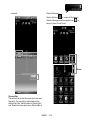
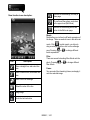
Contacts
1. Slide right or left side of the screen from the
down side to the up side to show Contacts
2. Slide right or left side of the screen to select a
set of contacts, and then tap a wanted contact.
Besides, you can select the contact by your
contacts’ initial letters on the shortcut bar.
MS820│ 2-16
Icon
Descriptions
Slide show
Next and Previous photos
Launch the Smart Album
Smart Album Interface
Select Start > Programs > Multimedia > Smart
Album to launch the Smart Album.
Rolling Dial
3. Tap the Return icon
Smart Touch Home.
to go back to the
Smart Album
Smart Album is a picture-viewing application.
You can open it to view the pictures on the phone
and memory card. You can watch automatic
playback album in the slide show also.
No.
Items
Description
1
Select it to
view the
photos
You can select it to
view the photos
2
About
Smart album version
3
Full Screen
Press to view the
pictures in full screen
MS820│ 2-17
4
Switch
Function
You can go to Smart
Editor, Slider show,
and Camera mode
5
Exit
Exit the Smart Album
6
Delete the
photos
You can delete the
selected photos
Launch the Smart
Player
Smart Player Interface
Select Start > Programs > Multimedia > Smart
Player to launch the Smart Player.
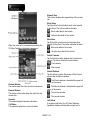
Smart Player
Smart Player is the most feature-rich mobile audio
player. You can use it easily.
No.
Icon
Descriptions
You can select it to
listen to previous
songs and next
songs. You can
select it to play, or
pause songs also
Adjusts volume
Play mode (repeat,
or random songs)
Items
Description
1
Playlists
Check the music lists on
your device and storage
card
2
3
Play
About
Play music
Smart Player version
4
Copy
You can copy music to
device or storage card
5
Exit
Exit the Smart Player
6
Delete
You can delete the
selected music
MS820│ 2-18
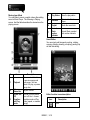
Music player Mode
You can listen to music or watch videos after adding
some to Music Player. The following is Playing
screen. And the table describes the elements on the
playing screen.
4
Play Status
Show the play status
5
Minimize
Minimize the Smart
Player
6
Playlist
Check the music lists
7
Current
Music
number
Indicator
Current Music number/
total number Indicator
Smart Editor
You can simply edit images by scaling, rotating,
cropping, framing, drawing, morphing, pasting clip
art and text editing.
No.
1
2
3
Items
Playback
Volume
Status Bar
Sound ON/
Off,
Equalizer
and Play
mode
Description
You can select it to listen
to previous songs and
next songs. You can
select it to play, or pause
songs also
Adjusts volume
You can turn the sound
on or off. And choose
equalizer mode or Play
mode (repeat, or random
songs)
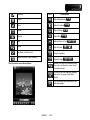
Editor function icons description:
Icon
Description
Tools
MS820│ 2-19
Drawing
Icon
Description
Morph
Adjust Brightness
Filter
Adjust Contrast
Frame
Adjust Sharp
Clip Art
Adjust Blur
Text
Adjust Mirror or Flip
Reset
Adjust Scale
Go Back to Picture List
Crop the picture
Options (Save, Open, About)
Adjust Rotate
Before you save the edited picture,
they can use Reset to clear up all
the edited result
Tool function icons description:
To confirm all the attached stamps
and return to upper level (Edit
Mode)
Quit choosing and returning to the
edit main page
MS820│ 2-20
Remove all the drawings, but stay in
draw page
Draw function icons description:
To confirm all the actions, and return
to the upper level (Edit Mode)
Remove all the drawing stuffs, and
return to the Edit main page
Morph:
Morph allows you to freely edit facial expression of
the image. There are several icons in the edit main
mode. Click
to start morph, use stylus to
drag a rectangle, and then click on the rectangle
area. Pressing
or
facial expressions.
to change different
Filter:
There are several interesting filter effects onto the
Icon
Description
Draw a straight line, and select line
size
Draw a freeform line, and select line
size
photo. Pressing
filter effects.
or
to change different
Frame:
You can select the interesting frames, and apply it
onto the selected image.
Draw a circle or rectangle
Select the color of the line
Drag image
Undo the last instruction
MS820│ 2-21
Text
You can type words on the photo.
ClipArt:
In clipart, select the desired clipart, and apply it onto
the selected image to design interesting image. The
clipart will be shown in the center of the image. You
can move it by dragging the clipart.
MS820│ 2-22
3 Phone Functions
3.1 Phone Dialer Screen and Key
Introduction
Press Talk/Send key to enter phone functions.
Please insert a SIM card before using these
functions.
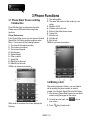
Phone Dialer screen
From Phone Dialer screen, you can access Contacts,
Speed Dial, Call History, and more options under
Menu. This screen has the following features:
1. The name of the network provider
2. The number you entered
3. Touch screen keypad
4. Hide Keypad
5. Signal strength
6. Clear numbers
7. Speed Dial
8. Make/End a video call
9. Make/End a voice call
10.Menu to access more options
1. The calling status
2. The name and number of the contact you are
calling
3. Speaker On/Off
4. Create a note for the call
5. Return to the dialer phone screen
6. Contact list
7. Mute the call
8. Hold the call
9. End the call
10.Menu to access more options
3.2 Making a Call
After entering the phone function, you can make a
call by entering the phone number, or select a
number from Contacts, Speed Dial, and Call History.
1. After entering Phone Dialer screen you can dial a
number using the keypad on the screen.
When a call is connected, the screen displays the
following:
2. To delete an error input, use
your screen.
3. Press
MS820│3-1
Key to make a call.
key on
4. Press
Key to end the call.
Speed Dial
You can set ten phone numbers in your speed dial
list.
1. After entering phone function, press Menu > View
> Speed Dial to enter your Speed Dial List.
2. On your Speed Dial List screen, you can select a
contact on your list to see the contact’s detailed
information.
3. To make a call, press the corresponding number
on your keypad to call the contact on your speed
dial list.
4. You can also use the navigation key to select a
contact you want to call on the speed dial screen,
and then press Call Key to call.
5. Press End Key to end the call.
3.3 Receiving / Ignoring a call
3.5 Emergency Calls
Enter the international emergency number 112, and
then tap Talk or press Talk/Send key. Additional
emergency numbers may be included in your SIM
card. Contact your network operator for more
information.
If your device has entered Device Lock mode, you
have to unlock the device first before making an
emergency call.
1. Tap the Unlock on Left Function Key
2. Tap “Unlock” displayed on the lower-left corner of
the screen.
3.6 Volume adjustment
When you receive a phone call, a notification
message will appear. To answer the incoming call,
tap Answer or press Talk/Send key. To ignore or
reject a call, tap Ignore to mute the phone and reject
the call. This behavior may divert the call to your
voice mail, depending on your network operator.
3.4 International Calls
When you make an international call from any
country, you need to insert a special international
access code. If you enter “+” symbol as a prefix
before the number you are calling, then you do not
need to enter the access code for the country you
are calling from.
To make an international call
1. Tap, and hold 0 key until + sign appear. +
replaces the international prefix of the country
that you are calling from.
2. Enter the full phone number you want to dial. It
should include the country code, area code
(without the leading zero), and phone number.
3. Tap Talk, or press Talk/Send key.
Tap
icon on the screen, and the volume
adjustment window will appear. Adjust the volume of
alert tone for all programs tapping on
, and
.
adjust the ring volume by tapping on
1. Press Volume Adjustment key on the left side
manually or tap
>
to adjust incoming
call volume.
2. If you press the Volume Adjustment key on the
left side of your device or tap
>
icons
during a call, you may adjust the in-call volume of
the phone. You can only adjust it during a call.
3. When you select Vibrate,
icon will change to
icon.
4. When you select Off,
change to
MS820│3-2
icon.
icon on screen will
3.7 Making a Call from Contacts
On Today screen, you can tap Contacts on the
lower-right corner of the screen to enter Contacts.
Enter the contact or phone number you intend to
search into the search field, the phone will search for
the contacts that match this condition.
1. Tap, and hold Navigation key upwards or
downwards to browse contacts by initial letters in
Contacts. (This function is available for contacts
synchronized from Outlook only).
2. Tap on any contact to view that contact’s
information.
3. On Contacts screen, tap Navigation key to make
a call to that person.
4. On Contacts screen, tap Menu on the lower-right
corner of the screen for more options.
by which the contact’s photo will display as an
incoming call photo ID.
2. You may also tap Ring tone field to set different
incoming call ring tones for your contacts.
3. Tap OK on the upper-right corner of the screen to
save the new contact, and exit.
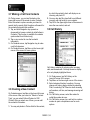
3.9 Call History
Call History contains all outgoing calls, incoming
calls, and missed calls. You may choose to display
all or only display highlighted items.
3.8 Creating a New Contact
On Contacts screen, tap New on the lower-left corner
of the screen. After you enter into “Select a Contact
Type”, you can select Outlook Contact or SIM
Contact. After you select one of them, you can edit
the contact’s information.
1. On Today screen, tap Call History on the
lower-left corner of the screen.
2. Tap Menu on the lower-right corner of the screen.
3. Select a desired function to perform. You may
change call history display method by selecting
Filter; or selecting Call Timers to check incoming
call numbers, call time, and manage incoming call
history.
4. On Call History screen, select the contact to
redial this number at once.
5. On Call History screen, tap, and hold on a phone
number to open a drop-down menu for more
options.
1. You may set photos in Picture field for this contact,
MS820│3-3
Tap “Menu”, and select “Block All unknown calls”
to block all unknown numbers.
3. Select “OK” to save the settings.
3.12 Video Telephony
The 3G Video Telephony Application/Phone Canvas
allows you to make a video call in addition to making
an audio call. To make a video call, perform the steps
described in the section below.
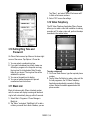
3.10 Setting Ring Tone and
Password
On Phone Dialer screen, tap Menu on the lower-right
corner of the screen. Tap Options > Phone tab.
1. You may select a preferred ring type.
2. If you want to download ring tones, please use
ActiveSync program in the computer and copy
the ring tone file to Application Data/ Sounds
folder in your device. The ring tone files will be
added as the options.
3. You can set keypad tone for dialing.
4. You can set personal password to prevent
unauthorized use from others.
To make a video call
1. On Phone Dialer Screen, type the required phone
number.
2. Tap the Video Call button to make a video call. As
the call progresses, the 3G Video Telephony
Application automatically proceeds to Dialing
screen. Status information appears below the
phone number.
3.11 Black List
Block all unknown calls. When a blocked number
calls, the screen will display incoming call alert and
ring but will automatically hang up within 5 seconds.
1. Select Start > Programs > Phone Manager >
Black List
2. Tap “Menu”, and select “Add Black List” to add a
number you would like to block. Besides, you can
MS820│3-4
Elapsed Time
This window displays the elapsed time of the current
call.
Block Video
Tap this button to block/unblock local video transmit
to the others. The button indicates the state:
:Block video data for the remote.
:Unblock video data for the remote.
Mute Video
Tap this button to mute/un-mute local audio data
transmit to the others. The button indicates the state:
When the video call is connected successfully, the
3G Video Telephony Application appears as:
:Mute audio data for the remote.
:Un-mute audio data for the remote.
Switch Cameras
Tap this button to switch between the front and rear
camera. The button reflects the current status:
:Front camera.
:Rear camera.
Switch Windows
Tap this button to switch the position of the Preview
window and the Remote window:
Preview Window
The window plays the video from the local camera.
Remote Window
The window at the center plays the video from the
remote side.
Operator
This window displays Operator information.
Call Status
This window displays the current call status.
:The Preview window is located at the upper-left
corner of the screen.
:The Remote window is located at the upper-left
corner of the screen.
:The preview window.
:The remote window.
Call Failed
If the placed call failed, the 3G Video Telephony
Application displays a dialog that prompts you to
MS820│3-5
indicate whether a voice call should be dialed or
whether the video call should be retried with the
same phone number.
Ending a call
You can end an active call by tapping
state changes to Call Ended.
. The call
Call History
The Call History feature of the 3G Video Telephony
Application is used to remember previous calls. This
feature allows you to easily redial the number of a
call you made earlier. In the Call History page, you
can distinguish audio calls from video calls by their
icons.
Incoming Video Call
When the 3G Video Telephony Application receives a
video call request, an information box appears. To
accept the call, tap Answer. To reject the call, tap
Ignore.
Outlook Contacts
The 3G Video Telephony Application allows you to
make a call to your Outlook contacts.
To make a call to an Outlook contact
1. Tap Contacts of Today screen to open Outlook
Contacts page.
2. Do one of the following to display a menu.
Tap menu or tap and hold the required contact
record.
3. Select Video Call to create an outgoing video call
to the selected contact.
:Outgoing video call.
:Incoming video call.
:Missed video call.
To redial a number from Call History
1. In the Call History page, tap and hold a record.
2. To make a video call, tap Video Call in Menu.
MS820│3-6
MS820│3-7
4 Settings
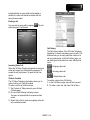
tapping the arrow
4.1 Personal Settings
You may set your personalized settings by
preference.
Buttons
You may assign programs to a hardware button.
You may set certain keys as the activation keys for
your most commonly used programs.
1. Tap Start > Settings > Personal tab > Buttons >
Program Buttons tab.
․Under Select a button, tap the button you want to
assign to a program, and then select a program
from Assign a program.
2. On Up/Down Control tab, Delay before first repeat
changes the time elapsed before scrolling begins.
Repeat rate changes the time it takes to scroll
from one item to the next.
Call Settings
You can set your device with the functions, when you
are on a call.
1. Tap Start > Settings > Personal tab > Call
Settings.
2. Auto Answer: After 3, 6, or 9 seconds.
3. Tap “Turn off touch screen during call to save
power”.
4. Tap “Vibrate if an outgoing call is answered”.
Input
Set your preferred input method.
1. Tap Start > Settings > Personal tab > Input.
2. On Input Method tab, select a desired input
method. On Word Completion tab, select the
desired settings for word completion. On Options
tab, select the desired options for writing and
recording. You can change input options by
.
Lock
You may set a personal password to lock your
device.
A strong password must have at least 7 characters
that are a combination of uppercase and lower case
letters, numerals, and punctuation.
1. Tap Start > Settings > Personal tab > Lock
2. To enable this function, select how long your
device must be turned off before the password is
required for using the device. Tap Prompt if
device unused for.
3. Select the type of password you would like to use:
Strong alphanumeric or Simple PIN.
4. Enter the password and, type it again in Confirm
field.
5. On Hint tab, this function provides a password
hint in case you forget your password. This hint
may be visible by others.
6. Tap OK to save the settings.
․If your device is configured to connect to a
network, use a strong password to help protect
network security.
․If you forget your password, you must reset the
device before you can access your device. The
reset will erase all files, data, and programs.
․If you have used ActiveSync to create a backup
file, all of your program data can be restored.
Menus
Select the programs to be displayed in Start menu.
Only 7 programs are allowed to be showed in Start
menu. Add the programs you use frequently in Start
menu:
1. Tap Start > Settings > Personal tab > Menus
2. Select the programs you want, and then tap OK.
MS820│4-1
Owner information
Set layout, items, color, and background of Today
display.
1. Tap Start > Settings > Personal tab > Owner
Information.
2. On Identification tab, enter your personal
information.
3. On Notes tab, enter any additional text you want
to display when your device is turned on, such
as: ”Welcome!”
4. On Options tab, select the message which will be
displayed, when your device is turned on.
Phone
Setting for phone functions.
You can easily view, and change settings, such as
Ring type, Ring tone, and Keypad. You can also
protect your device from the unauthorized use. There
are two ways to change phone settings:
․Tap Start > Settings > Personal tab > Phone.
Phone tab
Under Phone tab, you can set up the following items:
Ring type
You can change the way that you are notified when a
call is incoming. For example, you can choose to be
notified by a ring, a vibration, or a combination of
both. Tap the ring type list, and select the option.
Ring tone
Display the ring tone list, and then select the sound.
1. To set .wav or .mid files as ring tones, use
ActiveSync on your PC to copy the file to
\Windows\Rings folder on your device. Select the
sound from the ring tone list.
2. To download ring tones, you can make a
connection to the Internet, and then download
ring tones that are compatible with the .wav
or .mid formats.
Keypad
You can use this function to change the key tone.
If you select Long tones, the key tone will be
continuous, when you input a phone number. If you
select Short tones, the key tone will be only
continued one or two seconds, when you input a
phone number. If you select Off, the key tone will be
cancelled, when you input a phone number.
Security tab
You may check “Require PIN when phone is used” to
enhance your phone security. Tap Change PIN or
PIN2 to change your SIM PIN number.
Services tab
Settings include Call Barring, Caller ID, Call
Forwarding, Call Waiting, Voice Mail and Text
Messages, and Fixed Dialing.
1. Tap Start > Settings > Personal tab > Phone >
Services tab
2. Check the item, and tap Get Settings.
3. Tap OK to save settings.
Option
Description
Call Barring Block incoming and/or outgoing calls.
Display your name and/or phone
Caller ID
number for outgoing calls.
Call
Forward all or selected incoming calls
Forwarding to a different phone number.
Notify you an incoming call while you
Call Waiting
are on the phone.
Voice Mail
Set up voice mail and SMS service
and Text
center.
Messages
Fixed
You can only dial some phone number.
Dialing
Note: All services in Services are provided by
Network tab
operators. Please contact your operator for
Tap Start > Settings > Personal tab > Phone >
more services.
MS820│4-2
4. Tap OK to save.
Network tab.․Under Current network, tap Find
Network to
Network tab
Search for the network automatically.
․Under Network Selection, select Automatic or
Manual to select network automatically or
manually.
․Under Preferred networks, tap Set Networks to set
the preferred order of networks.
VT Call Forward tab
1. Tap Start > Settings > Personal tab > Phone > VT
Call Forward tab
2. Check the items, and then tap Get Settings.
3. Tap OK to save.
Sounds & Notifications
Setting alarm sounds and notifications.
Turning off sounds and notification helps conserve
battery power. To change the ring type and volume:
1. Tap Start > Settings > Personal tab > Sounds &
Notifications.
2. On Sounds tab, you can check the items.
3. On Notifications tab, you can customize how you
are notified about different events. Select the
event name, and then select the type of reminder.
You can select a special sound, a message, a
flash light, or vibration.
Today
Setting screen appearance and items displayed on
Today screen.
To change the theme of Today screen:
1. Tap Start > Settings > Personal tab > Today.
2. On Appearance tab, select the desired theme. To
use your own background, check “Use this
picture as the background”, and then tap Browse
to locate the desired file.
3. Choose a folder, and tap the file you want.
Note: The recommended picture size for the
background is 240x320 pixels in jpeg file
format. To beam a favorite theme to a friend,
select the desired theme, and tap Beam on
Appearance tab.
To customize the displayed information:
1. Tap Start > Settings > Personal tab > Today >
Items tab.
2. Select the information you want to be displayed
on Today screen.
3. To customize the information further, select an
information type, and then tap Options (not
available for all information types).
To add shortcuts in Today
1. Tap Start > Settings > Personal tab > Today >
Extended tab.
2. Check “Activate Shortcuts in Today”.
3. Tap OK to save.
4.2 System Settings
About
This function contains information about your device.
Version tab displays important device information,
including the amount of memory installed. On Device
ID tab, you can change your device name, if you are
unable to connect to a network because another
device with the same name is already connected.
Auto Rotate LCD
You can choose automatically rotate LCD by simply
turning your device sideways.
Backlight
Configure the backlight settings, and adjusts the
brightness level to save power.
MS820│4-3
Using the backlight on battery power substantially
reduces the battery life. Tap Start > Settings >
System tab > Backlight.
․On Battery power tab, you can turn ON/OFF the
backlight, when using battery power.
․On External power tab, you can turn ON/OFF the
backlight, when using external power.
․On Extended tab, you can adjust the brightness
level.
3. Performance mode
Certificates
It’s the information about the certificate issuer and
the expiration date.
It is Customer Experience Improvement Program
designed by Microsoft®. The purpose is to identifying
trends and usage patterns to improve the software.
You can check “Send Feedback” to participate or
“Don't Send Feedback to reject.”
Tap Certificates to view the name of the certificate
issuer and the expiration date.
Clock & Alarms
Setting for time and alarms.
Tap Start > Settings > System tab > Clock & Alarms.
․If you visit a particular time zone frequently, you
can select it as your Visiting time zone on Time tab
so that you can examine the correct date and time
quickly.
․You can use your device as a travel alarm clock by
setting a wake-up alarm on Alarms tab. Check the
item to select the type of alarm.
․To change the way the date or time is displayed on
your device, you can go to Regional Settings by
tapping Start > Settings > System tab > Regional
Settings.
CPU Profile
Adjust different profiles for CPU power management.
Go to Power Management:
Tap Start > Settings > System > CPU Profile.
You can check one of three modes of CPU profile:
1. Power saving mode.
2. Standard mode
Each mode has different set of preset settings, which
are shown on the screen when you select a mode.
You can choose the most suitable mode for your
device.
Customers Feedback
Customer Experience Improvement Program from
Microsoft®.
Encryption
You can encrypt files stored on the micro SD card by
simply checking “Encrypt files when placed on a
storage card”. Once encrypted, such files are only
readable by this device.
Encrypt data on your storage card:
1. On the Today screen, tap Start > Settings.
2. Tap System > Encryption.
3. Select Encrypt files placed on Micro SD Card.
Error Reporting
To help Microsoft improve the products you use, your
device can collect information on software operation
for later reporting in the event of a serious error.
Reporting this information when errors occur is
completely voluntary and confidential.
Managed Programs
Examine the installed programs.
Memory
Display memory status and programs that are
currently running. You may need to stop a program if
it becomes unstable or the program memory is low.
Tap Start > Settings > System tab > Memory.
․Main tab displays the amount of memory. This tab
MS820│4-4
shows storage’s and program’s memory. You can
examine the total, in-use, and free memory.
․Storage Card tab displays how much memory is
available on the storage card that is inserted into
your device.
Power
Battery status and settings.
Tap Start > Settings > System tab > Power.
․Battery tab displays the amount of battery power
remaining. Battery power depends on the battery
type and how your device is being used.
․On Advanced tab, you can select the options for
turning off your device to conserve battery power.
․On Extended tab, you can check “lock device
when entering stand-by mode”, “USB fast
charging”, or Turn on network indication”.
Quick Menu
You can activate the Quick Menu at the upper-right
corner of the screen.
Regional settings
Setting region, number, currency, time, and date
format.
This feature allows you to customize the unit and
format for the region you are in. To access this
feature, tap Start > Settings > System tab > Regional
Settings.
Remove Programs
Remove programs from your device
Screen
Setting screen orientation, screen alignment, and
text size.
․On General tab, you can adjust the screen’s
orientation, and align the screen.
․On Clear Type tab, you can check “Enable Clear
Type” to smooth the edges of screen fonts for
many programs.
․On Text Size tab, you can adjust the text size to
examine more content or increase the readability
in many programs.
Task Manager
Examine the applications which are using. You can
examine their amount of memory and their CPU
consumption.
Windows Update
Download and update Windows Mobile. To help keep
your mobile device protected.
Voice Commander Settings
You may record voice tags under “Voice Commander
Settings”, or train you the way of digit speaking under
digit training.
Tap Start > Settings > System tab > Voice
commander Settings.
․On Contacts tab, select a contact in the contact
list. Press
Press
Remove Programs allows you to uninstall programs
that are saved in your device’s storage memory. It
also shows the total available storage memory.
Select a program that you would like to remove from
the program box and tap Remove.
Press
to play system pronunciation.
to record your own pronunciation.
to stop recording your own
to delete the voice tag.
pronunciation. Press
Then you can go to “Voice Commander” in
Programs to start what you record. Tap Start >
Programs > Voice Commander.
․On Application tab, you can record the
pronunciations of applications’ names. Then you
MS820│4-5
can go to “Voice Commander” in Programs to start
what you record. Tap Start > Programs > Voice
Commander.
․On Application tab: If you have MP3 files in the
device or Micro SD card, you may record voice
tags for these MP3 files.
․On Digit Training, you can practice your digit
pronunciations. You can press
to record the
following digits in “Digit model adaptation”. You also
to delete the recorded digit
can press
pronunciations.
․On Digit Settings tab, you can change the length of
phone number.
․On Advanced Settings tab, you can change the
recording sensitivity.
․On About tab, you can know the details of Voice
Commander.
MS820│4-6
5 Synchronization
You can take information form your computer
wherever you go by Microsoft ActiveSync to
synchronize data in this device with personal
computer.
․You can update Outlook data in this device and in
your personal computer synchronously.
․You can synchronize Microsoft Word and
Microsoft Excel files in this device and in your
personal computer. The files will convert to the
compatible version automatically.
The default of ActiveSync is not to synchronize all
data automatically. If you would like to change the
default, you may activate or disable the
synchronization function for specific data in
ActiveSync Option.
1. ActiveSync Installation:
Use the enclosed CD to install Microsoft
ActiveSync in your personal computer. This
device already has the built-in ActiveSync.
2. Hardware Connection:
Connect your Windows Mobile-based device to
your personal computer with a USB cable or
cradle.
3. Using ActiveSync Program:
The ActiveSync wizard will give you
step-by-step instructions for synchronizing files
and loading programs onto your device.
According to your demand, please follow the
instructions to set up.
ActiveSync may also be used for the following
purposes:
․Back up or restore saved data in this device.
․Copy files between this device and personal
computer.
․Synchronize while connecting to your personal
computer or selecting synchronization command.
․Synchronize specific types and range of files. For
example, you may choose to synchronize
appointments of the past few weeks.
5.1 Install and Use ActiveSync
Note: Before installing ActiveSync, do not
connect your device to the computer. You
may only connect the device to the
computer by using the USB cable AFTER
ActiveSync.
Setup Windows Mobile Device Center on
Windows Vista
Microsoft Windows Mobile Device Center is the
replacement for Microsoft Active Sync on Windows
Vista.
When you connect and start Windows Mobile
MS820│ 5-1
Device Center for the first time. To create a
partnership:
1. Connect your device to your computer. Open the
Windows Mobile Device Center.
2. On the license agreement screen, click “Accept”.
3. On the Windows Mobile Device center’s Home
Screen, Click “Set up your device”
4. Select the items you want to synchronize, then
tap” Next”.
5. Enter a device name, then tap “set up”.
6. Click Start > All programs > Windows Mobile
Device Center on your Windows Vista computer.
Start and Stop synchronization
1. Connect your device to the computer using
Bluetooth, USB cable or cradle.
2. On the device, tap Start > Programs > Active
Sync> Sync.
3. To end synchronization before it completes, tap
“Stop”.
solution tasks. Try the following steps in order, one
at a time, until on works for you.
5.2 Synchronize via Bluetooth
You can synchronize data via Bluetooth. Select
Start > Programs > ActiveSync > Menu, and then
select “Connect via Bluetooth” and
tap ”Synchronize” in this device to process
synchronization.
If this is the first time you have connected to this
computer via Bluetooth, you must first complete the
Bluetooth wizard on the device and set up a
Bluetooth partnership with computer.
Note: To preserve battery power, turn off
Bluetooth when not is use.
․After you connect this device with your personal
computer with a USB cable or cradle, the
computer screen will display “Connected” upon
successful connection. A green icon
representing “connected” will appear on the task
bar of your computer screen.
․Select the Explore button of ActiveSync program
of your personal computer, to view the files in this
device. You may manage several files in the
device simultaneously.
Troubleshoot an ActiveSync cable connection
Troubleshoot as described here if you are using a
USB cable to connect your device to the PC, and
ActiveSync does not recognize the device, or the
program stops responding while connecting to
ActiveSync. Troubleshooting is often a matter of
systematically testing the possible solutions, usually
beginning with the simplest for speed and
convenience and moving on to more complex
MS820│ 5-2
6 Getting Connected
You device’s networking capabilities allow you to
access the Internet or your system operator at work.
6.1 Internet Access
Before you use GPRS or 3G to connect to the
Internet, please make sure your system operator
provide this service. It is convenient to work at home
or travel by using GPRS or 3G. You can use this
device to browse web pages, read or send E-mail,
MMS\SMS, and Windows Live messenger through
wireless network.
6.2 GPRS Connection Settings
1. Select Start > Settings > Connections tab >
Connections > Advanced tab.
2. Select “Select Networks” to open Network
Management screen.
3. Select a desired network name from the list;
press “New” to add available network to list;
press “Edit” to modify original network setup
content.
4. Tap “OK” to save and exit.
6.3 Activating GPRS Connection
If this device is under flight mode, please turn off
flight mode beforehand.
Tap
icon on Today screen, and then tap
“Wireless Manager” on the pop-up window. Tap on
“Phone” to turn the phone function on. The
icon
will appear on Today screen when GPRS is
activated.
1. Tap Start > Internet Explorer.
2. Input an URL address you desire to browse in
address field, and tap the arrow icon
to go to
the URL.
3. After completing connection will become
icon.
4. Or you may select Start > Settings > Connections
tab > Connections > Tasks tab; tap and hold a
connection to open the pop-up menu, and select
“Connect”.
MS820│6-1
6.4 GPRS Wizard
When you are connected to GPRS network, you may
surf on the Internet or send and receive email. GPRS
Wizard selects your GPRS network automatically.
1. Tap Start > Settings > Connections tab > GPRS
Wizard.
2. Choose the regional name and the network
name.
3. Tap “OK” to save.
Bluetooth is a short distance wireless communication
technology. Before you use Bluetooth function,
please finish connection setup first.
1. Select Start > Settings > Connections tab >
Bluetooth > Mode tab.
2. Check “Turn on Bluetooth” after you enter into
Mode tab screen.
6.5 Bluetooth Wireless
Transmissions
When you want to form a connection through
Bluetooth, please make sure the device you would
like to make connections with is also equipped with
Bluetooth.
Bluetooth Connection Settings
When Bluetooth is activated, you will see
the pop-up window.
icon in
3. If you want this device to be detected by other
Bluetooth devices, please check “Make this
device visible to other devices”. (Without
6-2
2
MS820│
Select Start > Settings > Connections tab >
Bluetooth > COM Ports tab.
checking this item, other Bluetooth devices are
unable to detect this device.)
4. Select Devices tab to show all connections
formed.
5. Tap “Add new device” to search for other
Bluetooth devices within an effective area.
Registering New Serial Port:
1. Select “New Incoming Port” to enter setup
screen.
2. Select a port to be set.
3. Select “Finish”.
6.6 Internet Sharing
You can set the device as a wireless modem.
Internet Sharing allows your PC/ Notebook be
connected to a wireless network. Before you create a
new modem by the selected connection type, you
still need to install the drivers in your PC/Notebook. If
you would like to connect to PC with a USB cable,
you will need to install ActiveSync 4.5 or later version
in your PC. Please find the drivers in the ActiveSync
and Application Software CD.
6. Select the device to be connected, and then
select “Next“. The screen will prompt for
password. After inputting password on password
input screen, select “Next“.
7. If the entered password is correct, the connection
will be formed.
1. Tap Start > Programs > Phone Manager >
Internet Sharing.
2. Select a USB or Bluetooth PAN as PC
Connection type.
3. Connect your phone with USB cable or Bluetooth
to a PC/Notebook, and then tap “Connect”.
Note: Optional Bluetooth accessories
such as Bluetooth headset are available.
Please contact your local dealer for more
information.
COM Ports
For example, when you purchase Bluetooth GPS
supported navigation software; you can register this
device as an effective serial port by following the
instructions on the manual of that product and the
steps as below:
MS820│6-3
Note: Before you tap Connect, please
make sure that your have inserted a
GPRS SIM card, and that you have
connected this phone to your
PC/Notebook by USB cable or Bluetooth
and disabled ActiveSync.
6.7 Wi-Fi
Wi-Fi allows this device to connect to the detected
network through Wi-Fi.
1. Select Start > Settings > Connections tab >
Wireless Manager.
2. Tap “Wi-Fi”.
3. Tap “OK” to activate wireless network.
After you activate Wi-Fi, a new window, “New
Network Detected”, will appear. Select “Connect”
and input your password to the local network. Tap
“Connect” to connect to this device via local network.
Note: Reboot is required when you
change the IP address in Start > Settings
> Connections tab > Wi-Fi > Network
Adaptors tab > Edit > IP Address tab.
6.8 USB
You may use the device as a mass storage device or
a Micro SD card reader.
1. On the device, select Start > Settings >
Connections tab > USB
2. Tap “SD-Card Reader”, and then tap “Change”.
3. Connect the device to the computer with a USB
cable.
4. Your PC will detect the new hardware
automatically. Now you can view or transfer files
to and from your Micro SD card.
6-4
4
MS820│
7 Messaging
7.1 SMS\MMS & E-mail
2. See “7.5 Using E-mail”.
Messaging includes text messages (SMS),
multimedia messages (MMS), and E-mail accounts.
Before receiving and sending your email, please
make sure this device has connected to a network.
When you are connected to a network, you may go
to “Messaging” to receive, and send your e-mail.
For receiving and sending SMS\MMS, you only need
to ensure that the phone function is activated and the
satellite icon on the top of status bar shows
. It is
not necessary to activate the connection or establish
a new email account and a connection in Messaging.
7.2 Using SMS\MMS
You may:
1. Use this device to connect with email server, and
receive, or send letter directly.
2. Update the Microsoft Outlook or Microsoft
Exchange Server email in this device and
personal computer synchronously.
For more information on SMS\MMS:
1. Select Start > Messaging > Menu > Options >
Accounts tab.
2. See “7.2 Using SMS\MMS”.
For more information on E-mail:
1. See “7.4 Establishing E-mail Account”.
Select Start > Messaging > SMS\MMS
The main steps are as follows:
1. Tap “Inbox” on the upper-left corner of the screen
to choose a folder.
2. Select Menu > New to create a new MMS or
SMS.
on the lower center
3. Tap the Input Panel icon
of the screen to activate or disable the Input
Panel, and then edit this SMS or MMS.
When read a SMS\MMS, you can:
Select Start > Messaging > SMS\MMS, and then
select the SMS\MMS to read and reply.
MS820│7-1
1. Tap the phone number which is showed on the
screen to save this contact as a new contact.
2. Tap “Reply” to compose a reply MMS\SMS.
on the lower center
3. Tap the Input Panel icon
of the screen to activate or disable the Input
Panel.
4. Select “Menu” for more information.
Note: You cannot copy a sent message
to the SIM card.
Note: Make sure the size of MMS
messages that you send is within the
limits allowed by your wireless service
provider.
Compose, and send a SMS:
1. Tap Start > Messaging > SMS\MMS > Menu >
New > SMS to write a new SMS.
2. Tap “To” field to input receivers’ phone numbers,
or tap Menu > Add Recipient to add recipients.
3. You can input SMS content in the empty area in
the middle of the screen. Tap the Input Panel icon
on the lower center of the screen to write
the content.
4. Select “Send” to send this new SMS.
Copy a SMS to the SIM Card:
1. In the SMS\MMS inbox, select the message to
open it.
2. To select a message that you want to copy to the
SIM card.
3. Select Menu > Copy to SIM.
Copy a SMS to the Phone:
1. In the SMS\MMS inbox, select the message to
open it.
2. To select a message that you want to copy to the
Phone.
3. Select Menu > Copy to Phone.
Reply a SMS with the function of MMS:
1. In the SMS\MMS inbox, you select a message,
and then open it.
2. Tap Reply.
3. Select Menu > Insert, and then select the wanted
item (Picture/ Video, Audio, vCard, vCalendar, or
Attachment.) to insert it into the SMS.
4. Select Send.
Compose, and send a MMS:
1. Tap Start > Messaging > SMS\MMS > Menu >
New > MMS to write a new MMS.
2. Tap “Bcc”, “Cc”, or “To” fields to input receivers’
phone numbers, or tap Menu > Add Recipient >
From Contacts or From Call History to add
recipients.
3. Tap “Subject” field to input a subject for your new
message.
4. You can input MMS content in the empty area on
SMS
the screen. Tap the Input Panel icon
on the
lower center of the screen to write the content.
5. Tap the Insert picture/ Video to insert a photo or
video.
MS820│ 7-2
5. The email from “Outbox” folder in this device will
be sent to your computer first, and then it will be
delivered through Microsoft Exchange Server or
Microsoft Outlook.
6. If a specific letter is deleted in this device, then it
will also be deleted in your computer when you
reconnect this device with computer.
7. SMS\MMS in this device will not be synchronized.
8. You may directly receive new email from email
server without connecting to a computer.
9. You may select to use it online or offline; if it is
online, you may directly read and reply an email
when this device is connected to email server.
You can reply an email directly by simply tapping
“Send”.
6. Enter text and insert audio by tapping the
respective areas.
7. Select “Send” to send this new MMS.
With push e-mail, you can access to new incoming
e-mail in real time. This Direct Push Technology can
be enabled by the Exchange Server administrator,
bringing the latest information to you. You must set
up your device to synchronize via an over-the-air
connection with Exchange Server. To use push
email, please turn on Wi-Fi or data connection to
connect to the Exchange Server.
MMS
7.3 Set up your device to
Synchronize Outlook E-mail with
your computer
If you want to synchronously process email, you
must activate the “Inbox” synchronization function in
ActiveSync beforehand. For more information on
“Inbox” synchronization, please see the online Help
of ActiveSync in your computer.
Inbox synchronization process rules:
1. Please select a desired cooperation relationship
on “New Partnership” screen in computer to
synchronously transmit information.
2. If you choose not to perform synchronization, you
may copy or move email messages between this
device and the computer manually.
3. Only the email in “Inbox” of your computer will be
synchronized.
4. Only the email in Microsoft Exchange Server or
Microsoft Outlook can be synchronized.
Enabling Direct Push on your PC:
1. Connect your device to the PC with a USB cable.
2. On the ActiveSync pop-up window, check
“Synchronize with Microsoft Exchange Server or
Personal Computer”, and click “NEXT”.
3. Input your network login name, password, and
domain name. If your server requires a SSL
encryption, please check “This server requires an
encrypted (SSL) connection.” Click “NEXT”.
MS820│7-3
4. Tap “Skip” skip automatic configuration or wait for
its procession.
5. Input the IP address of your server in “Server
Address”, and then tap “Next”.
6. Choose the wanted data to synchronize, and then
tap “Finish”.
Now you have established a cooperative relationship
for the device and the Exchange Server. The next
time when you select Start > ActiveSync > Sync, you
may synchronize with Exchange Server via Wi-Fi or
data connection.
Once you are connected to the network, you may
look up your Global Address List over the air from
your device by tapping “Contacts”. You may send an
email to a contact on your Global Address List
following the same steps as sending email to a
contact saved on your device.
4. Check the items you would like to synchronize,
for example, you may check Inbox, Calendar,
Contacts, or Tasks.
Enabling Direct Push on your device:
1. On your device, select Start > Programs >
ActiveSync > Menu > Add Server Source.
Note: To be able to use direct push, you
need to have an exchange server. Microsoft
Exchange Server also supports useful
functions such as remote device wipe.
To find out more on the benefit and usage of
Microsoft Exchange server, please visit
Microsoft’s website,
http://www.microsoft.com.
7.4 Establishing E-mail Account
2. Input your email address in “Email Address” field,
and then tap “Next”.
3. Input your user name, password, and domain
name, and then tap “Next”.
If you have email accounts from ISP or company
network, you may use “Messaging” to receive or
send email. Please refer to the following instructions
to set a new email account in ”Messaging” of this
device.
Please acquire the following information from ISP or
company network administrator:
Set up an Exchange Server connection:
1. Tap Start > Messaging > Setup E-mail
MS820│ 7-4
2. Add a new e-mail account, enter the E-mail
address and password for the e-mail account and
select the save password option. Tap “Next”.
3. Clear the Try to get e-mail settings automatically
from the Internet option and tap “Next”.
4. Your e-mail provider, select Exchange server and
tap “Next”.
5. Enter the Domain name and tap “Next”.
6. Server address, enter the exchange Server
address and tap “Next”.
7. Select the items that you want to sync with
exchange Server.
8. Tap “Finish”.
4. Enter your name and the account display name
and then tap “Next”.
5. In the Automatic Send/ Receive list, choose how
frequent you want e-mail messages.
6. Tap “Finish”.
7.5 Using E-mail
After you establish an email, you can use it.
The main steps are as follows:
1. Tap “Inbox” on the upper-left corner of the screen
to choose a folder.
2. Tap “Received” on the upper-right corner of the
screen to choose email arrangement.
3. Tap and hold on the email to open the pop-up
menu.
4. Select Menu > New to create a new email.
on the lower center
5. Tap the Input Panel icon
of the screen to activate or disable the Input
Panel, and then edit this email.
When you read an email, you can:
Select Start > Messaging > “the established e-mail” >
Menu, and then select “Send/Receive” to send, and
receive new emails. Select “Inbox” on the upper-left
corner of the screen to view Inbox. Tap any unread
email to view its content.
Set up an E-mail account:
Set up a POP3 or IMAP4 e-mail account on your
device if you have an e-mail account from an Internet
service provider (ISP) or other e-mail service
provider, or web-based account such as Gmail,
Yahoo.
1. Tap Start > Messaging > Setup E-mail
2. Add a new e-mail account, enter the E-mail
address and password for the e-mail account and
select the save password option. Tap “Next”.
3. In e-mail setup, auto setup settings from the
Internet option and tap “Next”.
1. Open an email.
2. Tap a contact in “To”, “Cc”, “Bcc” fields to save
this contact as a new contact.
3. Tap “Reply” to reply an email.
on the lower
4. Tap the Input Panel icon
center of the screen to activate or disable the
Input Panel.
5. Select “Menu” for more information.
6. On the email content screen, select, and hold to
activate the pop-up Menu.
MS820│7-5
Compose, and send an email:
Select Start > Messaging > “the established e-mail” >
Menu > New to write a new email. After writing a new
mail, select “Send” on the lower-left corner of the
screen, and then send this new email.
When you compose an email, you can:
1. Tap “To”, “Cc”, or “Bcc” fields to input receivers’
email addresses, or tap Menu > Add Recipient to
add recipients.
2. Tap “Subject” field to input a subject for your new
email.
3. You may input the email content in the empty
area on the screen.
4. Select “Send” to send this new email.
5. Tap the Input Panel icon
on the lower center
of the screen to activate or disable the Input
Panel.
6. Select “Menu“ for more information.
7. On the email content screen, select, and hold to activate
the pop-up Menu.
7.6 Windows Live™
Live Messenger, Live Mail, Live contacts . To use
these functions, you will need to turn on Wi-Fi or data
connection.
Set up Windows Live™:
Sign in using your Windows Live™ ID, which is your
Windows Live™ Mail or Hotmail address, and
password.
1. Tap Start > Programs > Windows Live and then
tap “Sign in to Windows Live”.
2. Tap the links to read the Windows Live term of
Use and the privacy. After reviewing them, tap
“Accept”.
3. Sign in to Windows Live, enter E-mail address and
password. Tap “Next”.
Windows Live Messenger:
1. Select Start > Programs > Messenger
2. Select your sign in status, and then tap “Sign in”.
3. Input your MSN or Hotmail email address and
password.
4. Select “Sign In”.
Windows Live™ provides a full Internet experience
on your device. Windows Live™ offers Live Search,
MS820│ 7-6
Hotmail:
1. After you sign in Messenger, wait for the sync to
finish, and then select Start > Messaging.
2. Select Windows Live Inbox from the drop down
menu on the upper-left corner of the screen. You
will find incoming emails to your Hotmail account
in the Windows Live Inbox.
MS820│7-7
8 Multimedia
8.1 Camera
You may use camera function in this device to
capture important moments.
1. Select Start > Programs > Multimedia > Camera
or press, and hold Camera Key to launch
camera.
2. Focus on the wanted object to shoot. Make a half
press, and hold Camera Key to execute auto
focus, and then make a full press to take a
picture.
3. Use Volume Adjustment side key to zoom in and
zoom out.
4. Tap
to change camera settings.
5. Tap
to enter into Pictures & Videos.
Camera Menu:
Video Mode: Tap this icon to switch to video
mode.
Pictures & Videos: View your photos here.
Camera Settings: Open the menu for camera
settings.
Front Camera: Use the camera which is
located at the front of the device.
Camera Settings:
1. Scene Mode: You can select different shooting
modes for your needs.
2. White Balance: You can set the white balance.
3. Color Effects: you may apply many different
photo effects.
4. Size: Change picture’s size to 2560 x 1920, 2048
x 1536, 1600X1200, 1280 x 960, 800 x 600, 640
x 480, 320 x 240, or 160 x 120.
5. EV: Exposure value ranging from +2 to -2.
6. ISO: The term ISO is used to indicate light
sensitivity of film.
7. Digital Lighting: Bighting up an underexposed
subject on backlighting or insufficient flash
illumination, or enhance contrast of an
overexposed subject that otherwise looks too
bright.
8. Self Timer: 5 seconds, 10 seconds, Off.
9. Flash: Auto, On, off
10. Shutter Sound: On, Off
11. Storage: Phone, Micro SD. (The storage location
will automatically change to Micro SD card, if the
Micro SD card is plugged in before launching
camera).
12. Time Stamp: Show photo taking time on a photo.
13. Confirmation: You can choose to continue
shooting, send MMS, not to save it, or go to
MS820│8-1
Pictures & Videos immediately after shooting a
photo.
14. Flicker Frequency: 50Hz, 60Hz.
15. Blur Detection: That is to judge whether or not a
given image is blurred and to determine to what
extent the image is blurred.
Confirmation frame:
2. Focus on the picture you want to film and press
Camera Key to start video filming.
3. Press Camera Key again to stop filming.
to change camera settings.
4. Tap
5. Select
Videos.
on screen to enter into Pictures &
Video Menu:
Camera Mode: Tap this icon to switch to
camera mode.
Pictures & Videos: view your video here.
Video Settings: open the menu for video
recorder settings.
Front Camera: use the camera which is located
at the front of the device.
Camera Mode: Tap this icon to switch to
camera mode.
Send MMS: You can send this photo for your
Friends.
Delete: Tap this icon to delete the photo.
Pictures & Videos: View your photos here.
High resolution Mode: Tap this icon to switch
to high resolution mode.
8.2 Video Mode
The device camera can also be used as a video
recorder to record memorable moments of your life.
1. Select Start > Programs > Multimedia > Camera
>
, or directly press, and hold Camera Key >
to enter into video mode.
Video Settings:
1. White Balance: You can set the white balance.
2. Color Effect: you may apply many different color
effects.
3. Video Format: You can select the wanted format
to record a film.
4. Anti-Shaking: Stabilized to movie clip when
shaking, you can share the fluent movies.
5. MMS Video: you can select to make a recording
especially for MMS.
6. Storage: Phone, microSD. (The storage location
MS820│8-2
will automatically change to microSD card, if the
microSD card is plugged in before launching
video Recorder).
7. Confirmation: You can choose to continue
shooting, send MMS, not to save it, or go to
Pictures & Videos immediately after shooting a
photo.
8.3 Recorder
Use recorder to record a voice memo.
keep recording on the background; or tap Menu >
Exit to stop recording, and exit.
Note: If there is incoming call during the
recording, answering the call will terminate the
recording automatically. If you want to
continue the recording after you end a call, you
need to reactivate the recording function.
8.4 Pictures & Videos
You may use “Pictures & Videos” function to manage
your photos or videos. In Pictures & Videos > Menu
> Tools > Options > General tab, you may resize the
picture. In “Menu”, you can also perform functions
such as “Play Slide Show “ or “Set as Today
Background…”.
By selecting Start > Programs > Multimedia >
Pictures & Videos, you can
1. Enter into different folders.
2. Select the photo arrangement.
3. Tap a thumbnail picture to view the picture.
4. Select “Menu” for more options.
1. Select Start > Programs > Multimedia >
Recorder.
to activate sound recording function.
2. Tap
to stop recording sound after you
3. Tap
activate sound recording function.
4. Before you start recording, you may set the
recording time in Duration to set the duration of
the recording.
to view the list of all records on screen.
5. Tap
Tap any recorded file to play the file.
6. Tap Menu > Save To to choose file location.
to leave the recorder screen while still
7. Tap
MS820│8-3
8.5 JAVA
2. Tap
This device supports JAVA, and therefore, you can
use JAVA applications and play games.
to activate recording function.
3. Tap
to decreases the radio frequency by
0.1MHz.
8.6 Audio Mixer
Audio Mixer enables you to configure bass, treble,
and 3D effects while you listen to the music. Use
Media Player to play your audio files, and then
activate Audio Mixer to adjust the settings. Tap Start
> Programs > Multimedia > Audio Mixer.
Note: If you use an A2DP Bluetooth
headset to listen to the music, Audio
Mixer won’t work.
8.7 FM Radio
FM Radio allows you to listen to FM Radio on MS820,
you must insert the stereo headset before you open
the FM radio.
to search for the next lower FM
4. Tap
channel.
5. Tap
to search for the next higher FM
channel.
6. Tap
to increases the radio frequency by
0.1MHz.
to switch between headset and
7. Tap
speaker output.
8. Press the volume control
to adjust the FM Radio volume.
8.8 Streaming Player
You can use Streaming Player to watch TV, or listen
to the streaming video on the Internet, or access to
the operator WAP portal. This function supports all
the streaming files. TV and radio contents are
provided by your operator. Click any streaming link
on Pocket Internet Explorer will launch this player.
Go to streaming client:
Start > Programs > Multimedia > Streaming Player
1. Select Start > Programs > Multimedia > FM
Radio.
MS820│8-4
MS820│8-5
9 Applications
9.1 Calendar
Appointments and Meetings:
You may use “Calendar” to arrange appointments,
meetings, and other events. You may view your
appointments in different display modes. You may
select the preferred display mode by tapping the
lower-left icon of the screen to switch day, week,
month, year, and agenda.
Create an Appointment:
1. Tap Start > Calendar. Select the date and the
time of appointment.
2. Tap Menu > New Appointment > Appointment
tab.
3. Select “Subject” field to edit the field or select the
predefined text.
4. Select “Location” field to edit the field.
5. Select “Starts” field to select start time.
6. Select “Ends” field to change end time.
7. You can add your personal notes in Notes tab.
8. Tap “OK” to save the appointment, and return to
the calendar screen.
If you select Remind me in “Reminder” field, then the
device will remind you by an alert sound according to
the settings in Start > Settings > Personal Tab >
Sounds and Notifications.
View and Update Calendar:
Select an appointment on the calendar to view the
appointment summary. If you want to change the
details of an appointment, select Menu > Edit.
1. Select a date to go to the desired date.
2. Select an appointment on the list to view or edit
the appointment’s details.
3. Tap “Day” (Week, Month, Year, or Agenda) on
the lower-left corner of the screen to switch the
display modes.
4. Tap “Menu” on the lower-right corner of the
screen to open menu.
Select Start > Calendar > Menu > Tools > Options.
You may change the display setup of Calendar by
your preference.
Send Meeting Notice:
You may use “Calendar” to set meeting notice by
combining with the information on Outlook or Pocket
Outlook. When you synchronize messages or
connect this device with E-mail server, meeting
reminders will be generated automatically. Select
Start > Calendar > Menu > Tools > Options >
Appointments tab, and select desired meeting
sending method in “Send meeting requests via” field.
Generate Meeting Notice:
1. Select Start > Calendar > Menu > New
Appointment
2. Select “Attendees” field. You can choose “Add
Required Attendee” or “Add Optional Attendee”.
MS820│9-1
3. Select Attendees from your contacts.
4. The new meeting notice will be generated
automatically, and saved in “Outbox” folder.
9.2 Contacts
“Contacts” is your address book and information
storage regarding the people. It stores phone
numbers, e-mail addresses, home addresses, and
any other information that relates to a contact, such
as a birthday or an anniversary date. You can also
add a picture or assign a ring tone to a contact.
• Outlook contacts. Contacts are stored on your
device, and created on your device or synchronized
with your PC or the Exchange Server.
• SIM contacts. Contacts are stored on the SIM card.
Only a name and phone number can be stored for
each entry.
• Windows Live™ contacts. Contacts when you
communicate with using Windows Live™
Messenger or MSN.
Phone Book:
“Contacts” helps you manage your phone book.
1. Tap “Enter a name…” field to input part of name
or desired or phone number to search for that
contact in the contacts list.
2. Tap “Enter a name…” field and input a letter
search for contacts that starts with that letter.
3. Tap contact’s name or phone number to view or
edit contact’s details.
4. Tap any contact and hold to open the pop-up
menu.
5. Select “New” to add new contacts.
6. Tap “Menu” for more options.
Add New Contacts to your device:
1. Select “New” on contacts screen.
2. Select Outlook Contact to input data in selected
fields on screen or panel.
3. Move the scroll bar on the right side of the screen
to adjust screen display.
4. Select Ring tone field to set a special ring tone for
this contact.
5. If you want to add notes, select Note tab to input
desired content.
6. Tap “OK” to save and return to contacts.
Add New Contacts to your SIM card:
1. Select “New” on contacts screen.
2. Select SIM Contact to enter a contact name and
phone number.
3. Tap “OK” to save and return to contacts.
Search for Contacts:
There are four contact search methods provided in
this system.
․Input the contact’s name or phone number in input
field, and then the contacts list will show the
information of this contact.
․Select “Menu” > “Filter” and select the way to
display contacts, by which your contacts list will
only display contacts in this category.
․If you want to view the contacts by companies,
select Menu > View By > Company, and then the
contacts list will display in the order of companies.
The number of contacts in each company will
show on the right hand side of company name.
․To search for a contact, select Start > Programs >
Search. Enter the name of the contact in “Search
for” field and select “Contacts” in “Type” field. Tap
“Search” to start searching.
View and Update New Contacts:
Select a contact in the contact list to view contact
summary screen. To edit a contact’s details, select
Menu > Edit on contact summary screen.
Share contact information via beam
You can quickly send contact information to another
mobile phone or device through Bluetooth beaming.
1. On the Contacts screen, select a contact.
MS820│9-2
2. Select Menu > Send Contact > Beam, then select
a device where to beam the contact to.
7. You may choose to display a specific task
category in your tasks list. Select Menu > Filter.
Add a New Task:
1. On “Tasks” screen, select Menu > New Task
2. Select a field to input data.
3. Select “Starts” and “Due” field to set first and last
day of task.
4. You may select “Occurs” to select whether this
task has periodicity.
5. You may select “Reminder” to set a time to
remind you or select “None” (unnecessary to
alert).
6. To appoint a task as certain category, tap
“Categories” field to select a category from the
options list.
7. To add notes, select Notes tab and input desired
content.
8. Tap “OK” to save the task, and return to “Tasks”
screen.
Note: Before beaming, make sure Bluetooth
is turned on and set to visible mode on your
device.
Send contact information via text messaging
1. On the Contacts screen, select a contact.
2. Select Menu > Send Contact > SMS \ MMS.
3. Select the contact information you want to send,
tap Done.
4. In the new text message, enter the mobile phone
number of the recipient, tap Send.
Send contact information as a vCard
From your device, you can send a vCard containing
contact information as file attachment in an MMS
message.
1. On the Contacts screen, select a contact.
2. Select Menu > Send as vCard.
3. A new MMS message is created with the vCard
file attached. Enter the mobile phone number or
e-mail address of the recipient, tap Send.
Check and Update Tasks:
You may select a task from tasks list to view task
summary. Tap the selected task, and then select
“Edit” to change the details of this task.
9.3 Tasks
9.4 Notes
You may use “Tasks” to help you track unfinished
tasks.
You may use text notes or voice notes to record
information. You may also record voice in “Notes”. If
a note file contains voice notes in addition to text, a
small icon representing voice notes will appear in the
content area of the note. If a notes recording is done
under the notes file list, then the recording content
will be saved as a single file.
1. To add a new task, tap “Tap here to add a new
task” field.
2. ” ! ” represents first priority.
3. Select a single item to input the details screen of
this time.
4. Select a single item, and hold to activate the
pop-up menu.
5. On “Tasks” screen, select Menu > New Task to
add tasks.
6. You may change the arrangement of the tasks list.
On “Tasks” screen, select Menu > Sort By.
Select arrangement of list:
1. Select a file on memo files list to open memo
file or play recording content.
2. Select a file on memo files list, and hold to open
the pop-up menu.
3. Select “New” to create a new memo.
MS820│9-3
4. Tap on Menu > View Recording Toolbar to show
or hide the recording tool bar.
Add Notes:
1. Tap Start > Programs > Notes. In the note list,
select “New”.
2. You may generate memo by writing, drawing, text
entry and recording.
3. When the action is finished, tap “OK” to return to
the note list.
9.5 Word Mobile
You may use Word Mobile in this device with
Microsoft Word in your computer to copy and move
document between this device and your computer
easily. Through the synchronization, you may keep
updated contents in both of this device and your
computer.
You may use your Word Mobile to generate
documents like letters, meeting minutes, and reports.
If you want to generate a new file, select Start >
Office Mobile > Word Mobile > New, a new blank
document will appear on screen. Your Word Mobile
can only open one document at a time.
When you open a second document at the same
time, this device will ask you to save the first
document. When you create a new document or edit
an old document, you may choose to save in the
following format: Word file, RTF file, and text-only
file.
The saved Word Mobile file in this device could be
opened in the ”Word Mobile” list. To delete, copy, or
send a file, select and hold desired file names to
open the pop-up menu.
After you open a Word Mobile file, you may tap
“View” to set Toolbar, Wrap to Window, and Zoom.
1. Select a folder category shown on list display field
under All Folders in ”Word Mobile” list.
2. Tap “Name” (or Date, Size, Type) to change the
arrangement of list.
3. Tap a file to open it.
4. Tap, and hold a file to the open pop-up menu
5. Tap “New” to create a new document.
6. Tap the Input Panel icon
to show, or hide
screen input panel, and select input method.
7. Tap “Menu” to open the menu for more options.
Note: When you are synchronizing or copying
files from the device to PC, Word Mobile files
will be transformed into Word files. While most
of the text and paragraphing will be kept during
this transformation, some of the format and
properties may be lost.
9.6 Excel Mobile
You may use Excel Mobile in this device with
Microsoft Excel in your computer to copy or move
files between this device and your computer easily.
Through the computer synchronization, you can
keep the updated content in both of this device and
your computer. You may use Excel Mobile to create
documents like Statement of Income and
Expenditure.
If you want to create a new Excel file, tap Start >
Office Mobile > Excel Mobile > New, and the screen
will open a new Excel file. Your Excel Mobile can
only open one file at that time. When you open a
second file at the same time, this device will ask you
to save the first file.
The saved Excel Mobile file in this device could be
opened in the “Excel Mobile” list. To delete, copy or
send a file, tap and hold the desired file name to
open the pop-up menu.
MS820│9-4
may select “Done” to end this editing.
2. Select “Menu”, and then tap “Delete” to delete
notes.
3. Select “Menu”, and then tap “Rename” to
rename notes.
4. Select Menu, and then tap “Options” to sort notes
by Date modified or Name.
5. Select Menu, and then tap “About” to check the
information of OneNote Mobile.
Your Excel Mobile provides basic worksheet tools,
for example, formula, function, sorting, and filtering.
Note: When you are synchronizing or
copying files from the device to PC, Excel
Mobile files will be transformed into Excel
files. While most of the settings will be
kept during this transformation, some of
the format and properties may be lost.
9.7 PowerPoint Mobile
9.9 Windows Media Player
9.7 PowerPoint Mobile
You may use PowerPoint Mobile in this device with
Microsoft PowerPoint in your computer to easily copy
or move document between this device and your
computer easily. Through the computer
synchronization, you may keep the updated content
in both of this device and your computer.
You may use PowerPoint Mobile to browse or play
PowerPoint file. If you want to open a
PowerPoint file, select Start > Programs >
PowerPoint Mobile, the screen will show your
PowerPoint files list, from which select the file you
want to open.
1. Select the folder type demonstrated in the list
display field under All Folders.
2. Select “Name” (or “Date”, “Size”, “Type”) to
change the arrangement of list.
3. Select the document to open.
4. Select and hold a document to activate the
pop-up menu.
5. Select “Open” to open a file.
6. Select “Menu” for options.
9.8 OneNote Mobile
Your Windows Media Player allows you to play
sound and video files in this device, select Start >
Programs > Windows Media to activate Windows
Media Player.
1. Tap
to view in full screen.
2. Display the wanted website, from which find the
wanted music and image to play.
OneNote Mobile allows you to edit notes.
3. Tap
to return to the beginning of current file
or previous file.
1. Tap Start > Office Mobile > OneNote Mobile >
New to create a new note. After the editing, you
4. Tap
or
5. Tap
to skip to next file.
MS820│9-5
to play or pause.
6. Tap
or
7. Tap
to active or disable sound.
․You may use the navigation keys or the scroll to
adjust your screen to browse the content.
․Tap “Menu” to open Menu.
․Select, and hold any location of website content to
open the pop-up menu.
to adjust volume.
On Windows Media Player screen, select Menu >
Library to enter into the library screen.
1. Select a library folder
2. Menu: select “Open File” to open files not in the
library. Select “Update Library” to update the
library list.
3. Select and hold the file or folder for playing, and
then select “Play” or “Queue Up”.
You may use the synchronization to copy sound and
image files from your computer to this device. The
Windows Media Player in this device can play
Windows Media and MP3 files.
9.10 Internet Explorer
You may use the following methods to browse web
pages or WAP pages. Select Start > Internet
Explorer to activate Internet Explorer.
You may:
Synchronize your favorite URL links on your PC to
the device. These URL links are saved in “My
Favorite” folders in Internet Explorer on your
computer.
If you are connected to an ISP or network, you may
download files and programs from the Internet or
business Intranet.
Browsing Internet:
1. Connect this device with the Internet via GPRS or
Wi-Fi.
2. Select Start > Internet Explorer
3. Input website address in the blank text field.
․Select the icon
the link.
View Favorites:
1. On browser screen, select Favorites or Menu >
Favorites.
2. On Favorites screen, select the wanted website
to view.
․Select the website you would like to go to.
․You may add or delete folders or URL links.
Mobile Favorites Folder:
After you install ActiveSync to your computer,
“Mobile Favorites” folder will be added to “My
Favorite” in your computer. Only items saved in
“Mobile Favorites” can be synchronized with this
device. Follow the steps below to add your favorite
website to “Mobile Favorites”:
1. On your computer, select Internet Explorer >
Tools > Establish Mobile Favorites.
2. To change name, input the new name in the new
window.
3. To change the storage location, select “Create
New” to create a new folder or select a folder in
the new window.
4. Click on “OK” to add this website to your Mobile
Favorites folder.
9.11 Calculator
Calculator allows you to run simple operations in this
device.
Select Start > Programs > Tools > Calculator to use
your calculator.
next to the blank field to go to
MS820│9-6
9.12 Games
You may access “Games” to select games you like in
this device for entertainment.
1. Select Start > Programs > Games
2. Select a game to launch it.
Smart Ball:
1. Tap Start > Program > Games> Smart Ball
2. Tap “Entry” to launch it.
9.13 Motion Games
Motion game brings new way for mobile game.
Shaking your handset as controller experiences an
unique motion games style. By using 3-axis sensor,
shaker creates surprisingly entertainment effect,
which allows you to relax anytime during busy life.
Dice:
1. Tap Start > Program > Games> Dice.
2. Tap “Play” to launch it.
Revolver:
1. Tap Start > Program > Games> Smart Ball
2. Tap “Entry” to launch it.
MS820│9-7
9.14 STK (SIM Tool Kit)
The available services depend on your operator. Tap
Start > Programs > Phone Manager, and then select
the STK service provided by your operator.
Note: All services in Services are provided
by operators. Please contact your operator
for more services.
9.15 ZIP
You can save the storage space and increase
efficiency of the device by compressing some of your
files with this ZIP tool.
Zipping Files:
1. To zip a file, select Start > File Explorer.
2. Tap, and hold a file you would like to zip. The
pop-up menu will appear.
3. Select “Add to Zip File” in the pop-up menu. In the
newly appeared window, you may:
․Select a compression method according to your
need.
․Set a password. When you unzip the file, the
system will ask you to input the password.
4. Select “Start” to compress the file.
Unzipping Files:
1. To unzip a file, select Start > Programs > Tools >
Zip
2. You may select a different folder for more zip files.
In the file list, tap the file you would like to unzip.
3. Tap “Yes”, and input the password (if required) to
decompress the zip file.
9.16 GPS Tracking
This feature allows you to record the routes you
travel through GPS tracking. You can use any
mapping software which supports .kml or .gpx file
format, such as Google Earth, to display the routes.
1. Tap Start > Programs > GPS Utility > GPS
Tracking. After you get into GPS Tracking, the
device will activate GPS, and search for the
coordinates. The screen shows current
connecting information, such as GPS status,
Satellites, GPS Time, etc.
to start
2. When GPS is connected, tap
recording tracks.
to pause the
3. During the track recording, tap
to start it.
route tracking, and tap
to create
4. Then GPS stays connected; tap
your own landmark (you can take a picture as
your landmark). The next page allows you to add
the name of the landmark and descriptions. Then
tap
to save the landmark.
to stop recording routes. On the pop-up
5. Tap
window, you may choose to save or cancel the
records. If you want to save the record, edit the
Beginning, Destination, and File Name, select
File Type and Save to.
to clean up all the records unsaved.
6. Tap
Note:
shows that GPS is trying to connect.
shows that GPS is connected.
You can take GeoTagged photos (photos that carry
the coordinates of where you were when you took
them) and easily share them with friends through
online albums like Flickr.
1. When GPS has successfully connected to
satellite signals, the GPS button will become
GPS ON
. Under this mode, the photos you
take will carry the current coordinates of where
you are at EXIF.
MS820│9-8
2. Aim at the item you would like to shoot, and then
make half press to focus. Make a full press to
take a picture.
Note: For your convenience, the filename
of photos with coordinates always ends
with (GPS) on this device. Example:
Camera0024 (GPS).jpg
Note:
Strong GPS signal reception. Tap to
open GPS pop-up menu.
Detecting GPS satellite signals.
9.17 Location Message
This feature allows you to send immediate location
through SMS with assigned frequency.
1. Tap Start > Programs > GPS Utility > Location
Message.
2. In the “From” and “To” columns, type with text or
tap
to insert the saved locations directly.
3. In the “Send to“ column, type the numbers or tap
to add a contact from phonebook directly.
4. In the Notes column, you can add extra words
you would like to show in the SMS.
5. Tap “GPS Start” to execute the location message.
If checked Auto send and selected report
frequency with ▲▼, the device sends the
location messages automatically basing on
assigned time interval. With no checking Auto
send, you can tap
on task bar of Today
screen to send the location message.
6. To discontinue automatically sending messages,
tap {Stop} with a pop-up window querying arrival
report.
Note:When the device has a bad signal
reception of GPS or GSM, the short message
will be discontinued, and a warning window
will pop up. If the weak reception lasts for 20
minutes, the pop-up window will query
whether to turn off Auto send will show up.
9.18 SIM Manager
To change contact information in your SIM card, tap
Start > Programs > Phone Manager > SIM Manager,
and then tap a SIM contact and edit it.
To copy SIM contacts to your device:
1. Tap Start > Programs > Phone Manager > SIM
Manager.
2. Select the desired item, or select all SIM contacts
by tapping Menu > Select All.
3. Tap Menu > Save to Device Contacts.
To copy Device contacts to the SIM card:
1. Tap Start > Programs > Phone Manager > SIM
Manager.
2. Tap Menu > Add to SIM.
3. Select the wanted contacts, and then tap Save to
MS820│9-9
save.
4. Tap Return to go back.
9.19 Spb Backup
Tap Start > Programs > Tools > Spb Backup.
Full Backup
1. On the initial screen select Full Backup.
Tap “Next” to proceed.
2. On the next screen you should provide the backup
file name and location. If you select the Custom
location, you will be able to select any folder on
your device. Tap “Next” to proceed.
3. On the final screen make sure all the specified
preferences are correct and tap “Next” to start the
process or “Back” to return to customizing the
backup preferences. On this screen you are also
shown the estimated backup file size and the
available storage space. If you don’t have enough
space on your device, you will be notified.
Custom Backup
1. On the initial screen select Custom Backup. Tap
“Next” to proceed.
2. At the next step you are asked to select what
particular item categories you would like to
include in the backup copy. To select a category,
select the check box in front of it. For some
categories you can also customize their contents
by selecting them and tapping on the Options
button. Tap “Next” to continue.
3. On the next screen you should provide the
backup file name and location. If you select the
Custom location, you will be able to select any
folder on your device. Tap “Next” to proceed.
4. Provide the password and confirm it if you wish
to encrypt your data using the AES algorithm.
This password will be asked for further backup
copy restoration. If you choose to compress your
data, Spb Backup will use ZIP archiving to reduce
the backup file size (it will be approximately half
as small compared to the uncompressed one).
The file size is dependant on the real device
storage space used.
5. On the final screen make sure all the specified
preferences are correct and tap “Next” to start the
process or “Back” to return to customizing the
backup preferences. On this screen you are also
shown the estimated backup file size and the
available storage space. If you don’t have enough
space on your device, you will be notified.
Scheduled Backup
1. On the initial screen select Scheduled Backup.
Tap “Next” to proceed.
2. In this dialog you can customize the scheduled
backup options.
a. Enable scheduled backup: If you select this
checkbox, you will allow the program to create
backup copies automatically in accordance with
options you customize here.
b. Days of week: Select days of week, when the
backup copies will be created automatically.
Select all days for daily schedule.
c. Time: Provide the time of backup copy
creation.
d. Automatically reset after backup/Turn off
MS820│9-10
device after reboot: If you keep this option
selected, the device will be turned off after any
reboot caused by backup in unattended mode.
e. Backup only on AC power: If you select this
option, the backup copy will be created only if
your device is connected to the external power.
When selected, tap “Next”.
3. In this dialog specify the scheduled backup file
location. Also, customize if you want to keep
previously created backup copies and, if yes, how
many. To continue, tap “Next”.
4. At the next step you are asked to select what
particular item categories you would like to
include in the automatically created backup copy.
To select a category, select the check box in front
of it. For some categories you can also customize
their contents by selecting them and tapping on
the Options button. Tap “Next” to continue.
5. Provide the password and confirm it if you wish to
encrypt your data using the AES algorithm. This
password will be asked for further backup copy
restoration. If you choose to compress your data,
Spb Backup will use ZIP archiving to reduce the
backup file size (it will be approximately half as
small compared to the uncompressed one). The
file size is dependant on the real device storage
space used.
6. On the final screen make sure all the specified
preferences are correct and tap “Finish” to save
settings and quit the program or “Back” to return
to customizing the backup schedule preferences.
Note:
When you upgrade your GSmart, you may
suffer from some problems in the process of
restoring backup. The process of restoring
backup may meet abnormal situations
because of the different Save Place of files or
the incompatible new and old systems.
Before you upgrade the system of your
device, you can tap “Full Backup” to backup
the files you want to save. After you upgrade
the system of your device, you can tap
“Restore Backup” to restore the saved files to
your device. However, when you do that, the
system of your device will go back to the
original version before you upgrade. If you
want to keep the upgraded version, you do
not need to choose “System Data” in
“Custom Backup”.
Restore Backup
You can select file to restore. Besides, the backup
will be stored here.
MS820│9-11
9.20 QuickMark
QuickMark is an application that scans and decodes
with camera of mobile device for offering services.
Tap Start > Programs > QuickMark.
Aim at the barcode in side the red focus screen,
QuickMark Mobile will decode it automatically. If the
barcode is recognized successfully, it will play
decode sound and show the result.
The barcode is below.
MS820│9-12
10 Managing Your Mobile
The saved data in ROM will not be lost suddenly. As
long as there is sufficient space in this device, you
may install suitable programs.
10.1 Memory Management
Select Start > Settings > System Tab > Memory
Main Tab:
Display current memory status of this device.
Adding programs through ActiveSync:
Before you install a program, please make sure the
device processor is suitable for the software.
Storage Card Tab:
Display the memory status of storage card in this
device.
10.2 Memory
When the memory is insufficient, this device cannot
allocate memory automatically, you may follow the
steps below to release more memory:
1. Select Start > File Explorer
2. Use “File Explorer” to move some files to Micro
SD card. Select, and hold the highlighted items
by stylus, and select “Cut” or “Copy” on the
pop-up menu; then select “Paste” after you move
to Micro SD card.
3. Use “File Explorer” to delete the unwanted files.
Select Start > Messaging > Menu > Options >
Storage tab. If you have inserted a memory card,
check “When available, use this storage card to store
attachments”, and the attachments will be saved to
memory card automatically.
Select Start > Internet Explorer > Menu > Tools >
Options > Memory Tab. Select “Clear History” and
“Delete Files” to delete the browsed web pages.
10.3 Add or Remove Programs
All installed programs in the device will be saved in
ROM (Read Only Memory) and are not removable.
1. Select Start > Settings > System Tab > About >
Version tab to check information of this device.
2. Download the desired software to your computer.
(Please select the software that are designed for
Pocket PC and this device)
3. Read the installation instructions, “Read me” file,
or the accompanied programs provided to you.
4. Connect your computer with this device.
5. Install the executive file to your computer.
․If this file contains a installation program, the
installation wizard will activate automatically.
Please follow the instructions on screen. Once the
installation on your computer is completed, and
the program will be installed to this device
automatically.
․If this file does not contain any installation
program, an error message will show on screen,
and tell you that this program is invalid, and is not
suitable for your computer. You must move this
program to this device manually. If you cannot find
any installation instructions for this program,
please use ‘Browse’ function of ActiveSync to
copy program file to Program Files folder in this
device.
6. After you complete the installation, you can select
Start > Programs, and then select the program
icon to run that program.
MS820│10-1
Adding programs through the Internet:
Via the Internet, you may download software which
is suitable for this device.
Before you install the program, please make sure the
device processor is suitable for the software.
1. Select Start > Settings > System tab > About >
Version tab to check information in this device.
2. Directly download programs to this device via
Internet Explorer in this device. (Please select
programs designed for Pocket PC and this
device)
3. Read the installation instructions, ‘Read me’ file,
or the accompanied programs provided to you.
4. Run the installation executive file in your
computer.
Adding programs to “Start” menu:
Select Start > Settings > Personal tab > Menus.
1. Check the programs to be displayed on “Start”
menu.
2. Press “OK” to save settings, and return to
Personal tab screen.
Remove Programs:
Select Start > Settings > System tab > Remove
Programs.
Select the programs you would like to delete from
“Programs in storage memory” list, and then select
“Remove” to delete the highlighted programs.
If the installed programs list does not contain the
program you intend to remove, you may use “File
Explorer” in this device to find the program, and
delete it by selecting and holding the program’s
name, and then select “Delete” in the pop-up menu.
MS820│10-2
11 Specifications
Item
Specification
System Information
Operating System
Windows Mobile 6.1 Professional
Processor
Marvell PXA 270 520 MHz
Memory
ROM 256 MB, SDRAM 128MB
Size
Dimensions (mm)
116*59*14.1 mm
Weight (in grams)
140 g (Including Battery)
Battery
Battery Capacity
Li-Ion 1300 mAh
Standby time
Up to 150 hours
Talk time
Up to 4 hours
Charging time
4 hours
Display Characteristics
Type
2.8”, 65,536 TFT LCD touch panel
Resolution
480 x 640 pixels
Band
Band
HSDPA; UMTS2100; GSM 900/1800/1900
Connectivity
Bluetooth 2.0
Bluetooth
WLAN
Modulation: GFSK
Band:2.4 - 2.4835GHz
Output power:0dbm (Typical)
WLAN 802.11b/g Wireless Technology: OFDM and DSSS
Operating frequency: 2.412 - 2.462GHz
11-1
MS820│
Output power:12dbm (Typical)
GPRS
GPRS Class 12
WAP
WAP 2.0
CSD
Y
Modem dial-up
Y
USB
Mini USB 2.0
Image
Format
JPEG, GIF, PNG, BNP, WBMP
Max Size (per)
Depends on available RAM
Audio
Format
MP3,WAV,WMA,MIDI, AAC
Max Size
Depends on available RAM
Video
Format
3GP, MPEG4, WMV
Max Size
Depends on available RAM
Phonebook
Size
Depends on available RAM
Ringtone
Type
MP3, WMA, AMR
Polyphone
48 polyphonic mid file
Digital Camera
Type
JPEG
Pixels
5.0 mega pixels
MS820│11-2
Front Camera
0.3 mega pixels VGA
Resolution
QVGA, QQCGA
Auto Focus
Y
Macro Mode
Y
Video Recording
Y
Message
Windows Live
Messenger
Y
SMS
Y
MMS
Y
E-Mail
Y
External Memory
Type
Micro SD Card
Max Size
Maximum to 4GB
Operating Temperature
Temperature
-10℃~45℃
Note: Specifications may vary in some regions.
11-3
MS820│
12 FAQ
Why can’t I turn on the device?
Why would the screen darken automatically?
Please make sure that the device has sufficient
power, and that the battery is secured in the device.
This is a power saving mechanism. You can change
this setting in Start > Settings > System tab >
Backlight > Battery Power tab & External Power tab.
Plug the device to an outlet by the AC charger.
Check whether the LED light on the device has
lighted up, and then press the power key on the
device to turn on the device.
When I open a file or a program, an “Insufficient
Memory” message pops up.
Why does the screen freezes and does not
respond to my commands or input?
Reboot the system to release memory. The system
shall operate more efficiently.
If the system still lags after rebooting, you will need
to clean boot the device. To clean boot, press and
hold Camera key and Power Key at the same time
for about 3 seconds, and then release. Your device
will reset to factory defaults and reboot.
The device memory is shared by both of storage and
programs. You can follow the steps below to release
memory.
1. Remove some of the rarely used programs.
2. Remove rarely used files.
Why doesn’t the screen respond accurately to
my stylus taps?
Select Start > Settings > System tab > Screen >
General tab. Select “Align Screen” to align the
screen.
Why does the device launch wrong programs or
ignore my command, when I press a device key?
Note: When you perform a clean boot on this
device, all your personalized settings, the
information, and the installed programs will
be removed. The system will reset to factory
defaults.
Select Start > Settings > Personal tab > Buttons, and
check whether the programs assigned to each key is
correct. You can change these key assignments.
My device cannot form a successful connection
with ActiveSync.
Why can’t my device make any sound alerts?
Tap the speaker icon
on the upper-right corner
of the screen, and then adjust the alert or ring
volume.
You could also use the volume key on the left side of
the device to adjust volume.
Please make sure you have installed ActiveSync 4.5
or later version in your computer. You can find
ActiveSync in the installation CD, or you can
download the latest version from Microsoft’s website.
Please make sure you have connected the device to
the computer by plugging in the USB cable to both of
the device and the computer.
MS820│12-1
Make sure that you are not running another program
that is using the same serial port.
If the connection still fails, remove ActiveSync in your
computer, and reinstall it.
How do I take out the Micro SD card from the SD
adapter?
The card slot on this device is designed for the Micro
SD card. To remove the Micro SD card from the SD
card adapter, please hold the SD card adapter with
one hand, and lift the end of the Micro SD card, and
pull slightly.
Can I synchronize information with PC and
Exchanger Server at the same time?
No. You can only synchronize information either with
PC or with Exchange Server at one time.
How do I connect a Bluetooth headset to my
device?
1. Make sure that both of your device and the
Bluetooth headset are turned on and within close
range, and that the headset is visible. Refer to the
manufacturer’s documentation to find out how to
set the headset to visible mode.
2. Tap Start > Settings > Connections tab > Bluetooth
> Devices tab, and then tap “Add new device”.
3. Tap the name of the Bluetooth headset, and then
tap “Next”. The device will pair the device with the
Bluetooth headset automatically.
Windows Mobile will try one of the preconfigured
passcode (0000, 1234…) to pair the Bluetooth
headset with the device automatically. If it fails,
you have to input the password delivered with
your headset manually.
How do I make video calls?
Do one of the following steps:
․On the Phone keypad, input the phone number,
and then tap “Video Call”.
․From “Contacts”, tap and hold the desired contact,
and then tap Video Call on the pop-up menu.
․From Call History, tap and hold the desired phone
number or contact, and then tap Video Call on the
pop-up menu.
Note: The video call feature is available, if you
are connected to a 3G network and the
person you are calling has a 3G phone.
How do I set a sound alert for incoming text
messages in my device?
1. Tap Start > Settings > Personal tab > Sounds &
Notifications.
2. In the Notifications tab, select Messaging: New
text message in the Event menu.
3. Check “Play sound”, and then choose a sound to
use.
How can I get a hard copy of the user manual?
You may download the user manual from the Product
page of GSmart website
(http://www.gigabytecm.com). Please select the
product, and click "Manuals".
If this document has any change, please download
the latest version on the GSmart official website.
GIGA-BYTE COMMUNICATIONS INC.
8F, No. 43, Fu-Hsin Road, Hsin-Tien, Taipei
County, Taiwan
+886-2-82192136
www.gigabytecm.com
MS820│12-2