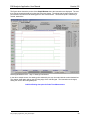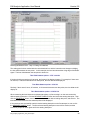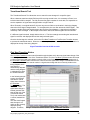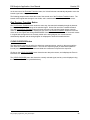
1
E84 Analysis Application
User Manual
Version 2.8
E84 Analysis Application User Manual
Version 2.8
Table of Contents
Overview ..................................................................................................................................................... 1
E84 Analysis Application ................................................................................................................ 1
Getting Started ............................................................................................................................................
Minimum System Requirements ....................................................................................................
Typographical Conventions ............................................................................................................
Installation ......................................................................................................................................
Troubleshooting WinNT, 2000, and XP Installation ...........................................................
Uninstalling the E84 Analysis Application .........................................................................
1
1
1
2
2
2
E84 Analysis Menu Bar ............................................................................................................................... 3
File Menu ........................................................................................................................................ 3
Save Recorded Data ......................................................................................................... 3
Open Data Set for Playback .............................................................................................. 3
Import DLD Log File .......................................................................................................... 4
Import HHT Cycle / Manual Test Data .............................................................................. 4
Export Graph as Metafile ................................................................................................... 4
Export Graph as Bitmap .................................................................................................... 4
Export Data to Text File ..................................................................................................... 5
Exit .................................................................................................................................... 5
Configuration Menu ........................................................................................................................ 5
Set E84 Interface Inputs .................................................................................................... 6
Enable Reserved Inputs .................................................................................................... 6
Set E23 Interface Inputs .................................................................................................... 7
Replace RSVD_1 with Pin 6 (Light Curtain) ...................................................................... 7
Set X-Axis Scale ................................................................................................................ 8
Set Voltage Reference ...................................................................................................... 8
Enter Test Information ....................................................................................................... 9
E23 Test Information ....................................................................................................... 10
Set Long Term Recording Mode ..................................................................................... 10
Record Using LPT (E84 Recorder) ................................................................................. 11
Record Using USB (E84 Recorder) ................................................................................. 11
Record Using COM (E84 DLD) ....................................................................................... 11
Analysis Menu .............................................................................................................................. 11
Ignore Idle Noise ............................................................................................................. 11
Ignore TD0 Warnings ...................................................................................................... 11
Ignore E23 CS Signal ...................................................................................................... 12
DLD Interface Menu ..................................................................................................................... 12
Configure DLD ................................................................................................................. 12
Upload DLD ..................................................................................................................... 14
Help Menu .................................................................................................................................... 14
Data Recoding Mode .................................................................................................................................
Recorded Data File Structure .......................................................................................................
Starting and Stopping Data Recording .........................................................................................
START Button .................................................................................................................
STOP Button ...................................................................................................................
UPLOAD DLD Button ......................................................................................................
Sampling Rate ..............................................................................................................................
E84 Recorder FIFO Overflow .......................................................................................................
E84 DLD Power On Graph Indicator ............................................................................................
E84 DLD Power Off Graph Indicator ............................................................................................
Timing Diagram Graph Update Rate ............................................................................................
E84_Analysis_Application_User_Manual.wpd
15
15
15
15
16
16
16
17
18
18
18
E84 Analysis Application User Manual
Version 2.8
Playback Analysis Mode ...........................................................................................................................
Playback Analysis Mode Graph Window ......................................................................................
Playback Analysis Tools ...............................................................................................................
Graph Zoom Tool ............................................................................................................
ZOOM FULL Button ...........................................................................................
Playback Scroll Feature .....................................................................................
Delta Signal Measurement Tool ......................................................................................
MEASURE SAMPLE Button ..............................................................................
Transitional Search Tool .................................................................................................
Find Next Transition Button ................................................................................
Find Previous Transition Button .........................................................................
CLEAR CURSORS Button ..............................................................................................
ERROR ANALYSIS Button .............................................................................................
Ignoring Idle Noise Errors ...................................................................................
Ignoring TD0 Warnings ......................................................................................
Ignoring E23 CS Signal ......................................................................................
Analyzing Large Recorded Data Sets .............................................................................
Exiting Playback Analysis Mode ...................................................................................................
19
19
20
20
22
22
22
22
25
25
26
26
27
29
30
31
31
31
Appendix A ................................................................................................................................................
Export Samples ............................................................................................................................
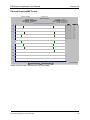
Exported Graph in WMF Format .....................................................................................
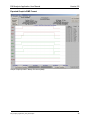
Exported Graph in BMP Format ......................................................................................
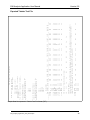
Exported Tabular Text File ..............................................................................................
Version History .............................................................................................................................
32
32
34
35
36
37
Technical Support ..................................................................................................................................... 38
E84_Analysis_Application_User_Manual.wpd
E84 Analysis Application User Manual
Version 2.8
List of Figures
E84 NT Driver Error ..................................................................................................................................... 2
File Menu ..................................................................................................................................................... 3
Save E84 Data Set Dialog Box ................................................................................................................... 3
Open E84 Data Set Dialog Box ................................................................................................................... 3
Import DLD Log FIle Dialog Box .................................................................................................................. 4
Save As Metafile Dialog Box ....................................................................................................................... 4
Save As Bitmap Dialog Box ........................................................................................................................ 4
Save As Text Dialog Box ............................................................................................................................. 5
Configuration Menu ..................................................................................................................................... 5
Set X-Axis Range Dialog Box ...................................................................................................................... 8
Enter Test Information Dialog Box .............................................................................................................. 9
E23 Test Information Dialog Box ............................................................................................................... 10
Long Term Recording Mode Enabled ....................................................................................................... 10
Long Term Recording Mode Active ........................................................................................................... 10
Record Using Menu Options ..................................................................................................................... 11
Analysis Menu Options .............................................................................................................................. 11
DLD Interface Menu Options ..................................................................................................................... 12
Configure DLD Dialog Box ........................................................................................................................ 12
Upload from DLD Dialog Box .................................................................................................................... 14
Save Data Set Dialog Box ......................................................................................................................... 14
Help Menu ................................................................................................................................................. 14
About E84 Analysis Application Dialog Box .............................................................................................. 14
Data Recording Mode ............................................................................................................................... 15
Sample Graph Window during Data Acquisition ....................................................................................... 16
Playback Analysis Mode Graph Window ................................................................................................... 19
Sample Screen - Zoom In Tool: Time Window Selection ......................................................................... 20
Sample Screen - Zoom In Tool: Zoom Applied ......................................................................................... 21
Delta Signal Measurement - Step 1: Instructions ..................................................................................... 22
Delta Signal Measurement - Step 2: Starting Point Marked ..................................................................... 23
Delta Signal Measurement - Step 3: Ending Point Marked ...................................................................... 24
Sample Transitional Search Screen - First Find Next Transition .............................................................. 25
Sample Transitional Search Screen - Second Find Next Transition ......................................................... 25
E84 Analysis Details .................................................................................................................................. 28
E84 Analysis Mode - Noise Error .............................................................................................................. 29
E84 Analysis Mode - TD0 Warning ........................................................................................................... 30
Sample Graph exported in Windows Meta File format (WMF) .................................................................. 34
Sample Graph exported in Bitmap File format (BMP) ............................................................................... 35
Sample Data Set exported in Tabular Text File format (TXT) ................................................................... 36
E84_Analysis_Application_User_Manual.wpd
(This page intentionally left blank)
E84 Analysis Application User Manual
Version 2.8
Overview
GCI’s E84 Recorder and E84 Data Logging Device (DLD) capture E84 Signal Streams associated with
automated material handoff operations in semiconductor fabrication facilities. Both units connect in-line
between Active (AMHS) and Passive (process equipment) E84 entities. The E84 Recorder connects to a
personal computer to provide real-time monitoring and unlimited recording to disk. The compact E84 DLD
is a self-contained unit capable of recording the last 50 material handoff operations to battery-backed
memory. GCI’s E84 Analysis application provides data analysis and management for both products.
E84 Analysis Application
GCI’s E84 Analysis application is a menu-driven graphical user interface that runs on the
Microsoft Windows NT, 2000, XP, and Vista operating systems (DLD support only). It configures the E84
Recorder and E84 DLD, supports data recording via the E84 Recorder, and uploads logged data from the
E84 DLD. It provides playback features including scroll, zoom, time measure, and automated error
analysis. Finally, the E84 Analysis application can save and load recorded E84 Signal Streams via the
PC’s hard drive.
Getting Started
Minimum System Requirements
The E84 Analysis application requires the following minimum system configuration:
•
•
•
•
•
•
•
486, or Pentium processor-based personal computer, laptop or desktop.
Windows NT/2000 or XP/Vista operating system.
E84 Recorder (not Vista compatible) - one parallel printer port (ECP support required). The
parallel printer port must be assigned to one of the standard memory addresses (378, 278, 3BC).
E84 DLD - one RS-232 or COM port
16 MB RAM
5 MB of available hard disk space.
CD-ROM drive
Typographical Conventions
Throughout this manual, various type styles are used in describing the E84 Analysis application’s GUI.
The styles defined here are used for:
Bold
- Used for screen names.
Italics
- Used for menu options.
Underlined
- Used for option button names.
SMALL CAPS
- Used for data entry fields.
E84_Analysis_Application_User_Manual.wpd
1
E84 Analysis Application User Manual
Version 2.8
Installation
To install the E84 Analysis application, locate the file GCI_E84AnalysisAppsetup.exe (on the E84 Analysis
Application Installation CD-ROM) using Windows Explorer® and double-click it. Follow the on-screen
instructions to complete the installation. Re-boot your system following installation.
A new group (GCI E84 Analysis) will be created in the Start Menu. Several shortcuts are added to this
new group, including shortcuts to the application, and this Users Manual.
Troubleshooting WinNT, 2000, and XP Installation
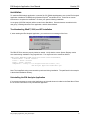
If, when starting the E84 Analysis Application, you receive an error message of the form:
E84 NT Driver Error
The E84 NT Driver was not properly loaded or started. Verify that the correct System Registry entries
were made during installation using regedt32.exe. Four keys need to be entered as follows:
[HKEY_LOCAL_MACHINE\SYSTEM\CurrentControlSet\services\HDLCDRVR]
“ErrorControl” = dword: 00000001
“Start” = dword: 00000002
“Type” = dword: 00000001
“ImagePath” = string:”\??\c:\Program Files\Get Control, Inc\
E84 Analysis Application\hdlcdrvr.sys”
Note: The ImagePath string must contain the path used during installation. The path listed in the example
is the default installation directory.
Uninstalling the E84 Analysis Application
If it becomes necessary to remove the Application, an Uninstall shortcut is added to the Start Menu.Follow
the on-screen instructions to fully uninstall the application.
E84_Analysis_Application_User_Manual.wpd
2
E84 Analysis Application User Manual
Version 2.8
E84 Analysis Menu Bar
The E84 Analysis Menu Bar is displayed along the top of the Graph Window. The available menu
options are File, Configuration, DLD Interface, Analysis, and Help.
File Menu
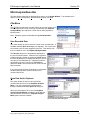
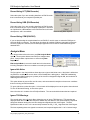
The File Menu provides the user with options to save the current set of
recorded data, load a set of previously recorded data (for Playback
Analysis Mode), and export the current data in either graphical or
tabular format.
Note: File Menu options are disabled during Data Acquisition.
Save Recorded Data
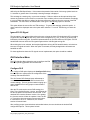
This option allows the user to save the current set of recorded data. A
standard Windows Save As dialog box is displayed. The current data
File Menu
set is saved to the file name supplied by the user. This data file can
then be loaded for use in the Playback Analysis Mode.
The Save As dialog box is automatically displayed at
the end of Data Acquisition. When the user completes
a Data Acquisition session by clicking the STOP button,
this Save As dialog box is displayed to allow the user to
save the just recorded data set. A default file name is
generated for the user in the form TEMP####.dat
(where the #### is auto-incremented for each recorded
data set saved).
If the user cancels the Save As dialog box, and initiates
another Data Acquisition session, the first set of
recorded data is lost.
Save E84 Data Set Dialog Box
Open Data Set for Playback
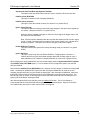
This option allows the user to load a previously
recorded data set for use in the Playback Analysis
Mode. The user is prompted for the desired file
through a standard Windows Open File dialog box.
When the user selects a file to load, the Playback
Analysis Graph Window is displayed, along with the
data set form the selected file. Playback Analysis
Mode options are then available.
Open E84 Data Set Dialog Box
E84_Analysis_Application_User_Manual.wpd
3
E84 Analysis Application User Manual
Version 2.8
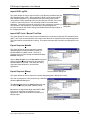
Import DLD Log File
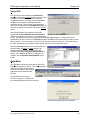
This option allows the user to import a DLD Log file that was uploaded using the
GCI Handheld Tester (HHT). When uploading a DLD Log file directly with the
E84 Analysis Application, it is automatically converted to the proper format
during upload. When uploading a DLD Log file using the GCI HHT, the Log file
is left in it’s raw binary format. This raw format must be converted before
displaying. This option converts the raw DLD Log file, prompts the operator for a Import DLD Log FIle
save file name, and displays the converted data. Reserved signals are
Dialog Box
processed based on the current setting of the Enable Reserved Inputs option in
the configuration menu.
Import HHT Cycle / Manual Test Data
This option allows the user to import Cycle and Manual test results saved using the GCI Handheld Tester
(HHT). HHT cycle and manual tests record a time chart that can be displayed by the Analysis Application.
This data must be converted before viewing. This option processes that conversion and displays the time
chart.
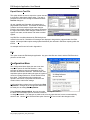
Export Graph as Metafile
This option allows the user to export the currently
displayed graph in Enhanced Meta File (EMF) or
Windows Meta File (WMF) format. The user is
prompted for a file name through a standard Windows
Save As dialog box.
Use the Save as type: list on the Save As dialog box to
change between Enhanced Meta File and standard
Windows Meta File formats. This allows the user to
export the Graph Window for use with other
applications.
Export Graph as Bitmap
Save As Metafile Dialog Box
This option allows the user to export the currently displayed graph in Bitmap File format.
The user is prompted for a file name through a standard
Windows Save As dialog box.
The Save as type: list on the Save As dialog box has
no affect when saving the graph in Bitmap format.
Bitmap files are significantly larger than WMF or EMF
files, but can generally be imported into more
applications. Appendix A contains an example of a
Bitmap export.
Save As Bitmap Dialog Box
E84_Analysis_Application_User_Manual.wpd
4
E84 Analysis Application User Manual
Version 2.8
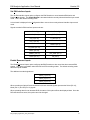
Export Data to Text File
This option allows the user to export the current data set
to a text file in signal state change order. The user is
prompted for a file name through a standard Windows
Save As dialog box.
All user supplied test information is formatted into a
page header in the text file. This header is followed by
a tabular list of time-stamped signal state changes.
Each line in the table contains a time-stamp, followed by
the signal name whose state changed at that time, the
signal’s new state, and the states of all other recorded
signals.
Save As Text Dialog Box
Any E84 Error conditions detected by E84 Analysis are
marked in the text file. Detailed error messages are displayed, along with the expected state of all E84
signals. All Analysis Menu option settings (described below) are reflected in E84 Error reporting within the
text file.
An example text file can be found in Appendix A.
Exit
This option closes the E84 Analysis application. Any open data files are closed, and the E84 Recorder is
placed in an idle mode.
Configuration Menu
The Configuration Menu allows the user to set data
acquisition options for the E84 Recorder. It also
provides an option to enter test information for E84
Recorder and E84 DLD data sets. E84 Recorder data
acquisition options include setting the types of signals to
record, the Voltage Reference, and the default X-Axis
time scale. Test information entry includes test
operator, test location, equipment manufacturer and
model number, and timeout settings.
Configuration Menu options have no affect during Data
Acquisition. Changes to the Configuration Menu must
be made prior to starting Data Acquisition.
During Playback Analysis Mode, the user can select
Configuration Menu
the Enter Test Information option to add test comments,
or change test details. The changes are made to the currently open data set, but are not automatically
saved to disk. Use the Save Recorded Data option from the File menu to store the changes to disk.
E84_Analysis_Application_User_Manual.wpd
5
E84 Analysis Application User Manual
Version 2.8
Set E84 Interface Inputs
The Set E84 Interface Inputs option configures the E84 Recorder to record standard E84 Active and
Passive mode signals. The Graph Window is annotated with the currently selected Interface Input record
mode. This is the default recording mode.
A check mark is displayed in the Configuration Menu next to the currently selected Interface Input record
mode.
Signals recorded in E84 Interface Inputs mode are:
Active Mode Signals
Passive Mode Signals
VALID (Pin 14)
L_REQ (Pin 1)
CS_0 (Pin 15)
U_REQ (Pin 2)
CS_1 (Pin 16)
READY (Pin 4)
TR_REQ (Pin 18)
BUSY (Pin 19)
COMPT (Pin 20)
HO_AVBL (Pin 7)
CONT (Pin 21)
ES (Pin 8)
Enable Reserved Inputs
The Enable Reserved Inputs option configures the E84 Recorder to also record the three reserved E84
signals. This option is available under both E84 and E23 recording modes. The default recording mode
has these inputs disabled.
The additional recorded signals are:
RSVD_1 (Pin 10)
RSVD_2 (Pin 11)
RSVD_3 (Pin 12)
When recording an Optical Communications link, these reserved signals represent the Select (Pin 10),
Mode (Pin 11) and Go (Pin 12) signals.
When uploading data from an attached DLD, the status of this option affects the displayed data. Once the
DLD data has been saved, this option cannot be changed.
E84_Analysis_Application_User_Manual.wpd
6
E84 Analysis Application User Manual
Version 2.8
Set E23 Interface Inputs
The Set E23 Interface Inputs option configures the E84 Recorder to record standard E23 Active and
Passive mode signals. The Graph Window is annotated with the currently selected Interface Input record
mode. Additional annotation changes include new timeout value names in the test information header
section.
The recorded signals are:
Active Mode Signals
Passive Mode Signals
VALID (Pin 14)
L_REQ (Pin 1)
CS_0 (Pin 15)
U_REQ (Pin 2)
CS_1 (Pin 16)
CS_2 (Pin 17)
READY (Pin 4)
TR_REQ (Pin 18)
BUSY (Pin 19)
COMPT (Pin 20)
If the interface being recorded does not match the pin assignments detailed above, custom adapter cables
must be assembled.
Replace RSVD_1 with Pin 6 (Light Curtain)
Some equipment manufacturers have replaced one of the unused E84 signals with a light curtain status
indicator. While this violates the published E84 specification, because the signal is not used for standard
E84 hand-offs, it does not affect AMHS deliveries.
This option replaces the RSVD_1 signal (pin 11 on the E84 interface connector, which is typically
connected to the Mode bit) with pin 6, connected to the light curtain status indicator. This allows those
customers using a light curtain indicator to display it’s status on the real time graph.
The Enable Reserved Inputs option is automatically set when selecting this option.
This option must be set before uploading data from an attached DLD. Once the DLD log file is uploaded
and saved, this option cannot be changed.
E84_Analysis_Application_User_Manual.wpd
7
E84 Analysis Application User Manual
Version 2.8
Set X-Axis Scale
The Set X-Axis Scale option displays a dialog box
where the user can enter the desired maximum X-Axis
Time value. It is recommended that the user set the
maximum X-Axis Time value large enough to capture
the entire test. For example, if a typical load sequence
takes three minutes, set the maximum X-Axis Time
value to at least three minutes (00:03:00).
The Set X-Axis Range dialog box contains three entry
fields, arranged in H:MM:SS format. Enter the desired Set X-Axis Range Dialog Box
hours, minutes and seconds for the X-Axis. The X-Axis
range can be any time length between one minute (0:01:00) and nearly 2 hours (1:59:59). The default
setting for the maximum X-Axis Time is two minutes (00:02:00).
Note: The X-axis scale only determines the length of the data set displayed on the screen at one time
during recording. It does not limit the length of the data recorded. For example, when using the default
setting of two minutes, the first two minutes of recorded data is displayed in real-time on the graph. When
the graph lines reach the right edge of the graph (at the two minute mark), the first two minutes of data is
shifted off the graph (to the left), the X-Axis labels are incremented by two minutes, and the next two
minutes of recorded data is plotted.
Set Voltage Reference
The Set Voltage Reference option displays a dialog box
where the user can enter the voltage reference used in
determining the state of the E84 Recorder’s inputs.
This setting does not affect the E84 DLD.
The Voltage Reference can be set to a level between
0.1 and 10.0 Volts in 0.1 Volt increments. The entered
Voltage Reference value is displayed on the Graph
Window, and in the test information header of the
tabular text file.
The default setting for the Voltage Reference is 1.8
Volts.
E84 logic states are determined by the presence or lack of current between the outputs and inputs of the
passive and active entities. However, the E84 Recorder inputs must be of high-impedance to remain nonintrusive to the interface between the active and passive entities. Therefore, the E84 Recorder utilizes a
voltage sense approach to detect the logic state of each E84 signal.
The E84 Recorder provides a programmable voltage reference to set the DC threshold voltage for sensing
the logic levels on the E84 interface. The SEMI® E84 specification specifies a maximum On State Voltage
of 1.8 Volts DC. This is the default setting for the E84 Recorder. This threshold voltage may be optionally
changed as required for a specific interface between active and passive entities or optical transceiver
devices.
E84_Analysis_Application_User_Manual.wpd
8
E84 Analysis Application User Manual
Version 2.8
Enter Test Information
The Enter Test Information option displays a dialog box where the user can enter details about the two
pieces of process equipment involved in the recording session.
Test details that can be entered by the user include:
•
•
•
•
GRAPH TITLE
NAME OF THE USER RUNNING THE TEST
LOCATION OF THE TEST
LOAD PORT NUMBER BEING TESTED
•
•
•
ACTIVE EQUIPMENT MANUFACTURER
ACTIVE EQUIPMENT MODEL NUMBER
ACTIVE TIMEOUT SETTINGS (TA1 - TA3)
•
•
•
PASSIVE EQUIPMENT MANUFACTURER
PASSIVE EQUIPMENT MODEL NUMBER
PASSIVE TIMEOUT SETTINGS (TP1 - TP6)
Enter Test Information Dialog Box
All test information entered by the user is stored with the saved data file, and displayed during Playback
Analysis Mode. It is also displayed in the E84 Data Recorder Graph Window, as well as in the exported
Meta, Bitmap and Text files.
When entering the Active and Passive Timeout settings, remember that the SEMI® E84 Specification sets
limits on valid timeouts (1 - 999 seconds). Values entered that are outside of the SEMI® E84 Specification
limits will not be accepted.
The only test information items that have defaults are the nine timeout settings. These defaults match the
typical values noted in the SEMI® E84 Specification (in seconds):
Timer
Default
Timer
Default
TA1
2
TP1
2
TA2
2
TP2
2
TA3
2
TP3
60
TP4
60
TP5
2
TP6
1
When recording data from an E84 DLD, The “Enter Test Information” dialog also displays the DLD’s
firmware version and ID number at the bottom of the dialog window.
A message is displayed when data recorded using the Replace RSVD_1 with Pin 6 (Light Curtain) option
is opened.
E84_Analysis_Application_User_Manual.wpd
9
E84 Analysis Application User Manual
Version 2.8
E23 Test Information
When configured to record E23 signals, the Enter Test
Information option displays a slightly altered dialog box
where the user can enter details about the two pieces of
process equipment involved in the recording session.
The main difference between E84 and E23 Test
Information is the renaming of timeout values. E23
timeouts are numbered T1 through T8.
Set Long Term Recording Mode
Long Term recording mode allows the user to
continuously record the E84 handshaking between two E23 Test Information Dialog Box
pieces of equipment over long periods of time, with realtime graphing disabled. The user can record several
days worth of E84 handshaking, and then use the
recorded data to trouble-shoot a failed E84 handoff that
occurred any time during the recorded session.
To enable the Long Term Recording Mode, the user
selects the Set Long Term Recording Mode option from
the Configuration Menu. When selected, a check mark
is displayed along side the option text in the menu. The
Graph Window is removed, and replaced with the
Long Term Recording Enabled window.
To initiate Long Term Recording, the user clicks the
START button. The screen changes to the Long Term Long Term Recording Mode Enabled
Recording Active window. Long Term Recording is
now active.
To terminate a long term recording session, the user
clicks the STOP button. When the STOP button is
clicked, the user is prompted to save the recorded data
set. After the data set is saved, the Long Term
Recording Active window is removed, and the system
enters Playback Analysis Mode. The Graph Window
is re-displayed, and the recorded data is plotted.
From here the user can export the recorded data set to
a text file for analysis.
When the user exits Playback Analysis Mode, the
Graph Window is removed, and the Long Term
Recording Enabled window is displayed. To exit from
Long Term Recording Mode, select the Set Long Term Long Term Recording Mode Active
Recording Mode option from the Configuration Menu.
The displayed check-mark next to the menu option will be removed, and the Graph Window will be
displayed.
More details on Data Acquisition follow in the next section.
E84_Analysis_Application_User_Manual.wpd
10
E84 Analysis Application User Manual
Version 2.8
Record Using LPT (E84 Recorder)
Select this option if you are recording data from an E84 Recorder
that is connected to your computer’s parallel port.
Record Using USB (E84 Recorder)
Select this option if you are recording data from an E84 Recorder
that is connected to one of your computer’s USB ports. Note that
as of publication, USB hardware in the E84 Recorder is still under
development, and is unavailable.
Record Using Menu Options
Record Using COM (E84 DLD)
If you are downloading the recorded data from an E84 DLD, use this menu to select the COM port to
which the DLD is connected. The drop down list shows all available COM port supported by Windows.
Once the COM port is selected, the E8 4Analysis Application can record live mode data through the
attached DLD.
Analysis Menu
The Analysis Menu allows the user to set E84 Analysis Mode
options. These options dictate how E84 Error Analysis takes
place. Analysis Menu options have no affect during Data
Acquisition.
E84 Analysis Mode is covered in detail later in this document,
including examples of the error conditions covered by this menu.
Analysis Menu Options
Ignore Idle Noise
The first option in the Analysis Menu allows the user to ignore Idle Noise errors. Idle Noise is defined as
any E84 Error condition that occurs when no E84 Handshake is taking place. Valid E84 handshaking
begins with the AMHS turning one (or both) of the Load Port Assignment Signals ON, and ends with all
AMHS signals turned OFF.
This option allows the user to filter out idle noise, and concentrate his analysis on those error conditions
that occur during an E84 Handshake.
To ignore Idle Noise, select this option. A check mark will be displayed next to the option when selected.
To turn off Idle Noise filtering, un-check the option.
Note: Idle noise is in violation of the E84 Specification. The cause should be determined and repaired.
Ignore TD0 Warnings
The second option in the Analysis Menu allows the user to ignore TD0 Warnings. TD0 warnings are
displayed when the recorded data shows the AMHS does not adhere to the recommended, but optional
delay timer between turning the Load Port Assignment Signals and the VALID signal. The E84
Specification calls out a 0.1 to 0.2 second delay between the CS_0 / CS_1 signal and the VALID signal.
The time separating these two signals is measured, and compared against the 0.1 to 0.2 second range
E84_Analysis_Application_User_Manual.wpd
11
E84 Analysis Application User Manual
Version 2.8
defined by the E84 Specification. If the measured separation falls outside of this range (either less than
0.1 seconds or greater than 0.2 seconds) a warning message is displayed.
This message is a warning only, not an error message. If failure to adhere to this optional delay timer
causes any problems for the Load Port, some other error condition will occur and be marked accordingly.
It is very possible that failure to adhere to this timer will have no affect at all on the success of the E84
Handshake. For this reason, the default state of the Ignore TD0 Warnings option is selected.
This option allows the user to filter out TD0 warnings. To ignore TD0 warnings, select this option. A
check mark will be displayed next to the option when selected. To turn off TD0 filtering, un-check the
option.
Ignore E23 CS Signal
The last option in the Analysis Menu allows the user to ignore the three CS signals during E23 recording.
A typical E23 handoff begins with one or more of the CS signals (CS_0, CS_1, and CS_2) turning ON,
followed by VALID turning ON. Some E23 implementations do not utilize the three CS signals. An E23
handoff that does not utilize the CS signals begins with the VALID signal turning ON.
When this option is not selected, the Analysis Application will tag all E23 handoffs that do not include at
least one CS signal as invalid. When this option is selected, the Analysis Application will treat those
handoffs as valid.
For those application where the CS signals are not implemented, this option should be enabled.
DLD Interface Menu
The DLD Interface Menu allows the user to configure the E84
DLD and upload logged data from the E84 DLD.
Configure DLD
DLD Interface Menu Options
The Configure DLD option displays the Configure DLD dialog
box with options to read and set the configuration of the
currently connected E84 DLD.
The Get Current DLD Settings button will attempt to
communicate with a connected DLD and retrieve its
current settings. This is a good test when bringing up a
newly installed DLD to verify proper communications
with the PC.
After the PC retrieves the current DLD settings, the
Date, Time, Daylight Savings, Version, and ID fields will
be filled in with the current values from the DLD. If the
attached DLD contains firmware version 2.0 or greater,
the Counter section will also be updated. Note: the RJConfigure DLD Dialog Box
11 Transceiver does not support counters at this time.
If connected to an RJ-11 Transceiver, the Counter
section will remain blank.
After verifying proper communications as described above, the user should set the desired DLD
configuration options. These options include:
E84_Analysis_Application_User_Manual.wpd
12
E84 Analysis Application User Manual
Version 2.8
Synchronize DLD Time/Date with System Time/Date
This option resets the DLDs internal real time clock to match the PC’s time and date.
Initialize (Clear) DLD RAM
This option erases the DLDs recording RAM buffer.
Initialize (Clear) Counters
This option clears the internal counters (for version 2.0 or greater DLD’s).
Ignore Control Signals
This option enables a masking function that treats changes in the three control signals as
non-events. (Requires version 2.5 or greater DLD’s).
When this option is disabled, changes on the three control signals do trigger events, and
are written into the RAM buffer.
Note: Leave this option disabled unless the recorded data shows excessive control signal
events. Having a recording of the true states of the control signals is very valuable when
analyzing a data set. This option will mask true changes to the control signals.
Enable DLD Error Trapping
This option turns on the special Errors Only Recording mode (for version 2.0 or greater
DLD’s).
Ignore Idle Noise
This option is used only when the Enable DLD Error Trapping option is selected. It
instructs the DLD to ignore signal state changes that would normally trigger an error if
those transitions occur outside of a standard handoff (for version 2.0 or greater DLD’s).
When bringing up a newly installed DLD, the user should always select the Synchronize DLD Time/Date
and Initialize (Clear) DLD RAM options. For more details on DLD configuration options, see the E84
DLD User Manual.
Note: when the Initialize (Clear) DLD RAM option is selected, the DLD erases it’s internal recording RAM
buffer. An attempt to upload the DLD log file just after clearing the RAM buffer will result in an error
message saying that the DLD Log file contains no data points. After clearing the RAM buffer, make sure
that the DLD has recorded new signal transitions so the RAM buffer will contain valid data points. The
DLD will log power on events, so an easy way to ensure the RAM contains at least one data point is to
power cycle the DLD after clearing the RAM.
After desired options have been selected, press the Update DLD button. The PC will attempt to
communicate with the connected DLD and configure it with the selected options. Options are stored in
non-volatile RAM, and remain in effect until the DLD is reconfigured.
E84_Analysis_Application_User_Manual.wpd
13
E84 Analysis Application User Manual
Version 2.8
Upload DLD
The Upload DLD option displays the Upload DLD
dialog box. Select the Connect button to connect to the
currently connected DLD and upload its data log.
Logged data from the currently connected E84 DLD is
uploaded and converted to E84 Data Recorder
Application format. The progress of the upload and
conversion are displayed in the Upload DLD dialog box.
The user may abort the upload by selecting the Cancel
button.
After the E84 Recorder uploads and converts the
logged data, the Save E84 Data Recorder Data Set
Upload from DLD Dialog Box
dialog box prompts the user to save the uploaded data
to disk. This dialog box consists of a standard Windows Save As dialog box. A default file name is
generated for the user in the form TEMP####.dat (where the #### is auto-incremented for each recorded
data set saved). The current data set is saved to the file name supplied by the user. If the user cancels
the Save As dialog box, and initiates another upload, the first set of recorded data is lost.
When the Save As dialog box has closed (by the user
selecting either the Save or Cancel buttons), the
uploaded E84 Signal Stream is displayed in the
Playback graph window Playback Analysis Mode is
started. For a detailed discussion on analysis tools
available, see the Playback Analysis Mode section
below.
Help Menu
The Help Menu provides the user with an About E84
E84 Analysis Application option. This option displays a Save Data Set Dialog Box
dialog box showing version number
information for both the E84 Analysis
Application and the E84 Recorder
firmware.
Help Menu
For E84 DLD’s, the message
Firmware Version x.x is replaced by
the message E84 Recorder Not Connected.
About E84 Analysis Application Dialog Box
E84_Analysis_Application_User_Manual.wpd
14
E84 Analysis Application User Manual
Version 2.8
Data Recoding Mode
The initial mode for the E84 Analysis application is Data Recording Mode. When recording live data, the
Data Recording Mode provides the interface to start and stop data recording. When connected to the
E84 DLD, Data Recording Mode also supports uploading logged data.
During data recording, the E84 Analysis application plots the acquired E84 Signal Stream on a timing
diagram graph in real-time and saves it to a temporary file on disk. During data upload via the E84 DLD,
the E84 Analysis application converts the logged data and saves it to a temporary file on disk. Data
analysis features are not available during Data Recording Mode (except for the real-time updates to the
timing diagram graph, when not in Long Term Recording mode). Recorded and uploaded data can be
analyzed using the Playback Analysis Mode described below.
Recorded Data File Structure
The recorded data file contains all user supplied test information, along with time-stamped data samples
for each signal state change that occurred during the recording session. Only those data samples that
contain a state change are logged to the data file. This provides a compressed file format to limit the size
requirements of the data file. If every sampled data point were stored (at the 1 kHz sample rate), the
storage requirements would be 4 kBytes for each second of recorded data. For a typical 3 minute test,
that would equate to a 720 kByte file. Saving only the signal state changes reduces this storage
requirement to under 100 bytes (for a typical load sequence). E84 Specification violations such as idle
noise will affect the storage requirements.
The compressed data file is expanded during Playback Analysis Mode to display the true 1 mSecond
sample data recorded by the E84 Recorder.
Starting and Stopping Data Recording
While in Data Record Mode (with Long Term Recording enabled or not), three option buttons are
available on the Graph Window. The START button initiates data recording, while the STOP button
terminates data recording. The UPLOAD DLD button opens the Upload DLD dialog box
START Button
Pressing the Start button re-displayed the Graph
Window (to include the user supplied Test Information if
entered) and initiates data recording. Data recording
continues until the Stop button is pressed. Recorded
data is added to the timing diagram graph, and logged
to disk in a temporary data file.
Note, if Long Term Recording Mode has been enabled,
the Graph Window is not displayed, and recorded data
is not plotted in real-time.
Data Recording Mode
E84_Analysis_Application_User_Manual.wpd
15
E84 Analysis Application User Manual
Version 2.8
STOP Button
Pressing the Stop button halts data recording. The user
is prompted to save the data set (through a standard
Windows Save As dialog box). The file name is
defaulted to “TEMP####.dat” (where #### is a
sequential file index starting at 0000). The user has the
option of changing the file name, or leaving it at the
temporary default. If the recorded data is not required
for additional Playback Analysis, the user can cancel
the Save As dialog box. The recorded data will not be
saved (though it is still available for immediate
Playback Analysis).
When the Save As dialog box has closed (by the user
selecting either the Save or Cancel buttons), the graph
Sample Graph Window during Data Acquisition
is updated with the last recorded data point, and
Playback Analysis Mode is started. A signal state
change table is built and displayed to the right of the timing diagram. This table shows the time-stamped
sequence of state changes that occurred during data recording. The displayed table shows the first 29
signal state changes currently visible on the graph.
For a detailed discussion on analysis tools available, see the Playback Analysis Mode section below.
UPLOAD DLD Button
The Upload DLD button is a short cut to the Upload DLD dialog box described in detail previously in this
manual. Select the Connect button to connect to the currently connected DLD and upload its data log.
Logged data from the currently connected E84 DLD is uploaded and converted to E84 Analysis application
format. The progress of the upload and conversion are displayed in the Upload DLD dialog box. The user
may abort the upload by selecting the Cancel button.
Sampling Rate
The E84 Recorder and E84 DLD record the E84 Signals using a transitional method. During recording, all
E84 signals are sampled simultaneously. The current state of the signal is compared with the previously
sampled signal state. If one or more signals have changed in the previous from the previous sample, the
data is time-stamped and recorded. The E84 Recorder samples at a 1 KHz rate (1mS resolution) and the
E84 DLD samples at a 500 Hz rate (2mS resolution).
The E84 Recorder produces a 4Hz timing mark (250 mS period) that is read by the E84 Analysis
application. The E84 Analysis application buffers a minimum of four samples per second. The timing
mark produces a minimum 250 mSecond update for the timing diagram graph during time periods of static
E84 signals.
E84_Analysis_Application_User_Manual.wpd
16
E84 Analysis Application User Manual
Version 2.8
E84 Recorder FIFO Overflow
The E84 Recorder contains a FIFO capable of buffering up to 16 signal transitions or timing records
without being serviced by the E84 Analysis application. If the E84 Recorder writes more than 16 records
to the FIFO before the E84 Analysis application reads the FIFO, the FIFO will overflow. If the FIFO
overflows, buffering of signal state transitions halts until the FIFO has been read. This results in potential
data loss. Limiting the real-time graph update to 100 Hz significantly improves the probability that the E84
Recorder FIFO will not overflow. If the E84 Recorder FIFO does overflow, the recorded data sample is
flagged.
When Data Acquisition completes, and the recorded data is displayed in Playback Analysis mode, a
vertical line is drawn at the time-stamp where the FIFO overflow was detected. This vertical line indicates
potential data loss. Due to the E84 Recorder’s 16-sample FIFO, the potential data loss occurred 16
samples past the displayed vertical line.
The most common cause for FIFO overflow problems is related to Windows multi-tasking. During Data
Acquisition, the E84 Recorder continuously records data samples at a minimum rate of 4 samples per
second (when no signal state changes are occurring). That rate increases with increased signal state
changes (to a maximum of 1000 samples per second). The E84 Analysis application can easily keep up
with the E84 Recorder during normal testing.
If, however, the user attempts to start another application during Data Acquisition, the computer shifts
processing time (away from the E84 Analysis application) to access the hard-drive, and load and initialize
the new application. This shift of processing time limits the E84 Analysis application’s ability to read data
samples from the E84 Recorder. This forces the E84 Recorder to buffer samples deeper into the FIFO,
eventually filling it up.
Due to the potentially high rate of sampling, FIFO overflows may even occur when the computer switches
into Screen-Saver mode.
FIFO overflow errors are not common. Typical E84 signal handshaking contains few signal state changes,
separated by adequate time for proper recording, even if the host computer is busy with another
application. If the E84 interface being recorded is not functioning properly, with signals oscillating or
bouncing, FIFO overflow errors will be more common.
If FIFO overflow errors do occur, verify that no other applications are stealing processing time from the
E84 Analysis application. Disable Screen-Saver mode to keep the computer from switching off the
display. Analyze the recorded data. If signals are changing at a very high rate of speed, trouble-shoot the
E84 interface to determine the cause.
E84_Analysis_Application_User_Manual.wpd
17
E84 Analysis Application User Manual
Version 2.8
E84 DLD Power On Graph Indicator
Power for the E84 DLD is provided by the Load Port. The E84 DLD can log transitory signal changes
during power up that the user may choose to ignore.
To indicate a power cycle, a vertical line is drawn at the time-stamp to indicate a power cycle on the E84
DLD. This marker is identical to the vertical line used to indicate an E84 Recorder FIFO Overflow
(described above).
E84 DLD Power Off Graph Indicator
The DLD (starting with version 2.3) also writes a power
down event into the log file. This allows the E84
Analysis Application to mark areas in the graph were
the DLD was not under power. This greatly aids in
analyzing the resultant data file. The power down event
is indicated by a vertical colored line.
The figure at right shows two successive IR Transceiver
Tests run on a GCI Handheld Tester. A DLD was
inserted between the HHT and the Optical Transceiver
being tested. The signal state changes recorded show
the sequence of signal tests run by the HHT.
The graph shows a solid black vertical line at the far left
of the display. This is a DLD Power On Indicator.
Following a series of signal changes, the graph displays a second vertical line whose color ranges from
red (near the top of the display) to green (in the middle), back to red and ends in black. This colored
vertical line is the DLD Power Down Indicator.
A second DLD Power On Indicator is shown towards the right of the graph window, followed by a second
IR Transceiver Test. No signal lines are graphed between the DLD Power Down and Power Up
indicators. A final DLD Power Down Indicator is shown at the far right of the graph window.
Timing Diagram Graph Update Rate
The real-time graph provides a maximum resolution of 100 data points per second (or 10 mS period). This
limitation is imposed due to the overhead of updating the graphics screen. Signals which transition faster
than 100 Hz may be transparent on the real-time graph. However, these signal transitions will be
recorded, reported in the tabular reports, and available for graphing during Playback Analysis mode.
When displaying previously recorded data using the E84 Analysis application’s Playback Analysis Mode,
the graph update rate reverts to the 1 mSecond sample rate of the E84 Recorder. This allows complete
analysis of recorded data, including those signal state changes that occurred under the 10 mSecond
update rate of the real-time graph.
E84_Analysis_Application_User_Manual.wpd
18
E84 Analysis Application User Manual
Version 2.8
Playback Analysis Mode
The Playback Analysis Mode can be used to examine the recorded data in detail. Playback Analysis
Mode is entered automatically upon termination of Data Acquisition. Playback Analysis Mode can also
be entered by selecting a saved data set using the Open Data Set for Playback option from the File menu.
The Playback Analysis Mode Graph Window is displayed, and the recorded data set is plotted on the
timing diagram graph. The resolution of the X-Axis is set to the 1 mSecond sample rate of the E84
Recorder. This allows the user to see every state change recorded. The initial X-Axis settings for the
graph are set to include the entire recorded data set on one screen. For long recording sessions, this may
cause a delay in updating the graph due to the large number of data points being plotted.
Playback Analysis Mode offers several analysis tools that help in understanding the data set recorded.
These tools are described in detail in the following sections.
Playback Analysis Mode Graph Window
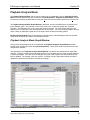
Along with the timing diagram of the recorded data, the Playback Analysis Graph Window includes
several option buttons not present during Data Acquisition. These option buttons provide access to the
analysis tools available.
Also displayed on the Playback Analysis Graph Window is a tabular, time-stamped list of signal state
changes. This table contains the first 29 state changes occurring within the time scale currently displayed
in the timing diagram. If the time scale is changed, using one of the analysis tools described below, the
table is updated. For example, if the user zooms in to display a single, signal state change, the table is
updated to include the time-stamp for only that one change.
Playback Analysis Mode Graph Window
E84_Analysis_Application_User_Manual.wpd
19
E84 Analysis Application User Manual
Version 2.8
Playback Analysis Tools
Graph Zoom Tool
The original graph displayed in Playback Analysis Mode covers the entire recorded data set. It is very
difficult to see the separation between different signal state changes, especially for long recording
sessions. The Graph Zoom Tool allows the user to focus in on a specific (time based) area of the timing
diagram.
The Graph Zoom Tool allows the user to set the minimum and maximum time-axis points for the
displayed timing diagram. This means the user can zoom in to a specific time window, adjusting the
minimum and maximum time-stamps displayed on the timing diagram. The scale along the X-Axis
changes with the zoom, while the Y-Axis remains constant. This keeps all recorded signals visible on the
display.
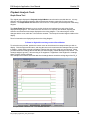
Zoom In Instructions are displayed just above the timing diagram.
To Zoom In: Right-Click and drag to select Zoom Window
To select the zoom window, position the mouse cursor at the minimum time-stamped data you wish to
display. Click the Right mouse button, and drag the cursor to the maximum time-stamped data you wish
to display. A dash-lined rectangle is displayed, showing the area of the graph you are selecting. When
you have drawn the rectangle around the data you wish to display, release the Right mouse button. The
rectangle height is ignored, Y-Axis zooming is not supported. Regardless of the height of the rectangle
drawn, only the X-Axis is affected.
The example screen above shows the dash-lined rectangle drawn around the raising edge of the CS_0
Sample Screen - Zoom In Tool: Time Window Selection
E84_Analysis_Application_User_Manual.wpd
20
E84 Analysis Application User Manual
Version 2.8
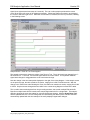
signal (at an approximate time-stamp of 4 seconds). The user in this example positioned the mouse
cursor at the upper left corner of the displayed rectangle. Clicked the Right mouse button, and dragged
the cursor to the lower right corner. When the mouse button is released, the zoom is processed, resulting
in the following screen.
Sample Screen - Zoom In Tool: Zoom Applied
The sample screen above shows the results of the Zoom In Tool. The X-Axis scale has changed from 0 50 Seconds to 2 - 7 seconds. All recorded signal state lines are still visible. The separation between
signal state changes is exaggerated due to the new time axis range.
Note the change in the time-stamp table displayed to the right of the timing diagram. In the sample screen
on the previous page, the table contained 16 entries, ranging from 3.692 to 36.594 seconds. With the
change in the X-Axis time scale following the Zoom, the table now contains six entries, ranging from 3.692
to 4.826. Only those state changes that are visible in the current timing diagram are listed in the table.
This is useful when examining data from long recording sessions, that contain multiple E84 hand-offs.
Data from multiple hand-offs will contain more state changes than will fit in a single table. This makes it
difficult to pinpoint the exact time-stamp for a specific signal state change. With the Graph Zoom Tool,
and the updated table, the user can enlarge the area surrounding the desired point, and have the table
automatically updated with the time-stamps of the newly displayed signal state changes.
E84_Analysis_Application_User_Manual.wpd
21
E84 Analysis Application User Manual
Version 2.8
ZOOM FULL Button
After using the Graph Zoom Tool to focus in on a specific section of the recorded data, use the ZOOM
FULL button to re-display the entire data set on the timing diagram. The X-Axis time range is reset to the
original values, and the graph is redisplayed.
The ZOOM FULL button has no affect when the entire data set is already displayed.
Playback Scroll Feature
The Playback Scroll Feature allows the user to scroll back and forth through the displayed data set.
When the user zooms in to display a small portion of the timing diagram, the area of interest may not be
visible. The Scroll Feature allows the user to move the center point of the X-Axis back and forth. The
data displayed in the graph will scroll along with the center point.
A scroll bar is displayed at the bottom of the Graph Window. This scroll bar provides the interface for
adjusting the graphs X-Axis center-point. Moving the scroll bar tab to the right, moves the X-Axis center
point to the right. Moving the scroll bar tab to the left, moves the X-Axis center point to the left.
There are three methods of scrolling through the data set. To rapidly scroll through the data, click the
scroll bar tab using the Left mouse button, and drag it to the approximate location of the desired data. The
location of the scroll bar tab within the scroll bar is relative to the resulting X-Axis center-point. If you wish
to quickly move the window to the beginning of the data set, slide the scroll bar tab to the far left side of
the scroll bar.
Alternately, for more fine adjustments, use the Left mouse button to single-click inside the dark gray area
of the scroll bar. Clicking to the left of the scroll bar tab will move the X-Axis center-point to the left
(smaller time-stamp value). Clicking to the right of the scroll bar tab will move the X-Axis center-point to
the right (larger time-stamp value). Single clicks inside this dark gray region move the X-Axis center-point
in 1 minute increments.
For extra fine adjustments, click the Left or Right arrows of the scroll bar. Single clicking the scroll bar
arrows move the X-Axis center-point in 1 second increments.
Delta Signal Measurement Tool
The Delta Signal Measurement Tool provides the user with a simple method of measuring the amount of
time separating two signal state changes. To measure the amount of time separating any two signal state
changes, click on the MEASURE SAMPLE button.
MEASURE SAMPLE Button
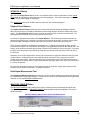
The MEASURE SAMPLE button starts the process of measuring the time separating two signal state
changes. When pressed, the MEASURE SAMPLE button displays instructions asking the user for the
starting data point.
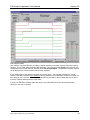
Left-Click Starting data point for Delta Time Measurement
Delta Signal Measurement - Step 1: Instructions
E84_Analysis_Application_User_Manual.wpd
22
E84 Analysis Application User Manual
Version 2.8
The figure above shows the portion of the Graph Window where the instructions are displayed. The user
then selects the starting data point using the Left mouse button. The signal state change nearest to the
point selected is marked as the starting point for time measurement. The selected point is marked by a
vertical, dashed line.
Delta Signal Measurement - Step 2: Starting Point Marked
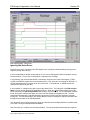
In the above sample screen, the starting point selected by the user is marked with the vertical dashed line.
The nearest signal state change was the rising edge of the VALID signal. The instruction text changes,
asking the user for the ending data point.
Left-Click Ending data point for Delta Time Measurement
E84_Analysis_Application_User_Manual.wpd
23
E84 Analysis Application User Manual
Version 2.8
Delta Signal Measurement - Step 3: Ending Point Marked
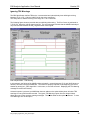
The ending point is then marked with the vertical dashed line, and the instruction text changes to display
the time delta between the two points. In this example, the user has selected the rising edge of the BUSY
signal. The time delta between the two points is shown as:
Time Delta between points - 2.797 seconds
If the time delta is greater than 60 seconds, the format of the display changes. For example, if there were
25 minutes, 4.134 seconds between two data points, the time delta would display as:
Time Delta between points - 25:4.134
Similarly, if there were 3 hours, 25 minutes, 4.134 seconds between two data points, the time delta would
display as:
Time Delta between points - 03:25:4.134
When measuring the time between two distant data points, try first zooming in on the area around the
desired starting data point. Click the MEASURE SAMPLE button and select the starting data point. Then
click the ZOOM FULL button, zoom in on the area around the desired ending data point, and select it. The
total delta time between the two selected points will be displayed.
If the user does not successfully mark his desired starting data point on the first attempt, he can re-click
the MEASURE SAMPLE button. The first selected starting data point cursor will be cleared, and the
instruction prompt will once again ask for the starting data point.
E84_Analysis_Application_User_Manual.wpd
24
E84 Analysis Application User Manual
Version 2.8
Transitional Search Tool
The Transitional Search Tool allows the user to search for state changes for a specific signal.
When a data set contains multiple E84 Hand-offs covering several hours, it is necessary to Zoom In on
individual hand-offs for analysis. The fully Zoomed Out graph contains so much data, it is impossible to
see the separation of signal state changes within a single hand-off.
When Zoomed In on a signal hand-off, the user may want to find the next location in the timing diagram
where the VALID signal changed states. To accomplish this, the user first selects the VALID signal. This
is done by double-clicking the signal name to the left of the timing diagram. A signal that is selected is
marked by a blue rectangle. In the sample screen shown below, the VALID signal has been selected.
If a different signal is desired, simply double-click on it. The blue rectangle surrounding the last selected
signal is removed, and displayed around the newly selected signal.
Once the desired signal is selected, click on the Find Next Transition or Find Previous Transition buttons
to process the transitional search. When the search completes, the time-stamp of the located transition is
displayed at the top of the timing diagram.
Signal Transition found at 04.543 seconds
Find Next Transition Button
The Find Next Transition button search forward through the data set for the next signal state change of the
selected signal. On the first use of the Transitional Search Tool, the Find Next Transition button will locate
a cursor on the first signal state change currently visible on the timing diagram. Each subsequent use of
the Find Next Transition button will move the cursor to the next signal state change FORWARDS from the
current cursor location. If the search results in a signal state change that is not currently visible on the
timing diagram, the XAxis limits are
automatically adjusted,
and the timing diagram
is redisplayed to show
the located transition.
In the following sample
screen, the user has
selected the VALID
signal, then clicked on
the Find Next
Transition button. The
first visible VALID
signal state change is
located (because this
was the first use of the
Transitional Search
Tool), and marked with
a vertical, dashed line
cursor.
The next VALID signal
state change is not
visible on the currently
displayed timing
diagram. Therefore,
Sample Transitional Search Screen - Second
First FindFind
Next
Next
Transition
Transition
E84_Analysis_Application_User_Manual.wpd
25
E84 Analysis Application User Manual
Version 2.8
on the next use of the Find Next Transition button, the X-Axis limits are automatically adjusted to move the
located signal state change into view.
The following sample screen shows the result of the second use of the Find Next Transition button. The
located VALID signal state change is now visible, and is marked with the vertical, dashed line cursor.
Find Previous Transition Button
The Find Previous Transition button works the same way, but searches backwards through the data set
for the previous signal state change of the selected signal. On the first use of the Transitional Search
Tool, the Find Previous Transition button will locate a cursor on the last signal state change currently
visible on the timing diagram. Each subsequent use of the Find Previous Transition button will move the
cursor to the next signal state change BACKWARDS from the current cursor location. If the search results
in a signal state change that is not currently visible on the timing diagram, the X-Axis limits are
automatically adjusted, and the timing diagram is redisplayed to show the located transition.
CLEAR CURSORS Button
The data point line cursors, as well as the delta time measurement text, remain on the screen until the
user clicks the CLEAR CURSORS button. The user can export the graph (in either Meta or BMP file
formats) and have the data point cursors and delta time measurement copied to the export file.
Clicking on the CLEAR CURSORS button clears the two data point cursors, and redisplays the Zoom In
instruction text.
The CLEAR CURSORS button also clears the currently selected signal, and any cursor displayed using
the Transitional Search Tool (described above)
E84_Analysis_Application_User_Manual.wpd
26
E84 Analysis Application User Manual
Version 2.8
ERROR ANALYSIS Button
Selecting the Error Analysis will display E84 Analysis details. If E23 signals were recorded, the analysis
will be based on the E23 handoff specification.
When the user first enters Playback Analysis Mode (either automatically at the end of Data Acquisition,
or after opening a saved data set for analysis) the recorded data is analyzed against timing requirements
defined in the E84 Specification. Any violations of the timing requirements are added to an internal error
list.
When the user presses the Error Analysis button, the standard Tabular Signal State Table at the right of
the timing diagram is removed, and replaced with E84 Analysis details. If the recorded data set is not in
violation of any E84 Timing requirements, a message is displayed indicating the data set is in full
compliance.
All standard Playback Analysis Mode tools are still functional. Use of several Playback Analysis Mode
tools will remove the E84 Analysis details, and re-display the tabular signal state table. The user can then
re-display the E84 Analysis details by selecting the Error Analysis button.
When the user presses the Error Analysis button, several changes occur on the Playback Analysis
Screen. First, the Error Analysis button is replaced by a Close Analysis button. This button is used to
remove the E84 Analysis details, and re-display the standard Tabular Signal State Table. Two additional
buttons are also displayed, the Prev and Next buttons. These buttons are used to advance back and forth
through each E84 Error condition. The first E84 Error condition is then located, and marked with a cursor.
E84 error details are then displayed.
The Prev button will move the Error Cursor to the previous E84 Error condition PRIOR to the current error.
If the error point is not visible in the timing diagram, the X-Axis is automatically updated.
The Next button moves the Error Cursor to the next E84 Error condition FOLLOWING the current error. If
the error point is not visible in the timing diagram, the X-Axis is automatically updated.
In either case, the Error Message and State Table are updated with details from the new error. If no E84
Error conditions exist in the direction selected (Prev or Next), then the button press is ignored.
The Close Analysis button will remove the E84 Analysis details, and re-display the standard Tabular
Signal State Table.
The following figure shows an example screen with E84 Analysis details displayed. Note that the tabular,
time stamped data table is replace by an error message, and a new state table. The error message
displayed details the E84 timing error detected. In this example, the Passive Equipment (Load Port)
dropped the READY signal prematurely. The E84 Specification dictates that the READY signal should
remain ON until AFTER the AMHS has dropped the TR_REQ and BUSY signals, and turned ON the
COMPT signal. The error message displayed indicates that the Load Port should be waiting for the AMHS
to change these three signals, and that no other signals should have changed state.
A Signal State table is displayed below the error message. This table first shows the time stamp where
the E84 Error condition was detected (based on the recorded data). The table also shows all 12 E84
signals, along with the current state, and expected state (based on the current stage of the E84
handshake) of each. Those signals that are not in the correct state are displayed in bold and underlined.
In this example, the READY signal is marked because its current state is OFF, but it should be ON.
E84_Analysis_Application_User_Manual.wpd
27
E84 Analysis Application User Manual
Version 2.8
E84 Analysis Details
The selection of the first E84 Error condition to display is based on the data currently visible in the timing
diagram. This is useful when analyzing large data sets. The user can use the Zoom tool to zoom in on a
small portion of the overall data set, and then enter E84 Analysis Mode. The E84 Error condition marked
will be the first error detected starting with the data displayed.
In the following figure, the data set extended over several hours. The user has zoomed in to a small
section of the data. When the Error Analysis button is pressed, the first E84 Error condition is located at a
time stamp of over 7½ hours. This is not the first E84 Error condition in the recorded data set, but is the
first error condition starting with the visible data.
If there is no E84 Error condition within the range of the visible data, the X-Axis would automatically
advance to the next occurrence.
E84_Analysis_Application_User_Manual.wpd
28
E84 Analysis Application User Manual
Version 2.8
E84 Analysis Mode - Noise Error
Ignoring Idle Noise Errors
Electrical noise may be present on the E84 signals due to improperly shielded cabling or faulty power
supplies (among other causes).
If the recorded data set shows noise problems on one or more E84 signals, E84 Error Analysis quickly
becomes tedious. Every noise hit will produce a separate error message.
In this example, the recorded data shows a momentary noise hit on the Load Ports outputs (L_REQ,
U_REQ, and READY signals all turn ON simultaneously). This noise hit occurs during an idle state, i.e.
no E84 Handshake was in progress at the time of the error. In all likelihood, no AMHS vehicle was
present to be affected by the error.
In this condition, it is helpful to be able to ignore Idle Noise Errors. The main goal of the E84 Analysis
Mode is to help trouble-shoot E84 Handshaking failures. When the Analysis Menu option Ignore Idle
Noise is selected, the E84 Analysis Mode adds a filter to its error search. For each E84 Error condition
found, the system verifies that at least one of the Load Port Assignment Signals are ON. The E84
Specification dictates that a valid E84 Handoff begins with one of the Load Port Assignment signals
turning ON. The E84 Specification also dictates that the Load Port Assignment signal must remain ON
throughout the duration of the E84 Handshake.
This allows the user to advance through a large recorded data set and display E84 Error conditions that
occur ONLY during an attempted E84 Handshake.
Note: Idle noise is in violation of the E84 Specification. The cause should be determined and repaired.
E84_Analysis_Application_User_Manual.wpd
29
E84 Analysis Application User Manual
Version 2.8
Ignoring TD0 Warnings
The E84 Specification defines TD0 as the “recommended and optional delay timer defining the timing
between CS_0 or CS_1 ON and VALID ON for the active equipment.”
This delay timer is defined as being in the range of 0.1 to 0.2 seconds.
The following figure shows a recorded data set exhibiting this warning. The Error Cursor is positioned at
7:37:06.713, where the VALID signal turns ON. The error message indicates that the AMHS has delayed
only 0.09 seconds between the CS_0 signal and the VALID signal.
E84 Analysis Mode - TD0 Warning
In this example, the failure of the AMHS to delay at least 0.1 seconds between CS_0 and VALID does not
affect the success of the E84 Handshake. The Load Port properly responds to the beginning of the E84
Handoff by turning its L_REQ signal ON. In this case, no error has occurred. Displaying the TD0 Warning
message becomes unnecessary.
Unless this option is selected, an AMHS that does not adhere to the optional delay timer will show TD0
warnings for every E84 Handoff recorded. The Ignore TD0 Warnings option from the Analysis Menu
allows the user to filter out these warning messages. The default state for this option is selected. To view
TD0 Warnings, turn off this option.
E84_Analysis_Application_User_Manual.wpd
30
E84 Analysis Application User Manual
Version 2.8
Ignoring E23 CS Signal
When analyzing E23 recorded data, the Analysis Application will tag handoffs that do not utilize the CS
signals as invalid. A typical E23 handoff begins with one or more of the CS signals (CS_0, CS_1, and
CS_2) turning ON, followed by VALID turning ON. Those E23 implementations that do not utilize the three
CS signals will show false failures.
Turn on the Ignore E23 CS Signal option. When this option is selected, the Analysis Application will treat
those handoffs as valid.
Analyzing Large Recorded Data Sets
The E84 Recorder can be used to record E84 Signal data over a long time period. Some applications call
for recording data over several days time. When analyzing large recorded data sets, the combination of
several Playback Analysis Mode tools can be helpful.
When a large data set is first opened, the timing diagram will attempt to show the entire data set. This
means the X-Axis range may be set to several hours in length. As described above, a data set recorded
over several days will result in an X-Axis range well over 70 hours.
Most E84 Hand-offs occur in minutes, some in less than one minute. When viewed over a 70 hour range,
these individual hand-offs will appear as single blips on the timing diagram. To get any meaningful
information out of the recorded data, the user must use the Graph Zoom Tool to zoom the X-Axis to a
more useable scale, typically under five minutes. At that zoom level, individual E84 Hand-offs can be
analyzed.
The Transitional Search Tool can be use to locate the beginning of each individual E84 Hand-off,
typically selecting the CS_0 / CS_1 or VALID signals to search on. Within each E84 Hand-off, the Delta
Signal Measurement Tool can be used to measure the time between any two signal state changes. The
E84 Analysis Mode can also be used to check for any timing violations.
Exiting Playback Analysis Mode
When the user has completed data analysis, he can load another data set for analysis, or exit Playback
Analysis Mode by pressing the EXIT PLAYBACK button. This will close the Playback Analysis Mode
Graph Window and redisplay the Record Mode Graph Window. From this point, the user can define
new Record Mode parameters (using the Configuration Menu) and start a new Data Acquisition session.
E84_Analysis_Application_User_Manual.wpd
31
E84 Analysis Application User Manual
Version 2.8
Appendix A
Export Samples
E84_Analysis_Application_User_Manual.wpd
32
(This page intentionally left blank)
E84 Analysis Application User Manual
Version 2.8
Exported Graph in WMF Format
10:14:25 - 07/04/2000
E84 Data Recorder
Recorded E84 Signals
Test Area : GCI Lab
Tested By : Andrew J. Giusti
Active Eq. Mfg : Get Control, Inc.
Active Eq. Model : E84 Emulator 1
TA1 - TA3 : 2, 2, 2
Ref Voltage :
Load Port # :
Passive Eq. Mfg :
Passive Eq. Model :
TP1 - TP6 :
1.8 Volts
1
Get Control, Inc.
E84 Emulator 2
2, 2, 60, 60, 2, 2
To Zoom In: Right-Click and drag to select Zoom Window
Time
-----------07/04/2000
10:14:30.884
10:15:02.944
10:14:31.025
10:15:03.232
10:14:32.481
10:15:03.284
10:14:32.728
10:15:03.416
10:14:33.582
10:15:03.828
10:14:33.822
10:15:03.984
10:15:02.944
10:15:04.085
10:15:03.232
10:15:04.185
10:15:03.284
10:15:03.416
10:15:03.828
10:15:03.984
10:15:04.085
10:15:04.185
L_REQ
U_REQ
READY
CS_0
CS_1
Signal
------
St
--
CS_0
L_REQ
VALID
BUSY
L_REQ
TR_REQ
TR_REQ
COMPT
READY
BUSY
COMPT
L_REQ
VALID
BUSY
CS_0
TR_REQ
COMPT
READY
COMPT
VALID
CS_0
1
0
1
0
1
0
1
1
0
1
0
0
0
0
1
0
0
0
0
VALID
TR_REQ
BUSY
COMPT
CONT
HO_AVBL
ES
10:14:25.000
10:14:35.000
10:14:45.000
10:14:55.000
10:15:05.000
10:15:15.000
Sample Data Set.DAT
Sample Graph exported in Windows Meta File format (WMF)
E84_Analysis_Application_User_Manual.wpd
34
E84 Analysis Application User Manual
Version 2.8
Exported Graph in BMP Format
Sample Graph exported in Bitmap File format (BMP)
E84_Analysis_Application_User_Manual.wpd
35
Andrew J. Giusti
GCI Lab
15:39:27 - 07/01/2000
1
Sample test comments...
E84_Analysis_Application_User_Manual.wpd
2
2
60
60
2
Off
On
On
Off
On
Off
Off
Off
Off
On
On
27.695 COMPT
27.783 CS_0
VALID
COMPT
On
Off
Off
Off
Off
Off
Off
Off
Off
Off
Off
Off
Off
Off
On
On
Potential Error:
Signal Status Error: The FOUP should be physically on the Load Port. The Load Port is waiting for the AMHS to
turn the TR_REQ and BUSY signals OFF and the COMPT signal ON to indicate the handoff is complete. No other
signals should change state at this time. (E84-1102 6.2.4.1 Steps 8-10.)
Off
E84 Warning - Expected Signal Status:
Changed New
Time Signal State L_REQ
U_REQ
READY
CS_0
CS_1
VALID
TR_REQ BUSY
COMPT
CONT
HO_AVBL ES
------------ ------- ----- ------- ------- ------- ------- ------- ------- ------- ------- ------- ------- ------- ------00.000
Off
Off
Off
Off
Off
Off
Off
Off
Off
Off
On
On
11.748 CS_0
On
Off
Off
Off
On
Off
On
Off
Off
Off
Off
On
On
VALID
On
11.751 L_REQ
On
On
Off
Off
On
Off
On
Off
Off
Off
Off
On
On
11.812 TR_REQ
On
On
Off
Off
On
Off
On
On
Off
Off
Off
On
On
11.813 READY
On
On
Off
On
On
Off
On
On
Off
Off
Off
On
On
11.855 BUSY
On
On
Off
On
On
Off
On
On
On
Off
Off
On
On
19.301 L_REQ
Off
Off
Off
On
On
Off
On
On
On
Off
Off
On
On
27.679 TR_REQ
Off
Off
Off
On
On
Off
On
Off
Off
Off
Off
On
On
BUSY
Off
27.681 READY
Off
Off
Off
Off
On
Off
On
Off
Off
On
Off
On
On
TP1:
TP2:
TP3:
TP4:
TP5:
Passive Equipment Details
------------------------Equipment Mfg: Get Control, Inc.
Equipment Model: E84 Emulator 2
TA1: 2
TA2: 2
TA3: 2
Active Equipment Details
-----------------------Equipment Mfg: Get Control, Inc.
Equipment Model: E84 Emulator 1
Name:
Area:
Time & Date:
Port Number:
Test Comments:
Graph Title: E84 Data Recorder
Recorded E84 Signals
E84 Recorder Test Information
E84 Analysis Application User Manual
Version 2.8
Exported Tabular Text File
Sample Data Set exported in Tabular Text File format (TXT)
36
E84 Analysis Application User Manual
Version 2.8
Version History
•
Revision 2.80 adds Light Curtain Status Indicator option. Changes the behavior of uploaded DLD
log files. Previously, the Reserved signals were enable by default when a DLD log file was
uploaded. This version uses the status of the Enable Reserved Signals option instead.
•
Revision 2.60 adds Error Analysis for E23 recorded signals.
•
Revision 2.52 adds the Ignore Control Signal option to the DLD Configuration dialog box.
•
Revision 2.5 divides this documentation into three individual documents: E84 Recorder User
Manual, E84 Analysis Application User Manual, and E84 Data Logging Device (DLD) User
Manual.
•
Revision 2.3 adds support for the GCI RJ-11 Transceiver.
•
Revision 2.0 adds support for the GCI E84 DLD.
•
Revision 1.50 adds E84 Error Analysis. Recorded data sets can be analyzed against published
E84 Specification timing requirements.
•
Revision 1.42a corrects some typographical errors only. No other changes were made. Covers
Software Version 1.42.
E84_Analysis_Application_User_Manual.wpd
37
E84 Analysis Application User Manual
Version 2.8
Technical Support
If you encounter problems using the E84 Analysis application, Get Control technical support can be
reached the following ways.
By email at [email protected].
Please include E84 Analysis application and E84 Recorder version numbers in your email. These can
be found using the About option from the Help Menu.
By phone at 1-480-539-0478 (9 - 5, Mountain Standard Time).
Please have the same information available when calling.
Also, see our web site at www.getcontrol.com for additional information about Get Control, Inc.
Software upgrades (when released) can also be found at:
http://www.getcontrol.com/products/e84analysis.html
E84_Analysis_Application_User_Manual.wpd
38