1
10/100TX / 100FX Fiber Optic
Converter
Port Description:
Package Contents
Port
TX
Mark
Description
10/100Base-TX It is connected to LAN card or
connected to hub
100FX
100Base-FX
Before going any further, please make sure that you have
the following parts in this package.
• One fiber media converter
• One External AC to DC power adapter ( 5VDC, 1.5A )
It is connected to other end of
Fiber Optic Transceiver.
**Note : The TX port support Auto-negotiation for
10/100M and Auto-MDI/MDIX capability.
• One user’s manual
Note: Please DO NOT use any other power adapter for
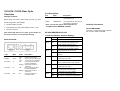
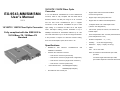
EX-9543-MM/SM Real Panel
the media converter to avoid possible damage.
Converter Advance function Setting :
DIP 1
Panel Contents:
DIP 2
ON
Enable LLCF Function
OFF
Dis-able LLCF Function (default)
ON
TP port supports auto-negotiation with
limited capability (defined in DIP 4)
OFF
TP port supports auto-negotiation with
10M/100M, full/ half capability (default)
DIP 3
LED
Mark
State
POWER
PWR
ON
OFF
ON
OFF
ON
100Mbps
100M
TX Link/Act
TX
FX Link/Act
Full Duplex
FX
FDX
ON
802.3X enable on TX and FX port
OFF
802.3X disable on TX and FX port
Description
Power is received
Power is not received
TP port work on 100M speed
TP port work on 10M speed
A TX port good Link status
has been established.
Blinking During Data Transfer or
Receiving
ON
A FX port good Link status
has been established.
Blinking During Data Transfer or
Receiving
ON
TX/FX port working on
Full duplex mode
(default)
DIP 4
ON
Set TX port work has 10M speed ability
( Valid when DIP 2 ON)
OFF
Set TX port work has 100M speed ability
ONLY ( Valid when DIP 2 ON), (default)
DIP 5
ON
Set TX port has Half Duplex ability
( Valid when DIP 2 ON)
OFF
Set TX port has Full Duplex ability
( Valid when DIP 2 ON ), (default)
DIP 6
ON
Set FX port on Half Duplex mode
OFF
Set FX port on Full Duplex mode(default)
Ordering Information:
EX-9543-MM/SM/SM4 :
10/100TX to 100FX Fiber Optic Converter
SC connector, Multi-mode 2KM