1
MSC CXB-6S / CXB-6SI
Feature
Rev. 1.8
Options
User Manual
Description
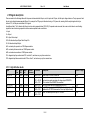
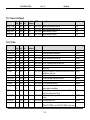
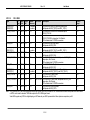
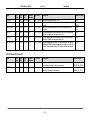
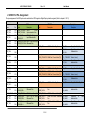
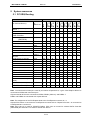
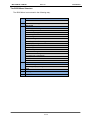
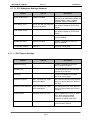
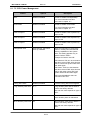
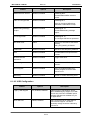
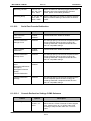
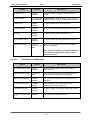
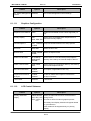
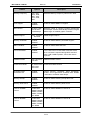
GateA20 Active
Upon Request,
Always
UPON Request – GA20 can be disabled using BIOS
services. Always – do not allow disabling GA20; this
option is useful when any RT code is executed
above 1MB
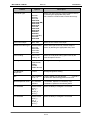
Interrupt 19 Response
Immediate,
Postponed
Bios reaction on INT19 trapping by Option Rom:
Immediate – execute the trap right now
Postponed – execute the trap during legacy boot
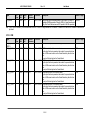
Launch CSM
Enable, Disable
This option controls if CSM will be launched
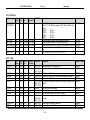
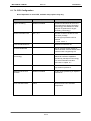
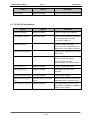
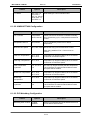
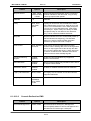
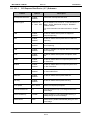
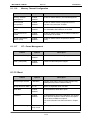
Boot option filter
UEFI and
Legacy, Legacy
only, UEFI only
This option controls what devices system can boot
to.
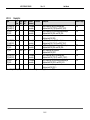
Launch PXE OPROM
policies
Do not launch,
UEFI only,
Legacy only
Controls the execution of UEFI and Legacy PXE
OPROM
Launch Storage
OPROM
Do not launch,
UEFI only,
Legacy only
Controls the execution of UEFI and Legacy Storage
OPROM
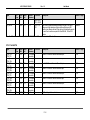
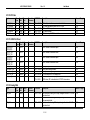
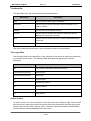
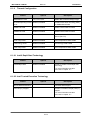
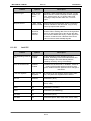
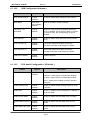
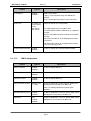
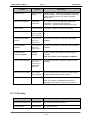
Onboard PATA
Controller OPROM
Disabled,
Enabled
Enable or disable boot option for onboard PATA
controller
Note: This option is only available on CXB-6S
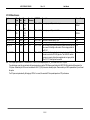
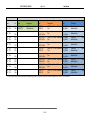
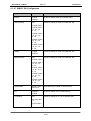
Launch Video OPROM
Do not launch,
UEFI only,
Legacy only
Legacy first
UEFI first
Controls the execution of UEFI and Legacy Video
OPROM.
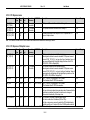
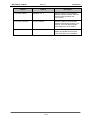
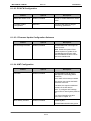
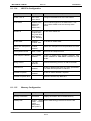
Other PCI device ROM
UEFI Oprom
Legacy Oprom
For PCI devices other than Network, Mass storage
or Video defines which Oprom to launch
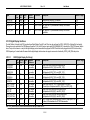
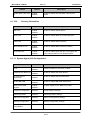
Boot Option #1…
Device x
Set the system boot order
Note: The number of available Boot options is
dependent on the devices which are connected.
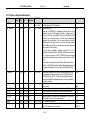
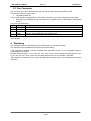
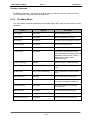
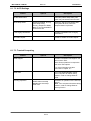
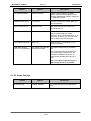
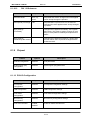
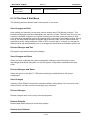
6.1.13 Security
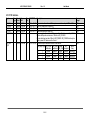
Feature
Options
Description
Administrator Password
Set Password
Set Setup Administrator Password
User Password
Set Password
Set User Password
72 / 81