1
No external power supply required.
Massive storage capacity (16MB ~ 512MB)
Writing protect switch, prevent from misuse & virus
LED Indicator
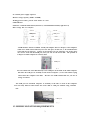
Small size: 77mmx26.5mmx13mm (left chart 1) 77mmx26.5mmx12.5mm( right chart 1)
Date storage life over 10years
Cover
Cover
USB por t
USB por t
LED
LED
Sw i t c h
Sw i t c h
(
)
A USB interface must be available. Usually all computer have a USB port, some computers
which were made before 1998 may have not this port, in this case, a PCI-USB interface
converted card is necessary. If there is no USB port on your computer, you need to have
one convert card with PCI-USB port, then you can use the Great disk. The position of
USB port on table computer is as below chart.
USB por t
You can connect the Great disk directly to the USB port on the back of the table computer.
But since the USB port is normally on the back of computer , it’s not convenient to plug
and connect the computer each time.
We have one USB extention line for you free of
charge to connect.
The USB port for notebook computer is normally at the side or back of the computer.
You can easily find out and connect the Great disk to USB port without using extention
line.
USB por t
1.3 MINIMUM SYSTEM REQUIREMENTS
3