1
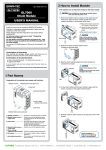
6, Slide the amplifier module parallel to the main module main
module and connect the connector, and in the same way connect
the SSD module with the fixation screws. (4 places on the upper
and lower part)
Connector
3, When it returns to the File operations screen, choose “SSD
Module” to execute.
When a message like the one in the chart below is shown, select “Yes”.
Slide it in the direction of the
arrow.
Inserting it at an angle may cause
damage to the nails.
Nail
* The formatting process can take several minutes.
When using the application software GLConfig
1, After connecting between the module and PC using USB, turn
on the power of the module.
7, Similarly, install the alarm module on the last part and fix it with
screws.
1
2
4
(You must have installed the USB driver previously. For more information about
installing the USB driver, see the User’s manual of the USB driver included CD-ROM.)
2, Using “Start” on the Windows OS, select “All Programs” →
Graphtec → GL-Connection→ GLConfig to start the GLConfig.
(When using Windows 7)
3, Press "Load” button to connect to the module.
Select “SSD Module” in the items of the initialization, and then
press “Execute” button.
3
During installation, a
4kgf.cm screw tightening
torque is recommended.
3 Formats
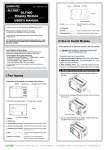
For first time use, please format the SSD.
This explains the formatting procedures.
4, “Do you want to format?” message is displayed. Select <OK>.
“Initializing” message is displayed. When the formatting is
completed, the following screen is displayed.
(It may take a long time to format depending on the contents of the drive.)
* For details on operations, etc., please refer to the User’s manual recorded on the
CD-ROM (included with the main module main module)
When using the display module
1, Choose “File Operations” under “File” on the home screen.
4 Specifications
GL7-SSD (SSD Module) specifications
Item
SSD
Recording capacity
Sampling interval
2, When the File Operations screen is shown, select “Format”
from “Operations”.
Contents
2.5” SSD HDD (SATA I/F)
Approx. 64GB (However, 1 file can be up to 2GB in size)
* Depending on the amplifier in use, there may be limitations to the
sampling interval.
* The fastest amplification is limited to the amplifier in use.
* If a sampling interval that exceeds the fastest speed on each amplifier is set,
the sampling is set to each amplifiers’ fastest speed, and the same data is
recorded for that interval.
External dimensions 49.2 × 136 × 160 mm (not including protruding parts)
[W×D×H] (approximate)
Weight
770g
Vibration proof
Automobile parts Type 1 Class A equivalent
* Depending on the state of fragmentation of the SSD, there may be cases where the
sampling rate won't be written on time. (A message will be displayed during recording)
If this sort of event occurs, please backup important data to another media and format
the SSD.
GRAPHTEC Corporation July 1, 2012
Frankfurter Strasse 150-152 | 65779 Kelkheim | +49 (0)6195 70060 | www.althen.de | [email protected]