1
VGA SWITCH SPLITTER 4×4 (matrix)
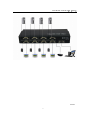
1) Connect all source devices to the video and audio inputs on the VGA Switch
Splitter
2) Connect the VGA displays and audio receivers to the outputs on the VGA
Switch Splitter.
3) Connect the 5VDC power supply to the VGA Switch Splitter.
4) Turn on the Power
Note: 1) Please make sure to cut off the power before insert IR Extender into the
unit.
2) Please make sure to insert the plug of IR Extender into the unit
completely.
Attention: Insert / Extract cable gently.
5.2 Operation
1) Selecting source devices by buttons
Four buttons on the Switch Splitter are used to select source devices circularly
for inputs A, B, C, and D. Once you press the button, it will select next available
source device.
2) Selecting source devices by IR remote
a) Power button
The power button of the IR remote can control the power of the Switch
Splitter. Pressing this button, the power-on unit will be turned off. If you
press it again, the unit will be turned on.
b) Other buttons
Depending on outputs A, B, C, D, the other buttons of the IR remote can
be divided into four groups. Each group has five buttons: ‘off’— turn off its
outputs. 1, 2, 3, 4 are used to select input port accordingly.
3) Selecting source devices by RS232
①. Introduction of RS232 remote operation:
RS232 remote operation is mainly based on the “super terminal” of
Windows operation system. Its parameter should be: ANSI 4800 8-N-1-non
②. Operation
A. Connect the switch splitter to the COM of PC with a RS232 cable.
B. Chose the right COM when you setting “super terminal” and then set the
parameter as follow:
Baud frequency:4800
Data bit: 8
Parity bit: N
Stop bit: 1
Data stream: NON
C. Inputting your instruction. The instruction should be two or three letter, and
finish with “Enter” button.
Please input next instruction in three seconds or the”Overtime instruction”
3