1
UNIVERSAL ACTIONS
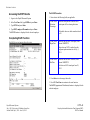
Accessing the ERIT Bundle
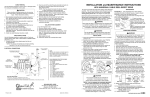
The ELVE Procedure
1. Log on to the Payroll/Personnel System.
1. Enter data in the following fields, as applicable:
2. At the Next Func field, type EEDB and press Enter.
3. Type BUND and press Enter.
START/ERIT
Reduction
Percentage
4. Type ERIT, employee ID number and press Enter.
Enter the total percent of time the ERIT
participant will be reducing their time.
Allowable values are whole numbers from 5
to 50
The ELVE function is displayed for the selected employee.
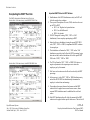
Completing ELVE Function
THE ELVE (LEAVE OF ABSENCE DATA) FUNCTION
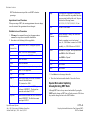
START/ERIT
Begin Date
Enter the date the ERIT will begin, in the
format: MMDDYY.
Begin date can NOT be earlier than the
program implementation date of July 1,
2011.
START/ERIT
End Date
Enter the date the ERIT will end, in the
format: MMDDYY.
End date can NOT extend past June 30,
2012.
2. Press Enter to invoke range/value edits.
3. Press F11 Next Func to continue to the next function.
The EAPP (Appointment/Distribution) function is displayed for the
selected employee.
Payroll/Personnel System
July 1, 2011, University of California, Santa Cruz
Section Valid: July 1, 2011 – June 30, 2012
4.15—2
Employee-Initiated Reduction in Time Program (ERIT)
PPS User Manual