1
Installation
DIMM Module Installation
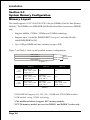
Figure 8 displays the notch marks and what they should look like on your DDR
DIMM memory module.
DIMMs have 184-pins and one notch that will match with the onboard DDR
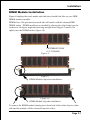
DIMM socket. DIMM modules are installed by placing the chip firmly into the
socket at a 90 degree angle and pressing straight down (figure 9) until it fits
tightly into the DIMM socket (figure 10).
CENTER KEY ZONE
(2.5 V DRAM)
Figure 8
Figure 9
DIMM Module clip before installation
Figure 10
DIMM Module clip after installation
To remove the DIMM module simply press down both of the white clips on either
side and the module will be released from the socket.
Page 3-7