1
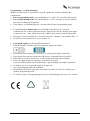
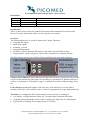
Programming – on IR-transmitters Without a web-browser it is possible to copy IR-signals into it and to enable/disable commoncode. Enter programming mode: press and hold keys 1, 2 and 3 for 3 seconds long beep. Leave programming mode: press and hold key «1» for 3 seconds, or wait for timeout after 60 sec without any keystrokes. If low battery: red flashing light for 2 seconds, then it leaves programming mode. To enable/disable commoncode: press and hold lock-code key for 3 seconds. Commoncode off: a short signal from beeper, light in lock code key and the green light. Commoncode on: a long signal from beeper, light in lock code key and the green light. Norwegian version transmits IR = Picomed, usercode 1, channel 1 (also named: NA1-1). Swedish version transmits IR = Gewa, channel 16. Copying IR signals into Picomed IR-transmitters: 1. Position Pico4/8/16 and the other IR-transmitter against each other. 2. 3. 4. 5. Press shortly on the actual key on Pico4/8/16: steady green light in actual key. Press shortly on actual key on the other IR-remote, it transmits IR to Pico4/8/16. When IR is received by Pico4/8/16, it will respond with single green flashing. Press once again shortly on actual key on the other IR-remote. A successful IR-learning will be indicated by 3 green flashing, then light is turned off. 6. Go back to step 2 to copy an IR-signal to an other key. 7. Leave programming mode when finished. IR-learning will be interrupted after 20 seconds if no IR is received. It will then go to ordinary programming mode. To switch to page 2 in programming mode; press and hold page select key for 3 seconds. IR-transmitters Pico4, Pico8 and Pico16 Page 3