1
Chapter 2 – Installation
Registering Intego Personal Antispam X3
When you restart your computer, open Intego Personal Antispam X3—it is found in your
Applications folder. Intego Personal Antispam X3 will open its Registration program, and
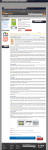
display the following window:
You must enter your name, company, if any, and your serial number. The serial number is
found on a sticker on the Intego Personal Antispam X3 CD, or provided in the e-mail
message confirming your purchase by download. When registration is completed, Intego
Personal Antispam X3 will open and you can configure the program.
Intego Personal Antispam X3 User's Manual
Page 21