1
3
4/18/2006
LOGGING IN TO 7i EXTENDED
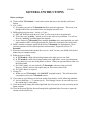
1) Start Internet Explorer 6.0—
a) Double-click on the Internet Explorer icon on your Desktop
b) 7i Extended requires that you use Internet Explorer version 6.0 or later.
2) To access 7i Extended manual—Go to http://www.fmd.duke.edu
a) Click Work Request
b) Click 7i Customer Manual (pdf)
c) Manual will open in Adobe Acrobat Reader.
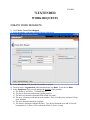
3) To access 7i Extended login page—
a) Go to http://www.fmd.duke.edu
b) Click Work Request to go to the 7i Extended login page
i) This will take you to the URL listed below:
http://fmdlinas.fac.duke.edu:7779/web/base/logindisp?tenant=production
c) Add login web page as a Favorite—
i) Click Favorites, Add to Favorites, OK
ii) Next time you login, just click Favorites and choose Datastream 7i
4) Login—
a) Type your User ID, typically your last name, first initial (i.e. SMITHJ for Jim Smith)
b) Type your password
i) The first time you login type 111111 (6 ones)
c) Click Login. The Starting Point home page will appear.
d) After you login the first time, change your password. You must choose a password that
contains at least six characters
i) To change password, click My Account at top of screen
ii) Type current password
iii) Type new password (at least six characters, combine letters and numbers)
iv) Retype new password
v) Click Save Record button at top left of screen (button that looks like a disk)