1
UMX-ETH
IP NETWORK CONNECTION CARD
FOR UMX-02/0 MODULAR MATRIX
4.6. Sending configurations to the unit
Before sending configurations to any equipment unit, it is advisable to save the configuration. To do this,
from the P.A. Manager software installation screen, open the File menu and select Save.
ATTENTION:
When a UMX-ETH card is added to an installation, it is necessary to send configurations to both the card and the UMX-02/0
audio matrix to which it belongs.
To send configurations to a UMX-02/0 through the UMX-ETH card, it is necessary to have sent configurations to the UMXETH card beforehand.
4.6.1. Sending configurations to a UMX-ETH card
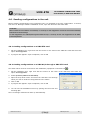
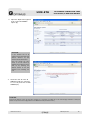
1. On the installation tree, right click with the mouse on the name of the UMX-ETH card and select the
option Send configurations.
2. A progress bar appears. Upon completion, click on OK.
4.6.2. Sending configurations to a UMX-02/0 through a UMX-ETH card
The audio matrix must be connected to the installation (equipment connected icon
).
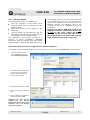
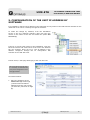
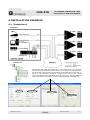
1. On the installation tree, right click with the mouse on the name of the UMX-02/0 and select the
option Send configurations.
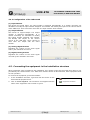
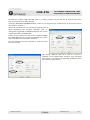
2. Select By Network (UMX-ETH or DVA-102ETH).
3. Open the drop-down menu and select the UMX-ETH card through
which you wish to send the configurations to the matrix.
4. Click on OK.
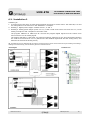
5. A progress bar appears. Upon completion, click on OK.
6. You can exit the Installation screen by opening the File menu and
selecting Quit.
The P.A. Manager software will start up automatically.
UMX-ETH version 2.1
R&D Department
14