1
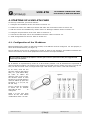
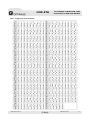
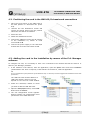
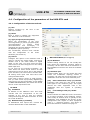
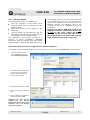
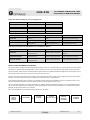
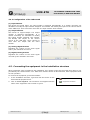
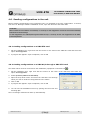
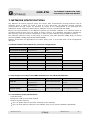
UMX-ETH IP NETWORK CONNECTION CARD FOR UMX-02/0 MODULAR MATRIX 4. STARTING UP A UMX-ETH CARD To start up a UMX-ETH, proceed as follows: 1. Configure the IP address of the card. Refer to section 4.1. 2. Position the card in the UMX-02/0 chassis and make the connections. Refer to section 4.2. 3. Add the card to the installation by means of the P.A. Manager software. Refer to section 4.3. 4. Configure the parameters of the card. Refer to section 4.4. 5. Connect the UMX-02/0 unit to the installation structure. Refer to section 4.5. 6. Send configurations to the unit. Refer to section 4.6. 4.1. Configuration of the IP address Before positioning the card in a UMX-02/0 chassis, its IP address must be configured. For this purpose, it has 4 internal DIP switches (see Figure 3). The IP address of the card is configured by means of these 4 DIP switches. This address identifies the card in the network, and so each equipment unit must have a unique IP address. NB: The IP address can also be set by software. To do this, refer to section 5. If this action is taken, the configuration DIP switches stop to be operative. An IP address is represented by means of a 32-bit binary number. The IP addresses are expressed as decimal notation numbers: the 32 bits of the address are divided into four octets (an octet is a group of 8 bits). On the card each octet is configured through a DIP switch (four octets four DIP switches). In an octet, each bit can have the value 0 (DIP switch OFF) or 1 (DIP switch ON). In order to obtain the decimal value of the octet, the decimal values of each bit that is in the ON position must be added up (from the top down: 1, 2, 4, 8, 16, 32, 64 and 128). Figure 3 Figure 3 shows an example in which the IP address 192.168.100.128 is configured. Table I on the next page shows all the DIP switch combinations from 0 to 255. UMX-ETH version 2.1 R&D Department 7