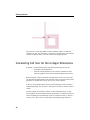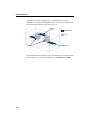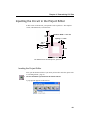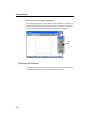
1
GETTING STARTED
RELEASE 11
Cover: James Clerk Maxwell (1831-1879). A professor at Cambridge
University, England, Maxwell established the interdependence of
electricity and magnetism. In his classic treatise of 1873, he
published the first unified theory of electricity and magnetism and
founded the science of electromagnetism.
GETTING STARTED
Printed: March 2007
Release 11
Sonnet Software, Inc.
100 Elwood Davis Road
North Syracuse, NY 13212
Phone: (315) 453-3096
Fax: (315) 451-1694
www.sonnetsoftware.com
© Copyright 1989,1991,1993, 1995-2007 Sonnet Software, Inc. All Rights Reserved
Registration numbers: TX 2-723-907, TX 2-760-739
Copyright Notice
Reproduction of this document in whole or in part, without the prior express written authorization of
Sonnet Software, Inc. is prohibited. Documentation and all authorized copies of documentation must
remain solely in the possession of the customer at all times, and must remain at the software designated
site. The customer shall not, under any circumstances, provide the documentation to any third party
without prior written approval from Sonnet Software, Inc. This publication is subject to change at any
time and without notice. Any suggestions for improvements in this publication or in the software it
describes are welcome.
Trademarks
The program names xgeom, emstatus, emvu, patvu, dxfgeo, ebridge, emgraph, gds, emserver,
emclient,, sonntcds, and sonntawr (lower case bold italics), Co-calibrated, Lite, LitePlus,
Level2 Basic, Level2 Silver, and Level3 Gold are trademarks of Sonnet Software, Inc.
Sonnet®, em®, and emCluster® are registered trademarks of Sonnet Software, Inc.
UNIX is a trademark of Unix Systems Labs.
Windows NT, Windows2000, Windows ME, Windows XP and Windows Vista are trademarks of
Microsoft, Inc.
AutoCAD and Drawing Interchange file (DXF) are trademarks of Auto Desk, Inc.
SPARCsystem Open Windows, SUN, SUN-4, SunOS, Solaris, SunView, and SPARCstation are
trademarks of Sun Microsystems, Inc.
HP, HP-UX, Hewlett-Packard are trademarks of Hewlett-Packard Company.
ADS, Series IV, Touchstone, and Libra are trademarks of Agilent Technologies.
Cadence and Virtuoso are trademarks of Cadence Design Systems, Inc.
AWR and Microwave Office are registered trademarks and EM Socket is a trademark of Applied Wave
Research, Inc.
GDSII is a trademark of Calma Company.
Macrovision, FLEXlm, and FLEXnet are registered trademarks of Macrovision Corporation.
OSF/Motif is a trademark of the Open Software Foundation.
IBM is a registered trademark of International Business Machines Corporation.
Linux is a registered trademark of Linus Torvalds.
Redhat is a registered trademark of Red Hat, Inc.
SuSE is a trademark of Novell, Inc.
Adobe® and Acrobat® are registered trademarks of Adobe, Inc.
AWR and Microwave Office are trademarks of Applied Wave Research, Inc.
Platform is a trademark and LSF® is a registered trademark of Platform Computing.
Table of Contents
TABLE OF CONTENTS
TABLE OF CONTENTS . . . . . . . . . . . . . . . . . . . . . . . . 5
1
WELCOME . . . . . . . . . . . . . . . . . . . . . . . . . . . . . . . 9
Documentation . . . . . . . . . . . . . . . . . . . . . . . . . . . . . 9
Manuals . . . . . . . . . . . . . . . . . . . . . . . . . . . . . . 10
Help . . . . . . . . . . . . . . . . . . . . . . . . . . . . . . . . 10
Sonnet Technical Support . . . . . . . . . . . . . . . . . . . . . 10
2
INSTALLATION . . . . . . . . . . . . . . . . . . . . . . . . . . . . 11
UNIX and Linux Installation . . . . . . . . . . . . . . . . . . . . 11
Windows Installation . . . . . . . . . . . . . . . . . . . . . . . . 11
Requirements . . . . . . . . . . . . . . . . . . . . . . . . . . 11
Compatibility . . . . . . . . . . . . . . . . . . . . . . . . . . 12
License Server . . . . . . . . . . . . . . . . . . . . . . . . . . 12
Windows Installation Instructions . . . . . . . . . . . . . 12
3
THE BASICS . . . . . . . . . . . . . . . . . . . . . . . . . . . . . 15
The Sonnet Design Suite . . . . . . . . . . . . . . . . . . . . . . 15
Sonnet Applications . . . . . . . . . . . . . . . . . . . . . . . . . 17
Sonnet Projects . . . . . . . . . . . . . . . . . . . . . . . . . . . . 17
The Sonnet Box . . . . . . . . . . . . . . . . . . . . . . . . . . . . 20
Coupling to the Box . . . . . . . . . . . . . . . . . . . . . . 21
Box Resonances . . . . . . . . . . . . . . . . . . . . . . . . . 22
Dielectric Layers and Metal Levels . . . . . . . . . . . . . 22
Circuit Metal. . . . . . . . . . . . . . . . . . . . . . . . . . . . . . 26
Cell Size and Meshing . . . . . . . . . . . . . . . . . . . . . . . . 26
Tips . . . . . . . . . . . . . . . . . . . . . . . . . . . . . . . . . . . 27
3D View . . . . . . . . . . . . . . . . . . . . . . . . . . . . . . 28
Estimate Memory . . . . . . . . . . . . . . . . . . . . . . . . 28
4
TUTORIAL: A QUICK TOUR . . . . . . . . . . . . . . . . . . . . 29
Invoking Sonnet . . . . . . . . . . . . . . . . . . . . . . . . . . . . 30
UNIX . . . . . . . . . . . . . . . . . . . . . . . . . . . . . . . . 30
Windows . . . . . . . . . . . . . . . . . . . . . . . . . . . . . . 31
5
Getting Started
Obtaining the Example Projects. . . . . . . . . . . . . . . . . 31
The Project Editor . . . . . . . . . . . . . . . . . . . . . . . . . 32
Zoom and Cell Fill . . . . . . . . . . . . . . . . . . . . . . . 35
Metal Types . . . . . . . . . . . . . . . . . . . . . . . . . . . 37
Dielectric Layers . . . . . . . . . . . . . . . . . . . . . . . . 39
Em - The Electromagnetic Simulator . . . . . . . . . . . . . 40
Setting Up the Analysis . . . . . . . . . . . . . . . . . . . . 41
Setting Up Analysis Frequencies. . . . . . . . . 41
Analysis Run Options . . . . . . . . . . . . . . . . . . . . . 42
Executing an Analysis Run . . . . . . . . . . . . . . . . . . 42
The Response Viewer- Plotting Your Data . . . . . . . . . . 43
Invoking the Response Viewer . . . . . . . . . . . . . . . 44
Displaying a Smith Chart . . . . . . . . . . . . . . . . . . . 45
Selecting Another Curve for Display . . . . . . . . . . . 45
Data Readouts - Smith Chart . . . . . . . . . . . . . . . . 49
Adding a Data Marker . . . . . . . . . . . . . . . . . . . . . 50
Closing the Response Viewer . . . . . . . . . . . . . . . . 51
Current Density Viewer . . . . . . . . . . . . . . . . . . . . . . 51
Invoking the Current Density Viewer . . . . . . . . . . . 52
Current Density Values . . . . . . . . . . . . . . . . . . . . 52
Frequency Controls . . . . . . . . . . . . . . . . . . . . . . 53
Animation . . . . . . . . . . . . . . . . . . . . . . . . . . . . 53
Time Animation . . . . . . . . . . . . . . . . . . . 53
Frequency Animation. . . . . . . . . . . . . . . . 56
5
CREATING
A
CIRCUIT: DSTUB . . . . . . . . . . . . . . . . . . 59
The Substrate, Subsectioning, and Cell Size . . . . . . 61
Metalization Levels and Dielectric Layers . . . . . . . . 62
Entering your Circuit . . . . . . . . . . . . . . . . . . . . . . . . 63
Invoking the Project Editor . . . . . . . . . . . . . . . . . 63
Specifying Box Settings . . . . . . . . . . . . . . . . . . . . 64
Setting Cell Size . . . . . . . . . . . . . . . . . . . 65
Setting the Dielectric Layers . . . . . . . . . . . . . . . . 66
Adding Metalization . . . . . . . . . . . . . . . . . . . . . . 68
Duplicating a Polygon . . . . . . . . . . . . . . . 74
Adding Metal Loss . . . . . . . . . . . . . . . . . . . . . . . 76
Defining a Metal Type . . . . . . . . . . . . . . . 77
6
Table of Contents
Applying a Metal Type . . . . . . . . . . . . . . . 80
Adding Ports . . . . . . . . . . . . . . . . . . . . . . . . . . . 82
Saving the Circuit . . . . . . . . . . . . . . . . . . . . . . . . 83
Em - The Analysis Engine . . . . . . . . . . . . . . . . . . . . . 84
A Simple Outline of the Theory . . . . . . . . . . . . . . . 85
Subsectioning the Circuit . . . . . . . . . . . . . 85
Frequency Sweep . . . . . . . . . . . . . . . . . . . . . . . . 86
Linear Frequency Sweep . . . . . . . . . . . . . . . . . . . 86
Selecting Analysis Options . . . . . . . . . . . . . . . . . . 87
Input the Linear Sweep . . . . . . . . . . . . . . . . . . . . 88
Run Options . . . . . . . . . . . . . . . . . . . . . . . . . . . 88
Executing the Analysis. . . . . . . . . . . . . . . . . . . . . 90
Observing the Data . . . . . . . . . . . . . . . . . . . . . . . . . 91
Invoking the Response Viewer. . . . . . . . . . . . . . . . 92
Editing Curve Groups . . . . . . . . . . . . . . . . . . . . . 92
Removing a Measurement from a Curve Group . . . . . 94
Adding a New Curve Group. . . . . . . . . . . . . . . . . . 95
6
DETERMINING CELL SIZE . . . . . . . . . . . . . . . . . . . . . . 97
Calculating Cell Size for Non-Integer Dimensions . . . . . . 98
Vias. . . . . . . . . . . . . . . . . . . . . . . . . . . . . . . . . . . . 99
Inputting the Circuit in the Project Editor . . . . . . . . . 101
Invoking the Project Editor . . . . . . . . . . . . . . . . 101
Specifying Box Settings . . . . . . . . . . . . . . . . . . . 102
Using the Cell Size Calculator . . . . . . . . . 103
Setting the Dielectric Layers . . . . . . . . . . . . . . . 108
Palette of Standard Geometries . . . . . . . . . . . . . 112
Creating an Airbridge . . . . . . . . . . . . . . . . . . . . 117
Adding Ports and Reference Planes . . . . . . . . . . . 122
Em - The Electromagnetic Simulator . . . . . . . . . . . . . 125
Setting Up the Analysis . . . . . . . . . . . . . . . . . . . 126
Selecting Run Options . . . . . . . . . . . . . . . . . . . . 126
Executing the Analysis. . . . . . . . . . . . . . . . . . . . 127
Viewing your Response . . . . . . . . . . . . . . . . . . . . . . 127
Adding a File to a Graph . . . . . . . . . . . . . . . . . . 131
INDEX . . . . . . . . . . . . . . . . . . . . . . . . . . . . . . . 133
7
Getting Started
8
Chapter 1 Welcome
CHAPTER 1
WELCOME
Welcome to Sonnet’s 3D Planar Electromagnetic software. Sonnet's suites of
high-frequency electromagnetic (EM) Software are aimed at today's demanding
design challenges involving predominantly planar (3D planar) circuits and
antennas. Predominantly planar circuits include microstrip, stripline, coplanar
waveguide, PCB (single and multiple layers) and combinations with vias, vertical
metal sheets (z-directed strips), and any number of layers of metal traces
embedded in stratified dielectric material.
The Sonnet Suites develop precise RF models (S-, Y-, Z-parameters or extracted
SPICE model) for planar circuits and antennas. The software requires a physical
description of your circuit (arbitrary layout and material properties for metal and
dielectrics), and employs a rigorous Method-of-Moments EM analysis based on
Maxwell's equations that includes all parasitic, cross-coupling, enclosure and
package resonance effects.
DOCUMENTATION: Sonnet provides manuals, context sensitive help, and an
online knowledge base as detailed below.
9
Getting Started
MANUALS: A set of hardcopy manuals are provided with Sonnet Level2 Basic and
above. All Sonnet Suites including Sonnet Lite and Sonnet LitePlus come with a
complete set of manuals in PDF Format. PDF format manuals are accessed by
clicking on the Manuals button in the Sonnet task bar. The complete list of
manuals is provided below:
Manual
Description
Format
Getting Started
Quick windows installation & Sonnet
Basics including Start up tutorials
Hardcopy/PDF
User’s Guide
Theory, features and feature tutorials
Hardcopy/PDF
Translators
Translators and Interfaces with tutorials
Hardcopy/PDF
UNIX & Linux Installation
UNIX & Linux Installation Instructions
Hardcopy/PDF
Remote em Processing
Installing remote em Processing
PDF Only
Windows Installation
Windows Installation including troubleshooting
PDF Only
emCluster Computing
Installing emCluster Computing
PDF Only
FLEXnet User’s Manual
Licensing Manager Software User’s
Manual
PDF Only
HELP: May be accessed in any of the following ways:
•
•
•
•
Selecting Help ⇒ Contents from any Sonnet application
Clicking on the Help button in any dialog box
Windows: Click on the ? button at the top of a dialog box and
click on the desired control
UNIX & Linux: Press Shift+F1, then click on the desired control
SONNET TECHNICAL SUPPORT: :
•
•
•
•
10
email: [email protected]
Voice: (315)453-3096 Toll Free in US: (877) 776-6638
Fax: (315) 451-1694
Web site: www.sonnetsoftware.com/support
Chapter 2 Installation
CHAPTER 2
INSTALLATION
UNIX and Linux Installation
If you are installing the software on a UNIX or Linux system, please refer to the
UNIX and Linux Installation manual provided in your set of hardcopy manuals or
PDF manuals in your download. If you are a new Sonnet user, once you have
completed your installation return to the tutorials in this manual.
Windows Installation
Requirements
•
OS: Windows XP and Windows Vista. For Windows XP, Service
Pack 2 is recommended for the best performance of the analysis
engine.
•
Hardware: Pentium or Athlon AMD processor, 128 Mbytes RAM
and 125 Mbytes of disk space.
•
To perform the installation on Windows XP or Windows Vista, you
must be logged in as the Administrator or as a member of the
11
Getting Started
administrator group.
For a complete list of requirements and testing updates, please see
http://www.sonnetsoftware.com/requirements
Compatibility
This release is backward compatible with all prior releases. However, you may not
use a release 11 project file in an earlier release of Sonnet.
License Server
TIP
For a standard evaluation, node-locked license or university license, the local machine is the license server.
For a floating license, one machine in the network should be designated as the
license server. This machine requires a hardware key attached to it. Client
machines do not require a hardware key. The license manager, FLEXNet,
executes on the license server.
For a discussion on types of licenses, please see “Licenses,” page 9 in the
Windows Installation Manual available in PDF format from the Sonnet task bar.
Windows Installation Instructions
1
12
Uninstall any previous installations of Sonnet by selecting Start ⇒ Programs ⇒ Sonnet ⇒ Uninstall. If this is the first time you’ve installed
Sonnet, continue at Step 2.
Chapter 2 Installation
NOTE:
If you want to keep an earlier version of the software be aware that
the license server for a previous release may not be run
simultaneously with the license server for Version 11 nor can you run
an older version using a version 11 license due to an incompatibility
of license file formats. The license servers must be installed on
different computers or run one at a time.
2
Both new and previous Sonnet User’s require a new license for Release
11.52. Go to www.sonnetsoftware.com/license and fill out the License
Request Form. Once you receive your license from Sonnet, you will be
able to enable your Sonnet Software.
3
Load the software from the CD-ROM on your system, following the
installation instructions on your screen.
4
If you are using a hardware key, attach it to your computer, then install
the Hardlock driver by selecting Admin ⇒ Hardware Key ⇒ Install
Driver from the Sonnet task bar menu and follow the on-screen instructions. To open the Sonnet task bar, select Start ⇒ Program Files ⇒
Sonnet ⇒ Sonnet from the Windows start menu.
5
Follow the directions in the licensing information e-mail you received
from Sonnet Software in response to the License Request Form.
6
Select Project ⇒ New Geometry from the main menu of the Sonnet task
bar to launch the project editor, xgeom, to verify that the installation is
correct.
If your installation is not successful, please refer to the Windows Installation
manual in PDF format for instructions on troubleshooting your installation.
For advanced feature installations and setups, please find the applicable
installation instructions in PDF format, using the Manuals button on the Sonnet
task bar after you have installed Sonnet. If you are viewing the PDF of this
manual, click on the appropriate link below.
•
•
Remote em processing
emCluster computing
13
Getting Started
14
Chapter 3 The Basics
CHAPTER 3
THE BASICS
This chapter is intended to provide you with basic information about the Sonnet
Design suite which will allow you to quickly and accurately model your circuit
while avoiding some of the common mistakes made during EM simulation. The
chapters which follow after contain tutorials on using the Sonnet suite.
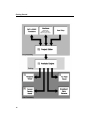
The Sonnet Design Suite
The suite of Sonnet analysis tools is shown below. Using these tools, Sonnet
provides an open environment to many other design and layout programs.
15
Getting Started
16
Chapter 3 The Basics
Sonnet Applications
Sonnet's suites of high-frequency electromagnetic (EM) Software are aimed at
designs involving predominantly planar (3D planar) circuits and antennas.
Predominantly planar circuits include:
•
•
•
•
•
•
•
•
•
•
Arbitrary microstrip & stripline circuits
Planar spiral inductors
RFIC & MMIC circuits
Planar filter analysis
High Speed Digital Interconnects
High density interconnects
Multi-layer circuits like LTCC and PCB technology
Microwave circuit discontinuities
Planar (patch) antennas
Circuits with vias, vertical metal sheets (z-directed strips), and any
number of layers of metal traces embedded in stratified dielectric
material.
For more information on Sonnet’s applications, see our website at:
http://www.sonnetsoftware.com/products/em/applications.asp
Sonnet Projects
There are two types of projects in Sonnet: the Geometry Project and the Netlist
Project. A geometry project contains a circuit whose properties are entered by the
user or provided by translating a file to the Sonnet environment. A netlist project
17
Getting Started
contains a circuit defined by a netlist which consists of one or more networks with
elements, which can be other geometry projects, connected together. A geometry
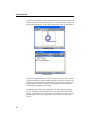
project and a netlist project, as they appear in the project editor, are shown below.
Geometry Project
Netlist Project
The most commonly used type of project is the geometry project, and a majority
of the documentation concerns the input and analysis of this type of project. The
geometry project contains the layout and material properties of a circuit and any
internal components. When you analyze a geometry project, em performs an
electromagnetic simulation of your circuit.
The Netlist project contains ideal components, data files and Sonnet geometry
projects. A network is defined which connects any combination of these items
together. A common use for a netlist project is to connect two or more geometry
projects together. The analysis engine, em, uses circuit theory to analyze the
network.
18
Chapter 3 The Basics
For both types of projects, the analysis controls (such as analysis frequencies, run
options, etc.) and analysis data are stored in the project. You use the same Sonnet
project for all the Sonnet programs.
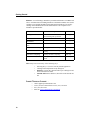
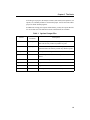
In addition to viewing your response within Sonnet, you may also export data files
for use in other tools. The table below shows which formats are available.
Table 1 Optional Output Files
Format
Default File
Extension
Touchstone
.s2p, .s3p, etc.
Touchstone response file containing S, Y, or Z-parameter
data. The file may contain any number of ports.
Databank
.s2p, .s3p, etc.
Databank format response file containing S, Y, or Zparameter data. The file may contain any number of ports.
SCompact
.flp
SCompact format response file
Spreadsheet
.csv
Comma separated value data for a spreadsheet such as
Excel.
Spectre
.scs
Cadence format Spice file - Pi model or Broadband model
PSpice
.lib
PSpice file - Pi model or Broadband model
Agilent MDF
.mdf
Agilent’s Microwave Data Interchange Format
LCT
.lct
N-Coupled Line (Transmission Line) Spice Model
Descriptions
19
Getting Started
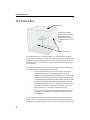
The Sonnet Box
Metal Box Top
The Sonnet six-sided
shielding box. The metal
walls of the box are
transparent to allow you
to see the interior of the
circuit.
Metal Side Walls
The Sonnet EM analysis is performed inside a six-sided metal box as shown
above. This box contains any number of dielectric layers which are parallel to the
bottom of the box. Metal polygons may be placed on levels between any or all of
the dielectric layers, and vias may be used to connect the metal polygons on one
level to another.
The four sidewalls of the box are lossless metal, which provide several benefits
for accurate and efficient high frequency EM analysis:
•
The box walls provide a perfect ground reference for the ports.
Good ground reference is very important when you need Sparameter data with dynamic ranges that might exceed 50 or 60 dB,
and Sonnet’s sidewall ground references make it possible for us to
provide S-parameter dynamic range that routinely exceeds 100 dB.
•
Because of the underlying EM analysis technique, the box walls
and the uniform grid allow us to use fast-Fourier transforms (FFTs)
to compute all circuit cross-coupling. FFTs are fast, numerically
robust, and map very efficiently to computer processing.
•
There are many circuits that are placed inside of housings, and the
box walls give us a natural way to consider enclosure effects on
circuit behavior.
As an example, a microstrip circuit can be modeled in Sonnet by creating two
dielectric layers: one which represents your substrate, and one for the air above
the substrate. The metal polygons for the microstrip would be placed on the metal
20
Chapter 3 The Basics
level between these two dielectric layers. The bottom of the box is used as the
ground plane for the microstrip circuit. The top and bottom of the box may have
any loss, allowing you to model ground plane loss.
Coupling to the Box
Since the four sidewalls of the box are lossless metal, any circuit metal which is
close to these walls can couple to the walls - just like what would happen if you
fabricated and measured a real circuit with the same box. If you do not want to
model this coupling (for example, your real circuit does not have sidewalls), then
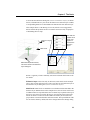
you must keep the circuit metal far away from the box sidewalls. A good rule to
use is at least three to five substrate thicknesses as shown below.
This circuit has a
substrate of 25 mils. The
spiral should be kept at
least 75-125 mils from
the box walls.
21
Getting Started
Box Resonances
It is possible for the six conducting sides of the Sonnet box to create a resonant
cavity, just like you would see if you fabricated and measured the circuit in the
same size box. You can use Sonnet to predict unwanted box resonances in the
package or module housing the circuit. Box resonances usually appear as a
“spike” in the S-Parameter magnitude and phase data, as shown below.
You can detect box resonances by observing your simulated results, through
runtime warning messages or by using the Box Resonance Estimator (Analysis ⇒
Estimate Box Resonances). For a detailed discussion on box resonances and how
to detect them, please see Chapter 23, “Package Resonances” on page 329 of
the Sonnet User’s Guide.
Dielectric Layers and Metal Levels
All Sonnet geometry projects are composed of two or more dielectric layers.
There is no limit to the number of dielectric layers in a Sonnet geometry project,
but each layer must be composed of a single dielectric material. Metal polygons
are placed at the interface between any two dielectric layers and are usually
modeled as zero-thickness, but can also be modeled using Sonnet’s thick metal
model. Vias may also be used to connect metal polygons on one level to metal on
another level.
22
Chapter 3 The Basics
You will use the Dielectrics dialog box (Circuit ⇒ Dielectric Layers), as shown
below, to add dielectrics to your circuit. Each time a new dielectric layer is added,
a corresponding metal level is also added to the bottom of the new dielectric layer.
This example shows a 3-D drawing of a circuit (with the z-axis exaggerated).
Please note that the pictured circuit is not realistic and is used only for purposes
of illustrating the box setup.
Dielectric Layer
Note that the
number of the
metal level
appears in
between the
dielectric
layers.
Metal Level
Metal Bottom (Ground Plane).
This is not shown in the Dielectric
Layer dialog box
Below is a glossary of some commonly used terms in Sonnet which relate to the
box model.
Dielectric Layer: This refers only to dielectrics, NOT metals. In the example
above, there are four dielectric layers. There is an entry for each dielectric layer in
the Dielectric Layers dialog box (Circuit ⇒ Dielectric Layers).
Metal Level: Metal levels are modeled as zero thickness and are attached to the
dielectric layer ABOVE them. In the example above, there are three metal levels
in addition to the box top and bottom. Since no metal may be placed on the top of
the box, it may not be accessed by the user or viewed in the project editor. The
bottom of the box is referred to as the GND level and may be accessed in the
project editor. It is not labeled in the dielectric window. The top and bottom of the
box are lossless metal by default, but can be changed in the Box Settings dialog
23
Getting Started
box (Circuit ⇒ Box Settings). You can use as many different metal types as you
wish on a single metal level; for instance, you may use a silver polygon and copper
polygon on the same metal level.
NOTE:
A “layer” refers to a dielectric layer while “level” refers to the metal
level which is sandwiched between the two dielectric layers. So,
technically, there is no such thing as a “metal layer” in Sonnet.
GND Level: You can place polygons on the GND level, but they have no effect
because this level is already completely metalized. However, cases do exist in
which you may want to place a polygon on the GND level in order to place a via
or a dielectric brick there.
Viewing Levels: When you view your circuit in the normal 2D view in the
project editor, you are always “on” a particular level, as shown by the level drop
list in the Project Editor tool bar as shown below. The top level is always “0” and
increases as you move downward through the box. You can switch levels by using
24
Chapter 3 The Basics
your arrow keys, or using the level drop list. By default, all polygons on your
present level are shown in solid, and all polygons on all other levels are shown as
dashed outlines.
The dotted
outline indicates
metal on the
level below this
one.
Level 0 is displayed
in the level drop list
in the project
editor.
Level 0
The dotted
polygon seen
above is shown
on Level 1 which
is below Level 0.
You may also change
the view to other
metal levels by using
the Up One Level and
Down One Level
button on the project
editor tool bar.
Level 1
As mentioned above, the metal level is associated with the dielectric layer above,
such that when you delete a dielectric layer, the metal level directly below the
layer is deleted.
The total height of the box is determined by the sum of the thicknesses of the
dielectric layers since metal is either modeled as zero-thickness or protrudes into
the dielectric layer above. If you wish to model microstrip circuits, you will need
to place a thick layer of air above your circuit; i.e. the topmost dielectric layer
should be at least three to five times the substrate thickness.
25
Getting Started
Circuit Metal
You input your circuit by placing metal polygons on the metal levels of your
geometry project. You define what type of metal a given polygon is by defining
metal types in your circuit. (Circuit ⇒ Metal Types). There is no limit as to how
many different metals are used on any given level or how many metal types you
may define for a project. To model loss in your metal, you enter the metal’s loss
characteristics when you define the metal type. It is also possible to use a provided
library of metal types or define your own metal library to use in multiple projects.
Cell Size and Meshing
The Sonnet analysis engine, em, calculates the response data for your circuit by
dividing the metal into small “subsections” and analyzing the coupling between
these subsections.
The picture on the left shows the circuit as viewed in the project editor. On
the right is shown the subsectioning used in analyzing the circuit.
The Sonnet subsectioning is based on the uniform cell size which is represented
in the project editor by small dots. The small dots are placed at the corners of a
“cell” as shown in the illustration below. One or more cells are automatically
combined together to create subsections. Cells may be square or rectangular (any
aspect ratio), but must be the same over your entire circuit. Note that the cell
dimensions do not have to be an integer nor do they have to be equal. For example,
you may define a cell size of 1.687 by 2.453 microns.
26
Chapter 3 The Basics
Metal polygons are represented with an outline and a cell fill pattern. The outline
represents exactly what you entered or imported. The cell fill represents the actual
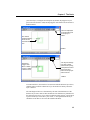
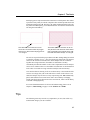
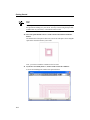
metalization analyzed by em. Therefore, the actual metalization analyzed by em
may differ from that input by you as illustrated below.You turn the cell fill on and
off using the control-M key.
This shows the circuit with the cell fill
turned off. The outline shows the polygon
drawn by you. Notice that this polygon is not
“on” the grid.
This shows the circuit with the cell fill on.
The patterned area shows the actual metal
that is analyzed by the analysis engine, em.
Note that this metal is always “on” the grid.
The cell size is specified in the project editor in the Box Settings dialog box which
is opened by selecting Circuit => Box from the project editor menu. The analysis
solves for the current on each subsection. Since multiple cells are combined
together into a single subsection, the number of subsections is usually
considerably less than the number of cells. This is important because the analysis
solves an N x N matrix where N is the number of subsections. A small reduction
in the value of N results in a large reduction in analysis time and memory.
Care must be taken in selecting a cell size so that accuracy is not sacrificed. If the
cell size is too large, then your results will not be accurate. If the cell size is too
small, the analysis may become too costly in processing time. Em automatically
places small subsections in critical areas where current density is changing
rapidly, but allows larger subsections in less critical areas, where current density
is smooth or changing slowly.
For a more detailed discussion of cell size and subsectioning, please refer to
Chapter 3, Subsectioning, on page 31 of the Sonnet User’s Guide.
Tips
The following items may not look very important to you now, but will be very
useful further along in your use of Sonnet.
27
Getting Started
3D View
It is often helpful to view your circuit in 3D. To do so, select the View ⇒ 3D
View command. An example of a 3D view is shown below.
3D View
Estimate Memory
Once you are done specifying your circuit in the project editor, you may determine
if it is possible to analyze your circuit with the computer resources available to
you. Selecting Analysis => Estimate Memory from the project editor's main menu
opens the Estimate Memory dialog box and subsections your project. A simple
status popup appears to indicate that the circuit is being subsectioned. When the
subsectioning is complete, the memory use estimate and the subsectioning
information, listed by level and total amounts, appears in the dialog box. You may
also view the subsectioning used by em.
28
Chapter 4 Tutorial: A Quick Tour
CHAPTER 4
TUTORIAL: A QUICK
TOUR
This tutorial provides you with an overview of the Sonnet products and how they
are used together. The second tutorial, in Chapter 5, walks you through a simple
example from entering the circuit in the graphical project editor, to viewing your
data in the response viewer, our plotting tool. The third tutorial covers design
issues which need to be considered in the project editor.
There are tutorials on different Sonnet features in the Sonnet User’s Guide as
well as tutorials on the use of the translators in the Translator manual.
The first tutorial is designed to give you a broad overview of the Sonnet suite,
while demonstrating some of the basic functions of the Sonnet products. The
following topics are covered:
•
Invoking Sonnet programs.
•
Opening a circuit geometry project in the project editor.
•
Running a simple analysis in em.
•
Plotting S-parameter data in the response viewer.
•
Performing a simple animation in the current density viewer.
29
Getting Started
Invoking Sonnet
You use the Sonnet task bar, shown below, to access all the modules in the Sonnet
Suite. Opening the Sonnet task bar, for both Windows and UNIX systems is
detailed below.
UNIX
1
Open a terminal.
If you do not know how to do this, please see your system administrator.
2
Enter “sonnet” at the prompt.
The Sonnet task bar appears on your display.
30
Chapter 4 Tutorial: A Quick Tour
Windows
1
Select Start ⇒ Programs ⇒ Sonnet ⇒ Sonnet from the Windows desktop
Start menu.
The Sonnet task bar appears on your display.
Obtaining the Example Projects
Example projects are supplied with your software and are available through the
PDF manuals on your computer. The Application Examples manual, when
accessed in PDF format on your computer, allows you to open the project in the
Project Editor or, in the case of multifile examples, copy the example folder to
your personal working directory.
NOTE:
You must have Adobe Acrobat Reader installed on your system to
access the manuals in PDF format. If you do not have the program, it
is available for installation by selecting Admin ⇒ Install Acrobat from
the Sonnet Task Bar main menu.
To copy the Filtwall project to use in this tutorial, do the following:
1
Click on the Manuals button on the Sonnet Task Bar.
The file sonnet_online.pdf is opened on your display. The manuals available in
PDF format are identical to the hard copy manuals which came with your
installation package.
31
Getting Started
2
Click on the Application Examples button in the PDF document.
3
Click on the Complete List button.
A page appears with a complete list in alphabetical order of the example files.
4
Click on Filtwall in the list.
This will take you to the Filtwall example project in the Application Examples
manual.
5
Click on the Load into Project Editor button at the top of the page.
The project editor is invoked on your display with the file “filtwall.son” open.
This file is a read-only to prevent corrupting the example files.
6
Select File ⇒ Save As from the project editor main menu.
The Save As browse window appears. Save the project in your working directory.
This allows you to save any changes you make to the circuit.
The Project Editor
The project editor, when editing a circuit geometry project, provides you with a
graphical interface which allows you to specify all the necessary information
concerning the circuit you wish to analyze with the electromagnetic simulator, em.
The example circuit, “filtwall.son”, shown on page 34, is a two port microstrip
filter with a 15 mil Alumina substrate and 100 mils of air above. Note that the
resonators run to the edge of the substrate, shorting them to the box wall.
Circuits in Sonnet are modeled as being enclosed in a six-sided metal box which
is ground. Any circuit metal touching the box is shorted to ground. This does not
apply to the two ports shown on the circuit. A standard box wall port is a grounded
32
Chapter 4 Tutorial: A Quick Tour
port, with one terminal attached to a polygon edge coincident with a box wall and
the second terminal attached to ground. The model for a box wall port is pictured
below.
-
1
+
Box wall
port on
page 46.
33
Getting Started
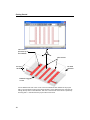
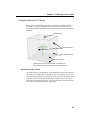
The circuit is
placed on top of
the substrate.
Short circuits
Air Layer
100 mils
Six-sided
metal box
Substrate Layer
15 mils
A three-dimensional view of the circuit in the six-sided metal box modeled in the project
editor. The view shown in the project editor window is a two-dimensional view from the top
looking directly down on the substrate. This view is from the 3D viewer which is opened by
selecting View ⇒ View 3D from the project editor main menu.
34
Chapter 4 Tutorial: A Quick Tour
Zoom and Cell Fill
The project editor has a zoom feature which allows you to take a closer look at any
part of your circuit. You will zoom in on a section of the filter, to observe an
example of staircase cell fill.
The cell fill represents the actual metalization analyzed by em. There are various
types of cell fill, one of which is staircase. Staircase uses a “staircase” of cells to
approximate any angled edges of polygons. Therefore, the actual metalization
analyzed by em may differ from that input by you.
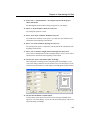
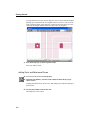
7
Select View ⇒ Cell Fill from the project editor main menu to turn off the cell
fill.
This command toggles the state of cell fill. Only the outline of the polygons are
displayed.
8
Click on the Zoom In button on the tool bar.
The appearance of the cursor changes. A magnifying glass with a plus sign, the
icon on the Zoom In button, appears next to the cursor.
9
Select the section of the circuit you wish to zoom in on.
Move the mouse to the upper left of the junction of the feed line and the first
resonator, as shown below. Click and drag the cursor down and to the right. A
rubber band surrounding the area follows the cursor. When you release the mouse
button, the project editor zooms in on the selected area.
As you can see in the enlargement on page 36, one of the metal polygons has a
diagonal edge.
35
Getting Started
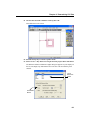
10 Select View ⇒ Cell Fill from the project editor main menu to turn on the cell
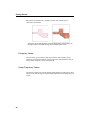
fill.
The metal fill pattern appears in the polygons on your display. Note that the
outline of the actual metal has a “staircase” edge which approximates the diagonal
edge drawn in the project editor. The default setting in the project editor is
staircase fill.
Note that em analyzes the staircase edged metal, not the diagonal polygon.
Diag
onal
NOTE:
Diagonal fill is not available in Sonnet Lite and Sonnet LitePlus. If you
are using either of these suites, skip to step 15. This will not affect
simulation results since staircase fill is restored before running the
analysis.
11 Click on the polygon circled above to select it.
The polygon is highlighted to indicate selection.
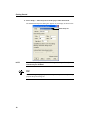
12 Select Modify ⇒ Metal Properties from the project editor main menu.
The Metalization Properties dialog box appears on your display as shown below.
13 Select Diagonal from the Fill Type drop list.
Diagonal fill type, while more accurately modeling the input edge, requires more
processing time.
14 Click on the OK button to apply the changes and close the dialog box.
The metal fill is updated. As you can see, the metal em analyzes is closer to your
input than in the case of staircase fill. But the increased accuracy comes at the
price of increased processing time.
36
Chapter 4 Tutorial: A Quick Tour
In this case, staircase fill provides the required degree of accuracy and will be used
for the analysis. The fill type will be changed back to staircase later in the tutorial.
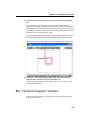
15 Click on the Full View button.
The whole circuit appears on your display.
Metal Types
The project editor allows you to define any number of metal types to be used in
your circuit. Multiple metal types may be used on any given level. A metal type
specifies the metalization loss used by em. Both the DC resistivity and the skin
effect surface impedance are accurately modeled in em.
Metal types are defined in the Metal Types dialog box where a fill pattern is
assigned as part of the definition. For a detailed discussion of metal types and loss,
see Chapter 4, “Metalization and Dielectric Layer Loss” in the Sonnet User’s
Guide.
After a polygon is drawn in your circuit, you can change the metal type. In our
example, all the polygons are comprised of Copper metal. An example is given
below of changing the metal type of one polygon to “Lossless” metal.
16 Click on any resonator of the filter to select it.
The polygon is highlighted to indicate selection.
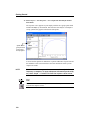
37
Getting Started
17 Select Modify ⇒ Metal Properties from the project editor main menu.
The Metalization Properties dialog box appears on your display as shown below.
Metal Drop List
NOTE:
Note that depending which Sonnet Suite you have purchased, some
controls may be disabled.
TIP
Double-clicking on a polygon, port, via or component in your circuit opens the appropriate Properties dialog box.
38
Chapter 4 Tutorial: A Quick Tour
18 Click on the Metal drop list and select “Lossless” from the list. Click on the
OK command button to apply the change and close the dialog box.
The fill pattern changes for the selected polygon as shown below.
The metal for this polygon now has the loss associated with the default lossless
metal. The project editor allows you to define any number of metal types for use
in your circuit. For details on defining metal types, see the project editor’s online
help.
You will not be analyzing with lossless metal; the metal is switched back later in
the tutorial.
Dielectric Layers
19 Select Circuit ⇒ Dielectric Layers from the project editor main menu.
The Dielectric Layers dialog box, which allows specification of the dielectric
layers in the box, appears on your display, providing you with an approximate
“side view” of your circuit. The project editor “level” number appears on the left.
A “level” is defined as the intersection of any two dielectric layers and is where
your circuit metal is placed.
39
Getting Started
.
Metal Box (Ground)
Air (100 mils)
Level 0
Metal
Alumina Substrate - 15 mils
Metal Box (Ground)
Refer to page 34 for a three-dimensional drawing of the dielectric layers. The air
layer is required to keep the metal top of the box away from the circuit metal.
20 Click on the OK command button to close the Dielectric Layers dialog box.
21 Select File ⇒ Revert to Saved from the project editor main menu.
This returns “filtwall.son” to the original form which you copied from the
example directory. This step ensures that you are analyzing the original file and
that you are able to successfully launch em from the project editor.
Em - The Electromagnetic Simulator
Em performs electromagnetic analysis for arbitrary 3-D planar geometries,
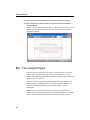
maintaining full accuracy at all frequencies. Em is a “full-wave” analysis engine
which takes into account all possible coupling mechanisms.
The project editor provides an interactive windows interface to em. This interface
consists of menus and dialog boxes which allow you to select run options, set up
the analysis type and input parameter values and optimization goals. You may
save the settings for an analysis file in a batch file using the analysis monitor.
In the next part of this tutorial, you set up the analysis for and analyze the circuit
“filtwall.son” which you examined in the project editor. If you have not already
done so, load “filtwall.son” into the project editor.
40
Chapter 4 Tutorial: A Quick Tour
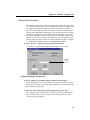
Setting Up the Analysis
These analysis controls have already been input to this example file, but the steps
are explained in order to show how the information is entered. You will be using
the Adaptive Band Synthesis (ABS) technique to analyze the circuit. ABS
provides a fine resolution response for a frequency band with a small number of
analysis points. Em performs a full analysis at a few points and uses the resulting
internal data to synthesize a fine resolution band. This technique, in most cases,
provides a considerable reduction in processing time. The points at which a full
analysis is performed are referred to as discrete data. The remaining data in the
band is referred to as adaptive data. For a detailed discussion of ABS, see Chapter
9, “Adaptive Band Synthesis (ABS)” in the Sonnet User’s Guide.
22 Select Analysis ⇒ Setup from the project editor main menu.
The Analysis Setup dialog box appears on your display as shown below.
Analysis
Control
drop list
Setting Up Analysis Frequencies
23 Select Adaptive Sweep (ABS) from the Analysis Control drop list.
Since the default type of sweep is Adaptive, you will not need to take any action
for this step. The adaptive sweep uses ABS to analyze the circuit. This enables the
Start and Stop text entry boxes.
24 Enter the Start, and Stop values in the appropriate text entry boxes.
The frequency band you wish to analyze is from 4.7 GHz to 5.5 GHz, therefore,
enter 4.7 in the Start text entry box, and 5.5 in the Stop text entry box. These
entries may already be present.
41
Getting Started
If you needed to change the frequency units, you would do so using the Units
dialog box, accessed by selecting Circuit ⇒ Units from the project editor main
menu.
Analysis Run Options
Run options for em are available in the Analysis Setup dialog box. This example
uses the De-embed option, which is set by default, and the Compute Current
Density option. De-embedding is set in the Advanced Options dialog box which
you access by clicking on the Advanced button in the Analysis Setup dialog box.
Since it is set by default, you do not need to do this for this example.
De-embedding is the process by which the port discontinuity is removed from the
analysis results. Inaccurate data may result from failing to implement this option,
even when you are not using reference planes. For a detailed discussion of deembedding refer to Chapters 7 and 8 in the Sonnet User’s Guide.
If this option is on, de-embedded response data is output to the project file.
The Compute Current Density run option instructs em to calculate current density
information for the entire circuit which can be viewed using the Current Density
Viewer. Be aware that for an adaptive sweep, current density data is only
calculated for discrete data points.
TIP
The Memory save option (not used in this example) uses less memory by storing
matrix elements as single precision numbers rather than double precision. Its use
is recommended in order to execute a simulation that otherwise might not be possible within the bounds of your memory limitations.
25 Click on the OK button to apply the changes and close the dialog box.
A Current Density Notice may appear on your display; if you do not wish this
warning to appear again, select the Don’t show me this again checkbox. Click OK
to close this notice.
Executing an Analysis Run
The control frequencies and run options are all specified. The analysis time for the
circuit will vary depending on the platform on which the analysis is performed.
42
Chapter 4 Tutorial: A Quick Tour
26 Select Project ⇒ Analyze from the project editor main menu to invoke em
and run the analysis.
The analysis monitor appears on your display with the output window displaying
response data. The analysis time will vary depending on the platform on which
you are running the software. This analysis needs only four discrete frequencies
to create the adaptive data and complete the analysis. When the analysis is
complete, the message “Analysis completed” followed by the data and time
appears in the analysis monitor as shown below.
The Response Viewer- Plotting Your Data
The response viewer is used to display the results from an em analysis as either a
Cartesian graph or Smith chart. S-, Y- and Z-Parameters can be displayed alone
or simultaneously as well as transmission line parameters. You can also display
multiple curves from multiple projects on a single plot or choose to open multiple
plots at the same time. It is also possible to display parameter sweeps and
optimization results in a number of advanced ways. This tutorial covers only the
most basic of the response viewer’s functions.
43
Getting Started
Invoking the Response Viewer
27 Select Project ⇒ View Response ⇒ New Graph from the project editor main
menu to invoke the response viewer.
The response viewer window appears on your display with a Cartesian graph of
the curve group filtwall with curve DB[S11] displayed. The project file contains
multiple curves which are displayed in user-defined curve groups.
Plot Legend
Curve Group
Legend
Plot
Window
A data point is the measurement for a particular frequency. The data for all
frequencies makes up a measurement. A measurement is a set of response data
uniquely identified by parameter type, response type, port numbers and project
file. An example would be:
DB[S11] in the filtwall.son file
DB identifies the response type as magnitude in dB. S identifies the parameter
type as an S-Parameter. 11 identifies the output port as Port 1 and the input port
as Port 1. The project file from which the measurement originated is
“filtwall.son.” A curve group is made up of one or more measurements.
Different curve groups may come from different project files yet be displayed
simultaneously
44
Chapter 4 Tutorial: A Quick Tour
Displaying a Smith Chart
28 Change the plot to a Smith Chart by selecting Graph ⇒ Type ⇒ Smith from
the response viewer main menu.
The plot is changed to a Smith chart of “filtwall.son” which appears on your
display. Again, the curve group filtwall with the DB[S11] curve is displayed. This
curve group is the default displayed upon startup.
TIP
You can right-click on most parts of the response viewer window to invoke popup menus. For example, right clicking in the plot window and selecting Type ⇒
Smith from the pop-up window also displays a Smith Chart.
Selecting Another Curve for Display
You may display multiple curves from multiple files simultaneously. Curve
groups contain one or more measurements. To add a different measurement for
display in a curve group, perform the following.
29 Select Graph ⇒ Type ⇒ Cartesian from the main menu.
This changes the plot back to a Cartesian graph.
45
Getting Started
30 Click on the curve group, filtwall, in the curve group legend to select it.
A box appears around the curve group name to indicate its selection.
Curve group
“filtwall”
31 Select Curve ⇒ Edit Curve Group from the response viewer main menu.
The Edit Curve Group dialog box appears on your display as shown below.
46
Chapter 4 Tutorial: A Quick Tour
TIP
Double-clicking on the Curve Group in the Curve Group legend also opens the
Edit Curve Group dialog box.
If this project file contained parameter combinations or optimization data, the
dialog box would include a section that allowed you to select parameter
combinations to display.
32 Double-click on DB[S21] in the Unselected list to move it to the Selected list.
DB[S21] moves to the Plotted list.
33 Click on the OK command button to apply these changes.
The Edit Curve group dialog box is closed and the Cartesian graph is updated to
display the curve group filtwall, which now contains the two curves, DB[S11] and
DB[S21]. Since the axes are set to autoscale, the values on the axes are
automatically adjusted. The graph should appear similar to that pictured below.
Note that very few of the symbols ( O ), indicating data points, appear on the
curves. When you are displaying adaptive data from an ABS analysis, the only
points highlighted with a symbol in the response viewer are those from the
discrete points where a full analysis was performed.
34 Right-click on the curve group name, filtwall, which appears in the Curve
Group legend and select Properties from the pop-up menu which appears on
your display.
The Data Set Style dialog box appears on your display.
47
Getting Started
35 Click on the Symbol radio button in the dialog box.
The dialog box should appear similar to that shown below.
36 Click on an arrow button next to the Symbol display until the word “None”
appears.
37 Click on the OK command button to apply these changes and close the
dialog box.
The symbols for the discrete data points are no longer displayed. Only the line
represents all the adaptive data.
The graph should appear similar to that pictured below.
48
Chapter 4 Tutorial: A Quick Tour
Data Readouts - Smith Chart
The response viewer can provide a readout on any given data point on your plot
in two different ways. The information provided is dependent upon the type of
data point selected. In the next section, you see how to obtain data on the Smith
chart.
38 Right-click in the plot window, then select Type ⇒ Smith from the pop up
menu which appears on your display.
The plot is changed to a Smith Chart. It is important to note that the curve group
filtwall only contains one curve: DB[S11]. The curve groups defined for Cartesian
graphs are independent of those defined for Smith charts.
Zooming in on a section of the Smith chart makes it easier to distinguish
individual points.
39 Click on the Zoom In button on the tool bar.
A change in the cursor indicates that you are in zoom in mode.
TIP
If you have a three-button mouse, clicking on the center mouse button when the
cursor is in the plot window, will put you in zoom in mode.
40 Click and drag your mouse in the Smith chart until the rubber band
surrounds the area you wish to magnify. Then release the mouse button.
The display is updated with a magnified picture of the selected area. To return to
the full graph, click on the Full View button on the tool bar. Zooming operates in
the same manner on a Cartesian graph. For our example, select one of the end
points of the graph to enlarge.
41 Move the cursor over a discrete data point in the Smith Chart.
A discrete data point is indicated by the O symbol. A popup appears, similar to
that shown below, on your display with data about that point.
42 Click on the Full View button on the tool bar.
The full view of the Smith chart appears in the response viewer window.
49
Getting Started
43 Click on a data point in the Smith chart.
The readout for that data point appears in the Status Bar at the bottom of the
response viewer window.
Selected Point
Readout in Status Bar
To move between points on a curve use the → and ← keys. To move between
curve groups on the display use the ↑ and ↓ keys.
Adding a Data Marker
There are markers available in the response view that allow you to annotate your
results in order to better interpret your data or make presenting your data simpler.
There are six types of markers available; this section teaches you to add a data
marker. For more information on markers, please refer to online help.
44 Select Graph ⇒ Marker ⇒ Add ⇒ Data Marker from the main menu of the
response viewer.
The appearance of the cursor changes.
50
Chapter 4 Tutorial: A Quick Tour
45 Click on the data point to which you wish to add a marker.
A label appears on your plot as shown below. Double clicking on the marker
allows you to control the data displayed in the marker.
Data Marker
Closing the Response Viewer
To close the program, perform the following:
46 Select File ⇒ Exit from the response viewer main menu.
The response viewer display is closed.
Current Density Viewer
The current density viewer is a visualization tool used to view the results of
circuits previously analyzed with em. Em saves the resulting current density
information in the project file ready for input to the current density viewer.
To produce the current density data, you must select the Compute Current Density
option in the Analysis Setup dialog box in the project editor. This was done for
you in the example file.
51
Getting Started
Invoking the Current Density Viewer
47 Select Project ⇒ View Current from the main menu of the project editor or
the main menu of the response viewer after clicking on the curve group
Filtwall in the legend.
The current density viewer window appears on your display with the first
frequency in “filtwall.son” displayed. The color plot should appear similar to the
one shown below. You are viewing the magnitude of the current density with a 1
Volt, 50 ohm source and Port 2 with a 50 ohm load.
Red areas represent high current density, and blue areas represent low current
density. A scale is shown on the left of the window which defines the values of
each color.
Current Density Values
48 Click on any point on your circuit to see a current density value.
The current density value (in amps/meter) at the point that you clicked is shown
in the status bar at the bottom of your window along with the coordinates of the
location.
52
Chapter 4 Tutorial: A Quick Tour
Frequency Controls
A different frame is displayed for each analysis frequency.
49 Click on the Next Frequency button on the tool bar.
The lowest frequency appears on your display as the default, which in this case is
at 4.7 GHz. When you click on the Next Frequency button, the display is updated
with the current density at 5.1125 GHz.
NOTE:
The scale to the left of the display is also updated.
50 Click on the Frequency Drop list, and select 5.2625.
The drop list allows you to go directly to any of the analysis frequencies.
Animation
The current density viewer provides two types of animation: frequency and time.
To do an animation in the frequency domain, the current density viewer takes a
picture of your circuit at each frequency point and links the pictures together to
form a “movie”. In the time domain, the current density viewer takes a picture of
your circuit at instantaneous points in time at a given frequency by changing the
excitation phase of the input port(s). Animation allows you to see how your
response changes with frequency or time, providing insight into the properties of
your circuit.
The animation menu and controls are the same whether animating as a function of
frequency or time. The current density viewer accomplishes this by translating the
data into frames. The animation menu then allows you to step one frame at a time,
or “play” the frames by displaying them consecutively. How the data relates to a
frame in either animation mode is discussed below.
Time Animation
For Time Animation, each frame corresponds to an input phase. The type of data
plotted is determined by the Parameters ⇒ Response menu. In this case, the data
is the JXY Magnitude, the total current density. This is the default setting upon
opening a current density viewer window. For more details about response types,
see “Parameters - Response” in the current density viewer’s help. To invoke help
for the current density viewer, select Help ⇒ Contents from its main menu.
53
Getting Started
51 Select Parameters ⇒ Scale from the current density viewer main menu.
The Set Scale dialog box appears on your display.
52 Click on the User Scale checkbox and enter a value of 100 in the Max Value
text entry box.
This allows you to set a fixed scale to avoid automatic updates of the scale during
the animation.
53 Click on the OK command button to close the dialog box and apply the
changes.
The dialog box disappears and the scale to the left of the current density viewer
window is now fixed at a maximum value of 100.
54 Select Animation ⇒ Settings from the current density viewer main menu.
The Animation Settings dialog box appears on your display as shown below.
55 Click on the Time Radio button to select Time Animation.
This enables the cycle type drop list and the Number of Steps text entry box.
56 Select Half Cycle from the cycle type drop list.
Our example uses half cycle, the default, in which the phase ranges from 0° to
180°.
For Full Cycle the phase ranges from 0° to 360°. For Quarter Cycle, the range is
0° to 90°.
57 Enter a value of 36 for the Number of Steps.
The number of steps is used to determine how many frames the animation
includes. There are 180° in a half cycle; therefore, 36 steps yield a value of 5° for
the phase interval.
54
Chapter 4 Tutorial: A Quick Tour
The lowest phase, 0°, corresponds to the first frame and the highest phase, 175°,
corresponds to the last frame. This phase value represents an offset from the
Source Phase for any given port set in the Port Parameters dialog box. For details
on how to set the Source Phase, see “Parameters − Ports” in the current density
viewer’s online help. To access the current density viewer’s help, select Help ⇒
Contents from its main menu.
For this example, the Source Phase for port 1 is set to the default of 0°. Port 1 is
terminated with a 50 ohm load.
58 Enter 0.1 in the Frame Duration text entry box.
Before “playing” the frequency data by displaying consecutive frames, you may
set the duration for each frame. This is the amount of time that each frame will
appear on the display. The default value is 0.5 seconds. For this example, the
frame duration is 0.1 seconds.
59 Click on the OK command button in the Settings dialog box.
This saves the settings and closes the Animation Settings dialog box.
60 Select Animation ⇒ Animate View from the current density viewer main
menu.
The current density viewer enters animation mode. The first frame, which displays
the Magnitude of JXY(t) at 5.2625 GHz and 0 degrees, appears in the window and
should resemble the picture below. The response type and frequency are
determined by the settings when animation mode was launched. The present mode
and frame is identified in the title bar of the window.
55
Getting Started
The Animation Controls, shown below, also appear on your display.
61 Click on the Continuous Play button in the Animation Controls.
This command toggles the Play commands in and out of continuous mode. In
continuous mode, when the last frame is reached, the current density viewer starts
over at the first frame and continues to cycle through the frames until a stop
command is received. If the play direction is reverse, when the first frame is
reached, the current density viewer starts over at the last frame and continues to
display frames, in reverse order, until you press stop.
Continuous mode is indicated by a change of color of the Continuous Play mode
icon.
62 Click on the Play button in the Animation Controls.
Selecting Play starts the animation at the present frame, 5.2625 GHz and 0
degrees, which corresponds to t = 0. Subsequent frames are displayed
consecutively in 5° intervals. Each frame is displayed for 0.1 seconds, the delay
set earlier. When the last frame is reached, the display starts over with the first
frame and repeats until you press the Stop button in the Animation Controls.
Be aware that the first time through, the current density viewer is calculating the
displays for each frame. Subsequently, the displays update at a slower rate. After
the initial loading cycle of all the frames is complete, the display updates at the
input rate of 0.1 seconds.
63 Click on the Stop button in the Animation Controls.
This stops the animation, although the window remains in animation mode.
64 Click on the Exit Animation button in the Animation Controls.
This exits the animation mode. The Animation Controls disappear from the
display.
Frequency Animation
For Frequency Animation, each frequency will have its own frame. The lowest
frequency, 4.7 GHz, corresponds to the first animation frame and the highest
frequency, 5.5 GHz, corresponds to the last frame.
65 Select Animation ⇒ Settings from the current density viewer main menu.
The Animation Settings dialog box appears on your display.
56
Chapter 4 Tutorial: A Quick Tour
66 Click on the Frequency radio button to select Frequency Animation.
If the radio buttons, Time and Frequency, in this dialog box are disabled, you
stopped the animation but did not exit the animation mode. You must click on the
Exit Animation button in the Animation controls to exit the animation mode and
allow you to modify the animation settings. Only the Frame Duration may be
changed while running an animation.
67 Click on the OK button to close the Animation Settings dialog box and apply
the changes.
68 Select Animation ⇒ Animate View from the current density viewer main
menu.
The current density viewer enters animation mode. The first frame, which displays
the JXY Magnitude response for 4.7 GHz, appears in the window. The response
type and frequency are determined by the settings when animation mode was
launched.
Since the ABS band was defined from 4.7 GHz to 5.5 GHz, the first discrete
frequency at which the circuit was analyzed is 4.7 GHz. Remember that current
density data for an ABS sweep is only calculated for discrete data points not for
all the adaptive data.
The Animation Controls also appear on your display. Note that Continuous Play
mode is still “on” from the previous example.
69 Click on the Play button in the Animation Controls.
Selecting Play starts the animation at the present frame, 4.7 GHz. Subsequent
frames, consecutively by frequency, are displayed, each for 0.1 seconds, the delay
set previously. When the last frame is reached, the display starts over with the first
frame and repeats until you press the Stop button in the Animation Controls.
Note that a description of each frame’s contents appears in the title bar of the
window.
70 Select File ⇒ Exit from the current density viewer main menu.
This command exits the current density viewer.
71 Select File ⇒ Exit from the project editor main menu.
This command exits the project editor program.
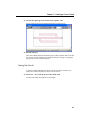
This completes the first Sonnet tutorial. The next tutorial concentrates on entering
a circuit in the project editor.
57
Getting Started
58
Chapter 5 Creating a Circuit: Dstub
CHAPTER 5
CREATING A CIRCUIT:
DSTUB
The second tutorial walks you through the process of entering a circuit in the
project editor, analyzing the circuit using the analysis engine, em, and observing
your analysis data in the response viewer. Some of the concepts covered in this
tutorial are:
•
Setting up box settings
•
Determining cell sizes
•
Setting up dielectric layers
•
Adding metal rectangles to a circuit
•
Adding metal polygons to a circuit
•
Copying, flipping and moving polygons in a circuit
•
Performing a simple analysis
•
Plotting response data
The example for this tutorial is a circuit geometry project “dstub.son.” The circuit,
as it appears upon completion, is shown following, along with a view showing the
orientation when looking at the project editor display.
59
Getting Started
Even if you plan on using a translator to import your circuits, this tutorial provides
you with the basics of the project editor environment which you need to accurately
translate your circuit.
The circuit is
placed on top of
the substrate.
Air Layer
100 mils
Six-sided metal
box
Substrate Layer - 20 mils
A three-dimensional view of the circuit in the six-sided metal box modeled in the
project editor. The view shown in the project editor window is a two-dimensional
view from the top looking directly down on the substrate.
60
Chapter 5 Creating a Circuit: Dstub
The Substrate, Subsectioning, and Cell Size
To input a circuit geometry in the project editor, you must set up the box and
substrate parameters as well as drawing the circuit. Below is a discussion of some
of the factors to consider when setting up the box and cell size.
Specifying the parameters of the enclosing box defines the dimensions of the
substrate, since the substrate covers the bottom area of the box. There are three
interrelated box size parameters: Cell Size, Box Size, and Number of Cells. Their
relationship is as follows:
(Cell Size) X (Num. Cells) = Box Size
Therefore, changing one parameter may automatically cause another parameter to
change. Any one of the parameters can be kept constant when changing sizes by
clicking on the corresponding Lock checkbox.
The electromagnetic analysis starts by automatically subdividing your circuit into
small rectangular subsections. Em uses variable size subsections. Small
subsections are used where needed and larger subsections are used where the
analysis does not need small subsections.
A “cell” is the basic building block of all subsections, and each subsection is
“built” from one or more cells. Thus a subsection may be as small as one cell or
may be multiple cells long or wide. Thus the “Dimensions” of a cell determine the
minimum subsection size.
The smaller the subsections are made, the more accurate the result is and the
longer it takes to get the result. Therefore, there is a trade off between accuracy
and processing time to be considered when choosing the cell size. The project
editor gives you a measure of control over the subsection size. For a detailed
discussion of subsectioning, please see Chapter 3, “Subsectioning” in the Sonnet
User’s Guide.
Note that the dimensions of a cell do not need to be a “round” number. For
example, if you want to analyze a line that is 9.5 mils wide, you need not set your
cell dimension to 0.5 mils. You may want to set it to 4.75 mils (9.5 mils divided
by 2) or 3.16667 mils (9.5 mils divided by 3). This will speed up the analysis
because fewer subsections will be used. Also, the width of the cell does not need
to be the same as the length.
When viewing your substrate, notice that the project editor displays a grid made
up of regularly spaced dots. The distance between each grid point is the cell size.
61
Getting Started
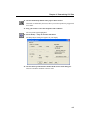
The cell size may be entered directly or you may enter the number of cells. This
sets the number of cells per substrate side, thus implicitly specifying the cell size
in relationship to the box size. Note that the number of cells must be an integer
number.
TIP
When the number of cells per side is large, selection of a power of two value provides em with a significant speed increase. For example, 256 cells per side is more
efficient than 250 cells per side.
Metalization Levels and Dielectric Layers
The analysis engine and the project editor can handle any number of metalization
levels. The default in a new project file is two dielectric layers with one
metalization level in between. Typically metalization is referred to as “levels” and
dielectric as “layers”. Each metalization level is sandwiched between two
dielectric layers. It may be helpful to think of a level as being attached to the
bottom of the dielectric layer above.You add another metalization level by adding
dielectric layers through the Dielectric layers dialog box. When you are in the
main window, you are viewing a metalization level of your circuit.
62
Chapter 5 Creating a Circuit: Dstub
Entering your Circuit
In this section of the tutorial, you input the circuit “dstub.son.” The complete
circuit, with dimensions, is shown below.
90 mils
200 mils
20 mils
60 mils
190 mils
60 mils
90 mils
20 mils
330 mils
The dimensions of the example file, dstub.son.
Invoking the Project Editor
1
Open the Sonnet task bar.
If you do not yet know how to do this, please refer to “Invoking Sonnet,” page 30.
2
Click on the Edit Project button in the Sonnet task bar.
A pop-up menu appears on the task bar.
63
Getting Started
3
Select New Geometry from the pop-up menu.
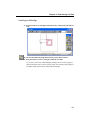
A project editor window, with an empty substrate, appears on your display as
shown below. The view shown in the project editor window is a two-dimensional
view from the top looking directly down on the substrate. The tool box, which
allows easy access to commonly used functions, also appears on your display.
Tool box
Specifying Box Settings
Before drawing the circuit, you must specify the parameters of the enclosing box,
which includes the dimensions of the substrate and the cell size.
4
Select Circuit ⇒ Box from the project editor main menu.
The Box Settings dialog box appears on your display.
64
Chapter 5 Creating a Circuit: Dstub
This dialog box is used to set the box size dimensions for your circuit. The box
size for our example is 200 mils by 330 mils.
5
Enter 330 in the X text entry box in the Box Size row of the Box Settings
dialog box.
This sets the x dimension of the box, and thereby, the substrate, to 330 mils.
6
Enter 200 in the Y text entry box in the Box Size row of the Box Settings
dialog box.
This sets the Y dimension of the box, and thereby, the substrate, to 200 mils.
Note that when these values are entered, the number of cells value is updated to
correspond to the new box size.
Setting Cell Size
In observing the dimensions of the circuit, shown on page 63, it can be seen that
common factors of the dimensions, in both the x and y directions, are 2, 5, and 10
mils, in order for all the metalization to fall on the cell grid. Off-grid metalization
is possible; however, that is addressed elsewhere.
A cell size of 10 mils by 10 mils provides enough accuracy for this circuit while
needing the least processing time. These are the default values, so that steps 7 and
8 may not be necessary.
7
Enter 10 in the X text entry box in the Cell Size row of the Box Settings
dialog box.
This sets the x dimension of the cell to 10 mils.
65
Getting Started
8
Enter 10 in the Y text entry box in the Cell Size row of the Box Settings
dialog box.
This sets the y dimension of the cell to 10 mils.
9
Click on the OK command button in the Box Settings dialog box.
The dialog box disappears from your display and the substrate is updated to show
the new size.
Setting the Dielectric Layers
Next, you need to specify the dielectric layers.
10 Select Circuit ⇒ Dielectric Layers from the project editor main menu.
The Dielectric Layers dialog box, which allows specification of the dielectric
layers in the box, appears on your display. A new geometry project always has two
default layers whose material is Air. The project editor “level” number appears on
the left providing you with an approximate “side view” of your circuit. A “level”
is defined as the intersection of any two dielectric layers and is where your circuit
metal is placed.
11 Enter a value of “100” in the Thickness text entry box in the first line of the
Dielectric Layers dialog box.
This dielectric layer is the air above the actual microstrip. The layer thickness has
absolutely no impact on execution time or accuracy. Remember, the analysis is
done inside of a six-sided metal box, so there is a metal top cover above the 100
mils of air. Specifying a small number for this thickness moves the top cover
66
Chapter 5 Creating a Circuit: Dstub
closer to the circuit metalization, providing stronger coupling between the top
cover and the circuit metalization. If you do not know the actual dimensions of the
box, or if you do not have a top cover, a good rule of thumb for microstrip is to set
the air thickness to several (3-5) substrate thicknesses.
The rest of the parameters are the default values for Air and do not need to be
changed.
12 Click on the second entry line in the Dielectric Layers dialog box to select it,
then click on the Edit button.
The Dielectric Editor dialog box is opened. You did not need the Dielectric Editor
for the first layer since you only wanted to change its thickness and this can be
done directly in the Dielectric Layers dialog box. However, to change any other
parameter of the dielectric layer you must use the Dielectric Editor dialog box.
TIP
Double-clicking on an entry in the Dielectric Layers dialog box, opens the Dielectric Editor dialog box on that entry.
13 Enter “Alumina” in the Mat. Name text entry box.
The material you wish to use for this dielectric layer is Alumina.
14 Enter a value of “20” in the Thickness text entry box.
This specifies a 20 mil thick substrate.
15 Enter a value of “9.8” in the Erel text entry box.
The dielectric constant for alumina is 9.8.
16 Click on the OK button to close the Dielectric Editor and apply the changes.
The Dielectric Layers dialog box is updated and should appear similar to that
shown below.
67
Getting Started
.
Metal Box (Ground)
Air (100 mils)
Level 0
Metal
Alumina Substrate - 20 mils
Metal Box (Ground)
Note that the thickness of each layer must be specified. If not, the default value,
0.0, causes em to issue an error message and stop execution.
The setup of the box size, and dielectric layers is complete. The only metal type
used for this circuit is lossless, the default metal type available in any new project
editor file. In the next section, you input the metal polygons which make up the
circuit.
17 Click on the OK command button to apply the changes and close the dialog
box.
Adding Metalization
First, you add the center rectangle of the circuit.
18 Click on the Add a Rectangle button in the tool box.
The appearance of the cursor changes.
68
Chapter 5 Creating a Circuit: Dstub
19 Move the cursor until the readout in the pointer area of the status bar reads
“0.0, 90.0 mils” then click the mouse.
20 Move the cursor up and to the right until you go up two cell grids and
towards the right edge of the box. Click on a point a few cells in from the box
wall.
A rubber band stretches from the first point you clicked to the location of the
cursor. When you click a second time, a metal rectangle appears in your circuit as
shown below. We have deliberately made the polygon too short in order to
demonstrate the Reshape tool. It should appear similar to the picture below.
69
Getting Started
Next, we’ll use the reshape tool to extend the polygon to the box wall.
21 Click on the Reshape button in the Tool Box.
The appearance of the cursor changes to indicate that you are in reshape mode.
22 Drag the mouse so that the two end points of the polygon are selected.
The two selected end points are highlighted as shown below.
Distance between the
two selected points.
70
Chapter 5 Creating a Circuit: Dstub
TIP
When two vertices of a polygon are selected, the distance between them is displayed in the status bar at the bottom of the window.
23 Click on one of the selected points and drag it to the box wall.
The circuit should appear as pictured below. You may select anywhere from one
vertex to all the vertices when in reshape mode. When more than one vertex is
selected, moving one vertex causes all other selected vertices to move and retain
their relative position to the first vertex as happened in this example. It is also
possible to add additional vertices to a polygon by using the Add Points button in
the tool box.
Next, you’ll add the polygons.
24 Click on the Add a Polygon button in the Tool Box.
The appearance of the cursor changes.
71
Getting Started
25 Type “60,90” followed by Enter on the keyboard.
This enters the first point on the polygon. A rubber band stretches from this point
to the location of the cursor.
26 Type “@20<270” followed by Enter on the keyboard.
The sign “@” indicates a relative distance from the last point. The “<270”
provides the angle at which the segment should emanate. Therefore, a segment 20
mils in length going straight down is added to the polygon and a line connecting
the two points appears.
27 Move the cursor down 20 mils and to the right 20 mils until the status bar
reads “20.0 X -20.0 mils” and then click.
Another segment is added to the polygon. As before, the rubber band now
stretches from the last point to be added.
TIP
If you add a point in the wrong location, hitting the backspace, or delete key, deletes the last entered point of the polygon.
72
Chapter 5 Creating a Circuit: Dstub
28 Enter “270,50” followed by Enter to enter the next point.
Continue adding points in this manner until the polygon is complete. The table
below lists all the points in the polygon.
Point
Coordinate
s
1
60,90
2
60,70
3
80,50
4
270,50
5
270,70
6
80,70
7
80,90
8
60,90
Note that you can complete the polygon by double-clicking on point 7 or by
clicking on point 8 after adding point 7. Your circuit should now appear as shown
below. Note that the metal polygons whose edges are touching are connected
electrically.
73
Getting Started
When a polygon is complete, a fill pattern which defines the actual metalization
analyzed by em appears on your display. In the picture above, notice the staircase
approximation for the mitered bend. Em does not analyze the bend as you entered
it; the staircase approximation is analyzed instead.
29 Enter ^M (Control-M) at the keyboard to turn off the metal fill.
The circuit, shown below, appears only with the outline of the polygons you have
entered.
30 Enter ^M (Control-M) at the keyboard to turn the metal fill back on.
The display is updated with the metal fill on. The metalization, as mentioned
above, represents the actual metal used in the simulation by em.
TIP
Selecting Diagonal fill type for this polygon would have provided a much closer
approximation of metalization to the entered polygon, at the cost of increased processing time. That degree of accuracy was not required for this circuit. For more
details on Fill Types, see “Modify - Metal Properties” in the project editor’s help.
To access the project editor’s help, select Help ⇒ Contents from its main menu.
Duplicating a Polygon
You now create the other stub by duplicating the one just entered.
31 Click on the completed polygon to select it.
The polygon appears highlighted.
74
Chapter 5 Creating a Circuit: Dstub
32 Select Edit ⇒ Duplicate from the project editor main menu.
A copy of the polygon appears on your circuit. Note that the duplicate polygon is
highlighted, indicating its selection for edit commands.
33 Select Modify ⇒ Flip from the project editor main menu.
The Flip dialog box appears on your display.
Left/Right Flip
Up/Down Flip
34 Click on the Left/Right Flip button in the Flip dialog box.
The polygon flips about its center in left/right direction.
35 Click on the Up/Down Flip button in the Flip dialog box.
The polygon flips about is center in the up/down direction.
36 Click on the Close button in the Flip dialog box.
The Flip dialog box disappears from your display. Your circuit should now appear
as shown.
75
Getting Started
37 Move the polygon, by dragging it with the mouse, until it is opposite the
other polygon on the other side of the strip.
The circuit should now look like this:
Adding Metal Loss
In the next section of the tutorial, you will define metal loss for all the metalization
in your circuit. In order to model metal loss, you must first define a metal type by
inputting its loss parameters. Once you have created the metal type, it needs to be
applied to the desired polygons in order for that metalization to use the correct
loss.
This change is done here for the purpose of demonstration; the polygons will be
changed back to lossless metal before analyzing the circuit.
76
Chapter 5 Creating a Circuit: Dstub
Defining a Metal Type
38 Select Circuit ⇒ Metal Types from the project editor main menu.
The Metal Types dialog box appears on your display. The only metal presently
defined for this circuit is the default Lossless metal whose entry is displayed in the
Metal Types dialog box as shown below.
39 Click on the Add button in the Metal Types dialog box.
The Metal Editor dialog box appears on your display. Note that a default name,
“Metal1,” is provided for the metal type and the default parameters define a
lossless metal.
77
Getting Started
40 Enter the name “Half Oz Copper” in the Name text entry box.
This will be the name of the metal type and will appear in any metal type menus.
You may enter any string of characters for the metal Name.
You will use the default type of “Normal” which is used for most circuit metal.
The metal loss is based on the bulk conductivity, thickness of the conductor and
the current ratio.
TIP
The metal type you are defining will only be available for use in this circuit unless
you add the metal type to your Global or Local metal library. Refer to "Metal Libraries" on page 58 of the Sonnet User’s Guide for details on using metal libraries.
41 Enter “5.8e7” in the Conductivity text entry box.
This is the bulk conductivity of Copper in S/M.
42 Enter “0.7” in the Thickness text entry box.
This will use a thickness of 0.7 mils to calculate loss. Note that the metal thickness
is used only in calculating loss; it does not change the physical thickness of
metalization in your circuit. The metalization in your circuit is still modeled as
zero-thickness. To model physically thick metal, you would use the Thick Metal
type.
The default value of zero for the current ratio does not need to be changed for this
metal. For most microstrip, zero is usually a good value. Time does not allow for
an explanation of current ratio here, but for a detailed explanation you may click
on the Help button in the dialog box.
TIP
Online help is available by clicking the Help button in any dialog box or by selecting Help ⇒ Contents from the menu of any Sonnet application. Clicking on the
Help button in a dialog box takes you directly to a topic which describes the functions and purpose of the controls in that dialog box.
78
Chapter 5 Creating a Circuit: Dstub
The dialog box should now appear similar to the illustration below.
Note the drop list for the pattern which is used to identify the metal where it is used
in your circuit. We are using the default. If you wish to change the Fill Pattern
click on the arrows to cycle through your choices.
43 Click on the OK button to close the dialog box and apply the changes.
The Metal Types dialog box now displays two metal types in the list: lossless and
Half Oz Copper.
44 Click on the OK button in the Metal Types dialog box to apply the changes
and close the dialog box.
Now that the Half Oz Copper metal type is defined for this circuit, you need to
apply the metal type to the desired polygons to use the loss model in your circuit.
79
Getting Started
Any combination of these two metals, lossless and Half Oz Copper, may be used
anywhere in your circuit. You may define as many metal types as you wish. Any
combination of these metal types may be used on any metal level and on any type
of polygon. You may use multiple metal types on the same metal level.
Applying a Metal Type
45 Drag your mouse or press Control-A to select all the polygons in the circuit.
All the polygons are highlighted to indicate that they are selected.
46 Select Modify ⇒ Metal Properties from the project editor main menu.
The Metalization Properties dialog box appears on your display. You may use this
dialog box to change the properties of multiple polygons. If two or more of the
selected polygons have different attributes, the field will display “Mixed” to
indicate different values. Any changes you make in the dialog box will be applied
to all selected polygons when it is closed. If you do not change a “Mixed” field
than no change is made to the polygons.
TIP
You may also access the Metalization Properties dialog box by double-clicking on
any polygon or right-clicking on a polygon and selecting “Metal Properties” from
the pop-up menu which appears.
80
Chapter 5 Creating a Circuit: Dstub
47 Select “Half Oz Copper” from the Metal drop list in the Metalization
Properties dialog box.
This applies the Half Oz Copper metal type to all the selected polygons. The loss
for this metalization will be calculated using the definition you entered for Half
Oz Copper.
48 Click on the OK button to apply the changes and close the dialog box.
Note that the appearance of the circuit has changed, with the fill pattern for Half
Oz Copper now appearing on all the polygons.
49 In the same manner, change the metal type for all the polygons back to
“Lossless.”
This applies the lossless metal type once again to your whole circuit.
81
Getting Started
Adding Ports
To complete the circuit, you need to add the two ports. The simplest type of port,
used in this example, is the boxwall port. A boxwall port is connected between a
polygon and the box wall.
NOTE:
The polygon must be touching the box wall.
50 Click on the Add Port button in the tool box while holding down the shift
key.
The shape of the cursor changes to indicate Add Port mode. Holding down the
shift key allows you stay in Add Port mode after adding the first port. This allows
you to add multiple ports without having to select the Add Port button each time.
TIP
Holding down the shift key when selecting any Add command allows you to add
multiple instances of that geometry element. When you are done, press the Escape
key to return to the pointer mode. Also, double clicking on an icon in the tool box
acts the same as pushing the shift key.
51 Click on the left edge of the circuit on the left box wall.
Port 1 is added to the circuit. Ports are numbered automatically in the order that
they are added. It is possible to change port numbers and types after they have
been added to the circuit. For more details, see Chapter 5, “Ports” in the Sonnet
User’s Guide.
82
Chapter 5 Creating a Circuit: Dstub
52 Click on the right edge of the circuit on the right box wall.
Port 2 is added to the circuit which should appear as shown below.
53 Push the ESC key.
This exits Add Port mode and returns the project editor to pointer mode. Note that
the ports are actually attached to the polygon; therefore, moving or copying the
polygon also moves or copies the ports.
Saving the Circuit
You have completed defining the circuit in the project editor, but before you
analyze the circuit using em, you need to save the circuit.
54 Select File ⇒ Save from the project editor main menu.
The Save File dialog box appears on your display.
83
Getting Started
55 If necessary, browse to the directory in which you wish to save the file.
56 Enter “dstub.son” in the File Name text entry box and click on the Save
command button.
The file is saved as a circuit geometry project with the name “dstub.son.” Notice
that this name now appears in the title bar. This completes the circuit editing
section of this tutorial.
Em - The Analysis Engine
In the next section of the tutorial, the circuit you entered is analyzed using the
electromagnetic simulator engine, em. The following discussion provides
background on em and explains the theory behind the analysis engine. Instructions
continue at step 57 on page 87.
The analysis engine, em, performs electromagnetic analyses for arbitrary 3-D
planar geometries, maintaining full accuracy at all frequencies. Em is a “fullwave” analysis engine which takes into account all possible coupling
mechanisms.
Analyses are set up in the project editor. The analysis monitor provides an
interface that allows you to monitor analyses and manage batch files for running
analyses. Your analysis control settings are saved as part of your project file.
84
Chapter 5 Creating a Circuit: Dstub
A Simple Outline of the Theory
Em performs an electromagnetic analysis of a microstrip, stripline, coplanar
waveguide, or any other 3-D planar circuit, such as the one shown below, by
solving for the current distribution on the circuit metalization using the Method of
Moments.
Metal Box Top
Metal Side Walls
Zero-thickness metal
Dielectric Layer
Em analyzes planar structures inside a shielding box.
Port connections are usually made at the box sidewalls.
Subsectioning the Circuit
The analysis starts by subdividing the circuit metalization into small rectangular
subsections. In an actual subsectioning, shown below, small subsections are used
only where needed. Otherwise, larger subsections are used since the analysis time
is directly related to the number of subsections. Triangular subsections can be
used to fill in the diagonal “staircase” at the user’s discretion. These subsections
are based on the cells specified in the geometry file.
85
Getting Started
Em effectively calculates the “coupling” between each possible pair of
subsections in the circuit.
The picture on the left shows the circuit as viewed in the project editor. On
the right is shown the subsectioning used in analyzing the circuit.
Frequency Sweep
There are three types of analyses that may be done in em: frequency sweep,
parameter sweep and optimization. This section of the tutorial describes how to
set up a linear frequency sweep, and invoke em.
Linear Frequency Sweep
The analysis control section of the Analysis Setup dialog box in the project editor
allows you to select the type of analysis and the frequencies used in analyzing your
circuit.
86
Chapter 5 Creating a Circuit: Dstub
A linear frequency sweep is used to execute an analysis using one or multiple
frequencies evenly spaced in an ascending order.
Analysis Type
Selecting Analysis Options
There are two options available in the Analysis Setup dialog box, which may be
turned on when you wish to use the option and set to off if the option is not desired.
In addition there are other run options in the Advanced Options dialog box which
are invoked by selecting the Advanced Options command button in the Analysis
Setup dialog box. The De-embed option, found in the Advanced Options dialog
box, is set to on by default for a new analysis. This example uses the De-embed
option.
If the project editor is not still open from the previous part of the tutorial, invoke
the project editor and open the file “dstub.son.”
57 Select Analysis ⇒ Setup from the project editor main menu.
The Analysis Setup dialog box appears on your display. The default type of
analysis is the Adaptive Sweep (ABS) already displayed in the Analysis Control
drop list. The other types of analysis are Linear Frequency Sweep, Frequency
Sweep Combinations, Parameter Sweep, Optimization and External Frequency
File.
87
Getting Started
58 Select “Linear Frequency Sweep” from the Analysis Control drop list.
The appearance of the dialog box is updated for the linear frequency sweep to
include the Start, Stop and Step text entry boxes as shown below.
Input the Linear Sweep
Frequency Control for this analysis is provided by direct input into text entry
boxes. The circuit is analyzed from 4.0 GHz to 8.0 GHz in 0.25 GHz intervals.
59 Enter “4.0” in the Start text entry box and enter “8.0” in the Stop text entry
box.
The analysis starts at 4.0 GHz and ends at 8.0 GHz.
60 Enter “0.25” in the Step text entry box.
The constant intervals between analysis frequencies is 0.25 GHz.
Run Options
This analysis uses the De-embed run option. The De-embed option is on by
default.
De-embed Option: De-embedding is the process by which the port discontinuity
and transmission line effects are removed from the analysis results. Inaccurate
data may result from failing to implement this option. When the De-embed option
is set, the circuit is automatically de-embedded to the specified reference planes,
88
Chapter 5 Creating a Circuit: Dstub
or the box edge if no reference planes are specified in the circuit geometry. For a
detailed discussion of de-embedding refer to Chapters 7 and 8 in the Sonnet
User’s Guide.
In our case, no reference planes are specified, so that the circuit is de-embedded
to the box walls.
This completes setting up the analysis run. The Analysis Setup dialog box should
appear similar to that shown here.
61 Click on the OK command button to apply the changes and close the dialog
box.
This completes the setup for your analysis.
62 Select File ⇒ Save from the project editor main menu.
The file must be saved before analyzing the circuit. If you do not execute a save
before analyzing, you will be prompted to do so.
89
Getting Started
Executing the Analysis
63 Select Project ⇒ Analyze to execute the analysis.
The analysis monitor appears on your display with the Response Data window
displayed. As the analysis progresses, the response data is output to the window.
The progress bar indicates the ongoing status of the analysis. When the job is
complete, the message “Analysis successfully completed” appears just below the
progress bar and the progress bar is completely filled in.
The output data from the analysis is shown in the Response Data window, as
pictured above. You can use the scroll bars to the right and bottom of the window
to see all your response data.
90
Chapter 5 Creating a Circuit: Dstub
64 Click on the Batch List command button in the analysis monitor window.
The batch list appears. The batch list shows the history of your runs and allows
you to set up a list of analyses to run sequentially. The data displayed in the
analysis monitor applies to the presently selected batch list entry.
For more information about batch lists, see help for the analysis monitor. To
access the analysis monitor’s help, select Help ⇒ Contents from its main menu.
Observing the Data
For this example, you shall display a Cartesian graph of your response data.
91
Getting Started
Invoking the Response Viewer
65 Select Project ⇒ View Response ⇒ New Graph from the analysis monitor
main menu.
The response viewer window appears on your display with a Cartesian graph
displaying the curve group dstub which consists of the S11 curve from the
response data.
Plot Legend
Curve Group
Legend
Editing Curve Groups
The project file contains multiple curves which are displayed in user-defined
curve groups. A measurement is a set of response data uniquely identified by
parameter type, response type, port numbers and project file. An example would
be:
DB[S21] in the dstub.son file
DB identifies the response type as magnitude in dB. S identifies the parameter
type as an S-Parameter. 21 identifies the input port as Port 1 and the output port
as Port 2. The project file from which the measurement originated is “dstub.son”.
A curve group is made up of multiple measurements.
A data point is the measurement for a particular frequency. The data for all
frequencies makes up a measurement. Curve groups consist of a set of
measurements defined by the user. The measurements in a curve group must all
92
Chapter 5 Creating a Circuit: Dstub
come from the same project file and be the same response and parameter type.
Different curve groups may come from different project files yet be displayed
simultaneously.
Since this analysis only included a frequency sweep, no parameter combinations
are available.
66 Click on Dstub in the Curve Group Legend.
A box appears around Dstub in the Curve Group legend and the curve group is
highlighted on the plot.
67 Select Curve ⇒ Edit Curve Group from the response viewer main menu.
The Edit Curve Group dialog box appears on your display.
TIP
You may also access this dialog box by right-clicking in the Curve Group Plot and
selecting “Edit Curve Group” from the pop-up menu which appears.
The project and data collection drop lists are disabled since you are editing an
existing curve group.
68 Double click on DB[S21] to move this curve from the unselected list to the
selected list.
This adds the DB[S21] measurement to the dstub curve group.
93
Getting Started
69 Click on the OK button to apply the changes and close the dialog box.
The dialog box disappears from your display and the plot is updated to include
both data curves.
Another way to add the DB[S21] curve would have been to create an additional
curve group. That is shown below.
Removing a Measurement from a Curve Group
70 Click on DB[S21] in the Curve Group legend to select it.
A box appears around the entry in the legend and the plot is highlighted.
71 Right click on DB[S21] and select Delete Measurement from the pop-up
menu which appears.
The curve legend and plot window are updated. Your graph should now appear as
it did when the response viewer was invoked.
94
Chapter 5 Creating a Circuit: Dstub
Adding a New Curve Group
72 Select Curve ⇒ Add Curve Group from the response viewer main menu.
The Add Curve Group dialog box appears on your display. This dialog box is the
same as the Edit Curve Group dialog box, but here the project drop list, group
name and axis radio buttons are enabled.
The default name of dstub_2 appears in the Group Name text entry box. The
response viewer uses the basename of the project file with an incremental number
attached as the default for curve group names. If you wish to change the curve
group name, edit the text in the entry box.
73 Double click on DB[S21] in the Unselected list.
DB[S21] is moved from the Unselected list to the Selected list.
Since a curve group defaults to the left axis with the magnitude (dB) of SParameters plotted, no other changes need to be made.
74 Click on the OK button to apply the changes and close the dialog box.
The curve group, dstub_2 is added to the plot. Note that the appearance is very
similar to when both measurements were in the same curve group. There are two
major differences. Different symbols are used to represent data points in this
graph. In the original graph, since the two measurements were in the same curve
95
Getting Started
group, the same symbol was used to represent data points. This graph is also
different, in that there are now two entries, one for each curve group, in the Curve
Group legend.
This completes the second tutorial.
96
Chapter 6 Determining Cell Size
CHAPTER 6
DETERMINING CELL
SIZE
The third tutorial is designed to give you a demonstration in using the Cell Size
Calculator to obtain the optimal cell size for your circuit as well as using the
palette of standard geometries and vias. Some of the following topics are covered:
•
The cell grid
•
Using the Cell Size Calculator to determine cell size
•
Using the Palette of Standard Geometries
•
Vias
For this tutorial, you analyze a rectangular spiral with an airbridge, as shown in
the figure below. First, the circuit is entered in the project editor, then an analysis
is run using em. You observe your output data using the response viewer, Sonnet’s
plotting tool. A comparison is made using a circuit with exact dimensions versus
a circuit with approximations that yields a significant improvement in processing
time. The goal of this tutorial is to teach you how to make wise choices in
balancing the needed level of accuracy versus the processing time requirements
and to teach you how vias are modeled.
97
Getting Started
The circuit is a 3 turn spiral inductor whose conductor width is 9.8 mils and
spacing is 3.4 mils. The overall size is 150 mils by 150 mils. Before you enter the
circuit in the project editor, you need to make some design decisions.
Calculating Cell Size for Non-Integer Dimensions
In general, you should follow these steps when determining your cell size:
•
•
Determine critical parameters.
Enter the critical parameters in the Cell Size Calculator to determine the optimal cell size with the minimal reduction in accuracy.
Before using the Cell Size Calculator to determine the cell size for your circuit,
you must decide which parameters are the most critical. You use the most critical
parameters to calculate the best cell size for your circuit in Sonnet.
In the case of the spiral inductor the most critical parameters are the conductor
widths and spacings. The overall size of the spiral, 150 mils by 150 mils, is not as
critical
For this example, the conductor width is 9.8 mils and the spacing is 3.4 mils.
These might be the values obtained from an optimization or synthesis software. In
order to model these two dimensions exactly, it would be necessary to choose a
cell size of 0.2. This cell size would require an inordinately large number of
98
Chapter 6 Determining Cell Size
subsections and hence a prohibitive amount of processing resources. So you need
to calculate a cell size that provides a level of accuracy within your tolerance while
using less of your memory and processing time.
For more information about cell sizes and subsectioning, please refer to Chapter
3, “Subsectioning,” in the Sonnet User’s Guide.
Vias
The spiral inductor uses an airbridge to connect one end of the inductor to the boxwall port. Vias, which are a special kind of subsection which allows current to
flow in the z-direction between metal levels, are needed to model the airbridge.
The via features in Sonnet are quite versatile. They can be used to create the many
via structures commonly found in multilayer designs. In Sonnet, vias can connect
between any two metalization levels. This allows the user to create internal “level
to level” vias which extend between any two metalization levels in the circuit
including the two outermost levels (Top and Gnd) or the present level and ground
(GND). An internal “level to level” via is used to create the vertical portion of the
airbridge in this example.
Sonnet’s vias use a uniform distribution of current along their length and thus are
not intended to be used to model resonant length vertical structures. Keep the via
lengths small with respect to a wavelength.
To create vias, use the project editor to enter via polygons where desired. Sonnet
places subsectional vias (called “via-posts”) along the entire perimeter of the via
polygon. This perimeter is always one cell wide. Vias extend in the direction
presently selected in the Tools menu. The length of the via is equal to exactly the
thickness of the dielectric layers which it traverses. The via-posts are rectangular
cylinders with a horizontal cross-sectional area equal to one cell. If you make the
cell size smaller, the vias become smaller with more of them along the edge of the
99
Getting Started
via polygon. Of course, the length of the via is unchanged. Current in a
subsectional via is uniform throughout the body of the via and is Z directed. Via
loss is determined by the metal type used for the via.
Metal
Level 0
- Metalization
- Via
Metal Level 1
Vias
Via polygons used to construct the airbridge.
For a detailed discussion of all the types of vias and how they are modeled, please
refer to Chapter 17, “Vias and 3-D Structures” in the Sonnet User’s Guide.
100
Chapter 6 Determining Cell Size
Inputting the Circuit in the Project Editor
In this section of the tutorial, you input the circuit “spiral.son.” The complete
circuit, with dimensions, is shown below.
132.6
mils
Conductor Width = 10.2 mils
Spacing = 3.4 mils
132.6
mils
119
mils
153 mils
153 mils
The dimensions of the example file, spiral.son.
Invoking the Project Editor
First, open the Sonnet task bar. If you do not yet know how to do this, please refer
to “Invoking Sonnet,” page 30.
1
Click on the Edit Project button in the Sonnet task bar.
A pop-up menu appears on the task bar.
101
Getting Started
2
Select New Geometry from the pop-up menu.
The project editor window, with an empty substrate, appears on your display as
shown below. The view shown in the project editor is a two-dimensional view
from the top looking directly down on the substrate. The tool box, which allows
easy access to commonly used functions, also appears on your display.
Tool
Box
Specifying Box Settings
Before drawing the circuit, you must specify the parameters of the enclosing box,
which includes the dimensions of the substrate and the cell size.
102
Chapter 6 Determining Cell Size
3
Select Circuit ⇒ Box from the project editor main menu.
The Box Settings dialog box appears on your display. This dialog box is used to
set the box size and cell size dimensions for your circuit.
Using the Cell Size Calculator
You will enter the critical dimensions into the Cell Size Calculator to determine
the optimal cell size. The automatic algorithm calculates the cell size which
provides the desired accuracy while using the minimum of processing resources.
This eliminates the need for you to do multiple analyses in order to find the
optimal cell size.
103
Getting Started
4
Click on the Cell Size Calculator button in the Box Settings dialog box.
A dialog box appears on your display asking if you wish to go straight to the
calculator or use the Wizard. For the first few times you use the Cell Size
Calculator function, we suggest you use the wizard until you are familiar with how
the calculator functions. The Wizard is already selected as the default choice.
5
Click on the Next button to continue using the Wizard.
The X Direction Target Entry box appears on your display. In the introduction to
this tutorial, the trace width and spacing were identified as the critical dimensions.
The critical dimensions are the same in both the x and y direction for this case. It
is possible to have different dimensions be critical in each direction. Remember
that the cell size does not have to be a square; the x and y dimensions of a cell may
be different. Hence, you enter critical dimensions in both the x and y direction
when using the Cell Size Calculator.
104
Chapter 6 Determining Cell Size
6
Enter 9.8 in the X Target text entry box and click on the Add button to the
right.
The trace width, 9.8 mils, is added to the list of critical dimensions in the x
direction.
7
Enter 3.4 in the X Target text entry box and click on the Add button to the
right.
The spacing, 3.4 mils, is added to the list of critical dimensions in the x direction.
This completes the list of critical dimensions in the x direction.
8
Click on the Next button to continue.
The Y Direction Target Entry box appears on your display. This is identical to the
previous entry but applies to the y direction. Since the trace width and spacing are
the same in both the x and y direction, the same values are entered for the y
direction as were entered in the x direction.
105
Getting Started
9
Enter the values 9.8 and 3.4 in the same manner cited above for the x
direction.
10 Click on the Next button to continue.
The Target Tolerance Entry box appears on your display. You may enter the
tolerance of your dimensions as a function of percentage or length units. Your
tolerance should be a non-zero value. The default tolerance is 5% which is a good
value for this example. You do not need to change any settings.
106
Chapter 6 Determining Cell Size
11 Click on the Next button to continue.
The suggested cell dimensions are displayed, 3.4 mils by 3.4 mils for the cell size.
This would make the trace width 10.2 mils.
12 Click on Finish to complete the Wizard and enter the suggested dimensions
for the cell size.
The cell size dimensions now appear in the Box Settings dialog box. Note that
when the new cell size is entered, the box size and Num. Cells entries are updated.
The cell size calculator used the original box size of 160 mils by 160 mils to arrive
at a box size of 47 cells by 47 cells. To allow enough space for the spiral, we shall
change the box size to 125 cells by 125 cells.
13 Enter 125 in the X text entry box in the Num. Cells row of the Box Settings
dialog box.
This sets the x dimension of the box, and thereby, the substrate, to 125 cells. The
box size is updated to 425 mils.
14 Enter 125 in the Y text entry box in the Num. Cells row of the Box Settings
dialog box.
This sets the Y dimension of the box, and thereby, the substrate, to 125 cells.
107
Getting Started
Note that when these values are entered, the box size value is updated to
correspond to the new number of cells.
15 Click on the OK command button in the Box Settings dialog box.
The dialog box disappears from your display and the substrate is updated to show
the new size. The substrate appears blank with no cell grid visible. In fact, the cell
size is simply too small for the grid to show up at a magnification of 1.0. In this
particular case, zooming in to a magnification of approximately 6.0x makes the
cell grid visible.The magnification level appears in the Status Bar at the bottom of
the project editor window.
Setting the Dielectric Layers
Next, you need to specify the dielectric layers.
108
Chapter 6 Determining Cell Size
16 Select Circuit ⇒ Dielectric Layers from the project editor main menu.
The Dielectric Layers dialog box, which allows specification of the dielectric
layers of the structure, appears on your display providing you with an approximate
“side view” of your circuit. The project editor “level” numbers appear on the left.
A “level” is defined as the intersection of any two dielectric layers and is where
your circuit metal is placed.
This circuit requires two metal levels in order to place an airbridge above the
spiral. Since a level is defined as the intersection of two dielectric layers, the
addition of a dielectric layer also adds another metal level.
109
Getting Started
17 Click on the Above button in the Dielectric Layers dialog box.
The Dielectric Editor dialog box appears on your display. This dialog box allows
you to edit the parameters of a dielectric layer in your circuit.
18 Enter a value of “250” in the Thickness text entry box and Air in the Mat.
Name text entry box.
This dielectric layer is the air above the actual microstrip. The layer thickness has
absolutely no impact on execution time. Remember, the analysis is done inside of
a six-sided metal box, so there is a metal top cover above the 250 mils of air.
Specifying a small number for this thickness moves the top cover closer to the
circuit metalization, providing stronger coupling between the top cover and the
circuit metalization. This cover is set high enough to prevent coupling. Since our
substrate thickness is 25 mils, this means the top cover is 10X this distance; the
reason 250 mils was selected.
19 Enter a value of “1.0” in the Erel text entry box.
This is the dielectric constant for air. This value may already be present. The rest
of the parameters are correct for air and do not need to be edited.
20 Click on the OK button to close the dialog box and add the dielectric layer.
The Dielectric Layers dialog box is updated to include the new entry.
110
Chapter 6 Determining Cell Size
21 Enter a value of “1.0” in the Thickness text entry box in the middle entry
line of the Dielectric Layers dialog box, presently labeled Unnamed.
This specifies a 1 mil thick layer. The other parameters define air as the dielectric
so there is no need to edit them. To edit a layer entry, double-click on the entry
line to open the Dielectric Editor dialog box which allows you to change the
parameters.
22 Double-click on the bottom entry line to open the Dielectric Editor dialog
box.
23 Enter a value of “25.0” in the Thickness text entry box.
This specifies a 25 mil thick substrate.
24 Enter a value of “9.8” in the Erel text entry box.
Since the dielectric constant for alumina is 9.8, this defines a 25 mil thick alumina
substrate for your circuit.
25 Enter Alumina in the name text entry box.
This identifies this dielectric layer as alumina.
26 Click on the OK button to close the dialog box and apply the changes.
The Dielectric Layers dialog box should appear similar to that shown below.
Note that the thickness of each layer must be specified. If not, the default value,
0.0, causes em to issue an error message and stop execution.
111
Getting Started
The setup of the box size, and dielectric layers is complete. The only metal type
used for this circuit is lossless, the default metal type available in any new project
file. In the next section, you input the metal polygons which make up the circuit.
27 Click on the OK command button to apply the changes and close the dialog
box.
Palette of Standard Geometries
The metalization in this circuit consists of a rectangular spiral and airbridge. You
use the Palette of Standard Geometries, pre-defined metalization shapes, to add
the rectangular spiral to your circuit.
28 Select “1” from the Level drop list on the tool bar to go to level 1 in your
circuit.
The view in the project editor is now level 1 where you wish to place the spiral.
29 Select View ⇒ Measuring Tool from the project editor main menu.
The measuring tool Readout dialog box appears on your display. You will use the
Readout dialog box to position the anchor where you want to place the rectangular
spiral on the substrate.
30 Click on the Anchor button in the Readout dialog box.
The Anchor Setup dialog box appears on your display.
31 Enter “132.6” in the X text entry box and “292.4” in the Y text entry box in
the Anchor Setup dialog box.
These values give the position of the upper left hand corner of the rectangular
spiral in your circuit. The upper left hand corner was selected because this is the
reference point used in the standard palette spiral inductor.
32 Click on the OK button to close the dialog box.
The Anchor, a large +, appears on your substrate. The anchor is used to help
position the spiral.
NOTE:
112
The precision used in placing the geometry in this example is done to
ensure that the results are consistent with results displayed later in
the tutorial. In many cases, the exact placement of the spiral would
be unimportant.
Chapter 6 Determining Cell Size
33 Select Tools ⇒ Add Metalization ⇒ Rectangular Spiral from the project
editor main menu.
The Rectangular Spiral Attributes dialog box appears on your display.
34 Enter “3” in the Number of Turns text entry box.
The rectangular spiral has 3 turns.
35 Enter “10.2” in the Conductor Width text entry box.
The width of the conductor for the spiral is 10.2 mils; the value obtained in the
calculations at the beginning of this tutorial.
36 Enter “3.4” in the Conductor Spacing text entry box.
The spacing for the spiral is 3.4 mils; the value obtained in the calculations at the
beginning of this tutorial.
37 Enter “153” in the First Length and Second Length text entry boxes.
This sets the overall dimensions of the rectangular spiral to 153 by 153; the values
obtained in the calculations at the beginning of this tutorial.
38 Click on the “None” radio button under Air Bridge.
This setting adds no airbridge to the rectangular spiral when adding it to your
circle. This setting could have been used in this case, but for the purposes of the
tutorial was not used in this case. The dialog box should appears as shown below:
39 Click on the OK button to add the Spiral.
A black outline of the spiral with a cursor fixed at the upper left hand corner
appears on your circuit display. As you move the mouse the position of the cursor
and spiral change accordingly.
113
Getting Started
TIP
You may want to zoom in on the location of the spiral to make it easier to position
the spiral before adding it to your circuit. You may zoom in using the Space Bar,
middle button on your mouse, or the button on the tool bar.
40 Move the spiral until the cursor is on the Anchor and click the left mouse
button.
The metalization of the spiral is drawn on your circuit. This places the rectangular
spiral at the desired location in your circuit.
Next, you need to extend the conductor to the box wall.
41 If you have not already done so, zoom in on the end of the conductor.
Your circuit should appear similar to that pictured below.
114
Chapter 6 Determining Cell Size
42 Click on the Reshape button in the project editor tool box.
This mode, as indicated by the cursor, allows you to select points on a polygon and
move them.
43 Drag your mouse to select the end points of the conductor.
The two points appear highlighted.
44 Select Modify ⇒ Snap To from the main menu.
The Snap Objects dialog box appears on your display.
45 Click on the Top radio button in the Box Walls section of the dialog box.
This will extend the conductor to the box wall.
115
Getting Started
46 Click on the OK button to close the dialog box and apply the changes.
The full view of your circuit should resemble the one shown below.
116
Chapter 6 Determining Cell Size
Creating an Airbridge
47 Zoom in on the area of the upper left hand corner of the spiral to the left box
wall.
48 Click on the Add a Rectangle button in the project editor tool box.
49 Drag the mouse to create a rectangle 119 mils by 10.2 mils.
As you move your mouse when adding the rectangle, the size of the polygon is
shown in the status bar. Use this to get the proper size rectangle. This polygon is
a feedline which connects to the spiral using an airbridge.
117
Getting Started
50 Move the rectangle so that the left end is on the box wall and the top lines up
with start of the spiral.
Your circuit should look like this:
51 Click on the Up One Level button on the tool bar.
Level 0 of your circuit is displayed. There is no metalization on this level yet,
however, the outline of the metalization placed on Level 1 appears as a dashed
line.
118
Chapter 6 Determining Cell Size
52 Add a rectangle which extends from three cells after the end of the feed line
to a cell before the beginning of the spiral (44.2 mils by 10.2 mils).
Zoom in if you need to. Use the dashed lines as guides for the ends of the polygon.
53 Select Tools ⇒ Add Via ⇒ Down One Level if it is not already selected.
Any vias added will extend down one level from the originating level.
TIP
You may click on the Via Down One Level button in the tool box.
54 Hold down the Shift key and select Tools ⇒ Add Via ⇒ Draw Rectangle to
add the via polygon.
Holding down the shift key allows you to add multiple via polygons to your
circuit. If the Via Direction Notice appears, click on OK to close the message. The
Add Via Rectangle mode is indicated by a change in the appearance of the cursor.
119
Getting Started
55 Click on the upper corner of the outline of the metal below and drag your
mouse to the lower corner of the metal polygon, then release the mouse.
The via polygon is drawn in your circuit and should appear similar to that shown
below. Note that the arrows on the via point downward to indicate the direction of
the via polygon.
120
Chapter 6 Determining Cell Size
56 Click on the upper right hand corner of the metal polygon on this level and
drag your mouse over two cells and down three. Release the mouse.
A via polygon connecting the airbridge to the beginning of the spiral is added to
your circuit as shown below. Note that the first via polygon does not have metal
in the middle but this one does. A via polygon has metalization in a one cell thick
wall around the perimeter. The second via polygon is only two cells wide so that
there is no space in the middle.
121
Getting Started
If you go down one level, the vias now appear in your circuit, but with the triangles
pointing up, to indicate that the via originated on the level above. The via on the
right overlaps the metal of the spiral; the overlap area does not appear in reverse
video, but the triangle indicates where the edge of the via polygon is.
57 Press the Escape key to return to pointer mode.
This exits Add Via mode.
Adding Ports and Reference Planes
58 Go to Level 1 if you are not already there.
59 Hold down the Shift key and click on the Add Port button in the project
editor tool box.
Holding down the shift key allows you to add multiple ports without returning to
pointer mode.
60 Click on the feedline at the left box wall.
This adds Port 1 to the circuit.
122
Chapter 6 Determining Cell Size
61 Click on the end of the conductor at the top box wall.
This adds Port 2 to the circuit.
62 Push the Escape key to return to pointer mode.
63 Select Circuit ⇒ Ref. Planes/Cal. Length from the project editor main menu.
The Reference Planes/Calibration Lengths dialog box appears on your display. In
the list, Left, Right, Top and Bottom refer to the box wall on which the port is
situated.
List of
Reference
Planes
Fixed Radio
Button
123
Getting Started
64 Select the “Left” entry in the list of reference planes.
The Left entry line is highlighted.
65 Click on the Fixed radio button.
This enables the text entry box for the fixed value. This choice uses a fixed value
for the reference plane.
66 Enter “119” in the Length text entry box for the Fixed radio button and
click on the Apply button.
The reference planes extends from the port on the left side of the box 119 mils into
the circuit. The left entry line now reads “Fixed, plane length of 119 mils.”
67 Select the “Top” entry in the list of reference planes.
The Top entry line is highlighted.
68 Click on the Linked radio button.
This choice allows you link the reference plane to a point on a polygon. If that
point is moved for any reason, the length of the reference plane changes
accordingly.
69 Click on the Mouse button next to the linked radio button to select a point.
The dialog box disappears and the cursor changes to a cross.
70 Click in the circuit on the corner of the spiral as pictured below.
You will need to zoom in on this area of the circuit.
Click on this point to set
the reference plane.
The dialog box re-appears. The top entry line now reads “Linked, distance from
port: 132.6 mils.”
124
Chapter 6 Determining Cell Size
71 Click on the OK button to apply the reference planes and close the dialog
box.
The reference planes extend from the box wall for the length input in the
Reference Planes dialog box. When analyzed by em, the circuit is automatically
de-embedded to the reference planes when the De-embed option is selected. Deembedding is the process by which the port discontinuity and any reference plane
lengths are removed from the analysis results.
Note that the fixed length reference plane is represented by a solid black arrow on
the circuit and the linked reference planes is shown by the outline of an arrow.
Inputting the circuit is now complete. Your circuit should appear as shown below.
72 Select File ⇒ Save from the project editor main menu and save the file
under the name “spiral.son” in your working directory.
The Save dialog box appears on your display. You need to save the circuit file
before analyzing with em.
Em - The Electromagnetic Simulator
In the next part of this tutorial, you analyze the circuit “spiral.son” which you
input in the project editor.
125
Getting Started
Setting Up the Analysis
73 Select Analysis ⇒ Setup from the project editor main menu.
The Analysis Setup dialog box appears on your display. For this circuit, you will
analyze using an adaptive sweep from 0.2 GHz to 2 GHz. An adaptive sweep
provides approximately 300 data points in the band. For a detailed discussion of
Adaptive Band Synthesis, see Chapter 9, “Adaptive Band Synthesis (ABS),” in
the Sonnet User’s Guide.
74 Select Adaptive Sweep (ABS) from the Analysis Control drop list if it is not
already selected.
The text entry boxes for the sweep are updated for an adaptive sweep.
75 Enter “0.2” in the Start text entry box and “2” in the Stop text entry box.
This defines the frequency band of the adaptive sweep as 0.2 GHz to 2.0 GHz.
Selecting Run Options
Run options for em are available in the Analysis Setup dialog box in the project
editor. This example uses only the De-embed option, which is set by default.
De-embedding is the process by which the port discontinuity and any reference
plane lengths are removed from the analysis results. Inaccurate data may result
from failing to implement this option, even when you are not using reference
planes. For a detailed discussion of de-embedding refer to Chapters 7 and 8 in the
Sonnet User’s Guide.
126
Chapter 6 Determining Cell Size
The analysis setup is now complete. The dialog box should appear similar to that
shown below.
76 Click on the OK command button to apply the changes and close the dialog
box.
77 Select File ⇒ Save from the project editor main menu.
This saves the analysis setup as part of your project file. You must perform the
save before running em. If the file is not saved when em is invoked, a request to
save the file appears before em executes.
Executing the Analysis
78 Click on the Analyze button on the project editor tool bar.
The analysis engine, em, is launched and the analysis monitor appears on your
display with the Response Data window shown. As the analysis progresses, the
response data is output to the Analysis monitor and the progress bar is updated.
When the analysis is complete, the “Analysis successfully completed.” message
appears in the analysis monitor window.
Viewing your Response
In the next part of this tutorial, you plot an equation in the response viewer and
compare the data to the analysis results of the circuit analyzed at the exact
dimensions.
127
Getting Started
79 Select Project ⇒ View Response ⇒ New Graph from the analysis monitor
main menu.
The response viewer appears on your display with the curve group spiral which
includes the DB[S11] measurement. Note that since the analysis is an adaptive
sweep, symbols only appear on the discrete data points.
“spiral” curve
group is listed
in the Curve
Group legend.
You will use the equation for inductance to plot the inductance of spiral.son and
the inductance of the circuit which uses the exact dimensions so that you can
compare the results.
NOTE:
You can invoke the response viewer as soon as the analysis of one
frequency is complete. To input subsequent information produced by
em, select Graph ⇒ Freshen Files from the response viewer menu.
TIP
You could also use the View Response button on the analysis monitor’s tool bar
to invoke the response viewer.
128
Chapter 6 Determining Cell Size
80 Right-click in the Curve Group legend and select “Add Equation Curve”
from the pop-up menu which appears. Or you may select Curve ⇒ Add
Curve Group from the main menu of the response viewer.
The Add Equation Curve dialog box appears on your display.
129
Getting Started
81 Select “Inductance2 (nH)” from the Equation drop list.
The equation for inductance appears in the Arguments section of the Add
Equation Curve dialog box as shown below. Inductance2 is the series inductance
and does not include any capacitance to ground. The definition of any given
equation is displayed in the Equation Body section of this dialog box.
Equation
Definition
82 Click on the OK button to close the dialog box and apply the changes.
You may not plot a data curve and an equation curve on the same axis of a plot;
therefore, when you add an equation curve, it is necessary to delete the existing
data curve. A warning message about the deletion of the data curve appears as
shown below.
130
Chapter 6 Determining Cell Size
83 Click OK to close the warning message box.
If you do not wish to have this warning appear, click on the “Don’t show me this
again” checkbox” before you click on the OK button.
The plot is updated with the inductance of your circuit as a function of frequency.
Adding a File to a Graph
For comparison, add the project file for the spiral inductor analyzed at the exact
dimensions. The project file for the exact circuit, which includes the response
data, has been provided.
84 Copy the example, Spi_exact, to your working directory.
You can access the example through the online manuals. If you do not know how
to do this, see “Obtaining the Example Projects,” page 31. Save the file to your
working directory.
85 Click on the Add File button on the tool bar of the Response Viewer.
A Browse dialog box appears on your display. Use the browser to locate the
“spi_exact.son” project file which was copied in the previous step.
131
Getting Started
86 Click on the OK button to add the new project file.
If an equation is presently displayed in your plot, adding another project file will
add the same equation curve for the new project.
The plot now displays the inductance of both projects. As you can see the results
achieved with the estimated circuit are very close to those of the exact circuit;
however, the estimated circuit only took a fraction of the processing time due to a
much bigger cell size.
The graph title was added by right clicking in the area above the graph in the plot
window, then selecting Options from the pop-up menu that appears. The title is
entered in the Graph Options dialog box opened by selecting this command.
This completes the third tutorial.
132
Index
Index
3D view 28
A
accuracy 66
Add Polygon button 71
Add Port button 82
Add Rectangle button
buttons
Add Rectangle 68
adding
ports 82
rectangle 68
air 20, 25, 66, 110
analysis
executing 42, 90
specifying frequencies 41
animate view 55, 57
animation 53
animate view 55, 57
controls 56
Continous Play button 56
Exit Animation button 56
Play button 56
Stop button 56
exit 56
frames 53
frequency 53, 56
settings 54, 56
time 53
Animation Settings dialog box 54
applications 17
attributes
modifying 36, 38
B
backspace key 72
box 34
coupling 21
definition 20
size 65
wall 82
box settings
specifying 64, 102
Box Settings dialog box 64, 103
box size 61
box wall 32
buttons 56
Add Polygon 71
Add Port 82
Continuous Play 56
Edit Circuit 101
Exit Animation 56
Full View 37
Next Frequency 53
Play 56
Zoom In 35
C
Cartesian graph 43
cell 61
cell fill 35
diagonal 36
staircase 36
cell grid 61
cell size 26, 61
dimensions 61
setting 65
vias 99
Circuit
Layers 39
circuit metal 26
compatibility with prior releases 12
Compute Current Density option 51
contacting Sonnet 10
Continuous Play button 56
coupling mechanisms 84
current density data 51
current density values 52
133
Index
current density viewer
animation 53
current density data 51
exiting 57
first tutorial 51–57
frequency controls 53
D
data curves
selecting 92
de-embed run option 88
delete key 72
design suite 15
dialog boxes
Animation Settings 54
Box Settings 64, 103
Dielectric Layers 40, 66, 109
Flip 75
Metalization Attributes 38
Set Scale 54
dielectric layers 22, 39, 62
setting 66, 108
thickness 66, 110
Dielectric Layers dialog box 40, 66, 109
documentation 9
dstub 84
dstub.geo 59, 84
three-dimensional view 60
duplicating 74
E
Edit Circuit button 63, 101
em 43
accuracy 66
first tutorial 40–57
run options 42, 88
second tutorial 84–91
speed 62
theory 85
third tutorial 125–127
enclosure 20
erel 110
example files
dstub 84
filtwall 31
obtaining 31
spi_exact 131
spiral 97, 98, 125
excitation phase 53, 54
exit file 51
exiting
project editor 57
F
file
exit 51
revert to saved 40
save 83
file formats 19
filtwall 31
filtwall.geo
description 32
flip 75
Flip dialog box 75
formats 19
frame duration 57
frames 53
frequencies
specifying 41
frequency animation 53, 56
selecting 57
frequency control
current density viewer 53
input 88
full-wave analysis 84
G
grid 26, 61
ground 32
H
Hardlock driver 13
help 10
I
installation
Linux and UNIX 11
Windows 11
invoking
project editor 63
invoking programs 29, 30
UNIX 30
Windows 31
134
Index
K
keyboard entry 73
L
layers 39, 62
setting 66, 108
levels 39, 62
license server 12
linear sweep
inputting 88
Linux installation 11
loading the software 13
M
manuals 10
materials 22, 26
memory
estimate 28
meshing 26
metal 26
metal box 32, 34
metal levels 22
metal types 37
metalization
adding to a circuit 68
levels 62
Metalization Attributes dialog box 38
microstrip 20, 25, 32, 66, 110
modify
attributes 36, 38
flip 75
N
new circuit
selecting 64, 102
Next Frequency button 53
number of cells 61
power of two 62
number of steps 54
O
output files 19
P
parameters
ports 55
scale 54
phase 53, 54
Play button 56
polygon
adding to a circuit 71
duplicating 74
keyboard entry 73
moving 76
selecting 74
ports
adding to a circuit 82
project editor
cell fill 35
exiting 57
first tutorial 32–40
invoking 63
saving a project 83
second tutorial 63–84
tool box 64, 102
view orientation 34
zoom 35
projects 17
R
rectangle
adding to a circuit 68
requirements 11
response viewer
first tutorial 43–51
second tutorial 91–96
selecting curves for display 45
third tutorial 127–132
revert to saved 40
run options 42, 88
Compute Current Density 51
de-embed 88
S
s2p 19
save
file 83
saving a project 83
scale parameters 54
server 12
license 12
Set Scale dialog box 54
settings
135
Index
animation 54, 56
shielding box 20
shortcut keys 72
shorted 32
smith chart 43
opening 45
snp 19
Sonnet
invoking programs 30
suite 15
task bar 30
view orientation
project editor 34
W
Windows installation 11
Windows requirements 11
Z
Zoom In button 35
zooming 35
edit circuit 63
Sonnet project 17
source phase 55
spi_exact 131
spiral 97, 98, 125
Stop button 56
subsectional vias 99
subsectioning 61, 85
subsections 61, 63, 101
substrate 61, 67
T
task bar 30
edit circuit 63
technical support 10
thickness
layer 66, 110
time animation 53
selecting 54
tool box 64, 102
Add Polygon button 71
Add Port button 82
Add Rectangle button 68
U
UNIX installation 11
V
via
cell size 99
loss 100
posts 99
subsectional 99, 100
view
3D 28
full view 37
136