1
62
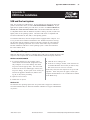
Appendix A: USB Driver Installation
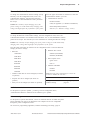
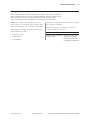
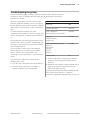
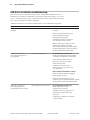
USB driver installation troubleshooting
This section lists some conditions you may run into during and immediately after driver
installation. If you think the condition may not be related to USB, look in Chapter 4: Using the
Printer, “Troubleshooting the printer.” That section describes other USB conditions which may
arise or may not be apparent until after installation.
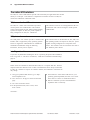
Additional information on most of the conditions below can be found within this appendix.
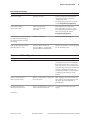
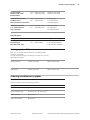
Conditions
Characteristics
Solution
USB printer not recognized by host
computer
Red LED on USB jack is off
Check that host has functional USB
hardware
Check the host for USB hub conflicts
Check for USB driver in Device
Manager; make sure system
requirements for driver are met and
the correct driver was installed
Make sure the printer model you have
supports the USB driver you have
downloaded. Some printer models support
the Native USB solution and some support
the RS-232C Emulation USB solution.
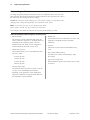
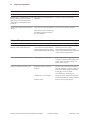
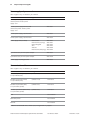
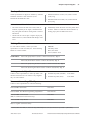
USB driver is installed on
host computer, but printer is
not recognized
LED blinks, then goes out
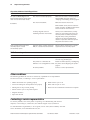
RS-232C Emulation solution only:
Check that the Edgeport driver installation
is complete; uninstall, then reinstall driver
Check that the printer firmware is
Boot V3.05, Flash V3.02 or higher
Check that the printer
communication mode is serial
and flow control is the same as the
host application
Native and RS-232C Emulation solutions:
Check for USB hub faults by plugging
printer directly into host
Make sure the printer model you are
connecting to the computer supports the USB
driver you have downloaded and installed.
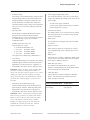
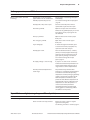
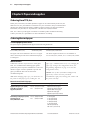
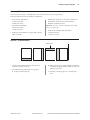
USB driver is installed on
host computer, printer is
recognized, but does not print
Printer beeps but does not print
RS-232C Emulation solution only:
Check communication port
assignment of application
Determine serial port assignment of
USB printer; set application to the
same port
In Edgeport, set automatic assignment
of port numbers
A760 Two-Color Thermal/Impact Hybrid Printer: User Guide
189-9200303 Rev. D
A760-D100 10/04