1
PA-301 User Manual Ch3: Rev.1-12/04
3. Getting Started with the PA-301
3.1
Introduction
The PA-301 Pulse BoosterTM System expands the high voltage pulse amplitude range
available to researchers. It is capable of producing rectangular wave pulses up to 3000. A
summary of the specifications is provided below. This Chapter will provide details regarding the
proper operation of the PA-301 using the PA-4000 PulseAgile® interface software.
3.2
Application Software
The PA-301 application software is a part of the PA-4000 PulseAgile® interface software.
It is accessible only when a PA-301 is connected using the DB25 interface cable as described in
Chapter 3. After installing the PA-301, close the Cuvette Holder handle, turn on the PA-4000,
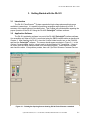
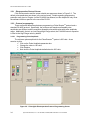
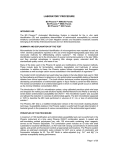
and start the PulseAgile® software. The screen should appear as shown in Figure 3-1. In the
Options Connected area, look for a check mark in the box labeled 3:1 Transformer. If there is
no check, then the DB25 interface cable is not connected properly. Power down the system
and check the cable. If the problem persists, then call Cyto Pulse Sciences Customer Service.
Figure 3-1: PulseAgile® Opening Screen showing PA-301 Pulse BoosterTM attached
Cyto Pulse Sciences, Inc. P. O. Box 609, Columbia, MD 21045 USA 410-715-0990
3-1