1
RIDGE INTERNATIONAL LIMITED 3.5.7 Log Management
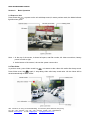
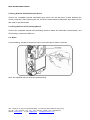
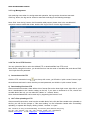
Unit make log notes when in running state and operation, the log can be viewed and removed.
Click “log” button, the log can be viewed or removed according to the following message.
Note: Click “view the log” button, the information table present “please view in the movable disk”,
computer enters movable disk mode, double click “log.txt” file to view the log information.
3.5.8 The Use of FTP Function
You can upload the files in unit to the defined FTP, or download files from FTP to unit.
Note: Before using this function, you should first turn into the mode of movable disk, and reboot FMS,
then input the unit’s password.
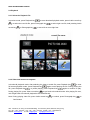
1) Connections with FTP
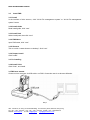
Click the FTP connection icon
on the top left corner, you’ll find the “quick connect” button, input
the mainframe and user’s name, then the port and password, and click the “quick connect” button.
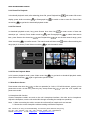
2) Downloading files from FTP
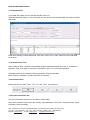
After successful connection, there will be a list of server files on the lower right corner, right click it, you’ll
have it downloaded to the certain catalog on the left, if you want to download it to unit, choose the
movable disk of the unit, you can also click “delete” or “ rename” button
Note: the downloaded files can be read only by supporting the format of unit.
3) Unit’s files uploading to FTP
After successful connection, enter into the movable disk of unit, click the files needed to be uploaded on
the list, you will find the prompt of “files send ending” on the information basket after successfully
uploading. or operate this step by clicking “delete”, “rename” or “open.”
Add.: 18th Floor, On Hong Commercial Building, 145 Hennessy Road, Wanchai, Hong Kong
Tel: + 86 – 799 – 6767972 Fax: + 86 – 799 – 6767973 Mobile: + 86 – 13907994349
Website: www.ridge.hk
E-mail: [email protected]
[email protected]