1
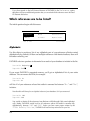
PAPYRUS
®
VERSION
7.0
Concepts / Reference
Research
S O F T WA R E D E S I G N
© 1992-2001 Research Software Design™
All Rights Reserved
COPYRIGHT NOTICE
This manual is copyrighted. You may not modify nor translate it in any way
without the prior written consent of Research Software Design. Copies of the
manual may be made, however, provided that such copies are either for the
direct use of a Registered User of the PAPYRUS™ Bibliography System, or are
to be distributed to individuals who are considering becoming Registered
Users themselves. Distribution of such copies is governed by the Research
Software Design License Agreement, which appears at the end of this manual.
Any other preparation or distribution of copies of this manual is in violation of
copyright law.
“PAPYRUS” is a registered trademark of Research Software Design.
“Research Software Design” is a trademark of Research Software Design.
All other brand and product names are trademarks or registered trademarks of their respective companies.
Research Software Design
617 SW Hume Street
Portland, OR 97219-4458 (U.S.A.)
Phone: 503-796-1368
Fax: 503-452-8920
General information: [email protected]
Technical support:
[email protected]
Web site:
http://www.rsd.com/
CONTENTS
Welcome to PAPYRUS! 1
Registered vs. Demo Systems 2
Other Versions of PAPYRUS 2
Our Ridiculously Reasonable License Policy 3
Overview of the PAPYRUS Documentation 4
CONCEPTS
Chapter 1
Chapter 2
Chapter 3
Bibliographies vs. Footnote Lists 6
Output Formats 8
Bibliographic Conventions 10
Alphabetic vs. Citation order 10
Number appearance 10
Repeated authors 11
Author and Editor names 11
Works “in press”, “submitted”, etc. 12
Capitalizing titles 13
In-text citations: Numeric 13
In-text citations: Name & Year 14
Specific page numbers 14
Footnote forms 15
Chapter 4
Chapter 5
Chapter 6
Chapter 7
Chapter 8
Chapter 9
The Pieces of Your PAPYRUS Database
—An Initial Overview 16
Reference Types and Fields 20
Journals 22
Keywords 25
Incomplete References 27
Notecards 29
iii
Chapter 10
Indexes 31
Indexes and Searches 33
Chapter 11
Groups 37
Sorting the Group 38
Specific pages 38
Implications of using “pointers” 39
Implications of storing Groups apart from the main database 39
Chapter 12
Access Codes 41
REFERENCE
Chapter 13
Installing PAPYRUS
44
Updating from Version 6.0 44
Initial PAPYRUS Installation 45
Subsequent Partial Installations 46
Multiple PAPYRUS Databases 47
Giving the Demo Version of PAPYRUS to Your
Colleagues 47
PAPYRUS’s Memory Requirements 47
Program Limits 48
The DOS Shell 49
Windows 51
DESQview 53
Networks 55
Chapter 14
Optimizing PAPYRUS Performance on Your Computer 56
Disk cache utilities, RAM disks 56
The “Brazilian” keyboard driver 57
SHARE.EXE 57
Chapter 15
Launching PAPYRUS
58
Launching PAPYRUS Directly From DOS 58
Launching PAPYRUS From the DOS Shell 62
Launching PAPYRUS From Windows 63
Launching PAPYRUS From DESQview 66
iv
Chapter 16
Reference Types and Their Fields 67
All Types 69
Articles 74
Books 75
Chapters 76
Maps 77
Patents 77
Theses 79
Quotes 79
Others 80
Additional Reference Types 81
Chapter 17
PAPYRUS Conventions 86
Keyboard 90
Mouse 93
The Little Triangle 93
Multiple-choice questions 94
Menus 94
Dialog boxes 95
Italics, Underlining, Boldface, Superscripts, Subscripts 97
Titles that really end with a period 98
Multiple paragraphs 98
Non-English characters 99
Choosing a Reference 101
Choosing a Journal 102
Choosing a Keyword or Format 103
Choosing a Disk File 104
Chapter 18
Chapter 19
Chapter 20
Chapter 21
Chapter 22
Main Menu and Road Map 106
Reference Input & Edit 109
Delete 115
Notecards 116
Cite 122
v
Chapter 23
List 125
Which references are to be listed? 126
Include notecards? 130
How shall each reference be formatted? 130
To where shall the list be sent? 131
Chapter 24
Chapter 25
Search 136
Group 144
View/Edit 147
Modify 149
Search 150
Text Extract 151
List 151
Info 152
Format/Sort 152
Keyword Add/Remove 153
Zap References 153
sWitch Group 153
Clear Group 154
Rename Group 154
Delete Group 154
Absorb Group 154
Chapter 26
Text Extract 156
Preparing the manuscript file 156
Running Text Extract 160
Chapter 27
Chapter 28
Winnow 163
Glossary 165
Input 165
Edit 165
Delete 165
List 165
vi
Chapter 29
Journals 166
Input/Edit 166
Delete 166
Merge 167
List 167
Styles 168
lOad 168
Chapter 30
Keywords 170
Input/Edit 170
Delete 170
Merge 170
List 171
lOad 171
Chapter 31
Formats 173
Input/Edit 173
Delete 185
List 185
liBrary 185
Chapter 32
Chapter 33
Import 189
Preferences 193
Colors 193
Beeps 193
Space check 193
Italic/underline 193
Duplicate anon. 193
Routine format 193
Field names 194
Hidden/required 194
new Keywords 194
Notecards 194
vii
Chapter 33
Preferences (continued)
Paste citations 194
Alphabetization 194
ENTER in dialogs 194
aLt keys 195
index Threshold 195
Chapter 34
Chapter 35
Chapter 36
Directory 196
Shell 197
Utilities 198
System Initialization 198
Access Codes 198
Printer Customization 198
Index File Regeneration 199
Create Back-up Files & Restore From Back-up Files 199
Chapter 37
UPAP and PAP_RES 201
Loading PAP_RES 201
Running UPAP 203
APPENDICES
Appendix A
Appendix B
Differences from PAPYRUS Version 6.0 206
Using PAPYRUS With
Particular Word Processors 208
WordPerfect for DOS, Version 5.1 209
WordPerfect for Windows, Version 5.1 211
Microsoft Word for DOS, Version 5.0 213
Microsoft Word for Windows, Version 2.0 215
WordStar for DOS, Releases 5.0, 5.5, 6.0 217
WordStar for Windows, Version 1.0 220
Other Word Processors 222
viii
Appendix C
Importing From Particular
Bibliographic Data Sources 224
General 224
CLEANUP.EXE 224
Current Contents on Diskette 225
Reference Update 225
Silver Platter (including AGRICOLA and GeoRef) 226
CD-Plus Medline 226
Compact Cambridge 227
BRS/Colleague 227
DIALOG 227
Grateful Med 228
Pro-Cite 228
REF-11 229
Reference Manager 229
Sci-Mate 230
Comma-delimited files 230
Other database programs 230
Appendix D
License Agreement 232
INDEX 237
ix
Welcome to PAPYRUS!
The PAPYRUS Bibliography System helps you maintain a permanent collection of reference
citations.
If you need to locate all references on a topic, or track down an article you recall having read
last year, you can use PAPYRUS to rapidly search your citation collection. The results can then
be sorted and formatted however you like.
If you are a student, a scholar, a researcher, or the secretary of any of these, then PAPYRUS can
also automate the bibliographic aspects of your work. Whenever you need to print a bibliography for a manuscript in preparation you can select the appropriate references from the
collection and use PAPYRUS to print the bibliography in any desired format. If you prepare
your manuscript using a word processor, PAPYRUS can automatically read your manuscript,
create the bibliography, and produce a new copy of your manuscript in which the citations
have been appropriately edited.
New references may be added to the collection at any time, and existing references can, of
course, be edited or deleted. You can also “import” references from virtually anywhere —
national on-line databases, CD-ROM bibliographic databases, monthly diskette update services, other personal bibliographic database programs, general-purpose database programs,
or existing bibliographies from your word processor.
You can also attach an unlimited number of “notecards” to each of your references. Each
notecard includes its own searchable title and keywords, plus room for 8,000 characters of
comments or quotations. Notecards are ideal for preparing a dissertation or for summarizing
a series of lengthy works. Some PAPYRUS users have even employed notecards to organize
their own works in progress.
The current version of PAPYRUS incorporates literally hundreds of suggestions from our
users. We believe that it stands alone among bibliographic programs in its power and ease of
use. Nevertheless, we still consider PAPYRUS a work in progress, and will always welcome
your further recommendations.
This edition of PAPYRUS, Version 7.0, has been implemented on IBM-PC compatible computers. A version for the Macintosh computer is under development at the time this Manual is
being prepared, and may be available by the time you read this.
1
Registered vs. Demo Systems
PAPYRUS is distributed in both Registered and Demo editions. Reference collections created
with the Demo version will “lock up” 30 days after they are created or when more than 50
references have been entered into the collection, whichever comes first. Upgrading to the
Registered version unlocks the collection.
The main PAPYRUS program is a file named PAP.EXE. If you have the Demo version of
PAPYRUS, you will instead find the file PAPDEM.EXE . Anywhere in these manuals that you are
instructed to type PAP as the name of the PAPYRUS program, substitute PAPDEM.
If you have purchased the Registered system, then you will find yourself with two copies of
Disk #1: one marked “Registered” and the other “Demo”. You may set aside the “Demo” disk
for now. Later, should a colleague wish to try PAPYRUS you may give him or her copies of all
of the PAPYRUS distribution disks, using the “Demo” copy of Disk #1 rather than the
“Registered” copy.
Other Versions of PAPYRUS
Two other special editions of PAPYRUS are available upon request—the PAPYRUS Retriever
and the Student edition.
If you use PAPYRUS to assemble a large collection of references and your colleagues begin
clamoring for their own copies of your database (or you think you could entice them to send
you large sums of money for their own copies of your database), then they will also need their
own copies of the PAPYRUS program in order to make use of your data files. While we do like
to think that all of your colleagues will rush out and purchase their own copies of PAPYRUS,
we can also help you with an interim solution. A legal interim solution.
The PAPYRUS Retriever is a stripped-down, “read-only” version of the full PAPYRUS
program. It is capable of searching a PAPYRUS database and outputing the results to the
screen, to a disk file, or to the printer. However, it does not provide the means to make any
changes or additions to the database.
We will provide you a disk containing the Retriever and its on-disk User’s Manual at no
charge. You can then copy this disk and distribute it along with your database files to each of
your colleagues.
The Student edition of PAPYRUS is like the Demo—it can only work with databases that are
fairly small and fairly recent. But where the Demo allows access for up to 30 days or 50
2
references, the Student edition works for up to 120 days or 200 references, whichever comes
first.
The Student edition is designed for classes on academic writing tools, where the students will
have the opportunity to work with PAPYRUS in creating their own small databases for use
during the course. We can provide a copy of this version to you if you are already a Registered
user of PAPYRUS and you plan on teaching such a course.
Our Ridiculously Reasonable License Policy
We recognize that many of you will need to access your bibliographic database on more than
one computer. Perhaps one at work and another at home, or one on a researcher’s desk and
another on a secretary’s. So rather than restrict the number of computers on which you can use
this copy of PAPYRUS, we license the program based on the number of distinct PAPYRUS
databases you use, regardless of how many different computers are running PAPYRUS with
copies of the same database. For full details of our license policy, as well as Site License options,
please refer to the License Agreement in Appendix D.
We have taken this approach because we feel that you deserve it. But we won’t be able to
continue to offer these services if we go out of business, so please do your share — feel free
to give away copies of the Demo system to your friends, but don’t distribute or use illegal
copies of the Registered version.
Thank you!
3
Overview of the PAPYRUS Documentation
Different people learn best in different ways, so we have provided you sufficient materials for
more than one approach to learning PAPYRUS.
There are three parts to the PAPYRUS documentation: WORKBOOK, CONCEPTS, and REFERENCE.
The WORKBOOK takes a tutorial, task-oriented approach. One chapter, for example, leads you
step by step through the process of entering references into PAPYRUS. Another walks you
through the steps of searching your database for a particular set of references and then
printing them. Using PAPYRUS with your word processor to assemble a bibliography for a
manuscript is the task reviewed in a later chapter.
The CONCEPTS section explains several fundamental ideas that, sooner or later, you need to
understand in order to work with PAPYRUS. Some of these may already be familiar to you
from work with other computer programs, while others are specific to PAPYRUS.
Finally, the REFERENCE section contains a detailed review of each PAPYRUS feature.
If you like to jump right into new software, then turn to the WORKBOOK. The first few chapters
will help you master basic PAPYRUS operations—you can later work through the more
advanced chapters as you need them. When you require more detailed information on a
particular feature, the WORKBOOK will refer you to the appropriate chapter of the REFERENCE
section. And sooner or later you should take the time to review the CONCEPTS section to ensure
that you are not missing any important ideas.
On the other hand, maybe you prefer a solid understanding of what this program is going to
do with your valuable information before you start giving it free rein. Then you should start
with CONCEPTS. Afterwards you will probably want to peruse at least the first several chapters
of the REFERENCE section. At that point you should feel quite confident entrusting your data to
PAPYRUS, understanding exactly how PAPYRUS will manipulate it. And when you later
need to accomplish a particular task for the first time, you can turn to the appropriate chapter
of the WORKBOOK.
Of course, there are some people who can only absorb difficult information directly from
another human being. Unfortunately, Research Software Design lacks the resources to provide you with a personal PAPYRUS tutor. But if you find yourself stymied despite all of our
documentation then please give us a call. (Fax and electronic mail are also encouraged.)
4
CONCEPTS x
Concepts
5
Bibliographies vs. Footnote Lists
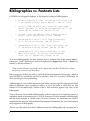
PAPYRUS is a bibliographic database, so let’s begin by looking at a bibliography:
1.
Runson,SK; Rogerstein,BT (1990): The judicious use of nitrous oxide
in the treatment of Grave’s disease. New Engl. J. Med. 182, 254267.
2.
Laszlo,JA; Snooks,BB; Old,DH (1991): Unconscious punning among
medical researchers. In: Sublimation and Compensation. Vol. 2. (Eds:
Jung,CG; Old,DH) Pergamon Press, New York, 102-129.
3.
LaFièvre,H (1992): Why Nothing is Funny: A Deconstructionist
Analysis. 2nd ed. Harvard University Press, Cambridge.
4.
Ramasubramanian,SR; Martin,S (1979): Eclectic neurosurgery.
Part I: Excision of inhibitions. JAMA 280, 324-330.
5.
Ramasubramanian,SR; Mull,M (1979): Eclectic neurosurgery. Part
II: Implantation of healthy attitudes. JAMA 280, 331-348.
6.
Ramasubramanian,SR (1992): Eclectic neurosurgery. In: Work
Once, Publish Forever. (Ed: Perish,N) (Career Maintenance
Series, Part 27.) Academic Press, Chicago, 201-240.
As in most bibliographies, the most common type of reference here is the journal article—
references 1, 4 and 5. References 2 and 6 each represents a chapter from a book. A book in its
entirety is cited by reference 3.
There are other reference types beside article, chapter and book that PAPYRUS knows about,
but for now we won’t worry about those.
Before we go any further, we need to clarify the distinction between a bibliography—which is
what PAPYRUS is specifically intended to produce—and a list of footnotes—which may be
what you thought we were discussing.
A bibliography is a list of all the references cited within a manuscript. The references are listed
either in alphabetic order according to author, or else in the order in which they are first
referred to in the manuscript (“citation order”). Each reference appears only once in the
bibliography.
A list of footnotes can resemble a bibliography, in that its main use is to document sources of
statements made in the manuscript. So a list of footnotes will often resemble a bibliography
that has been arranged in citation order. However, footnotes are sometimes also used to
supplement the main text with additional but tangential information; this sort of information
never appears in a bibliography.
There is one other subtle, but critical, difference between a bibliography and a footnote list. A
6
If I’ve made myself clear, you should now understand that when you enter a book into
PAPYRUS’s collection, no page numbers will be included. Similarly, when entering an article
or chapter, the page numbers will refer to the entire reference, and not to some particular page
or pages of interest. And while a footnote might refer to a particular diagram or table from
some previous work, a bibliography entry will instead refer to the work itself.
To be entirely honest, a number of journals actually break these rules in citing long works such
as books and dissertations. Apparently placing practicality above pure logic (hmph!), their
editors seem to feel that readers attempting to look up cited information might wish a hint as to
which page to turn to in the book. PAPYRUS does, in fact, provide mechanisms for dealing with
such utilitarian concerns.
Now, if you actually do need to produce footnotes for your publications, do not send your
copy of PAPYRUS back to us just yet! PAPYRUS can work in concert with your word
processor to save you the chore of manually typing and formatting each of your footnotes. I
just want you to understand that a list of footnotes is not the same thing as a bibliography.
These distinctions between footnote lists and bibliographies are in keeping with the practices
of most scientific and scholarly publications, which usually print any informational footnotes
at the foot of the page.1 I do recognize that there are some minor journals that do not
understand these distinctions; perhaps you can organize a boycott or something, and force
them to clean up their acts. You might start with Science.
Related chapters—
WORKBOOK:
Outputing a List of References
Assemble and Output a Bibliography
Prepare a Manuscript and its Bibliography Together
Pasting References into Your Footnotes
REFERENCE:
Cite
List
1 Where they belong.
Chapter 1: Bibliographies vs. Footnote Lists
7
CONCEPTS x
footnote that cites a book, for example, will provide enough information for the reader to
locate the particular page in that book that is relevant to the present discussion. If different pages
from the same book are referred to elsewhere in the manuscript, then that book will be cited
more than once in the list of footnotes. A bibliography, on the other hand, refers only to entire
works; a book will appear only once in a bibliography, and in that appearance no page numbers
will be mentioned.
Output Formats
You may have noted that the references appearing in last chapter’s sample bibliography look
different from those you are used to. For one thing, the year appears in parentheses following
the authors, while you might have expected it to be at the end of the reference. Also, neither
the names of journals nor their volume numbers have been underlined or italicized, nor have
the titles of books.
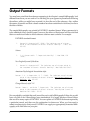
The sample bibliography was printed in PAPYRUS’s standard format. When a manuscript is
to be submitted to any specific journal, however, the editors of that journal will have devised
their own malicious format to which reference citations must conform. For example:
PAPYRUS standard format:
1.
Runson,SK; Rogerstein,BT (1990): The judicious use of nitrous
oxide in the treatment of Grave’s disease. New Engl. J. Med. 182,
254-267.
Science:
1.
S. K. Runson and B. T. Rogerstein,New Engl. J. Med. 182, 254
(1990).
New England Journal of Medicine:
1.
Runson SK, Rogerstein BT. The judicious use of nitrous oxide in
the treatment of Grave’s disease. New Engl J Med 1990;182:254-67.
American Psychological Association style:
Runson, S. K., & Rogerstein, B. T. (1990). The judicious use of nitrous
oxide in the treatment of Grave’s disease. New England Journal of
Medicine, 182, 254-267.
Chicago Manual, style “A”:
Runson, Simon K., and Brian T. Rogerstein. “The judicious use of nitrous
oxide in the treatment of Grave’s disease.” New England Journal of
Medicine 182 (1990): 254-67.
We can probably conclude that each journal has on its staff a Bibliography Editor who would
have very little to do if these things were standardized. It is largely because of these Editors
that we sell so many copies of PAPYRUS. You can explain to PAPYRUS the format required by
a particular journal, and then save the explanation for future use. When you later need to
submit a manuscript to that journal, PAPYRUS can supply an appropriately-formatted bibliography with little effort on your part.
8
In PAPYRUS terminology, for each different destination journal or style there is a PAPYRUS
output format. Each output format contains all of the rules about numbering and indenting
references, presenting author names, the appearance of articles, the appearance of books, and
so on for that particular journal or style. Your copy of PAPYRUS includes many predefined
output formats for you to use; you can also create your own additional ones at any time.
In addition to these normal output formats, PAPYRUS can also work with a different kind of
output format: tabular formats. A tabular format presents references in neat columns and
rows, like this:
1 Runson,&c
2 Laszlo,&c
3 LaFièvre
1990
1991
1992
The judicious use of nitr New Engl J Med
Unconscious punning among Jung
Why Nothing is Funny: A D econstructioni
182:254-2
2:102-129
You can use tabular formats to create compact reference lists for your own uses.
Related chapters—
WORKBOOK:
Outputing a List of References
Format Libraries and Predefined Formats
Output Formats
REFERENCE:
List
Formats
Chapter 2: Output Formats
9
CONCEPTS x
You will have noted that in the various formats, various elements of the reference may be
italicized, various punctuation marks are used, and authors’ names in particular may appear
in various guises. The point of using PAPYRUS is to create a permanent collection of references that may be called upon for any particular bibliography at any time. So references are
always entered in PAPYRUS’s standard style—e.g., no italics (apart from individual words),
authors’ firstnames or initials entered following the surname, etc. PAPYRUS knows where to
expect things in its standard style; once it finds them it is a relatively simple matter for it to
rearrange them to meet the demands of any martinet Bibliography Editor.
Bibliographic Conventions
Before I can explain how PAPYRUS will help you prepare your manuscripts and bibliographies, we need to review just a few more aspects of the wonderful world of bibliographies.
Alphabetic vs. Citation order
There are two basic ways in which a bibliography can be arranged: Alphabetic Order or
Citation Order. The method used has direct implications for the way references are cited
within the manuscript, as we will explore later in this chapter.
In a Citation Order bibliography, references are listed in the order that they are cited within
the manuscript. Each reference is assigned a sequential number. Should a reference be cited in
two different places within the manuscript, the second in-text citation will use the number that
has already been assigned.
The references of an Alphabetic Order bibliography are sorted by their authors’ names.
Should two references have identical authors, then most Bibliography Editors would have you
further arrange these based on their year of publication. And if their years are also identical
you should sort the references based on their titles.
Every now and then you will run into a bibliographic style that puts title-sorting ahead of yearsorting. Sometimes this is a logical choice, given the style used for displaying and citing each
reference. Sometimes it is not.
When a bibliography is sorted in Alphabetic Order, the references may or may not be assigned
sequential numbers. If they are, the numbers correspond to the order of references in the
bibliography, not the order of citations within the manuscript. On the other hand, many
alphabetical bibliographies accompany manuscripts in which the in-text citation is of the form
“Smith 1982”—in these cases the bibliography will not include any numbers.
Number appearance
For numbered bibliographies, the Bibliography Editors of the world have devised many
variants. Here are a few of the more popular forms:
1
1.
(1)
[1]
10
Smith,
Smith,
Smith,
Smith,
JP
JP
JP
JP
(1989)
(1989)
(1989)
(1989)
An
An
An
An
interesting
interesting
interesting
interesting
approach…
approach…
approach…
approach…
Repeated authors
The simplest approach is to do nothing special:
Smith, J.P. (1989) An interesting approach…
Smith, J.P. (1990) An even better approach…
Next, one can replace the second occurrence with some sort of dash:
Smith, J.P. (1989) An interesting approach…
——— (1990) An even better approach…
Or you might be instructed to completely suppress the second incident. The styles that make
this demand usually have some special way of indenting the bibliography:
Smith, J.P.
1989 An interesting approach…
1990 An even better approach…
Author and Editor names
The area where Bibliography Editors most enjoy demonstrating their individuality is in the
formatting of author and editor names. Here are a few of the possibilities:
Smith JP
Smith J P
SMITH,JP
SMITH, JP
Smith, J.P.
Smith, J. P.
Smith, John P.
JP SMITH
J P Smith
J.P. Smith
J. P. Smith
John P. Smith
Of course, just because you know how to format the first author or editor doesn’t mean that
you can predict the format of the rest:
Smith, J. P., C. Kent, and P. B. Parker
Nor will there always be a comma between the names; semicolons are also very popular.
“And” may appear as “&”, and whether it is to be preceded by a comma is anybody’s guess.
Some Bibliography Editors always want to see the name of each and every author. Others will
have special rules for using the phrase “et al.” when there are many authors. A typical set
of rules:
Chapter 3: Bibliographic Conventions
11
CONCEPTS x
For alphabetical bibliographies, there are different theories about what to do when two
consecutive references have the same authors.
If there are five or fewer authors, display all of them.
If there are more than five authors, display the first three, followed by “et
al.”
“Et al.” is, of course, short for “et alii”. Being Latin, it really should be italicized—but it often
isn’t. Moreover, some Bibliography Editors know less Latin than others, and drop the period
after “al”. Others—doubtless resenting the snobbery of those who would casually drop
phrases like “et alii” into the middle of otherwise perfectly readable sentences—use “and
others” for these situations.
Some references have a “corporate” author, such as The Society for Spending a Lot
of Money. Usually such a corporate author will be the only author listed, but occasionally one
or more humans will appear first.
A special case is the reference without an author. Different Bibliography Editors handle
anonymous references differently. Some want you to simply put down “Anonymous” or
“Anon.” as the author. Others request that you suppress the author field of such references.
And still others distinguish between articles that were originally published with no author
given, such as many editorials, and articles that actually attributed authorship to “Anonymous”—these Bibliography Editors would have you suppress the author field for the editorials, but indicate “Anonymous” when the original publication did.
Furthermore, when a work has no author specified there are a few bibliographic styles that
would have you move the reference’s title into the author position. For example:
Smith, John P. My latest big idea. Important Journal, 23, pp. 42-51.
1992.
Big ideas—who needs them? Journal of Anonymous Contention, 19, pp. 31920. 1992.
Works “in press”, “submitted”, etc.
Often you will need to cite a work that has not yet been published. These include works “in
press,” works “submitted” for publication, works “in preparation,” works “really deserving
more funding,” and so forth. Sometimes you will already know the eventual publication year,
sometimes not.
There are many Bibliography Editors who will allow none of these unpublished works to
appear in a bibliography except those actually “in press.” The rest are to be cited parenthetically within the text, if at all.
There are three ways (at least) of dealing with the “in press” references. First, the phrase “in
press” might be added to the end of the reference:
12
Smith,JP (1997) A brand new method of doing things. Journal of Methods
and Procedures, in press.
CONCEPTS x
Or “in press” might replace the year:
Smith,JP (in press) A brand new method of doing things. Journal of
Methods and Procedures.
Or the year part of the reference may be dropped entirely, and “in press” added to the end of
the reference:
Smith,JP. A brand new method of doing things. Journal of Methods and
Procedures, in press.
Capitalizing titles
Titles may be capitalized in either of two ways — “sentence” style:
A very important study
or “title” style:
A Very Important Study
The most common convention in scientific journals is to use sentence style for the titles of
articles and chapters, and title style for the names of books. There are, however, some
exceptions — such as the American Psychological Association format, which always uses
sentence style. In the humanities, on the other hand, title style is always employed.
Scientists need not be too jealous at such seeming standardization, however — two of the
primary humanities guidebooks, The Chicago Manual and The MLA Handbook, still can’t agree on
the capitalization of certain common prepositions.
Of course, non-English titles follow entirely different rules. German nouns are always capitalized, French titles generally use sentence style, etc. You’re on your own for these!
In-text citations: Numeric
When a bibliography numbers its references, whether they are arranged in Citation or Alphabetic Order, the in-text citations usually consist simply of those numbers. Such numbers may
be superscripted1, parenthesized (1) or bracketed [1]. Multiple references may be cited at the
same point in the text (1, 3, 7); consecutive numbers are usually hyphenated (4-7), but not
always (4, 5, 6, 7).
Chapter 3: Bibliographic Conventions
13
In-text citations: Name & Year
When the references in a bibliography are not numbered, they will be cited in the manuscript
using some variant of what is sometimes called the “Harvard” style: (Smith 1991). Multiple
references may be cited at once, in which case there is some disagreement among Bibliography
Editors whether they should be listed alphabetically (Jones 1992; Smith 1991) or
chronologically (Smith 1991; Jones 1992). Two references by the same author need not
repeat the author’s name (Smith 1990, 1991).
When an author has two or more references from the same year, an identifying letter appears
after the year: (Smith 1991a).
Citing two of these at one spot can be controversial—(Smith 1991a,b) or (Smith 1991a,
1991b)? Because few Bibliography Editors have expressed their opinion on this burning issue,
PAPYRUS defaults to the more concise, former form.
When two different authors with the same surname are cited, their first names or initials must
be given (Smith, JP 1988; Smith, AB 1990). Note that this is required even if the
works are from different years—if you cited these as (Smith 1988, 1990) it would
erroneously suggest to the reader that one person had authored both publications. Moreover,
telling the reader to look up (Smith 1988) rather than (Smith, JP 1988) in the
bibliography might lead to great frustration, since all of A.B. Smith’s recent references will
appear ahead of J.P. Smith’s older ones.
For two-author works this style of in-text citation generally has you list both names, but only
the first author plus “et al.” for works with three or more authors.
When you use the author’s name (or the authors’ names) in your text, the parenthetical
information adapts accordingly:
…according to Smith et al. (1991b),…
Specific page numbers
As you will recall from the “Bibliographies vs. Footnote Lists” chapter, a purist does not
include specific page numbers when a book (as opposed to a chapter from a book) is included
in a bibliography. Instead, the reader is guided to the appropriate page or pages via the in-text
citation.
For example, if the bibliography contains this entry:
3. LaFièvre, H. (1990): A Refutation of Antideconstructionism, 3rd ed.
Harvard University Press, Cambridge.
14
Then a reference to a particular page from this book might be cited in the manuscript as 3␣p.␣27
or (LaFièvre 1990, p. 27).
3. LaFièvre, H. (1990): A Refutation of Antideconstructionism, 3rd ed.
Harvard University Press, Cambridge. p. 27.
Footnote forms
In the humanities you are often expected to elucidate each in-text citation twice—first in a
footnote, and secondly in the bibliography. Nor are these two elucidations identical; if the
bibliography entry were:
LaFièvre, H. A Refutation of Antideconstructionism, 3d ed. Cambridge:
Harvard University Press, 1990.
then the corresponding footnote might appear as:
3. H. LaFièvre, A Refutation of Antideconstructionism, 3d ed. (Cambridge:
Harvard University Press, 1990), 27.
while a subsequent citation to the same work would be much abbreviated:
15. LaFièvre, Refutation, 27.
Related chapters—
WORKBOOK:
Assemble and Output a Bibliography
Prepare a Manuscript and its Bibliography Together
Pasting References into Your Footnotes
Output Formats
REFERENCE:
Reference Types and Their Fields
Text Extract
Formats
Chapter 3: Bibliographic Conventions
15
CONCEPTS x
In reality, though, few Bibliography Editors are purists. Most of them would simply change
the bibliography entry:
The Pieces of Your PAPYRUS Database
—An Initial Overview
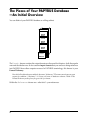
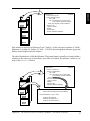
You can think of your PAPYRUS database as a filing cabinet:
References
Journals
Keywords
Formats
The Formats drawer contains the output formats we discussed last chapter—both the regular
ones and the tabular ones. It also contains import formats that you can use to bring references
into PAPYRUS from other computer sources. In PAPYRUS terminology, this drawer is your
Format Dictionary.
How did a file cabinet drawer suddenly become a “dictionary”? The term comes from our great
respect for tradition—”dictionary” is a hoary old term in database software. Think of the
Format Dictionary as the place you go to look up a format.
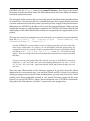
Within the References drawer are—what else?—your references:
16
References
Journals
CONCEPTS x
References
ARTICLE
1
Runson,SK
Rogerstein,BT
1990
The judicious use of nitrous oxide
in the treatment of Grave's disesase
Journal New England Journal of Medicine
Volume # 182
Page(s) 254-267
Abstract
Keyword NO2
Keyword GRAVE'S DISEASE
Reference #
Author #1
Author #2
Year
Title
Keywords
Formats
Each reference consists of a Reference Type (“Article”, in this case) and a number of “fields”
(Reference #, Author #1, Author #2, Year,…). We’ll be discussing these reference types and
fields at some length in the next chapter.
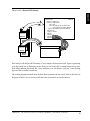
The above illustration is a little bit dishonest. The journal name is actually not stored within a
reference in the same way as the authors, year, title, etc. Instead, the reference “points to” an
entry in the Journals drawer:
Reference #
Author #1
Author #2
Year
Title
References
Journal
Volume #
Page(s)
Abstract
Keyword
Keyword
ARTICLE
1
Runson,SK
Rogerstein,BT
1990
The judicious use of nitrous oxide
in the treatment of Grave's disesase
182
254-267
NO2
GRAVE'S DISEASE
References
Journals
Journal name:New England Journal of Medicine
Keywords
Formats
Journal abbreviation: N. Engl. J. Med.
Routinely cite Issue #? N
Routinely cite Day/Month? N
Routinely cite journal Series? N
Chapter 4: The Pieces of Your PAPYRUS Database—An Initial Overview
17
PAPYRUS calls the Journals drawer your Journal Dictionary. Each entry in the Journal
Dictionary includes the official name, the official abbreviation and some additional information about a particular journal.
The advantage of this system is that you need only provide the official name and abbreviation
of a journal once. Not only does this save valuable disk space, but it means that the next time
you enter a reference that cites this journal you need type only enough of the journal name or
abbreviation for PAPYRUS to be able to look it up in the Journal Dictionary. When you later
include that reference in a bibliography or reference list, PAPYRUS will insert either the full
official name or full official abbreviation (whichever is required by the output format you’ve
picked).
This may not sound very important now, but wait until you’ve entered your seventh article
from the Zeitschrift für Tierphysiologie, Tierernaehrung und
Futtermittelkunde (Z. Tierphysiol.).
Actually, PAPYRUS is very smart when it comes to looking up journals. Once you’ve told it the
name and/or abbreviation of a journal, you can subsequently find that journal using any
reasonable abbreviation. For example, the above-mentioned journal may be identified by typing
such things as Zeit Tier , z tier tier , Z.T.T.F., or even zttf. You could even type
simply z, if you are willing to then choose from all the German journals whose names start with
that letter.
And yes, in answer to the question that will eventually occur to you, PAPYRUS does know that
words like “a”, “the” and “and” don’t count when forming abbreviations. Or “une”, “le” and
“et.” Or “ein”, “das” and “und.” Apart from English, French and German, though, you’re on
your own.
There are some other benefits to this dictionary approach. If you don’t know the official
abbreviation for a new journal entry, you can leave it blank and fill it in later. If you detect a
spelling or typing error in a journal’s name or abbreviation, you only need to fix it once. And if
spelling errors have accidentally resulted in two Journal Dictionary entries for the same
journal, you can tell PAPYRUS to “merge” the two entries into one—PAPYRUS will automatically update all of the reference “pointers” to point to the new, merged entry.
18
There is also a Keyword Dictionary:
CONCEPTS x
ARTICLE
1
Runson,SK
Rogerstein,BT
1990
The judicious use of nitrous oxide
in the treatment of Grave's disesase
Journal New England Journal of Medicine
Volume # 182
Page(s) 254-267
Abstract
Keyword
Keyword
Keyword
Reference #
Author #1
Author #2
Year
Title
References
Journals
References
Keywords
GRAVE'S DISEASE
NO2
Formats
Each entry in the Keyword Dictionary is very simple: the keyword itself. Again, organizing
your keywords into a dictionary means that you can easily edit or merge them at any time.
And when entering keywords for a new reference, you can always “pop up” your existing
keyword list to ensure consistency.
The coming chapters include more details about journals and keywords. And in the last few
chapters of this CONCEPTS section I will add a few accessories to our file cabinet.
Chapter 4: The Pieces of Your PAPYRUS Database—An Initial Overview
19
Reference Types and Fields
PAPYRUS divides the universe of publications into several reference types. Eight of them, to
be exact:
Article
Book
Chapter
Map
Patent
Thesis
Quote
Other
Now, you can doubtless think of some other common␣reference types in the real world—
Reports and Conference Proceedings spring to my mind, for example. And of course there are
no end of oddball reference types that some of you have to deal with daily, depending on your
field of endeavor—Book Review Articles, Festschrifts, Interviews, Talks… Indeed, style guides
such as the Chicago Manual list over 30 different reference types and still miss ones that some
PAPYRUS users have requested from us.
In designing PAPYRUS we have discovered two profound philosophical truths. First, the more
reference types available to you, the more trouble you can get yourself into. For example, every output
format needs to define the appearance of each reference type with which it might ever deal. If
PAPYRUS allowed three dozen reference types, then setting up each and every output format
would be eight times less fun than it is now.
Second, no matter how many reference types are available to you, next week you are going to urgently
need yet another. (This is actually a restatement of the Second Law of Thermodynamics,
sometimes referred to eponymously after its discoverer, Murphy.)
I do have to admit that eight types is probably a bit stingy on our part. Indeed, we do have
plans to increase this number in the future. (Check your READ.ME file to see if we have already
done so!) But for now the tack we have taken is not to provide huge numbers of reference
types, but rather to include sufficient optional fields within our existing reference types so that
they will cover the vast majority of citations you will encounter.
In the “Reference Types and Their Fields” chapter of the REFERENCE section I will provide
specific illustrations of dealing with diverse, real-world reference types using the existing
PAPYRUS types.
20
Each reference in your PAPYRUS database comprises many fields. Some of these fields are
available regardless of reference type, while others are specific to one or more reference types.
Also included in the “Reference Types and Their Fields” chapter is a tour of all the fields
provided by PAPYRUS.
Related chapters—
WORKBOOK:
Inputting References, Part 1
Inputting References, Part 2
Modifying References
REFERENCE:
PAPYRUS Conventions
Reference Types and Their Fields
Chapter 5: Reference Types and Fields
21
CONCEPTS x
For example, Authors, Year, Keywords and Abstract are fields that all reference types include.
But City of Publication is only available for Books and Chapters, while Issue only applies to
Articles.
Journals
For the majority of PAPYRUS users, the most common sort of reference is the journal article.
So let us discuss journals.
Obviously, every journal has an official name. Examples include The New England Journal of
Medicine, Science, Geochimica et Cosmochimica Acta, The Journal of Physical Chemistry, American
Antiquity, PMLA, etc.
If you are in the sciences, then you probably consider every journal to also have an official
abbreviation: New Engl. J. Med., Science, Geochim. Cosmochim. Acta, J. Phys. Chem., etc.
Unfortunately, although each journal gets to pick its own official name, the official abbreviation is up to others. In fact, each journal has more than one official abbreviation! In the
biomedical fields, for example, most Bibliography Editors will refer you to the “Index Medicus”
abbreviation style used by the National Library of Medicine. But in chemistry and physics you
will usually be referred to the abbreviation style of the Chemical Abstracts Service.
Meanwhile, most Bibliography Editors in the social sciences and humanities demand that you
always spell out journal names in full.
How much all of this affects you depends on your field. As a worst case, consider a neurological biochemist who sometimes publishes in biomedical journals, sometimes in chemistry
journals, and maybe even sometimes in psychological journals!
For each entry in your Journal Dictionary, PAPYRUS allows you to include the official name
and/or one or more official abbreviations. Each output format then indicates whether articles
should cite their journals by name or abbreviation; if by abbreviation, and if your Journal
Dictionary includes more than one abbreviation style, then the format also specifies which
style to follow.
But naming a journal is only half the battle. A bibliographic citation must include enough
information to guide the reader to the correct issue of the journal.
It usually suffices to provide just the Volume # and Pages, because most professional journals
use continuous page numbers through each entire 6- or 12-month Volume.
Unfortunately, some journals restart every issue with page 1. For these journals you must
routinely include the Issue in all citations.
That should be enough, but there are still other journals that not only restart their page
numbers with each issue, but also do not go out of their way to tell you the Issue number.
22
We’re still not done! Many journals overflow themselves regularly, so they publish supplements in addition to their regular issues. Which would be bad enough, but the journal
publishers of the world use “supplement” to mean two rather different things.
First, there can occasionally be an addendum to a regular issue. This will be referred to as
something like “Neurosci. Lett. 24(6 Suppl)” or “Neurosci. Lett. 24(6 Pt
2)”—a “supplement” or “second part” distributed with Issue #6. PAPYRUS offers a Supplement field for such cases.
In other situations, however, there may be entire supplementary volumes. This might look like:
“Neurosci. Lett. 24 Pt 2” or “Neurosci. Lett. 8 Pt 2(6)”, and implies that the
journal is publishing two or more parallel series of issues concurrently. In such cases, you
would not use PAPYRUS’s Supplement field, but rather specify “8 Pt 2” as the Volume #.
Now we are almost finished.
There are some journals that have actually split in two. Those that have accepted this state of
affairs now have names like Physics Letters A and Physics Letters B. Others try to hold onto their
past, distinguishing between, say, Scand. J. Inf. Dis. and Scand. J. Inf. Dis. (Suppl.). PAPYRUS
offers two ways of dealing with such fissioned journals.
First, it may be adequate to simply consider these to be two different journals. Then you would
have one journal named Physics Letters A or Scand. J. Inf. Dis., and another named Physics
Letters B or Scand. J. Inf. Dis. (Suppl.). This is the simpler solution, and often the appropriate
one.
Alternatively, PAPYRUS does provide a Journal Series field for article references. So you
could have a single journal named Physics Letters or Scand. J. Inf. Dis. and then enter “A” or “B”
or “Suppl.” in the individual references’ Journal Series field. This is the necessary approach
when citing journals such as the American Journal of Physiology, for which you are supposed to
stick the Series in with the Issue: “Am. J. Physiol. 256 (Regulatory Integrative
Comp. Physiol. 25)”.
To help you deal with all of these possibilities, whenever you add a journal to your Journal
Dictionary PAPYRUS lets you indicate whether references to this journal should routinely
include the Issue, should routinely include the Day/Month, and/or should routinely include
the Journal Series. Later when you enter a reference that cites this journal, if you fail to provide
the routinely-expected field(s) then PAPYRUS will alert you that it is missing.
Chapter 6: Journals
23
CONCEPTS x
Popular magazines (e.g., National Geographic, Psychology Today) usually fall into this category.
For these you must routinely include either the month or—for journals that appear more often
than monthly—the day and the month. In PAPYRUS we refer to this field as the Day/Month.
Related chapters—
WORKBOOK:
Inputting References, Part 1
Inputting References, Part 2
REFERENCE:
PAPYRUS Conventions
Journals
24
Keywords
Keywords allow for quick searches of PAPYRUS’s holdings. For example, you might want to
read up on the effects of emotion on cortisol levels. As a first step, you could ask PAPYRUS for
a list of references with both EMOTIONAL FACTORS and CORTISOL as keywords. If this turns
out to be a long list, you might further stipulate that the keyword REVIEW ARTICLE be
present.
PAPYRUS lets you search on any combination of keywords, authors, editors, year, title words,
abstract words, etc. There is therefore no routine need to repeat, for example, title words as
keywords. However, assigning your own keywords when you enter a reference will allow
more focused searches later, based on those aspects of the reference most relevant to you.
Feel free to create long, meaningful keywords—you can retrieve them later by typing just their
first few letters.
But because your keywords reside in PAPYRUS’s Keyword Dictionary, if someday you do get
tired of constantly seeing EMOTIONAL FACTORS AND CONCERNS you can change the
dictionary entry to, say, MOOD.
You may wish to set up a hierarchical system of keywords. As a simple example, you might
employ such keywords as BLOOD-CELLS-ERYTHROCYTES, BLOOD-CELLS-MONOCYTES,
BLOOD-PLASMA-ANTIBODIES, and BLOOD-TRANSFUSION REACTIONS. You could then
later search for references specifically about one type of blood cell (by searching for BLOODCELLS-ERYTHROCYTES), or more generally about any type of blood cell (by searching for
BLOOD-CELLS-*), or even any reference related to blood (by searching for BLOOD-*). The
“*” is a “wildcard” that will match any series of characters.
You might also wish to distinguish between major and minor keywords for each reference.
Suppose you have a citation which deals mainly with superconductivity, but which also
makes some passing references to semiconductors and to basic quantum chromodynamics.
You could enter SUPERCONDUCTIVITY as a major keyword for this reference, with
SEMICONDUCTIVITY and CHROMODYNAMICS as minor keywords. To indicate that a keyword
is “major” for this reference, you simply place a “#” before it (#SUPERCONDUCTIVITY).
Keywords without a “#” are “minor.”
When you later want to look up all references having anything to do with chromodynamics, a
search for CHROMODYNAMICS will include the above reference. But if you search instead for
#CHROMODYNAMICS you will not locate this one. Including a “#” in your search specification
Chapter 7: Keywords
25
CONCEPTS x
PAPYRUS allows you to assign keywords to each reference. A keyword can be whatever you
like; eg, CORTISOL, EMOTIONAL FACTORS, HIGH-ALTITUDE, REVIEW ARTICLE, REPRINT,
etc. Each reference may be given anywhere from zero to a hundred keywords, depending on
your interests and persistence.
will get you only those references in which the keyword is major; leaving out the “#” yields
both major and minor occurrences.
Related chapters—
WORKBOOK:
Modifying References
Searches and Groups
REFERENCE:
Keywords
26
Incomplete References
While PAPYRUS recognizes that certain fields are optional (e.g., an article’s Issue or a book’s
Total Number of Pages), other fields are always required (Authors, Year, Title, etc.). If any of
these last are missing when you have finished entering a reference into the system, PAPYRUS
will automatically add the special keyword INCOMPLETE to that reference. This serves three
purposes: (1) the reference is clearly identified as incomplete whenever displayed, (2) you can
search for all incomplete references, and use the resulting list to help you in gathering the
needed information, and (3) certain of PAPYRUS’s output displays look for this keyword and
alert you if it is present.
Once you have completed the reference (either by waiting for it to actually be published, or by
looking it up in the library), you can then remove the INCOMPLETE keyword from it.
“Why,” you ask, “can’t PAPYRUS recognize by itself when to remove the INCOMPLETE
keyword?” Ah. I’m glad you’ve asked me that question, as I’ve so far left the impression that it
is up to PAPYRUS to recognize that a reference is incomplete. But can PAPYRUS know that
the single-author article you’ve just entered really has thirteen authors, whose names you
don’t happen to recall at the moment? Can PAPYRUS know that you’re not sure you spelled
that German title correctly? Clearly, there will be many cases in which you know, or suspect,
that some of what you’ve entered is incomplete or incorrect. In these cases, where PAPYRUS
would otherwise trust in your integrity, it is up to you to provide the keyword INCOMPLETE
(which you enter just like any other keyword). And since PAPYRUS will subsequently have
no way of telling whether it or you provided the INCOMPLETE, it is always your responsibility
to remove it.
Any reference flagged as INCOMPLETE should carry an explanation of what’s missing. A Year
field of In Press, for example, is self-explanatory. In other cases, though, you should explain
in the Comments field exactly what is missing or uncertain.
Chapter 8: Incomplete References
27
CONCEPTS x
There are two situations in which you will be unable to supply PAPYRUS with all necessary
information about a reference. The first is that of a reference In Press or Submitted—the
page numbers, volume, year, etc., may not yet be determined. The other situation occurs when
you are unsure of some of the information, perhaps because you’re working from someone
else’s bibliography, or from an illegible handwritten note.
Related chapters—
WORKBOOK:
Modifying References
REFERENCE:
Keywords
28
Notecards
References
References
Journals
Keywords
ARTICLE
1
Runson,SK
Rogerstein,BT
1990
The judicious use of nitrous oxide
in the treatment of Grave's disesase
Journal New England Journal of Medicine
Volume # 182
Page(s) 254-267
Abstract
Keyword NO2
Keyword GRAVE'S DISEASE
Reference #
Author #1
Author #2
Year
Title
Formats
Card
titl
Pass e Study
NOTE
a
CARD
Comm ge Meth population
ods
ents
100 c
ases
and 2
were
00
stu
based died. The matched
co
case
on sta
radion
definit ntrols
Keyw
n
d
ard
u
io
ord
RADIO clide tests laboratory n was
Keyw
.
ord
and
THYR NUCLIDE
Keyw
OID F
ord
UNCT
TSH
ION T
ESTS
When you create each notecard you give it a brief Card Title. There is also a Passage field
where you can indicate the portion of the reference to which the notecard pertains. Examples
of Passage entries might include “Chapter 7”, “pp. 148-150”, “Methods section”, etc.
PAPYRUS makes it easy for you to scan the Card Titles and Passages of all the notecards
attached to a particular reference, and to then call up a particular notecard for viewing or
Chapter 9: Notecards
29
CONCEPTS x
If you wish to keep copious notes on some or all of your references, you may attach a stack of
notecards to each:
editing. You can search your entire database for a notecard by any word in its Card Title or
Comments fields, or by any keyword you’ve assigned to the notecard itself. And whenever
you have PAPYRUS produce a list of references, you have the option of also displaying each
reference’s notecards.
Notecards are a new feature in this version of PAPYRUS. While they were initially designed to
help our customers in the humanities free their desks of growing piles of 3x5 cards, we fully
expect the rest of you to think of other clever uses for them. Let us know what you come up
with!
Related chapters—
WORKBOOK:
Notecards
REFERENCE:
Notecards
30
Indexes
Author
Index
Keyword
Index
Title
Index
Editor
Index
Year
Index
Abstract
Index
References
Journals
Keywords
Formats
The references in your database are simply stored in the order they were entered. Each index,
though, is kept in alphabetic or numeric order. So when you are trying to find some particular
references—say, all those written by John Q. Smith—PAPYRUS will begin by looking through
the Author Index for “John Q. Smith”:
Chapter 10: Indexes
31
CONCEPTS x
In addition to those parts of your PAPYRUS database that we have already discussed, there
are also a collection of indexes (or “indices,” if you prefer) that PAPYRUS maintains automatically for you:
Author
Index
Keyword
Index
Title
Index
Editor
Index
Year
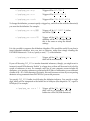
Index
Abstract
Index
Author
Index
References
References
Journals
Smith, John Q.
Keywords
Formats
The index entry for “John Q. Smith” points to all the references that include John Q. Smith
among their authors. Thus PAPYRUS can locate these particular references quite rapidly,
essentially unaffected by the total number of references in your database.
There are comparable indexes for Reference #, Year, Journal, Keywords, Title words, and so
on. (I’ll give you the complete list in just a moment.)
There are also indexes for your Journal Dictionary, Keyword Dictionary and Format Dictionary.
When you identify a journal as “zttf”, for example, PAPYRUS looks through just the “z…”s in
the Journal Dictionary’s index for possible matches.
As you can imagine, these indexes dramatically improve PAPYRUS’s performance when you
ask it to find a reference. One price you pay for this improvement in search speed is that
PAPYRUS must update all of its indexes whenever you add a new reference to your database
or make changes to an existing reference. Once the database contains several thousand
references, adding a new one may take a noticeable several seconds, particularly if you
routinely include long abstracts or comments.
Of course, another price is that all of these indexes do take up space on your disk. In fact, for a
large database the indexes will typically account for about 50% of the disk space occupied by
your database.
The only other drawback to the indexes is that should your computer crash while PAPYRUS is
in the middle of filing a new or changed reference, then the indexes may not be fully updated.
32
To help protect you from such a calamity, PAPYRUS makes sure that your indexes are always
kept fully up to date, except during the very few seconds that you are actually filing new or
changed information.
Indexes and Searches
The following considerations will be important to you when you have PAPYRUS
search for references. If this is your first time through this chapter you may want to
skim or skip all of this for now.
Let’s discuss precisely which fields are indexed, and what limitations apply to them. Most of
this discussion will be from the point of view of a person using PAPYRUS to perform a search.
These fields are indexed:
Reference #
Reference Type
Field A
Comments
Author
Title
Editor
Abstract
Year
Journal
Keywords
Note that words from your Abstracts and Comments fields—both reference Comments and
notecard Comments—are indexed.
Fields that are not indexed can still be searched. But PAPYRUS will have to examine every
reference in the database when searching on non-indexed fields. In such cases you can speed
the search by adding an indexed field to your search specification to do the initial weedingout.
For example, telling PAPYRUS to search for general=”new york” tells it to find all
references that contain “new york” somewhere in one or more of their fields. (Actually,
“general” looks at almost all fields—it does not check the Journal, Keywords, Comments or
Abstract fields, each of which is stored separately from its citing reference.) But PAPYRUS will
have to look at every reference in the database to carry out this search, since many of the fields
(such as City of Publication) are not indexed.
Chapter 10: Indexes
33
CONCEPTS x
Because it is essential that the indexes always accurately reflect the contents of the database,
the next time you start PAPYRUS it will insist upon “regenerating” the index files. This
process involves throwing away the current contents of all the indexes and then rebuilding
them by reading every reference, notecard, journal, keyword and format in your database. If
you have several thousand references, or even a few thousand with long comments or
abstracts, then an “index file regeneration” can take many hours.
You could help PAPYRUS by restricting your search to, say, books or book chapters:
general="new york" and (type="book" or type="chapter")
For this request PAPYRUS will first use its Reference Type Index to locate all references that
are Books or Chapters, and then examine only these for “New York”.
PAPYRUS skips over some parts of some fields when it creates its indexes. Specifically, for the
Title, Comments, Abstract and Field A indexes, common words such as “the”, “and”, “for”, or
“with” are not indexed. (This applies also to these words’ German and French equivalents.)
No word of only one or two letters is indexed, nor are pure numbers. For example, if “1987”
appeared in a Title it would not be indexed, although “5th” would.
For the Comments and Abstract indexes, you have the option of picking a different size cutoff
for words. For example, you might instruct PAPYRUS not to index any Comments or Abstract
word of fewer than 7 letters, rather than the default 2 letters. If you routinely enter lengthy
comments or abstracts, then this change would eliminate a considerable number of entries in
the index, and thus save considerable space on your hard disk. The trade-off is that to search
for short words PAPYRUS will then have to perform a “brute force” search—examining every
reference in the database.
Acronyms are treated specially—they are usually indexed regardless of their length. PAPYRUS
defines an “acronym” as any series of capitalized letters, possibly containing digits as well,
separated by hyphens, periods, commas, or nothing. Thus, “DNA”, “U.S.A.” and “2,3-DPG”
are all acronyms. In addition, PAPYRUS allows leading lower-case letters, as in “t-RNA”.
If you set your cutoff to 20 or more characters, then PAPYRUS concludes that you really do not
want to maintain indexes of your Comments and Abstract words. In such a case acronyms
appearing in these fields will not be indexed either. But as long as your cutoff is less than 20
characters all acronyms will be indexed.
For the Title and Field A Indexes, acronyms are always included.
Any time you specify a search that does not allow PAPYRUS to use at least one of it indexes,
whether because you have chosen a non-indexed field or because you have picked a word
shorter than the cutoff for your database, PAPYRUS will reply:
As you’ve defined this Search, I will have to examine EVERY
reference in your database. It would be MUCH faster if I could
use one or more of my index files.
(See PAPYRUS Reference Manual for further explanation.)
Can you modify this Search to include an indexed term?
You will usually be able find a way to so modify such a search, as we did above in the “New
York” example.
34
title="sapiens"
would find references whose titles included the phrase “Homo sapiens”. But:
keyword="sapiens"
would NOT find a reference bearing the keyword “HOMO SAPIENS”. On the other hand,
keyword="* sapiens"
would find a reference with the keyword “HOMO SAPIENS”. Finally, then,
term="* sapiens"
would find all references whose title, comments, abstract, or keywords included the word
“SAPIENS”. (In PAPYRUS searches, “Term” stands for “Title OR Comments OR Abstract OR Keyword”.)
There is one other implication of the way the PAPYRUS indexes work. If you specify:
title="homo sapiens"
PAPYRUS cannot simply look this phrase up in its index, since only individual words appear
in the Title Index. This search will therefore require examination of the entire database. You
can help PAPYRUS by changing the search to:
title="sapiens" and title="homo sapiens"
In this case PAPYRUS will use its Title Index to find all references with “sapiens” in their title,
and then examine only these references for the phrase “homo sapiens”.
Chapter 10: Indexes
35
CONCEPTS x
Note that most of the indexes hold entire fields, but a few instead hold individual words from
the field. For example, an entry in the Author Index is an entire author name, such as
“Smith,JP”—not just “Smith”. An entry in the Keyword Index holds an entire keyword,
whether the keyword is a single word (”HUMAN”) or a phrase (”HOMO SAPIENS,FEMALE”).
On the other hand, entries in the Title, Comments, Abstracts and Field A Indexes hold
individual words. So a search such as:
Related chapters—
WORKBOOK:
Searches and Groups
REFERENCE:
Search
Utilities
36
Groups
PAPYRUS refers to such a subset of the references from your total database as a Group.
When you have PAPYRUS perform a search, the result is a Group containing the relevant
references. When you use PAPYRUS to assemble a bibliography, the references you pick are
placed into a Group. You may accumulate many different Groups, each corresponding to a
different search, bibliography, or other collection of references.
There are several things you can do with a Group. You can view the entire Group on your
screen and examine and/or edit individual references. You can add other references to the
Group, or remove references from it. You can have PAPYRUS add a keyword to every
reference in the Group, or remove a keyword from them all. And, of course, you can have
PAPYRUS output the Group’s references—sorted however you like, using whatever output
format you like—to your printer or your word processor.
Strictly speaking, a Group does not actually contain its references. Rather, a Group acts as a
special type of index:
References
References
Your
Group
Journals
Keywords
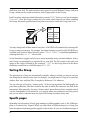
Reference #32
Formats
Thus, each entry in the Group points to a reference in your PAPYRUS database. This means
that the main database is not affected when you add new entries to the Group, remove entries
from the Group, rearrange the order of Group entries—or even when you delete the Group
Chapter 11: Groups
37
CONCEPTS x
Almost any task to which you will put PAPYRUS will involve only a subset of all the references
stored in your database. For example, you might want to examine all references on a given
topic. Or you might want to assemble the bibliography for your latest publication.
itself from your disk. The same reference may appear in several different Groups, and each
Group’s entries can be sorted in whatever order is appropriate to that Group.
Each Group has certain associated information: a name (“REVS” below), a one-line description
(“Reviews”), how the Group’s entries are to be sorted, what format to use when outputing
the Group, the search specifications (if any) that were used to create the Group, and so on:
Group
"REVS"
Description: Reviews
Sort by: Reference #
Format: STANDARD
Group
"REVS"
Search for:
keyword=
"review article"
You may change each of these items at any time—PAPYRUS will automatically rearrange the
Group’s entries as necessary. For example, the output format you specify tells PAPYRUS how
to handle such issues as letters following years—“Smith 1982a”—or modified alphabetical
orderings that take “et al.” into account.
As the illustrations suggest, each Group is stored separately from your main database. In fact,
each Group is represented by a separate file on your disk. The file’s name is the name you
assign to the Group, followed by the extension “.GRP”. So the Group shown in the above
illustration would exist as a disk file named REVS.GRP.
Sorting the Group
The references in a Group are automatically sorted by whatever criteria you choose, and you
can change those criteria at any time. For example, you might want a Group to be sorted by
Author, then Year, and then Title. Or maybe by Reference #. Or whatever.
You can also sort a Group by “citation order.” If the Group represents the bibliography for
your latest publication, then this would be the order in which the references are cited in the
manuscript. More generally, choosing “citation order” means that you have complete control
over the arrangement of its references—you specify where new references are to be placed,
and you can move a reference from one spot in the Group to another at any time.
Specific pages
Remember our discussion of Book page numbers in bibliographies, back in the “Bibliographies vs. Footnote Lists” chapter? When you add a Book or Thesis reference to a Group you
have the option of indicating specific page(s) for the citation. So you can cite different pages of
38
Implications of using “pointers”
Because each Group stores only pointers to references, rather than the references themselves,
whenever you have PAPYRUS output a Group you are guaranteed to see the current version
of each reference. This means that if you find a typographical mistake in a reference, you need
only correct it in the main database—each Group will then reflect the corrected reference.
This pointer scheme also means that a Group only makes sense in the context of its parent
PAPYRUS database. If your colleagues across the hall have their own copy of PAPYRUS and
their own database of references, then simply giving them a copy of one of your Groups—i.e.,
a copy of one of your .GRP files—will not do them much good: a Group entry that points to
“the 327th reference” will find the wrong reference if the Group is mistakenly used with a
different PAPYRUS database than the one with which it was created.
Which is not to imply that there is no way for you to give your colleagues a collection of
references to add to their database. The steps for doing so are described in the WORKBOOK
chapter “Sharing Information between Two PAPYRUS Databases.”
Implications of storing Groups apart from the main
database
That Groups are stored separate from the main database does have a couple of side effects that
you may encounter from time to time.
First, suppose that last week you asked PAPYRUS to find all of the references by John Smith.
The results were saved in a Group named SMITH (i.e., a file named SMITH.GRP). Now
suppose that today you add another John Smith publication to your PAPYRUS database files.
If you have PAPYRUS output the SMITH Group it will not include the new reference—you
must add to the SMITH Group an entry for the reference.
Next, suppose you discover that a particular John Smith reference had been entered into
PAPYRUS with an author of “John Smythe.” You can correct this mistake in your main
database, but again the SMITH Group will not include the former “Smythe” reference until
you tell it to.
Similarly, suppose that an existing “John Smith” reference should have been entered with an
author of “John Smythe.” Correcting this error in your main database will not cause the
reference to be removed from the SMITH Group. You must do so explicitly, or else have
PAPYRUS re-run its search for all “John Smith” references.
Chapter 11: Groups
39
CONCEPTS x
the same book several times within your bibliography, if that’s the style your publisher
prefers, yet you will only have to enter the full citation information for the book into your
PAPYRUS database a single time.
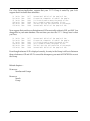
For a less obvious implication, suppose that your SMITH Group is sorted by year. Let’s
suppose that it includes these references:
32
192
95
918
491
256
Smith,
Smith,
Smith,
Smith,
Smith,
Smith,
John
John
John
John
John
John
1977
1981
1983
1984
1985
1988
Conventional beliefs of the people of the…
Alternative viewpoints of some of the people…
Civilized discourse among the people of the…
Petty squabbles among the people of the…
The mass uprising and revolution of the people…
Conventional beliefs of the people of the…
Now suppose that you discover that reference #192 was actually written in 1991, not 1981. You
change this in your main database. The next time you view the SMITH Group, here is what
you’ll see:
32
192
95
918
491
256
Smith,
Smith,
Smith,
Smith,
Smith,
Smith,
John
John
John
John
John
John
1977
1991
1983
1984
1985
1988
Conventional beliefs of the people of the…
Alternative viewpoints of some of the people…
Civilized discourse among the people of the…
Petty squabbles among the people of the…
The mass uprising and revolution of the people…
Conventional beliefs of the people of the…
Even though reference #192 is displayed correctly, its entry in the Group is still sorted between
those of references #32 and #95. To correct this discrepancy you must tell PAPYRUS to re-sort
the Group.
Related chapters—
WORKBOOK:
Searches and Groups
REFERENCE:
Search
Group
40
Access Codes
The third type of user is also the one who worries about the first type of user playing around
with a large central database shared by an entire research team.
Users of the first type will only need to use PAPYRUS’s List, Search, and Group options;
those of the second type may need access to all options except Utilities.
When a PAPYRUS database is first initialized, any user may access any option. You can use
the Utilities Access Codes sub-option to set up “medium-level” and “high-level” access
codes. You can then indicate which code, if either, is needed to access each of PAPYRUS’s
main options.
A few options never require an access code: List, Cite, glOssary, Notecards, diRectory,
and sHell. And the Utilities option itself always requires the high-level code.
PAPYRUS will only ask users to enter an access code the first time they try to use one of the
options requiring it. After that they will not be bothered for it again during that PAPYRUS
session. Failure to enter the correct access code results in the disappearance of the corresponding options from the main menu.
Related chapter—
REFERENCE:
Utilities
Chapter 12: Access Codes
41
CONCEPTS x
There are basically three types of PAPYRUS users. First are those who will use the data that
others have entered, but who will not be editing or entering stuff themselves. Next are those
who will enter new references, correct misspelled journal names, perhaps define new formats,
and so forth. Finally, a few truly hard-core users will also be responsible for maintaining backups of the database and customizing PAPYRUS to work with the available printers.
42
Reference
R EFERENCE x
43
Installing PAPYRUS
Included in this chapter are sections for installing PAPYRUS to run under the MS-DOS Shell,
Windows, DESQview, and networks.
Actually running PAPYRUS, once it has been installed, is discussed in the “Launching
PAPYRUS” chapter.
Updating from Version 6.0
If you have been using PAPYRUS Version 6.0 on your computer, there are a few steps you
must take to convert your existing PAPYRUS database into a Version 7.0 database. Skip this
section if your computer has never experienced PAPYRUS Version 6.0.
1
In your PAPYRUS data directory (the one containing your *.BIB
files), make sure that there are no PAPYRUS back-up files. These are
files ending with “.BB”.
2
Run your PAPYRUS Version 6.0. From the Utilities menu choose
Create Back-up Files. Have PAPYRUS proceed to create a set of
back-up files in your PAPYRUS data directory.
This set of back-up files (*.BB) contains all of the information from
your PAPYRUS database. You might wish to copy these files to floppy
disks for safekeeping. From these files, either Version 6.0 or Version 7.0
of PAPYRUS can reconstruct your entire database.
44
3
If you have more than one PAPYRUS database, each in its own directory, repeat the above procedure for each of them.
4
Follow the instructions given below under Initial Installation. This
will result in the removal of your PAPYRUS Version 6.0 program files
from your disk, and their replacement by the Version 7.0 program files.
5
Launch PAPYRUS Version 7.0. Go to the Utilities menu and choose
Restore from Back-up files. PAPYRUS will now re-initialize
your database, and then rebuild it from the back-up files you created in
step 2. For a database of a few thousand references, this process will
probably take several hours. Plan accordingly (e.g., consider running
this step overnight).
If you have any Groups from Version 6.0 that you wish to continue
using, you should now run the GRPCVT program to turn them into
Version 7.0 Groups. Simply type GRPCVT at the DOS C> prompt.
7
If you had added “device=ansi.sys” to your CONFIG.SYS file for
PAPYRUS Version␣6.0, but do not need it for any other programs you
use, you can now remove that line from CONFIG.SYS.
CONCEPTS x
6
APPENDICES x
Initial PAPYRUS Installation
Loading PAPYRUS onto your computer is easy.
1
Make a working copy of each of the original PAPYRUS diskettes. Place
the originals in a safe place and use your working copies for the
following steps.
2
If you have purchased the Registered Version of PAPYRUS you will
find two copies of Disk #1—one marked Registered and the other
Demo. For now, set aside the Demo disk. Place the Registered one
into your floppy drive.
If you have purchased the Demo Version of PAPYRUS, then you will
only have the Demo copy of Disk #1. Place it into your floppy disk
drive.
3
If that is your A: drive, then type this:
a:
On the other hand, if Disk #1 is in your B: drive, then type this:
b:
Now press the ENTER key.
4
Type this:
install
and then press the ENTER key.
Chapter 13: Installing PAPYRUS
R EFERENCE x
Appendix A summarizes many of the changes between Versions 6.0 and 7.0. You really should
fully review these new manuals soon, but Appendix A will alert you to the biggest changes.
45
5
Follow the instructions that appear on your screen. PAPYRUS will
now install itself onto your computer. The installation program will
ask your permission before it makes any changes to your system.
PAPYRUS is now installed. Put your diskettes in a safe place.
The “Launching PAPYRUS” chapter explains how you run the program. The first time you do
so PAPYRUS will ask to perform a System Initialization. This step creates a fresh,
empty PAPYRUS database.
A PAPYRUS database consists of 8 files, all of whose names end in “.BIB”. Seven of
these files (LAST.BIB, REF.BIB, JRNL.BIB, KEY.BIB, FMT.BIB, REFKEY.BIB,
INDX.BIB) are created when you perform the System Initialization. The eighth
(PRINT.BIB) is created during step 5 above.
After you do your System Initialization, you should use the Preferences option to
customize PAPYRUS to meet your personal needs.
You also might want to set up some Access Codes for your database, as described in the
“Access Codes” chapter of the CONCEPTS section. To do so, choose Utilities and then pick
Access Codes.
Subsequent Partial Installations
Repeating the same steps listed above will allow you to later add individual files from the
PAPYRUS diskettes to your hard disk. This means that you need not have PAPYRUS install
everything the first time you install the program. If you later find that you require one of our
special-purpose modules you can install it then. Or if you accidentally damage or delete one of
the PAPYRUS program files, you can restore just the damaged or deleted file.
Among the pieces you might want to later install in this fashion are Format Libraries—
collections of predefined output and import format templates—and various conversion programs for importing references from certain computer sources.
46
Multiple PAPYRUS Databases
PAPYRUS has been designed to work well with databases even as they grow to contain tens of
thousands of references. So it will generally be more convenient for you to keep one large
database than several smaller ones.
CONCEPTS x
However, if you actually work in two or more fields that have very little overlap, you might
prefer to maintain a separate PAPYRUS database for each field. To do so, create a separate
directory or subdirectory for each database. Copy the PRINT.BIB file from your initial
PAPYRUS installation into each of these data directories. (You need not copy any other PAPYRUS files to these new directories.) The first time you run PAPYRUS from each data directory
(as explained in the “Launching PAPYRUS” chapter) a fresh set of PAPYRUS *.BIB files will
be created there. These *.BIB files constitute the new (initially empty) PAPYRUS database.
R EFERENCE x
We give you permission to copy all of your PAPYRUS disks and give the copies to a colleague
to try. However, for Disk #1 you must give them a copy of the disk marked Demo. You may not
give away copies of your Registered Disk #1.
Your colleague can then install the Demo Version of PAPYRUS onto her or his computer
following the same steps listed above. As you’ll recall from the first few pages of this manual,
reference collections created with the Demo version will “lock up” 30 days after they are
created, or when more than 50 references have been entered into the collection, whichever
comes first. Purchasing the Registered version unlocks the collection.
Of course, we certainly hope that you will extol the virtues of PAPYRUS and help motivate your
colleague to join you in legal Registered Usership!
You may also provide colleagues with copies of these manuals.
PAPYRUS’s Memory Requirements
The PAPYRUS program requires approximately 470K of free RAM memory to run. If you have
extended (XMS) memory, PAPYRUS will use up to 1 megabyte of it to speed certain operations. PAPYRUS does not use expanded (EMS) memory.
PAPYRUS’s program files will take up approximately 2 megabytes of your hard disk.
PAPYRUS’s data files will start at about 225K, and grow as your database grows. As a very
rough estimate, 1500 references without abstracts or lengthy comments will take up about 1
megabyte.
Chapter 13: Installing PAPYRUS
47
APPENDICES x
Giving the Demo Version of PAPYRUS to Your
Colleagues
Program Limits
The total number of references, abstracts, comments and notecards in your database cannot
exceed 2 million (approximately—the exact number depends on the actual length of your
comments and abstracts).
No individual field within a reference or notecard can exceed 8,000 characters. However, you
may attach an unlimited number of notecards to each reference.
48
The DOS Shell
MS-DOS 5.0 includes a special program called the DOS Shell. (You start it up by typing
dosshell.) This replaces the usual DOS C> prompt with a semi-graphical interface, complete
with pull-down menus, scroll bars, and other modern accouterments.
MS-DOS 4.0 also includes a shell. Don’t get me started on MS-DOS 4.0.
To arrange all this, first turn on the Enable Task Swapper item under the DOS Shell’s
Options menu. Next, use the File menu’s New... item to create a new “program item.” Set
it up as follows:
Program Item Properties
Program Title . . . . [Papyrus 7.0........................]
Commands
. . . . . . [c:\pap\pap.........................]
Startup Directory . . [c:\pap.............................]
Application Shortcut Key
[ ] Pause after exit
OK
Cancel
[...........................]
Password . .
Help
[..............]
Advanced...
The Commands line tells the DOS Shell to run the program named “pap” from the “c:\pap”
directory. The Startup Directory line tells the DOS Shell that the PAPYRUS data files are
also to be found in the “c:\pap” directory. If you have installed the program in a different
directory, or if your database resides elsewhere, then change these accordingly.
Then press the Advanced... button and fill that screen in like this:
Chapter 13: Installing PAPYRUS
49
R EFERENCE x
In addition to providing a justification for your expensive color monitor and five-button
mouse, the DOS Shell allows you to run more than one “task” at a time. For example, you can
use the DOS Shell to jump back and forth between PAPYRUS and your word processor,
without having to actually quit one program and re-start the other.
Advanced
Help Text
[Papyrus Bibliography Program, Version 7.0.....]
Conventional Memory
XMS Memory
KB Required
[470........]
KB Required [0........]
KB Limit [1024.......]
Video Mode
(•) Text
Reserve Shortcut Keys [ ] ALT+TAB
( ) Graphics
[ ] ALT+ESC
[ ] Prevent Program Switch
[ ] CTRL+ESC
OK
Cancel
Help
Press the OK buttons on these windows, and you should now see an entry for Papyrus 7.0 in
the Program List pane of the DOS Shell window.
50
Windows 3.0, 3.1, 3.11
Included with PAPYRUS are two special files for use with Microsoft Windows (Version 3.0 or
newer). They are PAP.PIF (a Program Information File) and PAP.ICO (a beautiful icon).
•
you will install PAPYRUS in your Non-Windows Applications
group under the Windows Program Manager (Step 1)
•
both PAP.PIF and PAP.ICO were installed in C:\PAP by the PAPYRUS installation program (Steps 3, 4 and 6)
•
the PAPYRUS programs have been installed in C:\PAP (Step 6)
•
the PAPYRUS database files will also be located in C:\PAP (Step 3, 6)
Once you have completed the standard PAPYRUS installation, start Windows and bring up
the Program Manager screen. Then follow these instructions:
1
Click on the Non-Windows Applications window, making it the
active window.
2
From the File menu choose New…. In the resulting New Program
Object window, choose Program Item and press the OK button.
3
In the resulting Program Item Properties window, type
“Papyrus 7.0” for Description . Then for Command Line type
“C:\PAP\PAP.PIF”.
Windows 3.1: For Working Directory type “C:\PAP”.
4
Click on the Change Icon… button. In the Select Icon window
(“Change Icon” window in Windows 3.1) fill in “C:\PAP\PAP.ICO”
for the File Name. Then click on the View Next button (Windows
3.0) or the OK button (Windows 3.1). The PAPYRUS icon should appear. Press the OK button.
5
In the Program Item Properties window, press the OK button.
The PAPYRUS icon should now appear in your Non-Windows
Applications window.
Chapter 13: Installing PAPYRUS
51
R EFERENCE x
Here I will make some assumptions about your computer’s configuration. You are not
restricted to these assumptions, but if your configuration differs then make the appropriate
changes as you carry out the indicated steps in the following instructions. My assumptions
are:
6
52
If either your PAPYRUS programs or your PAPYRUS database are not
located in C:\PAP, then you will have to modify the PAP.PIF file. Do
so by running the Windows PIF Editor. From the PIF Editor’s
File menu choose Open…. Then select C:\PAP\PAP.PIF (of course,
if PAP.PIF is not in C:\PAP then substitute the actual path). Modify
the Program Filename line to reflect the actual location of the
PAPYRUS program files. Change the Start-up Directory line to
the actual location of your PAPYRUS data files. Then choose Save
from the File menu. Now exit the PIF Editor.
Windows 95
If you have the full version of PAPYRUS, you will have two copies of Disk #1, one marked
Registered and the other marked Demo. For now, set aside the Demo disk and insert the
Registered one into your floppy drive.
Using your mouse, click on your Start menu. From this menu, select Shut Down… This will
bring up a dialog box which will offer you three choices. Pick Restart the computer in
MS-DOS mode, and press the Yes button.
You will next find yourself at a C:\> prompt. Type:
a:install
(assuming that Disk #1 is in the A: drive). Now press the ENTER key, or click on the OK button.
Follow the instructions that appear on your screen. PAPYRUS will now install itself onto your
computer. The installation program will ask your permission before making any changes to
your system.
To return to Windows after the installer returns you to the C:\> prompt, type win.
Now follow these instructions to create a shortcut icon for PAPYRUS:
1
Right-click on the desktop itself—that is, not in any open window or
on any icon. This will bring up a list of choices. Two-thirds of the way
down the list you’ll see “New” with a little arrow off to one side. If you
click on this, it will open up a side menu of choices. There, the second
item in the list is Shortcut. Select this item.
2
A dialog box will now appear on your screen to allow you to set up the
shortcut. You will be prompted for the name of the program—type
C:\PAP\PAP.EXE (without the quotation marks). Press the Next
button. You’ll then be asked to supply the name for the shortcut—type
Papyrus 7.0.
3
If you see a Next button, press it. A window showing the attractive
PAPYRUS Icon will then appear. Press the Finish button. A
Papyrus 7.0 icon will now appear on your desktop.
If you do not see a Next button, then just press the Finish button. A
generic icon labeled Papyrus 7.0 will now appear on your desktop.
Chapter 13: Installing PAPYRUS
52a
R EFERENCE x
If you purchased the Demo Version of PAPYRUS, then you will only have the Demo copy of
Disk #1. Place it into the floppy drive.
4
Right-click on the newly created PAPYRUS shortcut icon. This will
again bring up a list of choices. This time, we want to select
Properties from the list. It’s at the bottom.
5
This will bring up another large dialog box with several tabs at the top.
The General tab will be selected. Select the Program tab. This will
bring up that page of the dialog box. In the Working field, type
C:\PAP (or whatever directory is to contain your PAPYRUS data files).
6
If you previously saw only a generic icon for PAPYRUS, now press the
Change Icon button. Dismiss any messages about there being no
available icons. For the filename containing the icon, type
C : \ P A P \ P A P . I C O . Press O K and you should now see our
attractive icon.
7
Select the Memory tab. In the Extended (XMS) Memory section, set
the value to 1024. Either press the down arrow and select 1024 from
the list, or simply click in the field and type 1024 in place of Auto.
8
Select the Misc tab. Select Always Suspend in the Background box.
Uncheck the box marked Foreground: Allow screen saver.
Also, slide the Idle Sensitivity slider all the way to the low end.
This will ensure best performance under Windows 95.
9
Click the OK button to dismiss the dialog box.
Once these steps have been performed, you will be ready to launch PAPYRUS from your
desktop. Please see your Windows 95 online documentation for more information on copying
the PAPYRUS shortcut icon into your Start menu or anywhere else that suits you.
52b
DESQview
PAPYRUS is a “DESQview-aware” program. This means that it runs well under DESQview,
but does not take any special advantage of DESQview-specific features.
Specify Program Information
Program Name............:
Keys to Use on Open Menu:
Memory Size (in K):
Program...:
Parameters:
Directory:
C:\PAP
Options:
Writes text directly to screen.......:
Displays graphics information........:
Virtualize text/graphics (Y,N,T).....:
Uses serial ports (Y,N,1,2)..........:
Requires floppy diskette.............: [N]
Press F1 for advanced options
Press ↵ when you are DONE
Then press F1 and fill in the Advanced Options screen:
Chapter 13: Installing PAPYRUS
53
R EFERENCE x
You teach DESQview about a new program by choosing Open Window and then Add a
Program from the DESQview menu. In the Add a Program menu, choose Other. Then,
when the little Add OTHER Program menu comes up, press F1. This will bring you to the
Specify Program Information screen. Fill it in as follows:
Specify Program Information Advanced Options
System Memory (in K).......:
Maximum Program Memory Size (in K)..: 800
Script Buffer Size.......:
Maximum Expanded Memory Size (in K): 1024
Text Pages: 1
1000
Graphics Pages: 0
Window Position:
Maximum Height:
Maximum Width.:
Initial Mode:
Starting Height:
Starting Width.:
Interrupts:
to
Starting Row...:
Starting Column:
0
0
Shared Program
Pathname..:
Data......:
Close on exit (Y,N,blank)......:
Allow Close Window command.....:
Uses math coprocessor..........:
Share CPU when foreground......:
Can be swapped out (Y,N,blank)..:
Uses its own colors..............:
Runs in background (Y,N,blank)...:
Keyboard conflict (0-F)..........:
Share EGA when foreground/zoomed.:
Protection level (0-3)...........:
Press F1 for standard options
Press ↵ when you are DONE
Now press ENTER a few times to save all of this.
From a technical point of view, DESQview is quite a complex environment. We have arrived at
the above settings after much study of the DESQview manual and a fair amount of experimentation; PAPYRUS seems to behave well with these settings, but feel free to do your own
experimentation.
54
Networks
This section is addressed to network administrators.
Be sure to refer to the PAPYRUS License Agreement found in APPENDIX D before
making PAPYRUS available over your network.
PAPYRUS makes very frequent accesses of its data files. In addition, the program files themselves are heavily overlaid, so sometimes when the user switches from one menu to another
PAPYRUS will have to read in a section of a program file.
The “Launching PAPYRUS” chapter explains how to direct PAPYRUS to find its data files on
a different disk than the one holding the PAPYRUS program files. You should use the
techniques described in that chapter; other approaches using “search drives” or APPEND
commands may not work.
PAPYRUS will run safely over a network, but has not been designed as a multiple-user
database. File-locking will prevent two users from simultaneously accessing the same set of
data files.
If you have several users who would like common, simultaneous read-only access to a PAPYRUS database, we can send you a copy of our Retriever program (at no charge). This strippeddown version of PAPYRUS allows users to search and output references, but not to make any
changes to the database. Because the Retriever opens the data files in read-only mode, you
should be able to run multiple copies simultaneously.
The PAPYRUS program files are PAP.EXE and PAP.OVR. The latter must be made read-only if
more than one person will be trying to run it at once. The DOS ATTRIB command will work
for this; you can probably also use your standard network utilities to make this file read-only,
but we have not tested that approach.
PAPYRUS keeps PAP.OVR constantly open to improve performance. If the file is not made
read-only, then a second user would be unable to also access it.
Because PAPYRUS is quite a large program, your users may find that they lack sufficient free
RAM to run it after loading their network drivers. In most cases this will not be a problem if
they are using DOS 5.0, with DOS loaded high. However, in a few cases users may have to
forego some of their pet TSRs to fit both network drivers and PAPYRUS into their computer.
Chapter 13: Installing PAPYRUS
55
R EFERENCE x
You may tell the PAPYRUS installation program to put the PAPYRUS program files onto a
network fileserver. Alternatively, you may install PAPYRUS on the local disks of several
networked computers, but keep one or more shared PAPYRUS databases on the fileserver.
Optimizing PAPYRUS Performance on Your
Computer
Disk cache utilities, RAM disks
If your computer has more than 640K of RAM memory, then you should use a disk cache
utility.
I am not referring here to the hardware disk caches that are now common on new computers’
disk controller cards. While these do improve your computer’s performance, their capabilities
pale in comparison to the larger software caches that I am discussing.
A disk cache utility is a program that is loaded when your computer boots up. Some common
ones are SMARTDrive (which comes free of charge with MS-DOS 5.0 or Windows), NCache
(part of the Norton Utilities), and PC-KWIK (available from Multisoft; also included with DRDOS 6.0). There are many others on the market as well.
Disk cache utilities insinuate themselves between your programs—such as PAPYRUS—and
your computer’s hard disk. Whenever a program reads information from the disk, or writes
information to the disk, the cache remembers that information. If a few moments later the
program needs to read that same part of the disk again, the cache immediately delivers the
data to the program without ever accessing the disk.
Nearly all computer programs will run at least somewhat faster when a disk cache utility has
been installed. For database programs such as PAPYRUS, though, the improvement may be as
great as tenfold for some operations.
So if your computer has more than 640K of RAM, you really should obtain and use a disk cache
utility program. Allocating even 200-300K to the cache will yield a noticeable improvement in
PAPYRUS’s performance. If you can spare 1-2 megabytes of RAM, that will be even better.
Some of you might be tempted to use your extra RAM as a RAM disk rather than a disk cache.
(If you don’t know what I’m talking about, please skip the rest of this paragraph.) In almost all
cases, however, for programs like PAPYRUS a disk cache will provide significantly greater
speed improvements than a RAM disk. Moreover, a disk cache will improve the performance
of all programs you run, while a RAM disk will benefit only specific programs or operations.
56
The “Brazilian” keyboard driver
If you have a standard English-language keyboard, but often need to type accented or nonEnglish letters (“é”, “ñ”, “ö”, etc.), then MS-DOS 5.0 includes a feature you might like to try. It
is called (for reasons known only to Microsoft) the Brazilian keyboard driver.
keyb br,,c:\dos\keyboard.sys
“keyb” stands for KEYB.COM, which is part of DOS. You should find both KEYB.COM and the
file KEYBOARD.SYS in your C:\DOS directory. The “br” in the above line stands for “Brazil”,
and there really are two commas between “br” and “c:\dos\keyboard.sys”.
Once the Brazilian keyboard driver has been installed, you can easily obtain acute or grave
accents, umlauts, tildes, circumflexes and cedillas. Since Microsoft’s MS-DOS manual does not
explain any of this in detail, though, I have taken on the task in the “PAPYRUS Conventions”
chapter later in this REFERENCE.
SHARE.EXE
If you will use PAPYRUS in conjunction with the DOS Shell, Windows, DESQview, or another
task switching program, it is a good idea to install DOS’s SHARE.EXE. Doing so is easy; simply
add this line to your AUTOEXEC.BAT file:
c:\dos\share
Running SHARE when you start your computer guarantees that you cannot accidentally
launch two copies of PAPYRUS at once. This is important, as running two copies of PAPYRUS
simultaneously is an excellent way to mangle your data files irreparably.
Chapter 14: Optimizing PAPYRUS Performance on Your Computer
57
R EFERENCE x
To install this helpmate, the following line must be executed. You can simply type it at the
DOS C> prompt, or you can place it in your AUTOEXEC.BAT file so that it will always take
effect when your computer is booted up. Here is the rather cryptic line:
Launching PAPYRUS
The Workbook also has a chapter named “Launching PAPYRUS.” If you get nervous
when people start talking about things named “AUTOEXEC.BAT” or “subdirectory”,
then you might want to try the Workbook chapter before plunging into this one. You
might also want to have your local computer guru read this chapter to help you set up
PAPYRUS to run as smoothly and conveniently as possible.
You can run PAPYRUS from whatever IBM-PC “environment” you prefer: the DOS C>
prompt, MS-DOS 5.0’s DOS Shell program, Microsoft Windows, or Quarterdeck’s DESQview.
Other options—such as “menu” or “shell” programs, DR-DOS, Software Carousel, etc.—also
work. The details are left as exercises for the reader.
Launching PAPYRUS Directly From DOS
The simplest way to start PAPYRUS is to first move yourself to the directory that contains your
PAPYRUS data files. If that is the C:\PAP directory, for example, you would type:
cd c:\pap
(“cd” means “Change Directory.”)
Then you can run PAPYRUS simply by typing:
pap
(If you have only the Demo version of PAPYRUS, instead of “pap” you type “papdem”. This is
true for all of the following examples, as well.)
When PAPYRUS is launched with this command, it expects to find its data files (*.BIB) in the
current default directory (or subdirectory) on the current default disk drive.
If there are no *.BIB files there, PAPYRUS will next check whether you have executed a DOS
APPEND command (perhaps in your AUTOEXEC.BAT file). If you have, PAPYRUS will then
look in the appended directories for the *.BIB files.
As a rule, though, there is no particular reason for you to use APPEND, at least as far as
PAPYRUS is concerned. The next section of this chapter explains how to access a set of
PAPYRUS data files that reside outside the current default directory.
58
If PAPYRUS cannot find a set of *.BIB files in the current (or appended) directory, it will offer
to perform a System Initialization. That is the step in which a fresh set of *.BIB files is
created.
Command line path(s)
pap c:\pap
When PAPYRUS is launched with this style of command, it expects to find its *.BIB files in
the disk and directory given on the command line.
Of course, if you are trying to run PAPYRUS from a disk/directory other than the one
containing the PAPYRUS program files (PAP.EXE, PAP.OVR), you had better be sure that the
PATH statement in your AUTOEXEC.BAT file includes that PAPYRUS program directory. If it
does not, then the above command will get you a Bad command or file name response.
If you have some reason for not including the PAPYRUS program directory in your PATH
statement, you can give it explicitly at the start of the command line. Assuming that the
program files are also in your C:\PAP directory, you would type:
c:\pap\pap c:\pap
In other words, “run PAP.EXE, which can be found in C:\PAP, and tell it to look for its data
files in C:\PAP”.
Command line switches
There are three command line “switches” available to you: /m, /s, and /c. Switches are
included on the command line after the program name:
pap /m /s
c:\pap\pap /c c:\pap
Note that standard DOS switches are indicated with forward slashes. If you prefer, though,
PAPYRUS does also accept switches entered with the hyphen notation:
pap -m -s
The /m switch forces PAPYRUS to run in monochrome mode. Normally PAPYRUS interrogates your computer to determine whether you are using a monochrome or color monitor.
However, some computers—these mainly include laptops with CGA screens and some AT&T
Chapter 15: Launching PAPYRUS
59
R EFERENCE x
To run PAPYRUS from a disk or directory other than the one containing your PAPYRUS data
files, you specify the location of the data files on your command line:
desktop models—are sneaky about this. These machines have monitors that display multiple
shades of gray; they inform programs that they have a color monitor, and then display the
programs’ various “colors” as different shades of gray. This tends to be suboptimal if the
program thinks it is writing yellow text on a blue background while the monitor shows you
only gray on near-identical gray.
So if you start PAPYRUS and everything turns gray, you should immediately quit PAPYRUS
by pressing the ESC key a few times. If that doesn’t work, press the letter “q” (for “quit”). Then
launch PAPYRUS again with the /m switch.
The /s switch controls PAPYRUS’s tendency to slide sideways from one screen to another. If
you get tired of PAPYRUS’s usual sliding (or if it causes some sort of funny behavior on your
particular monitor), adding /s will suppress the slides.
Including the /c switch eliminates the random message that PAPYRUS displays when you exit
the program. Perhaps in some future version it will also temper some of PAPYRUS’s scattered
impertinent remarks. This is, of course, the curmudgeon switch.
Batch files
You might want to create one or more batch files to encapsulate your particular combination
of paths and switches.
For example, suppose you want to be able to run PAPYRUS at any time, without worrying
about what directory you are currently in. Further suppose that the PAPYRUS program files
are located in C:\PAP, and that you have two different PAPYRUS databases, one in
C:\PAP\WORK and the other in C:\PAP\PLAY. You could then create a file (in your root
directory, probably) named WORK.BAT that contains this one line:
c:\pap\pap c:\pap\work
And you could create another file, PLAY.BAT, with this sole line:
c:\pap\pap c:\pap\play
Then whenever you wanted to run PAPYRUS, you could simply type work or play, and
PAPYRUS would run, using the appropriate data files.
The simplest way to create such a .BAT file is to type this:
copy con c:\work.bat
This tells the computer to copy whatever you type on the keyboard (the “console”) to a new file
named work.bat. You then type the line you need, and press the ENTER key. Now hold down
the CTRL key and type the letter “z”. Finally, once again press ENTER.
60
Floppy disk options
The PAPYRUS program is too big to fit onto a floppy disk. It must therefore be run from a hard
disk.
As a very rough estimate, a PAPYRUS database of 1,500 references, without abstracts, will
occupy about 1 megabyte of disk space. So a high-capacity diskette might support a PAPYRUS
database of a bit over 1,000 references, while a low-capacity 360K diskette could hold only a
few hundred references.
If you want to keep your database on a floppy disk, then install the PAPYRUS program onto
your hard disk in the standard fashion described in the “Installing PAPYRUS” chapter. When
you launch PAPYRUS, though, tell PAPYRUS to look to your floppy disk drive for its data
files.
For example, regardless of which disk is currently your default drive, you could tell PAPYRUS
to use the B: drive for its data files by typing:
c:\pap\pap b:
Chapter 15: Launching PAPYRUS
61
R EFERENCE x
But you do have the option of keeping your PAPYRUS data files on a floppy disk. This might
be useful if you wanted to carry your database back and forth between different computers.
However, all of your *.BIB␣data files must reside on the same floppy disk. This limits you to
a relatively small database.
Launching PAPYRUS From the DOS Shell
Assuming that you have followed the instructions in the “Installing PAPYRUS” chapter about
installing PAPYRUS into your DOS Shell Program List, you can now launch PAPYRUS
either by double-clicking on the Papyrus 7.0 entry with your mouse, or by using the TAB
and arrow keys to highlight that entry, and then pressing ENTER. Either way, the DOS Shell
screen should disappear, to be replaced by PAPYRUS’s main menu screen.
When you are completely through using PAPYRUS, exit it as always by pressing “q” or
clicking on the Quit item of the main menu. You will be returned to the DOS Shell window.
But to temporarily switch from PAPYRUS to another program (either back to the DOS Shell
itself, or to your word processor), press ALT-TAB.
Once you have launched both PAPYRUS and your word processor from the DOS Shell, then,
pressing ALT-TAB will take you back and forth between the two programs. This “task
swapping” may take several seconds; you can greatly speed the process by installing a disk
cache utility and giving it a megabyte or two or RAM to work with.
This is one situation where a RAM disk utility might actually have some advantage over a disk
cache program. The DOS Shell keeps its temporary “swap file” in the directory specified by
your TEMP environment variable. So assigning this directory to a RAM disk should dramatically speed up task swapping.
For full details on using the DOS Shell, refer to your MS-DOS manual. Or to whatever books
you’ve purchased to help you understand your MS-DOS manual.
62
Launching PAPYRUS From Windows
If you have followed the instructions in the “Installing PAPYRUS” chapter regarding installing PAPYRUS to run under Windows, then you can launch PAPYRUS simply by doubleclicking on the PAPYRUS icon in your Non-Windows Applications window.
Windows 386 enhanced mode
Shortcut keys
There are some Windows shortcut keys that let you quickly jump from PAPYRUS to your
word processor and back. These are explained in your Windows manual, but could be easier
to find. For your convenience I will summarize some of the more useful shortcuts here.
CTRL-ESC
Bring up the Windows Task List. From here you can switch to any
application, including the Program manager.
ALT-TAB
Switch between the two most-recently used applications. Once you
have used CTRL-ESC to move from PAPYRUS to your word processor, or vice versa, subsequently pressing ALT-TAB will move you
back and forth between these two programs. (Pressing ALT-TAB
repeatedly will cycle you through all running applications.)
ALT-ENTER
Switch between full-screen and window modes (Windows 386 enhanced mode only). PAPYRUS runs faster and smoother in full-screen
mode. However, you can also run it in a window via this shortcut.
Running PAPYRUS in a window has three disadvantages. (1) Text is
smaller, and therefore harder to read. (2) Under Windows 3.0, all
mouse actions will be intercepted by Windows, so PAPYRUS will not
respond to any mouse movements or clicks. (This has been mostly
fixed in Windows 3.1.) (3) Some PAPYRUS functions will slow down,
because other Windows applications are allowed to run in the background.
Chapter 15: Launching PAPYRUS
63
R EFERENCE x
If your computer is a 386 or better, then you should run Windows in its 386 enhanced mode. In
addition to the advantages this entails for all Windows applications, it also provides PAPYRUS the ability to work directly with the Windows clipboard. When run under 386 enhanced
mode, PAPYRUS’s Copy and Paste commands will allow you to easily exchange data with
your true Windows applications. And PAPYRUS’s Cite function will be able to place formatted bibliographic references directly into the Windows clipboard for subsequent Pasting
into your Windows applications.
ALT-SPACE
Switch from full-screen to window mode (if not already in window
mode), and bring up the application’s Control menu(Windows 386
enhanced mode only). The Control menu has several functions, none of
them terribly useful unless you lack a mouse. However, its Settings… item does allow you to turn Background execution on and
off.
Background execution
Under Windows, at any moment only one application is considered the “active” one. However, all other applications are usually allowed to run simultaneously “in the background.”
Windows works this magic by letting the active application run for, say, half a second, and
then letting the background applications run for, say, a tenth of a second each. So even though
an application will get a greater percentage of your computer’s resources when it is “active,” it
will still be sharing those resources with all other programs that you have launched.
Windows does allow you to adjust each application’s relative “priority.”
When a program—such as PAPYRUS—is running in full-screen mode, all background execution of other programs is suppressed. So PAPYRUS running full-screen under Windows will
perform its tasks nearly as fast as it would if run directly from DOS.
Windows itself will still use some of the computer’s time for its own purposes.
If you switch PAPYRUS to run in a window, though, it will slow down dramatically as your
other applications consume large chunks of the computer’s resources.
According to the PIF file we’ve supplied, PAPYRUS will not run at all when it is in the
background. In other words, as soon as you switch to your word processor or another
application, PAPYRUS goes into a state of suspended animation. When you switch back to
PAPYRUS it resumes its operations.
There are times that you might want to have PAPYRUS continue to run, albeit slowly, in the
background. For example, PAPYRUS might be importing a large file of references that you
downloaded from your library’s computer. While it is working on this import, you want to use
your word processor to get some other work done. You can tell Windows to allow PAPYRUS
to run in the background, in one of two ways.
First, you can use the PIF Editor to modify PAP.PIF. Check the box labeled Background
execution. This will instruct PAPYRUS to run in the background henceforth, every time it is
launched.
Second, while PAPYRUS is running you can use ALT-SPACE to bring up its Control menu.
Choose Settings…, and in the resulting dialog window check the Background box. This
64
only affects PAPYRUS’s current background execution behavior—the next time you launch
PAPYRUS, the PIF settings will again govern whether it runs in the background or not.
When to not run under Windows
Chapter 15: Launching PAPYRUS
65
R EFERENCE x
Because a complicated search or a lengthy import can require quite a bit of your computer’s
energies, you will find that these operations run noticeably faster when you launch PAPYRUS
directly from DOS rather than under Windows.
Launching PAPYRUS From DESQview
If you followed the instructions in the “Installing PAPYRUS” chapter regarding installing
PAPYRUS to run under DESQview, then you should be able to launch PAPYRUS from the
DESQview menu by choosing Open Window and typing PA.
Every aspect of PAPYRUS runs more slowly under DESQview than when PAPYRUS is
launched directly from DOS. This includes screen refreshes, searches, imports: everything,
and is true even when PAPYRUS is running full-screen in the foreground—even if PAPYRUS
is the only application running.
If you find a combination of DESQview settings that improves this situation, please tell us!
So there will be times when you will want to quit DESQview and launch PAPYRUS directly
from DOS. Specifically, any time that PAPYRUS is taking longer than you’d like to accomplish
a task, consider quitting DESQview for a while.
66
Reference Types and Their Fields
Quick summary
Built-in reference types:
R EFERENCE x
Article
Book
Chapter
Map
Patent
Thesis
Quote
Other
Entering other reference types:
Symposia & Conference Proceedings
Use Article or Chapter.
Reports
Use Book or Chapter.
Dissertation published on microfilm
Use Book.
Newspaper article
Use Article.
Fields available to all reference types:
Reference #
Just numbers, no letters nor punctuation.
Highest allowable number: 8,000,000.
You can override PAPYRUS’s default Reference #s with your own
preexisting numbers.
Authors, Editors
Up to 100 authors per reference.
Up to 100 editors per reference.
Enter as Surname,First or Surname,First,Suffix.
Enter either initials or entire firstnames.
If you type the name without capitalizing, PAPYRUS will capitalize
the surname and firstnames or initials for you.
“Corporate” names should not include commas.
Chapter 16: Reference Types and Their Fields
67
If you enter “Anonymous” as the author, then “Anonymous” will
always be displayed when you output that reference.
If you enter “Anon.” as the author, then your output format will
control whether to display “Anon.” or to suppress the author
field.
You can enter “et al.” when you don’t know all the authors or
editors.
Year
You need enter only the final two digits of a year.
Do not append “a”, “b”, etc. to a year.
You can enter “years” like “1976-1980”, “in press”, “submitted”.
Abstract
Up to 8,000 characters.
Comments
Up to 8,000 characters.
Also Print
Additional information to be appended to the reference whenever it is
output in a bibliography or reference list.
Keywords
Up to 100 keywords per reference.
Can be words or phrases.
Typing a number sign (“#”) in front of a keyword makes it “major”
for that reference.
Accession Number
Available for your local number system, universal library numbers,
etc.
For Books, Chapters, Theses, and Maps there is also a separate
Catalog Number field.
Location
Available to indicate where you keep each reference.
Affiliation/Address
Authors’ institutions and/or addresses.
Fields A, B, C
You can rename these three fields via the Preferences option.
Use them for whatever you wish.
Only Field A is indexed.
68
In this chapter I’ll review each of PAPYRUS’s reference types, and the various elements—
”fields,” in computerese—available to each.
After running through each of PAPYRUS’s reference types I will discuss some other reference
types common in the real world—such as Technical Reports and Conference Proceedings—
and show you how to fit them into PAPYRUS’s view of the universe.
R EFERENCE x
The CONCEPTS chapter on “Bibliographic Conventions” is a prerequisite for this one.
All Types
Some fields are available to you for all references, regardless of reference type.
Reference #
PAPYRUS assigns its own consecutive Reference # to each and every reference entered. The
very first reference typed into PAPYRUS is #1, the next is #2, and so on. This Reference #
provides a concise and unambiguous way of referring to any particular reference within
PAPYRUS. It also enables you to examine, say, the most-recently entered batch of references,
as these will be those with the highest Reference #’s.
Do not confuse PAPYRUS’s Reference #, which can be considered an inherent part of the
reference, with the ad hoc sequential numbers often printed before references when they appear
in a bibliography.
You can override PAPYRUS’s suggested Reference #. So those of you who have a collection of
index-cards or reprints with reference numbers already assigned need not worry—PAPYRUS
will allow you to use your old numbers. The same applies for those of you who will be
importing numbered references from another personal bibliographic program, in case you
wish to retain the old numbers.
PAPYRUS’s Reference #s are just that: numbers. You cannot, for example, mix letters in with
them (“A108”, “291-B” or whatever). The highest allowable number is 8,000,000.
Authors and Editors
PAPYRUS allows up to 100 authors per reference, plus a similar number of editors (where
applicable). Most human authors will have a surname plus one or more firstnames or initials.
You may enter either full firstnames (“Richard Milhouse”) or just initials (“R.M.”) or a
combination (“Richard M.”), whichever is most natural for you. When you have PAPYRUS
Chapter 16: Reference Types and Their Fields
69
output references, your output format tells PAPYRUS whether it should include full firstnames
(where available) or should convert all names to just initials.
Everything in this discussion of “author” names also applies to editor names.
When you enter an author’s name into PAPYRUS, you always do so in the form
Surname,First or Surname,First,Suffix. Here are some examples:
Einstein,Albert P
Picard,J-L
Downey,MP,Jr.
PAPYRUS will rearrange and re-punctuate these as necessary when they are output, according to whatever rules are specified in the output format you choose at the time.
There is no problem if you include some spaces or periods when you enter a name. PAPYRUS
will automatically convert the name to the above form.
In fact, PAPYRUS includes a useful shortcut for entering most author or editor names—if you
are entering a normal human’s name you can forget about your Shift key. For example, if you
enter the above names like this:
einstein,albert p
picard,j-l
downey,mp,jr.
PAPYRUS will automatically give them the correct capitalization.
If for some reason you actually want a name in all lower-case letters (“cummings,e.e. ” comes
to mind), type an exclamation point at the end of the name:
cummings,ee!
(The exclamation point will be removed when PAPYRUS saves the name.)
“Corporate” names are also acceptable:
The Flat Earth Society
But be sure not to include a comma within the name of a corporate author, or PAPYRUS will
insist on interpreting this as a human’s name.
If a reference is anonymous, and actually gives “Anonymous” as its author in the original
publication, then enter Anonymous for the PAPYRUS Author field. But if no author is given,
enter Anon. (including the period). Your output format will specify whether or not to
suppress the Anon. at the time the reference is output to a bibliography.
70
Sometimes when you are entering a reference you will know that you don’t know all of the
authors. In these cases you can enter et al. as the final author:
Author␣ #1␣ ␣ Smith,AB
Author␣ #2␣ ␣ Jones,PQ
Author␣ #3␣ ␣ et␣ al.
You can use et al. in the same fashion for editors.
Year
When entering a year, if you provide only two digits the current century is assumed. Thus,
entering:
Year␣ ␣ 78
is the same as entering 1978. However, if this would result in a date more than two years in
the future, the last century is assumed. For example, if you’re using the program in 1994 and
enter:
Year␣ ␣ 98
this would be the same as entering 1898.
If you have multiple references by the same author or authors from the same year, do not
append a letter after the years to distinguish them:
Year␣ ␣ 1990b␣ ␣ ←␣ wrong!
PAPYRUS will take care of sticking letters after the year when it assembles and outputs
particular bibliographies.
Occasionally a reference will have a year like 1976-1980. Such references include such things
as statistical compendia and reports. You may enter years like this, but be careful—many
reports include a range of years in their title, but were themselves actually published in a
particular year. For example:
Kounter,BN; Sensus,D (1987): Electoral results in Southern California
Primaries: 1960-1986. Numeric Press, Los Angeles.
Chapter 16: Reference Types and Their Fields
71
R EFERENCE x
PAPYRUS will automatically flag the reference as INCOMPLETE. Later if you fill in the rest of
the authors you can remove the INCOMPLETE keyword. (See the “Incomplete References”
chapter of the CONCEPTS section)
You can also put other things in the Year field, like in press or submitted. PAPYRUS will
flag such references as INCOMPLETE. As suggested in “Bibliographic Conventions” chapter of
the CONCEPTS section, a PAPYRUS output format can be told to suppress such non-numeric
years.
Titles
As discussed in the CONCEPTS chapter “Bibliographic Conventions,” the titles of articles, books,
chapters, etc. may be capitalized in either “sentence” or “title” style.
If you are confident that all of the Bibliography Editors who will ever see your work will agree
on style of capitalization, then by all means enter your titles using the correct capitalization in
the first place. Otherwise always use sentence style when entering titles. Your output formats
can later instruct PAPYRUS to capitalize the titles in your printed bibliographies using
whichever style is appropriate.
Abstract
You may keep an Abstract of up to 8,000 characters with each reference. (That is more than
four computer screenfuls.)
If you need more than 8,000 characters then you will want to use PAPYRUS’s notecard feature.
Comments
For your own working lists of references you might wish to include additional information
about each reference, information that you do not intend to include in your published
bibliographies. The Comments field provides a place for you to do so. For example, you can
enter cross-references to other works (“See also Jones, 1989, in which the same
points were addressed but…”), your own pithy observations and insightful reactions
(“lousy study, but always cited”), or more mundane notes (“2nd author spelled
correctly?”).
As with the Abstract field, if you have more than 8,000 characters for the Comments field then
you should instead use PAPYRUS’s notecards. These allow a more structured approach to
your note-taking, as each notecard can address a specific topic or a specific passage from the
reference.
Also Print
On occasion, some information that doesn’t belong in any of the other fields must be appended to a reference. Examples might include “in press” or “Translated by J.
72
Smith.” Whatever you put in a reference’s Also Print field will appear at the very end of the
reference when it appears in reference lists.
You would usually only put “in press” into the Also Print field if there were also an actual
Year to be displayed, or if you intended to use an output format that would suppress a Year of
“in press”. Otherwise you could simply enter “in press” as the reference’s Year.
Keywords
Typing a number sign (“#”) in front of a keyword designates it as “major” for a particular
reference. You can later search either for all references citing a certain keyword, or only for
those references that cite it as “major.”
Accession Number
For your internal use. You can use it to store a locally-meaningful number, a universal library
code number, or whatever you like.
Note that several references types—Book, Chapter, Thesis, Map—also include a separate field
for Catalog Number.
Location
For your internal use. If you keep your reprints in separate cabinets or folders or whatever,
you can indicate that information here.
Affiliation/Address
For your internal use. You can use this field to keep track of the authors’ institutions and/or
addresses.
Fields A, B and C
These three fields are provided for whatever uses you might invent. PAPYRUS’s “Preferences” option allows you to change their names to something more meaningful.
For example, if you cite many translated works, you might change “Field A” to “Translator.”
Someone else might rename “Field B” to “Chemical Reaction Family.”
Chapter 16: Reference Types and Their Fields
73
R EFERENCE x
Each reference can have up to a hundred keywords associated with it, as discussed in the
“Keywords” chapter of the CONCEPTS section. You’ll recall from that chapter that a keyword
can be either a single word (“CORTEX”, “GLASS”) or an entire phrase (“REVIEW ARTICLE”,
“GYRASE,DNA”).
Of the three fields, only Field A is indexed. So Field A is a good place to store information on
which you will later want to search.
This topic is discussed in some detail in the CONCEPTS chapter on “Indexes.”
That covers the fields common to all the reference types. In the next part of this chapter I
will discuss the fields specific to each reference type.
Articles
An Article is a reference that appears in an issue of some sort of periodical publication. There
is usually no confusion in recognizing an Article for what it is, except perhaps in the case of an
article appearing in a hardbound annual publication.
Here is a sample Article:
Gates,W; Sculley,J (1992): Why everyone should own a computer. J. SelfServ. Market. 39, 41-58
␣ ␣
␣ ␣
␣ ␣
␣ ␣
␣ ␣
␣ ␣
␣ ␣
␣ ␣
␣ ␣
␣ ␣
␣ ␣
␣ ␣
␣ ␣
␣ ␣
␣ ␣
␣ ␣
␣ ␣
␣ ␣
␣ ␣
␣ ␣
␣ ␣
␣ ␣
␣ ␣
␣ ␣
␣ ␣
␣ ␣
␣ ␣ ␣ ␣ ␣ ␣ Author␣ #1
␣ ␣ ␣ ␣ ␣ ␣ Author␣ #2
␣ ␣ ␣ ␣ ␣ ␣ ␣ ␣ ␣ ␣ ␣ Year
␣ ␣ ␣ ␣ ␣ ␣ ␣ ␣ ␣ ␣ Title
␣ ␣ ␣ ␣ ␣ ␣ ␣ ␣ Journal
␣ Journal␣ Series
␣ ␣ ␣ ␣ ␣ ␣ ␣ Volume␣ #
␣ ␣ ␣ ␣ ␣ ␣ ␣ ␣ ␣ ␣ Issue
␣ ␣ ␣ ␣ ␣ Supplement
␣ ␣ ␣ ␣ Day␣ &␣ Month
␣ ␣ ␣ ␣ Issue␣ Title
Issue␣ Editor␣ #1
␣ ␣ ␣ ␣ ␣ ␣ ␣ ␣ Page(s)
Gates,W
Sculley,J
1992
Why␣ everyone␣ should␣ own␣ a␣ computer
J.␣ Self-Serv.␣ Market.
39
41-58
As I explained in the CONCEPTS chapter “Journals,” to cite works from most journals you need
only include responses for the Volume # and Page(s) fields. However there are a few
journals that also require answers for Issue, Supplement, Day & Month, and/or Journal
Series.
Rarely, special issues of journals appear that list one or more Issue Editors. PAPYRUS does
supply fields for Issue Editor #1, Issue Editor #2, etc. There is also an Issue Title
field for such special occasions.
Although the Page(s) field is usually straightforward when citing scholarly journals, it can
74
get a bit more complicated with popular magazines or newspapers, or with “throw-away”
journals. These often “jump” an article across a series of discontinuous pages. In such cases
you may have to fill in Page(s) with something like “36-37, 67, 70-72”. Of course, if you
are both a non-purist and lazy, I suppose you could just enter “36-72”. I’ve also occasionally
seen this sort of thing cited as “36+”. So use whichever style seems familiar in your field.
R EFERENCE x
Books
A Book is a bound volume, cited in its entirety. For example:
Dichter,SN (1968): Valid and Invalid Generalizations in Psychiatry. 2nd
ed. Persimmon Press, New York.
␣ ␣ ␣ ␣ ␣ ␣ ␣ ␣ ␣ ␣ Author␣ #1
␣ ␣ ␣ "Authors"␣ are
␣ ␣ ␣ ␣ ␣ ␣ ␣ ␣ ␣ ␣ ␣ Editors?
␣ ␣ ␣ ␣ ␣ ␣ ␣ ␣ ␣ ␣ ␣ ␣ ␣ ␣ ␣ Year
␣ ␣ ␣ ␣ ␣ ␣ ␣ ␣ ␣ ␣ ␣ ␣ ␣ ␣ Title
␣ ␣ ␣ ␣ ␣ ␣ ␣ ␣ ␣ ␣ ␣ ␣ Edition
␣ ␣ ␣ ␣ ␣ ␣ ␣ ␣ ␣ ␣ ␣ ␣ ␣ Volume
␣ Total␣ number␣ of
␣ ␣ ␣ ␣ ␣ ␣ ␣ ␣ ␣ ␣ ␣ ␣ Volumes
␣ ␣ ␣ ␣ ␣ ␣ ␣ Series␣ Title
␣ ␣ ␣ ␣ Place␣ in␣ Series
␣ ␣ ␣ Series␣ Editor␣ #1
␣ ␣ ␣ ␣ ␣ ␣ ␣ ␣ ␣ Other␣ Info
␣ ␣ ␣ ␣ ␣ ␣ ␣ ␣ ␣ ␣ Publisher
City␣ of␣ Publication
␣ ␣ ␣ ␣ ␣ Catalog␣ Number
␣ ␣ ␣ Total␣ #␣ pages
␣ ␣ ␣ ␣ ␣ ␣ ␣ ␣ ␣ ␣ ␣ ␣ in␣ book
Dichter,SN
N
1968
Valid␣ and␣ Invalid␣ Generalizations␣ in␣ Psychiatry
2nd
Persimmon␣ Press
New␣ York
As we discussed at length in the “Bibliographies vs. Footnote Lists” chapter of the CONCEPTS
section, no specific page numbers have been entered here. However, a Total # pages in
book field is available for those of you whose bibliographies require it.
Sometimes the “authors” of a book actually edited it, and should therefore be identified as
editors when the reference is printed (e.g., Diem,K; Lentner,C (Eds.) (1970):
Scientific Tables. CIBA-GEIGY, Basle, Switzerland.) PAPYRUS therefore
always asks "Authors" are Editors?
Other available Book fields include Volume and Total number of Volumes—for a given
reference, you would generally cite either a single volume or the whole set of volumes.
PAPYRUS also provides a Catalog Number field for those of you who need to keep this
information.
Chapter 16: Reference Types and Their Fields
75
Most reports can be entered as Books. The Other Info field provides a place for report
numbers and such.
Books which are part of a larger series of books may have a Series Title, a Place in
Series (“Part 4” in the example below), and one or more Series Editor(s). So a
particularly verbose entry could look like:
Kat, Felix T (Ed.) (1982): Barks: Worse than Bites? 3rd ed. Vol. 2.
(Series Eds: Sylvester,TC; Boots,PN. Analysis of the Enemy, Part 4.)
Garfield Press, Boston. 324 pages.
Chapters
A Chapter is a section of a book, with a particular author or authors. The same book will have
other Chapters, some or all of them by different authors. The book itself will have been
assembled by an editor or editors. Note that in keeping with our previous discussions, if all of
the chapters of a book were written by the same author or authors, then a bibliographic
citation should refer to the entire work—as a Book.
So here is a sample Chapter:
Hawking,SW (1992): Quantum chaos. In: New Excuses for a Messy Desk. (Eds:
Murphy,LW; Finagle,JR) Random House, New York, 71-95.
␣ ␣ ␣ ␣ ␣ ␣ ␣ ␣ ␣ ␣ Author␣ #1
␣ ␣ ␣ ␣ ␣ ␣ ␣ ␣ ␣ ␣ ␣ ␣ ␣ ␣ ␣ Year
␣ ␣ ␣ ␣ ␣ ␣ Chapter␣ Title
␣ ␣ ␣ ␣ ␣ Chapter␣ Number
␣ ␣ ␣ ␣ ␣ ␣ ␣ ␣ ␣ Book␣ Title
␣ ␣ ␣ ␣ ␣ ␣ ␣ ␣ ␣ ␣ ␣ ␣ Edition
␣ ␣ ␣ ␣ ␣ ␣ ␣ ␣ ␣ ␣ ␣ ␣ ␣ Volume
␣ ␣ ␣ ␣ ␣ ␣ ␣ ␣ ␣ ␣ Editor␣ #1
␣ ␣ ␣ ␣ ␣ ␣ ␣ ␣ ␣ ␣ Editor␣ #2
␣ ␣ ␣ ␣ ␣ ␣ ␣ Series␣ Title
␣ ␣ ␣ ␣ Place␣ in␣ Series
␣ ␣ ␣ Series␣ Editor␣ #1
␣ ␣ ␣ ␣ ␣ ␣ ␣ ␣ ␣ Other␣ Info
␣ ␣ ␣ ␣ ␣ ␣ ␣ ␣ ␣ ␣ Publisher
City␣ of␣ Publication
␣ ␣ ␣ ␣ ␣ Catalog␣ Number
␣ ␣ ␣ ␣ ␣ ␣ ␣ ␣ ␣ ␣ ␣ ␣ Page(s)
Hawking,SW
1992
Quantum␣ chaos
New␣ Excuses␣ for␣ a␣ Messy␣ Desk
Murphy,LW
Finagle,JR
Random␣ House
New␣ York
71-95
The Chapter Number is seldom cited by most scientific Bibliography Editors.
As with Books, PAPYRUS provides fields for Edition, Volume, Series Title, Place in
Series, Series Editor(s), Other Info, and Catalog Number. Those of you who like
to drop names, therefore, might enjoy citing a chapter by one set of authors in a book edited by
76
another group of scholars which is in turn part of a series with its own collection of editors.
(Though you have to wonder how they’ll split up the royalties…)
Maps
Rockhound,P (1965): Aeromagnetic map of really stable volcanoes in southern Washington State. U.S. Geological Survey. Geophysical Investigations.
Map MSH-478. Scale 1:1,000,000.
␣ ␣ ␣ ␣ ␣ ␣ ␣ ␣ ␣ ␣ Author␣ #1 Rockhound,P
␣ ␣ ␣ ␣ ␣ ␣ ␣ ␣ ␣ ␣ ␣ ␣ ␣ ␣ ␣ Year 1965
␣ ␣ ␣ ␣ ␣ ␣ ␣ ␣ ␣ ␣ ␣ ␣ ␣ ␣ Title Aeromagnetic␣ map␣ of␣ really␣ stable␣ volcanoes␣ in␣ southern
Washington␣ State
␣ ␣ ␣ ␣ ␣ ␣ ␣ ␣ ␣ ␣ Publisher U.S.␣ Geological␣ Survey
␣ ␣ ␣ ␣ ␣ ␣ ␣ ␣ ␣ Map␣ Series Geophysical␣ Investigations
␣ ␣ ␣ ␣ ␣ ␣ ␣ ␣ ␣ Map␣ Number MSH-478
␣ ␣ ␣ ␣ ␣ ␣ ␣ ␣ ␣ ␣ ␣ ␣ ␣ ␣ Scale 1:1,000,000
␣ ␣ ␣ ␣ ␣ Catalog␣ Number
As for Books and Chapters, a Catalog Number field is available.
Patents
Patents are issued by governments to inventors (or to their employers). These can be quite
simple:
Franklin,B (1792): New method for electroshock therapy. (to P.R. Almanac
Corp.) U.S. Patent, 1,003, issued 5 July 1792.
␣ ␣
␣ ␣
␣ ␣
␣ ␣
␣ ␣
␣ ␣
␣ ␣
␣ ␣
␣ ␣
␣ ␣ ␣ ␣ ␣ ␣ Inventor␣ #1
␣ ␣ ␣ ␣ ␣ ␣ ␣ ␣ ␣ ␣ ␣ ␣ ␣ Year
␣ ␣ ␣ ␣ ␣ ␣ ␣ ␣ ␣ ␣ ␣ ␣ Title
␣ ␣ ␣ ␣ ␣ ␣ ␣ ␣ ␣ Assignee
␣ Principal␣ patent:
␣ ␣ ␣ ␣ ␣ ␣ ␣ ␣ ␣ ␣ Country
␣ ␣ ␣ ␣ ␣ ␣ ␣ ␣ ␣ Document
␣ ␣ ␣ ␣ ␣ ␣ ␣ ␣ ␣ ␣ ␣ Number
␣ ␣ ␣ ␣ ␣ ␣ ␣ Issue␣ Date
Franklin,B
1792
New␣ method␣ for␣ electroshock␣ therapy
P.R.␣ Almanac␣ Corp.
U.S.
Patent
1,003
5␣ July␣ 1792
Note that the “Author” field has been renamed “Inventor.” This is just a cosmetic change for
Chapter 16: Reference Types and Their Fields
77
R EFERENCE x
Maps are frequently referred to by geologists, geographers, political scientists, and Boy
Scouts. Here is a sample:
reference entry; you would still tell PAPYRUS to do searches for “author=franklin”, not
“inventor=franklin”.
Different Countries issue different Documents. What is called a “Patent” in the U.S. is a
“Demande” in France, a “Kokai” in Japan, an “Offenlegungsschrift” in Germany, and so forth.
Patents can also get rather more complex:
Franklin,B (1792): New method
Corp.) Application: U.S. 412,
for; a long wait is expected.
(also French Demande 3,291, 9
1793)
␣ ␣ ␣ ␣ ␣ ␣ ␣ ␣ Inventor␣ #1
␣ ␣ ␣ ␣ ␣ ␣ ␣ ␣ ␣ ␣ ␣ ␣ ␣ ␣ ␣ Year
␣ ␣ ␣ ␣ ␣ ␣ ␣ ␣ ␣ ␣ ␣ ␣ ␣ ␣ Title
␣ ␣ ␣ ␣ ␣ ␣ ␣ ␣ ␣ ␣ ␣ Assignee
␣ ␣ ␣ Priority␣ applic.:
␣ ␣ ␣ ␣ ␣ ␣ ␣ ␣ ␣ ␣ ␣ ␣ Country
␣ ␣ ␣ ␣ ␣ ␣ ␣ ␣ ␣ ␣ ␣ ␣ ␣ Number
␣ ␣ ␣ ␣ ␣ ␣ ␣ ␣ ␣ ␣ ␣ ␣ ␣ ␣ ␣ Date
␣ Other␣ applic.␣ info
␣ ␣ ␣
␣ ␣ ␣
␣ ␣ ␣
␣ ␣ ␣
␣ ␣ ␣
␣ ␣ ␣
␣ ␣ ␣
␣ ␣ ␣
␣ ␣ ␣
␣ ␣ ␣
␣ ␣ ␣
␣ ␣ ␣
␣ ␣ ␣
␣ ␣ ␣
␣ ␣ ␣
Principal␣ patent:
␣ ␣ ␣ ␣ ␣ ␣ ␣ ␣ ␣ Country
␣ ␣ ␣ ␣ ␣ ␣ ␣ ␣ Document
␣ ␣ ␣ ␣ ␣ ␣ ␣ ␣ ␣ ␣ Number
␣ ␣ ␣ ␣ ␣ ␣ Issue␣ Date
Equiv.␣ patent␣ #1:
␣ ␣ ␣ ␣ ␣ ␣ ␣ ␣ ␣ Country
␣ ␣ ␣ ␣ ␣ ␣ ␣ ␣ Document
␣ ␣ ␣ ␣ ␣ ␣ ␣ ␣ ␣ ␣ Number
␣ ␣ ␣ ␣ ␣ ␣ Issue␣ Date
Equiv.␣ patent␣ #2:
␣ ␣ ␣ ␣ ␣ ␣ ␣ ␣ ␣ Country
␣ ␣ ␣ ␣ ␣ ␣ ␣ ␣ Document
␣ ␣ ␣ ␣ ␣ ␣ ␣ ␣ ␣ ␣ Number
␣ ␣ ␣ ␣ ␣ ␣ Issue␣ Date
for electroshock therapy. (to P.R. Almanac
1 March 1790; Canadian patent also applied
U.S. Patent, 1,003, issued 5 July 1792.
September 1794; German Offen 10,214, 2 April
Franklin,B
1792
New␣ method␣ for␣ electroshock␣ therapy
P.R.␣ Almanac␣ Corp.
U.S.
412
1␣ March␣ 1790
Canadian␣ patent␣ also␣ applied␣ for;␣ a␣ long␣ wait␣ is
expected
U.S.
Patent
1,003
5␣ July␣ 1792
French
Demande
3,291
9␣ September␣ 1794
German
Offen
10,214
2␣ April␣ 1793
Patent applications may be made in more than one country. In such cases the earliest is called
the Priority Application. The Principal Patent and all of the other Equivalent
Patents can together be considered a “patent family.” However else they differ, the family
members will all have the same Priority Application information.
PAPYRUS allows you to enter as many Equivalent Patents as necessary.
78
Theses
A Thesis is a bound work submitted in partial fulfillment of an academic degree, such as a
Ph.D. or M.A.
For example:
R EFERENCE x
Sloth,JP (1995): The phenomenon of time dilation as it pertains to the
completion of academic degrees. Ph.D. Dissertation, Massachusetts Institute of Technology. 341 p.
␣ ␣ ␣ ␣ ␣ ␣ ␣ ␣ ␣ ␣ Author␣ #1 Sloth,JP
␣ ␣ ␣ ␣ ␣ ␣ ␣ ␣ ␣ ␣ ␣ ␣ ␣ ␣ ␣ Year 1995
␣ ␣ ␣ ␣ ␣ ␣ ␣ ␣ ␣ ␣ ␣ ␣ ␣ ␣ Title The␣ phenomenon␣ of␣ time␣ dilation␣ as␣ it␣ pertains␣ to␣ the
completion␣ of␣ academic␣ degrees
␣ ␣ ␣ ␣ ␣ ␣ ␣ ␣ ␣ ␣ ␣ ␣ ␣ Degree Ph.D.
␣ ␣ ␣ ␣ ␣ ␣ Document␣ Type Dissertation
Institution(&␣ City) Massachusetts␣ Institute␣ of␣ Technology
␣ ␣ ␣ Total␣ #␣ pages
␣ ␣ ␣ ␣ ␣ ␣ ␣ ␣ ␣ ␣ in␣ thesis 341
␣ ␣ ␣ ␣ ␣ Catalog␣ Number
The Document Type will usually be Dissertation or Thesis. For well-known institutions it is customary to omit the city, but otherwise one would typically enter something like
Ludwig-Maximilians-University, Munich.
Catalog Number is also provided for Theses.
Dissertations on microfilm are discussed later in this chapter.
Quotes
Occasionally a reference is so obscure or ancient that you will not be able to actually find a
copy of it. Often in such cases you will lack the information necessary to completely enter the
reference to the satisfaction of PAPYRUS (or of your Bibliography Editor). However, you will
have a copy of a more recent reference that cites the obscure one. (How do I know this?
Because it is only due to this more recent reference that you learned of the obscure reference in
the first place.)
A Quote, then, is an unprocurable reference whose existence you can only document via some
other reference.
Chapter 16: Reference Types and Their Fields
79
Here is a sample Quote:
Darwin,C (1881): The Mal de Mer Notebooks. Quoted in: Loubos,W;
Rosenwatter,BD (1979): Galumphing amongst the Galapagos galoots. Develop.
Dysent. 3, 29-35.
␣ ␣
␣ ␣
␣ ␣
␣ ␣
␣ ␣ ␣ ␣ ␣ ␣ ␣ ␣
␣ ␣ ␣ ␣ ␣ ␣ ␣ ␣
␣ ␣ ␣ ␣ ␣ ␣ ␣ ␣
Quoting␣
Author␣ #1
␣ ␣ ␣ ␣ ␣ Year
␣ ␣ ␣ ␣ Title
Reference
Darwin,C
1881
The␣ Mal␣ de␣ Mer␣ Notebooks
Loubos,W;␣ Rosenwatter,BD…
Note that for the quoted reference, only the Author(s), Year and perhaps Title are
provided.
The quoting reference is entered separately into PAPYRUS. The Quote then refers to this other
PAPYRUS reference. The quoting reference may be of any type except Quote. (Think about it.)
Others
Very rarely, a reference will not fit into one of the seven categories I’ve just presented. In such
extremely unusual cases you are dealing with an Other.
A small percentage of PAPYRUS users may find themselves using Others more frequently. This
might apply to you, for example, if you often cite personal communications, unpublished
letters, interviews, or the like.
For example:
North,O (1987): Shredded memo. June 15, 1987.
␣ ␣
␣ ␣
␣ ␣
␣ ␣
␣ ␣ ␣ ␣ ␣
␣ ␣ ␣ ␣ ␣
␣ ␣ ␣ ␣ ␣
Rest␣
␣ ␣ ␣
␣ ␣ ␣
␣ ␣ ␣
of␣
Author␣ #1
␣ ␣ ␣ ␣ ␣ Year
␣ ␣ ␣ ␣ Title
reference
North,O
1987
Shredded␣ memo
June␣ 15,␣ 1987
Note that there are only four fields: Author(s),Year, Title, and Rest of reference. As
a result, PAPYRUS can do very little to make an Other fit the requirements of any particular
format. Whatever punctuation or underlining you use when you enter an Other will appear
unchanged when the reference is subsequently printed, regardless of the demands of any
Bibliography Editors. Also, you may need to repeat the year within the Rest of reference
field to get it to show up in the right spot—in such cases you will then want to have your
output format suppress the usual Year from appearing in bibliographies. Keeping all this
straight can occasionally get a little complicated.
In other words, while each of PAPYRUS’s other seven reference types provide explicitly80
labeled fields that PAPYRUS can rearrange as needed when you output a bibliography, for
references of type Other what you enter for Rest of reference is exactly what you will see
in all output listings.
Additional Reference Types
Symposia & Conference Proceedings
Among the reports that come out of conferences and symposia you will find some of the most
convoluted and inconsistent bibliographic references in existence. Unfortunately, for some
areas of study they are also among the most common sorts of references.
The problems arise because there is more than one way to publish conference proceedings.
They may appear as a supplement to a regular issue of a journal, or take over the regular issue
itself. They may be printed and bound like a book—complete with an overall editor or editors,
a publishing organization, and a city of publication. Such a bound publication might be a onetime event, or an annual one. On the other hand, some proceedings may never be published at
all—the conference attendees will simply take home copies of the various papers they heard
presented.
Because of all these disparities in the way proceedings are actually published, it is impossible
for PAPYRUS to offer a single “Conference Proceedings” reference type. For the most part
(and for a change!) Bibliography Editors agree with us on this—those style guides that go into
sufficient detail specify that the appearance of a Proceedings citation depends on how the
proceedings were actually published.
To enter a conference or symposium proceedings reference into PAPYRUS, first figure out
how it was published. If you see a publisher (which might be an organization, rather than a
commercial press), a city, and one or more editors, then treat it as a Chapter from a book:
Chapter 16: Reference Types and Their Fields
81
R EFERENCE x
As promised, I will now discuss some of the other types of references you may encounter and
how you can shoehorn them into PAPYRUS’s eight reference types.
Thumb,G (1986): Are all these meetings really necessary? In: Proceedings
of the Fourth International Symposium on Wild Asparagus; March 3-11, 1986;
Sprout’s Farm, West Deerfield, Massachusetts. (Ed: Greenwater,U) Society
of American Asparagus Growers, Cincinnati, 87-93.
␣ ␣
␣ ␣
␣ ␣
␣ ␣
␣ ␣
␣ ␣
␣ ␣
␣ ␣
␣ ␣
␣ ␣
␣ ␣
␣ ␣
␣ ␣ ␣ ␣ ␣
␣ ␣ ␣ ␣ ␣
City␣
␣ ␣ ␣ ␣ ␣
␣ ␣ ␣ ␣ Author␣ #1
␣ ␣ ␣ ␣ ␣ ␣ ␣ ␣ ␣ Year
Chapter␣ Title
␣ ␣ ␣ Book␣ Title
␣ ␣ ␣
␣ ␣ ␣
of␣
␣ ␣ ␣
␣ ␣ Editor␣ #1
␣ ␣ Publisher
Publication
␣ ␣ ␣ ␣ Page(s)
Thumb,G
1986
Are␣ all␣ these␣ meetings␣ really␣ necessary?
Proceedings␣ of␣ the␣ Fourth␣ International␣ Symposium␣ on
Wild␣ Asparagus;␣ March␣ 3-11,␣ 1986;␣ Sprout’s␣ Farm,␣ West
Deerfield,␣ Massachusetts
Greenwater,U
Society␣ of␣ American␣ Asparagus␣ Growers
Cincinnati
87-93
Note that the “Book Title” may potentially contain several pieces of information: the name of
the conference, its dates and/or its location. If you wished, you could move some of these to
the Other Info field. Also note that the city where the conference was actually held may
differ from the City of Publication for the published Proceedings.
You might run into a reference that looks almost like this one, but lacks Editors. Go ahead and
make it a Chapter anyway.
If your reference does not look much like a Chapter, next try to see it as an Article. First,
perhaps it was published in a supplement to a regular issue of a normal journal:
Foote,Webb (1991): The 14th Century: Nothing interesting so far. Journal
of the McMurdo Sound Historical Society 22 (Proceedings of the 1990
Meeting of the Society, Eds: Snow,LA; Kold,ER), S61-S62.
␣ ␣
␣ ␣
␣ ␣
␣ ␣
␣ ␣
␣ ␣
␣ ␣
␣ ␣
␣ ␣
␣ ␣
␣ ␣
␣ ␣
␣ ␣
␣ ␣
␣ ␣
␣ ␣
␣ ␣
␣ ␣
␣ ␣ ␣ ␣ ␣ ␣ Author␣ #1
␣ ␣ ␣ ␣ ␣ ␣ ␣ ␣ ␣ ␣ ␣ Year
␣ ␣ ␣ ␣ ␣ ␣ ␣ ␣ ␣ ␣ Title
␣ ␣ ␣ ␣ ␣ ␣ ␣ ␣ Journal
␣ ␣ ␣ ␣ ␣ ␣ ␣ Volume␣ #
␣ ␣ ␣ ␣ ␣ Supplement
Issue␣ Editor␣ #1
Issue␣ Editor␣ #2
␣ ␣ ␣ ␣ ␣ ␣ ␣ ␣ Page(s)
Foote,Webb
1991
The␣ 14th␣ Century:␣ Nothing␣ interesting␣ so␣ far
Journal␣ of␣ the␣ McMurdo␣ Sound␣ Historical␣ Society
22
Proceedings␣ of␣ the␣ 1990␣ Meeting␣ of␣ the␣ Society
Snow,LA
Kold,ER
S61-S62
I’m showing this series of examples complete with Editors. In other cases everything else might
be the same, but without editors.
82
Or maybe a regular issue of a normal journal was completely devoted to the proceedings from
a conference:
Foote,Webb (1991): The 14th Century: Nothing interesting so far. Journal
of the McMurdo Sound Historical Society 22 (Proceedings of the 1990
Meeting of the Society, Eds: Snow,LA; Kold,ER), 61-62.
␣ ␣
␣ ␣
␣ ␣
␣ ␣
␣ ␣
␣ ␣
␣ ␣
␣ ␣
␣ ␣
␣ ␣ ␣ ␣ ␣ ␣ Author␣ #1
␣ ␣ ␣ ␣ ␣ ␣ ␣ ␣ ␣ ␣ ␣ Year
␣ ␣ ␣ ␣ ␣ ␣ ␣ ␣ ␣ ␣ Title
␣ ␣ ␣ ␣ ␣ ␣ ␣ ␣ Journal
␣ ␣ ␣ ␣ ␣ ␣ ␣ Volume␣ #
␣ ␣ ␣ ␣ Issue␣ Title
Issue␣ Editor␣ #1
Issue␣ Editor␣ #2
␣ ␣ ␣ ␣ ␣ ␣ ␣ ␣ Page(s)
Foote,Webb
1991
The␣ 14th␣ Century:␣ Nothing␣ interesting␣ so␣ far
Journal␣ of␣ the␣ McMurdo␣ Sound␣ Historical␣ Society
22
Proceedings␣ of␣ the␣ 1990␣ Meeting␣ of␣ the␣ Society
Snow,LA
Kold,ER
61-62
R EFERENCE x
␣ ␣
␣ ␣
␣ ␣
␣ ␣
␣ ␣
␣ ␣
␣ ␣
␣ ␣
␣ ␣
If the conference proceedings don’t seem to have been published as part of a normal journal,
then perhaps they themselves represent an annual periodical. If so, you would still use
PAPYRUS’s Article reference type:
Foote,Webb (1991): The 14th Century: Nothing interesting so far. Proceedings of the 1990 Meeting of the McMurdo Sound Historical Society 22 (Eds:
Snow,LA; Kold,ER), 61-62.
␣ ␣
␣ ␣
␣ ␣
␣ ␣
␣ ␣
␣ ␣
␣ ␣
␣ ␣
␣ ␣
␣ ␣
␣ ␣
␣ ␣
␣ ␣
␣ ␣
␣ ␣
␣ ␣
␣ ␣ Author␣ #1
␣ ␣ ␣ ␣ ␣ ␣ ␣ Year
␣ ␣ ␣ ␣ ␣ ␣ Title
␣ ␣ ␣ ␣ Journal
␣ ␣
␣ ␣
␣ ␣
␣ ␣
␣ ␣
␣ ␣
␣ ␣
␣ ␣
␣ ␣ ␣ ␣ ␣ ␣
Issue␣
Issue␣
␣ ␣ ␣ ␣ ␣ ␣
␣ Volume␣ #
Editor␣ #1
Editor␣ #2
␣ ␣ Page(s)
Foote,Webb
1991
The␣ 14th␣ Century:␣ Nothing␣ interesting␣ so␣ far
Proceedings␣ of␣ the␣ 1990␣ Meeting␣ of␣ the␣ McMurdo␣ Sound
Historical␣ Society
22
Snow,LA
Kold,ER
61-62
In this case, the 22 in the Volume # field implies that this was the 22nd annual meeting of this
society.
On aesthetic grounds, one might object to a journal named Proceedings of the 1990
Meeting of the McMurdo Sound Historical Society. After all, next year this
“journal” will change its name to Proceedings of the 199 1 Meeting of the
McMurdo Sound Historical Society. However, there is no hope for aesthetics when
dealing with conference proceedings, so don’t worry about it.
Chapter 16: Reference Types and Their Fields
83
Finally, if the proceedings were never actually published you can always fall back on Other:
Mathers,Jerry (1990): Nicknames and their implications. Proceedings of the
Association of Dysfunctional Media Families, January 17-29, 1990.
␣ ␣
␣ ␣
␣ ␣
␣ ␣
␣ ␣ ␣ ␣ ␣
␣ ␣ ␣ ␣ ␣
␣ ␣ ␣ ␣ ␣
Rest␣
␣ ␣ ␣
␣ ␣ ␣
␣ ␣ ␣
of␣
Author␣ #1
␣ ␣ ␣ ␣ ␣ Year
␣ ␣ ␣ ␣ Title
reference
Mathers,Jerry
1990
Nicknames␣ and␣ their␣ implications
Proceedings␣ of␣ the␣ Association␣ of␣ Dysfunctional␣ Media
Families,␣ January␣ 17-29,␣ 1990
Reports
Reports are usually best entered as Books, using the Other Info or Series-related fields,
and possibly the Also Print field, for the report-specific information. For example:
Senate Finger-Pointing Committee (1992): Certainly Not Our Fault. (Investigation of the Savings and Loan Scandal, Part #34) (Congressional FaceSaving Reports, No. S-10286.) U.S. Government Printing Office, Washington,
DC. (Document #CYA-3591)
␣ ␣ ␣ ␣ ␣ ␣ ␣ ␣ ␣ ␣ Author␣ #1
␣ ␣ ␣ ␣ ␣ ␣ ␣ ␣ ␣ ␣ ␣ ␣ ␣ ␣ ␣ Year
␣ ␣ ␣ ␣ ␣ ␣ ␣ ␣ ␣ ␣ ␣ ␣ ␣ ␣ Title
␣ ␣ ␣ ␣ ␣ ␣ ␣ Series␣ Title
␣ ␣ ␣ ␣ Place␣ in␣ Series
␣ ␣ ␣ ␣ ␣ ␣ ␣ ␣ ␣ Other␣ Info
␣ ␣ ␣ ␣ ␣ ␣ ␣ ␣ ␣ ␣ Publisher
City␣ of␣ Publication
␣ ␣ ␣ ␣ ␣ ␣ ␣ ␣ ␣ Also␣ Print
Senate␣ Finger-Pointing␣ Committee␣
1992
Certainly␣ Not␣ Our␣ Fault
Congressional␣ Face-Saving␣ Reports
No.␣ S-10286
Investigation␣ of␣ the␣ Savings␣ and␣ Loan␣ Scandal,␣ Part␣ #34
U.S.␣ Government␣ Printing␣ Office
Washington,␣ DC
Document␣ #CYA-3591
Now and then a report will be a compilation of many authors’ contributions. So an individual
part of such a report would be entered as a PAPYRUS Chapter:
Morsel,SS (1972): Tollhouse terrorism. In: Coca, Cocoa -- Not the Same.
(Eds: Hershey,B; Brown,E) (USDA/NIDA Joint Reports on Addiction, No. 32.)
National Institute on Drug Abuse, Rockville, Maryland, 231-264.
␣ ␣ ␣ ␣ ␣ ␣ ␣ ␣ ␣ ␣ Author␣ #1
␣ ␣ ␣ ␣ ␣ ␣ ␣ ␣ ␣ ␣ ␣ ␣ ␣ ␣ ␣ Year
␣ ␣ ␣ ␣ ␣ ␣ Chapter␣ Title
␣ ␣ ␣ ␣ ␣ ␣ ␣ ␣ ␣ Book␣ Title
␣ ␣ ␣ ␣ ␣ ␣ ␣ ␣ ␣ ␣ Editor␣ #1
␣ ␣ ␣ ␣ ␣ ␣ ␣ ␣ ␣ ␣ Editor␣ #2
␣ ␣ ␣ ␣ ␣ ␣ ␣ Series␣ Title
␣ ␣ ␣ ␣ Place␣ in␣ Series
␣ ␣ ␣ ␣ ␣ ␣ ␣ ␣ ␣ ␣ Publisher
City␣ of␣ Publication
␣ ␣ ␣ ␣ ␣ ␣ ␣ ␣ ␣ ␣ ␣ ␣ Page(s)
84
Morsel,SS
1972
Tollhouse␣ terrorism
Coca,␣ Cocoa␣ --␣ Not␣ the␣ Same
Hershey,B
Brown,E
USDA/NIDA␣ Joint␣ Reports␣ on␣ Addiction
No.␣ 32
National␣ Institute␣ on␣ Drug␣ Abuse
Rockville,␣ Maryland
231-264
Dissertations published on microfilm
When a dissertation has been published on microfilm, it should be entered as a Book rather
than a Thesis:
Smythe,Jon (1969): Spelling Reform in the Unyted States. (No. 69-02,191)
University Microfilms, Ann Arbor, Mich.
␣ ␣ ␣
␣ ␣ ␣
␣ ␣ ␣
␣ ␣ ␣
␣ ␣ ␣
of␣
␣ ␣ Author␣ #1
␣ ␣ ␣ ␣ ␣ ␣ ␣ Year
␣ ␣ ␣ ␣ ␣ ␣ Title
␣ Other␣ Info
␣ ␣ Publisher
Publication
Smythe,Jon
1969
Spelling␣ Reform␣ in␣ the␣ Unyted␣ States
No.␣ 69-02,191
University␣ Microfilms
Ann␣ Arbor,␣ Mich.
R EFERENCE x
␣ ␣ ␣ ␣ ␣
␣ ␣ ␣ ␣ ␣
␣ ␣ ␣ ␣ ␣
␣ ␣ ␣ ␣ ␣
␣ ␣ ␣ ␣ ␣
City␣
Newspaper Articles
Articles from newspapers can generally be entered as any other PAPYRUS Article, although
some information—such as Volume—might be missing:
Anon. (1998): Scientists confirm that Elvis was an alien being. National
Enquirer (18 July), 1, 54-55.
␣ ␣
␣ ␣
␣ ␣
␣ ␣
␣ ␣
␣ ␣
␣ ␣
␣ ␣
␣ ␣
␣ ␣
␣ ␣
␣ ␣
␣ ␣
␣ ␣
␣ ␣
␣ ␣
␣ ␣
␣ ␣
␣ ␣
␣ ␣
␣ ␣
␣ ␣
␣ ␣
␣ ␣
␣ ␣ Author␣ #1
␣ ␣ ␣ ␣ ␣ ␣ ␣ Year
␣ ␣ ␣ ␣ ␣ ␣ Title
␣ ␣ ␣ ␣ Journal
Day␣ &␣ Month
␣ ␣ ␣ ␣ Page(s)
Anon.
1998
Scientists␣ confirm␣ that␣ Elvis␣ was␣ an␣ alien␣ being
National␣ Enquirer
18␣ July
1,␣ 54-55
Related chapters—
CONCEPTS:
Bibliographic Conventions
Reference Types and Fields
Journals
Keywords
Incomplete References
Notecards
WORKBOOK:
Inputting References, Part 1
Inputting References, Part 2
Modifying References
Notecards
Chapter 16: Reference Types and Their Fields
85
PAPYRUS Conventions
Quick summary
Keyboard shortcuts
Enter
ESC
Accept the displayed or highlighted response
Exit from current section of the program, abandoning
any changes you have just made
Same as pressing ESC repeatedly, returning you to main
menu
SHIFT-ESC
CTRL-Enter
Insert a paragraph break
Arrow keys
CTRL-Left arrow
CTRL-Right arrow
ALT-Left arrow
ALT-Right arrow
Move cursor or highlighted entry one position
Move cursor one word to the left
Move cursor one word to the right
Move cursor to beginning of current line
Move cursor to end of current line
Home, End
PageUp, PageDown
Move cursor or highlighted entry to beginning or end
Move cursor or highlighted entry up or down a screen
Backspace
Delete
Insert
Delete preceding character
Delete current character
Switch between insert and overtype modes
F1
F2, CTRL-G
Bring up a help screen
Look up. Specifically works when entering the following; elsewhere brings up the Glossary:
Authors
Editors
Journals
Keywords
Formats
Choosing a Disk File
F3, CTRL-Insert
F4, SHIFT-Insert
Copy current field to clipboard
Paste clipboard contents at the cursor’s position
F5, CTRL-B
F6, CTRL-F
86
Erase backwards from cursor position to beginning of answer
Erase forwards from cursor position to end of answer
F7, CTRL-A
In reference entry screen or notecard entry screen, fill in all
fields from the last reference (of the same reference type)
or notecard saved
F8, CTRL-L Repeat last answer. For reference/notecard entry this refers to
the same field in the last reference/notecard saved
F9, CTRL-R Restore answer to its initial value
F10, CTRL-E Insert extended ASCII character
R EFERENCE x
Mouse
Left button
Right button
For mouse-oriented dialogs or menus, press to take actions.
Elsewhere, where mouse cursor is not visible, equivalent to
pressing Enter
Equivalent to pressing ESC
Little triangle
When an answer is displayed with a little triangle ( ) at the end you need not
backspace prior to typing a different answer—as soon as you press any
key (besides Enter) the default answer will disappear and what you type
will take its place.
Multiple-choice pop-up lists
Highlight your choice with arrow keys, Home, End, PageUp or PageDown.
The mouse will also move the highlight.
Typing the capitalized letter of your choice will move the highlight there.
Enter or left mouse button accepts choice.
ESC or right mouse button dismisses list and cancels the action you were about to
take.
Menu screens
Type the capitalized letter of your choice, or move highlight and press Enter.
Or click on your choice with mouse (left button).
ESC or right mouse button dismisses menu and returns you to previous screen.
F1 changes menu to multiple-choice list that includes brief explanation of the
choices.
Dialog boxes
Tab
SHIFT-Tab
Enter
Moves to next field.
Moves to previous field.
Accepts dialog;
equivalent to mouse-clicking on the double-bordered button.
Chapter 17: PAPYRUS Conventions
87
ESC
Right mouse button
Dismisses dialog;
equivalent to mouse-clicking on the Cancel button.
Equivalent to ESC.
(You can use the Preferences option to make Enter equivalent to TAB, and
ALT-Enter the equivalent of mouse-clicking on the double-bordered
button.)
Character formatting
{i...}
{b...}
{u...}
{+...}
{-...}
Italic
Boldface
Underline
Superscript
Subscript
_..._
Underline or Italic (choose via Preferences option)
{{
{}
The character “{”
The character “}”
{.
Non-removable period, for titles that end with an abbreviation
Non-keyboard characters
F10, CTRL-E
Bring up extended-ASCII character window
ALT-###
Enter the 3-digit code on numeric keypad
Brazilian keyboard driver:
Acute accent (é):
Grave accent (è):
Umlaut/Diaeresis (ë):
Tilde (ñ):
Circumflex (ê):
Cedilla (ç):
88
Apostrophe (’)
Reverse apostrophe (`)
Double quotation mark (")
Tilde (~)
Caret (^)
Apostrophe (’) and then “c”
Choosing a Reference
No need to capitalize the author’s name, nor to provide first name/initials.
You can use an asterisk (“*”) as a wildcard for any part of the author’s name.
F2 will pop up a list of all authors known to PAPYRUS.
For the year, no need to enter the first two digits.
Choosing a Journal
Choosing a Keyword or Format
You can enter just the first few letters.
Asterisks (“*”) work as wildcards.
F2 will pop up a list of all keywords or formats known to PAPYRUS.
If you need to enter a new keyword or format and PAPYRUS suggests a similar
existing one instead, add an exclamation point (“!”) at the end.
Choosing a Disk File
You can enter full path and filename if you know them.
Otherwise enter whatever you do know and press F2.
Chapter 17: PAPYRUS Conventions
89
R EFERENCE x
Enter any semi-reasonable abbreviation.
F2 will pop up a list of all journals known to PAPYRUS.
If you need to enter a new journal and PAPYRUS suggests a similar existing one
instead, add an exclamation point (“!”) at the end.
Keyboard
PAPYRUS provides many special keyboard shortcuts and features.
Enter
Accept the displayed or highlighted response.
ESC
Exit from the current section of the program, abandoning
any changes you have just made.
SHIFT-ESC
Same as pressing ESC repeatedly, returning you to the main
menu.
F1
Bring up a help screen.
Pressing the F1 key when you are at a menu screen will produce a new window that briefly
explains each choice on the menu. Pressing F1 elsewhere will usually bring up a window
listing all of the special keys available in PAPYRUS. (So you need not memorize this
chapter!)
90
Arrow keys
Move cursor or highlighted entry
one position.
CTRL-Left arrow
Move cursor one word to the left.
CTRL-Right arrow
Move cursor one word to the right.
ALT-Left arrow
Move cursor to beginning of current line.
ALT-Right arrow
Move cursor to end of current line.
Home, End, PageUp, PageDown
Move cursor or highlighted entry.
Backspace
Delete preceding character.
Delete
Delete current character.
Insert
Switch between “insert” and
“overtype” typing modes. “Insert”
mode is the normal one, where
anything you type is inserted at the
cursor position. In “overtype”
mode whatever you type replaces
the character at the cursor position.
F2, CTRL-G
Bring up the Glossary window or a
context-sensitive choice list.
There are many places where pressing F2 will bring up not the Glossary window but instead
a special window more relevant to the question you are being asked. For example, if you are
being asked to enter the name of an author then F2 will let you pick from all the authors
currently known to PAPYRUS. The same applies whenever you must identify an editor,
keyword, journal or format.
Pressing F2 when prompted for one of special fields will result in a window like this:
Type the first few characters
of the Author's surname
(or simply press ENTER)
When you then type one or a few letters, the window will change to a list of choices (simply
pressing the ENTER key takes you to the beginning of the author list). You can move through
this list with your arrow keys, the Home, End, PageUp, or PageDown keys, or your mouse.
Chapter 17: PAPYRUS Conventions
91
R EFERENCE x
The F2 key (or its more mnemonic equivalent, CTRL-G) will become a good friend of yours.
The Glossary is a place for you to keep words or phrases that you enter frequently. Pressing F2
lets you pick one of these words or phrases from the Glossary, rather than typing it in by hand.
Typing a letter (or a few letters reasonably rapidly) will move you to the corresponding part of
the list. Pressing ENTER accepts the highlighted choice, while ESC dismisses the list with no
choice being made.
On the other hand, if you type one or more letters before pressing F2, then PAPYRUS will skip
the first window and jump directly to a shortened list of only the choices beginning with the
letter(s) you’ve typed.
F3
Copy the current answer to the clipboard.
F4
Paste the contents of the clipboard at the cursor’s position.
This “clipboard” is an invisible helper. It has no relevance except in relation to the F3 and F4
keys. These keys thus provide a shortcut when you need to copy information from one part of
PAPYRUS to another.
If you are running PAPYRUS under Windows, then F3 and F4 automatically use the Windows
clipboard. This means that you can copy and paste text between PAPYRUS and any Windows
program. And since Windows users might be used to CTRL-INSERT for Copy and SHIFTINSERT for Paste, PAPYRUS accepts these as synonyms for F3 and F4.
F5, CTRL-B
Erase backwards from the cursor’s position to the beginning of the current answer.
F6, CTRL-F
Erase forwards from the cursor’s position to the end of the
current answer.
F8, CTRL-L
Repeat the last typed-in answer.
F8 can come in handy when you must repeatedly enter the same information, or nearly the
same information. For example, if you wanted PAPYRUS to list out all keywords that start
with the letters “bro”, you would find yourself in this dialog:
[Keyword␣ List]
Start␣ at:␣ bro
Stop␣ at:
Pressing F8 when prompted Stop at: would fill in bro as your answer.
92
The F8 key takes on greater usefulness in the reference entry screen, as I will explain in the
“Reference Input & Edit” chapter.
F9, CTRL-R
Restore original answer, discarding whatever changes
you’ve just made.
R EFERENCE x
F10, CTRL-E Bring up a special window of “extended-ASCII” characters.
This is discussed further below, under “Non-English characters.”
Mouse
If your computer has a mouse you can use it in most parts of PAPYRUS. Often you will see the
“mouse cursor”—a little rectangle on the screen that moves whenever you move the mouse. In
standard mouse-user fashion, you can position the cursor over a “button” or other object on
your screen and press the left mouse button to tell PAPYRUS to take the appropriate action.
When there is no mouse cursor showing, as when PAPYRUS is simply asking you to type
something, pressing the left mouse button is equivalent to pressing ENTER.
Pressing the right mouse button is always equivalent to pressing ESC.
The Little Triangle
Sometimes PAPYRUS will ask you a question with a “default” answer, followed by a little
triangle:
Start with: Beginning
The triangle simply means that if you want to change the answer to this question you need not
first erase the displayed answer. As soon as you type any letter the default answer will
disappear and what you type will take its place.
On the other hand, if you do like the default answer you can just press the ENTER key as usual.
Chapter 17: PAPYRUS Conventions
93
Multiple-choice questions
When PAPYRUS wants you to pick from a list of choices it presents a “pop-up” list:
On device:
Screen
Printer
File
You can move among the choices with your arrow keys. Home, End, PageUp and PageDown
all do what you’d expect, too. You can type the letter that is capitalized in your choice (this will
usually be the first letter)—if there is only one item with that letter capitalized then this
becomes your choice; if there is more than one then the highlight will move to the next of them
and wait for your further action.
Sliding your mouse up or down will also move the highlight.
Pressing ENTER or the left mouse button accepts the highlighted choice. ESC, or the right
mouse button, dismisses the list and cancels the action you were about to take.
For simple Yes-No questions, PAPYRUS does not usually put up a fancy box. Instead it simply
displays the default answer and waits for you to press Y, N, ENTER or ESC:
Is this the Reference you intended? Y
Menus
PAPYRUS often presents you with a menu of “options”:
List Option
Alphabetic
Group
Processed List
Numeric
Co-Author
Keyword Index
ESC to exit
F1 for help
You can do any of a number of things here, all of them pretty obvious. You can pick one of the
choices by typing its capitalized/highlighted letter. You can move the highlight with your
arrow keys. Pressing ENTER accepts the highlighted choice; ESC dismisses the menu.
94
Moving the mouse cursor to one of the choices and pressing the left button selects that choice.
The right button is equivalent to ESC.
Pressing F1 brings up a more verbose version of the menu:
Alphabetic order, any or all of your database
Numeric order, any or all of your database
Output the references of a Group
List all references with a given (co-)author
Special purpose option - see PAPYRUS Manual
List keywords, followed by all citing ref.s
R EFERENCE x
Alphabetic
Numeric
Group
Co-Author
Processed List
Keyword Index
This behaves like any other multiple-choice question, so in addition to providing short
explanations of the menu choices this version of the menu also allows you to actually make
your choice.
Dialog boxes
When PAPYRUS needs several pieces of information at once, it puts up a “dialog box”:
Format Input/Edit
Format Name:
VANCOUVER
Type:
Description:
Cancel
[ESC]
Okay
[ENTER]
.
Use Tab, Shift-Tab, or Mouse to move around
Dialog boxes include text boxes (the Format name: and Description: items in the above
example), multiple-choice items (Type:) and buttons (Cancel and Okay). You move from
one item to the next by pressing TAB; pressing SHIFT-TAB moves you to the previous item.
In a text box you simply type whatever you like. The usual keys (arrow, Home, End, etc.) do
their usual things.
Chapter 17: PAPYRUS Conventions
95
When you move to a multiple-choice item it will pop itself up:
Format Input/Edit
Format Name:
VANCOUVER
Type:
Output
Description:
Cancel
[ESC]
Okay
[ENTER]
.
Use Tab, Shift-Tab, or Mouse to move around
You pick your choice here as usual. But don’t press ENTER when the correct one is highlighted—press TAB or SHIFT-TAB instead.
Each button shows its keyboard equivalent. So pressing ENTER␣is equivalent to pressing the
Okay button, while ESC is the same as pressing the Cancel button.
This use of TAB to move from one field to the next, and ENTER to dismiss the dialog box, follows
the rules set by Microsoft and IBM for standard dialog boxes. However, many people automatically press ENTER after typing in a field, and thus inadvertently dismiss the dialog box when
they had only intended to proceed to the next field. If you find this happening to you, you can
use the PAPYRUS Preferences option to protect you from yourself. Specifically, you can tell
PAPYRUS to treat ENTER the same as TAB within dialog boxes, and to insist on ALT-ENTER to
dismiss the dialog box.
If you are running under Windows, though, ALT-ENTER already has a meaning assigned to it
by Windows itself—namely, “switch between full-screen and windowed mode.” Of course, if
you are running under Windows then you might as well get used to the standard uses of ENTER
and TAB.
A mouse will do just what you’d think it should do throughout this dialog box. (Remember
that pressing the right mouse button is always equivalent to hitting ESC.)
There are a couple types of simplified dialog boxes you will see frequently. One asks a Yes-No
question:
New journal?
No
96
Yes
Typing Y or N will make the corresponding choice. Or you can press ENTER to pick whichever
button has the double border (the Yes button in this example). Hitting ESC dismisses the
dialog and backs you out of whatever you had been discussing with PAPYRUS.
The other common type of dialog box is even simpler:
R EFERENCE x
Please enter a number between 1 and 8,000,000.
Okay
[ENTER]
Here PAPYRUS is merely alerting you to something. Pressing ENTER or ESC, or clicking either
mouse button, will dismiss the alert.
Italics, Underlining, Boldface, Superscripts, Subscripts
When you enter references into PAPYRUS you need not worry about underlining, italicizing
or boldfacing entire fields (book titles, volume numbers, etc.)—your output format will take
care of this when your bibliographies are ultimately printed out. However, if an individual
letter, word or phrase needs to be treated specially you can indicate that as you type.
To accomplish such character formatting, put braces (“{” and “}”) around the word or phrase
in question. You control the specific effect with a character immediately following the opening
brace, as follows:
{i...} Italics
{b...} Boldface
{u...} Underline
{+...} Superscript
{-...} Subscript
Here are some examples:
Behavior in {iHomo sapiens}
Properties of {+3}H{-2}O
Properties of {i{+3}H{-2}O}
Behavior in Homo sapiens
Properties of 3H2O
Properties of 3H2O
As a shortcut you can also use a pair of underscore characters to indicate either underlining or
italicizing:
Behavior in _Homo sapiens_
Chapter 17: PAPYRUS Conventions
97
The PAPYRUS Preferences feature allows you to pick whether words surrounded by
underscores will be underlined or italicized when output.
If for some unusual reason you actually need to include a brace character in one of your
references, you will have to do something to avoid confusing PAPYRUS. Specifically you will
have to precede the brace—regardless of whether it’s a “{” or “}”—with a left brace. Thus:
The set {{1,1,2,3,5,…{}
The set {1,1,2,3,5,…}
Titles that really end with a period
Output formats do not always end titles with a period. For example, a book title might be
followed by a comma and then any “Edition” or “Volume” information. In general, therefore,
the correct way to enter a title into PAPYRUS is to omit the final period; the output format will
take responsibility for providing the period where it should appear.
You don’t usually have to think about this. If you include a final period when you type a title
into PAPYRUS, the program will quietly erase the period for you.
But an occasional title really does need to always end with a period. For example:
Bird watching in Canada and the U.S.A.
To keep PAPYRUS from disposing of the final period, precede it with a left brace:
Bird watching in Canada and the U.S.A{.
Multiple paragraphs
In some fields—such as Comments or Abstract—you may wish to break your response into
more than one paragraph. But you cannot simply press the ENTER key to do so, since that
would instead advance you to the next field.
To end a paragraph but continue typing into the same field, press CTRL-ENTER.
98
Non-English characters
First, some historical background. (If you never did like history, feel free to skip this part.)
You are using PAPYRUS on a computer made by, or copied from, the International Business
Machines Corporation. But anything “international” about the IBM-PC was added late in the
design process, and not terribly well.
For example, the ASCII code 65 has been assigned to the letter “A”, 97 to “a”, 45 to “-”, and 33
to “!”.
IBM realized that a computer that could only support the letters used in English might have
limited appeal in those countries that have for some obscure reason chosen to use a different
language. So they added another 128 symbols. This “extended ASCII” character set is used by
all IBM-PC and compatible computers, but by no other sort of computer in the world. (In fact,
it is not even directly supported by most of the printers used with IBM-PC computers!)
48 of the extended characters were assigned to symbols for drawing lines and boxes, and
another 32 were given over to a smattering of mathematical symbols (including an arbitrary 12
Greek letters). Which left IBM 48 codes for non-English letters and punctuation marks—not
enough to completely handle more than one or two additional languages.
Eventually (in DOS 3.3) IBM and Microsoft added a feature called “code pages.” These allow
you to reassign some of the extended ASCII codes to different characters. There are now
several code pages distributed with DOS. The traditional English code page is now called
“437”; another code page frequently used in Europe is “850.”
All of this has resulted in a mess. If you are using an American computer, with the built-in
code page 437, then you can obtain an upper-case “gamma” (“Γ”), but not a lower-case one
(“γ”). If you are using a European computer with code page 850 installed, there are no Greek
letters at all. Similarly, while code page 850 provides both “È” and “É”, code page 437 contains
only “É”.
And then, of course, there is Windows. In Windows the standard character set is not extended
ASCII but rather ANSI (“American National Standards Institute”). I’ll spare you further details!
Word processors have dealt with this debacle in various ways. Most—including Microsoft
Chapter 17: PAPYRUS Conventions
99
R EFERENCE x
The letters, numbers and symbols on your keyboard and screen belong to a set of characters
known as “ASCII” (“American Standard Code for Information Interchange”). The ASCII
character set has been around for a few decades now, and includes a total of 128 codes. 33 of
these are not assigned to visible characters, but are used as special signals between pieces of
computer equipment. So that leaves 95 characters: 26 lower-case letters, 26 upper-case letters,
10 digits and 33 punctuation marks.
Word—support whatever extended ASCII code page you happen to have loaded, and that’s
all. Others—such as WordPerfect—have invented their own set of character sets.
PAPYRUS must work on any IBM-PC compatible computer, with any version of DOS, and in
conjunction with any word processor. So we are forced to stick to the lowest common
denominator—extended ASCII.
There are four ways to “type” extended characters in PAPYRUS. They are all limited to the
characters present on your computer’s code page.
First, keyboards designed for different countries show different characters, so if your keyboard shows the character you want, just type it.
You will need to press your keyboard’s AltGr key to obtain some of these characters. You
should use the PAPYRUS Preferences option to tell PAPYRUS that your keyboard has an
AltGr key.
Second, if you know the 3-digit extended ASCII code number for the character you want (these
can be found in your DOS or word processor manuals), you can hold down the ALT key and
enter the three digits on the numeric keypad at the right side of your keyboard.
This ALT-keypad approach was designed into your computer by IBM, not by us!
Third, you can install the DOS “Brazilian” keyboard driver, as I’ve explained in the “Installing
PAPYRUS” chapter at the beginning of this REFERENCE section. Once it has been installed you
can obtain accented letters as follows:
To obtain this
A letter with an acute accent (é)
A letter with a grave accent (è)
A letter with an umlaut/diaeresis (ë)
A letter with a tilde (ñ)
A letter with a circumflex (ê)
A cedilla (ç)
Type this
An apostrophe (’) and then the letter
A reverse apostrophe (`) and then the letter
A double quotation mark (") and then the
letter
A tilde (~) and then the letter
A caret (^) and then the letter
An apostrophe (’) and then a “c” or “C”
However, if you install the Brazilian keyboard driver, then to obtain an actual apostrophe,
reverse apostrophe, double-quotation mark, tilde or caret, you must press that key twice.
Fourth, PAPYRUS itself can provide you some direct assistance. Anytime you need to type an
extended character, you can press F10 or CTRL-E (for extended). This will pop up a little
window containing the extended ASCII letters and mathematical symbols from the most
popular code pages. (Depending on the code page actually loaded in your computer, some of
these will appear as gibberish geometric characters.)
100
In this little window you can use your arrow keys to move the highlight to the character you
want, and then press ENTER to pick it. Or you can click on the character with your mouse.
Choosing a Reference
Frequently when using PAPYRUS you will need to pick a particular reference. Here is how
PAPYRUS asks you to identify a reference:
[Identify␣ Reference:]
Reference␣ #␣ /␣ Author:
If you know the Reference # of the reference you want, you may enter it here. If not, then enter
the name of any of the authors of the reference. You may enter just the surname if you like, and
you can also use an asterisk as a “wildcard.”
For example, if you know that one of the authors’ surnames is Goldstein, enter:
[Identify␣ Reference:]
Reference␣ #␣ /␣ Author:␣ Goldstein
But if you don’t recall whether the author was Goldstein, Goldberg, or Goldman, then
enter:
[Identify␣ Reference:]
Reference␣ #␣ /␣ Author:␣ Gold*
On the other hand, if you cannot remember whether it was Goldstein, Silverstein, or
Copperstein, then try this:
[Identify␣ Reference:]
Reference␣ #␣ /␣ Author:␣ *stein
Chapter 17: PAPYRUS Conventions
101
R EFERENCE x
Because PAPYRUS is constrained to the available extended ASCII characters, there may be
times when you need to resort to yet another method of entering non-keyboard characters. For
example, since the lower-case gamma (“γ”) is not available with any of the standard code
pages, there is simply no way to have “γ” appear in PAPYRUS. The best you can do is type
“gamma” wherever you need this character. Then when you are ready to print a bibliography,
have PAPYRUS send it to your word processor. Assuming that you are using WordPerfect or
another word processor that does provide a way to display “γ”, you can tell your word
processor to search for all occurrences of “gamma” and replace these with “γ”. (Of course, this
all assumes that you are using a printer capable of displaying these characters!)
Finally, if you just want to browse through the authors known to PAPYRUS, press the F2 key.
After you enter an author’s name, PAPYRUS will ask:
Year:␣ Any␣
If you know the year, enter it. (You can type, for example, “91” rather than “1991”.)
Otherwise just press the ENTER key.
PAPYRUS will now display all references matching your criteria. If there is only one such
reference you will be asked:
Is␣ this␣ the␣ Reference␣ you␣ intended?␣ Y
But if there is more than one matching reference you will be returned to the Reference # /
Author: prompt to give the number of the one you want.
PAPYRUS is relatively intelligent when it comes to authors’ names. For example, it recognizes
that Smith,JP, Smith,John, and Smith,J,III may all be the same person. You can enter
any of these, or Smith or Sm*th*, and all the relevant references will be displayed.
Choosing a Journal
Whenever PAPYRUS prompts you to identify a journal, you may enter the official journal
name, an official journal abbreviation, or any semi-reasonable abbreviation.
For example, the New England Journal of Medicine, whose usual official abbreviation is N.
Engl. J. Med., may be identified by entering any of the following:
N. Engl. J. Med.
New Engl
NEJM
N. E. J. M.
New England Journal of Medicine
N Engl J M
New
N
When identifying a journal there is usually no need to use a “*” wildcard.
If PAPYRUS finds exactly one journal that matches your entry, it will “rewrite” your entry
with the full journal name and continue.
If PAPYRUS locates more than one journal that matches your entry, it will pop up a list of the
possibilities for you to choose from. (If you don’t like any of them, press ESC.)
If PAPYRUS cannot find any matches for the abbreviation you’ve entered, it asks:
102
New journal?
No
Yes
Whenever you are asked to identify a journal you can also use the F2 key to pop up a complete
list of your Journal Dictionary.
Occasionally you will run into this problem: Suppose you have already entered a journal
named Science and Technology into your PAPYRUS database. Now you want to enter
another one named simply Science. But as soon as you type “Science” and press ENTER,
PAPYRUS automatically converts your entry to Science and Technology.
Should this happen to you, go back to the line asking for the journal and type “Science!”.
The exclamation point tells PAPYRUS that you really mean just what you’ve typed.
Choosing a Keyword or Format
When you respond to a question in PAPYRUS asking you to identify a keyword or format,
PAPYRUS will look for any matches that begin with the letters you’ve typed. (Asterisks can
also be used as “wildcards.”)
If there is exactly one match, PAPYRUS will “rewrite” your entry with the full format name or
keyword.
If PAPYRUS locates more than one match, it will pop up a list of the possibilities for you to
choose from. (If you don’t like any of them, press ESC.)
As when choosing a journal, if PAPYRUS fails to find any matches for your entry it will ask
whether this represents a new keyword or format.
You can also use the F2 key to pop up the relevant Dictionary.
And as with journals, if PAPYRUS too helpfully expands your new keyword entry of, say,
AMINO ACID into the matching entry already in your Keyword Dictionary, AMINO ACID
SEQUENCE, then you can go back and use an exclamation point: “AMINO ACID!”.
Chapter 17: PAPYRUS Conventions
103
R EFERENCE x
If you reply Y then PAPYRUS will ask you to enter the full official name and abbreviation(s).
Choosing a Disk File
There are various places in PAPYRUS where you are asked to enter the name of a disk file. For
example, when you want to prepare a bibliography and send it to your word processor,
PAPYRUS will ask you to provide a filename for the bibliography. Or when you want
PAPYRUS to automatically prepare the bibliography for a manuscript you’ve prepared with
your word processor, you have to tell PAPYRUS the filename of the manuscript.
At such times, if you know it you can simply type in the name of the file:
Filename:␣ paper.doc
You can also provide a complete “path”:
Filename:␣ c:\wp51\paper.doc
Or you can use the standard DOS “wildcard” characters “?” and “*”:
Filename:␣ c:\wp51\*.doc
Finally, you can type part of the filename (or not) and then press F2.
In the last two cases—where you have used a wildcard character or you have pressed F2—
PAPYRUS brings up this dialog box:
Choose File
Path:
Filename:
Cancel
[ESC]
*.doc
Find
[ENTER]
.
Use Tab, Shift-Tab, or Mouse to move around
You can set the path and filename to whatever you like, and then select Okay. PAPYRUS will
display all matching files. The bottom of the list will also include any subdirectories of the
given directory:
104
Choose File
Path:
Filename:
*.doc
DRAFT1.DOC
LATEST.DOC
PAPER23.DOC
STUFF.DOC
[..]
[ARCHIVES]
Cancel
[ESC]
Find
[ENTER]
If you pick one of the subdirectories and select Okay, PAPYRUS will look there for matching
files. The “[..]” choice takes you “up” one directory from the directory you’ve typed.
Chapter 17: PAPYRUS Conventions
105
R EFERENCE x
Use Tab, Shift-Tab, or Mouse to move around
Main Menu and Road Map
PAPYRUS’s main menu looks like this:
Reference Option
Quit
Cite
diRectory
Input
List
glOssary
iMport
Edit
Search
Journals
Preferences
Delete
Group
Keywords
Utilities
Notecards
Winnow
Formats
sHell
F1 for help
2019 references on file.
At the lower left corner is an indication of the size of your PAPYRUS database. At the lower
right is a reminder of the database’s location. (If you have more than one PAPYRUS database
on your computer, this reminder will often come in handy.)
Pressing F1 changes this menu to its more verbose form, as discussed in the “Menus” section
of the previous chapter.
To exit PAPYRUS, choose Quit. For brief explanations of the remaining options, see the
“Overview of the Main Menu options” chapter of the WORKBOOK section.
106
Here is a “road map” of how the various pieces of PAPYRUS are connected:
Input
Input/Edit
Numeric
Edit
Delete
Group
Delete
Merge
Co-Author
List
List
Processed List
R EFERENCE x
Alphabetic
Styles
Keyword Index
lOad
Quit
Input
glOssary
Edit
Journals
Input/Edit
Delete
Keywords
Formats
Merge
Cite
diRectory
List
iMport
lOad
List
Search
Preferences
Group
View/Edit
Delete
Notecards
Winnow
sHell
Utilities
Modify
Input/Edit
Search
Delete
Text Extract
List
List
liBrary
Info
Format/Sort
Keyword Add/Remove
Zap References
Index File Regeneration
List Library Contents
sWitch Group
Create Back-up Files
Copy from Library
Clear Group
Restore From Back-up Files
Add to Library
Rename Group
Access Codes
sWitch Library
Delete Group
Printer Customization
Delete from Library
Absorb Group
System Initialization
Edit Library Description
Chapter 18: Main Menu and Road Map
107
Related chapter—
WORKBOOK:
Overview of the Main Menu Options
108
Reference Input & Edit
Quick Summary
To move from field to field in the reference entry screen:
R EFERENCE x
Enter or Tab
SHIFT-Tab
CTRL-Home
CTRL-End
Advance down to the next field
Move back up one field
Jump to the first field (Reference #)
Jump to the final field (Keyword)
To save the new or modified reference:
ALT-S
“File” menu, “Save”
Simply press Enter after entering final keyword
To abort the Input or Edit without saving:
ESC
“File” menu, “Cancel”
To enter or edit the reference’s notecards:
Save the reference. PAPYRUS will then ask whether you want to work on the
reference’s notecards. (This assumes that you have turned on the full
notecard features in the Preferences option.)
These are the options for entering new references into PAPYRUS, and for correcting or
completing previously-entered references.
Input will take you directly to the reference entry screen I’m about to describe. Edit will first
ask you to choose the reference you wish to modify, with the usual Reference # /
Author: prompt described in the “PAPYRUS Conventions” chapter. When you have no
more references to edit, you can press either ENTER or ESC to return to the main menu.
Here is the initial appearance of the reference entry screen:
Chapter 19: Reference Input & Edit
109
Reference
Edit
Reference #
Author #1
Year
Title
Journal
Volume #
Page(s)
Abstract
Comments
Keyword #1
View
Type
ARTICLE
1
√ Article
Book
Chapter
Map
Patent
Thesis
Quote
Other
The various fields are listed down the left side. Those that are highlighted are Required—if
any of these fields is left empty the reference will be considered incomplete, as described in the
“Incomplete References” chapter of the CONCEPTS section.
If you are in the Input sequence, the Type menu will automatically be “pulled down” so that
you can begin by setting the correct reference type. Also, the Reference # will initially be set
to the next available number.
To “pull down” any of the menus, hold down the ALT key and type the first letter of the
menu’s name. Or you can click on a menu name with your mouse (always using the left
button). The standard techniques for picking from a multiple-choice list—as we discussed in
the “PAPYRUS Conventions” chapter—then apply.
Next to each item in most of the pull-down menus is a shortcut key you can use in the future.
For example, pressing ESC (or your right mouse button) is equivalent to pulling down the
Reference menu and picking Cancel. Similarly, typing ALT-S is equivalent to pulling
down the Reference menu and picking Save.
110
Here are the menus:
Reference
Alt-S
ESC
Alt-I
Help
F1
R EFERENCE x
Save
(ALT-S)
Save
Cancel
cIte
Save this reference and go on to input or edit another.
Cancel
(ESC)
For Input, discard this reference. For Edit, discard any changes
that have been made to this reference.
cIte
(ALT-I)
Pass this reference (either its Reference # or its formatted form)
to PAP_RES or the Windows clipboard for transfer to your
word processor. (See the “Cite” chapter for more details.)
Help
(F1)
Bring up a help screen listing the various special keys available
during reference entry.
Edit
Copy
Paste
F3
F4
previous Field
All previous fields
F8
F7
add to Glossary...
Look up...
Alt-G
F2
Copy
(F3)
Copy the current field to the PAPYRUS clipboard—or, if running
under Windows, to the Windows clipboard.
Paste
(F4)
Paste the current contents of the PAPYRUS (or Windows)
clipboard at the current cursor position.
previous Field
(F8)
Duplicate the information that was entered in the same field of
the last saved reference of the same reference type as the current
one.
Chapter 19: Reference Input & Edit
111
All previous fields Duplicate the information that was entered in all the remaining
(F7) fields of the last saved reference of the same reference type as
the current one.
add to Glossary…
(ALT-G)
Enter a common word or phrase into the Glossary for future use.
Look up…
(F2)
Look up an existing entry from the Glossary, or—depending on
the field in which your cursor is currently positioned—from the
list of existing Authors, Editors, Journals or Keywords. If you
type a few letters prior to pressing F2, then the list will be
restricted to the entries that begin with those letters.
View
show Hidden fields
Collapse fields
Alt-H
Alt-C
show Hidden fields
(ALT-H)
Show or hide all of the “hidden” fields. The PAPYRUS
Preferences option allows you to pick which fields will always
be shown and which will be hidden.
Collapse fields
(ALT-C)
Shrink all fields, except the one in which your cursor is currently
positioned, to just their first line.
Type
√ Article
Book
Chapter
Map
Patent
Thesis
Quote
Other
Making a selection from this menu changes the reference type to
whichever you pick.
To move from field to field in the reference entry screen, you can of course use the arrow keys
or mouse. In addition these keys are also available:
112
Enter or Tab
Advance down to the next field
SHIFT-Tab
Move back up one field
CTRL-Home
Jump to the first field (Reference #)
CTRL-End
Jump to the final field (Keyword)
Although for a new reference the Reference # field is initialized to the next available
number, as I indicated in the “Reference Types and Their Fields” chapter you can change this
number if you so desire.
If you enter a Reference # that is already in use, PAPYRUS will offer to find the next available
number beyond the one you’ve entered.
Whenever you provide an answer to an Author or Editor field, a new Author or Editor
field will appear below it. This will continue until you have no more Authors or Editors to
enter, at which point you should simply leave the new one blank, and press Enter to proceed
to the next field. The same applies to the Keyword fields, as well as the Equivalent Patent
fields for Patents.
Automatic duplicate check: As soon as you have filled in the authors and year, PAPYRUS will
automatically check for other references with similar authors and year, of the same reference
type. If any are found, PAPYRUS will display them and ask whether you wish to continue
entering the current reference. If you see that the reference you were starting to enter is already
in your database, you would answer N. In that case, PAPYRUS will give you the option of
editing the pre-existing reference.
For references of type Quote, there is one unusual “field”: Change Quoting Reference?
When you answer Y to this question, PAPYRUS asks you to specify the reference that quotes
the one you are entering.
Chapter 19: Reference Input & Edit
113
R EFERENCE x
All other special keystrokes are as described in the “PAPYRUS Conventions” chapter. For a
quick reminder at any time, press F1.
All of the remaining fields you will encounter in the reference entry screen are discussed in the
“Reference Types and Their Fields” and “PAPYRUS Conventions” chapters of this REFERENCE
section. If you have any uncertainty about what PAPYRUS is asking you, those chapters
should answer your questions.
If in the Preferences option you have turned on the Notecards features, then after you save
a reference during Input or Edit PAPYRUS will ask you whether you wish to enter or edit its
notecards.
Related chapters—
CONCEPTS:
Reference Types and Fields
Journals
Keywords
Incomplete References
WORKBOOK:
Inputting References, Part 1
Inputting References, Part 2
Modifying References
114
Delete
This is the option for removing reference’s from PAPYRUS’s collection. After you choose the
reference to be deleted, you will be asked to confirm your decision:
Delete?␣ N
After a reference has been deleted, its Reference # may be re-used by a new reference. This is
up to you—PAPYRUS couldn’t care less whether a number is going unused. Re-using a
number does not conserve any of the computer’s storage space.
I would suggest that you ignore the gaps created in your Reference #s when you delete
references. Let the highest batch of Reference #s always represent your database’s most recent
entries.
But if your conscience rebels at the thought of not recycling deleted Reference #s, then the next
time you input a reference tell PAPYRUS to assign it a low Reference #, such as “1”. If that
number is already in use, PAPYRUS will automatically ask whether it should instead assign the
next available number.
You may delete a whole series of references at once. Of course, PAPYRUS will not perform
such an operation without your explicit confirmation:
[Delete]
[Identify␣ Reference:]
Reference␣ #␣ /␣ Author:␣ 520-580
You’re␣ sure␣ you␣ want␣ to␣ delete␣ ALL␣ the␣ references␣ from:␣ ␣ ␣ ␣ 520
␣ ␣ ␣ ␣ ␣ ␣ ␣ ␣ ␣ ␣ ␣ ␣ ␣ ␣ ␣ ␣ ␣ ␣ ␣ ␣ ␣ ␣ ␣ ␣ ␣ ␣ ␣ ␣ ␣ ␣ ␣ ␣ ␣ ␣ ␣ ␣ ␣ ␣ ␣ ␣ ␣ ␣ ␣ ␣ ␣ ␣ ␣ through:␣ ␣ ␣ ␣ 580???
You’re␣ REALLY␣ POSITIVE?␣ N
Related chapter—
WORKBOOK:
Modifying References
Chapter 20: Delete
115
R EFERENCE x
To have PAPYRUS actually go ahead and delete the reference you must answer Y.
Notecards
Quick Summary
To move from field to field in the notecard entry screen:
Enter or Tab
SHIFT-Tab
CTRL-Home
CTRL-End
Advance down to the next field
Move back up one field
Jump to the first field (Reference #)
Jump to the final field (Keyword)
To save the new or modified notecard:
ALT-S
“File” menu, “Save”
Simply press Enter after entering final keyword
To abort the notecard entry or edit without saving:
ESC
“File” menu, “Cancel”
In the master Notecard screen:
ESC
Enter
Exit from master Notecard screen
Display highlighted notecard
Left mouse button
Right mouse button
Same as Enter
Same as ESC
Arrow keys,
PageUp, PageDown,
Home, End,
Mouse
Move highlight
116
Insert
Delete
E
C
Input a new notecard
Delete highlighted notecard
Edit highlighted notecard
Cite highlighted notecard
T
P
Sort notecards by Title
Sort notecards by Passage
This option allows you to create, modify, and remove notecards for any reference in your
database. The “Notecards” chapters of the CONCEPTS and WORKBOOK sections provide further
important information on this topic.
If no notecards have been entered yet for this reference, the screen automatically shifts further
to the notecard entry screen:
Notecard
Edit
View
NOTECARD
Card title
Passage
Comments
Keyword #1
As you’ll recall from the CONCEPTS “Notecards” chapter, you assign each notecard a descriptive Card title. Passage indicates the part of the associated reference to which this notecard
relates (“Chapter 2”, “pp. 4-5”, “Methods Section”, etc.). Both of these fields will be
displayed when the notecard is listed on the master Notecard screen.
The notes or quotations that you wish to enter go into the Comments field.
As always, to insert a paragraph break type CTRL-ENTER .
Chapter 21: Notecards
117
R EFERENCE x
Notecards begins by asking you to pick the reference with whose notecards you wish to
work. Then it shifts to the master Notecard screen, in which all existing notecards for this
reference are displayed, one line each.
This entry screen behaves identically to the reference entry screen with which you are already
familiar. Here are the notecard entry menus:
Notecard
Save
(ALT-S)
Save
Cancel
cIte
Alt-S
ESC
Alt-I
Help
F1
Save this notecard and return to the master Notecard screen.
Cancel
(ESC)
If inputting, discard this notecard. If editing, discard any
changes that have been made to this notecard. Return to the master
Notecard screen.
cIte
(ALT-I)
Pass this notecard to PAP_RES or the Windows clipboard for
transfer to your word processor. (See the “Cite”
chapter for more details.)
Help
(F1)
Bring up a help screen listing the various special keys available
during notecard entry.
Edit
118
Copy
Paste
F3
F4
previous Field
All previous fields
F8
F7
add to Glossary...
Look up...
Alt-G
F2
Copy
(F3)
Copy the current field to the PAPYRUS clipboard—or, if
running under Windows, to the Windows clipboard.
Paste
(F4)
Paste the current contents of the PAPYRUS (or Windows)
clipboard at the current cursor position.
previous Field
(F8)
Duplicate the information that was entered in the same field of
the last saved notecard.
All previous fields Duplicate the information that was entered in all the remain(F7) ing fields of the last saved notecard.
add to Glossary…
(ALT-G)
Look up an existing entry from the Glossary. If you type a few
letters prior to pressing F2, then the list will be restricted to
entries that begin with those letters. (If the cursor is in a
Keyword field, then F2 will pop up a keyword list.)
View
Collapse fields
Collapse fields
(ALT-C)
Chapter 21: Notecards
Alt-C
Shrink all fields, except the one in which your cursor is
currently positioned, to just their first line.
119
R EFERENCE x
Look up…
(F2)
Enter a common word or phrase into the Glossary for future
use.
Here is a sample master Notecard screen:
Exploding cigars
Humor as fiction
3 LaFièvre
1992
F1 for help
Chapter 1
Why Nothing is Funny: A D econstructioni
2 Notecards
ESC to exit
Displayed at the bottom of the master Notecard screen is the reference whose notecards you
are manipulating, plus an indication of the total number of notecards currently on file for this
reference. The notecards themselves are displayed above, sorted by either their card Title or
Passage.
To change the sorting method, press the letter T or P, for Title or Passage.
To add a new notecard, press INSERT. (Pressing A or I, for add or input, also works.)
You can use your arrow keys or mouse to move the highlight to any of the notecards shown.
The PageUp, PageDown, Home and End keys all do what you’d expect, too.
To permanently remove a notecard, move the highlight to its line and then press DELETE.
PAPYRUS will, of course, ask you to confirm your intent before it carries out this deed.
120
Pressing ENTER causes PAPYRUS to fully display the currently highlighted notecard. Then it
will suggest:
Press␣ ↑,␣ ↓;␣ E␣ to␣ Edit,␣ D␣ to␣ Delete,␣ C␣ to␣ Cite;␣ any␣ other␣ key␣ to␣ return...
Related chapters—
CONCEPTS:
Notecards
WORKBOOK:
Notecards
Chapter 21: Notecards
121
R EFERENCE x
Pressing an arrow key lets you examine the previous or following notecard. Pressing E moves
you to the notecard entry screen to edit the current notecard. Pressing D allows you to
permanently delete it, while C copies it to PAP_RES or the Windows clipboard for transfer to
your word processor (see the “Cite” chapter for further details). Pressing any other key returns
you to the master Notecard screen.
Cite
This option lets you transfer information from PAPYRUS to your word processor. It works in
conjunction with the PAP_RES program, which provides the “glue” linking PAPYRUS with
your word processor. Or, if you are working in the Windows environment, Cite will use the
Windows clipboard for its transfers. Once the information has been transferred, your manuscript will be in the correct form to use with the Text Extract feature of PAPYRUS.
To understand how all these pieces fit together, refer to the “Prepare a Manuscript and
its Bibliography Together” and “Pasting References into Your Footnotes” chapters of
the WORKBOOK section.
Cite begins by asking you to identify a reference. It then asks Cite this Reference?
What happens when you answer Y then depends on two things.
If you have not used the Paste citations feature of the Preferences option to tell
PAPYRUS to allow Cite to “paste formatted citations,” and if you are not running under
Windows, then PAPYRUS will simply tell you that it has cited the reference.
If you have not set your Preferences to paste formatted citations, but you are running under
Windows, then you will see this dialog box:
Paste via:
PAP_RES
Replace Windows clipboard
Append to Windows clipboard
Cancel
[ESC]
Okay
[ENTER]
If you are using a non-Windows word processor, choose PAP_RES. If you are using a true
Windows word processor (e.g., Ami Pro, or anything named “… for Windows”) then pick one
of the other choices. Replace Windows clipboard first discards the current contents of the
clipboard, while Append to Windows clipboard adds this reference to the references
122
already in the clipboard. If you intend to cite only a single reference at this point in your
manuscript, then pick Replace Windows clipboard. But if you have two or more
references to cite, the use Replace Windows clipboard␣for the first one and Append to
Windows clipboard for the rest.
If you have told PAPYRUS to allow Cite to paste formatted citations, then this dialog box will
appear:
R EFERENCE x
Cite as:
Reference #
Initial Formatted reference
Subsequent Formatted reference
Cancel
[ESC]
Okay
[ENTER]
To insert the PAPYRUS Reference # for later use by Text Extract, pick Reference #. If
instead you want to paste an entire formatted reference into a footnote now, then pick the
appropriate of the other two choices.
When you cite a Book, a Thesis, or an Other, Cite also asks you:
Specific page(s) cited:
(if any)
Cancel
[ESC]
Chapter 22: Cite
Okay
[ENTER]
123
Here you can, if appropriate, indicate the specific page(s) from the reference to be cited, as I
indicated in the “Bibliographies vs. Footnote Lists” chapter of the CONCEPTS section.
Related chapters—
WORKBOOK:
Prepare a Manuscript and its Bibliography Together
Pasting References into Your Footnotes
124
List
Quick summary
Which references are to be listed?
R EFERENCE x
Alphabetic
Numeric
Group
Co-Author
Processed List
Keyword Index
Alphabetic range of first authors
Numeric range of Reference #s
The references of a particular Group
All references with a given (co-)author
Special purpose—for unsupported word processors
List keywords, each followed by its citing references
Also include each reference’s notecards?
If you answer Yes, then each reference will be followed by its notecards.
How shall each reference be formatted?
Format
Truncate lengthy Abstracts & Comments?
Truncate lengthy Keywords?
To where shall the list be sent?
Screen
File
Printer
Can be set up for your particular word processor
Many settings available
For use with laser printers, it is often best to send the output to your word processor, and print
it from there.
This is the option for outputing reference lists and bibliographies from PAPYRUS. List lets
you specify which references to output and in what format. The results can be shown on your
screen, sent directly to your printer, or put into a disk file for subsequent beautification by
your word processor.
List asks three sets of questions. First, which references are to be listed, and in what order?
Second, how shall each reference be formatted? And third, to where shall the list be sent?
Chapter 23: List
125
If you have turned on the full Notecard features of PAPYRUS in the Preferences option,
then there will be one additional question after you are asked which references are to be listed.
I’ll illustrate this below.
Which references are to be listed?
The initial questions begin with this menu:
List Option
Alphabetic
Group
Processed List
Numeric
Co-Author
Keyword Index
ESC to exit
F1 for help
Alphabetic
Use this choice to produce a list of any alphabetic part of your reference collection sorted
alphabetically by author(s). If there are multiple references with identical authors, these will
be further sorted by year.
PAPYRUS asks two questions to determine how much of your database to include in the list:
Start␣ with:␣ Beginning␣
Stop␣ with:␣ End␣
If you accept PAPYRUS’s suggested answers, you’ll get an alphabetical list of your entire
database. You can narrow this a bit; for example:
Start␣ with:␣ br
Stop␣ with:␣ bz
will list all of your references whose first author’s surname lies between “Br…” and “Bz…”,
inclusive.
Note that this will always be an alphabetic subset of your database. So if you answered:
Start␣ with:␣ 200
Stop␣ with:␣ 300
You would not obtain all the references from Reference #200 through #300, sorted alphabetically. Rather, PAPYRUS would look for all references whose first author’s surname falls,
alphabetically, between “200” and “300”. Unless you have some papers written by the
“270th Infantry Division ,” PAPYRUS will not find any references for your list.
126
Numeric
This choice is similar to Alphabetic, but selects and sorts by Reference #. Thus, accepting the
suggested answers to the next two questions:
Start␣ at␣ Ref#:␣ Beginning␣
Stop␣ at␣ Ref#:␣ End␣
R EFERENCE x
will yield a complete list of your reference collection in numeric order. This:
Start␣ at␣ Ref#:␣ 1
Stop␣ at␣ Ref#:␣ 100
will list the first hundred references from your collection.
Group
Once you have assembled a Group, use this List option to output it. PAPYRUS simply asks
you to pick your Group:
Choose a Group
Path: C:\PAP\
Descriptions?
Cancel
[ESC]
Look for:
Find
[ENTER]
␣
Use Tab, Shift-Tab, or Mouse to move around
If you recall the name of the Group you want, or the beginning of the name, type it and press
ENTER. Otherwise make sure that the Path is correct, and press ENTER. A list of available
Groups will be shown.
If you set Descriptions? to Y, then the name of each Group will be followed by its Group
Description and the number of references it contains.
Otherwise this dialog box behaves identically to that used to pick a file, as described in the
“PAPYRUS Conventions” chapter.
Once you pick the Group you want, PAPYRUS will display the standard Group information
(sorting method, format, search specifications, etc.) and ask you Is this the Group you
intended? If you answer N, you will be returned to the Choose a Group dialog box.
Chapter 23: List
127
Co-Author
With this choice you get a list of all references having a particular person among their authors.
For example,
Co-Author:␣ smith,jp
will result in a list of all the references listing Smith,JP as one of their authors. PAPYRUS will
also automatically include variants such as Smith,J and Smith,John Paul,III. The
references corresponding to each variant will be further sorted by year.
You may enter just the surname, if you wish, and you may use the asterisk wildcard. Thus,
Co-Author:␣ silver*
will include any author whose surname begins Silver…
You can even use only an asterisk:
Co-Author:␣ *
This will produce a listing of all the authors in your database, each of their names being
followed by all the references that include that author.
After asking for the co-author name, PAPYRUS goes on to ask:
From␣ Year:␣ Beginning␣
Thru␣ Year:␣ End␣
These questions allow you to narrow the list to a specific range of years, if you so desire.
Keyword Index
With this choice you get to specify an alphabetic range of keywords. PAPYRUS will print each
keyword followed by a list of all the references that cite it, sorted alphabetically.
If you just want an alphabetical list of any or all of your keywords themselves, then from the main
menu pick Keywords, and then choose List from the subsequent menu.
This one goes like this:
Start␣ with␣ Keyword:␣ Beginning␣
Stop␣ with␣ Keyword:␣ End␣
Major␣ keywords␣ only?␣ N
128
The first two questions allow you to limit the list to an alphabetical subset of your total
Keyword Dictionary. Then, if you like, you can further limit the list to those references citing
each keyword as “major.”
Processed List
So feel welcome to just skip this section.
I have to give a little background to explain Processed List. When PAPYRUS generates
your bibliographies, the results will usually be perfect. So you can generally just have PAPYRUS send the list directly to your printer. Alternatively, if you want to take advantage of some
laser printer features (proportionally-spaced type, different fonts), you can tell PAPYRUS to
send the list to a disk file for your word processor to open and print.
Once in a while, though, you will need to manually “tweak” a few of a bibliography’s
references to conform to a Bibliography Editor’s more eccentric demands. In such cases you
will use your word processor to make these changes, and then print the bibliography from
there.
Unfortunately, you may be using a word processor that is not fully supported by PAPYRUS.
In such cases PAPYRUS can give you your reference list as a generic ASCII file, readable by
any word processor. But special character attributes such as italics or superscripts will be
indicated by PAPYRUS’s usual “{…}” notation, rather than by the codes used by your specific
word processor. Once in your word processor you will have to search for these braces, remove
them, and have your word processor provide the appropriate formatting. This may not be a
problem for you if your word processor provides a decent “macro” facility for repetitive tasks.
If so, you can take care of the braces and formatting, tweak the bibliography as necessary, and
then print the results with your word processor.
But if dealing with all those “{…}”s intimidates you, PAPYRUS provides an alternative. Go
ahead and open the ASCII reference list with your word processor and take care of the
necessary tweaking. Leave the “{…}”s alone, though. Now have your word processor save the
results as a generic ASCII file. Finally, use PAPYRUS’s Processed List option (Remember
Processed List? This is a page about Processed List.) to read this “processed” file and
send the final tweaked, italicized, superscripted bibliography to your printer.
There is not much involved in this final step:
Full␣ name␣ of␣ Processed␣ List␣ file:␣
Chapter 23: List
129
R EFERENCE x
This is a special-purpose choice. It is so special-purpose that the odds you will ever need to use
it are somewhat slimmer than, say, the likelihood of your ever figuring out why there is a key
labeled SysRq on your keyboard.
As described in the “PAPYRUS Conventions” chapter, you can type any or all of the filename,
and/or press the F2 key to have PAPYRUS help you locate the file tweaked by your word
processor.
Include notecards?
If you have turned on PAPYRUS’s full Notecard features in the Preferences option, then
you will be asked:
Also␣ include␣ each␣ reference’s␣ notecards?
If you answer Y, then after each reference its notecards will be listed. This is helpful if you are
working on a heavily annotated bibliography.
If you do answer Y, then you will also be asked whether each reference’s notecards should be
sorted by their Titles or their Passages.
How shall each reference be formatted?
PAPYRUS begins by showing you its guess of the output format you will want. If you are
listing a Group then it will suggest the format specified in that Group. Otherwise it will
suggest whatever format you used in your last list.
[List:␣ Format␣ information]
Format:␣ STANDARD
Truncate␣ lengthy␣ Abstracts␣ &␣ Comments:␣ Y
Truncate␣ lengthy␣ Keywords:␣ Y
Okay?␣ Y
If PAPYRUS’s guess is correct, just press ENTER. Otherwise type N. Then indicate the format
you do want, as described in the “PAPYRUS Conventions” chapter.
Recall that the F2 key will pop up a list of the formats currently known to your database. The
two that are initially built into every PAPYRUS database are STANDARD and BRIEF. The
former includes all fields of each reference, while the latter provides a compact one-line tabular
display.
If your format includes the Comments␣and/or Abstract fields, you will be asked:
Truncate␣ lengthy␣ Abstracts␣ &␣ Comments: Y
If any Comments or Abstract would exceed a single line (70 characters, to be precise), then
“truncating” it will restrict the display to only a line’s worth, followed by an ellipsis (“…”).
130
Similarly,
Truncate␣ lengthy␣ Keywords: Y
allows you to restrict the keywords displayed to only one line.
To where shall the list be sent?
R EFERENCE x
PAPYRUS gives you three choices:
On device:
Screen
Printer
File
If you choose the first of these, the list will appear on your screen (as I hope you had already
guessed).
If you choose File, then you get to pick the type of file to create:
File type:
Microsoft Word (≥4.0,±Windows)
WordPerfect (≥5.0,±Windows)
PC-Write
WordStar (≥5.0,±Windows)
WordStar 2000 (≥3.0)
XyWrite
ASCII
ASCII with line breaks
We periodically add support for additional word processors, so this list might appear a little
different on your screen.
If your word processor is listed here, then picking it now will yield a file containing all of the
appropriate internal codes specific to your word processor.
If your word processor is not among those shown, you will usually want to pick ASCII. This is
a very generic, text-only, file format that all word processors are capable of reading. PAPYRUS
will output each reference as one long “line” with a “hard return” at the end. This way your
word processor can break the lines wherever it chooses, based on whatever margins you
instruct it to use. On the other hand, if you pick ASCII with line breaks PAPYRUS will
put hard returns within each reference so that no line exceeds 80 characters.
Chapter 23: List
131
After you pick your file type, PAPYRUS will ask you for a name to give the file. As discussed
in the “PAPYRUS Conventions” chapter, you can include an entire path if you wish, so that
the file ends up in the correct directory. You can also use the F2 key to first see what files
already exist.
Note regarding output to word processors: When you have PAPYRUS send a bibliography
directly to your printer, PAPYRUS will follow the instructions given in your output format to
appropriately indent each line. But since word processors provide finer control over margins
and indentation than does PAPYRUS—especially when you are using a proportionally-spaced
laser printer font—PAPYRUS will leave all margination and indentation to your word processor. We have included some hints in Appendix B, “Using PAPYRUS With Particular Word
Processors,” for quickly adjusting these things.
Picking Printer at the On device: prompt results in this big dialog box:
List: To Printer
Bibliography title:
Line spacing:
1
Convert "{...}"?
Margins
(in 1/4-inches):
Left: 2
Right: 2
Top: 2
Bottom: 2
Header & Footer
[ALT-H]
Skipped lines between references:
Single reference per page?
Manual paper feed?
N
N
Eject extra page at end?
Y
Printer port:
Printer settings
[ALT-P]
Cancel
[ESC]
Okay
[ENTER]
Use Tab, Shift-Tab, or Mouse to move around
Bibliography title: This is the title that PAPYRUS will print before the first reference in
the list. The standard PAPYRUS formatting notation applies here, so “{bREFERENCES}”
would come out as the word “REFERENCES”, boldfaced.
Line spacing: “1” means single-spaced, “2” double-spaced, and so on. This is the spacing
within each reference.
132
Skipped lines between references: This controls the number of extra lines to place
between references.
Convert "{...}"? You usually want this set to Y so PAPYRUS will convert its “{…}”
notation to actual underlines, boldfaces, or whatever when printing. But you can change it to N
if you need to see the braces just as they have been entered.
Margins These are expressed in quarter-inches. So “2” means 0.5 inch, “4” means 1 inch, etc.
Note to non-U.S. users: Our apologies for the current lack of a metric option here. But since most
printers’ character pitch is specified in “characters per inch” there is actually some logic to
sticking to these ancient units of measure.
Manual paper feed? If you intend to hand-feed individual sheets of paper, then answer Y.
But if your printer feeds itself, choose N.
Eject extra page at end? Some laser printers demand an extra “form-feed” command
from PAPYRUS; without it they will refuse to expel the final page of your bibliography. If you
find your printer ejecting an extra blank page after outputing your reference list, though,
change this to N.
Printer port: Most IBM-PC’s have their printer attached to their primary “parallel” port,
named LPT1. Some others use the primary “serial” port, COM1; however, many of these
contain an instruction in their AUTOEXEC.BAT file that tells COM1 to pretend to be LPT1.
You don’t really have to understand any of this computer-babble, unless leaving this choice set
to LPT1 fails to provide you a print-out. If so, try the other settings and see what happens. If
you still can’t get PAPYRUS to send your output to your printer, try your local computer guru
before you call us.
Header & Footer “Pressing” this button brings up a dialog box where you can indicate up
to three “header” and three “footer” lines. The header will appear at the top of each page
(within the margins you’ve set), the footer at the bottom. The lines in this dialog box will scroll
sideways as you type, as will the margin and center indicators.
If you want the page number to appear in either the header or footer, place a “@” character at
the corresponding position. PAPYRUS will replace the “@” with the appropriate page number.
Page numbering will begin with the value indicated in the Starting page #: box of this
dialog.
Chapter 23: List
133
R EFERENCE x
Single reference per page? If you want to print each reference on a separate page,
answer Y. Why would you ever desire this? Well, perhaps each “page” is actually a perforated
3x5 file card. By adjusting the various page size and margin settings you can get PAPYRUS to
print to such cards.
Printer settings (Note that the shortcut for this button is ALT-P and not CTRL-P.
Inadvertently pressing CTRL-P is a very bad idea on most IBM-PC’s and compatibles—doing
so tells your comter to immediately send everything on the screen to your printer.) “Pressing”
this button lets you tell PAPYRUS the type of printer you are using, so that it can transmit the
correct codes for underlines, boldfacing, etc. The dialog that emerges from this button also lets
you specify some other printer characteristics:
Printer Settings
Printer Type:
Generic Dumb Printer
Horizontal
---------Characters per inch: 10.0
Printable inches per line: 8.5
Actual paper width:
Vertical
-------Lines per inch:
Printable inches per page:
Actual paper height:
Cancel
[ESC]
Okay
[ENTER]
Printer Type: If you correctly loaded the file PRINT.BIB during your installation of
PAPYRUS, then selecting this item will yield a list of many kinds of printers. If yours is shown,
pick it. Otherwise see if your printer claims to “emulate” one of the ones that is listed. If not,
then you or someone into reading technical manuals should teach PAPYRUS about your
printer, using the Printer Customization option found under PAPYRUS’s Utilities
menu.
Again, the measurements in this dialog are expressed in inches rather than something more
modern. For the reference of our European customers, standard A4 paper measures 8.3 inches
by 11.7 inches. (These actually are the exact measurements used to define A4 paper!)
Note to laser printer users: To get the most out of your laser printer (or other fancy printer,
such as an ink-jet printer), you will want to have PAPYRUS send your bibliography to your
word processor, and then use the tools available in the word processor to pick fonts, change
margins, and so on. The manufacturers of word processors have volunteered to keep compatible with all of the printers on the market, so we see no reason to duplicate their efforts in this
regard.
134
Once you’ve made all of your choices, PAPYRUS will produce the list you’ve requested. You
can interrupt this process at any time by pressing ESC.
Related chapters—
R EFERENCE x
WORKBOOK:
Outputing a List of References
APPENDICES:
Appendix B: “Using PAPYRUS With Particular Word Processors”
Chapter 23: List
135
Search
Quick summary
Fields available for searching:
Reference #
Author
Editor
Year
Title
Journal
Abstract
Comments
Field A
Keyword
Term
General
Shortcut for: Title, Comments, Abstract, Keyword
Shortcut for: all fields except Journal, Keyword,
Abstract, Comments
You can abbreviate any of these to two or more letters.
Comparison operators:
Field
Field
Field
Field
= value
< value
> value
<= value
Field >= value
Look for references whose Field is equal to value
Look for references whose Field is less than value
Look for references whose Field is greater than value
Look for references whose Field is less than or equal
to value
Look for references whose Field is greater than or equal
to value
The value should usually be within quotation marks (either single- or double-quotation
marks). You can omit the quotation marks if the value is a single word or number, containing
no spaces.
The value can include an asterisk (“*”) as a wildcard.
You can use the F2 key after typing the field and the comparison operator, in order to look
up and choose from all available values.
136
Logical connectors:
This OR That
This AND That
NOT That
Look for references in which either This is true,
or That is true, or both.
Look for references in which both This and That
are true.
Look for references in which That is not true.
R EFERENCE x
You can use parentheses to group together the pieces of a complicated search.
When the search is done, you have three options:
• Discard the results.
• Put the results into a new Group, automatically named SEARCH.GRP,
and jump to that Group’s View/Edit screen.
• Put the results into a new Group, automatically named SEARCH.GRP,
and jump to its Group Option menu.
Chapter 24: Search
137
Many important issues relating to searches are covered in the “Indexes” chapter of the
CONCEPTS section and the “Searches and Groups” chapter of the WORKBOOK section.
Those chapters also include several search examples. What follows here is limited
mainly to details of syntax.
The Search option is—of course—what you use to find references based on some particular
criteria. Choosing Search from the main menu brings you this screen:
You may combine any of these:
Ref#
Year
Title
Author
Editor
Type
Keyword
Journal
Abstract
Comments
FieldA
Term
General
("Term"= "Title OR Comments OR Abstract OR Keyword")
("General"= "all but Journal, Keyword, Abstract, Comment")
(Patent Assignee is searchable as "Editor")
<
OR
<=
=
AND
>=
>
NOT
Example:
keyword="review article" and author="smith"
Example:
term="human*" and year>1989
Search for:
The basic form for a simple search specification is:
field = "value"
where field is Ref#, Author, Keyword, etc. You may abbreviate the name of the field as
much as you wish; for example, keyword could be abbreviated as key, ke, or even just k.
Don’t get carried away with abbreviations, though! First, excessive brevity will make your
138
searches difficult for you to decipher later. Second, you will need to provide at least two letters
to distinguish among title, type and term, or author and abstract.
Value should, in general, be included within quotation marks. However, as a shortcut you
can omit the quotation marks if value is a single word. For example, you can get away with
this:
keyword = review
R EFERENCE x
but you would need the quotation marks for this:
keyword = "review article"
It does not matter whether you put spaces between the parts of the search specification or not.
The following example is completely equivalent to the previous one:
keyword="review article"
Besides the equals sign, you can also use signs for greater than (“>“), less than (“<“), greaterthan-or-equal-to (“>=“), or less-than-or-equal-to (“<=“). For example, this search would indicate “all references published in 1989 or later”:
year >= 1989
This one would find all references with an author whose surname comes alphabetically before
“C…”:
author < c
You may include an asterisk as a “wildcard” within value. For example,
keyword = chrom*
would find all references citing a keyword that begins with “chrom…” (“chromatography”,
“chromodynamics”, “chromophobia”, etc.). Asterisks can appear anywhere within value:
keyword = "* review"
This would find all references with a keyword that ends in “review” (“good review”, “bad
review”, “movie review”, etc.).
A value that begins with an asterisk is going to yield a somewhat slower search. In keyword="* review" , for example, PAPYRUS will have to check every keyword in the Keyword
Dictionary to see if it ends in “review”. On the other hand, keyword="chrom*" would
require PAPYRUS to look through only a small part of the Keyword Dictionary, since PAPYRUS can use its alphabetical index of the dictionary.
Chapter 24: Search
139
Multiple simple search specifications can be combined with AND, OR or NOT. For example, to
search for all old reviews, you might enter something like this:
keyword=review and year<1990
The order of the two simple searches does not matter. PAPYRUS will run the following search
precisely the same as that above:
year<1990 and keyword=review
In both cases PAPYRUS will automatically pick the most efficient order in which to access its
indexes.
“AND” means “find only those references meeting both criteria.” To find references meeting
either of two criteria, use “OR”. For example, this search:
author="smith" or author="brown"
would locate all references with either an author of “Smith” or an author of “Brown” (or both).
To find all references that have an author of “Smith,” except for those that also have an author
of “Brown,” you could search for:
author="smith" and not author="brown"
As you start getting more complicated, though, you can also start getting PAPYRUS confused.
Consider these two searches:
author="smith" and not author="brown"
not author="brown" and author="smith"
The first of these is unambiguous. The second, though, might mean either what we intended:
(not author="brown") and (author="smith")
or something else entirely:
not (author="brown" and author="smith")
The first stands for “all references that do have ‘Smith’ for an author but not also ‘Brown’,”
while the second means “all references that do not have both ‘Smith’ and ‘Brown’ as authors.”
So a reference by “Smith and Jones” would fit either set of criteria, while one by “Brown and
Jones” would be accepted by the second search, as would another by “Jones and Rogers.”
140
You might want to re-read that paragraph, slowly and carefully, until you are sure you agree
with its conclusions.
In fact, you can include the parentheses yourself in the first place, so that PAPYRUS will not
have to guess at your intentions.
If you find yourself needing many parentheses, though, you should probably run your search
in stages using the Search option under Group. This is illustrated and discussed in the
“Searches and Groups” chapter of the WORKBOOK.
Two shortcut “fields” are available in searches. The first, TERM, is a shortcut for TITLE or
COMMENTS or ABSTRACT or KEYWORD. This search:
term = human
will find all references containing the word human in any one or more of their Title, Comments, Abstract and/or Keyword fields. It will perform precisely identically to this:
title=human or comments=human or abstract=human or keyword=human
So TERM does not add any new ability to searching—it just saves you lots of typing.
The other special “field” is GENERAL. Using it results in a search of all fields of each reference
except for the following: Abstract, Comments, Keyword, Journal.
These exceptions are due to the way information is stored by PAPYRUS. As you will recall from
the CONCEPTS section, PAPYRUS keeps the actual text of Journals and Keywords in their own
dictionaries, separate from your references themselves. And although your Abstracts and
Comments are stored in the same “drawer of the file cabinet” as your references, they are kept
there as separate records.
While GENERAL does give you a way to search otherwise unsearchable fields (such as Publisher or City of Publication), it cannot make use of any indexes. Therefore—as explained in
the “Indexes” chapter of the CONCEPTS section—a GENERAL search will be a very slow search,
unless you also include some other, indexed, criterion.
Chapter 24: Search
141
R EFERENCE x
In the absence of parentheses, PAPYRUS will group your ANDs, ORs and NOTs according to
standard rules which will be very familiar to those of you who are regular database searchers,
computer programmers or mathematicians. If you already know these rules, fine. If not, I do not
intend to confuse you with them here—use plenty of parentheses and you’ll always be safe.
The F2 key comes in very handy while you are setting up a search. If you type part of your
search, such as:
author=
and then press F2, your database’s author list will pop up for your perusal and selection.
Typing a bit more prior to hitting F2:
author=ra
will restrict the list to those entries that start with the letters you’ve given.
This works for Author, Editor, Type, Journal, Keyword, and Term (for Term, pressing F2 will
pop up your Keyword list). For all other fields F2 will bring up your Glossary.
If you have turned on the full Notecard features of PAPYRUS in the Preferences option,
then after you provide your search specification, PAPYRUS will ask you:
Include References, Notecards, or Both:
References
Notecards
Both
This lets you restrict your search whichever way you desire.
Once you’ve finished telling PAPYRUS what to search for, it will proceed to do so. As the
search progresses its results will scroll up your screen. If you are looking for one particular
reference you can interrupt the search—by pressing ESC—as soon as it appears. You can also
take this action if the search results do not seem to be coming out as you expected.
Once the search is completed (or interrupted), you will be invited to press:
ESC to discard, "V" for View/Edit, "G" for Group options
If you are finished with this search, then pressing ESC will return you to PAPYRUS’s main
menu. If instead you type the letter “v”, PAPYRUS will transport you to Group’s View/Edit
screen. From there you can explore the results of your search at your leisure. Pressing any
other key takes you directly to the Group Option menu, from which you can print the results
of your search, do further searches, etc.
142
The Search option automatically places your results into a new Group named SEARCH.GRP,
sorted by Reference #. You can use all of the usual tools of the Group option to change the
Group’s name, sorting method, default format and so on.
SEARCH.GRP will be replaced by a new file of the same name the next time you choose
Search from the main menu. So if you wish to keep the results of this search for future
reference, you should immediately change the name to something more specific than
SEARCH.GRP.
R EFERENCE x
Related chapters—
CONCEPTS:
Indexes
Groups
WORKBOOK:
Searches and Groups
Chapter 24: Search
143
Group
Quick summary
Group options:
View/Edit
Examine and modify the Group and any of its
references
Modify
Add or delete specific references or numeric ranges of
references to/from the Group
Search
Perform simple or complex searches of your database,
putting the results into this Group
Text Extract
Build the bibliography for your word-processed manuscript—discussed at length in the next chapter
List
Jump to the List option to output the contents of this
Group
Info
Display summary information about the Group
Format/Sort
Pick the output format and sorting method for the
Group
Keyword Add/Remove Add or remove a keyword to/from each of the
references in the Group
Zap References
Delete each of the Group’s references from your main
database
sWitch Group
Pick a different Group to work on
Clear Group
Empty this Group of its references
Rename Group
Change the name or description of the Group
Delete Group
Remove this Group from your computer’s disk
Absorb Group
Add the references from another Group to this Group
144
The “Groups” chapter of the CONCEPTS section is a prerequisite for this chapter.
When you pick Group from the main menu, you will be greeted with this full-screen dialog
box:
R EFERENCE x
Group
Path:
Look for:
Descriptions? Y
New
[ALT-N]
*.GRP
Rename
[ALT-R]
Delete
[ALT-D]
Cancel
[ESC]
Find
[ENTER]
Use Tab, Shift-Tab, or Mouse to move around
To create a new Group, make sure the PATH is set to the appropriate directory or subdirectory,
and then click on the New button or type its shortcut, ALT-N. Fill in the Group name and a
short but meaningful Description in the dialog box that then appears. You will then be taken to
the Format/Sort dialog, discussed later in this chapter, to establish the sorting method for
this Group.
To open an existing Group, make sure the PATH is set correctly and type the name of the Group
where indicated. If you only know part of the name you can type that much, or else you can
just leave the original asterisk as is to see all available Groups. If you want each Group’s
Chapter 25: Group
145
Description displayed besides the Group’s name, set Descriptions? to Y; otherwise make it
N. Then press the ENTER key or (left-)mouse-click on the Find button.
All of the Groups matching however much of the name you typed will now pop up.
Subdirectories will also be listed; choosing one of these and pressing ENTER will let you look for
Groups there.
If you wish to open one of these Groups, move the highlight to it and press ENTER. Or mouseclick on it.
If you wish to rename one of these Groups, or change its Description, move the highlight to it
and use the Rename button (or its shortcut, ALT-R).
To permanently delete a Group from your disk, move the highlight to it and use the Delete
button (or ALT-D).
Once you create a new Group or open an existing one, you will come to the Group Option
screen:
Group Option
View/Edit
Modify
Info
Clear Group
Search
Format/Sort
Rename Group
Text Extract
Keyword Add/Remove
Delete Group
List
Zap References
Absorb Group
ESC to exit
3 references in Group.
146
sWitch Group
F1 for help
The Text Extract option gets the whole next chapter to itself. I’ll discuss the remaining
options here.
View/Edit
The View/Edit screen lists each reference of the Group, one per line. At the bottom of the
screen is a status line that indicates the total number of references in the Group. It also reminds
you that ESC will get you out of View/Edit, while F1 will bring up a help window
summarizing everything I’m about to tell you here.
2 Laszlo,&c
1991
4 Ramasubramani 1979
1 Runson,&c
1990
<Nothing in clipboard>
F1 for help
Unconscious punning among Jung
2:102-129
Eclectic neurosurgery. Pa JAMA
280:324-3
The judicious use of nitr New Engl J Med 182:254-2
3 References
ESC to exit
That line just above the bottom of the screen is the View/Edit “clipboard.” (Not to be mistaken
with the invisible “clipboard” used by the F3/F4 Copy/Paste keys.) For a citation-order
Group you can use this clipboard to move a reference from one spot to another. Otherwise you
can ignore it.
Chapter 25: Group
147
R EFERENCE x
The most versatile and complex of the Group options, View/Edit allows you to view the
entire Group, to examine or edit any individual reference, to add references to the Group or
remove them, etc.
The View/Edit clipboard is mainly a vestigial holdover from PAPYRUS Version 6.0, where it
served a more important role. It will doubtless be fully excised by the time Version 8.0 evolves.
You can move through the Group with your arrow keys. Home, End, PageUp, and PageDown
all do what you’d expect. Moving your mouse (without pressing its buttons) also takes you up
or down in the Group.
Pressing the Delete key removes the currently-highlighted reference from the Group. Although no longer a member of the Group, the reference will then appear in the View/Edit
clipboard (replacing the reference already in the clipboard, if there was one).
If you press the Insert␣ key, whatever reference is currently in the clipboard will be removed
from the clipboard and added to the Group. For a Group sorted by citation order the reference
will be added immediately prior to the currently-highlighted reference. Otherwise PAPYRUS
will automatically place the reference where it belongs, according to whatever sorting method
you have previously specified for this Group.
Pressing ENTER or clicking the left mouse button will cause the View/Edit screen to slide out
of the way, and the reference which had been highlighted will now be displayed in full:
2. Laszlo,JA; Snooks,BB; Old,DH (1991): Unconscious punning among medical
researchers. In: Sublimation and Compensation. Vol. 2. (Eds: Jung,CG;
Old,DH) Pergamon Press, New York, 102-129.
↑, ↓; E to Edit, D to Delete, R to Remove, C to Cite; any other key to return...
At this point most keystrokes (or mouse clicks) will return you to the View/Edit screen. But
there are a few exceptions: the arrow or PageUp/PageDown keys will change the display to
that of the previous or next reference from the Group. And as indicated, “E” will allow you to
edit the reference, “D” to permanently delete it from your main database, “R” to just remove it
from this Group, and “C” to cite it via PAP_RES or the Windows clipboard for transfer to your
word processor (see the “Cite” chapter for further details).
The same choices are also available from the View/Edit screen itself, via the same letters. In
addition, pressing “A” lets you add any reference from your database to this Group, while “I”
lets you input a brand new reference to your database and simultaneously add it to this
Group.
When you Add a reference, if the reference you pick has notecards attached to it PAPYRUS
will ask:
148
Add the Reference itself, a Notecard, or All of its notecards:
Reference
Notecard
All notecards
If you pick the middle choice (Notecard), then PAPYRUS will switch to the master Notecard
screen for the reference. There you can perform all the usual notecard operations. Finally, you
can press “S” to select the currently highlighted notecard; you will be returned to the View/
Edit screen, where your selected notecard will now have been inserted.
Modify
Modify lets you add one or more references to the Group, or remove one or more references
from it.
Choosing Modify brings you to the standard PAPYRUS reference-picking question, Reference # / Author:. You identify a reference as usual. If it is already in the Group, PAPYRUS
will ask whether you wish to remove it. If the reference is not yet in the Group, PAPYRUS asks
whether you would like to add it now.
When you add a reference to a citation-order Group, PAPYRUS needs to ask you where to place
the newcomer. It does this by prompting:
Add␣ to␣ group?␣ Y
Before␣ Ref#:␣ END␣
If you want the new reference to be appended to the end of the Group, press ENTER.
Otherwise you must give the Reference # of one of the references already in the Group; the
new one will be inserted just before the one you indicate.
Of course, if you make a mistake you can always use View/Edit to fix it later.
The main advantage to Modify over simply pressing “A” or “R” in View/Edit is that
Modify also lets you add or remove a numeric series of references all at once. For example, to
add references #350 through #400 to a Group, you would choose Modify and then answer as
follows:
[Identify␣ Reference:]
Reference␣ #␣ /␣ Author:␣ 350-400
Chapter 25: Group
149
R EFERENCE x
So you can, if you so desire, place notecards into the Group, in addition to or instead of
references. (I’m not really sure why you would want to do this. But notecards are new, so I
can’t predict what uses you people are going to come up with for them.)
If the first of these is already in the Group, PAPYRUS will ask you if you wish to remove all of
them. If the first one is not in the Group, then you will be asked whether you wish to add all of
them.
Search
A Group can “hold” many separate searches, although at any given moment the results of
only one of them can be “loaded” and examined. You can combine the results of two or more of
these searches to create a new, more refined search.
In addition to thus providing a facility for you to perform exploratory, multi-step searches of
your database, searches run from within the Group option also run faster than those run from
PAPYRUS’s main menu Search option.
If you have not yet performed any searches with this Group, then the Group Search option
will perform almost identically to the main menu Search option discussed in the last chapter.
The differences are that the references found will not be displayed on the screen during the
search, nor will they be automatically loaded into the Group. (More on “loading” below.)
After at least one search has been run, you will encounter Group’s main Search screen:
[Search]
S1
S2
author="smith,j"
year>1989 and year<1991
(15)
(417)
Search Option
New Search
ESC to exit
150
re-run Old Search
Load Search Results
F1 for help
As you can see, there are three options available here. First, you can perform a new, different
search. Second, you can re-run one of the old searches—this would be useful if your database
has changed since you last ran the search, so that some relevant references may since have
been added or removed. And third, you can load the results of any one of the existing searches
into the Group.
When you choose to create a new search, you will find yourself at the same Search for:
prompt used by the main menu Search option. You specify the search exactly as explained in
the last chapter. The help screen that lists the searchable fields does not initially appear here,
but you can pop it up by pressing F1.
In addition to all the usual searchable fields, you can also include the results of one of the
previous searches. For example, if searches S1 and S2 have already been run (as in the above
illustration), then you could enter something like this for search S3:
Search␣ for:␣ s1␣ and␣ s2
This would yield only those references that were found by both of the previous searches. Or
you could enter:
Search␣ for:␣ s2␣ and␣ not␣ s1
This would yield all references from search S2 except for those also found by search S1.
Previous search results can also be combined with new criteria. For example, to narrow the
results of search S1 to only recent references, you could specify:
Search␣ for:␣ s1␣ and␣ year>1991
Text Extract
This option is discussed at length in the following chapter. It causes PAPYRUS to fill in your
Group based on the references you have cited in a word processed manuscript.
List
Choosing List takes you to the same List function accessible from the main menu, skipping
past the initial List questions that ask what references you wish to list—you will be listing the
Chapter 25: Group
151
R EFERENCE x
For an extensive discussion of “loading” references into Groups refer to the “Searches and
Groups” chapter of the WORKBOOK section. For now you should understand that after performing a search you must explicitly load its results into the Group before you can examine or
manipulate the references.
contents of the current Group. All the remaining questions are exactly the same as described in
the “List” chapter.
Info
Group’s Info option lists on your screen the basic statistics of this Group: its name, description, sorting method, format, currently-loaded search (if any), current Text Extract information (if any), date and time of last modification, and total number of references.
Format/Sort
Use this option to change the Group’s sorting method and default output format. Format/
Sort begins by asking you to pick a format, in the usual way described in the “PAPYRUS
Conventions” chapter. Next you will be asked:
Sort␣ in␣ citation␣ order?␣ N
If you answer Y you will have full control—and responsibility—for the order of references in
the Group. Otherwise you will be presented with the master sorting screen:
[Format/Sort]
1
2
3
4
5
6
7
8
9
10
11
12
13
14
15
Reference #
Authors
Year
Reference Type
Title
Pages
Accession Number
Location
Affiliation/Address
Field A
Field B
Field C
Also Print
Journal
Journal Series
16
17
18
19
20
21
22
23
24
25
26
27
28
29
30
Volume
Issue
Supplement
Editors of Book
Editors of Issue
Edition
Series Title
Place in Series
Editors of Series
Other Info
Publisher
City of Publication
Catalog Number
Chapter Number
Book Title
31
32
33
34
35
36
37
38
39
40
41
42
43
44
45
Degree
Document Type
Institution (& City)
Assignee
Priority appl. Country
Priority appl. Number
Priority appl. Date
Other application info
Princ. patent Country
Princ. patent Document
Princ. patent Number
Princ. patent Issue Date
Map Series
Map Number
Scale
Sort by: 2, 3, 5
(For example, "2, 3, 5" would mean
"sort first by Author, then by Year, and then by Title.")
152
As the example at the bottom of the screen demonstrates, you simply string together the
appropriate numbers from the list.
In most cases you’ll probably stick to numbers 1 through 6 (Reference #, Authors, Year,
Reference Type, Title and Pages), and maybe 14 (Journal). The rest of these fields are provided
to handle more bizarre special needs.
If you include number 3 (Year), PAPYRUS will ask whether you want the years sorted in
ascending or descending order.
Keyword Add/Remove
Use Keyword Add/Remove to (can you guess?) add or remove a keyword to/from every
reference in the Group.
Adding a keyword might be useful if you have retrieved this collection of references through
some complicated search. You could then include the newly-assigned keyword in future
searches.
You might wish to remove a keyword if you find it has become obsolete, or if you have
changed your mind about where it should be applied.
Note that if you really want to get rid of a keyword entirely, you can pick Keywords from
PAPYRUS’s main menu, and then Delete.
Zap References
This option permanently deletes all of the Group’s references from your main database. PAPYRUS
won’t let you do this without confirming that you really mean it, but please be careful!
sWitch Group
Choosing this one gets you out of the Group Option screen and back to the master Grouppicking screen. So if you are done dealing with this Group for the moment, but now you want
to work with another Group, this is the option for you.
Chapter 25: Group
153
R EFERENCE x
If you have used the Preferences option to tell PAPYRUS to allow different alphabetization
systems (Central European, Nordic, Spanish) for different Groups, and if you now include
number 2 (Authors) among your sorting fields, then PAPYRUS will ask which system you
want to use for this Group.
Clear Group
This option empties the Group of its references. (The references themselves, in your main
database, remain untouched.)
Any searches you’ve performed with this Group will still be retained, though none of their
results will be “loaded.” Information about previous Text Extracts (name of manuscript file,
choice of word processor, etc.) will also be remembered. So you can still re-run an old search,
or load any of the old search results, or re-run a Text Extract.
Rename Group
Choose Rename Group to change either the name or the Description of this Group.
Delete Group
This option permanently removes this Group from your disk.
As explained in the “Groups” chapter of the CONCEPTS section, such action has no effect on any
references themselves.
Absorb Group
The Absorb Group option lets you add to this Group all of the references currently contained
in some other existing Group. This might be useful, for example, if you’ve been assembling a
book, giving each chapter its own Group. Later you can Absorb all of the chapter bibliographies into a master reference list for the entire book.
You pick the absorbee with a simplified Group-picking screen:
Absorb what Group
Path:
Descriptions? Y
Cancel
[ESC]
Look for: *.GRP
Find
[ENTER]
Use Tab, Shift-Tab, or Mouse to move around
154
Related chapters—
CONCEPTS:
Groups
WORKBOOK:
Searches and Groups
R EFERENCE x
Chapter 25: Group
155
Text Extract
Quick summary
Normal notation for an in-text citation:
%% 123, 456 %%
Insert only the year(s):
%%y 123, 456 %%
Suppress the within-citation sorting:
%%s 123, 456 %%
Hide the citation:
%%- 123, 456 %%
Include specific page numbers in citation:
%% 123p34-35 %%
The use of Text Extract in conjunction with the rest of PAPYRUS and with your
word processor is detailed at length in the “Prepare a Manuscript and its Bibliography
Together” chapter of the WORKBOOK. You should refer to that chapter for an overview of
the entire process. The “Bibliographic Conventions” chapter in the CONCEPTS section
also contains useful background. In the present chapter I will fill in some additional
details.
Preparing the manuscript file
At the point in your manuscript where you wish to cite one or more references, insert the
appropriate PAPYRUS Reference #s, separated by commas, spaces, or whatever you like.
Before and after this series of Reference #s you place a special delimiter. The usual delimiter is
a pair of percent signs (“%%”), but you can use whatever character or characters you like. For
example,
While there is some controversy on this point %%263, 198%%, most authors
feel that the traditional methods are still valid %%35;514; 198%%.
156
If, say, eleven references have already been cited earlier in the manuscript, and if this is to be a
citation-order bibliography, then Text Extract will produce a new copy of your manuscript
containing:
While there is some controversy on this point (12, 13), most authors feel
that the traditional methods are still valid (13-15).
R EFERENCE x
From where did the parentheses come? They were specified in the Sorting/Citation part of the
output format your Group is using when you perform the Text Extract. PAPYRUS can automatically insert parentheses or square brackets, and can also superscript the inserted information.
If you so desire, Text Extract can instead provide citations in Name&Year style:
While there is some controversy on this point (Jones 1989; Smith et al.
1986a), most authors feel that the traditional methods are still valid
(Rodgers and Hammerstein 1966; Smith et al. 1986a, 1987).
Whether you get citation numbers or Name&Year is controlled by the format you use when
you run the Text Extract.
As you will recall from the “Bibliographies vs. Footnote Lists” chapter of the CONCEPTS section,
some Bibliography Editors insist on including specific page numbers when citing a Book or
Thesis. You can indicate this in your manuscript by appending “p” and the page number(s) to
the Reference # in your manuscript:
Nevertheless, we have had no luck in reproducing such techniques%%263p2325, 198%%.
This will not affect the appearance of the citation in your final manuscript, but will place the
page number(s) in the bibliography entry.
The same technique can also be used for references of type Thesis or Other.
Once in a great while I have seen a manuscript citation such as this:
Nevertheless, we have had no luck in reproducing such techniques (12 p.27,
13).
In such strange cases you would not use PAPYRUS’s “p” convention, as the bibliography’s
entry should refer to the entire Book or Thesis. Instead, you would set this up in your
manuscript directly:
Nevertheless, we have had no luck in reproducing such techniques%%263%%
p.27, %%198%%.
Chapter 26: Text Extract
157
If you wish, you may place additional information within the “%%...%%”s: Text Extract will
ignore anything in parentheses. So you could, for example, label your Reference #s to make
them more meaningful:
While there is some controversy on this point %% 263(Jones 1989),
198(Smith et al. 1986) %%, most authors feel that the traditional methods
are still valid %%35(Rodgers & Hammerstein 1966);514(Smith et al. 1987);
198(Smith et al. 1986)%%.
This is, in fact, the style that UPAP or the main program’s Cite option uses when inserting
citations into your manuscript.
If you are using the Name&Year style, there are a few additional frills available to you.
Citing only the year
Sometimes you would prefer to display only the year, usually because the authors have
already been mentioned in the text. For example,
...as Smith has pointed out (1982)...
To accomplish this, add a “y” after the first delimiter. This stands for “year only.” Thus, to
generate the preceding line you would include the following in your manuscript:
...as Smith has pointed out %%y 267%%...
This also works for multiple citations. This:
...as Smith has pointed out %%y 267, 14%%...
becomes:
...as Smith has pointed out (1975, 1982)...
Of course, in other situations you may need to be more creative. For example,
...as Smith has pointed out %%y 267%%; %%198%%...
would yield:
...as Smith has pointed out (1982; Smith et al. 1986)...
158
Suppressing within-citation sorting
Here’s another frill, one which you’ll probably use much less often. Within each output format
you specify whether in-text citations are to be alphabetical (Jones 1985, Smith 1980,
Zieve 1982) or chronological (Smith 1980, Zieve 1982, Jones 1985). Alternatively,
you can suppress sorting, so that the citations will always be left in whatever order they
appear in each “%%...%%” citation of the manuscript.
...as Smith has pointed out %%s 267, 14%%...
(You can even combine these: “%%ys...%%”. But if you ever actually have reason to do this,
let me know. My imagination doesn’t extend this far!)
Hiding the citation
Finally, here’s a frill for which I can conceive no possible use. But you folks are always a step
ahead of me, so perhaps you’ll find it helpful someday. Let me know.
In addition to “y” and “s”, you can specify “-”. This means “don’t display this citation string
at all.” For example,
...as Smith has pointed out %%- 267, 14%%...
would end up as:
...as Smith has pointed out...
Even though the citation string has disappeared, the references cited will still appear in the
Group created by Text Extract. (And yes, for those of you who have a compulsion to take
things to their limits, you can combine “-” with “y” or “s”, or even use all three at once. A
moment’s reflection will demonstrate the pointlessness of such an exercise, but PAPYRUS will
humor you anyway.)
Chapter 26: Text Extract
159
R EFERENCE x
I imagine that there may be situations in which you mostly want alphabetic or chronologic
sorting, but for one particular citation you need some special order. (I can imagine such
situations, but I can’t say that I’ve actually ever run into one.) Just as a “y” after the delimiter
means “year only,” you can use an “s” to mean “suppress sorting:”
Running Text Extract
If you pick the Text Extract option in a Group that already contains some references, you
will be asked:
Shall I first clear the contents of this Group?
No
Yes
In general you do wish to start with a cleared Group. PAPYRUS will then fill in the Group with
the references cited in your manuscript.
Here is one complicated situation where you might choose to answer N to this question.
Suppose that you have 10 separate word processor files, each corresponding to one of the 10
chapters in your coming book. You want one master bibliography at the end of the book, in
alphabetic order, and you are going to cite the references in the text via sequential numbers. In
order to build the master bibliography you could do 10 Text Extracts all to the same Group, not
clearing the Group each time. The Group will thus accumulate all of the references cited in all of
the chapters.
However, at this point the new versions of the individual chapter manuscripts will not contain
the correct sequential numbers for their reference citations, since PAPYRUS was working from
only a partial list of references at the time each Text Extract was performed. So now you can go
back and repeat all 10 Text Extracts, still not clearing the Group. This time PAPYRUS will be
working from the total reference list, so the sequential numbers inserted into the manuscript
files will now reflect the complete master reference list.
Next you are asked to provide the path and name of the original manuscript file (“Old text
file”). The methods of choosing a disk file discussed in the “PAPYRUS Conventions”
chapter apply here.
Then you specify the word processor that was used to create the old text file. (PAPYRUS
automatically remembers your choice here, and will make it the default answer the next time
you do a Text Extract.)
160
Old text file format:
R EFERENCE x
Plain text / ASCII
DCA
WordPerfect 4.2
WordPerfect 5.x (±Windows)
Microsoft Word (±Windows)
WordStar (±Windows)
WordStar 2000
PC-Write
XyWrite
Volkswriter
Other
DCA is a special format originally devised by IBM (and given one of their typical names:
“Document Content Architecture”). It is also known by an even more IBM’ish name, “Revisable
Form Text”, or RFT. Several word processors that PAPYRUS does not otherwise support, such
as Multimate and PFS-Write, can interconvert DCA or RFT files. (Not, of course, to be confused
with RTF—“Rich Text Format”—Microsoft’s would-be standard.)
This list is subject to change, as we add support for additional word processors from time to
time. If yours is not shown, try the Other setting and see what happens. If that doesn’t work,
see if your word processor can convert its files to and from the format used by one of the other
word processors.
Some word processors include a “Quick Save” or similarly-titled feature. This allows you to
save your work more quickly than normally by using a specially-formatted file. If you encounter troubles with Text Extract, try turning off this feature in your word processor and saving the
file in the standard, slower file format.
As new versions of these word processors are released, PAPYRUS will sometimes have to be
updated accordingly. If Text Extract seems to be having trouble with your files, and if your
word processor has been updated more recently than your copy of PAPYRUS, please contact
us. We will continue to endeavor to keep PAPYRUS up to date, and to make such updates
available to our Registered Users, on request, at a minimal cost.
You next provide a path and name for the New text file. PAPYRUS will initially suggest
the same name you gave for the old text file, with its extension changed to “.NEW”, but you are
free to change this.
If you have not recently confirmed the format and sorting method for this Group, PAPYRUS
will now run through the Format/Sort sequence to make sure that all is as you desire it.
Next you will be asked what delimiter was used in the old text file. (PAPYRUS will provide as
its default answer the delimiter you used in your last Text Extract.)
Chapter 26: Text Extract
161
If your Group uses PAPYRUS’s STANDARD or BRIEF format, you will now be asked:
I␣ can␣ give␣ you␣ text␣ citations␣ either␣ like␣ "1,2"␣ or␣ like␣ "1,␣ 2"
(The␣ former␣ might␣ be␣ preferable␣ if␣ you␣ are␣ using␣ superscripts.)
Shall␣ I␣ include␣ the␣ space␣ after␣ the␣ comma?␣ Y
Change␣ (for␣ example)␣ "4,5,6"␣ to␣ "4-6"?␣ Y
If you are using any other format, though, these questions will have already been answered in
the Sorting/Citation section of the format itself.
The Text Extract will now proceed; you will be kept apprised of its progress. At its conclusion,
barring any problems, your Group will now contain all of the cited references and there will be
a new text file for you to open with your word processor.
Related chapters—
CONCEPTS:
Bibliographies vs. Footnote Lists
Bibliographic Conventions
WORKBOOK:
Prepare a Manuscript and its Bibliography Together
162
Winnow
This option hunts for and eliminates duplicate references in your database. Although you can
have Winnow do this all by itself, you will usually want to supervise the process.
Winnow only asks three questions. First:
R EFERENCE x
I can either automatically delete all probable duplicates,
or I can ask you to manually confirm each deletion.
The latter course is safer.
Automatic
Automatic or Manual deletion:
Manual
Assuming you want to remain in charge here, stick with Manual.
Next comes:
You may choose between two criteria for judging duplicates:
- Loose: nearly identical Authors and Year.
- Tight: identical Authors, Year, and Reference Type,
very similar Titles, and certain other rules
depending on reference type.
Loose
Criteria:
Tight
The Tight criteria are usually best. Even at Tight, PAPYRUS is relatively intelligent about
variations in author names (“Smith,JP” vs. “Smith,John Peter”, one reference with “et
al.” and another without, etc.).
Finally, if you have recently run Winnow part way through your database, you now can start it
midway:
Start␣ checking␣ at␣ Author:␣ Beginning␣
As you might now guess, Winnow runs through your database in alphabetic order.
When Winnow suspects a pair of references to be duplicates, then if you have chosen Manual
Chapter 27: Winnow
163
deletion it presents both to you in a special screen. You can then delete the first, the second,
both or neither.
If the two references only loosely match, then Winnow’s default suggestion will be to delete
neither of them. For tight matches it will suggest deleting the more recently entered reference,
since you are more likely to have added your own Comments or keywords to the older one.
If you have chosen Automatic deletion, Winnow will always delete the more recently entered
reference.
You can interrupt the Winnow process at any time by pressing ESC.
164
Glossary
The Glossary is a place for you to store words or phrases that you use frequently. Rather than
repeatedly typing these, you simply press the F2 key and pick them from your Glossary.
The glOssary option provides four sub-option: Input, Edit, Delete, and List.
Input
This sub-option simply prompts you to type in new Glossary entries. When you’re done
entering these, just press ENTER or ESC to return to the glOssary menu.
Edit
This sub-option lets you pick existing Glossary entries and modify them. Press ESC when
you’re done.
Delete
Here you pick existing entries and remove them permanently from the Glossary. Pressing ESC
gets you back to the glOssary menu.
List
Use this sub-option to list out your entire Glossary to the screen, printer, or a disk file.
Related chapter—
WORKBOOK:
Inputting References, Part 2
Chapter 28: Glossary
165
R EFERENCE x
You can create individual Glossary entries from the reference entry screen via the Edit
menu’s add to Glossary... item. But picking glOssary from PAPYRUS’s main menu
brings you additional abilities.
Journals
There are six sub-options that let you work with your Journal Dictionary: Input/Edit,
Delete, Merge, List, Styles, and lOad.
Input/Edit
With this sub-option you first identify an existing journal to be modified, using the usual
journal-choosing techniques described in the “PAPYRUS Conventions” chapter, or enter the
name or abbreviation of a new journal. In the latter case PAPYRUS will ask you to confirm that
this is supposed to be a new journal.
Then comes the standard Journal Input/Edit dialog box:
Journal Input/Edit
Full Journal Name:
Standard Abbrev:
Routinely cite:
Issue? N
Day/Month?
N
Series?
N
Cancel
[ESC]
Okay
[ENTER]
Use Tab, Shift-Tab, or Mouse to move around
Fill in the full name and official abbreviation. If you don’t know both, you can supply either
one now, and return in the future with the other.
If you have used the Styles option (described below) to establish more than one abbreviation
style for your Journal Dictionary, then there will be additional lines in this box where you can
enter each abbreviation.
The three yes-or-no questions indicate fields that will be required when you enter an article
that cites this journal. This concern is described in more detail in the “Journals” chapter of the
CONCEPTS section.
Delete
Use this sub-option to permanently remove a journal from your Journal Dictionary.
166
If the journal you pick is still being cited by one or more articles, PAPYRUS will not allow you
to delete it. In such a case, though, it will offer to provide you a list of the citing references.
When asked to identify the journal to be deleted you can answer with just an asterisk. This
yields the following dialog:
[Journal␣ Delete]
R EFERENCE x
Journal:␣ *
Delete␣ all␣ uncited␣ journals?␣ Y
Would␣ you␣ like␣ to␣ confirm␣ each␣ deletion?␣ N
This procedure lets you clean out your Journal Dictionary of spurious entries.
Merge
When you have accidentally gotten two entries into your Journal Dictionary that are both
supposed to represent the same journal, this sub-option allows you to combine them into a
single entry.
PAPYRUS will ask you to identify the two journals, and then to confirm that you want them
merged. In addition to combining the entries, PAPYRUS will ensure that all references citing
either journal will henceforth correctly cite the new, merged entry. Finally, you get to specify
the full name and official abbreviation of the merged entry.
List
This sub-option provides you a listing of your Journal Dictionary. It begins by asking how
much of the dictionary to include:
[Journal␣ List]
Start␣ at:␣ Beginning␣
Stop␣ at:␣ End␣
If you have set up more than one abbreviation style in your Journal Dictionary, you next pick
the one to use for this list:
Abbreviation Style:
Standard
Alternate
Chapter 29: Journals
167
Then you send the list to the Screen, Printer, or File, as usual.
If you pick File, then after you provide the filename PAPYRUS asks:
Suppress␣ header␣ and␣ frequencies,␣ for␣ subsequent␣ Journal␣ Load? N
Answer Y if you intend to use this file to transfer your Journal Dictionary to another PAPYRUS
database, using the lOad option. In this case the file will consist of only the journal name and
the abbreviation, separated by a backslash, one journal per line. Each line will also include an
indication of whether it routinely includes the Issue, Day/Month, and/or Series.
Styles
If you need to use more than one style of journal abbreviations, as explained in the “Journals”
chapter of the CONCEPTS section, then choose this option. In the resulting dialog box you can fill
in the names of as many styles as you need (up to fourteen, anyway).
Once you’ve named more than one abbreviation style, spaces for each of them will automatically be included in the journal Input/Edit dialog. When you use the journal List option, it
will ask you which abbreviation style to display in the list. And when you set up an output or
import format, the Article portion of the format will ask which abbreviation style to use.
lOad
Used in conjunction with the journal List sub-option, this one lets you transfer your Journal
Dictionary from one PAPYRUS database to another. Or you can use it to load your Journal
Dictionary from a text file prepared elsewhere.
First PAPYRUS asks for the name of the file containing the journals. This file should be a plain
ASCII text file in which each journal gets exactly one line. The format of this line is:
Journal Name\J. Abbrev.\DIS
A backslash separates the journal’s name from its abbreviation, either of which might be
missing. The second backslash is optional, and is followed by any of the letters “D”, “I”, or “S”
(in upper or lower case, in any order). The presence of one or more of these letters indicates
that citations to this journal should routinely include the Day/Month, Issue, and/or Series,
respectively.
If your Journal Dictionary includes more than one abbreviation style, you next specify which
one will be filled in by the incoming abbreviations.
PAPYRUS will now read the journals listed in your file, echoing them to the screen as it goes.
If it recognizes either the name or abbreviation from a journal already in the Journal Dictio168
nary, it will automatically combine the new and old information. And if an incoming entry
differs slightly from an existing one, PAPYRUS will ask you which is correct.
Related chapters—
R EFERENCE x
CONCEPTS:
Journals
WORKBOOK:
Inputting References, Part 1
Sharing Information between Two PAPYRUS Databases
Chapter 29: Journals
169
Keywords
There are five sub-options that let you work with your Keyword Dictionary: Input/Edit,
Delete, Merge, List, and lOad.
Input/Edit
With this sub-option you first identify an existing keyword to be modified, using the usual
keyword-choosing techniques described in the “PAPYRUS Conventions” chapter, or enter a
new keyword. In the latter case PAPYRUS will ask you to confirm that this is supposed to be a
new keyword.
For an existing keyword, PAPYRUS will then allow you to change the keyword to whatever
you prefer.
Delete
Use this sub-option to permanently remove a keyword from your Keyword Dictionary.
If the keyword you pick is still being cited by one or more articles, PAPYRUS will ask:
␣ ␣ <Keyword␣ is␣ still␣ being␣ cited>
Shall␣ I␣ delete␣ it␣ from␣ each␣ of␣ the␣ citing␣ references? N
If you answer N, PAPYRUS will offer to provide you a list of the citing references.
When asked to identify the keyword to be deleted you can answer with just an asterisk. This
yields the following dialog:
[Keyword␣ Delete]
Keyword:␣ *
Delete␣ all␣ uncited␣ keywords? Y
Would␣ you␣ like␣ to␣ confirm␣ each␣ deletion? N
This procedure lets you clean out your Keyword Dictionary of spurious entries.
Merge
When you have accidentally gotten two entries into your Keyword Dictionary that are both
supposed to represent the same keyword, this sub-option allows you to combine them into a
single entry.
170
PAPYRUS will ask you to identify the two keywords, and then to confirm that you want them
merged. In addition to combining the entries, PAPYRUS will ensure that all references citing
either keyword will henceforth correctly cite the new, merged entry. Finally, you get to spell
the merged entry however you like.
List
[Keyword␣ List]
Start␣ at:␣ Beginning␣
Stop␣ at:␣ End␣
Then you send the list to the Screen, Printer, or File, as usual.
If you pick File, then after you provide the filename PAPYRUS asks:
Suppress␣ header␣ and␣ frequencies,␣ for␣ subsequent␣ Keyword␣ Load?␣ N
Answer Y if you intend to use this file to transfer your Keyword Dictionary to another
PAPYRUS database, using the lOad option. In this case each line of the file will consist of only
the keyword, without the usual inclusion of the number of references citing each one.
lOad
Used in conjunction with the keyword List sub-option, this one lets you transfer your
Keyword Dictionary from one PAPYRUS database to another. Or you can use it to load your
Keyword Dictionary from a text file prepared elsewhere.
First PAPYRUS asks for the name of the file containing the keywords. This file should be a
plain ASCII text file in which each line contains a keyword.
PAPYRUS will now read the keywords listed in your file, echoing them to the screen as it goes.
If it recognizes one as a keyword already in the Keyword Dictionary, it will not duplicate it.
Chapter 30: Keywords
171
R EFERENCE x
This sub-option provides you a listing of your Keyword Dictionary. It begins by asking how
much of the dictionary to include:
Related chapters—
CONCEPTS:
Keywords
WORKBOOK:
Modifying References
Sharing Information between Two PAPYRUS Databases
172
Formats
The Formats␣option is the gateway to your Format Dictionary. It contains four sub-options:
Input/Edit, Delete, List, and liBrary.
Input/Edit
Then comes the standard Format Input/Edit dialog box:
Format Input/Edit
Format Name:
Type:
Description:
Default Fussiness Level:
Cancel
[ESC]
Okay
[ENTER]
Use Tab, Shift-Tab, or Mouse to move around
The format Description can be any phrase that will in the future help you recall what this
format is for. There are four possible answers for Type:
Output
A format used solely for outputing reference lists.
Import
A format used solely for importing references into PAPYRUS from
other computer sources.
Both
A format that is sometimes used for outputing and other times for
importing. This is an unusual combination.
Tabular output
A special type of output format, in which the reference fields will
appear in specified columns to form a neat table.
If you declare a format to be an Import format (or a Both format), then an additional question
will appear in this dialog box: Default Fussiness Level. For a complete explanation of
import Fussiness Levels see the WORKBOOK chapter “Importing—Overview.” Your choice here
Chapter 31: Formats
173
R EFERENCE x
With this sub-option you first identify an existing format to be modified, using the usual
format-choosing techniques described in the “PAPYRUS Conventions” chapter, or enter the
name of a new format. In the latter case PAPYRUS will ask you to confirm that this is supposed
to be a new format.
simply provides the Level that will be suggested when this format is used for an import; since
the suggestion can be overridden at that time, you need not agonize too much about it now.
If you declare a format to be Tabular, this question will be added to the dialog box: Maximum
line width. This indicates the maximum length of any line output by this format; sticking to
79 will guarantee aesthetic appeal for listings directed to your screen, while higher values
would be convenient if your printer can fit more characters on a single line.
If this is a new format, then after you have filled in the dialog box PAPYRUS will ask:
Start␣ by␣ copying␣ another␣ format?
If you answer Y you get to indicate an existing format to use as a starting point for this one.
Next you come to the main Format Input/Edit menu:
␣ ␣
␣ ␣
␣ ␣
␣ ␣
␣ ␣
␣ ␣
␣ ␣
␣ ␣
␣ ␣
␣ ␣
␣ ␣
␣ ␣
␣ ␣
␣ ␣
␣ ␣
␣ ␣
␣ ␣
␣ ␣
␣ ␣
␣ ␣
␣ ␣
␣ ␣
␣ ␣
␣ ␣
␣ ␣
␣ ␣
␣ ␣
␣ ␣
␣ ␣
␣ ␣
␣ ␣
␣ ␣
␣ ␣
␣ ␣
␣ ␣
␣ ␣
␣ ␣
␣ ␣
␣ ␣
␣ ␣
␣ ␣
␣ ␣
␣ ␣
␣ ␣
␣ ␣
␣ ␣
␣ ␣
␣ ␣
␣ ␣
␣ ␣
␣ ␣
␣ ␣
␣ ␣
␣ ␣
␣ ␣
␣ ␣
␣ ␣
␣ ␣
␣ ␣
␣ ␣
␣ ␣
␣ ␣
␣ ␣
␣ ␣
␣ ␣
␣ ␣
␣ ␣
␣ ␣
␣ ␣
␣ ␣
␣ ␣
␣ ␣
␣ ␣
␣ ␣
␣ ␣
␣ ␣
␣ ␣
␣ ␣
␣ [␣
␣ [␣
␣ [␣
␣ [␣
␣ [␣
␣ [␣
]␣
]␣
]␣
]␣
]␣
]␣
Sorting/Citation␣ Style
Indentation/Numbering
Names/Year
Article␣
Book␣ ␣ ␣ ␣ ␣ ␣ ␣ ␣ ␣ ␣ ␣ ␣ ␣ ␣ ␣
Chapter
[␣
[␣
[␣
[␣
[␣
]␣
]␣
]␣
]␣
]␣
Map
Patent
Thesis
Quote
Other
(Format Input/Edit) Option:
As you define each section of the format, a check mark will appear before it in this menu. You
should always fill in at least the Indentation/Numbering and Names/Year sections. The
Sorting/Citation Style part is essential if you are going to use an output format in
conjunction with PAPYRUS’s Text Extract feature, optional for other output formats, and
completely irrelevant for import formats. Of the remaining sections you need provide information only for those reference types that you actually use.
Sorting/Citation Style
This section controls the way references will be sorted in a bibliography, and how they will be
cited within the corresponding manuscript. Be sure to read the “Bibliographic Conventions”
chapter of the CONCEPTS section before proceeding further here.
As you will recall from the first two CONCEPTS chapters, bibliographies can be sorted in either of
two standard ways:
174
When␣ using␣ this␣ Format,␣ will␣ the␣ bibliography␣ usually
␣ ␣ be␣ sorted␣ in␣ Alphabetic␣ Order,␣ or␣ in␣ Citation␣ Order?
Alphabetic␣ or␣ Citation␣ Order:
If you specify alphabetic order, then you will be asked:
When␣ using␣ this␣ Format,␣ will␣ the␣ citations␣ within␣ the
␣ ␣ TEXT␣ of␣ the␣ manuscript␣ be␣ by␣ Sequence␣ #␣ or␣ by␣ Name␣ &␣ Year?
“Sequence #” (or “Seq#”) is a term used throughout the format definition sections. It refers to
the ad hoc number appearing before each reference in an actual bibliography, as opposed to the
reference’s permanent PAPYRUS Reference # (“Ref#”).
If the references are indeed to be cited by Sequence #, then PAPYRUS will ask:
I␣ can␣ give␣ you␣ text␣ citations␣ either␣ like␣ "1,2"␣ or␣ like␣ "1,␣ 2"
(The␣ former␣ might␣ be␣ preferable␣ if␣ you␣ are␣ using␣ superscripts.)
Shall␣ I␣ include␣ the␣ space␣ after␣ the␣ comma?
which is pretty self-explanatory, and then the equally clear:
Within the text citations, change (for example) "4,5,6" to "4-6"?
On the other hand, if the references are to be cited by Name & Year, then you’ll be faced with
a series of questions pertaining to the appearance of the citations within your manuscript text.
First, most publishers expect you to use “et al.” in your text citation if there are more than a
couple of authors. You control this with your answers to the following questions:
Use␣ "et␣ al."?␣ Y
--if␣ more␣ than␣ how␣ many:
--then␣ display␣ how␣ many:
For example, answering these last two questions with 2 and 1, respectively, would indicate
that when there are more than two authors, we will mention the first, followed by “et al.” (or
“and others” or whatever). If we had answered N to Use "et al."?, then all authors would
always be displayed—a potentially frightening prospect.
Note that the answers you’ve just entered refer to the appearance of your text citation.
Different rules may apply to the number of authors to be displayed in the bibliography itself,
which may or may not even utilize “et al.” at all. We’ll enter those criteria at a later point (under
the Names/Year section).
Chapter 31: Formats
175
R EFERENCE x
Sequence#␣ or␣ Name&Year:
We will return to the details of “et al.” rules in a moment. First, though, we must tell PAPYRUS
how to cite references with only one or two authors:
Format-codes:
␣ ␣ 1␣ Author
␣ ␣ 2␣ Year
Format␣ for␣ Single-Author␣ citation:␣ 1,␣ 2
These “format-codes” are what you use to explain your desires to PAPYRUS. Thus, the answer
given above will translate into things like Smith, 1976. Any punctuation you enter between
the format-codes (a comma and a space, in this example) will appear unchanged in your final
output.
PAPYRUS next displays a single-author citation based on what you’ve just told it, and asks
whether you approve. If so, we move on to two-author citations:
Format-codes:
␣ ␣ 1␣ Author␣ #1
␣ ␣ 2␣ Author␣ #2
␣ ␣ 3␣ Year
Format␣ for␣ Two-Author␣ citation:␣ 1␣ &␣ 2,␣ 3
The above answer translates as Smith & Jones, 1978. If you agree with the appearance of
the sample that PAPYRUS now displays, then we will continue with citations to references of
greater than two authors.
If your answers to the previous “et al.” questions would allow citations spelling out three or
more authors, then you will get this question:
Format-codes:
␣ ␣ 1␣ Author␣ #1
␣ ␣ 2␣ Author␣ #2␣ -␣ Author␣ #(N-1)
␣ ␣ 3␣ Author␣ #N
␣ ␣ 4␣ Year
Format␣ for␣ N-Author␣ citation:␣ 1,␣ 2␣ &␣ 3,␣ 4
Format-code 2 represents all the authors except the very first and the very last. For a threeauthor citation, then, the above answer would yield Smith, Jones & Byrd, 1969, while
a four-author one would be Smith, Jones, Byrd & Wilson, 1984. Get it?
If we had indicated that we do want to use “et al.” then we now get this:
176
Format-codes:
␣ ␣ 1␣ Name(s)
␣ ␣ 2␣ Year
Format␣ for␣ "et␣ al."␣ citation:␣ 1␣ et␣ al.,␣ 2
You may spell out “et al.” in whatever fashion your publisher requires. For example, you
could answer the above question “1 and others, 2”.
R EFERENCE x
You might be tempted to enter “1 {iet al.}, 2 ” so that the phrase “et al.” will be italicized
in your in-text citation. This reasonable request actually puts some severe technical demands on
PAPYRUS. But go ahead and try it—for most major word processors (including WordPerfect)
PAPYRUS will do the right thing; for the rest (including Microsoft Word) you will have to use
the word processor to search for “{i…}”, remove those characters, and italicize their contents.
There are still a few more things to specify. First:
Format-codes:
␣ ␣ 1␣ Citation␣ #1
␣ ␣ 2␣ Citation␣ #2
Format␣ for␣ 2␣ citations␣ with␣ DIFFERENT␣ authors:␣ 1;␣ 2
and then:
Format-codes:
␣ ␣ 1␣ Citation␣ #1
␣ ␣ 2␣ Year␣ #2
Format␣ for␣ 2␣ citations␣ with␣ the␣ SAME␣ authors:␣ 1,␣ 2
These two yield:
Jones, 1978; Smith, 1982
and:
Smith, 1978, 1981
We need one more detail to satisfy the pickiest of Bibliography Editors:
Within␣ a␣ set␣ of␣ citations,␣ shall␣ I␣ sort␣ the␣ citations-␣ ␣ ␣ ␣ ␣ ␣ ␣ ␣ ␣ --in␣ ␣ Alphabetic␣ Order:␣ ␣ (Jones␣ 1985,␣ Smith␣ 1974),
␣ ␣ ␣ ␣ ␣ ␣ ␣ ␣ ␣ --in␣ ␣ Chronologic␣ Order:␣ (Smith␣ 1974,␣ Jones␣ 1985),
␣ --or␣ shall␣ I␣ ␣ Suppress␣ sorting,␣ and␣ leave␣ them␣ in␣ whatever
␣ ␣ ␣ order␣ you␣ provide␣ them?
Alphabetic,␣ Chronologic,␣ or␣ Suppress:
Chapter 31: Formats
177
Finally, whether this format specifies Sequence # or Name & Year citations, you get to indicate
their overall appearance in the text:
Overall␣ citation␣
␣ ␣ ␣ 1 Plain
4
␣ ␣ ␣ 2 (...)
5
␣ ␣ ␣ 3␣ [...]
6
format:
Superscripted
Superscripted (...)
Superscripted [...]
Desired␣ overall␣ format:
In other words, shall the Sequence # or Name & Year appear as is, or within parentheses, or
within square brackets? And, for any of these choices, should the citation also be superscripted?
Indentation/Numbering
This section of the format controls the overall appearance of each reference in your bibliography.
Are the references to be numbered or not? Should the first line of each reference be indented or
“outdented”? How about the subsequent lines?
We begin with numbering:
Each
␣ ␣ ␣ ␣ ␣
␣ ␣ ␣ ␣ ␣
␣ ␣ ␣ ␣ ␣
reference may be preceded by ␣ ---␣ a Sequence # (first reference = #1, second = #2, etc.)
-- a␣ Reference␣ #␣ (usual␣ permanent␣ PAPYRUS␣ Ref#)
-- No number at all.
Seq#,␣ Ref#,␣ or␣ Neither:
For an output format where the bibliography will be sorted in citation order, you will certainly
want to use Seq#s in the final bibliography. For output formats used in conjunction with
Name & Year citations you would choose Neither here. The only output formats that would
employ Ref#s would be those intended for producing reference lists for your own use. Most
tabular formats also fall into this last category.
For import formats, you will generally pick Neither, though a choice of Ref# is appropriate
if you are importing a series of numbered references from another database and wish to keep
the same numbers as the references are added to your PAPYRUS database.
If you choose to include a number, then you get some other questions:
178
Number␣ appearance:
1
2
3
4
5
"1"
"1."
"(1)"
"[1]"
Other
Desired␣ Number␣ appearance:
You might also pick choice number 5 for an import format where the first line of each record
looks something like:
Reference Number 123
In this case, “Reference Number ” would be the “punctuation” preceding each number.
Next you specify how much space to allow for the number, and how to position the number
within that space. This differs a bit for output, tabular and import formats.
First, for regular output formats and tabular formats:
Justify␣ the␣ Number␣ left␣ or␣ right:
From␣ column␣ #
Thru␣ column␣ #
The range of columns you specify will contain both the number and its punctuation. You need
not, however, include room for a blank space at the end of the number; PAPYRUS asks where
to start the first-line text with a separate question:
Text␣ on␣ first␣ line␣ starts␣ in␣ column␣ #
If a number (with its punctuation) would take up more space than was allocated by your
answers to these questions, PAPYRUS will simply use as much space as it needs, pushing the
following text rightward as necessary. For example, if you specified that each number should
be displayed with a period after it, left-justified from column #1 through column #3, and with
the text beginning in column #5, then you would get the following results for various length
numbers:
Chapter 31: Formats
179
R EFERENCE x
Although the first four choices should cover most conceivable requirements, choice number 5
is provided for whatever other ideas a bored Bibliography Editor might come up with. It
allows you to specify exactly the punctuation you wish to see preceding and following the
number.
1. XXXXXXXXXXXXXXXXXXXXXXXXXXXXXXXXXXXXXXXXX…
23. XXXXXXXXXXXXXXXXXXXXXXXXXXXXXXXXXXXXXXXXX…
456. XXXXXXXXXXXXXXXXXXXXXXXXXXXXXXXXXXXXXXXXX…
7890. XXXXXXXXXXXXXXXXXXXXXXXXXXXXXXXXXXXXXXXXX…
If you are confused by this, just try something and PAPYRUS will show you what your choice
will accomplish.
If you had specified that no number should appear, then these questions about the appearance
and placement of the number would be replaced by simply:
First line (of each paragraph) starts in column #
We have now indicated where the number, if any, will appear, and where the first line text
begins. For regular output formats we also specify the starting column for all subsequent lines
of text:
Subsequent lines (of each paragraph) start in column #
For tabular formats this question does not get asked, because all lines of tabular formats begin
in the same column.
After you answer this question, PAPYRUS will display some sample references (of the
XXXXXX… variety) for you to review.
For import formats the number position is not critical; PAPYRUS will figure it out automatically as it reads in each reference. So those questions will not be asked. However, the following
two questions are critical:
First line (of each paragraph) starts in column #
Subsequent lines (of each paragraph) start in column #
During imports PAPYRUS will use the indentation, if any, of the incoming data to break up
the records into separate “paragraphs.” Any line that begins in the “subsequent lines”
column will be considered a continuation of the preceding paragraph, while lines beginning in any other column (not necessarily the “first line” column) will be considered
the start of a fresh paragraph.
180
For further discussion and examples of “paragraphs” for both output and import formats,
refer to the “Output Formats” and “Importing—Other Structured Databases” chapters of the
WORKBOOK.
Names/Year
The first two questions control the appearance of Authors’ initials or firstnames. We’ll use
initials in our examples; if you choose full firstnames, the questions will change accordingly:
For␣ Authors'␣ first␣ names,␣ use␣ Full␣ Names␣ or␣ just␣ Initials:␣ Initials
Punctuation␣
␣ ␣ ␣ 1␣ "AB"␣ ␣ ␣
␣ ␣ ␣ 2␣ "A.B."␣
␣ ␣ ␣ ␣ ␣ ␣ ␣ ␣ ␣ ␣ ␣ ␣
for␣
␣ ␣ ␣ ␣
␣ ␣ ␣ ␣
␣ ␣ ␣ ␣
Author␣ Initials:
␣ ␣ ␣ 3␣ "A␣ B"
␣ ␣ ␣ 4␣ "A.␣ B."
␣ ␣ ␣ 5␣ "A-B"
Desired␣ punctuation:␣ 1
Now we specify which comes first, surname or initials, and whether the entire surname is
supposed to be capitalized. The first of these questions pertains to the first author of the
reference, while the second actually applies to all the subsequent authors:
Format-codes␣ for␣ Authors:
␣ ␣ ␣ 1␣ Surname␣ ␣ ␣ ␣ ␣ ␣ ␣ 3␣ Initials
␣ ␣ ␣ 2␣ SURNAME
Format␣ for␣ Author␣ #1:␣ 1,␣ 3
Format␣ for␣ Author␣ #2:␣ 3␣ 1
The answers we have just given would yield Smith, AB for the first author, but AB Smith for
subsequent ones.
Now we tell PAPYRUS whether to always display all authors, or to instead use “et al.” when
the number of authors exceeds some particular value. (Note that this is independent of how
many names appear within the text of your manuscript when using the Name & Year form of
citation).
Use␣ "et␣ al"?␣ Y
--if␣ more␣ than␣ how␣ many:␣ 5␣
--then␣ display␣ how␣ many:␣ 3␣
Note:␣ "et␣ al"␣ can␣ be␣ spelled:␣ "et␣ al",␣ "et␣ al.",
␣ ␣ ␣ ␣ ␣ ␣ ␣ ␣ ␣ ␣ ␣ ␣ ␣ ␣ ␣ ␣ ␣ ␣ ␣ "_et␣ al_",␣ "and␣ others",␣ etc.
How␣ do␣ you␣ want␣ it␣ spelled:␣ {iet␣ al.}
Chapter 31: Formats
181
R EFERENCE x
This part of the Format addresses the thorny issue of how to display the names of Authors and
Editors. It also includes one question about Years.
The above answers would result in the display of all authors if there are five or fewer. If there
are more than five, only the first three will be displayed, followed by et al. (You recalled that
PAPYRUS uses the notation “{i…}” to indicate italics?)
Now we need to indicate the punctuation which separates one author from the next. First, for
two-author references:
Format-codes:
␣ ␣ 1␣ Author␣ #1
␣ ␣ 2␣ Author␣ #2
Format␣ for␣ 2␣ Authors:␣ 1␣ and␣ 2
and then for references of greater than two authors:
Format-codes:
␣ ␣ 1␣ Author␣ #1
␣ ␣ 2␣ Author␣ #2␣ -␣ Author␣ #(N-1)
␣ ␣ 3␣ Author␣ #N
Format␣ for␣ N␣ Authors:␣ 1,␣ 2␣ and␣ 3
PAPYRUS then displays some samples using these rules. For the answers indicated above,
these samples will look like this:
Smythe,␣ AB␣ and␣ CD␣ Jones
Smythe,␣ AB,␣ CD␣ Jones␣ and␣ EF␣ Oglethorpe
Smythe,␣ AB,␣ CD␣ Jones,␣ EF␣ Oglethorpe,␣ {iet␣ al.}
If you don’t agree with the samples PAPYRUS displays, you can modify your answers
accordingly and try again.
For output and tabular formats there are two more questions about authors:
Suppress␣ Author␣ if␣ "Anon."?␣ N
This was discussed in the “Reference Types and Their Fields” chapter of this REFERENCE
section.
Now you get a choice regarding repeated authors:
If␣
␣ ␣ ␣
␣ ␣ ␣
␣ ␣ ␣
two␣ consecutive␣ references␣ have␣ identical␣ authors,␣ I␣ can␣ ---␣ Display␣ them␣ all
--␣ Replace the second occurrence with a dash ("---")
--␣ Suppress the␣ second␣ occurrence␣ altogether.
Display␣ all,␣ Replace␣ with␣ dash,␣ or␣ Suppress:␣ Display␣ all
182
Examples of each of these options appear in the “Output Formats” chapter of the WORKBOOK.
Now that we’re done with the Authors, we run through exactly the same questions (except for
the ones about anonymous or repeated authors) for Editors. These answers will apply to a
Chapter’s book editors, a Book’s series editors, an Article’s issue editors, etc.
R EFERENCE x
Finally, we come to:
Suppress␣ the␣ Year␣ if␣ it␣ is␣ non-numeric?␣ N
If the Year is something like In Press, you may desire that it not be displayed.
Article, Book, Chapter, etc.
Each of these mainly involves picking field numbers from the displayed menu, in the order
you want the fields to ultimately appear, separated by whatever punctuation you like.
There are many examples and explanations given in the format-related chapters of the
WORKBOOK. Reviewing those chapters should answer any questions you may have about
setting up these sections of a format.
Here I will restrict myself to a brief review of the special characters available to you.
Format-codes
The numbers listed in each menu of format-codes are, of course,
available for you to enter wherever they each belong.
0
The digit 0 is a special format-code for import formats. Whatever
appears at the corresponding point in the incoming data will be
discarded. If present in an output format, the 0 code will be ignored.
|
For both output and import formats a vertical bar means “new
paragraph here.” This vertical bar character generally appears on
your keyboard on the same key as the backslash (“\”); it is often
shown with a little break in the middle of the line.
[…]
For output formats, all fields and punctuation appearing within a set
of square-brackets will only appear if the first field given after the
opening square-bracket exists. For import formats the square-brackets can be interpreted to mean “this information may or may not be
present in the incoming data.” For both output and import formats,
square-brackets may be nested. Square-brackets are not allowed in
tabular formats.
Chapter 31: Formats
183
<…>
For both output and import formats, angle-brackets behave similarly
to square-brackets. However, angle-brackets are more intelligent
when several independent fields appear within them. For further
discussion, see the “Output Formats” chapter of the WORKBOOK. Unlike square-brackets, angle-brackets cannot be nested. They also slow
PAPYRUS a little bit, for both output and import, compared to squarebrackets. Angle-brackets are not allowed in tabular formats.
<<…>>
For output formats, double angle-brackets behave exactly like squarebrackets. For import formats they mean “this information may or
may not be present in the incoming data; if present, it might be
repeated any number of times.” Note that these are simply two anglebrackets next to each other, and not European quotation marks
(“«…»”). Double angle-brackets are not allowed in tabular formats.
{…}
For output formats, the curly braces define PAPYRUS character formatting. The character that appears immediately after the opening
brace determines the formatting to be applied:
{u…}
{i…}
{b…}
{+…}
{-…}
{c…}
Underline
Italicize
Boldface
Superscript
Subscript
Capitalize all major words
Import formats should generally not contain any of these; should any
be present, PAPYRUS will ask whether you wish it to ignore them
during the import.
184
_…_
For output formats these underscores will be treated as either {u…}
or {i…}—you control the choice through the PAPYRUS Preferences option. Import␣ formats will generally not include underscores.
{X
For both output and import formats, in order to explicitly include a
character that would otherwise mean something special to PAPYRUS—i.e., any of the special characters listed here—you must put an
opening curly brace before the character. Thus, “{[” would produce
an actual “[”, or “{_” an actual “_”.
Delete
This sub-option allows you to permanently delete a format from your Format Dictionary.
List
liBrary
Format Libraries are special “suitcases” for carrying formats from one PAPYRUS database to
another. They are discussed at more length in the “Format Libraries and Predefined Formats”
chapter of the WORKBOOK.
Choosing the Format liBrary sub-option brings you to the master Format Library dialog
box:
Format Library
New
[ALT-N]
Path:
Look for: *.FLB
Rename
[ALT-R]
Delete
[ALT-D]
Cancel
[ESC]
Find
[ENTER]
Use Tab, Shift-Tab, or Mouse to move around
To create a new Format Library, make sure the PATH is set to the appropriate directory or
subdirectory, and then click on the New button or type its shortcut, ALT-N. Fill in the Format
Chapter 31: Formats
185
R EFERENCE x
The List sub-option displays the contents of your Format Dictionary. You have the option of
including a sample Article and Chapter in addition to the name of each format. As with all
PAPYRUS lists, you can direct the output to your screen, printer, or a disk file.
Library name in the dialog box that then appears. You will then be asked to provide a short
Description for the Library.
To open an existing Format Library, make sure the PATH is set correctly and type the name of
the Format Library where indicated. If you only know part of the name you can type that
much, or else you can just leave the original asterisk as is to see all available Format Libraries.
Then press the ENTER key or (left-)mouse-click on the Find button.
All of the Format Libraries matching however much of the name you typed will now pop up.
Subdirectories will also be listed; choosing one of these and pressing ENTER will let you look for
Format Libraries there.
If you wish to open one of these Format Libraries, move the highlight to it and press ENTER. Or
mouse-click on it.
If you wish to rename one of these Format Libraries, move the highlight to it and use the
Rename button (or its shortcut, ALT-R).
To permanently delete a Format Library from your disk, move the highlight to it and use the
Delete button (or ALT-D).
Once you’ve chosen a Format Library, you have six sub-sub-options: List Library Contents, Copy from Library, Add to Library, sWitch Library, Delete from
Library, and Edit Library Description.
List Library Contents
Use this to see what’s in this Library. You have the options of including a sample Article and/
or Chapter for each format, in addition to the format’s name and description. The list can be
directed to your screen, printer, or disk file.
Copy from Library
To copy one or more formats from the Library to your own Format Dictionary, pick this subsub-option. PAPYRUS will then ask Copy which Format:.
You can use an asterisk as a wildcard here. So if you answer:
Copy␣ which␣ Format:␣ brs*
186
you will be shown a list of all formats in this Library that start “BRS…”, and PAPYRUS will
then ask:
Copy␣ all␣ these␣ Formats?␣ Y
If you want to copy all the formats from a Library, simply answer:
Copy␣ which␣ Format:␣ *
If a format with the same name already exists in your Format Dictionary, PAPYRUS will ask
you whether you wish to replace it.
sWitch Library
Choosing this one gets you out of the Format Library Option screen and back to the master
Format Library-picking screen. So if you are done dealing with this Format Library for the
moment, but now you want to work with another Library, this is the option to choose.
Add to Library
Use this choice to add one of the formats from your own Format Dictionary to the Library.
(This is how we created all of those Format Libraries that came with your copy of PAPYRUS.)
PAPYRUS simply asks you to identify a format, in the usual way. It will then add the format to
the Library.
Delete from Library
This choice allows you to erase a format from the Format Library. Like Add to Library, this
will only be useful if you are creating your own new Format Library.
Edit Library Description
As you’d imagine, this sub-sub-option is used to change the Description that appears when
PAPYRUS displays information about this Library.
Chapter 31: Formats
187
R EFERENCE x
You can also use your F2 key to examine the contents of the Library and pick any of its
formats.
Related chapters—
CONCEPTS:
Bibliographies vs. Footnote Lists
Output Formats
Bibliographic Conventions
WORKBOOK:
Format Libraries and Predefined Formats
Prepare a Manuscript and its Bibliography Together
Output Formats
Importing—Overview
Importing—Predefined, Straightforward
Importing—Predefined, Complicated
Importing—Word Processor Bibliography
Importing—Other Structured Databases
188
Import
The Import option is used to load references into PAPYRUS from other computer
sources. The five WORKBOOK chapters on importing provide in-depth discussions of the
entire import procedure. Here I will restrict myself to the basic import dialog between
you and PAPYRUS.
R EFERENCE x
First PAPYRUS asks you to identify the file to be imported:
File␣ containing␣ the␣ references:
The usual techniques covered in the “PAPYRUS Conventions” chapter on selecting disk files
(using asterisks, pressing F2, etc.) all apply here.
Next PAPYRUS asks you to specify the format that applies for this import, and then the
Fussiness Level.
In general it does not make sense for an import format to include the PAPYRUS “{…}”
notations for italics, boldface, etc. If your format does contain such codes, PAPYRUS will now
ask you:
Shall␣ I␣ ignore␣ the␣ "{...}"␣ stuff␣ in␣ this␣ Format?␣ Y
In most cases you would want to answer this Y.
If the import format indicates that the incoming references will be numbered, PAPYRUS asks:
If the references in C:\FILENAME.DAT are numbered,
␣ ␣ should␣ I␣ use␣ the␣ numbers␣ as␣ Ref#’s?␣ N
If you answer Y, then PAPYRUS asks what to do about duplicated numbers:
If␣ a␣ Ref#␣ is␣ already␣ in␣ use,␣ I’ll␣ assign␣ a␣ new␣ Ref#,
␣ ␣ starting␣ with␣ #123␣
You might choose to start these numbers high up, say at 10000, so that you easily pick out
those references that have been assigned new numbers.
Chapter 32: Import
189
If the references are not numbered, or you are not keeping the numbers, then PAPYRUS
instead asks:
I’ll␣ assign␣ the␣ references␣ consecutive␣ Ref#’s,
␣ ␣ starting␣ with␣ #123␣
Again, you are free to change this suggestion to whatever you like.
Next comes a choice of what to do about probable duplicate references:
If an imported reference appears to be a duplicate of an existing reference,
I can either:
- Automatically skip the imported reference,
- ask you to Manually choose to dispose either reference,
- or always go ahead and File the imported reference.
Under the first choice, suspected duplicates will be copied to a
"duplicates" file.
The second choice requires you to sit by the computer during the import.
Response to duplicates:
Automatically skip
Manually choose
File always
You can pick Manually choose now, and then switch to either Automatically skip or
File always once the import is underway. That way you can supervise PAPYRUS’s
impression of what are or are not duplicates before turning it completely loose.
If you do pick Automatically skip, then PAPYRUS next asks the name to use for the
duplicates file. It will suggest the same name as your data file, with the extension changed to
.DUP, but you can change this if you wish.
Next you have the option of specifying one or more keywords to be added to all of the
references imported. Then, if your import format indicates that the incoming references
include their own keywords, you will also be allowed to choose whether to keep those or not.
Now you designate “log” and “reject” files:
190
As␣ I␣ perform␣ this␣ Import␣ for␣ you,␣ I␣ may␣ have␣ some␣ concerns␣ regarding␣ some␣ of
the references (possible duplications, etc.). I’ll keep a record of these
concerns␣ in␣ a␣ "log"␣ file␣ for␣ you␣ to␣ review␣ later.
Name␣ of␣ log␣ file:␣ FILENAME.LOG
If␣ there␣ are␣ references␣ which␣ I␣ can’t␣ figure␣ out,␣ I␣ will␣ copy␣ them␣ into
a␣ "reject"␣ file,␣ which␣ you␣ can␣ later␣ edit␣ and␣ try␣ again␣ to␣ import.
The import will now proceed. As each reference is read from the data file it is echoed to your
screen. The following message then appears at the top of the screen:
Press␣ SPACE␣ BAR␣ to␣ force␣ me␣ to␣ try␣ the␣ next␣ Reference␣ Type;
"I"␣ to␣ ignore␣ current␣ reference;␣ ␣ ESC␣ to␣ abort␣ Import.
In the upper right corner will be an indication of which part of the import format—i.e., which
reference type—PAPYRUS is trying to match to the incoming reference.
If you notice PAPYRUS spending a long time trying to apply the wrong reference type, you
can press your keyboard’s space bar to move PAPYRUS on to the next reference type. The
types are tried in this order:
Article, Chapter, Book, Thesis, Patent, Map, Quote, Other
If you notice that PAPYRUS is pondering a reference containing a typographical error or
computer “noise,” then press the letter “i” and PAPYRUS will go on to the next reference in
the file.
Pressing ESC aborts the entire import. Depending on when you press the key, several seconds
may elapse before PAPYRUS notices—be patient.
If you are debugging an import format and want to observe PAPYRUS’s internal gyrations as
it tries to apply your format to your data, press the CAPS LOCK key. While CAPS LOCK is
engaged PAPYRUS will switch to a special debugging window where you can watch its
exertions. To return to the regular view, release CAPS LOCK.
Chapter 32: Import
191
R EFERENCE x
Name␣ of␣ reject␣ file:␣ FILENAME.REJ
If you have asked to Manually choose between probable duplicate references, then should
it encounter such a suspect PAPYRUS will display both and ask:
Delete:␣ Existing,␣ Imported,␣ or␣ Neither:
Your options at this point are:
Existing Delete the reference already in the database, and file the incoming
one.
Imported Leave the existing reference alone, and discard the incoming one.
Neither Leave the existing reference alone, and also file the incoming one.
Automatically skip Leave the existing reference alone, and discard the incoming one.
Then for the remainder of this import automatically discard all
probable duplicates among the incoming references.
File always Leave the existing reference alone, and also file the incoming one.
Then, for the remainder of this import automatically file all incoming references, even if they appear to be duplicates.
At the end of the import, PAPYRUS will give you the opportunity to delete the original, log,
reject, and/or duplicate files. If your import went well, then you can delete these now to avoid
cluttering up your disk.
Related chapters—
WORKBOOK:
Importing—Overview
Importing—Predefined, Straightforward
Importing—Predefined, Complicated
Importing—Word Processor Bibliography
Importing—Other Structured Databases
192
Preferences
The many choices under the Preferences option allow you to customize your PAPYRUS
database to best suit your needs. They are for the most part self-explanatory, so my remarks
here will be brief.
Use this to set your screen colors. For monochrome screens you can choose between normal
and reverse video.
Beeps
Depending on the obnoxiousness of your computer’s beeps, you can have PAPYRUS substitute a visual flash instead of an audible beep.
Space check
When it starts, PAPYRUS usually checks that there is plenty of free space on your disk so that
you won’t get into trouble. You can turn off this check if you wish.
Italic/underline
As I mentioned in the “PAPYRUS Conventions” chapter, you can use underscore characters
(“_…_”) to indicate underlining or italicizing. This Preference option lets you pick which
way to interpret the underscores henceforth.
Duplicate anon.
This option controls whether or not PAPYRUS will perform its usual check for duplicate
entries if you enter a reference by “Anonymous” or “Anon.”
Routine format
Instead of PAPYRUS always using its built-in STANDARD format for routine on-screen
displays, you can use this Preferences option to switch to a different format. You can pick
any format from your Format Dictionary.
Chapter 33: Preferences
193
R EFERENCE x
Colors
Field names
Use this option to rename Field A, Field B, and Field C to whatever you like.
Hidden/required
This is where you pick which fields will be “Required” (their absence will brand a reference
“INCOMPLETE”), which will be “Optional” (always shown, but not required), and which will
be “Hidden” (only shown when you select “show Hidden fields” from the entry screen’s View
menu).
new Keywords
This controls whether PAPYRUS assumes that an unrecognized keyword (or journal) is
probably a new one, or whether it is more likely a misspelling of an existing one.
Notecards
Use this option to turn on PAPYRUS’s full Notecard facilities.
Paste citations
See the “Pasting References into Your Footnotes” chapter of the WORKBOOK for an explanation
of this one.
Alphabetization
Here you control the language rules that PAPYRUS uses when sorting names in alphabetical
order. If you work largely in a language other than English, French, Italian or German, you
should examine this Preferences option.
ENTER in dialogs
According to the rules set by IBM and Microsoft, you use the TAB key to move from one field
of a dialog box to another, and the ENTER␣key to accept all of the displayed answers and
dismiss the dialog. However, you may have a deeply-engrained habit of pressing ENTER
whenever you finish typing a field, leading to the inadvertent dismissal of dialog boxes when
you only intended to proceed to the next field.
This Preferences option lets you tell PAPYRUS to treat ENTER the same as TAB within
194
dialog boxes. The equivalent of mouse-clicking on the Okay button will then be Alt-ENTER
rather than plain ENTER.
If you are running under Windows, though, ALT-ENTER already has a meaning assigned to it
by Windows itself—namely, “switch between full-screen and windowed mode.” Of course, if
you are running under Windows then you might as well get used to the standard uses of ENTER
and TAB.
IBM-PC computers with U.S. keyboards have two keys labeled Alt, one to the left of the space
bar and the other to the right. Elsewhere in the world, though, the right Alt key has been
relabeled as AltGr or AltCar. You use this AltGr key to obtain the extra symbols or
accented letters appearing on the right side of certain keys.
PAPYRUS defaults to the U.S. configuration, where either Alt key can be used to “pull down”
menus or “press” the buttons in dialog boxes. But if you have a non-U.S. keyboard you should
use this Preferences option to tell PAPYRUS to reserve the right Alt key for typing.
index Threshold
This controls the length “threshold” used when PAPYRUS indexes words from your Comments and Abstract fields. See the “Indexes” chapter in the CONCEPTS section for further
explanation.
Chapter 33: Preferences
195
R EFERENCE x
aLt keys
Directory
With this option you can switch from working with the PAPYRUS database in one directory to
a different PAPYRUS database in a different directory.
196
Shell
Choosing this option takes you temporarily out of PAPYRUS to DOS. A small kernel of
PAPYRUS is still loaded, though. When you are through doing your DOS work, type EXIT—
you will then be returned to PAPYRUS’s main menu.
R EFERENCE x
Chapter 35: Shell
197
Utilities
This option will generally be used only by the most computer-literate user of your computer. It
includes six sub-options: Index File Regeneration, Create Back-up Files,
Restore From Back-up Files, Access Codes, Printer Customization, and
System Initialization.
System Initialization
This is the first thing to run when you create a fresh PAPYRUS database. It creates a set of
empty data files, as described in the “Installing PAPYRUS” chapter.
Once you have some data on file, running System Initialization again will—if you
override PAPYRUS’s strenuous objections—ERASE EVERYTHING. Be careful!
Access Codes
See the “Access Codes” chapter of the CONCEPTS section for a discussion of what these are.
With this option you pick medium- and/or high-level access codes. Then you assign one or the
other, or neither, to each of the PAPYRUS options.
Some options are always available to all users: List, Cite, glOssary, Notecards,
diRectory, and sHell.
The Utilities option always requires the high-level access code, if one exists.
Printer Customization
This option lets you set the following printer-related parameters. These mainly affect
PAPYRUS’s behavior when you output lists of references with the main menu’s List option.
Default printer port (LPT1, LPT2, LPT3, COM1, COM2, COM3, or COM4)
Default printer type (HP LaserJet, Epson FX, IBM Proprinter, etc., etc.)
Default paper size (8.5" x 11.0", 8.3" x 11.7", etc.)
If your printer is not compatible with any of those we’ve already defined, you can use this
option to teach PAPYRUS your printer’s “escape-sequences” for handling italics, boldface,
superscripts, etc. If your printer doesn’t know how to deal with such things, you may tell
198
PAPYRUS to use underlines for italics, overprinting for boldface, and so forth. You will need
your printer’s instruction manual to figure these things out.
Index File Regeneration
You will eventually develop a love/hate (mainly hate, probably) relation with this option.
Should your computer crash for some reason while PAPYRUS is being used, the most-recently
entered data may not yet be fully indexed. This could cause bad things to happen the next time
you use PAPYRUS.
If this situation arises, you will find that when you next try to run PAPYRUS it will insist that
you perform an Index File Regeneration. (If it does not so insist then you can rest easy—all
indexing had, in fact, been completed prior to your crash.) Index File Regeneration
rebuilds all of the indexes in INDX.BIB based on the information in the remaining .BIB files.
Thus, Index File Regeneration can be a savior in recovering crashed data. Its main
drawback is that it can be very slow. The longer your Titles, Comments, and Abstracts, in
particular, the more indexing it must do. So if you have several thousand references and a not
particularly fast hard disk, you may be looking at many hours for this option to run.
One way to avoid such time-consuming scenarios is to make frequent back-ups of your
PAPYRUS database files, using standard DOS commands or commercial back-up utility
programs. In the event of a poorly-timed crash that requires a subsequent Index File Regeneration, you will then have the option of instead restoring your most recent back-up and simply
picking up from where you had left off.
Note that I am not referring here to PAPYRUS’s Create Back-up Files and Restore
From Back-up Files options, discussed below. As you will read in a moment, these would
not save you any time compared to doing an Index File Regeneration.
Create Back-up Files & Restore From Back-up Files
PAPYRUS provides these options so that you can make compact back-up files in a special
PAPYRUS file format, and then regenerate your entire database from them.
The files whose knowledge is backed-up and restored with this procedure are REF.BIB,
JRNL.BIB, KEY.BIB, FMT.BIB, REFKEY.BIB, and LAST.BIB. When Restore is
finished, it automatically invokes Index File Regeneration, which then rebuilds
INDX.BIB. The final database file, PRINT.BIB, contains the information used by Printer
Chapter 36: Utilities
199
R EFERENCE x
As discussed at length in the CONCEPTS chapter on “Indexes,” PAPYRUS maintains several
indexes of your database to speed its searches and to perform other housekeeping chores. All
of these indexes are physically stored in the file INDX.BIB.
Customization; this small file is independent of all the rest, and may simply be copied using
standard DOS commands.
In most cases, using a commercial back-up program for these tasks will be much faster than
using the PAPYRUS Create Back-up Files and Restore From Back-up Files
option, and will accomplish the task perfectly well. However, there are two special reasons for
occasionally using the PAPYRUS options.
First, if you create a set of back-up files and then immediately restore your database from
them, your data files will be cleaned up a bit. This mainly involves compacting some of their
contents, which can then speed up file access. In addition, if any minuscule inconsistencies
have crept into your files, this process will repair them. However, PAPYRUS usually handles
its files fairly intelligently in the first place, so you shouldn’t expect a particularly noticeable
performance improvement from this process. Consider doing it once or twice a year.
Second, as new versions of PAPYRUS come out, we’ve been known to make changes to the
way PAPYRUS organizes its *.BIB files. And on different computers we must sometimes use
different types of *.BIB␣files. However, the formats of the back-up files will always be
compatible. They therefore provide a bridge between different editions of PAPYRUS. In such
situations, you will usually be directed to use your original version of PAPYRUS to Create
Back-up Files, and then do a Restore From Back-up Files with the new edition.
For further discussion of back-up strategies, refer to the “Backing Up Your Database”
chapter of the WORKBOOK.
Related chapters—
CONCEPTS:
Indexes
Access Codes
WORKBOOK:
Backing Up Your Database
200
UPAP and PAP_RES
The use of these two PAPYRUS accessory programs is described in detail in the WORKBOOK
chapter “Prepare a Manuscript and its Bibliography Together.” In this chapter I will discuss
their installation.
Loading PAP_RES
PAP_RES must be loaded into RAM prior to starting your word processor. If you are using the
DOS Shell, Windows, DESQview, or another task-switcher, then PAP_RES must be loaded
prior to starting that program. The obvious place to accomplish this is within your
AUTOEXEC.BAT file.
Somewhere in your AUTOEXEC.BAT file, you need a line like this:
c:\pap\pap_res
The PAPYRUS installation program offers to insert this line for you when you install PAP_RES.
If you did not accept its offer, you can add this line yourself with any word processor.
If you do not know how to edit a text file such as AUTOEXEC.BAT with your word processor,
turn to APPENDIX B for some hints.
Note that whenever you make a change to your AUTOEXEC.BAT or CONFIG.SYS file, you
must reboot your computer for the change to take effect.
Executing the above line loads PAP_RES into your computer’s RAM. It will remain there until
the next time you reboot your computer. Do not worry about using up your computer’s
memory, though—PAP_RES consumes only about 2.1 K.
The above line tells PAP_RES to use its default settings for trigger keys (CTRL-SHIFT-ALT-A)
and delimiters (%%). You can change either or both of these by adding some optional parameters to the line.
To specify the trigger keys, indicate your choice as in these examples:
Chapter 37: UPAP and PAP_RES
201
R EFERENCE x
The standard PAPYRUS installation, as described in the “Installing PAPYRUS” chapter,
places PAP_RES.EXE and UPAP.EXE into the same directory as the rest of the PAPYRUS
program files. For our purposes here, I will refer to this directory as C:\PAP. If your C:\PAP
directory does not contain these two programs, then run the PAPYRUS installation program
again now to obtain them.
c:\pap\pap_res ac-p
Trigger will be ALT-CTRL-P
c:\pap\pap_res sc-x
Trigger will be SHIFT-CTRL-X
c:\pap\pap_res csa-b
Trigger will be CTRL-SHIFT-ALT-B
To change the delimiter, you must specify a trigger key, and follow that with the character(s)
you want for the delimiter. For example:
c:\pap\pap_res as-q ###
Trigger will be ALT-SHIFT-Q, delimiter will be “###”
c:\pap\pap_res csa-a %%
Trigger will be CTRL-SHIFT-ALT-A,
delimiter will be “%%”. In other words,
this is the same as using the default
settings.
It is also possible to suppress the delimiters altogether. This would be useful if you plan to
insert formatted references into your text or footnotes, rather than simply inserting the
PAPYRUS Reference#s. To do so, specify a caret (“^”) as the delimiter:
c:\pap\pap_res csa-a ^
Trigger will be CTRL-SHIFT-ALT-A,
there will be no delimiters.
If you will be using PAP_RES to transfer formatted references, though, you might want to
increase its usual 1024-character “buffer” to a larger size, so there will be room for it to hold a
couple of references at once. For example, each line of your computer screen includes 80
characters. so to transfer a reference or notecard with 20 lines of information you would need
a buffer of 80 x 20 = 1600 characters. Obviously, this only becomes an issue if you are passing
abstracts or long comments from PAPYRUS to your word processor.
You specify PAP_RES’s buffer size following the delimiter indicator. You provide a single
digit, which will be interpreted as the buffer size in kilobytes (the ubiquitous “K”, equal to
1024 bytes). For example:
c:\pap\pap_res csa-a ^ 2
202
Trigger will be CTRL-SHIFT-ALT-A,
there will be no delimiters, and the
buffer size will be 2K (2048 characters).
Running UPAP
There are not many options in launching UPAP. There are two forms of the command line:
upap
or:
upap c:\pap
Because we have tried to keep UPAP as small as possible, it is not intelligent enough to handle
this sort of launch:
c:\pap\upap c:\pap
← wrong!
In other words, you must either run UPAP from the directory that actually contains the
UPAP.EXE file, or else that directory must be included in your computer’s PATH. The latter is
the usual course; the PATH command in your AUTOEXEC.BAT file should include the directory
that contains your PAPYRUS program files (usually C:\PAP).
UPAP requires approximately 130K of free memory to run. Most word processors free up
much more than this amount when you use their “Shell to DOS” or “Execute DOS Command”
features. If UPAP does not have sufficient memory available, it will usually exit with an
“Insufficient memory” message. However, if there is almost enough memory, then UPAP
will begin executing but quickly terminate with an error message about being unable to open
the database files.
If there is not enough memory for UPAP, you will have to do without whatever memoryresident utility program you have loaded that is hogging your computer’s memory!
APPENDIX B includes some hints on running UPAP from your word processor.
Related chapters—
WORKBOOK:
Prepare a Manuscript and its Bibliography Together
Pasting References into Your Footnote
APPENDICES:
Appendix B: “Using PAPYRUS With Particular Word Processors”
Chapter 37: UPAP and PAP_RES
203
R EFERENCE x
The first of these assumes that the current default directory is the one that contains your
PAPYRUS data files (*.BIB). The second tells UPAP that the data files are to be found in the
C:\PAP directory.
204
Appendices
APPENDICES x
205
Appendix A: Differences from PAPYRUS
Version 6.0
Almost every aspect of PAPYRUS has been improved in Version 7.0. The changes listed here
are only some of the highlights. After each item is an indication of where you can find further
details.
User interface—Although everything looks considerably different from before, you should be
able to figure out the new screens in just a few minutes. [REFERENCE: PAPYRUS Conventions;
Reference Input & Edit]
New optional fields—These include a field for Abstracts (separate from the Comments field),
Location, Accession Number, and Affiliation/Address. Also new are three fields you can
name however you wish. [REFERENCE : Reference Types and Their Fields]
Searches—You can now launch a search directly from PAPYRUS’s main menu. Once you
have performed a search, Group now provides options for further refining the search. [REFERENCE: Search; WORKBOOK: Searches and Groups]
Groups—Many new features have been added. For example, you can now add a keyword to
every reference in a Group. You can also edit references directly from Group’s View/Edit
screen. [REFERENCE: Group; WORKBOOK: Searches and Groups]
Notecards—This new feature allows you to attach an unlimited number of sortable, searchable “notecards” to any reference. [CONCEPTS: Notecards; REFERENCE: Notecards; WORKBOOK:
Notecards]
Pop-up access to your dictionaries—Whenever you need to enter a keyword, journal, format,
author, or editor, pressing the F2 key will pop up a list of those entries currently in your
database. [REFERENCE: PAPYRUS Conventions]
Glossary—You can store common words or phrases in the Glossary, and later paste them into
your entries with a couple of keystrokes. [REFERENCE: PAPYRUS Conventions; Glossary]
Windows compatibility—PAPYRUS Version 7.0 can exchange data with your Windows
applications via the Windows clipboard. It is also fully compatible with the Windows versions
of Microsoft Word, WordPerfect and WordStar.
Cite—If you are running PAPYRUS under Windows, DESQview, the DOS Shell, or any other
“task-switcher,” you can now use the main PAPYRUS program’s Cite option to transfer
reference information to your word processor. [REFERENCE: Cite; WORKBOOK: Prepare a Manuscript and its Bibliography Together; Pasting References into Your Footnotes]
206
Elimination of duplicate references—The Winnow option searches your database for likely
duplicate references, displays them on your screen, and lets you delete either or both of the
references. Similar options are available during Imports. [REFERENCE: Winnow; Import]
Control over required and hidden fields—The Preferences option now allows you to decide
which fields will be shown and which hidden, as well as which are required to prevent
PAPYRUS from labeling a reference INCOMPLETE. [REFERENCE: Preferences]
Text Extract—The Text Extract option can now insert parentheses or brackets around your intext citations, or superscript them. So you no longer need to do this yourself in your word
processor. [REFERENCE: Text Extract; WORKBOOK: Prepare a Manuscript and its Bibliography
Together]
New symbols for formats—The marks “<<…>>” act similarly to “[…]”, but in an import
format allow an indefinite number of repeats. You can now include any literal characters in a
format, including digits, by preceding them with a “{”. [REFERENCE: Formats; WORKBOOK:
Importing—Other Structured Databases]
Non-English Alphabetization—PAPYRUS now knows how to alphabetize according to the
rules of English, French, German, Italian, Spanish, Finnish, Swedish, Danish, Norwegian, or
Icelandic. You can choose your default language setting via the Preferences option.
Transfer Keywords and Journals between databases—Just as you can use Format Library
files to move some or all of your Format Dictionary from one PAPYRUS database to another,
you can now perform analogous transfers of your Journal and Keyword Dictionaries. [REFERENCE: Journals; Keywords; WORKBOOK: Sharing Information Between Two PAPYRUS Databases]
8,000-character limit for each field—No field of a reference can hold more than 8,000 characters. If you need more than 8,000 characters in a field, you should use the new Notecard
features.
Time-out—This feature of Version 6.0, where leaving your keyboard idle for many minutes
caused PAPYRUS to exit, has been removed.
Appendix A: Differences from PAPYRUS Version 6.0
207
APPENDICES x
Tabular output formats—You can now create your own formats similar to the built-in BRIEF
format, with whatever fields and widths you like. [REFERENCE: Formats; WORKBOOK: Output
Formats]
Appendix B: Using PAPYRUS With
Particular Word Processors
There are three aspects of using PAPYRUS with your word processor for which I will offer you
some specific helpful hints:
• Using your word processor to modify simple text files. This applies to
making changes to your AUTOEXEC.BAT or CONFIG.SYS files, or editing
a file of references prior to importing it into PAPYRUS
• Bringing a PAPYRUS-produced bibliography into your word processor. Once the bibliography is in the word processor, you may need to
adjust margins, indentation and fonts.
• Using the UPAP program to paste PAPYRUS reference numbers into
your word processor manuscript. This process can usually be automated
and simplified with word processor “macros.”
Rather than superficially discuss every word processor in existence, I will instead concentrate
on the DOS and the Windows versions of three of the most popular IBM-PC word processors:
WordPerfect, Microsoft Word, and WordStar.
For the three biggies, I will specifically address the most current (or—for Microsoft Word for
DOS—the most widely used) versions. You may have to modify the instructions slightly for
newer or older versions.
Note that if you are using Windows or another task-switcher, you will be able to switch to the
main PAPYRUS program rather than have to run the UPAP program. So we need not discuss the
use of UPAP with the Windows word processors.
208
WordPerfect for DOS, Version 5.1
Using WordPerfect to modify simple text files.
To retrieve a text file into WordPerfect, press CTRL-F5␣ (“ Text In/Out”). Then choose “1DOS Text”. Finally, take choice “2- Retrieve (CR/LF to [HRt])”. WordPerfect will
then ask for the name of the text file to be retrieved. You may type in the entire path, as in
“C:\AUTOEXEC.BAT” or “C:\PAP\STUFF.TXT”.
To save a text file from WordPerfect, press CTRL-F5␣ (“ Text In/Out”). Then do not choose
“1-DOS Text”. Instead, pick “3- Save As”, followed by “1- Generic”. WordPerfect will
then ask for the name of the text file to be saved. Again, you may type in the entire path along
with the actual filename.
APPENDICES x
If you did succumb to the temptation of the obvious and pick “1-DOS Text”, WordPerfect
would stick extra hard returns all through the file wherever it felt the lines were too long.
Depending on what this file is to be used for, such extraneous hard returns can be disastrous.
Bringing a PAPYRUS-produced bibliography into WordPerfect.
When you have used the PAPYRUS List option to save a bibliography as a WordPerfect file,
you may then retrieve that file into WordPerfect just as you would any other WordPerfect file.
For example, you can press SHIFT-F10 (“Retrieve”), and then enter the name of the file.
PAPYRUS will actually have created a WordPerfect 5.0 file. All more recent versions of
WordPerfect can retrieve such files and convert them automatically.
If you wish, you can append the bibliography to an existing WordPerfect manuscript by first
retrieving the manuscript, moving to its end, and then retrieving the bibliography file there.
You will probably wish to remove the standard PAPYRUS header information (when the list
was created, using which output format) and replace it with the word “Bibliography” or
whatever.
You can set the bibliography’s margins and indentation however you like. Simply position the
cursor at the beginning of the bibliography and press SHIFT-F8 (“Format”). Then choose “1
- Line”, and set everything (justification, line height, line spacing, margins, tab settings, etc.)
as you desire. The entire bibliography will take on the attributes you have specified.
If your output format provided numbers before each reference, PAPYRUS will have separated
each number from the reference text with a WordPerfect [→Indent] code. This will automatically yield a “hanging indent” style. You can control the amount of indentation by
adjusting the tab settings with SHIFT-F8. If you need a different style—for example, one in
which the numbers are run in with the text, without any indentation or tabs—you can achieve
Appendix B: Using PAPYRUS With Particular Word Processors
209
it with a simple search and replace operation. For example, to convert each of the [→Indent]
codes to simply a space, you would move to the beginning of the bibliography and press ALTF2 (“Replace”). Answer the “w/Confirm?” question “No”. At the “->Srch:” prompt press
F4 (which is the key corresponding to [→Indent]). Then press F2 and answer the “Replace
with:” prompt by pressing the space bar once, followed by another F2.
If your output format did not provide numbers before each reference, then PAPYRUS will
have produced a flush-left bibliography. You can easily change this. For example, if you
would like to use a “hanging indent” style, then do the following. Position the cursor at the top
of the bibliography. Press ALT-F2 (“Replace”), and then answer the “w/Confirm?” question “No”. To “->Srch:” press ENTER (which will show up on your screen as [HRt]). Then
press F2 and answer the “Replace with:” prompt by pressing ENTER, then F4 and then
SHIFT-TAB (meaning [HRt][→Indent][←Mar Rel]). Then press F2 again, and voilà!
You can adjust the amount of indentation by adjusting the tab settings with SHIFT-F8.
To change the font used by the bibliography, first “block” the entire bibliography. Move the
cursor to the beginning of the bibliography and press F12 or ALT-F4 (“Block”). Then move
to the end of the bibliography. Now that you have blocked it, you set the font for the
bibliography in the usual way, with CTRL-F8 (“Font”).
If you find yourself always going through the same steps for all of your bibliographies, you
might like to create a WordPerfect macro to make all of the above adjustments automatically.
Using the UPAP program to paste PAPYRUS reference numbers
into your WordPerfect manuscript.
The basic steps for running UPAP are discussed in the WORKBOOK chapter “Prepare a Manuscript and its Bibliography Together” and the REFERENCE chapter “UPAP and PAP_RES.” They
are as follows:
While working in WordPerfect, press CTRL-F1 (“Shell”). Then pick “2- DOS Command”.
Finally, when prompted for the “DOS Command:”, type “upap c:\pap” (assuming that
C:\PAP is the location of your PAPYRUS data files), and press ENTER. UPAP will now take
over your screen and allow you to pick the reference(s) you want to cite. When you are
finished with UPAP you will be returned automatically to WordPerfect.
It is a simple matter to turn all of the above keystrokes into a macro. First, press CTRL-F10
(“Define Macro”). When prompted “Define macro:”, answer ALT-U (or whatever
shortcut you would like to use for running UPAP). For “Description:” type “MicroPAPYRUS”. Then type, as above, CTRL-F1, 2, upap c:\pap, ENTER. You will find yourself in
UPAP now. Press ENTER to return to WordPerfect. You should still see “Macro Def” flashing
in the corner of your screen, indicating that WordPerfect is still recording your keystrokes.
Press CTRL-F10 to indicate that the macro is now complete.
Now whenever you wish to run UPAP to cite some references, you can simply press ALT-U.
210
WordPerfect for Windows, Version 5.1
Using WordPerfect for Windows to modify simple text files.
You open a text file with WordPerfect for Windows just as you would any other file, choosing
Open… from the File menu. WordPerfect should recognize the file as an “ASCII Text
(DOS)” file, and convert it accordingly.
To save a text file from WordPerfect for Windows, choose Save As… from the File menu.
This time, specify “ASCII Generic Word Processor (DOS)” for the file type.
Bringing a PAPYRUS-produced bibliography into WordPerfect for
Windows.
When you have used the PAPYRUS List option to save a bibliography as a WordPerfect file,
you may then retrieve that file into WordPerfect for Windows just as you would any other
WordPerfect file, by choosing Open… from the File menu.
PAPYRUS will actually have created a WordPerfect 5.0 file. All more recent versions of
WordPerfect can retrieve such files and convert them automatically.
If you wish, you can append the bibliography to an existing WordPerfect manuscript by first
opening the manuscript, moving to its end, and then retrieving the bibliography file there,
using Retrieve… from the File menu.
You will probably wish to remove the standard PAPYRUS header information (when the list
was created, using which output format) and replace it with the word “Bibliography” or
whatever.
You can set the bibliography’s margins and indentation however you like. Simply position the
insertion point at the beginning of the bibliography and then use the WordPerfect Ruler or the
various items from the Layout menu to set everything (justification, line height, line spacing,
margins, tab settings, etc.) as you desire. The entire bibliography will take on the attributes
you have specified.
If your output format provided numbers before each reference, PAPYRUS will have separated
each number from the reference text with a WordPerfect [Indent] code. This will automatically yield a “hanging indent” style. You can control the amount of indentation by adjusting
the tab settings with the WordPerfect Ruler or by choosing Tab Set… from Line from the
Appendix B: Using PAPYRUS With Particular Word Processors
211
APPENDICES x
If you did incorrectly (but understandably, given WordPerfect’s unfortunate choice of terms)
save the file as “ASCII Text (DOS) ”, WordPerfect would stick extra hard returns all through
the file wherever it felt the lines were too long. Depending on what this file is to be used for,
such extraneous hard returns can be disastrous.
Layout menu. If you need a different style—for example, one in which the numbers are run in
with the text, without any indentation or tabs—you can achieve it with a simple search and
replace operation. For example, to convert each of the [Indent] codes to simply a space, you
would move to the beginning of the bibliography and choose Replace… from the Edit menu.
Position the insertion point in the Search For box and then press the Codes button. From
the resulting list of WordPerfect codes pick Indent and press the Insert button. Then tab to
the Replace With box and press the space bar once. Now press the Replace All button.
If your output format did not provide numbers before each reference, then PAPYRUS will
have produced a flush-left bibliography. You can easily change this. For example, if you
would like to use a “hanging indent” style, then do the following. Position the insertion point
at the top of the bibliography. From the Edit menu choose Replace…. Position the insertion
point in the Search For box and then press the Codes button. From the resulting list of
WordPerfect codes pick HRt and press the Insert button. Then tab to the Replace With
box and use the Codes window to insert [HRt][Indent][Mar Rel]. Now press the
Replace All button, and voilà! You can adjust the amount of indentation by adjusting the
tab settings with the WordPerfect Ruler or the Layout menu.
To change the font used by the bibliography, first “select” the entire bibliography. Move the
insertion point to the beginning of the bibliography. Then scroll to the end of the bibliography
and shift-click there. The entire bibliography should now be highlighted. You can now set the
font for the bibliography in the usual way, with either the WordPerfect Ruler’s Font button,
or with the Font menu.
If you find yourself always going through the same steps for all of your bibliographies, you
might like to create a WordPerfect macro to make all of the above adjustments automatically.
212
Microsoft Word for DOS, Version 5.0
Using Microsoft Word to modify simple text files.
To load a text file into Microsoft Word, use Transfer Load, as usual. You may enter the entire
path for the file, as in “C:\AUTOEXEC.BAT” or “C:\PAP\STUFF.TXT”.
To save a text file from Microsoft Word, use Transfer Save. However, make sure that the file
format is set to “Text-only”. Again, you may type in the entire path along with the actual
filename.
Bringing a PAPYRUS-produced bibliography into Microsoft Word.
PAPYRUS will actually have created a Microsoft Word 4.0 file. All more recent versions of
Microsoft Word can retrieve such files and convert them automatically.
If you wish, you can append the bibliography to an existing Microsoft Word manuscript by
first loading the manuscript, moving to its end, and then using Transfer Merge to load the
bibliography file there.
You will probably wish to remove the standard PAPYRUS header information (when the list
was created, using which output format) and replace it with the word “Bibliography” or
whatever.
You can set the bibliography’s margins and indentation however you like. Simply “select” the
entire bibliography and choose Format Paragraph. Then set everything (justification, line
spacing, etc.) as you desire. You can do the same with Format Division (for margins) and
Format Tabs (for indentation). The entire bibliography will take on the attributes you have
specified.
The same approach, using Format Character, allows you to specify the font and font size.
If your output format provided numbers before each reference, PAPYRUS will have separated
each number from the reference text with a tab. You can take advantage of this to easily set up
a “hanging indent” style. Select the entire bibliography, and choose Format Paragraph. Set
left indent to, say, 0.5", and then set first line to -0.5". (Yes, that is minus 0.5”.)
If you need a different style—for example, one in which the numbers are run in with the text,
without any indentation or tabs—you can achieve it with a simple search and replace operation. For example, to convert each of the tab codes to simply a space, you would move to the
Appendix B: Using PAPYRUS With Particular Word Processors
213
APPENDICES x
When you have used the PAPYRUS List option to save a bibliography as a Microsoft Word
file, you may then retrieve that file into Microsoft Word just as you would any other Microsoft
Word file, with Transfer Load.
beginning of the bibliography and choose Replace. Tell Word to replace ^t (that is a caret—
a SHIFT-6—followed by the letter “t”, which is Word’s search code for tab) with a single
space, with confirm set to No.
If your output format did not provide numbers before each reference, then PAPYRUS will
have produced a flush-left bibliography. You can easily change this to a hanging indent style
by following the same Format Paragraph directions I gave above.
If you find yourself always going through the same steps for all of your bibliographies, you
might like to create a Microsoft Word macro to make all of the above adjustments automatically.
Using the UPAP program to paste PAPYRUS reference numbers
into your Microsoft Word manuscript.
The basic steps for running UPAP are discussed in the WORKBOOK chapter “Prepare a Manuscript and its Bibliography Together” and the REFERENCE chapter “UPAP and PAP_RES.” They
are as follows:
While working in Microsoft Word, choose Library Run. Then at the “LIBRARY RUN:”
prompt type “upap c:\pap” (assuming that C:\PAP is the location of your PAPYRUS data
files), and press ENTER. UPAP will now take over your screen and allow you to pick the
reference(s) you want to cite. When you are finished with UPAP you will be returned automatically to Microsoft Word.
It is a simple matter to turn all of the above keystrokes into a macro. First, press SHIFT-F3
(“Record Macro on/off”). You should see “RM” appear near the right side of Word’s status
line. Then choose, as above, Library Run, and type upap c:\pap, followed by ENTER. You
will find yourself in UPAP now. Press ENTER to return to Microsoft Word. Now press SHIFTF3 again to turn off macro recording. Word will now prompt you “COPY to:”. Answer
upap^ (that is a caret, or SHIFT-6), and then press CTRL-U (or whatever shortcut you would
like to use for running UPAP).
Now whenever you wish to run UPAP to cite some references, you can simply press CTRL-U.
214
Microsoft Word for Windows, Version 2.0
Using Microsoft Word for Windows to modify simple text files.
You open a text file with Microsoft Word for Windows just as you would any other file,
choosing Open… from the File menu. Microsoft Word should recognize the file as requiring
conversion. Pick the “DOS Text” setting.
This is different from the “Text Only ” setting!
To save a text file from Microsoft Word for Windows, choose Save As… from the File menu.
Again, specify “DOS Text” for the file type.
When you have used the PAPYRUS List option to save a bibliography as a Microsoft Word
file, you may then retrieve that file into Word for Windows just as you would any other
Microsoft Word file, by choosing Open… from the File menu.
PAPYRUS will actually have created a Microsoft Word for DOS Version 4.0 file—all more
recent versions of Microsoft Word (including Word for Windows) can recognize and convert
such files automatically.
For this to work, you will have had to include the file converter for Word for DOS when you
installed Word for Windows. If you did not, you can use the Word Setup program to do so now.
If you wish, you can append the bibliography to an existing Word for Windows manuscript by
first opening the manuscript, moving to its end, and then inserting the bibliography file
there—from the Insert menu choose File… and then tell Word the name of the bibliography
file. It should recognize it as a Word for DOS file, and convert it accordingly.
You will probably wish to remove the standard PAPYRUS header information (when the list
was created, using which output format) and replace it with the word “Bibliography” or
whatever.
You can set the bibliography’s margins and indentation however you like. Simply “select” the
entire bibliography and then use the Word for Windows Ruler or the various items from the
Format menu to set everything (justification, line height, line spacing, margins, tab settings,
etc.) as you desire. The entire bibliography will take on the attributes you have specified.
The same approach, using Format Character…, allows you to specify the font and font size.
If your output format provided numbers before each reference, PAPYRUS will have separated
Appendix B: Using PAPYRUS With Particular Word Processors
215
APPENDICES x
Bringing a PAPYRUS-produced bibliography into Microsoft Word
for Windows.
each number from the reference text with a tab. You can take advantage of this to easily set up
a “hanging indent” style. Select the entire bibliography. Make sure the Ruler is showing. Hold
down the SHIFT key and drag the lower of the two little triangles at the left end of the Ruler
(the triangles that indicate the left margin) to the right. Or else from the Format menu you can
choose Paragraph…, and set From Left to, say, 0.5" and First Line to -0.5" (yes, minus
0.5").
If you need a different style—for example, one in which the numbers are run in with the text,
without any indentation or tabs—you can achieve it with a simple search and replace operation. For example, to convert each of the tab codes to simply a space, you would move to the
beginning of the bibliography and choose Replace… from the Edit menu. Tell Word to
replace ^t (that is a caret—a SHIFT-6—followed by the letter “t”, which is Word’s search
code for tab) with a single space, and then press the Replace All button.
If your output format did not provide numbers before each reference, then PAPYRUS will
have produced a flush-left bibliography. You can easily change this to a hanging indent style
by following the same hanging indent directions I gave above.
If you find yourself always going through the same steps for all of your bibliographies, you
might like to create a Word for Windows macro to make all of the above adjustments
automatically.
216
WordStar for DOS, Releases 5.0, 5.5, 6.0
Using WordStar to modify simple text files.
To open a text file in WordStar, from the opening screen’s File menu choose Open
nondocument file.
a
You save a text file from WordStar the same way as any other file. If you opened it as a
nondocument file, it will automatically be saved as a nondocument file. (Be sure not to
introduce any WordStar formatting codes into the file, though.)
Bringing a PAPYRUS-produced bibliography into WordStar.
When you have used the PAPYRUS List option to save a bibliography as a WordStar file, you
may then retrieve that file into WordStar just as you would any other WordStar document file.
PAPYRUS will actually have created a WordStar 5.0 file. All more recent versions of WordStar
can retrieve such files and convert them automatically.
If you wish, you can append the bibliography to an existing WordStar manuscript by first
loading the manuscript, moving to its end, and then picking Insert a file from the Edit
menu to load the bibliography file there.
You will probably wish to remove the standard PAPYRUS header information (when the list
was created, using which output format) and replace it with the word “Bibliography” or
whatever.
You can set the bibliography’s margins and indentation however you like. Simply position the
cursor at the beginning of the bibliography and from the Layout menu choose Margins and
tabs. You can then set everything (line spacing, margins, tab settings, etc.) as you desire. The
entire bibliography will take on the attributes you have specified. You can similarly use
standard WordStar techniques to change text justification, line heights and so on.
The same approach, using Choose font from the Style menu, allows you to specify the font
and font size.
If your output format provided numbers before each reference, PAPYRUS will have separated
Appendix B: Using PAPYRUS With Particular Word Processors
217
APPENDICES x
To convert a WordStar document file into a text file takes a few steps. First, with the Layout
menu’s Margin and tabs dialog box, set the Left margin, the Even page offset, and
the Odd page offset all to 0, or else there will be a series of spaces at the start of each line.
Then choose Print a file from the File menu. In the resulting dialog box, set the
Printer name to ASCII, and for Redirect output to port fill in the name of the text
file you would like to create.
each number from the reference text with a tab. You can take advantage of this to easily set up
a “hanging indent” style. Position the cursor at the beginning of the bibliography and from the
Layout menu choose Margins and tabs. Set the Paragraph margin to the position you
would like the first line of each reference (the number) to begin, and the Left margin to the
position for the remainder of the paragraph. For example, you could set Paragraph margin
to 0.5" and Left margin to 1.5".
If you need a different style—for example, one in which the numbers are run in with the text,
without any indentation or tabs—you can achieve it with a simple search and replace operation. For example, to convert each of the tab codes to simply a space, you would move to the
beginning of the bibliography and choose Find and replace text from the Go to␣
menu. Tell WordStar to replace “^P^I” (hold down the CTRL key and type the two letters “p”
and “i”, yielding WordStar’s search code for tab) with a single space, with the Options set
to NR (replace through the rest of the document, without asking for confirmation).
If your output format did not provide numbers before each reference, then PAPYRUS will
have produced a flush-left bibliography. You can easily change this to a hanging indent style
by following the same Margins and tabs directions I gave above.
If you find yourself always going through the same steps for all of your bibliographies, you
might like to create a WordStar macro to make all of the above adjustments automatically.
Using the UPAP program to paste PAPYRUS reference numbers
into your WordStar manuscript.
The basic steps for running UPAP are discussed in the WORKBOOK chapter “Prepare a Manuscript and its Bibliography Together” and the REFERENCE chapter “UPAP and PAP_RES.” They
are as follows:
While working in WordStar, choose Run a DOS command from the Other menu. For the
command, type “upap c:\pap” (assuming that C:\PAP is the location of your PAPYRUS
data files), and press ENTER. UPAP will now take over your screen and allow you to pick the
reference(s) you want to cite. When you are finished with UPAP you will be returned automatically to WordStar.
It is a simple matter to turn all of the above keystrokes into a macro. First, go to the Other
menu and choose Shorthand macros. Type a question mark (“?”) followed by the letter “U”
(or whatever shortcut character you would like to use for running UPAP). For the Description, type “Micro-PAPYRUS”. Then for the Definition type the following (the notation
“^X” means “hold down the CTRL key and press the letter “X”):
^P^KFupap c:\pap^P^M
(the “^P”s will not show up on your screen, but everything else should). When you finish
218
typing the Definition press F10. This will return you to the main SHORTHAND window.
Press CTRL-U to tell WordStar you have finished. It will ask whether you want to “Store
macro changes on disk?”—answer “Y”.
Now whenever you wish to run UPAP to cite some references, you can simply press ESC and
then the letter “U”.
APPENDICES x
Appendix B: Using PAPYRUS With Particular Word Processors
219
WordStar for Windows, Version 1.0
Using WordStar for Windows to modify simple text files.
You open a text file with WordStar for Windows just as you would any other file, choosing
Open… from the File menu. WordStar should recognize the file as requiring conversion. Pick
the “ASCII Raw” setting.
To save a text file from WordStar for Windows, choose Export Text… from the File menu.
Specify “Text-ASCII Raw” for the file type.
Bringing a PAPYRUS-produced bibliography into WordStar for
Windows.
When you have used the PAPYRUS List option to save a bibliography as a WordStar file, you
may then retrieve that file into WordStar for Windows just as you would any other WordStar
file, by choosing Open… from the File menu.
PAPYRUS will actually have created a WordStar for DOS Version 5.0 file—all more recent
versions of WordStar (including WordStar for Windows) can recognize and convert such files
automatically.
For this to work, you will have had to include the file converter for WordStar 5.0 when you
installed WordStar for Windows. If you did not, you can use the WordStar Setup program to do
so now.
If you wish, you can append the bibliography to an existing WordStar for Windows manuscript by first opening the manuscript, moving to its end, and then inserting the bibliography
file there—from the File menu choose Import Text… and then tell WordStar the name of
the bibliography file. For Import Type specify “Text-WordStar 5.0”, and make sure to
choose “Insert Copy of Document”.
You will probably wish to remove the standard PAPYRUS header information (when the list
was created, using which output format) and replace it with the word “Bibliography” or
whatever.
You can set the bibliography’s margins and indentation however you like. Simply “select” the
entire bibliography and then use the WordStar for Windows Ruler or the various items from
the Style and Layout menus to set everything (justification, line height, line spacing,
margins, tab settings, etc.) as you desire. The entire bibliography will take on the attributes
you have specified.
The same approach, using the Style menu, allows you to specify the font and font size.
220
If your output format provided numbers before each reference, PAPYRUS will have separated
each number from the reference text with a tab. You can take advantage of this to easily set up
a “hanging indent” style. Select the entire bibliography. Make sure the Ruler is showing. Drag
the lower of the two little triangles at the left end of the Ruler (the triangles that indicate the left
margin) to the right. There should also be a tab set at the same location as the lower triangle, so
that the text on the first line of each paragraph (governed by the tab setting) will line up with
the rest of the paragraph (governed by the lower little triangle).
If you need a different style—for example, one in which the numbers are run in with the text,
without any indentation or tabs—you can achieve it with a simple search and replace operation. For example, to convert each of the tab codes to simply a space, you would move to the
beginning of the bibliography and choose Find and Replace… from the Edit menu. Use
the Insert Tag button to tell WordStar to replace tab with a single space. Check the Don’t
Ask box, and then press the Find button.
Appendix B: Using PAPYRUS With Particular Word Processors
221
APPENDICES x
If your output format did not provide numbers before each reference, then PAPYRUS will
have produced a flush-left bibliography. You can easily change this to a hanging indent style
by following the same hanging indent directions I gave above.
Other Word Processors
Using your word processor to modify simple text files.
All word processors include facilities to read and write simple ASCII text files. Refer to your
word processor’s manual—try looking up “ASCII” or “Files, ASCII” or “Files, Text” in the
index.
Bringing a PAPYRUS-produced bibliography into the word processor.
If your word processor is one of the ones that PAPYRUS lists when you ask it to output a
listing to a disk file, then you should be able to open the bibliography file in your word
processor just as you would any other document. The hints in the above sections for modifying margins, indentation, fonts, etc., should help you accomplish the same tasks in your word
processor.
If your word processor is not one of the ones that PAPYRUS supports directly, you have three
options.
First, your word processor may be able to read and convert files from one of the formats that
PAPYRUS does support. If so, then tell PAPYRUS to output your bibliography as a file
formatted for WordPerfect, WordStar, or whatever, and use your word processor’s conversion
procedure to read the resulting file.
Second, there are a number of relatively inexpensive programs available that can convert
between word processor file formats. Check with your word processor’s manufacturer for
their recommendations.
Finally, if you do not have access to a file conversion mechanism, tell PAPYRUS to list out your
bibliographies as “ASCII” files. All word processors are capable of reading such files. You will
find that those parts of references that are to be underlined, boldfaced, italicized, superscripted,
or subscripted will have PAPYRUS’s usual “{u…}”, “{i…}”, etc., codes around them. If your
word processor supports some sort of “macro” facility, you should be able to create a macro
that will search for these codes, remove them, and format the text appropriately. The general
scheme of such a macro would look something like the following; the specifics may vary
greatly from one word processor to another:
• Search for “{u”
• Delete this pair of characters
• Turn on “block” or “select” or “extend selection”
222
• Search for “}”
• (At this point, all of the text to be underlined, plus the closing
“}”, should be selected/blocked/highlighted)
• Underline the currently selected/blocked/highlighted text
• Move the cursor to just past the “}”
• Backspace (to delete the “}”)
• Search for the next “{u” and repeat the above process
You would set up similar macros for “{i…}”, “{b…}”, etc. With some word processors, you
could then create a master macro that would call each of the specific ones in turn.
Using the UPAP program to paste PAPYRUS reference numbers
into your word processor manuscript.
If your word processor includes a macro facility for automating tasks, you can use my above
instructions for WordPerfect or Microsoft Word as models for setting up a macro to quickly
access UPAP from your word processor.
Appendix B: Using PAPYRUS With Particular Word Processors
223
APPENDICES x
Once you’ve taken care of the underlines, italics, and other character formatting, you can then
set the margins, indentation and so on with your standard word processor commands.
Appendix C: Importing From Particular
Bibliographic Data Sources
Our predefined import formats can be found in the Format Libraries IMPORT.FLB and
IMPORTC.FLB.
We may have added other Libraries since this manual was written; they will all begin with
IMPORT…
The sources included in our collection of import formats are based on our customers’ requests.
If your favorite source is not among these, please send us some sample downloads.
General
If your downloaded file uses special characters to indicate diacritical marks (such as “"u” or
“u:” for “ü”), you should convert these to standard extended ASCII characters (see the
“PAPYRUS Conventions” chapter) prior to doing the import. You can use your word processor to accomplish this.
If you do use your word processor to clean up your import file, be sure to save the results as a
“DOS Text” or “ASCII” file. See APPENDIX B for word processor-specific hints.
CLEANUP.EXE
Sometimes when you download files from one computer to another, small errors creep in
during the transfer process. This is especially common with transfers via telephone. Since
PAPYRUS pays close attention to the indentation of each line during an import, any transfer
errors that affect the number of spaces starting a line will interfere with your import.
Nearly all files for which indentation is an issue have a form something like this:
AN␣
AU␣
␣ ␣ ␣
␣ ␣ ␣
TI␣
␣ ␣ ␣
-␣ XXXXXXXXXXXXX
-␣ XXXXXXXXXXXXX
␣ ␣ XXXXXXXXXXXXX
␣ ␣ XXXXXXXXXXXXX
-␣ XXXXXXXXXXXXX
␣ ␣ XXXXXX
In other words, each reference is divided into paragraphs—the first line of the paragraph starts
in column #1 with a two-letter tag, and all remaining lines are indented to a particular column.
Even if you have a file that is not precisely of this form, if indentation is an issue then in your
224
files there should be precisely two types of lines: those that begin in column #1, and those that
begin in another, consistent, column.
When an occasional extra space creeps in at the start of an indented line, or when one of the
original leading spaces has disappeared, the line will begin in the wrong column. To repair
such inconsistencies we have provided the little program CLEANUP.EXE.
You run CLEANUP simply by typing its name at your DOS C> prompt. It begins by asking for
the name of your downloaded file. Then it asks you to provide another file name—this will be
given to a new, “cleaned-up” file. Finally, CLEANUP asks you in which column the indented
lines are supposed to begin.
Current Contents on Diskette
Any of Current Contents’ output formats can be imported. We have provided formats corresponding to several of these styles (“CCOD DIAL”, “CCOD FULL”, “CCOD NLM”, etc.). Since
some of Current Contents’ output styles include fields—particularly keywords and abstracts—
absent from others, you should pick a format that includes the fields you desire.
For reasons known only to its creators at ISI, Current Contents on Diskette capitalizes all titles
in “title” style, rather than “sentence” style. (See the “Bibliographic Conventions” chapter of
the CONCEPTS section for a discussion of capitalization styles.) We invite you to join your
colleagues in writing or calling ISI and demanding that they stick to the sentence style used by
scientists everywhere. In the meantime, PAPYRUS will import the titles as CCOD presents
them.
Current Contents on Diskette’s journal abbreviations will not necessarily correspond to any
official style, such as Index Medicus. To avoid corrupting your Journal Dictionary, you can set
up a new Journal Abbreviation Style called Current Contents. Then modify your CCOD
import formats to use this style. Once the references have been imported, you can use the
journal Edit and Merge options to provide the correct name and standard abbreviation for
each imported Current Contents abbreviation.
Reference Update
Our provided REFUP Format includes only Articles, as the sample Reference Update outputs
we’ve seen contain only this reference type. If you should find any other types of reference in
your Reference Update files, please let us know.
Appendix C: Importing From Particular Bibliographic Data Sources
225
APPENDICES x
CLEANUP functions in a very simple way. It copies everything from your original downloaded
file to the new file. Lines that begin in column #1 are copied unchanged. Lines that begin in
any other column are forced, in the new file, to begin in the column you specify.
Silver Platter (including AGRICOLA and GeoRef)
We have included import formats for over half-a-dozen Silver Platter CD-ROM databases. The
people responsible for most of these databases have done a good job of being self-consistent in
their data entry and export.
Two glaring exceptions, however, are the Silver Platter AGRICOLA and GeoRef CD-ROMs.
AGRICOLA is a messy database to start with, and the Silver Platter people have apparently
not been able to do too much to clean it up. We provide two import formats for this database:
SILVER AGR70 and SILVER AGR79. The first corresponds to the 1970-1978 references, the
second to those entered since 1979. We have tried to accommodate as many AGRICOLA style
variations as possible, with the trade-off that the imports will tend to run somewhat slowly.
GeoRef is much worse. It is apparently a conglomeration of references from many diverse
sources, with no attempt to standardize their appearance. At the time this manual is being
written we are up to four separate, complex import formats: SILVER GEO1, SILVER GEO2,
SILVER GEO3, and SILVER GEO4. But it seems like each time one of our GeoRef-using
customers sends us a sample Silver Platter GeoRef download, we are forced to create yet
another SILVER GEO import format.
At present, to import GeoRef files you must perform the following steps. First run our
GEOCVT.EXE program (by typing GEOCVT at the DOS C> prompt). It will ask for the name of
your downloaded file, and then for another name to use for a new file. The new file will be a
copy of the first, with indentation added to give PAPYRUS a fighting chance during the
import. When GEOCVT has finished you can discard your original downloaded file.
You will next perform a series of imports. First try importing the GEOCVTed file using SILVER
GEO1. With any luck some of the references will be accepted. Next import the “reject” file
using SILVER GEO2. Then apply SILVER GEO3 to that reject file, and so on. Each format’s
description indicates what Fussiness Level to use; at least one of the formats suggests trying it
first at one Level and then at another.
There are limits to what we can get PAPYRUS to accomplish when the incoming data are so
unpredictable. Still, we are always willing to add yet another sample GeoRef download to our
collection, so if you run into troubles with your imports go ahead and send us a disk with a
copy of your problem download.
CD-Plus Medline
This database changed its output styles in 1990. For current downloads, use our CDP MED
import format with downloads in the CD-Plus “Medlars” output style. We have also included
our original CDP format; that one corresponds to pre-1990 downloads in the CD-Plus “CDP”
output style.
226
Compact Cambridge
There are many Compact Cambridge CD-ROM databases. We have provided import formats
for Medline, Life Sciences, and ASFA (and possibly others since this manual was written). If
you utilize yet another Compact Cambridge database, please send us sample downloads and
we will add it to the collection.
For any Compact Cambridge download, you must use our COMCVT.EXE program to add
meaningful indentation to the file prior to importing it into PAPYRUS. Simply type COMCVT at
your DOS C> prompt. The program will ask you for the name of your downloaded file, and
then for another name to use for a new file. The new file will be a copy of the first, with
indentation added. When COMCVT has finished you can discard your original downloaded
file.
BRS/Colleague
Be sure to check your downloaded file’s indentation. Some BRS output files start their
continuation lines in column #4, while other samples we’ve seen begin continuations in
column #5. There may be other variations as well. Simply adjust the Indentation/Numbering
of your PAPYRUS import format to match your downloaded file.
DIALOG
To make life easy for PAPYRUS, use an output format with “tagged fields”. You can either
specify a DIALOG format which includes these (eg, “Full Record with Tagged Fields”) or else
type “tag” after your output command (as in “?t 2/5/1 tag”).
DIALOG can be tricky. Sometimes the same information will be presented differently in
different formats or for different references. For example, when accessing Medline we have
seen journal information appear like this in one case:
SO-␣ <JN>␣ Avian␣ Dis|
SO-␣ <PY>␣ Jan-Mar␣ 1988|
SO-␣ <VO>␣ 32␣ (1)␣ p148-50|
and like this in another:
JN-␣ Radiographics;␣ 7␣ (4)␣ p685-701|
PY-␣ Jul␣ 1987|
Appendix C: Importing From Particular Bibliographic Data Sources
227
APPENDICES x
We have observed Compact Cambridge changing its Medline output twice in the past three
years. We hope that they have now settled down for a while. You will find that we have
provided formats named CCMC (our original attempt), CCMC90 (for 1990’s style), and CCMC91
(for 1991’s change). If they change their minds again, we will counterattack with CCMC92 or
CCMC93 as needed.
If you look at our predefined DIALMED format you will see how we have dealt with this. You
may have to apply similar tricks for other DIALOG databases.
By the way, those “|”s that DIALOG appends to the end of each output paragraph will be
properly ignored by PAPYRUS.
DIALOG sometimes converts semicolons to carets (“^”), particularly as separators between
authors or keywords. PAPYRUS will automatically convert carets to semicolons during the
import process, so you will find that our DIALOG import formats all use semicolons at such
points.
DIALOG sometimes also converts spaces to underscores. If this causes problems for you, use
your word processor to replace all underscores with spaces prior to importing your downloaded file into PAPYRUS.
Grateful Med
You should not have Grateful Med “reformat” its output for you. Reformatting removes the
“tags” from each line, screws up the indenting, and introduces spurious blank lines within
references.
Instead, use Grateful Med’s routine “file” output option. The resulting file can be imported
with our predefined MED MULT format (Medline style, with multiple author lines).
Pro-Cite
Use Pro-Cite’s “Export” facility to create a text file of the references you wish to transfer to
PAPYRUS. Leave all of the Export parameters at their default settings.
Next use our PROCVT.EXE program to rearrange the exported file prior to importing it into
PAPYRUS. Simply type PROCVT at your DOS C> prompt. The program will ask you for the
name of your exported file, and then for another name to use for a new file. The new file will be
a copy of the first, with line breaks added and author punctuation more standardized. When
PROCVT has finished you can discard your original exported file.
Now import the file created by PROCVT using our predefined PROCITE format.
Pro-Cite includes 20 different reference types, so we have had to make some compromises to
import these into PAPYRUS’s eight. Of course few of you will actually use most of Pro-Cite’s
types (I mean, “Trade Catalogs”???), so usually this should not pose too much of a problem.
How to fill in some of Pro-Cite’s fields can be a matter of personal interpretation. If you find
that our PROCITE format disagrees with your interpretations then you can modify it as
needed. Should you encounter any difficulties we will be happy to help.
228
REF-11
Use REF-11’s “Summary with Comments” output method to create your import file. If you do
not care about keeping REF-11’s Reference Numbers, then this file is ready to be imported
with our predefined REF11 format.
If you do need to keep the REF-11 numbers as you transfer your references into PAPYRUS,
then you will have to use your word processor to make a change to the Summary with
Comments output file prior to importing it into PAPYRUS. (See APPENDIX B for hints on using
various word processors to modify simple text files.)
Each REF-11 reference begins with a line like this:
APPENDICES x
*************␣ Volume-ID␣ =␣ ␣ ␣ 1-␣ 324␣ ␣ ␣ ␣ Journal␣ Reference␣ *************
You must erase everything on the line before the Reference Number:
324␣ ␣ ␣ ␣ Journal␣ Reference␣ *************
(It does not matter if you leave a few spaces before the “324”.)
The easiest way to make this change throughout your entire file is to do one big Search and
Replace. Tell your word processor to search for “************* Volume-ID = 1-” and
replace it with nothing. You will have to count the exact number of asterisks and spaces
produced by your copy of REF-11; these have changed from one version to the next.
WordPerfect users note: the two hyphens must be entered as “hard hyphens,” which you do by
pressing the Home key and then the hyphen key.
While you have the file in your word processor, you might as well remove any page headings
that REF-11 has inserted in the file, as these may otherwise cause problems for PAPYRUS.
Save the file (as per the hints in APPENDIX B) and then import it into PAPYRUS with the
predefined REF11W (“REF-11 with reference numbers”) format.
Reference Manager
You can import bibliographies created with Reference Manager’s “Medline” output format.
Each version of Reference Manager has rearranged the appearance of this format from that
produced by its predecessors, so we have provided separate PAPYRUS import formats for
Reference Manager versions 3, 4, and 5.
If you have used Reference Manager’s underline, boldface, subscript, or superscript features
in your data, then use Reference Manager’s “word processor customization” function to set up
Appendix C: Importing From Particular Bibliographic Data Sources
229
PAPYRUS’s codes. For example, “Begin Boldface” should be “{B”, which translates in ASCII
to “123, 66,” while “End Boldface” is just “}” or “125.”
As with REF-11, importing each reference’s “computer number” will take some extra steps,
since this number may be buried within the reference. If you need to bring in these numbers
please contact us and we will be happy to provide you the necessary details.
Sci-Mate
Our predefined SCIMATE Format is necessarily somewhat generic, as each Sci-Mate database
tends to be unique. Ours is based on Sci-Mate’s ready-made “Document” Template. Use it as a
starting point for designing your own customized import Format.
To get the data from Sci-Mate, you should create a “text file” from the Manager’s “Workfile
Subsystem” menu. Specify that Field Codes are to be retained.
Comma-delimited files
Sometimes called “mail-merge” files, comma-delimited files can be produced by almost all
general-purpose database or spreadsheet programs.
Don’t use “tab-delimited”—PAPYRUS will treat incoming tabs as spaces.
For example, our predefined COMMA Format will accept things like this:
"101","ARTICLE","Smith P,Jones AB Jr,Watson KM","1987","Washing the plates,
scrubbing the mantle","Ocean. Tectonics","20","2","Suppl A","","251260","","An interesting summary of hot new developments.","SUBDUCTION
ZONES,MANTLE,*HEAT FLOW,BASALT"
PAPYRUS is intelligent about importing fields surrounded by quotations marks. It will work
hard to make sure that they are “balanced” for each field, and then strip them off prior to
saving the results.
You will have to modify the COMMA format to suit your particular requirements.
Other database programs
The guidelines outlined in the WORKBOOK chapter “Importing—Overview” apply here. Specifically, you need to have your program output a plain ASCII text file in which each reference is
separated from its neighbor by one or more blank lines. There can be no blank lines within a
reference. You need to separate the various fields of a reference with some unambiguous
punctuation marks.
230
Once you’ve accomplished that task, you should be able to create a PAPYRUS import format
to exactly match your text file.
If your existing data files are based on dBase, you might want to use our DB3CVT program.
DB3CVT can read a dBase III or IV DBF file and create the corresponding text file for PAPYRUS
to import. DB3CVT lists the fields present in the DBF file and allows you to specify their order
in the text file, as well as the punctuation to appear between each field and the next.
We also have a DIFCVT program for DIF files, a PCFCVT for PC-File databases, a NOTECVT
program (and matching import format) for Notebook II databases, and so on. These have each
been created in response to a particular user’s request, and then further developed for other
PAPYRUS users. Please feel free to send us your own requests.
APPENDICES x
Appendix C: Importing From Particular Bibliographic Data Sources
231
Appendix D: License Agreement
We at Research Software Design feel that PAPYRUS is the most versatile and easily used
bibliography management system available. We welcome your suggestions for future enhancements.
We also encourage you to share PAPYRUS with your friends and colleagues. In fact, we give
you full permission to hand out copies of these Manuals, and of the Demo version of the
PAPYRUS program. Just be sure to include all copyright notices, as well as the License
Agreement.
The License Agreement explains the details of these arrangements. Basically, you can give
away free copies of the Demo system to anyone who would like to try it out. But since we are
hoping to make a few bucks here, Research Software Design will only provide full support for
those of you who purchase your own Registered System.
If you have the Registered System, there is one file that you are not authorized to copy and
distribute: PAP.EXE. You must distribute PAPDEM.EXE instead.
Just to be sure that you’re paying attention here, let me repeat that:
You may NOT give away copies of PAP.EXE.
Got it?
Next important point:
Your purchase of a Registered System entitles you to up to
four (4) distinct databases.
Two databases are “distinct” if they contain independently-maintained reference collections.
Allow me to explain.
First, you may keep as many separate PAPYRUS databases as you like on a single personal
computer’s hard disk(s) or on its collection of floppy disks. All of these databases together
constitute a single “distinct” database for our purposes here.
The preceding paragraph does not apply to either a network of computers nor a multiple-user
fileserver or minicomputer. In these situations, each and every PAPYRUS database is considered
a distinct database.
Second, if you make a copy of your database and bring it to a second computer for your own
use—e.g., you want a copy of the same data on both your work computer and your home
232
computer—the copy does not count as an additional distinct database. Similarly, if a principal
investigator purchases PAPYRUS, then the same database may be copied to several computers
within the research group, and still be considered only a single distinct database.
Of course, in these situations we give you permission to copy the PAPYRUS programs to each of
these computers as well.
Note that your entitlement to four distinct databases does not mean that you get one, your
sister gets one, and two of your fellow graduate students each gets one. All four databases
must be used by you or your employees/assistants/minions.
If you plan to have more than four distinct databases, you
must purchase a Site License from us.
A Site License costs $200, in addition to your initial PAPYRUS purchase price. Regardless of
where you purchased PAPYRUS, you pay the Site License fee directly to Research Software
Design. Once you have paid this one-time fee, you may maintain a total of up to twenty (20)
distinct databases, provided that all of them are used by the Registered User or his/her/its
employees/staff/students.
If you find your department exceeding 20 distinct databases, you may purchase additional
$200 Site Licenses at any time. Each raises your authorized limit by another 20 distinct
databases.
The $200 fee applies in the United States, and in any other country where there is not an
exclusive PAPYRUS distributor. For countries with a local, exclusive distributor (currently
Finland, Sweden, Norway, Iceland, Denmark, and Australia) Site Licenses must be purchased
through that distributor, at a price set by the distributor.
In addition to these Departmental Site Licenses we can also negotiate Institutional Site
Licenses with entire universities or corporations.
Appendix D: License Agreement
233
APPENDICES x
Thus, most of you will actually have only one “distinct” database, whether it is used by a single
person or by an entire research group—the point in these situations is that each of the
computers has a copy of the same data. However, if PAPYRUS is purchased by, say, a university
department, then each research group in that department will presumably have its own
distinct database. In this case you will probably soon exceed the limit of four distinct databases.
RESEARCH SOFTWARE DESIGN™
LICENSE AGREEMENT
CAREFULLY READ ALL THE TERMS AND CONDITIONS OF THIS AGREEMENT PRIOR TO
USING THESE PROGRAMS. YOUR USE OF THE PROGRAMS OR RETURN OF THE ENCLOSED REGISTRATION CARD INDICATES YOUR ACCEPTANCE OF THESE TERMS AND
CONDITIONS.
1. LICENSE: You have the non-exclusive right to use the enclosed programs (together known as
“PAPYRUS”), although Research Software Design (“RSD”) retains title to them. These programs may
be used on any computer which you own or use. You may make as many copies of these programs as you
like for your own use, and you may distribute copies to others, as described in the next section of this
Agreement. However, you may not modify nor translate the programs nor related documentation
without the prior written consent of RSD.
2. REGISTRATION, COPIES, AND DISTRIBUTION: When you purchase a copy of PAPYRUS and
return a completed Registration Form to RSD you become a Registered User. This entitles you to certain
privileges, as described below. Although you may distribute copies of the enclosed programs and
documentation to other individuals, these other individuals will not themselves be Registered Users,
unless they too purchase their own PAPYRUS and return completed Registration Forms to RSD. You
must include all copyright notices in any copies you make of the programs or documentation, and you
must make clear to any such individuals that they are bound by all terms of this Agreement, whether they
register or not. Furthermore, the obligations of RSD to Registered Users, as specified in this Agreement,
do not extend to unregistered users of the programs.
When distributing copies of the programs and documentation to other individuals, you must
include ALL files provided on your disk(s) or tape(s), except for the file “PAP.EXE.” COPIES OF THE
FILE “PAP.EXE” MAY NOT BE GIVEN TO INDIVIDUALS WHO ARE NOT REGISTERED
USERS.
YOU MAY NOT COLLECT ANY PAYMENT FROM SUCH INDIVIDUALS, BEYOND
YOUR ACTUAL COSTS OF MAKING AND DISTRIBUTING THE COPIES.
3. SCOPE OF REGISTRATION: When you complete the Registration Form, you must indicate who is
to be included under the Registration—either a specified organizational entity (such as a particular
research group, a particular university department, or a particular company), or a specified person. Use
of the programs and related documentation by any individual, as part of that individual’s duties to the
specified entity or person, will be considered to represent use by the Registered User.
4. TRANSFER OF REGISTRATION: You may transfer your Registration to another party if the other
party agrees to the terms and conditions of this Agreement and completes a Registration Card or
equivalent form and returns it to RSD. If you transfer your Registration, you may not keep any copies of
the file “PAP.EXE” yourself, although you may keep and use copies of the other programs and
documentation. If you do keep copies of any of the files, you remain bound by all terms of this
Agreement, even though RSD’s obligations to Registered Users no longer extend to you.
234
5. COPYRIGHT: The programs and their related documentation are copyrighted. You may not modify
nor translate the programs nor documentation in any way, without the prior written consent of RSD.
Copies of the programs and documentation may, however, be made, provided that such copies are either
for the direct use of the Registered User, or are to be distributed to individuals who are considering
becoming Registered Users themselves. Distribution of such copies is governed by Section 2 of this
Agreement. Any other preparation or distribution of copies of the programs or documentation is in
violation of both this Agreement and copyright law.
6. TERM: This license is effective until terminated. You may terminate it by destroying all copies of the
programs and documentation which are in your possession, plus all of your data-files created by these
programs. This license will also terminate if you fail to comply with any term or condition of this
Agreement. You agree upon such termination to destroy all copies of the programs and documentation
which are in your possession, plus all of your data-files created by these programs.
8. SITE LICENSES: Purchase of PAPYRUS entitles you to use the enclosed programs to create a
maximum of four (4) distinct databases. IF YOU WILL HAVE MORE THAN FOUR DISTINCT
DATABASES, YOU MUST PAY AN ADDITIONAL SITE LICENSE FEE. The initial payment of this
fee will raise your authorized maximum number of distinct databases from four (4) to twenty (20).
Subsequent additional payments of the Site License fee will raise your authorized maximum number of
distinct databases in increments of twenty (20) additional distinct databases per Site License fee paid.
Two databases are considered “distinct” if they contain independently maintained collections
of data. However, if a copy is made of all or part of a database and taken to a one or more other
computers belonging to the Registered User, for the sole purpose of accessing the same data at
additional locations, these will NOT be considered additional distinct databases.
Appendix D: License Agreement
235
APPENDICES x
7. LIMITED WARRANTY: RSD warrants to Registered Users that the enclosed programs will perform
substantially as indicated in the accompanying documentation. In the event they do not so perform, and
provided you are a Registered User, RSD will have the option of either providing corrections to the
programs as per Section 9 of this Agreement, or of accepting return of all materials for a full refund of
the price you paid. You have no other remedy for breech of this warranty.
RSD warrants the disk(s) or tape(s) on which the programs are recorded to be free from defects
for ninety (90) days from the date of shipping. RSD will replace any defective disk or tape which is
returned to RSD within this ninety day period.
THE ABOVE IS THE ONLY WARRANTY OF ANY KIND, EITHER EXPRESSED OR
IMPLIED, INCLUDING, BUT NOT LIMITED TO THE IMPLIED WARRANTIES OF MERCHANTABILITY AND FITNESS FOR A PARTICULAR PURPOSE THAT IS MADE BY RSD ON THIS
RSD PRODUCT. THIS WARRANTY GIVES YOU SPECIFIC LEGAL RIGHTS AND YOU MAY
ALSO HAVE OTHER RIGHTS WHICH VARY FROM STATE TO STATE.
NEITHER RSD NOR ANYONE ELSE WHO HAS BEEN INVOLVED IN THE CREATION, PRODUCTION, OR DELIVERY OF THIS PROGRAM SHALL BE LIABLE FOR ANY
DIRECT, INDIRECT, CONSEQUENTIAL, OR INCIDENTAL DAMAGES ARISING OUT OF THE
USE, THE RESULTS OF USE, OR INABILITY TO USE SUCH PRODUCT EVEN IF RSD HAS
BEEN ADVISED OF THE POSSIBILITY OF SUCH DAMAGES OR CLAIM. SOME STATES DO
NOT ALLOW THE EXCLUSION OR LIMITATION OF LIABILITY FOR CONSEQUENTIAL OR
INCIDENTAL DAMAGES SO THE ABOVE LIMITATION MAY NOT APPLY TO YOU.
In the event of any dispute, RSD will have the sole right to determine how many distinct
databases are in use by a Registered User, provided such determinations are a reasonable interpretation
of this provision.
9. UPDATES AND CORRECTIONS: Registered Users will be notified whenever significant updates
or corrections to the program or documentation become available. Such updates or corrections will be
offered to all Registered Users free of charge, except for the actual costs of materials, shipping, and
handling.
10. NEW VERSIONS: Should substantially new versions of the programs become available, these will
be offered to all Registered Users at not more than one third (1/3) of the suggested retail price. A “new
version” of a program is distinguished from an “update” in that it offers significant new features, rather
than simply minor extensions or improvements of existing features. RSD will have the sole right to
determine whether a new offering represents an “update” or a “new version.”
11. SUPPORT SERVICES: RSD will respond in a timely fashion to any telephone calls or correspondence—whether by mail, fax, or electronic mail—from Registered Users regarding difficulties with the
programs or documentation. There will be no fee for such services.
12. MISC.: This license agreement shall be governed by the laws of the State of Oregon.
13. ACKNOWLEDGEMENT: YOU ACKNOWLEDGE THAT YOU HAVE READ THIS AGREEMENT, UNDERSTAND IT, AND AGREE TO BE BOUND BY ITS TERMS AND CONDITIONS.
YOU ALSO AGREE THAT THIS AGREEMENT IS THE COMPLETE AND EXCLUSIVE STATEMENT OF AGREEMENT BETWEEN THE PARTIES AND SUPERCEDES ALL PROPOSALS OR
PRIOR AGREEMENTS, VERBAL OR WRITTEN, AND ANY OTHER COMMUNICATIONS BETWEEN THE PARTIES RELATING TO THE SUBJECT MATTER OF THIS AGREEMENT.
Should you have any questions concerning this Agreement, please contact: Research Software
Design, 617 SW Hume Street, Portland, OR 97219-4458 (U.S.A.); 503-796-1368; fax 503-452-8920;
e-mail: [email protected].
© 2001 Research Software Design™
All Rights Reserved
236
INDEX
(Page numbers of the form “W123” refer to
the WORKBOOK. All other page numbers
refer to the CONCEPTS/REFERENCE volume.)
! (exclamation point) 70, 103
#, for major keyword 25, 73
%%-…%% 159
%%…%% 156
%%s…%% 159
%%y…%% 158
* (asterisk) 25
*.BIB 46, 47, W153
PRINT.BIB 47
/c switch 60
/m switch 59, W9
/s switch 60
<<…>> in formats 183, W148
<…> in formats 183, W101
[…] in formats 183, W100
_…_ 97
in formats 184
preferences 193
{ (brace) 98
{, in formats 184
{+…} 97
in formats 184
{-…} 97
in formats 184
{b…} 97
in formats 184
{c…}
in formats 184, W109
{i…} 97
in formats 184
{u…} 97
in formats 184
| (vertical bar), in formats 183, W113
Index
A4 paper 134
Abbreviation, journal 18, 102, 166, W18
importing W134
Abbreviation styles, journal 22, 168
Absorb Group 154
Abstract 72
truncate 130
Abstract index
threshold 34, 195
Accented letters 57, 99–101, 195, W23
Accents 57, 99–101, 195, W23
Access codes 41, 198
Accession number 73
Acronyms, indexing 34
Address 73
Advice, good 56, W157
Affiliation/Address 73
AGRICOLA 226
Alphabetic Order
vs. Citation order 10
Alphabetic order 175
Alphabetic reference list 126
Alphabetization 153
language for 194
Also Print 72
ALT key 110
ALT-arrow keys 90
ALT-ENTER 96, 194
Windows 63, 96, 195
ALT-S 110
AltCar key 195
AltGr key 100, 195
American Antiquity W110
American Psychological Association 13
and others 11
Angle-brackets (<…>), in formats
183, W101
Angle-brackets, double (<<…>>), in formats
183, W148
Anon. 12, 70, 182
check for duplicates 193
237
Anonymous 12, 70, 182
ANSI 99
APA 13
format for non-humans W132
Arrow keys 90
Articles 74
newspaper 85
ASCII 131
extended 99, W23
with line breaks 131
Asterisk (*)
in searches 139, W55
Asterisk, as wildcard 25
Author initials
importing W135
in in-text citations 14
Authors 69–71
and others 11
anonymous 12, 70, 182
are editors? 75
corporate 12, 70
dash for repeated 11
et al. 11, 71, 181
format 11–12, 181–183
importing W135
list references by 128
moving title into position 12
repeated 11, 182
suppress anonymous 12, 70
suppress repeated 11
Authors are editors? W24
Back-up files
create 199, W158
restore from 199, W158
Background execution, Windows 64
Backing up W157
Backspace key 90
Bar (|), in formats 183, W113
Batch files, for launching PAPYRUS 60
Beeps, suppressing 193
238
Bibliography
creating W67–W70
defined 6–7
outputing W67–W70
vs. footnotes 6–7
Bibliography Editors 8
Bibliography title 132
BibTeX W131
Black and white monitors 59
Boldface 97
in formats 184
Books 75
Boxes, dialog 95–97
Boycott 7
Brace character ({) 98
Brazilian keyboard driver 57, 99–101, W23
Breaks
line 131
paragraph 98
BRIEF format 130
BRS/Colleague 227
Cache, disk 56
Calamities 33
Capitalization
in formats 184, W109
title vs. sentence style 13
CAPS LOCK, for Import debugging window
191, W125
Card title, notecards 29
Catalog number 73, 75, 76, 77, 79
CCOD 225
CD-Plus 226
Cedillas 57, 99–101
Chapter number 76
Chapters 76
Character
erasing 90
formatting 97
Characters
ANSI 99
extended ASCII 99, W23
non-English 57, 99–101, 195, W23
Chicago Manual 13, 20, W103
Choosing
disk file 104
format 103
Group 145
journal 102
keyword 103
reference 101–102
Circumflexes 57, 99–101
Citation
format specification 174
in-text 10
Citation order 38, 152
vs. Alphabetic order 10
Citations
author initials in 14
Citations, in-text 13, 14. See also Text Extract
et al. 175
Name & Year 175–178
superscripts 178
Cite reference 122–124
Clamoring colleagues 2, W2
CLEANUP.EXE 224
Clear Group 154
Clipboard
copy and paste 92
View/Edit 147
Windows 122, W76, W77
Co-author list 128
Code pages 99
Codes, access 41, 198
Codes, format 176, 183
Collapse fields 112, W41
Colleagues, clamoring 2, W2
Colors 193
COM1-4 133
Combine
Groups 154
journals 167
keywords 170
searches 151, W57
Comma-delimited files 230
Comments 72
notecards 29
truncate 130
Comments index
threshold 34, 195
Compact Cambridge 227
Computer crashes 33
Computers, sneaky 60
Conference proceedings 81–84
Consistency W131
Convert “{...}”? 133
Copy and Paste 92, 111, 118
Windows 63, 92, 111, 118
Copy existing format 174
Copy previous notecard 119
Copy previous reference 111
Copying PAPYRUS
illegally 3, W3
legally 2, 3, 47, 232–236, W2, W3
Corporate authors 12, 70
Countries, for patents 78
Crashes, computer 33
Create back-up files 199, W158
CTRL-arrow keys 90
CTRL-B 92
CTRL-E 99–101, W23
CTRL-End 113
CTRL-ENTER 98
CTRL-F 92
CTRL-G 91
CTRL-Home 113
CTRL-INSERT 92
CTRL-L 92
CTRL-P W48
CTRL-R 93
Curly brace ({), in formats 184
Curmudgeon switch 60
Current Contents on Diskette 225
Customizable fields 73
Customizing PAPYRUS. See Preferences
Dash, for repeated authors 11, 182
Data directory 196
Index
239
Database
*.BIB files 46, 47
backing up W157
limits 48
mangling irreparably 57
moving W153
PAPYRUS 16
PRINT.BIB 47
Databases
multiple 47
transferring information between W153–
W156
Day/Month
journal 22
dBase 231
DCA 161
Debugging window, Import 191, W125
Degree, for theses 79
Delete
format 185
Group 146, 154
journal 166
keyword 170
notecards 120
reference 115, W41
references, via Group 153
DELETE key 90
Delimiters
for Text Extract 156, 202
Demo System 2, 47, W2
Dental flossing W157
DESQview
installing PAPYRUS 53–54
launching PAPYRUS 66
DIALOG 227
Dialog boxes 95–97
Diareses 57, 99–101
Dictionary
Format 173–187
format 16
indexes 32
journal 18, 166–169
transferring W154
keyword 19, 25, 170–171
transferring W153
240
DIF files 231
Directory
current default 58
data 196
PAPYRUS data 58
PAPYRUS program 59
switching 196
Disk #1, Registered vs. Demo 2, 47, W2
Disk cache 56
Disk file
choosing 104
list references to 131, W69
Disk, floppy 61
Disk, RAM 56
Disk space 32, 47
start-up check 193
Diskette, Current Contents on 225
Diskettes, floppy 61
Dissertations. See Theses
Dissertations on microfilm 85
Documents, for patents 78
DOS 4.0
don’t get me started 49
DOS 5.0
and networks 55
installing PAPYRUS 49–50
DOS Shell
installing PAPYRUS 49–50
launching PAPYRUS 62
SHARE.EXE 57
DOS, shell to 197
Double angle-brackets (<<…>>), in formats
183, W148
Downloading references. See Import
Duplicate references 163–164
automatic check 113
check if Anon. 193
during imports 190, W123
Duplicates file 190
Edit
format 173–184
journal 166
Edit (continued)
keyword 170
reference 109–114, W36–W42
Edit menu 111, 118
Editors 69–71
Bibliography 8
format 11–12, 181–183
issue 74
series 76
Eject extra page at end 133
END key 90
ENTER key 90, 113, 194
Entering
authors 91
editors 91
formats 91
journals 91
keywords 91
names 70
references 109–114
years 71
Entry screen, notecard 117–121
Entry screen, reference 109–114, W16
Erase
notecards 120
references 115
Erase backwards 92
Erase forwards 92
Erasing characters 90
ESC key 90
et al. 11, 14, 71, 181
in-text citations 175
Exclamation point 70, 103
Exit from current section 90
Expanded memory, not used 47
Expensive color monitor,justifying 49
Extended ASCII 99, W23
Extended memory requirements 47
F1 key 90, W40
F10 key 99–101, W23
F2 key 91, 112, 119, W29
in searches 142
Index
F3 key 92
F4 Key 92
F5 key 92
F6 key 92
F7 key 112, 119
F8 key 92
F9 key 93
Fancy printer 134
Field A 73
Fields 21, 67–85, 85
collapsed 112, W41
hidden 112, 194, W31
indexed 33
limits 48
required 27, 110, 194, W34
Fields A, B, C 73
customizing 194
File
duplicates 190
log 190
reject 190
File, disk
choosing 104
File regeneration, index 33, 199
File-locking 55
Filename 104
Fileserver, network 55
Finicky, fussiness level W122–W123
Fissioned journals 23
Five-button mouse, justifying 49
Floppy disks 61
Flossing, dental W157
Footer, in reference lists 133
Footnotes 7, 15, W80–W83
formatting 15, W81
use of Cite option 123
vs. bibliography 6–7
Foreign characters 57, 99–101, 195, W23
Format
American Antiquity W110
authors 11–12
BRIEF 130
capitalization 184, W109
Chicago Manual W103
choosing 103
241
Format (continued)
copying existing 174
Delete 185
editors 11–12, 181–183
et al. 181
footnotes 15, W81
import 173, W131–W136
Indentation/Numbering 178–181, W110
Input/Edit 173–184
Libraries 185–193, W64–W66
list 185
malicious 8
Medline-style W139–W158
names 11–12
Names/Year 181–183
output 8–9, 9, 130, 173, W93–W119
PAPX W155
predefined 185–193, W64–W66
routine display 193
Sorting/Citation Style 174
spaces in W134
special characters 183
STANDARD 130
tabular 9, 173, W114–W118
Vancouver W93
Format dictionary 16, 173–187
Format Libraries
installing 46
Format-codes 176, 183
Format/Sort 152
Formats 173–187
Fussiness level W122–W123
Good advice 56, W157
Grateful Med 228
Grayscale monitors 59
Group 37–40, 145–154, W54, W59–W63
Absorb 154
choosing 145
Clear 154
Delete 146, 154
Format/Sort 152
Info 152
Keyword Add/Remove 153
List 127, 151
Modify 149
new 145
pointers 39
Rename 146, 154
Search 150–151
Switch 153
Text Extract 156–162, W71–W79
View/Edit 147–149
Zap References 153
Gurus, would-be W149
Garbage
in, out W138
GENERAL, as search term 33, 141
GeoRef 226, W132
Glossary 91, 112, 119, 165, W26
Delete 165
Edit 165
Input 165
List 165
Icon, PAPYRUS 51
Identifying
disk file 104
format 103
Group 145
journal 102
keyword 103
reference 101–102
Impertinence 60
242
Header, in reference lists 133
Hell, data sources from W149
Help key. See F1
Heuristics W122
Hidden fields 112, 194, W31
Hierarchical keywords 25
HOME key 90
Hot-keys 201, W74
Import 189–192, W120–W126
AGRICOLA 226
BRS/Colleague 227
CD-Plus 226
comma-delimited 230
Compact Cambridge 227
consistency W131
Current Contents on Diskette 225
dBase 231
debugging window 191
DIALOG 227
DIF files 231
duplicate references 190, W123
fixing indentation before 224
fussiness level W122–W123
general advice 224
GeoRef 226, W132
Grateful Med 228
journal abbreviation W134
Notebook II W129
order of reference types tried 191, W148
PAPX transfers W155
PC-File 231
Pro-Cite 228
REF-11 229
Reference Manager 229
Reference Update 225
Sci-Mate 230
Silver Platter 226
Import format
Medline-style W139–W158
Import formats 173, W131–W136
missing pieces W142–W144
repeating pieces W147–W148
variant pieces W144–W146
IMPORT.FLB W132
IMPORTC.FLB W132
In press 12, 72, 183
In-text citations. See also Text Extract
author initials 14
et al. 175
format specification 174
name & year 14, 175–178
numeric 13
Index
In-text citations (continued)
superscripts 178
INCOMPLETE keyword 27, 71
Incomplete references 27, 71, 72
Indentation
and word processors 132
fixing, for import 224
format 178–181, W110
Index cards, printing references on 133
Index file regeneration 33, 199
Index threshold, Comments and Abstract
34, 195
Indexes 31–35
acronyms 34
Field A 74
searches 33–35
Indices. See Indexes
Info, Group 152
Initialization, system 198
Initials, author or editor names 70
Ink-jet printer 134
Input
format 173–184
journal 166
keyword 170
notecards 120
reference 109–114, W15–W25, W26–W35
INSERT key 91
Insert vs. overtype mode 91
Installing PAPYRUS 44–55, W6–W7
DESQview 53–54
DOS Shell 49–50
Format Libraries 46
initial installation 45
networks 55
subsequent partial installations 46
Windows 51–52
Institution, for theses 79
Integrity W80
Intelligence 102, W122, W149
Intimidating, less W133
Inventor 77
Issue editors 74
Issue, journal 22
243
Issue title 74
Italic vs. underline 193
Italics 97
for et al. 177
in formats 184
Journal 166–169
abbreviation 18, 22, 102, 166, W18
abbreviation styles 22, 168
choosing 102
day/month 22
Delete 166
fissioned 23
Input/Edit 166
issue 22
List 167
Load 168
looking up 18
Merge 167
name 22, 166
series 23
Styles 168
supplement 23
throw-away 74
volume # 22
Journal abbreviation
importing W134
Journal dictionary 18, 166–169
transferring W154
Journal name
importing W134
Journals, minor 7
Jr. 70
Jumping right in 4
Keyboard driver, Brazilian 57, 99–101, W23
Keys
ALT 110
ALT-arrow 90
ALT-ENTER 96, 194
Windows 63, 96, 195
ALT-S 110
244
Keys (continued)
AltCar 195
AltGr 100, 195
arrow 90
Backspace 90
CTRL-arrow 90
CTRL-B 92
CTRL-E 99–101, W23
CTRL-ENTER 98
CTRL-F 92
CTRL-G 91
CTRL-L 92
CTRL-P W50
CTRL-R 93
DELETE 90
END 90
ENTER 90, 113, 194
ESC 90
F1 90, W40
F10 99–101, W23
F2 91, 112, 119, W29
in searches 142
F3 92
F4 92
F5 92
F6 92
F7 112, 119
F8 92
F9 93
HOME 90
hot- 201, W74
INSERT 91
PageDown 90
PageUp 90
SHIFT-ENTER 90
SHIFT-TAB 95, 113
TAB 95, 113
trigger 201, W74
Keyword 25, 73, 170–171
choosing 103
Delete 170
hierarchical 25
INCOMPLETE 27, 71
Input/Edit 170
List 171
Keyword (continued)
Load 171
major vs. minor 25, 73
Merge 170
notecards 30
truncate 131
Keyword Add/Remove 153
Keyword dictionary 19, 25, 170–171
transferring W153
Keyword-indexed list of references 128
Language for sorting 153
preferences 194
Large sums of money 2, W2
Laser printers 133, 134
Launching PAPYRUS 58–66, W8–W10
DESQview 66
DOS Shell 62
Windows 63
Law, Murphy’s 20
Left mouse button 93
Letter appearing after year 14, 71
Letters, accented 57, 99–101, 195, W23
Libraries, format 185–193, W64–W66
License agreement 232–236
License policy 3, W3
Licenses, site 232–236
Limits
database 48
fields 48
Line breaks 131
Line spacing 132
Lines, skipped 133
List
formats 185
Group 151
journals 167
keywords 171
notecards 130
List references 125–135, 129, W43–W49
alphabetic 126
co-author 128
group 127
Index
List references (continued)
header & footer 133
keyword index 128
margins 133
numeric 127
to disk file 131, W69
to index cards 133
to printer 132
to screen 131
to word processor 131, W69
Lists, pop-up 91, 94
Little triangle 93
Load
journals from text file 168
keywords from text file 171
references. See Import
Loading PAPYRUS. See Installing PAPYRUS
Loading search results 151, W57
Location 73
Log file 190
Look up 112, 119
from Glossary 91, W27
journal 18
via F2 key 91, W27
LPT1-3 133
Main menu 106, W11–W13
getting there quickly 90
Major vs. minor keywords 25, 73
Manual paper feed 133
Map, road 107, W14
Maps 77
Margins 133
Master Notecard screen 120
Medline-style import format W139–W158
Memory requirements 47, 55
Menu
edit 111, 118
main 106, W11–W13
notecard 118
reference 111
type 112
view 112, 119
245
Menus 94, W16
pull-down 110
Merge
databases W153-W156
journals 167
keywords 170
Messages, random 60
Micro-PAPYRUS 201–203, W72
Microfilm 85
Microsoft Word 213–214
Microsoft Word for Windows 215–216
Minor journals 7
Minor vs. major keywords 25, 73
Missing pieces, import formats W142–W144
MLA Handbook 13
Modify Group 149
Money
large sums 2, W2
not wasted W80
Monitors
grayscale 59
monochrome 59
Monochrome switch 59, W9
Mouse 93
under Windows 63
Mouse button
left 93
right 93
Move cursor 90
Moving a database W153
Moving title into author position 12
MS-DOS 4.0
don’t get me started 49
MS-DOS 5.0
and networks 55
installing PAPYRUS 49–50
MS-DOS Shell
installing PAPYRUS 49–50
launching PAPYRUS 62
Multiple databases 47
Multiple paragraphs 98
Multiple-choice questions 94
Name & year in-text citations 14, 175–178
246
Name, journal
importing W134
Names
dropping 76
format 11–12, 181–183
Networks
installing PAPYRUS 55
Newspaper articles 85
Non-English characters 57, 99–
101, 195, W23
Notebook II W131
Notecard entry screen 117–121
Notecard menu 118
Notecards 29, 117–121, W84–W92
card title 29, 117
comments 29
copying previous 119
delete 120
entry screen 117–121
in searches 142
include in reference list 130
input 120
keywords 30
master screen 120
passage 29, 117
preferences 194
sorting 120
Numbering
format 178–181
Numbers
accession 73
appearance in bibliography 10
catalog 73, 75, 76, 77, 79
chapter 76
reference 69, 113
reusing 115
sequence 175
sequential 10
Numeric in-text citations 13
Numeric reference list 127
Oblivious, fussiness level W122–W123
Options 94
Order
alphabetic 10, 175
citation 10, 38, 152
Original answer, restore 93
Other info 76
Others 80
Output formats 8–9, 9, 130, 173, W96–
W119
for footnotes 15, W81
Output references 125–135
Overtype vs. insert mode 91
Page, eject extra at end of reference lists 133
Page numbers 7, 14, 38
PageDown key 90
Pages
discontinuous 74
specific 7, 14, 38, 123, 157
total in book 75
PageUp key 90
PAP.EXE 2, 55, W2
PAP.ICO 51
PAP.OVR 55
PAP.PIF 51
PAP_RES 122, 201–203, W72
PAPDEM.EXE 2, W2
Paper, A4 134
Paper, default size 198
Paper feed, manual 133
PAPX format W155
PAPYRUS
as database 16
backing up W157
copying, legally 232–236
disk space requirements 47
icon 51
installing 44–55, W6–W7
launching 58–66, W8–W10
license 232–236, 236
license policy 3, W3
limits 48
memory requirements 47, 55
micro- 201–203, W72
Index
PAPYRUS (continued)
multiple databases 47
pop-up 201–203
read-only 2, 55, W2
Retriever 2, 55, W2
Student edition 2, W2
switches 59
transferring information between databases W153–W156
updating from Version 6.0 44
using word processors with W71–W79
Windows PIF file 51
Paragraph break 98
Paragraphs 98
Passage, notecards 29, 117
Passwords. See Access codes
Paste 92, 111, 118
Patents 77
country 78
document 78
equivalent 78
principal 78
priority application 78
Path, command line 59
PC-File 231
Period, ending a title 98
PIF file 51
Piles, growing 30
Place in series 76
Pointers, in Groups 39
Pop-up lists 91, 94
Pop-up PAPYRUS 201–203
Port, printer 133, 198
Predefined formats 185–193, W64–W66
Preferences 193–195
Previous answer, repeat 92
Previous notecard, copying 119
Previous reference, copying 111
PRINT.BIB 47, 134
Printer
customization 198
ink-jet 134
laser 133, 134
list references to 132
247
Printer (continued)
port 133
default 198
type 134
Pro-Cite 228
Proceedings 81–84
Processed list 129
Profound philosophical truths 20
Proud
don’t be W135
Pulling down menus 110
Questions
multiple-choice 94
yes-no 94
Quick save, with word processor 161
Quotes 79, 113
RAM disk 56
RAM requirements 47, 55
Random messages 60
Read-only PAPYRUS 2, 55, W2
Reasonability, ridiculous 3, W3
REF-11 229
Reference
choosing 101–102
cite 122–124
copying previous 111
delete 115, W41
via Group 153
duplicate 113, 163–164
edit 109–114, W36–W42
entry screen 109–114, W16
importing 189–192, W120–W126
input 109–114, W15–W25, W26–W35
list 125–135, W43–W49
header & footer 133
include notecards 130
margins 133
to disk file 131, W69
to index cards 133
to printer 132
248
Reference, list (continued)
to screen 131
to word processor 131, W69
output 125–135
paste into word processor 122–124
quoted 79
renumbering 115
search 138–143
transferring W155
zap 153
Reference # 69, 113
reusing 115
Reference # / Author 101–102
Reference entry screen 109–114, W16
Reference Manager 229
Reference menu 111
Reference type menu 112
Reference types 6, 20, 67–85, 85
article 74
book 75
chapter 76
conference proceedings 81–84
dissertation on microfilm 85
map 77
newspaper article 85
order tried by Import 191, W148
other 80
patent 77
quote 79, 113
reports 84
symposium 81–84
thesis 79
Reference Update 225
References, incomplete 27, 71, 72
Regeneration, index file 33, 199
Registered System 2, W2
Reject file 190
Rename Group 146, 154
Renumbering references 115
Repeat previous answer 92
Repeated authors 11, 182
Repeating pieces, import formats W147–
W148
Reports 84
Required fields 27, 110, 194, W34
Respect
for tradition 16
lack of 60
Rest of reference 80
Restore from back-up files 199, W158
Restore original answer 93
Retriever, PAPYRUS 2, 55, W2
Reusing reference #s 115
RFT 161
Ridiculous reasonability 3, W3
Right mouse button 93
Road map 107, W14
Rodent 93
Routine display format 193
Royalties 77
RTF 161
Running PAPYRUS. See Launching
PAPYRUS
Sci-Mate 230
Screen
customizing colors 193
list references to 131
master notecard 120
notecard entry 117–121
reference entry 109–114, W16
sliding 60
Search speed 150, W58
SEARCH.GRP 143, W54
Searches 33–35, 138–143, W50–W63
adding an indexed term 34
combining 151, W57
GENERAL 33
indexes 33–35
keywords 25
loading results 151, W57
narrowing 34
notecards 142
under Group 150–151
Sentence style capitalization 13
Sequence # 175
Sequential numbers 10, 69
Index
Series
editors 76
journal 23
place 76
title 76
Sharing information between PAPYRUS
databases W153–W156
Shell, DOS
installing PAPYRUS 49–50
launching PAPYRUS 62
Shell to DOS 197
SHIFT-ESC 90
SHIFT-INSERT 92
SHIFT-TAB 95, 113
Shortcuts
entering names 70
entering years 71
Silver Platter 226
Single reference per page? 133
Site licenses 232–236
Skipped lines, in reference list 133
Slide switch 60
Sneaky computers 60
Sorting
alphabetic 175
Alphabetic vs. Citation 10
citation order 38, 152
format specification 174
Group 152
language 153
notecards 120
references 10
Space, disk 32, 47, 193
Spaces, in import formats W134
Spacing, line 132
Specific pages 7, 14, 38, 123, 157
Speed, searches 32, 150, W58
Square-brackets ([…]), in formats
183, W100
STANDARD format 130
Startup Directory
DOS Shell 49
Student edition, PAPYRUS 2, W2
Styles, journal abbreviation 22, 168
Submitted 12, 72
249
Subscripts 97
in formats 184
Suffixes, author or editor names 70
Superscripts 97
in formats 184
in-text citations 178
Supplement
journal 23
Supplied formats 185–193
Suppress
anonymous authors 12, 70
beeps 193
non-numeric year 183
repeated authors 11, 182
UPAP delimiters 202
Switch
directory 196
Group 153
Switch, monochrome 59, W9
Switches, command line 59
Symbols, non-English 57, 99–101
Symposia 81–84
System initialization 59, 198
System, Registered vs. Demo 2, 47, W2
Title
capitalization 13, 72, W109
ending in a period 98
issue 74
moving into author position 12
notecard 117
notecards 29
series 76
Title style capitalization 13
Tolerant, fussiness level W122–W123
Tradition, respect for 16
Transferring information between
PAPYRUS databases W153–W156
Transferring references W155
Triangle, little 93
Trigger keys 201, W74
Trouble, getting yourself into 20
Truncate
abstracts & comments 130
keywords 131
Truths, profound philosophical 20
Type menu 112
Types. See Reference types
Typing modes, insert vs. overtype 91
TAB key 95, 113
Tabular formats 9, 173, W114–W118
Task swapper, DOS Shell 49
Task switching 49
Technical reports 84
TERM, in searches 141
Text Extract 156–162, W71–W79
delimiters 156, 202
specific pages 157
Theses 79
document type 79
institution 79
Threshold, Comments and Abstract indexes
34, 195
Throw-away journals 74
Tildes 57, 99–101
Umlauts 57, 99–101
Underline vs. italic 193
Underlines 97
in formats 184
Underscore (_…_)
in formats 184
preferences 193
UPAP 201–203, W72
suppressing delimiters 202
Updating from Version 6.0 44
Users
hard-core 41
Utilities 198–200
disk cache 56
250
Vancouver format W93
Variant pieces, import formats W144–W146
Version 6.0, updating from 44
Vertical bar (|), in formats 183, W113
View menu 112, 119
View/Edit 147–149
Virtuoso, import format W149
Volume #, journal 22
Wildcard 25
in searches 139, W55
Windows
background execution 64
clipboard use by Cite 122, W76, W77
copy and paste 63, 92, 111, 118
installing PAPYRUS 51–52
launching PAPYRUS 63
Microsoft Word 215–216
mouse actions 63
SHARE.EXE 57
shortcut keys 63
WordPerfect 211–212
WordStar 220–221
Winnow 163–164
Word for Windows, Microsoft 215–216
Word, Microsoft 213–214
Word processor
indentation 132
list references to 131, W69
pasting references 122–124
quick save 161
Text Extract 161
using PAPYRUS with W71–W79
Word processors, general advice 222–224
WordPerfect 209–210
WordPerfect for Windows 211–212
WordStar 217–219
WordStar for Windows 220–221
Works in press 12, 72
Index
XMS memory requirements 47
Year 71
format 181–183
letter appearing after 14, 71
non-numeric 72
range 71
suppressing non-numeric 183
Zap references 153
Zeitschrift für Tierphysiologie,
Tierernaehrung… 18
251