1
© ETB Instruments LTD 2008
DigiDash2 - LITE Manual
3.1.4.6
Oil Temperature Alarm
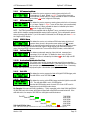
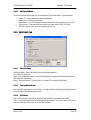
This allows the user to program a warning alarm point for the Oil
Oil Temp Alarm
Temperature in °C steps. Default = 110°C. To turn off the alarm (not
Ok
110
Add
recommended) set the value to 0. When activated the alarm is indicated
by the letters OTA on the 3-digit red LED display.
3.1.4.7
Oil Pressure Alarm
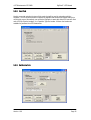
This allows the user to program a warning alarm point for the oil pressure
Oil PSI Alarm
in 1 psi steps. Default = 20psi. To turn off the alarm (not recommended)
Ok
20
Add
set the value to 0. When activated the alarm is indicated by the letters
OPA on the 3-digit red LED display.
NOTE – The ETB oil pressure sensor supplied with the DigiDash2 has a mechanical low-pressure
switch built-in should a separate dashboard warning light be required. This is calibrated to operate
when oil pressure falls below 7.5 psi. If this switch is activated, the LED display will show O.I.L. on
the 3-digit red LED display.
3.1.4.8
RPM/Oil Alarm
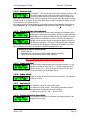
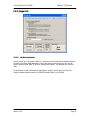
This allows the user to set a minimum RPM value below which the oil
RPM/PSI Alarm
pressure alarm (as set in the previous menu option) will NOT operate.
Ok
2500
Add
This is especially useful should you wish to set the oil pressure to a value
lower than normally experienced when a hot engine is idling and not have the alarm displayed
unless the engine RPM is above a certain limit. To turn off the RPM/Oil feature, set the value to 0.
3.1.4.9 Fuel Level Alarm
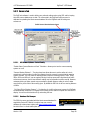
This allows an automatic warning of low fuel level, measured as a
Fuel Level Alarm
percentage (%) of a full tank. To disable the alarm, set to 0. When
Ok
20
Add
activated the alarm is indicated by the letters FLA on the 3-digit red LED
display.
3.1.4.10 Acceleration/Deceleration Test Stop
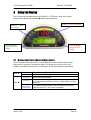
This allows you to quickly change the stop speed of the acceleration /
Accel Test Stop
deceleration timer. Acceleration Timer: If the start speed is lower than the
Ok
60
Add
stop speed an acceleration run is timed. Deceleration Timer: Conversely,
a higher start speed than stop speed implies a deceleration (braking) run.
3.1.4.11
Shift RPM
Shift RPM
Ok
10200
3.1.4.12
Add
This allows the user to program the final shift light LED RPM trigger point.
The shift RPM is set in 100 RPM steps.
Shift Delta
This allows the user to set the RPM change required to light the next shift
LED. The shift delta RPM is set in 100 RPM steps.
Ok 500 Add
Note that this RPM setting works for each LED or set of LED’s and is
dependent on the shift light mode chosen.
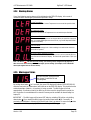
For Example: If the user sets Shift Light Mode = 1 (fully sequential), with a final Shift Light RPM of
10,000 RPM, each of the lower shift lights will illuminate at the RPM increment below this. If the
shift delta set to, for example, 500 RPM, the shift lights would illuminate at:
Shift Delta
First LED
Green
Next LED
Green
Next LED
Green
Next LED
Yellow
Next LED
Yellow
Shift Light RPM Set Value
Final LED
Red
7500 RPM
8000 RPM
8500 RPM
9000 RPM
9500 RPM
10000 RPM
NOTE - If the final Red shift light is illuminated for more than 1 second, the entire bank of shift lights will rapidly flash.
Version: 1.06
Page 15