Transcript
PMK10
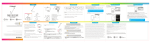
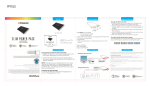
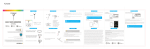
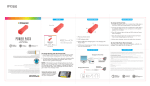
LOCATION OF CONTROLS
IN THE BOX
USING THE SHUTTER STICK (cont’d)
USING THE SHUTTER STICK
4. Open the camera app on your smartphone.
2
1. Place your smartphone into the Smartphone
NOTE: Certain smartphones camera apps have default settings that cannot
be changed. A third party camera app with a volume key enabled shutter is
recommended.
clamp. The spring clamp will keep your phone
securely in place.
3
5. In your smartphone’s camera app, select your front facing (Selfie) camera.
4
Shutter Stick, Car Charger, and Earbuds
then tighten it to secure the clamp on the base.
6. Extend the Shutter Stick to the desired length.
SH UTTER STICK COMBO
PMK10 | USER MAN UAL
1. Shutter button
Questions?
Need some help?
S H U T T E R S T I C K C OM B O
If you still have questions,
call our help line:
or visit us at:
1-877-768-8481
Click on “Product Support”
www.southerntelecom.com
7. Focus on yourself and press the shutter button on the Shutter Stick.
2. Smartphone clamp
1
3. Shutter Stick tightening wheel
4. 3.5mm headphone adapter
P MK 1 0 | U S ER MAN U AL
This manual will help you
enjoy your new product
NOTE: You can take “Selfies”, take normal pictures, or record videos. Choose
the settings in your smartphone’s camera app.
2. Loosen the knob on the base to adjust the angle
Questions?
Need Questions?
some help?
Needwillsome
help?
This manual
help you
This manual will help you
enjoy your
new product
enjoy your new product
If you still have questions,
If you
call
our still
helphave
line:questions,
or visit us at:
1-877-768-8481
1-877-768-8481
Click on “Product Support”
call our help line:
3. Connect the 3.5mm headphone adapter into
IMPORTANT: Some Android phones will display the volume control screen
when the Shutter Button is pressed. This is because the Shutter Stick uses
the volume frequency to take photos. If this happens, open your
smartphone’s CAMERA APP settings select “Volume Button Options” and
select CAPTURE. now the shutter will take pictures.
your smartphone’s headphone port.
or visit us at:
www.southerntelecom.com
www.southerntelecom.com
Click on “Product Support”
User Manual
TROUBLESHOOTING
My smartphone doesn’t take photos when the
shutter button is pressed.
1. Make sure that your smartphone’s camera app is open.
2. Properly secure your smartphone into the smartphone clamp.
3. Check that the 3.5mm headphone adapter is properly secured to your
smartphone’s headphone jack.
4. Certain smartphones camera apps have default settings that cannot be
changed. A third party camera app with a volume key enabled shutter is
recommended.
PLR IP Holdings, LLC, its licensees and affiliates, fully support all electronic waste initiatives. As responsible
stewards of the environment, and to avoid violating established laws, you should properly dispose of this product
in compliance with all applicable regulations, directives or other governances in the area where you reside. Please
check with local authorities or the retailer where you purchased this product to determine a location where you can
appropriately dispose of the product.
• Consult the dealer or an experienced radio/TV technician for help.
• Connect the equipment into an outlet on a circuit different from that to which the receiver is connected.
• Increase the separation between the equipment and receiver.
The volume screen appears when I press the shutter
button.
The Shutter Stick uses your Smartphone’s volume frequency to take photos. If
this happens, open your smartphone’s CAMERA APP settings select “Volume
Button Options” and select CAPTURE. Now the Shutter Stick will take
pictures.
LIMITED WARRANTY
LIABILITY DISCALIMER
IN NO EVENT, UNDER ANY CAUSE OF ACTION OF THEORY OF LIABILITY, SHALL SOUTHERN
TELECOM ITS DISTRIBUTORS OR SUPPLIERS BE LIABLE TO YOU OR ANY THIRD PARTY FOR
ANY INDIRECT, INCIDENTAL, CONSEQUENTIAL, SPECIAL, EXEMPLARY OR PUNITIVE
DAMAGES, OF ANY NATURE WHATSOEVER, ARISING OUT OF THE USE OF OR INABILITY TO
USE ANY SOUTHERN TELECOM PRODUCT, INCLUDING, WITHOUT LIMITATION, PROPERTY
DAMAGE, LOSS OF VALUE OF THE SOUTHERN TELECOM PRODUCT OR ANY THIRD PARTY
PRODUCTS THAT ARE USED IN OR WITH THE SOUTHERN TELECOM PRODUCT, OR LOSS
OF USE OF THE SOUTHERN TELECOM PRODUCT OR ANY THIRD PARTY PRODUCTS THAT
ARE USED IN OR WITH THE SOUTHERN TELECOM PRODUCT, EVEN IF SOUTHERN
TELECOM HAS BEEN ADVISED OF THE POSSIBILITY OF SUCH DAMAGES. WITHOUT
LIMITING THE FOREGOING, YOU UNDERSTAND AND AGREE THAT SOUTHERN TELECOM
HAS NO LIABILITY FOR ANY DAMAGE OR DESTRUCTION TO CONSUMER ELECTRONICS
DEVICES OR OTHER PERSONAL PROPERTY THAT ARE CONTAINED INSIDE OR OUTSIDE
THE SOUTHERN TELECOM PRODUCTS, INCLUDING, WITHOUT LIMITATION, LAPTOPS,
CELLULAR PHONES, OR OTHER HANDHELD DEVICES, OR ANY LOSS OF DATA CONTAINED
IN THE FOREGOING DEVICES. NOTWITHSTANDING ANY DAMAGES THAT YOU MIGHT INCUR
FOR ANY REASON WHATSOEVER (INCLUDING, WITHOUT LIMITATION, ALL DAMAGES
REFERENCED HEREIN AND ALL DIRECT OR GENERAL DAMAGES IN CONTRACT, TORT
(INCLUDING NEGLIGENCE) OR OTHERWISE), THE ENTIRE AGGREGATE LIABILITY OF
SOUTHERN TELECOM AND ANY OF ITS DISTRIBUTORS AND/OR SUPPLIERS SHALL BE
LIMITED TO THE AMOUNT ACTUALLY PAID BY YOU FOR THE SOUTHERN TELECOM
PRODUCT GIVING RISE TO LIABILITY. SOME STATES AND/OR JURISDICTIONS DO NOT
ALLOW THE EXCLUSION OR LIMITATION OF INCIDENTAL OR CONSEQUENTIAL DAMAGES,
SO THE ABOVE LIMITATIONS OR EXCLUSIONS MAY NOT APPLY TO YOU. THE LIMITATIONS
This product as supplied and distributed new by AIT, Inc. (“AIT”) to the original consumer purchaser
is warranted by AIT against defects in material and workmanship for a period of one year from your
date of purchase (“Warranty”).
In the unlikely event that this product is defective, or does not perform properly, you may within one year
from your original date of purchase return it to the authorized service center for repair or exchange.
TO OBTAIN WARRANTY SERVICE:
• Call the Customer Support number located below, or go to our website portal to receive an SRO
number.
• Provide proof of the date of purchase within the package (Dated bill of sale).
• Prepay all shipping costs to the authorized service center, and remember to insure your return.
• Include a return shipping address (no P.O. Boxes), a telephone contact number, and the defective
unit within the package.
• Describe the defect or reason you are returning the product.
Your product will be repaired or replaced, at our option, for the same or similar model of equal value
if examination by the service center determines this product is defective. Products received damaged
as a result of shipping, will require you to file a claim with the carrier.
The shipping address of the authorized service center is:
AIT, Inc.
ATTN: Customer Service (2nd Floor)
14-C 53rd Street
Brooklyn, NY 11232
IN NO EVENT WILL AIT, ITS MANUFACTURERS, DISTRIBUTORS OR PLR IP HOLDINGS, LLC BE
LIABLE FOR ANY INCIDENTAL, DIRECT, INDIRECT, SPECIAL, PUNITIVE OR CONSEQUENTIAL DAMAGES
(SUCH AS, BUT NOT LIMITED TO, DAMAGES FOR LOSS OF PROFITS, BUSINESS, SAVINGS, DATA OR
RECORDS) RELATED TO THIS PRODUCT. EXCEPT AS STATED HEREIN, NO OTHER WARRANTIES
SHALL APPLY.
Questions?
Need some help?
This manual will help you
enjoy your new product
If you still have questions,
call our help line:
or visit us at:
1-877-768-8481
Click on “Product Support”
www.southerntelecom.com
• Reorient or relocate the receiving antenna.
Note: This equipment has been tested and found to comply with the limits for a Class B digital device, pursuant to part 15 of the FCC
Rules. These limits are designed to provide reasonable protection against harmful interference in a residential installation. This
equipment generates, uses and can radiate radio frequency energy and, if not installed and used in accordance with the instructions,
may cause harmful interference to radio communications. However, there is no guarantee that interference will not occur in a
particular installation. If this equipment does cause harmful interference to radio or television reception, which can be determined by
turning the equipment off and on, the user is encouraged to try to correct the interference by one or more of the following measures:
Caution: Any changes or modifications not expressly approved could void the user's authority to operate the equipment.