1
Open Run:
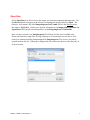
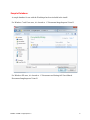
Select Open Run to be able to access the images you want for assignment and inspection. Use
the Browse button to navigate to the directory containing the images and select Open. The
directory will contain a file called ImageInspector.DATA.mdb, but it is the directory name
that must be highlighted. Until a run is opened, all options except Import/Open Database and
Open Run will be grayed out and inoperative on the ImageInspector™ Button Bar.
Once you have opened a run, ImageInspector™ will keep it in the list of available runs.
Please note that since image files are large and may be on external devices, the device will
need to be connected and the path unchanged for ImageInspector™ to access a previously
opened run from the list. If the path is changed, the user will need to browse to the directory in
its new location.
ReadMe – PAVER™ ImageInspector™
5