1
APPLICATION NOTES
The
APN 1100-01
is the registered trademark of Noritake Vacuum Fluorescent Display (VFD)
This Application Note has been compiled as a support material for our customers using U-version Vacuum
Fluorescent Display Modules (described as U-version Modules in the following sections). This document
contains general product information; the user is recommended to refer to the most recent product specification.
Materials included in this document are meant to be reference data and actual results may vary.
Applicable Model:
CU20025ECPB-W1J
1. BUS Setup
1.1
M68/i80 Selection
The U-version VFD modules support an M68 interface bus (E&R /W) making it interchangeable with
LCDs. In addition, the U-version VFD can be configured to interface to i80 bus (WR/RD) via the
jumpers that are located on the printed circuit board. To short circuit the jumpers, a soldering iron will
be necessary and a sharp object such as a knife is required.
1.2
8-Bit/4-Bit Selection
In both the M68 and i80 interface modes, the data bus width can be selected for 8 bit or 4 bit operation.
The modes are switched from 8 bit to 4 bit by sending a software command. If you have chosen the 4bit mode, use the upper nibble (D7-D4). An example of the initialization sequence for each case will be
explained in detail in the next section.
2. Initializing Procedure
The U-version module has its BUS width set at 8 bits by default. The U-version allows the user to select
either 8 bits or 4 bits. 4 bits mode allows the users to take advantage of the LCD interchangeable function.
2.1
8 bit mode
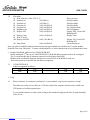
(1) Wait 260m Sec. After Vcc>4.75
(2) Function Set
38H (RS=0)
(3) Function Set
38H (RS=0)
(4) Brightness Set
00H (RS=1)
(5) Display OFF
08H (RS=0)
(6) Display Clear
(7) Wait 2.3m Sec
(8) Display ON
01H (RS=0)
0CH (RS=0)
(9) Entry Mode
06H (RS=0)
: Power on reset
: 8 bit Bus Mode
: 8 bit Bus Mode
: 100% Brightness
: Display OFF, Cursor OFF
: Blinking OFF
: Display Clear Instruction
: Display ON, Cursor OFF
: Blinking OFF
: Cursor Increment
Page 2 of 2
Downloaded from Elcodis.com electronic components distributor