1
APPLICATION NOTES
2.2
APN 1100-01
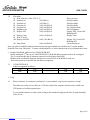
4 bit mode
(1) Wait 260m Sec, After VCC>4.75
(2) Function Set
3xH (RS=0)
(3) Function Set
3xH (RS=0)
(4) Function Set
2xH, 8xH (RS=0)
(5) Function Set
0xH, 0xH (RS=0)
(6) Brightness Set
0xH, 8xH (RS=1)
(7) Display OFF
0xH, 8xH (RS=0)
(8) Display Clear
(9) Wait 2.3m Sec
(10) Display ON/OFF
0xH, 1xH (RS=0)
: Power on reset
: 8 bit Bus Mode
: 8 bit Bus Mode
: 8 bit Bus Mode
: Set 4 bit Bus Mode
: 100% Brightness
: Display OFF, Cursor OFF
: Blinking OFF
: Display Clear
0xH, CxH (RS=0)
: Display ON, Cursor OFF
: Blinking OFF
(11) Entry Mode
0xH, 6xH (RS=0)
: Cursor Increment
Note: In order to establish synchronization between the upper and the lower nibble, the U-version module
should be first set in 8 bit mode. To ensure synchronization, we advise that the task to be performed three times.
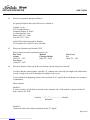
3. Display Data RAM Addresses for CU20025ECPB-W1J
Before writing the 2nd line on to CU20025ECPB-W1J, the RAM address pointer needs to be reassigned.
The U-version module has 80 character capacities for the display data RAM.
Modules with less than 80 displayed characters use selected area of the RAM for each row.
These selected areas are specified by the address assignment.
3.1
CU20025ECPB-W1J
Address assignment as follows:
00H
01H
40H
41H
LEFT
...................
...................
12H
52H
13H
53H
RIGHT
4. FAQ
4.1
When a character is rewritten or scrolled on U-version module, why does the character overlap?
The character overlap is not visible on a LCD due to their slow response time but can be visible on a
VFD because of its high response time.
To prevent this character overlap, when writing to the module the high period of the E signal should be
5µsec or less.
Page 3 of 3
Downloaded from Elcodis.com electronic components distributor