1
INSTALLATION DESCRIPTIONS
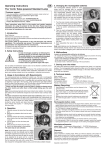
(2) Installation
1. Open the battery cover and put the battery inside, then cover it.
BATTERY
Step1:
Dig installation
hole
Step2:
Fix rain cover
2. Use the USB to charge when the monitor is lack of power.
AC
Step4:
Tighten screw
Step3: Fix
botton panel
FA I L U R E D I A G N O S I S
3. Outdoor camera connects with E-lock and power introduction.
(1) Diagram
12V+ GND
1
2
3
1. Fail to call. Whether indoor monitor is on
Whether outdoor camera is very far away from the indoor monitor
Whether there is wrong match between outdoor camera and indoor monitor
NC COM NO
4
5
6
2. Bad connection. Whether noise index is higher than 50dB
Whether outdoor camera is very far away from the indoor monitor
12V + GND
NO
COM
NC
3. Low volume in speaking state. Whether protective material is uncovered
Whether the volume is adjusted to be too low
NC
E - Lock
COM
4. Close Alarm.When have alarm from camera and monitor.
First step: Fix the camera screw at the bottom well. At this time, still have alarm.
Second step: Press the unlock button to close the alarm.
power supply
- 11 -
- 12 -