1
iPod Operation
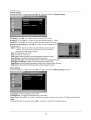
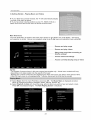
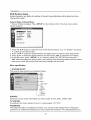
Now Playing
Screen - Music Playback
The Now Playing Screen allows you to see artist, album and track information at-a-glance.
screen you will see most often when listening to music
This is the
Art
Title
Title
Name
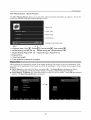
,back Information Bar
a
c
a. Playback state: Play F_ , Pause_,
Fast forward [_, Fast reverse [_
b. Shuffle Setting: Shuffle off _
, Shuffle Songs _,
Shuffle Albums ::_
c. Repeat Setting:
Repeat Off
t_- , Repeat One_b,
.
Repeat All c_j .
d. Elapsed time.
e. Total track length
f. Track position
on album or in playlist
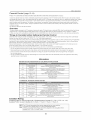
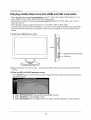
Video playback is supported by certain iPod models including iPod touch 1st and 2nd generation, iPod
nano 3rd and 4th generation, iPod classic and iPod 5th generation. Other models do not support video
playback.
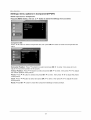
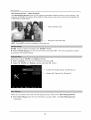
t_ Select Video from the main iPod Menu and press OK. The Video Menu is displayed as below.
Videos are categorized as Movies, Music Videos, TV Shows, Video Podcasts or Rentals.
I_ Select Movies, TV Shows etc, chose the series or movie you wish to watch. Press OK and playback
begins. The Now Playing Screen is displayed.
22