1
iPod Operation
iPod Operation
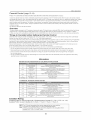
The following iPod models are supported by this TV for music playback. Certain models from the
below list can support video playback and photo viewing in addition to music playback. Please refer to
the following sections on playing videos and viewing photos for details,
E]°dtou
2nd generation
8GB 16GB 32GB
4th generation
8GB 16GB
80GB
160GB
iPod classic
2nd generation (aluminum)
iPod
nano 8GB
2GB 4GB
iPod
4th generation
(color display)
40GB 60GB
(video)
_
120GB
1st generation
8GB 16GB 32GB
5th generation (video)
iPod
_
60GB 80GB
5th generation
iPod
30GB
iPod
iPod
iPod
4th generation (color display)
20GB 30GB
4th generation
40GB
4th generation
20GB
(video)
iPod nano
3rd generation (video)
4GB 8GB
iPod nano
lstgeneration
1GB 2GB 4GB
iPod mini
4GB 6GB
1) Docking your iPod
I_ Locate the dock adapter plate supplied with your iPod and insert into the iPod dock as shown below.
1_ Insert your iPod into the iPod dock as shown below. Make sure all cases or "skins" are removed from
the iPod before docking.
I_,
is used.
FAILUREan
TOiP°d
DO SO
MAY
RESULT
IN DAMAGE
THE
When
c°nnecting
t° this
iP°d
D°ck' ptease
ensureTO
that
theiPod.
c°rrect adapter plate 1
I_ Turn on the LCD TV. The iPod is recognized and the TV automatically
switches to iPod mode.
o=
--
iPod Adpater
Plate
iPod Dock
L_Z
__'L_G.--I
L..J
NOTE: A docked iPod will charge when the TV is powered ON. When the TV is in standby mode
the iPod will not charge.
19