1
ORE"
TECHNOLOGY
&
INNOVATION
p-
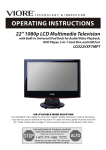
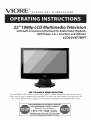
22"
080p LCD Multimedia
Television
with Built-in Universal iPod Dock for Audio/Video Playback,
DVD Player, 3-in- I Card Slot, and USB Port
LCD22VXFTMPT
AIR (TV)/CABLE
MODE SELECTION
The Air/CABLE menu option is set to the "CABLE" (Cable Television) mode at the factory.
If you want to use an antenna for the built-in TV tuner, this menu option must be set to the
"Air" mode. Please refer to page 12 of the owner's manual for the details of this menu.
Contents
Contents
1
Caution
2
Safety Information
3
Unit and Accessory
3
Product Feature
4
Getting Started-Front View
5
Getting Started-Rear View
6-7
Remote Control Key Functions
8-10
Basic operation
10-11
Picture menu options
11-12
Sound menu options
12-13
Channel menu options
13-15
Settings menu options
16
Settings menu options in VGA/PC
17
Settings menu options in Component
18
Parental Control
19-24
IPOD Operation
25-26
DVD basic operation
26
Disc Care
27-28
DVD System Setup
29-30
Playing Flash Media
31
Simple Troubleshooting
32
Technical Specification
Caution
Caution
The lightening flash with arrowhead symbol, within an equilateral triangle is
intended to alert the user to the presence of un-insulated "dangerous voltage"
within the products enclosure that may be of sufficient magnitude to constitute
a risk of electric shock to the persons.
The exclamation point within an equilateral triangle is intend to alert the user to
the presence of important operating and maintenance (servicing)
instructions in the literature accompanying the appliance.
Correct disposal of this Product
(Waste Electrical & Electronic Equipment (WEEE)
Your product is designed and manufactured with high quality materials and
components which can be recycled and reused.
This symbol means that electrical and electronic equipment, at their end-of-life,
should be disposed of separately from your household waste.
Please dispose of this equipment at your local community waste collection/
recycling centre.
In the European Union there are separate collection systems for used electrical
and electronic products. Please help us to conserve the environment we live inT
_/ST_
3124140
unit
cowith
0,,es
er,ca
saO,rect,ves.
et
CONFORMS TO UL STD. 60065
F_
LASEnRA_AT_N
This unit complies with FCC directive.
This unit is a "CLASS 1" laser product. This product uses a visible laser
beam which could cause hazardous
radiation exposure.
Ensure the
recorder is operated as instructed.
Do not remove any covers or look into
the DVD drawer opening whilst power is applied.
Do NOT modify or adjust
any controls that may affect laser emissions.
Should the appliance become
faulty consult a qualified technician.
Safety
Information
Safety Information
To ensure reliable and safe operation of this equipment, please read carefully all the instructions
in this user guide, especially the safety information below.
Electrical safety
•The TV set should only be connected to a mains supply which matches that stated on the label
on the mains adaptor
•To prevent overload, don't share the same mains supply socket with too many other items of
equipment.
Do not place any connecting wires where they may be stepped on or tripped over.
Do not place heavy items, which may damage the leads, on them.
Hold the Mains plug, not the wires, when removing from a socket.
During a thunderstorm or while leaving the TV for long periods, disconnect the aerial (if outdoor)
and mains adaptor from the supply.
Do not allow water or moisture to enter the TV or mains adaptor. Do NOT use in wet or moist areas
such as Bathrooms, steamy kitchens or near swimming pools.
• Pull the plug out immediately, and seek professional help if:
the mains plug or cable is damaged
liquid is spilt onto the set, or if it is accidentally exposed to water or moisture
anything accidentally penetrates the ventilation slots
the set doesn't work normally.
Do NOT remove the safety covers. There are no user serviceable parts inside. You may invalidate
the warranty. Qualified personnel must only service this apparatus.
To avoid battery leakage, remove exhausted batteries from the remote control handset, or when not
using for a long period.
Do NOT break open or throw exhausted batteries on a fire.
Physical safety
.Do NOT block ventilation slots in the back cover. You may place the TV in a cabinet, but ensure at
least 5cm (2") clearance all around.
=Do NOT tap or shake the TV screen, you may damage the internal circuits. Take good care of the
remote control, do not drop.
.To clean the TV use a soft dry cloth. Do NOT use solvents or petrol based fluids. For stubborn
stains, you may use a damp soft cloth with dilute detergent.
Unit and Accessory and Product Feature
Unit and Accessory
oo
J
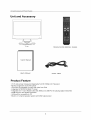
TV set
Remote Control( batteries: 2xAAA)
User's Manual
User's Manual
Power Cable
Product Feature
•
•
•
•
•
•
•
•
21.6" wide screen (measured diagonally) FulI-HD 1080p LCD Television
Built-in progressive scan DVD player
iPod Dock for playback of music and video from iPod
Integrated ATSC/NTSC/QAM TV tuner
Integrated 3-in-1 Card Reader (SD, MS, MMC) and USB Port for playing digital media files
HDMI input for true digital connection
VGA port for connection to PC
Built-in 2.1-channel speaker system with 20W output power
Getting Started
Getting Started
CH-
CH+
VOL-
0
0
Q
VOL+
INPUT
PLAY
O
EJECT
iI
I
P
iiI
I
I
m
m
®
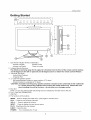
1. LED Power Indicator (Power on/Standby)
Indicator on(Red)
Standby mode
Indicator on(Green)
Power on mode
2. Infrared Remote Receiver
The effective receiving range for the signal is 5-8 metres from the front of the remote control window,
and 30 degrees to the left or right side and 20 degrees above or below the remote control Window.
3. Universal iPod Dock
- Audio/Video Playback
- Charging iPod
4. 2.1 Channel Speaker System
- Mid-range/tweeters located on upper section of TV stand
- Woofer located on underside of TV stand
CAUTION: A sensitive low-frequency speaker (woofer) is located on the underside of this multimedia
TV. Please remove the protective film covering the woofer before use. Please take care
when handling the unit by the base - do not press on or damage woofer.
5. Disc Slot
Insert a 12 cm disc with the label side facing back as indicated by the label next to the slot.
6.3-in-1 Card Slot (SD/MMC/MS)
7. USB Port
8. The functions of the buttons:
MENU : Press to display the OSD menu, press again to exit the menu.
CH+/- : Press to scan through channels.
VOL+/- : Press to adjust the volume.
INPUT : Press to display the input source menu.
PLAY: Play/Pause the disc playing.
EJECT : Eject the disc.
POWER : Turn on/standby the TV set.
Getting Started
Rear view
2
1
HDMI
PC-IN
VGA
3
4
5
Y
Pb
I I '1'
Pr
6
S-VIDEO VIDEO
R
I ui
7
8
L
9
RF
10
1. Switch: Switch on/off the power supply.
2. AC Power IN: Connect to an earth 100-240V, 50/60Hz AC outlet with the Power Cable.
3. HDMh Connect it to the HDMI of DVD or other equipment.
4. PC-IN: Connect it to the audio output terminal of PC.
5. VGA: For PC display. Connect it to the D-Sub 15 pins analog output connector of the PC.
6. YPbPr: (Component) Connect them to the video output terminals of DVD or other equipment.
(used in Component mode).
7. S-VIDEO: Connect it to S-Video output terminal of DVD or other equipment.
8. VIDEO: (Composite) Connect it to video output terminal of DVD or other equipment.
9. L/R Audio in: Connenct them to audio output terminals(For Video-Composite/S-Video/YPbPr-Component).
10. RF: Connect antenna or cable 75 Ohm coaxial to receive TV signal.
Wall Mounting
The TV is provided with mounting holes for a VESA approved wall mounting bracket(NOT
SUPPLIED). Remove the Posi screws holding the base to the base bracket and lift the
base away (do not remove the base mounting bracket). Mount the VESA bracket using
4 x M4 xl0 Iso metric threaded screws (not supplied). Do not use screws longer than 10 mm,
damage will occur to the internal parts. Fit the wall bracket securely following the manufacturers
instructions.
Remote
Remote
Control
Control
Key Functions
Key Functions
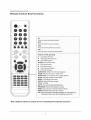
f
POWER
Switch on LCD TV when at standby mode or vice versa
INPUT
Press to cycle through the input source.
INPUT
_e
o
@
NUMBER BUTTONS
Press 0-9 to select a TV channel directly when you are watching
TV. Then press "OK" key to confirm.
Press this button to enter a program number for multiple program
channel such as 2-4 ,etc.
d_--p
Return to the previous channel viewed.
I PICTURE
SOUND
SLEEP
DISPLAYI
PICTURE
Select the picture mode.
VOL+
o
SOUND
Select the sou nd mode
@
_
MUTE
SLEEP
Time shutting down
DISPLAY
Press to display the source and channel's information.
VOLEXIT
Press to mute the sound. Press again or press VOL÷/- to unmute.
EXIT
Clears all on.screen displays and returns to TV viewing from any
menu.
AUDIO
ONLY
CC
MENU
MTS
EPG
MENU
BiingS up the main menu tOthe screen:
FAV
SHUFFLE
AII0ws y0U to navigate the on.screen menus and adjUSt the
System sett ng tO your preferenCe:
REPEAT
Press to scan thrOUgh channels: To scan quickly Channelsl press
and hold down either +/' button:
J
Note:
Buttons
labeled
in yellow
are for controlling
iPod-specific
functions
Remote Control Key Functions
Remote
Control
Key Functions
INPUT
e@
e
e
f
cc
Press to display the closed caption.
MTS
Press to select the audio channels.
PICTURE
SOUND
SLEEP
EPG
DISPLAY
@
NOW
Press to enter the EPG menu directly.
FAV
_LAYING
Press to add or remove favorite channel.
VOL+_
MUTE
_
CH+
Buttons for DVD operating
VOL
CN
EXIT
__ : Load/eject
DVD disc.
I,II : Play/pause
MENU
DVD program.
[] : Stop DVD program.
SETUP: DVD system setup.
44 : DVD fast reverse.
))
: DVD fast forward.
144 : DVD previous chapter.
))
: DVD next chapter.
LANGUAGE:
Select the DVD disc language.
ZOOM: Adjust picture size in DVD mode.
AUDIO
ONLY
MENU
SUBTITLES:
DOD
CC
MTS
EPG
SLOW:
FAV
Turn on/off the DVD subtitle display.
Play DVD program at slow speed.
MENU: DVD play list/Disc menu.
SHUFFLE
ANGLE: Select DVD picture angle.
TITLE: DVD title.
REPEAI
GOTO:
Play your favorite title/chapter/track.
PROGRAM:
Edit the DVD program and play.
INTRO: If you play CD, it will scan program with 3S.
REPEAT: Repeat playing the title or chapter.
A-B: Select and play the preferable paragraph of DVD program by
pressing this button twice at the beginning and end of it.
Note:
Buttons
labeled
in yellow
are for controlling
iPod-specific
functions
Menu Operation
Menu Operation
Basic operation
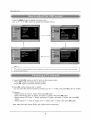
TURN ON LCD TV
1. Connecting to the AC intput cable, at this time the TV will enter standby mode and indicator show red.
2. Use the POWER button can turn ON LCD TV from standby mode.
TURN OFF LCD TV
Press the POWER button on TV or on the remote control to enter standby mode. The indicator is red.
NOTE: If this is the first time you run the LCD TV, the Initial Setup Menu will appear in the picture,
and the items of this menu also exist in other menus, so you are able to change the values
after you set them up.
Language
Press • / • button to select this item, then press OK / • button to select the OSD language.
Tuning Band
Press OK / • button to select Tuning Band mode. (Available tuning band mode: Air, Cable)
Auto Channel Search
Press • / • button to select this item, then press OK / • button to enter the Auto Channel Search
Program.
1. Press the VOL+/- button to adjust the volume.
2. If you want to switch the sound OFF, press the MUTE _ button.
You can cancel this function by pressing the MUTE or VOL+/- button.
TheOSD(OnScreenDispmaY)reference
for your product,
inthisdocumentmaybedifferentfromyourTV's,
because
this is just an
1
Menu Operation
- Press the MENU button to display the mains menu.
- Use A/ • / _/_
OK buttons to operate the available menus.
l
1
L
1
The OSD (On Screen Display)
graphical presentation.
function
enables
you to adjust
the screen status conveniently
since it provides
1. Using the CH+/CH- button on the TV set or on the remote control.
- Press CH+ button to increase channel number.
- Press CH- button to decrease channel number.
2. Using 0-9 number buttons and -/-- button.
You can select the channel number by pressing 0 to 9 or -/-- button, and press OK button to confirm.
3. Example
- Select channel
- Select channel
- Select channel
button.
- Select channel
5: press "5" button, then press OK button.
62: press "6" button, and press "2" button, then press OK button.
152: Press "1" button, and press "5" button, and press "2" button, then press OK
'5-1 ': press "5" button, and "-/--"button, and "1" button, then press OK button.
Note: After select the number button, the number will be memorized.
Menu Operation
You can select the input source by pressing the INPUT button on
the remote control or on the TV set.
Picture menu options
,
In this manual,
TVoperation.
the OSD ( On Screen
Display)
may be different
from your TV' s because
it is just example
to help the
l
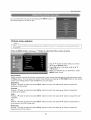
Press the MENU button, and useA / • button to select the Picture menu as below.
1. Use • / • button to select what you want to
adjust in the Picture menu.
2. Press OK button, and adjust by 4/•/•
/•
/ OK buttons.
3. When you adjusted to your preference, press
MENU button to exit.
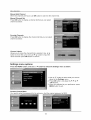
Picture Mode
Select the type of picture which best corresponds to your viewing requirements by selecting picture mode
in Picture menu. You may select the picture mode directly by pressing the PICTURE button on the remote
control, and change picture mode to User then you can adjust.
Brightness
Press • / • button to select and press OK/•
brightness of the picture.
button to enter, then press _/•
button to adjust the
Contrast
Press • / • button to select and press OK/•
contrast of the picture.
button to enter, then press -,I/•
button to adjust the
button to enter, then press _/•
button to adjust the color
button to enter, then press _1/•
button to adjust the tint
button to enter, then press -,I/•
button to adjust the
Color
Press • / • button to select and press OK/•
saturation.
Tint
Press • / • button to select and press OK/•
of the picture. (In NTSC mode only)
Sharpness
Press • / • button to select and press OK/•
sharpness level of the picture.
10
Menu Operation
Advanced Video
Press OK/• button to enter the submenu as below:
Aspect Ratio: Select the ratio of picture display.
Color Temperature: Press OK/•/•
button to select the color temperature from Cool/Normal/Warm.
Noise Reduction: Press OK/•/•
button to select the level of noise reduction from Off/Low/Medium/High.
3D Y/C: Press OK/•/•
button to set the 3D/YC on/off.
Gradient Enable: Press OK/•/•
button to set the Gradient Enable on/off.
Blue Screen: Press OK/•/•
button to set the Blue Screen on/off.
If the function is turned on, the TV will display blue screen when there's no signal.
Sound
menu options
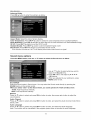
Press the MENU button, and use • / • button to select the Sound menu as below.
1. Use • / • button to select what you want to
adjust in the Sound menu.
2. Press OK button, and adjust by _/•/•
/•
/ OK buttons.
3. When you adjusted to your preference, press
MENU button to exit.
Sound Mode
Select the Sound mode in Sound menu. You may select the Sound mode directly by pressing the
SOUND button on the remote control.
When you select "User" as the Sound mode, you could operate the Treble and Bass item.
Treble: High frequencies intensity.
Bass: Low frequencies intensity.
Balance
Press • / • button to select and press OK/•
sound balance.
Audio Channel
Press • / • button to select and press OK/•
Stereo, SAP.
button to enter, then press _/•
button to adjust the
button to enter, and select the Audio channel mode: Mono
Audio Language
Press • / • button to select and press OK/• button to enter, and select the Audio language.
Note: The function will be unavailable if the program system does not provide the audio language.
11
Menu Operation
Advanced Audio
Press • / • button to select and press OK/t,- button to enter the submenu.
Audio Only: Press OK/<
power 3 sec. to restore.
Channels
/ I_ button to set the video on/off. Select "YES", the video will hide, hold down
menu options
Press the MENU button, and use • / • button to select the Channels menu as below.
1. Use • / • button to select what you want to
adjust in the Channels menu.
2. Press OK button, and adjust by < / _ / • / •
/ OK buttons.
3. When you adjusted to your preference, press
MENU button to exit.
Tuning Band
Select Tuning Band mode.(Available tuning band mode: Air/Cable)
If select Air, the range of channel is 2-69, and if select Cable, the range of channel is 1-135.
Auto Channel Search
Press the OK/1_ button on the item to start Auto Channel Search.
Note: 1. It will search all the channels include digital and analog
channels.
2. You could cancel the auto searching by pressing MENU
button.
12
Menu Operation
Manual Add Channel
When the channels are found, use OK button to add it to the channel list.
Manual Channel Set
Press OK button to display a channel list that you can select
channel as below:
Favorite Channels
Press OK button to display the channel list that you can select
channel as below:
Channel Labels
Allows you to name the channel that is selected. Use ,11/ I_
button to move the cursor and use T/•
button to input the
name and then press OK button to confirm.
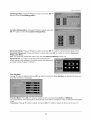
Settings
menu options
Press the MENU button, and use • / • button to select the Settings menu as below.
1. Use • / • button to select what you want to
adjust in the Settings menu.
2. Press OK button, and adjust by < / _-/• / •
/ OK buttons.
3. When you adjusted to your preference, press
MENU button to exit.
Parental Control Menu
You need to enter the password for the submenu. And the original password is 0000.
13
Menu Operation
US Ratings Menu: Press •/•
button to select and press OK / •
button to enter the US Ratings Menu.
Canadian Ratings Menu: Press •/•
button to select and press
OK / • button to enter the Canadian Ratings Menu.
Advanced
Rating: Press • / • button to select and press OK / •
button to set advanced rating on/off.
Advanced Rating Lock: Press •/• button to select and press OK / • button to enter the Advanced
Rating Lock Menu.
Note: You could not operate the menu if you turn the Advanced Rating function off.
Password Set: You need to enter the correct old password
before setting a new password, and after set the new password,
you need to enter it again to confirm it.
Time Set Menu
Press •/•
button to select and press OK / • button to enter the Time Set Menu as below that allows you
to set the time the TV will display.
Time Set Mode: Press OK / • button to select the time set mode from AUTO and MANUAL.
You should set the Time Set Mode to "Manual" first if you want to change the value of Time Zone/Year/Date
/Time.
Time Zone: Press •/•
button to select, and press OK / • button to select the time zone for your TV.
14
Menu Operation
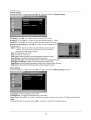
Closed Caption
Press •/•
button to select and press OK / • button to enter the Closed Caption.
CC Mode: Press OK / • button to enter and select CC mode.
Analog CC: Press OK / •
Digital CC: Press OK / •
button to enter and select analog CC mode.
button to enter and select digital CC mode.
Advanced CC Settings: Press OK/•
button to enter Advanced CC
Settings menu.
Style: Press • button to select CC style between Automatic and
custom. You need to set it to Custom first if you want to
change the value of items below.
Size: Normal/Large and Small.
Font: From Font 1 to Font 7.
Text Color: RedlGreenlBluelYellowlMagentalCyanlBlacklWhite.
Text Opacity: Solid/Flashing/Transparent/Translucent.
Background Color: BlacklWhitelRedlGreenlBluelYellowlMagentalCyan.
Background Opacity: SolidlFlashinglTransparentlTranslucent.
Edge Effect: None/Raised/Depressed/Unifrom/Left
Shadow/Right Shadow.
Edge Color: BlacklWhitelRedlGreenlBluelYellowlMagentalCyan.
Menu Setting
Press •/• button to select and press OK / • button to enter the Menu Setting submenu.
Language: To select language of the OSD.
Transparency: To select the transparency of the OSD.
Sleep Timer: Press OK / • button to select the number of minutes to set your TV sleeps automatically.
Reset
Press • / • button to select and press OK / • button to reset all the settings above.
15
Menu Operation
Settings
menu options
in VGA/PC
Select input source "VGA/PC".
Press the MENU button, and use • / • button to select the Settings menu as below.
PC Setting
Press •/•
button to select PC Setting, then press OK / • button to enter the PC Setting menu.
Horizontal Position: Press •/•
button to select and press OK / • to enter, then press • / • to
adjust the horizontal position of the picture.
Vertical Position: Press •/•
button to select and press OK / • to enter, then press • / • to adjust
the vertical position of the picture.
Phase: Press •/•
of the picture.
button to select and press OK / • to enter, then press • / • to adjust the phase
Clock: Press •/•
the picture.
button to select and press OK / • to enter, then press • / • to adjust the clock of
Auto Adjustment:
Press OK / • to auto adjust the VGA settings.
Reset: Press OK / • to reset the VGA settings to factory default.
16
Menu Operation
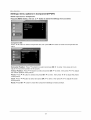
Settings menu options in Component(YPbPr)
Select input source "Component".
Press the MENU button, and use • / • button to select the Settings menu as below.
Component Set
Press •/•
button to select Component Set, then press OK / • button to enter the Component Set
menu.
Horizontal Position: Press v/• button to select and press OK/•
adjust the horizontal position of the picture.
to enter, then press • / • to
Vertical Position: Press •/•
button to select and press OK / • to enter, then press • / • to adjust
the vertical position of the picture.
Phase: Press •/•
of the picture.
Clock: Press •/•
of the picture.
button to select and press OK / • to enter, then press • / • to adjust the phase
button to select and press OK / • to enter, then press • / • to adjust the clock
Reset: Press OK / • button to reset the Component Settings to factory default.
17
Menu Operation
Parental
Press
Control
"ok" to enter
(page
13-14)
the sub-menu
and
then
uses
the
0-9 to enter
the correct
• 0,0,0,0.
If used, this optional feature can "block" undesirable
programming
and settings that restrict or "block" the programming
that can appear on the TV. Parental control allows the user the capability of defining which
rating they consider accept-able,
from appearing
password
on the TV. Parental Control offers the user a wide variety of options
program
to the younger or more sensitive viewer. It can be preset and turned either on or off by the user who specifies the
secret 4-number code, the password. The number of hours blocked
programs into the TV's memory. Viewer
are specified. General audience and children viewer blocks
should both be
ratings are specified for both TV and the motion picture industry; both rating systems should
be used, for
complete coverage.
The ratings are based on the ages of children.
Overview
To insure complete coverage
for all TV programs, (movies and regular TV shows) choose a rating for MPAA, from the selections
ratings from the TV Parental Guidelines
Rating System below, using the Age Block option for General Audiences,
to those, you may wish to add additional
Things to Consider
Determine
restrictions from the Content Block menu. See the Parental Control menu,
before
which rating you consider acceptable
Setting
Up Parental
below. And choose
and for Children. In addition
and submenus
example below.
Control
to the viewer. (For example, if you choose TV-PG, all more restrictive ratings will be automatically
blocked; the viewer will not be able to see: TV-PG, TV-14, or TV-MA rated programming.)
Do you want to block the auxiliary video source entirely?
input jacks) Or leave unblocked,
(Blocks the signal sent by the equipment,
such as a VCR, connected
then choose allowable ratings. Block program "Content" based on individual parameters
to the TV Audio/Video
such as: Strong Dialog,
Bad Language, Sex Scenes, Violence Scenes, or Fantasy Violence Scenes; in the Content BIk option.
Select a secret password; in the Set Password option. Use the number keys on the remote. Don't forget the password, it is the only way you can
access the Parental Control menu and change rating selections,
or turn Parental Control off.
Do you want Parental Control to be active all the time? If not, you can turn it on or off with the Lock On/Off option.
*
You can set different
*
Simply specifying
*
Even if you choose to leave the Aux inputs unblocked, the ratings you specify will automatically
from the video sources.
*
You can not disable Parental Control by disconnecting
specified
Parental Control viewing restrictions for general audiences
one content block such as Sex Scenes, will not automatically
and for children both can be active at the same time.
block another content in the programs from appearing.
restrict the programming
the TV from power. Block hours will automatically
that appears
reset to the original block time setting
if power is disconnected.
Information
MOTION PICTURE ASSOCiATiON
G
OF USA (MPAA) RATING SYSTEM
General Audiences
Content not offensive
Parental Guidance
PG
Suggested
PG-13
Parental Strongly
Cautioned
Program is inappropriatefor preteens with a greater degree
of offensive material Suggested than a PG rated program
Restricted
R
under
NC-17
age 17
Not for children under age 17 under any circumstances.
Strong sexual content.
X
Hard Core Films
Same as NC-17 rating.
No Rating
No Rating
TV PARENTAL
TV-Y
Canadian
Canadian
Not for children under age 17.
Strong elements of sex and/or violence.
viewing
No Children
Canadian
to most viewers
Content is such that parents may not want their children to
view the program.
GUIDELINE
MPAA Not Rated
RATING
Young Children
TV-Y7
Children 7 and over
TV-G
Parental Audience
TV-PG
ParentatGuidance
TV-14
Parents Strongly
Cautioned
TV-MA
Mature Audience
Only
SYSTEM
Content not offensive
Considered
to most viewers
suitable for children over 7 may contain
Fantasy Violence Scenes.
Considered
suitable for all audiences;
children
may watch unattended.
Suggested Unsuitable for younger children, may contain:
Suggestive Dialog Bad Language, Sex and Violence Scenes
Unsuitable for children under 14 may contain: Strong
Dialog, Bad Language
Sex and Violence Scenes.
Adults only, may contaim
Strong Dialog, Bad Language,
Violence Scenes.
Sex, and
Rating:
English
French
is used
is used
throughout all of Englishspeaking
Canada (E, C, C8+, G, PG, 14% 18+).
in Quebec (E, G, 8 ans +, 13 ans +, 16 ans +, 18 ans +).
18
iPod Operation
iPod Operation
The following iPod models are supported by this TV for music playback. Certain models from the
below list can support video playback and photo viewing in addition to music playback. Please refer to
the following sections on playing videos and viewing photos for details,
E]°dtou
2nd generation
8GB 16GB 32GB
4th generation
8GB 16GB
80GB
160GB
iPod classic
2nd generation (aluminum)
iPod
nano 8GB
2GB 4GB
iPod
4th generation
(color display)
40GB 60GB
(video)
_
120GB
1st generation
8GB 16GB 32GB
5th generation (video)
iPod
_
60GB 80GB
5th generation
iPod
30GB
iPod
iPod
iPod
4th generation (color display)
20GB 30GB
4th generation
40GB
4th generation
20GB
(video)
iPod nano
3rd generation (video)
4GB 8GB
iPod nano
lstgeneration
1GB 2GB 4GB
iPod mini
4GB 6GB
1) Docking your iPod
I_ Locate the dock adapter plate supplied with your iPod and insert into the iPod dock as shown below.
1_ Insert your iPod into the iPod dock as shown below. Make sure all cases or "skins" are removed from
the iPod before docking.
I_,
is used.
FAILUREan
TOiP°d
DO SO
MAY
RESULT
IN DAMAGE
THE
When
c°nnecting
t° this
iP°d
D°ck' ptease
ensureTO
that
theiPod.
c°rrect adapter plate 1
I_ Turn on the LCD TV. The iPod is recognized and the TV automatically
switches to iPod mode.
o=
--
iPod Adpater
Plate
iPod Dock
L_Z
__'L_G.--I
L..J
NOTE: A docked iPod will charge when the TV is powered ON. When the TV is in standby mode
the iPod will not charge.
19
iPod Operation
2) iPod=specific keys on the remote control
20
iPod Operation
3) Getting Started - Playing
Music and Videos
I_ If your iPod has just been docked, the TV will automatically display
the main iPod menu as below.
If you have been viewing another source (TV, HDMI, DVD etc.)
select "iPod" from the source menu to launch the iPod menu.
Main iPod menu
The main iPod Menu is similar to the main menu shown on and iPod's own LCD display. The layout
and operation is similar. Menus are navigated using the A V 4 I_ keys and selections made using OK.
Browse and play songs
Browse and play videos
Select next song/video
Shuffle settings
Access
advanced
Access
currently
according
settings
playing
song or video
NOTES:
- The images of menus shown in this user manual are samples only. Actual menu contents will vary
depending on the data loaded onto the specific iPod used.
- Reading the contents of the iPod and displaying the iPod main menu may take a short period of time.
If the iPod main menu is not displayed after 1 minute, disconnect the iPod and re-connect
I_ Select
Music
t_ Select
Press
Music from the main iPod Menu and press OK. The Music Menu is displayed as below.
is arranged according to Playlists, Artists, Albums, Genres, etc.
Playlists, Artists etc, chose the song, artist or album you wish to hear and select a track.
OK and playback begins. The Now Playing Screen is displayed.
21
to
iPod Operation
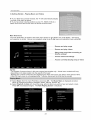
Now Playing
Screen - Music Playback
The Now Playing Screen allows you to see artist, album and track information at-a-glance.
screen you will see most often when listening to music
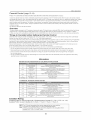
This is the
Art
Title
Title
Name
,back Information Bar
a
c
a. Playback state: Play F_ , Pause_,
Fast forward [_, Fast reverse [_
b. Shuffle Setting: Shuffle off _
, Shuffle Songs _,
Shuffle Albums ::_
c. Repeat Setting:
Repeat Off
t_- , Repeat One_b,
.
Repeat All c_j .
d. Elapsed time.
e. Total track length
f. Track position
on album or in playlist
Video playback is supported by certain iPod models including iPod touch 1st and 2nd generation, iPod
nano 3rd and 4th generation, iPod classic and iPod 5th generation. Other models do not support video
playback.
t_ Select Video from the main iPod Menu and press OK. The Video Menu is displayed as below.
Videos are categorized as Movies, Music Videos, TV Shows, Video Podcasts or Rentals.
I_ Select Movies, TV Shows etc, chose the series or movie you wish to watch. Press OK and playback
begins. The Now Playing Screen is displayed.
22
iPod Operation
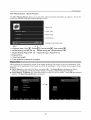
Now Playing
Screen - Video Playback
The Now Playing Screen gives you at-a-glance information about the video you are viewing. The
playback information bar shown at the bottom of the screen is the same as for music playback and
is described in detail above.
Video playback area
Playback Information Bar
HINT: Press EXIT to hide the playback information bar.
Shuffle
songs or videos according to the Shuffle
I_ Select
Shuffle Songs
settings.
from the main iPod Menu and press OK.
The next song/video is played
according to the Shuffle settings.
Allows you to adjust Shuffle
i_ Select
Settings
and Repeat settings.
from the main iPod Menu and press OK.
I_ Adjust the Shuffle
and Repeat
settings using the OK button.
--"""""_ Shuffle Off, Shuffle Songs, Shuffle Albums
_'_'_'_'_'_'_'_'_'_'_
Repeat Off, Repeat One, Repeat All
Allows you to quickly access the currently playing song or video on the Now Playing
I_ Select Now Playing
from the main iPod Menu and press OK.
is displayed.
23
The Now Playing
Screen.
Screen
iPod Operation
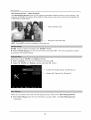
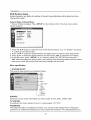
4) Viewing Photoes
This TV can be used as a large screen for conveniently viewing photoes stored on your iPod. Photo
viewing is supported by certain iPod models including iPod touch 1st and 2nd generation, iPod nano
3rd and 4th generation, iPod classic and iPod 5th generation. Other models do not support photo
viewing. Photo viewing is supported in Manual Mode only. iPod functions can be controlled by using
the basic navigation and playback keys on the remote or directly via the control panel of the iPod.
NOTE: The steps in this section require navigation of iPod menus and control of iPod settings. Details
of menus and settings vary between iPod models. A degree of familiarity with the operation of your
particular iPod model is required. All sfideshow parameters including accompanying music, speed,
transition style etc. are controlled by the iPod. Please refer to your iPod user manual for details.
To view photoes after docking your iPod:
I_ Press___-_ on the remote control to select Manual Mode. The screen displays " C__--_Return to
iPod Mode".
I_ Enable the "TV Out" function on your iPod. Ensure that "TV Signal" is set to "NTSC". These
settings are usually located in the "Slideshow Settings" menu of your iPod. For best viewing, set
the TV out format to "Widescreen" if available or set the TV aspect ratio to "Normal" for viewing 4:3
photos.
I_ Select a photo album from your iPod photo library. Atypical operating sequence is shown below.
The sequence may be different for your particular iPod model. Please refer to your iPod user
manual for details.
Slideshow Settings
Musics
Videos
Extras
Clock
>
>
>
Stopwatch
Games
Settings
Shuffle Songs
>
>
>
>
I_ Choose a photo to view. Select the photo once to view it on the iPod screen. Select the photo again
to start a slideshow. The photo is displayed on the TV screen. You may configure the accompanying
music, slideshow speed, transition styles etc. using the iPod menus. Please refer to your iPod user
manual for details.
1 of 8
NOTE:
-Tostart a slideshow on iPod touch models, tap the 1_ icon shown at the bottom of the photo or album
you are currently viewing. If you do not see the I,. symbol, tap the photo to show the controls.
- Press ZOOM button on the remote control to adjust the aspect radio for the picture display mode on
the screen.
24
DVD Operation
DVD Basic Operation
Turn on your TV then use the INPUT
button on the remote
mode. If there is no disc in the DVD players
Place
control
or on the TV to select
DVD
the screen will show "NO DISC".
a disc
Insert a disc according
to the silk.
Do not touch the playing surface.
Hold the disc around the outside with your fingers
automatically
draw the disc into the player.
To "Eject" the disc, press the " _.A " (EJECT)button
Play
The contents
and place the disc into the slot. The player
on the remote
of each disc vary, as to how the disc was authored
control
will
or on the TV.
and what features
are included.
Some discs start playing as soon as they have been read, some need "Play" selecting in the
Menu. Different play modes are offered, such as Menu Play, Sequence Play and other modes.
Using the Display
Feature
1. Compatible
with DVD, SVCD, VCD, CD, HD-CD,
2. Loading and playing DVDs (two pages)
WMA,
Digital Audio disc discs.
- Press DISPLAY button once to show the first page:
- "Disc Type, Title * / * (the playing title / total titles), Chapter
chapters), Elapsed Time of the Disc".
- Press the button again to show the second
* / * (the playing
chapter
/ total
page:
- "Language
*/* (the serial number of playing language / the amount of optional languages)
Off, Language Type, Audio Type, Subtitle * / * (the serial number of playing subtitle/the
amount of optional
of optional angles)
subtitles)
or Off".
or Off, Angle * / * (the serial number
of playing
or
angle / the amount
- Press the button for the third time, the display menu fades out.
3. Loading and playing SVCD discs (two pages)
- Press Display button once to show the first page:
- "Disc Type, Track * / * (the playing track / total tracks),
Time of the Playing Track".
- Press the button again to show the second
Mute,
PBC, Repeat
Mode, Elapsed
page:
- "Language
* / * (the serial number of playing language/the
amount of optional languages)
Off, Language Type, Audio Type, Subtitle * / * (the serial number of playing subtitle / the
amount of optional subtitles) or Off".
- Press the button for the third time, the display
or
menu fades out.
4. Loading and playing VCD
- Press Display button once to show the first page:
- "Disc Type, Track * / * (the playing
Time of the Playing Track".
track / total tracks),
Mute,
PBC, Repeat
- Press the button again, the display menu fades out.
5. Loading and playing CD, HD-CD, WMA, Digital Audio / JPEG
- Press Display button once to show the first page:
- "Disc Type, Track * / * (the playing track / total tracks),
the Playing Track".
- Press the button again,
the display
menu fades out.
25
Mute,
Mode, Elapsed
discs
Repeat
Mode, Elapsed
Time of
DVD Operation
Subtitles
1. Compatible
with DVD, SVCD
2. Press the Subtitle
button
discs.
on the remote
once, and the subtitle
info banner
appears
3. When a DVD or SVCD is recorded with subtitles, you can use the Subtitle feature to view the
subtitles on-screen.
By default, subtitles are off. The info banner will display Subtitle Off.
4. To display
serial
subtitles,
number
press the Subtitle
will be displayed
button
again.
in the info banner
The default
and subtitles
language
with its responding
will be displayed
in that
language. There are 8 supported
subtitles: Chinese, English, Japanese,
French, Spanish,
Portuguese,
Germany and Latin. With each consecutive
press of the Subtitle button, the
subtitle
switches.
For example,
"Language
of the subtitles are disc-dependent).
Subtitle Off is displayed.
Zoom
In the Video
1. Compatible
2. The Zoom
Icon: [1 English
To turn subtitles
with DVD, SVCD, VCD, JPEG discs.
Function allows you to enlarge the video
Audio
1. Compatible
button
until
Image
3. Press Zoom repeatedly
to activate the function
Zoom 3, Zoom 4, Zoom 1 /2, Zoom 1 /3, Zoom
Digital
DTS 6CH] or [Off]" (the availability
off, press the Subtitle
image.
and choose the required
1/4, Zoom Off.
zoom factor:
Zoom
2,
Disc
with Digital Audio discs
2. The player
3. The player
will search the disc directory automatically
and display the contents
will then start to play the first track, of the selected directory.
4. To change
directories
use the direction
on screen.
buttons.
Disc Care
About
Disc Terms
Title
Generally,
pictures
or music compressed
on a DVD are divided
into several
sections,
"title".
Chapter
The smaller section unit of picture or music in a DVD under the title, usually one title is
comprised
of one or more chapters and each of them is numbered for easy searching,
but some
discs may not have a recording
Track
A segment of picture
Care of Disc
Video
disc contains
or music
chapter.
on a CD, Each track
high-density
1. Hold the disc with fingers
compressed
by outer
is numbered
data that needs
edge and/or
the center
for searching.
proper
spindle
handling.
hole. Do not touch the discs
2. Do not bend or press the disc.
surface.
3. Do not expose
(_
the disc to direct sunlight
_
or heating
_cs.
sources,
Stere
dis
_n cabinet
vertically,
and in dry condition.
Prevent
exposure
to:
Direct sunlight, Heat or exhaust from a heating
Clean the disc surface with a soft, dry cleaning
from center
toward
device, Extreme humidity
cloth, Wipe the disc surface
gently
and radically
the outer edge.
Do not apply thinner, alcohol, chemical solvent,
will permanently
damage the disc surface.
26
or sprays
when cleaning.
Such cleaning
fluids
DVD Operation
DVD System
Setup
System operation will define the setting
change them again.
General
Steps of Setup
Menu
1. Pause or Stop the player.
shown as below.
Press SETUP
2. Press the &/T button to select
button to open that section.
3. Press
A/T
of the set; these definitions will be stored until you
to select the desired
4. Press A/T
to select the desired
5 To exit the menu, press "SETUP"
on the remote
control.
The main menu will be
the Icon of the desired
section,
e.g. "TV System"
feature
and again press
and press
_ button to open that section.
feature and then press "OK" to select the new setting.
or • button to select EXIT SETUP and then press
"OK" When launching the setup routine, the pressing of the following buttons
setup menu, while the choices that have been changed will be saved.
will turn off the
Menu specification
1. SYSTEM
SETUP
The system
setup options
are illustrated
below:
NT$¢
AUTO
4:3PS
16:9
I K|B SAFE
2G
3 PG
4 PGI3
6R
7 HC-t7
8 ADULT
SOURCE
Select
the source
of the information
you want to play: AUTO,
DISC, CARD,
USB
TV SYSTEM
According
to the Color system
of your TV, select
proper
TV TYPE.
PASSWORD
The password
password.
option
To enable
is initialized
as locked.
these features
You cannot
set the ratings
you must unlock the Password.
27
limit or change
The default
the
password
is
DVD Operation
"0000". Using the 4,/I' button, move the highlight to "PASSWORD",
press _ the button and
enter "0000". You will see the padlock symbol open. You may now change the RATING or put in
a new password number. If the Lock symbol is BLUE you must press _ the button to enter the
lock field, the lock symbol will change to YELLOW, you may now enter a new 4 digit number.
Please remember or write down the new Password and keep safe.
RATING
The Rating feature is a rating limit feature, like movie ratings. This helps you to control what
DVD the family watches. There are 8 levels of selection, from KIDS SAFE to ADULT. Adult is the
"play all" selection.
2. LANGUAGE
The language
SETUP
setup options are illustrated
below:
- OSD LANGUAGE:
The OSD will display in the
guage you
_ose.
- AUDIO LANG: If the disc you are playing has the language you choose,
it will output audio in
that language.
- SUBTITLE
LANG: If the disc you are playing has the language you require you may select this
either in the Menu or using the "SUBTITLE"
button on the Remote control. You may also switch
this OFF.
- MENU
LANG:
3. AUDIO
-TONE:
If the disc you are playing
has the language
SETUP
Use the 4,/I'
button to move the
scroll and adjust the tone.
4. DIGITAL
SETUP
The video setup options are illustrated below:
- DYNAMIC RANGE: Use the A/I'
button to
move the scroll and adjust the dynamic range.
- DUAL MONO: Choose the mode of the audio
output.
There are four modes:
MONO R,MIX MONO.
STEREO,
MONO
L,
28
you require you may select this.
Playing Flash Media
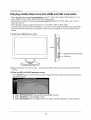
Playing media files from the USB and SD card slots
- The following files formats are supported by this TV: JPG, MP3, WMA, MP4 (DivX3.11-5.11,
Xvid), MPEG1 (DAT, MPG, MPEG), MPEG2 (mpeg, mpg).
- File formats including the following are not supported
by this TV: BMP, PNG, AAC, DivX 6,
DivX HD, Vob, ts.
- The following cards are supported by this TV: SD, MMC, Memory Stick (MS).
- Only full-size card formats are supported.
If you wish to use compact formats
microSD, Memory Stick Duo etc., please be sure to use an adapter to convert
format.
such as miniSD,
to the full-size
1) Insert your USB device or card.
m
SD/MMC/MS
card reader
USB jack
m
2) Select DVD from the source menu.
source.
3) Enter the USB or CARD
operation
All card and USB functions
are accessed
from the DVD
screen
Press SETUP button on the remote control to display the DVD setup menu on DVD mode as
the picture below:
•
•
Select SYSTEM
Select SOURCE
•
Select USB/CARD
SETUP using • • and press OK to select
and press OK to select
and press OK to enter the folder and file navigation
29
screen as below.
Playing
Flash
Media
3) Play the Music, Video or view the Photos
2
3
•
4
5
Use ,q • to select (3) - Music, (4) - Photo or (5) - Movie.
in area (1).
The list of folders
is displayed
• Select area (1) using the ,q • keys and select the folder using • T. The list of files is
displayed in area (2).
• Select area (2) using the ,q • keys and select the file you wish to play using • T.
• Press OK button to begin playback.
NOTE:
1. Playback controls and settings are same as for DVD playback.
2. Pressing the STOP button on the remote control during playback will halt playback
and return to the file and folder navigation screen.
3. The following keys have specific functions during photo playback:
• •
Rotate image
• •
Flip image
Display the next photo
I_
Display the previous photo
30
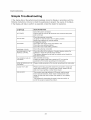
Simple Troubleshooting
Simple Troubleshooting
If the display
following
fails or the performance
instructions.
If the Display
dramatically,
check the Display
Performs to check the peripherals
still fails to perform
as expected,
contact
to pinpoint
the dealer
in accordance
the source
with the
of the failure.
for assistance.
SYMPTOM
DEALING METHOD
NO POWER
Check the power connection.
Pull the plug out, wait for 60 seconds, then reconnect the power
and run the set
NO PICTURE
NO SOUND
Check the antenna connection.
Try other TV channel due to the TV station problem.
Modify the brightness or contrast setting.
Increase the volume.
Check that if the set is on the mute state or not.
Check the voice setting condition.
Check the voice mode setting condition.
ABNORMAL COLOR
Check the antenna connection
NO RESPONSE OF THE
REMOTE CONTROL
Check the effect of the batteries, if needed, please replace the
batteries or clean the remote sensor window.
The distance between the set and the remote control should be
less than 6 meters.
The SCREEN FLASH IN
VGA MODE
The parameter is too big.
Please use safety mode when restart the PC, and set the
parameter of the monitor according to the instruction.
SOME INTERFERE IN THE
VGA MODE
Please modify parameter of the monitor according to the instruction.
CLEAN THE TV SET
Please pull the plug out when clean the LCD screen. Using soft,
clean cloth to wipe it off. If need to clean further, please use dry
cloth, don't use naphtha or other thinner liquid.
COLOR SPOT
This product uses high definition LCD panel, and the panel
has its special character, there maybe existed some color
spots, so when the user find few color spots it's not a quality
problem.
The standard for inspecting this panel is the same which is
out of the scope to replace the product.
31
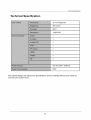
Technical Specification
Technical Specification
22 inch(diagonal)
300 cd/m 2
800:1
1366X768
1
1
1
1
1
1
1
1
AC100-240V
50/60Hz
60W
The cabinet
improving
design
and electronics
specifications
will be modified
the performance.
32
without
prior notice for
VIORE
TM
LIMITED
WARRANTY
FLAT PANEL TELEVISION
This VlORE brand Product, as supplied and distributed by VlORE and delivered new in the original carton to the original purchaser is
warranted by VlORE against manufacturing defects in materials and workmanship for a limited warranty period of one (1) year on parts and
labor. However, there will be only a 90 day parts and labor limited warranty for commercial use.
This Limited Warranty
does not apply to store display products and product
products missing accessories,
no fault found or damaged
at time of delivery
sold as a "marked
to Viore.
down"
special,
in "as is" condition,
"open
box",
Proof of purchase within one year from date of purchase
in the form of a Bill of Sale, Receipt or Receipted
Invoice is evidence the Product is
within the limited warranty period. The Bill of Sale, Receipt or Receipted
Invoice must be presented
as a pre-condition
to obtaining
the limited
warranty service.
This limited warranty begins on the original date of purchase, and is valid only on Products purchased through VlORE authorized dealers and
used in the United States by the original purchaser. To receive warranty service, the purchaser must contact VlORE for problem determination
and service procedures. Warranty service may only be performed by a duly authorized VlORE service center. The original dated bill of sale,
receipt or receipted invoice must be presented upon request as proof of purchase to VlORE or VlORE's authorized service center.
VlORE will repair or if repairs cannot be made, VlORE will replace this Product at no charge if the Product is defective as specified in this
limited warranty during the limited warranty period. VlORE may use new, or remanufactured parts or products to repair or replace the Product
at its sole discretion. All replaced parts and Products become the property of VlORE and must be returned to VlORE. Replacement parts and
Products assume the remaining original limited warranty, or ninety (90) days, whichever is longer.
Product freight needs to be prepaid by original purchaser and shipped in either its original packaging or packaging affording an equal degree
of protection. VlORE shall not be responsible for or obligated to replace damaged goods. If you reside in California and you cannot transport
the television due to the size, weight, and method of attachment, VlORE will provide transportation for the television to the repair facility. If
you reside in a state other than California, you are responsible for the costs of transporting the television to a repair facility.
If the product is received damaged by VlORE, it is the responsibility of the consumer to file a claim against the carrier. VlORE will only store
the damaged product for 30 days and reserves the right, in its sole discretion, to dispose of the damaged product or ship it back to the
consumer at consumer's expense after 30 days.
This limited warranty covers manufacturing
defects in materials and workmanship
encountered
in normal, and except to the extent otherwise
expressly
provided for in this statement,
noncommercial
use of this product, and shall not apply to the following,
including,
but not limited to:
damage which occurs in shipment;
delivery and installation;
applications
and uses for which this product was not intended;
altered product or
serial numbers; cosmetic
damage or exterior finish; accidents,
abuse, neglect, fire, water, lightning or other acts of nature; use of products,
equipment,
systems, utilities, services,
parts, supplies, accessories,
applications,
installations,
repairs, external wiring or connectors
not
supplied or authorized
by VlORE which damage this product or result in service problems;
incorrect electrical
line voltage, fluctuations
and
surges; customer adjustments
and failure to follow operating
instructions,
cleaning,
maintenance
and environmental
instructions
that are
covered and prescribed
in the instruction
book; reception
problems
and distortion
related to noise, echo, interference
or other signal
transmission
and delivery problems;
burned-in
images. VlORE does not warrant uninterrupted
or error-free operation
of the product.
THERE ARE NO EXPRESS WARRANTIES OTHER THAN THOSE LISTED AND DESCRIBED ABOVE, AND NO WARRANTIES
WHETHER EXPRESS OR IMPLIED, INCLUDING, BUT NOT LIMITED TO, ANY IMPLIED WARRANTIES OF MERCHANTABILITY OR
FITNESS FOR A PARTICULAR PURPOSE, SHALL APPLY AFTER THE EXPRESS WARRANTY PERIODS STATED ABOVE, AND NO
OTHER EXPRESS WARRANTY OR GUARANTY GIVEN BY ANY PERSON, FIRM OR CORPORATION WITH RESPECT TO THIS
PRODUCT SHALL BE BINDING ON VIORE. REPAIR OR REPLACEMENT AS PROVIDED UNDER THIS LIMITED WARRANTY IS THE
EXCLUSIVE REMEDY OF THE CONSUMER. VIORE SHALL NOT BE LIABLE FOR ANY INCIDENTAL, OR CONSEQUENTIAL
DAMAGES FOR BREACH OF ANY EXPRESS OR IMPLIED WARRANTY ON THIS PRODUCT; EXCEPT TO THE EXTENT PROHIBITED
BY APPLICABLE LAW, ANY IMPLIED WARRANTY OF MERCHANTIBILITY OR FITNESS FOR A PARTICULAR PURPOSE ON THIS
PRODUCT IS LIMITED IN DURATION TO THE DURATION OF THIS LIMITED WARRANTY. THIS LIMITED WARRANTY SHALL NOT
EXTEND TO ANYONE OTHER THAN THE ORIGINAL PURCHASER OF THIS PRODUCT, IS NONTRANSFERABLE AND STATES YOUR
EXCLUSIVE REMEDY.
Some states do not allow limitations on how long an implied warranty lasts, or the exclusion or limitation of incidental or consequential
damages, so the above limitations or exclusions may not apply to you. This warranty gives you specific legal rights, and you may also have
other rights which vary from state to state. Any provision contained herein which is found contrary to state or local laws shall be deemed null
and void and the remaining provisions shall continue in full force and effect.
To obtain
warranty
service,
please
contact
VlORE
at:
Phone" 1-877-777-1428
www.viore.com
Ver. 090729
©2009
VIORE,
Inc.Allrights
reserved.
Reproduction
inwhole
orinpartwithout
written
permission
isprohibited.
"iPod" is a trademark of
Apple, Inc., registered in the U.S. and in other countries. "Made for iPod " means that an electronic accessory has been designed to
connect specifically to iPod and has been certified by the developer to meet Apple performance standards. Apple is not responsible for
the operation of this device or its compliance with safety and regulatory standards. HDMI, the HDMI logo and High-Definition Multimedia
Interface are trademarks of HDMI Licensing LLC. All other trademarks are trademarks of their respective owners. Features and
specifications are subject to change without notice.
VlORE, Inc.
7801 Hayvenhurst
Avenue, Van Nuys, California 91406
Printed in China