1
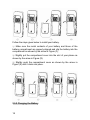
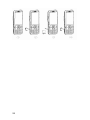
SIM card, slide it in the direction as shown in Figure (2), and take out
SIM card.
SIM card
holder
2.6.3 Turning On/Off Your Phone
Hold down the End Key for a few seconds to turn on/off your mobile
phone.
The phone will not be able to be used properly if it has been turned on
without a SIM card inside. Once a SIM card is inserted, your phone will
automatically check the validity of the SIM card.
And then the following prompts will be shown successively on the
display:
Enter Phone Lock Code - when the phone lock code feature is
enabled.
Enter PIN code - when the PIN code is enabled.
Searching… - The phone keeps searching until it locates a suitable
network.
2.6.4 Unlocking Your Phone
The Phone Lock mechanism can be enabled to protect your phone
from unauthorized use. When this feature is enabled, you have to enter
21




































![hank yo_fo buyil_gaSamsung (}a_Te_a ]hs](http://vs1.manualzilla.com/store/data/005691502_1-2e8e29ffb67d0c8f7d0d701e3cb644b7-150x150.png)