1
TcpStereo
User's Manual
HOW TO IMPORT A DIGITAL PHOTOGRAMMETRIC FLIGHT
On the menu bar, click File then Import project and finally From flight data.
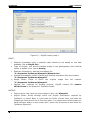
An import window will appear (Figure 7) which will advance step by step where
interaction is required, in order to personalize and validate the import.
The 6 import steps for digital photogrammetric flight projects are described
below, following Ejemplo1 in TcpStereo.
1) Files and folders
You will firstly need to indicate where the information will be taken from, as well
as where the imported project will be saved to. These are the fields shown in Figure 7:
Figure 7 – Digital flight import, step 1.
INPUT:
•
•
Orientation file: Select the file from project Ejemplo1 from TcpStereo.
C:\Proyectos TcpStereo\Ejemplo1\Ejemplo1.exp
Image folder: Select the original image folder.
C:\Proyectos TcpStereo\Ejemplo1
OUTPUT:
•
Project name: Write Ejemplo1.
© Aplitop S.L. 2010
5