1
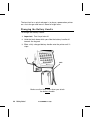
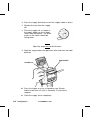
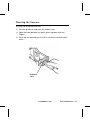
To clean the platen roller:
1. Turn the printer off and open the supply cover.
2. Remove your supply. See "Removing Supplies" in Chapter 3.
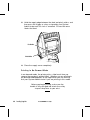
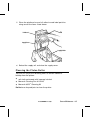
3. Open the label deflector by gently pressing down with two
fingers.
4. Clean the platen roller and remove any adhesive buildup.
Platen Roller
5. Turn the platen roller with your finger, and then continue
cleaning.
6. Reload your supply and close the label deflector and supply
cover.
6-6 Care and Maintenance
TC6035EZEM Rev. C 10/98